ECO mode AUDI S3 2010 Owner's Manual
[x] Cancel search | Manufacturer: AUDI, Model Year: 2010, Model line: S3, Model: AUDI S3 2010Pages: 320, PDF Size: 75.34 MB
Page 102 of 320
• .___w __ a _r _m _ a _n_d_ c_ o _ ld __________________________________________________ _
The temperature is auto mat ica lly contro lled. Maximum airflow is
primarily blown in through out lets G),@ and
0 => page 102 .
Outlets@ can be opened and c losed wi th the controls behind
them . Outlets @ and
0 must be opened so the windows can be
defrosted as quickly as possible.
By pressing
( lliil] and air recircula tion are switched off .•
Manual air recirculation mode ~
T he recirculation mode prevents polluted outside air from
entering the vehicle interior.
Switching on air rec ir c ulation
- Press the button [~ I=> page 98, fig. 103 => &.
Swit ching off air r ecir culation
- Press the b utton [~ I again , or
Press the [AUTO
I button, or
- Press the
l@I button.
In air recirculation mode, air is drawn from the vehicle interior and
recirculated . We recommend that you use the manual a ir reci rcu la
tion mode under th e fol lowing cond itions :
When driving through a tunnel or i n a traffic jam so that exhaust
fumes canno t en ter the vehic le interior.
& WARNING
Do not use this s etting for extended per iod s of t ime . The wind ows
c ould fog up sin ce no fre sh air can enter the vehi cle . If the
window s fog up , pre ss th e air re cir culat ion button again immed i
ately t o switch off th e air re circulation function or sel ect defro st. •
Automatic air recirculation[~ ]
If outside air is pollu te d, an air quality sens or in the
vehicle will automatically switch on the air recirculati on.
Switching on air recir culation
- Press [~ I=> page 98, fig. 103.
Switching off air re cir culation
Press@ again, or
press [AU TO
I, or
press
[ @ I.
The automatic air recirculation mode shou ld no rma lly be left
sw itched on at all times.
T he system is ready to operate approximately 30 seconds after you
t urn on the ignition or start the vehic le . Fresh air enters the vehic le
only during this ini tialization period.
The air qua lity sensor for detecting diese l and gasoline exhaust
fumes switches automatically to air recirculation mode if the outside air is h eavily po lluted . The supply of outside air is closed off.
As soon as the pollut ion leve l drops, fresh air is automatically
supplied to the vehic le interior again .
The air recirculation operates fo r a maximum of 12 minutes . If the
windows star t to fog up whi le the a ir rec irculation is on, press(@]
Under c ertain operating conditions ( for example , if
I@ ] or 1~ 1 are
pressed) the a ir rec ircu lation automatically switches o ff. If the air
cond itioner is switched off, or if the temperature is be low 18 °F ( -
8 °C), the air recircu lation wi ll opera te only for 12 sec onds. •
Page 103 of 320
___________________________________________________ w_ a _r_m _ a_ n_d_ c_ o_ ld __ _
Switching between Fahrenheit and
Centigrade
You can change the temperature display from °F (Fahren
heit) to °C (Centigrade) and vice versa.
-Hold the [ ,;;S;)I button down => page 98, fig. 103.
- Turn the rotary switch (driver's side) @for 3 seconds+. •
Air recirculation (~ ]
The air recirculation prevents exhaust fumes or other
pollution from entering the vehicle.
Switching air recirculation on
- Press [~I=> page 98, fig. 103 => &
Switching air recirculation off
-Press~ again, or
- press
[AUTO J, or
- press[@).
In the air recirculation mode, the air in the passenger compartment
is recirculated to prevent exhaust fumes and other pollution from
entering the vehicle. We recommend that you use the manual air
recirculation under the following conditions:
• when driving through tunnels
• in a traffic jam.
& WARNING
Do not use this setting for extended periods of time . The windows
could fog up since no fresh air can enter the vehicle . If the
Controls and equip
ment
& WARNING (continued)
windows fog up, press the air recirculation button again immedi
ately to switch off the air recirculation function or select defrost. •
Adjusting the fan speed 8 G
The automatically selected fan speed can be increased or
decreased.
- Press the 8 or G buttons in the center of the control
panel=>
page 98, fig. 103 to adjust the fan speed to your
comfort.
The air conditioning system automatically regulates the fan speed
in response to the interior temperature. However, you can also
adjust the fan speed manually. A line of small bars in the center
display above the fan control buttons will retreat or extend to reflect
your adjustments to the fan speed.•
Air distribution
The automatically controlled air distribution can be
changed manually.
You can use the [1!:.), l~l or l~ l buttons separately or together in
combination. To switch back to the automatic air distribution
setting, either switch off the buttons you previously selected, or
press
[ AUTO ).
Each of the three buttons has its own specific function (the refer
ence numbers refer to the air outlets) :::>
page 102, fig. 104.
Air directed to the windows ~
All the air is directed to outlets G),@ and G). Contrary to when [@ 1
is pressed, the amount of air remains the same. .,_
I • •
Page 104 of 320
![AUDI S3 2010 Owners Manual • ..__w_ a_ r_m _ a_ n_d_ c_ o_ ld __________________________________________________ _
Air d ir ected to the dri ver/ front passe nger[~]
All the air is directed to outlets @, G) and Â](/img/6/57545/w960_57545-103.png "AUDI S3 2010 Owners Manual • ..__w_ a_ r_m _ a_ n_d_ c_ o_ ld __________________________________________________ _
Air d ir ected to the dri ver/ front passe nger[~]
All the air is directed to outlets @, G) and Â")
• ..__w_ a_ r_m _ a_ n_d_ c_ o_ ld __________________________________________________ _
Air d ir ected to the dri ver/ front passe nger[~]
All the air is directed to outlets @, G) and © in the instrument
panel. Air also is directed through the center console in the rear.
Air dir ected to th e footw ells ~
All the air is directed to outlets © and to the outlets under the front
seats .•
Air outlets
, _ ,
,~
---- 1
'
Fig . 104 I nstrume nt pan el: a ir out let loca tio ns a nd airfl ow direc tions
T he air out lets G) and 0 on top of t he instrument pane l are
fixed . Outlets 0 and 0 can be adjusted .
Adjusting air outlets 0 and 0
- Turn the vertical thumbwheel beside the outlet to
increase, reduce or shut down t he airflow from that
outle t. - Move t
he smal l tab in the center of the o utlet lo uver side
ways and up or dow n to ad just the level an d direc tion of
airflow.
The supply of air to the outlets is controlled either automatically or manually depending on the operation mode selected . The airflow
from al l outlets can be hea ted, unheated or cooled.
The heater out lets for the rear footwells are located under the front
seats. When you select outlets©, air is also directed to the rear
footwells.
[ i ] Tips
• When defrosting/defogging the windows, air flows from outlets
G), ® and G). To defrost or defog the windows as rapidly as
possible, air out lets
G) should be opened fully with the adjuster
whee ls.
• When the air conditioner is working, cooled air wi ll flow primarily
from outlets ®·
G) and ©-To assure adequate cooling, out lets G)
and © should never be completely closed. •
Using the climate controls economically
Using the climate controls prudently can help save fuel.
When you use the air conditioner, engine power is reduced
and fuel consumption increases. To save fuel, you should
use the a ir conditioner only when necessary . Also please
note the following points:
- If you want to save fuel, sw itch off the air conditioner.
- If you are going to drive w ith the wi ndows open, switc h
off the a ir condit io n er.
~
Page 121 of 320
____________________________________________________ T_ r_ a _n _s_ m_ i_ s _ s_ i_ o _ n _ ___.1111111
Ap plies to vehicl es: with S tro ni c® and w ith Tip tr onic cont rols o n the stee ring wh eel
Steering wheel with Tiptronic ® controls
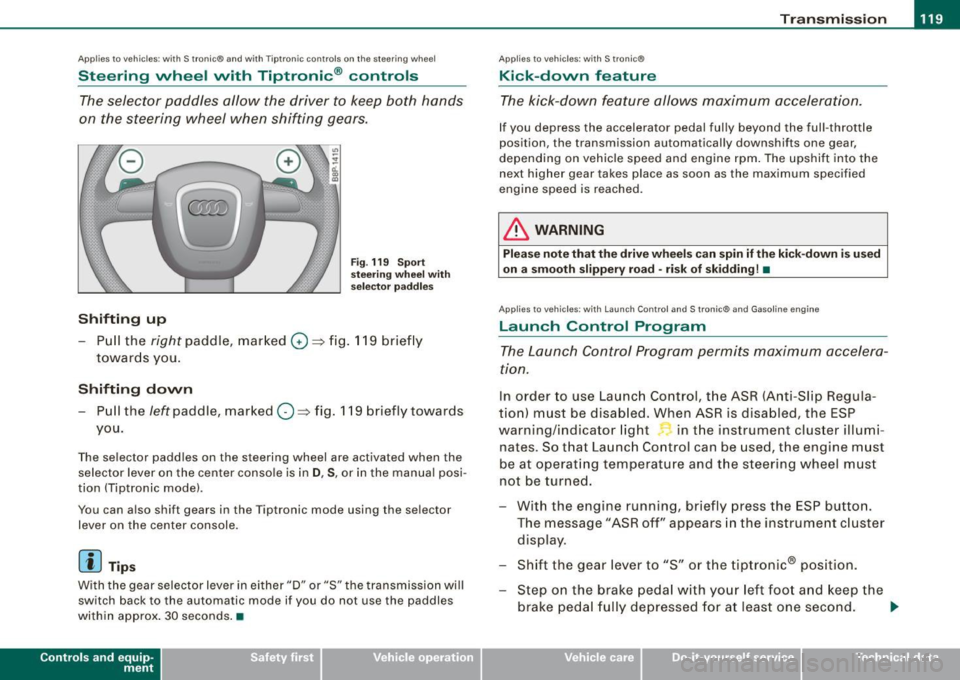
The selector paddles allow the driver to keep both hands
on the steering wheel when shifting gears.
Shifting up
Fig . 119 S port
s tee ring w he el w it h
selector pa ddles
-Pull the right paddle, marked 0 ==> fig. 11 9 briefly
towar ds you .
Shifting down
-Pull the left paddle, mar ked O ==> fig. 119 briefly towards
you.
The selector paddles on the steering wheel are activated when the se lector lever on the center console is in
D , S , or in the manua l posi
tion (Tiptronic mode) .
You can a lso shift gears in the Tiptronic mode using the se lector
lever on the center console .
[ i] Tips
With the gear selector lever in ei ther "D" or "S" the transmission wi ll
switch back to the automatic mode if you do not use the paddles
within approx . 30 seconds .•
Con tro ls and eq uip
ment
Ap plies to vehi cles: wit h S tr on ic ®
Kick -down feature
T he kick-down feature allows maximum acceleration.
If you depress the accelerator pedal ful ly beyond the ful l- throt tle
position, the transmission automatically downshifts one gear,
depending on vehic le speed a nd eng ine rpm . The upshi ft into the
next higher gear takes place as soon as the max imum specified
engine speed is reached .
& WARNING
Please note th at th e drive wheel s can spin if the kick -do wn is used
o n a s mooth slippery r oad -ri sk of sk idding! •
Applies to ve hicles: w it h L aunch Contro l and S tronic ® and Gaso line engine
Launch Control Program
The Launch Control Program permits maximum accelera
ti on.
In order to use Launc h Control, t he ASR (Anti-Slip Regula
tion) must be disab led . When ASR is disabled, the ESP
warning/indicator light in t he instrument cluster illumi
nates . So that Launch Control can be used, the engine must
be at operat ing temperature and the stee ring wheel must
not be turned.
- With the engine running, briefly press the ESP button.
The message "ASR off" appears in the instrument c luster
disp lay .
- Shift the gear lever to "S" or the tiptronic® pos ition.
- Step on the brake peda l w ith yo ur left foo t and keep the
brake peda l fully depressed for at least one second . _,.
Vehicle care I I Technical data
Page 122 of 320
• ..__T_ r_a _n_ s_ m_ is_ s_io _ n ______________________________________________________ _
- With your right foot, step on the accelerator to the wide
open throttle position or Kickdown. The engine speed
settles at about
3,200 rpm.
Take your left foot off the brake.
The S tronic® in your vehicle is electronically controlled. A special
Launch Control Program provides th e best acceleration from a
standing start .
& WARNING
• Always adapt your driving to the traffic flow.
• Only use Launch Control when road and traffic conditions allow
it and other drivers will not be endangered or annoyed by your
driving and the acceleration of the vehicle.
• Make sure that ESP remains enabled. With the ESP disabled,
the vehicle could brake away, particularly on a slick and slippery
road -risk of skidding!
• Once acceleration is finished, switch ASR on again by briefly
pushing the ESP button . •
Ap plies to ve hicles : wit h S t ro ni c®
Back-up program
In the event of a system malfunction, there is an back-up
program.
In the event of system malfunction, the automatic transmission
switches to th e fail -safe mode . All o f the selec tor lever pos ition
displays for the automatic transmission are highlighted with a light
background in the instrument clust er display. In some cases you
cannot drive in the reverse gear any more .
If the transmission swi tches to fail-safe mode, you should take the
vehicle to an authorized Audi dealership as soon as possible to have
the condition corrected .•
A pp lies to veh ic les: w ith s tro nic®
Emergency release for selector lever version
A
If the vehicle's power supply fails , the selector lever can
be released in an emergency.
Fig. 120 Selector lever :
Remove selector lever
sleeve
Fig . 121 Selector lever :
emergency release
from the Park position
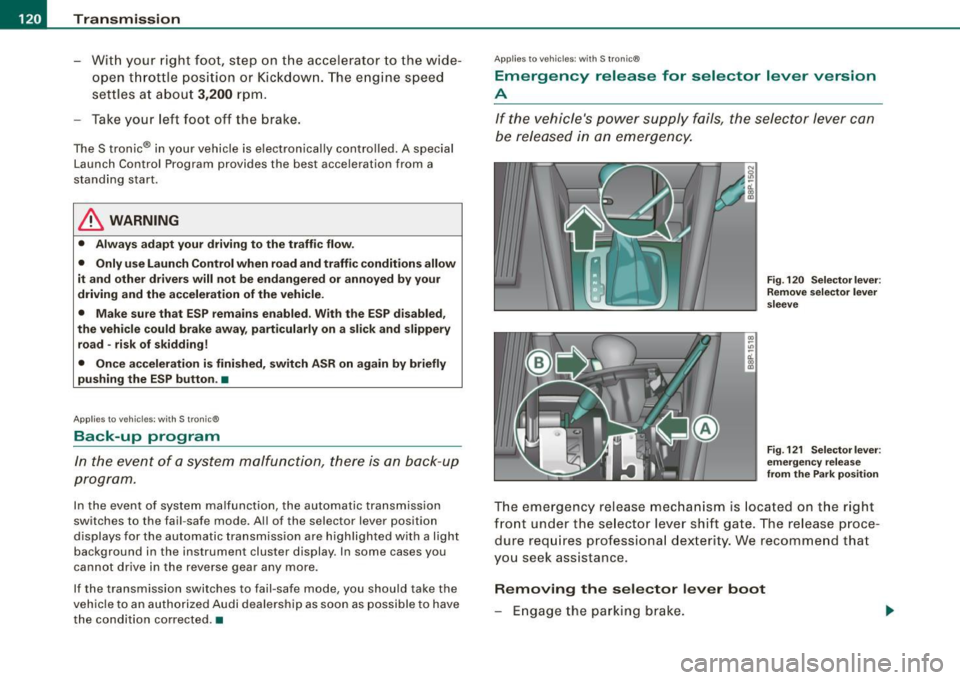
The emergency release mechanism is located on the right
front under the selector lever shift gate. The release proce
dure requires professional dexter ity. We recommend that
you seek assistance.
Removing the selector lever boot
- Engage the parking brake.
Page 162 of 320

___ A_ ir_ b_ a-g _ s_y _s_ t_ e_ m _________________________________________________ _
& WARN ING (continued )
• Always make sure that the side airbag can inflate without inter
fe rence :
- Never install seat covers or replacement upholstery over the
front seatback s that have not been spe cifically approved by
Audi.
- Never use additional seat cushions that cover the areas
where the side airbags inflate .
- Damage to the original seat covers or to the seam
in the area
of the side airbag module must always be repaired immedi
ately by an authorized Audi dealer .
• The airbag system can be activated only once. After an airbag
ha s inflated , it must be replaced by an authorized Audi de aler or
qualified technician who has the technical information , training
and special equipment necessary .
• The airbag system can be deployed only once. After an airbag
has been deployed , it must be repla ced with new repla cement
parts designed and approved especially for your Audi model
version . Replacement of complete airbag systems or airbag
components must be performed by qualified workshops only .
Make sure that any airbag service action is entered in your Audi
Warranty
& Maintenance booklet under AIRBAG REPLACEMENT
RECORD .•
Other things that can affect Advanced Airbag
performance
Changing the vehic le's suspension system can change the way that
th e Adva nced A ir b ag Sy stem per fo rms in a cras h. For exa m ple,
using tire -rim combinations not approved by Audi, lowering the
vehic le, c hanging the st iff ne ss of th e susp ens ion , incl udi ng the
spr ings, suspension struts, s hock absorbers etc . ca n chan ge the
forces that are mea su red by the air bag sensors and sent to the elec
tronic control unit. Some suspension chan ges can, for examp le, increase the force levels
measured by the sensors and make the
airbag sys te m d eploy in c ras hes i n wh ich i t wou ld not d epl oy i f the
changes had not been made. Other kinds of changes may reduce
t he fo rce level s measu red by the se nso rs and p reve nt the ai rbag
from dep loying when it should.
T he sensors in the safety belt buckle for the driver and front
p assenge r seat te ll the e lectro nic c ont ro l m odu le if th e safety belt is
l atched or not. If the safety belt is being used, the front airbag wi ll
d eploy at a sl igh tly higher rate o f ve hic le dece lera tio n th an if the
safety be lt is not be ing used. Therefore, in a particular coll ision, it is
p os sible that an airbag wi ll no t de ploy a t a seating position where
the safety be lt is being used but wi ll inflate at the position where the
safe ty be lt is not be ing used . It i s important tha t n othing in terfe re
with the safety b elt buckles so that t he se nsors can send the cor rec t
i nfo rma tion abo ut safe ty belt use to the elec tro nic con trol u nit .
& WARNING
Changing the vehicle' s suspension including use of unapproved
tire -rim combinations can change Advanced Airbag performan ce
and increase the risk of serious personal injury in a crash.
• Never install suspension components that do not have the
same performance characteristics as the components originally
installed on your vehi cle .
• Never use tire -rim combinations that have not been approved
by Audi.
& WARNING
Items stored between the safety belt buckle and the center
console can cause the sensors in the buckle to send the wrong
information to the electronic control module and prevent the
Advanced Airbag System from working properly .
• Always make sure that noth ing can interfere w ith the safety
belt buckles and that they are not obstructed.
Page 171 of 320

-----------------------------------------~C::_! h~ i~ ld ~ S~a !_!f ~e _!;tY L _ffllll
restraints and for the different models of the same kind of child
restraint offered by child restraint manufacturers.
The weight ranges for the individual types, makes and models of
child restraints that the NHTSA has specified in the Safety Standard
together with the weight ranges of typ ical infants and typical 1 year
old child have been stored in the control unit of the Advanced
Airbag System. When a child restraint is being used on the front
passenger seat with a typical 1 year -old child, the Advanced Airbag
System compares the weight measured by the weight sensing mat
with the information stored in the electronic control unit.
The electronic control unit also registers the tension on the front
passenger safety belt. The tension on the safety belt for the front
passenger seat will be different for an adult who is properly using
the safety belt as compared to the tension on the belt when it is
used to attach a child restraint to the seat. The sensor below the
latch for the safety belt for the front seat passenger measures the
tension on the belt . The input from this sensor is then used with the
weight to "decide" , whether there is a child restraint with a typical 1
year-old child on the front passenger seat and whether or not the airbag must be turned off.•
Child restraints and Advanced Airbags
Regardless of the child restraint that you use, make sure that it has
been certified to meet United States Federal Motor Vehicle Safety
Standards and has been certified by its manufacturer for use with
an airbag. Always be sure that the chi ld restraint is properly
installed at one of the rear seating positions. If in exceptiona l
circumstances you must use it on the front passenger seat, carefully
read all of the information on child safety and Advanced Airbags
and heed a ll of the applicable WARNINGS. Make certain that the
child restraint is correctly recognized by the weight -sensing mat
inside the front passenger seat, that the front passenger airbag is
turned off and that the airbag status is always correctly signaled by
th e
PASSENGER AIR BAG OFF light .
Controls and equip
ment Safety first Vehicle operation
Many
types and models of child restraints have been available over
the years, new mode ls are introduced regularly incorporating new
and improved designs and older mode ls are taken out of produc
tion. Child restraints are not standardized . Child restraints of the
same type typically have different weights and sizes and different
'footprints,' the size and shape of the bottom of the chi ld restraint
that sits on the seat, when they are installed on a vehicle sea t. These
differences make it virtual ly impossible to certify comp liance with
the requirements for advanced airbags with each and every child
restraint that has ever been sold in the past or will be sold over the
course of the usefu l life of your vehic le.
For this reason, the United States National Highway Traffic Safety
Administration has pub lished a list of specific type, makes and
models of child restraints that must be used to certify compliance
of the Advanced Airbag System in your vehicle with the suppression
requirements of Federal Motor Vehicle Safety Standard 208. These
child restraints are:
A. Car beds, manufactured on or after September 1,
2004:
• Cosco Dream Ride 02-719
B. Rear facing child restraint systems, manufactured
on or after September 1, 2004:
(When the restraint system comes equipped with a removable base,
compliance has to be certified with or without the base) .
• Britax Handle with Care 191
• Century Assura 4553
• Century Smart Fit 4543
• Cosco Arriva 02727
• Evenflo Discovery Adjust Right 212
• Evenflo First Choice 204
• Graco lnfant8457
Vehicle care Do-it-yourself service Technical data
Page 191 of 320
actual vehicle behavior. If the two do not match, for example when
th e vehicle begins to skid, ESP brakes the appropriate wheel auto
matical ly .
The vehicle is stabilized again by the forces acting on the wheel
during braking. With an oversteering vehicle (tendency for the rear
end to skid out of the curve), the brake application is mainly at the
front wheel on the outside of the curve, with an
understeering
vehicle (tendency to run wide in the curve) at the rear wheel on the
inside of the curve or additionally at the other wheels as needed.
This brake application is accompanied by noises.
ESP works in conjunction with ABS=>
page 192. If there is malfunc
tion in the ABS, ESP is also inoperative.
Activating
The ESP is automatica lly activated when the engine is started, and
it performs a self-test. As soon as the test is completed, the system
is in normal operating mode. With ASR deactivated, or with ESP/ASR
deactivated, pressing the button=>
page 188, fig. 158 returns the
system to normal operation.
Deactivating
ESP should normally be activated at all times because this ensures
optimum vehicle stability. Only in certain exceptional cases it does
make sense to deactivate Anti-Slip Regulation (ASR) or the Elec
tronic Stability Program (ESP) by pressing the button =>
page 188,
fig. 158. Both deactivation stages can only be activated from normal
mode .
Deactivating ASR
Tap the switch. Deactivation is indicated by slow flashing of the ESP
lamp in the instrument cluster. In certain situations (e .g. driving
with snow chains, in deep snow or on loose ground, or when
rocking the car free), it may be necessary to deactivate ASR.
Deactivating ESP/ASR
Press the button for more than 3 seconds. Deactivation is indicated
by the ESP lamp in the ins trument cluster staying on permanently.
Controls and equip
ment Safety first Vehicle operation
Intelligent technology
This
deactivates the Electronic Stability Program (ESP) in addition to
ASR. No Elec tronic Stability System operation and no Anti -Slip
Regulation is available across the entire speed range; ASR and ESP
are activated only when the brakes are used for the duration of the
braking action and remain active until a stable vehicle condition has
been reached. There is no driving situation which requires ESP to be
deactivated, so this should only be done if the driver's skill and the
traffic situation permit.
& WARNING
• The limits of physics cannot be suspended by ESP. Even in vehi
cles with ESP. you should always adapt your driving to road and
traffic conditions. This is particularly true on a slippery and wet
road . Do not be tempted by the increased safety provided to take
risks -danger of an accident!
• Please note that when ASR or ESP /ASR is deactivated , the drive
wheels can spin on icy and slippery roads and the vehicle can
break away -danger of skidding!
Electronic differential lock CED1
.)
The electronic differential lock monitors the rotational
speed of the drive wheels.
General notes
The elect ronic differential lock (EDU helps the car to start moving,
accelerate and c limb a gradient on surfaces providing poor or
a lmost no grip. Without EDL, this would be difficult, if not impos
s ible.
How the system works
The EDL operates automatical ly. It monitors the rotationa l speed of
the drive wheels on an axle with the help of the ABS sensors
=>
page 192. If a noticeable difference in rotational speed between
the drive wheels on one axle is detected (e.g. on slippery ground
on
one side),
the spinning wheel is braked, thereby transferring power
Vehicle care Do-it-yourself service Technical data
Page 193 of 320
• when driving in deep snow or on loose ground and
• when rocking the vehicle loose after it has become stuck.
When the abnormal situation is over, you should activate the ASR again.
& WARNING
The increased safety afforded by ASR does not mean that you can
take safety risks. Always adapt your driving style to the road
conditions and traffic situation.
[ i J Tips
To ensure that the ASR works properly, all four wheels must be fitted
with identical tires. Any differences in rolling radius of the tires can
cause the system to reduce engine power when this is not desired.
See also~
page 254, "New tires and replacing tires and wheels". •
Braking
Generat information
What affects braking efficiency?
Operating conditions and driving habits
The brakes on today's automobiles are still subject to wear,
depending largely on operating conditions and driving habits~& .
On vehicles that are either driven mostly in stop-and-go city traffic
or are driven hard, the brake pads should be checked by your autho
rized Audi dealer more often than specified in the
Warranty & Main
tenance booklet.
Failure to have your brake pads inspected can
result in reduced brake performance.
On steep slopes, you should use the braking effect of the engine.
This way, you prevent unnecessary wear on the brake system. If you
Controls and equip
ment Safety first Vehicle operation
Intelligent technology
must use your brakes, do not hold the brakes down continuously.
Pump the
brakes at intervals.
Moisture or road salt
If you are driving faster than 50 mph (80 km/h) and the windshield
wipers are on, the brake pads will briefly touch the brake discs in
regular intervals so as to improve reaction time when braking on
wet surfaces. You, the driver, will not notice anything .
Under certain conditions, for example, when driving through water
or very heavy rain, or even after washing your vehicle, the braking
effect can be reduced due to moisture (or in freezing conditions ice)
on the brake pads. A few cautious brake applications should dry off
the brake pads or remove any ice coatings .
The effectiveness of the brakes can be reduced when the vehicle is
driven on a salt-covered road and the brakes are not used . Likewise,
you clean off accumulated salt coating from brake discs and pads
with a few cautious applications of the brake~&.
Corrosion
There may be a tendency for dirt to build up on the brake pads and
corrosion to form on the discs if the car is not driven regularly or
only for short trips with little use of the brakes.
If the brakes are not used frequently, or if corrosion has formed on
the discs, it is advisable to clean off the pads and discs by braking
firmly a few times from a moderately high speed~& .
Faults in the brake system
If you should notice a sudden increase in brake pedal travel, then
one of the two brake circuits may have failed~ &.
Low brake fluid level
Malfunctions can occur in the brake system if the brake fluid level is
too low. The brake fluid level is monitored electronically.
Vehicle care Do-it-yourself service Technical data
Page 200 of 320

•---=D:..:.. r::..: iv::..: i:..:. n.:.: g_ a:.:..:.. n::..:d:.;_ e:.. n ....:..; v...:i..:..r ..:: o ..:.n..:.. m:...:....:.. e.:...:.. n::..:t:.._ ____________________________________________ _
Avoid damaging the vehicle
When you are driving on poor roads, or over curbs, steep ramps,
etc., make certain that low -lying parts such as spoilers and exhaust
system parts do not bottom out and get damaged.
This is especially true for vehicles with low -slung chassis (sports
chassis) and fu lly loaded vehicles.
Operate your vehicle economically
and minimize pollution
General
Your personal style of driving will determine the economy
o f your vehicle, as well as exhaust and noise levels.
Fuel economy, environmental impact, and wear on your engine,
brakes and tires largely depend on three factors:
• your personal driving style
• operating conditions
• technical limitat ions
If you anticipate what you need to do next and drive economically,
you can easily cu t your fue l consumption by 10 -15 percent . This
section will give you some tips on how you can help the environ
ment and your pocketbook .
[ i ) Tips
The consumption estimates as published by ENVIRONMENTAL
PROTECT ION AGENCY (EPA) and Transport Canada may not corre
spond to your actua l consumption on the road, which wi ll vary
depending upon vehic le load and speed, road and weather condi
tions, trip length, etc.
Drive smo~thly and keep a lookout ahead
Vehicles use the m ost fuel when they are accelerating.
Avoid unnecessary accelerating and braking.
Vehicles use the most fue l when they are accelerating . If you antici
pate what is going to happen next, you will need to brake less and,
thus, accelerate less. Let the vehicle coast whenever possible -for
example when you see that the next traffic light is red.
Avoid full throttle
Driving at moderate speeds saves fuel and improves your
mileage.
-Try and keep we ll below your car's maximum speed.
Acce lerating gently reduces fuel consumption, engine wear, and
does not disturb the environment .
Fuel consumption, exhaust em issions and engine noise increase
disproportionately at high speeds. If you drive at approximately
three quarters of top speed, fuel consumption wil l be reduced by
one half. Never drive faster than the posted speed limit and weather
conditions permit .•
Reducing unnecessary idling
E ven when your car is just idling i t burns up fuel.
- Sh ut the eng ine off when you are not driving the vehicle.
- Do not warm up th e vehicle by letting the eng ine r un at
idle.
I t m akes sense to shut off the engine in traffic jams, when waiting
for trains to pass at rai lroad crossings, or at traffic lights that have
9),