warning light AUDI S3 2010 User Guide
[x] Cancel search | Manufacturer: AUDI, Model Year: 2010, Model line: S3, Model: AUDI S3 2010Pages: 320, PDF Size: 75.34 MB
Page 19 of 320

qualified workshop=> &. With the eng ine not running (e .g . when
t he car is being towed), there is also no power assis t availa ble.
& WARNING
If there is a malfunction , the indi cator light for the electro -mechan
ical power assist illuminates . Seek profess ion al assistance . •
Controls and equip
ment
Instruments and warning /indi cator lights
I • •
Page 21 of 320
& WARNING (continued)
• Always remember, even if the "snowflake" symbol (ice
warning) does not appear in the display, black ice could be on the
road.
• Always reduce your speed and drive with special care in cold
weather conditions when the chance of encountering icy road
surfaces increases.
[ i] Tips
• If the vehicle is stationary , or if you are driving at a very low
speed, the temperature shown in the display might be slightly
higher than the actual outside temperature. This is caused by the
heat being radiated from the engine.
• On vehicles with S tronic, the reminders do not appear in the
display until you select a gear .
• On vehicles with Audi Navigatio n system*, the displays may
differ from their normal appearance during navigation. •
Applies to ve hicles: with g ears hift indicator and manual transmi ssio n
Gearshift recommendation
This indicator can help conserve fuel.
Controls and equip
ment
+55°F
~ 340mi
3~4 Fig . 8 Gearshift
recommendation
Driver information display
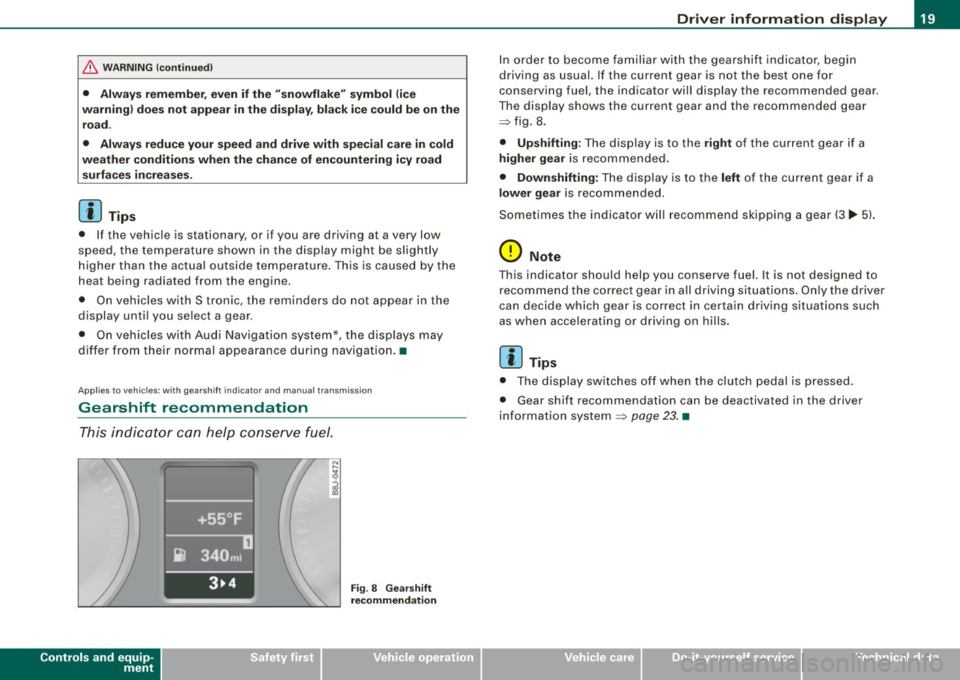
In order to become familiar with the gearshift indicator, begin
driving as usual. If the current gear is not the best one for
conserving fuel, the indicator will display the recommended gear .
The display shows the current gear and the recommended gear
=> fig. 8 .
• Upshifting: The display is to the right of the current gear if a
higher gear is recommended.
• Downshifting: The display is to the left of the current gear if a
lower gear is recommended.
Sometimes the indicator will recommend skipping a gear (3.,. 5l.
0 Note
This indicator should help you conserve fuel. It is not designed to
recommend the correct gear in all driving situations. Only the driver
can decide which gear is correct in cer tain driving situations such
as when accelerating or driving on hills.
[ i] Tips
• The display switches off when the clutch pedal is pressed.
• Gear shift recommendation can be deactivated in the driver
information system
=> page 23. •
I • •
Page 23 of 320
On-Board Diagnostic system (08D)
On-Board Diagnostics
Fig. 10 location of
Data Link Connecto r
( DL C)
On-Board Diagnostics monitors the components of your emission
control system . Each controlled component in your engine system
has been assigned a code. In case of a malfunction , the component
will be identified and the fault stored as a code in the control
module memory .
The Mil lamp may also illuminate if there is a leak in the on-board
fuel vapor recovery system . If the light illuminates after a refuelling,
pull off the road and stop the vehicle, then check that the fuel filler
cap is properly closed
=> page 220 .
In order to make an accurate diagnosis, the stored data can only be
displayed using special diagnostic equipment (generic scan tool for
OBDl.
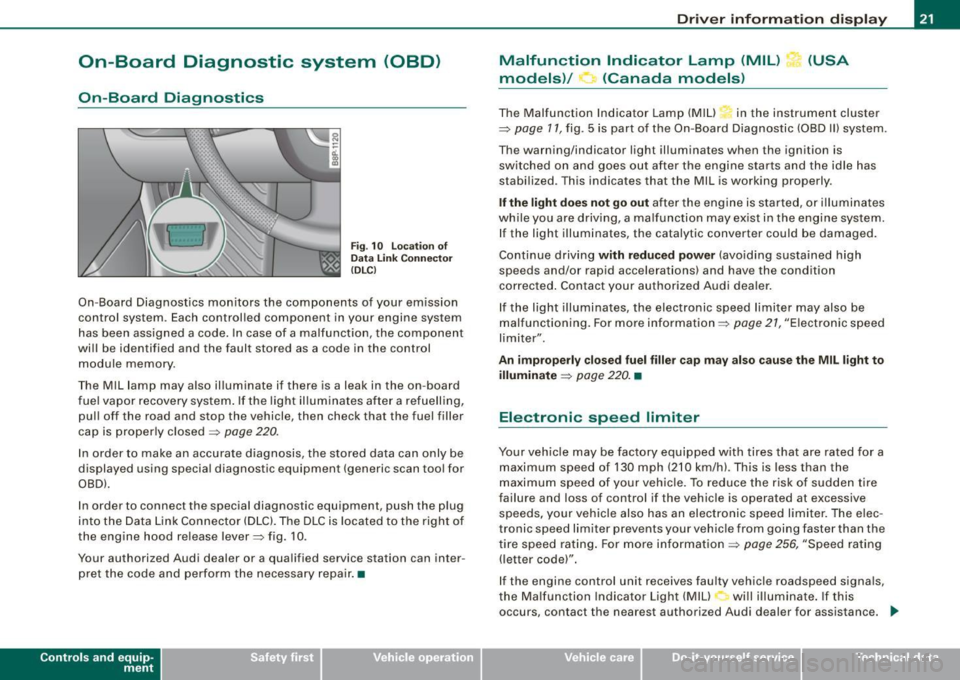
In order to connect the special diagnostic equipment, push the plug
into the Data Link Connector (DLC). The DLC is located to the right of
the engine hood re lease lever=> fig. 10.
Your authorized Audi dealer or a qualified service station can inter
pret the code and perform the necessary repair. •
Contro ls and eq uip
ment
Driver information display
Malfunction Indicator Lamp (MIL) (USA
models)/ (Canada models)
The Malfunction Indicator Lamp (MIU in the instrument cluster
=> page 11, fig . 5 is part of the On-Board Diagnostic (OBD II) system .
The warning/indicator light illuminates when the ignition is
switched on and goes out after the engine starts and the idle has
stabilized. This indicates that the Mil is working properly .
If the light does not go out after the engine is started, or illuminates
while you are driving, a ma lfunction may exist in the engine system.
If the light illuminates, the catalytic converter could be damaged.
Continue driving
with reduced power (avoiding sustained high
speeds and/or rapid accelerations) and have the condition
corrected . Contact your authorized Audi dealer.
If the light illuminates , the electronic speed limiter may also be
malfunctioning. For more information=>
page 21, "Electronic speed
limiter".
An improperly closed fuel filler cap may also cause the MIL light to
illuminate
=> page 220. •
Electronic speed limiter
Your vehicle may be factory equipped with tires that are rated for a
maximum speed of 130 mph (210 km/h) . This is less than the
maximum speed of your vehicle. To reduce the risk of sudden tire
failure and loss of control if the vehicle is operated at excessive
speeds, yo ur vehicle also has an electronic speed limiter. The elec
tronic speed limiter prevents your vehicle from going faster than the
tire speed rating. For more information
=> page 256, "Speed rating
(letter code)".
If the engine control unit receives faulty vehicle roadspeed signals,
the Malfun cti on Indicator Light (MIU will illuminate . If this
occurs, contact the nearest authori zed Audi dealer for assistance. _.,
Vehicle care I I irechnical data
Page 26 of 320
Driver informati on displ ay
Fig. 1 4 Display : Start
menu
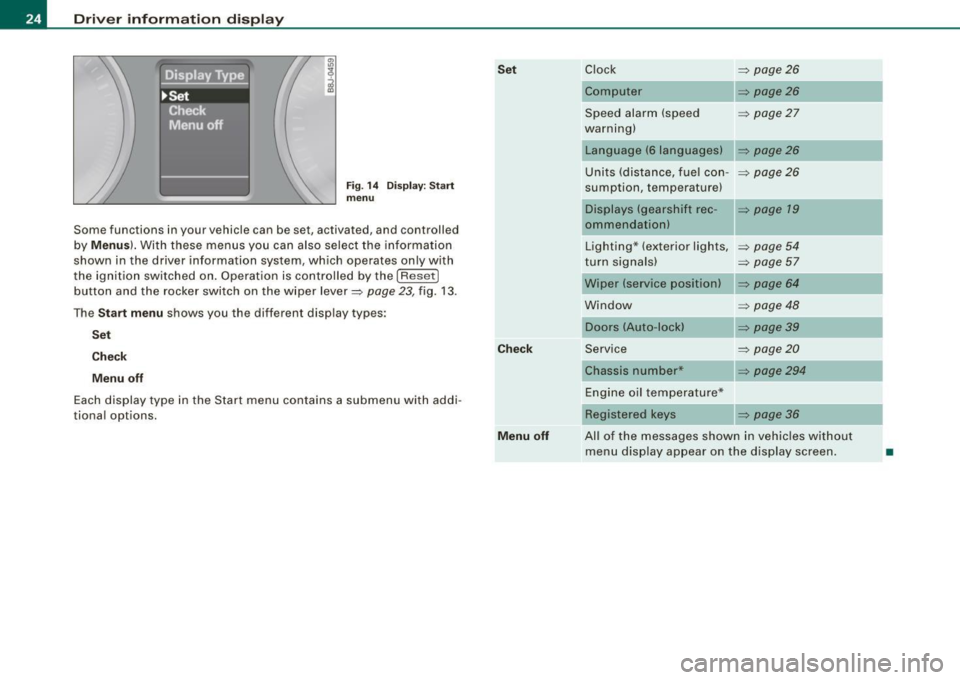
Some func tions in your vehicle can be se t, act iva ted, and cont rolled
by
M enu s). With these menus you can also select the information
shown in the driver information system , which ope rates only with
the ignition switched on. Operation is controlled by the
! R ese t]
button and the rocker switch on the wiper lever=> page 23, fig. 13 .
The
S ta rt m enu shows you the diff erent disp lay types :
Set
C hec k
M enu off
Each display type in the Start menu con tains a submenu with addi
tional options.
Se t
C hec k
M enu off Clock
=> page 26
Computer => page26
Speed alarm (speed => page27
warning)
Language (6 languages)
Units (distance, fuel con- =>
page26
sumption, temperature)
Displays (gearshift rec -
=> page 19
ommendation)
Lighting * (exterior lights,
=>
page 54
turn signals) => page 57
Wiper (service position) => page 64
Window => page 48
Doors (Auto-lock)
Service
=>
page20
Chassis number* => page294
Engine oil temperature*
Registered
keys => page 36
All of the messages shown in vehicles without menu disp lay appear on the display screen.
•
Page 28 of 320
Driver informati on displ ay
Selecting settings
The Driver Information System settings are menu-guided.
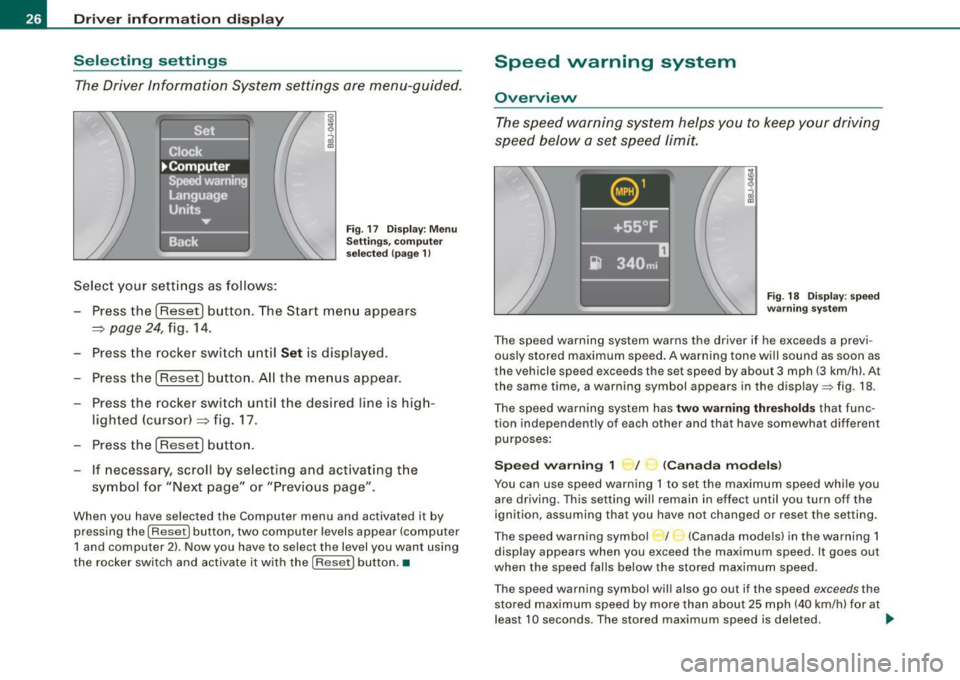
Select your settings as follows:
Fig . 17 Dis play: Men u
Sett ings, co mputer
sel ected (page 1)
- Press the !Reset) button. The Start menu appears
~ page 24, fig. 14.
- Press the rocker switch until
Set is displayed.
- Press the
(Reset] button. All the menus appear.
- Press the rocker switc h until the desired line is hig h-
lighted (cursor)~ fig. 17.
- Press the
!Reset] button .
- If necessa ry, scroll by selecting and activating t he
symbol for "Next page" or "Previous page".
When you have selected the Computer menu and activated it by
pressing the
I Reset] button, two computer levels appear (computer
1 and computer 2) . Now you have to select the level you want using
the rocker switch and activate it with the [R ese t] button. •
Speed warning system
Overview
The speed warning system hel ps you to keep your driv ing
speed below a set speed limit.
F ig. 18 Disp lay : sp ee d
w arni ng s yste m
The speed warning system warns the dr iver if he exceeds a previ
ous ly stored maximum speed . A warning tone will sound as soon as
the vehicle speed exceeds the set speed by about 3 mph (3 km/h). At
the same time, a warning symbol appears in the display=> fig. 18.
The speed war ning system has
two warn ing thre shold s that func
tion independently of each other and that have somewhat different
purposes :
Spee d warning 1 ~ / (Canad a mod els)
You can use speed warning 1 to set the maximum speed whi le you
are driving. This setting will remain in effect until you turn off the
ignition, assuming that you have not changed or reset the set ting.
The speed warning symbo l / (Canada models) in the warning 1
display appears when you exceed the maximum speed. It goes out
when the speed falls below the stored maximum speed.
T he speed warning symbol wi ll also go out if the speed
exceeds the
stored maximum speed by more than about 25 mph (40 km/h) for at
leas t 10 seconds . The stored maximum speed is deleted. .,_
Page 31 of 320
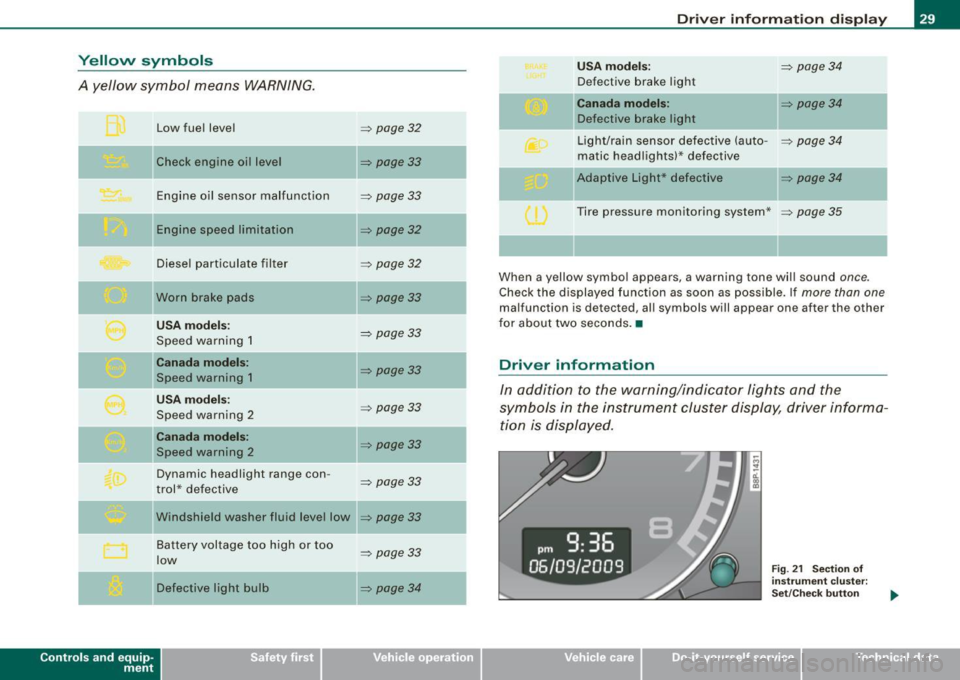
Yellow symbols
A yellow symbol means WARNING.
Contro ls and eq uip
ment Low fuel level
Check engine oi l level
Engine oil sensor malfunction
Engine speed limitation
Diesel particulate filter
Worn brake pads
USA models:
Speed warning 1
Canada models:
Speed warning 1
USA models:
Speed warning 2
Canada models:
Speed warning 2
Dynamic headlight range con -
trol * defective
W indshield washer fluid level low
Battery voltage too high or too
low
Defective light bulb
=> page 32
=> page33
-
=> page33
=> page32
=> page32
=> page33
=> page 33
=> page33
=> page33
=> page33
=> page33
=> page33
...
=> page 33
=> page34
-
-
-
Driver information display
USA models: => page34
Defective brake light
Canada models: => page 34
Defective brake light
Light/rain sensor defective (auto-
=> page 34
matic headlights)* defective
-Adaptive Light * defective => page34
Tire pressure monitoring system * => page 35
When a yellow symbol appears, a warning tone will sound once.
Check the displayed function as soon as possible. If more than one
malfunction is d etected, all symbols will appear one after the other
for about two seconds. •
Driver information
In addition to the warning/indicator lights and the
symbols in the instrument cluster display, driver informa tion is displayed .
Vehicle care I I
Fig. 21 Section of
instrument cluster:
Set/Check button
irechnical data
Page 32 of 320

Driver information display
Driver information appears in the display when a defective light
bulb is reported by the defective light bulb warning~
page 34,
when the brake pads are worn and before you engage a gear on
vehicles with S tronic.
In addition, driver information may appear when a red symbol
flashes in the driver display .
To display Driver information
As an example, the~ symbol appears in the display. If you now
press the button~
page 29, fig. 21 , the following driver message
appears in the display:
Switch off engine and check oil level
The driver message in the display goes out after about 5 seconds.
You can display the driver message again by briefly pressing the
button. •
Brake system malfunction
BRAKE (USA models) /((D) (Canada models )
The indicator light flashes if the brake fluid level is too
low, if there is a malfunction in the ABS system or when
the parking brake is engaged.
If the BRA KE/(CD) symbol flashes in the display with the
parking brake released, there is a malfunction in the brake
system. In addition to the symbol, one of two messages
appears in the display:
Stop vehicle and check brake fluid
ABS fault
! See owner's manual
- Pull off the road and stop the vehicle.
- Obtain professional assistance.
USA models: if there is a malfunction in the ABS system, the • c:::;
warning/indicator light illuminates along with the BRAKE system
malfunction warning/indicator light~
/.1.
Canada models: if there is a malfunction in the ABS system, the
warning/indicator light illuminates together with the
CCD) brake
system malfunction warning/indicator light~
/.1.
Parking brake set
The parking brake warning light Brake /«D> (Canada models) illumi
nates when the parking brake is set . In addition, a warning tone will
sound after you have driven for longer than 3 seconds and faster
than 3 mph (5 km/h).
& WARNING
• Always observe the warnings in~ page 215, "Engine compart
ment", before opening the engine hood and checking the brake
fluid.
• Driving with low brake fluid is a safety hazard! Stop the car and
get professional assistance.
• If the brake system warning/indicator light illuminates
together with the ABS warning/indicator light, then the ABS
system is malfunctioning. The rear wheels could quickly lock up
when you apply the brakes. This could lead to loss of control and
your vehicle could slide! Drive carefully to the nearest authorized
Audi dealer and have the malfunction corrected. •
Engine cooling system malfunction _t_
A malfunction in the engine cooling system must be
repaired as soon as possible.
When the J_ symbol in the display flashes, then either the
engine coolant temperature is too high, or the coolant level
~
Page 33 of 320
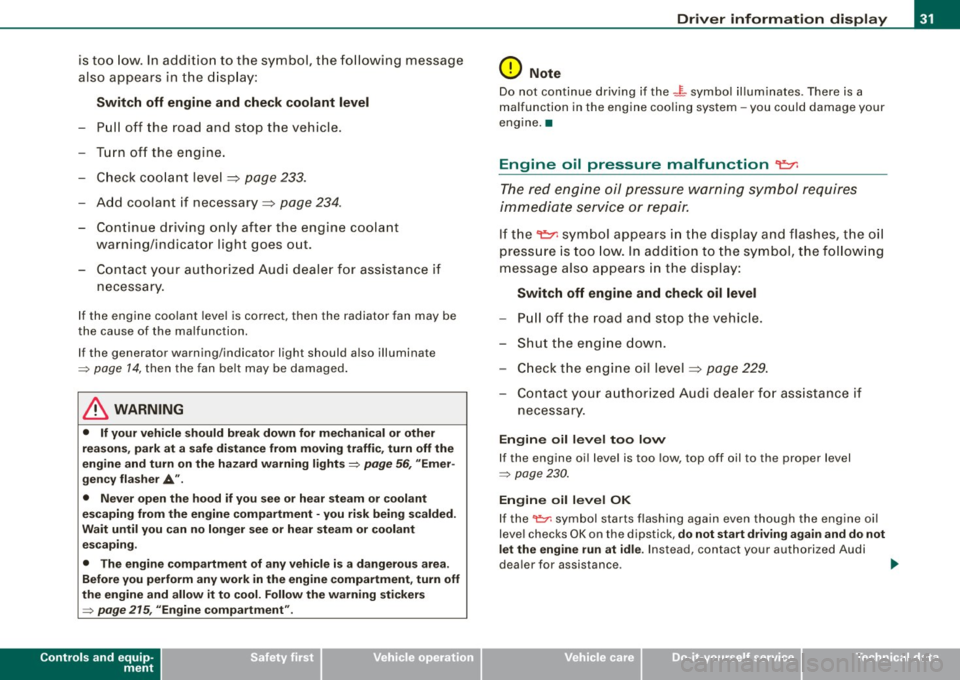
is too low. In addition to the symbol, the following message
also appears in the display:
Switch off engine and check coolant level
-Pull off the road and stop the vehicle.
- Turn off the engine.
- Check coolant level
=> page 233.
-Add coolant if necessary=> page 234 .
-Continue driving only after the engine coolant
warning/indicator light goes out.
- Contact your authorized Audi dealer for assistance if
necessary.
If the engine coolant level is correct, then the radiator fan may be
the cause of the malfunction.
If the generator warning/indicator light should also illuminate
=> page 14, then the fan belt may be damaged.
_& WARNING
• If your vehicle should break down for mechanical or other
reasons, park at a safe distance from moving traffic, turn off the
engine and turn on the hazard warning lights
=> page 56, "Emer
gency flasher A".
• Never open the hood if you see or hear steam or coolant
escaping from the engine compartment -you risk being scalded.
Wait until you can no longer see or hear steam or coolant escaping.
• The engine compartment of any vehicle is a dangerous area.
Before you perform any work in the engine compartment, turn off
the engine and allow it to cool. Follow the warning stickers
=> page 215, "Engine compartment".
Controls and equip
ment
Driver information display
0 Note
Do not continue driving if the -F-symbol illuminates . There is a
malfunction in the engine cooling system -you could damage your
engine. •
Engine oil pressure malfunction "I=:,:
The red engine oil pressure warning symbol requires
immediate service or repair.
If the 't::r. symbol appears in the display and flashes, the oil
pressure is too low. In addition to the symbol, the following
message also appears in the display:
Switch off engine and check oil level
-Pull off the road and stop the vehicle.
- Shut the engine down.
- Check the engine oil level=>
page 229.
-Contact your authorized Audi dealer for assistance if
necessary.
Engine oil level too low
If the engine oil level is too low, top off oil to the proper level
=> page 230.
Engine oil level OK
If the '1::7: symbol starts flashing again even though the engine oil
level checks OK on th e dipstick,
do not start driving again and do not
let the engine run at idle .
Instead, contact your authorized Audi
dealer for assistance . ..
I • •
Page 34 of 320
![AUDI S3 2010 User Guide Driver information display
[ i ] Tips
• The engine oil p re ss ure symbol 9:::r. is not an indicator for a low
engine oil level. Do not rely on it . In stead , check the oil lev](/img/6/57545/w960_57545-33.png "AUDI S3 2010 User Guide Driver information display
[ i ] Tips
• The engine oil p re ss ure symbol 9:::r. is not an indicator for a low
engine oil level. Do not rely on it . In stead , check the oil lev")
Driver information display
[ i ] Tips
• The engine oil p re ss ure symbol 9:::r. is not an indicator for a low
engine oil level. Do not rely on it . In stead , check the oil level in your
engine at regular interval s, preferably each time you refuel , and
alway s before going on a l ong trip.
• The yellow oil level warning indication · require s oil refill or
workshop service w ithout delay . Do not wait until the red oil pres
s ure warning symbol
9:::r. s tarts to flash before you respond to the
l ow oil level warning . By then , yo ur engine may already have
s uffered serious damage. •
Fuel supply too low f
When the symbol illuminates, t his mea ns there are about 2.6
gallons (10 liters) of fuel left in the fuel tank. Time to refuel!
~ page 279.
If the symbol lights up, even when there is ample fuel in the tank,
and the te xt
Tank system malfunction! Please contact workshop
appears in the disp lay, there is a fault in the syste m. Contact a qual
ified workshop to have the fault rectified .•
App lies t o vehic les: with engine sp eed lim itat ion
Engine speed limitation I
I Engine speed ma ximum XXXX RPM
The . symbo l illuminates when there is an engine control malfunc
t ion. T he ind icat or l ight
'IC in the instrument cluste r also il lum i
nates . T he engine speed is limited to the speed displayed in the
driver in for mation sys tem . Keep in mind tha t the engi ne s peed wi ll
not exceed the va lue d isplayed in the driver information system, for
exam ple when downshifting.
P lease go to an authorized Audi deale r or other qua lified workshop
to have the malfunction repaired. •
Applies to vehicles: with diese l engi ne and d iesel particu late filte r
Diesel particulate filter clogged
Particulate filter ! See owner's manual
If the indicator light in the instrument c luster comes on, the
diesel particulate fi lte r has become blocked with soot as the resul t
of constant short -distance driving . When the symbol illumi -
nates, you can alte r yo ur driving style to assist the filter self
clean ing process. Drive for app roxi mately 15 m inutes in 4th or 5th
gea r (automatic transmission with the selector lever in the S posi
t ion) at a minimum s peed of 37 mph (60 km/h) and an e ngine speed
of approximately 2 ,000 R PM . T he temperature increase that wil l
r esu lt from this ca n burn o ff the soot in the fil te r. The symbo l w ill
switc h off when the cleaning is successful.
I f the sy mbo l d oes not swi tch off, see you r aut hor ized deale r or
other qua lif ied workshop to have the prob lem correc ted .
As long as the indicator light remains on (diesel particulate filter
plugged), you can e xpect i ncreased fue l co nsu mption a nd possibly
a lso a loss of engine performance.
A message may a lso be displayed in the ins tru me nt cluste r
informing you or prompting necessary act ion .
For more information on the diese l particulate filter, refer to
~ page 797.
& WARNING
Always adapt your speed to the current weather, road and traffic
conditions. You should never disobey traffic laws in order to follow
driving recommendation s. •
Checking the engine oil level ~
· Ple ase add max. 1 qt of engine oil!
Page 35 of 320

If the '-" symbol comes on, add 1 quart (1 liter) of oil at the next
opportunity =>
page 230. •
Checking the engine oil level r.,
When the symbol illuminates, check the engine oil level as soon
as possible=>
page 229. Top off the oil at your earliest opportunity
=>
page 230. •
Engine oil sensor defective -;...
If the symbol illuminates, contact your authorized Audi dealer
and have the oil sensor inspected.•
Worn brake pads ~ :;
rt. Brake pads!
If the warning light illuminates, immediately contact your autho
rized Audi dealer or qualified workshop to have all brake pads
inspected. On USA models the warning light? comes on together
with the warning light
BRAKE. Both sets of brake pads on an axle must
always be replaced at the same time.
& WARNING
Driving with bad brakes can cause a collision and serious personal
injury.
• If the warning light and the warning light
BRAKE11 with the
message Brake pads! comes on in the instrument cluster display,
immediately contact your authorized Audi dealer or qualified
workshop to have all brake pads checked or replaced if
necessary. •
11 BRAKE : USA models only
Controls and equip
ment
Speed warning
models) 1
· ,I'""'
Driver information display
(USA models> IP (Canada
If the ~ symbol illuminates, this means you are driving faster than
the set vehicle speed. Slow down!=>
page 26. •
Speed warning 2 r (USA models) /,.__, (Canada
models)
If the C) symbol illuminates, this means you have driven faster than
the second set vehicle speed. Slow down! =>
page 26. •
Applies to veh icles : wi th dynamic head light range ad justment
Headlight range control defective
If the illuminates, the dynamic headlight range control is no
longer working properly. Have the system checked and repaired at
your authorized Audi dealer. •
Windshield washer fluid level too low .-_j
If the ~ symbol illuminates, add windshield washer fluid to the
washer system =>
page 240. •
Battery voltage low ~
If the C symbol illuminates, contact your authorized Audi dealer
and have the following components inspected:
• drive belt
• battery charge
Also see if the generator warning/indicator light illuminates
=>
page 14. •
I • •