brake AUDI S3 2011 Owner's Manual
[x] Cancel search | Manufacturer: AUDI, Model Year: 2011, Model line: S3, Model: AUDI S3 2011Pages: 320, PDF Size: 75.79 MB
Page 117 of 320
Transmission Ill
----------------
S tronic transmission
Applies to veh icles: w ith S tron ic ®
Introduction
Your vehicle is equipped with a S tronic transmission, also called a
double-clutch system/transmiss ion.
Power is transferred between the engine and the transm ission by
means of two independent clu tches. They replace the torq ue
converter of conventional automat ic transmiss ions and allow the
vehicle to a cce le rate witho ut a no ticeable b reak in the powe r flow .
With the a id of tiptroni c, the gears can optionally be shifted
manu
ally ~ page 119 . •
A ppli es to ve hicles : with S tro nic ®
Selector lever positions
All the selector lever positions are explained in this
section.
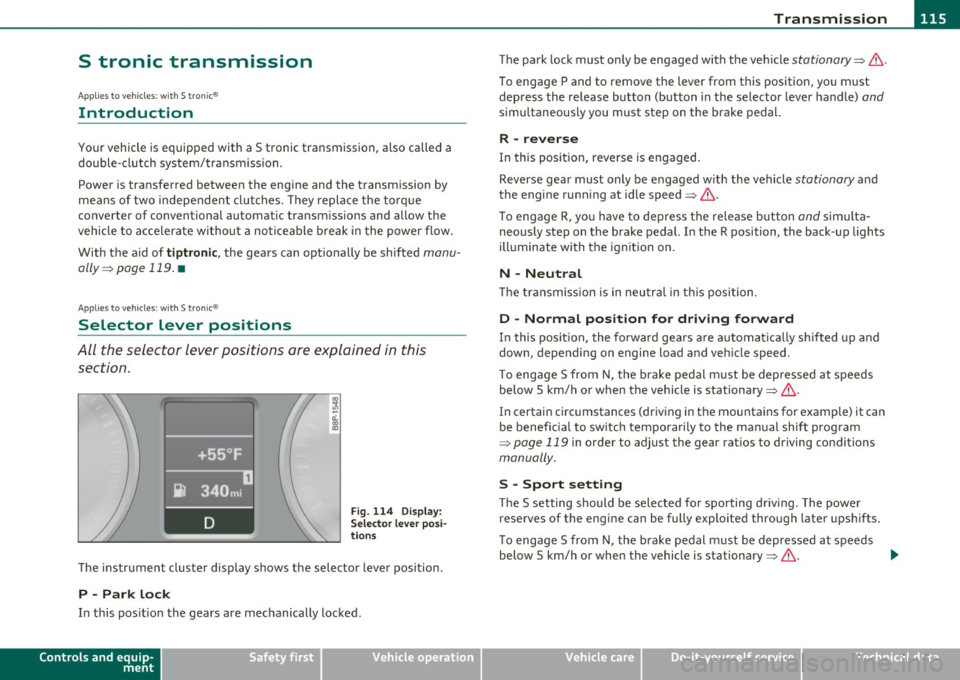
Fig. 114 D ispl ay:
Sel ect or le v er po si
t io ns
T he instr ument cluster display shows the selecto r lever position .
P -Park lock
In this pos it ion the gears are mechanically locked.
Controls and equip
ment Safety first The park
lock must on ly be engaged with the veh icle
stationary~ &.
To engage P and to remove the lever from this position, yo u m ust
depress the release bu tton (button in the selector lever handle)
and
simu ltaneously you must step on the brake pedal.
R -reverse
In this pos it ion, reverse is engaged.
Reverse gear must only be engaged with the vehicle
stationary a nd
the engine runn ing at idle speed~& .
T o engage R, yo u ha ve to dep ress t he release b utton
and s imulta
neously step on the brake pedal. In the R position, the back -up lights
ill uminate with the ign it ion on.
N -Neutral
Th e tra nsmiss ion is in neu tral in t his posi tion.
D -Normal position for driving forward
In this pos it ion, the forward gea rs a re a utoma tic a lly s hif ted up and
down, depending on engine load and ve hicle speed.
T o engage S from N, the brake pedal m ust be depressed at speeds
below 5 km/h or when the vehicle is stationary~&.
In certain circ umstances (driving in the mountains for example) it can
be benefic ia l to sw itc h t emporar ily to the ma nual shift prog ram
~ page 119 in order to adjust the gear rat ios to driving conditions
manually.
S -Spo rt setting
Th e S setting should be selected fo r spo rting dr iv ing. The power
reserves of the engine can be fully exploited through later upshifts .
T o engage S from N, the b rake pedal m ust be depresse d at speeds
below 5 km/h or when the vehicle is stationary~&. .,_
Vehicle care Technical data
Page 118 of 320
lffllL--_T.:...:.. r.:::a :..:.n.:.. s=-.:.. ":..:':..:. is = s:..:.io .::...;. n_;__ __________________________________________________ _
& WARNING
• Neve r place the select or lever in the R or P position while the
vehicle is moving · ris k of an accident!
• With the eng ine running, it is necessary to hold the vehicle
with th e fo ot brake in all selector lever position s (exc ept P and N),
because e ven at idle speed the transfer of power is never
completely interrupted -the vehicle " creep s". If the vehicle is
stationary and th e transmission is engaged, the engine shou ld
never be speeded up unintentionall y (e.g . manuall y from under
the hood ). Otherwise the vehicle will immediate ly start to mov e -
sometimes e ven if the parking brake is firml y applied -risk of an
accident!
• Before you or other person s open the hood and work on a
running engine , the selector lever must be moved to P and the
parking brake applied firmly -risk of an accident! Follow the
warning stickers~
page 218, "Engine c ompartment ".
W Tips
If you have inadve rtently shifting into N w hil e the vehicle is moving,
you should remove your foot from the accelerator and wait until the
eng ine speed has dropped to idle be fore shifti ng back to Dor 5 . •
A ppli es to veh icles : wi th S tron ic ®
Selector lever lock
The selector lever lock prevents a gear from being
engaged accidentally and unintention ally setting the
vehicle in motion.
.. ... 0 'i'
i
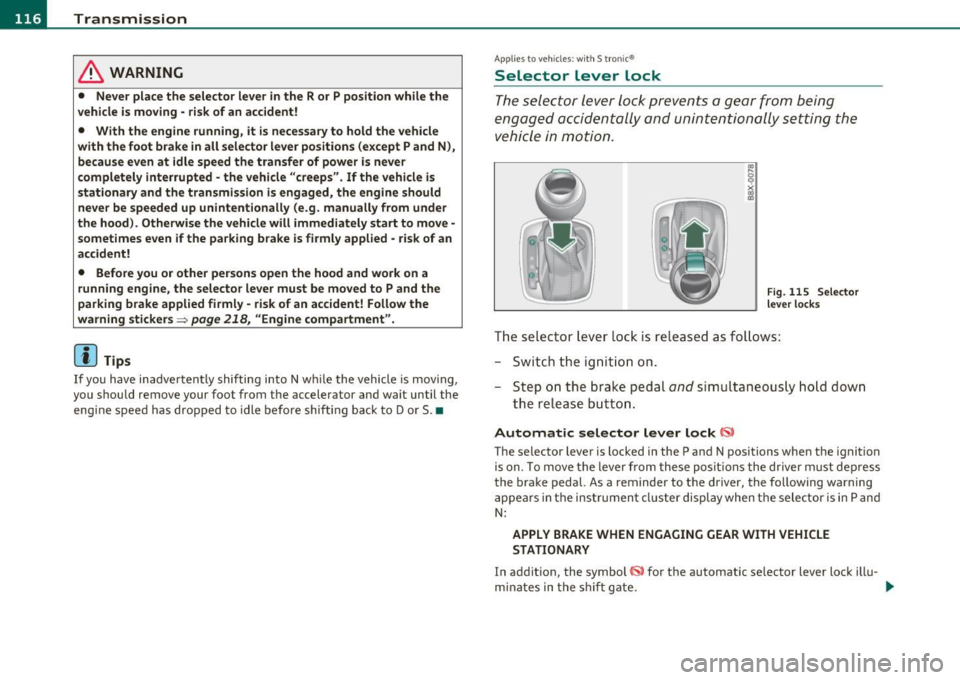
Fi g. 11 5 Se lector
le ver l ocks
The selector lever lock is re leased as fo llows:
- Switc h th e ign it io n on.
- Step o n the brak e peda l
and simult aneous ly ho ld down
th e relea se b utto n.
Automatic selector lever lock
The selector lever is locked in the P and N positions when the ignition
is on. To move the lever from these posit ions the d river must dep ress
the bra ke pedal. As a reminder to the driver, the fo llowing warning
a ppea rs in the instrument cluster display when the selector is in P and
N:
APPLY BRAKE WHEN ENGAGING GEAR WITH VEHICLE
STATIONARY
I n addit ion, the symbol for the automatic se lector lever lock ill u-
mi nates in the s hift gate. .,_
Page 119 of 320
____________________________________________________ T _r_a _n_ s_m _ i_s _s_ i_ o _ n _ ___.fflll
The selector lever lock is effective only when the vehicle is stationary
and at speeds below 5 km/h. At highe r speeds, the lock in the N posi
tion is automatically switched off.
The selector lever is not locked when rapid shifts are made through
the N position (e.g . from R to D) . T h is allows you to "rock" the vehicle
if it becomes stuck. If the lever is in the N position for more than
1 second with the brake pedal not depressed, the selector lock
engages automatically.
Release button
The release button in the selector lever handle prevents accidental
shifts into certain selector lever pos itions. When you press the
release button, the selector lever lock is cancelled. In the illustration,
the positions in which the release button has to be pressed are h igh
lighted in color::::>poge
116, fig . 115 .
Ignition k ey remo val l ock
The ignition key can only be remove after the ignition is switched off
if the selector lever is in P. As long as the ignit ion key is removed, the
selector lever is locked in P.
[ i ) Tips
If the selector lever does not engage, there is a malfunction . The
eng ine is disabled to prevent the vehicle from driv ing off unintention
ally. To allow the selector lever to engage again, proceed as follows:
Press and release the brake pedal.•
Contro ls a nd e quip
m en t Vehicle
OP-eration
Applies to vehicles : w ith S tronic®
Driving Notes
The forward gears are shifted up or down automatically .
Starting from stop
-Step on and hold the brake pedal.
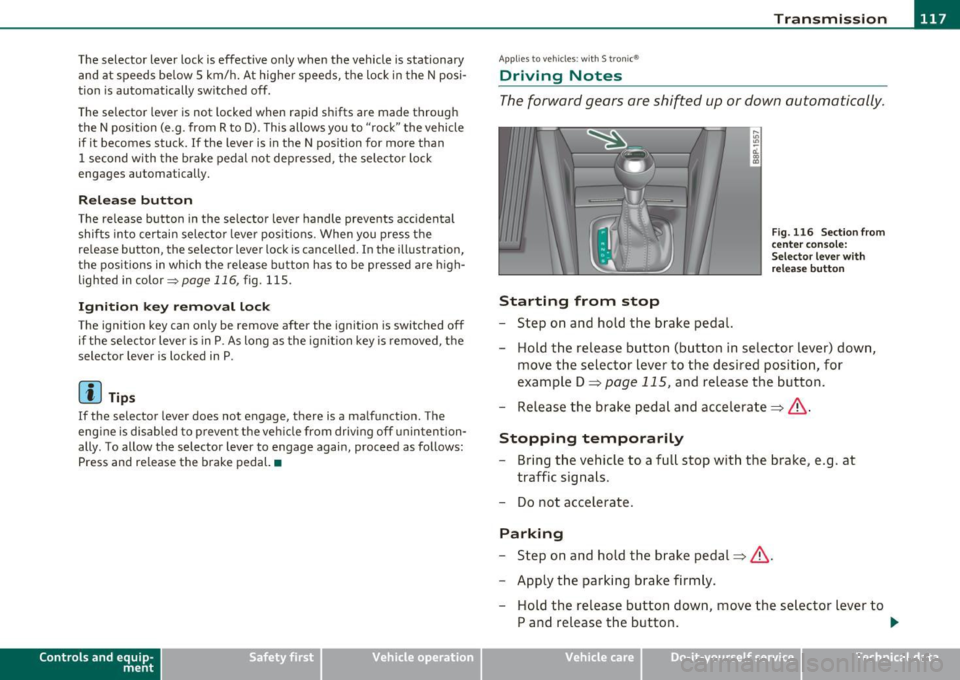
Fig. 116 Section from
ce nter conso le:
Selector lever with
r elease button
- Hold the release button (button in selector lever) down,
move the selector lever to the desired position, for
example D =:;,
page 115, and relea.se the button.
- Release the brake pedal and accelerate=:;,& .
Stopping temporarily
-Bring the vehicle to a full stop with the brake, e.g . at
traffic signals.
- Do not accelerate .
Parking
-Step on and hold the brake pedal=:;,&.
- Apply the parking brake firmly.
- Hold the release button down, move the selector lever to
P and release the button. .,.
Vehicle care Do-it-yourselt service iTechnical data
Page 120 of 320
lffll.___T_ r_a _n_ s_m _ i_s _s _ i_o _n ___________________________________________________ _
Stopping on an incline
- Always
hold t he vehicle with the footbrake or parking
b rake in order to preve nt "ro llback "=> & . Do not try to
p reve nt t he v ehicle from ro lli ng back by re vving th e e ngine
whi le it is in gea r.
Starting on a hill
- Apply the hand bra ke fi rmly.
- With t he eng ine in gear , gra dually acce lerate a nd release
the hand bra ke.
T he eng ine c an only be started with the selector leve r in P or N
=>
page 107 . At low amb ient temperatures (14 °F /-10 °(), it i s only
possible to start the engine with the selector lever in P.
W hen pa rking on leve l grou nd , it is suff ic ient to p lace the se lector
lever in P. On a steeply sloping road, you shou ld f irst app ly the
par king brake firmly and then p lace t he selecto r leve r in P. T his way,
you do not overload the paw l mechanism and it is easier to move the
selector lever out of P.
& WARNING
• Never leave your vehicle with the engine running while in ge ar.
If you must lea ve your vehicle with the engine running, set the
parking brake and engage the park lo ck .
• When the eng ine i s running and the transmi ssio n is in gear (D ,
Sor R ) or in "tiptronic " mode, it is ess ential that you stop the
v ehicle with the footbrake. When idling , the transmiss ion of
power doe s not stop completely -the vehicle "creeps".
• Do not a ccelerate when you change the selector leve r position
with th e vehicle stationary and the engine runn ing -risk of an acci
dent!
• Never place the selector lever in the R or N position wh ile the
v ehicle is moving -risk of a n accident!
& WARNING (continued )
• If you have to bring your vehicle to a stop while on an incline ,
keep the foot brake depressed all the way down so that the vehicle
does not start to roll backward. You should never hold the veh icle
using the clutch if you are going to b e stopped on an incline. If you
do , the clutch will start to slip when it o verheats c aused by the
c onstant overload . Thi s is danger ous be cau se if the vehicl e start s
to roll backward , you could cause an accident. If the clutch should
s tart to slip, you will fee l the vehicle "jerk " and the selector lever
d isplay w ill start blinking.
• Befor e driving down a st eep slope, reduc e your speed and shift
i nto a lower gear w ith "tipt ronic ".
• Do not ride the brakes or apply the brake pedal too often or too
long . Constant b raking causes the brakes to overheat and
s ub stantially reduces braking performan ce, in creases braking
d istance or causes complete failure of the b rake system . •
A pplie s to v eh icl es: wit h S tro nic transm iss ion and Hi ll De scen t A ss ist
Hill Descent Assist
Hill Descent Assist helps the driver when driving down
inclines.
H ill Descent Assist is activated by pressing the brake while
descending when the se lector lever is in
D /S . The S tronic transmis
sion a utomat ically s hifts down to a gear s uitable fo r the in cl ine. H ill
Descent Assist attempts to mainta in the cu rrent vehicle speed when
t he br aking oc curs, as far as physical and technical l imi ts allow.
It
may be necessary to adjust the speed using the brakes .
Hi ll Descent Assist switches off w hen the incline levels out or when
the gas pedal is pressed.
On vehicles with cruise control*=>
page 110, Hill Descent Assist is
also activa ted when the speed is set.
~
Page 121 of 320
____________________________________________________ T _r_a _n_ s_m _ i_s _s_ i_ o _ n_---J_
& WARNING
Hill D escent Assist cannot overcome physical limitations, so it
m ay not be possible to maint ain a c onstant vehicle speed under all
circum stances . Always be re ady to apply the brakes. •
Applie s to v ehicles: w ith S tron ic ®
tiptronic operation
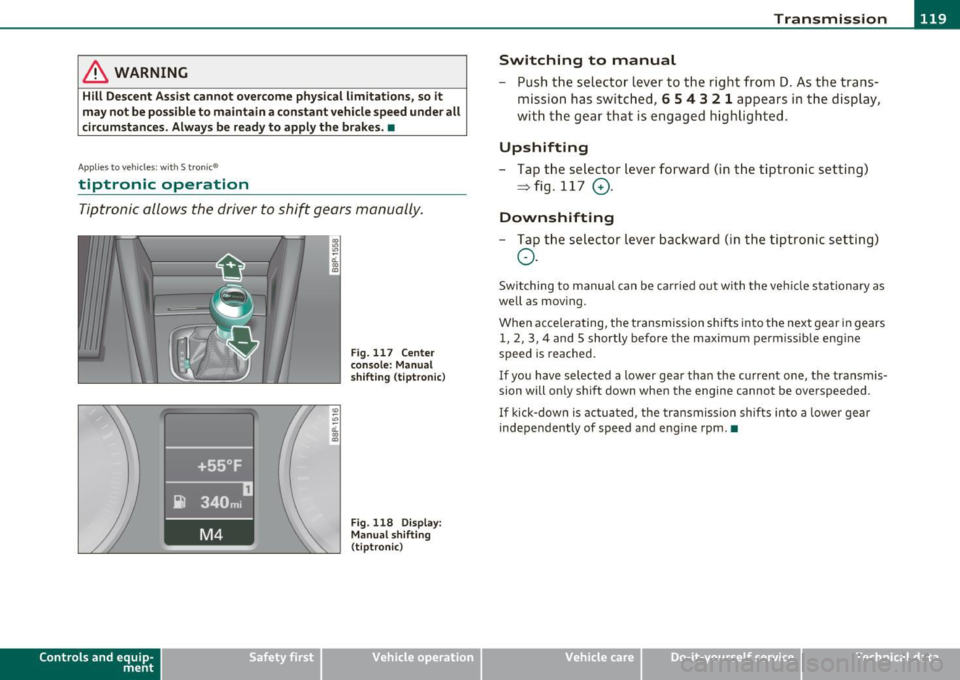
Tiptronic allows the driver to shift gears manually.
Con tro ls a nd e quip
m en t
Fig . 11 7 Ce nter
con sole : Manual
s hift ing (tiptronic )
Fig. 118 Dis play:
Man ual shifti ng
( tiptr oni c)
Vehicle OP-eration
Switching to manual
-Push t he selector lever to t he righ t from 0 . As t he trans
mission has switc hed ,
6 5 4 3 2 1 appears in the d isplay,
with th e gear that is engaged h ig hligh ted.
Upshifting
-Tap t he se lector lever forward ( in t he t iptronic setting)
~ fig .117 0.
Downshifting
-Tap the sele ctor l ever bac kwar d (in th e tiptr oni c sett ing)
o .
Swi tching to manual can b e ca rried o ut with th e ve hicle sta tionary as
well as mov ing.
Whe n acce le ra ting, the t ransmission shifts into the next gear in gears
1 , 2, 3, 4 and 5 shortly before the maximum perm issib le eng ine
speed is reached.
If you h ave se lect ed a lower ge ar than the c urrent one, the tr ansmis
sion will only shift down when the engine cannot be overspeeded.
If kick-down is ac tua ted, the tra nsmiss io n sh ifts into a lowe r gear
inde pendently of speed and e ng ine rpm .•
Vehicle care Do-it-yourselt service iTechnical data
Page 122 of 320
1111..__T_ r _a_ n_s_ m_ i_ s _s_ i_ o _ n _________________________________________________ _
Applies to veh icles : with S tro nic® and with Tiptron ic controls on the stee ring whee l
Steering wheel with Tiptronic ® controls
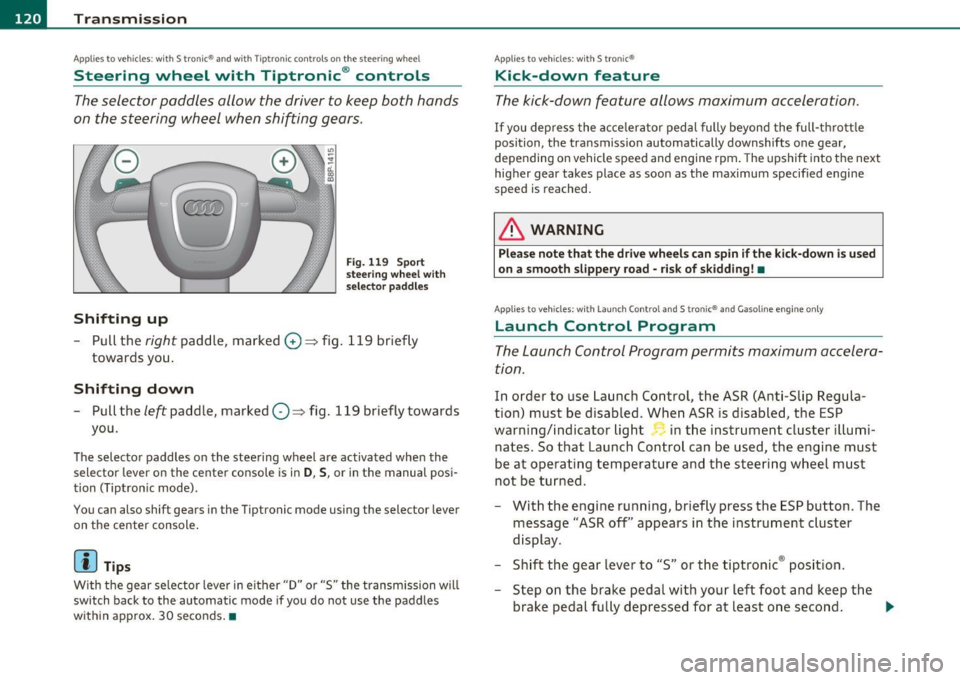
The selector paddles allow the driver to keep both hands
on the steering wheel when shifting gears.
Shifting up
Fig. 119 Sport
steering wheel with
selector paddles
-Pull the right paddle, marked G) => fig. 119 briefly
towards you .
Shifting down
-Pull the left paddle, marked O=> fig. 119 briefly towards
you.
The selector paddles on the steering wheel are activated when the
selector lever on the center console is in
D, S, or in the manual posi
tion (Tiptron ic mode).
You can also shift gears in the Tiptronic mode using the selector lever
on the center console.
[ i ] Tips
With the gear selector lever in either "D" or "S" the transmission will
switch back to the automatic mode if you do not use the paddles
within approx. 30 seconds .•
Applies to veh icles : with S tro nic®
Kick-down feature
The kick -down feature allows maximum acceleration.
If you depress the accelerator pedal fully beyond the full-thrott le
position, the transmission automatically downshifts one gear,
depending on vehicle speed and engine rpm. The upsh ift in to the next
higher gear takes place as soon as the maximum specified engine
speed is reached.
& WARNING
Please note that the drive wheel s can spin if the kick-down is u sed
on a smooth slippery road -risk of skidding! •
Applies to veh icles: w ith Lau nch Control an d S tron ic® and Gasoline engine only
Launch Control Program
The Launch Control Program permits maximum accelera
tion.
In order to use Launch Control, the ASR (Anti-Slip Regula
tion) must be disabled. When ASR is disabled, the ESP
warning/indicator light in the instrument cluster illumi
nates. So that Launch Control can be used, the engine must
be at operating temperature and the steering wheel must
not be turned.
- With the engine running, briefly press the ESP button. The
message "ASR off' appears in the instrument cluster
display.
- Shift the gear lever to "S" or the tiptronic ® posit ion.
- Step on the brake peda l with your left foot and keep the
brake pedal fully depressed for at least one second . _,,,
Page 123 of 320
Transmission -_____________ _.;..____;_~~
-With your ri ght foot, step on the accelerator to the wi de
open t hrottle positio n or Kickdown . The engine speed
settles at about
3,200 rpm.
- Take your left foot o ff the brake.
& WARNING
• Always adapt your driving to the traffic flow.
• Only use Launch Control when road and traffic condition s allow
it and other dri ver s will n ot be endangered or annoyed by your
driving and the acceleration of the vehicle.
• Make sure that ESP remains enabled . With the ESP disabled,
the vehicle could brake awa y, particula rly on a slick and slippery
road -risk of skidding!
• Once a cceleration i s fin ished , switch ASR on again by briefl y
pushing the ESP button. •
Applie s to v ehic le s: wit h S tron ic ®
Back-up program
In the event of a system malfunction, there is an back -up
program.
I n the even t of system ma lfunct ion, the automati c transmis sion
switches to the fail-safe mode. All of the se lector lever posit ion
displays fo r the automat ic transmiss ion are hi ghligh ted with a ligh t
background in the instrument cluster display . In some cases you
canno t drive in the reverse gear a ny mo re.
If the transmiss ion sw itc hes to fa il-safe mode, you should take the
vehicle to an authorized Aud i dealership as soon as possible to have
the cond itio n corrected. •
Contro ls a nd e quip
m en t Vehicle
OP-eration
Applies to veh icles : w ith S t ron ic ®
Emergency release for selector lever
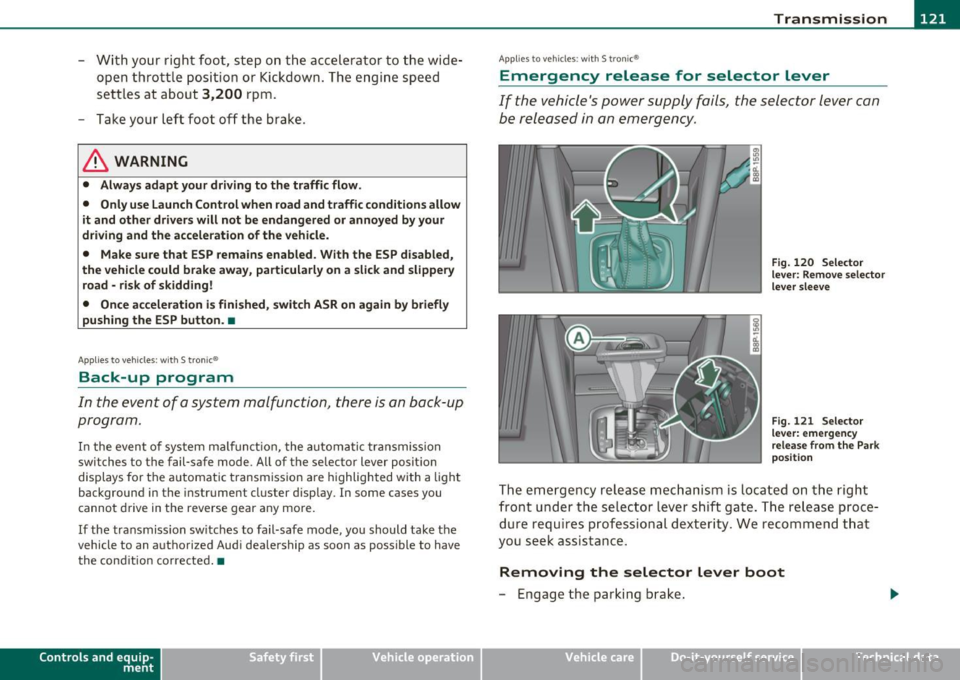
If the vehicle's power supply fails, the selector lever can
be released in an emergency .
Fig. 120 Selector
le ve r: R em ov e se le ct or
l e ve r sleev e
Fig. 12 1 Selector
l e ve r: em ergen cy
relea se fro m the P ark
p os iti on
The em ergency release m echanism is loca ted on th e right
front u nder the se lector lev er shift gate . The re lease p roc e
dure requ ires profess ional dext eri ty. We recommend t hat
you seek assis tance.
Removing the selector Lever boot
- Engage the par king bra ke.
Vehicle care Do-it-yourselt service iTechnical data
Page 124 of 320
-Transmission •m ___________________ _
- Remove the screwdriver from the vehicle tool kit. Use the
flat side of the reversible screwdriver blade=:>
page 2 70.
- Carefully pry the cover out with the screwdriver and pull it
=:>
page 121, fig. 120 toward the shifter knob in the direc
tion of the arrow. The screwdriver must grip at the lower
edge of the cover to loosen it.
Emergency release for selector Lever
- Press the yellow release lever in the direction of the arrow
=:>
page 121, fig. 121 and hold it in that position.
- Press the release button in the selector lever@ and move
the lever into the N position .
- Clip the shift boot back into the shift gate.
If the vehicle has to be pushed or towed if the power supply fails (e.g.
battery is discharged), the selector lever must be moved to the N
position using the emergency locking device.
& WARNING
The selector must only be shifted from the P position if the hand
brake is firmly applied. Otherwise the vehicle would start moving
unexpectedly on a grade when the selector lever is shifted from
the P position -increasing the risk of an accident. •
Page 132 of 320
........ _D_ r_iv _i_ n .... g=-- S_ a_f _e _Ly :,.._ ______________________________________________ _
in. WARNING
Improper seating positions increase th e risk of serious personal
injury and de ath whenever a vehicle is being used.
• Always make sure th at all veh icle occupants stay
in a proper
seating position and are properly re strained when ever the vehicle
is being used. •
Pedal area
Pedals
The pedals must al ways be free t o move and mus t neve r
be in terfered wit h by a floor mat or any other object.
Make s ure that all pedals move free ly without interference and t hat
nothing prevents them from returning to their original pos itions.
On ly use floor mats that le ave t he pedal area free and can be secured
with floor mat fasteners.
If a brake circu it fails, increase d bra ke peda l trave l is re quir ed to b ring
the vehicle to a f ull stop .
in. WARNING
Pedals that cannot mo ve freely can cause loss of vehicle control
and increase the risk of serious injury.
• Never place any objects
in the driver 's footwell. An object could
get into the pedal area and interfere with pedal fun ction. In case
of sudden braking or an accident , you would not be able to b rake
or accelerate!
• Always make sure that nothing can fall or move into the
driver' s footwell. •
Floor mats on the driver side
Always use floor mats th at can be se curely a ttached to
the floo r mat fasteners and d o not inte rfe re with the free
movem ent of th e pedals.
- Make su re that t he floor mats are proper ly secured a nd
cannot move and i nte rfere with t he ped als=> &.
Use on ly floor ma ts that leave the peda l area unobstructed and that
are firm ly sec ured so that they cannot s lip out o f position. Yo u can
ob tain su itab le floor mats from you r autho rized Audi Dealer .
Floor mat fasteners are installed in your A ud i.
F loor m ats used in your vehicle m ust be att ached to t hese f astene rs.
Properly securing t he floor mats w ill prevent them from s liding into
posi tions that cou ld i nterfere w it h t he ped als o r impair safe ope ra
t ion of your veh icle in other ways .
in. WARNING
Pedals that cannot move freely can result in a loss of vehicle
c ontrol and in crease the risk of seriou s per sonal injury .
• Always make sure that floor mats are properly secured .
• Never place or install floor mats or other floor coverings in the
vehicle that cannot be properly secured in place to prevent them
from slipping and interfering with the pedals or the ability to
control the vehicle.
• Never place or install floor mats or other floor coverings on top
of al ready installed floor mats . Additional floor mats and other
coverings will reduce the size of the pedal area and interfere with
the pedals.
• Always properly rein stall and secure floor mats that have been
taken out for cleaning.
• Always make sure that objects cannot fall into the driver foot-
well while the vehicle is moving. Objects can become trapped
~
Page 133 of 320

& WARNING (continued)
under the brake pedal and accelerator pedal causing a loss of
vehicle control. •
Stowing luggage
Loading the luggage compartment
All luggage and other objects must be properly stowed
and secured in the luggage compartment.
~ ... a'. ., m
Fig . 124 Safe load
positioning: heavy
cargo positioned as far
forward as possible.
Loose items in the luggage compartment can shift suddenly,
changing vehicle handling characteristics. Loose items can
also increase the risk of serious personal injury in a sudden
vehicle maneuver or in a collision.
- Distribute the load evenly in the luggage compartment.
- Always place and properly secure heavy items in the luggage compartment as far forward as possible
~ fig . 124.
- Secure luggage using the tie-downs provided~ page 82.
Safety first Vehicle OP-eration Driving
Safely
-
Make sure that the rear seatback is securely latched in
place.
& WARNING
Improperly stored luggage or other items can fly through the
vehicle causing serious personal injury in the event of hard braking or an accident. To help reduce the risk of serious personal injury:
• Always put objects, for example, luggage or other heavy items
in the luggage compartment.
• Always secure objects in the luggage compartment using the
tie-down eyelets and suitable straps.
& WARNING
Heavy loads will influence the way your vehicle handles. To help
reduce the risk of a loss of control leading to serious personal
injury:
• Always keep in mind when transporting heavy objects, that a
change in the center of gravity can also cause changes in vehicle
handling:
-Always distribute the load as evenly as possible.
- Place heavy objects as far forward in the luggage compart-
ment as possible.
• Never exceed the Gross Axle Weight Rating or the Gross Vehicle
Weight Rating specified on the safety compliance sticker on the
left door jamb. Exceeding permissible weight standards can cause
the vehicle to slide and handle differently.
• Please observe information on safe driving=>
page 124.
& WARNING
To help prevent poisonous exhaust gas from being drawn into the
vehicle, always keep the rear lid closed while driving . .,_
Vehicle care Do-it-yourselt service iTechnical data