warning AUDI S3 2012 Workshop Manual
[x] Cancel search | Manufacturer: AUDI, Model Year: 2012, Model line: S3, Model: AUDI S3 2012Pages: 280, PDF Size: 70.11 MB
Page 76 of 280
7 4 Seats and storage
- Always drive slowly, avo id sudden brak
ing and maneuvers when transporting
cargo on the roof of your vehicle .
@) For the sake of the environment
Sometimes it may be easier to leave a roof
rack installed even though you are not us
ing it . Due to the increased a ir resistance
your veh icle will unnecessar ily use more
fuel. Remove the roof rack if you are not
going to use it.
Cup holders
Cup holders in the center console
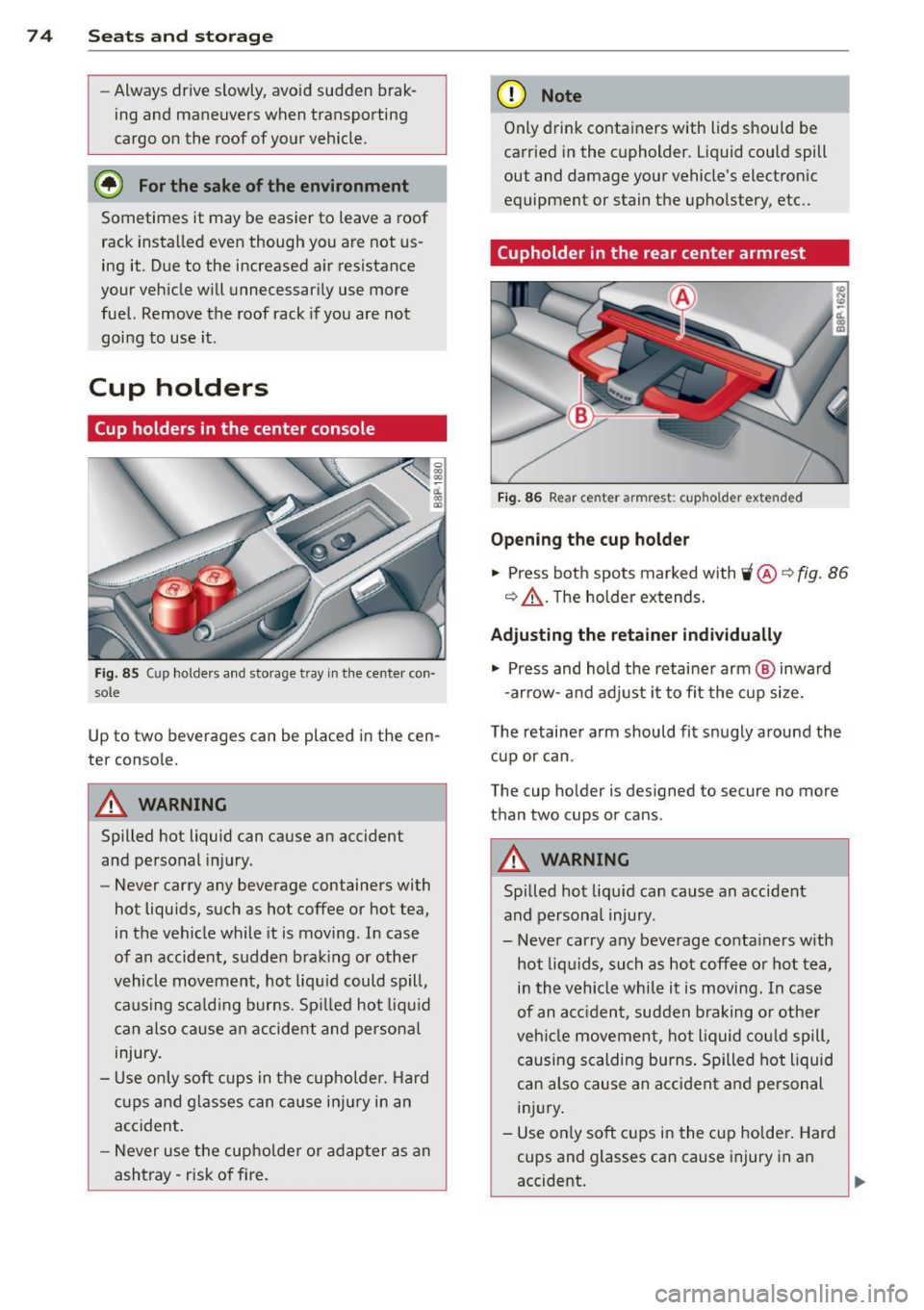
Fi g. 85 Cup ho lders a nd sto rage t ray in th e ce nte r con ·
s o le
Up to two b everages can be placed in the cen
te r console.
A WARNING
Spilled hot liquid can cause an accident
and pe rsonal injury.
-
- Never carry any beverage containers with
hot liquids, such as hot coffee or hot tea,
in the vehicle while it is moving . In case
of an accident, s udde n bra king or other
v ehicl e mov ement, hot liq uid could s pill,
causing s ca ld ing burns . Sp illed hot liq uid
c an also ca use a n accide nt and perso nal
injury.
- Use only soft cu ps in t he cup holder. H ard
c u ps and gla sses can c ause i njur y in an
acc ident.
- N ever use the cup holder or adap ter as an
ashtray- r isk o f fire.
(D Note
Only drink conta iners with lids should be
carr ied in the cupholder. Liquid could spill
out and damage your vehicle's electron ic
equipment or stain the upho lstery, etc ..
(upholder in the rear center armrest
Fig. 86 Rea r ce nter armr est: c upho ld er extend ed
Opening the cup holder
.,. Press bot h spo ts marked with 'i @ ~ fig. 86
q &_ . The holder ex tends .
Adjusting the retain er individually
.,. Press and hold the retai ne r arm @ inwa rd
- ar row -and adj ust i t to fit the cup si ze.
The retainer arm should fit snugly around the cup or can .
The cup ho lder is de signed to secure no mo re
than two cups or can s.
A WARNING
Spi lled ho t liquid can cause an accident
and persona l injury .
-
- Never carry any beverage conta iners w ith
hot liq uids, such as hot coffee o r hot tea,
in th e vehicle while it is moving. In case
of an a cciden t, sudden braking or othe r
ve hicl e movement, hot liquid cou ld spill,
causing scalding burns . Spilled hot liquid
can also cause an acc ident a nd personal
in ju ry.
- Use on ly soft cups in the cu p holde r. Hard
cups and glasses can cause injury in a n
accident.
Page 77 of 280
CD Note
Only drink containers with lids should be
carried in the cupho lder. Liqu id could spill
out and damage your veh icle's e lectronic
equ ipment or sta in the upholstery etc.
Socket
Outlets
The outlet in the front center console and in
the luggage compartment may be used for
12-volt appliances.
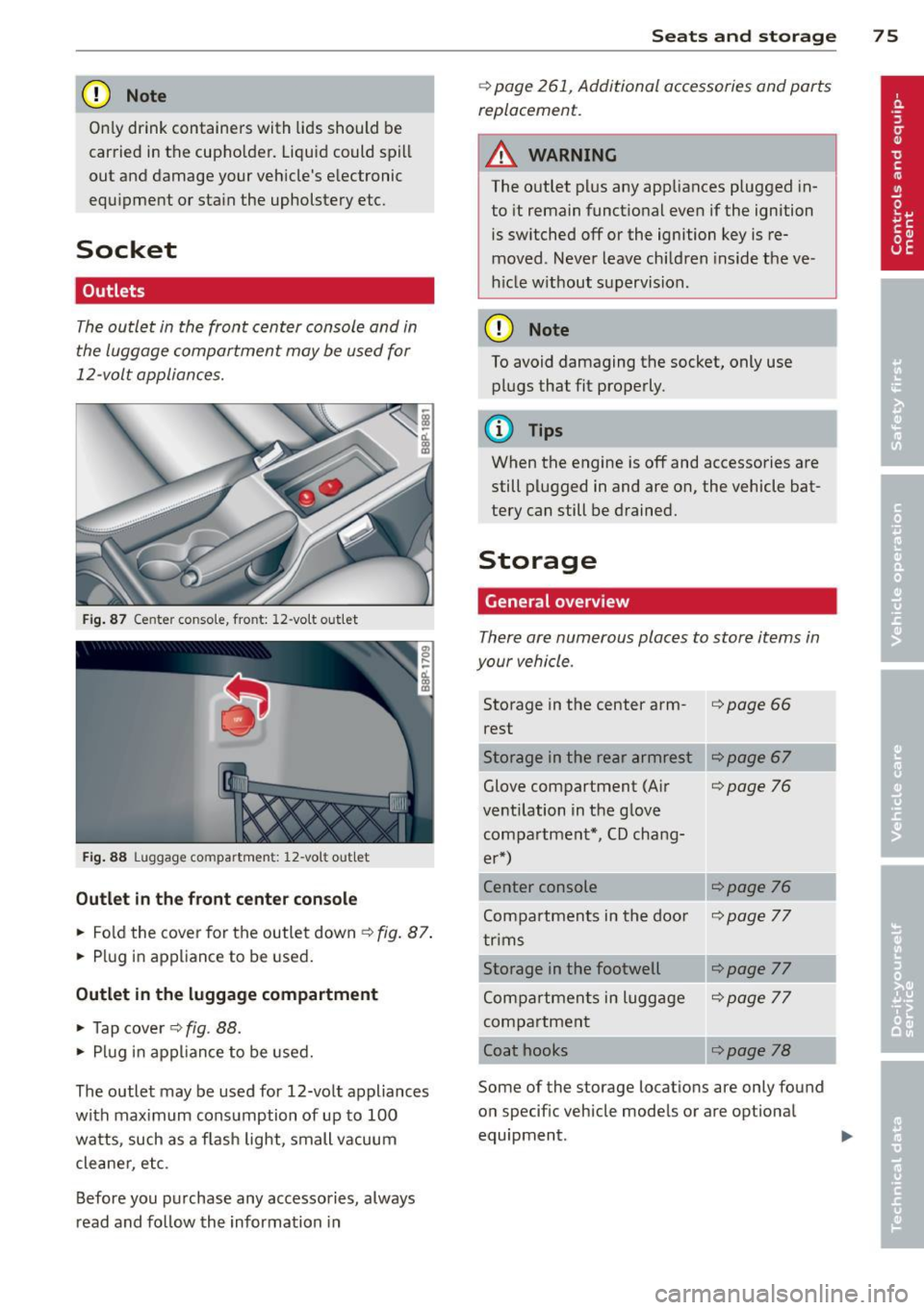
Fig. 87 Ce nter conso le, front: 12-vo lt out let
Fig. 88 L uggage compartmen t: 12-vo lt out let
Outlet in the front center console
.. Fold the cover for the outlet down ¢ fig. 87.
.. Plug in appliance to be used.
Outlet in the luggage compartment
.. Tap cover ¢ fig. 88.
.. Plug in appliance to be used.
The outlet may be used for 12-volt appliances
with maximum consumption of up to 100
watts, such as a f lash light, small vacuum
cleane r, etc.
Before you purchase any accessories, always
read and follow the information in
Seats and storage 75
¢ page 261, Additional accessories and parts
replacement.
A WARNING
The outlet plus any appliances plugged in
to it remain functional even if the ignition
is switched off or the ignition key is re
moved. Never leave children inside the ve
h icle w ithout supervision.
CD Note
To avoid damaging the socket, only use
plugs that fit properly.
(y Tips
When the engine is off and accessories are
still plugged in and are on, the vehicle bat
tery can still be drained.
Storage
General overview
There are numerous places to store items in
your vehicle .
Storage in the center arm-i=>page 66
rest
Storage in the rear armrest
Glove compartment (Air
¢page 76
ventilation in the glove compartment*, CD chang-
er*)
Center console
¢page 76
Compartments in the doo r ¢page 77
trims
Storage in the footwell
¢page 77
Compartments in luggage ¢page 77
compartment
Coat hooks
¢page 78
Some of the storage locations are only found
on specif ic vehicle models or are optional
equipment .
Page 78 of 280
76 Seats and storage
& WARNING
-Always remove objects from the instru
ment panel. Any items not put away
could slide around inside the vehicle
while driving or when accelerating or
when applying the brakes or when driv
ing around a corner.
- When you are driving make sure that
anything you may have placed in the cen
ter console or other storage locations
cannot fall out into the footwells. In case
of sudden braking you would not be able
to brake, depress the clutch or acceler
ate.
- Any pieces of clothing that you have
hung up must not interfere with the driv
er's view. The coat hooks are designed
only for lightweight clothing. Never hang
any clothing with hard, pointed or heavy
objects in the pockets on the coat hooks.
During sudden braking or in an accident -
especially if the airbag is deployed -
these objects could injure any passen
gers inside the vehicle .
Glove compartment
The glove compartment is illuminated and
can be locked .
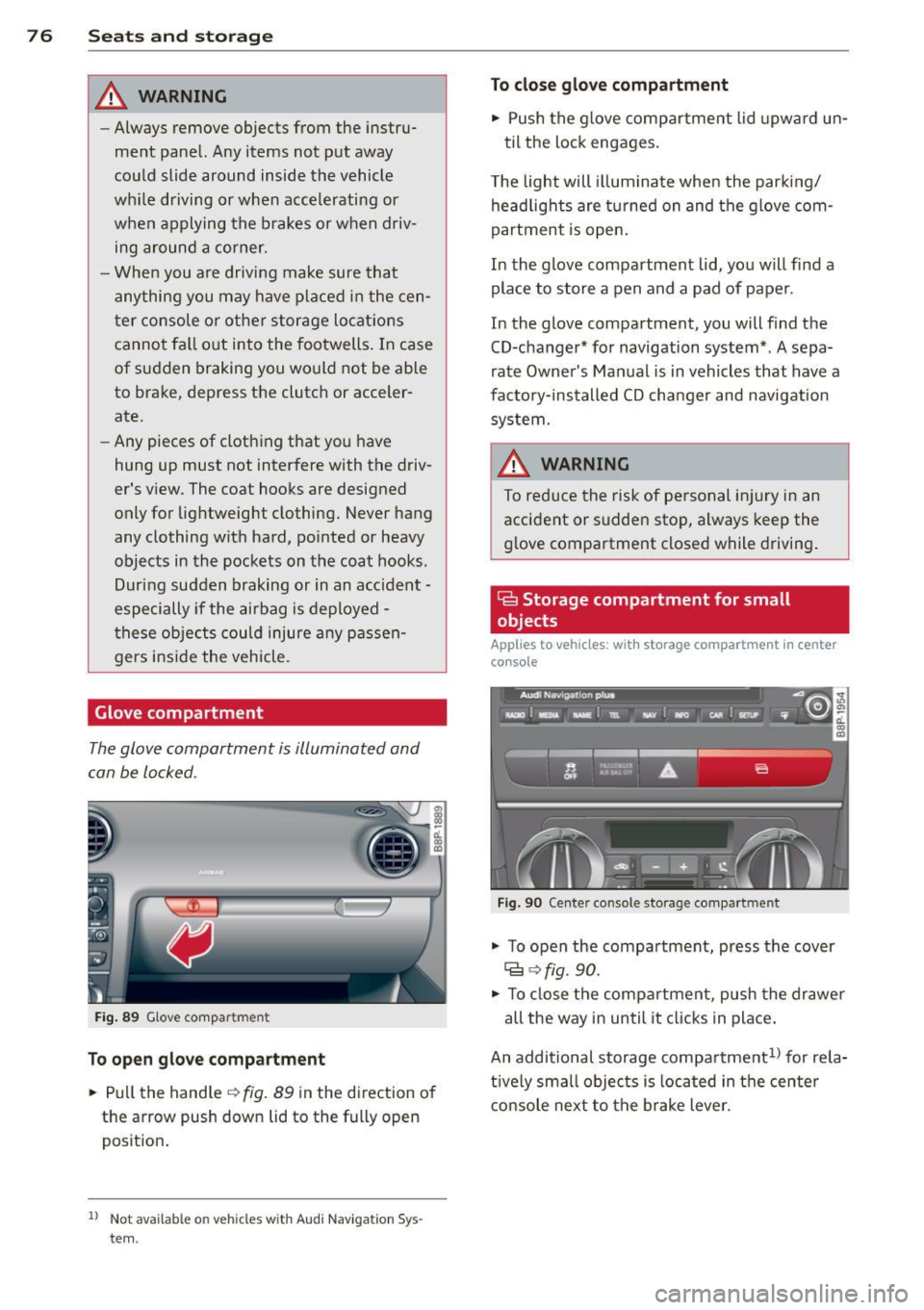
Fig. 89 Glove compar tment
To open glove compartment
"' Pull the handle~ fig. 89 in the direct ion of
the arrow push down lid to th e fully op en
position.
1 ) Not ava ilab le o n veh icl es with Audi N avigat ion Sys
t e m .
To close glove compartment
"' Push the glove compartment lid upward un-
til the lock engages.
The light will illuminate when the parking/
headlights are turned on and the glove com
partment is open.
In the glove compartment lid, you will find a
place to store a pen and a pad of paper .
In the glove compartment, you will find the
CD-changer* for navigation system* . A sepa
rate Owner's Manual is in vehicles that have a
factory-installed CD changer and navigation
system.
A WARNING
To reduce the risk of personal injury in an
accident or sudden stop, always keep the
glove compartment closed while driving.
Ga Storage compartment for small
objects
Applies to vehicles: with storage compartment in center
console
Fig. 90 Cen te r c onso le s torage compar tme nt
"' To open the compartment, press the cover
Cg ~fig. 90.
-
"' To close the compartment, push the drawer
all the way in until it clicks in place.
An additional storage compartment
1> for rela
tively small objects is located in the center
console next to the brake lever.
Page 79 of 280
Compartments in the door trims
There are storage compartments in the door
trims .
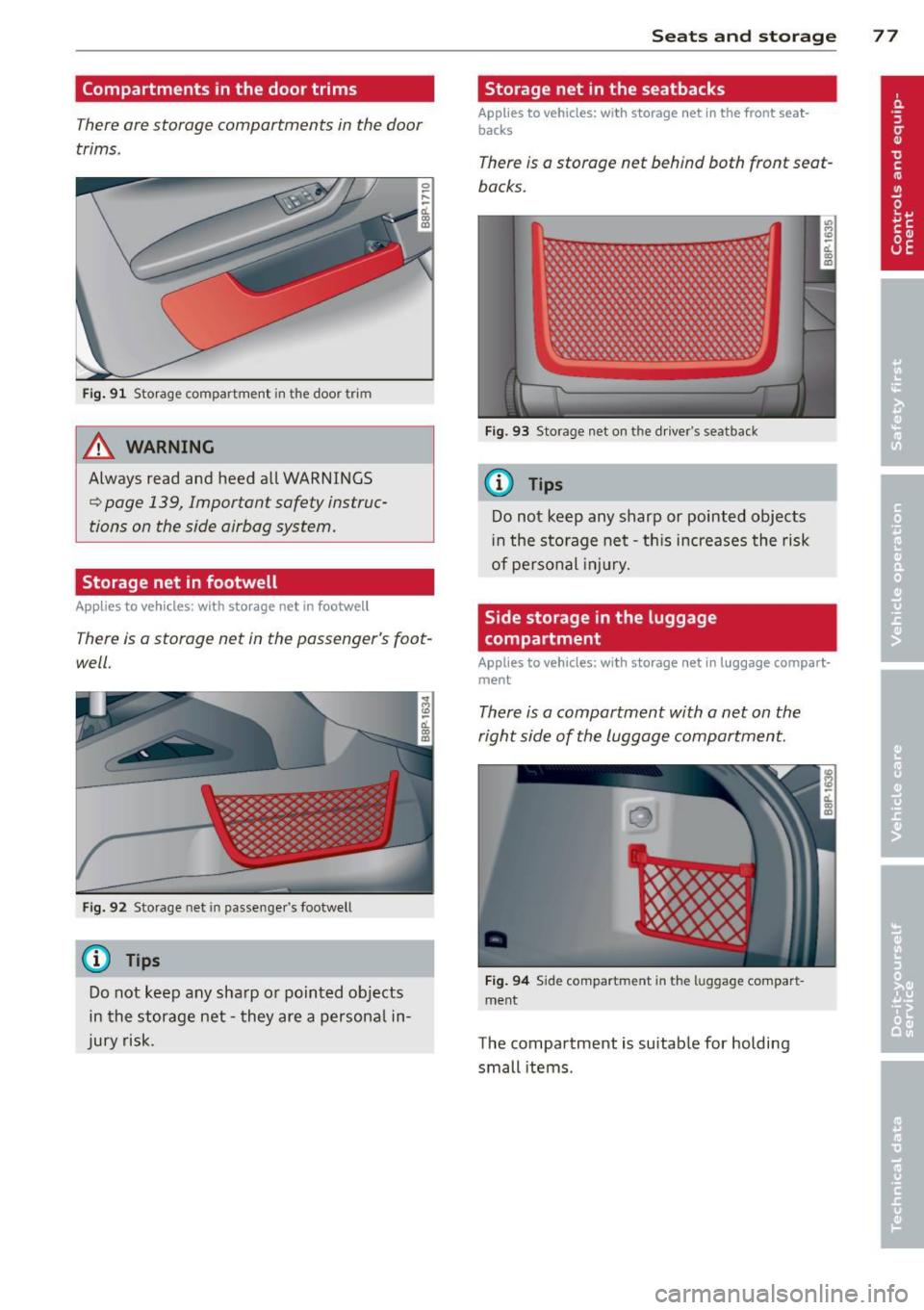
Fig. 91 Storage compartment in the door trim
A WARNING
Always read and heed all WARNINGS
c:::> page 139, Important safety instruc
tions on the side airbag system.
Storage net in footwell
Applies to vehicles: with storage net in footwell
There Is a storage net in the passenger's foot
well.
Fig. 92 Storage net in passenger's footwell
(D Tips
Do not keep any sharp or pointed objects
in the storage net -they are a persona l in
jury risk.
S ea ts a nd s to rage 77
Storage net in the seatbacks
Applies to vehicles: wit h storage net in the front seat
backs
There is a storage net behind both front seat
backs.
Fig. 93 Storage net on th e d river's seatback
(D Tips
Do not keep any sharp or pointed objects
i n the storage net -th is increases the risk
of pe rsonal injury.
Side storage in the luggage
compartment
Applies to vehicles: wit h storage net in luggage compart
ment
There is a compartment with a net on the
right side of the luggage compartment.
Fig . 9 4 Side compartment in the luggage compart
ment
The compartment is suitable for holding
small items .
Page 80 of 280
78 Seats and storage
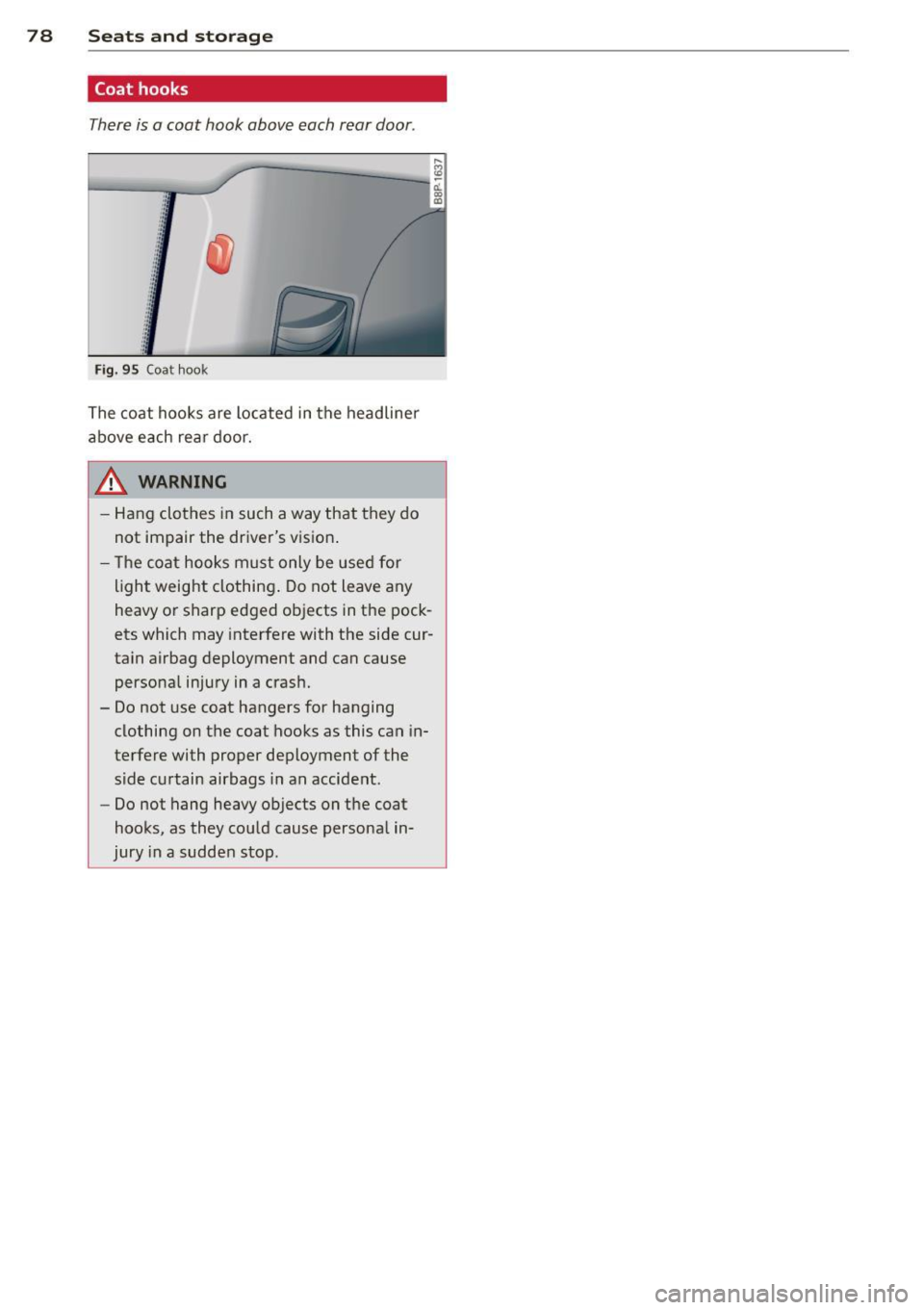
Coat hooks
There is a coat hook above each rear door .
.. ., ' . 'I ., '
Fi g. 9 5 Coa t hook
The coat hooks are located in the headliner
above each rear door.
A WARNING
- Hang clothes in such a way that they do
not impair the driver's vision .
- Th e coat hooks must only be use d for
ligh t weight clothing . Do not leave any
heavy or sharp edged objects in the pock
ets which may interfere with the side cur
tain airbag deployment and can cause
perso na l injury in a cras h.
- Do not use coat hangers for hanging clothing on the coat hooks as this can in
terfere with proper deployment of the side curtain airbags in an accident.
- Do not hang heavy objects on t he coat
hooks, as they could cause persona l in
jury in a sudden stop.
Page 81 of 280

Warm and cold Climate controls
Description
The air conditioner is fully automatic and is
designed to maintain a comfortable and uni
form climate inside the vehicle .
We recommend the following settings:
... Se lect and set a temperature between 64 °F
(+ 22 °C) and 84 °F (+28 °C).
... Press the
!AU TO ! button.
With this setting, you attain maximum com
fort in the least amount of time. Change this
setting, as desired, to meet your personal
needs.
The climate controls are a combination of
heating, ventilation and cooling systems,
which automatically reduce humidity and cool the air inside your vehicle.
The air temperature, air flow and air distribu
tion are automatica lly regulated to achieve
and maintain the desired passenger compart
ment temperature as quickly as possib le.
The system automatically compensates for
changes in the outside temperature and for
the intensity of the sunlight entering the vehi
cle. We recommend you use the
Automatic
mode c> page 81 for year-round comfort.
Please note the following:
Turn on the air conditioner to reduce humidity
in the vehicle. This also p revent the windows
from fogging up .
When the outside temperature is high and the
air is very hum id,
condensation from the
evaporator may drip under the vehicle . This is
normal and does not indicate a leak.
If the outside temperature is low, the fan nor
mally only switches to a h igher speed once
the engine coolant has warmed up sufficient
ly.
Warm and cold 79
T he air conditioner temporari ly switches off
when you drive off from a standstill using full
throttle to save engine power.
T he compressor also switches off if the cool
ant temperature is too high so that the engine
can be adequately cooled under extreme
l oads.
Air pollutants filter
T he air pollutants filter (a combined particle
filter and activated charcoa l filter) reduces or
eliminates outside air pollution (dust, or pol
l en) from entering the vehicle .
T he air pollutants filter must be changed at
the interva ls specified in yo ur Warranty
&
Maintenance booklet, so that the air condi
tioner can properly work.
If you drive your vehicle in an area with high
air pollution, the filter may need to be
changed more frequently than specified in
your Audi Warranty
& Maintenance booklet. If
in doubt, ask your authorized Audi Service Ad
visor for advice.
Energy management
To prevent the battery from being discharged
and to restore the ba lance of energy, compo
nents which require large amounts of energy
are temporarily cut back or switched off c> page 167. Heating systems in particular re
quire a great deal of energy. If you notice, for
example, that the rear window heater is not
heating, then it has been temporarily cut back
o r switched off by
energy management.
These systems are available again as soon as
the energy balance has been restored.
_& WARNING
.-----
Reduced visibility is dangerous and can
cause accidents .
- For safe driving it is very important that
all windows be free of ice, snow and con-
densation.
- Fully familiarize yourself with the proper
use and function of the heating and ven
tilation system and especia lly how to de
fog and defrost the windows.
Page 84 of 280
82 Warm and cold
i Setting the temperature
Separate temperatures can be selected for the driver's and front passenger 's side .
.,. Turn the rotary switch @ on the driver 's
s ide and the rotary switch @ on the pas
senger 's side left(-) or right( +) to control
the temperature
¢ page 80, fig. 96.
There is a time delay before the selected tem perature is reached.
(D Tips
The temperature setting for the driver's
side can be transferred to the passenger's
side
¢ page 81.
~ Defrosting/defogging the windshield
The windshield and side windows are quickly
defrosted or defogged
... Press ~¢ page 80, fig. 96.
... Press ~ again or press !AU TO ! to switch off
the defro ster.
The temperature is automatica lly controlled .
Maximum airflow is primarily blown in
through outlets
(D , @ and ®¢ page 84.
Outlets @ can be opened and closed with the
controls behind them. Outlets @and ® must
be opened so the windows can be defrosted as
quickly as possible.
By pressing ~ and air recirculation are switch
ed off .
~ Manual air recirculation mode
The recirculation mode prevents polluted out
side air from entering the vehicle interior.
Switching on air recirculation
.,. Press the button I"" !¢ page 80, fig. 96
¢,&. .
Switching off air recirculation
.,. Press the button 1...,1 again, or
... Press the !AU TO
I button, or
... Press the~ button . In air recirculation
mode, air is drawn from
the ve hicle interior and recirculated. We rec
ommend that yo u use the manua l air recircu
lation mode under the follow ing cond itions:
When driving thro ugh a tunnel or in a traffic
jam so that exhaust fumes cannot enter the
vehicle interior.
A WARNING
-
Do not use this setting for extended peri
ods of time. The windows cou ld fog up
since no fresh air can enter the vehicle.
If
the windows fog up, press the air r ecircula
tion button again immediately to switch
off the air re cir cula tion function or select
defrost.
~ Automatic air recirculation
If outside air is polluted, an air quality sensor
in the vehicle will automatically switch on the
air recirculation .
Switching on air recirculation
.,. Press ~¢ page 80 , fig . 96 .
Switching off air recirculation
... Press ~ again, or
.,. press !AUTO !, or
.,. press ~.
The automatic air recirculation mode should
normally be left switched on at all times.
T he system is ready to operate approximately
30 seconds after you turn on the ignition or
start the vehicle. Fresh air enters the vehicle
only during this initialization period .
T he air quality sensor for detecting diesel and
gasoline exhaust fumes switches automatica l
l y to air recirculation mode if the outside air is
heavily polluted. The supply of outside air is
closed off.
As soon as the pollution level drops, fresh air
is automatically supplied to the vehicle interi
or again .
Page 85 of 280
The air recirculation opera tes for a maximum
of 12 minutes. If the windows start to fog up
while the air rec irculat ion is on, press~
Unde r certain operating condi tions (fo r exam
p le, if~ or
1-1 are pressed) the air recircu la
tion automatica lly switches off.
If the air con
d itioner is sw itched off, or if the temperature
is below 18 °F (-8 °C), the air recircu lation wi ll
operate only for 12 seconds.
Switching between Fahrenheit and
Centigrade
You can change the temperature display from
°F (Fahrenheit) to °C (Centigrade) and vice
versa.
.,. Hold the l.,s,! button down c:> page 80,
fig.
96.
.,. Turn the rotary switch (d river 's s ide) @ for
3 seconds +.
G;J Air recirculation
The air recirculation prevents exhaust fumes
or oth er pollution from entering the vehicle .
Switching air recirculation on
.,. Press ~ c:> page 80, fig. 96 c:> A
Switching air recirculat ion off
.,. Press~ again, or
.,. press
IAUTOI, or
.,. press~-
I n the ai r recircula tion mode, the air in the
passenger compa rtment is recirculated to
p revent exhaust fumes and ot her pollution
from entering the vehicle. We recommend
that you use the manual air recircu lation un
der the following conditions:
- when d riving through t unnels
- in a traffic jam.
,8. WARNING
Do not use this setting for extended pe ri
ods of time . The windows could fog up
since no fresh a ir can ente r the vehicle . If
Warm and c old 83
the windows fog u p, press the ai r rec ircula
tion button aga in immed iately to sw itch
off the air rec irculation function or select
defrost.
G IB Adjusting the fan speed
The automatically selected fan speed can be
increased or decreased.
.,. Press the[:] or El buttons in the center of
the control panel
c:> page 80, fig. 96 to ad
just the fan speed to your comfort.
T he air conditioning system automatically
r egulates the fa n speed i n respo nse to the in
terior tempe rat ure. However, you can a lso ad
j ust the fan speed ma nually. A line of small
bars in the center display above the fan con
trol buttons w ill re treat or extend to reflect
you r adjustments to the fan speed .
Air distribution
The automatically controlled air distribution
can be changed manually.
You can use the @J , [fil or~ buttons separate
ly or together in combination. To switch back
to the automatic air d istr ibu tion sett ing, ei
the r switch off the b uttons you prev iously se
lected , or press
IAUTOI.
Each of the three buttons has its own spec ific
funct io n (t he reference numbers refer to the
a ir out lets)
c:> page 84, fig. 97.
~ Air directed to the windows
A ll the air is directed to outlets
a ir remains the same .
~ Air directed to the driver /front
passenger
All the a ir is directed to outlets@,@ and ©
in the instrument panel. Air also is directed
th ro ugh the center console in the rear.
~ Air d irected to the footwells
A ll the air is directed to outlets ® and to the
outlets under the front seats.
Page 87 of 280
conditioner automatically se lects the settings
assigned to that key. This way every driver will maintain his/her own persona l settings and
does not have to reset them manually.
(D Tips
If a d ifferent driver uses your key and
changes the air conditioner settings, the
latest adjustments w ill erase and rep lace
the settings you have stored.
mP Rear window defogger
T he rear window defogger clears the rear win
dow of conden sation .
Fig. 98 Swi tch for rea r wi ndow defogger w ith a ir -con ·
d it io nin g
.. Press the QiP switc h to switch the rear win-
dow defogger on and off.
The defogger works on ly with the engine run
n ing. When the defogger is switched on, an
indicator light in the switc h comes on.
The rear w indow defogger switches
off au to
matica lly afte r abo ut 20 m inutes.
@ For the sake of the environment
T ur n the defogger off when the rea r win
dow is clear. When you save elec tricity, you
save fuel.
Additional heater
Applies to vehicles: with diesel engine
.. Switc h the Additional heate r to AUTO .
Vehicles w it h diese l eng ine s are equipped
with an add it ional heate r to warm the interior
of the vehicle mo re q uick ly. The additional
W arm and cold 85
heater switches itse lf on and off automatically
when the o utside temperature is below 50 °F
(10 °C) and the engine is running, depending
o n the coolant temperature , interior tempera
ture and the selected temperature.
Electrically heated
front seats
Applies to vehicles: with electrically heated front seats
With the ignition on , the seat cushion and
backrest of the front seats can be heated.
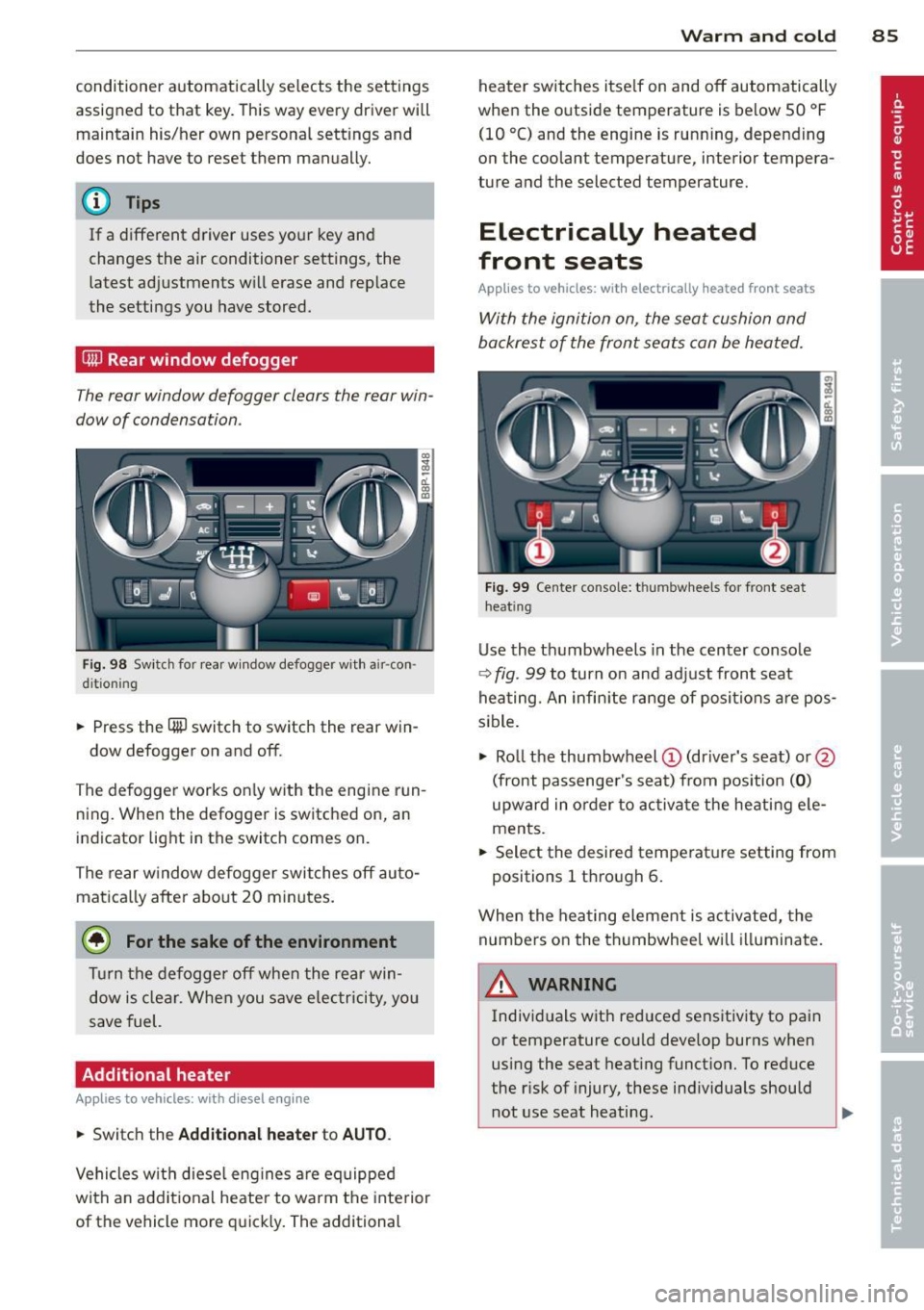
F ig . 99 Ce nter co nsole: t hu m bwhee ls for front seat
h eat ing
Use the t humbwheels in the center conso le
c;:> fig . 99 to turn on and adjust front seat
heating. An infin ite range of positions are pos
sible .
.. Ro ll t he thumbw heel
(D (dr iver's seat) or@
(front passenger's seat) from pos ition
( 0 )
upward in order to activa te the heati ng e le
ments .
.. Select the desired temperat ure setting from
positions 1 t hrough 6.
When the hea ting element is activated, the
numbers on the thumbwheel will illuminate .
& WARNING
Individuals wit h reduced sensitiv ity to pai n
or temperature cou ld deve lop burns when
using the seat heating funct ion. To reduce
the r isk of injury, these ind ividuals should
not use seat heating .
Page 88 of 280
86 Warm and cold
(D Note
To prevent possible damage to the heating
elements, do not kneel on the seats or ap
ply a heavy load to relatively small areas of
the seat.
Engine preheater
Applies to vehicles: with engine p reheate r
Use of the engine pre heater is recommended
when the ambient temperature is below
-5 °F
(-20 °C) .
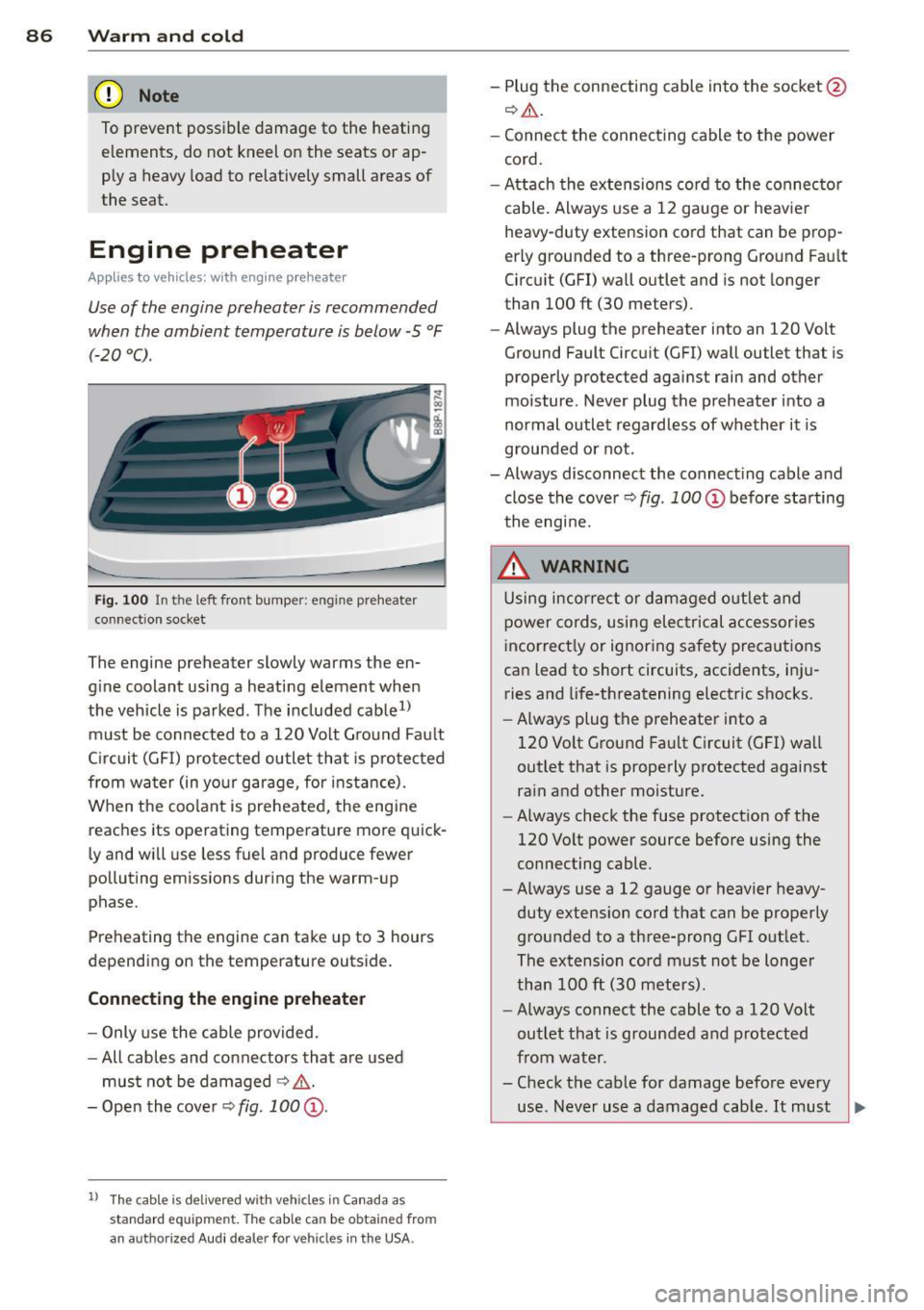
Fig. 100 In t he l eft fron t bump er: en gine preheater
co nn ect ion socket
The engine preheater slowly w arms the en
gine coolant using a heating element when
the vehicle is parked. The included cable
1>
must be connected to a 120 Volt Ground Fault
Circuit (GFI) protected outlet that is protected
from water (in your garage, for instance).
When the coolant is preheated, the engine
reaches its operating temperature more quick
ly and will use less fuel and produce fewer
polluting emissions during the warm-up
phase.
Preheating the engine can take up to 3 hours
depending on the temperature outside.
Connecting the engine preheater
- Only use the cable provided.
-All cables and connectors that are used
must not be damaged
¢ .&.
-Open the cover Q fig. 100 @.
l) Th e cabl e is de live red w it h veh icles i n Canada a s
s tandard e quipmen t. The cable c an be o btain ed fro m
an a uth orize d Au di d ea le r fo r veh icl es in the USA.
- Plug the connecting cable into the socket @
Q.ii_.
-Connect the connecting cable to the power
cord.
- Attach the extensions cord to the connector
cable. Always use a 12 gauge or heavier
heavy -duty extension cord that can be prop
erly grounded to a three-prong Ground Fault
Circuit (GFI) wall outlet and is not longer
than 100
ft (30 meters).
- Always plug the preheate r into an 120 Volt
Ground Fault Circuit (GFI) wall outlet that is
properly protected against rain and other
moisture. Never plug the preheater into a
normal outlet regardless of whether it is
grounded or not .
- Always disconnect the connecting cable and
close the cover
Q fig . 100 @ before starting
the engine.
_&. WARNING
-
Using incorrect or damaged outlet and
power cords, using electrical accessories
incorrectly or ignoring safety precautions
can lead to short circuits, accidents, inju ries and life-threatening electric shocks.
- Always plug the preheater into a
120 Volt Ground Fault Circuit (GFI) wall
outlet that is properly protected against
rain and other moisture.
- Always check the fuse protection of the
120 Volt power source before using the
connecting cable .
- Always use a 12 gauge or heavier heavy
duty extension cord that can be properly
grounded to a three-prong GFI outlet .
The extension cord must not be longer
than 100
ft (30 meters).
- Always connect the cable to a 120 Volt
outlet that is grounded and protected
from water .
- Check the cable for damage before every
use . Never use a damaged cable.
It must ~