ECO mode AUDI S3 2015 User Guide
[x] Cancel search | Manufacturer: AUDI, Model Year: 2015, Model line: S3, Model: AUDI S3 2015Pages: 310, PDF Size: 76.15 MB
Page 87 of 310
M N
0 > co ,...., \!) ..,.,
M ..,., ,....,
Switching off
Applies to vehicles: with cruise contro l system
Temp orar y de acti vation
.. Press the brake pedal, or
.. Press the lever into pos ition @ (not clicked
i nto place) ~
page 84, fig. 74, or
Switchin g off completel y
.. Press the lever into pos ition @ (clicked into
place), or
.. Switch the ign ition off .
The speed you stored will be retained if the
cru ise control has been sw itched off tempora
rily. To resume the stored speed, release the
brake pedal and pull the lever into posit ion
@ .
The stored speed is erased when the cru ise
control is switched off completely or the ign i
tion is sw itched off .
.8, WARNING
You should only resume the stored speed if
it is not too h igh fo r exis ting traffic condi
tions. Otherwise you risk an accident .
@ Tips
-If the brakes become too heated while
driving, the cruise cont ro l switches off .
If
this happens while dr iv ing downh ill, you
can re lieve the brakes by shifting into a
l ower gear .
- When the cr uise control is act ivated, ESC
spo rt mode cannot be switched on.
Dri vin g 85
•
Page 96 of 310
94 Audi pre sen se
Audi pre sense
Introduction
Applies to vehicles: with Audi pre sense basic or Audi pre
sense front
Within the limits of the system, pre sense ba
sic and pre sense front can initiate steps to
protect vehicle occupants in certain danger
ous situations.
Critical driving situations can be recognized by
the pre sense front v ia a network of differe nt
vehicle systems and can take steps to prepare
the vehicle occupants for a potentia l collision.
The pre sense front works with a radar sensor
and a video came ra* .
It also functions within
the limits of the system when adapt ive cruise
control * is switched off.
General information
General information
App lies to vehicles: with Audi pre sense front or Audi
adaptive cruise control
A WARNING
Also follow the general information found
on
~ page 86, General information.
Audi pre sense basic
Descript ion
Applies to vehicles: with Audi pre sense basic
The function of the pre sense basic is activat
ed at a speed of 20 mph (30 km/h) or higher.
The following functions can be triggered un
der certain conditions within the limits of the
system:
- T ensioning of the safety be lts (for example,
during heavy braking) : The front safety belts
have reversib le be lt pretensioners. If a colli
sion does not occur, the safety belts loosen
s light ly and are ready to trigger again .
- Closing the windows and the sunroof* (for
example, when over- or understeering): The
windows and the sunroof" close until there is only a small gap open. Audi drive select:
The dep loyment time is
adapted in dynamic mode.
A WARNING
-The pre sense basic cannot overcome natu- ral phys ica l laws.
It is a system designed to
assist and it cannot prevent a coll is ion. Do
not let the increased safety provided
tempt you into taking risks. This could in
crease your r isk of a collis ion.
- The system can deploy incorrectly due to system-specific limits .
(D Tips
-Certa in pre sense bas ic functions switch
off when ESC is switched off (sport
mode) or when dr iving in reverse .
- The pre sense bas ic functions may not be
available if there is a ma lfunction in the
ESC system or the a irbag control mod
ule .
- Note that with pre sense bas ic, the rever
sible safety belt pretensioner on the
front passenger 's side deactivates when
the front passenger's a irbag is deactivat
ed.
Audi pre sense front
Description
Applies to vehicles: with Audi pre sense front or Audi
adapt ive cru ise control
Pre sense front informs yo u if the distance to
the vehicle ahead falls below the safe distance
for an extended period of time. It can warn of a possible collision and initiate braking ma
neuvers, within the limits of the system .
When detected in time, the system can assess
dangerous situat ions where an object ahead
brakes suddenly or if your own veh icle is trav
eling at a high speed and approaching an ob
ject that is moving more slow ly . If detection is
not possible, then p re sense fro nt does not re
act.
Page 108 of 310
106 Audi drive select
Audi drive select
Driving settings
Introduction
Applies to vehicles: with Audi drive select
Aud i d rive select makes it possibl e to expe ri
e nce diffe ren t types of vehi cle sett ings in o ne
ve hicl e. The dr ive r can se lect from three
c om
fort , auto and dynamic modes using the t.'i:.:1
button in the center conso le or the MM I to
switch between a sporty an d a comfortable
driving mode, for examp le. In the
individual *
mode, the sett ings can be ad justed to your
pe rsonal preferences. This makes it poss ib le
to comb ine settings such as a sporty eng ine
tuni ng with lig ht steer ing.
A WARNING ,_
Using Audi dr ive se lect i ncorrect ly can lead
t o co llisions, othe r accidents an d serio us
inju ries.
Description
Applies to vehicles: with Audi drive select
The vehicle setup in each mode depends on
the vehicle's features. However, t he engine
and steering are always affected .
Engine and automatic transmission
Depending on the m ode, the e ng ine and au to
ma tic transm iss ion * respond more quickly or
in a more ba la nce d manner to acce lerator
pedal movements.
Adaptive dampers (Audi magnetic ride)*
T he adaptive dampers use senso rs to reco rd
in fo rma tion rega rding s teering moveme nts,
b rak ing and a cce le ra ti on ope rat ions by t he
d river, road s urface, driving spee d, an d load.
W ith Aud i drive se lect yo u can adjust the
adaptive dampe rs sporty (dynamic), comfort
ab le (comfort) or balanced (auto).
Steering
T he stee ring ad apts in te rms o f stee ring assis
tance. There are different modes
~ page 10 7.
Indirect stee ring that moves eas ily as in com -f
ort mode is es pec ially suited to long drives
o n a hig hway. The dynam ic mode provi des
spo rty, direct steer ing.
F o r vehicles wi th progressive stee ring * the
stee ring pe rformance is mo re agile.
Cornering light*
T he co rne ring light adjusts when driv ing on
c u rves a t speeds between 6 mph ( 10 km/h)
and 68 mph (1 10 km/h). The pivo ting act io n
and the light ing a re a lso adapted to the
mode.
Adaptive cruise control*
T he be hav io r whe n accelerating can be adjust
ed from comfor tab le to spor ty, depend ing on
t h e Au di drive sele ct mo de. Ad aptive cr uise
control also responds to the driving behavior
of the vehicle ahead in a more co nservative or
spo rty manne r.
(D Tips
In some mo dels, the maxim um vehicle
sp eed can on ly be reache d in t he a uto and
d ynam ic modes.
Page 111 of 310
M N
0 > co ,...., \!) 1.1"1
M 1.1"1 ,....,
Automatic
transmission S tronic-transmission
Introduction
Applies to vehicles: with S tronic transmiss ion
Your vehicle is equipped with an electronical
l y -controlled DSG transmission called S tronic.
T wo independent clutches transfer the power
between the engine and transmission. It al
lows the vehicle to accelerate without a no
ticeable interruption in traction .
T he transmission upshifts or downshifts auto
matically. The driving style continuously influ
ences the selection of the driving program .
When a
moderate driving style is used, the
transmission selects the most econom ica l
driving mode. The transmission upshifts at a
lower RPM and downshifts at a higher RPM to
improve fuel effic iency .
T he transmission switches to a sporty mode
after a kick-down or when the driver uses a
sporty driving style characterized by quick ac
celerator pedal movements, heavy accelera
tion, frequent changes in speed and traveling
at the maximum speed.
If desired, the driver can also select the gears
manually (tiptronic mode) r=> page 114,
Shifting manually (tiptronic mode) .
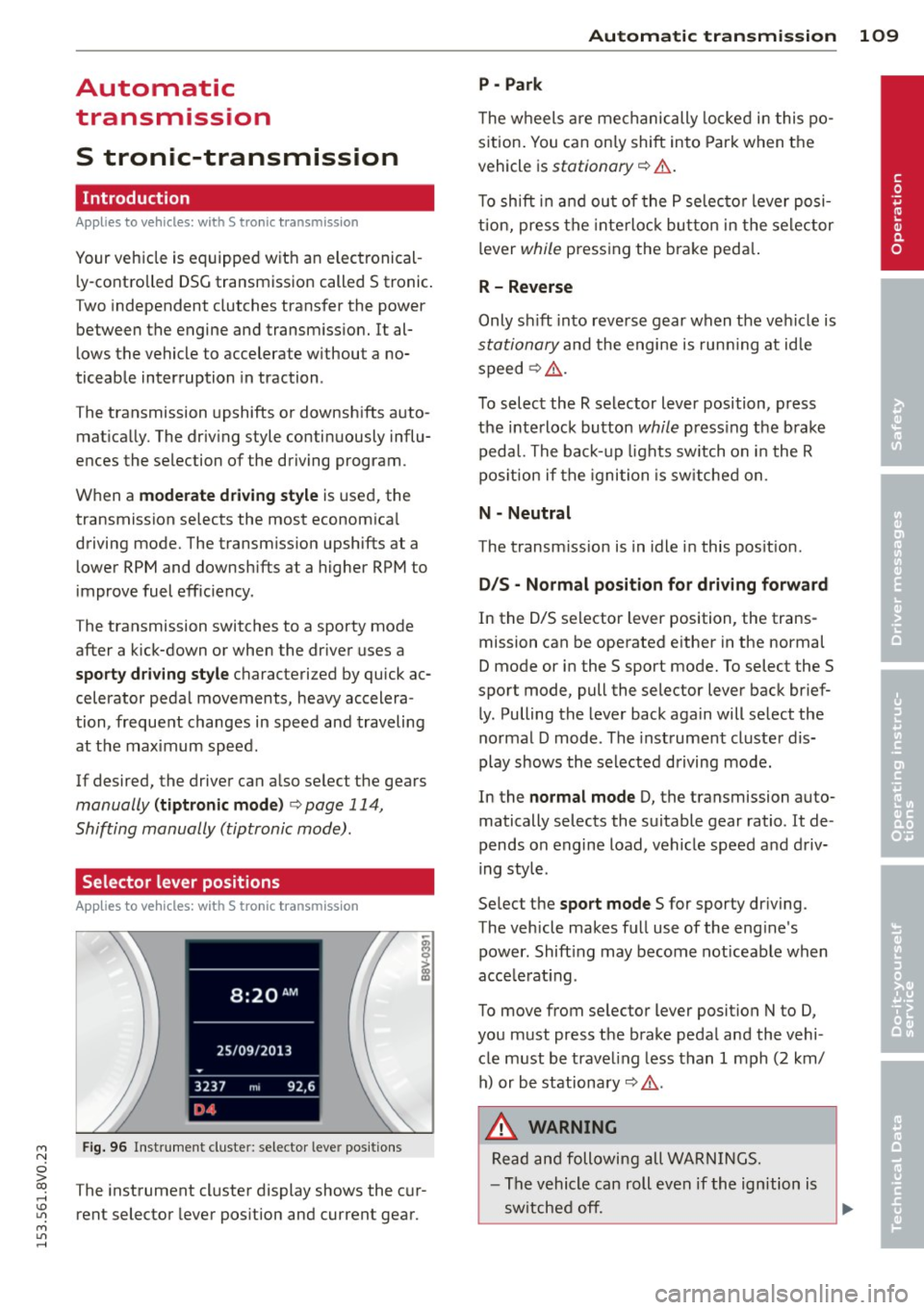
Selector lever positions
Applies to vehicles: with S tro nic transmission
Fig. 96 Instrument cluster: selector leve r positions
The instrument cluster display shows the cur
rent selector lever position and current gear.
Automatic transmission 109
P -Park
The wheels are mechanically locked in this po
sition. You can only shift into Park when the
vehicle is
stationary r=> &..
To shift in and out of the P selector lever posi
tion, press the interlock button in the selector
lever
while pressing the brake peda l.
R- Reverse
Only shift into reverse gear when the vehicle is
stationary and the engine is running at idle
speed
r=> &. .
To select the R selector lever position, press
the interlock button
while press ing the brake
pedal. The back-up lights sw itch on in the R
pos ition if the ignition is switched on .
N -Neutral
The transm iss ion is in idle in this position .
DIS -Normal position for driving forward
In the D/S selector lever position , the trans
mission can be operated either in the normal
D mode or in the S sport mode. To select the S
spor t mode, pull the selector lever back brief
ly. Pulling the lever back again will select the
normal D mode . The instrument cluster dis
play shows the selected driving mode.
In the
normal mode D, the transmission auto
matically selects the suitable gear ratio . It de
pends on engine load, vehicle speed and driv
ing style .
Select the
sport mode S for sporty driving .
The vehicle makes full use of the eng ine's
power. Shift ing may become noticeable when
acce lerat ing.
To move from selector lever position N to D,
you must press the brake pedal and the vehi cle must be traveling less than 1 mph (2 km/
h) or be stationary~ &.-
.&_ WARNING
Read and following all WARNINGS.
- The vehicle can roll even if the ignition is
switched off.
~
•
Page 114 of 310
112 Automatic tran smi ssio n
Stopp ing /p ark ing
If the selector lever is not in the P position
when you open the driver's door, the vehicle
could ro ll. In vehicles with a convenience key*,
the following message appears:
Sh ift to P,
othe rwise veh icle c an roll a way. Door s do not
lock if le ver is not in P.
You will also hear a
warn ing tone.
"' Press and ho ld the brake pedal¢.&_ .
"' Set the parking brake.
"'Se lect the P selector lever pos ition.
St opp ing on an incline
• Always press the brake pedal to hold the ve
hicle in p lace and prevent it from "rolling
back"
¢ .&_ . Do n ot try to prevent the vehi
cle from "roll ing back" when a gear is en
gaged by increasing the eng ine speed
¢ (D.
Starting on an inclin e in vehicl es w it h out
Hill Hold *
"'Set the parking brake.
"' With the driving gear selected, press the ac
celerator pedal carefully . The parking brake
will release automat ically if your safety belt
is fastened.
St arting on an incline i n vehicle s with Hill
Hold*
"' With the driving gear selected, remove your
foot from the brake pedal and press the ac cele rato r pedal ¢
page 82, Hill hold.
Under certain circumstances, (such as driving
in the mountains or towing a tra iler), it may
be usefu l to sw itch temporarily to the manual
shift p rogram in order to adjust the gears to
the dr iving condit ions by hand
¢ page 114.
When parking on a level surface, simply place
the selector lever in the P pos ition. On in
clines , activate the parking bra ke first and
then move the selector lever to the P pos it ion
¢ page 80 . This prevents the locking mecha
nism from being loaded too heavi ly and will
make it easier to move the selector lever out
of the P position.
A WARNING
- The vehicle can roll even when the en
g ine is switched off.
- Unintended vehicle movement can lead
to serious injuries .
- Never leave your vehicle with the engine running while in gear. If you must leave
your veh icle when the engine is running,
set the parking brake and move these
lector lever to the P position .
- Power is still transferred to the wheels
when the engine is runn ing at idle. To
prevent the vehicle from "c reeping", you
must keep you r foot on the brake when
the engine is running and the selector lever is in the D, Sor R position or "tip
tronic" mode is selected . -
-Do not inadvertently press the accelera
tor peda l when the vehicle is stationary.
Otherwise the vehicle wi ll start to move
immediate ly, even if the parking brake is
set. Th is could result in a crash.
- Do not press the accelerator pedal when
changing the se lector lever position
while the veh icle is stationary and the
engine is running.
- Never engage the R or P selector level positions while dr iv ing. It could cause a
crash .
- Before driving down a steep slope, re
duce your speed and shift into a lower
gear with "tiptronic" .
- Do not ride the brakes or press the brake
pedal too often or too long when driving
downhill . Constant braking causes the
brakes to overheat and substantially re
duces braking pe rformance, increases
b rak ing distan ce or causes complete fa il
ure of the brake system.
- I f you must stop on an in cl ine, always
hold the vehicle i n place with the foot
brake or park ing brake to p revent it from
rolling back .
- Never hold the vehicle on an incline with
a slipping clutch . The clutch opens auto
matica lly when it becomes too hot from
Page 116 of 310
114 Automatic transmission
Shifting manually (tiptronic mode)
Applies to vehicles: with S tron ic t ransmiss ion/ s hift pa d
d les
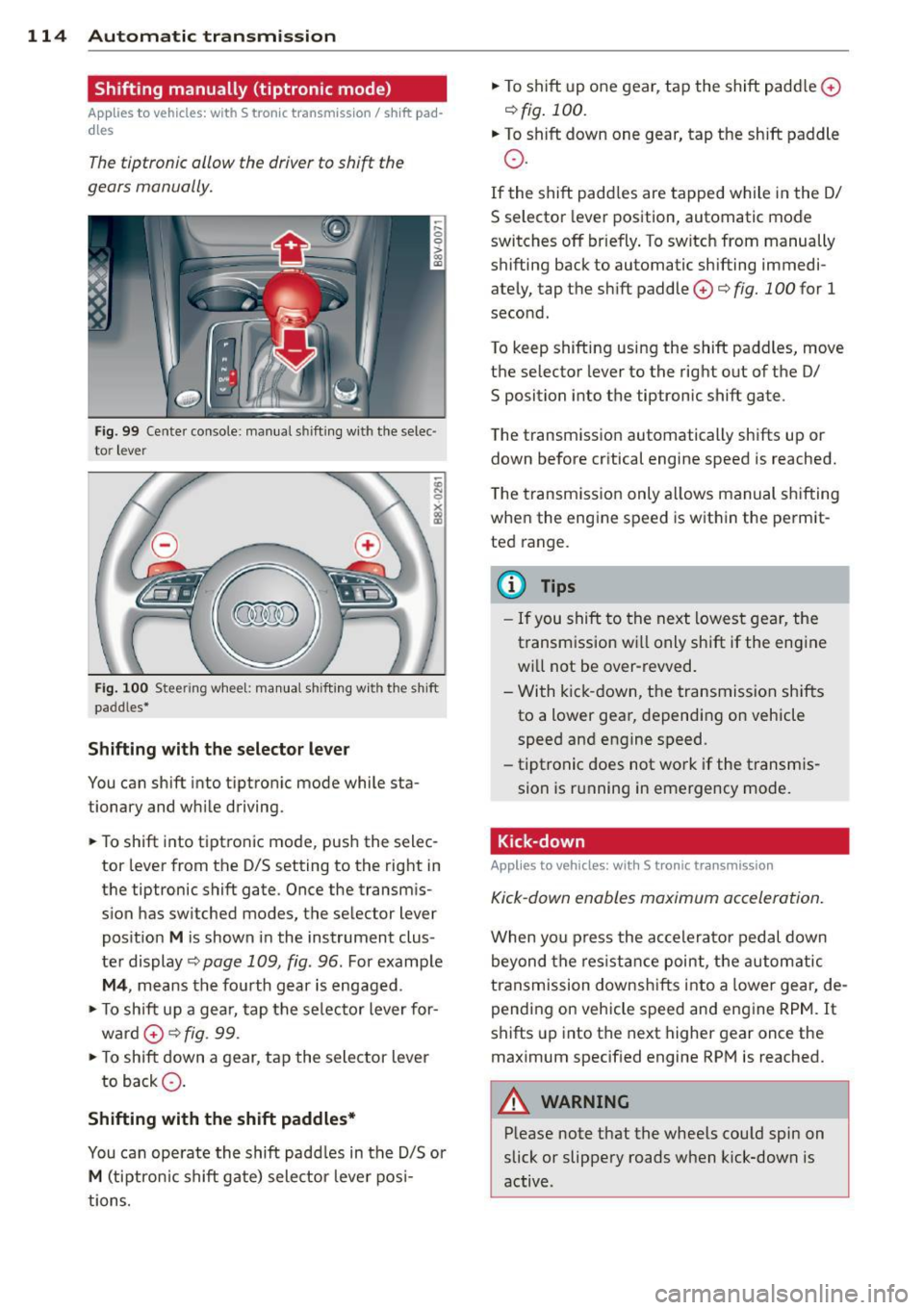
The tiptronic allow the driver to shift the
gears manually.
F ig. 99 Cente r console : manual shifting with the selec·
tor lever
Fi g. 100 Steer ing whee l: manua l sh ift ing w ith the s hift
paddles•
Shifting with the selector lever
You can shift into tiptronic mode while sta
tionary and while driving.
.. To shift into tiptronic mode, pus h the selec
tor lever from the D/S setting to the right in
the tiptronic shift gate . Once the transmis
s ion has switched modes, the selector lever
pos it ion
M is shown in the instrument clus
ter display
c:> page 109, fig. 96. For example
M4, means the fourth gear is engaged.
.. To shift up a gea r, tap the selector lever for
ward
0 c:>fig. 99.
.. To shift down a gear, tap the selector lever
to back Q.
Shifting with the shift paddles*
You can operate the shift paddles in the D/S or
M (tiptronic shift gate) selector lever posi
tions. ..
To shift up one gear, tap the shift paddle
0
c:> fig. 100.
.. To shift down one gear, tap the shift paddle
o.
If the shift padd les are tapped while in the D/
S selector lever position, automatic mode
switches
off briefly . To switch from manually
shifting back to automatic sh ifting immedi
ately, tap the shift paddle
0 c:> fig. 100 for 1
second.
To keep shifting using the shift paddles, move
the selector lever to the rig ht out of the D/
S position into the tiptronic shift gate.
The transmission automatically shifts up or
down before critical engine speed is reached.
T he transmission only allows manual shifting
when the engine speed is within the permit
ted range.
(D Tips
- If you shift to the next lowest gear, the
transmission w ill only shift if the engine
will not be over-revved.
- With kick-down, the transmission shifts
to a lower gear, depending on vehicle
speed and engine speed.
- tiptronic does not work if the transmis
sion is run ning in emergency mode.
· Kick-down
App lies to vehicles: wit h S t ronic tra nsmi ssio n
Kick-down enables maximum acceleration.
When yo u press the accele rator pedal down
beyond the resistance point, the automatic
transmission downshifts into a lower gear, de
pending on vehicle speed and engine RPM. It
shifts up into the next higher gear once the
maximum specified engine RPM is reached.
A WARNING
-Please note that the wheels could spin on
slick or slippery roads when kick-down is
active.
Page 117 of 310
M N
ci > co ,...., \!) ..,.,
M ..,., ,....,
Launch Control-Program
App lies to vehicles: with launch control
The Launch Control Program enables maxi
mum acceleration.
Requirement : The engine must be at operat
ing temperature and the steering wheel must
not be turned .
.. With the engine running, press the
!.$OFFI
button briefly one time 1) .
.. Pull the selector lever back out of the 0/S
position briefly to select the S position, or
press it toward the right into the t ipt ronic
pos ition or select the
d ynamic driv ing mode
i n drive select*
~ page 106.
.. Press the brake peda l firmly with your left
foot and hold it all the way down for at least
1 second.
.. At the same time, press the gas peda l all the
way down with your right foot unti l the en
gine reaches and stays at a high RPM level.
.. Remove your left foot from the brake.
A WARNING
- Always adapt your driving to the traffic
flow.
- Only use Launch Control when road and
t raff ic conditions a llow it and other driv
ers wi ll not be endangered or impacted
by yo ur driving and the veh icle's acceler
a tion.
- Please note tha t the dr ive whee ls can
spin and the vehicle can brea k away
when sport mode is switched on, espe
c ially when the road is sl ippery.
- Once the vehicle has started moving,
press the
I.$ OFF I button br iefly to turn
the sport mode off.
(j) Tips
- The transm ission tempe rat ure may in
crease significantly after using the
l ) In vehicles with a dr iver info rmat ion system, an ESC
light in the in stru m ent cl us ter stays on contin uo usly
and the m essage
Stabilizatio n cont rol (ESC): spor t.
W arning! Restricted stability
appears temporarily.
Automa tic tran sm iss ion 115
Launch Control Program . If that hap
pens, the program may not be availab le
for a few m inutes. It will be ava ilable
again after a cool-down per iod.
- When accelerating using the Launch
Contro l Program, all vehicle parts are
subject to heavy loads. Th is can lead to
increased wear .
Emergency mode
Applies to vehicles: with S tronic transm ission
In the event of a system malfunction, there is
an emergency program.
If all of the selector lever positions are high
li ghted with a light backgro und in the instru
ment cluster d isplay, there is a system mal
funct ion and the S tronic transmission is run
ning in the emergency program . The vehicle
can still be driven in emergency mode, but on
ly w ith reduced speed and not in all gears. In
some cases, the veh icle
c ann ot driv e in re
v e rs e .
(D Note
If the transmission runs in emergency
mode, drive to your author ized Audi dealer
or q ua lified repa ir facil ity immed iate ly to
have the ma lf u nction corrected.
Transmission malfunction
• Tran smiss ion malfuncti on! Please stop
the vehicle and select P
T here is a malfunction in the transmiss ion .
Park the vehicle securely and do not continue
driv ing. See an authorized Audi dealer or au
thorized Audi Service Facility for assistance.
• Tran smi ssion overh eatin g! Plea se stop
the vehicle!
The transm iss io n is too hot and can become
damaged . Stop and let the transmission cool .,.
•
Page 118 of 310
116 Automatic transmission
with the eng ine runn ing (a t id le) in the P se
lector lever position . Then the indicator light
and the message turn off, drive to an author
ized A udi dealer or qualified repair facility im
mediately to have the malfunct ion corrected.
If the indicator lig ht and the dr ive r message
do not tur n off, do not cont inue dr iv ing. See
a n author ized Audi d eal er or author ized A udi
S ervi ce Fa cili ty for a ssis tance.
Di] Transmiss ion malfunction: you can con
tinue driving
Drive to an autho rized Aud i dea le r or a uthor
ized A udi Service Facility immed iate ly to have
the ma lf u nction corrected .
Di] Transmission malfunction: no reverse
gear (you can continue driving)
D rive to an authorized Aud i dea le r or a uthor
ized A udi Service Facility immediate ly to have
the ma lf u nct ion co rrected .
Di] Transmi ssion malfunction: You can con
tinue dri ving in D until engine off
Drive the ve hicle away from mov ing traff ic and
p ar k. See an au thori zed A udi d ealer or author
iz ed A udi Service F acility for assis tance .
Di] Transmi ssion overheating! Please adapt
driving style
Continue driving moderate ly. When t he in di
cato r ligh t turns off, you can continue dr iving
normally .
Di] Transmission : Please press brake pedal
and select gear again
If t h e tra nsmission mal functions beca use the
temperature is too h igh , a message appears
when t he transmission is coo led.
Selector lever emergency release
Applies to vehicles: with S tronic transmission
If the vehicle 's power supply fails, the selec
tor lever can b e released in an emergency.
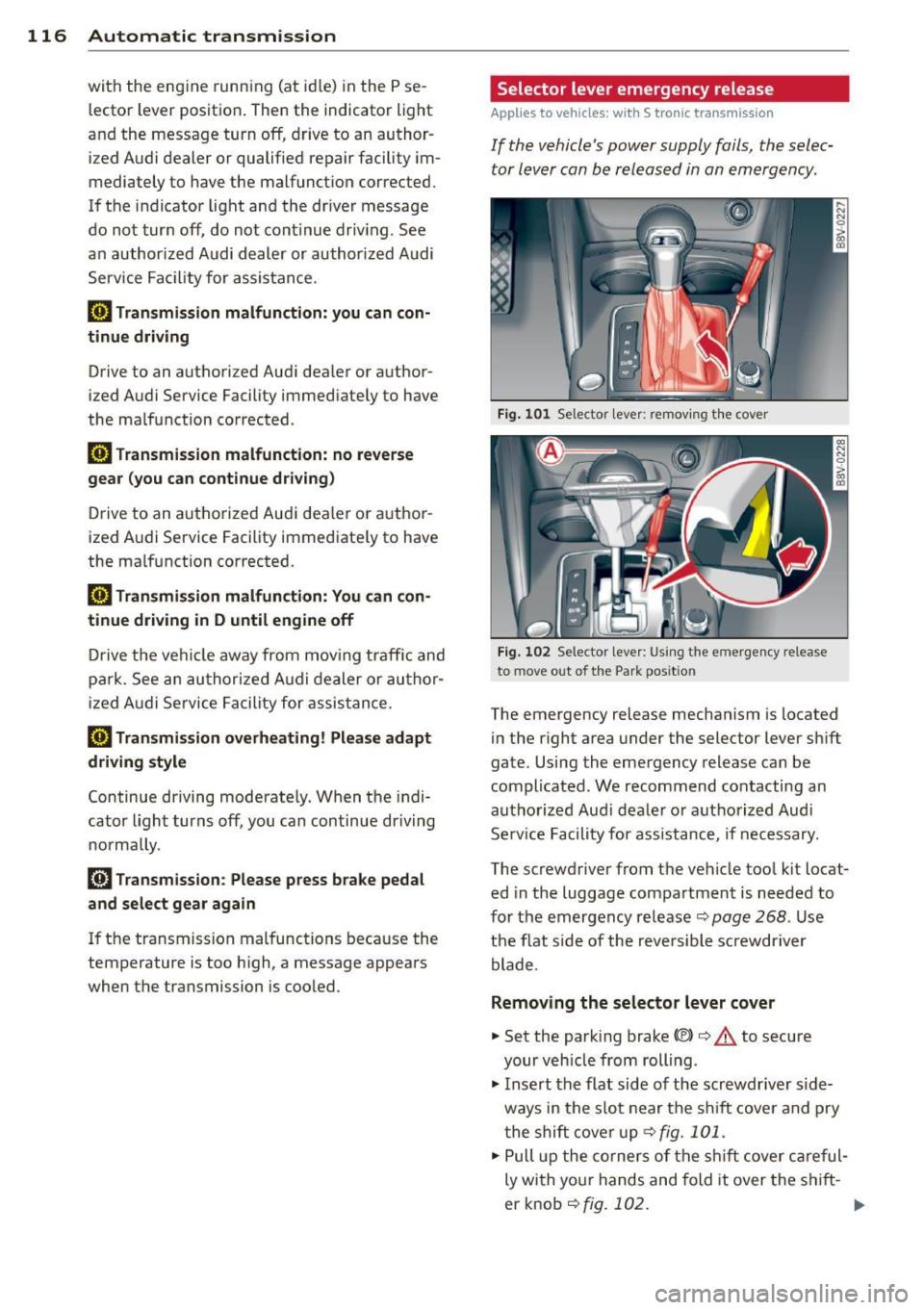
Fig. 101 Se lector leve r: remov ing t he cover
Fig. 10 2 Selector leve r: Us ing the emergency re lease
to move out of t he Park pos itio n
The emergency release mechanism is located
in the right a rea under the selector lever sh ift
gate. Using the eme rgency release ca n be
complicated. We recommend contacting an
au tho rize d Audi d eale r o r a uth o rized Aud i
Se rv ice Facility for assistance, if necessary.
The sc rewd river from t he ve hicle too l kit locat
ed in the luggage compartmen t is needed to
fo r the emergency release ¢ page
268 . Use
the f lat s ide of the reve rsible screwdriver
blade .
Removing the selector lever cover
"'Set the park ing brake «el)¢&. to secure
your veh icle from rolling .
"' Insert the flat side o f the scr ewdr ive r side
ways in the s lot near the s hift cove r and pry
t he shi ft cove r up <=> fig.
101 .
.,. Pull up the co rner s of the shift c over car eful
ly wi th yo ur hands and fold it over the s hift-
er knob ¢fig.
10 2. ..,.
Page 162 of 310
160 Airbag system
Repair, care and disposal of the airbags
Parts of the airbag system are installed at
many different places on your Audi. Installing,
removing, servicing or repairing a part in an
area of the vehicle can damage a part of an
airbag system and prevent that system from
working properly in a collision.
There are some important things you have to know to make sure that the effectiveness of
the system will not be impaired and that dis
carded components do not cause injury or pol lute the environment.
A WARNING
Improper care, servicing and repair proce
dures can increase the risk of personal in
jury and death by preventing an airbag from deploying when needed or deploying
an airbag unexpectedly:
- Never cover, obstruct, or change the
steering wheel horn pad or airbag cover
or the instrument panel or modify them
in any way.
- Never attach any objects such as cup
holders or telephone mountings to the
surfaces covering the airbag units.
- For cleaning the horn pad or instrument
panel, use only a soft, dry cloth or one
moistened with plain water. Solvents or
cleaners could damage the airbag cover
or change the stiffness or strength of the material so that the airbag cannot de
ploy and protect properly.
- Never repair, adjust, or change any parts
of the airbag system.
- All work on the steering wheel, instru
ment panel, front seats or electrical sys
tem (including the installation of audio
equipment, cellular telephones and CB
radios, etc .) must be performed by a
qualified technician who has the training
and special equipment necessary.
- For any work on the airbag system, we
strongly recommend that you see your
authorized Audi dealer or qualified work
shop. -
Never modify the front bumper or parts
of the vehicle body.
- Always make sure that the side airbag
can inflate without interference:
- Never install seat covers or replace
ment upholstery over the front seat
backs that have not been specifically
approved by Audi.
- Never use additional seat cushions that
cover the areas where the side airbags
inflate.
- Damage to the original seat covers or
to the seam in the area of the side air
bag module must always be repaired
immediately by an authorized Audi
dealer.
- The airbag system can deploy only once.
After an airbag has been deployed, it must be replaced with new replacement
parts designed and approved especially
for your Audi model version. Replace
ment of complete airbag systems or air
bag components must be performed by
qualified workshops only . Make sure that
any airbag service action is entered in
your Audi Warranty
& Maintenance book
let under
AIRBAG REPLACEMENT RE
CORD.
- For safety reasons in severe accidents,
the alternator and starter are separated
from the vehicle battery with a pyrotech nic circuit interrupter.
- Work on the pyrotechnic circuit inter
rupter must only be performed by a
qualified technicians who have the ex perience, information and special tools
necessary to perform the work safely.
- If the vehicle or the circuit interrupter
is scrapped, all applicable safety pre
cautions must be followed.
@) For the sake of the environment
Undeployed airbag modules and preten
sioners might be classified as Perchlorate
Material -special handling may apply, see
Page 174 of 310
172 Child Saf ety
c::> page 144, Airbag system and
c::> page 170 , Important things to
know.
Always rep lace child restraints that were
installed in a vehicle during a crash . Dam
age to a child restraint that is not visible
could cause it to fail in another collision
situation.
Advanced front airbag system and children
Your veh icle is eq uipped with a front "Ad
vanced Airbag System" in compliance with
United States Federal Motor Vehicle Safety
Standard ( FMVSS) 208 as applicab le at the
time your vehicle was manufactured.
The Advanced Airbag system in your vehicle has been certified to meet the " low -risk" re
quirements for 3 and 6 year-o ld children on
the passenger side and small adults on the
driver side. The low risk deployment criter ia
are intended to reduce the risk of injury
through interaction with the a irbag that can
occur, for example, by be ing too close to the
steering wheel and instrument panel when
the airbag inflates. In addi tion, the system
h as been certified to comply w ith the "sup
pression" requirements of the Sa fety Stand
ard, to turn
off the front airbag for infants up
to 12 months who a re restrained on the front
passenger seat in chi ld restraints that are list
ed in the Standard.
Even though yo ur vehicle is equipped with an
Advanced Airbag system, all chi ldren, espe
cially those 12 years and younger, shou ld al
ways ride in the back seat properly restrained
for the ir age and s ize . The a irbag on the pas
senger side makes the front seat a potentially
dangerous place for a child to ride. The front
seat is not the safest place fo r a ch ild in a fo r
ward-facing child safety seat. It can be a ve ry
dangerous place for an infan t or a large r ch ild
in a rearward- facing seat. The vehicle's Advanced Airbag System has a
capacitive passenger detection system i n the
front passenger seat cush ion that can detect
the presence of a baby or a ch ild in a child re
stra int system on this seat.
The capacitive passenger detection system registers the changes that result in an electri
ca l fie ld when a chi ld, a child restra int, and a
baby blanket are on the front passenger seat.
The change in the measured capac itance due
to the p resence of a child, a ch ild restraint,
and a baby blanket on the front passenge r
seat is related to the chi ld restraint system
rest ing o n the seat. The meas ured capa cit an ce
of a child restrain t system varies depend ing
on the type of system and specific make and
model.
T he electrical c apa citan ce of the various
types, makes, and models of child restraints
specified by the U .S . Nationa l Highway Traffic
Safety Administration (NH TSA) in the re levant
safety standard are stored in the Advanced
Airbag System contro l unit together with the
capacitances typical of infants and a 1-year
o ld child . When a child restraint is used on the
front passenger seat with a typical 1 year-old
infa nt, the Advanced Airbag System compa res
the capacitance measu red by the capacitive
passenge r de tection system wi th the data
stored in the electron ic cont ro l unit . Child restraints and Advanced front
airbag system
Regardless of the c hild restra int that you use,
make sure that it has been cert ified to meet
U nited States Federal Motor Vehicle Safety
Standards and has been ce rtified by its manu
factu rer for use with an airbag. A lways be sure
t h at the c hild restr aint is properly installed at
one of the rear seating posi tions. If in excep
t iona l circumstances yo u must use it on the
front passenger seat, carefully read a ll of the
information on child sa fety and Advanced Air
bags and heed all of the applicable WARN
INGS . Make certain that the c hild and chi ld re
stra int are correctly recognized by the capac i
t ive passenger detection system in the front .,.