engine AUDI S3 2015 User Guide
[x] Cancel search | Manufacturer: AUDI, Model Year: 2015, Model line: S3, Model: AUDI S3 2015Pages: 310, PDF Size: 76.15 MB
Page 22 of 310
20 Instruments and indicator lamps
ltJ;):t :1;034 ( USA model s) / ml (Canada mod
els) Caution : Vehicle parked too steep
When t he i nd ic ator light blinks and th is mes
sage appears, t here is no t eno ugh braking
power to keep the ve hicl e from rolling . The
b rakes have overheate d. The vehicle cou ld roll
away even on a small incline .
ltJ;)i:j;lJ34 ( USA model s) / ml (Canada mod
els) Parking brake is applied
I f t his message appea rs, press t he b rake pedal
fi rst and then re lease the par king brake if nec
essa ry.
@ Tips
F or addit ional info rmation on the pa rk ing
brak e, refer t o¢
page 80.
...L Cooling system
• Switch off engine and check coolant lev
el!
T he coolant leve l is too low or the coolant
temper ature is too high .
D o not cont inue d riving and swi tc h the eng ine
o ff. C hec k the coolant leve l¢
page 225 .
-If the coolant leve l is too low, add coolant
<=> page 226 . O nly con tinue driv ing o nce the
indicator light turns off.
- If the coolant leve l is correct, the problem
may be ca used by a ma lf u nction in the radia
tor fan . D o not cont inue driv ing . See an au
t h o rized Aud i dea le r or a uth o riz ed Aud i
Se rv ic e Fa cili ty for ass ist ance.
• Coolant temperature too high! Let engine
run with vehicle stationary
Let the eng ine run at id le for a few minutes to
coo l down .
A WARNING
- Never op en the hood if you ca n se e or
h ear st ea m or coo la nt escaping from the
eng ine com pa rtm ent. This in cre ases t he
r isk of burn s. Wai t unti l you no longe r
see o r hear steam o r cool ant esca ping.
-
'
- The engine compa rtment in any vehicle
can be a dangerous area. Stop the engine
a nd allow it to cool befo re working in the
e ng ine compartment. A lways foll ow the
info rmation found in
~ page 217, Work
ing in th e engin e compartm ent.
(D Note
Do n ot cont inue dr iv ing if the . indicato r
lig ht tur ns on -this inc reases the r isk o f
engine damage.
"1::::7: Engine oil pressure
• Switch off engine! Oil pres sure too low
St op t he engine and do not cont inue drivi ng.
Check the eng ine oi l level
r=> page 223 .
- If the engine o il level is too low, add eng ine
oil
r=> page 221. Only co nti nu e driving once
the indicator light turns off.
- If the engine o il level is co rrect and the indi
cator light still turns on, turn the eng ine off
and do not cont inue driv ing . See an author
ized Aud i deale r or au tho rized Aud i Service
Facili ty for ass ista nce.
(i) Tips
The oil pressu re war ning is not an oi l level
i ndica to r. For th is reason, c hec k t he o il lev
e l reg ularly .
' 0 Alternator/battery
• Alternator fault: battery is not being
charged
The re is a malfunction in the alternator or th e
vehicle e lectr ica l system .
Drive to an authorized Audi dealer or author
ized Audi Serv ice Facility immediately . Be
ca use the v ehicl e batte ry is drain ing , turn off
all unnecessa ry el ectrical eq uipm ent such as
t h e M MI. See yo ur aut ho rized Aud i de aler o r a
qualifie d repa ir fa cili ty if the b attery ch arge
l evel is too low .
(•) low battery charge: Battery will be
charged while driving
Page 23 of 310
M N
0 > co ,...., \!) 1.1'1
M 1.1'1 ,....,
The starting abili ty may be impai red .
If thi s message tu rns off afte r a litt le w hile,
the ba ttery ch arged eno ugh wh ile driving.
If the message does not turn off, have and au
thor ized Audi deal er or au thori zed A udi Se rv
i ce Fa cility repa ir th e malfunc tio n.
~/ !f Safety systems
The fl (U SA mo dels) / El (C an ad a mod els)
i ndicator lig ht mon itors the sa fe ty sys tems.
Safety system
If the II (U SA mode ls) / m (Canada mode ls)
indi cator lig ht tur ns on or b links, the re is a
mal func tion in a safe ty system.
Dr ive to an authorized Aud i dea ler o r a uthor·
iz ed A udi Service Fac ility immed iate ly to have
the ma lfunction co rrected .
_& WARNING
Have the safety systems ins pect ed imme
diately. Otherwise, there is a ris k that the
systems may not a ct ivate d uring a colli
sion, which increases t he risk of ser ious in
jury or deat h.
~ Front safety belt
The . indicator light stays on unti l the driv
er 's and front passenger's safety belts are
buckled. There is a lso a war ning tone above a
certa in speed .
(D Tips
For addit ional information on safety be lts,
refe r to
¢ page 135.
~ - Steering lock
• Do not drive vehicle: steering defective
There is a malfunct io n in the electron ic steer
i n g lock. You cannot turn the ignition on.
D o
not tow your vehicle beca use it ca nnot be
steere d. See an a uthorized Aud i dea le r or au
thor ized Audi Serv ice Facility for assistance.
Instruments and indicator lamps 21
II Steering lock : system fault! Please con
tact Service
T he re is a m alfunction in the elec troni c steer
i ng lock.
D rive to an au thor ized A udi dealer or autho r·
iz ed Audi Se rv ic e Facili ty im mediately to have
t h e m alf unc tio n c orr ecte d.
_& WARNING
Do no t tow yo ur vehicle when there is a
mal func tion in the elec tronic s teer ing lock
• th is i ncreases the risk of an acci dent.
<=.e Engine start system
• Engine start system malfunction. Please
contact Service
Do not sw itch the igni tion off because yo u
may not be able to switch it on again.
Dr ive to an au thor ized A udi dealer or au tho r·
i zed Audi Serv ice Facili ty im media tely to have
the mal fun ction correcte d.
i·l i:ngine start system malfunction . Please
contact Service
T here is a malfunction in the eng ine starting
system.
- Ve hicles w ith an ignition
¢ page 75, Auto
matic start malfunction
- Ve hicles w ith a convenience key
¢ page 77, Automatic start malfunction
D rive to an authorized A udi dealer or author
ized Audi Se rv ice Facility immediately to have
the mal function corrected.
~ Engine
• Engine stopped : brake servo and power
steering not pos sible
There is a malfunction in the eng ine or in the
fuel supply system.
More force is needed to steer and bra ke t he
moving vehicle w hen the eng ine is sto pped. If
the ve hicle is ro lling, try to stop it caref ully on
the side of the road away from moving traff ic . ..,.
•
Page 25 of 310
M N
0 > co ,...., \!) 1.1'1
-If the warning light EiJ or the warning
light
11111 ) w ith the message B ra ke
pads !
comes on in the instrument cluster
display, immediately contact your au
thorized Aud i dealer or qualified work
shop to have a ll brake pads checked or
replaced if necessary.
· ~ Hill hold
Hill h old ass is t: un availabl e
If the II indicator l ight turns on and this
message appears, hill hold is not available.
II Manu al control!
If this message appears, press the brake ped
al.
Continue dr iving with the help of the parking
brake .
¢ page 80
EPC Engine control (gasoline engine)
Applies to vehicles: with gasoline engine
If the [ID indicator light turns on there is a
malfunct ion in the engine control.
Drive s low ly to your author ized Audi dealer or
qua lified repai r facility to have the engine
checked.
If the ~ indicato r ligh t turns on when you
start the engine, there is a mal func tion in the
l aunch cont ro l. To start the engine, follow
these steps:
- Vehicles with a mechanical ignition
¢ page 75, Automatic start malfunction
-Vehicles with a conven ience key
¢ page 77, Automatic start malfunction .
W Engine control (diesel engine)
Applies to vehicles: with diesel engine
The engine is prewarming if the II indicato r
light turns on when the ignition is switched
on.
M
~ 1) - : USA mod els only
In strum ent s an d indicator lamp s 23
If the indicator light blinks while d riving,
there is a ma lfunction in the engine control.
D rive slowly to an authorized Aud i dea ler or
a uthorized Aud i Service Fac ility to have the
malfunction corrected.
If the II ind icator light turns on when you
star t the eng ine, the re is an automa tic start
malfunction . T o start the eng ine , fo llow these
steps: Vehicles with a mechanical ignition
¢ page 75, vehicles with a convenience key
¢ page 77.
a System indicator light (MIL)
The system indicator light (MIL) is part of the
On Board Diagnostic system (OBD II). The
II symbol turns o n when the ignition is
switched on and turns off again once the en gine is started and run ning at a steady id le
speed . This indicates that the M IL is function
ing correct ly.
The ind icator light turns on if there is a mal
functio n in the eng ine e lectronics. See an au
tho rized Audi dea le r or authorized Audi Serv
ice Facili ty to have the malf unc tion corrected.
The system indicator light (MIL) may turn on i f the fue l filler cap is not closed co rrectly
¢ page 212.
For additional information, refer to
¢ page 30 .
®-~ Diesel particulate filter
Applies to veh icles: w ith diese l engine and d iese l particu
late filter
• Particulate filter: s ystem fault! See own
er's manual
The diese l particu late filter requires regenera
tion. To assist the filter self-cleaning process:
Drive for approximately lS minutes at
40 mph (60 km/h) or above in the S selector
lever position. Keep the engine speed around
2,000 RPM. The temperature increase that
will result from this can burn off the soot in .,. •
Page 26 of 310
24 Instruments and indicator lamps
the filter. The indicator light will turn off
when the cleaning has completed successful
ly.
If the indicator light does
not turn off, drive
immediately to an authorized Audi dealer or
authorized Audi Service Facility to have the
malfunction corrected .
.&_ WARNING
Always adapt your speed to the current
weather, road and traffic conditions. You
should never disobey traffic laws in order
to follow driv ing recommendations .
(D Tips
For additional information on the diese l
particulate f ilter, refer to¢
page 199.
!?i Engine speed limitation
App lies to vehicles: with engine speed limitation
Ill Max. engine speed: XXXX rpm
-
The engine speed is automatically limited to
the speed displayed in the driver information
system. This protects the engine from over
heating .
The engine speed limitation deactivates once
the engine is no longer in the c ritical tempera
ture range and you have released the accelera
tor pedal.
If the engine speed limitation was activated
by an engine control malfunction, the
Di indi
cator light also turns on. Make sure the en
g ine speed does not go above the speed dis
played, for example when downsh ifting . Drive
to an authorized Audi dealer or author ized
Aud i Service Facility immediately to have the
malfunction corrected.
~"' Engine oil level (min.)
l!I Check oil level
You may continue driving for the time being.
Check the oil level as soon as possible
¢page 221.
-If the engine oi l level is too low, add engine
oil
¢ page 223.
-If the engine oi l level is correct and the indi
cator light still turns on, drive at low engine
speed to the nearest authorized Audi dealer
or qualif ied repair facility .
~w, Engine oil sensor
• Oil level sensor: system fault!
The sensor to check the engine oi l level has
failed. Drive to an author ized Audi dealer or
authori zed Aud i Service Facility immediately
to have the malfunction corrected.
• Oil level sens.: oil change necessary.
Please contact Service
T he eng ine oi l level is too high.
Drive to an authorized Audi dealer or author
ized Audi Serv ice Fac ility imm ediately to have
the malfunction corrected.
Bl Tank system
D Please refuel
If the indicator light turns first turns on and
t his message appears, the tan k contains the
following amount of fuel:
- Front wheel dr ive : approximately 1.8 gal
lons (7 liters)
- All wheel dr ive : approximately 2.2 gallons
(8 .5 liters)
II] Please refuel immediately
If the indicator light turns on the message ap
pears, the fuel tank is almost empty. Refuel
the vehicle immed iate ly.
D Fuel tank malfunction! Please contact
Service
If the indicator l ight turns on and the mes
sage appea rs:
- there is a malfunction in the fuel tank sys
tem, or
- in vehicles with diesel engines, water may
have collected in the fuel fi lter.
Page 27 of 310
M N
0 > co ,...., \!) 1.1"1
Drive to an authorized Audi dea ler or a uthor
ized Audi Service Facility immediate ly to have
the ma lfunction corrected.
([) Note
Applies to vehicles with diese l engines: If
the diesel fuel quality is poor, it may be
necessary to have the water drained from
the water separator
l ) in the fuel filter
more often than specified in the mainte
nance schedule. This can help reduce en
gine malfunctions.
@I For the sake of the environment
Fuel should never enter the sewer system
or come into contact with the ground .
(j) Tips
More information on refueling is available
on page
¢page 212.
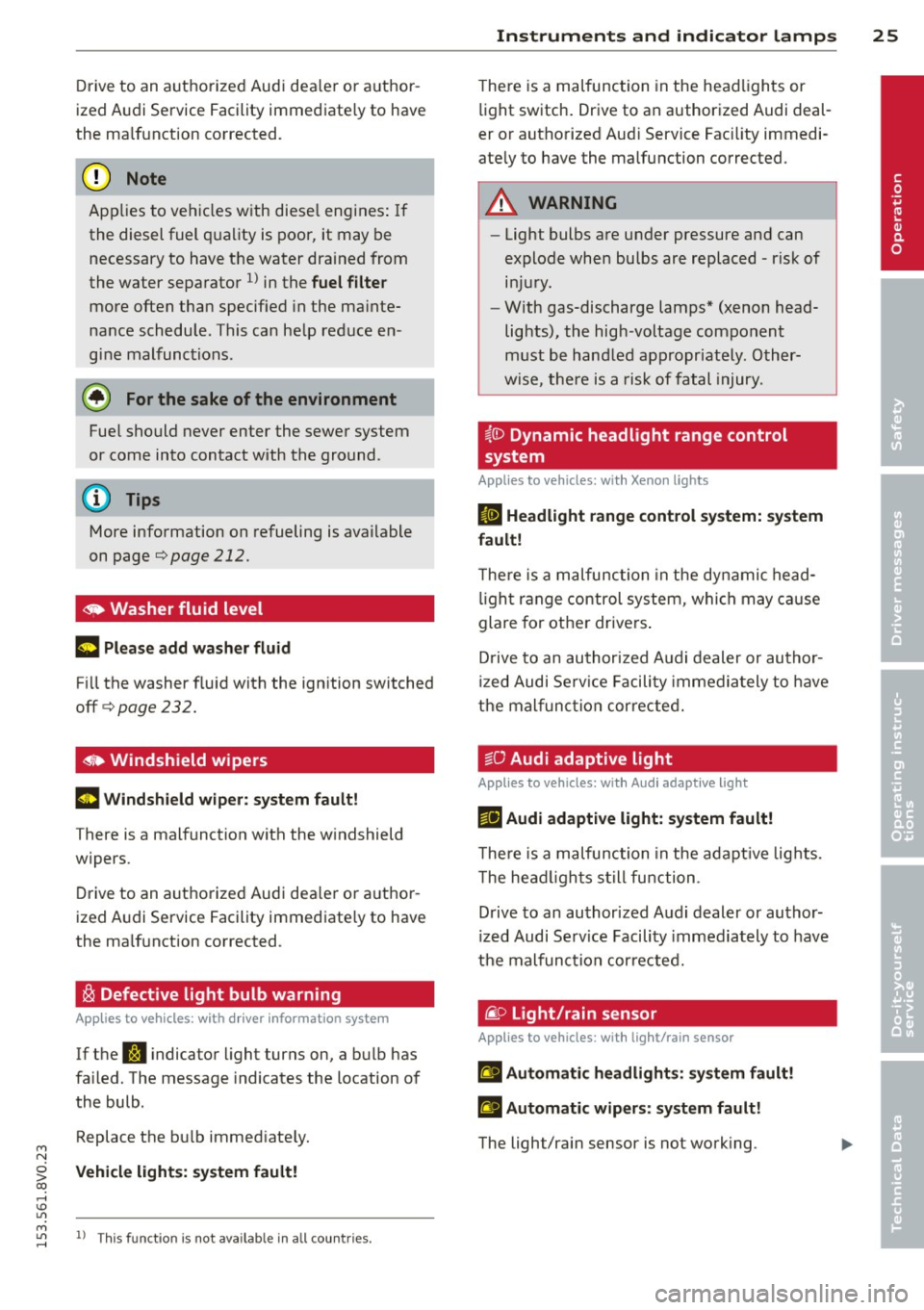
~ Washer fluid level
= Please add washer fluid
Fill the washer fluid with the ignition switched
off¢page232.
o Windshield wipers
m Windshield wiper: system fault!
There is a malfunction with the w indshield
wipers.
Drive to an authorized Audi dea ler or author
ized Audi Service Facility immed iate ly to have
the malfunction corrected.
~ Defective light bulb warning
App lies to vehicles: with dr iver information system
If the S:!I indicator light turns on, a bulb has
fa iled. The message indicates the location of
the bulb.
Replace the bu lb immediate ly.
Vehicle lights: sy stem fault!
M 1.1"1 l) Th is fu nct io n is not available in all coun tries. ,....,
Instruments and indicator lamps 25
T here is a malfunction in the headlights or
light switch. Drive to an authorized Audi deal
er or authorized Aud i Service Fac ility immedi
ate ly to have the malfunction corrected .
A WARNING
-Light bulbs are under pressure and can
explode when bulbs are replaced - risk of injury.
- With gas-discharge lamps* (xenon head
lights), the high-voltage component
must be handled appropriately. Other
wise, there is a risk of fatal injury.
~{i) Dynamic headlight range control
sy stem
Applies to vehicles: wi th Xeno n lights
fl Headlight range control system: system
fault!
T here is a malfunction in the dynamic head
light range control system, which may cause
glare for other drivers .
D rive to an authorized Audi dealer or author
ized Audi Serv ice Facility immediately to have
the malfunction corrected.
tsO Audi adaptive light
App lies to vehicles: wi th Audi ada ptive ligh t
r!l Audi adaptive light: system fault!
The re is a malfunction in the adapt ive lights.
T he head lights still function .
Drive to an authorized Audi dealer or author
ized Audi Serv ice Facility immediately to have
the malfunction corrected.
@) Light/rain sensor
App lies to vehicles: wit h lig h t/rain senso r
El Automatic headlights: system fault!
El Automatic wipers: system fault!
The light/rain sensor is not working. •
Page 30 of 310
28 Driver information system
On-board computer display
The on-boa rd compute r display monitors the
different memory levels:
- Sho rt-term memo ry (on-board computer 1)
- Long-term memory (on-board computer
2)
-Efficiency program
The fo llow ing information can be displayed in
on-boa rd computer
1 and 2 one after the oth
er.
- Date
- Estimated range based on current fuel leve l
- T rave l time
- Average consumption
- Average speed
- Distance
- Current fuel consumption
- Engine oil temperature indicator*
On-board computer D (short-term
memory)
The sho rt-term memory co llects driving infor
mation from the time the ignit ion is switched
on until it is switched off. If you continue dr iv
ing
within two hours after switching the igni
tion off, the new values are included when cal
culating the current trip information. If stop ped for more the two hours, the short term
memory is automatically erased once you be
g in driving .
On-board computer fJ (long-term
memory)
Unlike the short-term memory, the long-term
memory is not erased automatically. You can
select the time period for evaluating trip in
formation yourself.
Efficiency program~
The efficiency program can help you to use
less fuel ~
page 29 .
(D Tips
-The on-board computer is controlled by
the left button f ields on the mult ifunc
t ion steering wheel. -
For information on using the other but
ton f ields, such as the audio, telephone*
and navigation* funct ions, see the MMI
owner's manual.
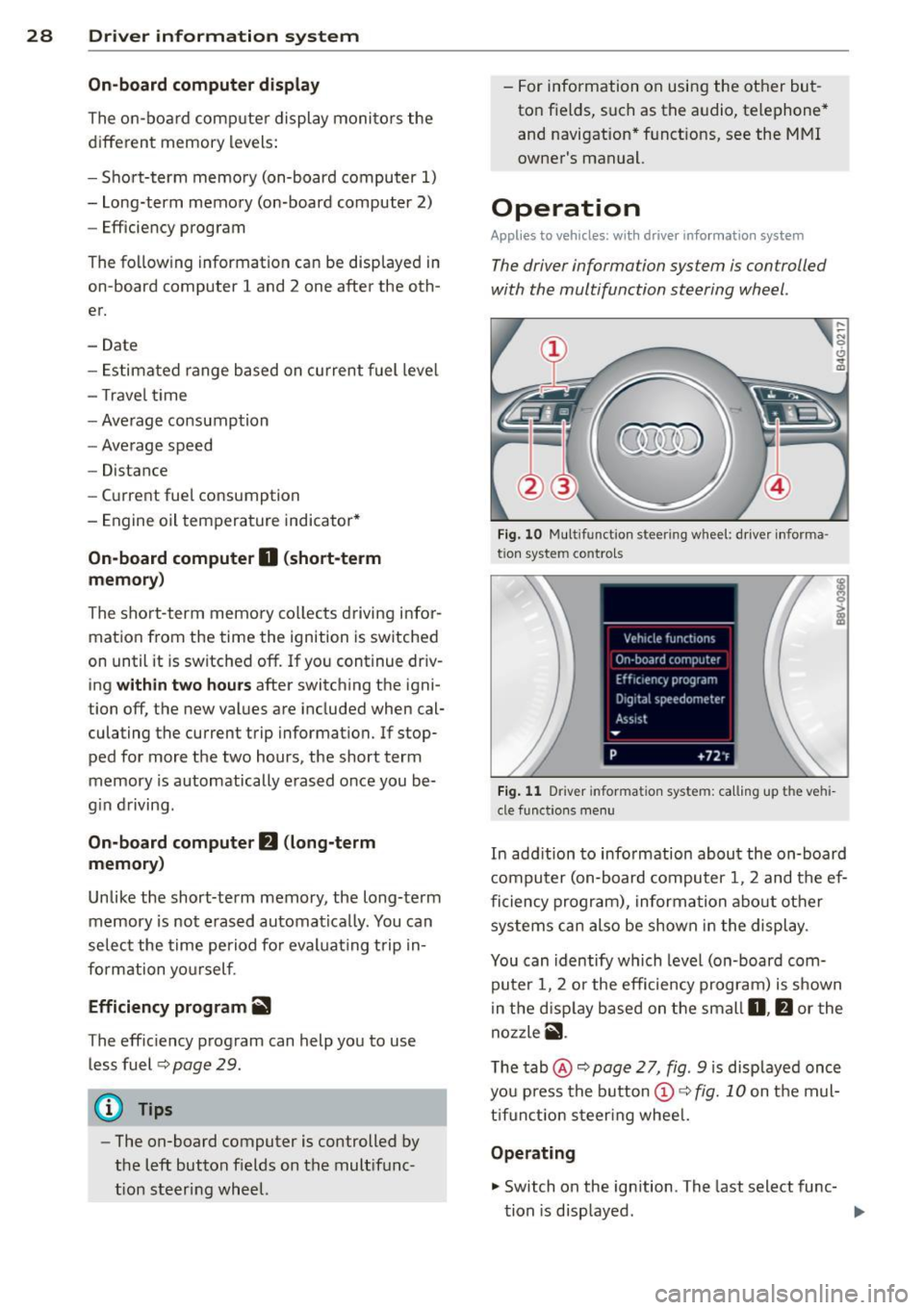
Operation
Appl ies to vehicles: wit h driver informatio n system
The driver information system is con trolled
with the multifunction steering wheel .
Fig. 10 Multi funct ion s teer ing w heel : driver informa ·
tio n syste m controls
Fig. 11 D river informa tion syste m: call ing up t he ve hi
cle func tion s men u
In add ition to info rmation about the on-board
computer (on-board computer 1 , 2 and the ef
ficiency program), information about other
systems can also be shown in the display .
You can identify which level (on-board com
puter 1, 2 or the efficiency program) is shown
in the d isp lay based on the small
0, fJ or the
nozzle
ii .
The tab@~ page 2 7, fig. 9 is displayed once
you press the button
(D ~ fig. 10 on the mul
tifunction steering wheel.
Operating
.,. Switch on the ignition . T he last select func-
tion is displayed . ..,_
Page 32 of 310
30 Driver in formation sy ste m
other equipment inf luencing consumpt ion
c::> page 30 . Fuel economy messages
c::> page 30 provide tips for efficient driving .
The effic iency program receives data about
the dis tance and fuel consumption from the
on-board computer
1. If the data in the effi
ciency program is de leted
c::> page 29, the val
ues in the on-board computer 1 are also reset .
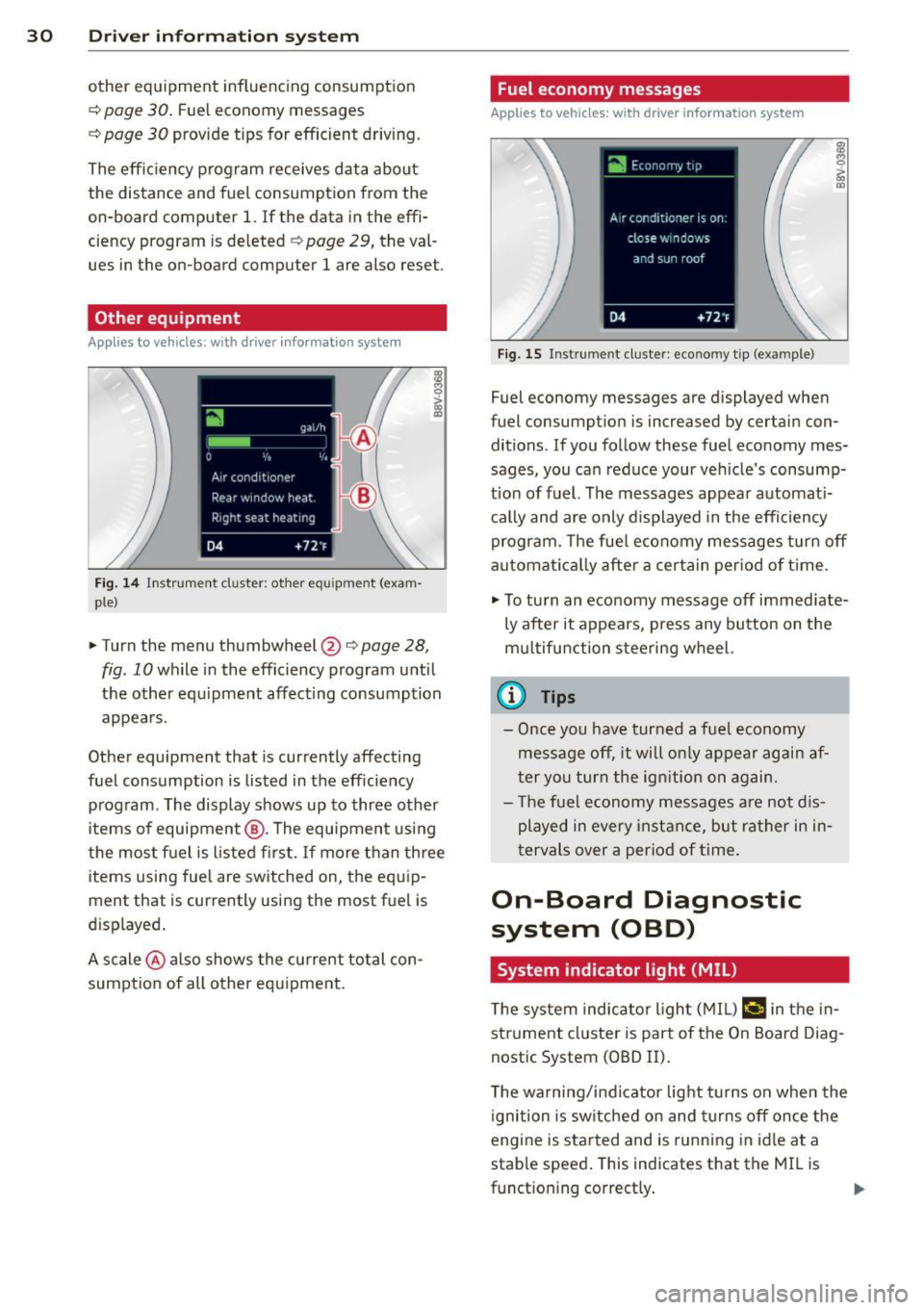
Other equipment
Applies to vehicles: with driver informatio n system
Fig. 14 Instrument cluster : other equ ipment (exam·
ple}
.,. Turn the menu thumbwheel@r:::> page 28,
fig. 10 while in the efficiency program until
the other eq uipment affect ing consumption
appea rs.
Other equipment that is currently affecting
fuel consumption is listed in the efficiency
program. The display shows up to three other
items of equipment @. The equipment us ing
the most f uel is listed fi rs t . If more than th ree
items using fue l are switched on, the equ ip
ment that is currently using the most fuel is
d isplayed.
A scale @ also shows the cu rrent total con
sumpt ion of all other equ ipment.
Fuel economy messages
Applies to vehicles: wit h drive r info rmation system
Fig. 15 Inst rume nt clus ter: economy tip (exa mple)
Fuel economy messages are displayed when
fuel consumpt ion is increased by certain con
ditions. If you follow these fuel economy mes
sages, you can reduce your ve hicle's consump
tio n of fuel. The messages appea r automat i
c a lly and are only d isplayed in the efficiency
program. The fue l economy messages turn off
automa tica lly after a certain per iod of t ime.
.,. To tu rn an eco nomy message off immed iate
ly after it appears, press any button on the
mu ltifu nction steering wheel.
(D Tips
- Once yo u have turned a fuel economy
message off, it wi ll o nly appear again af
ter yo u turn the ign ition on again.
- T he fue l economy messages are not d is
played in every in sta nce, but ra ther i n in ·
tervals over a period of time.
On-Board Diagnostic
system (OBD)
System indicator light {MIL)
T he system indicator l ight ( MIL) ¢4 in the in
strument cl uster is part of the On Board Diag
nostic System (OBD II) .
T he warn ing/ind icator light turns on when the
ignition is sw itche d on and tu rns off once the
engine is sta rted and is runn ing in idle at a
stab le speed . This indicates that the MI L is
funct ioning correct ly .
Page 33 of 310
If the light doe s not turn off after starting
the engin e
or turns on while driving, this may
indicate there is a malfunction in the eng ine.
If the indicator turns on, the catalytic convert
er may be damaged .
Drive
with reduc ed engine perfo rm ance
(avo id h igh speeds for extended periods of
time and/or fast accelerat ion) and have the
malfunction corrected. See an authorized Audi
dealer o r authorized Aud i Service Facility .
The indicator may turn on if the electron ic
speed limiter is faulty. For additional informa
tion, refer to
c:> page 31, Electronic speed
limiter" .
The MIL m ay also turn on if the fuel filler c ap
i s not clo sed co rre ctl y
c:> page 212 .
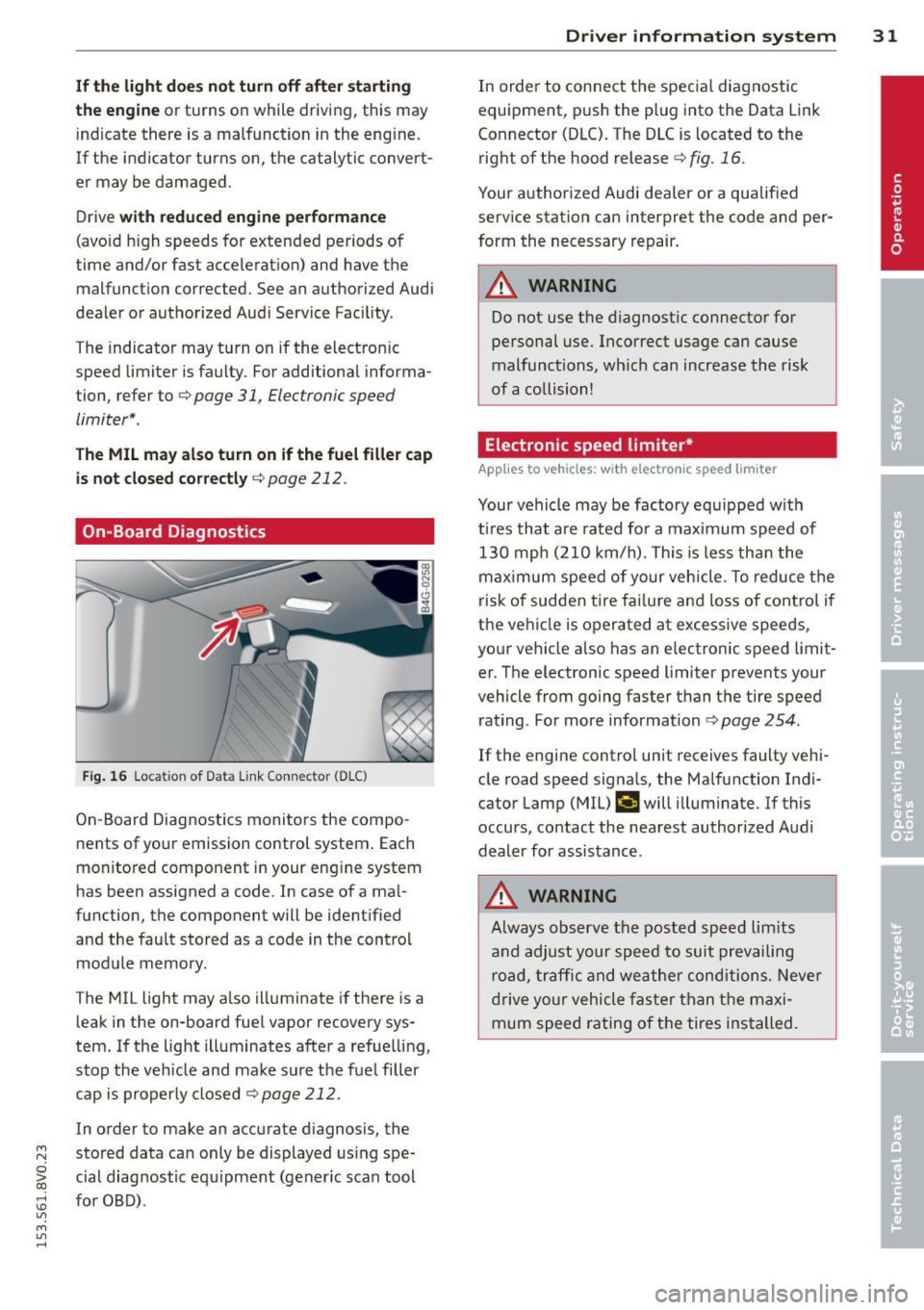
On-Board Diagnostics
Fi g. 16 Locat ion of Data Link Connector (DLC)
On -Board Diagnostics monito rs the compo
nents of you r emission control system . Each
monitored component in your engine system
has been assigned a code . In case of a ma l
function, the component will be ident ified
and the fau lt stored as a code in the control
module memory.
The MIL light may a lso illuminate if there is a
leak in the on-board fuel vapor recovery sys
tem. If the light illuminates after a refue lling,
stop the veh icle and make sure the fuel filler
cap is properly closed
c:> page 212.
In order to make an accurate d iagnosis, the
~ stored data can only be displayed us ing spe-
o iii cial diag nostic equipment (gener ic scan tool
:;, for OBD) .
"' M
"' ......
Driver in formation system 31
In order to connect t he specia l diagnostic
equipment, pus h the plug into the Data Link
Connector (DLC). The D LC is located to the
right of the hood release
c:> fig . 16.
Your authorized Audi dea ler or a qualified
service station can interpret the code and per
form the necessary repair.
_& WARNING
Do not use t he diagnostic connector for
personal use. Incorrect usage can cause
malfunctions, wh ic h can increase the risk
of a collision!
Electronic speed limiter *
Applies to vehicles: wit h electro nic s peed limiter
-
Your vehicle may be factory equipped w ith
t ires that are rated for a maximum speed of
130 mph (210 km/h). Thi s is less tha n the
maximum speed of your vehicle. To reduce t he
risk of sudden tire fai lure and loss of contro l if
the ve hicle is operated at excessive speeds,
your vehicle a lso has an e lectronic speed limit
er . T he e lectronic speed limiter prevents your
vehicle from go ing faster than the tire speed
rating . For more information
c:> page 254.
If the engine contro l unit receives faulty vehi
cle road speed signa ls, the Ma lfunction Indi
cator Lamp (MIL)
¢'4 will illuminate. If this
occurs, contact the nearest authorized Audi
dealer for assistance .
_& WARNING
Always observe the posted speed lim its
a nd adjust your speed to suit prevailing
road, traffic and weather conditions. Neve r
drive yo ur vehicle fas ter than the maxi
mum speed rating of the tires installed.
-
Page 34 of 310
32 Driver information system
Lap timer and engine
oil temperature
indicator
Introduction
Applies to vehicles: with lap timer (S mode ls)
The engine oil temperature is only shown in
the lap timer disp lay .
Lap timer
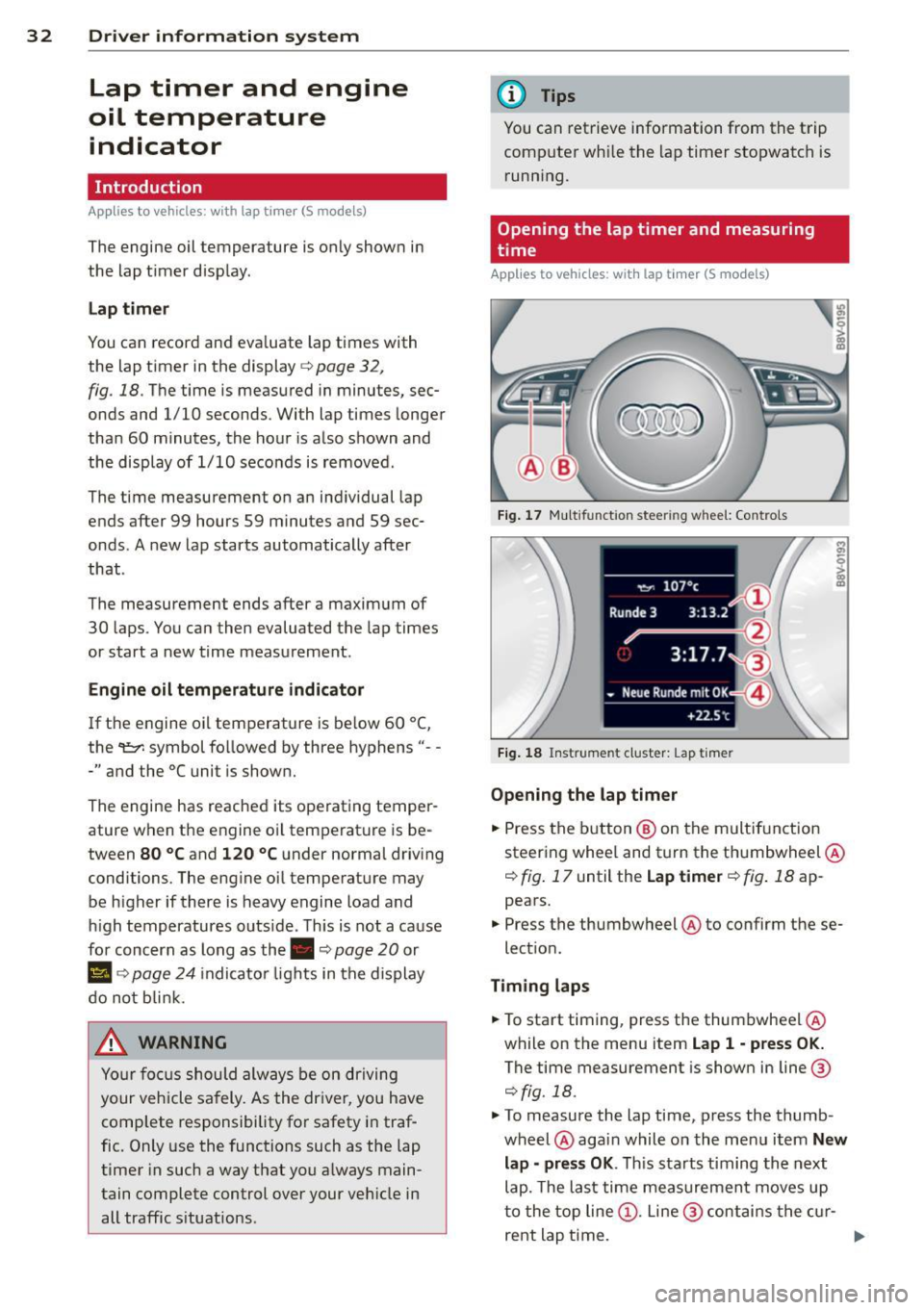
You can record and evaluate lap times with
the lap timer in the display
c:> page 32 ,
fig . 18. The time is measured in minutes, sec
onds and 1/10 seconds. With lap times longer
than 60 minutes, the hour is also shown and
the display of 1/10 seconds is removed .
The time measurement on an individual lap
ends after 99 hours 59 minutes and 59 sec
onds . A new lap starts automatically after
that .
The measu rement ends after a maximum of
30 laps . You can then evaluated the lap times
or start a new time measurement .
Engine oil temperature indicator
If the engine oil temperature is be low 60 ° (,
the 't::7-symbol followed by three hyphens" --
-" and the °C uni t is shown.
The engine has reached its operating temper
ature when the engine oil temperature is be
tween
80 °C and 120 °C under normal driving
conditions. The engine oil temperature may be h igher if there is heavy engine load and
high temperatures outs ide. This is not a cause
for concern as long as the.
c:> page 20 or
Ill c:> page 24 indicator lights in the display
do not b link.
.&, WARNING
Your focus should always be on driving
your vehicle safely. As the dr iver, you have
complete responsibility for safety in traf
fic. Only use the functions such as the lap
timer in such a way that you a lways main
tain complete control over your veh icle in
all traffic situations .
(D Tips
You can retrieve information from the trip
computer wh ile the lap timer stopwatch is
running.
Opening the lap timer and measuring
time
Applies to vehicles: with lap timer (S models)
Fig. 17 Mult ifun ction stee ring w hee l: Con trols
Fig. 18 Instrume nt clust er: L ap timer
Opening the lap timer
... Press the button® on the multif unction
steering whee l and turn the thumbwheel @
¢ fig. 17 until the Lap timer ¢ fig. 18 ap
pears .
... Press the thumbwheel @to confirm these
lect ion.
Timing laps
... To start timing, press the thumbwheel @
while on the menu item
Lap 1 -press OK.
The time measurement is shown in line@
¢fig. 18.
... To measure the lap time, press the thumb
wheel @again while on the menu item
New
lap -press OK. This starts t iming the next
lap. The last time measurement moves up
to the top line@. Line @ contains the cur-
rent lap time. ..,.
Page 37 of 310
M N
0 > co ,...., \!) ..,.,
M ..,., ,....,
Opening and closing
Central locking
Key set
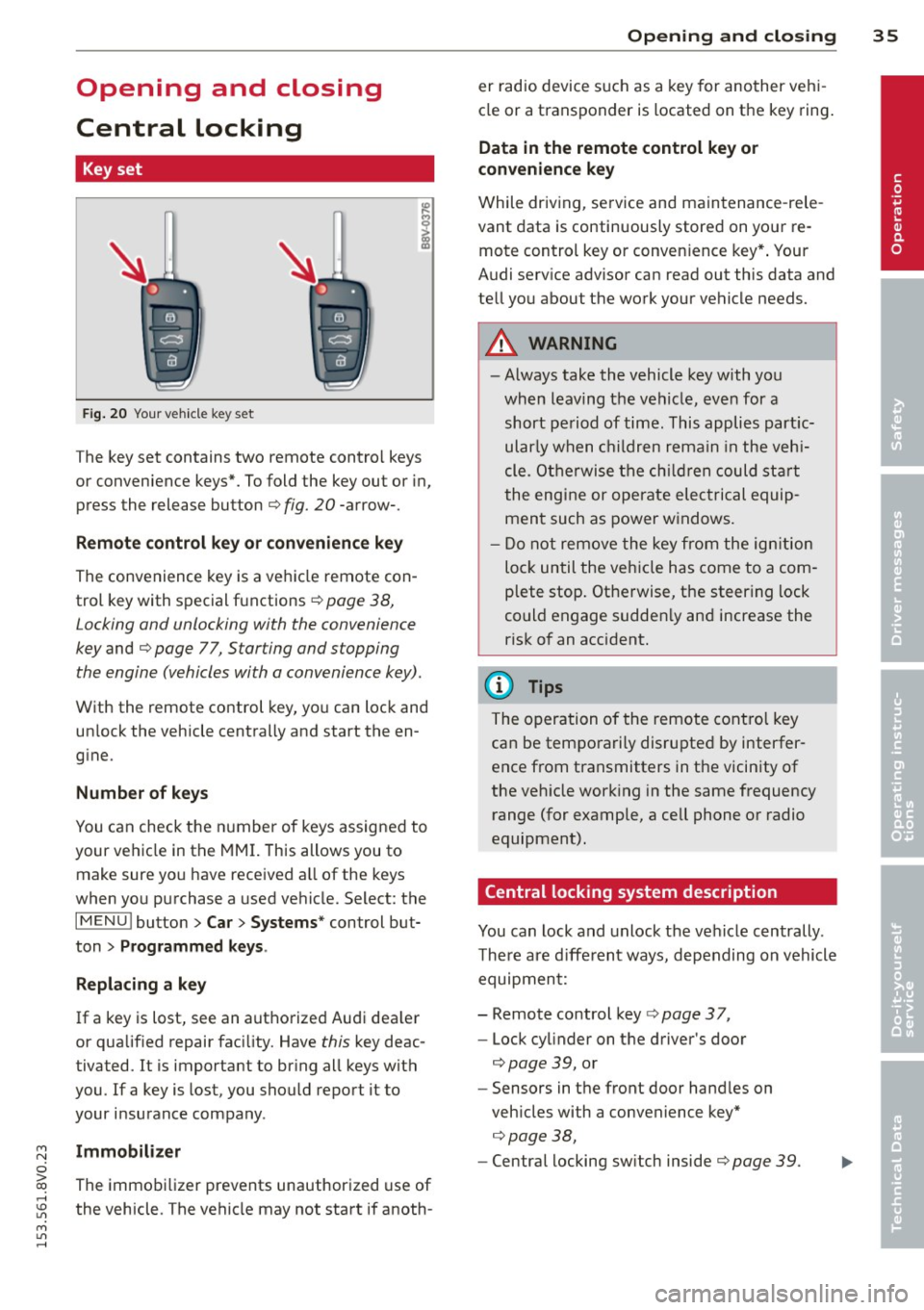
Fig . 20 Your vehicle key set
The key set contains two remote contro l keys
or convenience keys*. To fold the key out or in,
press the release button
q fig. 20 -arrow-.
Remote control key or convenience key
The convenience key is a vehicle remote con
trol key with special functions
q page 38,
Locking and unlocking with the convenience
key and q page 77, Star ting and stopping
the engine (vehicles with a convenience key).
With the remote control key, you can lock and
un lock the vehicle centrally and start the en
g ine.
Number of keys
You can check the number of keys assigned to
your vehicle in the
MMI. T his allows you to
make sure you have received a ll of the keys
when you purchase a used vehicle. Select: the
I MENU I button > Car> Systems* control but
ton
> Programmed keys.
Replacing a key
If a key is lost, see an authorized Audi dea ler
or qualified repair facility. Have
this key deac
tivated. It is important to br ing all keys with
you.
If a key is lost, you should report it to
your insurance company .
Immobilizer
The immobilizer prevents unauthorized use of
the vehicle . The vehicle may not start if anoth -
Opening and closing 35
er radio device such as a key for another veh i
cle or a transponder is located on the key ring.
Data in the remote control key or
convenience key
While driving , service and maintenance -rele
vant data is continuously stored on your re
mote control key or convenience key*. Your
Audi serv ice advisor can read out this data and
tell you about the work your vehicle needs.
_& WARNING
- Always take the vehicle key with you
when leaving the vehicle, even for a
short period of time. This applies partic
ularly when children remain in the vehi
cle . Otherwise the children could start
the engine or operate electrical equip
ment such as power windows.
- Do not remove the key from the ignition
lock until the vehicle has come to a com
plete stop. Otherwise, the steering lock
could engage sudden ly and increase the
risk of an accident.
{i) Tips
The operation of the remote control key
can be temporarily disrupted by interfer
ence from transmitters in the vicinity of
the veh icle working in the same frequency
range (for example, a cell phone or radio
equipment).
Central locking system description
You can lock and unlock the vehicle centrally .
There are different ways, depending on vehicle
equipment:
- Remote control key
q page 3 7,
- Lock cylinder on the driver's door
qpage 39, or
- Sensors in the front door handles on
veh icles with a convenience key*
q page 38,
-Central locking sw itch inside q page 39. •