air condition AUDI S3 2015 Owners Manual
[x] Cancel search | Manufacturer: AUDI, Model Year: 2015, Model line: S3, Model: AUDI S3 2015Pages: 310, PDF Size: 76.15 MB
Page 7 of 310
M N
0 > co ,...., \!) 1.1'1
M 1.1'1 ,....,
In addition to this Owner's Man ual, your Audi
comes with the
- MM I Operating Ins truc tions
- Warranty
& Ma intenance book let.
If you are miss ing one of these publicat ions,
or if you believe that the information is not
complete, contact your authorized Audi dealer
for assistance.
MMI Operating In struction s
contain detailed description of the Audi Mu lti
Media Interface (MMI) including the naviga
tion system, the sound system and the hand
held pho ne.
The Warranty & M aintenance booklet
explains how yo u can keep your A udi in top
driving condition by having it serviced regular
ly and conta ins detai led information about
the warranties covering your Aud i. Always
have the book let with you when you take your
ve hicle to an author ized Audi dealer for serv
i ce. Your Audi Servi ce Adviso r will record each
sched uled service and can answe r any q ues
tions you may have regarding how to ma intain
your vehicle .
In Canada,
the vehicle lite ratu re is also avai lab le in
Fr ench. To obtain a co py, contact your dea le r
or write to:
Au Canada, on peut se p rocure r un exempla ire
e n frarn;ais de ce document aupres du conces
sionn aire ou de:
Aud i Canada
Client Assistance
Assistance a la Clientele
7 77 Bayly S treet, West,
Ajax, Ontario LlS 7G7
If you sell y our Aud i
all lite rature should be left in the veh icle to
make the Warranty terms as we ll as a ll oper
ating, safety and ma intenance information
av ail ab le to the next owner.
Vehicle literature 5
If you change your address or if you
bought thi s Audi u sed
be sure to send in a "Notice of Address
Change"/ "Notice of Used Car Purchase" post
card. This card can be found in the Warranty
&
Maintenance booklet or obtained from your
authorized Audi dea ler.
It i s in your own inte rest that we are able to
contact you should the need arise .
•
•
•
Page 26 of 310
24 Instruments and indicator lamps
the filter. The indicator light will turn off
when the cleaning has completed successful
ly.
If the indicator light does
not turn off, drive
immediately to an authorized Audi dealer or
authorized Audi Service Facility to have the
malfunction corrected .
.&_ WARNING
Always adapt your speed to the current
weather, road and traffic conditions. You
should never disobey traffic laws in order
to follow driv ing recommendations .
(D Tips
For additional information on the diese l
particulate f ilter, refer to¢
page 199.
!?i Engine speed limitation
App lies to vehicles: with engine speed limitation
Ill Max. engine speed: XXXX rpm
-
The engine speed is automatically limited to
the speed displayed in the driver information
system. This protects the engine from over
heating .
The engine speed limitation deactivates once
the engine is no longer in the c ritical tempera
ture range and you have released the accelera
tor pedal.
If the engine speed limitation was activated
by an engine control malfunction, the
Di indi
cator light also turns on. Make sure the en
g ine speed does not go above the speed dis
played, for example when downsh ifting . Drive
to an authorized Audi dealer or author ized
Aud i Service Facility immediately to have the
malfunction corrected.
~"' Engine oil level (min.)
l!I Check oil level
You may continue driving for the time being.
Check the oil level as soon as possible
¢page 221.
-If the engine oi l level is too low, add engine
oil
¢ page 223.
-If the engine oi l level is correct and the indi
cator light still turns on, drive at low engine
speed to the nearest authorized Audi dealer
or qualif ied repair facility .
~w, Engine oil sensor
• Oil level sensor: system fault!
The sensor to check the engine oi l level has
failed. Drive to an author ized Audi dealer or
authori zed Aud i Service Facility immediately
to have the malfunction corrected.
• Oil level sens.: oil change necessary.
Please contact Service
T he eng ine oi l level is too high.
Drive to an authorized Audi dealer or author
ized Audi Serv ice Fac ility imm ediately to have
the malfunction corrected.
Bl Tank system
D Please refuel
If the indicator light turns first turns on and
t his message appears, the tan k contains the
following amount of fuel:
- Front wheel dr ive : approximately 1.8 gal
lons (7 liters)
- All wheel dr ive : approximately 2.2 gallons
(8 .5 liters)
II] Please refuel immediately
If the indicator light turns on the message ap
pears, the fuel tank is almost empty. Refuel
the vehicle immed iate ly.
D Fuel tank malfunction! Please contact
Service
If the indicator l ight turns on and the mes
sage appea rs:
- there is a malfunction in the fuel tank sys
tem, or
- in vehicles with diesel engines, water may
have collected in the fuel fi lter.
Page 33 of 310
If the light doe s not turn off after starting
the engin e
or turns on while driving, this may
indicate there is a malfunction in the eng ine.
If the indicator turns on, the catalytic convert
er may be damaged .
Drive
with reduc ed engine perfo rm ance
(avo id h igh speeds for extended periods of
time and/or fast accelerat ion) and have the
malfunction corrected. See an authorized Audi
dealer o r authorized Aud i Service Facility .
The indicator may turn on if the electron ic
speed limiter is faulty. For additional informa
tion, refer to
c:> page 31, Electronic speed
limiter" .
The MIL m ay also turn on if the fuel filler c ap
i s not clo sed co rre ctl y
c:> page 212 .
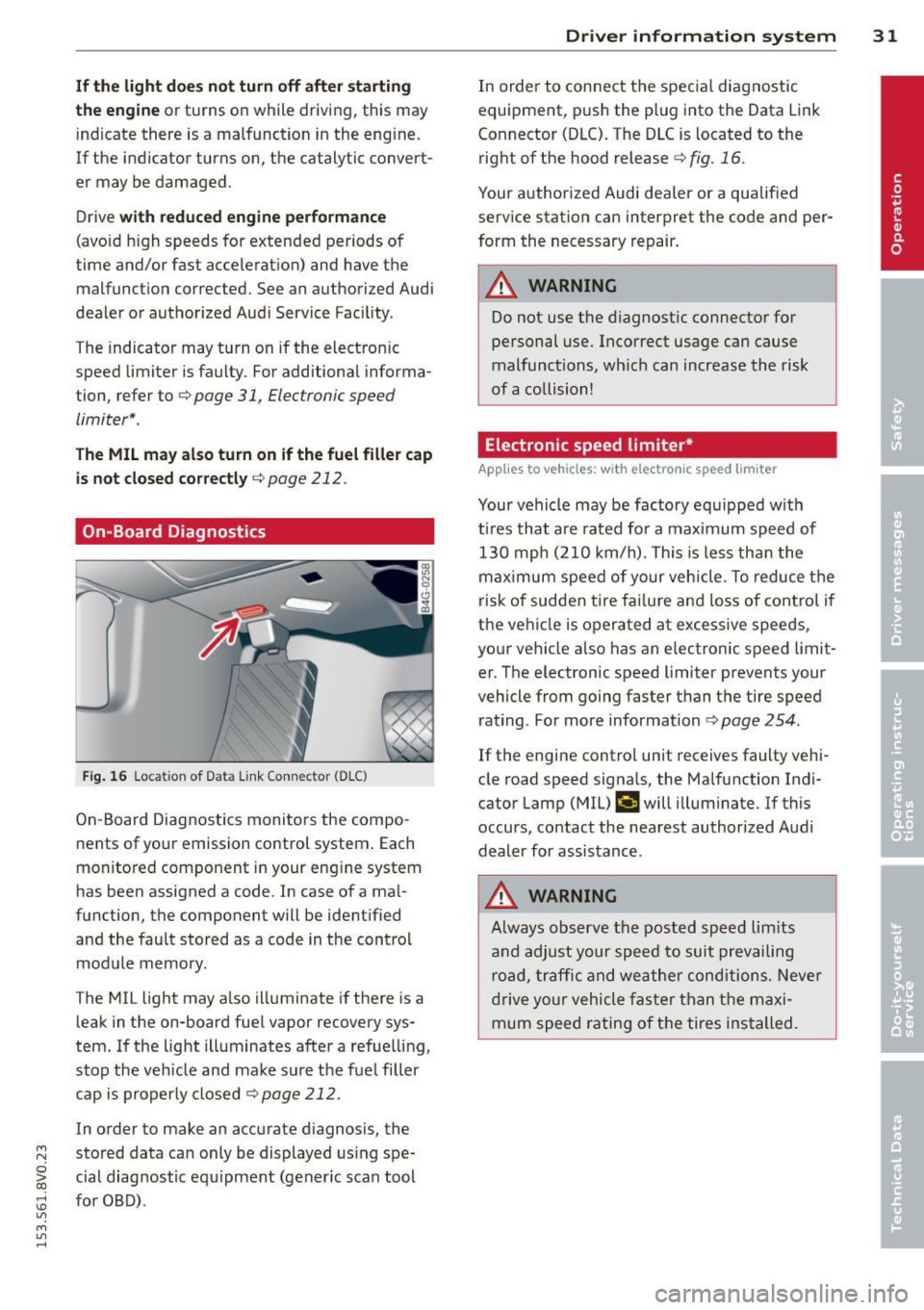
On-Board Diagnostics
Fi g. 16 Locat ion of Data Link Connector (DLC)
On -Board Diagnostics monito rs the compo
nents of you r emission control system . Each
monitored component in your engine system
has been assigned a code . In case of a ma l
function, the component will be ident ified
and the fau lt stored as a code in the control
module memory.
The MIL light may a lso illuminate if there is a
leak in the on-board fuel vapor recovery sys
tem. If the light illuminates after a refue lling,
stop the veh icle and make sure the fuel filler
cap is properly closed
c:> page 212.
In order to make an accurate d iagnosis, the
~ stored data can only be displayed us ing spe-
o iii cial diag nostic equipment (gener ic scan tool
:;, for OBD) .
"' M
"' ......
Driver in formation system 31
In order to connect t he specia l diagnostic
equipment, pus h the plug into the Data Link
Connector (DLC). The D LC is located to the
right of the hood release
c:> fig . 16.
Your authorized Audi dea ler or a qualified
service station can interpret the code and per
form the necessary repair.
_& WARNING
Do not use t he diagnostic connector for
personal use. Incorrect usage can cause
malfunctions, wh ic h can increase the risk
of a collision!
Electronic speed limiter *
Applies to vehicles: wit h electro nic s peed limiter
-
Your vehicle may be factory equipped w ith
t ires that are rated for a maximum speed of
130 mph (210 km/h). Thi s is less tha n the
maximum speed of your vehicle. To reduce t he
risk of sudden tire fai lure and loss of contro l if
the ve hicle is operated at excessive speeds,
your vehicle a lso has an e lectronic speed limit
er . T he e lectronic speed limiter prevents your
vehicle from go ing faster than the tire speed
rating . For more information
c:> page 254.
If the engine contro l unit receives faulty vehi
cle road speed signa ls, the Ma lfunction Indi
cator Lamp (MIL)
¢'4 will illuminate. If this
occurs, contact the nearest authorized Audi
dealer for assistance .
_& WARNING
Always observe the posted speed lim its
a nd adjust your speed to suit prevailing
road, traffic and weather conditions. Neve r
drive yo ur vehicle fas ter than the maxi
mum speed rating of the tires installed.
-
Page 53 of 310
M N
0 > co ,...., \!) ..,.,
M ..,., ,....,
A WARNING
-The ra in sensor is only intended to assist
the driver. The driver is still responsible
for manually sw itching the w ipers on ac
cording to the v is ibility conditions.
- The windshield may not be treated w ith
water-repe lling windshield coat ing
agents. Unfavorable conditions, such as
wetness, darkness o r low sun, can result
in increased glare. W iper blade chatter is
also possible.
- Properly functioning windshie ld w iper
blades are requi red fo r a clear view and
safe driving~
page 51, Replacing
front windshield wiper blades .
(D Note
-In case of frost, make sure the wind
shield wiper b lades are not frozen to the
windsh ield . Sw itching on the windshield
wipers when the blades are frozen to the
windsh ield can damage the wiper blades.
- Prior to using a car wash, the windshield
wipe r system must be switched
off (lever
in position 0). This prevents unintention
al sw itching on and damage to the wind
s h ield wiper system.
- Do not use the wipers to remove ice from
the windows. Using windshie ld w ipers as
i ce scrapers destroys the wiper b lades.
(D Tips
- The windshield wipe rs switch off when
t h e ignit ion is turned
off. You can acti
vate the windshield wipers after the igni
tion is switched back on by moving the
windsh ield wiper leve r to any pos ition.
- Worn or dirty windsh ie ld w iper blades
r esult in streak ing. This can affect the
r ain senso r funct ion. Check your wind
s hi eld wipe r blades regularly.
- The washer fluid nozzles in the w ind
s hi eld washer system are heated* at low
temperatures when the ig nit ion is on.
- When stopping temporar ily, e.g. at a
traff ic light, the se t speed of the w ind- Light
s and Visi on 5 1
shield w ipers is automatically reduced by
one speed.
- In vehi cles w ith an MMI, you can switch
the rain senso r or
off in the Driver assi s
tance
menu.
Cleaning windshield wiper blades
Clean the wiper b lades when you see w iper
streaks . Use a soft clot h and a glass cleaner .
.,. Place the windshie ld wiper arms in the serv
ice pos ition
~ page 51.
.,. Fold the windshie ld w iper arms away from
the windshield.
A WARNING
Di rty windsh ield wiper b lades can impair
v ision, which increases the r isk of an acci
dent.
(D Note
If you see streaks again after clean ing the
wiper blades, the blades must be replaced
~page 51.
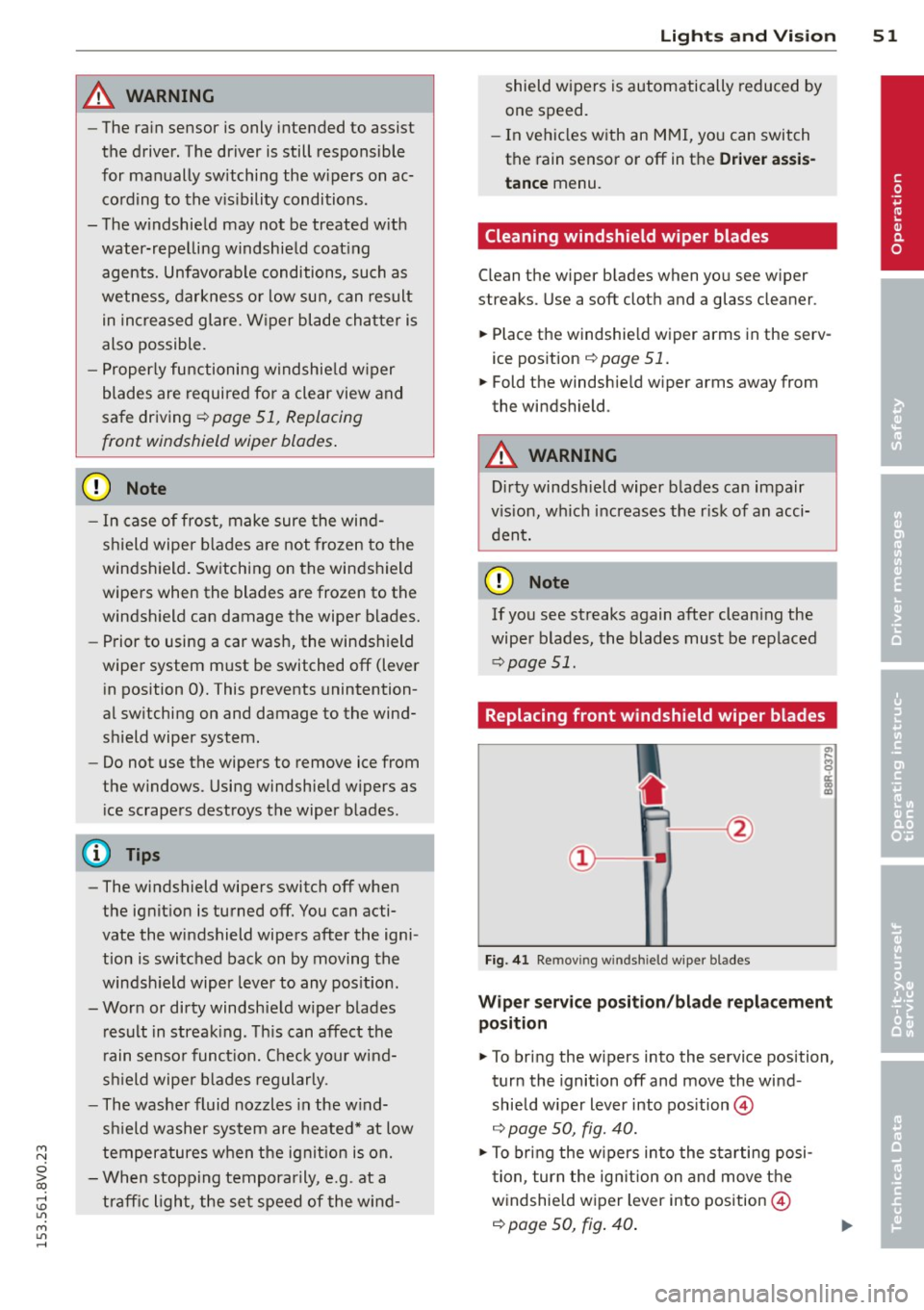
Replacing front windshield wiper blades
Fig. 41 Remov ing w indsh ie ld wipe r blades
Wiper servic e posit ion /bl ade repl ace ment
position
.,. To bri ng the w ipers into the service position,
tur n the ignition
off and move the wind
shield w iper lever into pos ition @
~ page 50, fig. 40.
.,. To bring the w ipers into the starting posi
t ion, tur n the ig nition on and move t he
w indshie ld w iper lever into position @
~ page 50, fig. 40 .
•
Page 72 of 310
70 Warm and cold
1- 1 Sw itching r ecircul ation mode on and
off
In recirculation mode, the air inside the vehi
cle is circu lated and filtered. This prevents the
unfiltered air outside the vehicle from enter ing the vehicle inter ior. We recommend
switch ing recirculation mode on when driving
through a tunnel or when sitt ing in traffic
c::> ,& .
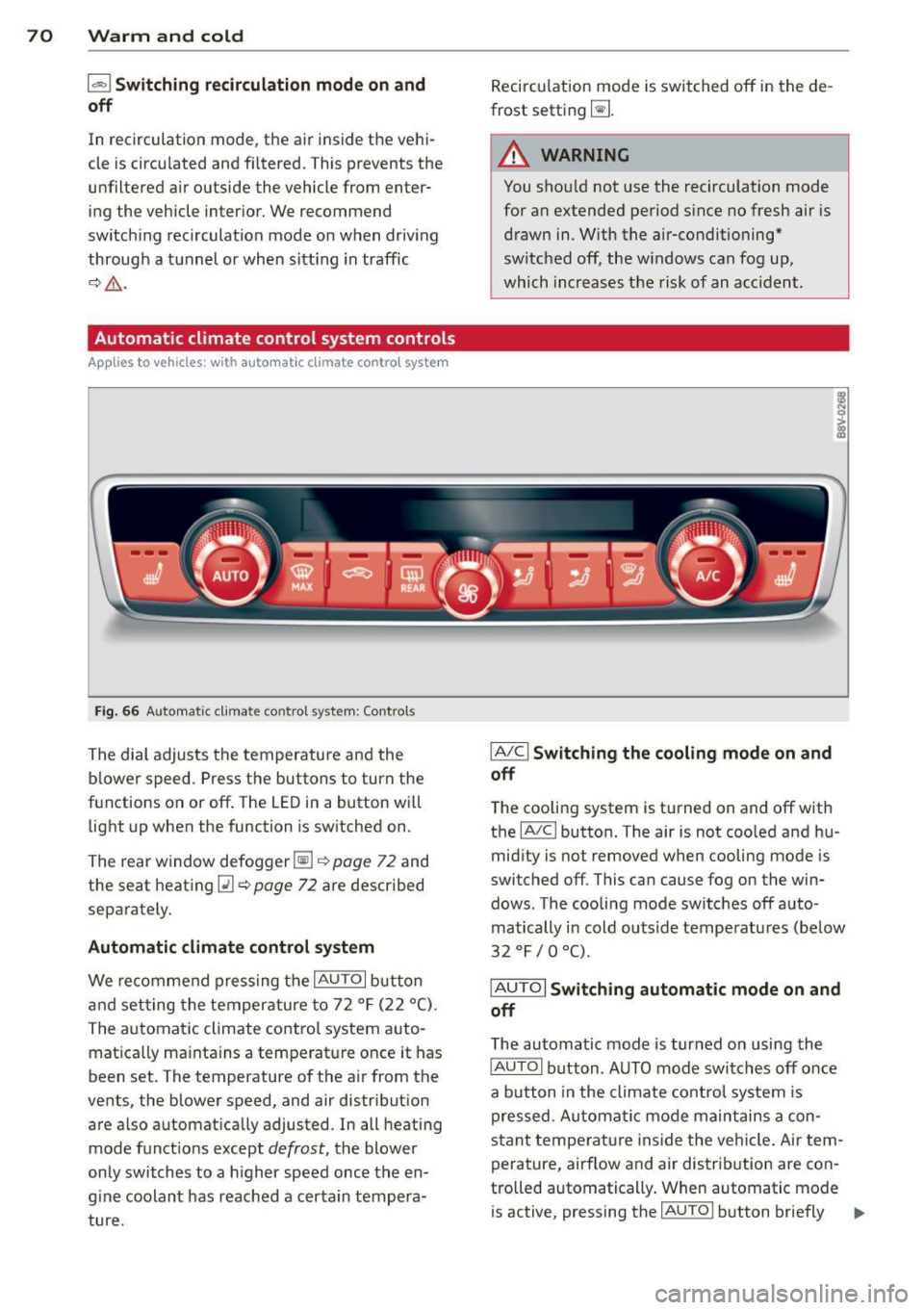
Automatic climate control system controls
App lies to vehicles: with a utomat ic climate contro l system
Fig . 66 A ut oma tic cl ima te co ntro l sy ste m: Control s
The dial adjusts the temperature and the
blower speed. Press the buttons to turn the
functions on or off . T he LED in a button w ill
light up when the function is sw itched on .
The rear window defogger~
c::> page 72 and
the seat heating
Q] c::> page 72 are described
separately.
Automatic climate control syst em
We re commend pressing the IAU TO I button
and setting the temperature to 72
° F (22 °() .
The automatic climate control system auto
matica lly ma inta ins a temperature once it has
been set. The temperature of the air from the
vents, the blower speed, and air distribution
are also automat ically adju sted . In all heat ing
mode funct ions except
defrost, the blower
only switches to a h igher speed once the en
g ine coolant has reached a certa in tempera
ture . Recirculation mode is switched off in the de
frost setting ~-
.&_ WARNING
-You shou ld not use the recirculation mode
for an extended period s ince no fresh air is
drawn in. With the air-conditioning*
switched off, the w indows can fog up,
which increases the risk of an acc ident .
IA/ Cl Switching th e cooling mode on and
off
T he cooling system is turned on and off with
the
IA/C l button. The air is not coo led and hu
mid ity is not removed when cooling mode is
switched off . This can cause fog on the win
dows . The cooli ng mode switches off auto
matically i n cold outside temperatu res (be low
32 °F / 0 °() .
IAUTOI Switch ing automatic mode on and
off
The automatic mode is turned on using the
IAUTOI button . AUTO mode switches off once
a b utton in the climate control system is
pressed . Automatic mode maintains a con
sta nt temperature ins ide the ve hicle . Air tem
perature, airflow and air d istribution are con
trolled automatically . When automatic mode
is active, pressing the
IAU TO I button briefly IJJ,-
Page 74 of 310
7 2 Warm and cold
& WARNING
You should not use the rec irculation mode
for an extended per iod since no fresh air is
drawn in . With the ai r-conditioning switch
ed off, the windows can fog up, which in
c reases t he risk of an ac cident.
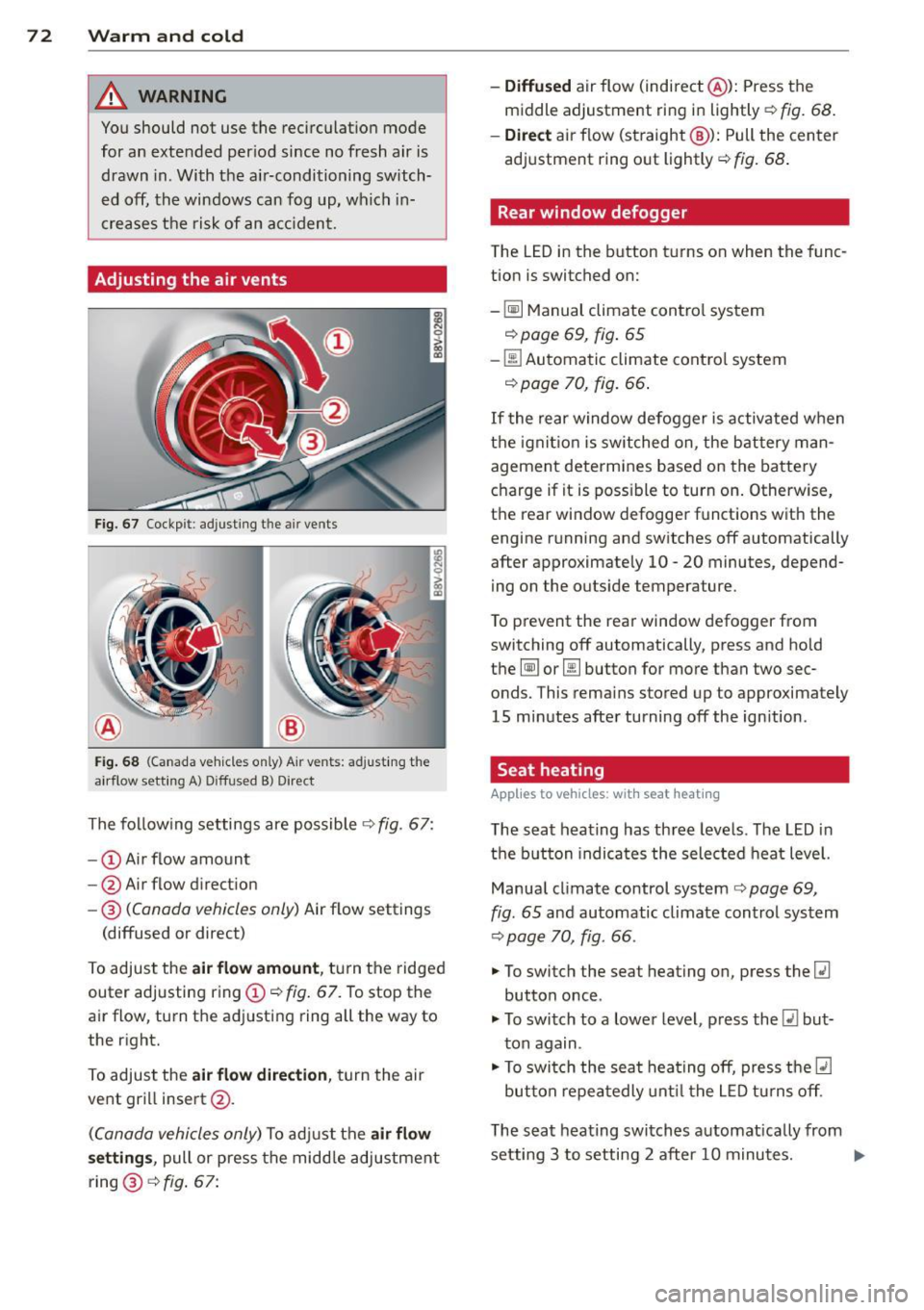
Adjusting the air vents
Fig. 67 Cockp it : adjust ing the a ir vents
®
Fi g. 6 8 (Canada ve hicles o nly) A ir ve nts : ad just ing t he
a irflow sett ing A ) D iffused B ) Direct
The fo llow ing settings are possible ¢ fig. 67:
- © Airflow amount
- @ Air flow d irect ion
- @
(Canada vehicles only) Air f low settings
(diffused or direct)
To adjust the
air flow amount , tu rn the ridged
outer adj usting ring©
c::> fig. 67. To stop the
air flow, turn t he adjusting ring all the way to
the right.
To adjust the
air flow direction , turn the air
ve nt gri ll insert @.
(C anada vehicles only) To ad just the air flow
setting s,
pull or press the midd le adjustment
ring @¢
fig. 67:
- Diffused air flow (indirect @): Press the
middle adjustment ri ng in lightly
c::> fig. 68 .
- Direct
air f low (st raight @): Pull the center
ad justment ring o ut lightly ¢
fig. 68 .
Rear window defogger
The LED in the button t urns on when the func
tion is switched on:
-
~ M anual climate contro l system
c::> page 69, fig . 65
-00 Automatic climate contro l system
c::> page 70, fig . 66.
If the rear w indow defogger is activated w hen
t h e igni tion is switched on, the bat tery man
agement determines based on the battery
c h arge if i t is poss ible to turn on . Otherw ise,
the rear window defogge r funct ions w it h the
engine running and switches off automatically
after approximately 10 -20 minutes, depend
i ng on the outs ide temperature .
T o p revent the rear window defogger f rom
switching off automatically, press and hold
t h e
@ii or 00 button for more than two sec
onds. This rema ins stored up to approxima tely
15 minutes afte r turning off the ign ition .
Seat heating
Applies to veh icles : w it h seat heat ing
The seat heating has th ree leve ls. The LED in
the b utt on indica tes the sele cted heat leve l.
Manua l climate control system
c::> page 69,
fig . 65 and automatic climate control system
c::> page 70, fig . 66.
"' To switch the seat heating on, press the
lt:J
button once .
"' To swi tch to a lower level , press the
lt:I but
ton again .
"' To swi tch the sea t heating off, press the
lt:J
but ton re peat edly unt il t he L ED turns off .
T he seat heating swi tches a utomat ica lly from
setting 3 to setting 2 after 10 minutes.
Iii>
Page 88 of 310
86 Audi adapti ve cruise control
Audi adaptive cruise
control
Introduction
Applies to vehicles: with Audi adaptive cruise co ntrol
The adaptive cruise control system is a combi
nation of speed and distance regulation. It as
sists the driver by both regulat ing the speed
and maintaining a distance to the object
ahead, within the abilit ies of the system. If
the system detects an object, adaptive cru ise
con trol can brake and acce le rate your veh icle.
This makes driving more comfortable both on
long stretches of highway and in stop-and -go
traffic.
General Information
General information
Applies to vehicles: with Audi adaptive cruise control and
Audi pre se nse front
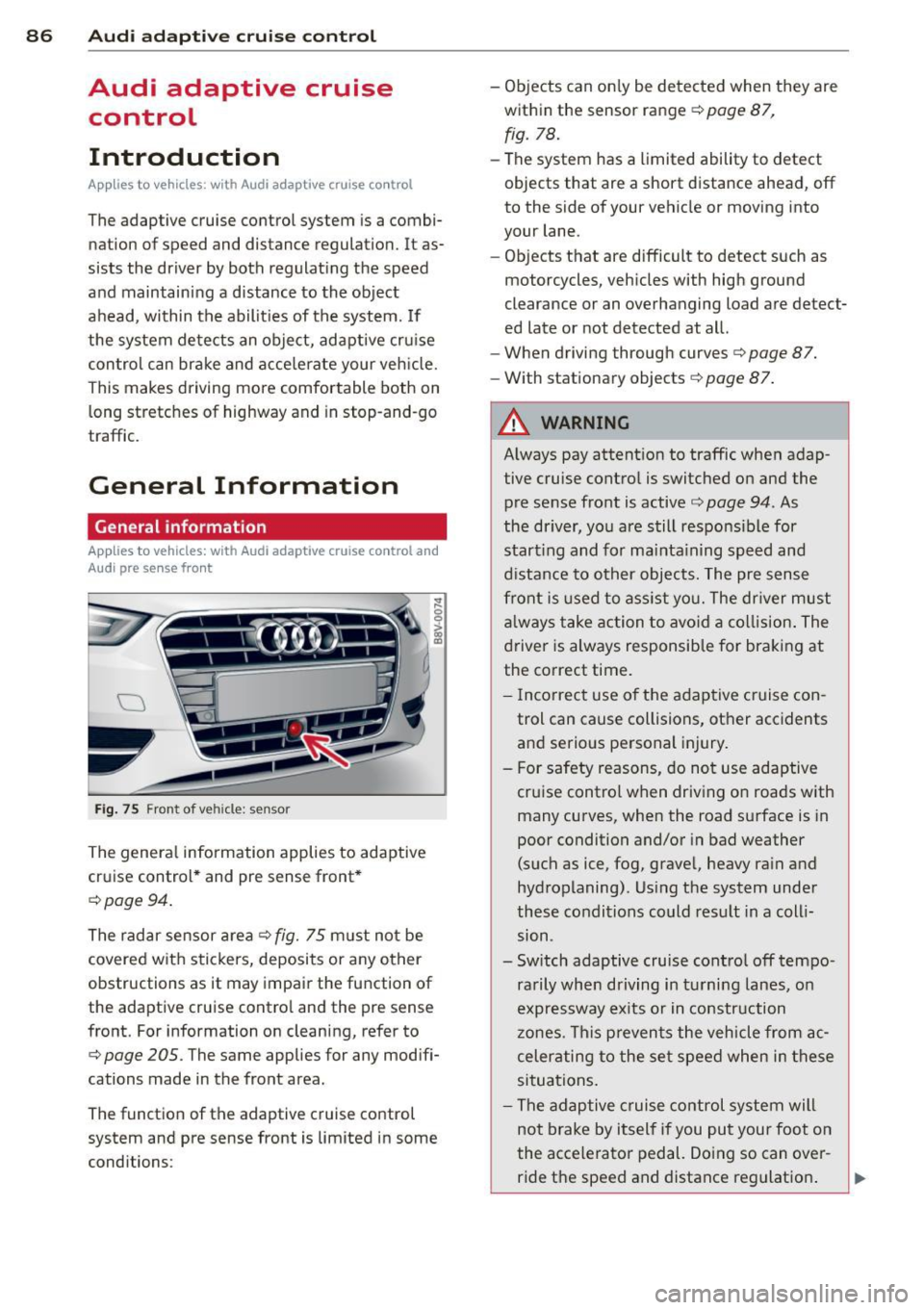
Fi g. 75 Front of veh icle: sensor
The genera l information applies to adaptive
cruise control * and pre sense front *
c:;, page 94.
The radar sensor a rea c::> fig. 75 m ust not be
covered w ith stickers, deposits or a ny other
obstructions as it may impair the function of
the adaptive cruise control and the pre sense
front. For information on cleaning, refer to
c:;, page 205. The same applies for any modifi
cations made in the front area.
The function of the adaptive cruise control
system and pre sense front is limited in some
conditions : -
Objects can on ly be detected when they are
within the sensor range
c::> page 87,
fig. 78.
-The system has a limited ability to detect
objects that are a short distance ahead, off
to the side of your vehicle or moving into
your lane.
- Objects that are difficult to detect such as
motorcycles, vehicles with high ground
clearance or an overhanging load are detect
ed late or not detected at all.
- When driving through curves
c::>page 87.
-With stationary objects c::> page 87.
A WARNING
-
Always pay attent ion to traffic when adap
tive cruise control is switched on and the
pre sense front is active
c::> page 94. As
the driver, yo u are still responsible for
start ing and for mainta ining speed and
d istance to other objects. The pre sense
front is used to ass ist you. The dr iver must
a lways take action to avo id a collision . The
driver is always responsible for braking at
the correct time.
- I ncorrect use of the adaptive cruise con
trol can cause collisions, other accidents
and serio us personal injury.
- For safety reasons, do not use adaptive cruise control when driving on roads with
many curves, when the road surface is in
poor condition and/or in bad weather
(such as ice, fog, gravel, heavy rain and
hydroplaning). Us ing the system unde r
these conditions could result in a coll i
sion .
- Switch adaptive cruise control off tempo rarily when driving in tu rni ng lanes, o n
expressway ex its or in construction
zones. This prevents the vehicle from ac
celerating to the set speed when in these
situations .
- The adaptive c ruise control system will
not brake by itself if you put your foot on
the accelerator pedal. Doing so can over-
ride the speed and distance reg ulation . ..,_
Page 89 of 310
....,
N
0 > co
rl I.O
"' ....,
"' rl
-When approaching stationary objects
such as stopped traffic, adaptive cruise
control will not respond and pre sense
front will have limited function.
- The adaptive cruise control system and
pre sense front do not react to people,
animals, objects crossing the road or on
coming objects.
- The function of the radar sensors can be
affected by reflective objects such as
guard rails, the entrance to a tunnel,
heavy rain or ice.
- Never follow a vehicle so closely that you
cannot stop your vehicle safely. The
adaptive cruise control cannot slow or
brake the vehicle safely when you follow
another vehicle too closely. Always re
member that the automatic braking
function cannot bring the vehicle to a
sudden or emergency stop under these
conditions.
- To prevent unintended operation, always
switch ACC off when it is not being used.
(D Note
The sensor can be displaced by impacts or
damage to the bumper, wheel housing and
underbody. The adaptive cruise control
and pre sense front may become impaired
as a result. Have an authorized Audi dealer
or authorized Audi Service Facility check
their function.
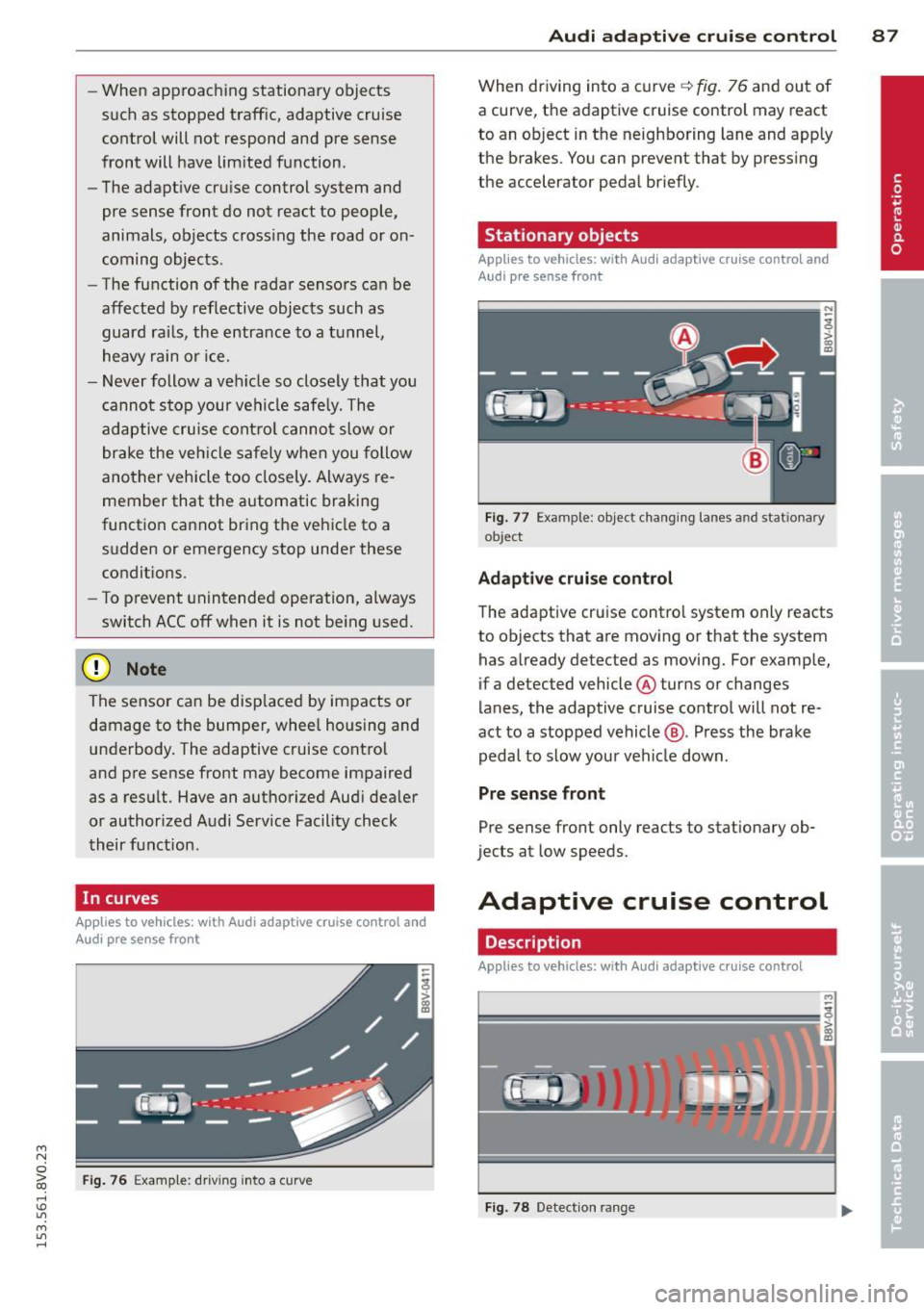
In curves
Applies to vehicles: with Audi adaptive cruise control and
Audi pre se nse front
Fig. 76 Example: driv ing into a curve
Audi adaptive crui se control 87
When driving into a curve q fig. 76 and out of
a curve, the adaptive cruise control may react
to an object in the neighboring lane and apply
the brakes. You can prevent that by pressing
the accelerator pedal briefly.
Stationary objects
Applies to vehicles: with Audi adaptive cruise control and
Aud i pre sense front
Fig. 77 Example : object changing lanes and stat ionary
ob ject
Adaptive cruise control
The adaptive cruise control system only reacts
to objects that are moving or that the system
has already detected as moving. For example,
if a detected vehicle @turns or changes
lanes, the adaptive cruise control will not re
act to a stopped vehicle@. Press the brake
pedal to slow your vehicle down .
Pre sense front
Pre sense front only reacts to stationary ob
jects at low speeds.
Adaptive cruise control
Description
Applies to vehicles: with Audi adaptive cruise control
=--=~----
?!!!! = ';! ~~~~
Fig. 78 Detection ran ge
Page 93 of 310
....,
N
0 > co
rl I.O
"' ....,
"' rl
.. press the brake peda l.
.. To resume the stored speed, move the lever
into position @.
Inte rrupting crui se contr ol wh en stopped
.. Push the lever away from you into position
@ . The message ACC : s ta ndb y appea rs .
.. To resume cru ise control, press the brake
pedal and pull the lever toward you into po
sit ion @.
A WARNING
It is dangerous to activate cru ise contro l
and resume the stored speed when the
current road, traffic or weather conditions
do not permit th is . This could result in a
crash.
Setting the distance
Applies to vehicles: with Audi adaptive cruise control
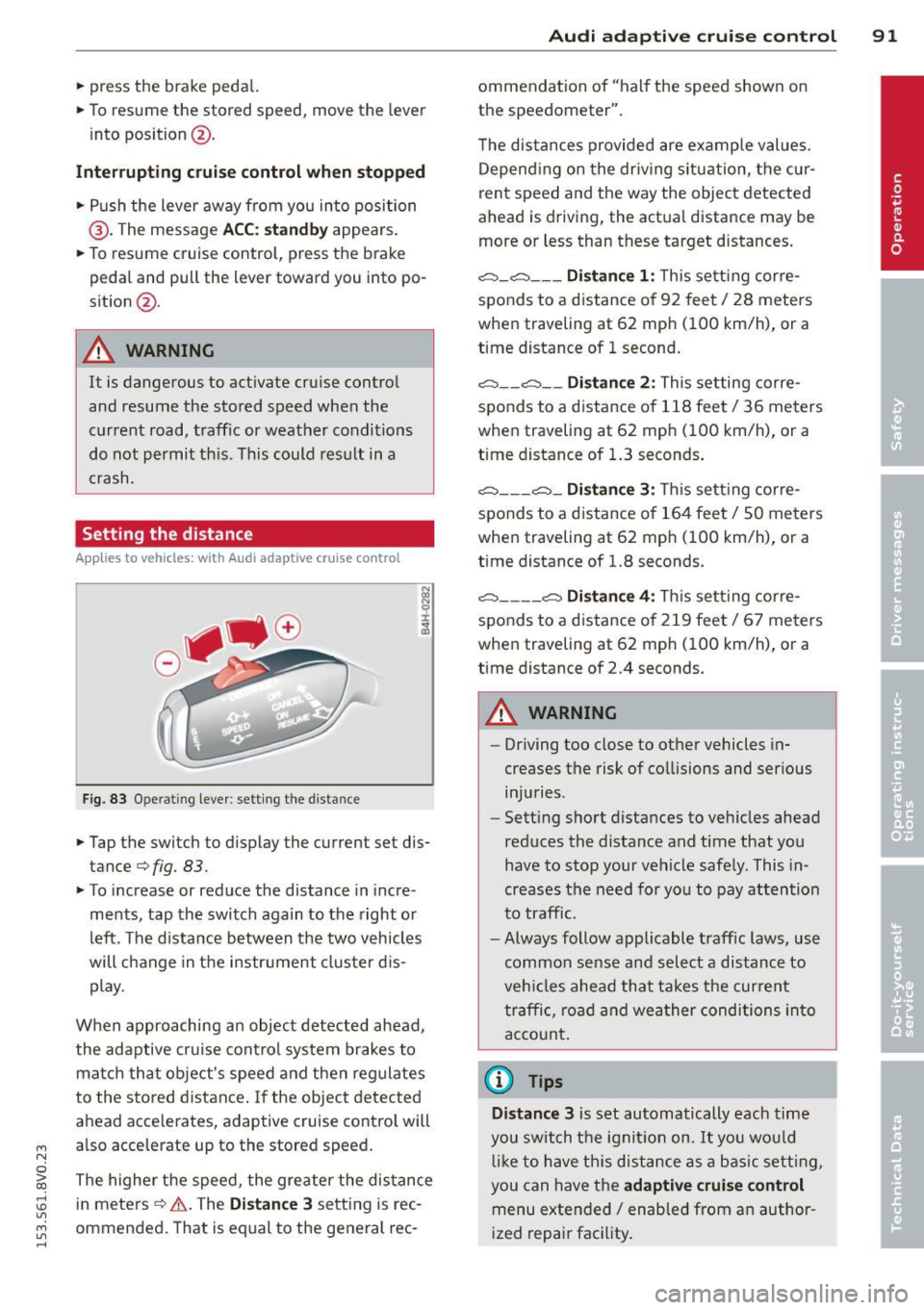
Fig. 83 O perat ing lever : setting the d istance
.. Tap the switch to display the current set dis
tance¢
fig. 83.
.,. To increase or reduce the distance in incre
ments, tap the switch again to the right o r
left . T he d istance between the two vehicles
will change in the instr ument cluster d is
play.
When approaching an object detected ahead ,
the adaptive cru ise cont ro l system brakes to
matc h that object's speed and then regulates
to the stored distance . If the object detected
ahead acce lerates, adaptive cru ise control will
also acce lerate up to the stored speed .
The highe r the speed, the greater the distance
in meters ¢.&. . The
Dist ance 3 sett ing is rec
ommended. That is equal to the general rec -
Audi adapti ve crui se control 91
ommendation of "hal f the speed shown on
the speedometer" .
T he distances provided are examp le values.
Depend ing on the dr iv ing situation, the cur
rent speed and the way the object detected
ahead is driving, the act ual distance may be
more or less than these target d istances .
c::;, _c::::, ___ Distance 1 : Th is sett ing corre-
sponds to a distance o f 92 feet/ 28 meters
when traveling at 62 mph ( 100 km/h), or a
time distance of 1 second.
c::;, __ c::::, __ Distanc e 2: This setting corre
sponds to a distance o f 118 feet/ 36 meters
when traveling at 62 mph ( 100 km/h), or a
time distance of 1.3 seconds .
c::;, ___ c::;,_ Dista n ce 3 : This sett ing corre-
sponds to a distance o f 164 feet/ 50 meters
when traveling at 62 mph ( 100 km/h), or a
t ime distance of 1.8 seconds.
c::;, ____ c::::, Dista n ce 4: T his sett ing corre-
sponds to a distance o f 219 feet/ 67 meters
when traveling at 62 mph ( 100 km/h), or a
time distance of 2.4 seconds.
A WARNING
-
- Driving too close to other vehicles in
creases the risk of co llisions and ser ious
inju ries .
- Sett ing s hort dista nces to veh icles ahead
reduces the distance and time that you
have to stop your vehicle safe ly. This in
creases the need for yo u to pay attention
to traffic.
- Always follow applicable traff ic laws, use
common sense and select a distance to
veh icles ahead that takes the cur ren t
traffic , ro ad and weather conditions into
acco unt .
@ Tips
Distance 3 is set automatically each time
you swi tch the ignit ion on.
It yo u wou ld
l ik e to have th is distance as a b asic setti ng,
you can have the
adaptive crui se cont rol
menu extended/ enabled from an author
i zed repair fac ility .
Page 120 of 310
118 Parking systems
Parking systems
General information
Appl ies to vehicles: with rea r parking sys te m s/park in g
syste m plus/rearv iew camera
Depending on your vehicle's equipment, vari
ous parking aids will help you when parking
and maneuvering.
The
rear parking system is an audible parking
aid that warns you of obstacles
behind the ve
hicle
¢ page 119.
The parking system plus assists you when
parking by audibly and visually indicating ob
jects detected
in front of and behind the vehi
cle
¢ page 119.
The rearview camera shows the area behind
the vehicle in the MMI display . This display as
sists you when you are cross or parallel park ing. The parking system plus functions are al
so available ¢
page 120.
& WARNING
-Always look for traffic and check the area
around your vehicle by looking at it di
rectly as well. The parking system cannot
replace the driver 's attention. The driver
is always responsible when entering or
leaving a parking space and during simi
lar maneuvers .
- Please note that some surfaces, such as
clothing, are not detected by the system.
- Sensors and cameras have blind spots in
which people and objects cannot be de
tected . Be especially cautious of small
children and animals .
- Always pay attention to the area around
the vehicle -using the rearview mirror,
too.
- The sensors can be displaced by impacts
or damage to the radiator grille, bumper,
wheel housing and the underbody. The
parking system may become impaired as
a result . Have your authorized Audi deal
er or authorized service facility check
their function . -
Make sure the sensors are not obstructed
by stickers, deposits or other materials.
If they are, the sensor function could be impaired. For additional information on
cleaning, refer to¢
page 205.
(D Note
- Some objects are not detected or dis
played by the system under certain cir
cumstances:
- Objects such as barrier chains, trailer
draw bars, vertical poles or fences
- Objects above the sensors such as wall
extensions
- Objects with specific surfaces or struc
tures such as chain link fences or pow
der snow
- If you continue driving closer to a low-ly
ing object, it may disappear from the
sensor range. Note that you will no lon
ger be warned about this obstacle.
- The sensors can be displaced by impacts
or damage to the radiator grille, bumper,
wheel housing and the underbody. The
parking system may become impaired as
a result. Have your authorized Audi deal
er or authorized service facility check
their function .
(D Tips
- The system may provide a warning even
though there are no obstacles in the cov
erage area in some situations, such as:
- certain road surfaces or for long grass.
- external ultrasonic sources e.g. from
cleaning vehicles.
- heavy rain, snow, or thick vehicle ex
haust.
- We recommend that you practice park
ing in a traffic-free location or parking
lot to become familiar with the system.
When doing this, there should be good
light and weather conditions.
- You can change the volume and pitch of
the signals as well as the disp lay
¢ page 124.