lane assist AUDI S3 2015 User Guide
[x] Cancel search | Manufacturer: AUDI, Model Year: 2015, Model line: S3, Model: AUDI S3 2015Pages: 310, PDF Size: 76.15 MB
Page 105 of 310
....,
N
0 > co
rl I.O
"' ....,
"' rl
General information
Applies to vehicles: with Audi side assist
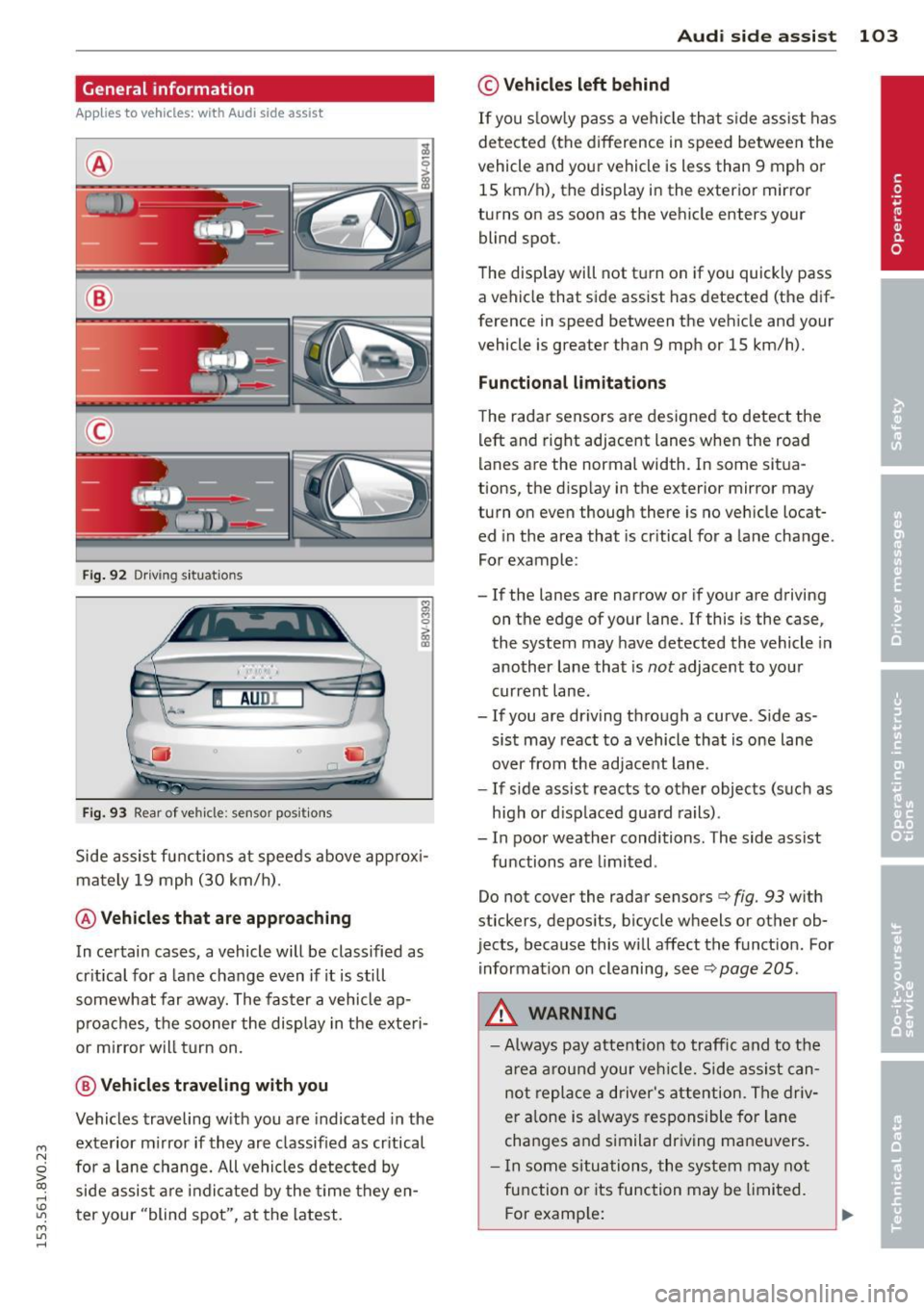
®
®
©
Fig . 92 Dr iv ing s it uat ions
I AU DI
Fi g. 93 Rear of ve hicle: se nsor pos it ions
Side assist functions at speeds above app rox i
mately 19 mph (30 km/h) .
@Vehicl es that ar e approaching
In certain cases, a vehicle will be classified as
cr itical for a lane change even if it is still
somewhat far away. The fas ter a vehicle ap
p roaches, t he sooner the display in the exteri
or m irror will t urn on.
@ V ehicles traveling with you
Vehicles traveling w ith you are indicated in the
exterior m irror if they are classified as cr itical
for a lane change. All vehicles detec ted by
side assist are indi cated by the time they en
t er your "blind spot", at the latest.
Aud i side assist 103
© Veh icles left behind
If you s low ly pass a vehi cle that s ide assist has
detected (the difference in speed between the
vehicle and you r vehicle is less than 9 mph or
15 km/h), the display in the exterio r mir ro r
turns on as soon as the vehicle enters your blind spot.
T he disp lay will not t urn on if you quickly pass
a vehicle that side assist has detected (the dif
ference in speed between the veh icle and your
vehicle is greater than 9 mph or 15 km/h).
Functional limitations
The radar sensors are designed to detect the
left and right adjacent lanes when the road
lan es are the normal width . In some sit ua
tions, the d isp lay in the exterior mirror may
turn on even though there is no ve hicle locat
ed in the area that is cr itical for a lane cha nge.
For example:
- If the lanes are narrow or if your are driving
on the edge of your lane.
If this is the case,
the system may have detected the vehicle in
another lane that is
not adjacent to you r
current lane .
-If you are dr iving through a curve . S ide as
sis t may react to a vehicle that is one lane
over from the adjacent lane.
- If side assist reacts to other objects (such as
high or d isp laced guard rails) .
- In poor weather conditions. The side assist
functions are limited .
Do not cover the radar sensors
c> fig. 93 w ith
stickers, depos its, bicycle wheels or other ob
jects, because this will affect the funct ion. For
information on cleaning, see
c> page 205.
A WARNING
- Always pay attention to traffic and to the
a rea a round your ve hicl e. Side assi st can
not repla ce a d river's attention . Th e driv
er a lone is always responsible for la ne
cha nges and s imilar dr iv ing ma ne uvers.
- In some si tua tions, the system may not
function or its function may be limited.
F or examp le:
Page 106 of 310
104 Audi side assist
-If vehicles are approaching or being
left behind very quickly. The display
may not turn on in time.
- In poor weather conditions such as
heavy rain, snow or heavy mist.
- On very wide lanes, in tight curves, or if
there is a rise in the road surface.
Vehicles in the adjacent lane may not
be detected because they are outside
of the sensor range.
- Audi side assist cannot detect all vehicles
under all conditions, which can increase
the risk of accidents.
- Please note that side assist only displays
approaching vehicles or vehicles in your
blind spot if your vehicle is traveling at
least 19 mph (30 km/h).
- In certain situations, the system may not
work or its function may be limited. For
example:
- The display may not turn on at the
right time if vehicles are approaching
or passing very quickly.
- In poor weather conditions, such as
heavy rain, snow or fog.
- In very wide lanes, in tight curves or
when there are slopes in the roadway,
vehicles in the neighboring lanes may not be detected because they are out
side of the sensor range.
The sensors can be displaced by impacts or damage to the bumper, wheel housing and
underbody. This can affect the system. Have your authorized Audi dealer or au
thorized service facility check their func
tion.
{D) Tips
- If the window glass in the driver's door
or front passenger's door has been tint
ed, the display in the exterior mirror may
be misinterpreted .
- For an explanation on conformity with
the FCC regulations in the United States and
the Industry Canada regulations, re
fer to~
page 292.
Switching on and off
Applies to vehicles: with Aud i s ide ass ist
The system and be switched on and off in the
MMI.
.. Select: the I MENU I button >Car> Systems*
control button > Driver assistance > Audi
side assist.
With Off, the system is switched
off.
An activated system will signal every time the ignition is switched on by turning the displays
in the exterior mirrors on briefly.
Adjusting the display brightness
Applies to vehicles: with A udi side ass ist
The display brightness can be adjusted in the
MMI.
.. Select: the I MENU I button >Car> Systems*
control button > Driver assistance > Audi
side assist.
The display brightness adjusts automatically
to the brightness of the surroundings, both in
the information and in the warning stage. In
very dark or very bright surroundings, the dis play is already set to the minimum or maxi
mum level by the automatic adjustment. In
such cases, you may notice no change when
adjusting the brightness, or the change may
only be noticeable once the surroundings
change.
Adjust the brightness to a level where the dis
play in the information stage will not disrupt
your view forward. If you change the bright
ness, the display in the exterior mirror will
briefly show the brightness level in the infor
mation stage. The brightness of the warning
stage is linked to the brightness in the infor
mation stage and is adjusted along with the
information stage adjustment. .,_
Page 295 of 310
M N
0 > co ,...., \!) 1.1'1
M 1.1'1 ,....,
A
A/C (automatic climate control system) .. 70
A/C (manual cl imate control system) .. .. 69
Accessories . . . . . . . . . . . . . . . . . . . . 60, 291
Active lane ass ist . . . . . . . . . . . . . . . . . . . . 98
Ac tiva ting vibration warning .. .. .. .. . 100
Adj usting steering time . ... .. .. .. .. . 100
C leaning the camera area . ... .. .. .. . 206
Driver messages . . . . . . . . . . . . . . . . . . . . 99
Indicator light . . . . . . . . . . . . . . . . . . . . . 99
switch ing on and
off ...... .. .. .. .. .. 99
Adapt ive cruise control . . . . . . . . . . . . . . . . 86
Automatic transmission . . . . . . . . . . . . . 90
C lean ing the sensor .... ... .. .. .... . 206
Driver messages .......... .... .. .... 92
General Informa tion . . . . . . . . . . . . . . . . 86
Request fo r driver intervention . . . . . . . . 92
Stop-and-go traffic .......... .... ... 90
Adaptive dampe rs . . . . . . . . . . . . . . . . . . . 106
Indicator light . . . . . . . . . . . . . . . . . . . . . 26
Adapt ive light . . . . . . . . . . . . . . . . . . 47, 106
I ndicator light . . . . . . . . . . . . . . . . . . . . . 25
AdBlue .. .. .. .. ........ ... .. ... ... . 215
F il ling . .. .. .......... ... .... .. .. . 216
M essages .. ............. .. .. .. .. . 215
Adding W indshield washer fluid ....... ... .. 232
Adj usting a ir distribution (Climate control
system) ... .. ................. .. .... 71
Ad justing air vents ......... .. .. .. .. .. 7 2
Adjusting a ir vents (manual climate con-
trol system) . . . . . . . . . . . . . . . . . . . . . . . . . 69
Ad justing a utomatic headlights . ... .. .. 48
Ad justing the cen ter conso le lighting .. .. 50
Ad justing the temperat ure
manual climate control system . . . . . . . . 69
advanced key
refer to Convenience key . . . . . . . . . . . . . 77
A irbag .... .. ................. .. ... 1 44
I ndica tor ligh t . . . . . . . . . . . . . . . . . . . . . 21
Ai rbag system ................ .... .. 165
Advanced Airbag System ... .. .. .. .. . 148
Advanced Airbag System compone nts . 15 2
Ca re ..... .. .... ........... .. .. .. . 160
C hi ld ren . .. ............. .... .. ... 17 2
C hi ld restra ints . .. ..... ... .. .. .. ... 172
Inde x 293
Components (front airbags) .. ... .. .. 152
Danger of fitting a ch ild seat o n the front
passenger seat ... .. . .. ... .... ... .. 146
Disposa l .. .. .. .. ................. 160
Front a irbags . . . . . . . . . . . . . . . . 148, 150
How do the front airbags work? ...... 154
How many a irbags does my vehicle
have? ....... ... .. ..... .......... 152
How the Advanced Airbag System com-
ponent s work togethe r ......... .. .. 15 4
Im portant sa fe ty instructions on the
knee airbag system .. .. ..... ... .. .. 163
Impo rtant t hings to know .... ... .. .. 144
Knee a irbags . .. .. ................. 161
Monitoring .. .. .. ................. 156
PASSENGER AIR BAG OFF light ..... .. 157
Repairs ......... .. ............... 160
Safety i nstr uctions .. . .. .. .. ... ... .. 159
S ide a irbags . .. .... ... .. ..... ..... 163
S ide cur tain airbags . ........... .... 166
Wa rning/Indicato r lights ....... .. .. 156
When must the system be inspected? . 156
Ala rm system
re fer to Anti-theft alarm system ....... 35
A lignment pin (changing the whee l) .. .. 268
A ll- wea ther lights ( LED headlights) ... .. . 46
A ll-wheel d rive
Winter tires . .. .. .. .......... ..... 261
A ll wheel drive .. .. ................. 193
Altern ator
refer to Alternator (indicator light) 20
Alternato r (indicato r light) ...... .... .. 20
Amb ient lighting . ... .. .. .. .... ... .. . 49
A nti- freeze
refer to Eng ine coolan t ......... .. .. 225
Anti -lock braking system ............. 189
Ind icator light ... .. . .. .... .... .. .. . 22
Anti-slip regu lation .. ........... .... 189
Ind icator light . .. .... ........... .. . 22
An ti-theft a larm system ....... ... .. .. . 35
Anti-theft protection Electronic immob ilizer ............. .. 40
Audi active lane assist
refer to Active lane ass ist ......... .. . 98
Audi drive selec t ..... . .. .. ..... ... .. 106
Ind icator light ..... . .. .. ..... ... .. . 26
•
•
•
Page 301 of 310
M N
0 > co ,...., \!) ..,.,
M ..,., ,....,
Headlights Headlig ht range control system ... .. .. 46
L eft hand drive, right hand drive ... .. .. 49
Travel mode ............. .... .. .. .. 49
Washer reservoir ......... .... .. .. . 232
Head restraints . . . . . . . . . . . . . . . . . . . . . 129
adj usting . ... .... .. .... ... .. .. .... 59
Ad justing . ... .. ... ..... ... .. .. ... 129
removing and installing . . . . . . . . . . . . . . 59
H eated
exterior m irrors ....... ... .. .. .. .. .. 52
Rear window . . . . . . . . . . . . . . . . . . . . . . . 72
Seats . ..... .. .... .. .... ... .. .. .... 72
Washer nozz les . . . . . . . . . . . . . . . . . . . . 50
H ea ting (diese l eng ine a uxiliary hea ter) .. 73
H eavy clothing and safety belts . . . . . . . . 1 38
Hex soc ket ... .. .. .. .. .... ... .. .. ... 268
H igh voltage warning label .. .. .. .. .. . 286
H ighway lig ht .. ........... .. .. .. .. .. 47
H ill descent control ..... ... .. .. .. .. . 113
H ill hold .. ... ............. ... ... ... 82
Hill hold ass ist
refer to Hill hold ......... .... .. .. .. 82
H orn ... .. .. .. .. ... . .... ... .. .. .. .. . 8
H ow are c hild restra int system anchors re-
lated to child safety ............. .... 184
How many airbags does my vehicle have? 152
H ow often sho uld I check my t ire pres-
sures? . ..... .. .... .. .... ... .. .. ... 247
H ow safety belt pretensioners wo rk . . . . 142
Hydroplaning ............. .... .. .. . 253
I
Ignition
Indicator light . . . . . . . . . . . . . . . . . . . . . 21
Sw itching on/off (w ith button) .. .. .. .. 77
I gnition key safety in terloc k . . . . . . . . . . . 7 4
Ignition lock mechanical ........... ...... .... ... 74
Immobilizer ... .... .... ... .. .. .. .... 35
I mpor tan t thi ngs to do before driving . . 125
Improperly wor n safety belts . . . . . . . . . . 141
I ndicato r lights . . . . . . . . . . . . . . . . . . . . . . 14
I nfant seats . . . . . . . . . . . . . . . . . . . . . . . 176
Instal ling ch ild safety seats
Safety belts .. ........... .. .. .. ... 181
Inde x 299
Installing the upper tether st rap on the
ancho rage . ... .. .... . ... ...... ... .. 187
Instrument cluster . ................. . 10
Instruments .. .. .. ................. . 10
Adjusting the light ing . .. .... ... .. .. . 50
Interior l ighting ..... . .. .. ..... ... .. . 49
Intermittent (w indshield w ipers) .. ... .. 50
J
Jump -starting
Jump start cab les 280
281
K
Key ...
... .. .. .... .. . .. .. ..... ... .. . 35
Checking the number . .. ..... ... .. .. . 35
Driver messages (mechanical ignition
key) ...... .. .. .. ................. . 79
Driver messages (with convenience key) . 79
Key not recognized . . . . . . . . . . . . . . . . . . 79
Key replacement ................. .. 35
Replacing the battery .. .. ... ... .. .. . 37
u nlocking/loc king .... ....... 37, 38 , 39
Key recognition Climate control system ............. . 68
K ick -down
Automat ic transmission ..... ... .. .. 114
Knee a irbags .. .. .. .. .. ........... .. 161
Descrip tion .. .. .. .. ............... 161
How they wor k ..... . .. ..... ... .. .. 162
Important sa fe ty instructions . ... .. .. 163
L
La ne assist
refer to Ac tive lane ass ist .... ... .. .. . 98
Lap time r ...... ... .. ................ 32
Evaluating recorded times .......... .. 33
Star ting . . . . . . . . . . . . . . . . . . . . . . . . . . 32
LATC H ..... .. .. .. ................. 184
Description . . . . . . . . . . . . . . . . . . . . . . . 18S
Installing a c hild restra int .......... . 186
Location . . . . . . . . . . . . . . . . . . . . . . . . . 185
Mount ing and releasing the anchorage
hoo k ..... .. .. .. .. . .............. 186
Launc h Control-Program (automatic trans
mission) . . . . . . . . . . . . . . . . . . . . . . . . . . 115
•
•
•