steering AUDI S3 2015 User Guide
[x] Cancel search | Manufacturer: AUDI, Model Year: 2015, Model line: S3, Model: AUDI S3 2015Pages: 310, PDF Size: 76.15 MB
Page 37 of 310
M N
0 > co ,...., \!) ..,.,
M ..,., ,....,
Opening and closing
Central locking
Key set
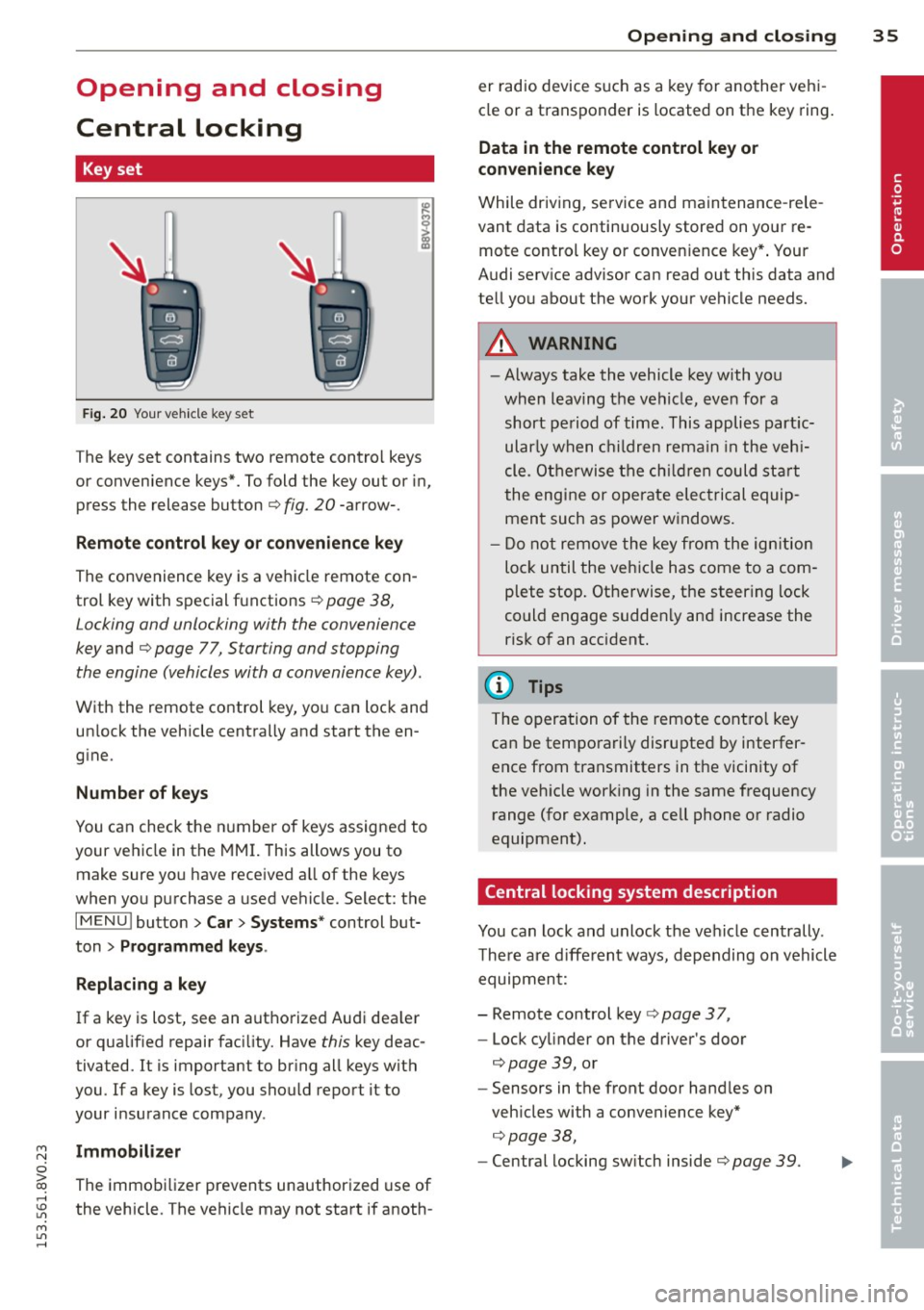
Fig . 20 Your vehicle key set
The key set contains two remote contro l keys
or convenience keys*. To fold the key out or in,
press the release button
q fig. 20 -arrow-.
Remote control key or convenience key
The convenience key is a vehicle remote con
trol key with special functions
q page 38,
Locking and unlocking with the convenience
key and q page 77, Star ting and stopping
the engine (vehicles with a convenience key).
With the remote control key, you can lock and
un lock the vehicle centrally and start the en
g ine.
Number of keys
You can check the number of keys assigned to
your vehicle in the
MMI. T his allows you to
make sure you have received a ll of the keys
when you purchase a used vehicle. Select: the
I MENU I button > Car> Systems* control but
ton
> Programmed keys.
Replacing a key
If a key is lost, see an authorized Audi dea ler
or qualified repair facility. Have
this key deac
tivated. It is important to br ing all keys with
you.
If a key is lost, you should report it to
your insurance company .
Immobilizer
The immobilizer prevents unauthorized use of
the vehicle . The vehicle may not start if anoth -
Opening and closing 35
er radio device such as a key for another veh i
cle or a transponder is located on the key ring.
Data in the remote control key or
convenience key
While driving , service and maintenance -rele
vant data is continuously stored on your re
mote control key or convenience key*. Your
Audi serv ice advisor can read out this data and
tell you about the work your vehicle needs.
_& WARNING
- Always take the vehicle key with you
when leaving the vehicle, even for a
short period of time. This applies partic
ularly when children remain in the vehi
cle . Otherwise the children could start
the engine or operate electrical equip
ment such as power windows.
- Do not remove the key from the ignition
lock until the vehicle has come to a com
plete stop. Otherwise, the steering lock
could engage sudden ly and increase the
risk of an accident.
{i) Tips
The operation of the remote control key
can be temporarily disrupted by interfer
ence from transmitters in the vicinity of
the veh icle working in the same frequency
range (for example, a cell phone or radio
equipment).
Central locking system description
You can lock and unlock the vehicle centrally .
There are different ways, depending on vehicle
equipment:
- Remote control key
q page 3 7,
- Lock cylinder on the driver's door
qpage 39, or
- Sensors in the front door handles on
veh icles with a convenience key*
q page 38,
-Central locking sw itch inside q page 39. •
Page 49 of 310
....,
N
0 > co
rl I.O
"' ....,
"' rl
Aud i adapti ve lig ht*
The adaptive light on ly functions when the
light switch is in the AUTO position. You can
deactivate adaptive light in the MMI
c:> page
48.
When switched on, adapt ive light adjusts to
curves depending on the vehicle speed and
steering whee l ang le. This provides better
l ighting through the curve . The system op er
ates in a speed range from approximately
6 mph (10 km/h) to 68 mph (110 km/h).
St atic corner ing li ght * (vehicles with adaptive
l ight) -th e corne ring light switches on auto
matically when the steering whee l is tu rned at
a cert ain angle a t speeds up to approximately
44 mph (70 km/h) and when the turn signal is
activated at speeds up to approximately
25 mph (40 km /h). The area to the s ide of the
ve hicle is il luminated better when turning .
Spee d d epen de nt ligh t dist rib uti on* -The
speed dependent light distribution adapts the
light in towns and on highways or express
ways . Inte rsect io ns can also be illuminated on
veh icles w ith a navigation system* .
Highway light function*
(Vehicles with adaptive light or L ED head
lights) -This function adapts the light ing for
h ighway driving based on vehicle speed .
A WARNING
-Automatic headligh ts* are only intended
to assist the dr iver. They do not re lieve
the driver of responsibility to check the headlights and to turn them on manua lly
according to the current light and visib ili
ty conditions. For example, fog cannot be detected by the light sensors. So al
ways switch on the low beam under
these weather conditions and when driv ing in the dark
io .
-Acc idents could occur if you cannot see
the road ahead of you well and if othe rs
on the road cannot see you. Always
swit ch you r headlights on so that you can Ligh
ts and Visi on 4 7
see the road ahead of you and ot hers can
see your vehicle from behind.
- Please observe legal regulations when
using the lighting systems described.
(D Note
The rear fog lights shou ld only be turned
on in accordance with traffic regu lations,
to prevent glare for traffic behind your ve
hicle.
(D Tips
- The light sensor for the automatic head
lights * is in the rearview mirror mount.
Therefore, do not place any stickers in
this area on the windshield .
- Some functions of the exterior lighting
can be adjusted
c:> page 48.
-If you turn off the ignition while the ex
terior lights are on and open the door,
you will hear a warning tone.
- The tail lights do not switch on when the
daytime running lights switch on.
- In cool or damp weather, the inside of
the headlights, turn signals and tail
lights can fog over due to the tempera
ture difference between the inside and
outside . They w ill clear shortly after
switching them on . This does not affect
the se rvice life of the lighting.
- A message w ill appear in the instrument
cluster if there is a malfunction in the
light senso r
c:> page 25.
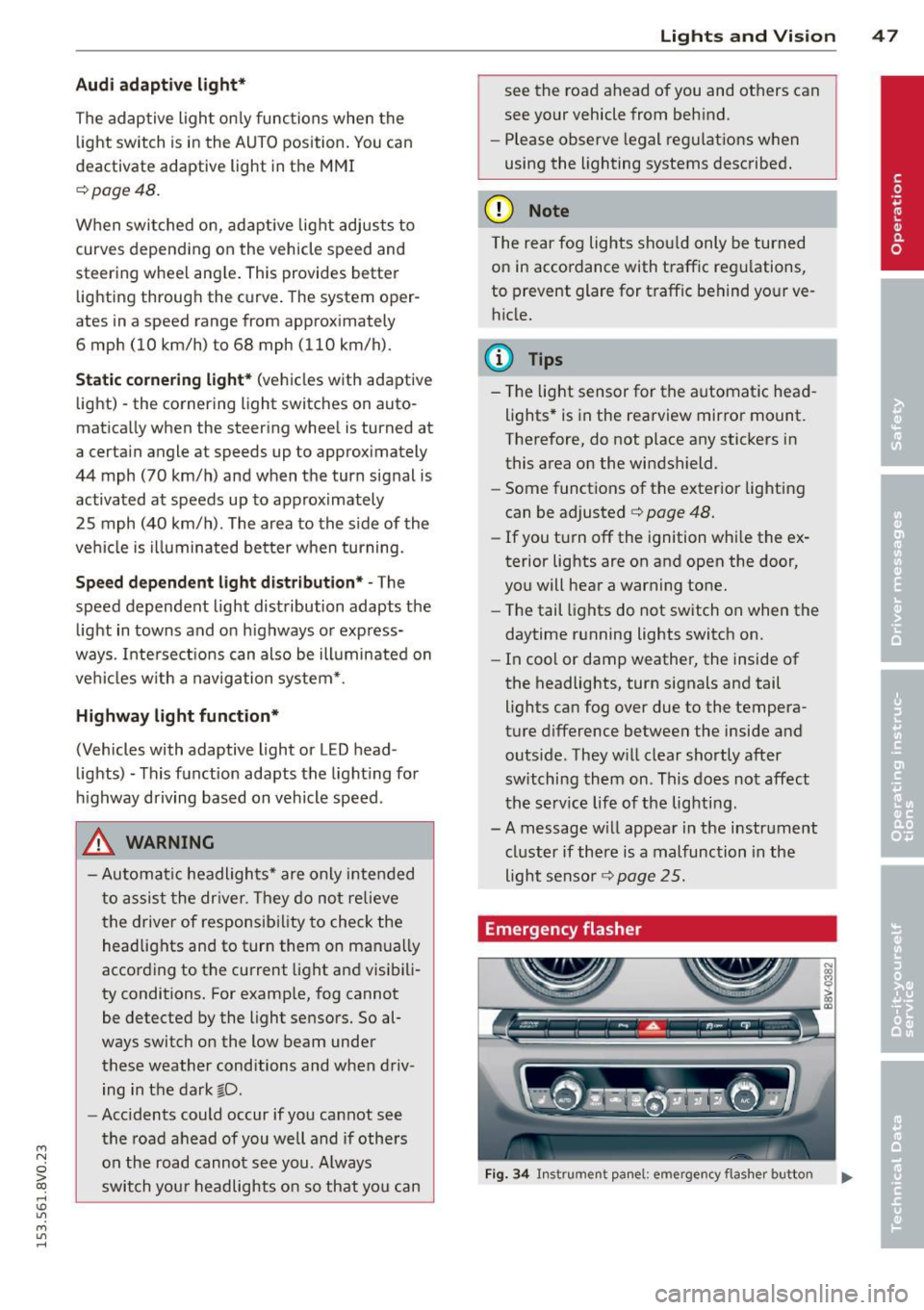
Emergency flasher
Fig. 34 In str umen t pa nel: em erg ency fla sher button
Page 58 of 310
56 Seat s a nd s tor ag e
Seats and storage
General information
Important information
& WARNING
Refer to the chapter Driving Safely
r::!>poge 125, Driving safety for important
information, t ips, suggestions and warn
ings that you should read and follow for
your own safety and the safety of your pas sengers.
Why is your seat adjustment so important?
The safety belts and the airbag system con
only provide maximum protection if the front
seats ore correctly adjusted.
There are various ways of adjusting the front
seats to provide safe and comfortable support
for the driver and the front passenger. Adjust
your seat properly so that :
- you can easily and quickly reach all the
switches and controls in the instrument
panel
- your body is properly supported thus reduc
ing physical stress and fatigue
- the safety belts and airbag system can offer
maximum protection
r::!> page 144 .
In the following sections, you will see exactly
how you can best adjust your seats .
There are special regulations and instructions
for insta lling a child seat on the front pas
senger's seat. Always follow the information regarding child safety provided in
r::!> page 170, Child Safety .
& WARNING
Incorrect seating position of the dr iver and
all other passengers can result in serious
personal in jury.
- Always keep your feet on the f loor when
the vehicle is in motion - never p ut your
feet on top of the instrumen t panel, out of the window or on top of the seat c
ush
ion. This applies espec ially to the passen
gers. If your seating position is incorrect,
you increase the risk of injury in the case
of sudden braking or an accident .
If the
airbag inflates and the seating position is incorrect, this could result in pe rsonal
inj ury or even death.
- It is important for both the drive r and
front passenger to keep a distance of at least 10 inches ( 25 cm) between them
selves and the steering wheel and/or in
strument panel. If you're sitting any
closer than this, the airbag system can not protect you properly. In addition, the
front seats and head restraints must be
adjusted to your body height so that they
can give you max imum protect ion.
- Always try to keep as much distance as
possible between yourself and the steer
ing wheel o r instrument panel.
- Do not adjust the driver's or front pas
senger's seat whi le the vehicle is moving.
Your seat may move unexpectedly, caus
ing sudden loss of veh icle cont ro l and
pe rsonal injury. If you adjust yo ur seat
while the veh icle is moving, yo u are ou t
of posit ion .
Driver's seat
The correct seat position is important for safe
and relaxed driving.
We recommend that you adjust the dr iver's
seat in the fo llow ing manne r:
.. Adjust the seat in fore and aft direction so
that you can easily push the peda ls to the
floor wh ile keeping your knees sl ightly bent
c::> &. in Why is your seat adjustment so im
portant? on page 56.
.. Ad just the bac krest so tha t when you sit
w ith your back against the backrest, you can
still grasp the top of the steering wheel.
.. For adjustab le head restraints: adjust the
head restra int so the upper edge is as even
as poss ible with the top of your head. If that
is not possible, try to adjust the head ..,.
Page 76 of 310
74 Driving
Driving
Steering
Adjusting the steering wheel position
The steering wheel position is fully adjustable
up and down and forward and bock .
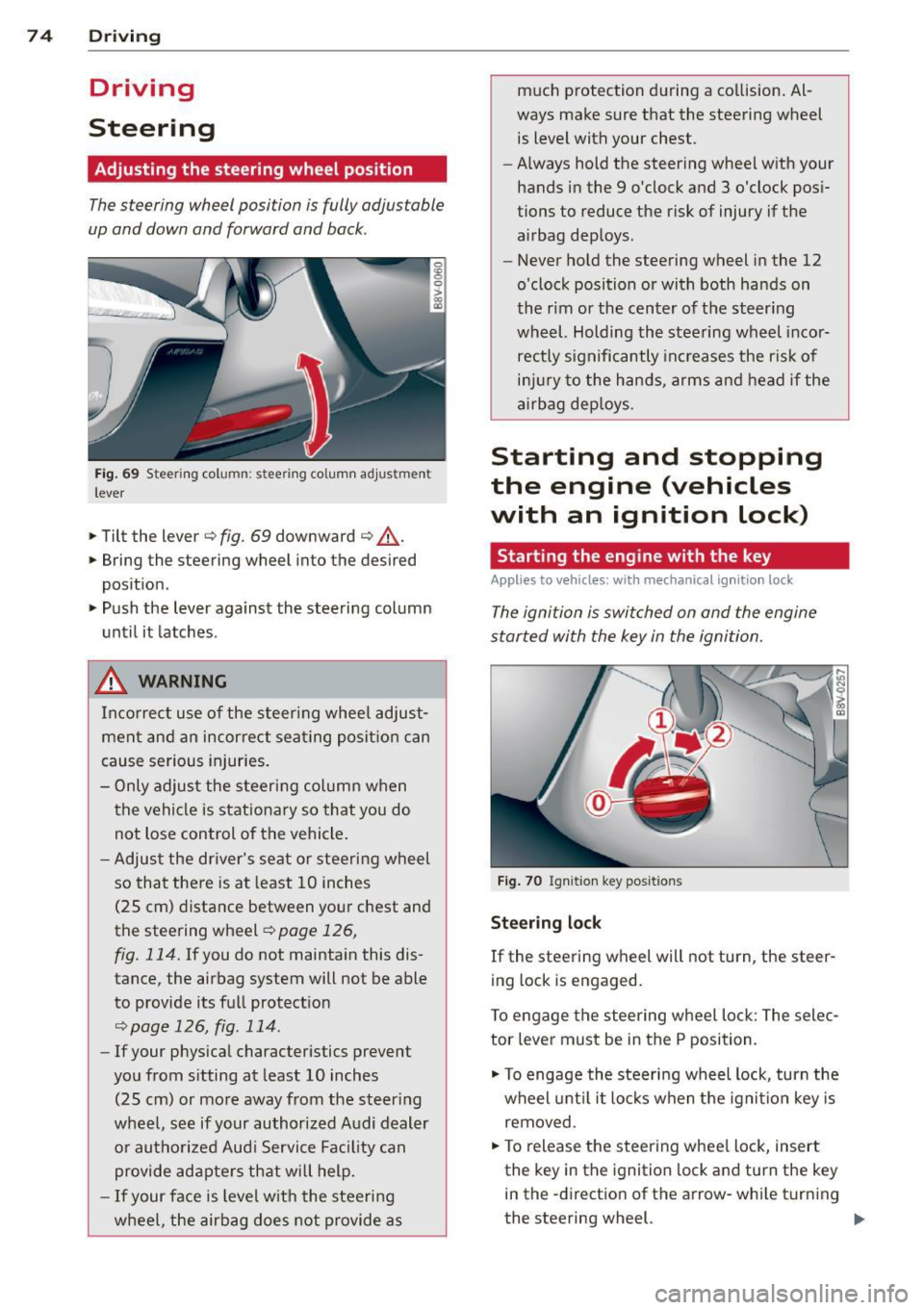
Fig. 69 Steering column: stee ring column adjustmen t
lever
.. Tilt the lever ¢ fig. 69 downward ¢ &_.
.. Bring the steering wheel into the desired
position .
.. Push the lever against the steering column
until it latches .
_& WARNING
Incorrect use of the steer ing whee l adjust
ment and an incorrect seating position can
cause serious injuries.
- Only adjust the steering column when
the vehicle is stationary so that you do
not Lose control of the vehicle .
- Adjust the driver's seat or steering wheel
so that there is at least 10 inches
(25 cm) distance between your chest and
the steering wheel~
page 126,
fig. 114.
If you do not maintain this dis
tance, the airbag system will not be able
to provide its full protect ion
<=> page 126, fig. 114.
- If your phys ical characteristics prevent
you from sitting at least 10 inches
(25 cm) or more away from the steer ing
wheel, see if your authorized Audi dealer or authorized Audi Service Fac ility can
provide adapters that will help.
- If your face is level with the steering
wheel, the airbag does not provide as much protection during a co
llision. Al
ways make sure that the steering wheel is level with your chest .
- Always hold the steering wheel with your
hands in the 9 o'clock and 3 o'clock pos i
tions to reduce the risk of injury if the
airbag deploys.
- Never hold the steering wheel in the 12
o'clock position or with both hands on
the rim or the center of the steering
wheel. Holding the steering wheel incor
rectly significantly increases the r is k of
inj ury to the hands, arms and head if the
airbag deploys.
Starting and stopping
the engine (vehicles
with an ignition lock)
Starting the engine with the key
Applies to vehicles: wit h mechanical ignition loc k
The ignition is switched on and the engine
started with the key in the ignition.
Fig. 70 Ignit ion key pos itions
Steering lock
If the steering wheel will not turn, the steer
ing lock is engaged.
To engage the steering wheel Lock: The selec
tor leve r must be in the P position.
.. To engage the steering wheel lock, turn the
wheel until it locks when the ignition key is
removed .
.. To release the steering wheel Lock, insert
the key in the ignition lock and turn the key
in the -direction of the arrow-whi le turning
the steering wheel. .,.
Page 77 of 310
M N
0 > co ,...., \!) 1.1'1
M 1.1'1 ,....,
Switchin g th e ig nition on /off or
p rewar ming
~ To switch the ignition on, turn the ignition
key to position
(D .
~ To switch the ignition off, turn the ignition
key to position @.
Diese l vehicles are preheated while the igni
tion is switched on
II .
Starting th e engin e
Your veh icle is eq uipped with launch cont ro l.
As soon as you have turned the ignition key to position @, the engine will start automatical
l y.
~ Press the brake peda l and move the se lector
lever to the P or N position.
~ Turn the key briefly to position @. The igni
tion key automatically returns to position
(D . Do not press the accelerator peda l when
do ing this.
Major electrical equipment switches off tem
porarily when starting the engine.
It is poss ible that t here will be a slight delay
when starting the engine in diese l vehicles in
colder temperatures . Therefore , you must
ho ld the brake pedal down unti l the engine
starts . The indicator light turns on while the
engine is preheating
II .
The prewarming time depends on the coolant
temperature and outside temperature. The
glow plug indicator light
II wi ll only turn on
for approximately 1 second when the eng ine
is warm or the outside temperature is higher
than 8
°C. T hat means you can start the en
g ine
immediately .
If the engine does not start immediately, stop
the starting procedure by turn ing the ignition
key to pos ition @and repeat after 30 sec
onds .
Automatic star t m alfunction
If the ~ (gasoline engine) or II (diesel en
g ine) indicator light turns on and the message
E ngin e sta rt system m alfunction . P le ase Dri
vin g 75
cont act Se rv ice
appears, there is an automatic
start malfunction.
T o start the engine, hold the ign it ion key in
pos ition @unt il the engine r uns.
Drive to an authorized Audi dealer or author
ized Audi Serv ice Facility immediately to have
the malfunction corrected.
_& WARNING
- Never a llow the engine to run in confined
spaces - there is a risk of asphyxiation .
- Never remove the ignit ion key from the
ignition loo k while the vehicle is moving .
Otherwise the steering lock will engage
and you will not be able to steer the vehi
cle.
- Please note that the b rake booster and
power steering only work when the en
gine is running. When the engine off, you must use more force to steer or brake
the vehicle. Because the usual steer ing
and brak ing capability is not ava ilable,
the risk of accidents or injur ies increases .
- Always take the vehicle key with you when leav ing the vehicle, even for a
short pe riod of time. This applies part ic
ularly when children remain in the veh i
cle. Otherwise the chi ldren could start
the engine or operate electrical equip
ment such as power w indows.
(D Note
- Avo id h igh engine speed, full th rottle,
and heavy eng ine load as long as the en
gine has not reached operat ing tempera
t u re yet . You could damage the engine.
- T he engine cannot be started by pushing
or towing.
@) For the sake of the environment
Do no t let the eng ine run w hile pa rked to
warm up. Begin dr iv ing immediately. This
reduces unnecessary emissions.
•
Page 78 of 310
76 Driving
(D Tips
-If it is difficult to turn the key to position
(D , turn the steering wheel back and
forth slightly to release the steering
wheel lock .
- After starting a cold engine, there may
be a brief period of increased noise be
cause the oil pressure must first build up
in the hydraulic valve adjusters. This is
normal and not a cause for concern .
- If the battery is disconnected and recon
nected, you have to hold the ignition key
in position
(D for five seconds for the en
gine to start .
- After switching the ignition off, you can
only remove the key when the selector
lever is in the "P" (Park) position. After
that the selector lever is locked.
,
Stopping the engine with the key
App lies to vehicles: with mechanical ig niti on lock
Stopping the engine
.,,. Br ing the vehicle to a full stop.
.,,. Turn the key to position @.
Releasing the steering lock
Requirement : The selector lever must be in
the P position.
.,,. Remove the ignition key in position @
Qpage 77, fig . 71 Q &-
.,,. Turn the steering wheel until you hear the
steering wheel lock.
The locked steering helps prevent vehicle
theft .
_& WARNING
-Never turn off the engine before the ve
hicle has come to a complete stop. The
full function of the brake booster and the
power steering is not guaranteed. You
must use more force to turn or brake, if
necessary. Because you cannot steer and
brake as you usually would, this could
lead to accidents and serious injuries . -
Never remove the ignition key from the
ignition look while the vehicle is moving .
Otherwise, the steering lock could sud
denly engage and you would not be able
to steer the vehicle .
- Please note that the brake booster and
power steering only work when the en
gine is running. When the engine off, you
must use more force to steer or brake
the vehicle . Because the usual steering
and braking capability is not available,
the risk of accidents or injuries increases.
- Always take the vehicle key with you
when leaving the vehicle, even for a
short period of time. This applies partic
ularly when children remain in the vehi
cle. Otherwise the children could start
the engine or operate electrical equip
ment such as power windows.
- For safety reasons, always park the vehi
cle with the selector lever in the P posi
tion . Otherwise, there is the risk that the
vehicle could roll.
- After the engine has been switched off,
the radiator fan can continue to run for
up to 10 minutes - even with the ignition
switched off. It can also switch on again
after some time if the coolant tempera
ture rises as a result of heat buildup or if
the engine compartment is heated by
sunlight and the engine is hot .
(D Note
-If the engine has been under heavy load
for an extended period of time, heat
builds up in the engine compartment af
ter the engine is switched off -there is a
risk of damaging the engine. For this
reason, let the engine run for at idle for
approximately two minutes before shut
ting it off.
Page 79 of 310
....,
N
0 > co
rl I.O
"' ....,
"' rl
Starting and stopping
the engine (vehicles
with a convenience key)
St t· th · ith the
button
Applies to vehicles: with convenience key
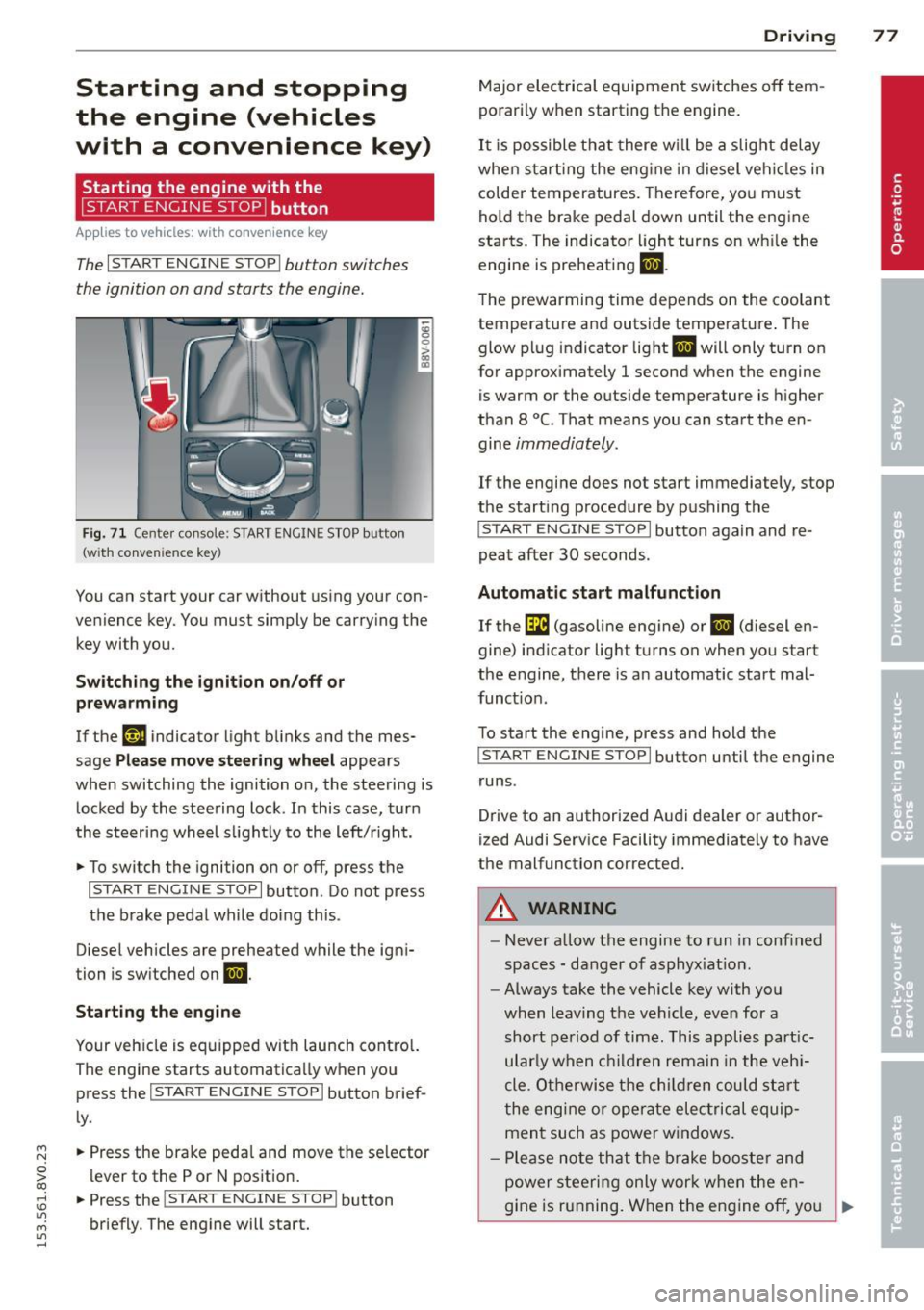
The I START ENGINE STOPI button switches
the ignition on and starts the engine.
Fig. 71 C en ter con sole : START ENGINE STOP b utton
(w ith conve nien ce key)
You can start your car without using your con
venience key. You must simply be carry ing the
key with you.
Switching the ignition on/off or
prewarming
If the 'y.ij indicator light blinks and the mes
sage
Please move steering wheel appears
when switching the ignition on, the steering is
locked by the steering lock . In this case, turn
the steering wheel slightly to the left/r ight .
.,. To switch the ignition on or off, press the
I START ENGINE STOPI button . Do not press
the brake pedal while do ing this .
Diesel vehicles are preheated while the igni
tion is switched on
II.
Starting the engine
Your vehicle is equipped with launch contro l.
The engine starts automatically when you press the
I START ENGINE STOP I button brief
ly .
.,. Press the brake pedal and move the se lector
lever to the P or N position.
.,. Press the
I START ENGINE STOPI button
briefly. The engine will start .
Driving 77
Major electrical equipment switches off tem
porarily when starting the engine.
It is possible that there will be a slight delay
when starting the engine in diesel vehicles in
colder temperatures. Therefore, you must
hold the brake pedal down until the engine
starts. The indicator light turns on wh ile the
engine is preheating
II .
The prewarming time depends on the coolant
temperature and outside temperature . The
glow plug indicator light
II will only turn on
for approximately 1 second when the engine
is warm or the outside temperature is higher
than 8
°C. That means you can start the en
gine
immediately.
If the engine does not start immediately, stop
the start ing procedure by pushing the
I START ENGINE STOP I button again and re
peat after
30 seconds.
Automatic start malfunction
If the GI (gasoline engine) or II (diesel en
gine) indicator light turns on when you start
the engine, there is an automatic start mal
funct ion .
To start the engine, press and hold the
I START ENGINE STOP I button until the engine
runs .
Drive to an authorized Audi dealer or author
ized Audi Service Facility immediately to have
the malfunction corrected .
A WARNING
-Never allow the engine to run in confined
spaces - danger of asphyx iat ion.
- Always take the vehicle key with you
when leaving the vehicle, even for a
short period of time. This applies part ic
ular ly when children remain in the vehi
cle . Otherwise the children could start
the engine or operate electrical equip
ment such as power windows .
- Please note that the brake booster and
power steering only work when the en-
gine is running. When the engine off, you
~
Page 80 of 310
78 Driving
must use more force to steer or brake
the vehicle. Because the usual steering
and braking capability is not available,
the risk of accidents or injuries increases .
- Avoid high engine speed, full throttle,
and heavy engine load as long as the en
gine has not reached operating tempera
ture yet. You could damage the engine .
- The engine cannot be started by pushing
or towing.
@ For the sake of the environment
Do not let the engine run while parked to
warm up. Begin driving immediately. This
reduces unnecessary emissions.
{D) Tips
- After starting a cold engine, there may
be a brief period of increased noise be
cause the oil pressure must first build up in the hydraulic valve adjusters. This is
normal and not a cause for concern .
- If the . indicator light blinks in the in
strument cluster before switching the ig
nition off, the ignition will not switch on
again.
9 page 193
- If you leave your vehicle with the ignition
switched on, the ignition will switch off
after a certain amount of time. Make
sure that electrical equipment such as
the exterior lights are switched off.
Turning the engine off using the button
Applies to vehicles: with conven ience key
• Bring the vehicle to a full stop.
• Move the selector lever into the P position .
• Press the
I START ENGIN E STOPI button
9page 77, fig. 71 .
Steering lockll
The steering locks when you turn the engine
off using the
I START E NGIN E STOP t* button,
l) Thi s fun ction is not available in all c oun tries.
move the selector lever into the P position
and open the driver's door.
The locked steering helps prevent vehicle
theft .
Emergency off function
If it is absolutely necessary, the engine can al
so be turned off while driving at speeds lower
than 6 mph (10 km/h). If you press the
I STAR T ENGINE ST OPI* button while driving,
the message
Pressing start/stop button
again will switch off engine!
appears. To
switch the engine off, press the
I S TAR T ENGINE ST OPI* button twice in a row
briefly or press and hold for longer than two
seconds.
A WARNING ~
- Never turn off the engine before the ve- hicle has come to a complete stop . The
full function of the brake booster and the
power steering is not guaranteed . You
must use more force to turn or brake if
necessary. Because you cannot steer and
brake as you usually would, this could
lead to crashes and serious injuries.
- Please note that the brake booster and
power steering only work when the en
gine is running. When the engine off, you
must use more force to steer or brake
the vehicle. Because the usual steering
and braking capability is not available,
the risk of accidents or injuries increases.
- Always take the vehicle key with you
when leaving the vehicle, even for a
short period of time. This applies partic
ularly when children remain in the vehi
cle . Otherwise the children could start
the engine or operate electrical equip
ment such as power windows.
- For safety reasons, always park the vehi
cle with the selector lever in the P posi
tion. Otherwise, there is the risk that the
vehicle could roll.
Page 81 of 310
....,
N
ci > co
rl I.O
"' ....,
"' rl
-After the engine has been switched off ,
the radiator fan can continue to run for
up to 10 minutes -even with the ignition
switched off . It can also switch on again
after some time if the coolant tempera
ture rises as the result of heat buildup or
if the engine compartment is heated by
the sun's rays and the engine is hot.
(D Note
If the engine has been under heavy load
for an extended period of time, heat builds
up in the engine compartment after the
engine is sw itched off -there is a ris k of
damaging the engine. For this reason, let
the engine run for at idle for approx imate
ly two minutes before shutting it off.
Starting the engine if there is a
malfunction
App lies to vehicles: with conve nience key
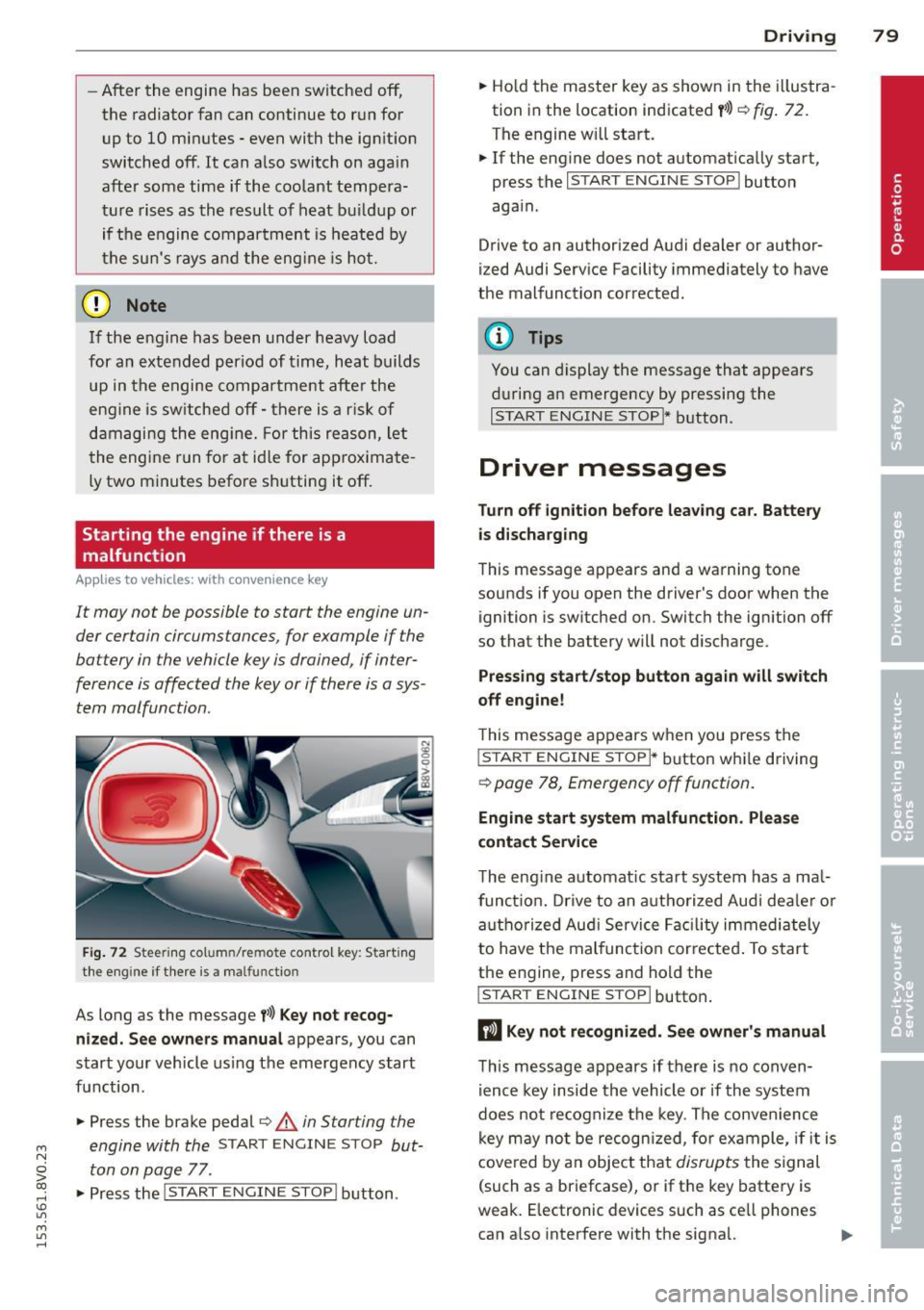
It may not b e possibl e to start the engine un
der cer tain circumstances , for example if the
battery in the vehicle key is drained , if inter
ference is affected the key or if there is o sys
tem mo/function.
Fig. 72 Steering co lu m n/re mote control key : Start ing
the engine if there is a ma lfunctio n
As long as the message f>l) Key not recog
nized. See owners manual
appears, you can
start your vehicle using the emergency start
function .
"" Press the brake pedal¢.&.
in Starting the
engine with the
START ENGINE STOP but
ton on page
77 .
.,. Press the
j;..,, s=T~A~R=T~-EN~G-I_N_E--ST--OP I button.
Driving 79
""Ho ld the master key as shown in the illustra
tion in the location indicated
y>>) r=) fig. 72.
The engine w ill start.
"" If the engine does not automatically start,
press the
I START ENGINE STOP I button
again .
Drive to an authorized Audi dealer or author
ized Audi Service Facility immediately to have
the malfunction corrected.
(D Tips
You can display the message that appears
during an emergency by pressing the
I START ENGINE STOP!* button.
Driver messages
Turn off ignition before leav ing car. Battery
is discharging
This message appears and a warning tone
sounds if you open the driver's door when the ignition is switched on. Switch the ignition off
so that the battery will not discharge.
Pressing start/stop button again will switch
off engine!
T his message appears when you press the
I STAR T ENGINE S TOPI* button while driving
¢ page 78, Emergency off function .
Engine start system malfunction. Please
contact Service
The engine automat ic start system has a ma l
funct ion. Drive to an authorized Audi deale r or
authorized Aud i Service Facility immediately
to have the malfunction corrected . To start
the engine, press and hold the
I STAR T ENGINE S TOP I button.
DJ Key not recognized. See owner's manual
This message appears if there is no conven
ience key inside the vehicle or if the system
does not recognize the key. The convenience
key may no t be recogn ized, for example, if it is
covered by an object that
disrupts the signal
(such as a briefcase), or if the key battery is
weak. E lectronic devices such as ce ll phones
can a lso interfere with the signal. ..,.
Page 83 of 310
M N
0 > co ,...., \!) ..,.,
M ..,., ,....,
driving force has been built up at the
whee ls.
E mergenc y brake fun ction
An emergency braking funct ions ensures that
the vehicle can be slowed down even if the
normal brakes fail¢ page 82, Emergency
braking function .
A WARNING
-Do not press the accelerator pedal inad
vertent ly when the vehicle is stationary
and the engine is runn ing and a gear is
selected. Otherwise the vehicle will start
to move immediately and could result in a crash .
- If the power supply fa ils, the re leased
park ing brake can no longer engage. In
this case, par k the vehicle on level
ground and secure it by placing the se
lector lever i n the P pos ition. See an au
thori zed Aud i dea ler or a utho rized Aud i
Serv ice Facility for ass istance.
(D Note
I f the . or. (U SA mode ls) /. (Cana
da mode ls) indicato r light in t he instru
ment cluster blinks, there is a mal fun ct ion
in the brake system . Re fer to the detailed
description of the indicator lights
r=:>page 18.
-If the . (USA models) /. (Cana-
da models) or
Iii indicator light turns
on, there is a malfunct ion in the park ing
brake
r=:> page 19.
(D Tips
- If the electromechanical parking brake is
set wh ile the ignition is switched off, the
¢C)'A indicator light in the button and in
the instrument cluster dis- play . (USA models)
I. (Cana-
da models) w ill t urn off afte r a ce rtain
amount of time.
- If dr iver's door is opened while the ign i
tion is switched on, the parking b rake
sets automat ically. This prevents unin
tended ro lling of the vehicle .
Dri vin g 81
-Occasional noises when the pa rking
brake is set and released are normal and
are not a cause for concern.
- When the vehicle is pa rked, the park ing
brake goes through a self -test cycle at
regu lar interva ls. Any no ises assoc iated
w ith this are normal.
- If there is a power fa ilure, the park ing
brake will not set if it is released, and it
w ill not release if it is set
r=;, & . See a n
authorized Audi dealer or autho rized
Audi Service Facility fo r ass ista nce.
Parking
" Press the b rake pedal to stop the veh icle.
" Pull the switch @¢
page 80, fig. 73 to set
t he par king brake.
" Place the se lecto r lever in the P position .
.. Turn the engine off¢
A_.
"Tu rn the steering wheel when parking on in
clines so that the wheels w ill roll into the
curb if the vehicle starts moving.
A WARNING
- Always take the vehicle key w ith you
when leav ing the vehicle, even for a
short pe riod of time. This applies part ic
ularly when children rema in in the veh i
cle . Ot herwise children co uld s tart the
engine, release the pa rking brake o r op
erate electrical equipment such as power
windows, which increases the risk of an
accident.
- No one should remain in the vehicle
when it is locked, especially children.
Loc ked doors make it more difficult for
emergency workers to get into the ve hi
cle, which puts lives at risk.
•