cruise control AUDI S3 2015 Owner's Manual
[x] Cancel search | Manufacturer: AUDI, Model Year: 2015, Model line: S3, Model: AUDI S3 2015Pages: 310, PDF Size: 76.15 MB
Page 109 of 310
....,
N
0 > co
rl I.O
"' ....,
"' rl
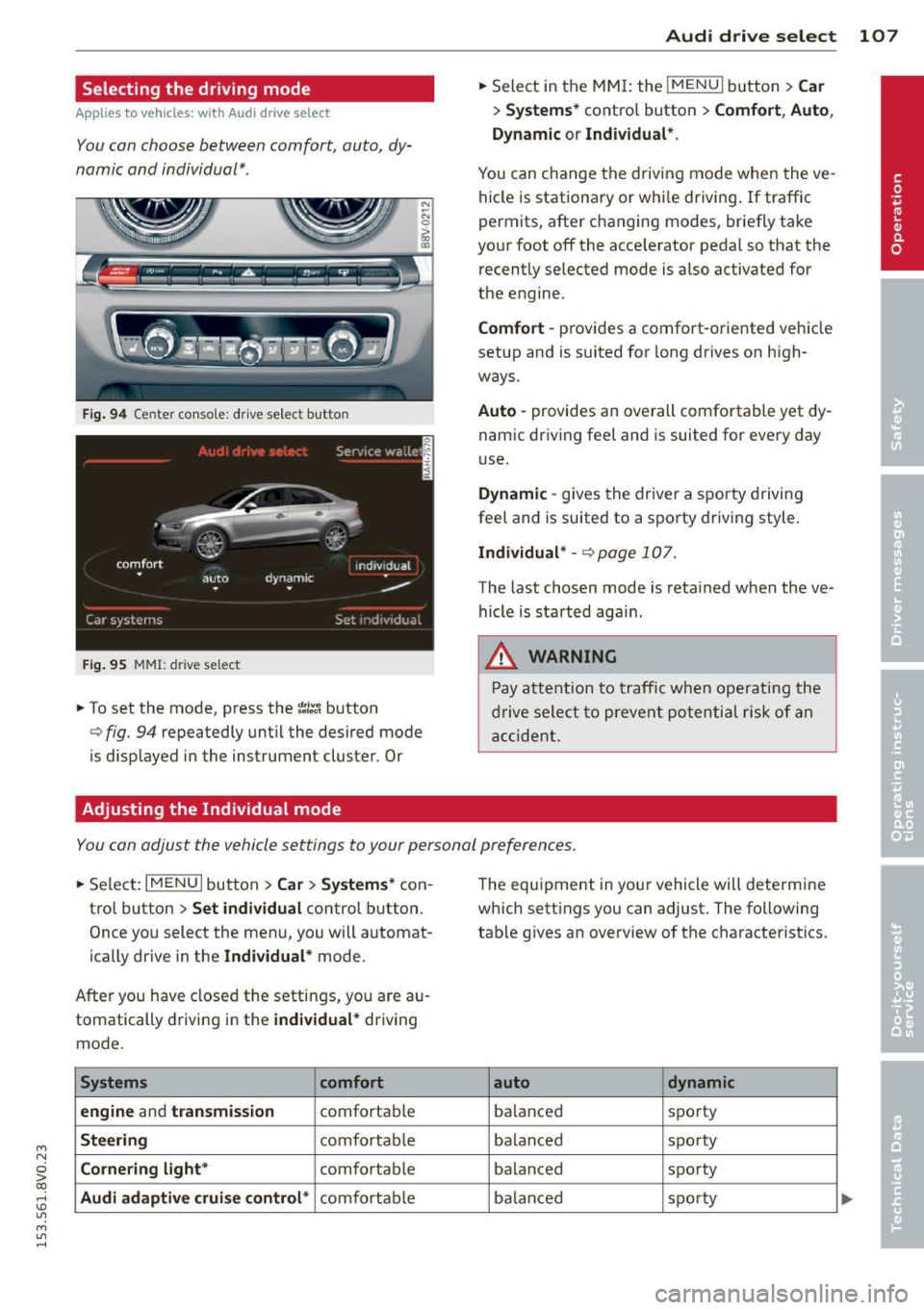
Selecting the driving mode
Applies to vehicles: with Audi drive select
You can choose between comfort, auto, dy
namic and individual* .
Fig. 94 Center conso le : drive select button
Fig. 95 MMI: dr ive se lect
.. To set the mode, press the ~:/:a button
N
-N 0 ::> a, Q)
Q fig . 94 repeatedly until the desired mode
is d isplayed in the instrument cluster . Or
Adjusting the Individual mode Audi drive
select 107
.. Select in the MMI: the !MENU I button> Car
> Systems* contro l button > Comfort , Auto ,
Dynamic
or Individual*.
You can change the driving mode when the ve
hicle is stationary or while driving. If traffic
permits, after changing modes, briefly take
your foot off the acce lerator pedal so that the
recently selected mode is also activated for
the engine .
Comfort -provides a comfort-oriented vehicle
setup and is suited for long drives on high
ways.
Auto -provides an overall comfortable yet dy
namic driving feel and is suited for every day
use.
Dynamic -gives the driver a sporty driving
feel and is suited to a sporty driving style.
Individual* -Qpage 107.
The last chosen mode is retained when the ve
hicle is started aga in .
.&_ WARNING
Pay attention to traffic when operating the
drive select to prevent potential risk of an
accident.
You can adjust the vehicle settings to your personal preferences .
.. Select: I MENU I button >Car > Systems* con
trol button >
Set individual control button.
Once you select the menu, you will automat
ically drive in the
Individual* mode.
After you have closed the settings, you are au
tomatically driving in the
individual* driving
mode .
Systems comfort
engine
and transmission comfortable
Steering comfortable
Cornering light* comfortable
Audi adaptive cruise control* comfortable The
equipment in your vehicle will determine
which settings you can adjust . The following
table gives an overview of the characteristics .
auto dynamic
balanced sporty
ba lan ced sporty
ba lanced sporty
ba lanc ed sporty
Page 115 of 310
M N
0 > co ,...., \!) 1.1'1
M 1.1'1 ,....,
the overload. The ml indicator light
turns on and a message appears
Q page 115 when the clutch is overload
ed .
-If the engine must run while you are
working in the eng ine compartment with
the hood open, make sure a gear is not engaged . T he selecto r leve r must be
firmly in the P pos ition and locked in
pla ce and t he pa rking brake must be set
Qpage217. Otherwise, the veh icle
cou ld beg in moving when the eng ine
speed is high, even with the parking
brake set.
W Note
- When stopping on an incline, do not try
to ho ld the vehicle in place by pressing
the accelerator peda l w hile a dr iving gear
i s selected. This can cause the automatic
transmission to overheat and can dam
age it. Set the parking b rake or press the
brake pedal to p revent the veh icle from
ro lling .
- Allow ing the ve hicle to roll when the en
gine is stopped and the selector lever is
i n the N position will damage the auto
matic transmission beca use it is not lu
b ricated unde r tho se c ircumstances.
- The t ransm ission can overheat and be
damaged under certa in d riving and traf
fi c condition s suc h as frequent s tarts ,
creeping for a long time , or s top-and-go
traff ic. W hen the
ml or . indicator
light turns on, stop the vehicle at the
next oppo rtunity and let the t ransmis
s ion coo l
Qpage 115.
-Allow ing the ve hicle to roll when the en
gine is stopped w ill damage the S tron ic
transmission because it is not lubricated
Q page 282 , Emergency towing with
commercial tow truck .
@ Tips
For safety reasons, the park ing brake re
leases automatically only when the driver's
door is closed and dr iver 's safety belt is
fastened.
Automa tic tran sm iss ion 113
Hill descent control
App lies to vehicles : wi th 5 tronic tra nsmi ssio n
Hill descent control assists the driver when
driving down hills .
Hill descent control is activated when these
l ector lever is in the D or S position and you
press the brake peda l. The transmission auto
matically selects a gear that is suitable for the
i ncl ine. Hill descent cont ro l t ries to ma inta in
t h e speed ac hieved a t the t ime of b raking,
within physic al and tec hnical lim it a tions. If
may sti ll be ne cessa ry to adju st the speed
with t he b rakes . Because hi ll descent control
cannot sh ift down farthe r than 3rd gear, it
may be necessary to sh ift into t iptronic mode
in very steep areas. In this case, shift into 1st
o r 2nd gear in tiptro nic mode to use the en
gine's brak ing force to relieve the brakes .
Hill descent control switches off once the hi ll
levels out or you press the accelerator pedal.
On vehicles with a cruise contro l system*
Q page 83, hill descent control is also activat
ed when the speed is set .
A WARNING
-
Hill descent control cannot overcome
physical lim itations, so it may not be ab le
to maintain a co nsta nt speed unde r all
conditions . A lways be ready to apply the
b rakes .
•
Page 191 of 310
M N
0 > co ,...., \!) 1.1'1
M 1.1'1 ,....,
Smart Technology
Information about
data recorded by
vehicle control
modules
Your vehicle is not equipped with a crash data
recorder. This device is installed by some vehi
cle manufacturers to record data about crash
es so that it can be analy zed later . Crash data
recorders are also called "Event Data Record
ers ( EDR)" .
In some legal jurisdictions, it is not permitted
to access or download data recorded by pre
installed crash data recorders in order to eval
uate a crash without clear consent of the vehi
cle owner .
Your vehicle is not equipped with a crash data recorder. However it does contain a variety of
electronic control modules for various vehicle
systems such as engine function, exhaust
treatment or airbags and safety belts .
These electronic control modules record vehi cle data during normal driving for diagnosis
and repair purposes . The recording capability
of the electronic control modules is limited to
data only- no sound is recorded.
If the control
module detects a system ma lfunction or other
change in status, a very limited amount of da
ta is recorded for an extremely small period of
time . Data that is recorded in such a case may
include vehicle speed, d riving direction, the
load on the brakes and head restraints and
performance in the event of an acciden t or
other change in status . The stored data can
only be read or downloaded with special devi
ces.
Electronic stabilization
control (ESC)
Description
The Electronic Stabilization Control (ESC) con
tr ibutes to driver safety. It reduces the risk of
slipp ing and improves driving stability. ESC
Smart Technolog y 189
detects critical situations such as the vehicle
oversteering and understeering or the wheels
are spinning . The vehicle is stabilized by ap
plying the brakes or reducing engine torque.
Once the ESC is activated, the indicator light
m blinks in the instrument cluster .
The following systems are integrated in the
ESC:
Anti-lock braking system (ABS )
ABS prevents the whee ls from locking when
braking. The vehicle can still be steered even
during hard braking. Apply steady pressure to
the brake pedal. Do not pump the pedal. A
pulsing in the brake peda l indicates that the
system is acting to stabilize the vehicle.
Brake assi st sys tem
The brake assist system can decrease braking
distance. It increases braking power when the
driver presses the brake pedal quickly in emer
gency situations. You must press and hold the brake pedal until the dangerous situation is
over . In vehicles with adaptive cruise control*,
the brake assist system is more sensit ive if the
distance detected to the vehicle ahead is too
small.
Anti-slip regulation (ASR)
ASR reduces engine power when the drive
wheels begin spinning and adapts the force to
the road conditions . This makes it easier to
start , accelerate and dr ive up inclines .
Electronic differential lock (EDL)
The EDL brakes wheels that are spinning and
transfers the drive power to the other drive
wheel or wheels if the vehicle is equ ipped with
all wheel drive*). This function is not available
at higher speeds .
In extreme cases, EDL automatically switches
off to keep the brake on the braked wheel
from overheating . The vehicle is still working
correctly. EDL will switch on aga in automat i
cally when cond itions have returned to nor-
mal. .,..
•
•
•
Page 294 of 310

292 Consumer Information
This will help ensure that vehicle function, performance and safety are not impaired
c:::> &. .
Attempting to work on electronic components
and the software used with them can cause
malfunctions. Because of the way electronic
components are interconnected with each
other, such malfunctions can also have an ad
verse affect on other systems that are not di rectly involved . Th is means that you risk both
a substantial reduction in the operational
safety of your vehicle and an increased wear of
vehicle pa rts
c:::> &. .
Author ized Audi dealers will perform this
work in a p rofessional and competent manner
or, in special cases, refer you to a professional
company that specializes in such modifica
tions.
& WARNING
Improper repairs and modifications can
change the way vehicle systems work and
cause damage to the vehicle and serious
personal injury.
-
(D Note
If emergency repairs must be performed
elsewhere, have the vehicle examined by
an authorized Audi dealer as soon as possi
ble.
Declaration of
Compliance, Telecom
munication and
Electronic Systems
Radio Frequency Devices and Radiocommuni
cation Equipmen t User Manual Notice.
The manufacturer is not responsible for any
radio or TV interference caused by unauthor
ized modifications to this equipment.
Devices
The following devices each comp ly with FCC
Part 15.19, FCC 15.21 and RSS-Gen Issue 1:
- Adaptive cruise control* -
Audi side assist*
- Cell phone package*
- Convenience key*
- Electron ic immobilizer
- Homelink un iversal remote control*
- Remote control key
FCC Part 15.19
This device complies with part 15 of the FCC
Rules. Operation is subject to the following
two conditions :
(1) This device may not cause harmful inter
f erence, and
(2) this device must accept any interference
received, including interference that may
cause undesired opera tion .
FCC Part 15.21
CAUTION:
Changes or modifications not expressly ap
proved by the party responsible for compli
ance could void the user's authority to operate
the equipment.
RSS-Gen Issue 1
Operation is subject to the following two con
ditions:
(1) this device may not cause interference ,
and
(2) this device must accept any interfe rence ,
i ncl uding interference that may cause unde
sired operation of the device.
Page 295 of 310
M N
0 > co ,...., \!) 1.1'1
M 1.1'1 ,....,
A
A/C (automatic climate control system) .. 70
A/C (manual cl imate control system) .. .. 69
Accessories . . . . . . . . . . . . . . . . . . . . 60, 291
Active lane ass ist . . . . . . . . . . . . . . . . . . . . 98
Ac tiva ting vibration warning .. .. .. .. . 100
Adj usting steering time . ... .. .. .. .. . 100
C leaning the camera area . ... .. .. .. . 206
Driver messages . . . . . . . . . . . . . . . . . . . . 99
Indicator light . . . . . . . . . . . . . . . . . . . . . 99
switch ing on and
off ...... .. .. .. .. .. 99
Adapt ive cruise control . . . . . . . . . . . . . . . . 86
Automatic transmission . . . . . . . . . . . . . 90
C lean ing the sensor .... ... .. .. .... . 206
Driver messages .......... .... .. .... 92
General Informa tion . . . . . . . . . . . . . . . . 86
Request fo r driver intervention . . . . . . . . 92
Stop-and-go traffic .......... .... ... 90
Adaptive dampe rs . . . . . . . . . . . . . . . . . . . 106
Indicator light . . . . . . . . . . . . . . . . . . . . . 26
Adapt ive light . . . . . . . . . . . . . . . . . . 47, 106
I ndicator light . . . . . . . . . . . . . . . . . . . . . 25
AdBlue .. .. .. .. ........ ... .. ... ... . 215
F il ling . .. .. .......... ... .... .. .. . 216
M essages .. ............. .. .. .. .. . 215
Adding W indshield washer fluid ....... ... .. 232
Adj usting a ir distribution (Climate control
system) ... .. ................. .. .... 71
Ad justing air vents ......... .. .. .. .. .. 7 2
Adjusting a ir vents (manual climate con-
trol system) . . . . . . . . . . . . . . . . . . . . . . . . . 69
Ad justing a utomatic headlights . ... .. .. 48
Ad justing the cen ter conso le lighting .. .. 50
Ad justing the temperat ure
manual climate control system . . . . . . . . 69
advanced key
refer to Convenience key . . . . . . . . . . . . . 77
A irbag .... .. ................. .. ... 1 44
I ndica tor ligh t . . . . . . . . . . . . . . . . . . . . . 21
Ai rbag system ................ .... .. 165
Advanced Airbag System ... .. .. .. .. . 148
Advanced Airbag System compone nts . 15 2
Ca re ..... .. .... ........... .. .. .. . 160
C hi ld ren . .. ............. .... .. ... 17 2
C hi ld restra ints . .. ..... ... .. .. .. ... 172
Inde x 293
Components (front airbags) .. ... .. .. 152
Danger of fitting a ch ild seat o n the front
passenger seat ... .. . .. ... .... ... .. 146
Disposa l .. .. .. .. ................. 160
Front a irbags . . . . . . . . . . . . . . . . 148, 150
How do the front airbags work? ...... 154
How many a irbags does my vehicle
have? ....... ... .. ..... .......... 152
How the Advanced Airbag System com-
ponent s work togethe r ......... .. .. 15 4
Im portant sa fe ty instructions on the
knee airbag system .. .. ..... ... .. .. 163
Impo rtant t hings to know .... ... .. .. 144
Knee a irbags . .. .. ................. 161
Monitoring .. .. .. ................. 156
PASSENGER AIR BAG OFF light ..... .. 157
Repairs ......... .. ............... 160
Safety i nstr uctions .. . .. .. .. ... ... .. 159
S ide a irbags . .. .... ... .. ..... ..... 163
S ide cur tain airbags . ........... .... 166
Wa rning/Indicato r lights ....... .. .. 156
When must the system be inspected? . 156
Ala rm system
re fer to Anti-theft alarm system ....... 35
A lignment pin (changing the whee l) .. .. 268
A ll- wea ther lights ( LED headlights) ... .. . 46
A ll-wheel d rive
Winter tires . .. .. .. .......... ..... 261
A ll wheel drive .. .. ................. 193
Altern ator
refer to Alternator (indicator light) 20
Alternato r (indicato r light) ...... .... .. 20
Amb ient lighting . ... .. .. .. .... ... .. . 49
A nti- freeze
refer to Eng ine coolan t ......... .. .. 225
Anti -lock braking system ............. 189
Ind icator light ... .. . .. .... .... .. .. . 22
Anti-slip regu lation .. ........... .... 189
Ind icator light . .. .... ........... .. . 22
An ti-theft a larm system ....... ... .. .. . 35
Anti-theft protection Electronic immob ilizer ............. .. 40
Audi active lane assist
refer to Active lane ass ist ......... .. . 98
Audi drive selec t ..... . .. .. ..... ... .. 106
Ind icator light ..... . .. .. ..... ... .. . 26
•
•
•
Page 298 of 310
296 ~l :..:.: nd ~e ~x :._ ______________________________ _
Closing
Hood . ..... ... . ...... ... .. .. .... . 219
Panorama s unroof ..... ... .. .. .... .. 44
W indows ............... .... ...... 43
C losing/open ing
by remote con tro l . . . . . . . . . . . . . . . . . . 3 7
with the central locking switch ...... . . 39
with the convenience key . . . . . . . . . . . . . 38
with the door lock ........ .. .. .... .. 39
Cockpi t (ove rview) . . . . . . . . . . . . . . . . . . . . 8
Cold ti re i nflat ion pressure ....... .. .. . 240
Com ing home . .. .. ..... ... .. .. .... .. 48
Compartmen ts .......... .. .... .. .. .. 6 1
Compass in the mirror .......... .. .. .. 54
Comp liance .. ... .. ..... ... .. .. .... . 292
Consumer Info rmation . . . . . . . . . . 133, 289
Consumpt ion (fue l) . . . . . . . . . . . . . . . . . . 28
Cont acting NH TSA ......... .. .. .... . 133
Conve nience key
Eme rgency operation . . . . . . . . . . . . . . . . 79
I nd icator light . . . . . . . . . . . . . . . . . . . . . 79
St arti ng the eng ine (START ENG INE ST OP
b utton) .. .. ............. .. .. .. .. .. 77
S topping the engine (S TAR T EN GIN E
STO P button) .. . ...... ... .. .. .... .. 78
Switching the ign ition on . ... .. .... . . 77
un locking/locking ........ .. .. .. .. .. 38
Conve nien ce opening/closing .. .. .. .. . . 43
Convertible c hild safety seats .. .. .... . 177
Conve rtible locking retracto r
Activating .. ... .. ..... ... .. .. .... . 183
Deactivating . . . . . . . . . . . . . . . . . . . . . . 184
Using to secure a c hild safety seat l81, 183
Coolant
refer to Engine coo la nt . ... .. .. .... . 225
Cooling mode (automatic climate control
sys tem) . .. .... ............. .. .... .. 70
Cooling mode (manua l cl imate control sys-
tem) ........ .......... ...... ... .. .. 69
Cooling system Adding coolant . ... .... ... .. .. .. .. . 226
Coolant leve l check ing ....... .. .... . 226
Coolant temperature indicator .. .. .... 12
Ind icator light . . . . . . . . . . . . . . . . . . . . . 20
Cornering light .. .. ..... ... .. .. .... .. 4 7
C rash data recorde r (ED R) ... .. .. .. .. . 189 Cruise cont
ro l system
Changing speed . ... ... ..... ... .. .. . 84
Desc ription . ... .. ... .. ..... ... .. .. . 83
Preselect ing speed ............. .... . 84
Switching off .. .. ............. .... . 85
switching on . . . . . . . . . . . . . . . . . . . . . . . 84
C u p ho lde rs ..... .. ... .. ..... ... .. .. . 61
C ur rent co nsu mption . . . . . . . . . . . . . 27, 28
D
Data recorde r . . . . . . . . . . . . . . . . . 189, 195
Date disp lay . ..... .. ... ..... ... .. .. . 10
D ayt ime run ning lights ........... .... . 46
Declarat ion of compliance
Adaptive cruise control ............. 292
Audi s ide ass ist .. ... .. .. ... ..... .. 292
Cell phone package ... ...... ... .. .. 292
C onvenience key ... .......... .... .. 29 2
El ec tronic immob ilizer ...... .... .. .. 292
Homelin k unive rsal remo te con trol ... 2 92
Remote contro l key .. .. ..... ... .. .. 292
Defect ive light bu lb wa rni ng
I n di cator lig ht . .. ............. .... . 25
Defrost ing (windshie ld)
automatic climate control system . . . . . 71
ma nual cl imate co ntrol system ....... . 69
DEF (instr ument cluster) . ..... ... .. .. . 11
Del uxe a utomat ic cli mate control
refer to Clima te con trol sys tem ( auto -
matic) . ... .... .. ... .. .. ..... ... .. . 70
Dete rm ining co rrect load limit .. .. .. .. 250
Diesel Indicato r light . .. ... ...... .... .... . 23
Prewarm ing (bu tton) ......... .... .. . 77
P rewarm ing (key) . .......... ...... .. 74
Diesel f uel .. .... .. .. .... .... ... .. .. 211
D iesel pa rticula te filter ... ... .... .. .. 1 99
Digital compass . . . . . . . . . . . . . . . . . . . . . 54
D imens ions ..... .. .. .... .... ... .. .. 287
D im ming the rearview m irror ... .. .. .. . 53
Distance ... .. .. .. ............. .... . 28
D oor/re ar lid w arning ............ .. .. . 27
Door contact sw itch . . . . . . . . . . . . . . . . . . 49
Doors Child safety lock (mechanical) . ... .. .. . 42