ignition AUDI S3 2015 Owner's Manual
[x] Cancel search | Manufacturer: AUDI, Model Year: 2015, Model line: S3, Model: AUDI S3 2015Pages: 310, PDF Size: 76.15 MB
Page 52 of 310
50 Lights and Vision
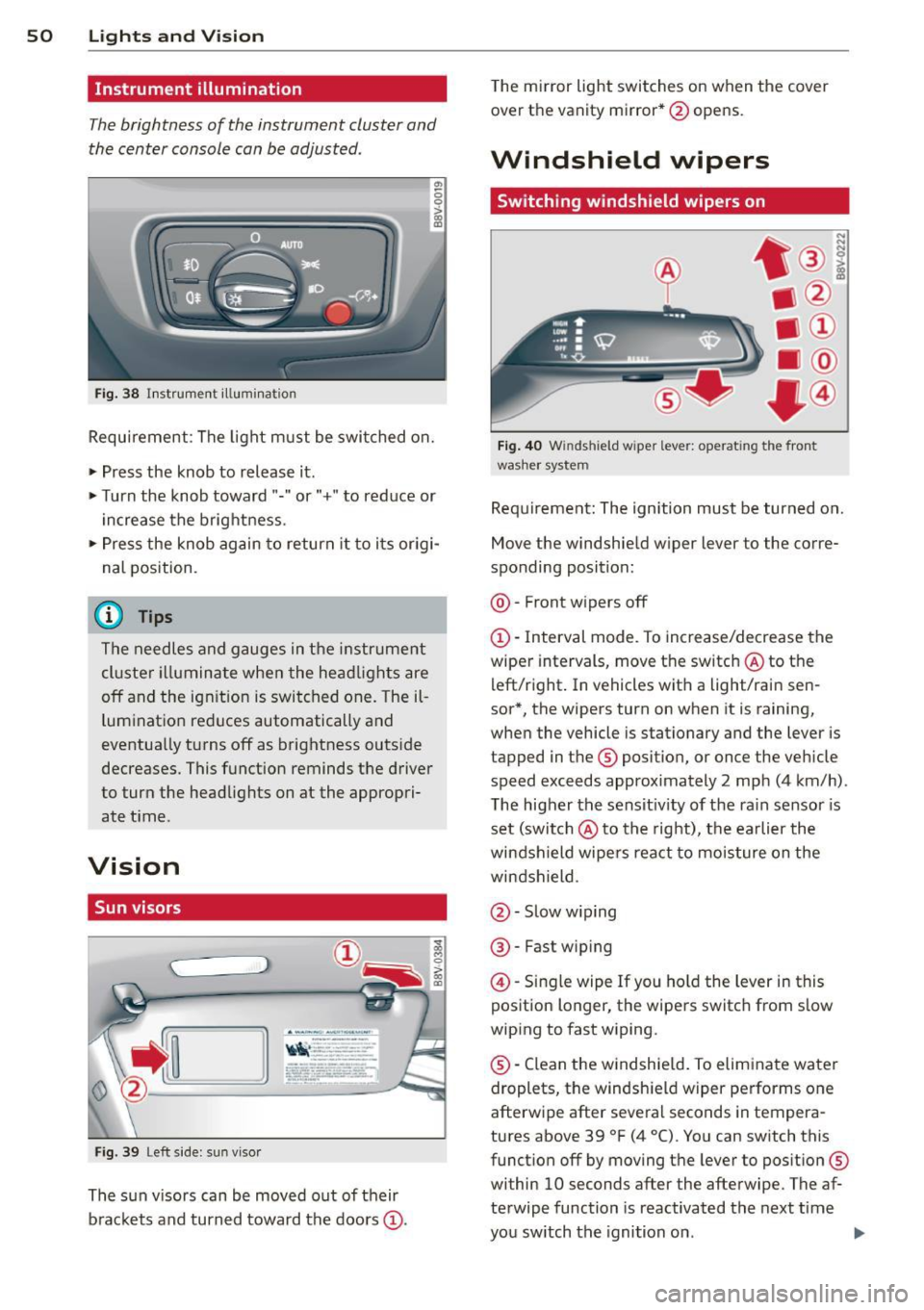
Instrument illumination
The brightness of the instrument cluster and
the center console can be adjusted.
"' 0 0
'
Fig. 38 Instrument illumination
Requirement : The light must be switched on.
.. Press the knob to release it .
.. Turn the knob toward"." or"+" to reduce or
increase the brightness.
.. Press the knob again to return it to i ts origi
nal position.
¢j) Tips
The needles and gauges in the instrument
cluster illuminate when the headlights are
off and the ignition is switched one. Theil
lumination reduces automatically and
eventually turns off as brightness outside
decreases. This function reminds the driver
to turn the headlights on at the appropri
ate t ime.
Vision
Sun visors
( ___ _____ )
Fig . 39 Left s ide: sun visor
The sun v isors can be moved out of their
brackets and turned toward the doors@.
i 0 > 00 a,
The mi rror light switches on when the cover
over the vanity mirror* @opens .
Windshield wipers
Switching windshield wipers on
Fig. 40 Winds hield w iper leve r: ope rat ing the front
washer system
Requ irement: The ignition must be turned on.
Move the windshield w iper lever to the corre
sponding position:
@ -Front wipers off
@ · Interval mode. To increase/decrease the
wiper intervals, move the switch @ to the
left/right . In vehicles with a light/rain sen
sor*, the wipers turn on when it is raining,
when the vehicle is stationary and the lever is
tapped in the ® position, or once the vehicle
speed exceeds approximately 2 mph (4 km/h) .
T he higher the sensit iv ity of the ra in sensor is
set (switch @ to the right), the earlier the
windshield wipers react to moisture on the
windshield.
@ · Slow w iping
@ -Fast wip ing
@ · Single wipe If you ho ld the lever in this
position longer, the wipers switch from slow
wiping to fast wiping.
® ·Clean the windshield . To eliminate water
droplets, the windsh ield wiper performs one
afterwipe after several seconds in tempera
tures above 39 °F (4 °() . You can switch this
funct ion off by moving the lever to position ®
within 10 seconds after the afterwipe. The af
terwipe function is reactivated the next time
you sw itch the ignition on . ..,
Page 53 of 310
M N
0 > co ,...., \!) ..,.,
M ..,., ,....,
A WARNING
-The ra in sensor is only intended to assist
the driver. The driver is still responsible
for manually sw itching the w ipers on ac
cording to the v is ibility conditions.
- The windshield may not be treated w ith
water-repe lling windshield coat ing
agents. Unfavorable conditions, such as
wetness, darkness o r low sun, can result
in increased glare. W iper blade chatter is
also possible.
- Properly functioning windshie ld w iper
blades are requi red fo r a clear view and
safe driving~
page 51, Replacing
front windshield wiper blades .
(D Note
-In case of frost, make sure the wind
shield wiper b lades are not frozen to the
windsh ield . Sw itching on the windshield
wipers when the blades are frozen to the
windsh ield can damage the wiper blades.
- Prior to using a car wash, the windshield
wipe r system must be switched
off (lever
in position 0). This prevents unintention
al sw itching on and damage to the wind
s h ield wiper system.
- Do not use the wipers to remove ice from
the windows. Using windshie ld w ipers as
i ce scrapers destroys the wiper b lades.
(D Tips
- The windshield wipe rs switch off when
t h e ignit ion is turned
off. You can acti
vate the windshield wipers after the igni
tion is switched back on by moving the
windsh ield wiper leve r to any pos ition.
- Worn or dirty windsh ie ld w iper blades
r esult in streak ing. This can affect the
r ain senso r funct ion. Check your wind
s hi eld wipe r blades regularly.
- The washer fluid nozzles in the w ind
s hi eld washer system are heated* at low
temperatures when the ig nit ion is on.
- When stopping temporar ily, e.g. at a
traff ic light, the se t speed of the w ind- Light
s and Visi on 5 1
shield w ipers is automatically reduced by
one speed.
- In vehi cles w ith an MMI, you can switch
the rain senso r or
off in the Driver assi s
tance
menu.
Cleaning windshield wiper blades
Clean the wiper b lades when you see w iper
streaks . Use a soft clot h and a glass cleaner .
.,. Place the windshie ld wiper arms in the serv
ice pos ition
~ page 51.
.,. Fold the windshie ld w iper arms away from
the windshield.
A WARNING
Di rty windsh ield wiper b lades can impair
v ision, which increases the r isk of an acci
dent.
(D Note
If you see streaks again after clean ing the
wiper blades, the blades must be replaced
~page 51.
Replacing front windshield wiper blades
Fig. 41 Remov ing w indsh ie ld wipe r blades
Wiper servic e posit ion /bl ade repl ace ment
position
.,. To bri ng the w ipers into the service position,
tur n the ignition
off and move the wind
shield w iper lever into pos ition @
~ page 50, fig. 40.
.,. To bring the w ipers into the starting posi
t ion, tur n the ig nition on and move t he
w indshie ld w iper lever into position @
~ page 50, fig. 40 .
•
Page 60 of 310

58 Seats and storage
dr iving or rid ing . The safety belts and air
bag system can prov ide the greatest pro
tection possible when the backrests are
in the upright posit ion a nd the safety
belts are worn correct ly. The more a
backrest is reclined, the greater the risk
of injury due to an incorre ct seating posi
t ion an d safety be lt position .
Power seat adjustment
Applies to vehicles: with power adjustable seats
Fig. 47 Fr ont se at: power se at adju stm en t
@ -Adju sting the lumbar suppor t: press the
button in the desired d irect ion .
@-Moving the seat up/down : press the but
ton up/down. To adju st the front seat cushion ,
press the front button up/down . To adjust the
rear seat cushion, press the rear button up/
down .
@-Moving the sea t forward/back: press the
bu tton forward/back.
© -Adjusting the backrest angle : press the
button forward/back.
@ -Lengthening/shortening the upper thigh
support *: lift the handle.
A WARNING
- Only adjust the front seat w ith when t he
vehicle is stationary. Otherwise, th is in
creases the risk of an accident
- The power adjustment for the front seats
also works with the ignition switched off
or with the ignition key removed. For this
reason, c hildren should never be left un
attended in t he veh icle -they could be in
jured! -
Exerc ise caution when adjusting the seat
he ight. Unsupervised or careless seat ad
justment can pinch fingers or hands
causing injuries .
- W hile the vehicle is mov ing, the seat
backs of the front seats must not be in
clined too far to the rear because the ef
fectiveness of the safety be lts and the
airbag sys tem is seve rely comp romised -
there is a risk of injury.
- To r educe the risk of injury dur ing s udden
b ra ki ng or in a co llision, the drive r and
front p assenge r sh ould not have the ir
backrests in the recline d posi tion while
driving or r iding. The safety be lts and a ir
bag system can provide the greatest pro
tect ion possible when the backrests are
in the upr ight position and the safety
be lts are worn correctly. The more a
backrest is reclined, the greater the r isk
of injury due to an inco rrect seating posi
tion and saf ety belt pos it ion.
Front center armrest
Applies to vehicles: wit h front center armrest
The cen ter armrest can be adjusted to several
levels .
Fig. 48 Armrest betwee n the drive r's /fro nt pa ssenger' s
seats .
.,. To adjust the ang le, raise the armres t
¢ fig. 48 notch by notch.
.,. To bring the armrest back down, ra ise it out
of the top notch and fold it back down . Then
lift the a rmrest to the desired position, if
necessary .
Please note that the dr iver's ab ility to move
his or a rm may be restricted when the armrest
Iii>
Page 75 of 310
M N
0 > co ,...., \!) 1.1'1
M 1.1'1 ,....,
When seat heating should not be
switched on
Do not turn the seat heating on under the fol
lo wing circumstances:
- The seat is unoccupied.
- The seat is covered with a seat cover.
- The seat is covered with a child seat .
- The seat is damp or wet .
A WARNING
Individuals with reduced sensitivity to pain
or temperature could develop burns when
using the seat heating function. To reduce
the risk of injury, these individuals should
not use seat heating.
(D Note
To avoid damage to the heating elements
in the seats, do not kneel on the seats or
place heavy loads on a small area of the
seat.
(D Tips
- The setting for the seat heating on the
driver's side is assigned to the key that is
1n use.
- If the front passenger's seat heating is
turned on, it will not turn on again auto
matically if more than
10 minutes have
passed between switching the ignition
off and switching it on again.
Auxiliary heater
App lies to vehicles: with d iesel e ngin e
In cool outside temperatures, the electric aux
iliary heater helps the vehicle interior to warm
more quickly . The auxiliary heater switches on
and off automatically according to the vehicle heating settings .
The "auxiliary heater" function can be switch
ed on and off in the
MMI. Select: the !MENUI
button
> Car > Systems * control button > AC
> Auxiliary heater .
Warm and cold 73
•
Page 76 of 310
74 Driving
Driving
Steering
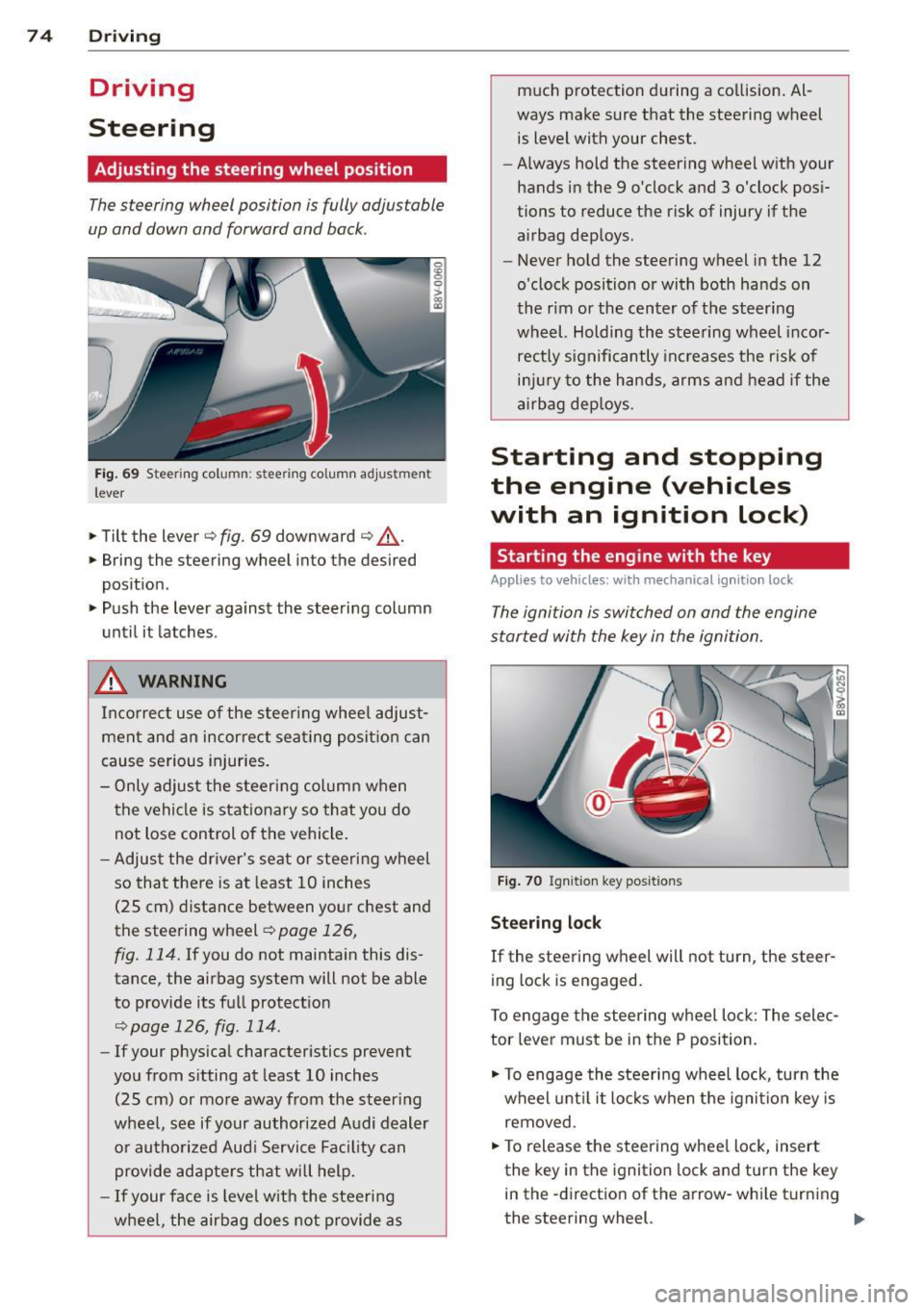
Adjusting the steering wheel position
The steering wheel position is fully adjustable
up and down and forward and bock .
Fig. 69 Steering column: stee ring column adjustmen t
lever
.. Tilt the lever ¢ fig. 69 downward ¢ &_.
.. Bring the steering wheel into the desired
position .
.. Push the lever against the steering column
until it latches .
_& WARNING
Incorrect use of the steer ing whee l adjust
ment and an incorrect seating position can
cause serious injuries.
- Only adjust the steering column when
the vehicle is stationary so that you do
not Lose control of the vehicle .
- Adjust the driver's seat or steering wheel
so that there is at least 10 inches
(25 cm) distance between your chest and
the steering wheel~
page 126,
fig. 114.
If you do not maintain this dis
tance, the airbag system will not be able
to provide its full protect ion
<=> page 126, fig. 114.
- If your phys ical characteristics prevent
you from sitting at least 10 inches
(25 cm) or more away from the steer ing
wheel, see if your authorized Audi dealer or authorized Audi Service Fac ility can
provide adapters that will help.
- If your face is level with the steering
wheel, the airbag does not provide as much protection during a co
llision. Al
ways make sure that the steering wheel is level with your chest .
- Always hold the steering wheel with your
hands in the 9 o'clock and 3 o'clock pos i
tions to reduce the risk of injury if the
airbag deploys.
- Never hold the steering wheel in the 12
o'clock position or with both hands on
the rim or the center of the steering
wheel. Holding the steering wheel incor
rectly significantly increases the r is k of
inj ury to the hands, arms and head if the
airbag deploys.
Starting and stopping
the engine (vehicles
with an ignition lock)
Starting the engine with the key
Applies to vehicles: wit h mechanical ignition loc k
The ignition is switched on and the engine
started with the key in the ignition.
Fig. 70 Ignit ion key pos itions
Steering lock
If the steering wheel will not turn, the steer
ing lock is engaged.
To engage the steering wheel Lock: The selec
tor leve r must be in the P position.
.. To engage the steering wheel lock, turn the
wheel until it locks when the ignition key is
removed .
.. To release the steering wheel Lock, insert
the key in the ignition lock and turn the key
in the -direction of the arrow-whi le turning
the steering wheel. .,.
Page 77 of 310
M N
0 > co ,...., \!) 1.1'1
M 1.1'1 ,....,
Switchin g th e ig nition on /off or
p rewar ming
~ To switch the ignition on, turn the ignition
key to position
(D .
~ To switch the ignition off, turn the ignition
key to position @.
Diese l vehicles are preheated while the igni
tion is switched on
II .
Starting th e engin e
Your veh icle is eq uipped with launch cont ro l.
As soon as you have turned the ignition key to position @, the engine will start automatical
l y.
~ Press the brake peda l and move the se lector
lever to the P or N position.
~ Turn the key briefly to position @. The igni
tion key automatically returns to position
(D . Do not press the accelerator peda l when
do ing this.
Major electrical equipment switches off tem
porarily when starting the engine.
It is poss ible that t here will be a slight delay
when starting the engine in diese l vehicles in
colder temperatures . Therefore , you must
ho ld the brake pedal down unti l the engine
starts . The indicator light turns on while the
engine is preheating
II .
The prewarming time depends on the coolant
temperature and outside temperature. The
glow plug indicator light
II wi ll only turn on
for approximately 1 second when the eng ine
is warm or the outside temperature is higher
than 8
°C. T hat means you can start the en
g ine
immediately .
If the engine does not start immediately, stop
the starting procedure by turn ing the ignition
key to pos ition @and repeat after 30 sec
onds .
Automatic star t m alfunction
If the ~ (gasoline engine) or II (diesel en
g ine) indicator light turns on and the message
E ngin e sta rt system m alfunction . P le ase Dri
vin g 75
cont act Se rv ice
appears, there is an automatic
start malfunction.
T o start the engine, hold the ign it ion key in
pos ition @unt il the engine r uns.
Drive to an authorized Audi dealer or author
ized Audi Serv ice Facility immediately to have
the malfunction corrected.
_& WARNING
- Never a llow the engine to run in confined
spaces - there is a risk of asphyxiation .
- Never remove the ignit ion key from the
ignition loo k while the vehicle is moving .
Otherwise the steering lock will engage
and you will not be able to steer the vehi
cle.
- Please note that the b rake booster and
power steering only work when the en
gine is running. When the engine off, you must use more force to steer or brake
the vehicle. Because the usual steer ing
and brak ing capability is not ava ilable,
the risk of accidents or injur ies increases .
- Always take the vehicle key with you when leav ing the vehicle, even for a
short pe riod of time. This applies part ic
ularly when children remain in the veh i
cle. Otherwise the chi ldren could start
the engine or operate electrical equip
ment such as power w indows.
(D Note
- Avo id h igh engine speed, full th rottle,
and heavy eng ine load as long as the en
gine has not reached operat ing tempera
t u re yet . You could damage the engine.
- T he engine cannot be started by pushing
or towing.
@) For the sake of the environment
Do no t let the eng ine run w hile pa rked to
warm up. Begin dr iv ing immediately. This
reduces unnecessary emissions.
•
Page 78 of 310
76 Driving
(D Tips
-If it is difficult to turn the key to position
(D , turn the steering wheel back and
forth slightly to release the steering
wheel lock .
- After starting a cold engine, there may
be a brief period of increased noise be
cause the oil pressure must first build up
in the hydraulic valve adjusters. This is
normal and not a cause for concern .
- If the battery is disconnected and recon
nected, you have to hold the ignition key
in position
(D for five seconds for the en
gine to start .
- After switching the ignition off, you can
only remove the key when the selector
lever is in the "P" (Park) position. After
that the selector lever is locked.
,
Stopping the engine with the key
App lies to vehicles: with mechanical ig niti on lock
Stopping the engine
.,,. Br ing the vehicle to a full stop.
.,,. Turn the key to position @.
Releasing the steering lock
Requirement : The selector lever must be in
the P position.
.,,. Remove the ignition key in position @
Qpage 77, fig . 71 Q &-
.,,. Turn the steering wheel until you hear the
steering wheel lock.
The locked steering helps prevent vehicle
theft .
_& WARNING
-Never turn off the engine before the ve
hicle has come to a complete stop. The
full function of the brake booster and the
power steering is not guaranteed. You
must use more force to turn or brake, if
necessary. Because you cannot steer and
brake as you usually would, this could
lead to accidents and serious injuries . -
Never remove the ignition key from the
ignition look while the vehicle is moving .
Otherwise, the steering lock could sud
denly engage and you would not be able
to steer the vehicle .
- Please note that the brake booster and
power steering only work when the en
gine is running. When the engine off, you
must use more force to steer or brake
the vehicle . Because the usual steering
and braking capability is not available,
the risk of accidents or injuries increases.
- Always take the vehicle key with you
when leaving the vehicle, even for a
short period of time. This applies partic
ularly when children remain in the vehi
cle. Otherwise the children could start
the engine or operate electrical equip
ment such as power windows.
- For safety reasons, always park the vehi
cle with the selector lever in the P posi
tion . Otherwise, there is the risk that the
vehicle could roll.
- After the engine has been switched off,
the radiator fan can continue to run for
up to 10 minutes - even with the ignition
switched off. It can also switch on again
after some time if the coolant tempera
ture rises as a result of heat buildup or if
the engine compartment is heated by
sunlight and the engine is hot .
(D Note
-If the engine has been under heavy load
for an extended period of time, heat
builds up in the engine compartment af
ter the engine is switched off -there is a
risk of damaging the engine. For this
reason, let the engine run for at idle for
approximately two minutes before shut
ting it off.
Page 79 of 310
....,
N
0 > co
rl I.O
"' ....,
"' rl
Starting and stopping
the engine (vehicles
with a convenience key)
St t· th · ith the
button
Applies to vehicles: with convenience key
The I START ENGINE STOPI button switches
the ignition on and starts the engine.
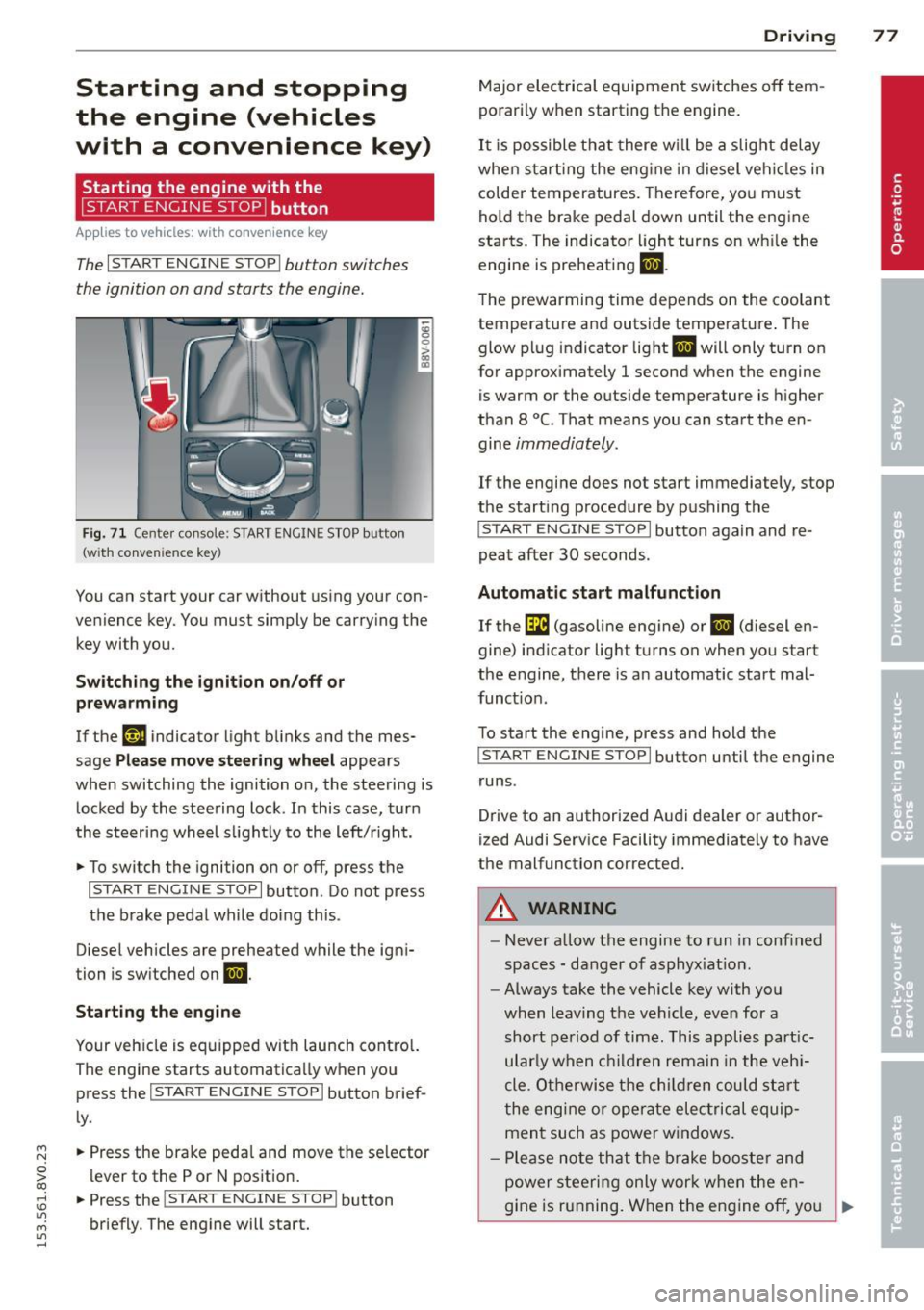
Fig. 71 C en ter con sole : START ENGINE STOP b utton
(w ith conve nien ce key)
You can start your car without using your con
venience key. You must simply be carry ing the
key with you.
Switching the ignition on/off or
prewarming
If the 'y.ij indicator light blinks and the mes
sage
Please move steering wheel appears
when switching the ignition on, the steering is
locked by the steering lock . In this case, turn
the steering wheel slightly to the left/r ight .
.,. To switch the ignition on or off, press the
I START ENGINE STOPI button . Do not press
the brake pedal while do ing this .
Diesel vehicles are preheated while the igni
tion is switched on
II.
Starting the engine
Your vehicle is equipped with launch contro l.
The engine starts automatically when you press the
I START ENGINE STOP I button brief
ly .
.,. Press the brake pedal and move the se lector
lever to the P or N position.
.,. Press the
I START ENGINE STOPI button
briefly. The engine will start .
Driving 77
Major electrical equipment switches off tem
porarily when starting the engine.
It is possible that there will be a slight delay
when starting the engine in diesel vehicles in
colder temperatures. Therefore, you must
hold the brake pedal down until the engine
starts. The indicator light turns on wh ile the
engine is preheating
II .
The prewarming time depends on the coolant
temperature and outside temperature . The
glow plug indicator light
II will only turn on
for approximately 1 second when the engine
is warm or the outside temperature is higher
than 8
°C. That means you can start the en
gine
immediately.
If the engine does not start immediately, stop
the start ing procedure by pushing the
I START ENGINE STOP I button again and re
peat after
30 seconds.
Automatic start malfunction
If the GI (gasoline engine) or II (diesel en
gine) indicator light turns on when you start
the engine, there is an automatic start mal
funct ion .
To start the engine, press and hold the
I START ENGINE STOP I button until the engine
runs .
Drive to an authorized Audi dealer or author
ized Audi Service Facility immediately to have
the malfunction corrected .
A WARNING
-Never allow the engine to run in confined
spaces - danger of asphyx iat ion.
- Always take the vehicle key with you
when leaving the vehicle, even for a
short period of time. This applies part ic
ular ly when children remain in the vehi
cle . Otherwise the children could start
the engine or operate electrical equip
ment such as power windows .
- Please note that the brake booster and
power steering only work when the en-
gine is running. When the engine off, you
~
Page 80 of 310
78 Driving
must use more force to steer or brake
the vehicle. Because the usual steering
and braking capability is not available,
the risk of accidents or injuries increases .
- Avoid high engine speed, full throttle,
and heavy engine load as long as the en
gine has not reached operating tempera
ture yet. You could damage the engine .
- The engine cannot be started by pushing
or towing.
@ For the sake of the environment
Do not let the engine run while parked to
warm up. Begin driving immediately. This
reduces unnecessary emissions.
{D) Tips
- After starting a cold engine, there may
be a brief period of increased noise be
cause the oil pressure must first build up in the hydraulic valve adjusters. This is
normal and not a cause for concern .
- If the . indicator light blinks in the in
strument cluster before switching the ig
nition off, the ignition will not switch on
again.
9 page 193
- If you leave your vehicle with the ignition
switched on, the ignition will switch off
after a certain amount of time. Make
sure that electrical equipment such as
the exterior lights are switched off.
Turning the engine off using the button
Applies to vehicles: with conven ience key
• Bring the vehicle to a full stop.
• Move the selector lever into the P position .
• Press the
I START ENGIN E STOPI button
9page 77, fig. 71 .
Steering lockll
The steering locks when you turn the engine
off using the
I START E NGIN E STOP t* button,
l) Thi s fun ction is not available in all c oun tries.
move the selector lever into the P position
and open the driver's door.
The locked steering helps prevent vehicle
theft .
Emergency off function
If it is absolutely necessary, the engine can al
so be turned off while driving at speeds lower
than 6 mph (10 km/h). If you press the
I STAR T ENGINE ST OPI* button while driving,
the message
Pressing start/stop button
again will switch off engine!
appears. To
switch the engine off, press the
I S TAR T ENGINE ST OPI* button twice in a row
briefly or press and hold for longer than two
seconds.
A WARNING ~
- Never turn off the engine before the ve- hicle has come to a complete stop . The
full function of the brake booster and the
power steering is not guaranteed . You
must use more force to turn or brake if
necessary. Because you cannot steer and
brake as you usually would, this could
lead to crashes and serious injuries.
- Please note that the brake booster and
power steering only work when the en
gine is running. When the engine off, you
must use more force to steer or brake
the vehicle. Because the usual steering
and braking capability is not available,
the risk of accidents or injuries increases.
- Always take the vehicle key with you
when leaving the vehicle, even for a
short period of time. This applies partic
ularly when children remain in the vehi
cle . Otherwise the children could start
the engine or operate electrical equip
ment such as power windows.
- For safety reasons, always park the vehi
cle with the selector lever in the P posi
tion. Otherwise, there is the risk that the
vehicle could roll.
Page 81 of 310
....,
N
ci > co
rl I.O
"' ....,
"' rl
-After the engine has been switched off ,
the radiator fan can continue to run for
up to 10 minutes -even with the ignition
switched off . It can also switch on again
after some time if the coolant tempera
ture rises as the result of heat buildup or
if the engine compartment is heated by
the sun's rays and the engine is hot.
(D Note
If the engine has been under heavy load
for an extended period of time, heat builds
up in the engine compartment after the
engine is sw itched off -there is a ris k of
damaging the engine. For this reason, let
the engine run for at idle for approx imate
ly two minutes before shutting it off.
Starting the engine if there is a
malfunction
App lies to vehicles: with conve nience key
It may not b e possibl e to start the engine un
der cer tain circumstances , for example if the
battery in the vehicle key is drained , if inter
ference is affected the key or if there is o sys
tem mo/function.
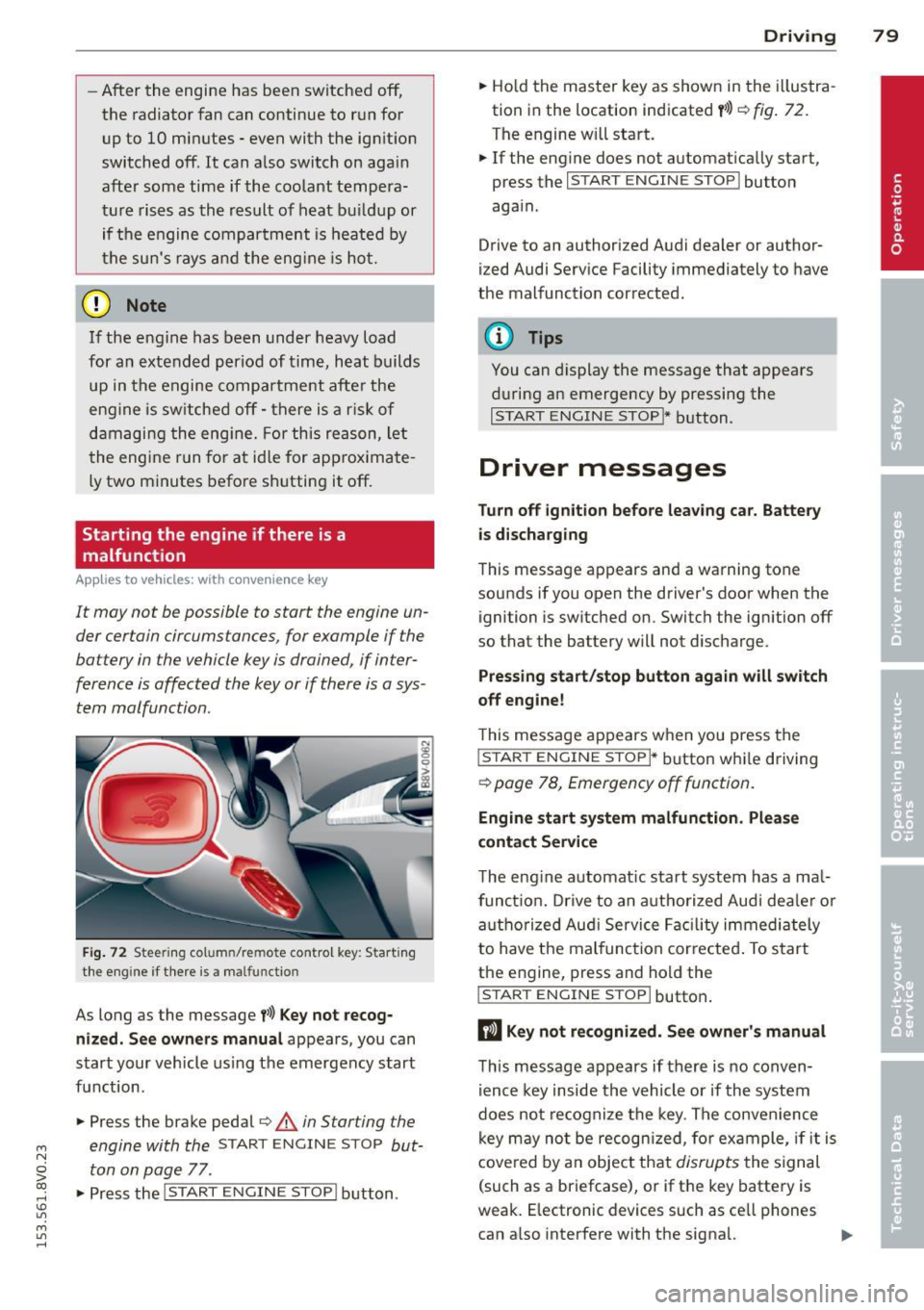
Fig. 72 Steering co lu m n/re mote control key : Start ing
the engine if there is a ma lfunctio n
As long as the message f>l) Key not recog
nized. See owners manual
appears, you can
start your vehicle using the emergency start
function .
"" Press the brake pedal¢.&.
in Starting the
engine with the
START ENGINE STOP but
ton on page
77 .
.,. Press the
j;..,, s=T~A~R=T~-EN~G-I_N_E--ST--OP I button.
Driving 79
""Ho ld the master key as shown in the illustra
tion in the location indicated
y>>) r=) fig. 72.
The engine w ill start.
"" If the engine does not automatically start,
press the
I START ENGINE STOP I button
again .
Drive to an authorized Audi dealer or author
ized Audi Service Facility immediately to have
the malfunction corrected.
(D Tips
You can display the message that appears
during an emergency by pressing the
I START ENGINE STOP!* button.
Driver messages
Turn off ignition before leav ing car. Battery
is discharging
This message appears and a warning tone
sounds if you open the driver's door when the ignition is switched on. Switch the ignition off
so that the battery will not discharge.
Pressing start/stop button again will switch
off engine!
T his message appears when you press the
I STAR T ENGINE S TOPI* button while driving
¢ page 78, Emergency off function .
Engine start system malfunction. Please
contact Service
The engine automat ic start system has a ma l
funct ion. Drive to an authorized Audi deale r or
authorized Aud i Service Facility immediately
to have the malfunction corrected . To start
the engine, press and hold the
I STAR T ENGINE S TOP I button.
DJ Key not recognized. See owner's manual
This message appears if there is no conven
ience key inside the vehicle or if the system
does not recognize the key. The convenience
key may no t be recogn ized, for example, if it is
covered by an object that
disrupts the signal
(such as a briefcase), or if the key battery is
weak. E lectronic devices such as ce ll phones
can a lso interfere with the signal. ..,.