warning AUDI S3 2015 Service Manual
[x] Cancel search | Manufacturer: AUDI, Model Year: 2015, Model line: S3, Model: AUDI S3 2015Pages: 310, PDF Size: 76.15 MB
Page 67 of 310
....,
N
0 > co
rl I.O
"' ....,
"' rl
Increasing the size of the luggage
compartment
The rear seat backrests can be folded forward
either separately or together .
I
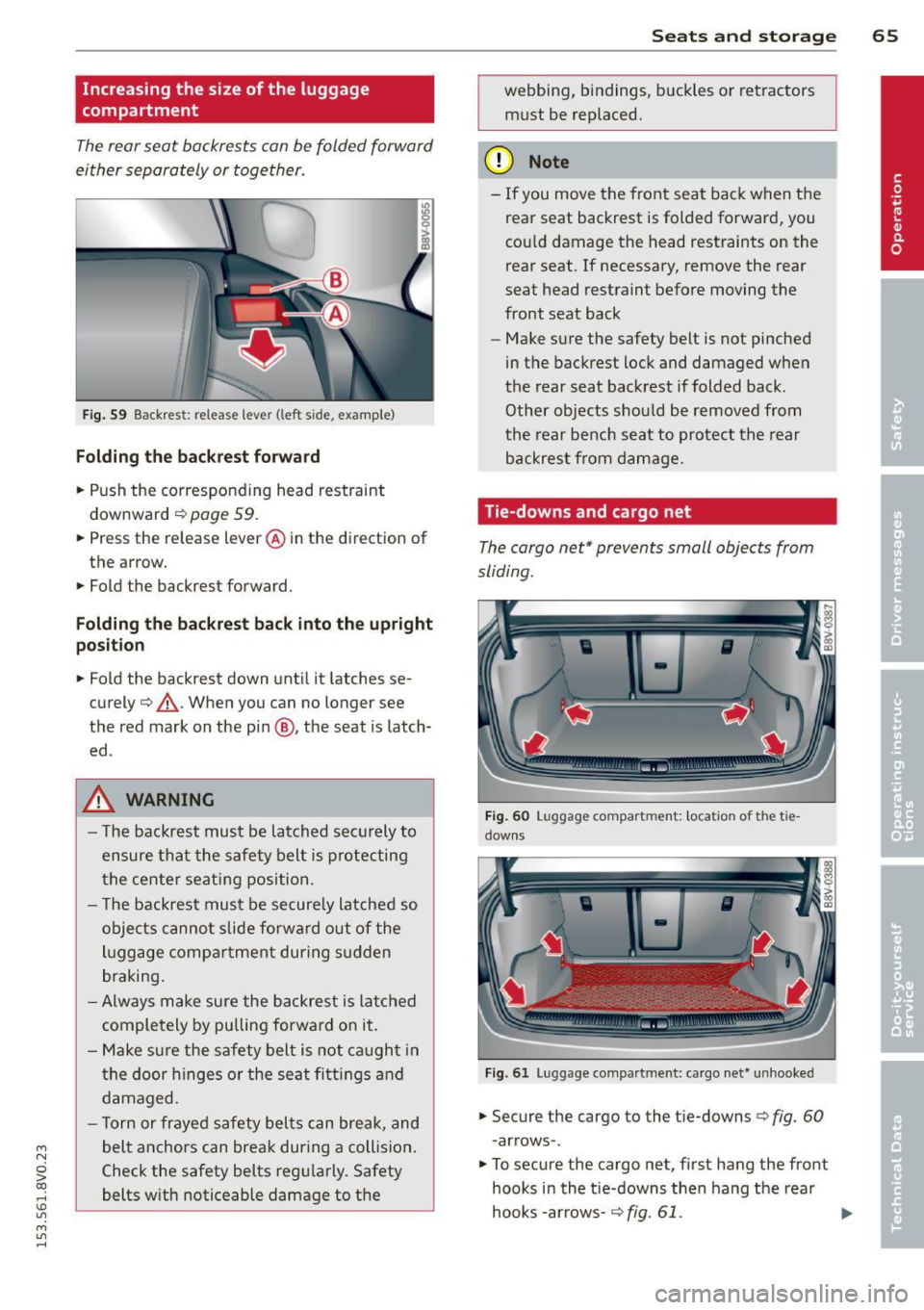
Fig. 59 Backres t: release leve r (left s ide, examp le )
F o lding th e back res t fo rward
.. Push the corresponding head restraint
downward ¢
page 59 .
.. Press the release lever @ in the direction of
the arrow.
.. Fold the backrest forward .
Folding the back res t back into th e up right
po sit ion
.. Fold the backrest down until it latches se
curely¢ ,&.. When you can no longer see
the red mark on the pin @, the seat is latch
ed .
A WARNING
-The backrest must be latched securely to
ensure that the safety belt is protecting
the center seating position.
- T he backrest must be secure ly latched so
objects canno t slide forwa rd out of the
luggage compa rtment during s udden
braking .
- Always make sure the backrest is latched
completely
by pulling forward on it.
- Make sure the safety belt is not caught in
the door h inges o r the seat fitti ngs and
damaged.
- T orn or frayed safety belts can break, and
belt anchors can break during a collision .
Check the safety belts regularly. Safety
belts with noticeable damage to the
S ea ts a nd s to rage 65
webbing, bindings, b uckles or retractors
must be replaced.
(D Note
- If you move the front seat back when the
rear seat backrest is folded forward, you
cou ld damage the head restraints on the
rear seat. If necessary, remove the rear
seat head restraint before moving the
front seat back
- Make sure the safety belt is not pinched
in the backrest lock and damaged when
the rear seat backrest if folded back.
Other objects should be removed from
the rear bench seat to protect the rear
backrest from damage .
Tie-downs and cargo net
The cargo net* prevents small objects from
sliding .
F ig . 60 Lu gg age compar tment: locat io n of th e tie
downs
F ig . 61 Lu ggage compart ment: ca rgo net * un hooke d
.. Secure the cargo to the tie-downs c> fig. 60
- arrows -.
.. To secure the cargo net , first hang the front
hooks in the t ie-downs then hang the rear
hooks -arrows -¢
fig. 61. ...,
Page 68 of 310
66 Seats and st o rage
• Observe the safety notes q page 132 , Tie-
downs.
Due to the laws of phys ics , even small objects
that are loose in the vehicle can become heavy
p rojectiles and cause serious inj uries during a
collision . Objects in the vehicle inc rease in ki
neti c energy, wh ich varies depend ing on the
vehicle and the we ight of the objec t. The vehi
cle speed is the most important factor in t his.
F or example: In a fronta l impact at a speed of
30 mph (48 km/h). the weight of a 10 lb
(5 kg) object increa ses to approxima tely
20 times its normal weight due to the forces
acting upon it . This means the we ight of the
object is suddenly equ ivalent to approximate
ly 200 lb (90 kg) . It is easy to imagine the
type of injuries a n objec t of that weight could
cause if it slides thro ugh the passenger com
pa rtment unrestrained during a collision at a
re lative ly low speed.
A WARNING
Weak, damaged or faulty straps used to
secure objects to the tie-downs can fa il
during heavy braking or a collision and
lead to serious injuries .
- Always use suitable straps and secure
objects to the t ie-downs in the luggage
compartment to prevent objects from
shifting and slid ing fo rward.
- Never secure a ch ild seat restraint to a
t ie-down .
- Because of their load capacity, the hooks
should only be used to secu re objects
that weigh a max imum of 10 lb (5 kg) .
Heavy objec ts will not be secured suffi
c iently, a nd this increases the risk of in
jury.
Storage hooks
Applies to vehicles: with bag hooks
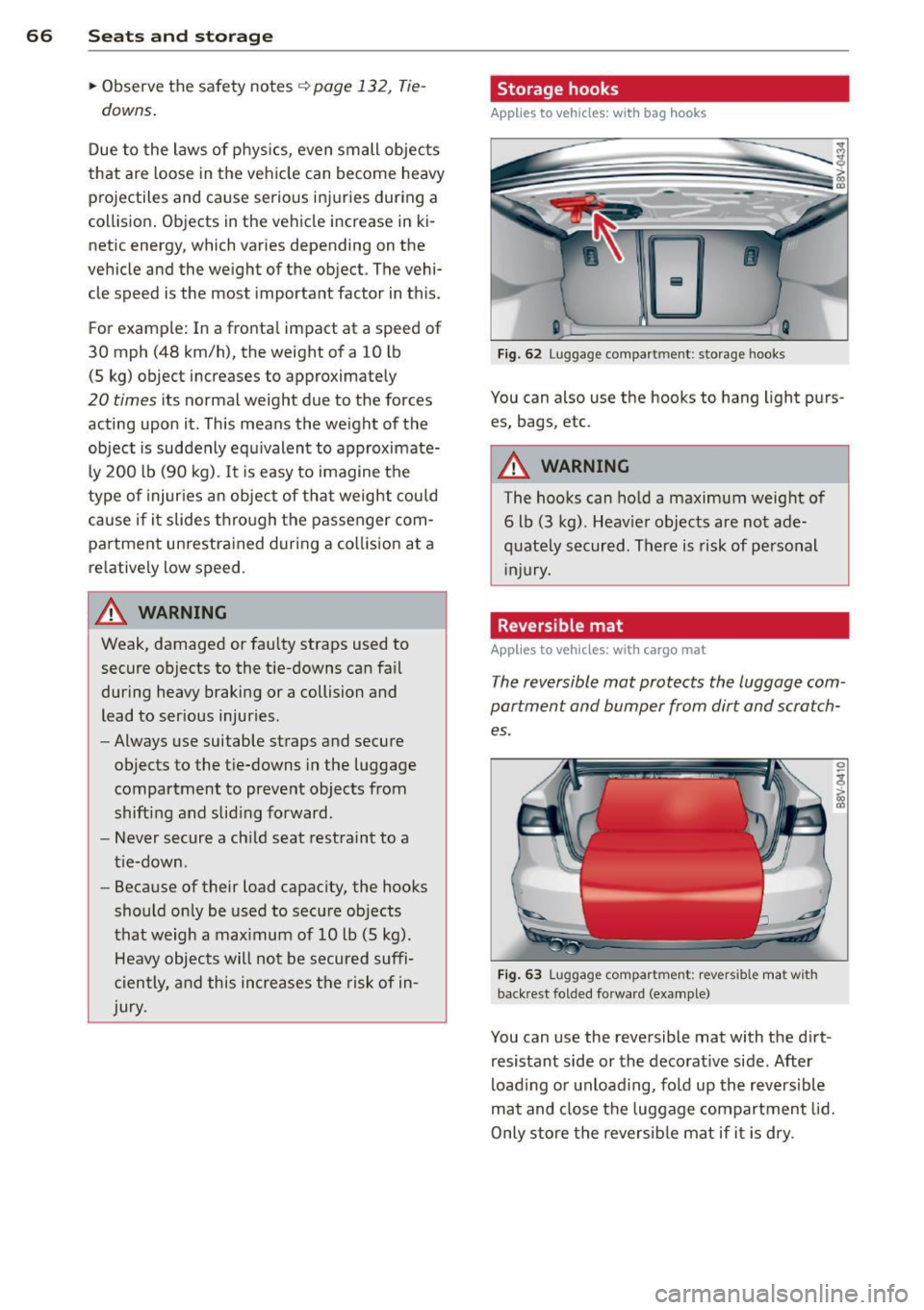
F ig. 62 Lugg age compart men t: s torage hooks
You can also use the hooks to hang light purs
es, bags , etc .
A WARNING
-The hooks can ho ld a maximum weight of
6 lb (3 kg). Heav ier objects are not ade
q uate ly secured . Th ere is risk of personal
Injury.
. Reversible mat
Applies to vehicles: with cargo mat
The reversible mat protects the luggage com
partment and bumper from dirt and scratch
es.
F ig . 63 Lu gg age compar tment: re vers ible mat w it h
back re st fo lded fo rwa rd (example)
You can u se the reversible mat with the d irt
resistant side or the decorat ive side. After
load ing or unload ing, fold up the revers ible
mat and close the luggage compartment lid.
Only store the reversib le mat if it is dry .
Page 69 of 310
....,
N
0 > co
rl I.O
"' ....,
"' rl
Pass-through
Applies to vehicles: wit h pass -through
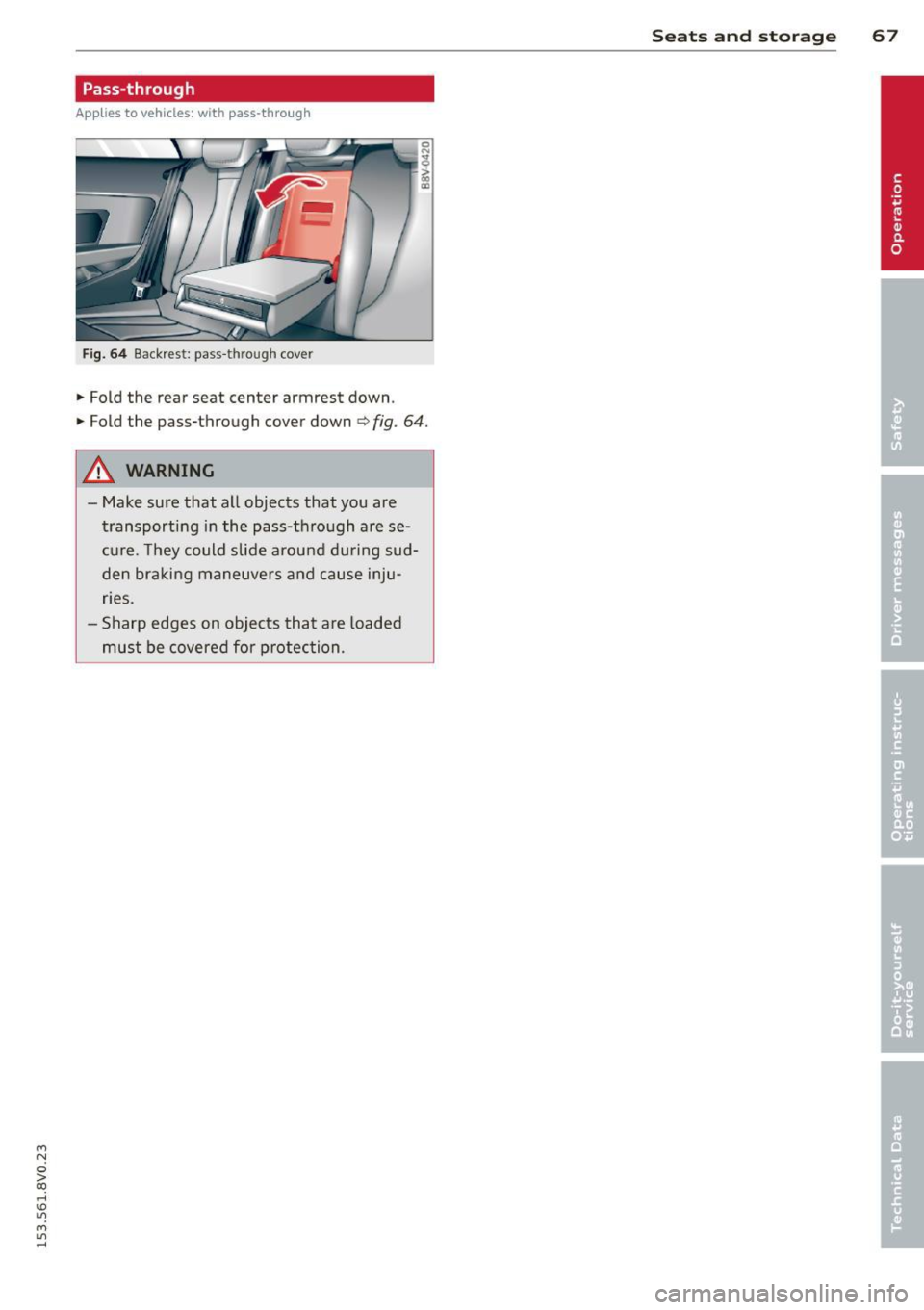
Fig. 64 Backrest : pass -t h roug h cove r
• Fold the rear seat center armrest down .
• Fold the pass-through cover down
<=> fig . 64 .
A WARNING
-Make sure that all objects that you are
transporting in the pass-through are se
cure. They could slide around during sud
den braking maneuvers and cause inju
ries .
- Sharp edges on objects that are loaded
must be covered for protection .
-
Seats and storage 67
Page 70 of 310
68 Warm and cold
Warm and cold Climate control system
Description
Different systems cou ld be installed.
- manual climate control system* or
- automatic climate control system*
The
climate control system* cools and re
moves humidity from the air in the vehicle in
terior. It is the most effective when the win
dows and panorama sunroof* are closed. If
there is a build-up of heat inside the vehicle,
ventilation can help to speed up the cooling
process . For this reason, the windows and
panorama sunroof can be opened from the
outside .
9 page 43, Convenience opening/
closing
Pollutant filter
T he pollutant filter removes pollutants such
as dust and pollen from the air .
Key recognition
You can store various settings for the manua l
and automatic
climate control system* and
assign them to the key being used .
A WARNING
Poor visibility can lead to accidents.
- For safer driving, keep all windows free
of ice, snow and fog .
- Become familiar as quickly as possible
with the correct use and function of the cl imate control system, especially with
the defrosting and defogg ing funct ion .
- When the temperature is below freezing,
only use the windsh ield washer system
after the w indshield has been warmed by the cl
imate control system . The washer
fluid could freeze on the windshield and
impair visibility.
(D Note
- If you suspect that the climate control
system is damaged, switch the system
off to prevent further damage and have
it checked by an authorized Audi dealer
or authorized Audi Service Facility.
- Repairs to the Audi climate control sys
tem require special technical knowledge
and special tools. See an authorized Audi
dealer or authorized Audi Serv ice Facility .
® For the sake of the environment
Reducing the amount of fuel used also re
duces the amount of pollutants that enter
the air.
(D Tips
- To prevent interference with the heating
and cooling output and to prevent the
w indows from fogging over, the air in
take in front of the windshield must be
free of ice, snow or leaves.
- Condensation from the cooling system*
can dr ip and form a puddle of water un
der the vehicle. This is normal and does
not mean there is a leak.
- T he energy management system may
switch the seat heating* or rear window
defroster off temporari Ly . These systems
are available again as soon as the energy
balance has been restored.
- The flows through the vents under the
rear window. Make sure the openings are
not covered when placing clothing on the
luggage compartment cover.
Page 72 of 310
70 Warm and cold
1- 1 Sw itching r ecircul ation mode on and
off
In recirculation mode, the air inside the vehi
cle is circu lated and filtered. This prevents the
unfiltered air outside the vehicle from enter ing the vehicle inter ior. We recommend
switch ing recirculation mode on when driving
through a tunnel or when sitt ing in traffic
c::> ,& .
Automatic climate control system controls
App lies to vehicles: with a utomat ic climate contro l system
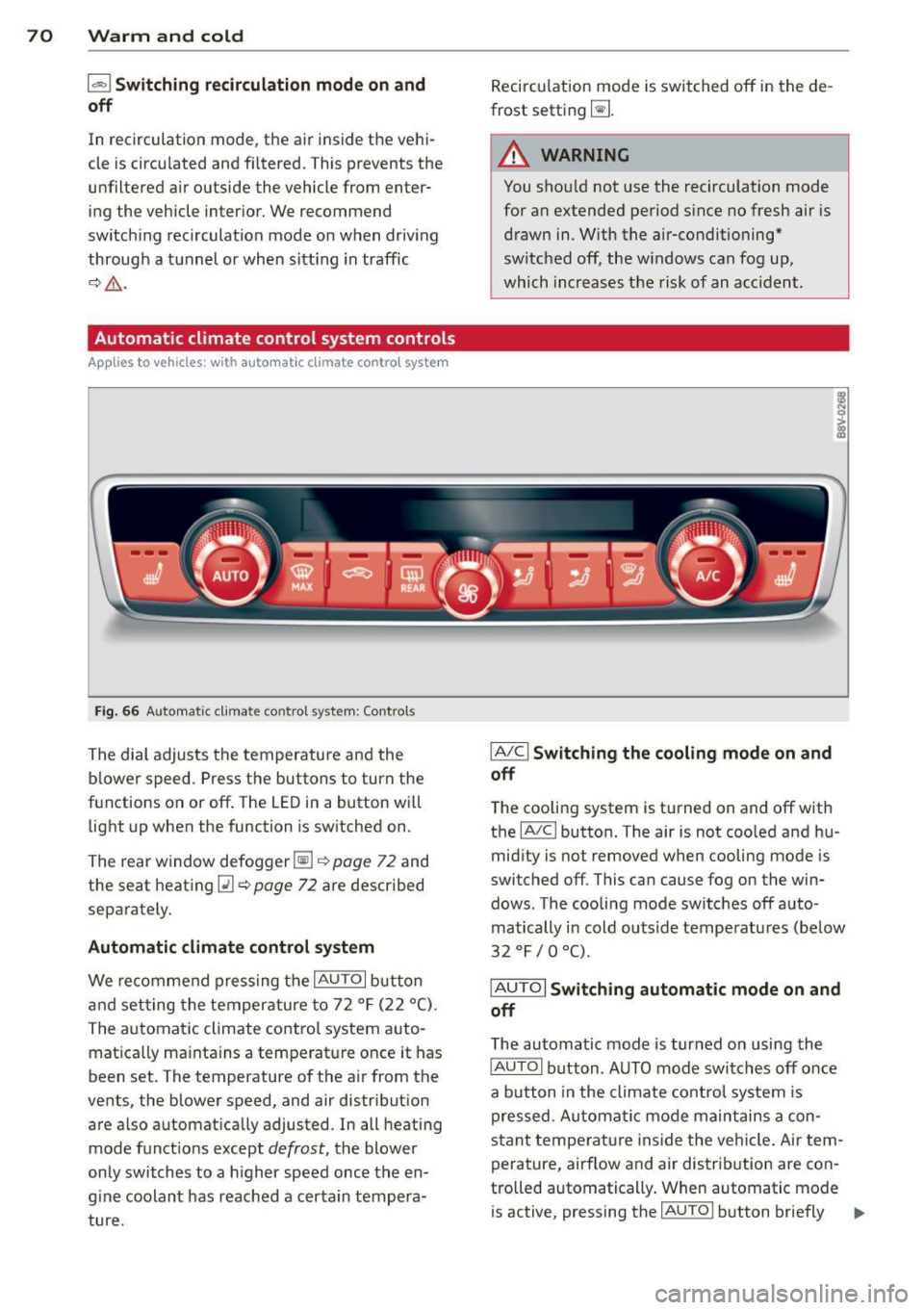
Fig . 66 A ut oma tic cl ima te co ntro l sy ste m: Control s
The dial adjusts the temperature and the
blower speed. Press the buttons to turn the
functions on or off . T he LED in a button w ill
light up when the function is sw itched on .
The rear window defogger~
c::> page 72 and
the seat heating
Q] c::> page 72 are described
separately.
Automatic climate control syst em
We re commend pressing the IAU TO I button
and setting the temperature to 72
° F (22 °() .
The automatic climate control system auto
matica lly ma inta ins a temperature once it has
been set. The temperature of the air from the
vents, the blower speed, and air distribution
are also automat ically adju sted . In all heat ing
mode funct ions except
defrost, the blower
only switches to a h igher speed once the en
g ine coolant has reached a certa in tempera
ture . Recirculation mode is switched off in the de
frost setting ~-
.&_ WARNING
-You shou ld not use the recirculation mode
for an extended period s ince no fresh air is
drawn in. With the air-conditioning*
switched off, the w indows can fog up,
which increases the risk of an acc ident .
IA/ Cl Switching th e cooling mode on and
off
T he cooling system is turned on and off with
the
IA/C l button. The air is not coo led and hu
mid ity is not removed when cooling mode is
switched off . This can cause fog on the win
dows . The cooli ng mode switches off auto
matically i n cold outside temperatu res (be low
32 °F / 0 °() .
IAUTOI Switch ing automatic mode on and
off
The automatic mode is turned on using the
IAUTOI button . AUTO mode switches off once
a b utton in the climate control system is
pressed . Automatic mode maintains a con
sta nt temperature ins ide the ve hicle . Air tem
perature, airflow and air d istribution are con
trolled automatically . When automatic mode
is active, pressing the
IAU TO I button briefly IJJ,-
Page 74 of 310
7 2 Warm and cold
& WARNING
You should not use the rec irculation mode
for an extended per iod since no fresh air is
drawn in . With the ai r-conditioning switch
ed off, the windows can fog up, which in
c reases t he risk of an ac cident.
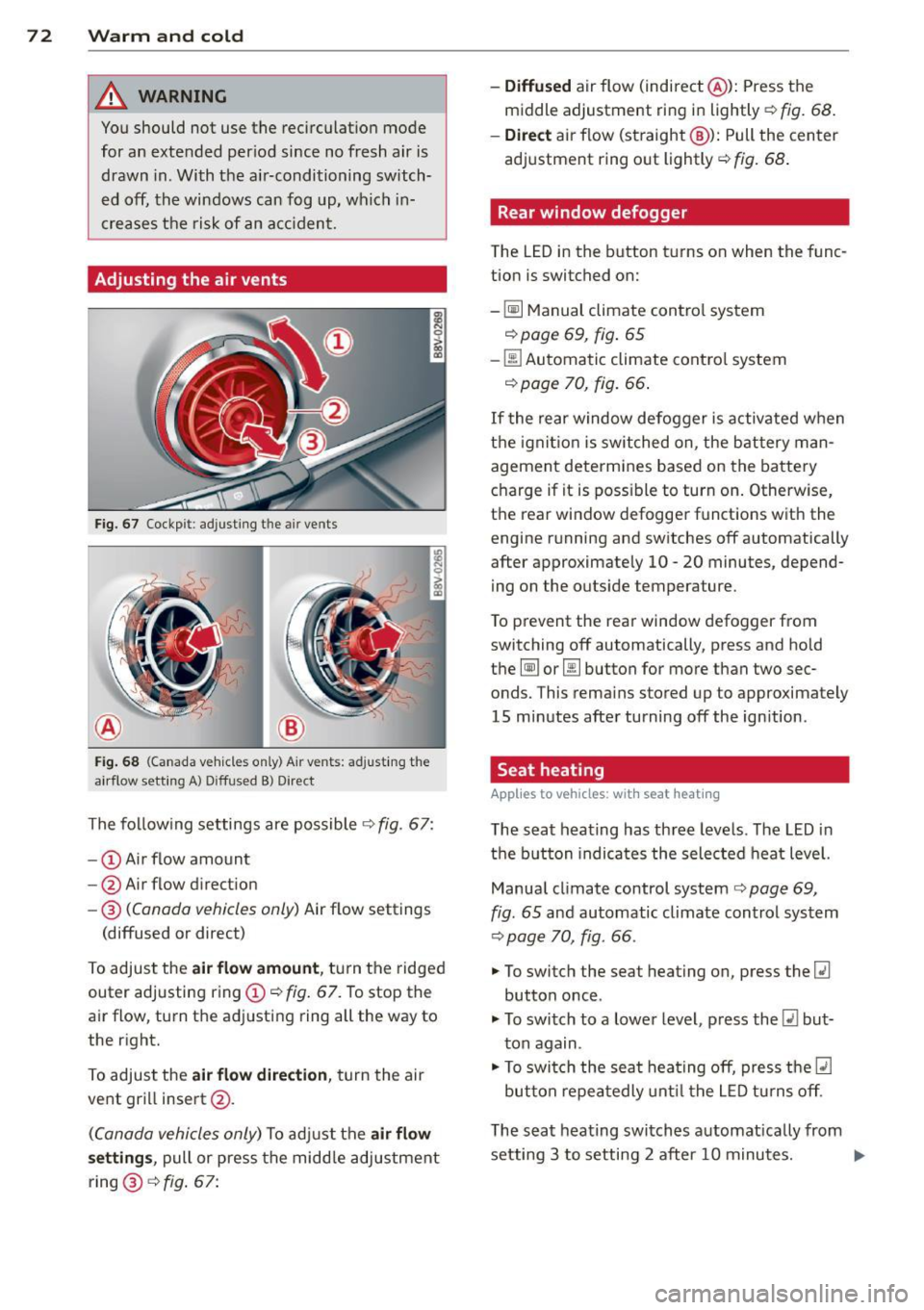
Adjusting the air vents
Fig. 67 Cockp it : adjust ing the a ir vents
®
Fi g. 6 8 (Canada ve hicles o nly) A ir ve nts : ad just ing t he
a irflow sett ing A ) D iffused B ) Direct
The fo llow ing settings are possible ¢ fig. 67:
- © Airflow amount
- @ Air flow d irect ion
- @
(Canada vehicles only) Air f low settings
(diffused or direct)
To adjust the
air flow amount , tu rn the ridged
outer adj usting ring©
c::> fig. 67. To stop the
air flow, turn t he adjusting ring all the way to
the right.
To adjust the
air flow direction , turn the air
ve nt gri ll insert @.
(C anada vehicles only) To ad just the air flow
setting s,
pull or press the midd le adjustment
ring @¢
fig. 67:
- Diffused air flow (indirect @): Press the
middle adjustment ri ng in lightly
c::> fig. 68 .
- Direct
air f low (st raight @): Pull the center
ad justment ring o ut lightly ¢
fig. 68 .
Rear window defogger
The LED in the button t urns on when the func
tion is switched on:
-
~ M anual climate contro l system
c::> page 69, fig . 65
-00 Automatic climate contro l system
c::> page 70, fig . 66.
If the rear w indow defogger is activated w hen
t h e igni tion is switched on, the bat tery man
agement determines based on the battery
c h arge if i t is poss ible to turn on . Otherw ise,
the rear window defogge r funct ions w it h the
engine running and switches off automatically
after approximately 10 -20 minutes, depend
i ng on the outs ide temperature .
T o p revent the rear window defogger f rom
switching off automatically, press and hold
t h e
@ii or 00 button for more than two sec
onds. This rema ins stored up to approxima tely
15 minutes afte r turning off the ign ition .
Seat heating
Applies to veh icles : w it h seat heat ing
The seat heating has th ree leve ls. The LED in
the b utt on indica tes the sele cted heat leve l.
Manua l climate control system
c::> page 69,
fig . 65 and automatic climate control system
c::> page 70, fig . 66.
"' To switch the seat heating on, press the
lt:J
button once .
"' To swi tch to a lower level , press the
lt:I but
ton again .
"' To swi tch the sea t heating off, press the
lt:J
but ton re peat edly unt il t he L ED turns off .
T he seat heating swi tches a utomat ica lly from
setting 3 to setting 2 after 10 minutes.
Iii>
Page 75 of 310
M N
0 > co ,...., \!) 1.1'1
M 1.1'1 ,....,
When seat heating should not be
switched on
Do not turn the seat heating on under the fol
lo wing circumstances:
- The seat is unoccupied.
- The seat is covered with a seat cover.
- The seat is covered with a child seat .
- The seat is damp or wet .
A WARNING
Individuals with reduced sensitivity to pain
or temperature could develop burns when
using the seat heating function. To reduce
the risk of injury, these individuals should
not use seat heating.
(D Note
To avoid damage to the heating elements
in the seats, do not kneel on the seats or
place heavy loads on a small area of the
seat.
(D Tips
- The setting for the seat heating on the
driver's side is assigned to the key that is
1n use.
- If the front passenger's seat heating is
turned on, it will not turn on again auto
matically if more than
10 minutes have
passed between switching the ignition
off and switching it on again.
Auxiliary heater
App lies to vehicles: with d iesel e ngin e
In cool outside temperatures, the electric aux
iliary heater helps the vehicle interior to warm
more quickly . The auxiliary heater switches on
and off automatically according to the vehicle heating settings .
The "auxiliary heater" function can be switch
ed on and off in the
MMI. Select: the !MENUI
button
> Car > Systems * control button > AC
> Auxiliary heater .
Warm and cold 73
•
Page 76 of 310
74 Driving
Driving
Steering
Adjusting the steering wheel position
The steering wheel position is fully adjustable
up and down and forward and bock .
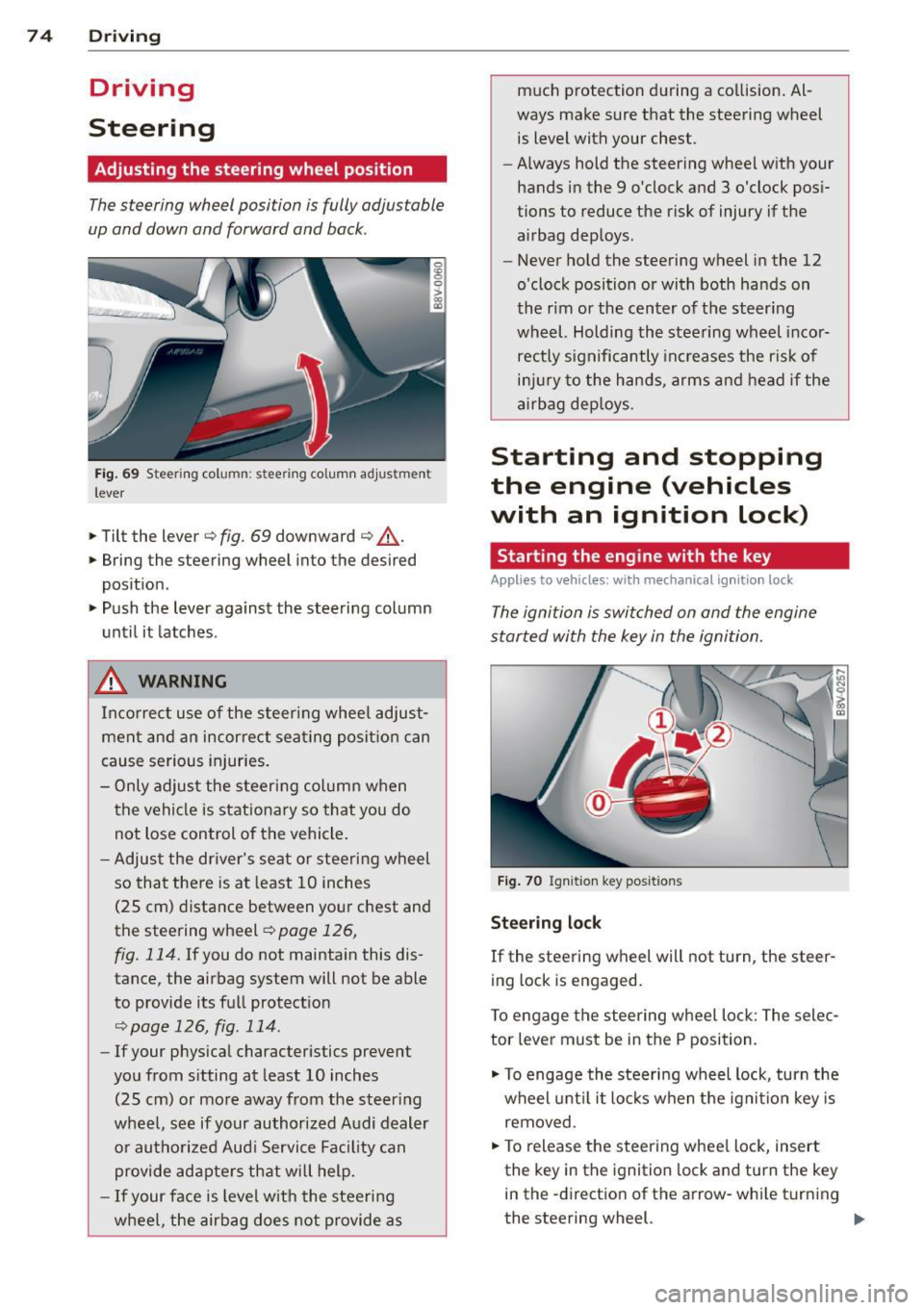
Fig. 69 Steering column: stee ring column adjustmen t
lever
.. Tilt the lever ¢ fig. 69 downward ¢ &_.
.. Bring the steering wheel into the desired
position .
.. Push the lever against the steering column
until it latches .
_& WARNING
Incorrect use of the steer ing whee l adjust
ment and an incorrect seating position can
cause serious injuries.
- Only adjust the steering column when
the vehicle is stationary so that you do
not Lose control of the vehicle .
- Adjust the driver's seat or steering wheel
so that there is at least 10 inches
(25 cm) distance between your chest and
the steering wheel~
page 126,
fig. 114.
If you do not maintain this dis
tance, the airbag system will not be able
to provide its full protect ion
<=> page 126, fig. 114.
- If your phys ical characteristics prevent
you from sitting at least 10 inches
(25 cm) or more away from the steer ing
wheel, see if your authorized Audi dealer or authorized Audi Service Fac ility can
provide adapters that will help.
- If your face is level with the steering
wheel, the airbag does not provide as much protection during a co
llision. Al
ways make sure that the steering wheel is level with your chest .
- Always hold the steering wheel with your
hands in the 9 o'clock and 3 o'clock pos i
tions to reduce the risk of injury if the
airbag deploys.
- Never hold the steering wheel in the 12
o'clock position or with both hands on
the rim or the center of the steering
wheel. Holding the steering wheel incor
rectly significantly increases the r is k of
inj ury to the hands, arms and head if the
airbag deploys.
Starting and stopping
the engine (vehicles
with an ignition lock)
Starting the engine with the key
Applies to vehicles: wit h mechanical ignition loc k
The ignition is switched on and the engine
started with the key in the ignition.
Fig. 70 Ignit ion key pos itions
Steering lock
If the steering wheel will not turn, the steer
ing lock is engaged.
To engage the steering wheel Lock: The selec
tor leve r must be in the P position.
.. To engage the steering wheel lock, turn the
wheel until it locks when the ignition key is
removed .
.. To release the steering wheel Lock, insert
the key in the ignition lock and turn the key
in the -direction of the arrow-whi le turning
the steering wheel. .,.
Page 77 of 310
M N
0 > co ,...., \!) 1.1'1
M 1.1'1 ,....,
Switchin g th e ig nition on /off or
p rewar ming
~ To switch the ignition on, turn the ignition
key to position
(D .
~ To switch the ignition off, turn the ignition
key to position @.
Diese l vehicles are preheated while the igni
tion is switched on
II .
Starting th e engin e
Your veh icle is eq uipped with launch cont ro l.
As soon as you have turned the ignition key to position @, the engine will start automatical
l y.
~ Press the brake peda l and move the se lector
lever to the P or N position.
~ Turn the key briefly to position @. The igni
tion key automatically returns to position
(D . Do not press the accelerator peda l when
do ing this.
Major electrical equipment switches off tem
porarily when starting the engine.
It is poss ible that t here will be a slight delay
when starting the engine in diese l vehicles in
colder temperatures . Therefore , you must
ho ld the brake pedal down unti l the engine
starts . The indicator light turns on while the
engine is preheating
II .
The prewarming time depends on the coolant
temperature and outside temperature. The
glow plug indicator light
II wi ll only turn on
for approximately 1 second when the eng ine
is warm or the outside temperature is higher
than 8
°C. T hat means you can start the en
g ine
immediately .
If the engine does not start immediately, stop
the starting procedure by turn ing the ignition
key to pos ition @and repeat after 30 sec
onds .
Automatic star t m alfunction
If the ~ (gasoline engine) or II (diesel en
g ine) indicator light turns on and the message
E ngin e sta rt system m alfunction . P le ase Dri
vin g 75
cont act Se rv ice
appears, there is an automatic
start malfunction.
T o start the engine, hold the ign it ion key in
pos ition @unt il the engine r uns.
Drive to an authorized Audi dealer or author
ized Audi Serv ice Facility immediately to have
the malfunction corrected.
_& WARNING
- Never a llow the engine to run in confined
spaces - there is a risk of asphyxiation .
- Never remove the ignit ion key from the
ignition loo k while the vehicle is moving .
Otherwise the steering lock will engage
and you will not be able to steer the vehi
cle.
- Please note that the b rake booster and
power steering only work when the en
gine is running. When the engine off, you must use more force to steer or brake
the vehicle. Because the usual steer ing
and brak ing capability is not ava ilable,
the risk of accidents or injur ies increases .
- Always take the vehicle key with you when leav ing the vehicle, even for a
short pe riod of time. This applies part ic
ularly when children remain in the veh i
cle. Otherwise the chi ldren could start
the engine or operate electrical equip
ment such as power w indows.
(D Note
- Avo id h igh engine speed, full th rottle,
and heavy eng ine load as long as the en
gine has not reached operat ing tempera
t u re yet . You could damage the engine.
- T he engine cannot be started by pushing
or towing.
@) For the sake of the environment
Do no t let the eng ine run w hile pa rked to
warm up. Begin dr iv ing immediately. This
reduces unnecessary emissions.
•
Page 78 of 310
76 Driving
(D Tips
-If it is difficult to turn the key to position
(D , turn the steering wheel back and
forth slightly to release the steering
wheel lock .
- After starting a cold engine, there may
be a brief period of increased noise be
cause the oil pressure must first build up
in the hydraulic valve adjusters. This is
normal and not a cause for concern .
- If the battery is disconnected and recon
nected, you have to hold the ignition key
in position
(D for five seconds for the en
gine to start .
- After switching the ignition off, you can
only remove the key when the selector
lever is in the "P" (Park) position. After
that the selector lever is locked.
,
Stopping the engine with the key
App lies to vehicles: with mechanical ig niti on lock
Stopping the engine
.,,. Br ing the vehicle to a full stop.
.,,. Turn the key to position @.
Releasing the steering lock
Requirement : The selector lever must be in
the P position.
.,,. Remove the ignition key in position @
Qpage 77, fig . 71 Q &-
.,,. Turn the steering wheel until you hear the
steering wheel lock.
The locked steering helps prevent vehicle
theft .
_& WARNING
-Never turn off the engine before the ve
hicle has come to a complete stop. The
full function of the brake booster and the
power steering is not guaranteed. You
must use more force to turn or brake, if
necessary. Because you cannot steer and
brake as you usually would, this could
lead to accidents and serious injuries . -
Never remove the ignition key from the
ignition look while the vehicle is moving .
Otherwise, the steering lock could sud
denly engage and you would not be able
to steer the vehicle .
- Please note that the brake booster and
power steering only work when the en
gine is running. When the engine off, you
must use more force to steer or brake
the vehicle . Because the usual steering
and braking capability is not available,
the risk of accidents or injuries increases.
- Always take the vehicle key with you
when leaving the vehicle, even for a
short period of time. This applies partic
ularly when children remain in the vehi
cle. Otherwise the children could start
the engine or operate electrical equip
ment such as power windows.
- For safety reasons, always park the vehi
cle with the selector lever in the P posi
tion . Otherwise, there is the risk that the
vehicle could roll.
- After the engine has been switched off,
the radiator fan can continue to run for
up to 10 minutes - even with the ignition
switched off. It can also switch on again
after some time if the coolant tempera
ture rises as a result of heat buildup or if
the engine compartment is heated by
sunlight and the engine is hot .
(D Note
-If the engine has been under heavy load
for an extended period of time, heat
builds up in the engine compartment af
ter the engine is switched off -there is a
risk of damaging the engine. For this
reason, let the engine run for at idle for
approximately two minutes before shut
ting it off.