cruise control AUDI S3 2015 Owners Manual
[x] Cancel search | Manufacturer: AUDI, Model Year: 2015, Model line: S3, Model: AUDI S3 2015Pages: 310, PDF Size: 76.15 MB
Page 4 of 310
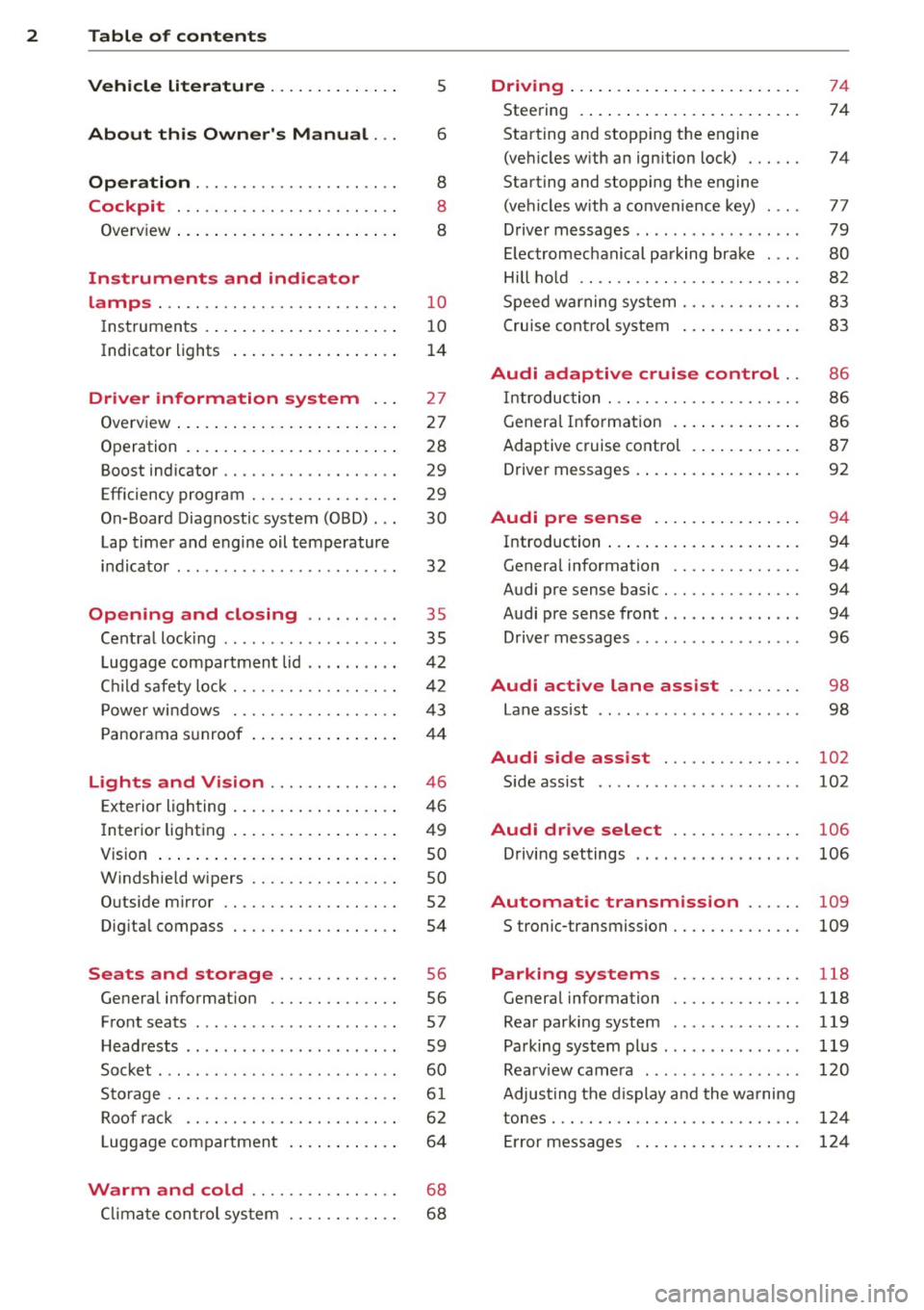
2 Table of contents Vehicle literature .. .. .. .. .. ... .
About this Owner's Manual ...
Operation .............. .... ... .
Cockpit ... ............. .... .. . .
Ove rv iew ... ... .. ..... ... .. .. ... .
Instruments and indicator
lamps ..... ............. .. .. .. . .
Ins truments . .. .. ..... ... .. .. ... .
Indicator lights ....... ... .. .. ... .
Driver information system .. .
Overview ... ... .. ..... ... .. .. ... .
Operation . .... .. ..... ... .. .. ... .
Boost indicator ........... .... ... .
Efficiency program ........ .. .. .. . .
On-Board Diagnostic system (OBD) . . .
Lap timer and engine oil temperature
indicator ............. ........ .. .
Opening and closing .. .. .. .. . .
Ce ntra l locking ................ .. .
L uggage compartmen t lid ... ... .. . .
C hil d safety lo ck ........ .. .. .. .. . .
P owe r wi ndows .......... .. .. .. . .
5
6
8
8
8
10
1 0
1 4
27
2 7
28
29
29
30
32
35
35
4 2
42
43
P anorama s unroof . . . . . . . . . . . . . . . . 4 4
Lights and Vision ............. .
Exte rior ligh ting ....... ... .. .. ... .
I nter ior light ing .. ..... ... .. .. ... .
V1s 1on ..... ... .. ..... ... .. .. ... .
W indshie ld wipers ........ .. .. ... .
O utside mirror ............... ... .
Dig ita l compass .......... .... ... .
Seats and storage ....... .. ... .
General i nformat ion ............. .
F ront seats ........... .... .... .. .
H eadrests .. ................ ... . .
Socket ... .. ... .... ...... .. .. .. . .
S to rage .... ... .......... .. .. .. . .
Ro of r ack .. ............. ....... .
L uggage compartmen t .. .. .. .. .. . .
46
46
4 9
so
so
52
54
56
56
57
59
60
6 1
6 2
6 4
Warm and cold . . . . . . . . . . . . . . . . 68
C lima te control sys tem . . . . . . . . . . . .
6 8
Driving ... .... .. ... .. ..... .... . .
Stee ring .. .... .. .. ... ..... ... .. .
Starting and stopp ing t he engine
(ve hicles with an ign ition lock) ... .. .
Starting and stopp ing th e engine
(ve hicles w ith a convenience key) ... .
Drive r m essages .. ... .. ....... ... .
El ectromechanical pa rking brak e ... .
Hill ho ld .. .. .. . .............. .. .
S peed w arning system .......... .. .
C ruise con tro l system .. ..... ... .. . 74
74
74
77
79
80
82
83
8 3
Audi adaptive cruise control .. 86
In troduc tion ..... ............... .
Genera l Info rmation . .. ..... ... .. .
Adaptive cruise contro l ...... .... . .
Drive r messages . .... .. ..... ... .. .
Audi pre sense .. .... .... ... .. .
Introduction ..... ... .. ..... .... . .
Genera l information ........... .. .
Audi pre sense basic .............. .
Audi pre sense front .............. .
Driver messages ................. .
Audi active lane ass ist ..... .. .
Lane assist .. .. ............ ..... . 86
8
6
87
92
94
94
94
94
94
96
98
98
Audi side assist . . . . . . . . . . . . . . . 102
Side assist ...... ............... .
Audi drive select ............. .
Driving settings ................. .
Automatic transmission ..... .
S tronic-transmiss ion ........... .. .
Parking systems
General information ........... .. .
Rea r parki ng system ............. .
Pa rking sys tem plus .............. .
Rea rv iew camera .... .. ....... ... .
Adju sting t he d isplay a nd the wa rning
tones . .... .... ................. .
Er ror messages . ... ... ..... ... .. .
102
106
106
109
109
118
118
119
119
120
124
124
Page 11 of 310
M N
0 > co ...... \!) ..,.,
M ..,., ......
CD
@
®
©
®
®
(J)
®
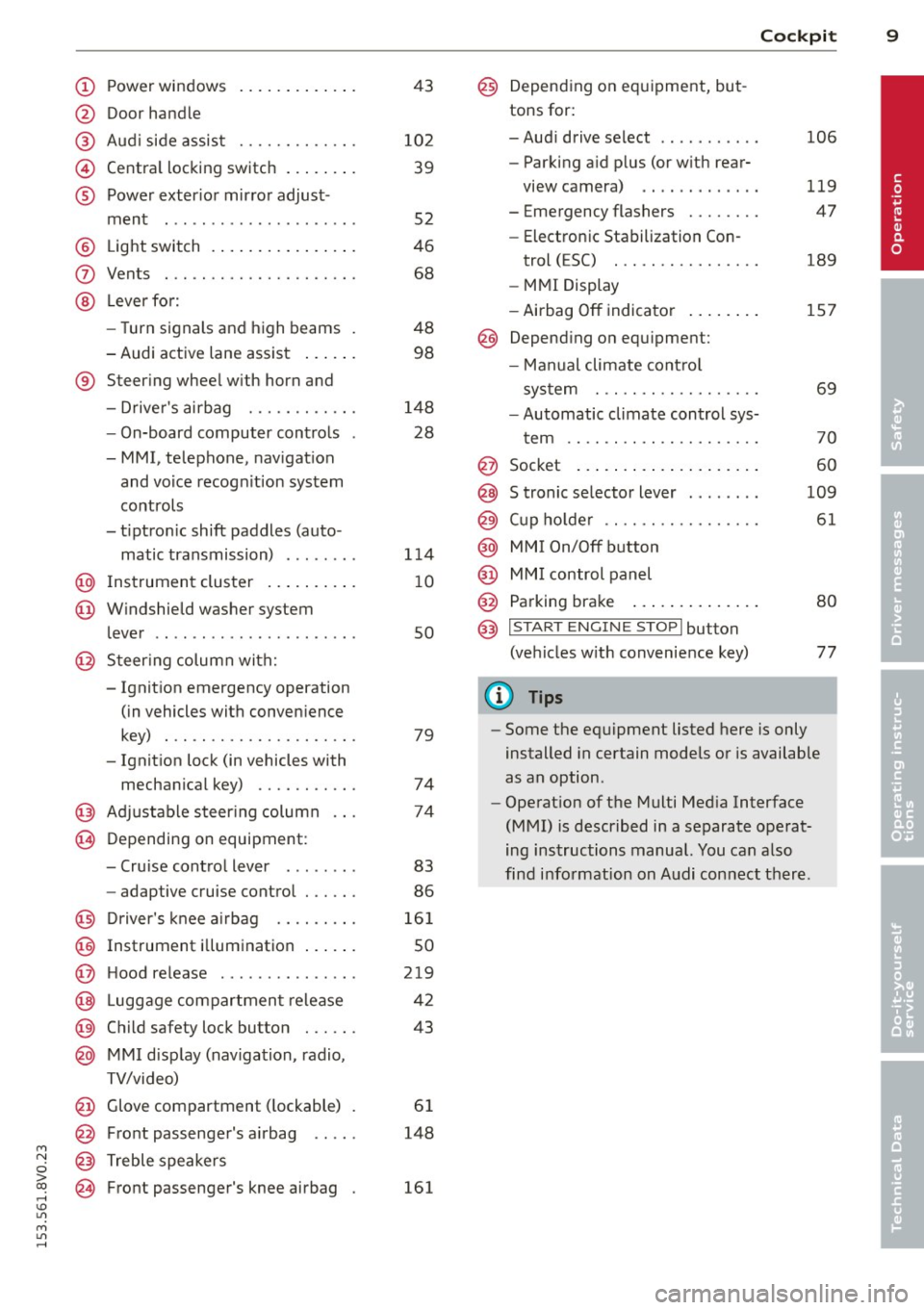
Power windows
Door handle
Aud i side assist
........ .... .
Centra l locking switch ... .. .. .
Powe r exter ior mirror adjust
ment
.. ... .............. ..
Light switch
Vents
L ever fo r:
- Turn signals and high beams
- Audi active lane assist ... .. .
® Steer ing wheel w ith horn and
- Drive r's airbag ....... .. .. .
- On-board computer controls
- MMI, telephone, nav igat ion
and voice recogn it ion system
controls
- tiptron ic shift paddles (auto-
matic transmission) ....... .
@ Instrument cluster .. ... .. .. .
@ W indshield washer system
l ever
' .. ... .............. . .
@ S teer ing column with:
- Ignit ion emergency operation
(in vehicles with conven ience
key) . .. ................. .
- Ignit ion lock (in vehicles with
mechanical key) ...... .. .. .
@ Adjustable s teer ing column
@ Depending on equipment :
- Cruise contro l lever . ...... .
- adaptive cruise contro l ... .. . 4
3
10 2
39
52
46
68
48 98
148 28
1 14
1 0
so
79
74
74
83
86
@ D river's knee a irbag . . . . . . . . . 161
@ Instrument i llumination . . . . . . 50
@ H ood re lease . . . . . . . . . . . . . . . 219
@ Lugg age compartmen t release 42
@ Child safety lock button . . . . . . 43
@ MMI d isp lay (navigation , radio,
TV/video)
@ Glove compartment ( lockable)
@ Front passenger's airbag .. .. .
@ Treble speakers
@ Front passenger's knee airbag 61
148
161
Cockpi t 9
@) Depending on eq uipment, but
tons for:
- Aud i drive select
- Parking a id p lus (or w ith rear-
view camera) .. . ... ...... .
- Emergency flashers ....... .
- Electron ic Stabilization Con-
trol ( ESC) . .. .... ........ .
- MMI Display
- Airbag
Off indicator ..... .. .
@ Depend ing on equ ipment:
- Manual climate cont ro l
system
- Automatic climate contro l sys
t em
. . .. .. .. .... .........
@ Socket
@ S tronic se lector lever ....... .
@ Cup ho lder .. .. .. . ......... .
@ MMI On/Off button
@ MM I control panel
@ Parking brake ... . ... ...... .
@ I START ENGI NE STOPI button
(ve hicles w ith convenience key)
(D Tips
106
119
47
189
157
69
70
60
109
61
80
77
- Some the eq uipment listed here is only
installed in certain models or is available
as an option.
- Operat ion of the Multi Med ia Interface
(MMI) is described in a separate operat
ing instructions manual. You can a lso
find info rmation on A udi con nect ther e.
•
Page 16 of 310
14 Instruments and indicator lamps
Indicator lights
Description
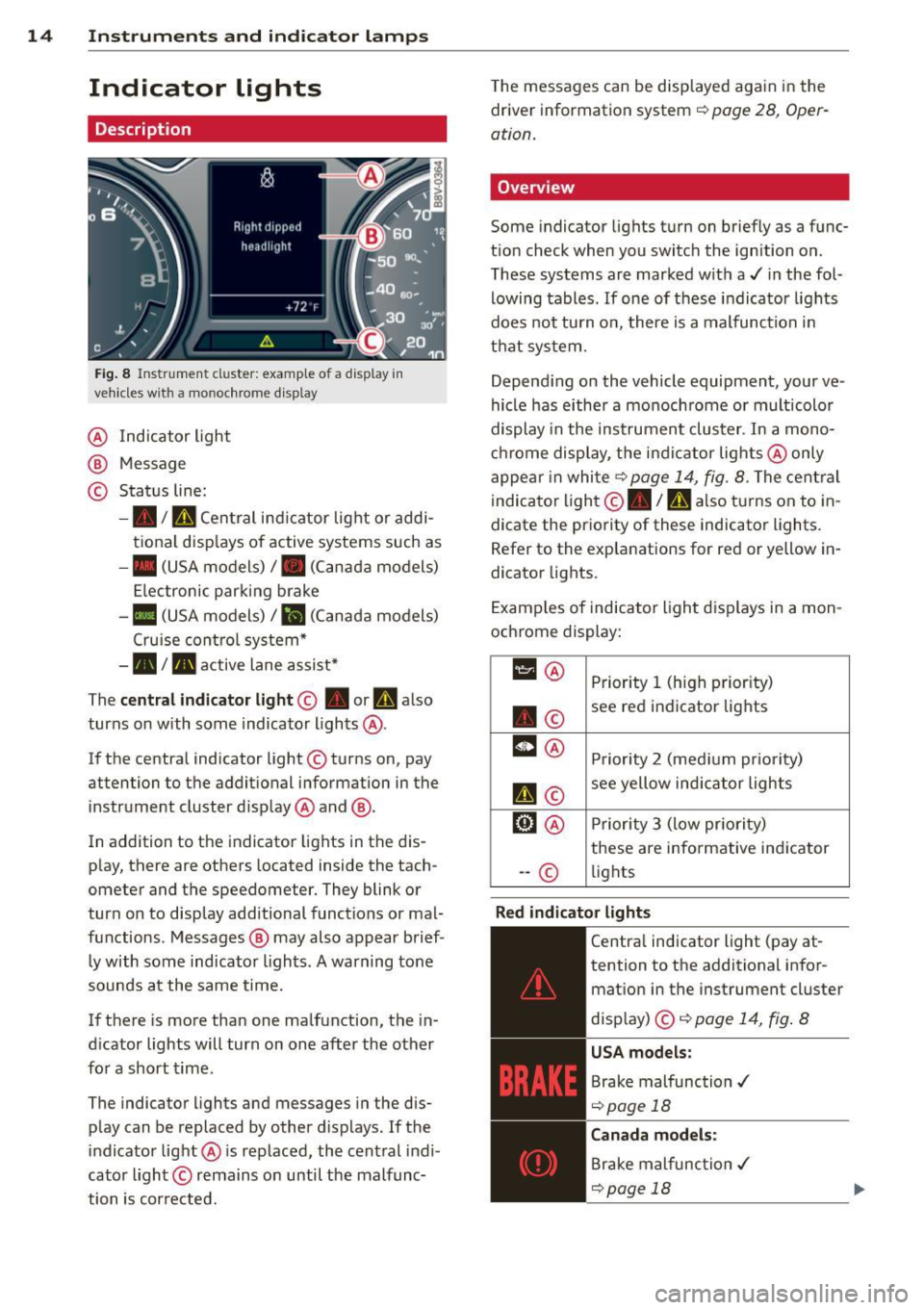
Fig. 8 Instrument cl uster: example of a display in
vehicles wit h a mo nochrome display
@ Indicator light
@ Message
© Status line:
-• ID Central indicator light or addi
tional displays of active systems such as
- • (USA models)/ . (Canada models)
Electronic parking brake
-II (USA models)/ ii (Canada models)
Cruise control system*
-• I. active lane assist*
The
central indicator light@ • or ml also
turns on with some indicator lights@.
If the central indicator light @turns on, pay
attention to the additional information in the
instrument cluster d isplay @and @.
In addition to the indicator lights in the dis
play, there are others located inside the tach
ometer and the speedometer. They blink or
turn on to display additional functions or mal
functions . Messages @ may also appear brief
ly with some indicator lights. A warning tone
sounds at the same time.
If there is more than one malfunction, the in
d icator lights will turn on one after the other
for a short time.
The indicator lights and messages in the dis
play can be replaced by other displays . If the
indicator light@ is replaced, the central indi
cator light © remains on until the malfunc
tion is corrected. T
he messages can be displayed again in the
driver information system ¢
page 28, Oper
ation.
Overview
Some indicator lights turn on briefly as a func
tion check when you switch the ignition on.
These systems are marked w ith a./ in the fol
lowing tables. If one of these indicator lights
does not tu rn on, there is a malfunction in
that system .
Depend ing on the vehicle equipment, your ve
hicle has either a monochrome or multicolor
display in the instrument cluster . In a mono
chrome display, the indicator lights @only
appear in white
¢ page 14, fig. 8. The central
indicator light ©. /
n also turns on to in
dicate the priority of these indicator lights.
Refer to the explanations for red or yellow in
dicator lights.
Examples of indicator light displays in a mon
ochrome display:
11 @ Priority 1 (high priority)
. © see red indicator lights
m
@ Priority 2 (medium priority)
II©
see yellow indicator lights
@l @ Priority 3 (low pr iority)
these are informative indicator
-- © lights
Red indicator lights
-------------
Central indicator light (pay at-
tention to the additional infor
mation in the instrument cluster
display) ©¢
page 14, fig. 8
USA models:
Brake malfunction ./
¢page 18
Canada models:
Brake malfunction./
¢page 18
Page 20 of 310
18 Instruments and indicator lamps
Ad Blue -I"
or
Ad Blue/
~
AdBlue malfunction*
Qpage 215
Other indicator lights
-------------
Turn signals
Qpage26
USA models: Cruise control sys
tem*
Q page 83
Canada models: Cruise control
system*
Q page 83
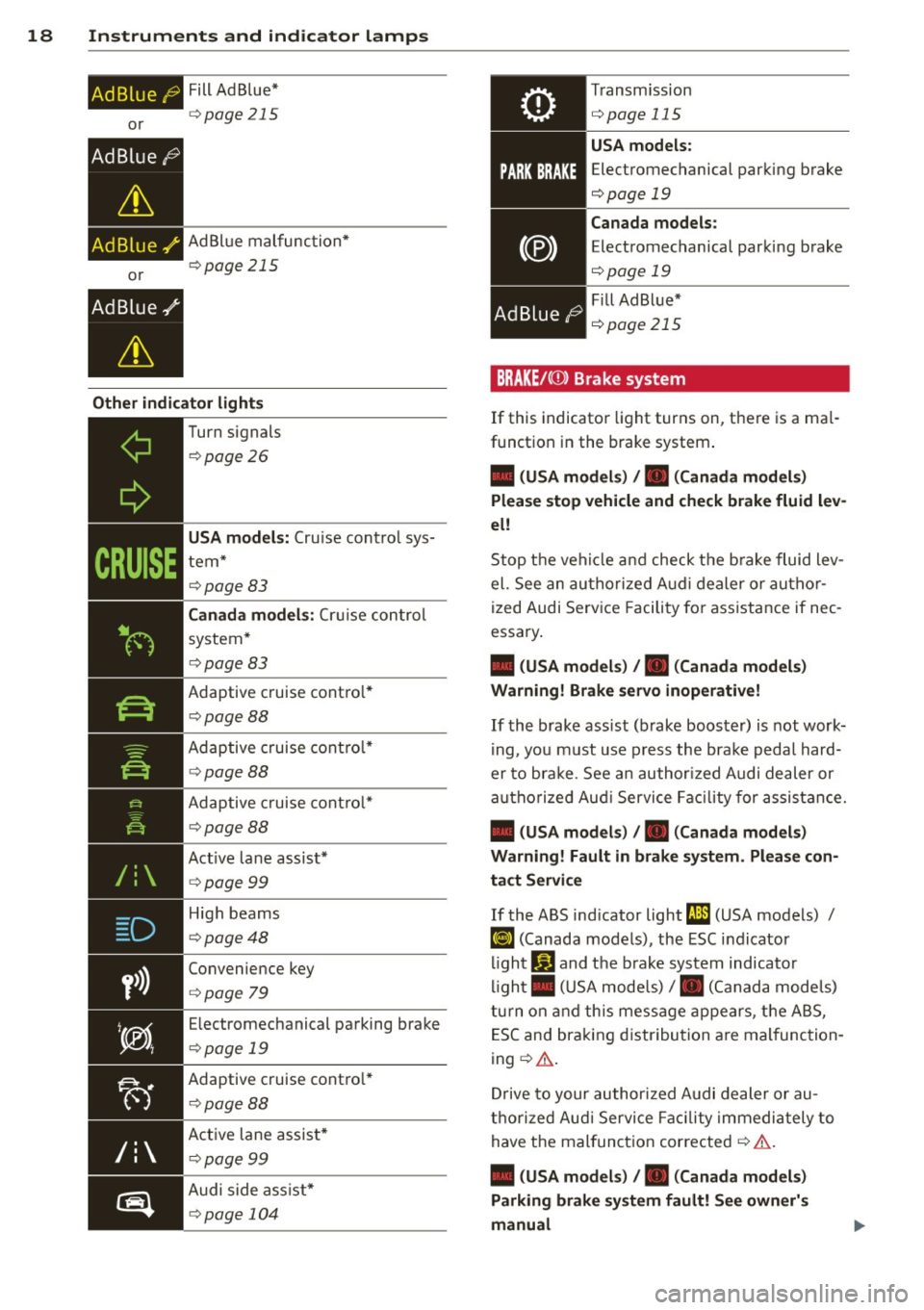
Adaptive cruise control*
Qpage 88
Adaptive cruise control*
Qpage88
Adaptive cruise control*
Qpage 88
Active lane assist*
Qpage 99
High beams
Qpage48
Convenience key
Qpage 79
Electromechanical parking brake
Qpage 19
Adaptive cruise control*
Qpage88
Active lane assist*
Qpage 99
Audi side assist*
Qpage 104
Transmission
Qpage 115
USA models:
Electromechanical parking brake
Qpage 19
Canada models:
Electromechanical parking brake
c::>page 19
Fill Ad Blue*
r::!) page 215
BRAKE/C(D) Brake system
If this indicator light turns on, there is a mal
function in the brake system.
• (USA models) , • (Canada models)
Please stop vehicle and check brake fluid lev
el!
Stop the vehicle and check the brake fluid lev
el. See an authorized Audi dealer or author
ized Audi Service Facility for assistance if nec
essary.
• (USA models) , • (Canada models)
Warning! Brake servo inoperative!
If the brake assist (brake booster) is not work
ing, you must use press the brake pedal hard
er to brake . See an authorized Audi dealer or
authorized Audi Service Facility for assistance.
• (USA models) , • (Canada models)
Warning! Fault in brake system. Please con
tact Service
If the ABS indicator light (JD (USA models) /
II] (Canada models), the ESC indicator
light
G1 and the brake system indicator
light . (USA models)/ . (Canada models)
turn on and this message appears, the ABS,
ESC and braking distribution are malfunction
ing
r::!) & .
Drive to your authorized Audi dealer or au
thorized Audi Service Facility immediately to
have the malfunction corrected
i::::> A .
• (USA models) , • (Canada models)
Parking brake system fault! See owner's
manual
Page 29 of 310
....,
N
0 > co
rl I.O
"' ....,
"' rl
Driver information
system
Overview
Applies to vehicles: with dr iver information system
Fi g. 9 l nstrume nt cl uste r: dr ive r info rmatio n syste m
(ex am ple)
Data is automatica lly recorded , processed and
d isp layed in the dr iver information system .
Sett ings for special equ ipment can be adjust
ed in the MMI. Select the
! M ENU ! button> Car
> Systems * menu control button .
Introduction
The driver information system is controlled
through the mult ifunction steering wheel
c::;, page 28 , fig . 10 .
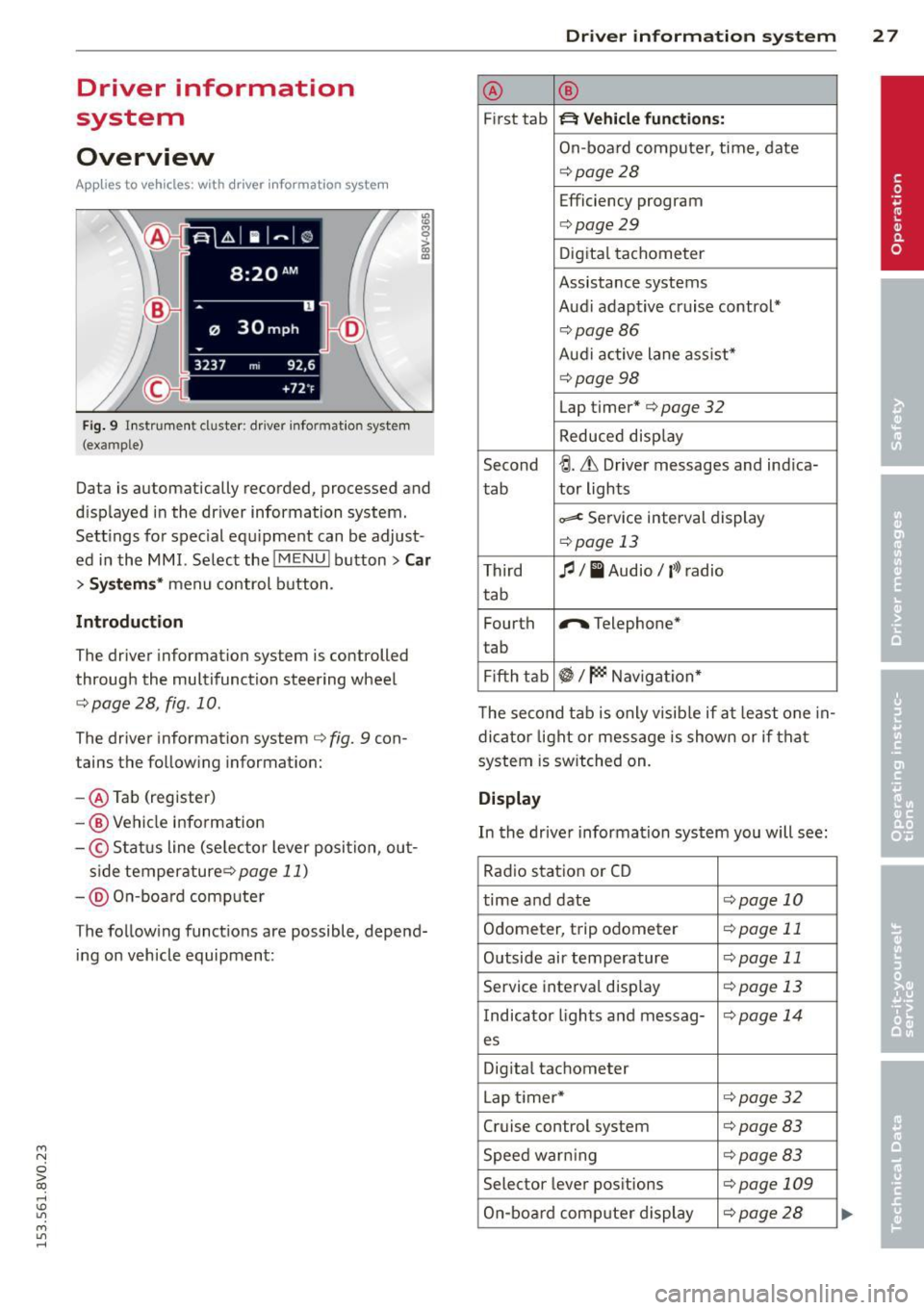
The driver information system c::;, fig. 9 con
tains the follow ing informat ion:
- @ Tab (register)
-@ Vehicle information
-© S ta tus line (se lecto r lever posi tion , ou t-
s ide temperature ¢page
11)
-@ O n-boa rd comp ute r
T he follow ing funct ions are possible , depend
i ng on vehicle equipment :
Driver in formation system 2 7
@ ®
First tab ~ Vehicle functions:
On-boa rd comp uter, time, date
¢ page28
Efficiency program
c=;, page29
Digita l tachometer
Assistance systems
Aud i adapt ive cruise control*
¢ page86
Aud i active lane ass ist*
¢ page 98
Lap timer* c::;, page 32
Reduced disp lay
Second
~ -Lh Driver messages and ind ica-
tab tor lights
~ Se
rv ice interval display
¢ page 13
Third fl I I Audio/ l'>l radio
tab
Fourth
r,. Telephone*
t ab
Fi fth tab
~I~ Naviga tion *
T he second tab is only v isib le if at least one in
dicator light or mess age is shown or if that
system is switched on.
Display
In the drive r information system you will see:
Rad io stat io n or CD
time and date
c:!;> page 10
Odometer, trip odometer c:!;> page 11
Outside air temperature c::;, page 11
Serv ice interva l disp lay ¢ page 13
Indicator lights and messag-<:!.> page 14
es
Dig ita l tachometer
L ap timer*
c:!;> page 32
Cruise control system ¢page 83
Speed war ning c:!;> page 83
Selec tor lever pos itions ¢page 109
On-bo ard comp uter display c:!;> page 2 8
Page 85 of 310
M N
0 > co ,...., \!) 1.1'1
M 1.1'1 ,....,
moment after re leasi ng the b rake peda l. Dur
i n g this time, you can easily be gin to move
your veh icle.
A WARNING
- The intelligent technology of Hill Hold
cannot overcome the lim itations im
posed by natural phys ica l laws . The in
c reased comfort offered by Hill Hold
sho uld not cause you to ta ke safety risks .
- Hill Hold cannot hold the veh icle in all
hill start situat ions (for examp le, if the
ground is slippery or icy).
- If you do not begin movi ng immediately
after releasing the b rake pedal, the vehi
cl e could begin to roll backwa rd under
c ertai n circumst ances. Press the bra ke
peda l or set the par king b rake immed i
ately .
-If the engine "sta lls", p ress the brake
peda l or set the par king b rake immedi
ately .
- Star ting on in cli nes in s top-and-go traf
fic: To hel p prevent the vehicle from roll
ing back when starting, press and hold
the brake pedal for several seconds when
the vehicle is stationary.
@ Tips
You can find out if your vehicle is equipped
wit h Hill Hold by check ing at an authorized
Aud i dea le r or q ualified repa ir facility.
Speed warning system
Introduction
The speed warning system helps you to stay
under a specified maximum speed.
-
The speed warning system warns you if you
are exceeding the max imum speed that you
h ave set . Yo u will hea r a warn ing tone when
your speed exceeds the stored va lue by ap
p rox imately 3 mph (3 km/ h). The . (USA
models)/ . (Canad a mo dels) indicator l igh t
and the message
Speed limit e xceeded! ap
pear in the instr ument cluster disp lay at the
same time. The./. indicator light turns
Drivin g 83
off when the speed dec reases be low the stor
ed maximum speed .
Setting a t hreshold is recommended if you
would like to be rem inded when you reach a
ce rtain maxim um speed. S ituations whe re you
may want to do so incl ude driving in a co untry
with a genera l speed limit o r if the re is a
specified maximum speed for winter tires .
(D Tips
Regardless of the speed warning system,
you should a lways monitor your speed us
i ng the speedometer and make sure yo u
are follow ing the lega l speed limit .
Setting the threshold
You can set, change and delete the threshold
in the MMI.
.,.. Select: the
I MENU I button > Car > Systems*
cont ro l button > Driver assistance > Speed
warning .
You can set any threshold between 20 mph
(30 km/h) and 150 mph (240 km/h) . Settings
can each be adj usted in increments of 6 mph
(10 km/h).
Cruise control system
Description
Applies to veh icles: w ith c ruise control system
The cru ise con trol system makes it poss ib le to
drive at a cons tant speed start ing at 15 mph
(20 km/h).
T he speed is kept const ant by modifying en
gine powe r or throug h an ac tive brake inte r
vention .
.&_ WARNING
-Always pay attention to the t raffic
around you when the cruise contro l is in
operation. You are always responsible for
your speed and the distance between
your veh icle and other vehicles .
llll-
•
Page 86 of 310
84 Driving
-For reasons of safety, cruise control
should not be used in the city, in stop
and-go traffic, on winding roads and
when road conditions are poor (such as
ice, fog, gravel, heavy rain and hydro
planing) -you could have an accident .
- Switch the cruise control off temporarily
when driving in turning lanes, highway
exits or in construction zones.
- Please note that unconsciously "resting"
your foot on the accelerator pedal pre
vents the cruise control from braking.
This is due to the control system being
overridden by the driver's acceleration.
- If there is a brake system malfunction
such as overheating when the speed
warning system is switched on, the brak
ing function in the system will be deacti
vated. The remaining speed warning sys
tem functions will remain active, as long
as the
B (USA models)/ ii (Canada
models) indicator light is on.
@ Tips
- The cruise control system is ideal for
stretches with speed limits. The driver is
responsible for adhering to the correct
speed.
- The cruise control remains active when
shifting gears.
- The brake lights turn on when the brakes
are activated.
Switching on
Applies to vehicles: with cr uise contro l system
0
f
~
0
Fig. 74 Opera ting lever: Cruise control system
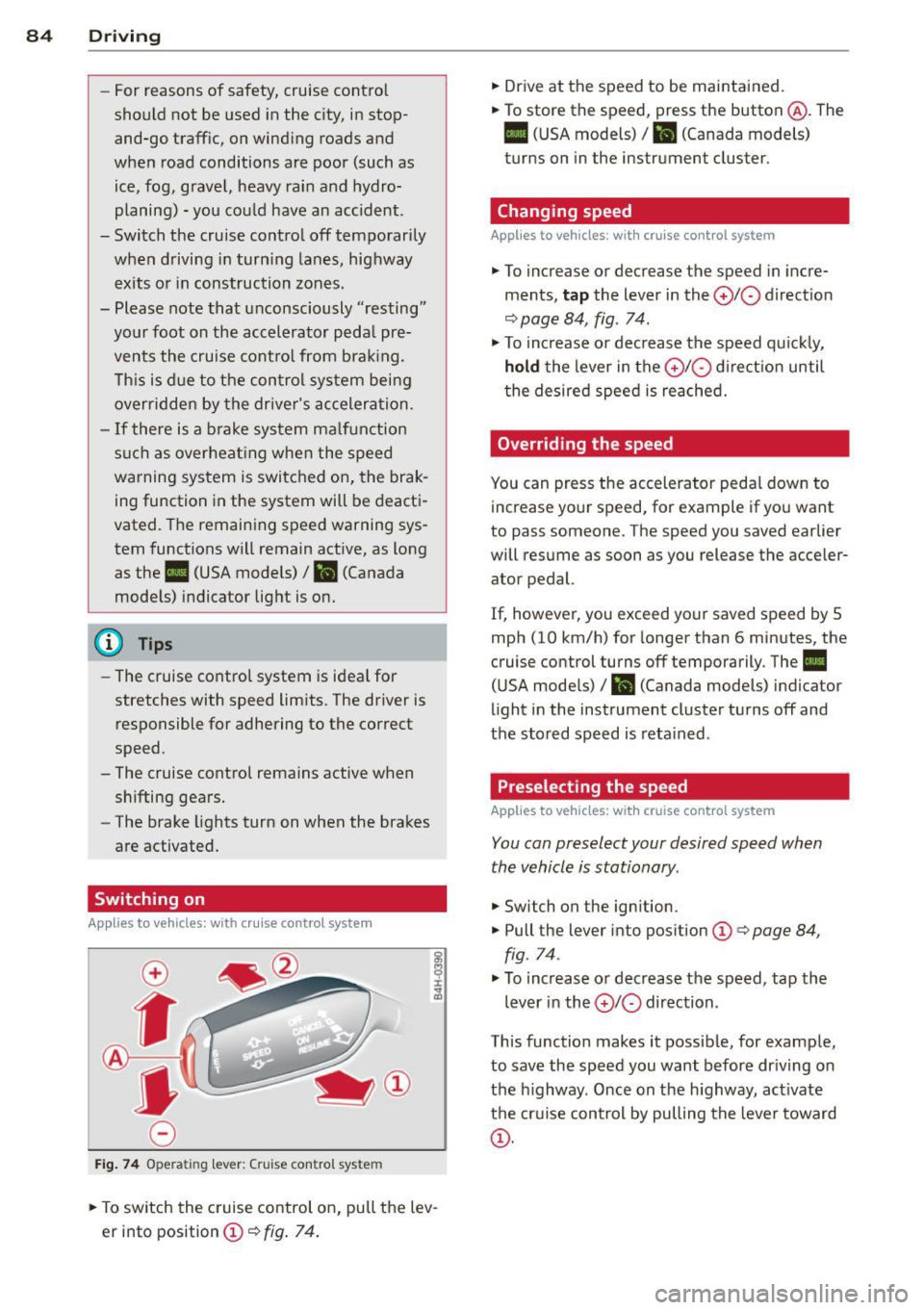
.,. To switch the cruise control on, pull the lev
er into position
CD¢ fig. 74.
.,. Drive at the speed to be maintained.
.,. To store the speed, press the button @. The
B (USA models)/ ii (Canada models)
turns on in the instrument cluster.
Changing speed
Applies to vehicles: with cruise control system
.,. To increase or decrease the speed in incre
ments,
tap the lever in the 0 10 direction
<:;>page 84, fig. 74 .
.,. To increase or decrease the speed quickly,
hold the lever in the 010 direction until
the desired speed is reached.
Overriding the speed
You can press the accelerator pedal down to
increase your speed, for example if you want
to pass someone. The speed you saved earlier
will resume as soon as you release the acceler ator pedal.
If, however, you exceed your saved speed by 5
mph (10 km/h) for longer than 6 minutes, the
cruise control turns off temporarily. The
II
(USA models) / Bl (Canada models) indicator
light in the instrument cluster turns off and
the stored speed is retained .
Preselecting the speed
Applies to vehicles: with cruise control system
You can preselect your desired speed when
the vehicle is stationary .
.,. Switch on the ignition .
.,. Pull the lever into position
CD¢ page 84,
fig . 74.
.,. To increase or decrease the speed, tap the
lever in the
010 direction .
This function makes it possible, for example,
to save the speed you want before driving on
the highway . Once on the highway, activate
the cruise control by pulling the lever toward
CD-
Page 87 of 310
M N
0 > co ,...., \!) ..,.,
M ..,., ,....,
Switching off
Applies to vehicles: with cruise contro l system
Temp orar y de acti vation
.. Press the brake pedal, or
.. Press the lever into pos ition @ (not clicked
i nto place) ~
page 84, fig. 74, or
Switchin g off completel y
.. Press the lever into pos ition @ (clicked into
place), or
.. Switch the ign ition off .
The speed you stored will be retained if the
cru ise control has been sw itched off tempora
rily. To resume the stored speed, release the
brake pedal and pull the lever into posit ion
@ .
The stored speed is erased when the cru ise
control is switched off completely or the ign i
tion is sw itched off .
.8, WARNING
You should only resume the stored speed if
it is not too h igh fo r exis ting traffic condi
tions. Otherwise you risk an accident .
@ Tips
-If the brakes become too heated while
driving, the cruise cont ro l switches off .
If
this happens while dr iv ing downh ill, you
can re lieve the brakes by shifting into a
l ower gear .
- When the cr uise control is act ivated, ESC
spo rt mode cannot be switched on.
Dri vin g 85
•
Page 88 of 310
86 Audi adapti ve cruise control
Audi adaptive cruise
control
Introduction
Applies to vehicles: with Audi adaptive cruise co ntrol
The adaptive cruise control system is a combi
nation of speed and distance regulation. It as
sists the driver by both regulat ing the speed
and maintaining a distance to the object
ahead, within the abilit ies of the system. If
the system detects an object, adaptive cru ise
con trol can brake and acce le rate your veh icle.
This makes driving more comfortable both on
long stretches of highway and in stop-and -go
traffic.
General Information
General information
Applies to vehicles: with Audi adaptive cruise control and
Audi pre se nse front
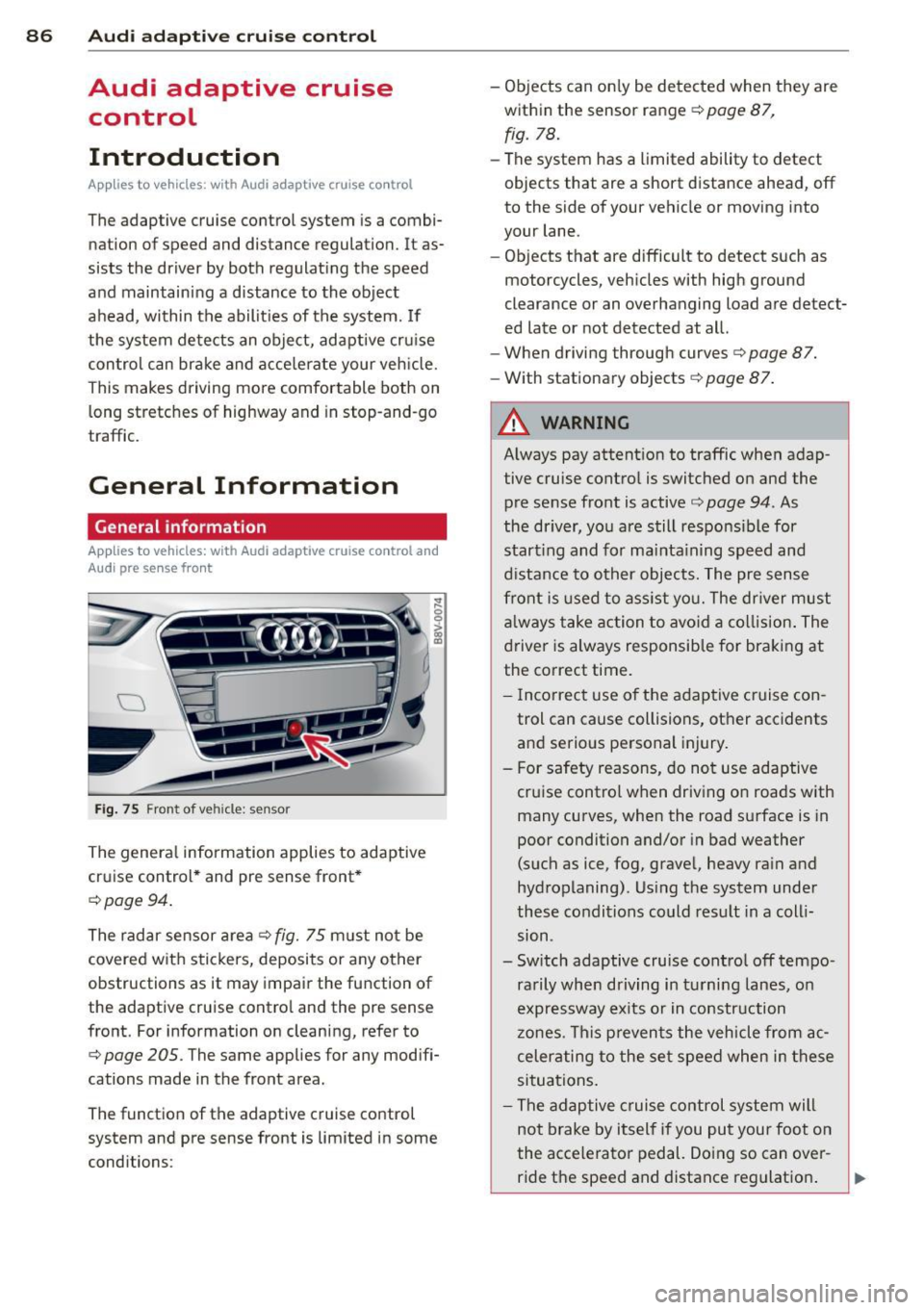
Fi g. 75 Front of veh icle: sensor
The genera l information applies to adaptive
cruise control * and pre sense front *
c:;, page 94.
The radar sensor a rea c::> fig. 75 m ust not be
covered w ith stickers, deposits or a ny other
obstructions as it may impair the function of
the adaptive cruise control and the pre sense
front. For information on cleaning, refer to
c:;, page 205. The same applies for any modifi
cations made in the front area.
The function of the adaptive cruise control
system and pre sense front is limited in some
conditions : -
Objects can on ly be detected when they are
within the sensor range
c::> page 87,
fig. 78.
-The system has a limited ability to detect
objects that are a short distance ahead, off
to the side of your vehicle or moving into
your lane.
- Objects that are difficult to detect such as
motorcycles, vehicles with high ground
clearance or an overhanging load are detect
ed late or not detected at all.
- When driving through curves
c::>page 87.
-With stationary objects c::> page 87.
A WARNING
-
Always pay attent ion to traffic when adap
tive cruise control is switched on and the
pre sense front is active
c::> page 94. As
the driver, yo u are still responsible for
start ing and for mainta ining speed and
d istance to other objects. The pre sense
front is used to ass ist you. The dr iver must
a lways take action to avo id a collision . The
driver is always responsible for braking at
the correct time.
- I ncorrect use of the adaptive cruise con
trol can cause collisions, other accidents
and serio us personal injury.
- For safety reasons, do not use adaptive cruise control when driving on roads with
many curves, when the road surface is in
poor condition and/or in bad weather
(such as ice, fog, gravel, heavy rain and
hydroplaning). Us ing the system unde r
these conditions could result in a coll i
sion .
- Switch adaptive cruise control off tempo rarily when driving in tu rni ng lanes, o n
expressway ex its or in construction
zones. This prevents the vehicle from ac
celerating to the set speed when in these
situations .
- The adaptive c ruise control system will
not brake by itself if you put your foot on
the accelerator pedal. Doing so can over-
ride the speed and distance reg ulation . ..,_
Page 89 of 310
....,
N
0 > co
rl I.O
"' ....,
"' rl
-When approaching stationary objects
such as stopped traffic, adaptive cruise
control will not respond and pre sense
front will have limited function.
- The adaptive cruise control system and
pre sense front do not react to people,
animals, objects crossing the road or on
coming objects.
- The function of the radar sensors can be
affected by reflective objects such as
guard rails, the entrance to a tunnel,
heavy rain or ice.
- Never follow a vehicle so closely that you
cannot stop your vehicle safely. The
adaptive cruise control cannot slow or
brake the vehicle safely when you follow
another vehicle too closely. Always re
member that the automatic braking
function cannot bring the vehicle to a
sudden or emergency stop under these
conditions.
- To prevent unintended operation, always
switch ACC off when it is not being used.
(D Note
The sensor can be displaced by impacts or
damage to the bumper, wheel housing and
underbody. The adaptive cruise control
and pre sense front may become impaired
as a result. Have an authorized Audi dealer
or authorized Audi Service Facility check
their function.
In curves
Applies to vehicles: with Audi adaptive cruise control and
Audi pre se nse front
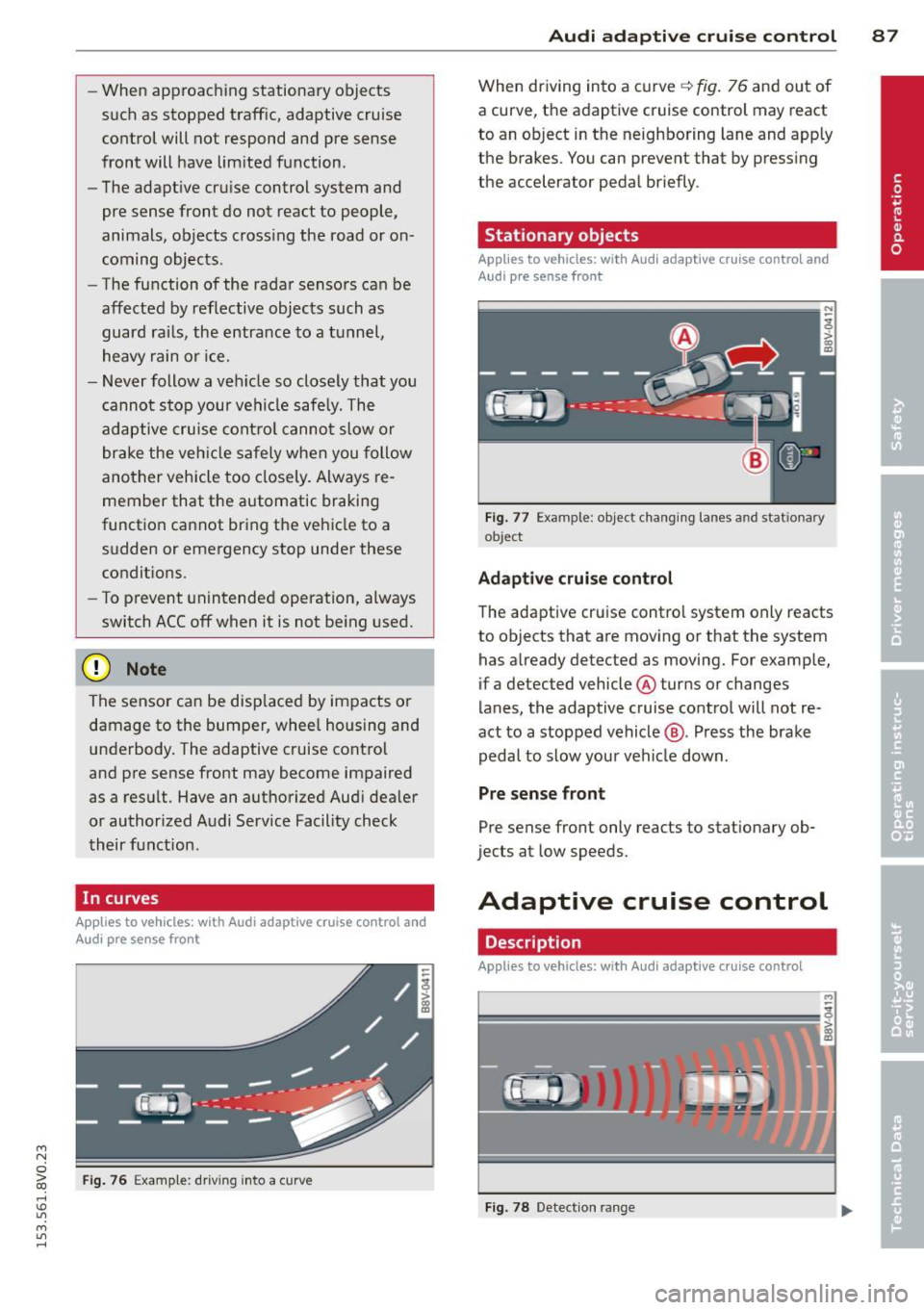
Fig. 76 Example: driv ing into a curve
Audi adaptive crui se control 87
When driving into a curve q fig. 76 and out of
a curve, the adaptive cruise control may react
to an object in the neighboring lane and apply
the brakes. You can prevent that by pressing
the accelerator pedal briefly.
Stationary objects
Applies to vehicles: with Audi adaptive cruise control and
Aud i pre sense front
Fig. 77 Example : object changing lanes and stat ionary
ob ject
Adaptive cruise control
The adaptive cruise control system only reacts
to objects that are moving or that the system
has already detected as moving. For example,
if a detected vehicle @turns or changes
lanes, the adaptive cruise control will not re
act to a stopped vehicle@. Press the brake
pedal to slow your vehicle down .
Pre sense front
Pre sense front only reacts to stationary ob
jects at low speeds.
Adaptive cruise control
Description
Applies to vehicles: with Audi adaptive cruise control
=--=~----
?!!!! = ';! ~~~~
Fig. 78 Detection ran ge