key battery AUDI S3 2015 Owners Manual
[x] Cancel search | Manufacturer: AUDI, Model Year: 2015, Model line: S3, Model: AUDI S3 2015Pages: 310, PDF Size: 76.15 MB
Page 19 of 310
M N
0 > co ,...., \!) 1.1'1
M 1.1'1 ,....,
or
or
or
or
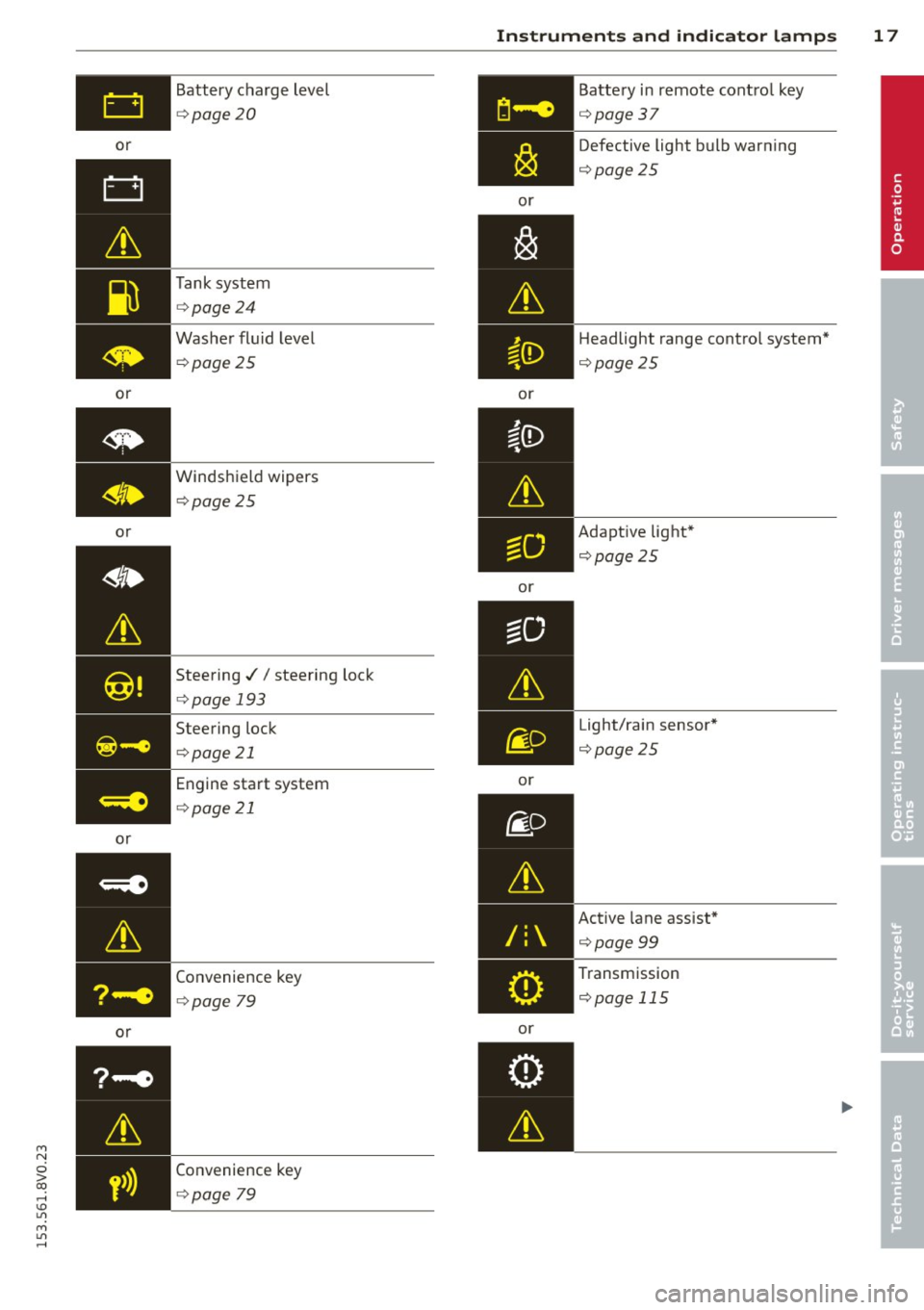
or Battery charge level
¢
page 20
Tank system
¢page 24
Washer fluid level
¢ page 25
Windshield wipers
¢page 25
Steering .//steering lock
¢page 193
Steering lock
¢p age 21
Engine start system
¢page 21
Convenience key
¢page 79
Convenience key
¢page 79
Instruments and indicator lamps 17
or
or
or
or
/:
or Battery
in remote control key
¢page37
Defective light bulb warning
¢page25
Headlight range contro l system*
¢ page25
Adaptive light*
¢page 25
Light/rain sensor*
¢page25
Active lane assist*
¢page 99
Transmission
¢page 115
•
Page 39 of 310
LED and batteries in the remote control
key
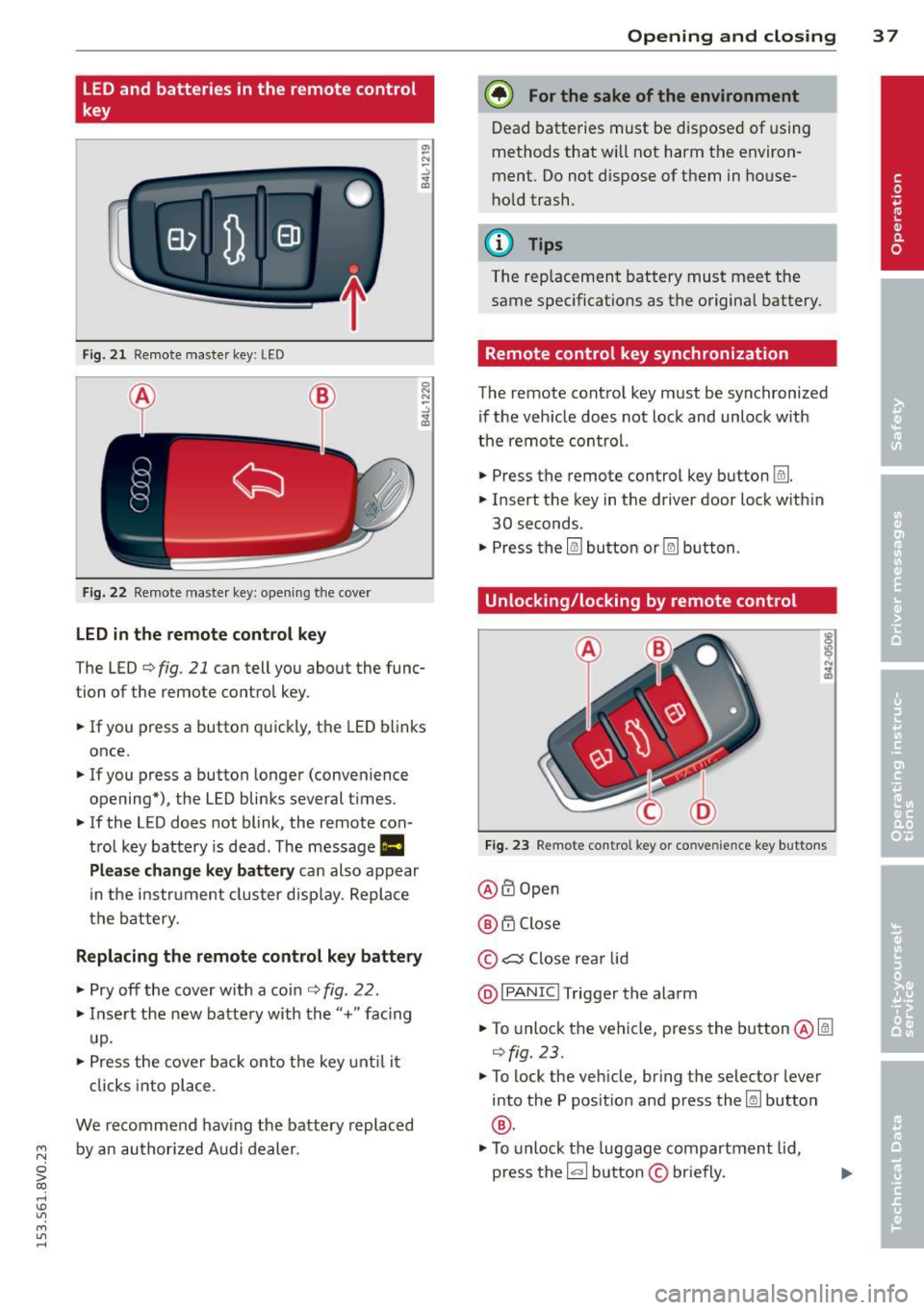
Fig. 2 1 Remote master key: LED
Fig. 22 Remote master key: opening the cove r
LED in the remote control key
The LED¢ fig. 21 can tell you about the func
tion of the remote control key .
.. If you press a button quickly, the LED blinks
once .
.. If you press a button longer (convenience
opening*) , the LED blinks several times .
.. If the LED does not blink , the remote con
trol key battery is dead. The message
Ill
Plea se change key battery can also appear
in the instr ument cluster display. Replace
the battery.
Replacing the remote control key battery
.. Pry off the cover w ith a coin ¢ fig . 22 .
.. Insert the new battery with the"+" fac ing
up.
.. Press the cover back onto the key until it
clicks into place .
We recommend having the battery replaced
~ by an authorized Audi dealer.
0 > co
rl I.O
"' M
"' rl
Opening and closing 3 7
@) For the sake of the environment
Dead batteries must be disposed of using
methods that will not harm the environ
ment. Do not dispose of them in house
hold trash .
{!) Tips
The rep lacement battery must meet the
same specifications as the origina l battery.
Remote control key synchronization
The remote control key must be synchronized
if the veh icle does not lock and unlock w ith
the remote control.
.. Press the remote control key button
Im .
.. Insert the key in the driver door lock w ith in
30 seconds .
"' Press the
l@J button or~ button .
Unlocking/locking by remote control
Fig. 23 Remote control key or conve nien ce key buttons
@ffi Open
@ 6".i Close
© c:s Close rear lid
@I PANIC I Trigger the alarm
.. To unlock the vehicle, press the button@lm
¢fig.23 .
"'To lock the veh icle, bring the selector lever
into the P posit ion and press the~ button
®·
"'To unlock the luggage compartment lid,
press the~ button
© briefly.
Page 41 of 310
....,
N
0 > co
rl I.O
"' ....,
"' rl
WARNING
----Read and following all WARNINGS. ¢ & in
Key set on page 35
@ Tips
If your vehicle is left standing for a long
period of time, note the following:
- The proximity sensor switches off after a
few days to save energy. You then have
to pull once on the door handle to unlock
the vehicle and a second time to open it.
- To prevent the battery from draining and
to retain the starting ability of yo ur vehi
cle as long as possible, the energy man
agement system gradua lly tuns off un
necessary convenience functions You
may not be able to unlock your vehicle
using the convenience key .
- For an explanation on conformity with
the FCC regulations in the United States
and the Industry Canada regulations, re
fer to ¢page
292 .
Unlocking/locking with the key
In the event that the power locking system
fails, the driver's door can locked and un
locked using the door lock .
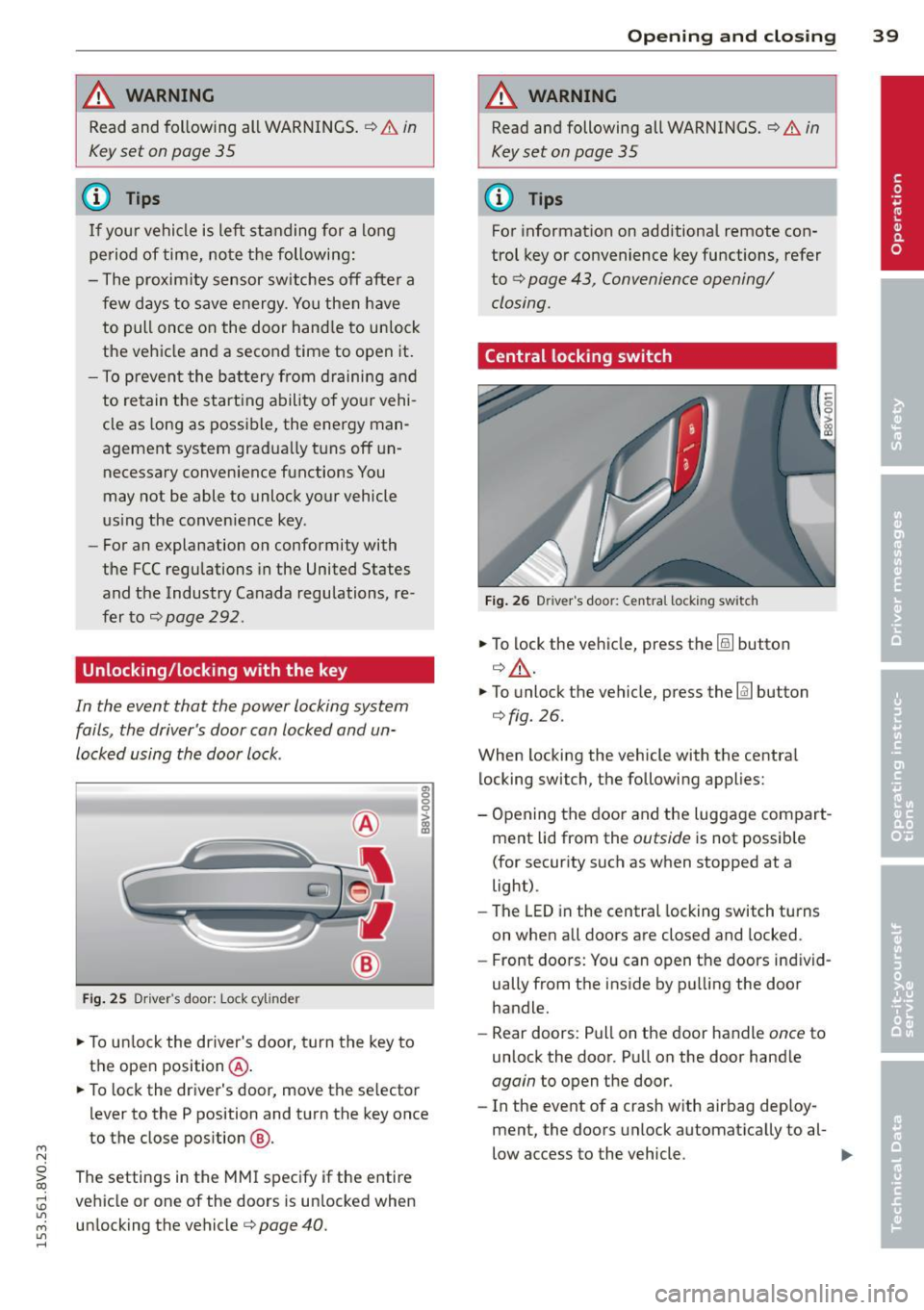
Fig. 25 Driver 's door: Lock cy linder
.,. To unlock the driver's door, turn the key to
the ope n position @.
en 0 g
~
.,. To lock the driver's door, move the se lector
lever to the P position and turn the key once
to the close position
@ .
The settings in the MMI specify if the entire
vehicle or one of the doors is un locked when
unlocking the vehicle¢ page 40 .
Opening and closing 39
A WARNING
Read and following all WARNINGS. ¢ & in
Key set on page 35
(D Tips
For information on additional remote con
trol key or convenience key functions, refer
to
¢ page 43, Convenience opening/
closing.
Central locking switch
Fig. 26 Drive r's doo r: Centra l locki ng sw itch
.,. To lock the vehicle, press the@! button
¢.&, .
.,. To unlo ck the vehicle, press the @J button
¢fig.
26.
When locking the vehicle with the central locking switch, the following applies:
- Opening the door and the Luggage compart
ment lid from the outside is not possible
(for security such as when stopped at a
light).
- The
LED in the central locking switch turns
on when all doors are closed and locked .
- Front doors: You can open the doors ind iv id
ually from the inside by pulling the door
handle.
- Rear doors: Pull on the door handle once to
unlock the door. Pull on the door hand le
again to open the door .
- In the event of a crash w ith airbag deploy·
ment, the doors unlock automatically to al-
low access to the vehicle. ..,.
Page 46 of 310
44 Opening and clo sing
• Hold the key in the driver's door lock until all
windows and the panorama sunroof* have
reached the desired position .
Conveni ence closing
• Hold the key in the d river's door lock i n the
lock pos ition until a ll wi ndows and the pan
o rama sunroo f* are closed .
Convenience closing with the convenience
key*
• To uch the sensor* on one of the front door
h and les and cont in u e touching it unt il all of
the windows and the panorama s unroof* are
closed . Do not place your hand in the door
hand le when doing th is.
Adjusting the convenience opening in the
MMI
• Se lect : the I MENU ! button> Car> Systems *
control button > Vehicle sett ings > Central
locking > Long -press to open windows
To enab le convenience opening of the win -
dows and the roo f*, the
Front windows , Rear
w indows *
and Roof* functions must be
sw itched
On .
A WARNING
-Never close the windows or pano rama
sunroof* carel essly or in an uncontro lled
m ann er, be cause th is increases the risk
o f i njury.
- Fo r se curity reasons, the windows can
only be opened with the remote c ontro l
k ey at a maxim um dis tance of ap proxi
ma tely 6 feet ( 2 meters) from the ve hi
cle .
- Pa y att ention when using the lock cyli n
der to close the windows and t he panora
ma sunroof* so that no one is pinche d.
Clos ing stops whe n the key is moved into
the start ing pos ition.
Correcting power window malfunctions
After disconnecting the vehicle battery , the
one-touch up and down feature must be acti vated again .
• Pull the power window switch u ntil the win
dow is completely ra ised .
• Release the sw itch and pull it agai n for at
l e ast one s econd .
Panorama sunroof
Description
Applies to vehicles: with panoramic sunroof
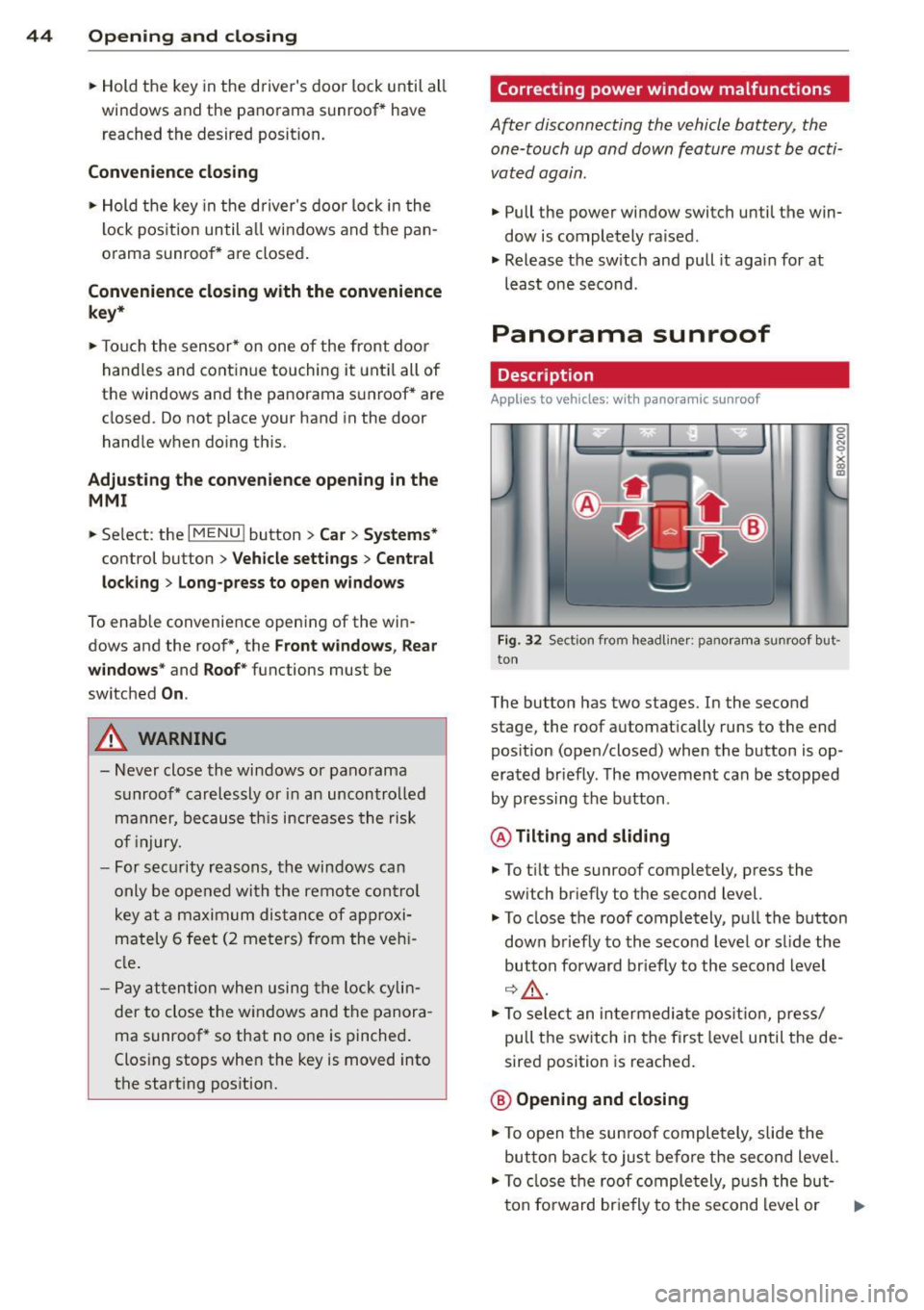
Fig. 32 Sect io n fr om headli ner: pano ra m a s unroof but
to n
The butto n has two stages . In the second
stage, the roof automat ically runs to the end
pos ition (open/closed) when the button is op
era ted br iefly . T he movement ca n be s topped
by pressing the b utton .
@Tilting and sliding
• To t ilt the sunroof completely , press the
sw itch br iefly to the second level.
• To close t he roof completely, pu ll the button
down b riefly to the seco nd leve l or s lide the
button forward br iefly to the s econd level
~~-
.. To se le ct an in termedia te pos it ion , press/
pull t he sw itch in the firs t leve l until the de
sired position is reached .
@ Opening and closing
• To open t he su nroof completely, sli de the
button bac k to ju st befo re the second level.
• To close t he roof comple tely, p ush the but-
t on fo rward br ie fly to the se cond level or .,..
Page 78 of 310
76 Driving
(D Tips
-If it is difficult to turn the key to position
(D , turn the steering wheel back and
forth slightly to release the steering
wheel lock .
- After starting a cold engine, there may
be a brief period of increased noise be
cause the oil pressure must first build up
in the hydraulic valve adjusters. This is
normal and not a cause for concern .
- If the battery is disconnected and recon
nected, you have to hold the ignition key
in position
(D for five seconds for the en
gine to start .
- After switching the ignition off, you can
only remove the key when the selector
lever is in the "P" (Park) position. After
that the selector lever is locked.
,
Stopping the engine with the key
App lies to vehicles: with mechanical ig niti on lock
Stopping the engine
.,,. Br ing the vehicle to a full stop.
.,,. Turn the key to position @.
Releasing the steering lock
Requirement : The selector lever must be in
the P position.
.,,. Remove the ignition key in position @
Qpage 77, fig . 71 Q &-
.,,. Turn the steering wheel until you hear the
steering wheel lock.
The locked steering helps prevent vehicle
theft .
_& WARNING
-Never turn off the engine before the ve
hicle has come to a complete stop. The
full function of the brake booster and the
power steering is not guaranteed. You
must use more force to turn or brake, if
necessary. Because you cannot steer and
brake as you usually would, this could
lead to accidents and serious injuries . -
Never remove the ignition key from the
ignition look while the vehicle is moving .
Otherwise, the steering lock could sud
denly engage and you would not be able
to steer the vehicle .
- Please note that the brake booster and
power steering only work when the en
gine is running. When the engine off, you
must use more force to steer or brake
the vehicle . Because the usual steering
and braking capability is not available,
the risk of accidents or injuries increases.
- Always take the vehicle key with you
when leaving the vehicle, even for a
short period of time. This applies partic
ularly when children remain in the vehi
cle. Otherwise the children could start
the engine or operate electrical equip
ment such as power windows.
- For safety reasons, always park the vehi
cle with the selector lever in the P posi
tion . Otherwise, there is the risk that the
vehicle could roll.
- After the engine has been switched off,
the radiator fan can continue to run for
up to 10 minutes - even with the ignition
switched off. It can also switch on again
after some time if the coolant tempera
ture rises as a result of heat buildup or if
the engine compartment is heated by
sunlight and the engine is hot .
(D Note
-If the engine has been under heavy load
for an extended period of time, heat
builds up in the engine compartment af
ter the engine is switched off -there is a
risk of damaging the engine. For this
reason, let the engine run for at idle for
approximately two minutes before shut
ting it off.
Page 81 of 310
....,
N
ci > co
rl I.O
"' ....,
"' rl
-After the engine has been switched off ,
the radiator fan can continue to run for
up to 10 minutes -even with the ignition
switched off . It can also switch on again
after some time if the coolant tempera
ture rises as the result of heat buildup or
if the engine compartment is heated by
the sun's rays and the engine is hot.
(D Note
If the engine has been under heavy load
for an extended period of time, heat builds
up in the engine compartment after the
engine is sw itched off -there is a ris k of
damaging the engine. For this reason, let
the engine run for at idle for approx imate
ly two minutes before shutting it off.
Starting the engine if there is a
malfunction
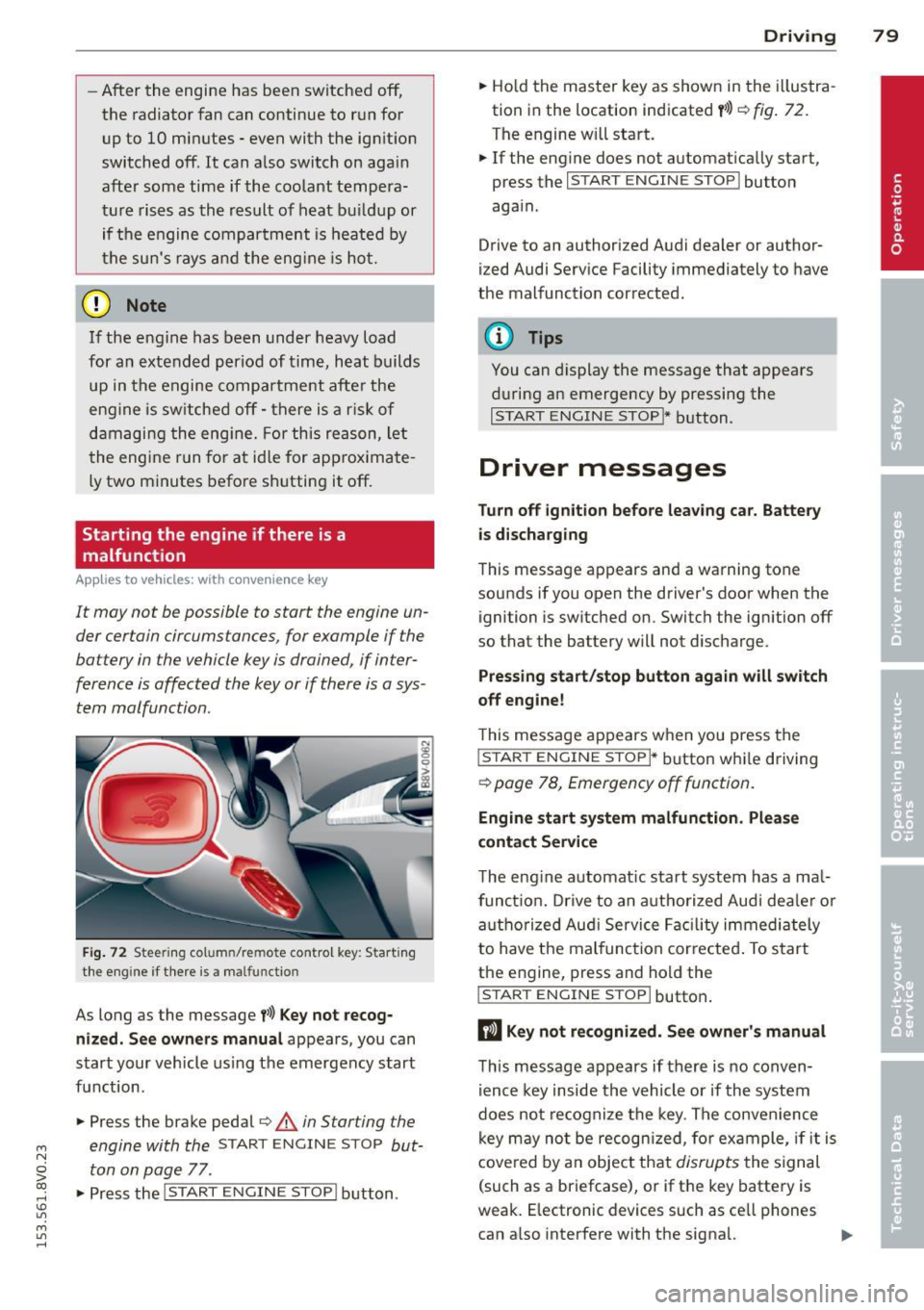
App lies to vehicles: with conve nience key
It may not b e possibl e to start the engine un
der cer tain circumstances , for example if the
battery in the vehicle key is drained , if inter
ference is affected the key or if there is o sys
tem mo/function.
Fig. 72 Steering co lu m n/re mote control key : Start ing
the engine if there is a ma lfunctio n
As long as the message f>l) Key not recog
nized. See owners manual
appears, you can
start your vehicle using the emergency start
function .
"" Press the brake pedal¢.&.
in Starting the
engine with the
START ENGINE STOP but
ton on page
77 .
.,. Press the
j;..,, s=T~A~R=T~-EN~G-I_N_E--ST--OP I button.
Driving 79
""Ho ld the master key as shown in the illustra
tion in the location indicated
y>>) r=) fig. 72.
The engine w ill start.
"" If the engine does not automatically start,
press the
I START ENGINE STOP I button
again .
Drive to an authorized Audi dealer or author
ized Audi Service Facility immediately to have
the malfunction corrected.
(D Tips
You can display the message that appears
during an emergency by pressing the
I START ENGINE STOP!* button.
Driver messages
Turn off ignition before leav ing car. Battery
is discharging
This message appears and a warning tone
sounds if you open the driver's door when the ignition is switched on. Switch the ignition off
so that the battery will not discharge.
Pressing start/stop button again will switch
off engine!
T his message appears when you press the
I STAR T ENGINE S TOPI* button while driving
¢ page 78, Emergency off function .
Engine start system malfunction. Please
contact Service
The engine automat ic start system has a ma l
funct ion. Drive to an authorized Audi deale r or
authorized Aud i Service Facility immediately
to have the malfunction corrected . To start
the engine, press and hold the
I STAR T ENGINE S TOP I button.
DJ Key not recognized. See owner's manual
This message appears if there is no conven
ience key inside the vehicle or if the system
does not recognize the key. The convenience
key may no t be recogn ized, for example, if it is
covered by an object that
disrupts the signal
(such as a briefcase), or if the key battery is
weak. E lectronic devices such as ce ll phones
can a lso interfere with the signal. ..,.
Page 107 of 310
M N
0 > co ,...., \!) 1.1'1
M 1.1'1 ,....,
@ Tips
-Side assist is not active wh ile you are
making the adjustment.
- Your settings are automati cally stored
and ass igned to the remote control key
being used.
Driver messages
App lies to vehicles: with Audi side assist
If t h e side assist switc hes off automatically, a
message appea rs in the instrument cluster
d is p lay.
@j Audi side assist: currently unavailable
No sensor vision
The radar sensors' vision is affected . Do not
cover the area in front of the senso rs with bike
wheels, s tickers, dirt or other obj ects . Clean
the area in front of the senso rs, if necessa ry
~p age 103, fig. 93.
@j Audi side assist: currently unavailable
Side assist can not be switched o n tempo rar ily
beca use there is a mal func tion (for exam ple,
the battery charge leve l may be too low) .
@j Audi side assist: System fault!
The system cannot guara ntee that it w ill de
tect ve hicles correctly and it is switched
off.
The senso rs have been displaced o r are faulty.
H ave the sys tem check ed by a n authorized
Aud i dea le r or autho rized Aud i S ervic e Facility
soon.
Audi side assist 105
•
Page 197 of 310
not used then is being generated in o rder to
maintain an optimal battery charge level.
@ Tips
- Energy management cannot overcome
the laws of physics. Note that the charge l evel and length of the battery life are
limited .
- When the start ing ability is endangered,
the (•) indicator light turns on
c!:>page20.
What you should know
Maintaining the starting ability is the highest
priority.
A lot of stress is p laced on the battery when
driving short distances, in traffic , and at co ld
times of the year. A lot of energy is used but litt le is generated. It is also critical when the
engine is not running but electrical equip ment is switched on . In this case, energy is
used but none is generated .
In situations like this, energy management
will actively regulated the distribution of en ergy.
Long periods without use
I f you do not drive your vehicle for several
days or weeks, e lectrica l equipment is gradu
ally sca led back or switched off . This reduces
energy use and ensures the vehicle will be
able to start after long periods of time. Some
conven ience functions such as opening with
the remote contro l key may not be ava ilab le.
These convenience functions will be available
again once you switch the ign ition on and
start the engine.
With the engine switched off For example, if you listen to the radio when
the engine is switched off, the batte ry w ill
drain .
~ A warning text will appear if energy consump-
~ tion could impair starting ab ility . co ,....,
~ The message shows that you need to start the
~ engine in order to charge the battery. ,....,
Smart Technolog y 195
With the engine running
Although electrical energy is generated while driving, the battery can drain. This can happen
when litt le energy is generated, and much is
used and the charge leve l of the battery is not
optimal.
To restore the ba lance of energy, components
that require large amounts of energy are tem
porari ly scaled back or switched off. Heating
systems in particular require a great deal of energy. If you notice, for example, that the
seat heating* or rear window defroster is not
working, then it has been temporar ily reduced
or switched off . These systems are availab le
again as soon as the energy balance has been
restored.
In add ition, you may notice that the idle
speed has slight ly increased . That is normal
and no cause for concern. Due to the in
creased idling speed, the additional required
energy w ill be gene rated and the battery will
be charged.
Notice about data
recorded by the Event
Data Recorder and
vehicle control
modules
Event Data Recorder
This vehicle is equipped with an Event Data Recorder ( EDR). The main purpose of an EDR
is to record, in certain crash or near crash-like
situations, such as an airbag deployment or hitting a road obstacle, data that w ill assist in
understanding how a vehicle's systems per
formed . Th e EDR is designed to record data
related to vehicle dynam ics and safety sys
tems for a short pe riod of time, typically
30 seconds or less . The EDR in this vehicle is
designed to record such data as:
- How various systems in your veh icle were
operating;
- Whether or not the driver and passenger
safety belts were buckled/fastened;
•
•
Page 230 of 310
228 Check ing and F illin g
8_ WARNING
-Brake fluid is poiso nous. It must be sto r
ed only in th e closed original container
out o f the reach of children!
- Brake fa ilure can result from old or inap
propriate brake fluid. Observe these pre
caut ions:
- Use only brake fluid that meets SAE specification
J 1703 and conforms to
Federal Motor Vehicle Standard 116.
Always check with your authorized Audi
dealer to make sure you are using the
correct brake flu id. The correct type of
brake fluid is also indicated on the
b rake fluid reservoir.
- The brake fluid must be new. Heavy use
of the brakes can cause a vapor lock if
the brake fluid is left in the system too
l ong. This can serious ly affect the effi
ciency of the bra kes as well as yo ur
safety . This could result in an acc ident.
@ Note
Brake flu id will damage the paint of your
veh icle.
@i For the sake of the environment
Because of the problem of proper d isposa l
of brake flu id as we ll as the special tools
requ ired and the ne cessary expert ise, we
recommend that you have the brake fluid
changed by your author ized Audi dealer .
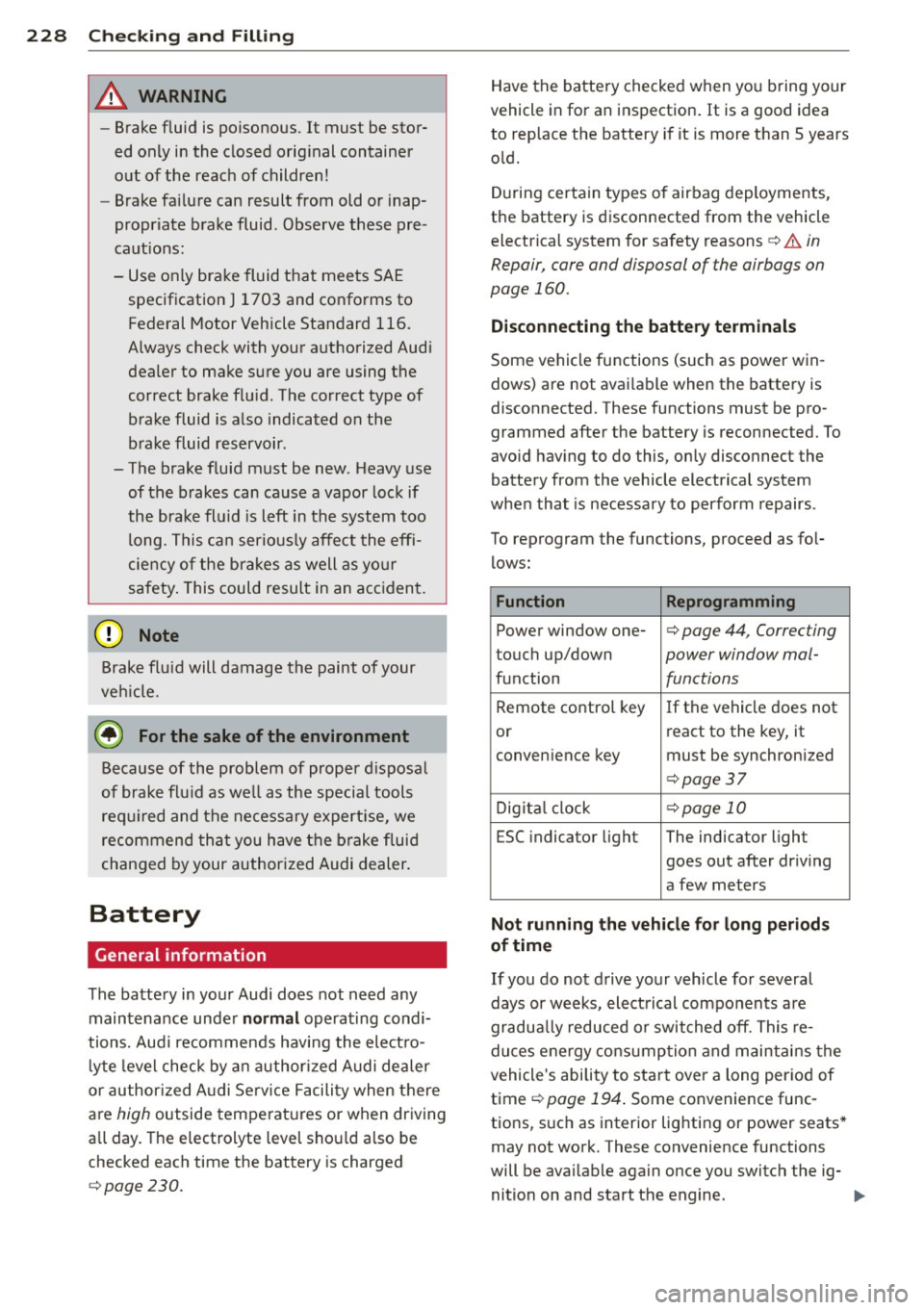
Battery
General information
The battery in your Audi does not need any
maintena nce under
normal operating condi
tions. Aud i recommends having the elect ro
l yte level check by a n author ized Audi dealer
or author ized Audi Se rv ice Facili ty when there
are
high outside temperat ures or when driving
all day. The e lectrolyte level shou ld a lso be
checked each time the battery is charged
¢ page 230.
Have the batte ry checked when yo u bring your
vehicle in for an inspection . It is a good idea
to replace the battery if it is more than 5 years
o ld.
D uring certain types of airbag deployments,
the battery is disconnected from the vehicle electrical system for safety reasons¢
& in
Repair, care and disposal of the airbags on
page 160.
Di sconnecting the battery te rminals
Some vehicle functions (such as power win
dows) are not avai lable when the battery is
disconnected. These functions must be pro
grammed after the battery is reconnected. To
avo id hav ing to do this, only disconnect the
battery from the vehicle electrical system
when that is necessary to perform repairs .
To reprogram the functions, proceed as fol
lows:
Function Reprogramming
Power window one-¢ page 44, Correcting
touch up/down power window ma/-
function functions
Remote control key
If the vehicle does not
or r
eact to the key, it
convenience key must be synchronized
¢ page37
Dig ita l cl ock ¢page 10
ESC indicator light The indicator light
goes out after driving
a few meters
Not running the vehicle for long periods
of time
If you do not drive your vehicle fo r several
days or weeks, electrical components are
gradua lly reduced or switched off. This re
duces e nergy consumption and maintains the
vehicle's ability to start over a long per iod of
time
¢ page 194. Some convenie nce func
tions, such as interior lig hting or power seats *
may not work. These convenience functions
will be ava ilable again once you switch the ig-
nition on and start the engine. .,.
Page 296 of 310
29 4 Index
Audi magnetic ride
refer to Adaptive dampers 106
Aud i Service Repa ir Ma nuals and Litera -
ture .. .. .... ............. .. .. .. .. . 289
AUTO Automatic climate control system ..... 70
Automatic headlights ......... .. .... 46
Auto Lock (centra l locking system) .... .. 36
Automatic belt retractor ............. 138
Automatic climate control system
refer to Climate control system (auto-
mat ic) ............................ 70
Automatic headlights ................. 46
Automatic post-collision braking system 190
Automatic transmission .............. 109
Driving t ips . .................. .... 111
E mergency mode .................. 115
H ill descent control ................ 113
I gnition key safety in terlock .. .. .... .. 74
Kick -down . .... . ...... ... ... ..... . 114
L aunch Contro l-Program ... .. .. .. .. . 1 15
malfunction . .. . ...... ... .. .. .... . 110
Selector lever emergency release . . . . . 116
Selector lever lock . . . . . . . . . . . . . . . . . 110
Selector lever posit ions ............. 109
Shifting manually . . . . . . . . . . . . . . . . . . 114
Steer ing whee l w ith shift paddles ..... 114
S t ron ic .. .. ..... ........ .. .. .. .. . 109
tiptronic . .. ............. .. .. .. .. . 114
Automatic wipe/wash system . . . . . . . . . . 50
Auto Safety Hotline ..... ... .. .. .... . 133
Auxiliary heater (vehicles w ith d iese l en-
g ines) .. .. .... ............. ...... .. 73
Average consumption ................. 28
Average speed . . . . . . . . . . . . . . . . . . . . . . . 28
B
Battery . .. .. ............. .. .. .. .. . 228
Charge level ... ... .... ... .. .. .... . 194
Charging . . . . . . . . . . . . . . . . . . . . . 20, 230
Energy management . ... .. .. .. .. .. . 194
Important warnings ............... 229
Indicator light . . . . . . . . . . . . . . . . . . . . . 20
Jump starting ............ .. .. .. .. . 280
Locat ion ... ... .... ...... ... ... .. . 229
Replacing the battery .............. 231 Winter operation
.... .. ..... .... . .. 228
Working on the battery . ..... ... .. .. 229
Before driving ..... ............. .... 125
Blended gasoline .. ............. .... 210
B lower
automatic Climate control system . ... . 71
Manua l climate control system ... .. .. . 69
Boos t .............................. 29
Booster seats . . . . . . . . . . . . . . . . . . . . . . 179
Boost p ressure indicator . ..... ... .. .. . 29
Brake fluid Changi ng the b ra ke fluid ........ .. .. 22 7
Checking the b rake fluid level ........ 22 7
What is the co rrect b rake fluid level? .. 2 2 7
What shou ld I do if the brake fluid warn -
ing light comes on? ..... .... ... .. .. 227
B rakes ..... .... .. .. ........... .... 191
B rake assist system . ........... .. .. 189
B rake booster ..................... 191
Indicator light ... .. ... ..... ... .. .. . 25
New brake pads . .... .. ..... ... .. .. 191
Brake system Brake fluid .... .. ............. .... 22 7
B rake fluid specifications fo r refill and re -
placement .... .. ... .. ..... ... .. .. 227
B rake pads . ..... .. .... .... ... .. .. 197
Fl uid reservoir ... .. ... ..... ... .. .. 227
Worn brake pads symbo l . . . . . . . . . . . . . 22
B rak ing
Emergency brak ing funct ion ... .. .. .. . 82
Indicator light ... ... .. ..... .... . .. . 18
Parking brake .... .. ... ..... ... .. .. . 80
Starting on inclines ............ .... . 82
B reak-in per iod ..................... 197
Brake pads . ..... ... .. ..... ... .. .. 197
T ires ... .. .... .. .. ... ..... ... .. .. 197
Bu lbs ......... ... .. .............. . 279
C
California Proposition 65 Warn ing .... . 218
Battery specific .................. . 230
Capacities AdBl ue ... .... .. ............. .... 215
Fuel tank .. .. .. .. ............. .. .. 288
Washe r fluid reservo ir .. ....... ... .. 288
Care ... .. .. .... .. .. .... . ..... ... .. 205
also refer to Cleaning .......... .. .. 205