change time AUDI S3 2016 User Guide
[x] Cancel search | Manufacturer: AUDI, Model Year: 2016, Model line: S3, Model: AUDI S3 2016Pages: 328, PDF Size: 81.78 MB
Page 132 of 328
Ass is t
Assist
Electronic speed limiter
Applies to vehicles: with electronic speed limite r
Your vehicle may be factory equipped wi th tires
that are rated for a maximum speed of 130 mph (210 km/h). This is less than the maximum speed
of your vehicle. To reduce the risk of sudden tire
fa ilure and loss of control if the veh icle is operat
ed at excessive speeds, your vehicle also has an
electron ic speed limiter. The electron ic speed
lim iter prevents your veh icle from going faster
than the t ire speed rating. For mo re information
~page 260.
If the engine control unit receives faulty vehicle
road speed s ignals, the Ma lfunction Ind icator
L amp (MIL)
¢;5 will illum inate. If this occurs,
con ta ct the nearest au thori zed A ud i d ealer for
assis tance.
A WARNING
Always observe the posted speed limits and
adjust your speed to s uit prevailing road, traf
fic and weather cond itions. Never drive your
vehicle faster than t he maximum speed rat ing
of the tires installed.
Speed warning system
Introduction
The speed warning system helps you to stay un
der a specified maximum speed.
-
The speed warning system warns you if you are
exceeding the maximum speed that you have set .
You will hear a wa rning tone when your speed ex
ceeds the stored va lue by app roxima tely 3 mph
(3 km/h). The. (U SA mode ls)/ . (Canada
models) ind ic a tor light and the message
Speed
limit e xceeded!
appear in the inst rument cluste r
disp lay at the same time. The./. indicato r
light t urns off when the speed decreases be low
the stored maximum speed.
Se tting a thresho ld is recommended if you would
like to be reminded when yo u reach a certain
maximum speed. Situations where you may want
to do so include driving in a country wit h a gener-
130
al speed limit or if there is a spec ified maximum
speed for winter tires.
(D Tips
Regar dless o f th e speed war ning system, you
shou ld always monitor your spee d using the
speedometer and make s ure yo u are fo llow ing
the legal speed limit .
Setting the threshold
You can set, change and delete the threshold in
the MMI .
.. Sele ct: the I M ENU I button >Car > Systems*
control button > Drive r assi stance > Speed
wa rning.
You can se t any thresho ld between 20 mp h
(3 0 km/h) and 150 mph (2 40 km/ h). Settings
can each be adj usted in increments of S mph ( 10
km/ h).
Cruise control system
· Description
Applies to vehicles: with cruise control system
The cru ise cont rol system ma kes it possib le to
dr ive at a constan t speed starti ng at 15 mph
(2 0 k m/h).
The speed is kep t constant by mod ifying engine
power or through an active bra ke interven tion.
A WARNING
- Always p ay att ention to the tr affi c ar ou nd
you whe n the cruise co ntro l is in opera tion.
Y ou are always responsible fo r your speed
and the distance between your veh icle and
other vehicles.
- For safety reasons, cruise cont rol should not
be used in the city, in stop-and-go traff ic, on
winding roads and when road conditions a re
poor (such as ice, fog, g ravel, heavy ra in and
hyd roplaning), because this inc reases the
ris k of an accident.
- Switch the cruise control off temporarily
when dr iv ing in turning lanes, highway exits
or in constr uct ion zones.
-
Page 134 of 328
Assist Switching off completely
.,. Press the leve r into position @(clicked into
place), or
.,. Switch the ignition off.
The speed you sto red w ill be retained if the cruise
control has been switched off tempora rily . To re
sume the stored speed, re lease the brake pedal
and pu ll the lever into position
(D .
The stored speed is erased when the cruise con
trol is sw itched off comp letely or the ignit ion is
switched off .
A WARNING
You should only resume the stored speed if it
is not too high for existing traffic conditions.
Otherwise you risk an accident .
@ Tips
-If the brakes become too heated whi le driv
ing, the cruise control switches off. If this
happens while driving downhill, you can re
lieve the brakes by shifting into a lower
gear.
- When the cruise control is activated, ESC
sport mode cannot be switched on.
Audi adaptive cruise control
Description
Applies to vehicles: w ith Audi adaptive cruise control
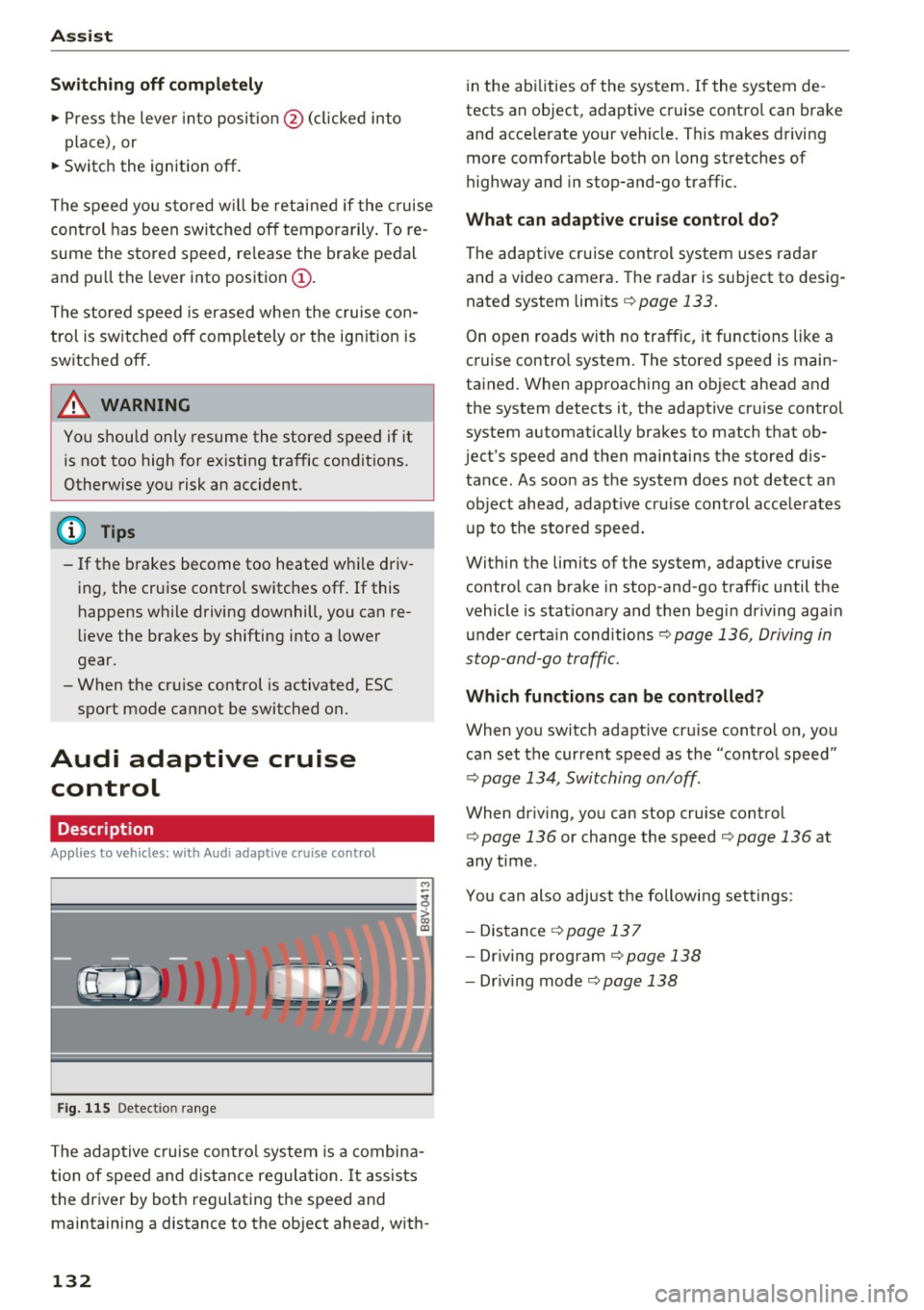
Fig. 115 Detect ion range
The adaptive cruise control system is a combina
tion of speed and distance regulation .
It assists
the driver by both regulating the speed and
maintaining a distance to the object ahead, with-
132
in the abilities of the system. If the system de
tects an object, adaptive cruise contro l can brake
and acce lerate your vehicle. This makes driving
more comfortable both on long stretches of
highway and in stop-and-go traffic.
What can adaptive cruise control do?
The adaptive cruise control system uses radar
and a video camera. The radar is subject to desig
nated system limits
i=> page 133 .
On open roads with no traffic , it functions like a
cruise contro l system. The stored speed is main
tained. When approaching an object ahead and
the system detects it, the adapt ive cr uise control
system automatically brakes to match that ob
ject's speed and then maintains the stored dis
tance . As soon as the system does not detect an
object ahead, adapt ive cr uise control acce lerates
up to the stored speed.
Within the limits of the system, adaptive cruise control can brake in stop -and -go traffic until the
vehicle is stat ionary and then begin driving agai n
under certain cond itions
i=> page 136, Driving in
stop-and-go traffic.
Which functions can be controlled?
When you switch adapt ive cru ise control on, you
can set the current speed as the "control speed"
i=> page 134, Switching on/off.
When dr iving, you can stop cruise control
i=> page 136 or change the speed c> page 136 at
any time .
You can also adjust the following settings :
- Distance
i=> page 137
-Dr iv in g program i=> page 138
-Dr iving mode c> page 138
Page 138 of 328
Ass is t
Changing the speed
Applies to vehicles: with Audi adaptive cruise contro l
0
f
•
0
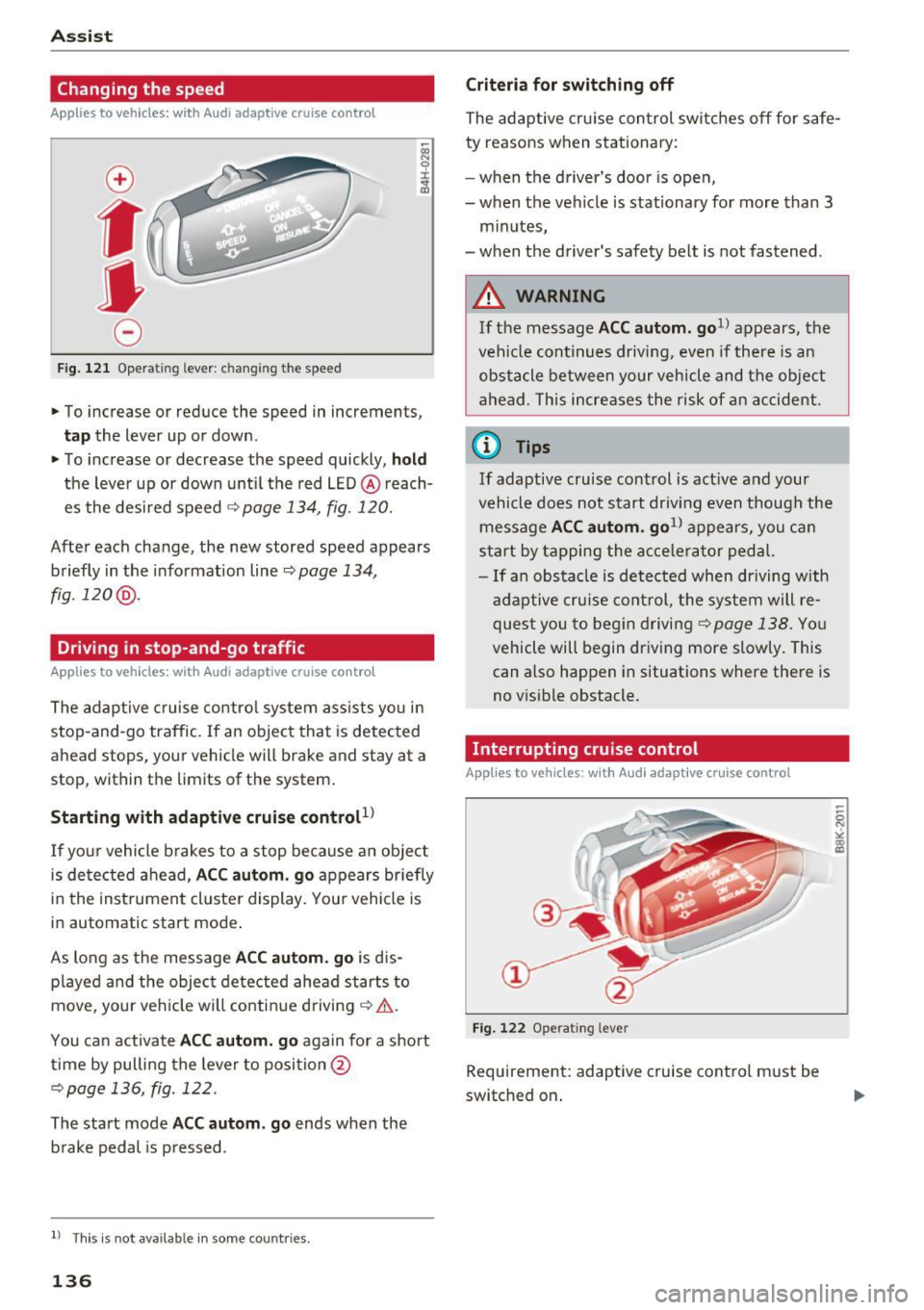
Fig. 121 Operating lever : c han gin g th e speed
.,. To increase or reduce the speed in increments,
tap the lever up or down .
.,. To increase or decrease the speed quickly , hold
the leve r up or down until the red LED @ reach
es the desired speed
¢ page 134 , fig . 120.
After each change, the new stored speed appears
briefly in the informat ion line ¢
page 134 ,
fig .120 @.
Driving in stop-and-go traffic
Applies to vehicles: with Audi adaptive cruise control
The adaptive c ruise control system assists yo u in
stop-and-go traffic. If an object that is detected
ahead stops, your vehicle will brake and stay at a
stop, within the limits of the system.
Starting with adaptive cru ise control
l)
If yo ur vehicle b rakes to a stop because an object
is de tected ahead,
AC C autom. go appears br iefly
in the instrument cluste r display. You r vehicle is
in automat ic start mode .
As long as the message
A CC au tom . go is d is
p layed and the object detected ahead starts to
move , your veh icle wi ll continue driving¢& .
You can activate
AC C autom. go again for a short
time by pulling the lever to posi tion @
¢page 136, fig. 122.
The start mode ACC autom . go ends when the
b rake pedal is p ressed .
l) Th is is no t ava ila b le in s ome c ountries .
136
Criteria for switching off
The adaptive cru ise con trol switches off for safe
ty reasons when stationary:
- when the d river 's doo r is open,
- when the vehicle is stationary for more than 3
minutes,
- when the driver's safety belt is not fastened .
A WARNING
If the message ACC autom. go1> appears, the
vehicle continues driving , even if there is an
obstacle between your vehicle and the ob je ct
ahead . This increases the risk of an accident .
@ Tips
If adaptive cruise control is act ive and your
vehicle does not start driv ing even though the
message
AC C autom . go1> appears, you ca n
start by tapping the a cce le ra tor ped al.
- If an obstacle is detected when dr iving with
adaptive cruise con trol, the system will re
ques t you to beg in d riving
¢page 138. You
vehicle will begin dr iving more slowly. This
can also happen in situations where there is
no v is ible obstacle.
Interrupting cruise control
Applies to vehicles: with Audi adaptive cruise control
Fi g. 12 2 Ope rating leve r
Requ irement: adaptive cruise cont rol must b e
switched on .
Page 139 of 328
,....,
N
0 > co ,....,
Ove rriding means ex ceeding the selected speed
when adaptive cruise control is active, for exam
p le when pressing the accelerator peda l when
passing.
"'T o accelerate manua lly, p ull the lever toward
you into position @and ho ld it there. The mes
sage
ACC : over ride appears . Or
"' press the accelerator pedal.
"' To resume cruise control, release the lever or
take your foot off the acce lerator pedal.
Inte rrupting cruise contr ol w hil e driving
"'Move the lever into position @. The message
ACC: standb y appears. Or
"' press the brake pedal.
"' To resume the stored speed, move the lever in
to posit ion @.
Int errupting c rui se contr ol wh en stopped
"' Push the lever away from you into position @.
The message
ACC : stan dby appears.
"' To resume cruise control, press the brake pedal
and pull the lever toward you into position@.
A WARNING
It is dangerous to activate cruise control and
resume the stored speed when the current
road, traffic or weather conditions do not pe r
m it this. This could result in a crash.
Setting the distance
A ppl ies to v ehicles: with Audi a daptive cruise co ntro l
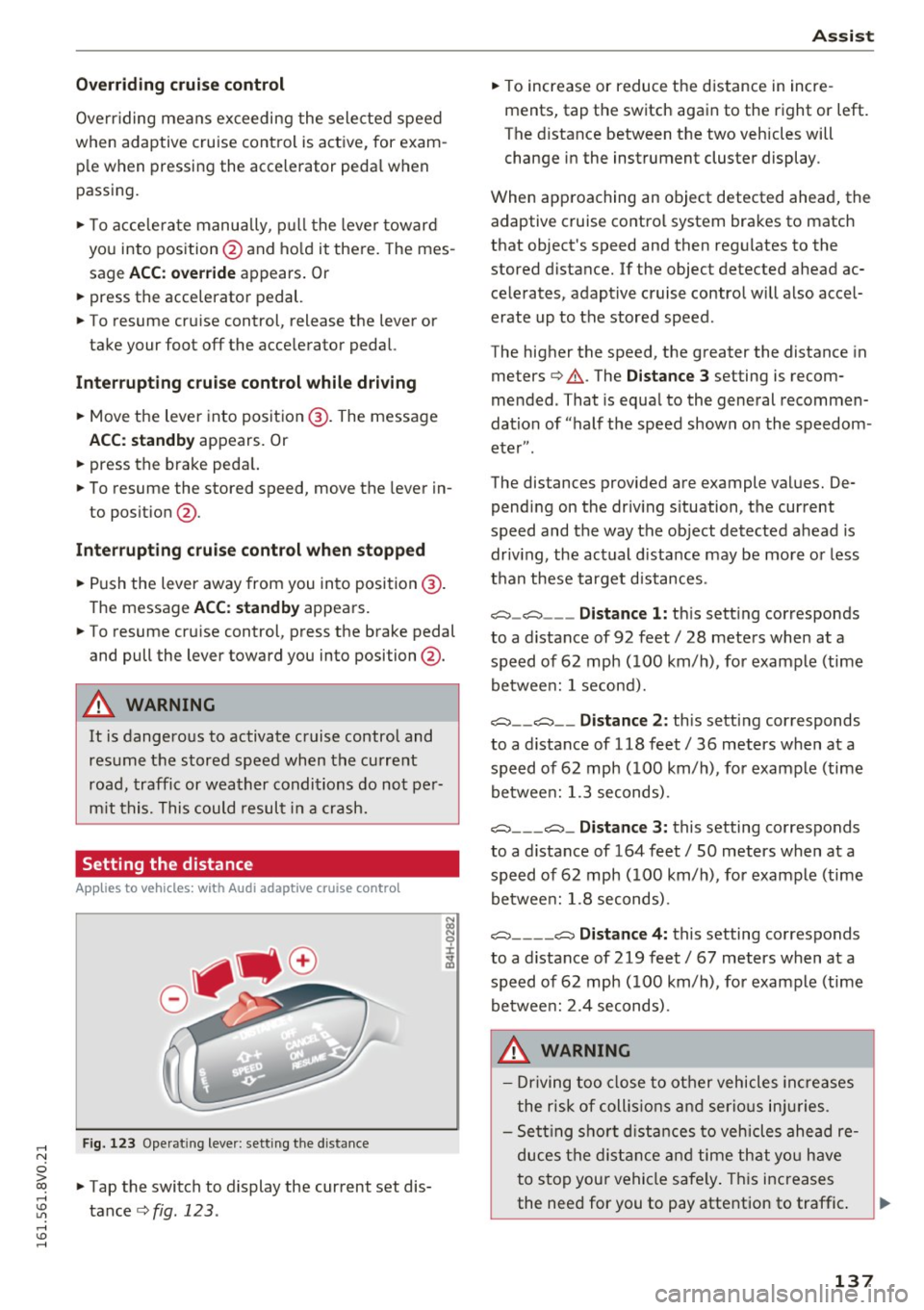
Fig. 123 Operat ing lever: setting the distance
"' Tap the switch to display the current set dis
tance
c>fig. 123 .
Assist
"'To increase or reduce the d istance in incre
ments, tap the switch again to the right or left.
The distance between the two veh icles will
change in the instrument cluster display.
When approaching an object detected ahead, the adaptive cruise contro l system brakes to match
that object's speed and then regu lates to the
stored distance. If the object detected ahead ac celerates, adaptive cruise control will also accel
erate up to the stored speed.
The higher the speed, the greater the distance in
meters
c> & . The Distance 3 setting is recom
mended. That is equa l to the general recommen
dation of "half t he speed shown on the speedom
eter" .
The distances provided are example values. De pending on the driv ing s ituation, the current
speed and the way the object detected ahead is
driv ing, the actual d ista nce may be more or less
t h an these target d istances .
o::::::::,_o::::::::, ___ Distance 1: th is sett ing corresponds
to a distance of 92 feet/ 28 meters when at a speed of 62 mph ( 100 km/h), for example (time
betwee n: 1 second).
o::::::::, __ o::::::::, __ Distanc e 2: this setting corresponds
to a distance of 118 feet/ 36 meters when at a speed of 62 mph ( 100 km/h), for example (time
betwee n: 1.3 seconds) .
o::::::::, ___ o::::::::,_ Distance 3: this setting corresponds
to a distance of 164 feet
I SO meters when at a
speed of 62 mph ( 100 km/h), for example (time
betwee n: 1.8 seconds) .
o::::::::, ____ o::::::::, Distance 4: this setting corresponds
to a distance of 219 feet
I 67 meters when at a
speed of 62 mph ( 100 km/h), for example (time
betwee n: 2.4 seconds) .
A WARNING
-Driving too close to other vehicles increa ses
the risk of collis ions an d serio us inj uries.
- Se ttin g sho rt d istances to vehicles ahead re
duces the dis tance an d time th at you have
to stop you r vehicle safe ly . Th is increases
the need for you to pay attention to traffic . ..,.
137
Page 148 of 328
Assist
General information
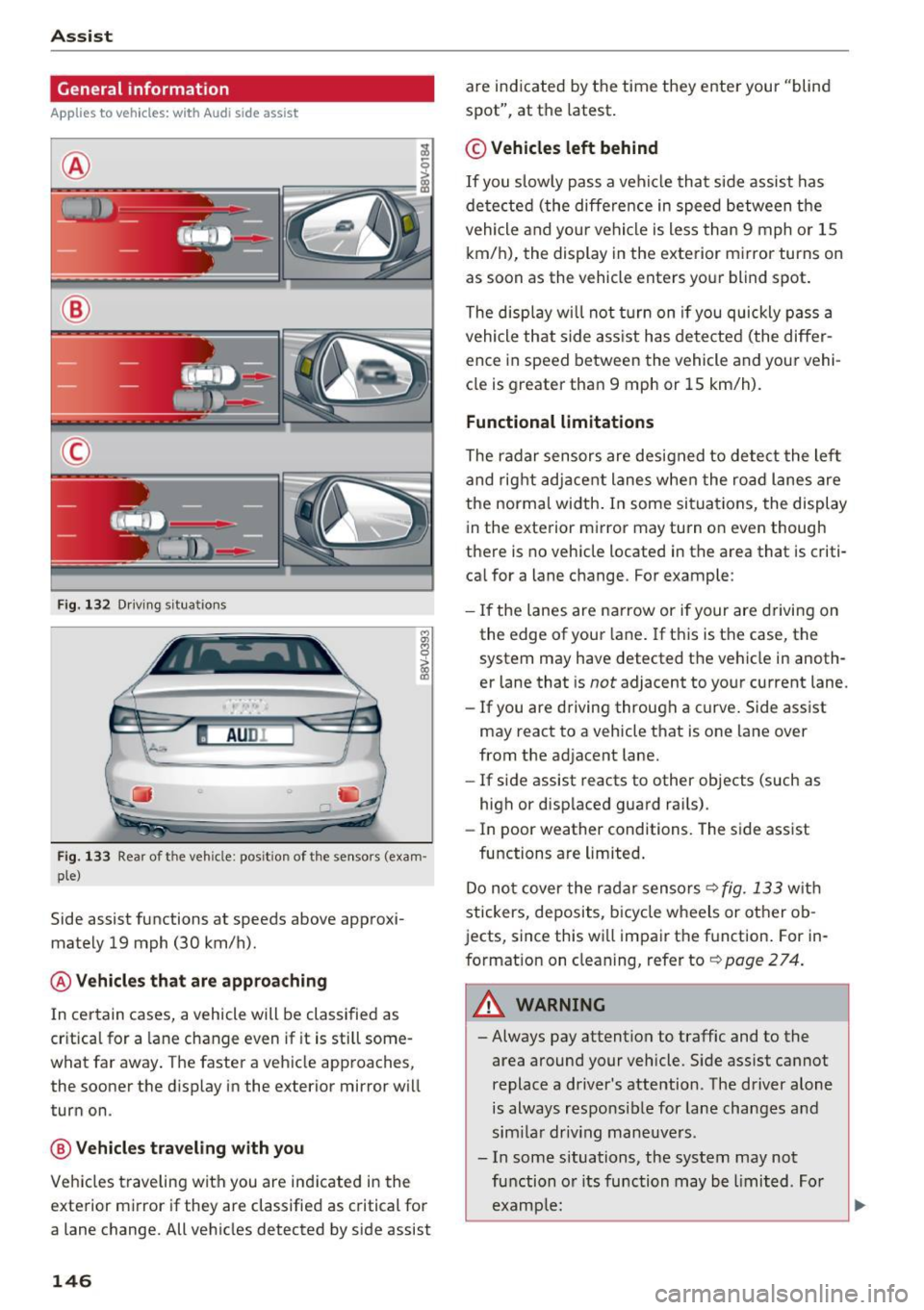
Applies to veh icles: w ith Audi side assist
®
@
©
F ig. 132 Driving s itu atio ns
I AU DI
-·
Fig. 133 Rear of the vehicle: pos it ion of the senso rs (exa m·
pie)
Side assist functions at speeds above approxi·
mately 19 mph (30 km/h).
@ Vehicles that are approaching
In certain cases, a vehicle will be classified as
cr itical for a lane change even if it is still some·
what far away . The faster a veh icle approaches,
the sooner the display in the exterior mirror wi ll
turn on.
@ Vehicles traveling with you
Vehicles traveling with you are indicated in the
exterior mirror if they are classified as critical for
a lane change. All vehicles detected by side assist
146
are indicated by the time they enter your "blind
spot", at the latest .
© Vehicles left behind
If you slow ly pass a vehicle that side assist has
de tected (the diffe rence in speed between the
vehicle and your vehicle is less than 9 mph or 15
km/h), the display in the exterior mirror turns on
as soon as the vehicle enters your blind spot.
The display will not turn on if you quickly pass a
vehicle that side ass ist has detected (the differ
ence in speed between the vehicle and your vehi
cle is greater than 9 mph or 15 km/h).
Functional limitations
The radar sensors are designed to detect the lef t
and right adjacent lanes when the road lanes are
the normal width . In some situations, the display
in the exterior mirror may turn on even though
there is no vehicle located in the area that is criti·
cal for a lane c hange. For example:
- If the lanes are narrow or if your are driving on
the edge of your lane . If this is the case, the
system may have detected the vehicle in anoth·
er lane that is
not adjacent to your current lane.
- If you are driving through a curve . Side assist
may react to a vehicle that is one lane over
from the ad jacent lane.
- If side assist reacts to other objects (such as
high or disp laced guard rai ls).
- In poor weather conditions. The side assist
functions are limited.
Do not cover the radar sensors <=?
fig. 133 with
stickers, deposits, bicycle wheels or other ob
jects, since this wi ll impair the function . For in·
formation on cleaning, refer to<=?
page 274.
_& WARNING
-Always pay attention to traffic and to the
area around your vehicle. Side assist cannot
replace a d river's attention. The driver alone
is always respo nsible for lane changes a nd
similar driving maneuvers .
- In some situations, the system may not
function or its function may be limited. For
example:
-
Page 149 of 328
,....,
N
0 > co ,....,
behind very quickly. The display may not
turn on in time.
- In poor weather conditions such as heavy
rain, snow or heavy mist.
- On very wide lanes, in tight curves, or if
there is a rise in the road surface. Vehicles
in the adjacent lane may not be detected
because they are outside of the sensor range.
- Audi side assist cannot detect all vehicles
under all conditions, which can increase the
risk of accidents.
- Please note that side assist only displays ap
proaching vehicles or vehicles in your blind
spot if your vehicle is traveling at least
19 mph (30 km/h).
- In certa in situations, the system may not
work or its function may be limited. For ex
amp le:
- The display may not turn on at the right
time if vehicles are approaching or passing
very quickly.
- In poor weather conditions, such as heavy rain, snow or fog.
- In very wide lanes, in tight curves or when
there are slopes in the roadway, vehicles
in the neighboring lanes may not be de
tected because they are outside of the
sensor range.
(D Note
The sensors can be displaced by impacts or
damage to the bumper, wheel housing and
underbody. This can affect the system. Have
an authorized Audi dealer or authorized Audi
Serv ice Facility check their function .
(Di Tips
-If the window glass in the driver's door or
front passenger's door has been t inted, the
display in the exterior mirror may be misin
terpreted.
- For an explanation on conformity with the
FCC regulations in the United States and the
Industry Canada regu lations, refe r to
r::!> page 309.
Assist
Switching on and off
App lies to vehicles : wi th Audi side ass ist
T he system and be switched on and off in the
MM I*.
"' Select: the I MENU I button> Car> Sys tem s"
control button > Driver a ssistanc e > Audi s ide
a ssis t.
With Off , the system is switched off.
An activated system w ill s ignal every time the ig
nition is switched on by turning the displays in
the exte rior m irro rs on briefly.
Adjusting the display brightness
App lies to vehicles: wi th Audi side ass ist
The display brightness can be adjusted in the
MM!* .
"' Select: the IM ENU I button > Ca r > Sys te m s*
control button > Dri ver assi st a n ce > Au di s ide
a ssis t.
The display br ightness adjusts automatically to
the brightness of the surroundings, both in the
information and in the warning stage. In very
dark or very bright surround ings, the d isp lay is
al ready set to the minimum o r max imum level by
the automatic adjustment. In such cases, you may not ice no change when adjust ing the bright
ness, or the change may only be noticeable once
the surroundings change.
Adjus t the br igh tness to a leve l where the display
in the information stage will not disrupt your
view forward . If you change the brightness, the
display in the exterior mirror will briefly show the
brightness level in the information stage . The
brightness of the warning stage is linked to the
brightness in the information stage and is adjust
ed along with the information stage adjustment .
(D Tips
-Side ass ist is not act ive while you are mak
ing the adjustment.
- Your settings are automatica lly stored and
assigned to the remote control key being
used.
147
Page 153 of 328
.... N
0 > co ....
General information
Applies to vehicles: with rear pa rk in g systems/pa rk in g system
p lus/rearv iew camera
Depending on your vehicle's equipment, various
parking aids will help you when parking and ma
neuvering.
The
rear parking system is an audible parking aid
that warns you of obstacles
behind the vehicle
¢page 152.
The parking system plus assists you when park
ing by audibly and visually indicating objects de
tected
in front of and behind the vehicle
¢ page 152.
The rearview camera shows the area behind the
vehicle in the MMI display . This display assists
you when you are cross or parallel parking. The
parking system plus functions are also available
¢ page 153.
A WARNING ,--
- Always look for traffic and check the area
around your vehicle by looking at it directly
as well. The parking system cannot replace
the driver's attention. The driver is always
responsible when entering or leaving a park
ing space and during similar maneuvers.
- Please note that some surfaces, such as
clothing, are not detected by the system .
- Sensors and cameras have blind spots in
which people and objects cannot be detect
ed . Be especially cautious of small children
and animals .
- Always pay attention to the area around the
vehicle -using the rearview mirror, too .
- The sensors can be displaced by impacts or
damage to the radiator grille, bumper,
wheel housing and the underbody . The park
ing system may become impaired as a re
sult. Have an authorized Audi dealer or au
thorized Audi Service Facility check their
function.
- Make sure the sensors are not obstructed by
stickers, deposits or other materials. If they
are the sensor function could be impaired .
I
Parking systems
For additional information on cleaning, re
fer to¢
page 274.
@ Note
-Some objects are not detected or displayed
by the system under certain circumstances:
- Objects such as barrier chains, trailer draw
bars, vertical poles or fences
- Objects above the sensors such as wall ex
tensions
- Objects with specific surfaces or struc
tures such as chain link fences or powder
snow
- If you continue driving closer to a low-lying
object, it may disappear from the sensor
range . Note that you will no longer be
warned about this obstacle.
- The sensors can be displaced by impacts or
damage to the radiator grille, bumper,
wheel housing and the underbody . The
parking system may become impaired as a
result . Have an authorized Audi dealer or
authorized Audi Service Facility check their
function.
(D Tips
- The system may provide a warning even
though there are no obstacles in the cover
age area in some situations, such as:
- certain road surfaces or for long grass .
- external ultrasonic sources e.g. from
cleaning vehicles.
- heavy rain, snow, or thick vehicle exhaust .
- We recommend that you practice parking in
a traffic-free location or parking lot to be
come familiar with the system. When doing
this, there should be good light and weath
er conditions .
- You can change the volume and pitch of the
signals as well as the display¢
page 157.
-What appears in the MMI display is some
what time-delayed.
- The sensors must be kept clean and free of
snow and ice for the park assist to operate .
151
Page 201 of 328
,....,
N
0 > co ,....,
insta ll a forward-fac ing ch il d restraint on
the front passenger seat, always move the
seat into its rearmost pos ition in the seat's
fore and aft adjustment range, as far away
from the airbag as possib le . The backrest
must be ad justed to an up right posit ion.
Make sure that the
PASSENGER AIR BAG
OFF
light comes on and stays on all the time
whenever the ignition is switched on .
A WARNING
-If the PASSENGER AIR BAG OFF light does
not go out when an ad ult is sitting on the
front passenger seat after taking the steps
described above, make sure the adu lt is
properly seated and restrained at one of the
rear seat ing pos itions .
- Have the airbag system inspected by your
Audi dealer before transport ing anyone on
the front passenger seat .
If the capacitive passenger detection system
determines that the front passenger seat is
empty, the frontal airbag on the passenge r
side w ill be tu rned off, and the
PASSENGER
AIR BAG OFF
light will stay on .
Repair, care and disposal of the airbags
Pa rts of t he air bag system are i nstalled at many
d ifferen t places on your Aud i. Insta lling , remov
ing, servi cing or repa iring a part in an area of the
ve hicle can damage a part of an airbag system
and prevent that system from working properly
in a co llision .
There are some important things you have to
know to mak e sure that the effectiveness of the
system wi ll not be impaired and that discarded
components do not cause injury or poll ute the
env ironment.
A WARNING
Improper care, serv icing and repa ir proce
dures can increase the r isk of personal injury
and death by preventing an airbag from de-
-
Airb ag sys tem
ploying when needed or deploy ing an a irbag
unexpectedly:
- Never cover, obstruct, or change the steer
ing wheel ho rn pad or airbag cover or the in
strument panel or modify them in any way.
- Never attach any ob jects s uch as c up ho lders
or telephone mountings to the surfaces cov
ering the a irbag un its.
- For cleaning the horn pad or instr ument
panel, use only a soft, dry cloth or one mois
tened with p lain water. Solvents or cleaners
could damage the airbag cove r or change
the st iffness o r strength of the material so
that the ai rbag cannot deploy and p rotect
p rope rly.
- Never repair, adjust, or change any parts of
the airbag system.
- All work on the steering wheel, inst rument
panel, front seats or e lectr ica l system ( in
cludi ng the ins tall ation of a udio eq uipment,
cellular telephones and C B radios , etc.)
m ust be performed by a qualif ied techn ic ian
who has the t raining and spec ial equ ipment
necessary.
- For any wo rk on the airbag system, we
strong ly recommend that you see yo ur au
thor ized Audi dealer or qualif ied workshop .
- Never modify the front bumpe r or parts of
the vehicle body.
- Always make sure that the s ide a irbag can
inflate w ithout interference:
- Never install seat covers or replacement
upholste ry ove r the front seatbacks that
have not been specifica lly approved by
Audi .
- Never use additional seat c ushions that
cove r the areas where the sid e airbags in
flate.
- Damage to the orig inal seat cove rs or to
the seam in the area of the s ide airbag
module must always be repaired immedi
ate ly by an au thori ze d Aud i dealer .
- The airb ag system can deploy on ly once. Af
ter an airb ag h as been deployed, i t must be
replaced with new replacement parts de
signed and approve d espec ially for your
Audi mo del version . Replacement of com
p lete airbag systems or airbag components
199
Page 213 of 328
,....,
N
0 > co ,....,
Your vehicle is equipped with a front "Advanced
Airbag System" in compliance w ith United States
F edera l Motor Vehicle Safety Standard ( FMVSS)
208, as well as Canada Motor Vehicle Safety
Standard (CMVSS) 208 as applicable at the time
your veh icle was manufactured.
The Advanced Airbag system in your vehicle has been certified to meet the "low-risk" require
ments for 3- and 6-year old children on the pas
senger side and small adults on the driver side.
The low risk deployment criteria are intended to
reduce the risk of injury through interaction with
the airbag that can occur, for example, by being
too close to the steering wheel and instrument panel when the airbag inflates. In addition, the
system has been certified to comply with the
"s uppress ion " req uirements of the Safety Stand
a rd, to turn off the front ai rbag for infants up to
12 months who are restrained on the front pas
senger seat in child restraints that are listed in
the Standard.
E ven though your vehicle is equipped with an Ad ·
vanced Airbag system, all children, especially
those 12 years and younger, should always ride
in the back seat properly restra ined for their age
and si ze. The airbag on the passenger side makes
the front seat a potentially dangerous place for a
child to r ide . The front seat is not the safest place
for a child in a forward-facing child safety seat .
It
can be a very dangerous place for an infant or a
l arger child in a rearward -facing seat.
The vehicle's Advanced A irbag System has a ca
pac itive passenger detect io n system in the front
passenger seat cush ion that can detect the pres
ence of a baby or a child in a ch ild restraint sys
tem on this seat .
The capacit ive passenger detection system regis
ters the changes that result in an electrical fie ld
when a ch ild, a child restra int, and a baby blanket
are on the front passenge r seat. The change in
the measured capacitance due to the presence of
a child, a child restraint, and a baby b lanket on
the front passenger seat is related to the child restraint system resting on the seat. The meas
ured capacitance of a child restraint system var-
Ch ild safety
ies depending on the type of system and specific
make and mode l.
T he elect rical capac itance of the va rious types,
makes, and models of chi ld restra ints specified
by the U.S .National Highway Traff ic Safety Ad
ministration (NHTSA) in the relevant safety
standard are stored in the Advanced Airbag Sys
tem control unit together with the capacitances
typ ical of infants and a 1-year old child. When a
child restraint is used on the front passenger
seat w it h a typical 1 year-old infant, the Ad
vanced Airbag System compares the capacitance measured by the capacitive passenge r detection
system with the data stored in the electronic co n
t rol unit.
Child restraints and Advanced front airbag
system
Regardless of the ch ild restraint that you use,
make sure that it has been certified to meet Safe
ty Standards and has been cert ified by its manu
facturer for use w ith an airbag . Always be sure
that the c hild rest raint is p roperly installed at
one of the rear seating positions . If in exception
al circumstances you must use it on the front
passenge r seat, carefu lly read a ll of the informa
tion on child safety and Advanced Airbags and heed all of the applicable WARNINGS . Make cer
tain that the chi ld and child restraint are correct
ly recognized by the capac itive passenger detec
t ion system in the front passenger seat, that the
front passenger a irbag is turned off, and that the
airbag status is always correctly s ignaled by the
PASSENGER AIR BAG OFF light .
Many types and models of child restra ints have
been available over the years, new models are in
troduced regu larly incorporating new and im
proved designs and older models a re take n out of
production. Child restra ints are no t standa rdized.
Child res tra ints of the same type typically have
different weights and sizes and different "foot
prints", the size and shape of the bottom of the
chi ld restraint that sits on th e seat, when they
are installed on a vehicle seat. These d ifferences
make it virtually impossib le to certify compliance
with the requirements for advanced a irbags w ith
each and every child restra int that has ever been ..,.
21 1
Page 242 of 328
Checking and Filling
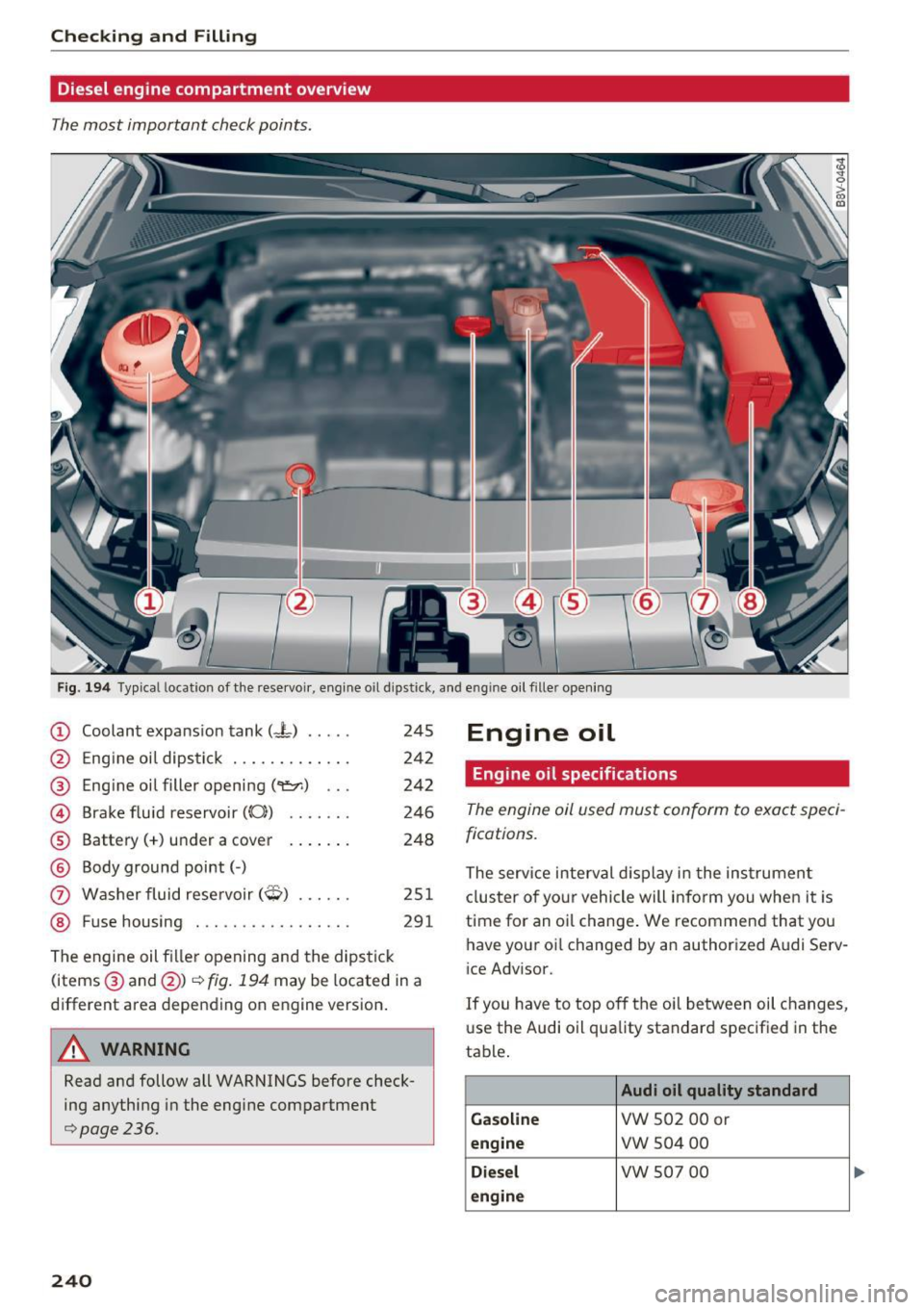
Diesel engine compartment overview
The most important check points.
Fig. 194 Typical location of the rese rvoir, engine o il dipstick, and engine oil fille r opening
(D Coolant expansion tank (- L) .. ...
@
®
©
®
®
0
®
Engine oil dipstick ............ .
Engine oil filler opening
(9=:r.) .. .
Brake fluid reservoir ((0))
Battery(+) under a cover
Body ground point( -)
Washer fluid reservoir
(q) ..... .
Fuse housing .. .............. .
245
242
242
246
248
251 291
The engine oil fi ller opening and the dipstick
(items @ and @)¢
fig. 194 may be located in a
different area depending on engine version.
,& WARNING
Read and follow all WARNINGS before check
ing anything in the engine compartment
¢page 236.
240
Engine oil
Engine oil specifications
The engine oil used must conform to exact speci
fications.
The service interval display in the instrumen t
cluster of your vehicle will inform you when it is
time for an oi l change. We recommend that you
have your oi l changed by an authorized Audi Serv
ice Advisor.
If you have to top off the oil between oil changes,
use the Audi oil quality standard specified in the
table .
Audi oil quality standard
Gasoline
VW 502 00 or
engine vw 504 00
Diesel vw 507 00
engine