door lock AUDI S3 2016 User Guide
[x] Cancel search | Manufacturer: AUDI, Model Year: 2016, Model line: S3, Model: AUDI S3 2016Pages: 328, PDF Size: 81.78 MB
Page 46 of 328
Opening and clo sin g
Adju st ing the con venien ce op en ing in the
MMI
.. Select: the I MENU ! button >Car > Sys tems*
control button > Vehicle sett ings > Central
l oc king > Lo ng -p res s to open w indows
To enable convenience opening of the w indows
and the roof*, the
front wind ow , rea r wind ow *
and roof * functions must be switched on.
A WARNING
-Never close the windows or panorama sun
roof* careless ly or in an uncontrolled man
ner, because this increases the risk of injury .
- For security reasons, the windows can only
be opened with the remote control key at a
maximum d istance of approximately 6 feet
(2 mete rs) from the vehicle.
- Pay attention when using the lock cylinder
to close the windows and the panorama
s u nroof* so that no one is pinched. Closing
stops when the key is moved into the start
ing position .
Correcting power window malfunctions
-
After disconnecting the vehicle battery, the one
touch up and down feature must be activated
again.
.. Pull the power window sw itch until the w indow
is comp letely raised.
... Release the sw itch and pull it agai n for at least
one second.
Panorama roof
Description
App lies to veh icles : with panoramic sunroof
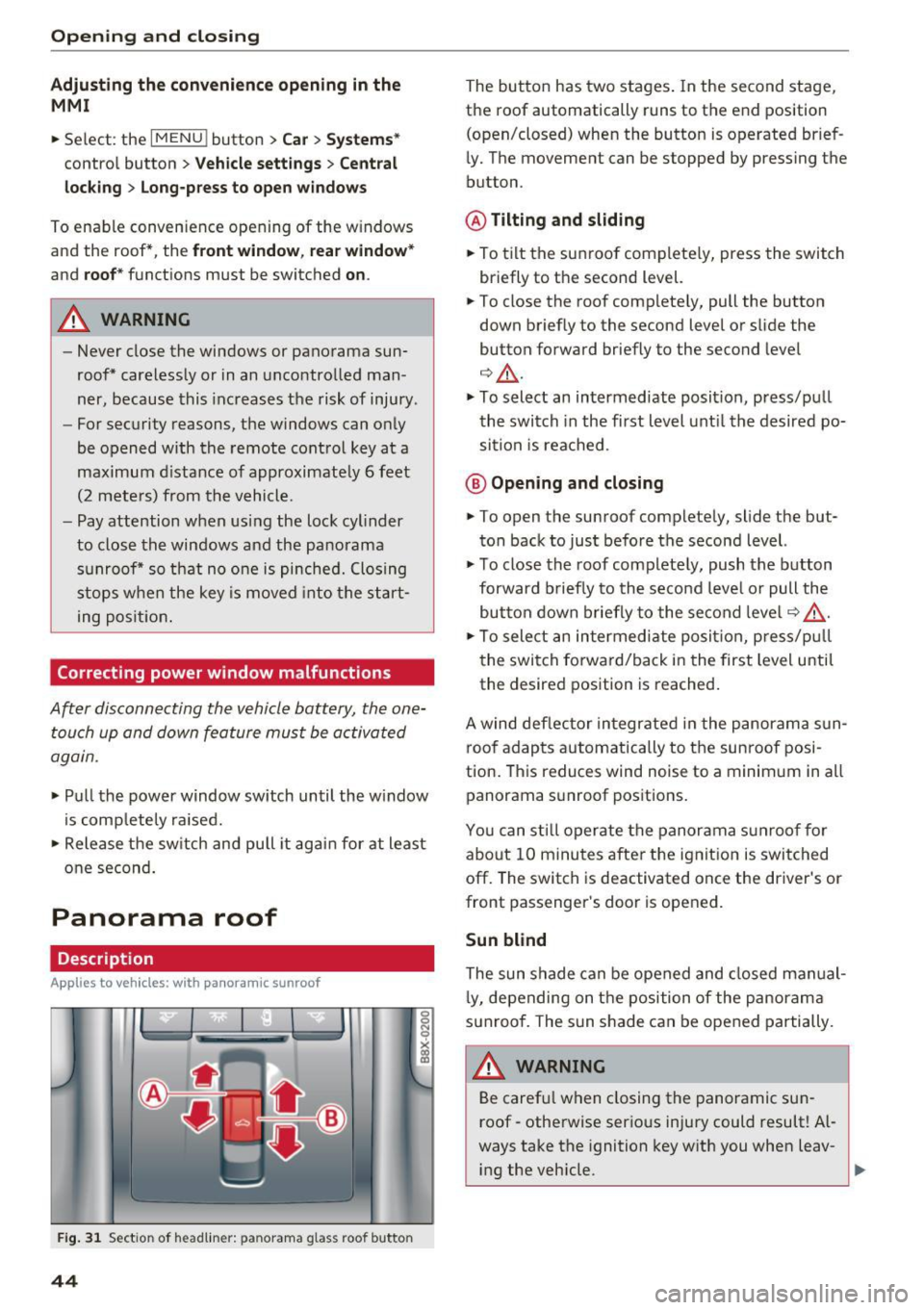
Fig . 3 1 Sect ion of head liner: panorama glass roof butto n
44
The button has two stages . In the second stage,
the roof automatically runs to the end position
(open/closed) when the button is operated brief
ly. The movement can be stopped by pressing the
button.
@ Tilting and sliding
.. To tilt the sunroof completely, press the switch
briefly to the second level.
.. To close the roof completely, pull the button
down briefly to the second level or s lide the
button forward briefly to the second level
Q &_.
.. To select an intermediate position, press/pu ll
the switch in the first level until the desired po
sition is reached .
@ Opening and closing
.. To open the sunroof completely, slide the but
ton back to just befo re the second level.
.. To close the roof complete ly, push the button
forward b riefly to the second leve l or pull the
button down briefly to the second leve l¢ ,& .
.. To sele ct an intermediate posit ion, p ress/pu ll
the switch forward/back in the first level until
the desired position is reached.
A wind def lector integrated in the panorama sun
roof adapts automatically to the sunroof posi
tion. Th is reduces wind noise to a minimum in all
panorama s unroof positions.
You can sti ll operate the panorama sunroof for
about 10 minutes after the ignit ion is switched
off. The switch is deactivated once the driver's or
front passenger's door is opened.
Sun blind
The sun shade can be opened and closed manual
l y, depending on the position of the panorama
sunroof. The sun s hade can be opened partially.
A WARNING
Be caref ul when closing the panoramic sun
roof - otherwise serious injury could result! Al
ways take the ignition key with you when leav-
-
ing the veh icle. ti,.
Page 50 of 328
Lights and Vision
.,. Press the~ button to switch the emergency
flashers on or off.
You can indicate a lane change or a turn whe n the
emergency f lashers are sw itched on by using the
turn signal lever. The emergency flashers stop
temporarily .
The emergency flashers also work when the igni
tion is turned off.
(0, Tips
You s hou ld sw itch the emergency flashers on
if:
- You are the last car in a traff ic jam so that
a ll other vehicles appro ach ing from be hind
can see yo u, or if
- You r vehicle has bro ke n down or you are
having an eme rgency, or if
- Y our vehicle is being towed or if you a re
tow ing another vehicle .
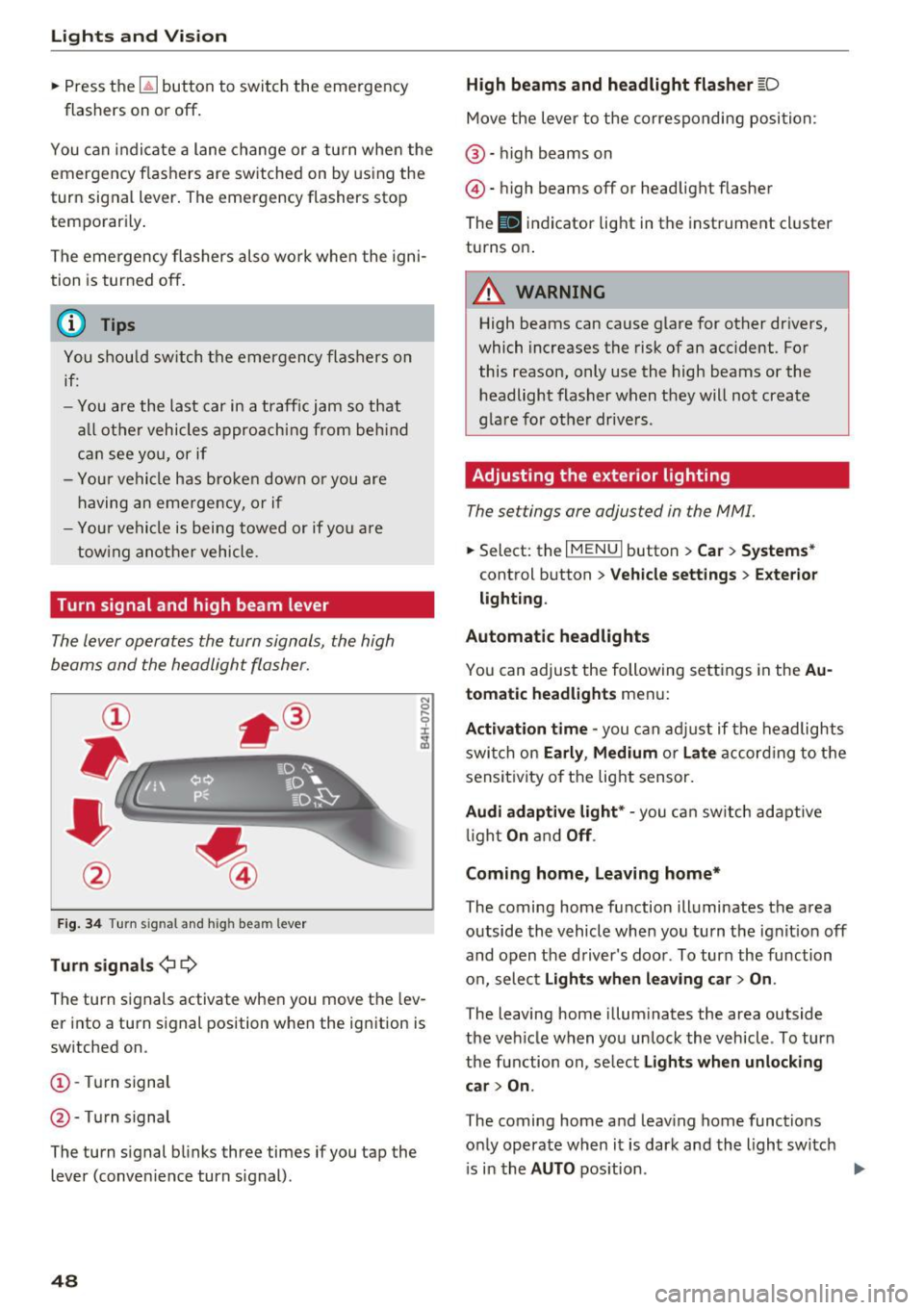
Turn signal and high beam lever
The lever operates the turn signals, the high
beams and the headlight fla sher.
F ig. 34 Turn signal and h igh bea m lever
Tu rn signal s¢¢
N
0
.... 9 ::i:
;ii
The turn signals activate when you move the lev
er into a turn signal position when the ignition is
sw itched on.
(D -Turn signal
@ -Turn signal
The turn signal blinks three times if you tap the
lever (conven ience turn s ignal).
48
High beams and headlight flasher [D
Move the lever to the corresponding position:
@ -high beams on
@-high beams off or headlight flasher
The
II i ndicator light in the instrument cl uster
turns on.
A WARNING
High beams can cause glare for other drivers,
which increases the risk of an accident. For
this reason, only use the high beams or the
headlight flasher when they will not create
gla re for othe r drive rs .
Adjusting the exterior lighting
The settings are adjusted in the MMI.
.,. Select : the I MENU I button > Car > Systems *
control button > Vehicle settings > Exte rior
light ing .
Automatic headlights
Yo u can adjust the following settings in the Au
tomati c headlights
menu:
Activation time -you can ad ju st if the headlights
swi tch on
Early , Medium or Late acco rd ing to t he
sensi tivity of the light sensor.
Audi adaptive light * -you can sw itch adaptive
li gh t
On an d Off .
Coming home, Leaving home*
The coming home f unction illuminates the area
outside the vehicle when you turn the ignition off
and open the driver 's door . To turn the function
o n, select
Lights when leaving car > On .
The leaving home illum inates the area outside
the ve hicle when you unlock the vehicle . To turn
the function on, se lec t
Lights when unlocking
car > On .
The coming home and leav ing home functions
o nl y operate when it is dark and the light sw itch
i s in the
AUTO pos ition . ..,.
Page 52 of 328
Lights and Vision
Instrument illumination
The brightness of the instrument cluster and the
center console can be adjusted .
Fig. 37 Instrument ill umination
Requirement: the light must be switched on.
~ Press the knob to release it .
~ Turn the knob toward"-" or"+" to reduce or in
crease the brightness.
~ Press the knob again to return it to its original
position.
(D Tips
The needles and gauges in the instrument cluster illuminate when the headlights are off
and the ignition is switched one. The illumina
tion reduces automatically and eventually
turns off as brightness outside decreases.
This function reminds the driver to turn the
headlights on at the appropriate time.
Vision
Adjusting the exterior mirrors
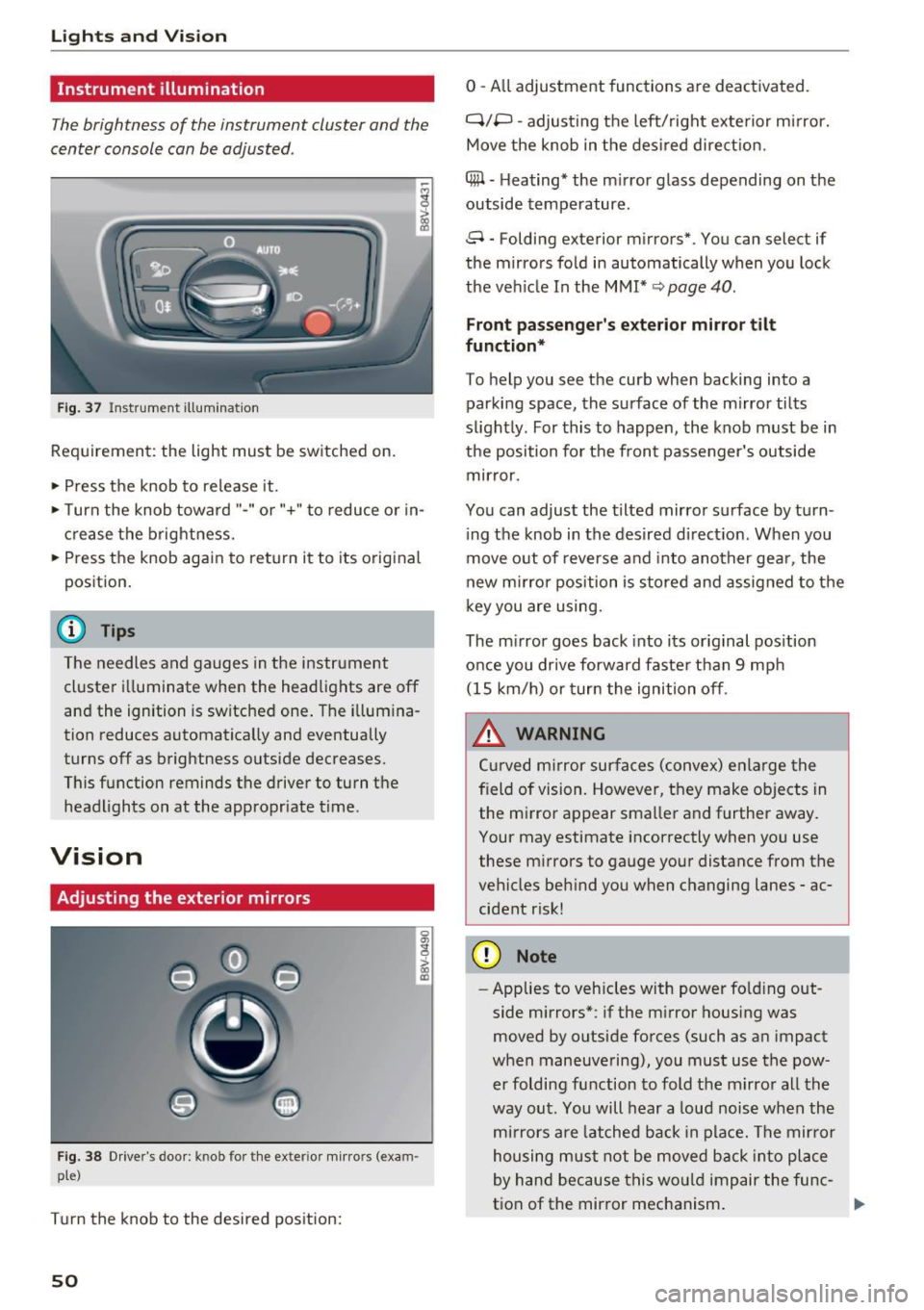
Fig. 38 Driver's door: knob for the ex ter ior mirrors (exam
ple)
Turn the knob to the desired position:
50
0 - All adjustment functions are deactivated.
q;p -adjusting the left/right exterior mirror.
Move the knob in the desired direction.
4#1 -Heating* the mirror glass depending on the
outside temperature.
8 -Folding exterior mirrors*. You can select if
the mirrors fold in automatically when you lock
the vehicle In the
MMI* ~ page 40.
Front passenger's exterior mirror tilt
function*
To help you see the curb when backing into a
parking space, the surface of the mirror tilts
slightly. For this to happen, the knob must be in
the position for the front passenger's outside mirror.
You can adjust the tilted mirror surface by turn ing the knob in the desired direction . When you
move out of reverse and into another gear, the
new mirror position is stored and assigned to the
key you are using.
The mirror goes back into its original position
once you drive forward faster than 9 mph (15 km/h) or turn the ignition off.
.&, WARNING
Curved mirror surfaces (convex) enlarge the
field of vision. However, they make objects in the mirror appear smaller and further away.
Your may estimate incorrectly when you use
these mirrors to gauge your distance from the
vehicles behind you when changing lanes -ac
cident risk!
(D Note
- Applies to vehicles with power folding out
side mirrors*: if the mirror housing was
moved by outside forces (such as an impact
when maneuvering), you must use the pow er folding function to fold the mirror all the
way out. You will hear a loud noise when the
mirrors are latched back in place. The mirror
housing must not be moved back into place
by hand because this would impair the func
tion of the mirror mechanism.
-
Page 67 of 328
Installing
• Slide the cover@ hor izontally into the desig
nated ho lder @in the side bracket until the
cover is lined up.
• Hook the straps into the l uggage compartment
lid @ ¢
A.
A WARNING
-To prevent accidents, never install the lug
gage compartment cove r unsec ured.
- The luggage compartment cover is not a
surface for storing objects. Objects placed
on the cover increase the r isk of injury to all
vehicle occupa nts dur ing sudden bra king
mane uvers o r when i nvo lved in an accident .
Increasing the size of the luggage
compartment
-
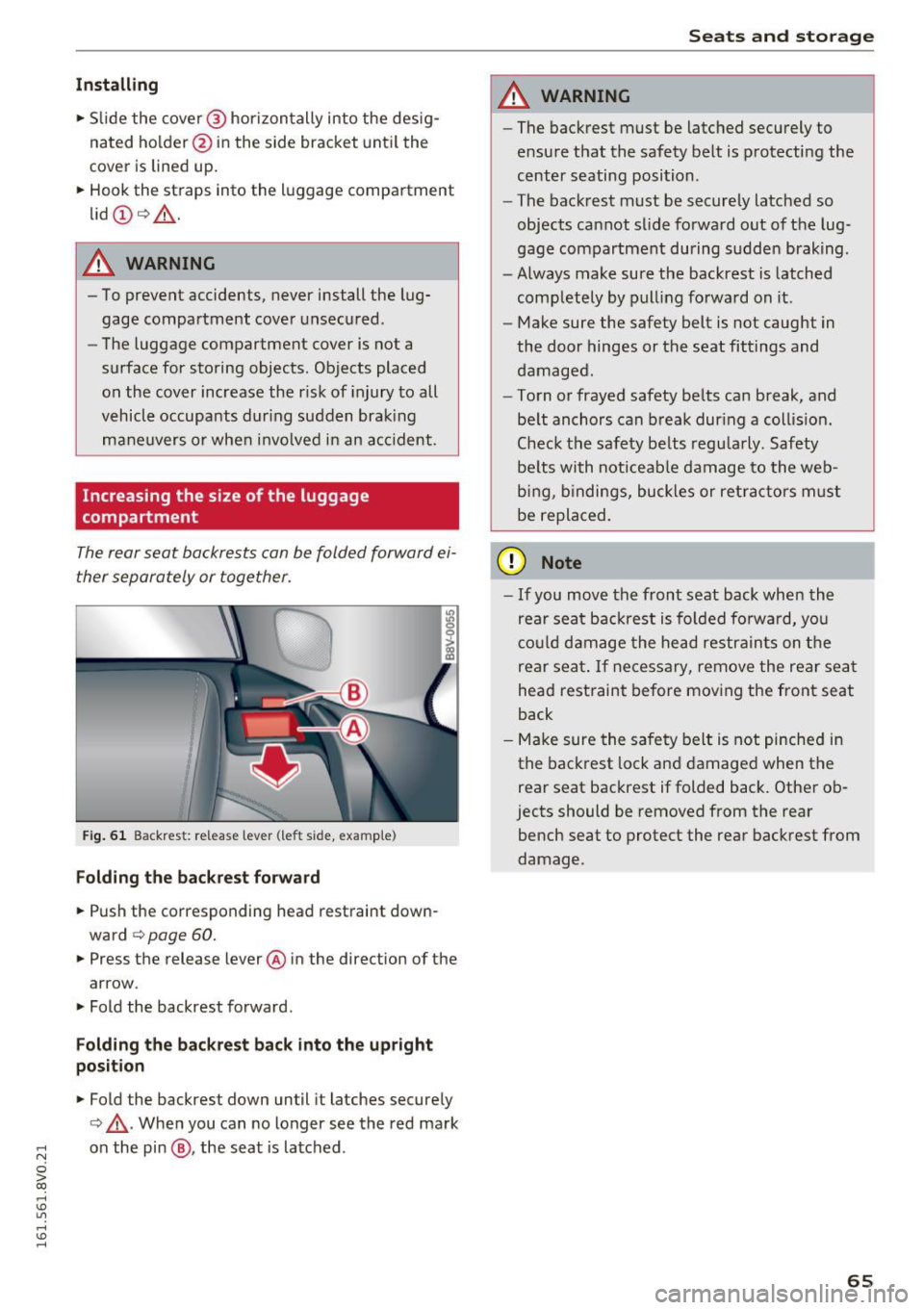
The rear seat backre sts can be folded forward ei
ther separately or together.
F ig. 61 Backrest: re lease lever (le ft s ide, examp le)
Folding the backr est forward
• Push the corresponding head restraint down
ward
¢ page 60.
• Press the release lever @ in the direct ion of the
arrow .
• Fold the backrest forward .
Folding the backrest back into the upright
position
• Fold the backrest down until it latches secure ly
¢ ,& .When you can no longer see the red mark
;::: on the pin @, the seat is la tched .
0 > CX)
rl I.Cl U"I
rl I.Cl rl
Seats and storag e
A WARNING
-~
-The backrest must be latched securely to
e nsu re that the safety belt is p rotecti ng the
center seating position .
- The bac krest must be securely latched so
objects cannot slide fo rward out of the lug
gage compartment during sudde n braking .
- Always make su re the backrest is latched
completely by pull ing fo rwa rd on it .
- Make sure the safety belt is not caught in
the door hinges or the seat fittings and
damaged.
- To rn or frayed safety be lts can break, and
be lt anchors can b reak dur ing a col lision .
C heck the safety be lts regu la rly. Safety
be lts wi th noticeable damage to the we b
b in g, b indings, bu ckles or ret ra cto rs m ust
be repla ced.
(D Note
- If you move the front seat back when the
rear seat backrest is fo lded fo rwa rd, yo u
c o ul d d am age the head restra in ts on t he
rear sea t. If necessary, remove the rear sea t
head restraint be fore mov ing the front seat
back
- Make sure the sa fe ty belt is not pinche d in
the back rest lock a nd damage d when the
rear seat backrest if folded back . Othe r ob
jects should be removed from the rear
bench seat to protect the rear backrest from
damage .
65
Page 85 of 328
,....,
N
0 > co ,....,
There is an automatic start malfunction if the~
(gasoline engine) or
II (diesel engine) indicator
light turns on and the message
Engine start sys
tem malfunction! Please contact Service
ap
pears.
To start the engine, press and hold the
I S TART ENGINE STOPI button until the engine
runs.
Drive to an authorized Audi dealer or authorized
Audi Service Facility immediately to have the
malfunction corrected.
& WARNING
- To reduce the risk of poisoning, never allow
the engine to run in confined spaces.
- Always take the vehicle key with you when
leaving the vehicle, even for a short period
of time. This applies particularly when chil
dren remain in the vehicle. Otherwise the
children could start the engine or operate
electrical equipment such as power win
dows .
- Please note that the brake booster and pow
er steering only work when the engine is
running . When the engine off, you must use
more force to steer or brake the vehicle. Be
cause the usual steering and braking capa
bility is not available, the risk of accidents or
injuries increases.
(D Note
- Avoid high engine speed, full throttle, and
heavy engine load as long as the engine has
not reached operating temperature yet. You
could damage the engine.
- The engine cannot be started by pushing or
towing.
@) For the sake of the environment
Do not let the engine run while parked to
warm up. Begin driving immediately. This re
duces unnecessary emissions.
,....,
{!) Tips
-Some noise after starting the engine is nor
mal and is no cause for concern.
- If the . indicator light blinks in the instru
ment cluster before switching the ignition
off, the ignition will not switch on again.
¢page 162
-If you leave your vehicle with the ignition
switched on, the ignition will switch off af
ter a certain amount of time. Make sure that electrical equipment such as the exterior
lights are switched off .
Turning the engine off using the
button
Applies to vehicles: with convenience key
Plug-in hybrid drive*: refer to the information un
der
¢ page 100.
"' Bring the vehicle to a full stop.
"' Move the selector lever into the P position.
.. Press the
!STAR T ENGINE STOP ! button
¢ page 82, fig. 78.
The needle in the tachometer moves to OFF when
the ignition switches off.
Steering lock1
)
The steering locks when you turn the engine off
using the
I START ENGINE STOPI* button, move
the selector lever into the P position and open
the driver's door.
The locked steering helps prevent vehicle theft.
Emergency off function
If it is absolutely necessary, the engine can also
be turned off while driving at speeds lower than
6 mph (10 km/h). To switch the engine off, press
the
I START ENGINE STOPI button twice in a row
briefly or press and hold for longer than two sec -
onds. ..,.
83
Page 87 of 328
.... N
0 > CX)
rl I.Cl U"I
rl I.Cl ....
This message appears and a warning tone sounds if you open the driver's door when the ignition is
switched on. Switch the ign ition off so that the
battery will not d ischarge.
Pressing start/stop button again will switch off
engine!
This message appears when you press the
ISTART ENGINE STOPI* button while driving
¢ page 83, Emergency off function.
Engine start system malfunction. Please con
tact Service
The engine automatic start system has a mal
function . Drive to an author ized Audi dealer or
author ized Audi Service Facility immediate ly to
have the malf uncti on corrected. To start the en
g ine, press and hold the
!START ENGINE STOPI
button.
DJ Key not recognized. See owner's manual
This message appears if there is no convenience
key inside the vehicle or if the system does not
recognize the key. The conven ience key may not
be recognized, for example, if it is covered by an
object that
disrupts the signal (such as a brief
case), o r if the key battery is weak. Electronic de
vices such as cell phones can also interfere with
the signal.
To still be able to start or stop the engine, refer
to "Cor rect ing a malfunction" ¢
page 84.
Ill Key not in vehicle?
The Ill indicator light turns on and this message
appears if the convenience key was removed from
the vehicle when the eng ine was running . If the
conven ience key is no longer in the vehicle, you
cannot switch the ignition on o r start the engine
once yo u stop it. In addition, you cannot lock the
ve hicl e from the outside .
Press brake pedal
This message appears if you do not press the
brake pedal when starting the eng ine .
Please engage N or P
This message appears when starting or s topping
the engine if the selector lever is not in the Nor P
position . The engine will not start/stop .
Driving
Shift to P, vehicle can roll away . Doors can only
be locked in P
T his message appears for safety reasons along
with a warning tone. It appears if the selec to r
lever for the automat ic transmission is not in the
P position when switching the ignition off with
the
I START ENGINE STOPI * button. Shift these
lector lever to the P position. Otherwise, the vehi
cle could roll. You also cannot lock the vehicle us
ing the locking sensor o n the door hand le or us
ing the conven ience key.
Electromechanical
parking brake
Operating
The electromechanical parking brake replaces
the hand brake.
Fig . 80 Center console : pa rk ing brake
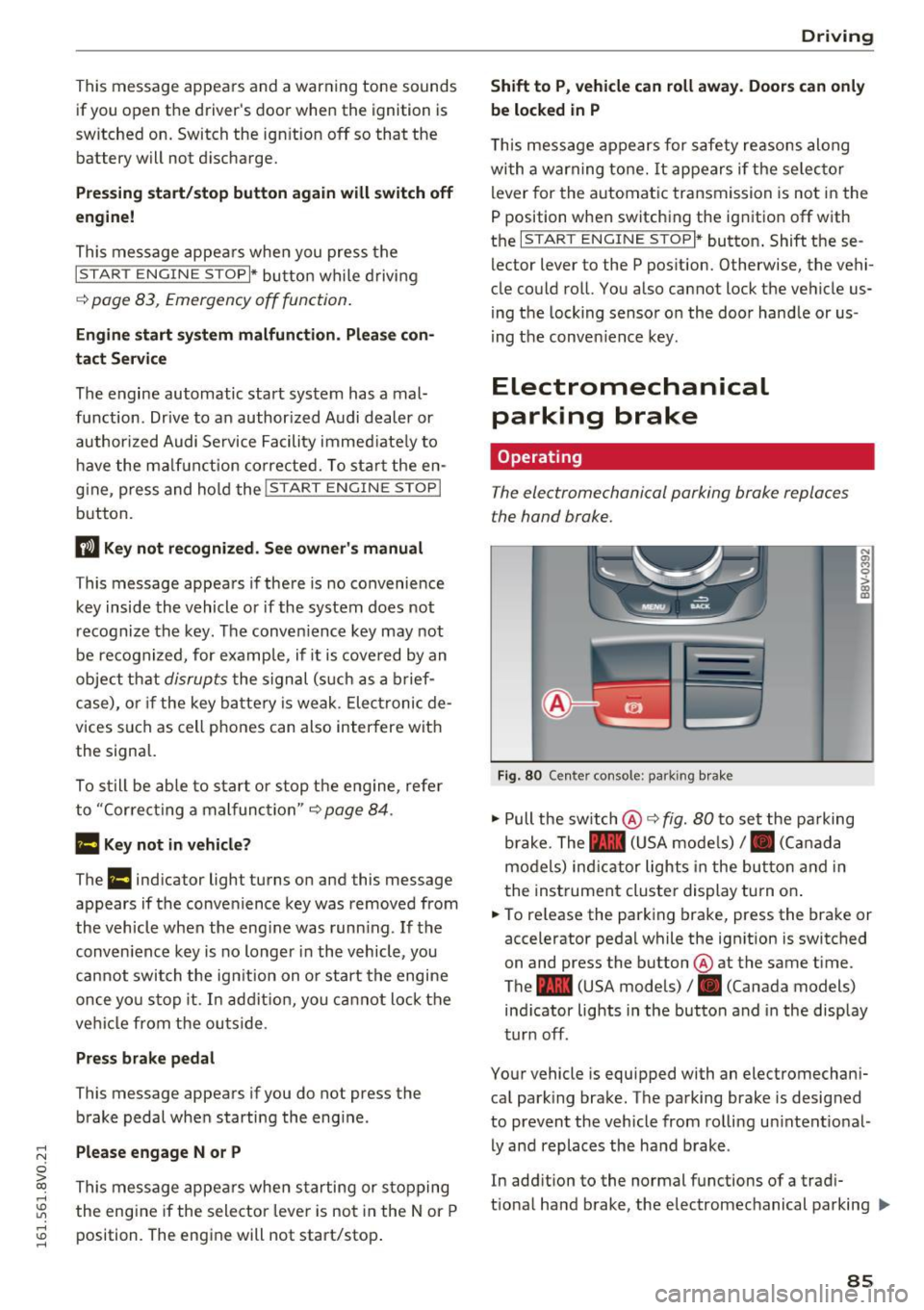
" Pull the switch @¢ fig. 80 to set the parking
brake. The - (USA models),. (Canada
models) ind icator lights in the button and in
the instrument cluster display turn on .
" To release the parking brake, press the brake or
accelerator pedal while the ign ition is switched
on and press the button @at the same time.
The - (USA models), . (Canada models)
ind icator lights in the button and in the display
turn off.
Your vehicle is equipped with an electromechani
cal park ing brake. The parking brake is designed
to prevent the vehicle from rolling un intent io nal
ly and replaces the hand brake .
In addition to the normal functions of a tradi
t ional hand brake, the electromec hanical parking ..,.
85
Page 88 of 328
Driving
brake provides various convenience and safety
functions.
When starting from a stop
- The integral hill start assist helps you when
driving by automatically releasing the parking
brake
c:;, page 87, Starting from a stop.
- When starting on inclines, the hill start assist
prevents the vehicle from unintentionally roll
ing back. The braking force of the parking brake
is not released until the wheels build up
enough driving force.
Emergency brake function
The emergency braking function ensures that the
vehicle can be slowed down even if the
standard
brakes fail c:;, page 87, Emergency braking
function.
A WARNING
- Do not press the accelerator pedal inadver
tently when the vehicle is stationary and the engine is running and a gear is selected.
Otherwise the vehicle will start to move im
mediately and could result in a crash.
- If the power supply fails, the released park
ing brake can no longer engage. In this
case, park the vehicle on level ground and
secure it by placing the selector lever in the
P position . See an authorized Audi dealer or
authorized Audi Service Facility for assis
tance.
(D Note
If the . or .. (USA models) /. (Canada
models) indicator light in the instrument
cluster blinks, there is a malfunction in the
brake system. Refer to the detailed descrip
tion of the indicator lights
c:;, page 18.
-If the - (USA models) /. (Cana-
da models) or
Ill indicator light turns on,
there is a malfunction in the parking brake
c;, page 19.
@ Tips
-If the parking brake is set while the ignition
is switched off, the
¢~jj indicator light in the
button and in the instrument cluster dis-
86
play - (USA models) /. (Canada mod
els) will turn off after a certain amount of
time.
- If driver's door is opened while the ignition
is switched on, the parking brake sets auto
matically. This prevents unintended rolling
of the vehicle.
- Occasional noises when the parking brake is
set and released are normal and are not a
cause for concern.
- When the vehicle is parked, the parking
brake goes through a self-test cycle at regu
lar intervals. Any noises associated with this
are normal.
- If there is a power failure, the parking brake
will not set if it is released, and it will not release if it is set
c:;, I!:::,. . See an authorized
Audi dealer or authorized Audi Service Fa cility for assistance.
· Parking
.,. Press the brake pedal to stop the vehicle.
.,. Pull the switch @
c:;, page 85, fig. 80 to set the
parking brake.
.,. Place the selector lever in the P position.
.,. Turn the engine off
c:;, & -
.,. Turn the steering wheel when parking on in
clines so that the wheels will roll into the curb
if the vehicle starts moving.
A WARNING
- Always take the vehicle key with you when
leaving the vehicle, even for a short period
of time . This applies particularly when chil
dren remain in the vehicle. Otherwise chil
dren could start the engine, release the
parking brake or operate electrical equip
ment such as power windows, which in
creases the risk of an accident.
- When the vehicle is locked, no one -particu
larly not children -should remain in the ve
hicle. Locked doors make it more difficult
for emergency workers to get into the vehi
cle, which puts lives at risk.
Page 89 of 328
,....,
N
0 > co ,....,
The start assist function ensures that the park
ing brake is released automatically upon start
ing.
Stopp ing and sett ing the p arking br ake
.. Pull the switch@¢ page 85, fig. 80 to set the
parking brake.
Starting and aut omatically rele asing the
par king b rake
Requirement: the driver's door must be closed
and the driver's safety belt must be fastened.
.. When you press the accelerator pedal, the
parking brake is automatically released and
your vehicle begins to move.
When stopping at a traffic signal or stopping in
city traffic, the parking brake can be applied . The
vehicle does not have to be he ld with the brake
pedal. The parking brake eliminates the tendency
to creep when a selector lever pos ition is engag
ed. As soon as you press the accelerator pedal,
the park ing brake re leases automatically and the
vehicle starts to move.
Starting on slope s
When starting on inclines, the hill start assist
prevents the vehicle from unintentionally rolling
back . T he braking force of the parking brake is
not released until the wheels bu ild up enough
d riving force.
(D Tips
For safety reasons, the parking brake is re
leased automatically only when the dr iver's
safety belt is fastened and the dr iver's door is
loc ked.
Emergency braking function
In the event that the conventional brake system
fails or locks.
.. To brake your vehicle in an emergency, pull the
@ switch¢
page 85, fig. 80 and hold it pulled.
.,. As soon as you release the @switch or acce le r
ate, the brak ing p rocess stops.
D riv ing
Pu lling and ho lding the @switch while driving at
a speed of about 2 mph (3 km/h) or higher ini
t iates the emergency braking funct ion. The vehi
cle brakes at all four wheels by activating the
braking hydraulics. The brake performance is
s imilar to heavy braking. ¢
&
To help prevent act ivat ing the emergency braking
by mistake, an aud ible warn ing tone (buzzer)
sounds when the @switch is pulled. Emergency
braking stops as soon as the @switch is released
or the accelerator pedal is pressed.
A WARNING ,__ -Emergency braking should only be used in an
emergency, when the normal brake pedal has
failed or the brake pedal is obstructed. Du ring
emergency braking, your veh icle wi ll brake
similar to heavy braking. ESC and the associ
ated components (ABS, ASR, ED L) cannot
overcome the laws of physics. In corners and
when road or weather conditions are bad, a
fu ll brake application can cause the vehicle to
skid or the rear end to break away, which in
creases the r isk of an accident.
Hill hold
Applies to vehicles: wit h Hill Ho ld
Hill hold makes it easier to start on hills .
Requirement: the driver's door must be closed
and the engine must be running.
The system is activated when the brake pedal is pressed while the vehicle is stationary.
T o prevent the vehicle from rolling back when
starting, the brake power is held for a brief mo
ment after re leasing the brake pedal. During this
time, you can easily begin to move your vehicle .
A WARNING
--
-The intelligent technology of Hill Hold can
not overcome the limitat ions imposed by
natural phys ical laws. The increased comfort
offe red by Hill Hold shou ld not cause you to
take safety risks.
~
87
Page 95 of 328
,....,
N
0 > co ,....,
the clutch is over loaded.
- If the engine must run while you are work
ing in the engine compartment with the
hood open, make sure a gear is not engag
ed. The selector lever must be firmly in the
P position and locked in place and the park
ing brake must be set¢
page 236. Other
w ise, the vehicle could begin moving when
the engine speed is high, even w ith the
par king brake set.
(D Note
- When stopping on a n incline, do not t ry to
ho ld the vehicle in place by press ing the ac
ce le ra to r pedal wh ile a driv ing gear is se
l ected. This can ca u se the au toma tic trans
mission to overheat and can damage it. Set
the pa rking brake or press the brake pedal
to prevent the vehicle from ro lling .
- Allow ing the vehicle to ro ll when the eng ine
is stopped and the se lector lever is in the N
pos ition w ill damage the automatic trans
mission because it is not l ubricated under
those circumstances.
- The transmiss ion can overheat and be dam
aged under certain driving and traffic condi
tions such as frequent starts , creeping for a
l ong time, or stop-and-go traffic. When t he
mJ o r. indicator light tu rns o n, s top the
vehicle at the next oppo rt u nity and let the
transm issio n coo l
¢page 95 .
-Allow ing the ve hicle to ro ll when the eng ine
i s s topped w ill damage the S tro nic trans
mission because it is not lubric ated
¢ page 297, Towing with a tow truck .
(D Tips
For safety reasons, the parking b rake releases
au tomatically on ly w hen the dr iver's door is
closed and driver's sa fe ty belt is fastened.
Autom atic tran sm iss ion
Hill descent control
Applies to vehicles: with S tronic transmission
The hill descent control system assists the driver
when driving down hills.
Hill descent control is act ivated when the se lec
tor lever is in the D or S position and you press
the brake pedal. The transmission automatically
selects a gear that is su itable for the incline . H ill
descent con trol tr ies to maintain the speed ach
i eved a t the time of braking, w it hi n physi cal a nd
technical lim itations . If may s till be necessary to
adjus t the speed w ith the bra kes . Because hill de
scent control cannot shift down farthe r than 3rd
gear, it may be necessary to shift into tiptronic
mode in very steep areas. In this case, shift into 1st or 2nd gear in tiptronic mode to use the en
gine's braking force to relieve the brakes .
Hill descent control switches off once the decline
levels out or you press the accelerator pedal.
On vehicles with a cru ise con trol system*
¢ page 130, hill descent control is a lso activated
when the speed is set.
A WARNING
-Hill descent control cannot overcome physical
limitat ions, so it may not be able to ma intain
a constant speed under all conditions. A lways
be ready to app ly the brakes.
93
Page 102 of 328
e-tron
serious damage and/or a decrease of the ca
pacity void coverage under the New Vehicle
Limited Warranty.
Starting/driving the vehicle
Applies to veh icles: w ith plug-in hybrid drive
The vehicle is started and stopped with the
I START S TOP I button. Also note the informa
tion here ¢
page 82.
Establishing drive ready mode
See¢.& in Introduction on page 98.
Requ irement: a charging cable must not be con
nected to the vehicle ¢
page 121 and the selec
tor lever must be in the P or
N position.
- Press the brake pedal.
- Press the
I START STOPI button .
When the vehicle enters drive ready mode, the
status message
e-tron READY appears briefly in
the instrument cluster display and the needle in
the power meter points to
READY r:::;, page 101 .
Driving
The vehicle starts with the electric motor after
establishing the drive ready mode and if the con
ditions for electric drive mode have been met
¢page 103.
The conditions to drive are essentially the same
for the automatic transmission : ¢
page 89
You and your passengers should anticipate the
possibility of a sporty acce leration.
Ending drive ready mode
- Place the selector lever in the P position.
- Switch the ignition off with the
le!> START STOPI
button.
Vehicle sound
The vehicle generates electronic vehicle sound at
speeds up to approximately 2S mph (40 km/h) so
that your vehicle can be heard from the outside
when in electric drive mode. The veh icle sound
automatically fades out at higher speeds when
the sounds from the tires and wind start increas
ing .
100
Switching the ignition on/off
You can switch the ignit ion on without establish
ing drive ready mode.
- Press the
I START STOP ! button to switch the
ign ition on and off. Do not press the brake ped
al while doing this.
The needle stays pointing to
OFF@ r:::;, page 101,
fig. 88 when the ignit ion is switched on.
No indicator lights stay turned on when the igni
tion is switched off .
Ignition is switched off automatically
To prevent the battery from draining, the ignition
will switch off automatically under the following conditions:
- The vehicle must have already been driven.
- The vehicle must be stationary.
- The gaso line engine must not be runn ing .
- The driver 's door must be open .
- The driver's safety belt must be unbuckled.
- The brake pedal must not be pressed.
In this case, the activated low beam is replaced
by the parking light. The message
Side marker
lights automatically shut off in 30 minutes. See
owner's manual
appears in the instrument clus
ter display . The parking lights w ill switch off af
ter approximately 30 minutes or when you lock
the vehicle.
If the gasoline engine was not stopped, the mo
tor continues running and the ignition does not
automat ically switch off
r:::;, ,& .
A WARNING
To reduce the risk of poisoning, never allow
the engine to run in confined spaces.
(D Tips
The vehicle cannot start when outside tem
peratures are below-18
°F (-28 °()
r:::;,page 101.
-