ECU AUDI S3 2016 Owner's Manual
[x] Cancel search | Manufacturer: AUDI, Model Year: 2016, Model line: S3, Model: AUDI S3 2016Pages: 328, PDF Size: 81.78 MB
Page 106 of 328
e-tron
Setting plug-in hybrid drive modes
Applies to vehicles: w ith p lug -in hybrid drive
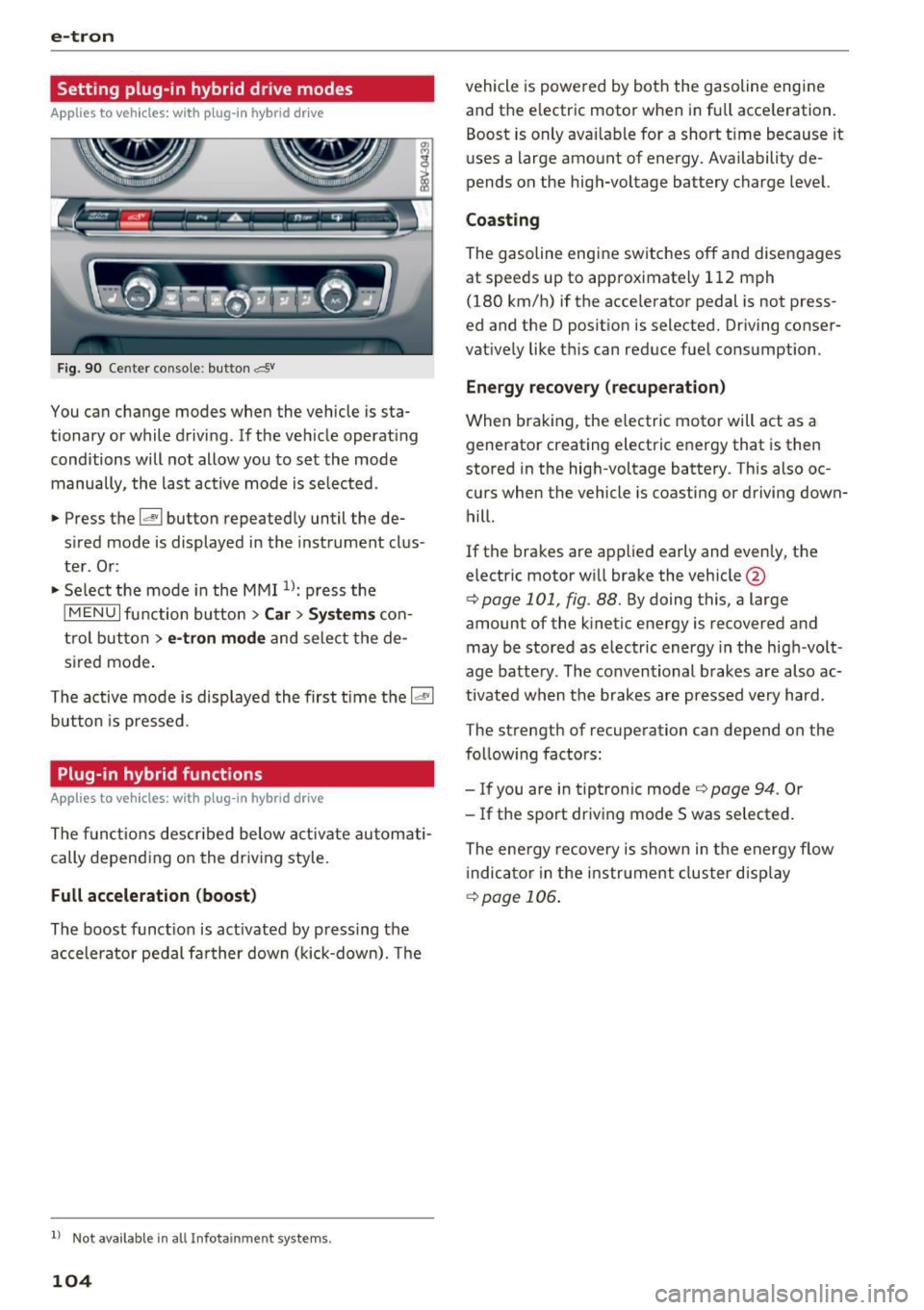
Fig. 90 Center console : but ton &
You can change modes when the vehicle is sta
tionary or while driving. If the vehicle operating
conditions will not allow you to set the mode manually, the last active mode is se lected .
.,. Press the
laV I button repeatedly until the de
sired mode is displayed in the instrument clus
ter . Or :
.,. Select the mode in the MMI
n: press the
I MENU I function button> Car > Systems con
trol button >
e-tron mode and select the de
s ir ed mode .
The active mode is displayed the first time the
14 "1
button is pressed .
Plug-in hybrid functions
Applies to veh icles: with p lug -in hybrid drive
The functions described below activate automati
cally depending on the driving style.
Full acceleration (boost)
The boost funct ion is act ivated by pressing the
accelerator pedal farther down (kick-down). The
l) Not availa ble in a ll Info ta inm en t sy ste m s.
104
vehicle is powered by both the gasoline eng ine
and the e lectric motor when in fu ll acce leration.
Boost is only ava ilable for a short time because it
uses a large amount of energy. Availability de
pends on the high-voltage battery charge level.
Coasting
The gasoline engine switches off and disengages
at speeds up to approximate ly 112 mph
(180 km/h) if the acce lerator pedal is not press
ed and the D position is selected. Driving conser
vatively like this can reduce fuel consumption .
Energy recovery (recuperation)
When braking, the electric motor will act as a
generator creating electric energy that is then
stored in the high-voltage battery . This also oc
curs when the vehicle is coasting or driving down
hill.
If the brakes are applied early and evenly, the electric motor w ill brake the vehicle @
¢page 101 , fig. 88. By doing this , a large
amount of the kinetic energy is recovered and
may be stored as e lectric energy in the high -volt
age battery . The conventional brakes are also ac
tivated when the brakes are pressed very hard.
The strength of recuperation can depend on the
following factors:
- If you are in tiptronic mode
Q page 94 . Or
- If the sport driving mode 5 was selected.
The ene rgy recovery is shown in the energy flow
i ndica tor in the in str ument cluster display
¢page 106 .
Page 108 of 328
e-tron
Energy flow indicator
Applies to veh icles: w ith p lug -in hybrid drive
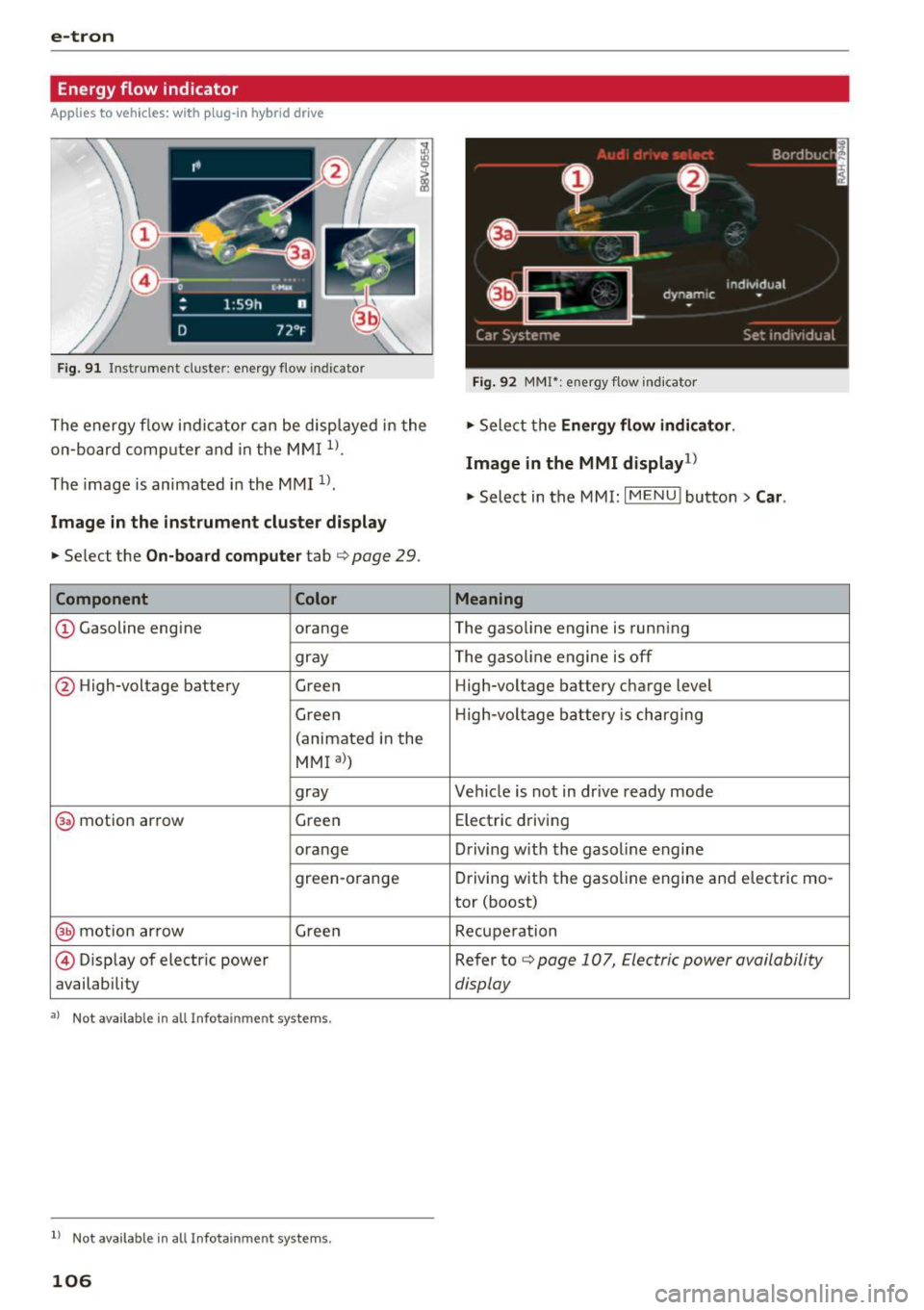
Fig . 91 Instrument cluster: e nergy flow indicator
The energy f low indi cator can be disp layed in the
on-board com puter and in the M MI
1>.
The image is animated in the MMI 1>.
Image in the instrument cluster display
.,. Se lect the On-board compute r tab c> page 29.
Component Color
CD Gasoline engine orange
gray
@ High-voltage battery
Green
Green
(animated i n the
MMI al )
gray
@ motion ar row Gree
n
o range
green-orange
@ mot ion ar row Gree n
@ Disp lay of electric power
availability
•> Not available in a ll Infotainmen t systems .
ll Not available in all Infota inmen t sys tems .
106
Fig. 92 MMI*: energy flow i nd icato r
.,. Select the Ene rgy flow indi cator .
Image in the MMI display1
)
.,. Select in the MMI: I MENU ! button> Car.
Meaning
The gasoline engine is runn ing
The gasoline engine is off High-voltage battery charge level
H ig h-voltage battery is ch arging
Vehicle is not in dr ive ready mode
Elect ric d riving
D riving w ith the gasol ine engine
Driving wit h the gaso line engine and electric mo-
tor (boost)
Recupe ration
Refer to
c> page 107, Electric power availability
display
Page 114 of 328
e-tron
-The vehicle radio and TV systems may have
limited reception when charging the vehi
cle.
Charging at public
charging stations
App lies to vehicles: w ith plug-in hybrid drive and special
charging cable
Use the charging cable supplied at the public
charging station for charging. Contact an author
ized Audi dealer or authorized Audi Service Facili
ty for more information.
• Read the operating instructions at the charging
station to charge the battery.
• Unl ock the vehicle if necessary¢
page 35.
• Make sure that the selector lever is in the P po
sition and drive ready mode is switched off .
• Turn the lock until it is vertical to open the
cov
er on the charging unit r:;> page 115, fig . 108.
• Slide the cover carefully to the side if necessa
ry .
• Remove the lock on the charging port
¢page 115, fig. 109 .
• Remove the cap from the charging cable if nec
essary .
• Connect the cable to the veh icle charging port .
• If a charg ing timer is not set, the charging
process will start automatically depending on
the charging station¢
page 116, Setting the
charging timer.
• The vehicle operating status is indicated by the
status LED@¢
table on page 119.
• Refer to the information under¢ page 117,
After charging
or ¢ page 121 , Vehicle charg
ing connector emergency release.
@ Tips
-It is not possible to charge using the charg
ing timer at some charging stations .
- You can use your Audi e-tron charging sys
tem if there is a household or industrial con
nection availab le at the charging station.
112
Charging the battery
with the Audi e-tron
charging system
Charging system overview
Applies to vehicles : with plug -in hybrid drive
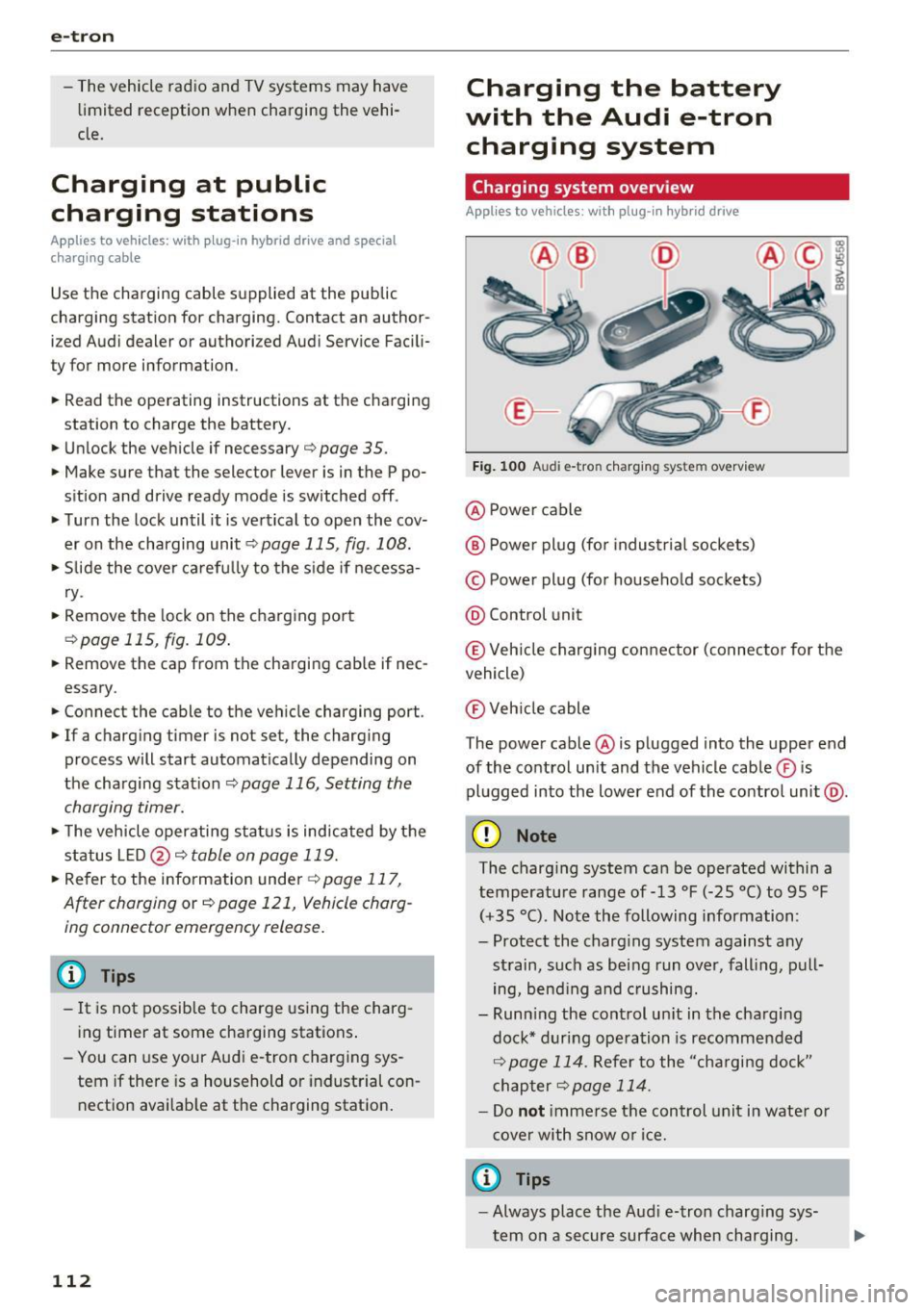
Fig. 100 Audi e-tron c harging system overview
@ Power cable
@ Power plug (for industrial sockets)
© Power plug (for household sockets)
@ Control unit
© Veh icle charging connector (connector for the
vehicle)
® Vehicle cable
The power cable @ is plugged into the upper end
of the control unit and the vehicle cable ® is
plugged into the lower end of the contro l unit @.
(D Note
The charging system can be operated within a
temperature range of-13 °F (-25 °C) to 95 °F
(+35 °C). Note the following information:
- Protect the charg ing system against any
strain, such as being run over, falling, pull
ing, bend ing and crushing.
- Runn ing the control un it in the charging
dock* during operation is recommended
¢ page 114. Refer to the "cha rging dock"
chapter
¢page 114.
-Do not immerse the control unit in water or
cover with snow or ice.
a) Tips
-Always place the Aud i e-tron charging sys
tem on a secure surface when charging.
Page 116 of 328
e-tron
Charging dock
Applies to vehicles: with p lug -in hybrid drive and charging
dock
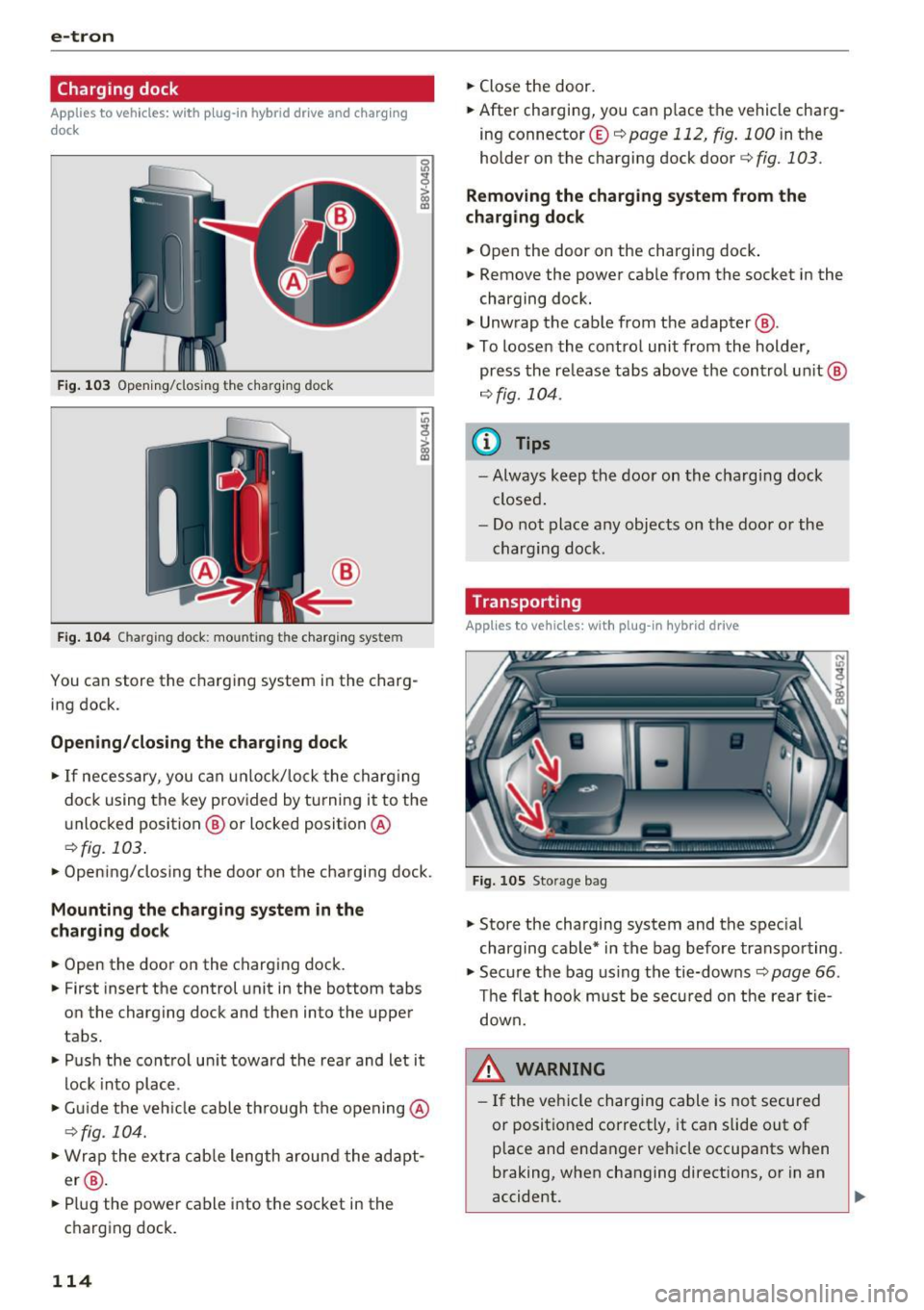
F ig . 1 03 Opening/clos ing t he charg ing dock
®
Fig . 1 04 Charging dock: mounting the ch arging system
You can store the charg ing system in the charg
ing dock.
Opening /closing the charging dock
• If necessary, you can u nlock/lock the charg ing
dock using the key provided by turning it to the
unlocked position @ or locked position @
¢fig. 103.
• Opening/closing the door on the charging dock.
Mounting the cha rging system in the
charging dock
• Open the door on the charging dock.
• First insert the control unit in the bottom tabs
on the charging dock and then into the upper
tabs.
• Push the control un it toward the rea r and let it
lock into place.
• Gu ide the vehicle cable th rough the opening @
¢fig_ 104.
• Wrap the extra c ab le length around the adapt
er @ .
• Plug the power cable into the socket in the
charging dock.
114
• Close the door.
• After charging, you can place the vehicle charg
ing connecto r© ¢
page 112 , fig. 100 in the
holder on the charging dock door¢
fig. 103.
Removing the charging system from the
charging dock
• Open the door on the charging dock .
• Remove the power cable from the socket in the
charging dock.
• Unwrap the cable from the adapter @.
• To loosen the contro l unit from the holder,
press the re lease tabs above the cont rol un it @
r=:> fig. 104.
(D Tips
- Always keep the door on the cha rg in g dock
closed .
- Do not place any objects on the doo r or the
charging dock.
Transporting
Applies to vehicles: with plug-in hybrid drive
Fig. 105 Storage bag
• Store the charging system and the spec ial
charging cable* in the bag before transpo rting.
• Secure the bag us ing the tie-downs¢
page 66.
The flat hoo k m ust be sec ured on t he rear tie
down.
8_ WARNING
- If the veh icle charging cable is no t secured
or positioned correctly, it can slide out of
p lace and endanger ve hicle occupants when
braking, when changing directions, or in an
accident.
Page 129 of 328
,....,
N
0 > co ,....,
General information
Your Audi was designed primarily for passenger
transportation .
If you plan to tow a trailer, please remember that
the additional load will affect durability, econo
my and performance.
T railer towing not only places more stress on the
vehicle, it also calls for more concentration from
the driver.
For this reason, always follow the operating and
driving instructions provided and use common
sense.
Technical requirements
Trailer hitch
Use a weight-carrying hitch conforming to the
gross trailer weight. The hitch must be suitable
for your vehicle and trailer and must be mounted
securely on the vehicle's chassis at a technically
sound
location . Use only a trailer hitch with a re
movable ball mount . Always check with the trail
er hitch manufacturer to make sure that you are
using the correct hitch.
Do not use a bumper hitch.
The hitch must be installed in such a way that it
does not interfere with the impact -absorbing
bumper system . No modifications should be
made to the vehicle exhaust and brake systems .
From time to time, check that all hitch mounting
bo lts remain securely fastened.
When you are not towing a trailer,
remove the
tra iler hitch ball mount . This prevents the hitch
from causing damage should your vehicle be
struck from beh ind
~ ,&. .
Trailer brakes
If your trailer is equipped with a braking system,
check to be sure that it conforms to all regula
tions .
Trailer mode
The trailer hydraulic brake system must not be
directly connected to the vehicle's hydraulic
brake system.
Safety chains
Always use safety chains between your vehicle
and the trailer.
Trailer lights
T ra iler lights must meet all regulations . Be sure
to check with your Aud i dea ler for correct wiring,
switches and relays .
Mirrors
If you are unable to see the traffic behind you us
ing the regular outside mirrors, then you
must in
stall extended mirrors . It is important that you
always have clear vision to the rear.
,8. WARNING
After removing the trailer hitch, do not store
it in your vehicle. In case of sudden braking,
the hitch could fly forward and injure you or
your passengers.
Operating instructions
Maximum trailer weight
A trailer for your vehicle is limited to a typical
class 1 or class 2 trailer.
Trailer load distribution Be sure the load in the trailer is held securely in
place to prevent it from shifting forward, back
ward or sideways.
Never allow a passenger to ride in a trailer~.&.
in Driving instructions on page 128.
Engine cooling system
Towing a trailer makes the engine work harder. It
is important that the cooling system's perform
ance is up to the additional load. Make sure that
the cooling system has enough fluid.
Tire pressure
When towing a trailer, inflate the tires of your
vehicle to the cold tire pressure listed under "Full ..,.
127
Page 143 of 328
,....,
N
0 > co ,....,
detect all objects. This increases the risk of
a collision.
- Pre sense front does not react to people or
animals or objects that are crossing the ve
hicle's path or are difficult to detect
¢ page 133.
-Reflective objects such as guard rails or the
entrance to a tunnel, heavy rain and ice can
affect the function of the radar sensor and
the system's ability to detect a collision risk.
- Lack of attention can lead to collisions, oth
er accidents and serious injuries. pre sense
front is an assistance system and cannot
prevent a collision by itself. The driver must
always intervene. The driver is always re
sponsible for braking at the right time.
- Always pay attention to traffic, even when
pre sense front is switched on. Always be
ready to intervene and take over complete
control of the vehicle whenever it is neces
sary. Always follow traffic laws regarding
maintaining a safe distance between your
vehicle and vehicles ahead.
- pre sense front works within certain limits
and cannot react to situations that are out
side of the system limits, such as when ap
proaching a stationary vehicle or a station
ary obstacle (the end of a traffic jam or ave
hicle that has broken down).
- Always keep in mind that the radar sensor
for pre sense front only works within de
fined detection zones, which means other
vehicles may not always be detected cor
rectly.
- The function and range of the radar sensor
can be impaired by rain, snow and heavy
mist. Vehicles ahead may not be detected
right away, or not detected at all.
- Reflective surfaces such as guard rails or en
trances to tunnels may impair the function
of the radar sensor.
(D Note
The sensor can be disp laced by impacts or
damage to the bumper, wheel housing and
underbody. Pre sense front can be impaired
by this. Have an authorized Audi dea ler or au-
Assist
thorized Audi Service Facility check their func
tion.
(D Tips
- You can cancel the bra king with increas ing
force that is initiated by the system by brak
ing yourself, by acce lerating noticeably or
by swerving.
- For information on driver messages about
pre sense, refer to¢
page 142.
- Keep in mind that pre sense front can brake
unexpectedly. Always secure any cargo or
objects that you are transporting to reduce
the risk of damage or injury.
- Certain pre sense front functions switch off
when ESC is switched off (sport mode) or
when driving in reverse.
- The pre sense front functions are not availa
ble if there is a malfunction in the adaptive
cruise control* system¢
page 138 or
¢page 142.
-Keep in mind that pre sense front can brake
abruptly. Always secure cargo or objects
that you transport to reduce the risk of
damage or injury .
Settings in the Infotainment system
Applies to vehicles: with Audi pre sense front or Audi adaptive
cruise control
.,. In the MMI, select: the I MENU I button >Car>
Systems*
control button > Driver assistance >
Audi pre sense .
Switching the system on and off
Audi pre sense (Syste m): if the system is turned
off, it automatically turns on again once the igni
tion is switched on.
System -switch Audi pre sense On/Off. With
this, you can switch the prewarning and the brak
ing intervention from Audi pre sense on or off.
Early warning -the distance and approach warn
ings can be switched
On /Off .
(D Tips
-If you restrict or switch off the ESC, the pre
sense also switches itse lf off¢
page 160.
141
Page 169 of 328
.... N
0 > CX)
rl I.Cl U"I
rl I.Cl ....
.. Make sure that all windows are clean and afford
good visibility to the outside .
.. Secure all luggage and other items carefully
r=> page 64, r=> page 63.
.. Make sure that nothing can interfere with the
pedals .
.. Adjust front seat, head restraint and mirrors
correctly for your height .
.,. Instruct passengers to adjust the head re
straints accord ing to their height .
.. Make sure to use the right ch ild restraint cor
rectly to protect children
r=> page 209, Child
safety .
.. Sit properly in your seat and make sure that
your passengers do the same
r=> page 58, Front
seats .
.. Fasten your safety belt and wear it properly . Al
so instruct your passengers to fasten their safe
ty belts properly
r=> page 176.
What impairs driving safety?
Safe driving is directly related to the condition of
the vehicle, the driver as well as the driver 's abili
ty to concentrate on the road without being dis
tracted.
The driver is responsible for the safety of the ve·
h ide and all of its occupants. If your ability to
drive is impaired, safety risks for everybody in the
veh icle increase and you also become a hazard to
everyone else on the road
r=> ,&. . Th erefo re :
.. Do not let yourself be distracted by passengers
or by using a cell ular telephone.
.. NEV ER drive when yo ur dr iv ing abili ty is im
paired (by medications, alcohol, drugs, etc.).
.. Observe all traffic laws, rules of the road and
speed limits and plain common sense.
.. ALWAYS adjust your speed to road, traffic and
weather conditions.
.. Take frequent breaks on long trips. Do not drive
for more than two hours at a stretch.
.,. Do NOT drive when you are tired, under pres
su re or when you are stressed.
Dr iving safety
A WARNING
-Impaired driving safety increases the risk of
serious personal injury and death whenever a
vehicle is being used .
Correct passenger
seating pos itions
Proper seating position for the driver
The proper driver seating position is important
for safe, relaxed driving.
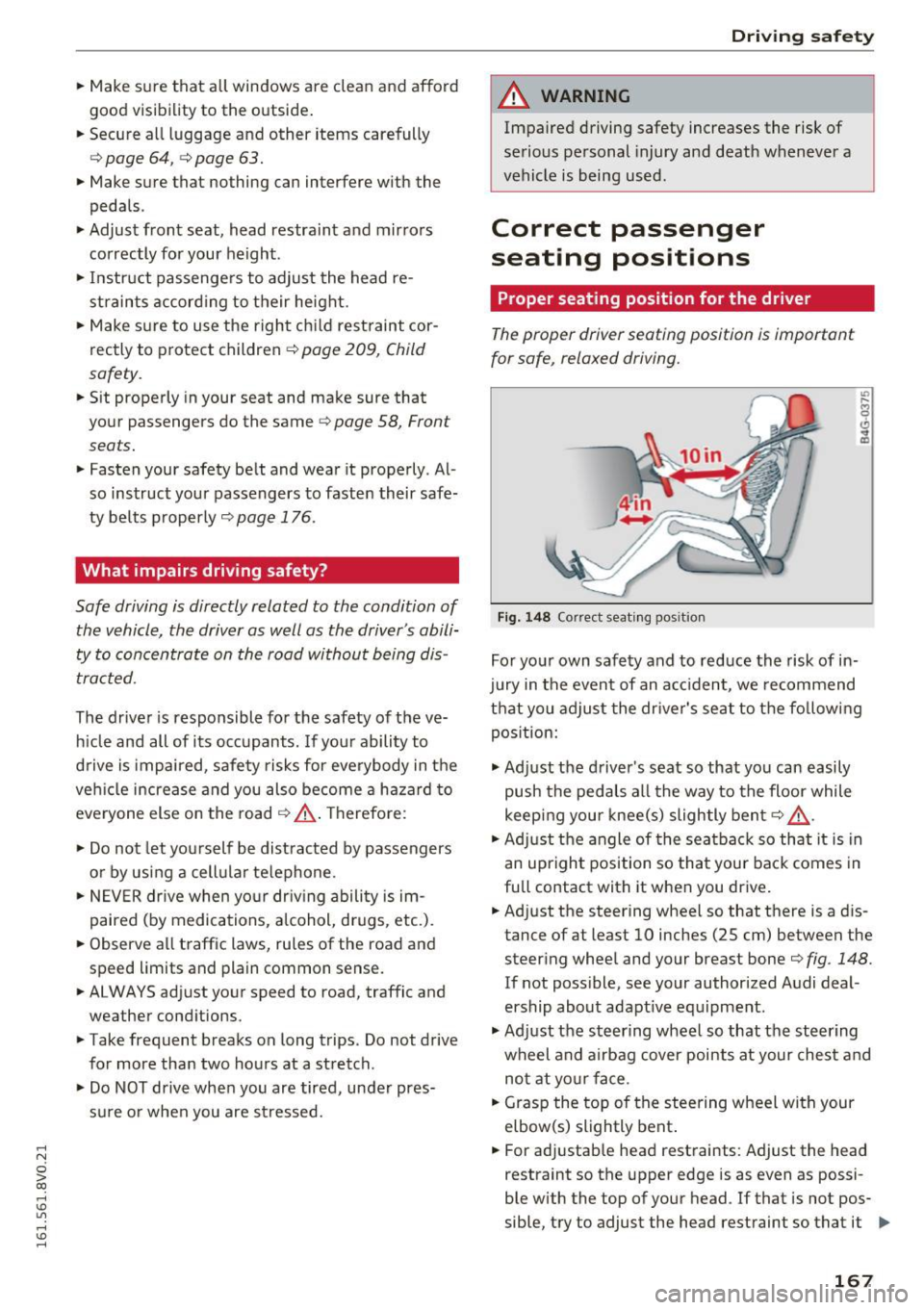
Fig. 148 Correct seating pos ition
For your own safety and to reduce the risk of in·
jury in the event of an accident, we recommend
that you adjust the dr iver's seat to the follow ing
position:
.,. Adjust the driver's seat so that you can easily
push the pedals all the way to the floor while
keep ing your knee(s) slightly bent
r=> ,&. .
.. Adjust the angle of the seatback so that it is in
an upright position so that your back comes in
full contact with it when you drive .
.. Adjust the steering wheel so that there is a d is
tance of at least 10 inches (25 cm) between the
steering wheel and your breast boner=>
fig. 148.
If not poss ible, see your authorized Audi deal·
ership about adapt ive equipment .
.,. Adjust the steering wheel so that the steering
wheel and airbag cover points at your chest and
not at your face .
.. Grasp the top of the steering wheel with your
elbow(s) slightly bent .
.. For adjustab le head restraints: Adjust the head
restraint so the upper edge is as even as possi
ble with the top of your head . If that is not pos
sible, try to adjust the head restraint so that it ..,.
167
Page 171 of 328
,....,
N
0 > co ,....,
unfolds. To help reduce the risk of serious
personal injury:
- Passengers must always sit in an upright po
sition and never lean against or place any
part of their body too close to the area
where the airbags are located .
- Passengers who are unbelted, out of posi
tion or too close to the airbag can be seri ously injured by an a irbag as it unfolds w ith
great force in the blink of an eye.
-Always make sure that there are at least 10 inches (25 cm) between the front pas
senger's breastbone and the instrument
panel.
- Always make sure that there are at least
4 inches (10 cm) between the front passen
ger's knees and the lower part of the instru
ment panel.
- Each passenger must always sit on a seat of
their own and properly fasten and wear the safety belt belonging to that seat.
- Before driving, always adjust the front pas
senger seat properly.
- For adjustable head restraints: befo re driv
ing, always also adjust the head restraints
properly.
- Always keep you r feet on the floor in front
of the seat. Never rest them on the seat, in
strument panel, out of the window, etc. The
airbag system and safety be lt will not be
able to protect you properly and can even in
crease the risk of injury in a crash.
- Never drive with the backrest reclined or
tilted far back! The farther the backrests are
ti lted back, the greater the risk of injury due
to incorrect positioning of the safety belt
and improper seating position .
- Children must a lways ride in child seats
<=> page 209. Special precautions apply
when installing a child seat on the front
passenge r seat¢
page 184 .
Driving safety
Proper seating positions for passengers in
rear seats
Rear seat passengers must sit upright with both
feet on the floor consistent with their physical
size and be properly restrained whenever the ve
hicle is in use.
To reduce the risk of injury caused by an incorrect
seat ing pos ition in the event of a sudden brak ing
maneuver or an accident, your passengers on the
rear bench seat must always observe the fo llow
ing :
.,. For adjustab le head restraints: adjust the head
restraint so the upper edge is as even as possi
ble with the top of your head. If that is not pos
sible, try to adjust the head restraint so that it
is as close to this position as possible
¢page 170 .
.,. Keep both feet flat in the footwell in front of
the rear seat.
.,. Fasten and wear safety belts properly
¢page 179 .
.,. Ma ke sure that ch ild ren are a lways properly re
s trained in a child restra int that is app ropr iate
for their size and age ¢
page 209.
A WARNING
Passengers who are improperly seated on the
rear seat can be serious ly injured in a crash.
- Each passenger must always sit on a seat of
their own and properly fasten and wear the
safety belt belonging to that seat.
- Safety belts only offer maxim um protection
when the safety belts are properly posi
tioned on the body and secure ly latched. By
not sitting upright, a rear seat passenger in
creases the risk of personal injury from im
properly posit ioned safety belts!
- For adjustable head restraints: always ad
just the head restraint properly so that it can give maximum protect ion .
169
Page 173 of 328
,....,
N
0 > co ,....,
- never sit sideways
- never lean out the window
- never put your feet out the window
- never put your feet on the instrument panel
- never rest your feet on the seat cushion or back
of the seat
- never ride in the footwell
- never ride in the cargo area
8_ WARNING
Improper seating posit ions increase the r isk
of serious personal injury and death whenever
a vehicle is being used.
- Always make sure that all vehicle occupants
stay in a proper seating position and are
properly restrained whenever the vehicle is
being used.
Driver's and front
passenger's footwell
Important safety instructions
Appl ies to vehicles: with knee airbags
8_ WARNING
Always make sure that the knee airbag can in
flate without interference. Objects between
yourself and the airbag can increase the risk
of injury in an accident by interfering with the
way the airbag deploys or by being pushed in
to you as the airbag deploys .
- No persons (children) or anima ls shou ld ride
in the footwell in front of the passenger
seat.
If the airbag dep loys, this can result in
serious or fatal injuries .
- No objects of any kind should be carried in
the footwell area in front of the driver's or
passenger's seat. Bulky objects (shopping
bags, for example) can hamper or prevent
proper deployment of the airbag . Small ob
jects can be thrown through the vehicle if
the airbag deploys and injure you or your
passengers.
Driving safety
Pedal area
Pedals
The pedals must always be free to move and
must never be interfered with by a floor mat or
any other object.
Make sure that all pedals move freely without in
terference and that nothing prevents them from
returning to their original positions .
Only use floor mats that leave the pedal area free
and can be secured with floor mat fasteners .
If a brake circuit fails, increased brake pedal trav
el is required to bring the vehicle to a full stop.
8_ WARNING
--
Pedals that cannot move freely can cause loss
of vehicle control and increase the risk of seri
ous injury.
- Never place any objects in the driver's foot
well. An object could get into the pedal area
and interfere with pedal function. In case of
sudden braking or an accident, you would
not be able to brake or acce lerate!
-Always make sure that nothing can fall or
move into the driver's footwell.
Floor mats on the driver side
Always use floor mats that can be securely at tached to the floor mat fasteners and do not in
terfere with the free movement of the pedals.
.. Make sure that the floor mats are properly se
cured and cannot move and interfere with the
pedals~ &-
Use only floor mats that leave the pedal area un
obstructed and that are firmly secured so that
they cannot slip out of position . You can obtain
suitable floor mats from your author ized Audi
Dealer.
Floor mat fasteners are installed in your Audi .
Floor mats used in your vehicle must be attached
to these fasteners . Properly securing the floor
Ill>
171
Page 174 of 328
Driving safety
mats will prevent them from sliding into posi
tions that could interfere with the pedals or im
pair safe operation of your vehicle in other ways.
A WARNING
Pedals that cannot move freely can result in a
loss of vehicle control and increase the risk of
serious personal injury.
- Always make sure that floor mats are prop
erly secured .
- Never place or install floor mats or other
floor coverings in the vehicle that cannot be
properly secured in place to prevent them
from slipping and interfering with the ped als or the ability to control the vehicle.
- Never place or install floor mats or other
floor coverings on top of already installed
floor mats. Addit ional floor mats and other
coverings will reduce the size of the pedal
area and interfere with the pedals.
- Always properly reinstall and secure floor
mats that have been taken out for cleaning.
- Always make sure that objects cannot fall
into the driver footwell while the veh icle is
moving. Objects can become trapped under
the brake pedal and accelerator pedal caus
ing a loss of vehicle control.
Storing cargo correctly
Loading the luggage compartment
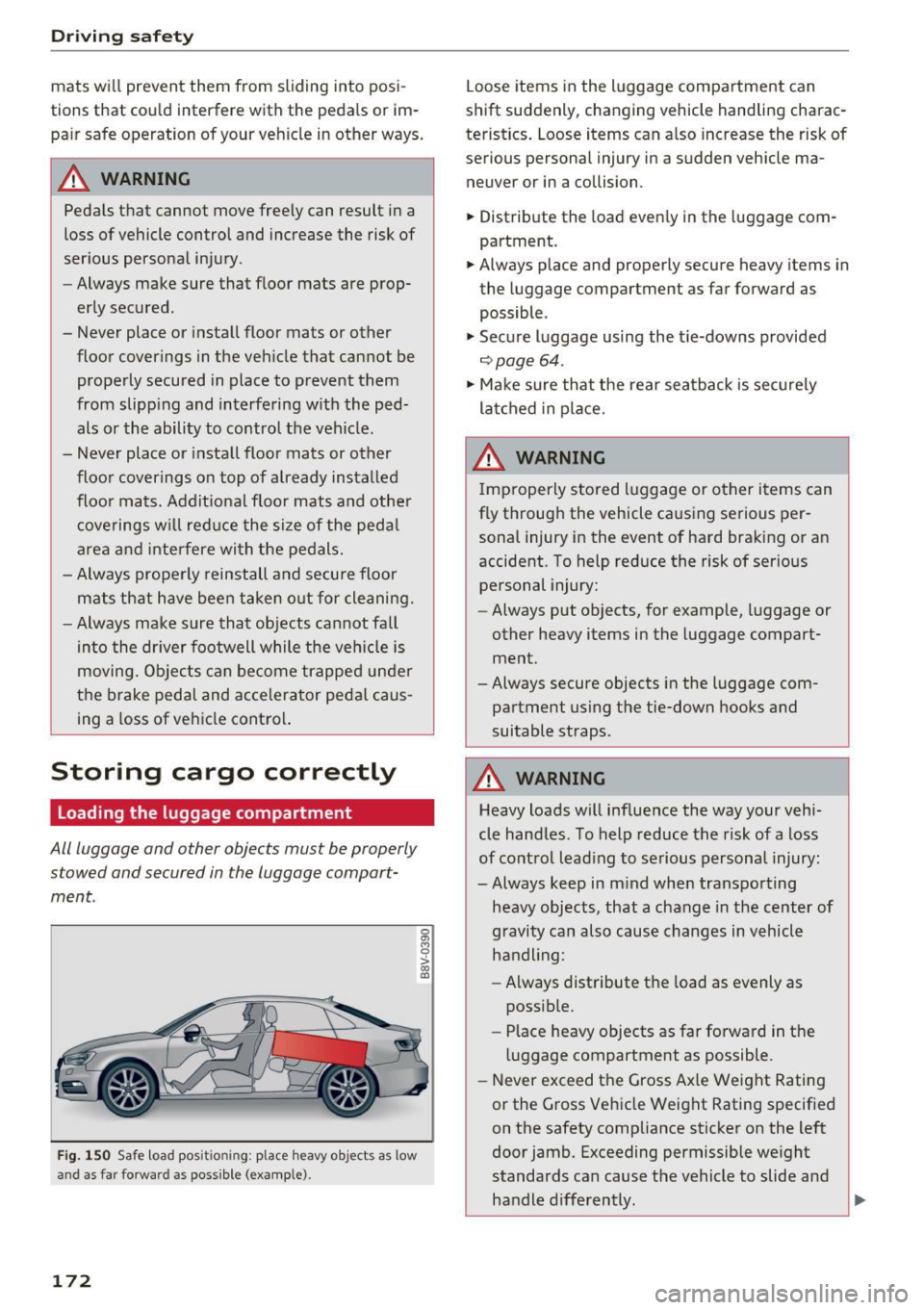
All luggage and other objects must be properly
s towed and secured in the luggage compart
ment.
Fig. 150 Safe load pos it io nin g: place heavy objects as low
and as far forward as possible (example) .
172
Loose items in the luggage compartment can
shift suddenly, changing vehicle handling charac
teristics. Loose items can also increase the risk of
serious personal injury in a sudden vehicle ma
neuver or in a collision.
.,. Distribute the load evenly in the luggage com
partment.
.,. Always place and properly secure heavy items in
the luggage compartment as far forward as
possible .
.,. Secure luggage using the t ie-downs provided
~ page 64.
.,. Make sure that the rear seatback is securely
latched in place.
A WARNING
Improperly stored luggage or other items can
fly through the vehicle causing serious per sonal injury in the event of hard braking or an
accident. To help reduce the risk of serious personal injury:
- Always put objects, for example, luggage or
other heavy items in the luggage compart
ment.
-Always secure objects in the luggage com
partment using the tie-down hooks and
suitable straps .
A WARNING
Heavy loads will influence the way your vehi
cle handles . To help reduce the risk of a loss
of control leading to serious personal injury:
-Always keep in mind when transporting heavy objects, that a change in the center of
gravity can also cause changes in vehicle
handling:
- Always distribute the load as evenly as
possible.
- Place heavy objects as far forward in the
luggage compartment as possible .
- Never exceed the Gross Axle Weight Rating
or the Gross Vehicle Weight Rating specified
on the safety compliance sticker on the left
door jamb. Exceeding permissible weight
standards can cause the vehicle to slide and
handle differently .
Ill>-