instrument cluster AUDI S3 2016 Owner's Manual
[x] Cancel search | Manufacturer: AUDI, Model Year: 2016, Model line: S3, Model: AUDI S3 2016Pages: 328, PDF Size: 81.78 MB
Page 108 of 328
e-tron
Energy flow indicator
Applies to veh icles: w ith p lug -in hybrid drive
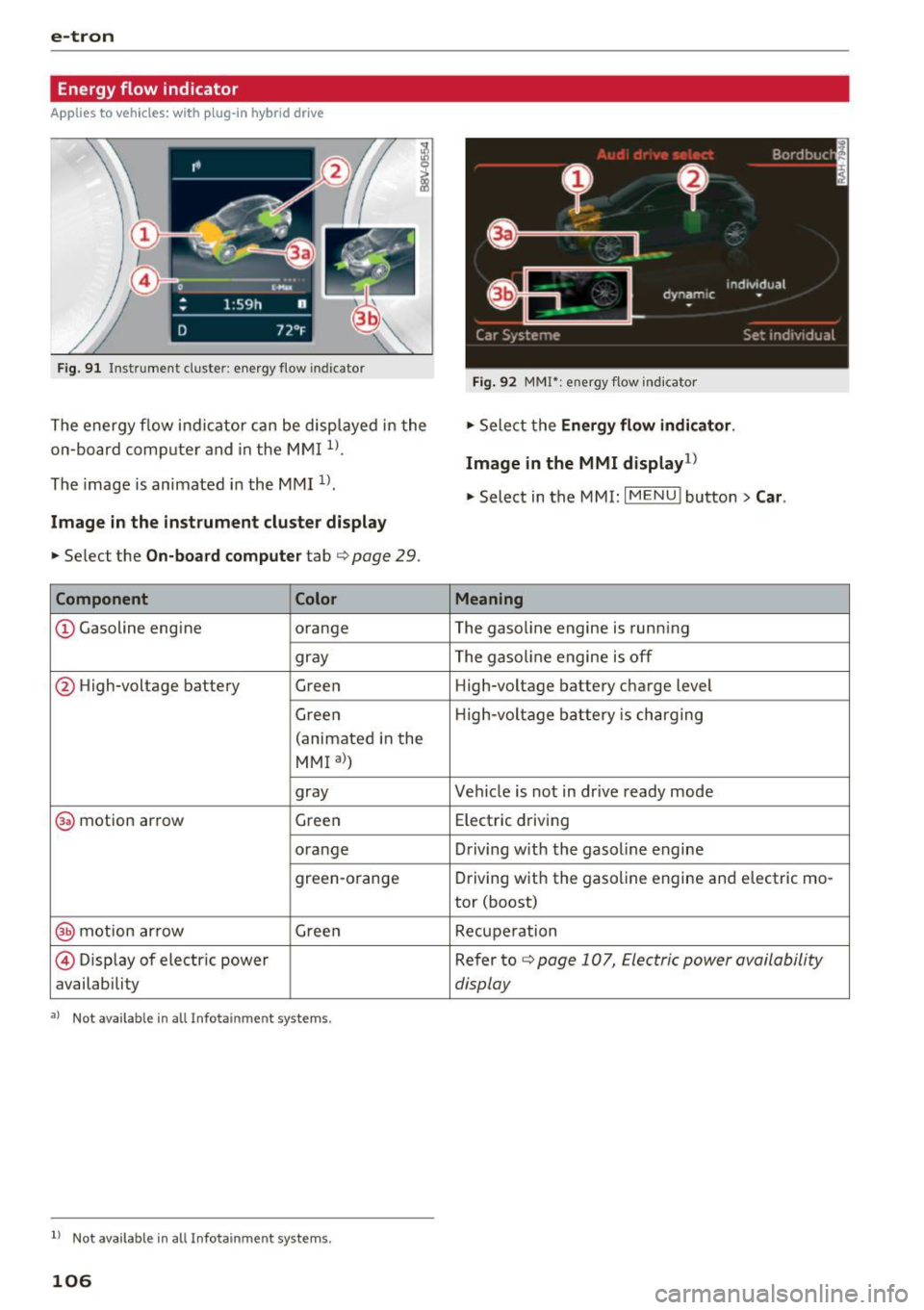
Fig . 91 Instrument cluster: e nergy flow indicator
The energy f low indi cator can be disp layed in the
on-board com puter and in the M MI
1>.
The image is animated in the MMI 1>.
Image in the instrument cluster display
.,. Se lect the On-board compute r tab c> page 29.
Component Color
CD Gasoline engine orange
gray
@ High-voltage battery
Green
Green
(animated i n the
MMI al )
gray
@ motion ar row Gree
n
o range
green-orange
@ mot ion ar row Gree n
@ Disp lay of electric power
availability
•> Not available in a ll Infotainmen t systems .
ll Not available in all Infota inmen t sys tems .
106
Fig. 92 MMI*: energy flow i nd icato r
.,. Select the Ene rgy flow indi cator .
Image in the MMI display1
)
.,. Select in the MMI: I MENU ! button> Car.
Meaning
The gasoline engine is runn ing
The gasoline engine is off High-voltage battery charge level
H ig h-voltage battery is ch arging
Vehicle is not in dr ive ready mode
Elect ric d riving
D riving w ith the gasol ine engine
Driving wit h the gaso line engine and electric mo-
tor (boost)
Recupe ration
Refer to
c> page 107, Electric power availability
display
Page 109 of 328

.... N
0 > CX)
rl I.Cl U"I
Statistics
Applies to vehicles: with plug-in hybrid drive
Fig. 93 Example image: e-tron stat istics
The statistics in the MMI l) show the distances
driven without emissions (electric) and with fuel.
The values are taken from on-board computers 1
and 2 .
Opening the statistics
.. Select: I MENU I function button >Car> Car sys
tems
> e-tron statistics
.. Turn the control knob to switch between on
board computer 1 and 2.
Electric power availability display
Applies to vehicles: with plug-in hybrid drive
Fig. 94 Instrument cluster; electric power availability dis
p lay
The power currently available in the electric drive
system is displayed when you open the energy
flow indicator
r=> page 106.
The bars are filled in with different colors accord
ing to the power status :
rl
~ 1> Not available in all Infotainment syste ms.
e-tron
@ -white: electric power currently available.
@ -green: electric power currently used .
The more segments that are colored in white in
the E-MAX area
0, the longer the maximum
power can be utilized . The segments turn off in
the E-MAX area when the maximum power can no
longer be utilized.
When the drive power is greatly reduced, the
drive mode will automatically switch to using the
gasoline engine.
The availability of power is generally restricted under the following conditions:
- The temperature of the high-voltage battery is
be very cold or very hot.
- The high-voltage battery charge level is low.
The power availability is not visible if the&] indi
cator light turns on .
(D Tips
High power availability is necessary, for exam
ple, when needing to accelerate quickly while
in electric driving mode to pass another vehi
cle.
Vehicle tool kit and tire mobility kit
Applies to vehicles: with plug-in hybrid drive
Fig. 95 Luggage compartment: vehicle tool kit and tire
mo bility kit
The vehicle tool kit and the tire mobility kit (Tire
Mobility System) are located in the side trim pan-
el @ and @ in the luggage compartment. .,.
107
Page 133 of 328
.... N
0 > CX)
....
"' U"I
....
"' ....
-Please note that unconsciously "resting"
your foot on the accelerator pedal prevents the cruise control from braking. This is be
cause pressing the accelerator pedal over
rides the cruise control system .
-If there is a brake system malfunction such
as overheating when the speed warning sys
tem is switched on, the braking function in
the system will be deactivated. The remain
ing speed warning system functions will re
ma in active, as long as the~ (USA mod
els) /
fil (Canada models) indicator light is
on.
{i) Tips
- The cruise control system is ideal for
stretches w ith speed limits. The d river is re
sponsible for adhering to the correct speed.
- The cruise control remains active when
shifting gears.
- The brake lights turn on when the brakes
are act ivated.
Switching on
Appl ies to vehicles: with c ru ise control system
0
f
®t
0
Fig. 114 Operat ing lever: cruise contro l system
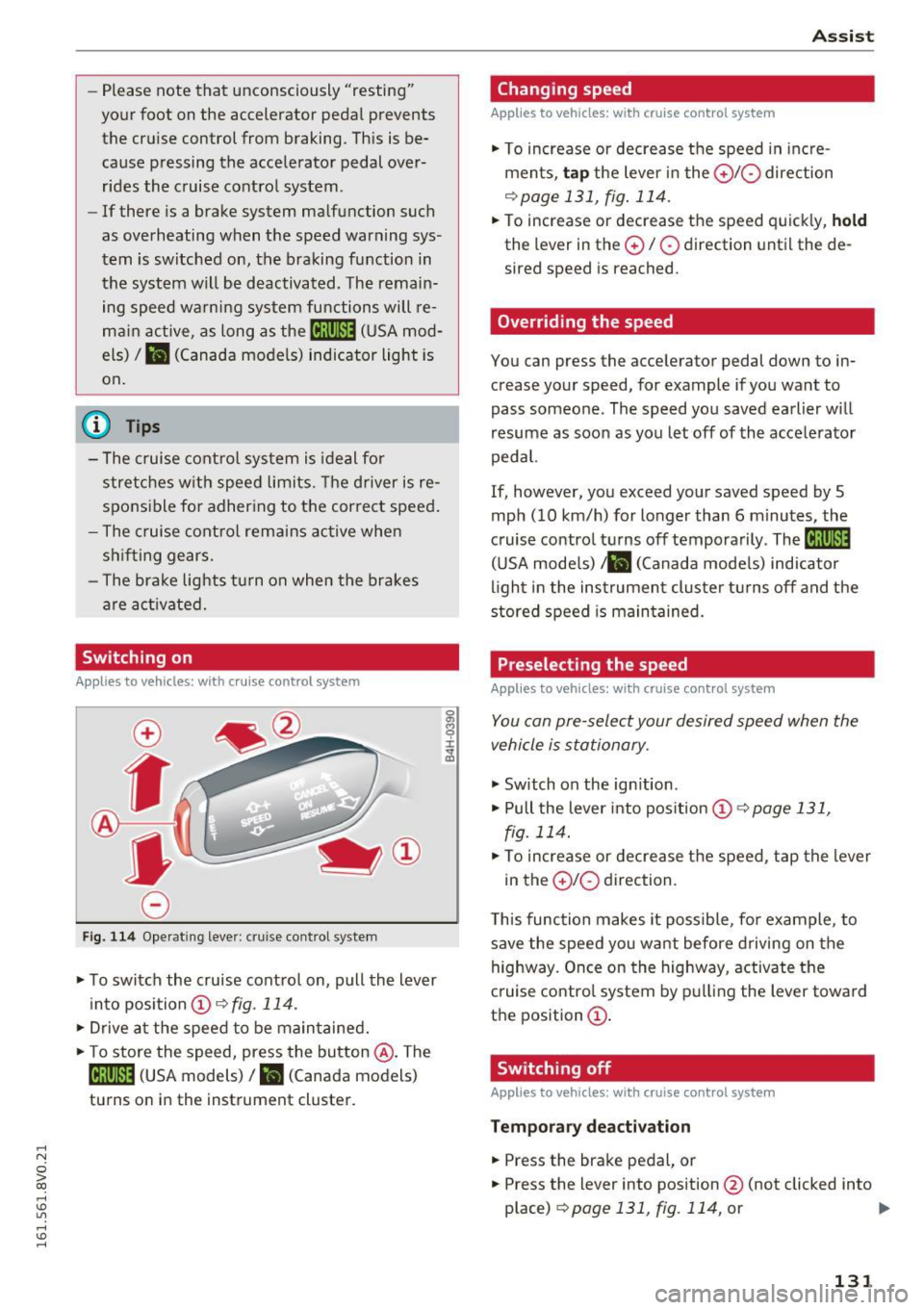
.. To switch the cruise control on, pull the lever
into position @~
fig. 114.
.. Drive at the speed to be maintained .
.. To store the speed, press the button @. The
@;\1)~14 (USA models) / l'I (Canada models)
turns on in the instrument cluster.
Assist
Changing speed
App lies to vehicles: w ith cruise control system
., To increase or decrease the speed in incre
ments,
tap the lever in the 010 direction
~ page 131, fig. 114.
.. To increase or decrease the speed quickly, hold
the lever in the 0 / 0 direction until the de
sired speed is reached.
Overriding the speed
You can press the accelerator pedal down to in
crease your speed, for example if you want to
pass someone. The speed you saved earlier will
resume as soon as you let off of the accelerator
pedal.
If, however, you exceed your saved speed by 5
mph (10 km/h) for longer than 6 minutes, the
cruise control turns off temporarily .
The@;\!)~14
(USA mode ls) ;fil (Canada models) indicator
light in the instrument cluster turns off and the
stored speed is maintained.
Preselecting the speed
Appl ies to vehicles: w it h cruise co ntrol system
You can pre-select your desired speed when the
vehicle is stationary.
., Switch on the ign ition .
.. Pull the lever into position
(D 9 page 131,
fig. 114 .
.. To increase or decrease the speed, tap the lever
in the
010 direction.
This function makes it possible, for example, to
save the speed you want before driving on the
highway. Once on the highway, activate the
cruise control system by pulling the lever toward
the position
(D .
Switching off
Applies to veh icles: w it h cru ise co ntrol system
Temporary deactivation
.. Press the brake pedal, or
.. Press the lever into position@ (not clicked into
place)
~ page 131, fig. 114, or ..,
131
Page 136 of 328
Assist
(D Note
The sensor can be displaced by impacts or
damage to the bumper , whee l housing and
underbody. The adaptive cruise control and
pre sense front may become impaired as a re
sult . Have an authorized Audi dealer or au
thorized Audi Service Fac ility check their func
tion .
In curves
Applies to veh icles: w ith Aud i adapt ive cru ise co ntro l and Audi
pre se nse front
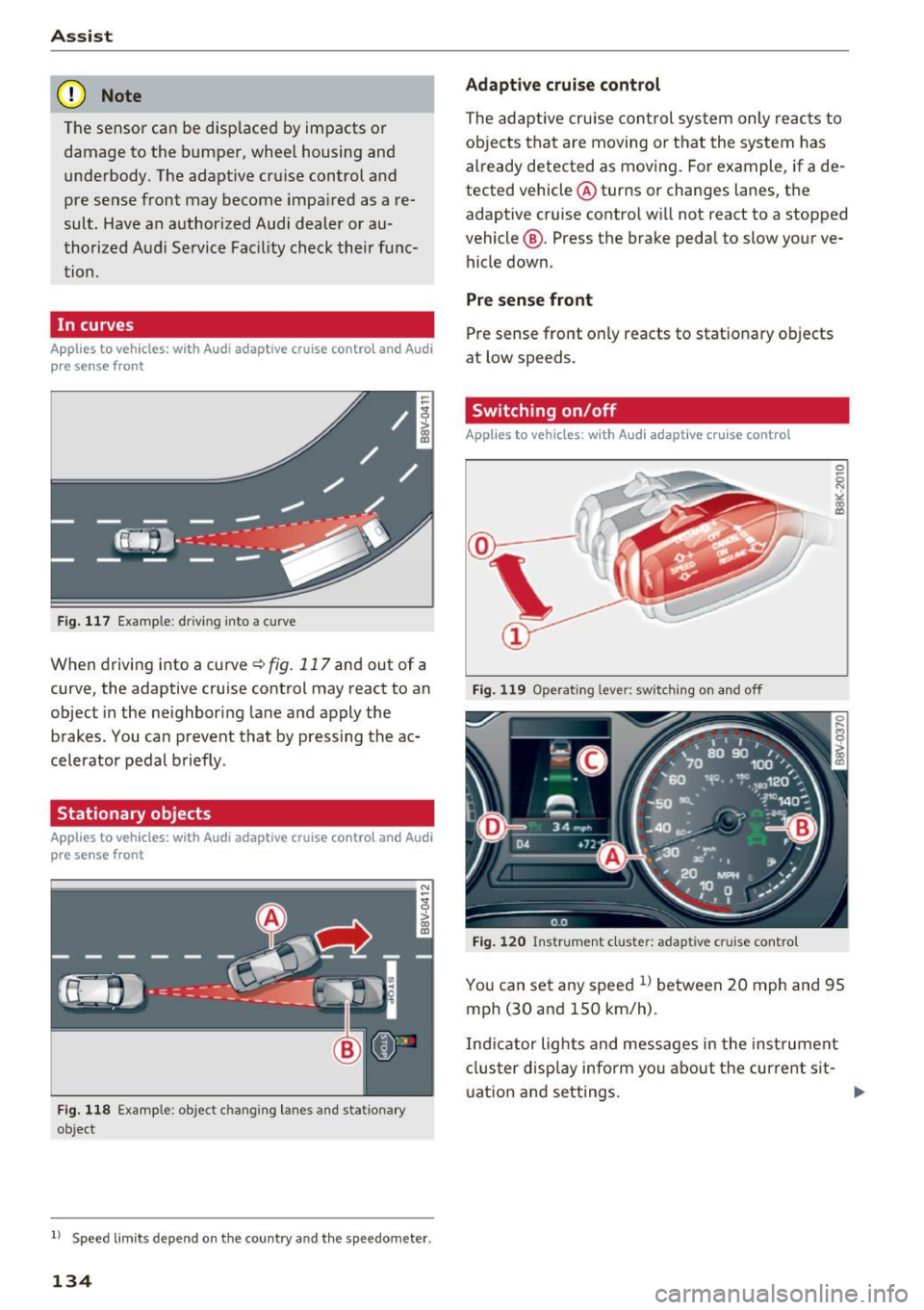
Fig. 117 Example: driving into a curve
When driving into a curve ¢fig. 117 and out of a
curve, the adaptive cruise control may react to an
objec t in the neighboring lane and apply the
brakes. You can prevent that by pressing the ac
celerator pedal briefly .
Stationary objects
App lies to veh icles: with Aud i adapt ive cruise co ntro l an d Audi
p re se nse front
Fig . 118 Examp le: object changing lanes and stat ionary
object
l) Speed limits de pend on t he country and th e s pee domet er.
134
Adaptive cruise control
The adaptive cruise control system only reac ts to
objects that are moving or that the system has
already detected as moving. For example, if a de
tected vehicle @turns or changes lanes, the
adaptive cruise contro l will not react to a stopped
vehicle @. Press the brake pedal to slow your ve
hicle down.
Pre sense front
Pre sense front only reacts to stationary objects
at low speeds.
Switching on/off
App lies to vehicles: wit h Audi adapt ive c ru ise control
Fig . 11 9 Operat ing lever: swi tching on and off
Fig. 120 Instrument cluster: adapt ive cruise contro l
You can set any speed l) between 20 mph and 95
mph (30 and 150 km/h).
Indicator lights and messages in the instrument
cluster display inform you about the current sit-
u ation and settings .
1JJ,-
Page 137 of 328
,....,
N
0 > co ,....,
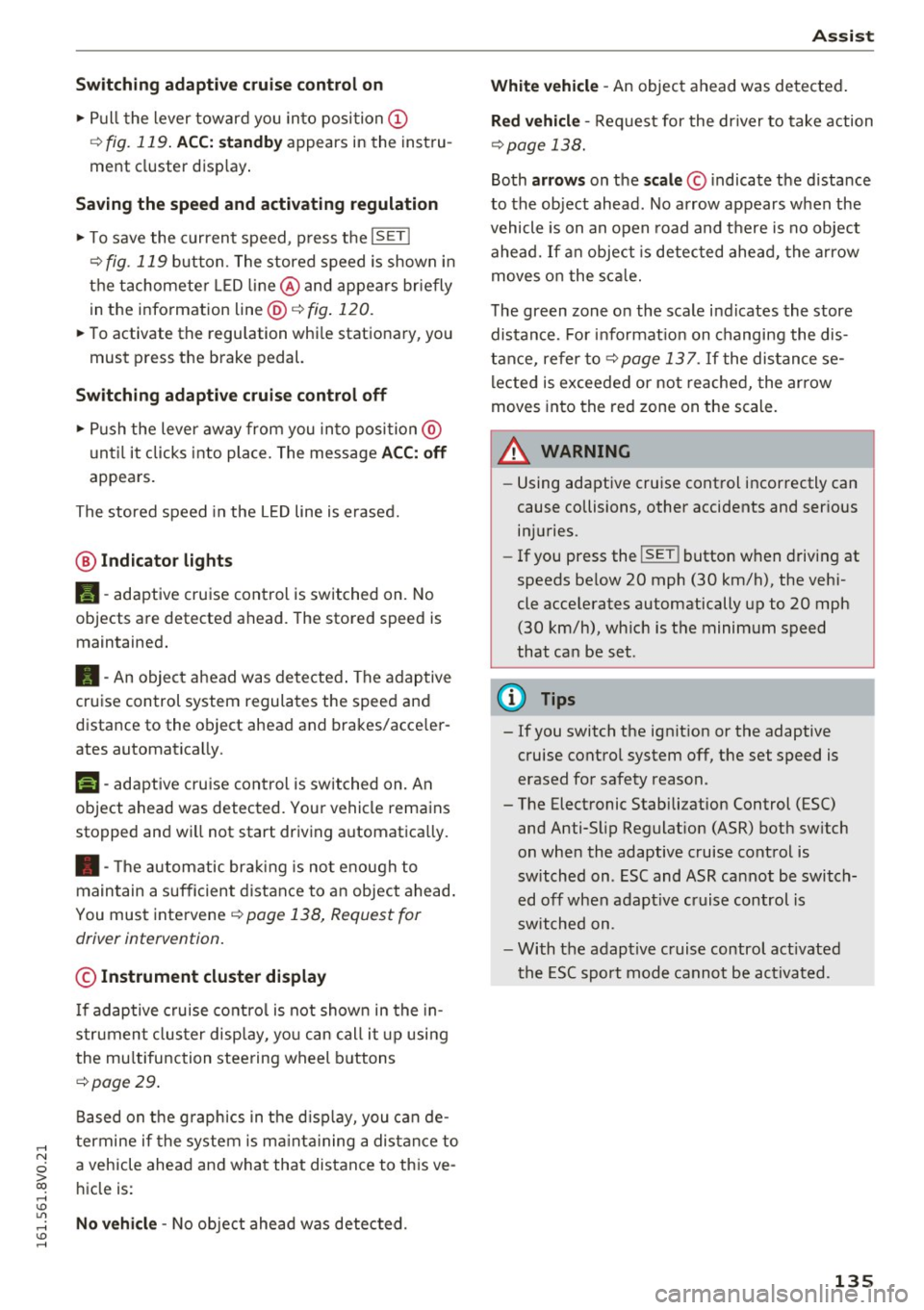
"' Pull the lever toward you into position @
¢fig. 119 . ACC: stan dby appears in the instru
ment cluster disp lay .
Saving the speed and activating regulati on
"'T o save the c urrent speed , press the ISETI
¢fig. 119 button. The stored speed is shown in
t h e tachomete r LED line @and appears briefly
in the information line @¢
fig. 120.
"' To activate the regu lation whi le stationary, you
must press the brake pedal.
Sw itching adaptiv e cruis e control off
"' Push the lever away from you into position @
until it clicks i nto place. The message
AC C: off
appears .
The stored speed in the LED line is erased.
@ Indicato r lights
II -adaptive cruise control is switched on. No
objects are detected ahead. The stored speed is
maintained.
• -An object a head was detected . The adaptive
cruise control system regulates the speed and
d istance to the object ahead and brakes/acce ler
ates automatica lly.
fij -adaptive cru ise control is switched on. An
object ahead was detected. Your vehicle remains
stopped and w ill not start driving automatica lly.
• -T he automatic bra king is no t enough to
maintain a sufficient distance to a n object ahead.
You must intervene ¢
page 138, Request for
driver intervention.
© Instrument clu ster display
If adaptive cruise control is not shown in the in
s trument cluster disp lay, yo u can call it up using
the mu ltifunction steering wheel b uttons
¢ page 29 .
Based on the g raph ics in the d isp lay, you can de
termine if the system is m ainta ining a distance to
a vehicle ahead and what that distance to this ve
hicle is:
No vehi cle -No object ahead was detected.
Assist
White vehicl e -An object ahead was de tected .
Red vehicl e -Request for the dr iver to take action
¢page 138.
Both arrows on the scal e© indicate the d istance
to the object ahead . No arrow appears when the
vehicle is on an open road and t here is no object
ahead. If an object is detec ted ahead, the a rrow
moves on the sca le.
T he green zone o n the scale indicates the store
distance. For informat ion on changing the dis
t a nce, refer to ¢
page 13 7. If the distance se
l ected is exceeded or not reached, the arrow
moves into the red zone on the scale.
A WARNING
- Using adaptive cruise control incorrectly can
cause collisions, other accidents and ser ious
in ju ries.
- If you press the
!SET ! button w hen driving at
speeds be low 20 mph (30 km/h), the vehi
cle acce lerates automatically up to 20 mph
(30 km/h), wh ich is the minimum speed
that can be set.
{!) Tips
- If you switch the ignit ion or the adaptive
cruise control system off, the set speed is
erased for safety reason.
- The Electronic Stabilization Control (ESC) and Anti-S lip Regulat ion (ASR) both sw itch
on when the adaptive cruise control is
switched on . ESC and ASR ca nnot be switch
ed off when adapt ive cruise control is
switched on.
- With the adaptive cruise control act ivated
t he ESC spo rt mode cannot be activated.
135
Page 139 of 328
,....,
N
0 > co ,....,
Ove rriding means ex ceeding the selected speed
when adaptive cruise control is active, for exam
p le when pressing the accelerator peda l when
passing.
"'T o accelerate manua lly, p ull the lever toward
you into position @and ho ld it there. The mes
sage
ACC : over ride appears . Or
"' press the accelerator pedal.
"' To resume cruise control, release the lever or
take your foot off the acce lerator pedal.
Inte rrupting cruise contr ol w hil e driving
"'Move the lever into position @. The message
ACC: standb y appears. Or
"' press the brake pedal.
"' To resume the stored speed, move the lever in
to posit ion @.
Int errupting c rui se contr ol wh en stopped
"' Push the lever away from you into position @.
The message
ACC : stan dby appears.
"' To resume cruise control, press the brake pedal
and pull the lever toward you into position@.
A WARNING
It is dangerous to activate cruise control and
resume the stored speed when the current
road, traffic or weather conditions do not pe r
m it this. This could result in a crash.
Setting the distance
A ppl ies to v ehicles: with Audi a daptive cruise co ntro l
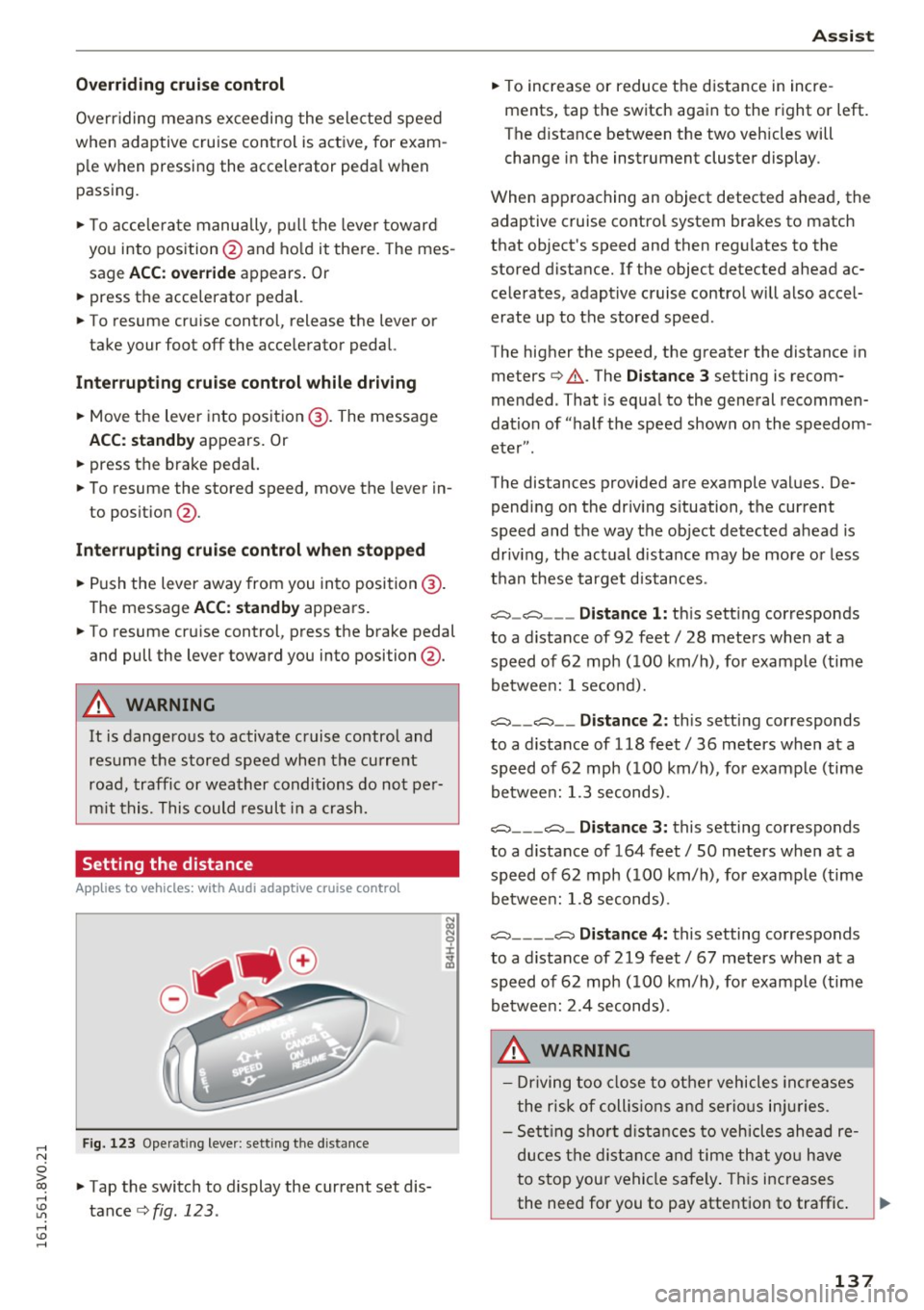
Fig. 123 Operat ing lever: setting the distance
"' Tap the switch to display the current set dis
tance
c>fig. 123 .
Assist
"'To increase or reduce the d istance in incre
ments, tap the switch again to the right or left.
The distance between the two veh icles will
change in the instrument cluster display.
When approaching an object detected ahead, the adaptive cruise contro l system brakes to match
that object's speed and then regu lates to the
stored distance. If the object detected ahead ac celerates, adaptive cruise control will also accel
erate up to the stored speed.
The higher the speed, the greater the distance in
meters
c> & . The Distance 3 setting is recom
mended. That is equa l to the general recommen
dation of "half t he speed shown on the speedom
eter" .
The distances provided are example values. De pending on the driv ing s ituation, the current
speed and the way the object detected ahead is
driv ing, the actual d ista nce may be more or less
t h an these target d istances .
o::::::::,_o::::::::, ___ Distance 1: th is sett ing corresponds
to a distance of 92 feet/ 28 meters when at a speed of 62 mph ( 100 km/h), for example (time
betwee n: 1 second).
o::::::::, __ o::::::::, __ Distanc e 2: this setting corresponds
to a distance of 118 feet/ 36 meters when at a speed of 62 mph ( 100 km/h), for example (time
betwee n: 1.3 seconds) .
o::::::::, ___ o::::::::,_ Distance 3: this setting corresponds
to a distance of 164 feet
I SO meters when at a
speed of 62 mph ( 100 km/h), for example (time
betwee n: 1.8 seconds) .
o::::::::, ____ o::::::::, Distance 4: this setting corresponds
to a distance of 219 feet
I 67 meters when at a
speed of 62 mph ( 100 km/h), for example (time
betwee n: 2.4 seconds) .
A WARNING
-Driving too close to other vehicles increa ses
the risk of collis ions an d serio us inj uries.
- Se ttin g sho rt d istances to vehicles ahead re
duces the dis tance an d time th at you have
to stop you r vehicle safe ly . Th is increases
the need for you to pay attention to traffic . ..,.
137
Page 142 of 328
Ass is t
- The pre sense b asic functions may not be
available if there is a ma lfunction in the ESC
system or the airbag contro l module.
- Note that with pre sense basic, the reversi
ble safety belt pretensioner on the front
passenger 's s ide deact ivates when the front
passenger's airbag is deactivated.
Audi pre sense front
Description
A pp lies to veh icles: with Audi pre sense front or Audi adapt ive
cr uise control
Pre sense front informs you if the distance to the
vehicle ahead falls below the safe distance for an
extended period of time.
It c an warn of a poss i
b le co llision and initiate braki ng maneuve rs,
within the limits of the system.
When detected in time, the system can assess
dangerous s ituations where an object ahead
b rakes suddenly or if your own vehi cle is t raveling
at a high speed and approaching an object that is
mov ing more slowly. If detect ion is not possible,
then pre sense front does not react.
Warnings
Applies to veh icles: with Audi p re se nse front o r Aud i ada ptive
cr uise con trol
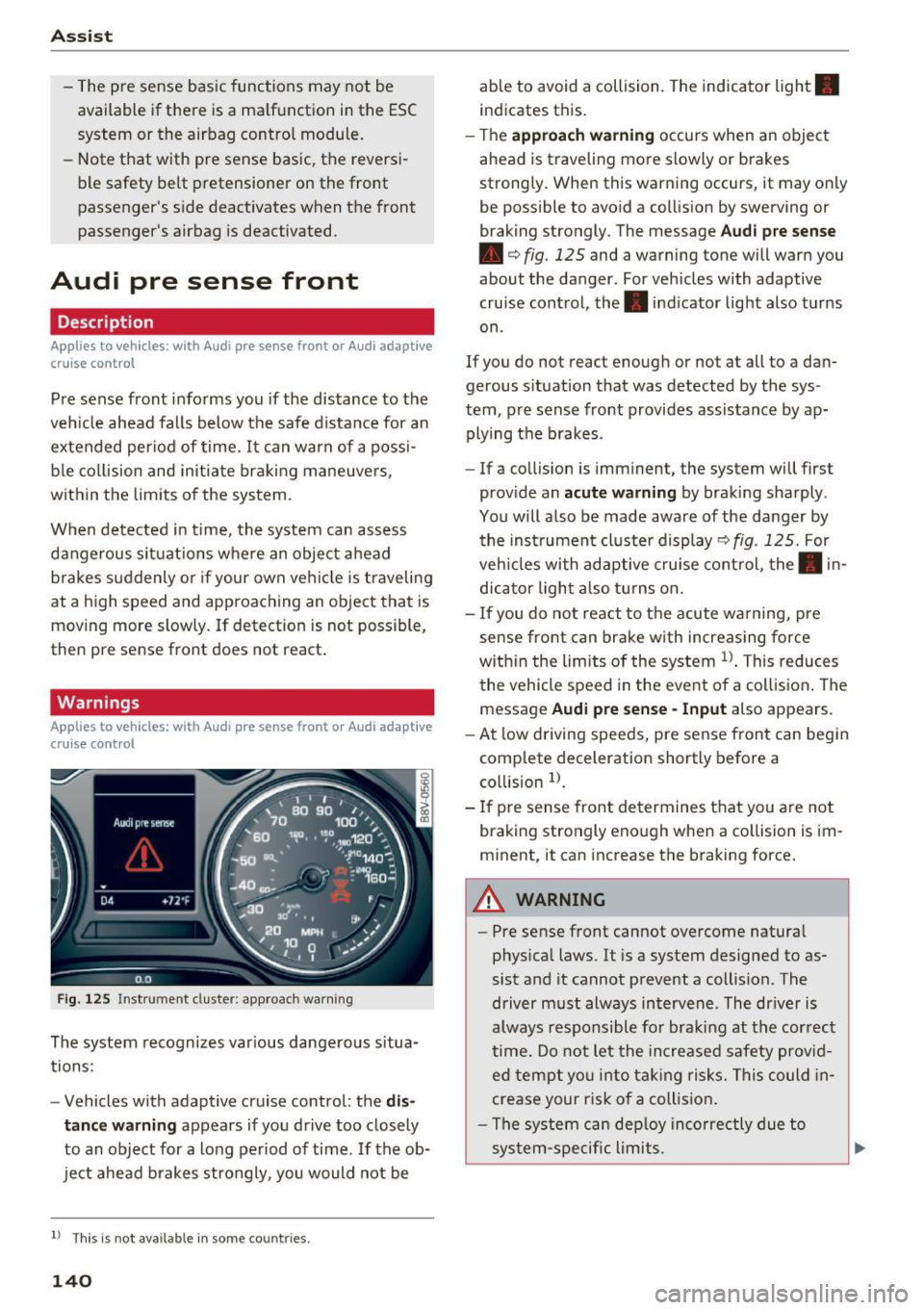
F ig . 12 5 Instrument cluster: app roach wa rning
The system recognizes var ious dange rous situa
tions:
- Vehicles with adapt ive cruise control: the
dis
tance warning
appears if yo u drive too closely
to an object for a long period of time. If the ob
ject ahead b rakes strongly, you would not be
l ) Thi s is not ava ilab le in some co un tri es .
140
able to avoid a collision. The indicator light .
indicates this.
- T he
approach w arning occurs when an object
ahead is traveling more slowly or brakes
strong ly. When this warning occurs, it may only
be possible to avoid a coll is ion by swerving or
braking strongly. The message
Aud i p re sense
• c:> fig. 125 and a warning tone will warn you
about the danger. For vehicles with adaptive
cruise control, the. indicator light also turns
on .
If you do not react enough or not at all to a da n
gerous s ituation that was detected by the sys
tem , pre sense front provides assistance by ap
plying t he b rakes .
- If a collision is imminent, the system will first
prov ide an
acute w arning by braking sharply .
You will also be made aware of the danger by the ins trument cluste r display
c:> fig . 125. For
veh icles with adaptive cru ise cont rol, the . in
dic ator light a lso tu rns on .
- If you do not react to the acute warning, pre
sense front can brake w ith increasing force
w it hi n the lim its of the system
l )_ This reduces
the vehicle speed in the event o f a collis ion . The
message
Audi pre sense -Input also appears.
- At low driving speeds, pre sense front can begin
complete deceleration shortly before a
co llision
l).
- If p re sense front determines t hat you are not
braking strongly enough when a co llision is im
m inent, it can increase the braking force.
A WARNING
-
- Pre sense front cannot overcome natura l
phys ica l laws. It is a system designed to as
sist and it cannot prevent a collision . The
driver m ust always intervene . The dr iver is
always responsible fo r braki ng at the correct
time . Do not let the in crease d sa fety prov id
ed tempt you into ta king risks. This could in
crease your risk of a collision .
- The system can dep loy inco rre ctly due to
sys tem-specific li mits.
Page 145 of 328
.... N
0 > CX)
.... I.Cl U"I
.... I.Cl ....
-For safety reasons, active lane assist must
not be used when there are poor road and/
or weather conditions such as slippery
roads, fog, gravel, heavy ra in, snow and the
potent ial for hydroplaning . Using active lane
assist under these conditions may increase
the risk of a c rash.
Switching on and off
Applies to vehicles: with Audi active lane assist
•
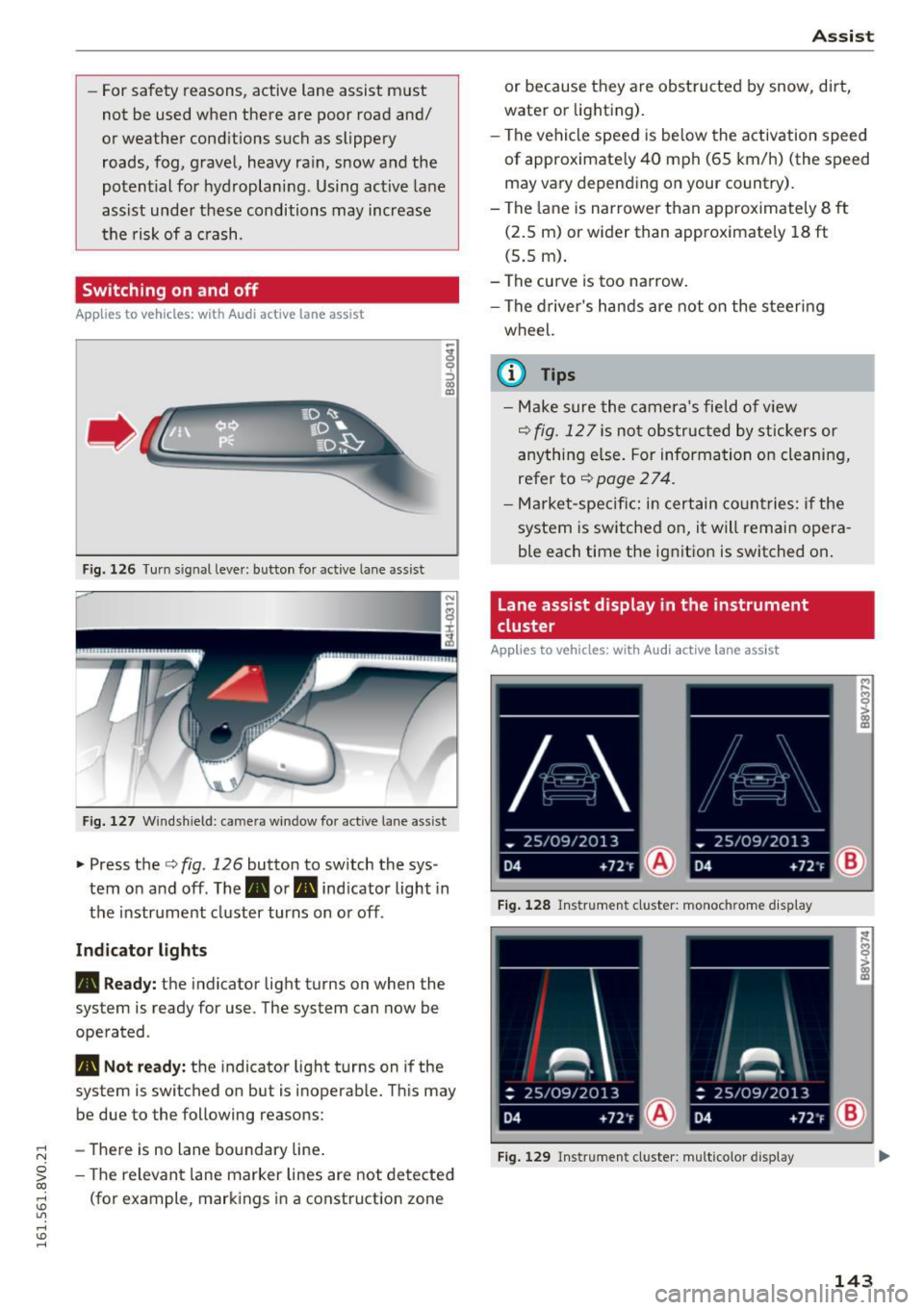
F ig. 1 26 Turn s ig n al leve r: button for active lane as sist
F ig. 127 W ind sh ield: c ame ra win dow fo r act ive lane ass is t
~ Press the c::> fig. 126 button to sw itch the sys
tem on and off . The . or. indicator light in
the instrument cluster turns on o r off .
Ind icator light s
• Read y :
the indicator light turns on when the
system is ready for use. The system can now be
operated .
• Not ready: the indicator light turns on if the
system is switched on but is inoperable. Th is may
be due to the following reasons:
- There is no lane bo undary line .
- The relevant lane marker lines are not de tected
(fo r example, markings in a const ruction zone
A ss ist
or because they are obstructed by snow, dirt,
water or lighting).
- The vehicle speed is be low the activation speed
of approximate ly 40 mph (65 km/h) (the speed
may va ry depend ing on your country).
- The lane is narrowe r th an approximately 8
ft
(2.5 m) or wider than approximate ly 18 ft
(5.5 m) .
- The curve is too narrow .
- The d river's hands are not on the steering
wheel.
(0 Tips
- Make sure the camera's field o f view
c::> fig . 12 7 is not obs tructed by st ickers or
anything e lse. For informa tion on clea nin g,
refer to
c::> page 2 7 4.
- Market-specifi c: in certain co untries: if the
system is switched on, it will remain opera
ble each time the ig nitio n is switched on .
Lane assist display in the instrument
cluster
Applies to vehicles: with Audi act ive lane assist
Fig. 1 28 Ins trumen t cl uster: monoc hrom e disp lay
F ig . 12 9 Instru men t cl uster: multicolor display
143
Page 146 of 328
Assist
The lane assist display can be called up using the
buttons in the
multifunction steering wheel
c::>page29 .
Monochrome display
Refer to c::> fig. 128
® Solid lines: active lane assist is switched
on and ready to provide warnings on the
side that is ind icated.
® Blinking lines (left or right): using vi bra-
tions in the steering whee l, active lane as-
sist is warning you that you are leaving
the lane.
® Unfilled line(s): active lane assist is
switched on but is not ready to provide
warn ings.
No lines: active lane assist is sw itched off.
Multi-Color Display
Refer to q fig. 129
® Solid white lines: active lane ass ist is
sw itched on and ready to provide warn-
ings on the side that is indicated.
® Red lines (left or right) : using vibrations in
the steering wheel, active lane assist is
warn ing you that you are leaving the lane.
® Solid gray lines: active lane assist is
switched on but is not ready to provide
warn ings.
No lines: active lane assist is switched off.
Messages in the instrument cluster display
If the active lane ass ist has a malfunction , the
rm indicator light in the instrument cluster dis
p la y turns off and one of the following messages
appears:
Audi active lane assist: currently not available.
No camera view
This message appears if the camera is unable to
detect the lines . Th is could happen if :
l) This fun ction is not availab le in all coun tries.
144
-The camera fie ld of view c;,page 143, fig . 127 is
dirty or covered in ice. Clean this area on the
w indshield.
- The camera fie ld of view is fogged over . Wait
until the fog has cleared before switching the
active lane assist on again.
- The system has been unable to detect the lanes
for an extended period of time due to road con
ditions . Switch the act ive lane assist back on
when the lines are more visible .
Audi active lane assist: Currently unavailable
There is a temporary active lane assist malfunc
tion. Try switching the active lane ass ist on again
l ater.
Audi active lane assist: System fault!
Drive to an authorized Audi dealer or authorized
Audi Service Fac ility immed iately to have the
malfunction corrected.
rm Audi active lane assist: Please continue
steering vehicle!
This message appears if you are not steering by
yourself .
If this is the case, active lane assist does
not switch off, but it is "not ready" to provide a
warning . The system can help you keep the vehi
cle in the lane. However, you are responsible for
driv ing the veh icle and must steer it yourse lf .
Adjusting the steering time and vibration
warning
Applies to vehicles: with Audi active lane assist
You can adjust individual active lane assist set
tings in the MMI.
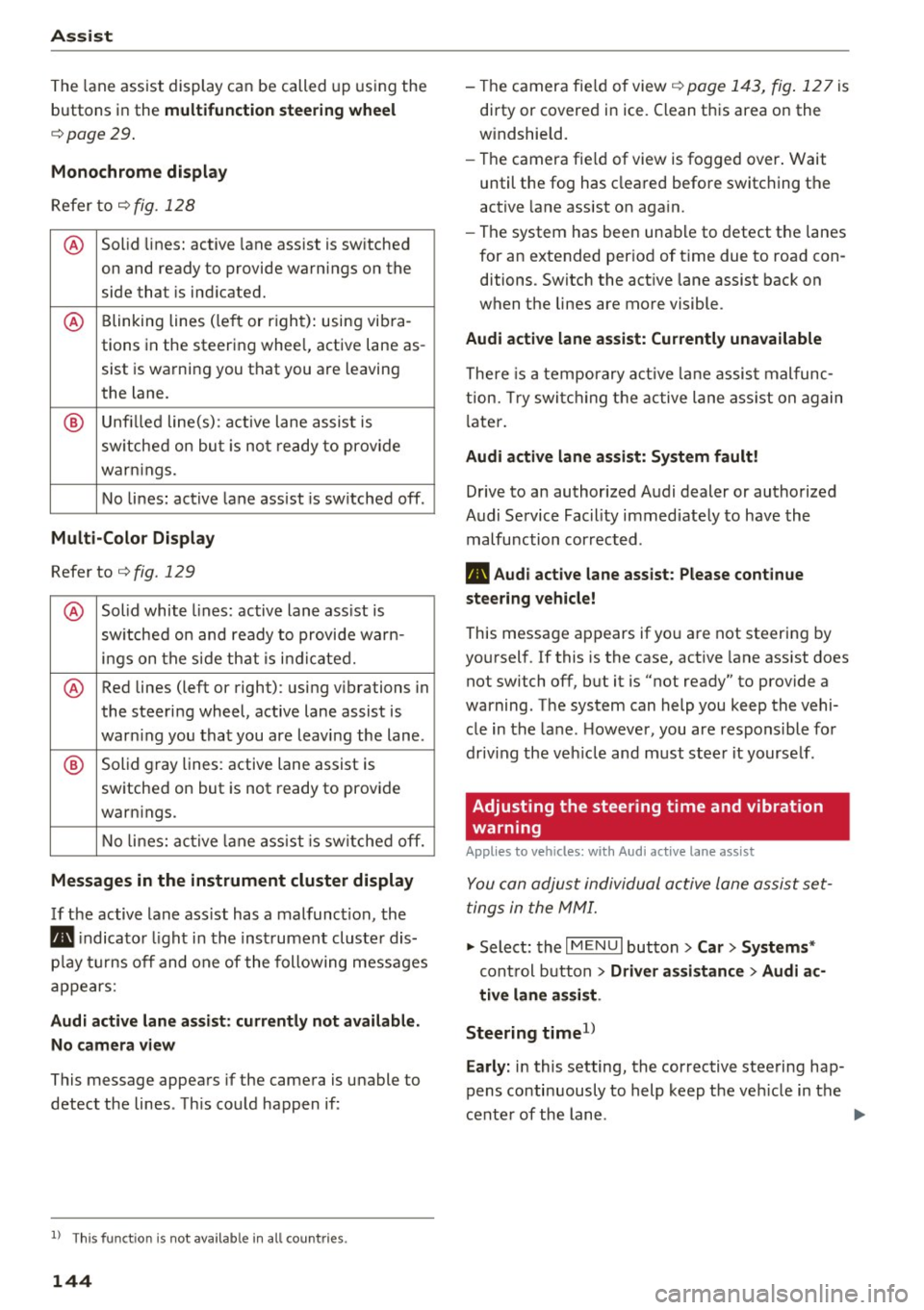
.,. Select: the I MENU I button> Car> Systems *
control button > Driver assistance > Audi ac
tive lane assist .
Steering time
1 >
Early: in this setting, the corrective steering hap
pens continuously to help keep the veh icle in the
center of the lane .
IJII>
Page 151 of 328
.... N
0 > CX)
rl
"' U"I
rl
"' ....
@ Tips
In some models, the maximum vehicle speed
can only be reached in the auto and dynamic
modes.
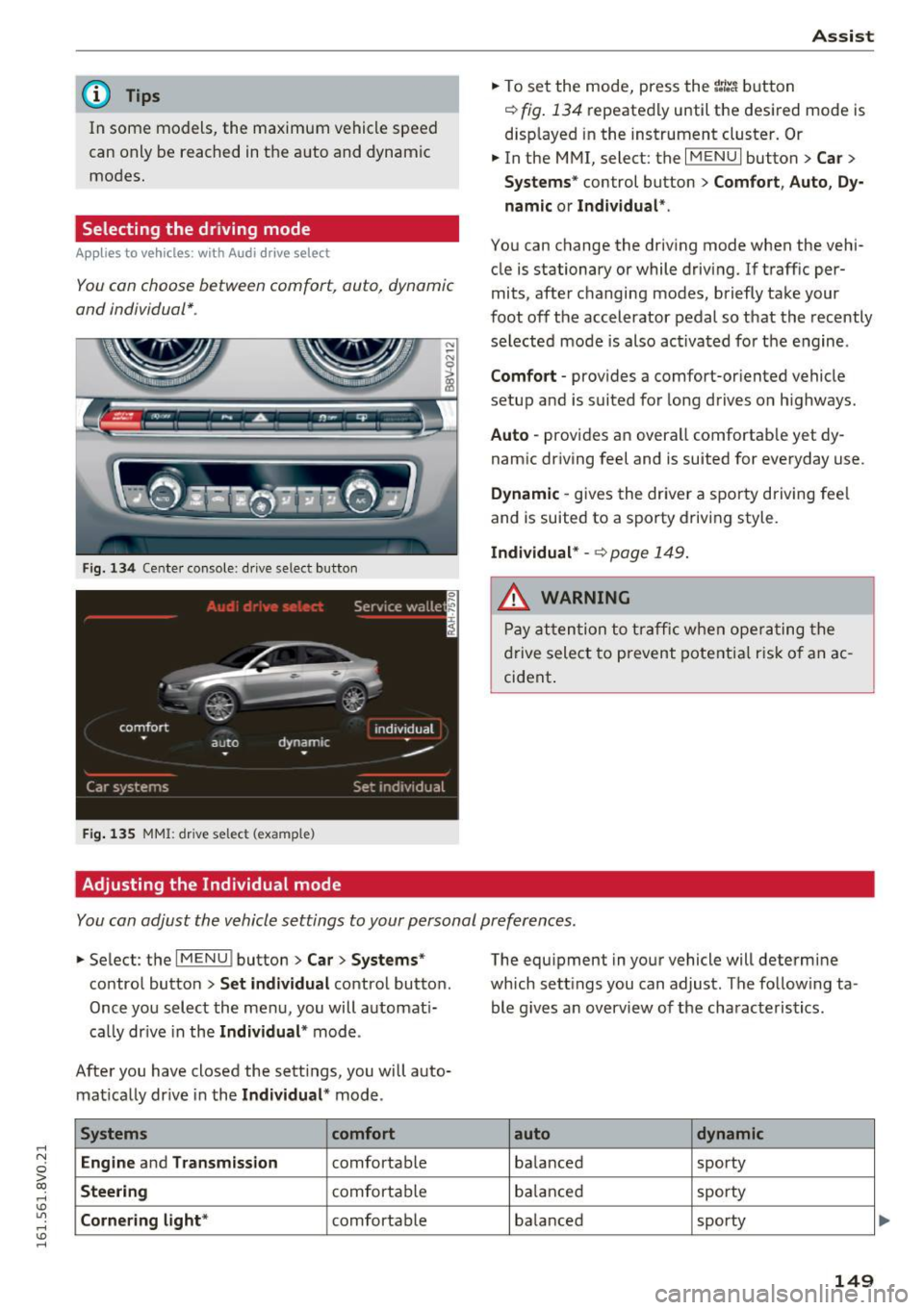
Selecting the driving mode
Appl ies to vehicles: with Audi d rive select
You con choose between comfort, auto, dynamic
and individual* .
Fig. 134 Cente r console : dr ive select button
F ig. 135 MMI: drive select (example)
Adjusting the Individual mode Assist
.,.
To set the mode, press the r:/tc'i button
~ fig. 134 repeatedly until the desired mode is
displayed in the instrument cluster. Or
.,. In the MMI, select: the
I MENU I button > Car >
Systems"
control button > Comfort, Auto, Dy
namic or Individual *.
You can change the driving mode when the vehi
cle is stationary or while driving. If traff ic per
mits, after changing modes, briefly take your
foot off the accelerator pedal so that the recently
selected mode is also activated for the engine .
Comfort -provides a comfort-or iented vehicle
setup and is suited for long drives o n highways.
Auto -provides an overall comfortab le yet dy
namic driving feel and is suited for everyday use .
Dynamic -gives the driver a sporty driving fee l
and is suited to a sporty driving style.
Individual* -~ page 149.
A WARNING
Pay attention to traffic when operating the
drive select to prevent potential risk of an ac
cident .
You can adjust the vehicle settings to your personal preferences .
.,. Select : the IMENU ! button> Car> Systems*
control button > Set individual control button.
Once you select the menu, you will automat i
cally drive in the
Individual * mode.
After you have closed the sett ings, you will auto
matically drive in the
Individual * mode.
Systems comfort
Engine
and Transmission comfortable
Steering comfortable
Cornering light* comfortable The equipment
in your vehicle will determine
which sett ings you can adjust. The follow ing ta
ble g ives an overview of the characteristics .
auto dynamic
balanced sporty
balanced sporty
balanced sporty
149