ESP AUDI S3 SEDAN 2015 User Guide
[x] Cancel search | Manufacturer: AUDI, Model Year: 2015, Model line: S3 SEDAN, Model: AUDI S3 SEDAN 2015Pages: 282, PDF Size: 71.14 MB
Page 61 of 282
....,
N
0 > co
rl I.O
"'
"'
"'
rl
_& WARNING
Always leave the lid on the glove compartment cover closed while driving to reduce the
risk of injury.
Additional storage compartments
There are additional storage compartments,
compartments and holders at other locations in
the vehicle :
- In the upper part of the glove compartment.
- In the center console under the center arm-
rest* .
- On the back of the right front seat . The com
partment* can hold a maximum weight of
2 lbs
(1 kg).
- Garment hooks on the B-pillar ¢
&.
_& WARNING
-Do not place any objects on the instrument
panel. Objects that are not stored securely
can slide around in the vehicle while driving,
when accelerating or braking or when turn
ing.
- Make sure that objects cannot fall out of the
center console storage compartment or oth
er compartments and into the footwell
while driving. These objects could prevent
you from braking or accelerating during sud
den braking maneuvers.
- Garments hung on the hooks must not ob
struct the driver's view. The garment hooks
are only designed for light objects . Do not
hang any garments with hard, sharp or
heavy objects in the pockets on the garment
hooks . These objects could injure vehicle oc
cupants during sudden brak ing or in a colli
sion - especially if the airbags deploy.
- Always keep the glove compartment closed
while driving to reduce the risk of injury dur
ing a collision or heavy brak ing.
- Read and following the WARNINGS in
¢ page 168, Important safety instructions
on the side airbag system.
-Hang garments so that they do not obstruct
the driver's view.
Seats and storage
-The garment hooks should only be used for
light articles of clothing . Do not leave any
heavy or sharp-edged objects in the pockets
that could interfere with the side airbags unfolding and cause injuries in the event of
a collision .
- Do not use coat hangers to hang garments,
because this could reduce the effectiveness
of the side curtain airbags.
- Do not hang any heavy objects on the gar
ment hooks, because they could cause injury
during heavy braking.
- Because of their load capacity, the hooks
should only be used to secure objects that
weigh a max imum of 10 lb (5 kg). Heavy ob
jects will not be secured sufficiently, and
this increases the risk of injury.
luggage compartment
Loading luggage compartment
Luggage items must be stowed securely.
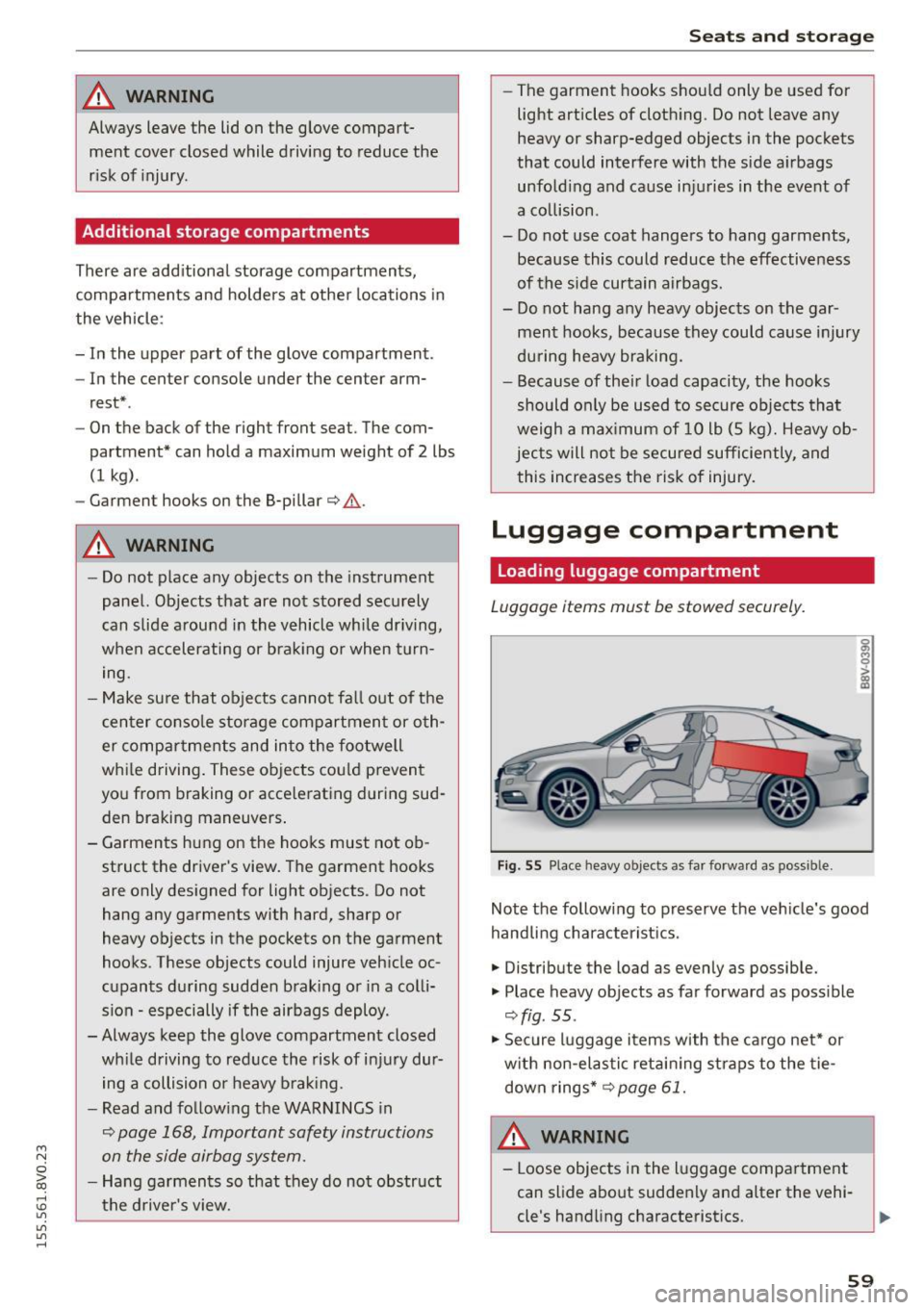
Fig. 55 Place heavy objects as far forward as poss ib le.
Note the following to preserve the vehicle's good
handling characteristics .
.,. Distribute the load as evenly as possible.
.,. Place heavy objects as far forward as possible
¢ fig . 55 .
.,. Secure luggage items with the cargo net* or
with non-elastic retaining straps to the tie
down rings* ¢
page 61.
WARNING
-Loose objects in the luggage compartment
can slide about suddenly and alter the vehi
cle's handling characteristics.
59
Page 62 of 282
Seats and storag e
-Loose objects in the passenger compart
ment can fly forward during abrupt maneu
vers or acc idents and injure occupants.
- Always store objects in the luggage com
partment and use suitable straps, particu
larly with heavy objects.
- When you transport heavy objects, a lways
remember that a change in the center of
gravity may result in a change in the veh i
cle's handling character istics.
- Follow all warnings
Q page 130, Driving
safety .
(D Tips
The tire pressure must be adjusted to the load
- see the tire pressure sticker located on the
driver's side B-pillar.
General information
.&, WARNING
Refer to the chapter Dr iving Safely
Q page 130, Driving safety for important in
formation, tips, suggestions and warnings that you should read and fo llow for your own
safety and the safety of your passengers.
Increasing the size of the luggage
compartment
The rear seat backrests can be folded forward ei
ther separately or together.
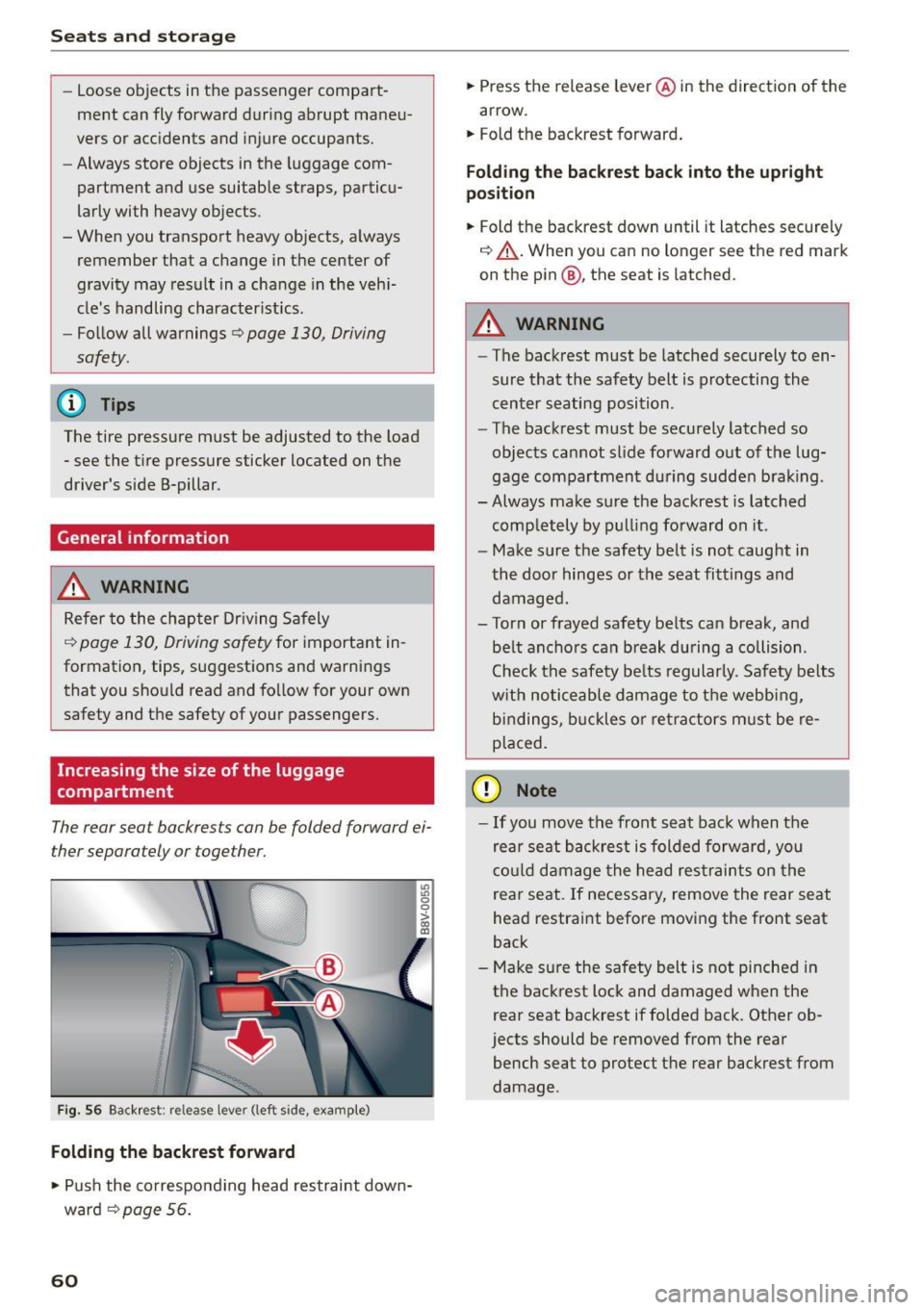
Fig. 56 Backrest: release lever (left side, example)
Folding the backrest forward
.,. Push the co rresponding head restraint down
ward ¢
page 56.
60
.,. Press the release leve r@ in the direction of the
arrow.
.,. Fold the backrest forward .
Folding th e backre st back into the upright
po sition
.,. Fold the backrest down until it latches securely
¢ ,&. .When you can no longer see the red mark
on the pin@, the seat is latched.
.&, WARNING
- The backrest must be latched securely to en
sure that the safety belt is protecting the
cent er seating position .
- The backrest must be securely latched so
objects cannot slide forward o ut of the lug
gage compartment du ring sudde n brak ing .
- Always make sure the backrest is latched
comp letely by pulling forward on it .
- Make sure the safety belt is not caught in
the doo r hinges or the seat fittings and
damaged.
- Torn or frayed safety be lts can break, and
be lt ancho rs can b reak du ring a collision .
Check the safety be lts regularly. Safety belts
w it h noticeable damage to t he webb ing,
bi ndings, b uckles o r ret ra ctors m ust be re
placed.
(D Note
- If you move the front seat back when the
rear seat backrest is folded forward, you
c o ul d damage the head res traints on the
rear seat. If necessary, remove the rear seat
head restraint before moving the front seat
back
- Make su re the safety belt is not pinched in
the back rest lock and damaged when the
rear seat backrest if folded back. Other ob
jects should be removed from the rear
bench seat to protect the rear backrest from
damage .
Page 66 of 282
Warm and cold
Warm and cold Climate control system
Description
Different systems could be installed.
- manual climate control system* or
- automatic climate control system*
The
climate control system* cools and removes
humidity from the air in the vehic le interior. It is
the most effective when the windows and panor
ama sunroof* are closed.
If there is a build-up of
heat inside the vehicle, ventilation can help to
speed up the cooling process . For this reason, the
windows and panorama sunroof can be opened
from the outside .~
page 41, Convenience open
ing/closing
Pollutant filter
The pollutan t filter removes pollutants such as
dust and pollen from the air.
Key recognition
You can store various settings for the manua l and
automatic
climate control system* and assign
them to the key being used .
A WARNING
Poor visibility can lead to acc idents.
- For safer driving, keep all w indows free of
ice, snow and fog.
- Become familiar as quickly as possible with
the correct use and function of the climate
control system, espec ially with the defrost
ing and defogging function .
- When the temperature is below freezing,
only use the windsh ield washer system after
the windsh ield has been warmed by the cli -
64
mate control system. The washer f luid could
freeze on the w indshield and impair visibili
ty.
(D Note
- If you suspect that the climate control sys
tem is damaged, switch the system off to
prevent further damage and have it checked
by an authorized Audi dealer or authorized
Audi Service Facility .
- Repairs to the Audi climate control system
require special technical knowledge and
special tools. See an author ized Audi dealer
or authorized Audi Service Facility .
@ For the sake of the environment
Reducing the amount of fuel used also re
duces the amount of pollutants that enter the
a ir .
@ Tips
- To prevent interference with the heating
and cooling output and to prevent the win
dows from fogg ing over, the air intake in
front of the w indshield must be free of ice,
snow or leaves.
- Condensation from the cooling system* can
dr ip and form a pudd le of water under the
vehicle . This is normal and does not mean
there is a leak .
- Th e energy management system may switch
the seat heating* or rear window defroster
off temporarily. These systems are available
again as soon as the energy balance has
been restored.
- The f lows through the vents under the rear
window. Make sure the openings are not
covered when p lacing clothing on the lug
gage compartment cover.
Page 73 of 282
M N
0 > co ,...., \!) 1.1'1
1.1'1
1.1'1
,....,
If you anticipate w hat you need to do next and
drive economically, you can easily cut your fue l
consumption by 10-15 percent. Th is sect ion will
g ive you some tips on how you can help the envi
ronment and your pocketbook.
The consumpt ion estimates as published by
ENVIRONMENTAL PROTECTION AGENCY (EPA)
and Transport Canada may not correspond to
your actual consumption on the road, which
w ill vary depend ing upon vehicle load and
speed, road and weather conditions, trip
length, e tc.
Drive smoothly and keep a lookout ahead
Vehicles use the most fuel when they are acceler
ating.
.. Avoid unnecessary accelerating and braking.
Vehicles use the most fuel when they are acceler
ating. If you anticipate what is going to happen next, you will need to brake less and, thus, accel
erate less. Let the vehicle coast whenever possi b le -for example when you see that the next traf
fic light is red.
Avoid full throttle
Driving at moderate speeds saves fuel and im
proves your mileage .
.. Try and keep well be low your car's max imum
speed .
Accelerating gently reduces fuel consumpt ion,
engine wear, and does not d isturb the env iron
ment .
Fue l consumption, exha ust emissions and eng ine
noise increase disproportionately at high speeds.
If you drive at approx imately t hree quarters of
top speed, fuel consumpt ion w ill be reduced by
one half . Never dr ive faste r than the posted
speed limit a nd weather conditions perm it.
Dri ving
Reducing unnecessary idling
Even when your car is just idling it burns up fuel .
.. Shut the eng ine off when you are not driving
the vehicle .
.. Do not warm up the vehicle by lett ing the en-
gine run at idle.
It is efficient to switch off the engine when stop
ped at ra ilroad crossings and long red lights.
Turning the engine off for just 30-40 seconds
saves more fuel than is b urned by starti ng the
engine aga in .
It takes a long t ime for the engine to warm up
fully when it is ru nning at idle. However, wear
and noxious emissions are espec ia lly hig h when
t h e engine is warming up. So you should d rive
away as soon as you sta rt the eng ine and avoid
run ning at high rpms w hile the eng ine is s till
warmi ng up .
@ Note
Do no t leave eng ine idl ing una ttended afte r
s ta rtin g.
If war ning lig hts s hou ld come on to
i ndica te imprope r operat ion, they would go
u nheede d. Extended idling also produces
heat, which could result in overheat ing or oth
er damage to the ve hicle or other property.
Regular maintenance
A badly tuned engine unnecessarily wastes a lot
of fuel.
.. Have your ve hicle serviced at reg ular in tervals.
B y havi ng your ve hicle regu la rly se rv iced by an
Audi dealer he lps to ensu re that it ru ns p rope rly
and economically. The condi tion of your veh icle
not only affects its sa fety and ability to ho ld i ts
val ue, it also affects
fuel consumption.
Check your oil each time you fill your tank.
The amou nt of oi l used is re lated to engine load
and speed.
It is normal for the oil consumption of a new en
gine to reach its lowest value after a certai n m ile-
age has been dr iven. ...,
71
Page 90 of 282
Automatic transmission
Launch Control-Program
Applie s to v ehi cles: w ith launch control
The Launch Control Program enables maximum
acceleration .
Requirement: The engine must be at operating
temperature and t he steering wheel must not be
turned.
.,. With the engine running, press the
!~OFFI but
ton briefly one time
l) .
.,. Pull the selector lever back out of the O/S posi
tion briefly to select the S position, or press it
toward the right into the tiptronic position or
select the
Dynamic driving mode in drive se
lect*
~page 112.
.,. Press the brake pedal firmly with your left foot
and hold it all the way down for at least 1 sec
ond.
.,. At the same time, press the gas pedal all the
way down with your right foot until the engine
reaches and stays at a high RPM level.
.,. Remove your left foot from the brake.
_.&. WARNING
- Always adapt your driving to the traffic flow.
- Only use Launch Control when road and traf-
fic conditions allow it and other drivers will
not be endangered or impacted by your driv
ing and the vehicle's acceleration.
- Please note that the drive wheels can spin
and the vehicle can break away when sport
mode is switched on, especially when the
road is slippery.
- Once the vehicle has started moving, press
the
l .1'3 OFF ! button briefly to turn the sport
mode off.
(D Tips
- The transmission temperature may increase
significantly after using the launch control program. If that happens, the program may
1l In vehicles w ith a d rive r infor matio n syste m, a n ESC light
in t he instrument clus ter s tays o n co ntinuo usly and t he
message
Stabilization control (ESC): sport. Warning! Re·
stricted stability
appears temporarily.
88
not be available for a few minutes. It will be
available again after a cool-down period.
- When accelerating using the launch control
program, all vehicle parts are subject to
heavy loads. This can lead to increased wear.
Emergency mode
App lies to vehicles : wi th S t ro ni c t ra nsmi ssio n
In the event of a system malfunction, there is an
emergency program .
If all of the selector lever positions are highlight
ed with a light background in the instrument
cluster display, there is a system malfunction and
the S tronic transmission is running in the emer
gency program. The vehicle can still be driven in
emergency mode, but only with reduced speed
and not in all gears. In some cases, the vehicle
cannot drive in reverse .
(D Note
If the transmission runs in emergency mode,
drive to an authorized Audi dealer or author
ized Audi Service Facility immediately to have
the malfunction corrected.
Transmission malfunction
• Transmission malfunction! Please stop the
vehicle and select P
There is a malfunction in the transmission. Park
the vehicle securely and do not continue driving.
See an authorized Audi dealer or authorized Audi
Service Facility for assistance.
• Transmission overheating! Please stop the
vehicle!
The transmission is too hot and can become dam
aged. Stop and let the transmission cool with the
engine running (at idle) in the P selector lever po
sition. Then the indicator light and the message
turn off, drive to an authorized Audi dealer or au
thorized Audi Service Facility immediately to have.,.
Page 94 of 282
Trailer mode
load" on the label located on the driver's side B
pillar (visible when the door is open). Inflate
trailer tires to trailer and tire manufacturers'
specifications.
Lights
Check to make sure both vehicle and trailer lights
are working properly.
Safety chains
Be sure tra iler safety cha ins are properly connect
ed from the trailer to the hitch on the vehicle.
L eave enough slack in the chains to permit turn
ing corners. When you install safety chains, make
sure they will not drag on the road when you are
driving .
The chains should cross under the trai ler tongue
to prevent it from dropping in case of separation
from the hitch .
Driving instructions
Driving with a trailer always requires extra care
and consideration .
To obta in the best poss ible handling of vehicle
and trailer, please note the following:
.,. Do not tow a loaded tra iler when your car itself
is not loaded.
.. Be especia lly careful when passing other
vehicles.
.. Observe speed limits .
.. Do not drive at the maximum permissible
speed.
.. Always apply brakes early.
.. Monitor the temperature gauge.
Weight distribution
Towing a loaded trai ler with an empty car results
in a high ly unstable distribution of weight. If this
cannot be avoided, drive at very low speeds only
to avoid the risk of losing steering control.
A "balanced" rig is easie r to operate and control.
This means that the tow vehicle should be loaded
to the extent possible and permissible, while
keeping the trailer as light as poss ible under the
circumstances. Whenever possible, transfer
some cargo to the luggage compartment of the
92
tow vehicle while observing tongue load require
ments and vehicle loading considerations.
Speed
The higher the speed, the more diff icult it be
comes for the driver to control the rig. Do not
drive at the maximum permissible speed. Reduce
your speed even more if load, weather or wind
conditions are unfavorab le -particularly when
going downh ill.
Reduce veh icle speed
immediately if the trailer
shows the slightest sign of swaying .
Do not try
to stop the swaying by accelerating.
Observe speed limits. In some areas, speeds for
vehicles towing tra ile rs are lower than fo r regular
vehicles .
Always apply brakes early. When driving down
hill, shift int o a lo wer gear to use the eng ine
braking effect to slow the vehicle . Use of the
brakes alone can cause them to overheat and fail.
Coolant temperature
The coolant temperature gauge¢ page 12 must
be obse rved carefully. The coolant temperature
can increase if you dr ive on long inclines in a low
gear at high engine speeds . Reduce your speed
immediately if the LEDs in the top part of the dis
play turn on .
For more information abo ut ind icator lights, re
fer to. ¢
page 19 .
A WARNING
-
Anyone not properly restrained in a moving
vehicle is at a much greater risk in an acci
dent. Never let anyone ride in your car who is
not proper ly wearing the restraints provided
by Aud i.
Trailer mode notes
Important to know
Your vehicle handles differently when towing a
trai ler because of the additiona l weight and dif
ferent weight distribution . Safety, performance
and economy will greatly depend on how careful-
ly you load your trailer and operate your r ig. ..,.
Page 95 of 282
M N
0 > co ,...., \!) 1.1'1
1.1'1
1.1'1
,....,
Before you actually tow your trailer, practice
turning, stopping and backing up in an area away
from traffic. Keep practicing until you have be
come completely fami liar with the way your ve hi
cle-trailer combination behaves and responds.
Backing up is d iff icu lt and requires practice . Back
i ng up w ith a trailer generally req uires steering
action oppos ite to that when backing up yo ur ve
hi cle without a trailer.
M aintain a g reater distance betwee n your vehicle
and the one in front of yo u. You w ill need more
room to stop. To compensate for the tra iler, you
will need a larger than norma l turning radius.
When passing, remember that yo u cannot acce l
erate as fast as yo u normally would because of
the added load. Make sure you have enough room
to pass. After passing, allow plenty of room for
your trailer before changing lanes again.
Avoid jerky sta rts, sharp turns or rapid lane
changes.
@ Tips
- Do not tow a tra ile r during the break-in peri
od of yo ur vehicle.
- If yo u tow a t railer, you r A udi may require
more frequent ma intenance due to the ex
tra load
~ page 262.
Parking on a slope
Do not park on a slope with a trailer . If it cannot
be avoided, do so only after doing the following:
When parking:
.. Apply the foo t brake .
.. Have someone pla ce chocks under bo th t he ve
hicle and the trailer wheels .
.. With c hocks i n place, s lowly re lease the brakes
u nti l the whee l chocks absorb the load .
.. Turn the wheels towards the c urb .
.. Apply the parking brake .
.. Se lect the P selector lever pos ition.
When restarting after parking :
.. Apply the foot brake .
.. Start the eng ine.
.. Se lect the D/S selector lever posit ion.
Trailer mode
.. Release the pa rking brake and s lowly pull out
an d away from the wheel chocks .
.. Stop and have someone retr ieve the wheel
chocks.
(D Tips
If you move the selector leve r of the automat
i c transm iss ion to P before app ly ing the park
i ng brake and before blocking the wheels, you
may have to use mo re force later to move the
l ever out of the P posit ion.
93
Page 96 of 282
Assist
Assist Electronic speed limiter*
Applies to veh icles: with electronic speed limiter
Your vehicle may be factory equipped with ti res
that are rated for a maximum speed of 130 mph
(210 km/h) . T his is less than the maximum speed
of your vehicle . To reduce the risk of sudden tire
failure and loss of control if the vehicle is operat
ed at excessive speeds, your vehicle also has an
electronic speed limiter. The electronic speed
limiter prevents your vehicle from going faster
than the tir e speed rat ing . For more information
~page 221.
If the engine control unit receives faulty vehicle
road speed signals, the Malfunction Indicator
Lamp (MIL)
¢4 will illuminate . If this occurs,
contact the nearest a utho rized Audi dealer for as
sistance .
A WARNING
Always observe the posted speed limits and
adjust your speed to suit prevailing road, traf
fic and weather conditions . Never drive your
vehicle faster than the maximum speed rating of the tires installed.
Speed warning system
Introduction
The speed warning system helps you to stay un
der a specified maximum speed.
-
The speed warning system warns you if you are
exceeding the maximum speed that you have set .
You will hear a warning tone when your speed ex
ceeds the stored value by approximately 3 mph
(3 km/h) . Th e. (USA models)/. (Canada
models) indicator light and the message
Speed
limit exceeded!
appear in the instrument cluster
disp lay at the same time . The ./. indicator
light turns off when the speed decreases below
the stored maximum speed.
Setting a thresho ld is recommended if you would
like to be reminded when you re ach a certain
maximum speed. Situations where you may want
to do so include driving in a country with a gener-
94
al speed limit or if there is a specified maximum
speed for winter tires.
(D Tips
Regardless of the speed warning system, you
should always monitor your speed using the
speedometer and make sure you are following
the legal speed limit .
Setting the threshold
You can set, change and delete the threshold in
the MMI.
.. Select: the I MENU I button >Car> Systems*
contro l button > Driver assistance > Speed
warning.
You can set any threshold between 20 mph
(30 km/h) and 150 mph (240 km/h) . Settings
can each be adjusted in increments of 6 mph
(10 km/h).
Cruise control system
· Description
Applies to vehicles: with cruise control system
The cruise control system makes it poss ible to
drive at a constant speed starting at 15 mph
(20 km/h).
The speed is kept constant by modify ing engine
power or through an act ive brake intervention.
A WARNING
- Always pay attention to the traffic around
you when the cruise control is in operation.
You are a lways responsible for your speed
and the distance between your vehicle and
other vehicles.
- For reasons of safety, cruise contro l should
not be used in the city, in stop-and-go traf
fic, on winding roads and when road condi tions are poor (such as ice, fog, gravel,
heavy rain and hydroplaning) -you could
have an accident .
- Switch the cruise control off temporarily
when driv ing in turning lanes, highway exits
or in construction zones .
-
Page 99 of 282
....,
N
ci > co
rl I.O
"'
"'
"'
rl
General information
Applies to vehicles: with Audi adaptive cruise control and Audi
pre sense front
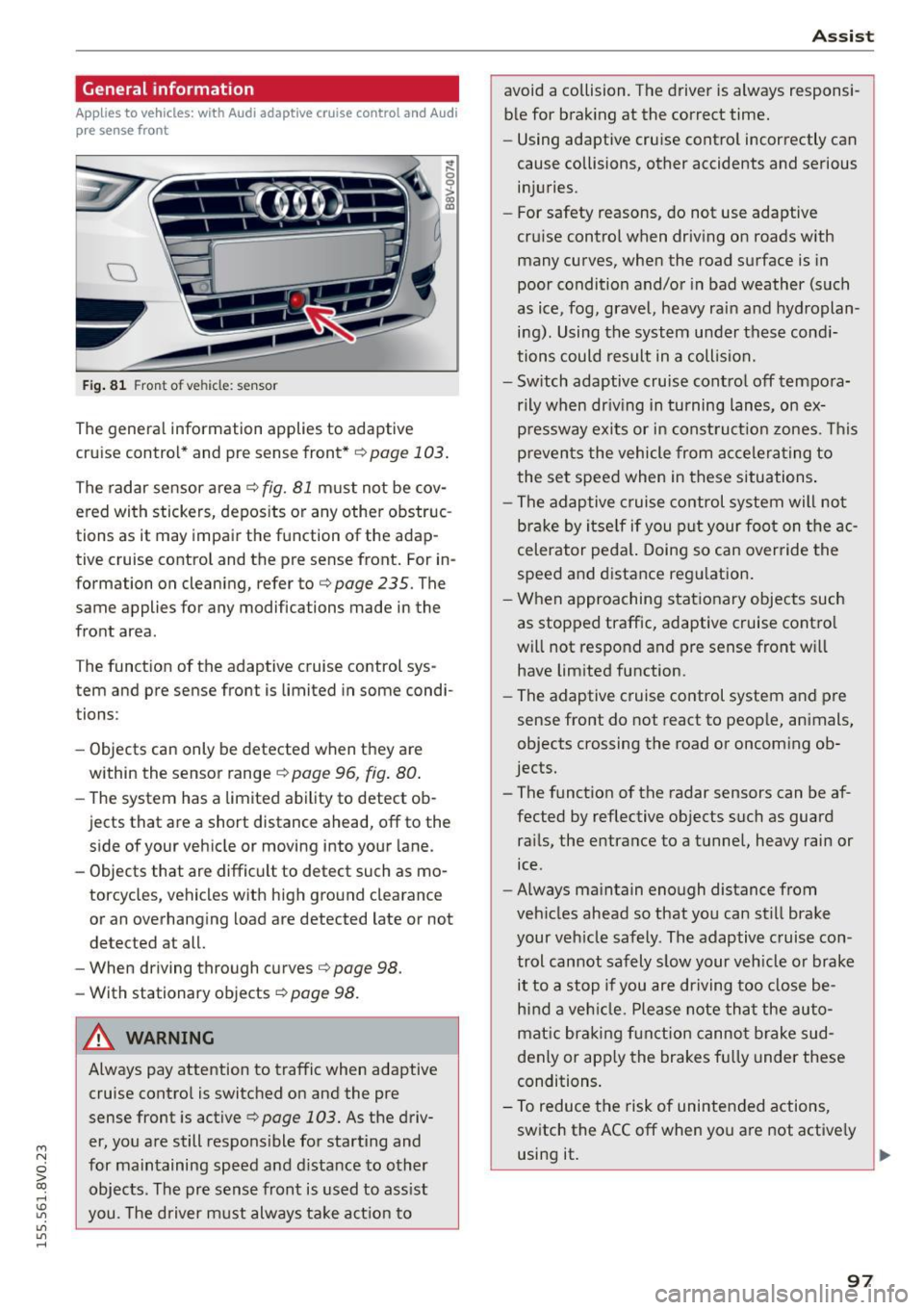
Fig. 81 Front of vehicle: sensor
The general information applies to adaptive
cruise control* and pre sense front*
r::!>page 103.
The radar sensor area r::!> fig. Bl must not be cov
ered with stickers, deposits or any other obstruc
tions as it may impair the function of the adap
tive cruise control and the pre sense front. For in
formation on cleaning, refer tor::!>
page 235. The
same applies for any modifications made in the
front area .
The function of the adaptive cruise control sys tem and pre sense front is limited in some condi
tions :
- Objects can only be detected when they are
within the sensor ranger::!>
page 96, fig. 80.
-The system has a limited ability to detect ob
jects that are a short distance ahead, off to the side of your vehicle or moving into your lane.
- Objects that are difficult to detect such as mo
torcycles, vehicles with high ground clearance
or an overhanging load are detected late or not
detected at all.
- When driving through curves
r=> page 98.
-With stationary objects r::!> page 98.
A WARNING
Always pay attention to traffic when adaptive
cruise control is switched on and the pre
sense front is active
r::!> page 103. As the d riv
er, you are still responsible for starting and
for maintaining speed and distance to other objects. The pre sense front is used to assist
you. The driver must always take action to
Assist
avoid a collision. The driver is always responsi
ble for braking at the correct time.
- Using adaptive cruise control incorrectly can
cause collisions, other accidents and serious
injuries.
- For safety reasons, do not use adaptive
cruise control when driving on roads with
many curves, when the road surface is in
poor condition and/or in bad weather (such
as ice, fog, gravel, heavy rain and hydroplan
ing). Using the system under these condi
tions could result in a collision.
- Switch adaptive cruise control off tempora
rily when driving in turning lanes, on ex
pressway exits or in construction zones. This
prevents the vehicle from accelerating to
the set speed when in these situations.
- The adaptive cruise control system will not
brake by itself if you put your foot on the ac
celerator pedal. Doing so can override the
speed and distance regulation.
- When approaching stationary objects such
as stopped traffic, adaptive cruise control
will not respond and pre sense front will
have limited function.
- The adaptive cruise control system and pre
sense front do not react to people, animals,
objects crossing the road or oncoming ob
jects.
- The function of the radar sensors can be af
fected by reflective objects such as guard
rails, the entrance to a tunnel, heavy rain or
ice.
- Always maintain enough distance from
vehicles ahead so that you can still brake
your vehicle safely. The adaptive cruise con trol cannot safely slow your vehicle or brake it to a stop if you are driving too close be
hind a vehicle. Please note that the auto
matic braking function cannot brake sud
denly or apply the brakes fully under these
conditions.
- To reduce the risk of unintended actions,
switch the ACC off when you are not actively
using it.
~
97
Page 103 of 282
M N
0 > co ,...., \!) 1.1'1
1.1'1
1.1'1
,....,
Overriding cruise control
Overriding means exceeding the selected speed
when adaptive cruise contro l is active, for exam
p le when pressing the acce lerator pedal when
passing.
"'T o accelerate man ua lly, pull the lever towa rd
you into position @and ho ld it there. The mes
sage
ACC: o ve rride appears . Or
"' press the accelerator peda l.
"' To resume cruise control, release the lever or
take your foot off the acce lerator pedal.
Int errupting c ruis e contr ol w hil e driving
"'Move the lever into position @. The message
ACC: stand by appears. Or
"' press the brake peda l.
"' To resume the stored speed, move the lever in
to posit ion @.
Int errupting c rui se contr ol wh en stopped
"' Push the lever away from you into position @.
The message
ACC: s ta ndby appears.
"' To resume cruise control, press the brake peda l
and pull the lever toward you into position@.
A WARNING
It is dangerous to act ivate cru ise contro l and
resume the stored speed when the current
road, traff ic or weather condit ions do not per
m it this. This could result in a c rash.
Setting the distance
A ppl ies to vehicles: with Audi adaptive cruise co ntrol
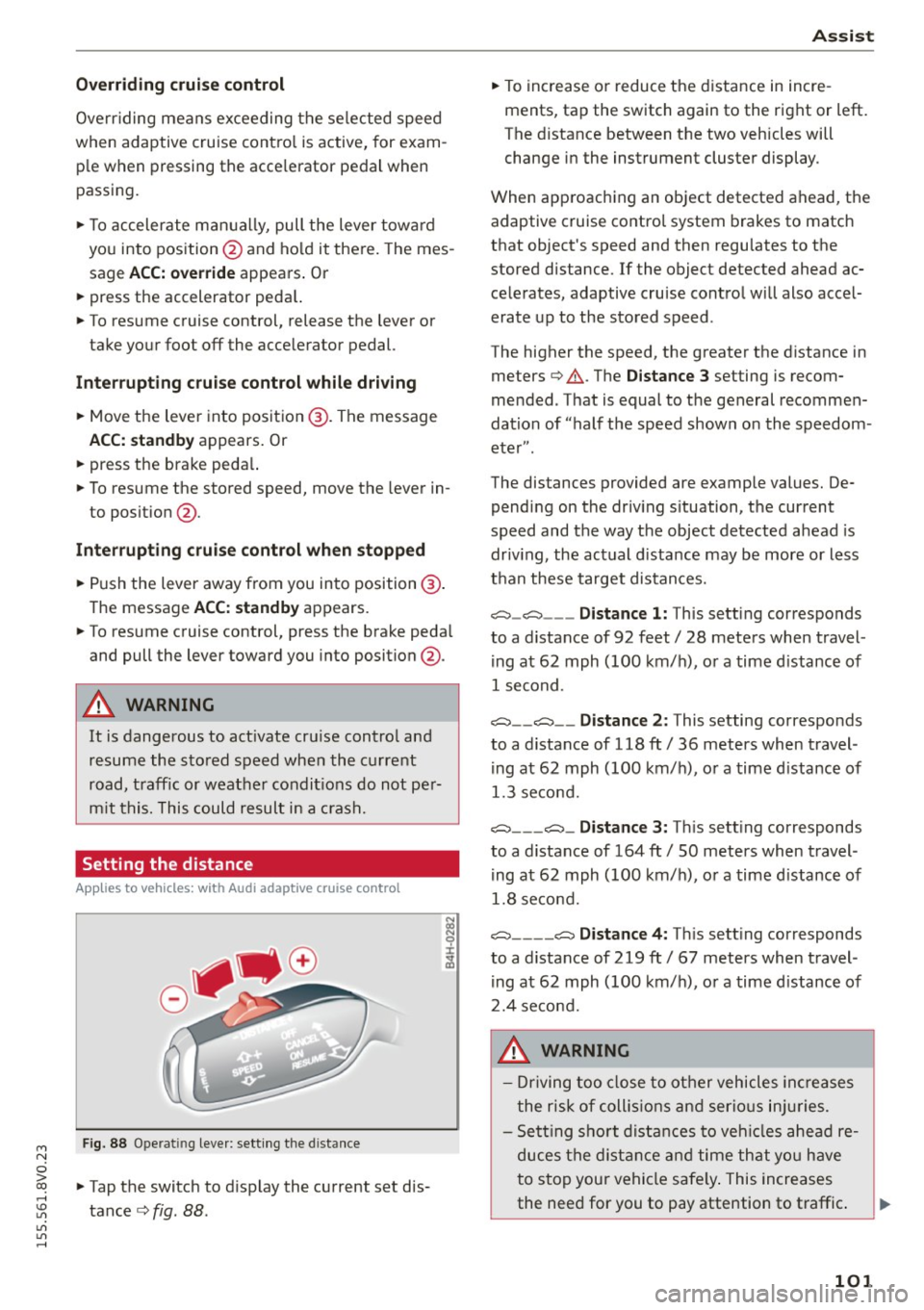
Fig. 88 Ope rat ing leve r: sett ing the d istance
"' Tap the switch to d isplay the current set dis
tance
c> fig. 88 .
Ass is t
"' To increase or reduce the d istance in incre
ments, tap the switch again to the right or left.
The distance between the two vehicles will
change in the instrument cluster display .
When approaching an object detected ahead, the adaptive cruise contro l system brakes to match
that object's speed and then regu lates to the
stored distance. If the object detected ahead ac
celerates, adaptive cruise control will also accel
erate up to the stored speed .
The higher the speed, the greater the distance in meters
c> .&. . The Distanc e 3 setting is recom
mended. That is equal to the general recommen
dation of "half the speed shown on the speedom
eter" .
The distances provided are example values. De pending on the driv ing s ituation, the current
speed and the way the object detected ahead is
driv ing, the actual d istance may be more or less
than these target distances.
c::::::, _c::::::, ___ Distance 1: This setting corresponds
to a distance of 92 feet/ 28 meters when travel
ing at 62 mph (100 km/ h), or a time d istance of
1 second.
c::::::, __ c::::::, __ Distance 2 : This setting corresponds
to a distance of 118 ft/ 36 meters when travel
ing at 62 mph (100 km/ h), or a time d istance of
1.3 second.
c::::::, ___ c::::::,_ Distanc e 3: Th is sett ing corresponds
to a distance of 164 ft/ 50 meters when travel
ing at 62 mph (100 km/ h), or a time d istance of
1.8 second.
c::::::, ____ c::::::, Distance 4: This sett ing corresponds
to a distance of 219 ft/ 67 meters when travel
ing at 62 mph (100 km/h), or a time d istance of
2.4 second.
A WARNING
- Driving too close to other vehicles inc reases
the risk of coll is ions and ser io us in juries.
- Sett ing s ho rt distances to veh icles ahead re
duces the dist ance and time that you have
to stop your vehicle safe ly . This increases
the need for you to pay attention to traffic. .,,.
101