ESP AUDI S3 SEDAN 2015 Owner's Manual
[x] Cancel search | Manufacturer: AUDI, Model Year: 2015, Model line: S3 SEDAN, Model: AUDI S3 SEDAN 2015Pages: 282, PDF Size: 71.14 MB
Page 106 of 282
Ass is t
- The pre sense basic functions may not be
available if there is a malfunction in the ESC
system or the airbag control module.
- Note that with pre sense basic, the reversi·
ble safety belt pretensioner on the front
passenger's side deact ivates when the front
passenger's airbag is deactivated .
Audi pre sense front
Description
Applies to vehicles: with Audi pre sense front or Audi adaptive
cruise control
Pre sense front informs you if the d istance to the
vehicle ahead falls below the safe distance for a n
extended per iod of time.
It c an warn of a possi·
b le co llision and initiate braking maneuvers,
within the limits of the system.
When detected in time, the system can assess
dangerous situations whe re a n object ahead
b rakes s udden ly or if you r own vehicle is traveling
at a high speed and approaching an object t hat is
moving more s lowly . If detection is not possible ,
then pre sense front does not re act .
Warnings
Applies to vehicles: with Audi pre sense front or Audi adaptive
cruise control
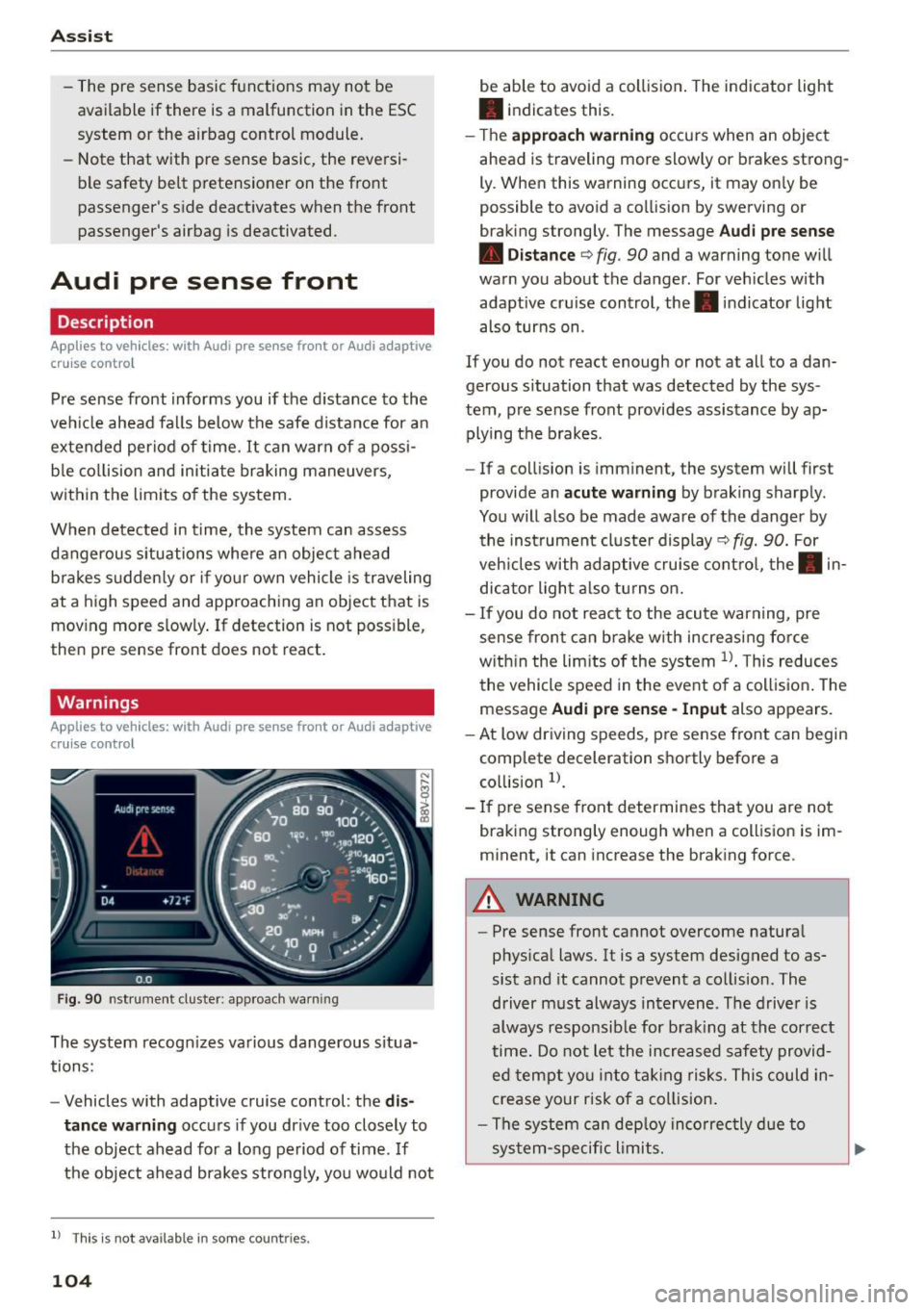
F ig . 90 nst rument clus te r: app roac h warn ing
The system recogn izes va rious dangerous situa
tions:
- Vehicles with adaptive cruise control: the
dis
tanc e warnin g
occurs if you dr ive too closely to
the object ahead for a long period of time .
If
the object ahead brakes strong ly, you would not
l l Thi s is no t ava ilab le i n so me c oun tries .
104
be able to avoid a collision . The indicator light
• indicates th is.
- T he
approach warn ing occurs when an object
ahead is traveling more slowly or brakes strong·
Ly. When this warning occ urs, it may on ly be
possible to avo id a collision by swerving o r
b raking strongly. The me ssage
Audi pre se nse
• Dis tance
q fig. 90 and a warning tone will
warn you about the danger . For veh icles with
adaptive cru ise control, the. indicator light
also turns on.
If you do no t reac t enough or no t at all to a dan
gerous situation that was detected by the sys
tem, p re sense front provides assistance by ap
plying the b rakes .
- If a collision is imm inen t, the system will first
provide a n
acu te warning by braking sharp ly .
You will also be made aware of the danger by the inst rument cluste r display
q fig. 90. For
veh icles with adaptive cru ise cont ro l, the . in
dic ator light a lso tu rns o n.
- If you do not reac t to the acu te warning, pre
sense front ca n brake w ith increasing force
w it hi n the lim its of the system
1> . T his reduces
the vehicle speed in the event o f a collis io n. The
message
Audi pre sense -Input also appears.
- At low driving speeds, pre sense front can begin
complete decelerat ion shortly before a
co llision
l).
- If p re sense front determines that you are not
braki ng strong ly enough when a coll is ion is im·
minent, it can increase the brak ing force .
A WARNING
-
-Pre sense front cannot overcome natura l
phys ica l laws. It is a system designed to as
sist and it cannot prevent a collision. The
driver m ust always intervene . The d river is
always responsib le for brak ing at the correct
time . Do not let the in crea sed safety provid
ed tempt you into ta king risks. This could in
crease your risk of a collision .
- The system can dep loy inco rrec tly d ue to
sys tem-specific l imits.
Page 108 of 282
Ass is t
- Switch the pre sense off when you are load
ing the vehicle onto a vehicle carrier, train,
sh ip or other type of transportation. Th is
can prevent undesired warnings from the pre sense system.
Driver messages
Applies to veh icles: w ith Audi p re se nse or Audi adaptive
cruise control
Audi pr e se nse cu rrently un ava ilable. No sens or
v is ion
This message appea rs if the sensor view is ob
s tructed, for example by leaves, snow, heavy
spray or dirt . Clean the sensor¢
page 97, fig. 81.
Audi pre sense : off
This message appears when the ESC is switched
to sport mode, for example¢
page 124.
Audi p re sen se: sys tem fault!
This message appears when the pre sense func
tion is affected. For example, this cou ld be
caused by a faulty sensor.
If the message stays on, d rive to an au thorized
Aud i dea ler or authorized Audi Service Faci lity to
have the malfunction corrected.
Audi active lane assist
Description
Applies to vehicles : with Audi active lane assist
Active lane ass ist detects lane marker lines with
in the limits of the system using a came ra in the
windshie ld. If you are app roach ing a detected
lane marker line and it appears like ly that you
will leave the lane, the system will warn you with
corrective steering . You can override this steering
at any time. If you pass over a line, the steering
wheel will v ibrate light ly. In order for this warn
ing vibrat ion to occur, it must first be switched
on in the MMI. Active lane assist is operable
when the lane marker line is detected on at least one side of the veh icle.
l) T hi s function is not ava ilable in all cou ntri es.
106
The system will not warn you befo re crossing a
l ane marker line if you have activated the turn
s ignal. In this case, it assumes that you are
changing lanes intentionally.
The system is des igned for driving on express
ways and highways and therefore on ly activates
at speeds above approx imately 40 mph (65 km/
h).
A WARNING
-
- The system warns the driver that the vehicle
is leaving the lane using corrective steering .
The driver is always responsible for keeping
the vehicle within the lane.
- The system can help you keep the vehicle in
the lane, but it does not drive by itself.
Al
ways keep you r hands on the steering
wheel.
- Corrective steer ing may not occur in certa in
situa tions, su ch as during heavy braking.
- There may be cases where the camera does
not recognize all lane ma rker lines. Correc
tive stee ring can only take p lace on the side
of the vehicle where lane marker line5 are
detec ted.
- Othe r road structures or obje cts cou ld possi
b ly be identified un intent ionally as lane
marker l ines . As a result, corrective steering
may be unexpected or may not occur .
- The camera view can be restricted, for ex
ample by vehicles driving ahead or by rain,
snow, heavy spray light shining into the
camera or by d irt on the window. This can
result in active lane ass ist not detecting the
lane marker lines or detecting them incor
rectly.
- In certain situat ions where visibility is low,
the vehicle may switch from "early" to "late"
corrective steering
l l.
- Under certain co nditions such as ruts in the
road, an inclined roadway or crosswinds, the
corrective steering a lone may not be enough
to keep the vehicle in the midd le of the lane.
~
Page 110 of 282
Assist Monochrome display
Refer to¢ fig. 93
® solid lines: active lane ass ist is switched
on and ready to provide warnings on the
side that is ind icated.
® blinking line (left or r ight): active lane as -
sist is warning you by a vibration in the
steering whee l that you are leaving the
lane.
® unfilled line(s): lane assist is activated,
but not ready to give warn ing
no lines: active lane assist is switched off .
Multicolored display
Refer to¢ fig. 94
® solid white lines: active lane assist is
switched on and ready to provide warn-
ings on the side that is indic ated.
® red line (left or rig ht): active lane assist is
warn ing you by a v ibration in the steer ing
wheel that you are leaving the lane .
® solid gray lines: lane assist is activated,
but not ready to give warning
no lines: active lane assist is switched off .
Messages in the instrument cluster display
If the active lane ass ist has a malfunction, the
ra, indicator light in the inst rument cluste r dis
play turns off and one of the following messages
appears:
Audi active lane assist: currently not available.
No camera view
This message appears if the camera is unab le to
detect the lines . Th is could happen if:
- The camera field of view ¢
page 107, fig. 92 is
dirty or cove red in ice . Clean this area on the
windshield.
- The came ra f ield of view is fogged over. Wait
u nt il the fog has cleared before switching the
active lane assist on again.
- The system has been unable to detect the lanes
for an extended period of time due to road con-
l) Thi s fun ctio n is not available in all cou ntri es.
108
ditions. Switch the active lane assist back on
when the lines are more visib le.
Audi active lane assist: Currently unavailable
There is a temporary active lane assist malfunc
tion . Try switching the active lane assist on again
l ate r.
Audi active lane assist: system fault!
Drive to an authorized A udi dealer or authorized
Audi Service Facility immed iate ly to have the
malfunction corrected.
ra, Audi active lane assist: Please continue
steering vehicle!
This message appears if you are not steering by
you rself. If this is the case, active lane assist does
not switch off, but it is "not ready" to provide a
warning. The system can he lp you keep the vehi
cle in the lane. However, you are responsible for
driving the veh icle and must steer it yourse lf.
Adjusting the steering time and vibration
warning
Applies to vehicles: with Audi active lane assist
You can adjust individual active lane assist set
tings in the MMI.
.,. Select: the I MENU I button> Car > Systems *
control button > Driver assistance > Audi active
lane assist .
Steering time
1>
Early: in this setting, the corrective steering hap
pens continuously to help keep the vehicle in the
center of the lane.
Late : in this setting, the system provides correc
tive steering just before a vehicle whee l touches a
detected lane marker line .
Vibration warning
You can switch the additional vibrating warning
i n the steer ing whee l on or off.
II>
Page 111 of 282
....,
N
0 > co
rl I.O
"'
"'
"'
rl
_& WARNING
With the vibration warning switched off, no
visible warning will appear in t he instrument
cluster dis play when crossing a lane ma rker.
(D Tips
Ma rket-specific: your settings are automati
cally stored and assigned to the remote con
trol key being used .
Audi side assist
Description
Applies to vehicles: with Audi side assist
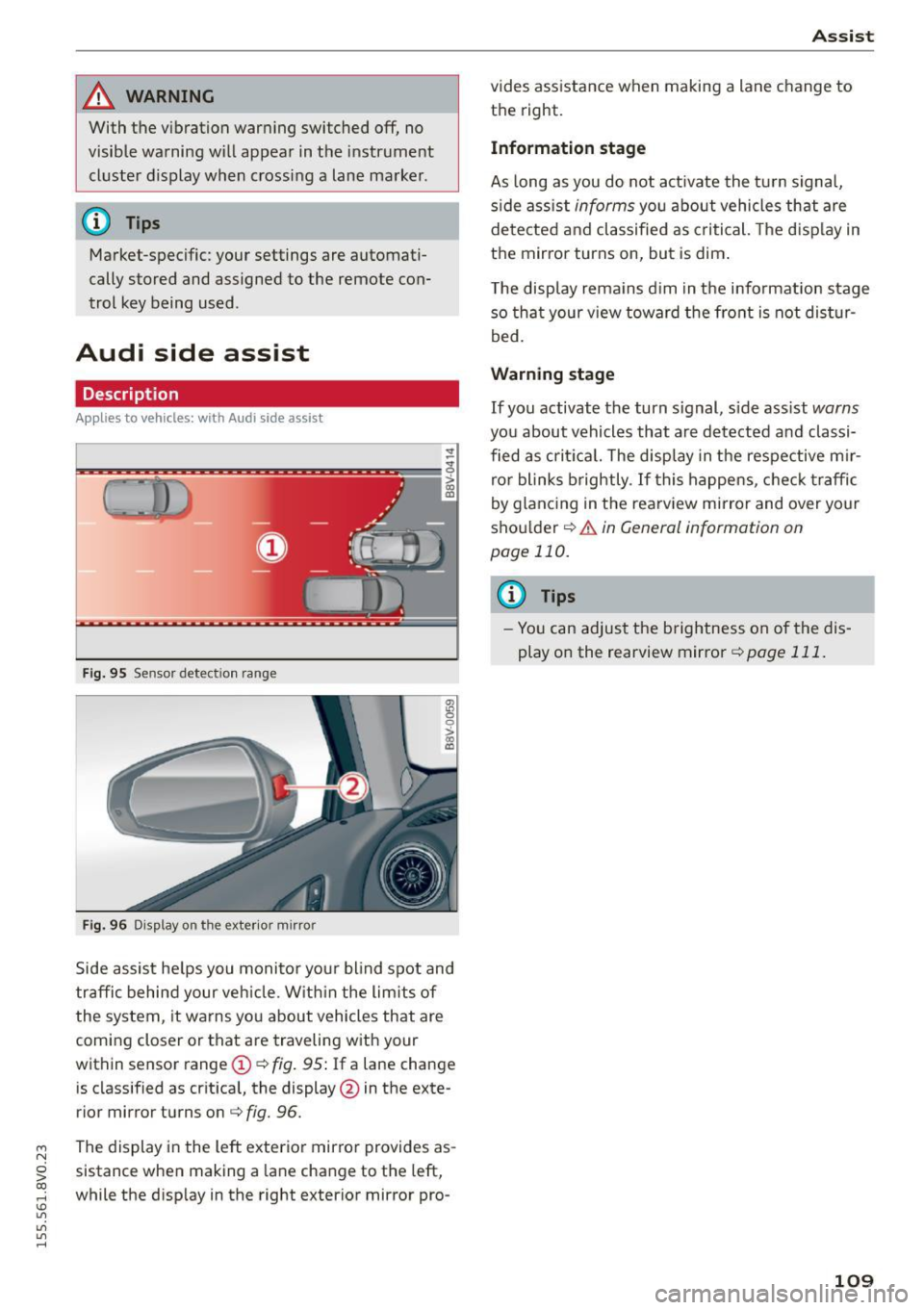
Fig . 9 5 Sensor detect io n range
Fig . 96 Display on the exterior mirror
fR 0
0
> CX)
traffic behind your ve hicle. W it hi n the limit s of
the system, it warns yo u about vehicles that are
coming closer or that are traveling with your
within sensor range
(D ¢ fig . 95: If a lane change
is classified as cr it ica l, the display @in the exte
rior mirror turns on
c:> fig. 96.
The display in the left exterior mirro r provides as
sistance when making a la ne change to the left,
while the d isp lay in the right exterior mirror pro-
A ssi st
vides assistance when making a lane change to
th e right.
Information stage
As long as you do not act ivate the tu rn signa l,
s ide ass ist
informs yo u about vehicles that are
de te cted a nd classified as criti cal. The d is pl ay in
the mirror turns on, but is dim .
T he display rema ins d im in the info rmation stage
so tha t your v iew toward the front is not dis tur
bed.
Warn ing stage
If you activate the turn s ignal, s ide ass ist warns
you about vehicles that are de tected and classi
fied as cri tica l. The display in the respective m ir
ro r blinks brightly . If this happe ns, che ck tr affi c
by glanc ing in the rearv iew mirror and over your
sho ulder
c:> .&. in General information on
page 110.
@ Tips
- Yo u can adjust the brightness on of the dis
play on the rearview mirror
c:> page 111 .
109
Page 112 of 282
Ass is t
General information
App lies to veh icles: w ith Audi side assis t
®
@
©
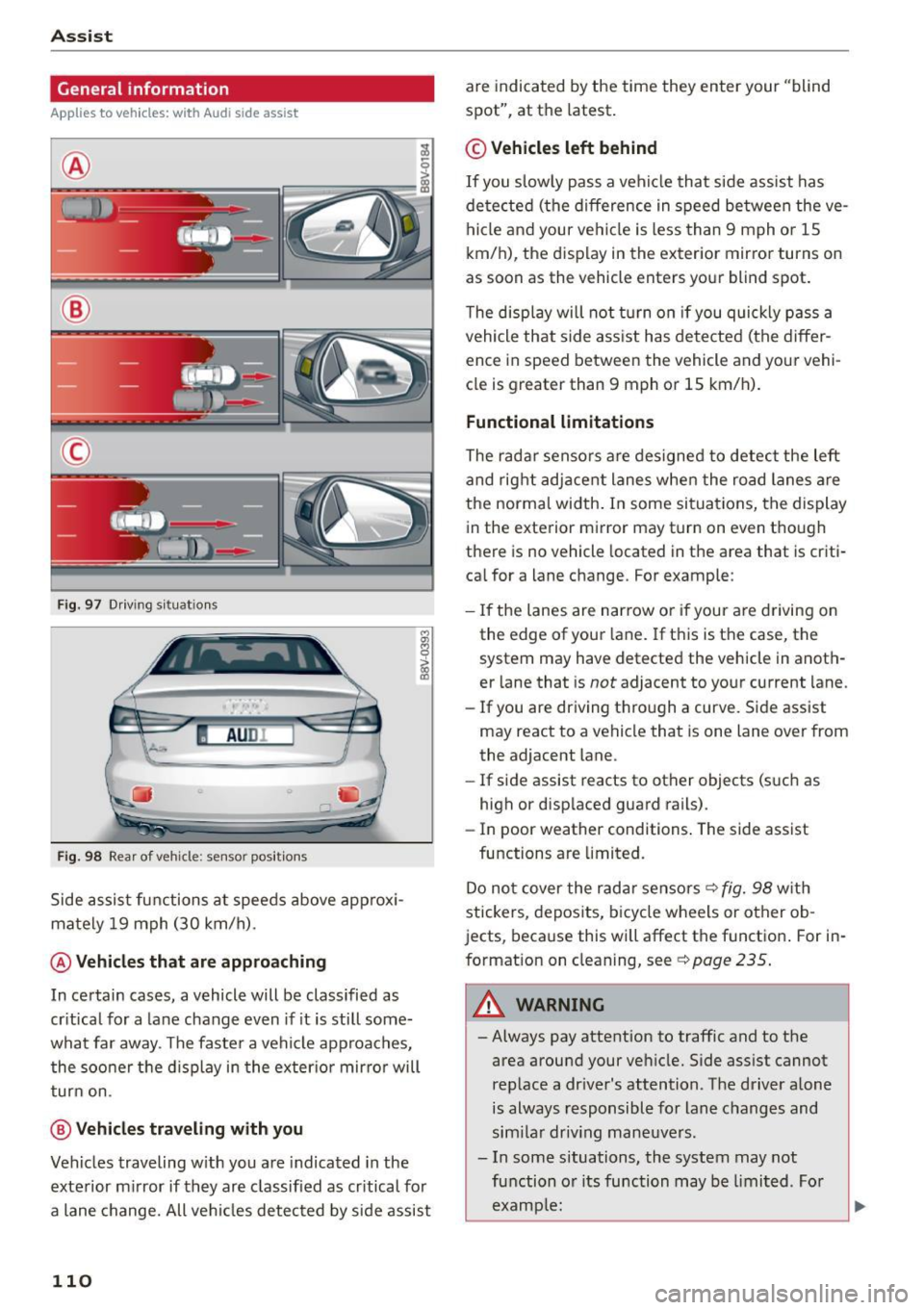
Fig . 97 D riving s ituat io ns
I AU DI
-·
Fi g. 98 Rear of vehicle: sensor pos itio ns
Side assist functions at speeds above approx i
mately 19 mph (30 km/h).
@ Vehicles th at ar e approaching
In certain cases, a vehicle will be classified as
cr itical for a lane change even if it is still some
what far away. The faste r a vehicle approaches,
the soo ner t he d isplay in the exter io r mirro r will
t ur n on.
@ Vehicl es traveling with you
Veh icles traveling w ith you are indicated in the
exte rior m irror if they are classified as cr itical for
a lane change. All ve hicl es detected by side assist
110
are indicated by the time they enter your "blind
spot", at the latest .
© Vehicles left behind
If you slow ly pass a veh icle that side assist has
de tected (the difference in speed be tween the ve
hi cle and your ve hicl e is less than 9 mph o r 1S
km/h), the display in the exterior mirror turns on
as soon as the vehicle enters yo ur blind spot.
T he disp lay will not t urn on if you quickly p ass a
vehicle that side ass ist has de te cted (the differ
ence in speed between the vehicle and your vehi
cle is greater than 9 mph or 1S km/h).
Functional limitations
The radar senso rs are des igned to detect the left
and rig ht adjacent lanes when the road lanes a re
the norma l width . In some si tua tions, the display
in the exterior mirror may turn on even though
there is no vehicle located in the area that is criti
ca l for a lane change. For example:
- If the lanes are nar row o r if your are driving on
the edge of your lane. If t his is t he case, the
system may have detected the vehicle in anoth
er lane that is
not adjacent to yo ur current lane.
- If you are driving t hro ugh a curve. S ide assist
may react to a vehicle that is one lane over from
the adjacent lane.
- If side assist reacts to other objects (s uch as
high or disp laced guard rails) .
- In poor weather conditions . The side assist
functions are limited.
Do no t cover the radar sensors ¢
fig. 98 with
stickers, depos its, bicy cle wheels or other ob
jects, beca use this will affect the function . For in
format ion on cleaning, see
¢ page 235 .
_& WARNING
-Always pay attention to traffic and to the
area around your ve hicle. Side ass ist cannot
rep lace a dr iver's attention. T he driver alone
is always responsible for lane c hanges and
sim ila r driv ing mane uvers .
- In some s ituations, the system may not
fu nction o r its function may be limi ted . Fo r
examp le:
-
Page 114 of 282
Assist Driver messages
Appl ies to vehicles: with Audi side assist
If the side assist switches off automatically, a
message appears in the instrument cluster dis
p la y.
@j Audi side assist: currently unavailable.
No sensor vision
The radar sensors' vision is affected. Do not cover
the area in front of the sensors with bike wheels,
stickers, dirt or other objects. Clean the area in
front of the sensors, if necessary
r:!> page 110,
fig. 98.
@j Audi side assist: currently unavailable
Side assist cannot be switched on temporarily be
cause there is a ma lfunction (for examp le, the
battery charge level may be too low).
@j Audi side assist: System fault!
The system cannot guarantee that it will detect
veh icles correctly and it is switched off. The sen
sors have been displaced or are faulty. Have the
system checked by an authorized Audi dealer or
authorized Audi Service Facility soon.
Audi drive select (drive
settings)
Introduction
Applies to vehicles: with Audi drive select
Audi drive select makes it possible to experience
different types of vehicle settings in one vehicle.
The driver can select from three
Comfort, Auto
and Dynamic modes using the ~.7l.'i button in the
center console or the MMI to switch between a
sporty and a comfortable driving mode, for ex
ample . In the
individual* mode, the settings can
be adjusted to your personal preferences . This
makes it possib le to combine settings such as a
sporty engine tun ing with light steering .
.,&. WARNING
Using Audi drive select incorrect ly can lead to
collisions, other accidents and serious inju
ries.
112
· Description
Applies to vehicles: with Audi drive se lect
The vehicle setup in each mode depends on the
vehicle's features. However , the eng ine and steer
ing are always affected.
Engine and automatic transmission
Depending on the mode, the engine and auto
matic transmission* respond more qu ickly or in a
more balanced manner to accelerator peda l
movements .
Adaptive dampers (Audi magnetic ride)*
The adaptive dampers use sensors to record in
format ion regarding steer ing movements, brak
ing and acce lerat ion operations by the driver,
road surface, dr iv ing speed, and load. With Audi
drive select you can adjust the adaptive dampers
sporty (dynamic), comfortable (comfort) or bal
anced (auto).
Steering
T he steer ing adapts in terms of steer ing ass is
tance. There a re diffe rent modes
Q page 113.
Indirect steering that moves easily as in comfort
mode is especia lly suited to long drives on a high
way. The dynamic mode provides sporty, direct
steering .
For vehicles with progressive steering* the steer
ing performance is more agi le .
Cornering light*
The cornering light adjusts when driv ing on
curves at speeds between 6 mph (10 km/h) and
68 mph (110 km/h). The pivoting action and the
lig hting are also adapted to the mode.
Adaptive cruise control*
The behavior when accelerating can be adjusted
from comfortable to sporty, depending on the
Audi drive select mode. Adaptive cruise control
also responds to the driving behavior of the vehi
cle ahead in a more conservative or sporty man
ner.
Page 117 of 282
M N
0 > co ,...., \!) ..,.,
..,.,
..,., ,....,
Parking systems
General information
Applies to vehicles: with rea r parking sys te m s/park in g system
p lus/rearview camera
Depending on your vehicle's equipment, various
parking aids will help you when parking and ma
neuvering.
The
rear parking system is an audible parking aid
that warns you of obstacles
behind the vehicle
¢ page 116.
The parking system plus assists you when park
ing by audibly and visually indicating objects de
tected
in front of and behind the vehicle
¢ page 116.
The rearview camera shows the area behind the
vehicle in the MMI display. This display assists
you when you are cross or parallel parking. The
parking system plus functions are also available
¢page 117.
A WARNING ,--
- Always look for traffic and check the area
around your vehicle by looking at it directly
as well. The parking system cannot replace
the driver's attention. The driver is a lways
responsible when entering or leaving a park
ing space and during similar maneuvers .
- Please note that some surfaces, such as
clothing, are not detected by the system.
- Sensors and cameras have blind spots in
which people and objects cannot be detect
ed . Be especially cautious of small children
and animals .
- Always pay attention to the area around the
vehicle - using the rearview mirror, too.
- The sensors can be displaced by impacts or
damage to the radiator grille, bumper,
wheel housing and the underbody . The park
ing system may become impaired as a re
sult . Have an authorized Audi dealer or au
thorized Audi Service Facility check their
function.
- Make sure the sensors are not obstructed by
st ickers, deposits or other materials.
If they
are the sensor function could be impaired .
'
Parking systems
For additional information on cleaning, re
fer to
¢ page 235.
@ Note
- Some objects are not detected or displayed
by the system under certain circumstances:
- Objects such as barrier chains, trailer draw
bars, vertical poles or fences
- Objects above the sensors such as wall ex
tensions
- Objects with specific surfaces or struc
tures such as chain link fences or powder
snow
- If you continue driving closer to a low-lying
object, it may disappear from the sensor
range. Note that you will no longer be
warned about this obstacle.
- The sensors can be displaced by impacts or
damage to the radiator grille, bumper,
wheel housing and the underbody. The park
ing system may become impaired as a re
sult. Have an authorized Audi dealer or au
thorized Audi Service Facility check their
function.
(D Tips
- The system may provide a warning even
though there are no obstacles in the cover
age area in some situations, such as:
- certain road surfaces or for long grass .
- external ultrasonic sources e.g. from
cleaning vehicles.
- heavy rain, snow, or thick vehicle exhaust.
- We recommend that you practice parking in
a traffic-free location or parking lot to be
come familiar with the system. When doing
this, there should be good light and weather
conditions.
- You can change the volume and pitch of the
signals as well as the display¢
page 121 .
-What appears in the MMI display is some
what time-delayed.
- The sensors must be kept clean and free of
snow and ice for the park assist to operate .
115
Page 125 of 282
M N
0 > co ,...., \!) 1.1"1
1.1"1
1.1"1
,....,
shared, please see your contract with the
wireless telecommunications provider and the
"About Aud i connect" tab in your vehicle's
MMI: ! MENUI button> Audi connect > About
Audi connect .
Electronic stabilization
control (ESC)
Description
The E lectronic Stabilization Contro l (ESC) reinfor
ces driver safety. It reduces the risk of slipping
and improves driving stability. ESC detects criti
cal s ituations such as the vehicle oversteering
and understeering or the wheels a re spinning.
The vehicle is stabilized by applying the brakes or
reducing engine torque. Once the ESC is activat
ed, the indicator light
DJ blinks in the instru
ment cluster.
The fol low ing systems a re integrated in the ESC:
Anti-lock braking system (ABS)
ABS prevents the wheels from locking when brak
i ng. The vehicle can still be steered even during
hard braking . Apply steady pressure to the brake
pedal. Do not pump the pedal. A pulsing in the
brake pedal ind icates that the system is acting to
stabilize the vehicle .
Brake assist system
The brake assist system can decrease braking d is
tance . It increases braking power when the driver
presses the brake pedal quickly in emergency s it
uations. You must press and hold the brake pedal
unti l the dangerous sit uation is ove r. In vehicles
with adaptive cruise control *, the brake assist
system is more sensit ive if the distance detected
to the vehicle ahead is too small.
Anti-slip regulation (ASR)
ASR reduces engine power when the drive whee ls
begin spinning and adapts the force to the road
conditions. This makes it easier to start, acceler
ate and drive up inclines.
Intelligent Technology
Electronic differential lock (EDL)
The EDL brakes whee ls that are spinning and
trans fers the drive power to the other drive wheel
or whee ls if the vehicle is equipped with all wheel
drive*). This function is not available at higher
speeds.
In extreme cases, EDL automatically switches off
to keep the brake on the braked wheel from over
heating. The vehicle is still working correct ly. EDL
will switch on again automatically when condi
tions have returned to normal.
Steering recommendation
The ESC helps to stabilize the vehicle by changing
the steering torque .
Selective wheel torque control
Selective wheel torque control is used when dr iv
i ng on curves. The front wheel on the inside of
the curve o r both wheels on the inside of the
curve are braked selectively as needed . This al
lows more precise driving in curves .
Automatic post-collision braking system
The "Automat ic post -collision braking system"
can help to reduce the ris k of sliding and of other
collisions after an accident. If the airbag control
module detects a collision above a certain vehicle
speed, the vehicle is braked by the ESC.
T he vehicle does not brake automatically if:
- the driver presses the accelerator pedal, or
- the braking force generated by the pressed
brake pedal is greater than the brak ing force
that would be initiated by the system, or
- the ESC, the brake system or the vehicle electr i
cal system are not funct ion ing .
A WARNING
-The ESC and its integrated systems cannot
overcome the limits posed by natural phys i
cal laws. This is especially important on slip
pery or wet roads .
If the systems begin act
ing to stabilize your vehicle, you should im-
mediately a lter your speed to match the ..,.
123
Page 126 of 282
Intelligent Technology
road and traffic conditions . Do not let the in
c reased sa fety prov ided tempt you into tak
ing risks. Th is cou ld increase your r isk of a
collision .
- Please note the risk of a co llision increases
when d riving fast, especially through curves
and on slippery or wet roads, and whe n dr iv
i ng too close to obj ects ahead . T he ESC and
i t s integr ated sy ste ms cann ot a lways pre
ven t colli sion s -the re is s till a risk of acci
dent s!
- Press the ac celerator ped al carefully whe n
acc ele ratin g on eve n, slippe ry su rfac es su ch
Switching on /off
as ice a nd snow . T he d rive wheels can spin
even wh en t hese control systems are instal
led and this ca n affect d riving stability and
increase the risk of a collis ion .
{!) Tips
-ABS an d ASR o nly fu nction co rrec tly when
all four wheels are equipped with identica l
t ir es . Differe nt tire s izes ca n lead to a reduc
t ion in e ngine powe r.
- Yo u may hear noises when t he systems de
sc rib ed ar e wo rking.
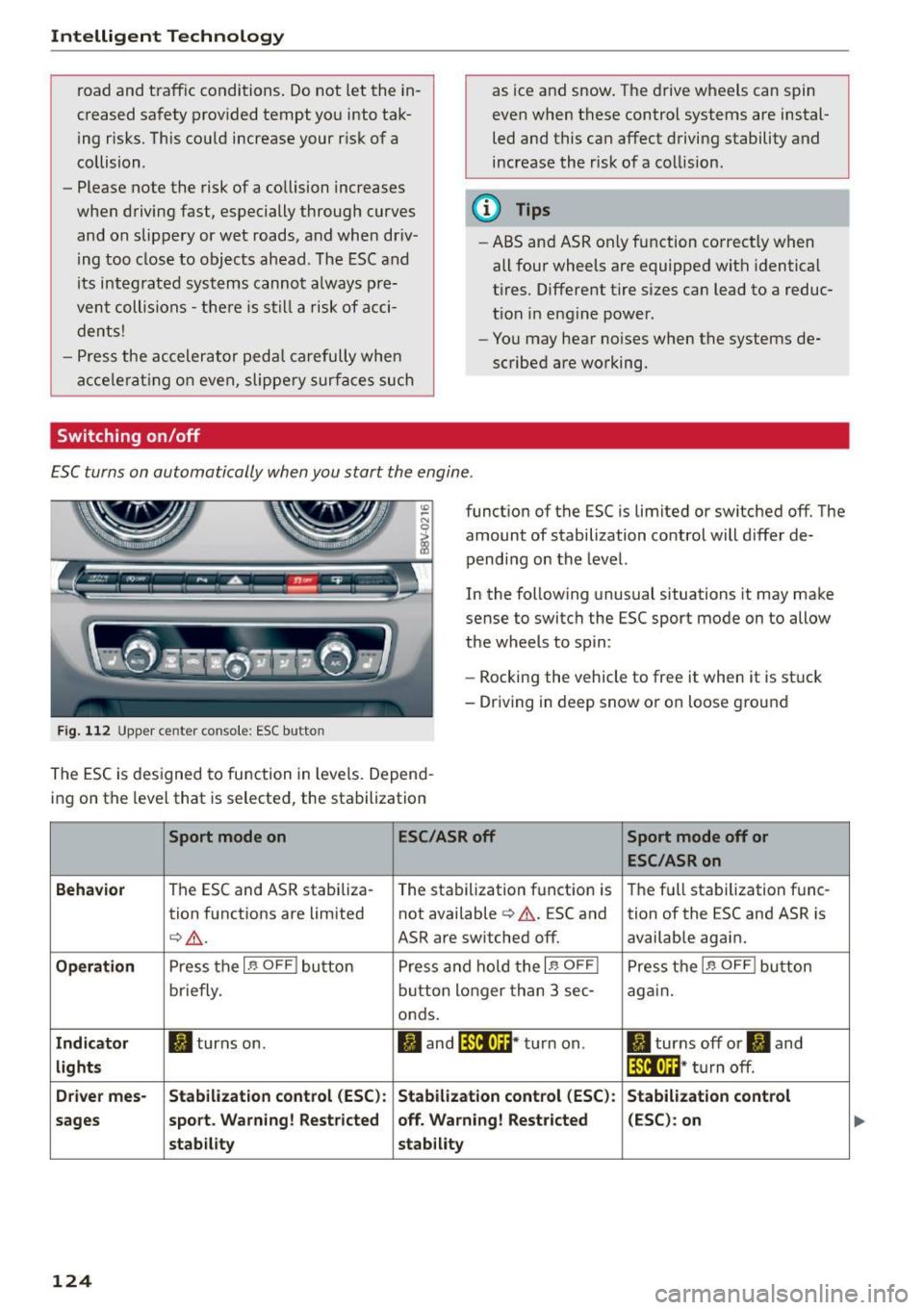
E SC turns on automatically when you start the engine .
Fig. 112 Upper ce nte r con so le : ESC butto n
functio n of the ESC is limited or switched off. The
amount of stabilization control will d iffer de
pend ing on the level.
In the fo llow ing unusual situations it may ma ke
sense to switch the ESC sport mode on to allow
t h e wheels to sp in:
- Rocking the vehicle to free it when it is st uck
- Driving in deep snow or o n loose g ro und
The E SC is d esigned to fu nction in levels . Depen d
i ng on the level that is se lected, the sta bilization
Sport mode on ESC/ASR off Sport mode off or
ESC/ASRon
Behavior
T he ESC and ASR stabiliza- The sta bilization f unct ion is T he f ull sta bilization f unc -
tion f unct ions a re lim ited not available¢& . ESC and
tion of the ESC and ASR is
¢ _& .
ASR are switched off. available again.
Operation Press t he I~ OFF ! bu tton P ress and hold t he I~ OFF I Pre ss th e I~ OFF ! bu tton
briefly. bu
tto n lon ger than 3 sec-
again.
onds.
Indicator II tur ns on. ltl and lf'tl•U~ * tu rn on . II turns off or II and
lights lf'tl•lH* turn off .
Driver mes- Stabilization control (ESC): Stabilization control (ESC) : Stabilization control
sages sport
. Warning! Restricted off . Warning! Restricted (ESC) : on
stab ility stability
124
Page 127 of 282
M N
0 > co ,...., \!) 1.1'1
1.1'1
1.1'1
,....,
A WARNING
You should only switch sport mode on or switch ESC/ASR off if your driving ab ilities and
road condit ions perm it.
- The stabilization function is limited when
sport mode is switched on. The dr iving
wheels could sp in and the veh icle could
swerve, especially on slick or slippery road
surfaces.
- There is no vehicle stabilization when ESC/
ASR are switched off.
(D Tips
- ESC/ASR cannot be switched off or sport
mode cannot be sw itched on if the cru ise
control system* or the adapt ive cruise con
trol* is switched on.
- Malfunctions in the Audi magnetic r ide may
make it impossible to sw itch the ESC/ASR
off or to switch spo rt mode o n.
Brakes
New brake pads
New brake pads do not achieve their full braking
effect during the first 250 mi (400 km). They
must be "broken in" f irst. Howeve r, you can com
pensate for the slightly reduced braking force by
press ing firmly on the b rake pedal. Avoid heavy
braking during the break -in period.
Wear
Brake pad wear is large ly dependent on the way
the veh icle is d riven and on operating co nditions.
This is especially t rue if you are driving frequent ly
in the city and on cu rves or with a sporty driving
style.
Operating noise
Noises may occur when braking depending on the
speed, b rak ing force and o utside conditions s uch
as tempe rat ure and h umid ity.
Effect of water and road s alt
In certain situat ions, for example after driving
throug h wate r, in heavy ra in, after overn ight con
densat ion or afte r wash ing you r car, the braking
In te llig ent T echnolog y
effect can be reduced by moisture or ice on the
brake rotors and brake pads . The brakes must be
"dried" first with a few careful brake applications.
At higher speeds and with the windsh ield wipers
turned on, the brake pads press against the b rake
rotors for a short amount of time . This action
wh ich is not felt by the driver happens at regular
intervals and facilitates a better reaction t ime for
the brakes in wet weather.
The braking effect can a lso be reduced if you are
driv ing on salted roads and you do not apply the
brakes for long periods of time. The layer of salt
on the brake rotors and pads must be worn off
first whe n the brakes a re applied .
Corro sio n
Leav ing the ve hicle parked for long periods of
t ime, low mileage and avoiding heavy braking can
contribute to corros ion on the brake rotors and
dirty brake pads.
If you usua lly avoid heavy b raking or if there is
corrosion present, occas ional heavy braking at
high speeds is recommended to clean the brake
rotors and pads¢,&.
Brake sy stem malfunct ion
if you notice that the b rake pedal travel has sud
denly gotten larger, then a brake circ uit may have
failed. Drive to an authorized Audi dealer or au
thori zed Audi Service Facility immediately to have
the problem cor rected. On the way there, dr ive
with reduced speed and keep in mind that a long
braking distance and increased pressu re on the
brake pedal will be necessa ry.
Low br ake fluid level
When the brake f lu id level is low, malfunct ions in
the brake system may occur. The brake flu id leve l
is electronically mon itored.
Brake boo ste r
The brake booster amplifies the pressure yo u ap
ply to the brake peda l.
It only works when the en-
gine is running.
IJ>
125