lane assist AUDI S3 SEDAN 2015 User Guide
[x] Cancel search | Manufacturer: AUDI, Model Year: 2015, Model line: S3 SEDAN, Model: AUDI S3 SEDAN 2015Pages: 282, PDF Size: 71.14 MB
Page 109 of 282
....,
N
0 > co
rl I.O
"'
"'
"'
rl
-For safety reasons, act ive lane assist must
not be used when there are poor road and/
or weather conditions such as slippery
roads, fog, gravel, heavy rain, snow and the
potent ial for hydroplaning. Us ing active lane
assist under these conditions may increase
the risk of a crash.
Switching on and off
A ppl ies to vehicles: with Audi ac tive lane assis t
•
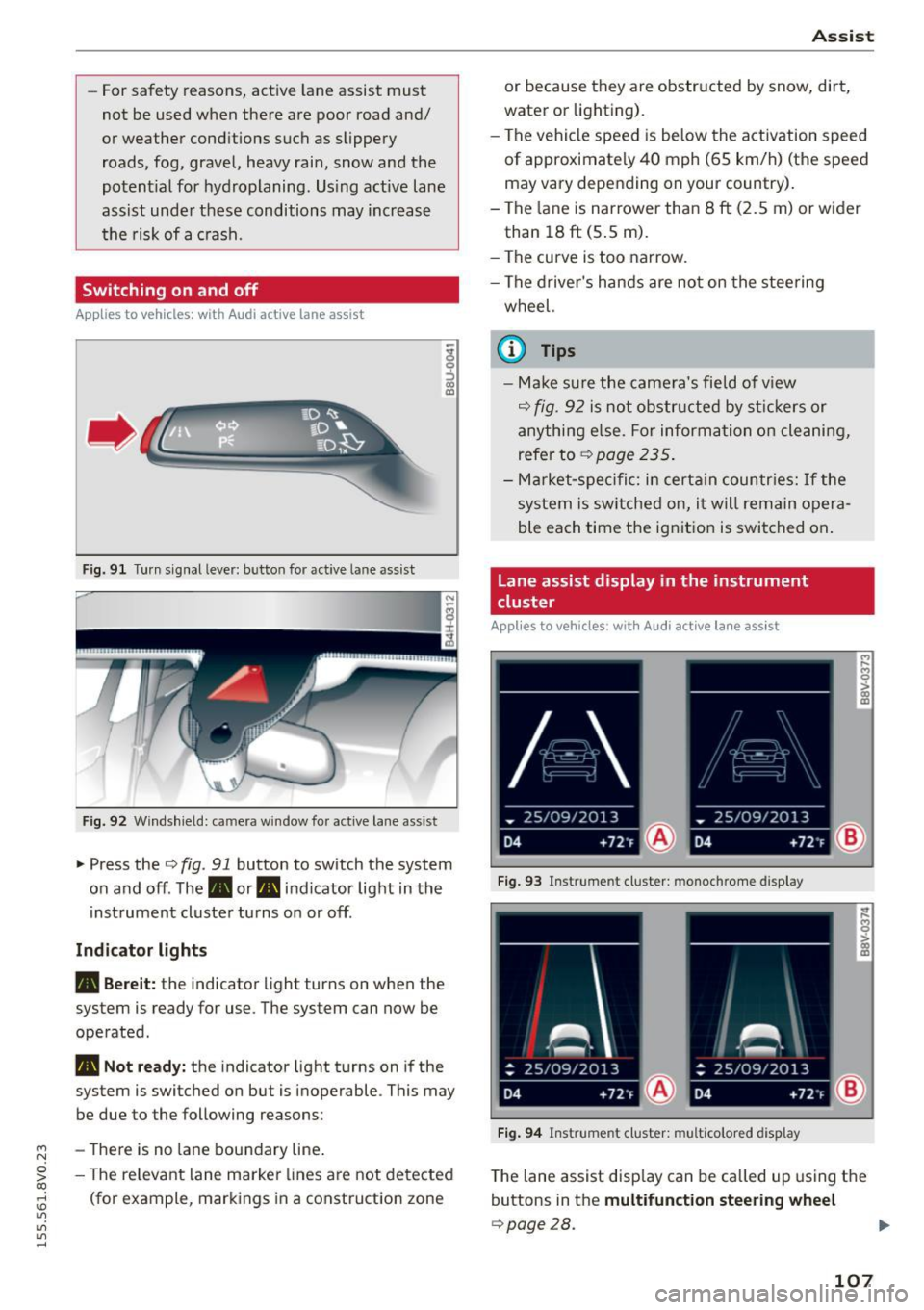
Fig. 91 Turn s ignal lever: but ton for active lane assist
Fig. 92 W indsh ield: camera w indow fo r active lane assist
~ Press the Q fig. 91 button to switch the system
on and off. The. or. indicator light in the
inst rument cluster turns on or off.
Ind icat or light s
• Bere it:
the indicator light turns on when the
system is ready for use. The system can now be
operated .
• Not read y: the indicator light turns on if the
system is switched on but is inoperable . This may
be due to the following reasons:
- There is no lane boundary line .
- The re levant lane marke r lines a re not detected
(for example, markings in a construction zone
A ssi st
or because they a re obstr ucted by snow, dirt,
water or lighting).
- The vehicle speed is be low the activation speed
of approximately 40 mph (65 km/h) (the speed
may vary depending on your country) .
- The la ne is nar rower than 8
ft (2.5 m) or wider
than 18
ft (5 .5 m).
- The curve is too narrow.
- The driver's hands are not on the stee ring
wheel.
a) Tips
- Make sure the came ra's field of v iew
Q fig. 92 is not obstr ucted by st ic kers or
anything e lse. For informa tion o n cleaning,
refer to
~ page 235.
-Ma rket -s pe ci fic: i n certa in countr ies: If the
system is sw itched on, i t will remain opera
ble each time the ignit ion is switched on .
Lane assist display in the instrument
cluster
App lies to vehicles: wit h Audi a ctive la ne ass ist
F ig . 93 Instrument cluster: monochrome display
Fi g. 94 Instrument cluster: multicolored display
M
~ > a,
a,
T he lane assist disp lay can be called up us ing the
buttons in the
multifunct ion steering wheel
Q page28.
107
Page 110 of 282
Assist Monochrome display
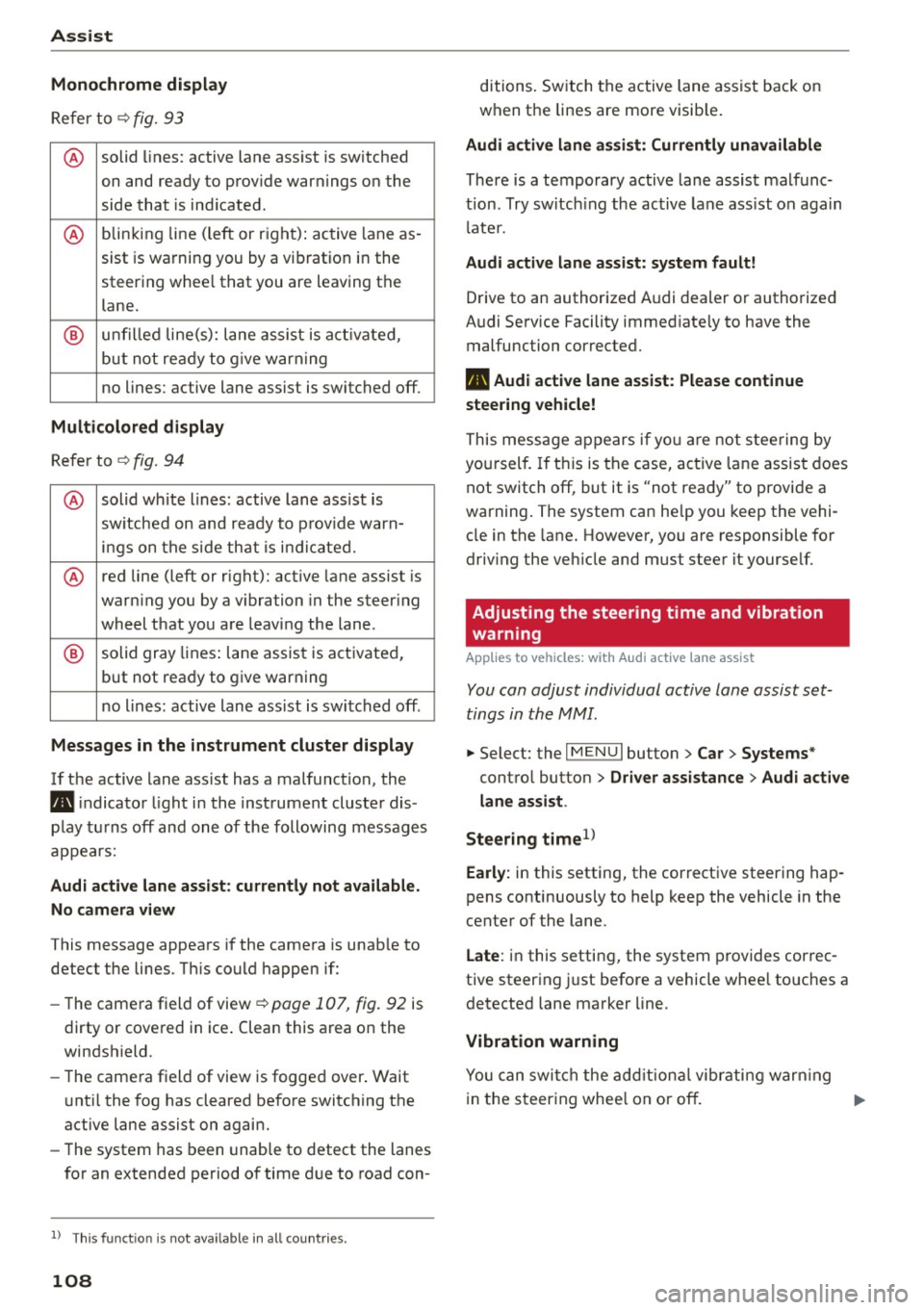
Refer to¢ fig. 93
® solid lines: active lane ass ist is switched
on and ready to provide warnings on the
side that is ind icated.
® blinking line (left or r ight): active lane as -
sist is warning you by a vibration in the
steering whee l that you are leaving the
lane.
® unfilled line(s): lane assist is activated,
but not ready to give warn ing
no lines: active lane assist is switched off .
Multicolored display
Refer to¢ fig. 94
® solid white lines: active lane assist is
switched on and ready to provide warn-
ings on the side that is indic ated.
® red line (left or rig ht): active lane assist is
warn ing you by a v ibration in the steer ing
wheel that you are leaving the lane .
® solid gray lines: lane assist is activated,
but not ready to give warning
no lines: active lane assist is switched off .
Messages in the instrument cluster display
If the active lane ass ist has a malfunction, the
ra, indicator light in the inst rument cluste r dis
play turns off and one of the following messages
appears:
Audi active lane assist: currently not available.
No camera view
This message appears if the camera is unab le to
detect the lines . Th is could happen if:
- The camera field of view ¢
page 107, fig. 92 is
dirty or cove red in ice . Clean this area on the
windshield.
- The came ra f ield of view is fogged over. Wait
u nt il the fog has cleared before switching the
active lane assist on again.
- The system has been unable to detect the lanes
for an extended period of time due to road con-
l) Thi s fun ctio n is not available in all cou ntri es.
108
ditions. Switch the active lane assist back on
when the lines are more visib le.
Audi active lane assist: Currently unavailable
There is a temporary active lane assist malfunc
tion . Try switching the active lane assist on again
l ate r.
Audi active lane assist: system fault!
Drive to an authorized A udi dealer or authorized
Audi Service Facility immed iate ly to have the
malfunction corrected.
ra, Audi active lane assist: Please continue
steering vehicle!
This message appears if you are not steering by
you rself. If this is the case, active lane assist does
not switch off, but it is "not ready" to provide a
warning. The system can he lp you keep the vehi
cle in the lane. However, you are responsible for
driving the veh icle and must steer it yourse lf.
Adjusting the steering time and vibration
warning
Applies to vehicles: with Audi active lane assist
You can adjust individual active lane assist set
tings in the MMI.
.,. Select: the I MENU I button> Car > Systems *
control button > Driver assistance > Audi active
lane assist .
Steering time
1>
Early: in this setting, the corrective steering hap
pens continuously to help keep the vehicle in the
center of the lane.
Late : in this setting, the system provides correc
tive steering just before a vehicle whee l touches a
detected lane marker line .
Vibration warning
You can switch the additional vibrating warning
i n the steer ing whee l on or off.
II>
Page 111 of 282
....,
N
0 > co
rl I.O
"'
"'
"'
rl
_& WARNING
With the vibration warning switched off, no
visible warning will appear in t he instrument
cluster dis play when crossing a lane ma rker.
(D Tips
Ma rket-specific: your settings are automati
cally stored and assigned to the remote con
trol key being used .
Audi side assist
Description
Applies to vehicles: with Audi side assist
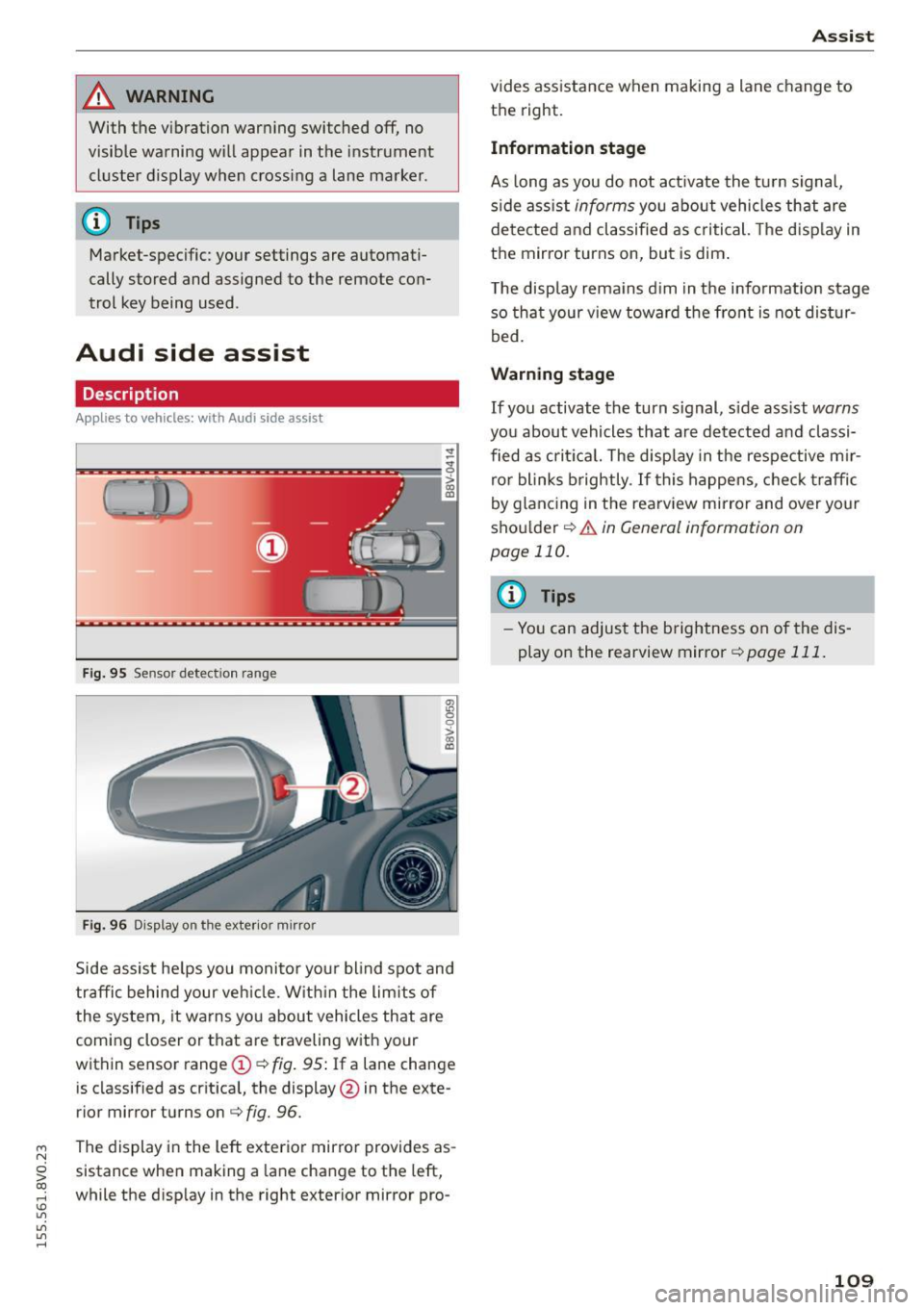
Fig . 9 5 Sensor detect io n range
Fig . 96 Display on the exterior mirror
fR 0
0
> CX)
traffic behind your ve hicle. W it hi n the limit s of
the system, it warns yo u about vehicles that are
coming closer or that are traveling with your
within sensor range
(D ¢ fig . 95: If a lane change
is classified as cr it ica l, the display @in the exte
rior mirror turns on
c:> fig. 96.
The display in the left exterior mirro r provides as
sistance when making a la ne change to the left,
while the d isp lay in the right exterior mirror pro-
A ssi st
vides assistance when making a lane change to
th e right.
Information stage
As long as you do not act ivate the tu rn signa l,
s ide ass ist
informs yo u about vehicles that are
de te cted a nd classified as criti cal. The d is pl ay in
the mirror turns on, but is dim .
T he display rema ins d im in the info rmation stage
so tha t your v iew toward the front is not dis tur
bed.
Warn ing stage
If you activate the turn s ignal, s ide ass ist warns
you about vehicles that are de tected and classi
fied as cri tica l. The display in the respective m ir
ro r blinks brightly . If this happe ns, che ck tr affi c
by glanc ing in the rearv iew mirror and over your
sho ulder
c:> .&. in General information on
page 110.
@ Tips
- Yo u can adjust the brightness on of the dis
play on the rearview mirror
c:> page 111 .
109
Page 112 of 282
Ass is t
General information
App lies to veh icles: w ith Audi side assis t
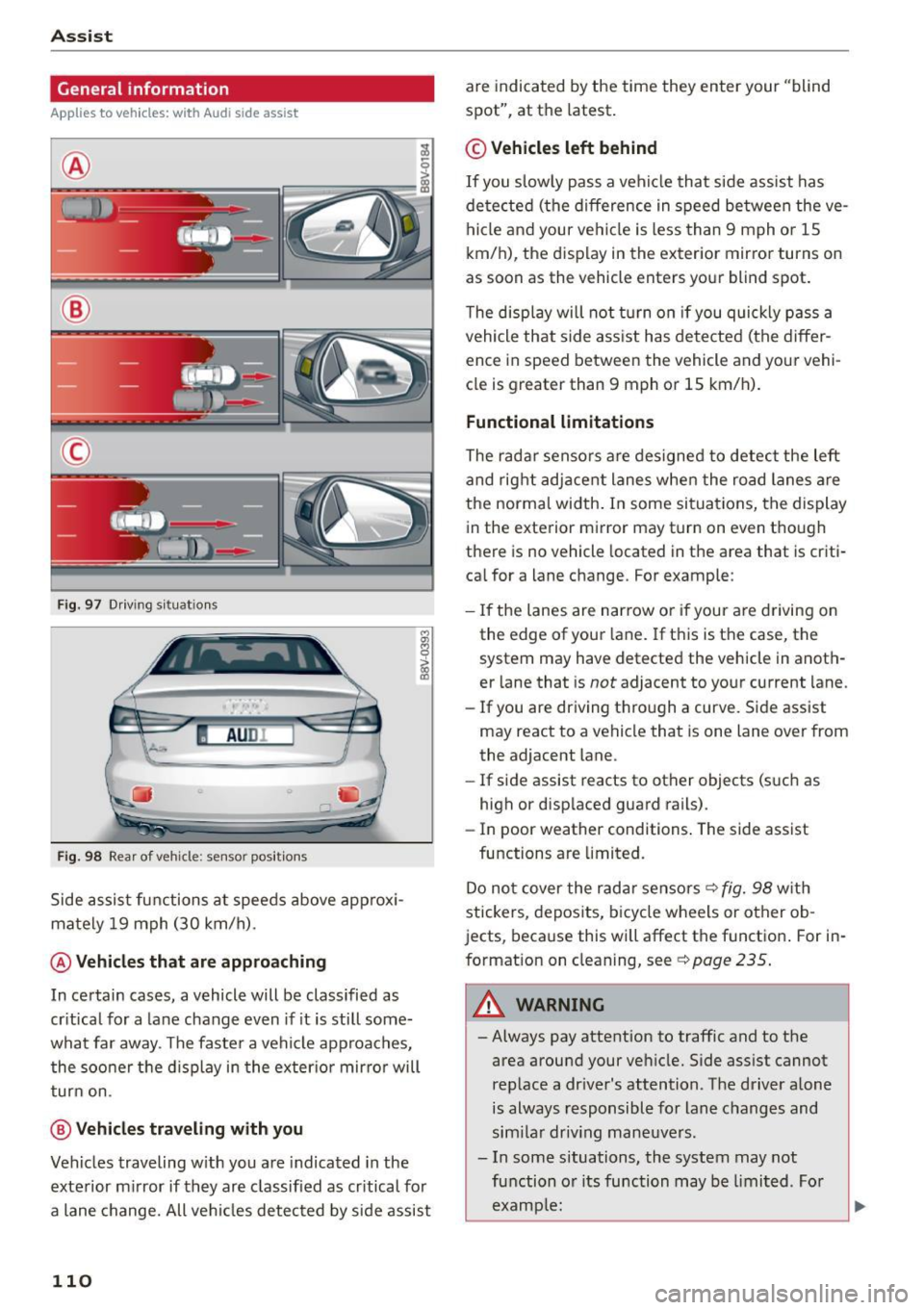
®
@
©
Fig . 97 D riving s ituat io ns
I AU DI
-·
Fi g. 98 Rear of vehicle: sensor pos itio ns
Side assist functions at speeds above approx i
mately 19 mph (30 km/h).
@ Vehicles th at ar e approaching
In certain cases, a vehicle will be classified as
cr itical for a lane change even if it is still some
what far away. The faste r a vehicle approaches,
the soo ner t he d isplay in the exter io r mirro r will
t ur n on.
@ Vehicl es traveling with you
Veh icles traveling w ith you are indicated in the
exte rior m irror if they are classified as cr itical for
a lane change. All ve hicl es detected by side assist
110
are indicated by the time they enter your "blind
spot", at the latest .
© Vehicles left behind
If you slow ly pass a veh icle that side assist has
de tected (the difference in speed be tween the ve
hi cle and your ve hicl e is less than 9 mph o r 1S
km/h), the display in the exterior mirror turns on
as soon as the vehicle enters yo ur blind spot.
T he disp lay will not t urn on if you quickly p ass a
vehicle that side ass ist has de te cted (the differ
ence in speed between the vehicle and your vehi
cle is greater than 9 mph or 1S km/h).
Functional limitations
The radar senso rs are des igned to detect the left
and rig ht adjacent lanes when the road lanes a re
the norma l width . In some si tua tions, the display
in the exterior mirror may turn on even though
there is no vehicle located in the area that is criti
ca l for a lane change. For example:
- If the lanes are nar row o r if your are driving on
the edge of your lane. If t his is t he case, the
system may have detected the vehicle in anoth
er lane that is
not adjacent to yo ur current lane.
- If you are driving t hro ugh a curve. S ide assist
may react to a vehicle that is one lane over from
the adjacent lane.
- If side assist reacts to other objects (s uch as
high or disp laced guard rails) .
- In poor weather conditions . The side assist
functions are limited.
Do no t cover the radar sensors ¢
fig. 98 with
stickers, depos its, bicy cle wheels or other ob
jects, beca use this will affect the function . For in
format ion on cleaning, see
¢ page 235 .
_& WARNING
-Always pay attention to traffic and to the
area around your ve hicle. Side ass ist cannot
rep lace a dr iver's attention. T he driver alone
is always responsible for lane c hanges and
sim ila r driv ing mane uvers .
- In some s ituations, the system may not
fu nction o r its function may be limi ted . Fo r
examp le:
-
Page 113 of 282
M N
0 > co ,...., \!) ..,.,
..,.,
..,., ,....,
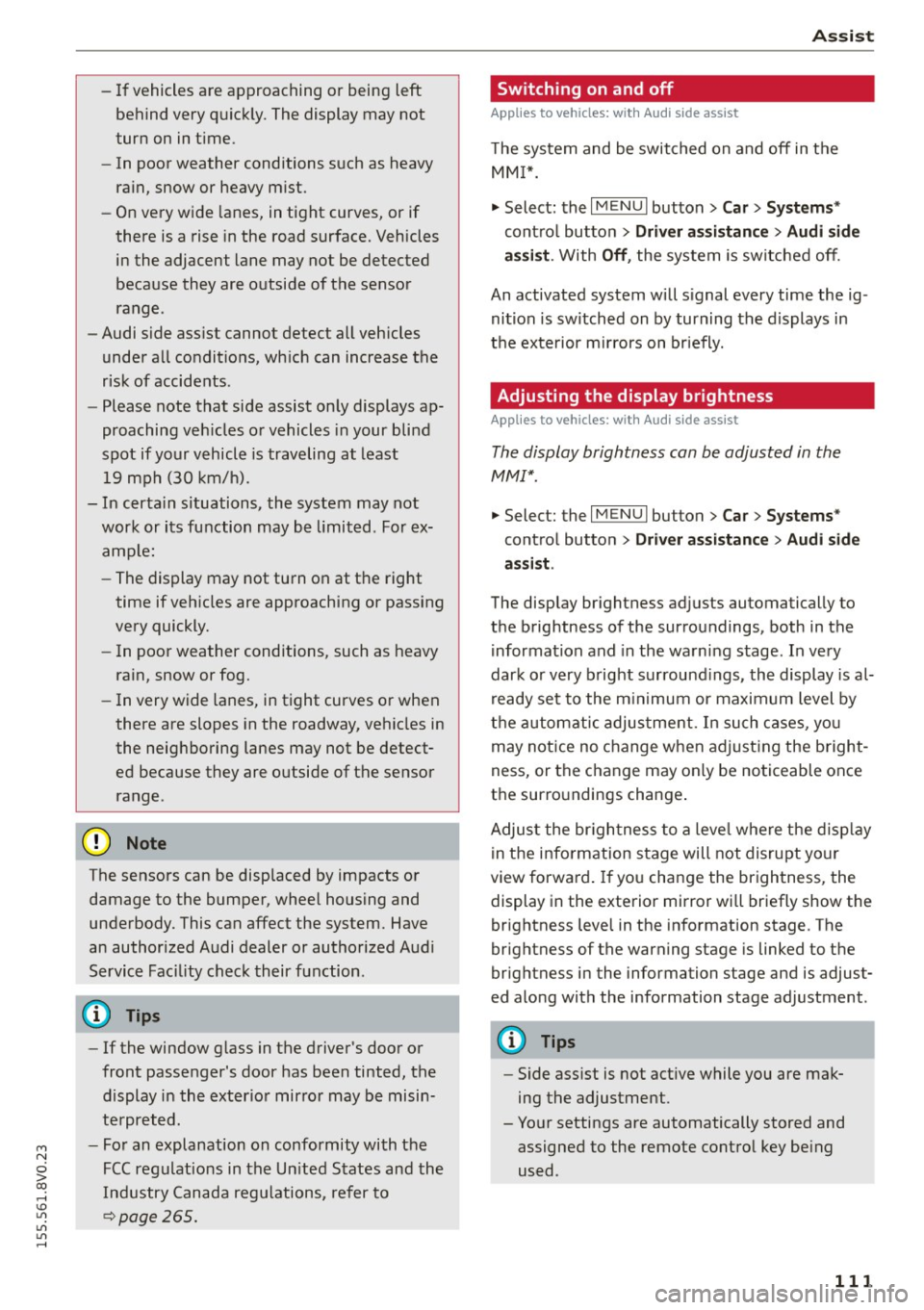
-If vehicles are approaching or being left
behind very quickly. The display may not
turn on in time .
- In poor weather conditions such as heavy
rain, snow or heavy mist.
- On very wide lanes, in tight curves, or if
there is a rise in the road surface. Vehicles
in the adjacent lane may not be detected
because they are outside of the sensor range.
- Audi side assist cannot detect all vehicles
under all conditions, which can increase the
risk of accidents .
- Please note that side assist only displays ap
proaching vehicles or vehicles in your blind
spot if your vehicle is traveling at least
19 mph (30 km/h).
- In certain situations, the system may not
work or its function may be limited. For ex
ample:
- The display may not turn on at the right
time if vehicles are approaching or passing
very quickly.
- In poor weather conditions, such as heavy rain, snow or fog.
- In very wide lanes, in tight curves or when
there are slopes in the roadway, vehicles in
the neighboring lanes may not be detect
ed because they are outside of the sensor
range .
(D Note
The sensors can be displaced by impacts or
damage to the bumper, wheel housing and
underbody. This can affect the system. Have
an authorized Audi dealer or authorized Audi
Service Facility check their function .
(Di Tips
-If the window glass in the driver's door or
front passenger's door has been tinted, the
display in the exterior mirror may be misin
terpreted.
- For an explanation on conformity with the
FCC regulations in the United States and the
Industry Canada regulations, refer to
r::!> page 2 65 .
Assist
Switching on and off
App lies to vehicles : wi th Audi side ass ist
The system and be switched on and off in the
MMI*.
"'Select: the I MENU I button> Car> Systems*
control button > Driver assistance> Audi side
assist .
With Off, the system is switched off.
An activated system will signal every time the ig nition is switched on by turning the displays in
the exterior mirrors on briefly.
Adjusting the display brightness
App lies to vehicles: wi th Audi s ide ass ist
The display brightness can be adjusted in the
MM!*.
"'Select: the I MENU I button> Car> Systems*
control button > Driver assistance > Audi side
assist .
The display brightness adjusts automatically to
the brightness of the surroundings, both in the
information and in the warning stage. In very
dark or very bright surroundings, the display is al
ready set to the minimum or maximum level by
the automatic adjustment. In such cases, you
may notice no change when adjusting the bright
ness, or the change may only be noticeable once
the surroundings change.
Adjust the brightness to a level where the display
in the information stage will not disrupt your
view forward. If you change the brightness, the
display in the exterior mirror will briefly show the
brightness level in the information stage . The
brightness of the warning stage is linked to the
brightness in the information stage and is adjust
ed along with the information stage adjustment .
(D Tips
-Side assist is not active while you are mak
ing the adjustment.
- Your settings are automatically stored and assigned to the remote control key being
used.
111
Page 268 of 282
Index
A
A/C
refer to Climate control system (automatic) .66
re fer to Climate control system (manual) . 65
A/C (automatic climate control system) . . . . 66
A/C (manual climate control system) . . . . . . 65
Accessories . . . . . . . . . . . . . . . . . . . . . . . 5 7, 2 64
Active lane ass ist . . . . . . . . . . . . . . . . . . . . . 106
Activating vibration warning . . . . . . . . . . . 108
Adjusting steering time . . . . . . . . . . . . . . . 108
Clean ing the camera area . . . . . . . . . . . . . 236
Driver messages . . . . . . . . . . . . . . . . . . . . . 107
Indicator light . . . . . . . . . . . . . . . . . . . . . . 107
switching on and
off . . . . . . . . . . . . . . . . . 107
Adapt ive cruise control. . . . . . . . . . . . . . . . . . 96
Automatic transmission . . . . . . . . . . . . . . 100
C leaning the sensor . . . . . . . . . . . . . . . . . . 236
Driver messages . . . . . . . . . . . . . . . . . . . . . 102
General Information . . . . . . . . . . . . . . . . . . 97
Request for driver intervention . . . . . . . . . 102
Stop-and-go traffic . . . . . . . . . . . . . . . . . . 100
Adaptive dampers.................. ... 112
Indicator light . . . . . . . . . . . . . . . . . . . . . . . 25
Adaptive light .. .... .... ..... .. .. .. 43, 112
I ndicator l ight . . . . . . . . . . . . . . . . . . . . . . . 24
AdBlue . . . . . . . . . . . . . . . . . . . . . . . . . . . . . . 195
Filling . . . . . . . . . . . . . . . . . . . . . . . . . . . . . 197
Messages . . . . . . . . . . . . . . . . . . . . . . . . . . 196
Adjusting air distribution (Climate control sys-
t em).... .. .. .. ................. .. .... 67
Ad justing air vents . . . . . . . . . . . . . . . . . . . . . 68
Adjusting air vents (manual climate control
system) . . . . . . . . . . . . . . . . . . . . . . . . . . . . . . 65
Adjusting automatic headlights . . . . . . . . . . 45
Adjusting the center console lighting . . . . . . 47
Adjusting the temperature manual climate control system . . . . . . . . . . 65
advanced key
refer to Convenience key . . . . . . . . . . . . . . . 75
Airbag . . . . . . . . . . . . . . . . . . . . . . . . . . . . . . 148
Indicator light . . . . . . . . . . . . . . . . . . . . . . . 20
Airbag system . . . . . . . . . . . . . . . . . . . . . . . . 168
Advanced Airbag-System . . . . . . . . . . . . . . 152
Advanced Airbag System components . . . 155
Ca re. . . . . . . . . . . . . . . . . . . . . . . . . . . . . . . 163
Children . . . . . . . . . . . . . . . . . . . . . . . . . . . 174
266
Child restraints ..... .. .............. . 174
Components (front airbags) . . . . . . . . . . . 155
Danger of fitting a ch ild seat on the front
passenger seat . . . . . . . . . . . . . . . . . . . . . . 149
Disposal . . . . . . . . . . . . . . . . . . . . . . . . . . . 163
Front airbags . . . . . . . . . . . . . . . . . . . 152, 153
How do the front airbags work? . . . . . . . . 158
How many a irbags does my vehicle have? 155
How the Advanced Airbag System compo-
nents work together . . . . . . . . . . . . . . . . . 157
Important information . . . . . . . . . . . . . . . 148
Important safety instructions on the knee
airbag system . . . . . . . . . . . . . . . . . . . . . . . 166
Knee a irbags. . . . . . . . . . . . . . . . . . . . . . . . 164
Monitoring . . . . . . . . . . . . . . . . . . . . . . . . . 160
PASSENGER AIR BAG OFF light . . . . . . . . . 160
Repairs . . . . . . . . . . . . . . . . . . . . . . . . . . . . 163
Safety instructions . . . . . . . . . . . . . . . . . . . 162
Side a irbags . . . . . . . . . . . . . . . . . . . . . . . . 166
Side curtain airbags . . . . . . . . . . . . . . . . . . 169
Warning/Indicator lights . . . . . . . . . . . . . 160
When must the system be inspected? . . . 160
Alarm system
refer to Anti-theft alarm system . . . . . . . . . 33
Alignment pin (changing the whee l) . . . . . . 241
All-weather lights (LED headlights) . . . . . . . . 43
All season tires . . . . . . . . . . . . . . . . . . . . . . . 229
All wheel drive . . . . . . . . . . . . . . . . . . . . . . . 127
Alternator
refer to A lternator (indicator light) . . . . . . 19
Alternator (indicator light) . . . . . . . . . . . . . . 19
Ambient lighting . . . . . . . . . . . . . . . . . . . . . . 46
Ant i-freeze
refer to Engine coolant . . . . . . . . . . . . . . . 205
Anti-lock braking system . . . . . . . . . . . . . . . 123
Ind icator light . . . . . . . . . . . . . . . . . . . . . . . 21
Anti-slip regulation . . . . . . . . . . . . . . . . . . . 123
Indicator light . . . . . . . . . . . . . . . . . . . . . . . 21
Ant i-theft alarm system . . . . . . . . . . . . . . . . . 33
Anti -theft protection
Electronic immobilizer . . . . . . . . . . . . . . . . . 38
Audi active lane assist
refer to Active lane assist . . . . . . . . . . . . . 106
Audi adaptive cruise control
refer to Adaptive cruise control. . . . . . . . . . 96
Audi adaptive light
refer to Adapt ive light . . . . . . . . . . . . . . . . . 43
Page 274 of 282
Index
Heated exterior mirrors . . . . . . . . . . . . . . . . . . . . . . 47
Rear window . . . . . . . . . . . . . . . . . . . . . . . . . 68
Seats . . . . . . . . . . . . . . . . . . . . . . . . . . . . . . . 68
Washer fluid nozzles . . . . . . . . . . . . . . . . . . 49
Heating (diesel engine auxiliary heater) . . . . 69
Heavy clothing and safety belts . . . . . . . . . . 142
Hex socket . . . . . . . . . . . . . . . . . . . . . . . . . . . 241
High voltage warning label . . . . . . . . . . . . . 258
Highway light . . . . . . . . . . . . . . . . . . . . . . . . .
44
Hill descent control . . . . . . . . . . . . . . . . . . . . 86
Hill hold . . . . . . . . . . . . . . . . . . . . . . . . . . . . . 80
Hill hold assist
refer to Hill hold . . . . . . . . . . . . . . . . . . . . . 80
Horn . . . . . . . . . . . . . . . . . . . . . . . . . . . . . . . . .
8
How are child restraint system anchors relat-
ed to child safety . . . . . . . . . . . . . . . . . . . . . 185
How many airbags does my vehicle have? . . 155
How safety belt pretensioners work 146
I
Ignition
I ndicator light . . . . . . . . . . . . . . . . . . . . . . . 20
Switching on/off (with button) . . . . . . . . . . 75
Ignition key safety interlock . . . . . . . . . . . . . 73
Ignition lock
mechanical . . . . . . . . . . . . . . . . . . . . . . . . . . 73
I mbalance (wheels) . . . . . . . . . . . . . . . . . . . 222
Immobilizer . . . . . . . . . . . . . . . . . . . . . . . . . . 33
Important things to do before driving . . . . 130
I mp roperly worn safety belts . . . . . . . . . . . . 146
Indicator lights . . . . . . . . . . . . . . . . . . . . . . . . 13
I nfant seats . . . . . . . . . . . . . . . . . . . . . . . . . 178
Inflation pressure (tires) . . . . . . . . . . . . . . . 224
Inspection interval with driver information system . . . . . . . . . 212
I nstalling chi ld safety seats
Safety belts . . . . . . . . . . . . . . . . . . . . . . . . 182
I nstalling the upper tether strap on the an
chorage . . . . . . . . . . . . . . . . . . . . . . . . . . . . . 188
Instrument cluster . . . . . . . . . . . . . . . . . . . . . 10
Instruments . . . . . . . . . . . . . . . . . . . . . . . . . . 10
Adjusting the lighting . . . . . . . . . . . . . . . . . 47
I nterior lighting . . . . . . . . . . . . . . . . . . . . . . . 46
Intermittent (windshield wipers) . . . . . . . . . 49
272
J
Jump-starting
Jump start cables 252
253
K
Key........
.. .. .. .. .. ............. .. . 33
Checking the number. . . . . . . . . . . . . . . . . . 33
Driver messages (mechanical ignition key) . 77
Driver messages (with convenience key) . . . 77
Key not recognized . . . . . . . . . . . . . . . . . . . . 77
Key replacement . . . . . . . . . . . . . . . . . . . . . 33
Rep lacing the battery . . . . . . . . . . . . . . . . . 34
unlocking/locking .. ............ 35, 36 , 37
Key recognition Cl imate control system . . . . . . . . . . . . . . . . 64
Kick-down Automatic transmission . . . . . . . . . . . . . . . 87
Knee airbags . . . . . . . . . . . . . . . . . . . . . . . . . 164
Description . . . . . . . . . . . . . . . . . . . . . . . . . 164
How they work . . . . . . . . . . . . . . . . . . . . . . 165
Important safety instructions . . . . . . . . . . 166
L
Lane assist
refer to Active lane assist . . . . . . . . . . . . . 106
Lap timer. . . . . . . . . . . . . . . . . . . . . . . . . . . . . 30
Evaluating recorded times . . . . . . . . . . . . . . 32
Starting . . . . . . . . . . . . . . . . . . . . . . . . . . . . 31
LATC H . . . . . . . . . . . . . . . . . . . . . . . . . . . . . . 185
Description . . . . . . . . . . . . . . . . . . . . . . . . . 186
Installing a child restraint . . . . . . . . . . . . . 187
Location . . . . . . . . . . . . . . . . . . . . . . . . . . . 186
Mounting and releasing the anchorage
hook . . . . . . . . . . . . . . . . . . . . . . . . . . . . . . 187
Launch Control-Program (automatic transmis-
s ion) . . . . . . . . . . . . . . . . . . . . . . . . . . . . . . . . 88
Leather care/cleaning . . . . . . . . . . . . . . . . . . 238
Leaving home . . . . . . . . . . . . . . . . . . . . . . . . . 45
LED headlights All-weather lights . . . . . . . . . . . . . . . . . . . . 43
Left hand drive . . . . . . . . . . . . . . . . . . . . . . . . 46
Lifting jack . . . . . . . . . . . . . . . . . . . . . . . . . . 243
Light Adaptive light . . . . . . . . . . . . . . . . . . . . . . . . 43
Adjusting automatic headlights . . . . . . . . . 45