instrument cluster AUDI S3 SEDAN 2015 Owner's Manual
[x] Cancel search | Manufacturer: AUDI, Model Year: 2015, Model line: S3 SEDAN, Model: AUDI S3 SEDAN 2015Pages: 282, PDF Size: 71.14 MB
Page 109 of 282
....,
N
0 > co
rl I.O
"'
"'
"'
rl
-For safety reasons, act ive lane assist must
not be used when there are poor road and/
or weather conditions such as slippery
roads, fog, gravel, heavy rain, snow and the
potent ial for hydroplaning. Us ing active lane
assist under these conditions may increase
the risk of a crash.
Switching on and off
A ppl ies to vehicles: with Audi ac tive lane assis t
•
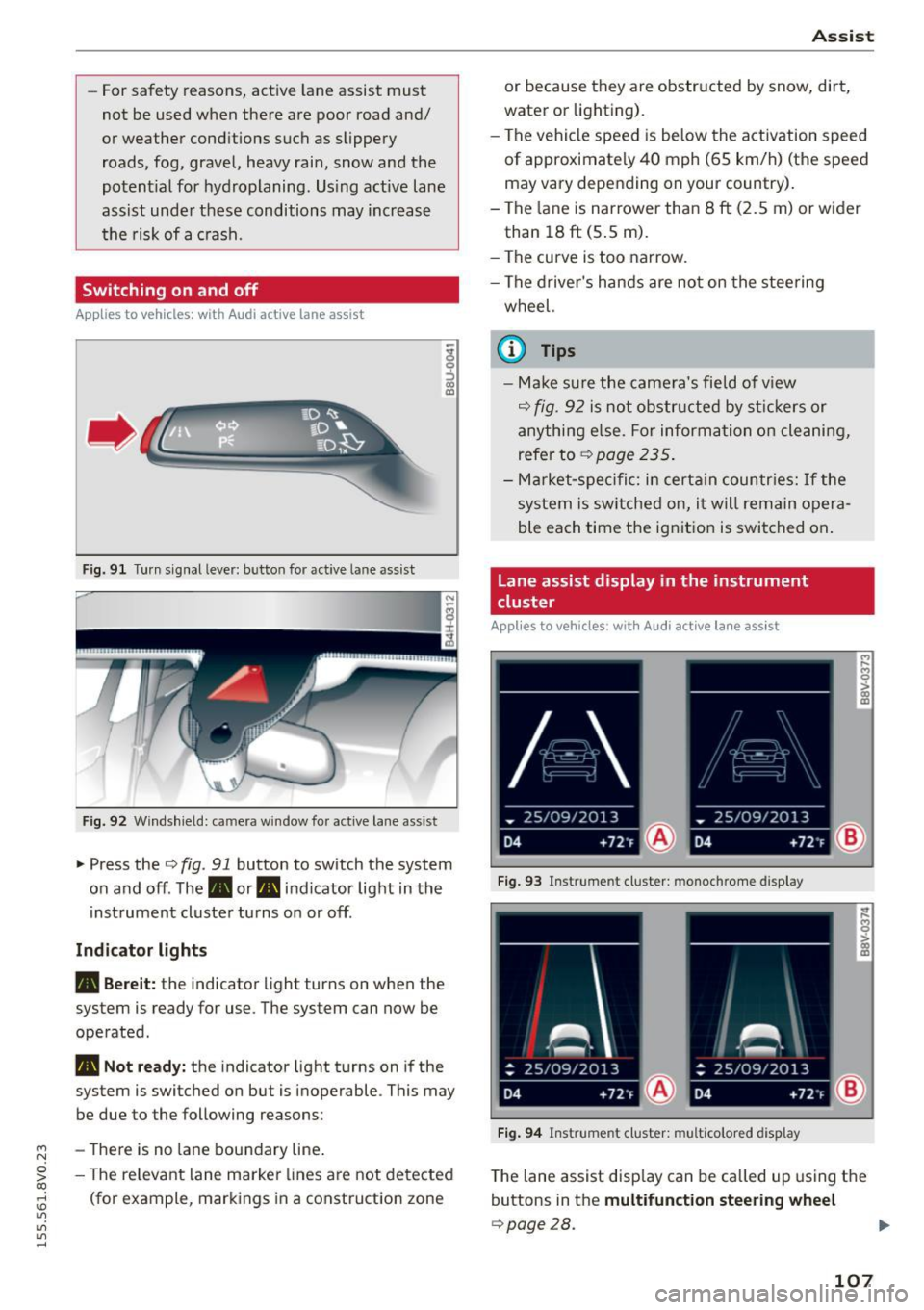
Fig. 91 Turn s ignal lever: but ton for active lane assist
Fig. 92 W indsh ield: camera w indow fo r active lane assist
~ Press the Q fig. 91 button to switch the system
on and off. The. or. indicator light in the
inst rument cluster turns on or off.
Ind icat or light s
• Bere it:
the indicator light turns on when the
system is ready for use. The system can now be
operated .
• Not read y: the indicator light turns on if the
system is switched on but is inoperable . This may
be due to the following reasons:
- There is no lane boundary line .
- The re levant lane marke r lines a re not detected
(for example, markings in a construction zone
A ssi st
or because they a re obstr ucted by snow, dirt,
water or lighting).
- The vehicle speed is be low the activation speed
of approximately 40 mph (65 km/h) (the speed
may vary depending on your country) .
- The la ne is nar rower than 8
ft (2.5 m) or wider
than 18
ft (5 .5 m).
- The curve is too narrow.
- The driver's hands are not on the stee ring
wheel.
a) Tips
- Make sure the came ra's field of v iew
Q fig. 92 is not obstr ucted by st ic kers or
anything e lse. For informa tion o n cleaning,
refer to
~ page 235.
-Ma rket -s pe ci fic: i n certa in countr ies: If the
system is sw itched on, i t will remain opera
ble each time the ignit ion is switched on .
Lane assist display in the instrument
cluster
App lies to vehicles: wit h Audi a ctive la ne ass ist
F ig . 93 Instrument cluster: monochrome display
Fi g. 94 Instrument cluster: multicolored display
M
~ > a,
a,
T he lane assist disp lay can be called up us ing the
buttons in the
multifunct ion steering wheel
Q page28.
107
Page 110 of 282
Assist Monochrome display
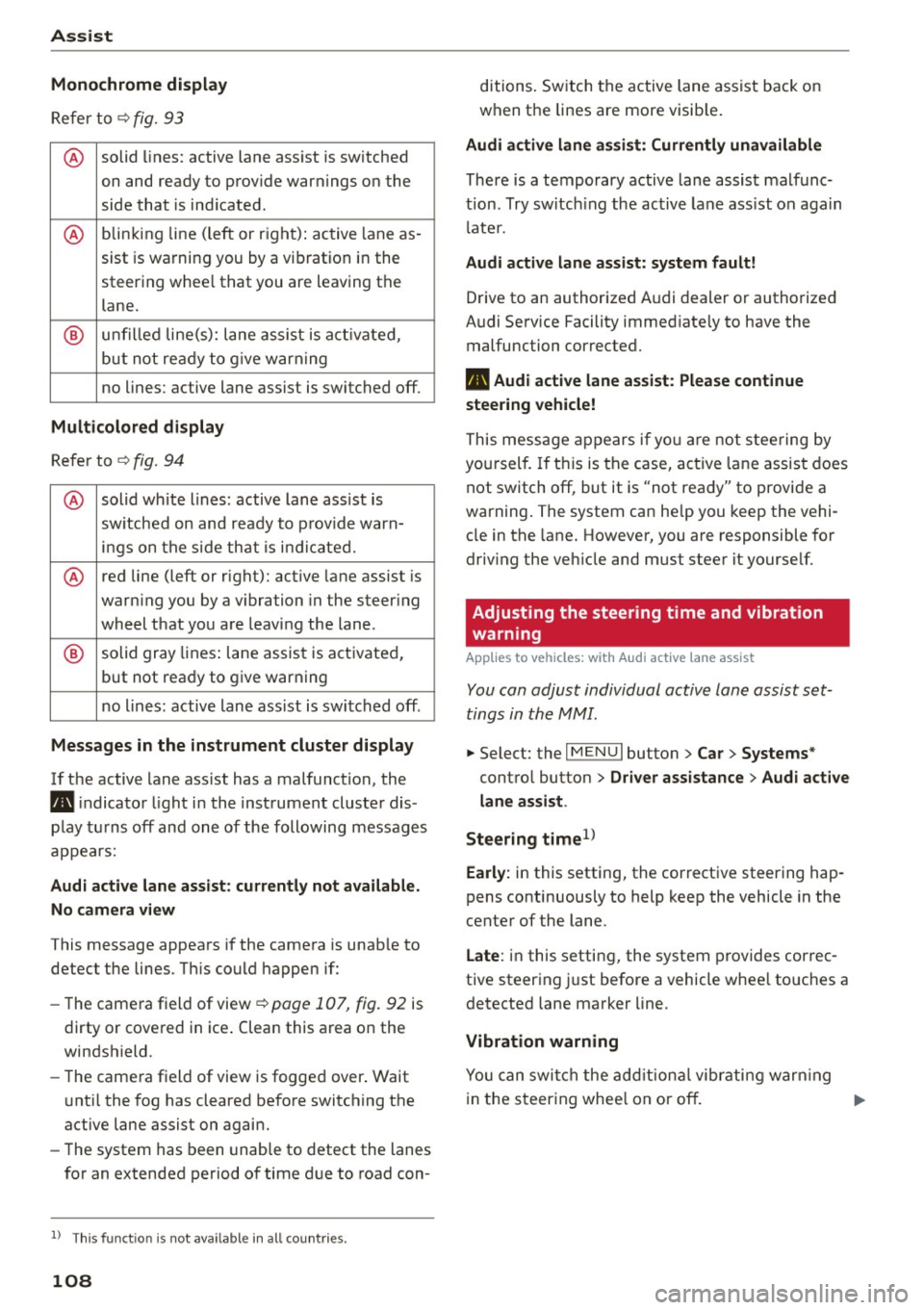
Refer to¢ fig. 93
® solid lines: active lane ass ist is switched
on and ready to provide warnings on the
side that is ind icated.
® blinking line (left or r ight): active lane as -
sist is warning you by a vibration in the
steering whee l that you are leaving the
lane.
® unfilled line(s): lane assist is activated,
but not ready to give warn ing
no lines: active lane assist is switched off .
Multicolored display
Refer to¢ fig. 94
® solid white lines: active lane assist is
switched on and ready to provide warn-
ings on the side that is indic ated.
® red line (left or rig ht): active lane assist is
warn ing you by a v ibration in the steer ing
wheel that you are leaving the lane .
® solid gray lines: lane assist is activated,
but not ready to give warning
no lines: active lane assist is switched off .
Messages in the instrument cluster display
If the active lane ass ist has a malfunction, the
ra, indicator light in the inst rument cluste r dis
play turns off and one of the following messages
appears:
Audi active lane assist: currently not available.
No camera view
This message appears if the camera is unab le to
detect the lines . Th is could happen if:
- The camera field of view ¢
page 107, fig. 92 is
dirty or cove red in ice . Clean this area on the
windshield.
- The came ra f ield of view is fogged over. Wait
u nt il the fog has cleared before switching the
active lane assist on again.
- The system has been unable to detect the lanes
for an extended period of time due to road con-
l) Thi s fun ctio n is not available in all cou ntri es.
108
ditions. Switch the active lane assist back on
when the lines are more visib le.
Audi active lane assist: Currently unavailable
There is a temporary active lane assist malfunc
tion . Try switching the active lane assist on again
l ate r.
Audi active lane assist: system fault!
Drive to an authorized A udi dealer or authorized
Audi Service Facility immed iate ly to have the
malfunction corrected.
ra, Audi active lane assist: Please continue
steering vehicle!
This message appears if you are not steering by
you rself. If this is the case, active lane assist does
not switch off, but it is "not ready" to provide a
warning. The system can he lp you keep the vehi
cle in the lane. However, you are responsible for
driving the veh icle and must steer it yourse lf.
Adjusting the steering time and vibration
warning
Applies to vehicles: with Audi active lane assist
You can adjust individual active lane assist set
tings in the MMI.
.,. Select: the I MENU I button> Car > Systems *
control button > Driver assistance > Audi active
lane assist .
Steering time
1>
Early: in this setting, the corrective steering hap
pens continuously to help keep the vehicle in the
center of the lane.
Late : in this setting, the system provides correc
tive steering just before a vehicle whee l touches a
detected lane marker line .
Vibration warning
You can switch the additional vibrating warning
i n the steer ing whee l on or off.
II>
Page 111 of 282
....,
N
0 > co
rl I.O
"'
"'
"'
rl
_& WARNING
With the vibration warning switched off, no
visible warning will appear in t he instrument
cluster dis play when crossing a lane ma rker.
(D Tips
Ma rket-specific: your settings are automati
cally stored and assigned to the remote con
trol key being used .
Audi side assist
Description
Applies to vehicles: with Audi side assist
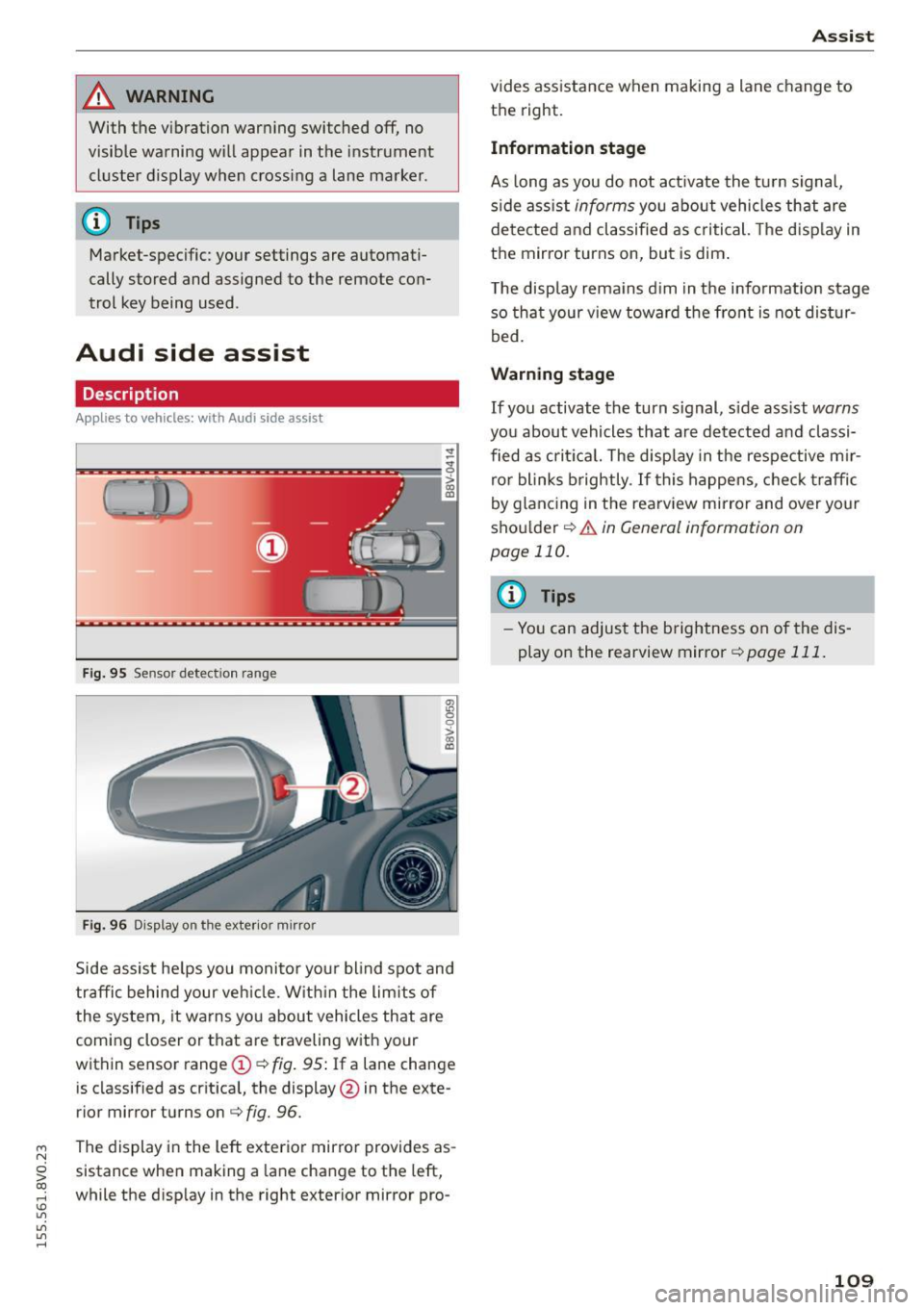
Fig . 9 5 Sensor detect io n range
Fig . 96 Display on the exterior mirror
fR 0
0
> CX)
traffic behind your ve hicle. W it hi n the limit s of
the system, it warns yo u about vehicles that are
coming closer or that are traveling with your
within sensor range
(D ¢ fig . 95: If a lane change
is classified as cr it ica l, the display @in the exte
rior mirror turns on
c:> fig. 96.
The display in the left exterior mirro r provides as
sistance when making a la ne change to the left,
while the d isp lay in the right exterior mirror pro-
A ssi st
vides assistance when making a lane change to
th e right.
Information stage
As long as you do not act ivate the tu rn signa l,
s ide ass ist
informs yo u about vehicles that are
de te cted a nd classified as criti cal. The d is pl ay in
the mirror turns on, but is dim .
T he display rema ins d im in the info rmation stage
so tha t your v iew toward the front is not dis tur
bed.
Warn ing stage
If you activate the turn s ignal, s ide ass ist warns
you about vehicles that are de tected and classi
fied as cri tica l. The display in the respective m ir
ro r blinks brightly . If this happe ns, che ck tr affi c
by glanc ing in the rearv iew mirror and over your
sho ulder
c:> .&. in General information on
page 110.
@ Tips
- Yo u can adjust the brightness on of the dis
play on the rearview mirror
c:> page 111 .
109
Page 114 of 282
Assist Driver messages
Appl ies to vehicles: with Audi side assist
If the side assist switches off automatically, a
message appears in the instrument cluster dis
p la y.
@j Audi side assist: currently unavailable.
No sensor vision
The radar sensors' vision is affected. Do not cover
the area in front of the sensors with bike wheels,
stickers, dirt or other objects. Clean the area in
front of the sensors, if necessary
r:!> page 110,
fig. 98.
@j Audi side assist: currently unavailable
Side assist cannot be switched on temporarily be
cause there is a ma lfunction (for examp le, the
battery charge level may be too low).
@j Audi side assist: System fault!
The system cannot guarantee that it will detect
veh icles correctly and it is switched off. The sen
sors have been displaced or are faulty. Have the
system checked by an authorized Audi dealer or
authorized Audi Service Facility soon.
Audi drive select (drive
settings)
Introduction
Applies to vehicles: with Audi drive select
Audi drive select makes it possible to experience
different types of vehicle settings in one vehicle.
The driver can select from three
Comfort, Auto
and Dynamic modes using the ~.7l.'i button in the
center console or the MMI to switch between a
sporty and a comfortable driving mode, for ex
ample . In the
individual* mode, the settings can
be adjusted to your personal preferences . This
makes it possib le to combine settings such as a
sporty engine tun ing with light steering .
.,&. WARNING
Using Audi drive select incorrect ly can lead to
collisions, other accidents and serious inju
ries.
112
· Description
Applies to vehicles: with Audi drive se lect
The vehicle setup in each mode depends on the
vehicle's features. However , the eng ine and steer
ing are always affected.
Engine and automatic transmission
Depending on the mode, the engine and auto
matic transmission* respond more qu ickly or in a
more balanced manner to accelerator peda l
movements .
Adaptive dampers (Audi magnetic ride)*
The adaptive dampers use sensors to record in
format ion regarding steer ing movements, brak
ing and acce lerat ion operations by the driver,
road surface, dr iv ing speed, and load. With Audi
drive select you can adjust the adaptive dampers
sporty (dynamic), comfortable (comfort) or bal
anced (auto).
Steering
T he steer ing adapts in terms of steer ing ass is
tance. There a re diffe rent modes
Q page 113.
Indirect steering that moves easily as in comfort
mode is especia lly suited to long drives on a high
way. The dynamic mode provides sporty, direct
steering .
For vehicles with progressive steering* the steer
ing performance is more agi le .
Cornering light*
The cornering light adjusts when driv ing on
curves at speeds between 6 mph (10 km/h) and
68 mph (110 km/h). The pivoting action and the
lig hting are also adapted to the mode.
Adaptive cruise control*
The behavior when accelerating can be adjusted
from comfortable to sporty, depending on the
Audi drive select mode. Adaptive cruise control
also responds to the driving behavior of the vehi
cle ahead in a more conservative or sporty man
ner.
Page 115 of 282
....,
N
0 > co
rl I.O
"'
"'
"'
rl
@ Tips
In some models, the maximum vehicle speed
can only be reached in the auto and dynamic
modes.
Selecting the driving mode
A ppl ies to vehicles: with Audi drive select
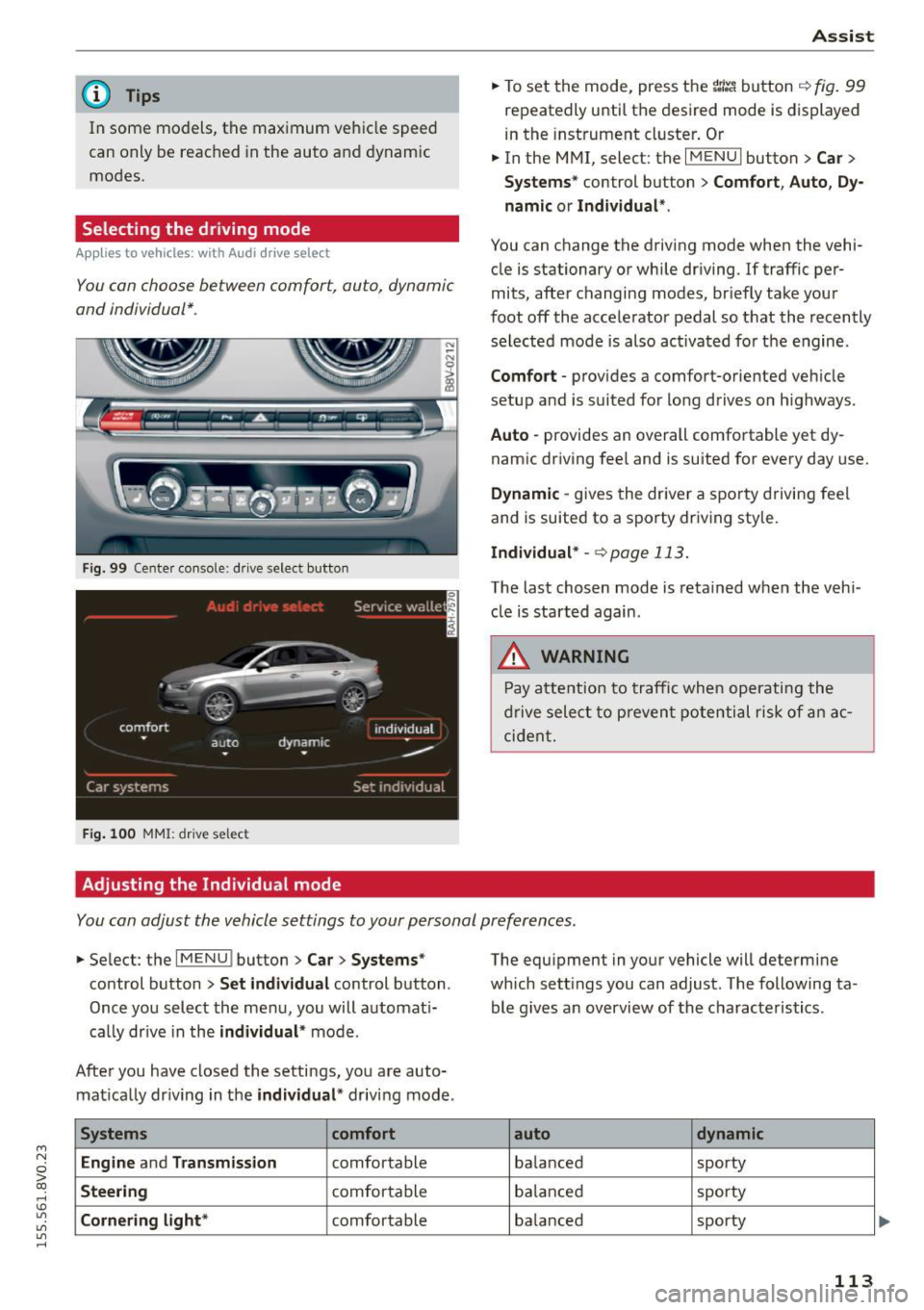
You con choose between comfort, auto, dynamic
and individual* .
Fig. 99 Center console: dr ive selec t button
Fig . 100 MMI : drive select
Adjusting the Individual mode Assist
.,.
To set the mode, press the r:1:.~ button ~ fig. 99
repeatedly until the desired mode is displayed
in the instrument cluster. Or
.,. In the MMI, select: the
I MENU I button >C ar>
Systems"
control button > Comfort, Auto, Dy
namic or Individual ".
You can change the driving mode when the vehi
cle is stationary or while driving.
If traffic per
mits, after changing modes, briefly take your
foot off the accelerator pedal so that the recently
selected mode is also activated for the engine .
Comfort -provides a comfort-oriented vehicle
setup and is suited for long drives o n highways.
Auto -provides an overall comfortable yet dy
namic driving feel and is suited for every day use.
Dynamic -gives the driver a sporty driving feel
and is suited to a sporty driving sty le.
Individual* -<=>page 113.
The last chosen mode is retained when the veh i
cle is started again .
.&, WARNING
-Pay attention to traffic when operating the
drive select to prevent potential risk of an ac
cident.
You con adjust the vehicle settings to your personal preferences .
.,. Select : the IMENU ! button> Car> Systems*
control button > Set individual control button .
Once you select the menu, you will automat i
ca lly dr ive in the
individual* mode .
After you have closed the settings, you are auto mat ically dr iving in the
individual * driving mode .
Systems comfort
Engine
and Transmission comfortable
Steering comfortable
Cornering light* comfortable The equipment
in your vehicle will determine
which sett ings you can adjust. The following ta
ble g ives an overview of the characteristics .
auto dynamic
balanced sporty
balanced sporty
ba lanced sporty
113
Page 142 of 282
Safety belt s
Safety belts
General notes
Always wear safety belts!
Wearing safety belts correctly saves lives!
This chapter explains why safety belts are neces
sary, how they work and how to adjust and wear
them correctly.
.. Read all the information that follows and heed
all of the instructions and WARNINGS.
&_ WARNING
Not wearing safety belts or wearing them im
properly increases the risk of serious personal
injury and death.
- Safety belts are the single most effective
means available to reduce the risk of serious
injury and death in automobile accidents.
For your protection and that of your passen
gers, always correct ly wear safety belts
when the vehicle is moving.
- Pregnant women, injured, or physically im
paired persons must also use safety belts.
L ik e all veh icle occupants, they are more
likely to be seriously injured if they do not
wear safety be lts . The best way to protect a
fetus is to protect the mother - throughout
the ent ire pregnancy.
Number of seats
Your Audi has a total of five seating positions:
two in the front and three in the rear. Each seat
ing position has a safety belt .
&_ WARNING
Not wearing safety belts or wearing them im
properly increases the risk of serious personal
injury and death.
- Never strap more than one person, includ
ing small ch ildren, into any belt. It is espe
cially dangerous to place a safety belt over a
child sitting on your lap.
- Never let more people ride in the vehicle
than there are safety belts available.
140
-Be sure everyone riding in the vehicle is
properly restrained with a separate safety
belt or child restraint.
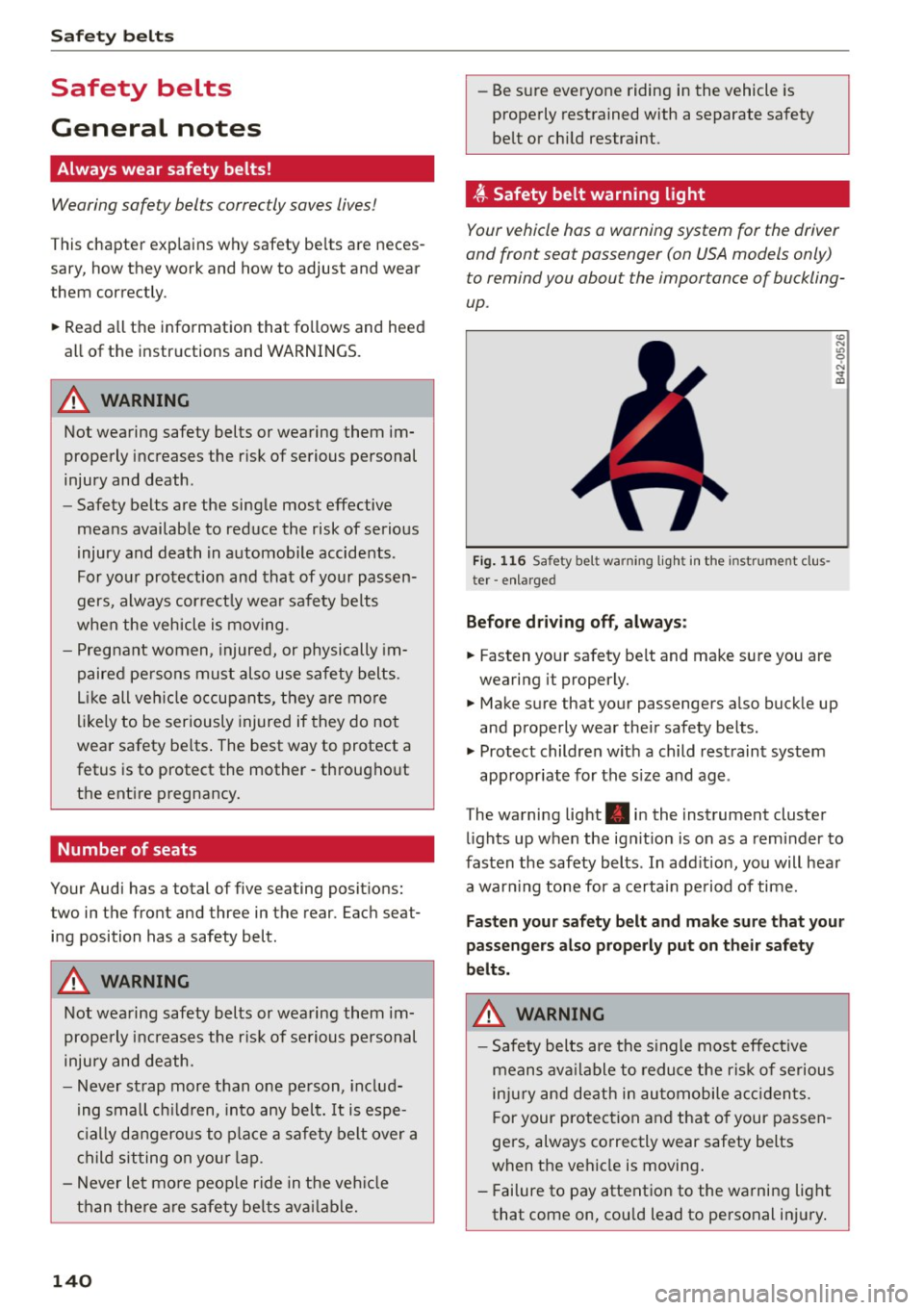
~ -Safety belt warning light
Your vehicle has a warning system for the driver
and front seat passenger (on USA models only) to remind you about the importance of buckling
up .
Fig. 116 Safety belt warning light in the instrument cl us
ter -enlarged
Before driving off, always:
.. Fas ten your safety belt and make sure you are
wearing it properly .
(0
"'
"' 9
"'
and properly wear their safety belts .
.. Protect children with a child restraint system
appropriate for the s ize and age .
The warning light . in the instrument cluster
light s up when the ign it ion is on as a reminder to
fasten the safety belts . In add ition, you will hear
a warn ing tone for a certain pe riod of time.
Fasten your safety belt and make sure that your
passengers also properly put on their safety
belts .
&_ WARNING
-Safety belts are the sin gle most effect ive
means available to reduce the risk of serious
injury and death in automobile accidents.
F or your protection and that of your passen
gers, always correctly wear safety belts
when the vehicle is moving .
- Failure to pay attention to the warning light
that come on, cou ld lead to personal injury .
-
Page 158 of 282
Airbag syste m
-An Advanced Airbag wi th gas generator for the
driver inside the steering wheel hub.
- An Advanced Airbag with gas generator inside
the instrument pane l for the front passenger.
- A capacitive passenger dete ct ion system under
neath the front passenge r seat cover. This sys
tem measures the e lectrical capacitance of the
person in the seat. The information registered
is sent continuously to the electronic control
unit to regulate deployment of the front Ad
vanced Airbag on the passenger s ide.
- An airbag monitoring system and indicator
light in the instrument cluster¢
page 160.
-A sensor in each front seat registers the dis
tance between the respect ive seat and the
steering wheel or instrument panel. The infor
mation registered is sent cont inuously to the
electronic control unit to regulate deployment
of the front Advanced Airbags.
- The
PASSENGER AIR BAG OFF light comes on
and stays on in the center of the instrument
pane l¢
page 198 a nd tells you when the front
Advanced Airbag on the passenger side has been t urned off .
- A sensor in the safety belt latch for the dr iver
and for the front seat passenger that senses
whether that safety belt is latched or not and
transmits this information to the e lectronic
control unit .
_&. WARNING
Damage to the front passenger seat can pre
vent the front airbag from work ing properly.
- Improper repair or disassembly of the front
passenger and driver seat w ill prevent the
Advanced Airbag System from funct ioning
properly.
- Repairs to the front passenger seat must be
performed by qualified and properly trained
workshop personnel.
- Never remove the front passenger or driver
seat from the veh icle.
- Never remove the upholstery from the front
passenger seat.
- Never disassemble or remove parts from the
seat or disconnect wires from it.
156
- Never carry sharp objects in yo ur poc kets or
put them on the seat. The capacitive pas
senger detection mat in the front passenger
seat will not function properly if it is punc
tured.
- Never carry things on you r lap or carry ob
jects on the front passenger seat. Such ob
jects can influence the capacitance regis
tered by the capac itive passenger detection
sy stem, so that in correct info rmation is pro
vided to the airbag cont rol uni t.
- Never store items under the front passenger
se at. P arts of the Advanced Airbag System
under the passenger seat could be dam
aged, p reventing t hem and the airbag sys
tem from wo rking properly.
- Never p lace sea t covers or rep lacement up
holstery that have not been specifically ap
proved by Audi on the front seats .
- Seat covers can prevent the Advanced Air
bag System from recognizing c hild re
straints or occupants on the front passenger
seat and prevent the side a irbag in the seat
backrest from deploying properly.
- If a seat heater has been retrofitted or oth
erw ise added to the front passenger seat,
never install any child restraint system on
this seat.
- Never use cushions, pillows, b lankets, or
sim ila r items on the front passenger seat .
The additional layers prevent the capacitive
passenger detection system from accurately
measuring the capacitance of the child safe
ty seat and/or the person on the seat and
thus keep the Adv ance d Airbag System from
wo rking properly .
- Never p lace or u se any e lectr ic al device
(s uc h a s a laptop, CD player, elec tronic
games device, power inve rter or seat heater
for child seats) on the front passenger seat if the device is connected to the 12 -volt
socket or the cigarette lighter soc ket. Such
dev ices can influence the capac itance regis
tered by the capac itive passe nger detection
system, so that incorrect info rmation is pro-
vided to the ai rbag cont rol unit.
~
Page 198 of 282
Checking and Fill in g
Ad Blue is the market ing name for Diese l Exhaust
Fl uid (DEF) .
The AdBlue is carried in a separate tank in the ve
h icle. The AdB lue usage acco unts for approxi
mately 0.5% to 1.2% of the diesel fuel that is
used .
When a message about refil ling the Ad Blue ap
pea rs in the instrument cluster disp lay, yo u must
refill the AdBlue yourself or have it refilled by an
authorized Aud i dealer or authorized Audi Se rvice
Facility ¢
page 197 .
A WARNING
Failure to heed Ad Blue refill information in
the instrument cluster can prevent the vehicle
from be ing started and driven. If the veh icle
cannot be driven and an emergency arises,
personal in ju ry can occur.
-Always have the Ad Blue tank refilled well before the tank runs d ry.
(D Tips
-
- The instrument cluster display indicates the
distance remaining that can be driven
¢ page 196. If the AdBlue tank is com
plete ly empty, the engine w ill not start
again after the ig nition is switched off.
- Ad Blue is required by law to operate this ve
hi cle.
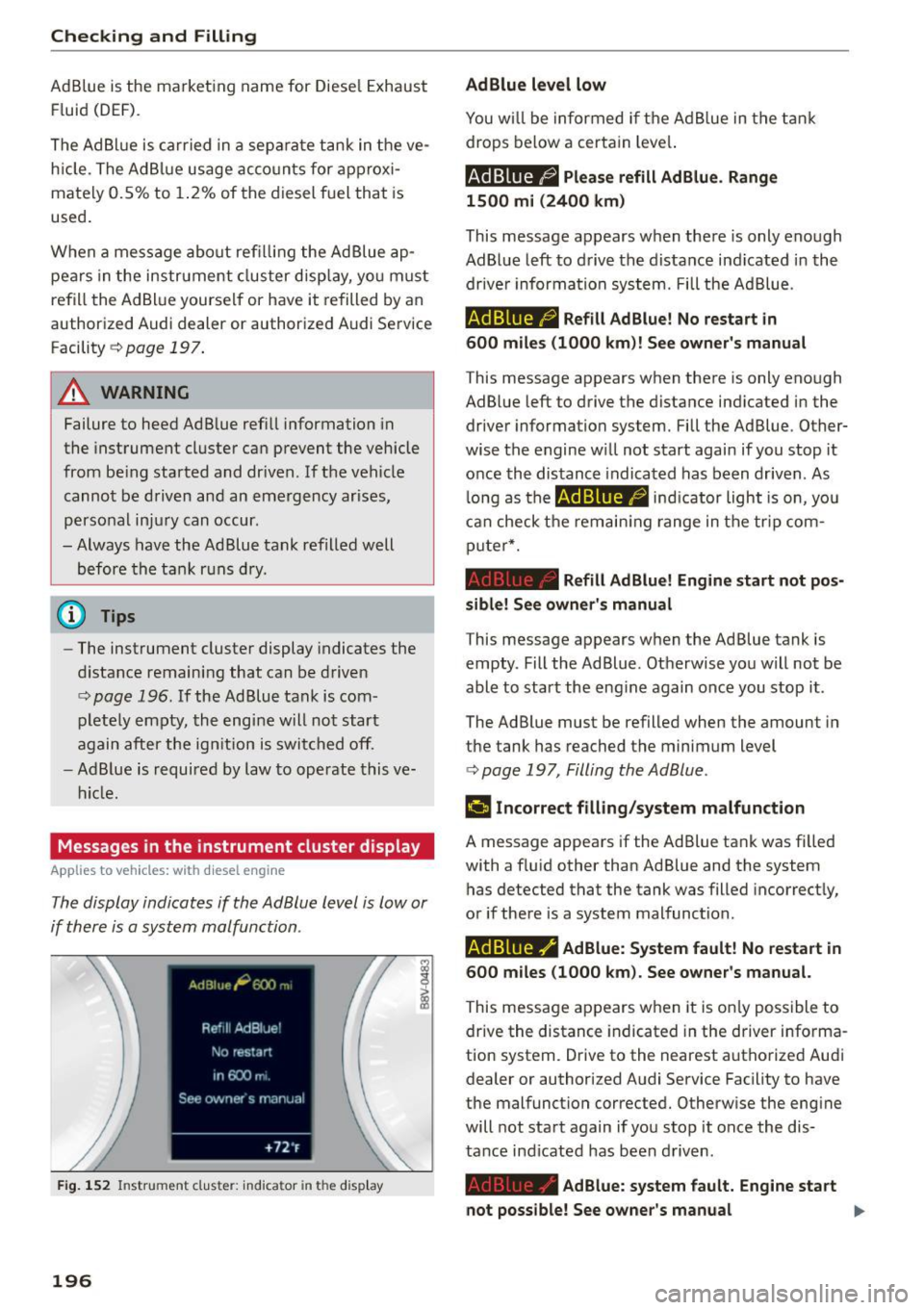
Messages in the instrument cluster display
Applies to vehicles: with diesel engine
The display indicates if the Ad Blue level is low or
if there is a system malfunction .
Fig. 1 52 In stru ment cl uste r: ind ic a tor in th e disp la y
196
AdBlue level low
You w ill be informed if the Ad B lue in the tan k
drops below a certa in leve l.
Ad Blue /;, Please refill AdB lue . Range
1500 mi (2400 km )
This message appears when there is only enough
AdBl ue left to d rive the distance ind icated in the
drive r information system. Fill the Ad Blue.
AdBlue /9 Refill AdBlue! No restart in
600 mile s (1000 km )! See owner' s manu al
T his message appears when there is only eno ugh
Ad B lue left to drive the distance ind icated in the
dr iver information sys tem. Fill the Ad Blue. Other
wise the engine w ill not start again if you stop it
once the distance indicated has been driven . As
l ong as the indicator light is on, yo u
can check t he remain ing range in the tr ip com
p uter*.
Refill Ad Blu e! Engine start not po s
sible! See owner 's m anual
This message appears w hen the Ad Blue tank is
empty . Fill the Ad Blue. Otherwise you will not be
able to start the eng ine again once you stop it .
The Ad Blue must be refilled when the amount in
the tank has reached the minimum level
¢ page 197, Filling theAdBlue .
¢4 tncorrect filling /system malfuncti on
A message appears if the Ad Blue ta nk was fi lled
with a f lu id other than Ad Blue and the system
has detected that the tank was filled incorrect ly,
or if there is a system malfunction.
AdBlue ./' AdBlue: System fault! No restart in
600 miles (1000 km ). See owner's manual.
This message appears when it is on ly possible to
drive the distance indicated in the driver informa
tion system . Drive to the nearest authorized Aud i
dealer or author ized A udi Service Facility to have
the malfunct ion corrected. O therwise the engine
will not sta rt again if you stop it once the dis
tance indicated has been d riven .
Ad Blue: system fault . Engine start
not possible! See owner 's manual
Page 199 of 282
....,
N
0 > co
rl I.O
"'
"'
"'
rl
This message appears if the system has detected
that the tank was filled incorrectly or that there
is a malfunction. Drive immediately to the near
est authori zed Aud i dealer or authori zed Audi
Service Facility to have the malfunction correct
ed . Otherwise you will not be able to start the en
g in e again once you stop it.
Filling the Ad Blue
Applies to vehicles: with selective catalyt ic red uctio n
A special refill bottle must be used to fill the
AdBlue.
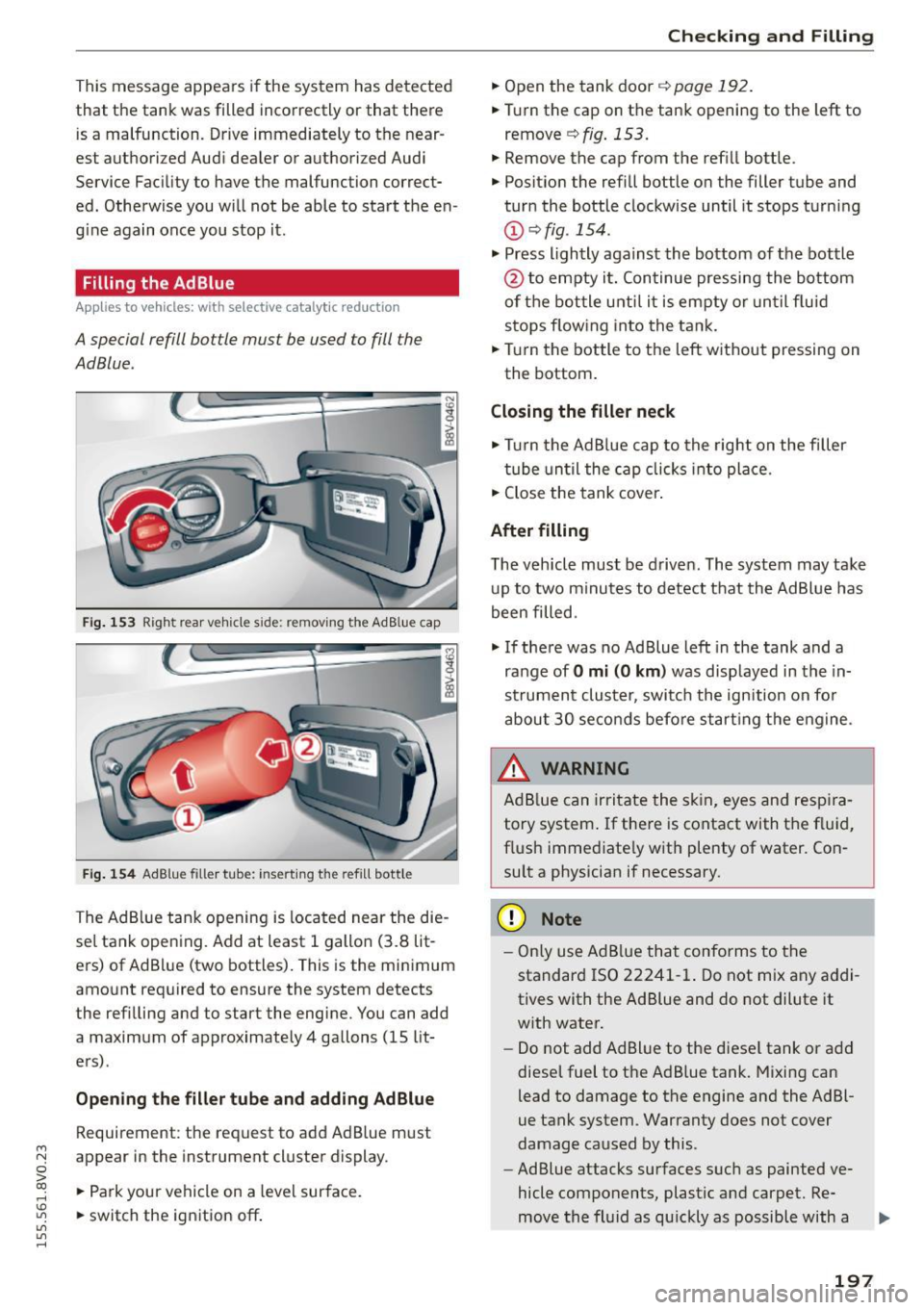
Fig. 153 Right rear vehicle s ide: removing the Ad B lue cap
Fig. 154 Ad Blue filler tube: inserting the refi ll bott le
The Ad Blue tank opening is located near the die
sel tank opening. Add at least 1 gallon (3.8 lit
ers) of AdBlue (two bottles). This is the minimum
amount required to ensure the system detects
the refilling and to start the engine. You can add
a maximum of approximately 4 gallons (15 lit
ers) .
Opening the filler tube and adding AdBlue
Requirement: the request to add Ad Blue must
appear in the instrument cluster display.
• Park your vehicle on a level surface.
• switch the ignition off .
Checking and Filling
• Open the tank door q page 192.
• Tur n the cap on the tank opening to the left to
remove
q fig. 153.
• Remove the cap from the refill bottle.
• Position the refill bottle on the filler tube and
turn the bottle clockwise until it stops turning
@ qfig. 154.
• Press lightly against the bottom of the bottle
@ to empty it. Con tinue pressing the bottom
of the bottle unti l it is empty or until flu id
stops flowing into the tank.
• Turn the bottle to the left without pressing on
the bottom.
Closing the filler neck
• Turn the Ad Blue cap to the right on the filler
tube until the cap clicks into place.
• Close the tank cover.
After filling
The vehicle must be driven. The system may take
up to two minutes to detect that the AdBlue has
been filled.
• If there was no Ad Blue left in the tank and a
range of
O mi (0 km ) was displayed in the in
strument cluster, switch the ignition on fo r
about 30 seconds before start ing the engine.
_& WARNING
=
Ad Blue can irritate the skin, eyes and respira-
tory system . If there is contact with the fluid,
flush immediate ly with plenty of water. Con
sult a physician if necessary.
(D Note
- Only use Ad Blue that conforms to the
standard ISO 22241-1. Do not mix any addi
tives with the Ad Blue and do not dilute it
with water.
- Do not add AdBlue to the diese l tank or add
diesel fuel to the Ad B lue tank. Mixing can
lead to damage to the engine and the Ad Bl
ue tank system. Warranty does not cover
damage caused by this .
- Ad Blue attacks surfaces such as painted ve
hicle components, plastic and carpet. Re-
move the fluid as quickly as possible with a ..,.
197
Page 203 of 282
....,
N
0 > co
rl I.O
"'
"'
"'
rl
Checking and Filling
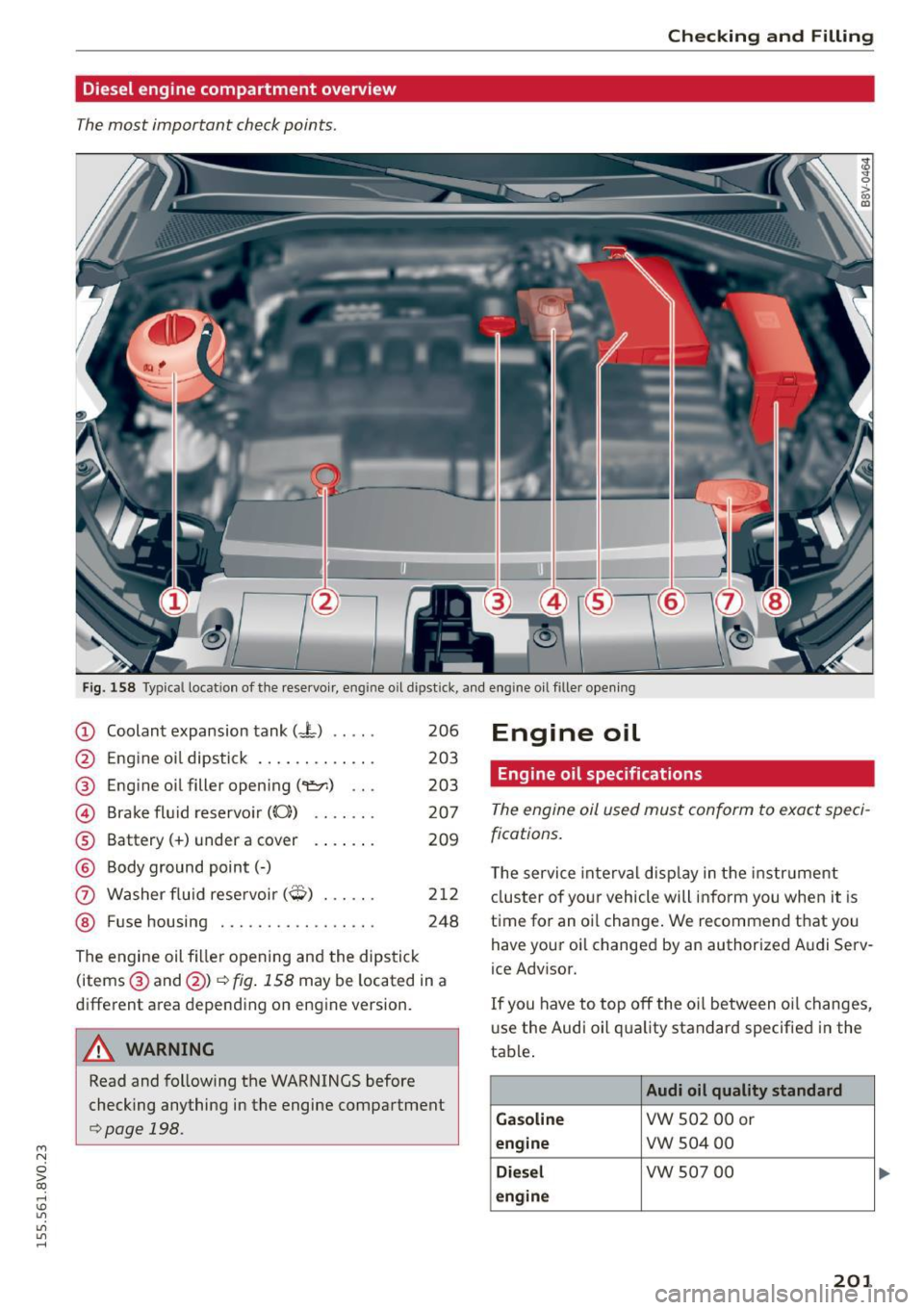
Diesel engine compartment overview
The most important check points .
Fig. 158 Typical locat ion of the reservoi r, eng ine oil dipstick, and engine o il filler opening
CD Coolant expansion tank (-L) .....
@
®
©
®
®
(J)
®
Engine oil dipstick ... ...... ... .
Engine oil filler opening (~) .. .
Brake fluid reservoir
(0))
Battery(+) under a cover
Body ground point(-)
Washer fluid reservoir
(O) ..... .
Fuse housing .......... ...... .
206
203
203 207
209
212
248
The engine oil filler opening and the dipstick
(items ® and @)¢
fig . 158 may be located in a
d ifferent area depending on engine version.
A WARNING
-
Read and following the WARNINGS before
checking anything in the engine compartment
¢page 198.
Engine oil
Engine oil specifications
The engine oil used must conform to exact speci
fications.
T he service interval display in the instrument
cluster of your vehicle will inform you when it is
time for an oi l change. We recommend that you
have your oil changed by an authorized Audi Serv
ice Advisor.
If you have to top off the oil between o il changes,
use the Audi oil qua lity standard specified in the
table .
Audi oil quality standard
Gasoline
VW 502 00 or
engine vw 504 00
Diesel VW 507 00
engine
201