center AUDI S3 SEDAN 2015 Owners Manual
[x] Cancel search | Manufacturer: AUDI, Model Year: 2015, Model line: S3 SEDAN, Model: AUDI S3 SEDAN 2015Pages: 282, PDF Size: 71.14 MB
Page 12 of 282
Instruments and indicato r Lights
Instruments and indicator Lights
Instruments
Instrument cluster overview
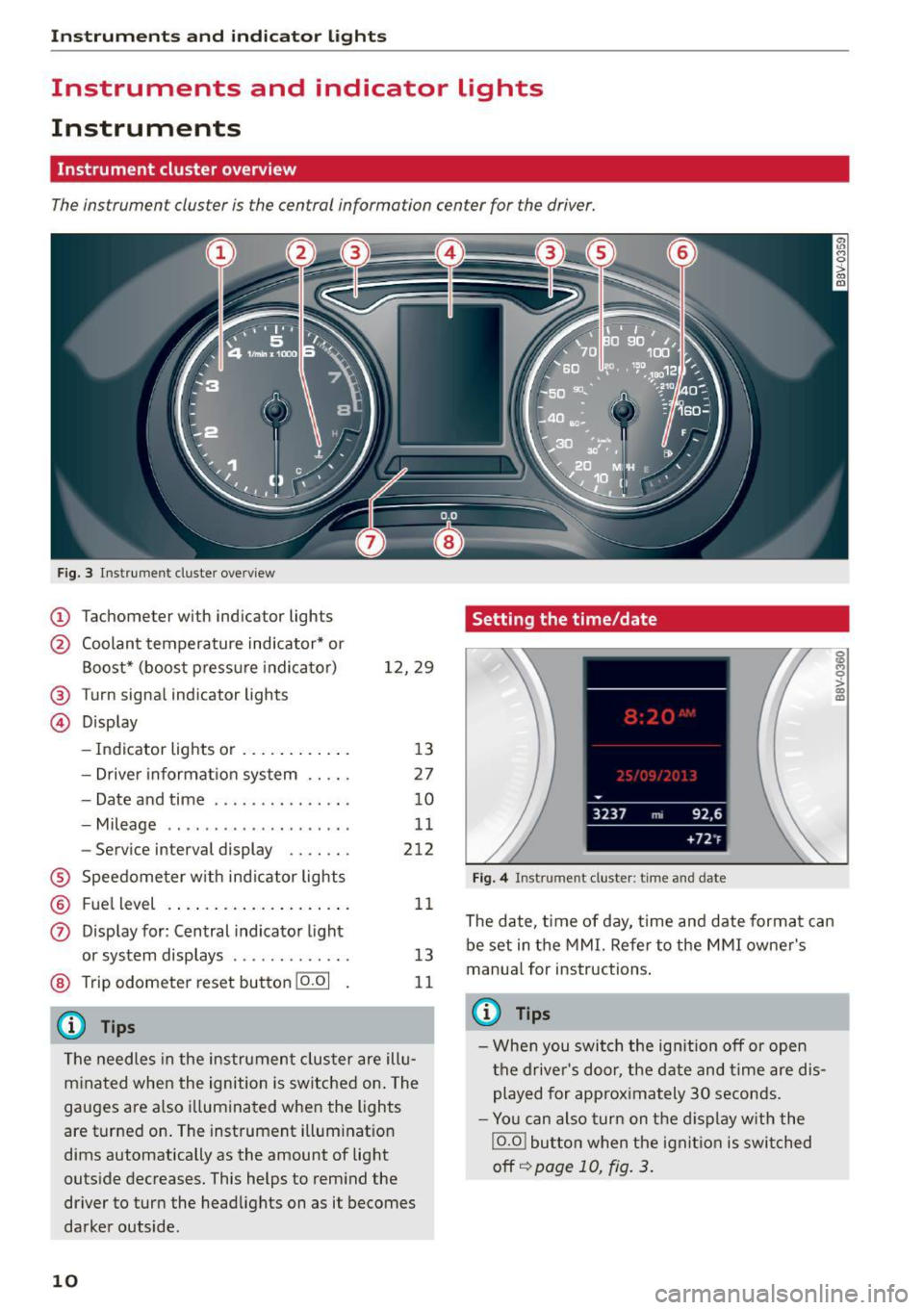
The instrument cluster is the central information center for the driver.
Fig. 3 Instrument cluster overview
(D Tachometer with indicator lights
@ Coolant temperature ind icator* or
Boost* (boost press ure indicato r)
® Turn signa l indicator lights
@ Display 12,29
- Indicator lights or . . . . . . . . . . . . 13
- Drive r information system . . . . . 27
- Date and time . . . . . . . . . . . . . . . 10
- Mileage . . . . . . . . . . . . . . . . . . . . 11
- Service interval display . . . . . . . 212
® Speedometer w ith indicator lights
® Fu el level .. ................ . .
0 Display for: Central indicator light
or system displays ..... ..... .. .
@ Trip odometer reset button 10.01
(D Tips
11
13
11
The needles in the instrument cluster are illu
minated when the ignition is switched on. The
gauges are also illuminated when the lights
are turned on . The instrument illum inat ion
dims automatically as the amount of light
outside decreases. This helps to remind the
driver to turn the headlights on as it becomes
darker outside.
10
Setting the time/date
Fig. 4 Instrument cluste r: time and date
The date, time of day, time and date format can
be set in the MMI. Refer to the MMI owner's
manua l for instructions .
(0 Tips
-When you switch the ignition off or open
the driver's door, the date and time are dis
played for approximately 30 seconds.
- You can also turn on the display with the
IO.O ! button when the ignition is switched
off
I:=;) page 10, fig. 3.
g .., 0 :> CX) m
Page 14 of 282
Instruments and indicator lights
reached the reserve mark, the bottom LED will
turn red and the
ljJ indicator light turns on
¢
page 23. The bottom LED blinks red when
the fuel level is very low.
The on-board computer shows the range based
on the fuel level¢
page 28, On-board comput
er display.
For the tank capacity in your vehicle, refer to the
Technical Data
¢ page 260.
(D Note
Never drive until the tank is completely emp
ty. The irregular supply of fuel that results
from that can cause engine misfires. Uncom
busted fuel will then enter the exhaust sys
tem. This can cause overheating and damage
to the catalytic converter.
Coolant temperature indicator
In vehicles without a coolant temperature indica
tor, an indicator light. will turn on when the
coolant temperature is too high ¢
page 19. Re
fer to ¢(1) .
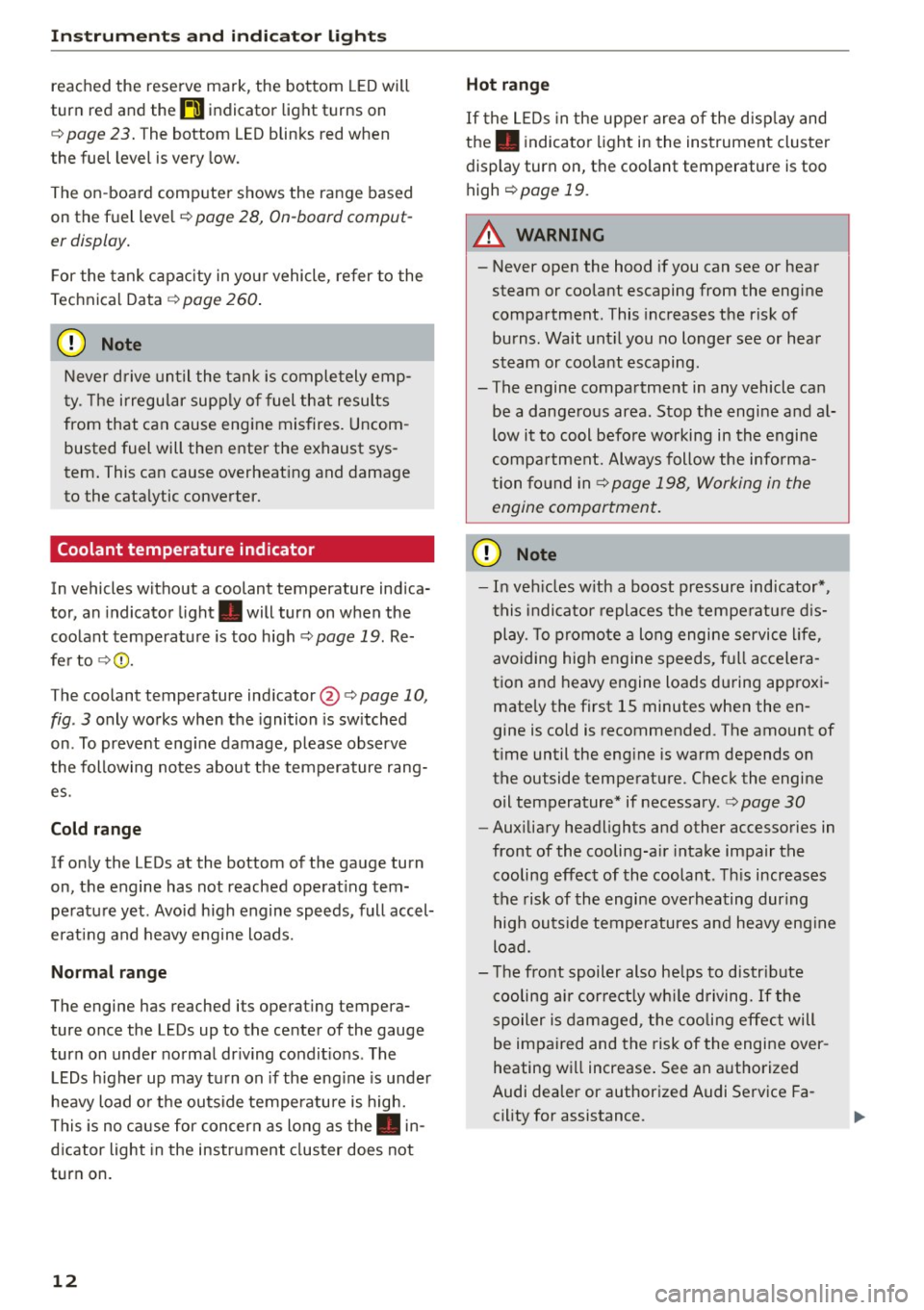
The coolant temperature indicator @c:>
page 10,
fig . 3 only works when the ignition is switched
on . To prevent engine damage, please observe
the following notes about the temperature rang
es.
Cold range
If only the LEDs at the bottom of the gauge turn
on, the engine has not reached operating tem perature yet. Avoid high engine speeds, full accel
erating and heavy engine loads.
Normal range
The engine has reached its operating tempera
ture once the LEDs up to the center of the gauge
turn on under normal driving conditions . The
LEDs higher up may turn on if the engine is under
heavy load or the outside temperature is high.
This is no cause for concern as long as the. in
dicator light in the instrument cluster does not
turn on.
12
Hot range
If the LEDs in the upper area of the display and
the . indicator light in the instrument cluster
display turn on, the coolant temperature is too
high
c:> page 19 .
A WARNING
-Never open the hood if you can see or hear
steam or coolant escaping from the engine
compartment. This increases the risk of
burns. Wait until you no longer see or hear
steam or coolant escaping.
- The engine compartment in any vehicle can
be a dangerous area . Stop the engine and al
low it to cool before working in the engine
compartment. Always follow the informa
tion found in ¢
page 198, Working in the
engine compartment.
(D Note
- In vehicles with a boost pressure indicator* ,
this indicator replaces the temperature dis
play. To promote a long engine service life,
avoiding high engine speeds, full accelera
tion and heavy engine loads during approxi
mately the first 15 minutes when the en
gine is cold is recommended . The amount of
time until the engine is warm depends on
the outside temperature . Check the engine
oil temperature* if necessary .
c:> page 30
-Auxiliary headlights and other accessories in
front of the cooling-air intake impair the
cooling effect of the coolant. This increases
the risk of the engine overheating during
high outside temperatures and heavy engine
load.
- The front spoiler also helps to distribute
cooling air correctly while driving. If the
spoiler is damaged, the cooling effect will
be impaired and the risk of the engine over
heating will increase. See an authorized
Audi dealer or authorized Audi Service Fa
cility for assistance.
Page 33 of 282
....,
N
0 > co
rl I.O
"'
"'
"'
rl
temperature may be higher if there is heavy en
gin e load and high temperatures outside. This is
not a cause for concern as long as the.
¢page 19 orllll ¢page23 indicator lights in the
display do not blink.
A WARNING
Your focus should always be on driving your
vehicle safely . As the dr iver, you have com
plete responsibility for safety in traffic . Only
use the functions such as the lap timer in such
a way that you a lways maintain complete con
trol over your vehicle in all traffic situations .
(D Tips
You can retr ieve information from the tr ip
computer while the lap timer stopwatch is
r u nning.
Opening the lap timer and measuring time
Applies to vehicles: with lap timer (5 models)
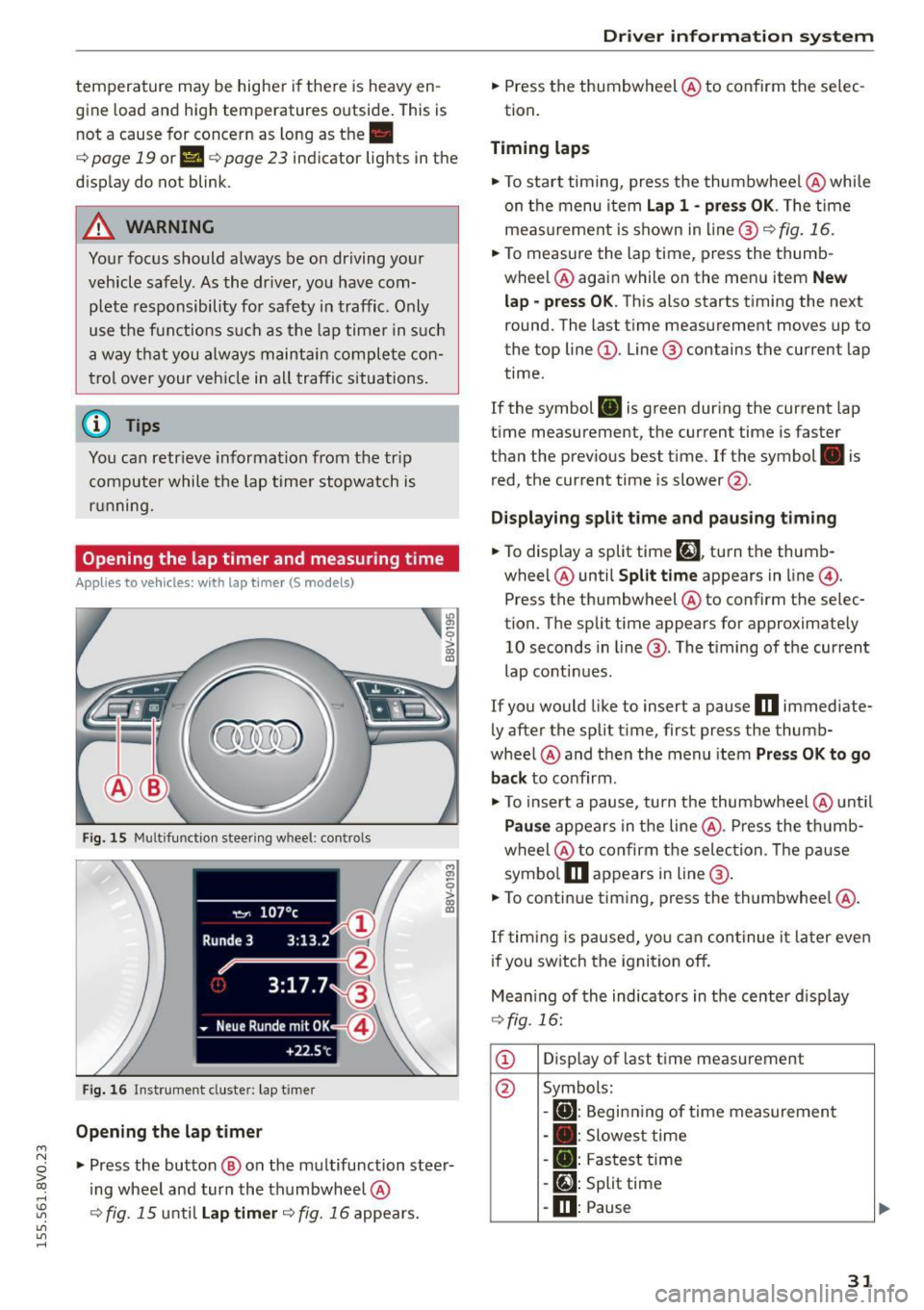
Fig. 15 Multifunction steer ing wheel: controls
Fig. 16 Instrument cluster: lap timer
Opening th e lap timer
-
"'Press the button @ on the multifunction steer
ing wheel and turn the thumbwheel @
¢fig. 15 unt il Lap timer ¢fig. 16 appea rs.
Dr iver inform atio n sy stem
.. Press the thumbwheel @ to confirm the selec
tion.
T im ing laps
"' To sta rt timing, press the thumbwheel @ while
on the menu item
Lap 1 - pre ss OK . The time
measurement is shown in line @
r=:> fig. 16.
.. To measure the lap time, press the thumb
wheel @ again while on the men u item
New
lap -pre ss O K. This also starts timing the next
round. The last time measurement moves up to
the top line
(D . Line ® contains the current lap
time .
If the symbol
ri) is green during the current lap
t ime measurement, the current time is faster
than the previous best time. If the symbol. is
red, the current time is slower @.
Displaying split time and pausing tim ing
.. To display a split time
[~l turn the thumb-
wheel @until
Split time appears in line @.
Press the thumbwheel @ to confirm the selec
tion. The split time appears for approximately 10 seconds in line @. The timing of the current
lap conti nues.
If you would like to insert a pause
m immediate
ly after the split t ime, first press the thumb
wheel @and then the menu item
Pr ess OK to go
back to confirm .
"' To insert a pause, turn the thumbwheel @ until
Pau se appears in the line @. Press the thumb
wheel @ to confirm the se lec tion . Th e pause
symbo l
m appears in line @ .
.. To continue timing, press the thumbwhee l@ .
If timing is paused , you can continue it la ter even
i f you sw itch the ignition off.
Mean ing of the indicators in the center d isp lay
¢ fig . 16:
CD Disp lay of last time measurement
@ Symbols:
-
[O]: Begin ning of time measuremen t
- . : Slowest time
- . : Fastest time
- [~]: Split time
-m : Pause
31
Page 49 of 282
....,
N
0 > co
rl I.O
"'
"'
"'
rl
Instrument illumination
The brightness of the instrument cluster and the
center console can be adjusted .
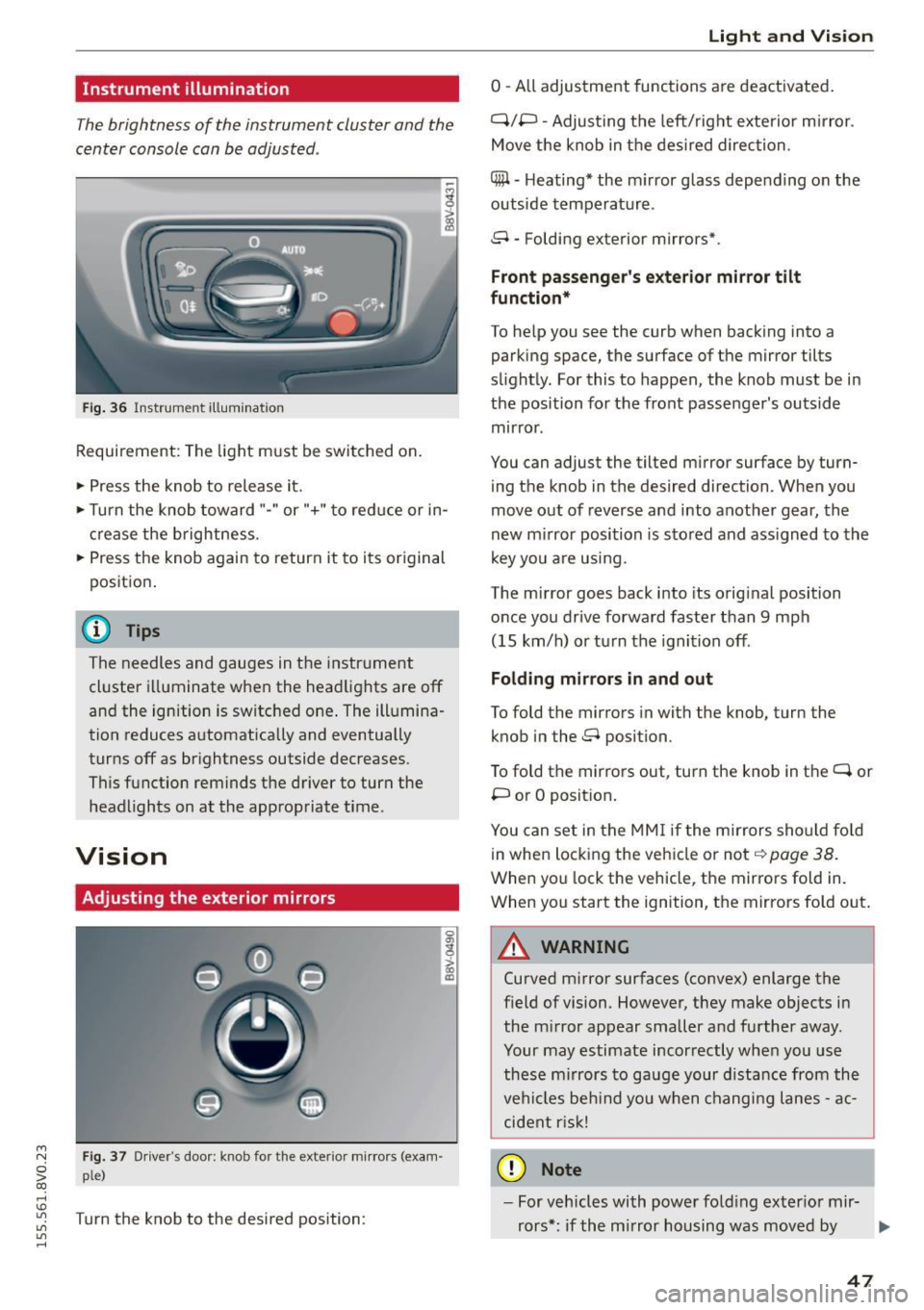
Fig. 36 Instrument illum ination
Requirement: The light must be switched on.
.. Press the knob to release it.
.. Turn the knob toward"-" or"+" to red uce or in
crease the brightness.
.. Press the knob again to return it to its original
posit ion .
@ Tips
The needles and gauges in the instrument
cluster illuminate when the headlights are off
and the ignition is switched one . The illumina·
tion reduces automatically and eventually
turns off as br ightness outside decreases.
This function reminds the driver to turn the
headlights on at the appropriate time .
Vision
Adjusting the exterior mirrors
Fig. 37 Driver's door: knob for the exterior mirrors (exam
ple)
Turn the knob to the desired position:
0
g
> a, (X)
Light and Visio n
0 -A ll adjustment functions are deactivated .
Q/P -Adjusting the left/rig ht exterior mirror.
Move the knob in the des ired direction.
C@ · Heating* the m irror glass depending on the
outside temperature.
8 • Folding exterior mirrors*.
Front pa ss e ng er's ex te rior mirror tilt
functio n*
To help you see the curb when backing into a
parking space, the surface of the mirror tilts
slight ly. For this to happen, the knob must be in
the position for the front passenger's outside
mirror .
You can adjust the tilted mirror surface by turn·
i ng the knob in the desired direction . When you
move out of reverse and into another gear, the
new m irror position is stored and ass igned to the
key yo u are us ing .
The mirror goes back into its orig inal position
once you drive forward faster than 9 mph
(15 km/h) o r turn the ignition off.
Folding m ir rors in and out
To fold the mirrors in with the knob, turn the
knob in the 8 position.
To fold the mirrors out, turn the knob in the
q or
P or O posit ion .
You can set in the MM I if the mirrors sho uld fo ld
in when locking the vehicle or not
q page 38.
When you lock the vehicle, the mirrors fold in.
When you start the ignition, the mirrors fold out.
A WARNING -,.
Curved m irror surfaces (convex) enlarge the
field of vision. However, they make objects in
the m irror appear smaller and further away.
Your may estimate incorrectly when you use
these m irrors to gauge your d istance from the
vehi cles be hind you when changi ng lanes -ac·
cident risk!
@ Note
- For vehicles with power fo ld ing exter ior mir·
rors*: if the mirror housing was moved by
IJI,-
47
Page 57 of 282
....,
N
0 > co
rl I.O
"'
"'
"'
rl
Power seat adjustment
Applies to vehicles: with power adjustable seats
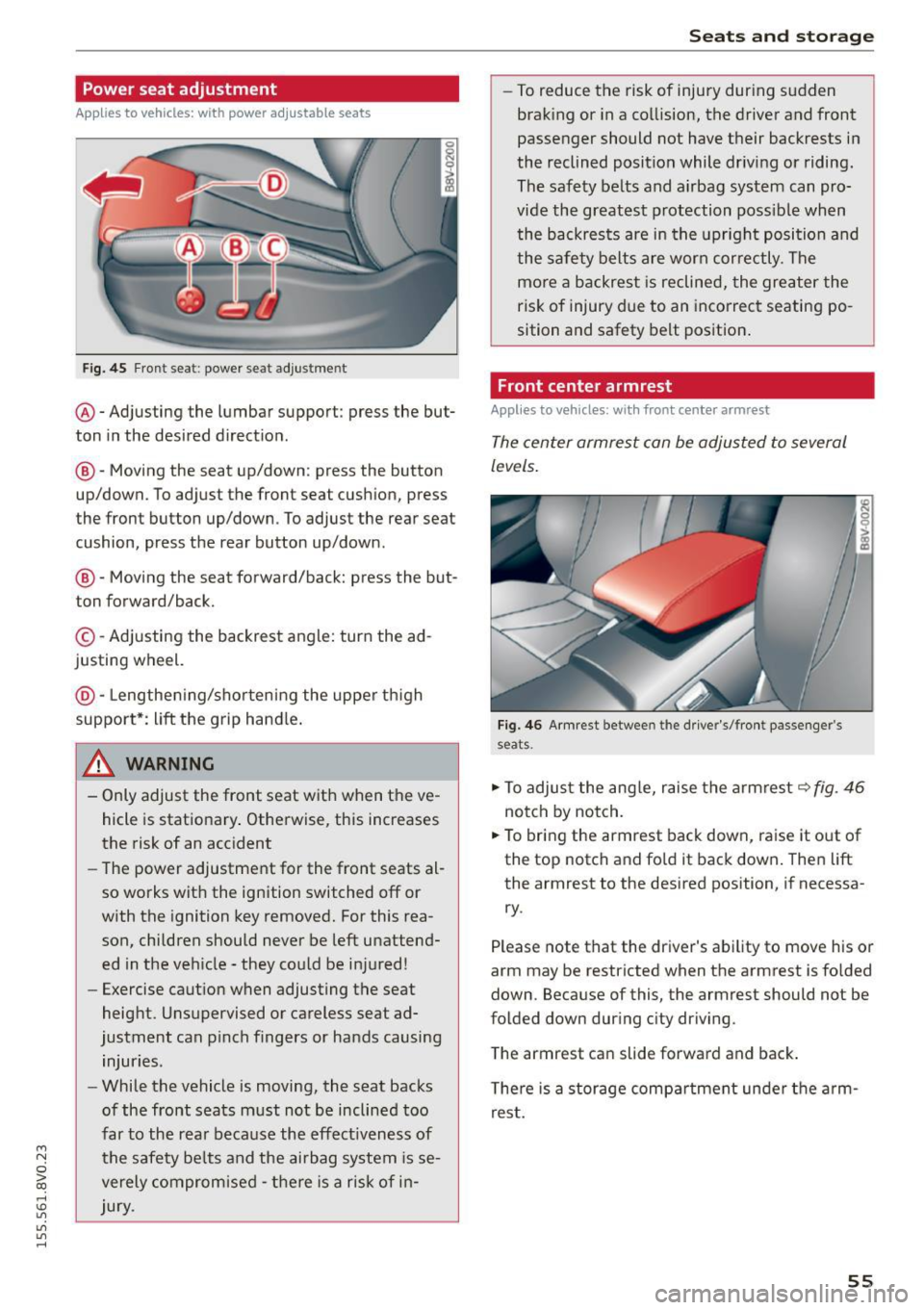
Fig. 45 Front seat: power seat adjus tment
@ -Adjusting the lumbar support: press the but
ton in the desired direction .
®-Moving the seat up/down: press the button
up/down. To adjust the front seat cush ion, press
the front button up/down . To adjust the rear seat
cushion, press the rear button up/down.
@ -Moving the seat forward/back: press the but
ton forward/back.
© -Adjusting the backrest angle: turn the ad
justing wheel.
@ -Lengthening/shortening the upper thigh
support*: lift the grip hand le.
A WARNING
- Only adjust the front seat with when the ve
hicle is stationary . Otherwise, this increases
the risk of an accident
- The power adjustment for the front seats al
so works with the ignition switched off or
with the ignition key removed. For this rea
son, children should never be left unattend ed in the vehicle - they could be injured!
- Exercise caution when adjusting the seat
height. Unsupervised or careless seat ad
justment can pinch fingers or hands causing
injuries.
- While the vehicle is moving, the seat backs
of the front seats must not be inclined too
far to the rear because the effect iveness of
the safety be lts and the airbag system is se
verely compromised -there is a risk of in
jury.
Seats and storage
- To reduce the risk of injury during sudden
braking or in a collision, the driver and front
passenger should not have their backrests in
the reclined position while driving or riding.
The safety belts and airbag system can pro
vide the greatest protection possible when
the backrests are in the upright position and
the safety belts are worn correctly. The
more a backrest is reclined, the greater the
risk of injury due to an incorrect seating po
sition and safety belt position.
Front center armrest
Applies to vehicles: wit h front center armrest
The center armrest can be adjusted to several
levels.
Fig. 46 Armrest between the driver's/front passenger's
seats .
.,.. To adjust the angle, raise the armrest ~fig. 46
notch by notch.
.,.. To bring the armrest back down, raise it out of
the top notch and fold it back down. Then lift
the armrest to the desired position, if necessa
ry.
Please note tha t the driver's ability to move his or
arm may be restricted when the armrest is folded
down. Because of this, the armrest should not be
folded down during city driving.
The armrest can slide forward and back.
There is a storage compartment under the arm
rest.
55
Page 58 of 282
Seats and storag e
Rear center armrest
Applies to vehicles: with rear center armrest
The storage compartment and cup holder are in
tegrated in the armrest.
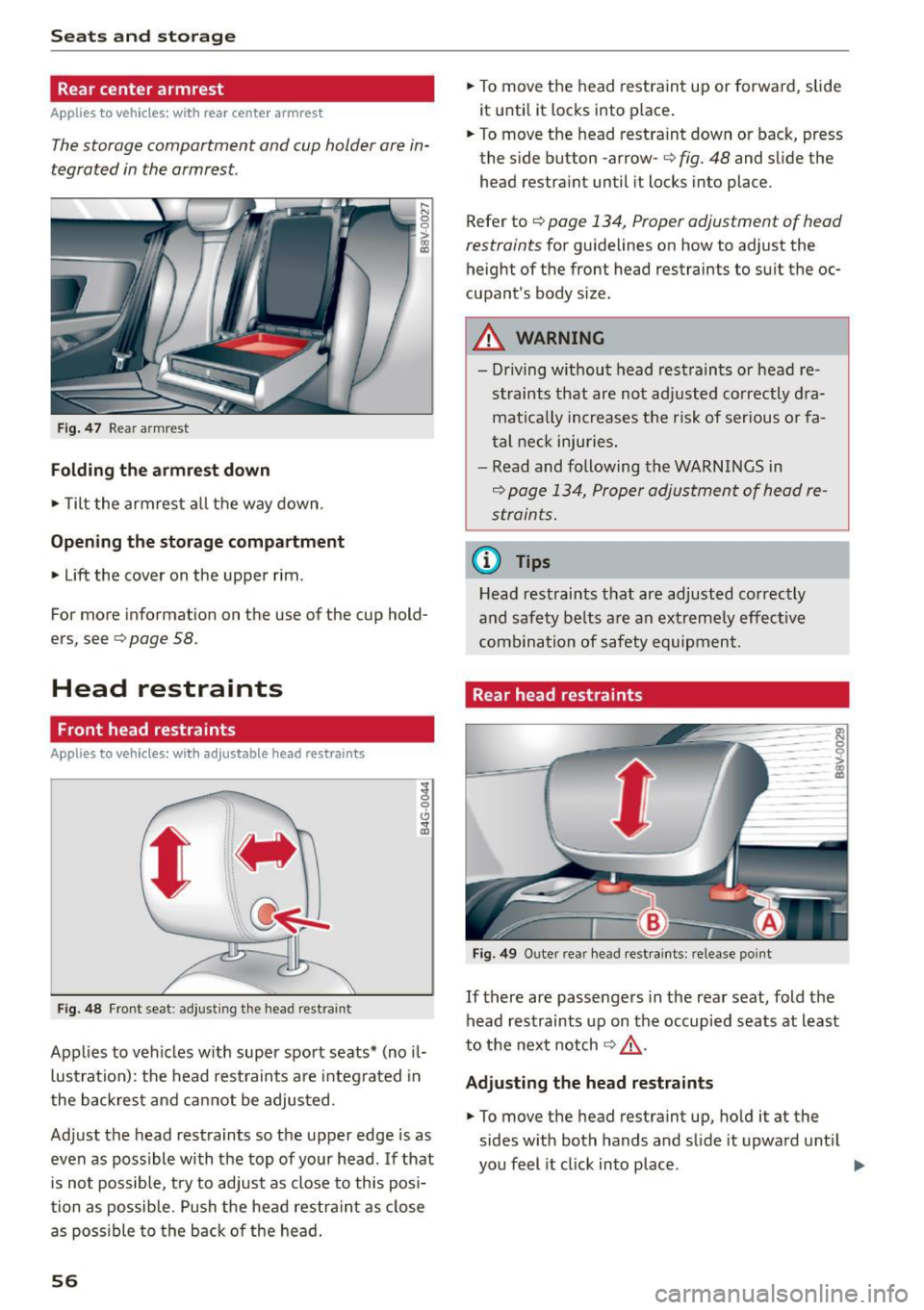
Fig . 47 Rear armrest
Folding the armre st d own
• Tilt the armrest a ll the way down.
Opening the sto rage c omp artment
• Lift the cover on the upper rim .
~I
gl
~
For more information on the use of the cup hold
ers, see
c> page 58.
Head restraints
Front head restraints
Applies to veh icles: with adjustable head restraints
-
'
' F ig. 48 Front seat : ad just ing the head restraint
Applies to vehicles w ith super sport seats* (no il
lustration): the head restraints are integrated in
the backrest and cannot be adjusted.
Adjust the head restraints so the upper edge is as
even as possible with the top of your head. If that is not possible, try to adjust as close to this posi
tion as possib le. Push the head restra int as close
as poss ible to the back of the head.
56
• To move the head restraint up or forward, slide
it unti l it locks into place .
• To move the head restraint down or back, press
the side button -arrow-
c> fig. 48 and s lide the
head restraint until it locks into place.
Refer to
c> page 134, Proper adjustment of head
restraints
for guidelines on how to adjust the
height of the front head restraints to suit the oc
cupant's body size.
A WARNING
- Dr iving without head restraints or head re
straints that are not adjusted correctly dra
mat ica lly increases the risk of serious o r fa
tal neck inju ries.
- Read and following the WARNINGS in
c> page 134, Proper adjustment of head re
straints.
@ Tips
Head restraints that are adjusted correctly
and safety belts are an extreme ly effect ive
combination of safety equipment.
Rear head restraints
ro -0
Fig. 49 Outer rear head rest raints: release point
-0 > :g
If there are passengers in the rear seat, fold the
head restraints up on the occupied seats at least
to the next notch
c> ,& .
Adju sting the head restraints
• To move the head restraint up, hold it at the
sides with both hands and slide it upward unt il
you feel it click into place. .,.
Page 59 of 282
....,
N
0 > co
rl I.O
"'
"'
"'
rl
.. To move the head restraint down, press the
button ®
<::>fig . 49 and slide the head restraint
downward.
Removing the h ead restraints
To remove the head restraints, the backrest m ust
be folded forwa rd partia lly .
.. Remove the screwdrive r from the vehicle too l
k it
9 page 241 .
.. Re lease the backrest<::> page 60 .
.. Press the but ton @ c:? fig. 49 and s lide the head
restraint up as far as it can go<::>
_A .
.. Place the screwdriver in position @ in the
opening, press the button ® and pu ll the head
restraint out of the backrest at the same time
t::>_& .
.. Fold the backrest down unt il it latches securely
t::> .A in Increasing the size of the luggage
compartment on page 60 .
Installing the head re st ra int s
To install the head restraints, the backrest must
be folded forward partially .
.. Re lease the backrest <::>
page 60 .
.. Slide the posts on the head restra int down into
the guides until you feel the posts click into
place. You should not be able to pull the head
restraint out of the backrest .
.,. Fold the backrest down unt il it latches securely
9 .A in Increasing the si ze of the luggage
compartmen t on page 60.
A WARNING
- Only remove the rear seat head restraints
w hen necessary in o rder to i nstall a chi ld
seat . Install the head restraint again imme
diately once the chi ld seat is removed. Driv
ing with the head restraints removed or
head restraints not in the highest position
increases the risk of ser ious injury .
- Read and fo llow ing the WARNINGS in
<::>
page 134.
-
Seats and storage
Socket
Applies to veh icles: w it h socket
Electrical accessories can be connected in the 12
volt socket.
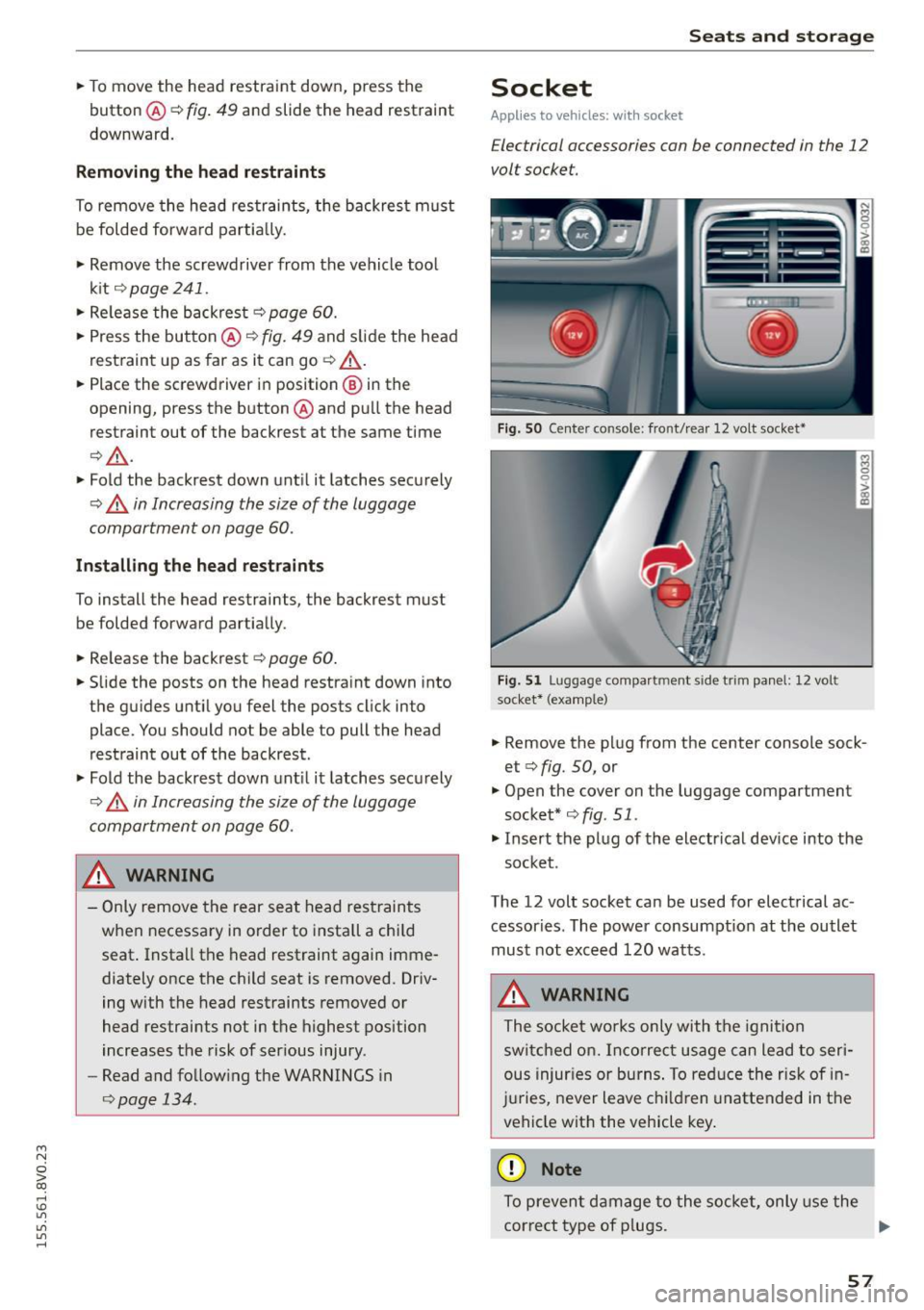
F ig. S O Center co nsole: front/ rear 12 volt socket•
F ig. 5 1 Luggage compartm ent side trim panel: 12 volt
socket* (examp le)
.. Remove the plug from the center console sock
et <::>
fig. 50, or
.,. Open the cover on the luggage compartment
socket* <::>
fig. 51.
.,. Insert the plug of the electrical dev ice into the
socket .
The 12 volt socket can be used for electrical ac
cessories . The power consumpt ion at the outlet
must not exceed 120 watts.
A WARNING
The socket wo rks only with the igni tion
switc hed on. Inco rrect usage can lead to ser i
ous injur ies or burns . To red uce the risk of in
j u ries, never leave c hildren unattended in the
vehicle with the vehicle key .
@ Note
To prevent damage to the socket, only use the
correct type of p lugs. .,,.
57
Page 61 of 282
....,
N
0 > co
rl I.O
"'
"'
"'
rl
_& WARNING
Always leave the lid on the glove compartment cover closed while driving to reduce the
risk of injury.
Additional storage compartments
There are additional storage compartments,
compartments and holders at other locations in
the vehicle :
- In the upper part of the glove compartment.
- In the center console under the center arm-
rest* .
- On the back of the right front seat . The com
partment* can hold a maximum weight of
2 lbs
(1 kg).
- Garment hooks on the B-pillar ¢
&.
_& WARNING
-Do not place any objects on the instrument
panel. Objects that are not stored securely
can slide around in the vehicle while driving,
when accelerating or braking or when turn
ing.
- Make sure that objects cannot fall out of the
center console storage compartment or oth
er compartments and into the footwell
while driving. These objects could prevent
you from braking or accelerating during sud
den braking maneuvers.
- Garments hung on the hooks must not ob
struct the driver's view. The garment hooks
are only designed for light objects . Do not
hang any garments with hard, sharp or
heavy objects in the pockets on the garment
hooks . These objects could injure vehicle oc
cupants during sudden brak ing or in a colli
sion - especially if the airbags deploy.
- Always keep the glove compartment closed
while driving to reduce the risk of injury dur
ing a collision or heavy brak ing.
- Read and following the WARNINGS in
¢ page 168, Important safety instructions
on the side airbag system.
-Hang garments so that they do not obstruct
the driver's view.
Seats and storage
-The garment hooks should only be used for
light articles of clothing . Do not leave any
heavy or sharp-edged objects in the pockets
that could interfere with the side airbags unfolding and cause injuries in the event of
a collision .
- Do not use coat hangers to hang garments,
because this could reduce the effectiveness
of the side curtain airbags.
- Do not hang any heavy objects on the gar
ment hooks, because they could cause injury
during heavy braking.
- Because of their load capacity, the hooks
should only be used to secure objects that
weigh a max imum of 10 lb (5 kg). Heavy ob
jects will not be secured sufficiently, and
this increases the risk of injury.
luggage compartment
Loading luggage compartment
Luggage items must be stowed securely.
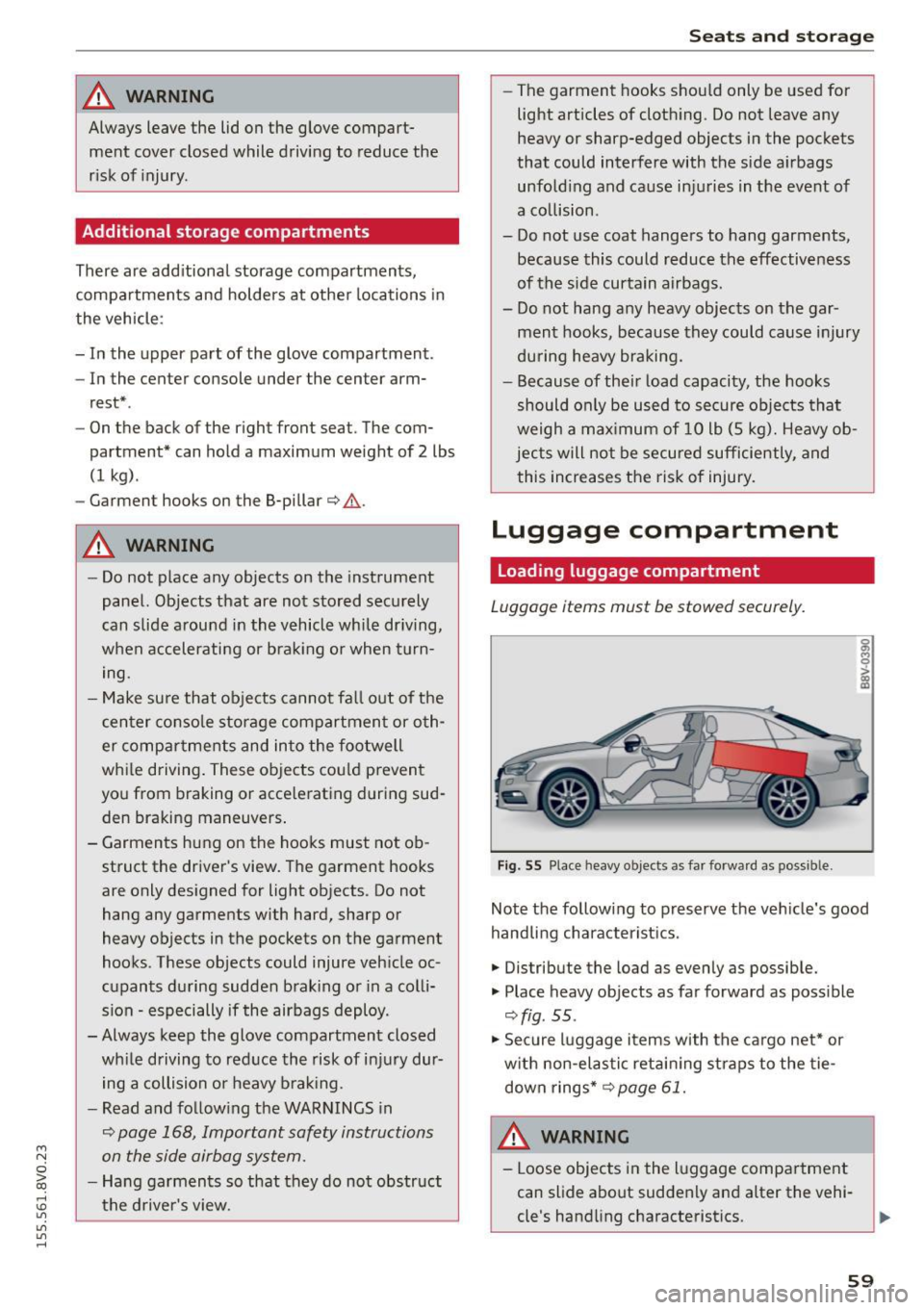
Fig. 55 Place heavy objects as far forward as poss ib le.
Note the following to preserve the vehicle's good
handling characteristics .
.,. Distribute the load as evenly as possible.
.,. Place heavy objects as far forward as possible
¢ fig . 55 .
.,. Secure luggage items with the cargo net* or
with non-elastic retaining straps to the tie
down rings* ¢
page 61.
WARNING
-Loose objects in the luggage compartment
can slide about suddenly and alter the vehi
cle's handling characteristics.
59
Page 62 of 282
Seats and storag e
-Loose objects in the passenger compart
ment can fly forward during abrupt maneu
vers or acc idents and injure occupants.
- Always store objects in the luggage com
partment and use suitable straps, particu
larly with heavy objects.
- When you transport heavy objects, a lways
remember that a change in the center of
gravity may result in a change in the veh i
cle's handling character istics.
- Follow all warnings
Q page 130, Driving
safety .
(D Tips
The tire pressure must be adjusted to the load
- see the tire pressure sticker located on the
driver's side B-pillar.
General information
.&, WARNING
Refer to the chapter Dr iving Safely
Q page 130, Driving safety for important in
formation, tips, suggestions and warnings that you should read and fo llow for your own
safety and the safety of your passengers.
Increasing the size of the luggage
compartment
The rear seat backrests can be folded forward ei
ther separately or together.
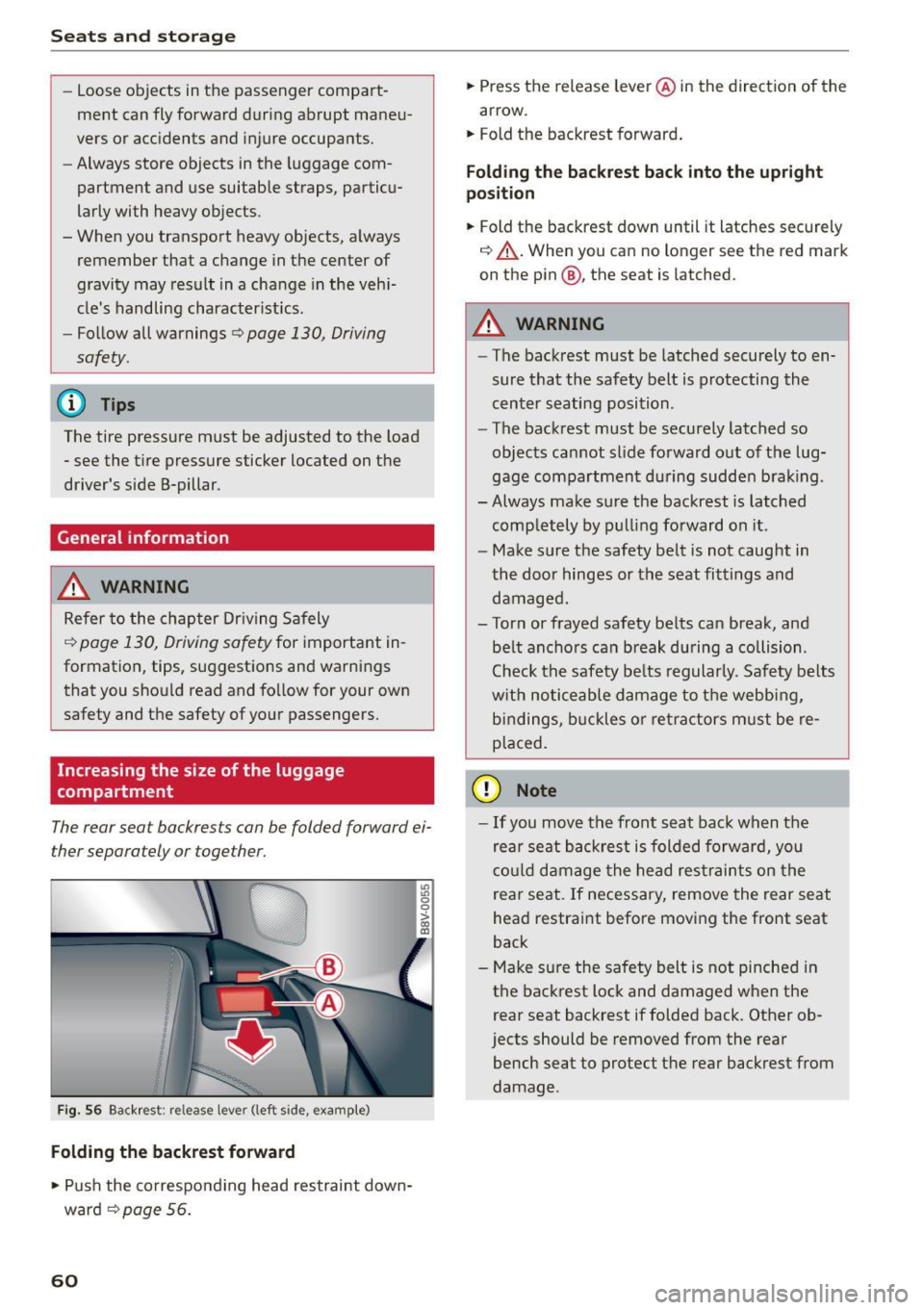
Fig. 56 Backrest: release lever (left side, example)
Folding the backrest forward
.,. Push the co rresponding head restraint down
ward ¢
page 56.
60
.,. Press the release leve r@ in the direction of the
arrow.
.,. Fold the backrest forward .
Folding th e backre st back into the upright
po sition
.,. Fold the backrest down until it latches securely
¢ ,&. .When you can no longer see the red mark
on the pin@, the seat is latched.
.&, WARNING
- The backrest must be latched securely to en
sure that the safety belt is protecting the
cent er seating position .
- The backrest must be securely latched so
objects cannot slide forward o ut of the lug
gage compartment du ring sudde n brak ing .
- Always make sure the backrest is latched
comp letely by pulling forward on it .
- Make sure the safety belt is not caught in
the doo r hinges or the seat fittings and
damaged.
- Torn or frayed safety be lts can break, and
be lt ancho rs can b reak du ring a collision .
Check the safety be lts regularly. Safety belts
w it h noticeable damage to t he webb ing,
bi ndings, b uckles o r ret ra ctors m ust be re
placed.
(D Note
- If you move the front seat back when the
rear seat backrest is folded forward, you
c o ul d damage the head res traints on the
rear seat. If necessary, remove the rear seat
head restraint before moving the front seat
back
- Make su re the safety belt is not pinched in
the back rest lock and damaged when the
rear seat backrest if folded back. Other ob
jects should be removed from the rear
bench seat to protect the rear backrest from
damage .
Page 64 of 282
Seats and storag e
Pass-through
Applies to veh icles: w ith pass-t hro ug h
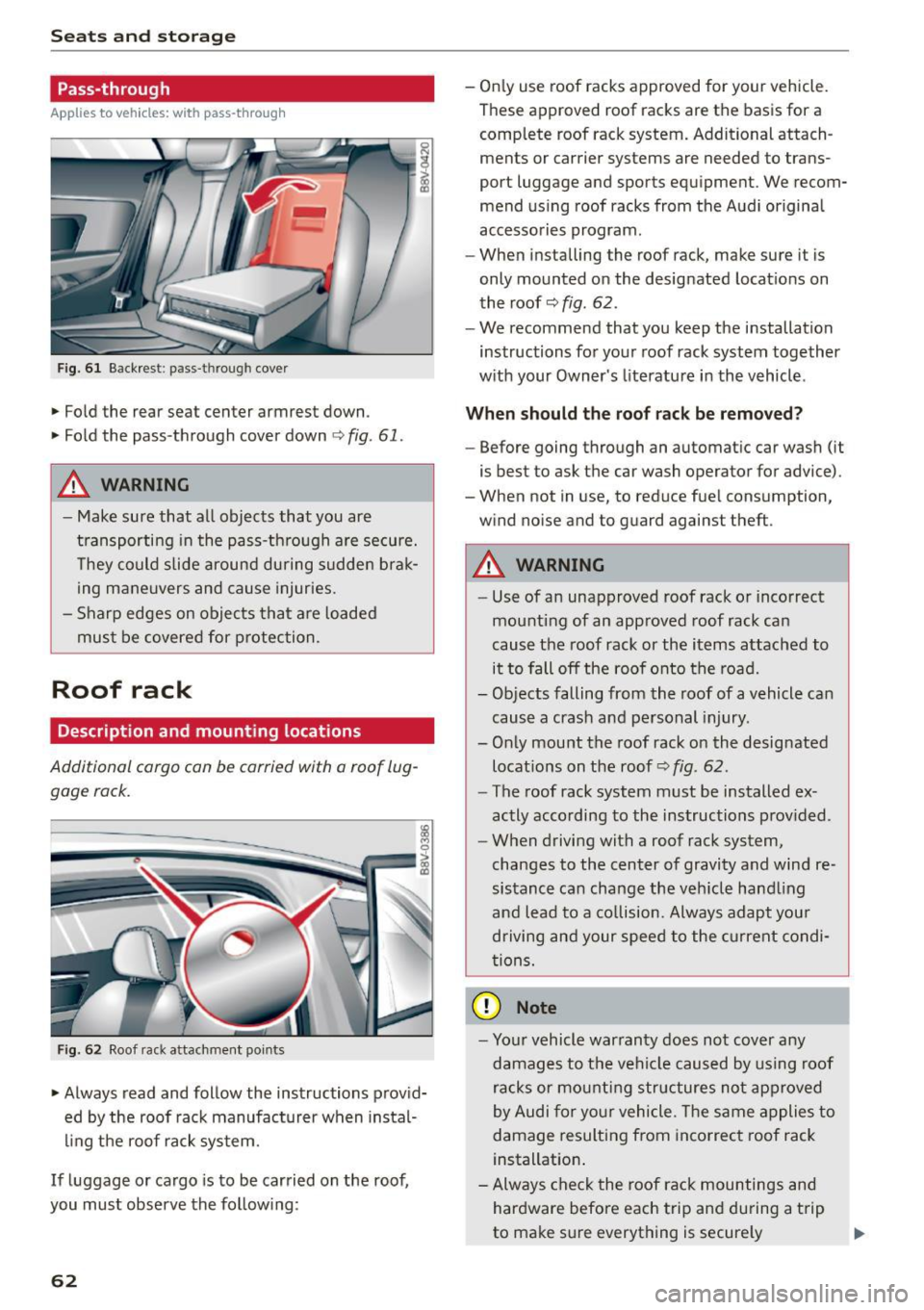
Fig. 6 1 Back rest : pass -through cover
.,. Fold the rear seat center armrest down.
.,. Fo ld the pass-through cover down ¢
fig. 61 .
A WARNING
0 N
i (D
-
- M ake sure that all objects that you are
transporting in the pass-th rough a re secu re.
T hey co uld slide around during sudden brak
ing mane uvers and cause injuries.
- Sharp edges on objects that are loaded
must be covered for protection.
Roof rack
Description and mounting locations
Additional cargo con be carried with a roof lug
gage rock.
Fig. 62 Roof rack attachment points
.,. Always read and follow the instructions provid
ed by the roof rack manufacturer when instal
ling the roof rack sys tem.
If luggage or cargo is to be carried on the roof,
you must observe the follow ing:
62
- On ly use roof racks approved for your vehicle.
These approved roof racks are the basis for a
complete roof rack system. Additional attach
ments or carrier systems are needed to trans
port luggage and sports equipment. We recom
mend us ing roof racks from the Audi original
accessories program.
- When installing the roof rack, make sure it is
only mounted on the designated locat ions on
the roof¢
fig. 62.
- We recommend that you keep the installation
instructions for yo ur roof rack system together
w ith your Owner's literature in the vehicle .
When should the roof rack be remo ved?
- Before going through an automatic car wash (it
is best to ask the car wash operator for advice).
- When not in use, to reduce fuel consumption,
w ind no ise and to guard against theft .
A WARNING
-Use of an unapproved roof rack o r incorrect
mounting of an approved roof rack can
cause the roof rack or the items attached to
it to fall off the roof onto the road.
- Objects falling from the roof of a vehicle can
cause a crash and personal injury.
- Only mount the roof rack on the designated
locat ions on the roof¢
fig . 62.
- The roof rack system must be installed ex
actly according to the instructions p rov ided.
- When driving with a roof rack system,
changes to the center of gravi ty and wind re
sistance ca n change the veh icle hand ling
and lead to a co llision. Always adapt you r
driving and your speed to the current condi
t ions.
(D Note
- Yo ur vehicle war ranty does not cov er any
damages to t he vehi cle caused by using roof
racks or mounting structures not ap proved
by Audi for yo ur vehicle. The same a pplies to
damage resulting from incorrec t roof rack
installation .
- Always che ck the roof rack mountings and
hardware before each trip and du ring a t rip
to make sure everything is secure ly