center AUDI S3 SEDAN 2015 User Guide
[x] Cancel search | Manufacturer: AUDI, Model Year: 2015, Model line: S3 SEDAN, Model: AUDI S3 SEDAN 2015Pages: 282, PDF Size: 71.14 MB
Page 65 of 282
M N
0 > co ,...., \!) ..,.,
..,.,
..,., ,....,
tightened. If necessary, retighten the mountings and check the entire system
from t ime to t ime.
- After mounting a roof rack system, or when
you transport objects on the roof of your ve
hicle, the height of the veh icle is naturally
increased. Be careful when driving under
l ow bridges or in parking garages for exam
ple. This could cause damage to the load
and even the vehicle itself.
- Make sure the open rear lid and the sun
roof* do not come into contact with the roof
rac k.
Loading the roof rack
Always distribute loads evenly . Make sure any
thing on the roof rack is securely tied down .
... Always distribute the loads on the roof rack
evenly .
... Always attach items to the roof rack securely
before you d rive off .
The maximum perm iss ible roof weight is
165 lb
( 75 kg ). The roof weight is the total of the
weight of the roof rack, the attachments and the
cargo you a re ca rrying . You must also not exceed
the maximum load weight fo r the roof rack you
a re using.
When using a roof rack system wh ich has a lower
l oad carrying capacity, you must not use up the
tota l maxim um permissible load car ry ing capac i
ty specified above. Inste ad , you shou ld load t he
roof rack system only to the maximum capacity
specified by the manufact urer of the roof rack
system .
A WARNING
Weak, damaged or improper straps used to
secure items to the roof rack can fa il during
hard brak ing or in a collision and cause seri
ous personal injury.
- Make sure the roof rack is insta lled exactly
as spec ified above
¢ page 62.
- Always use suitable mounting straps for se
curing items to the roof rack to help prevent
items from shift ing or f ly ing fo rward.
-
S eat s and stor age
- Items on the roof rac k must always be se
curely mounted.
- The use of a roof rack can negatively affect
the way a vehicle handles. Cargo that is
large, heavy, bulky, long or flat will have a
greater negative inf luence on the vehicle's
ae rodynamics, center of gravity and overall
h a ndling. Always drive slowly, avoid sudden
b rak ing and maneuvers when transpor ting
cargo on the roof of your veh icle.
- Never exceed the maxim um permissible
load carrying capacity of the roof of your ve
h icle, the permiss ible axle weights and the
perm issib le tota l we igh t of your vehicle
¢ page 258, Weights .
@ For the sake of the environment
As a result of the increased wind resistance
created by a roof ra ck , your vehicle is using
fuel unnecessarily. So remove the roof rac k af
ter using it.
63
Page 69 of 282
shown in the disp lay. To exit "Eco" mode*, press
the
! AUTO ! button again .
I• I • I Setting the temperature
The temperature can be adjusted individually for
the dr iver and front passenger using the dials.
Tempe ratures between 60 °F ( +16 °C) and 84 ° F
(+28 °C) can be set. If outside of this range, LO or
HI will appear in the climate control system dis
p lay. In both settings, the climate contro l runs
with constantly at the maximum cooling or heat ing level. The temperature is not regulated.
Synchronization: by pressing the IAUTO I button
for two seconds, the temperature setting for the
driver is transferred to the front passenger's side.
This applies a temperature change to the front
passenger's side.
~ Adjusting the blower
To prevent the windows from fogging over, the b lower sho uld a lways ru n at a low speed. You can
ad just the volume of air generated by the b lower
to your preference. To have the blower regu lated
automatically, press the !AU TO I button .
Adjusting the air distribution
The air distribution is adjusted with the~, U!i
and ~ buttons. To have the air d istr ibut ion regu
lated automatically, press the
IAUTOI button.
The round air vents in the cockpit are adjustable
¢page 68.
To keep the windows from fogging in damp
weather, we recommend opening the side air
vents and ti lting them to the side
~ page 68,
Adjusting the air vents .
Foot vents are located under the front seats and
adjustable vents on the end o f the center console
to heat the rear of the vehicle .
~ Switching the defroster on and off
The windshield and side windows are defrosted
or cleared of condensation as quickly as possible .
The maximum amount of air flows main ly from
M
N the vents below the windshie ld. Recirculation 0
iii mode switches off . The temperat ure is contro lled
~ automatically. In the Ii] sett ing, the IA/C i cooling
Vl
Vl
......
Warm and cold
mode switches on automatically, depending on
the outside air temperat ure.
T he
IAUTO ! button switches the defroster off.
l"""I Switching recirculation mode on and off
The recircu lation mode can be turned on manual
ly or automatically* .
- Switching manual recirculation mode on and
off : press
1.,,.,1 The LED light up when switched
on .
- Automatic* recirculation mode: the auto recir
culat ion must be act ivated in the MMI. Select:
the
I MENU I button > Car > Systems* control
button
> AC > Auto recirculation . The air quali
ty sensor that is designed for diesel and gaso
line exhaust automatically switches the recircu
lation mode on or off depending on the level of
pollutants in the outside air .
In recircu lation mode, the air inside the vehicle is
c ir cula ted and filtered. This prevents the unfil
tered air outside the vehicle from entering the
vehicle interior. We recommend switching recir
cu lation mode on when driving through a tunnel
or when sitting in traffic~ &.
T he
1-1 button, !AUTO ! or the [ii bu tton switches
recirculation mode off.
T he system switches to recirculation mode when
driv ing in reverse when the engine is cold.
_&. WARNING
You should not use the recirculation mode for
an extended period sin ce no fresh air is drawn
in. With the air-conditioning switched off, the
windows can fog up, which increases the risk
of an acc ident.
67
Page 70 of 282
Warm and col d
Adjusting the air vents
Fig. 65 Cockp it: adjusting the air vents
®
Fig. 66 Applies on ly to Canada: Ven ts: adjusting the air
flow setting A) Diffused B) Dire ct
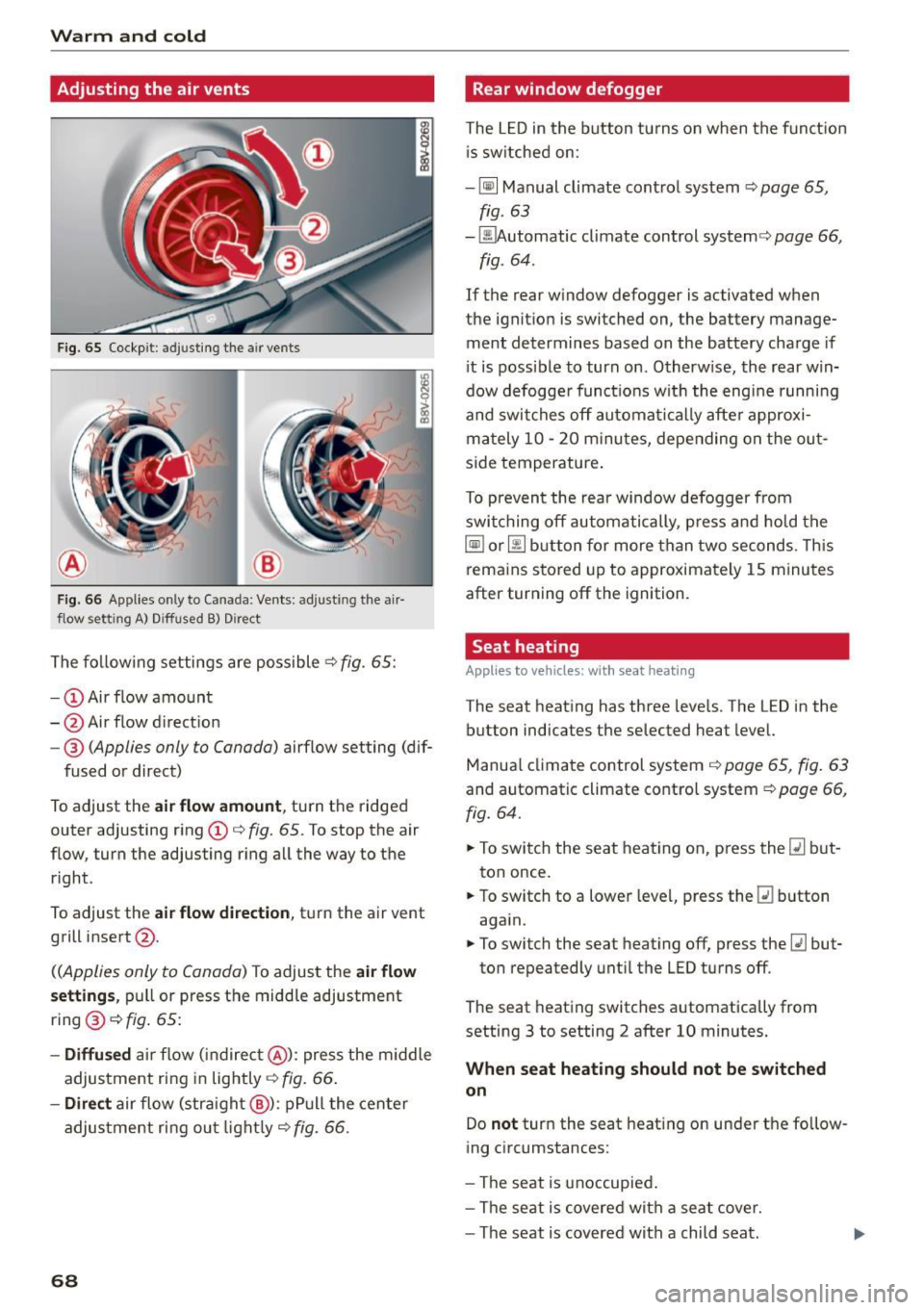
The fo llow ing settings are possible .:;> fig. 65:
- CD Air flow amount
- @ Air flow d irection
- @
(Applies only to Canada) airflow setting (dif-
fused or direct)
To adjust the
air flow amount , turn the ridged
outer adjusting ring CD¢
fig. 65. To stop the air
flow, turn the adjusting r ing all the way to the
right .
To adjust the
air flow di rection , tu rn the air vent
grill insert @.
((Applies only to Canada) To adjust the air flow
s etting s,
pull or press the midd le adjustment
ring @¢
fig. 65:
-Diffu sed ai r flow (indirec t@ ): press the m iddle
adjustment ring in lightly¢
fig. 66 .
-Direct air flow (stra ight @): pP ull the center
adjus tment ri ng ou t light ly¢
fig. 66 .
68
Rear window defogger
The L ED in the button tu rns on when the funct ion
i s sw itched on:
- ~ Manual climate contro l system ¢
page 65,
fig. 63
- ~ utomatic climate control system¢ page 66,
fig . 64 .
If the rear window defogger is activated when
the ignit ion is switched on, the battery manage
ment determines based on the battery charge if
i t is possible to turn on . Otherw ise, the rear win
dow defogge r funct ions w ith the eng ine runni ng
and swit ches off automat ically afte r approxi
mately 10 -20 m inu tes, depending o n the ou t
s ide temperature .
To p revent the rear window defogger from
swi tching off automatically, p re ss and hold t he
~ or~ button fo r more than two seconds. Th is
rema ins stored up to approximately 1 5 minutes
after turning off the ignition .
Seat heating
Applies to vehicles: with seat heating
The seat heat ing has three leve ls. The LED in the
button indicates the selected heat level.
Manua l climate control system ¢
page 65, fig. 63
and automatic climate control system ¢ page 66,
fig. 64.
.. To swi tch the seat heat ing on, press the~ but
ton once.
.. To switch to a lowe r leve l, p ress the ~ button
aga in.
.. To switch the seat heating off, press the~ but-
ton repeatedly unti l the LED turns off.
The seat heating switches automatically from
setting 3 to setting 2 after 10 minutes .
When seat heating should not be switched
on
Do not turn the seat heating on under t he fo llow
ing circumstances:
- The seat is unoccupied .
- The se at is covered wit h a seat cover.
- The seat is covered with a child seat.
Page 75 of 282
....,
N
-Always hold the steering wheel with your
hands in the 9 o'clock and 3 o'clock posi
tions to reduce the risk of injury if the airbag
deploys .
- Never hold the steer ing wheel in the 12
o'clock position or w ith both hands on the
rim or the center of the steering wheel.
Holding the stee ring wheel incorrectly sig
nificantly increases the risk of injury to the
hands, arms and head if the airbag deploys.
Starting and stopping
the engine (vehicles with an ignition lock)
Starting the engine with the key
Applies to vehicles: with mechanical ignit ion lock
The ignition is switched on and the engine start
ed with the key in the ignition .
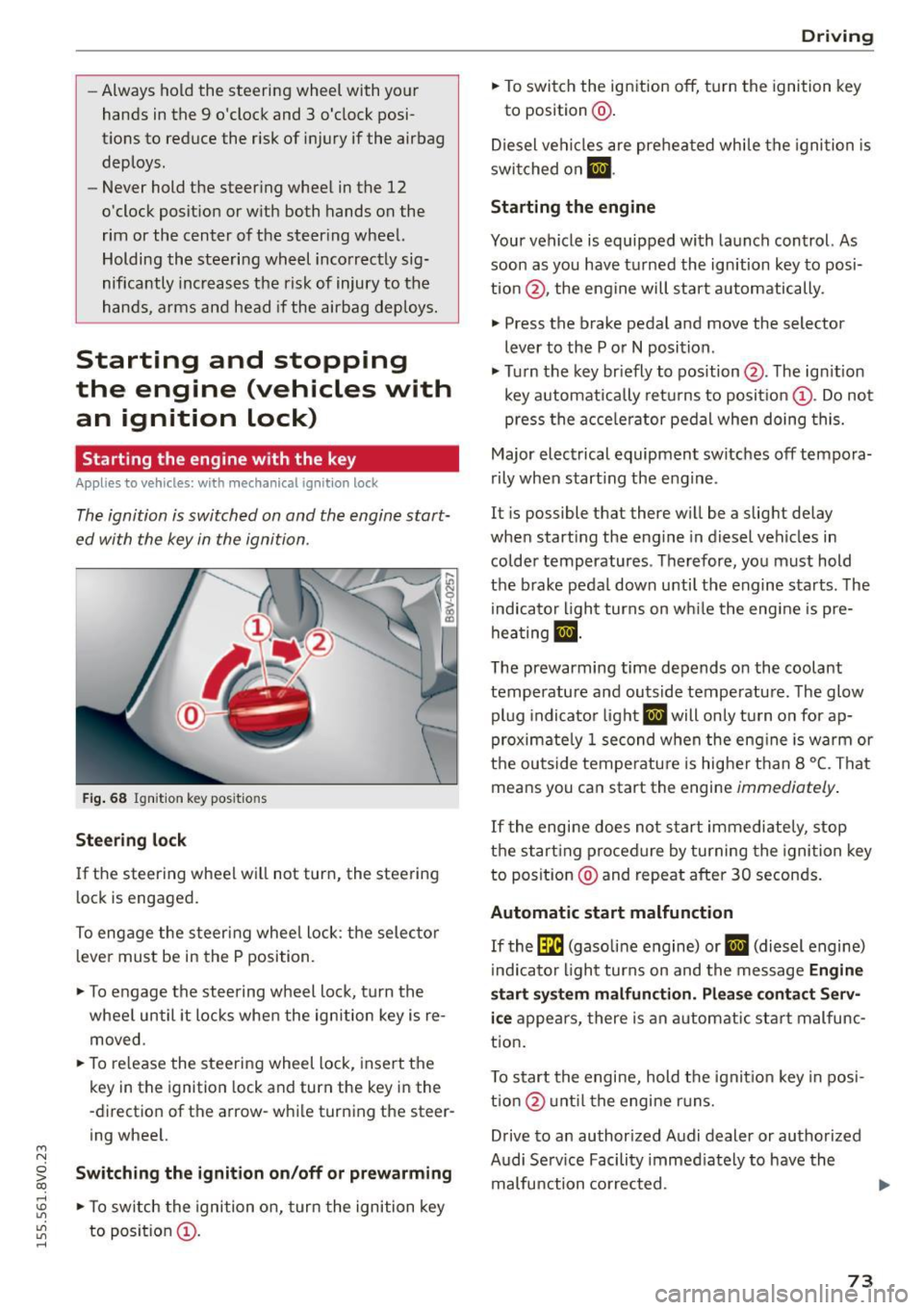
Fig . 68 Ignit io n key pos it io n s
Stee ring l ock
If the steering wheel wil l not turn, the steering
lock is engaged.
To engage the steering wheel lock : the selector
l ever must be in the P position.
.,. To engage the steering w heel lock, turn the
whee l until it locks whe n the ignition key is re
moved.
.,. To re lease the steering wheel lock , insert the
key in the ignition lock and turn the key in the
-direction of the arrow-while turning the steer
ing wheel.
~ Swit ching the ignition on /off or prew arming co
rl I.O
"'
"'
"'
rl
.,. To sw itch the ignition on, turn the ignition key
to position @.
Dr ivi ng
.,. To switch the ignition off, turn the ignition key
to posit ion @.
Diesel vehicles are preheated while the ignition is
swi tched on
m .
Starting the engine
Your vehicle is equipped with launch control. As
soon as you have turned the ign ition key to posi
tion @, the engine will start automatically.
.,. Press the brake pedal and move the selector
lever to the P or
N position .
.,. Turn the key br iefly to position @. The ign ition
key automatically retu rns to position @. Do not
press the a cce le rator pedal when doing this.
Major electrical equipment switches off tempora
rily when start ing the engine .
It is possible that there w ill be a slight delay
when starting the eng ine in diesel vehicles in
colder temperatures . T herefore, you must hold
the brake pedal down unti l the engine starts . The
indicator light turns on wh ile the engine is pre
hea ting
lJ .
The prewarming time depends on the coolant
temperature and outside temperatu re. The glow
pl ug indicato r light
IJ will only turn on for ap
proximate ly 1 second when the eng ine is warm or
the outside tempe rature is higher than 8
°C. That
means you can start the engine
immediately .
If the engine does no t st art immediately, stop
the start ing procedure by turning the ignition key
to position @and repeat after 30 seconds.
Automatic start malfunction
If the (m (gasoline engine) or IJ (diesel engine)
i ndicato r light turns on and the message
Engine
start sy ste m malfunction . Plea se c ontact S erv
i c e
appea rs, there is an automatic sta rt malfunc
t ion .
T o start the engine, hold the ignit io n key in posi
tio n@ unt il the engine r uns.
Drive to an authorized Audi dealer or authorized
Audi Se rv ice Facility immed iately to have the
malfunction corrected. ..,.
73
Page 89 of 282
....,
N
0 > co
rl I.O
"'
"'
"'
rl
Shifting manually (tiptronic mode)
Applies to vehicles: with 5 tronic transmiss ion/ shi ft padd les
The tiptronic allow the driver to shift the gears
manually.
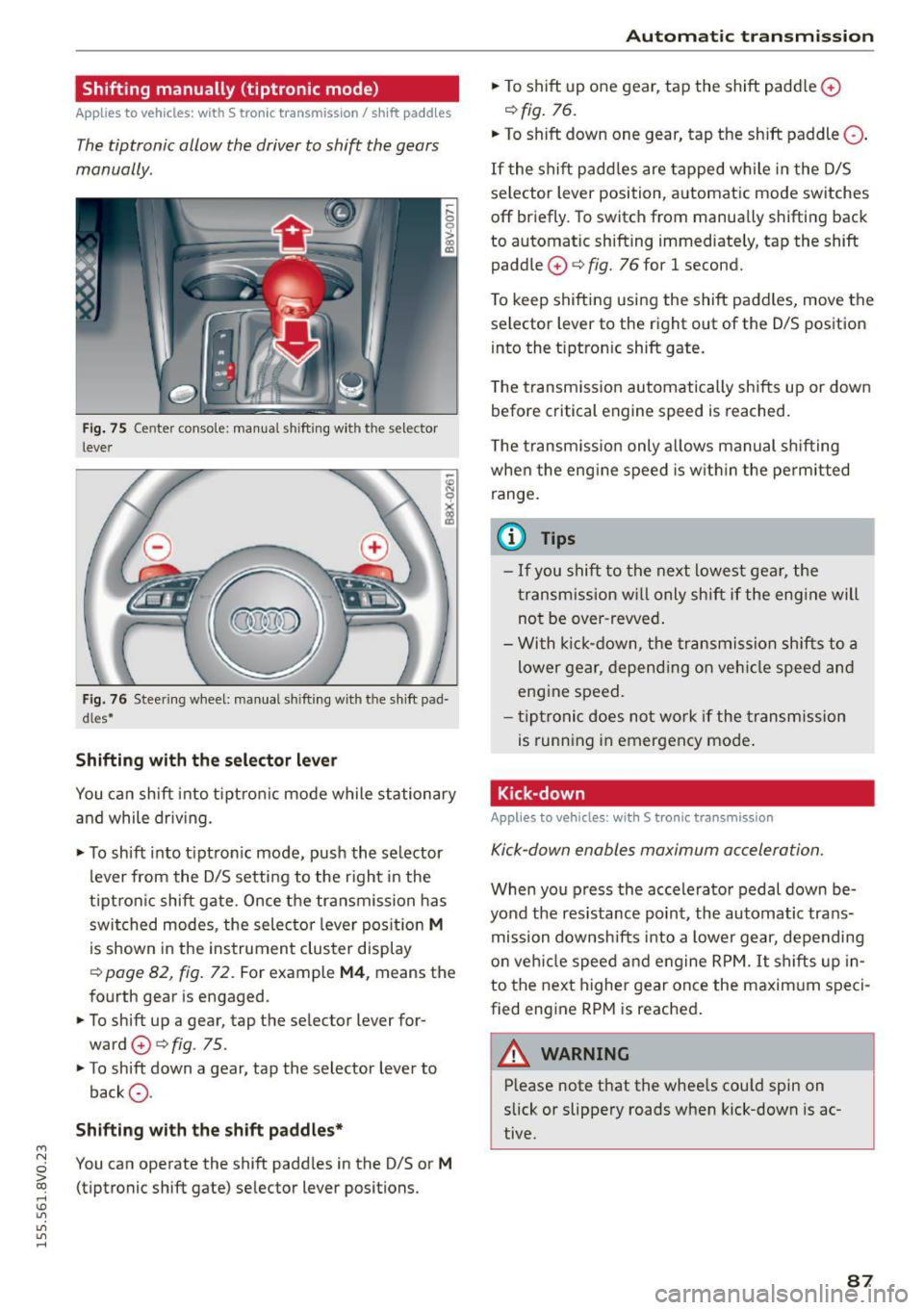
Fig. 75 Center c_onso le: manual shi fting wi th the selec tor
lever
Fig. 76 Steering wheel: manual shi fting with t he shift pad
d les*
Shifting with the selector lever
You can shift into tiptronic mode while stationary
and while driv ing.
• To shift into tip tron ic mode, push the selector
lever from the D/S setting to the right in the
tiptron ic shift gate. Once the transmission has
switched modes, the selecto r lever position
M
is shown in the instrument cluster display
r:::> page 82, fig. 72 . For example M4, means the
fourth gear is engaged.
• To shift up a gear, tap the selector lever for
ward
0 r:::> fig . 75.
• To shift down a gear, tap the selector lever to
back
0 -
Shifting with the shift paddles*
You can operate the shift paddles in the D/S or M
(tiptronic shift gate) selector lever positions.
Automatic transmission
• To shift up one gear, tap the shift padd le 0
r:::> fig. 76.
• To shift down one gear, tap the shift paddle 0 -
If the shift paddles are tapped while in the D/S
selector lever position, automatic mode switches
off briefly. To switch from manually shifting back
to automatic shifting immediately, tap the shift paddle
0 ¢ fig. 76 for 1 second.
To keep shifting using the shift paddles, move the
selector lever to the right out of the D/S position
into the t iptron ic shift gate.
T he transmission automatically shifts up or down
before critical engine speed is reached.
The transmission only allows manual shifting
whe n the engine speed is within the permitted
range.
(0 Tips
- If you shift to the next lowest gear, the
transmission will only shift if the engine will
not be over-revved.
- With kick-down, the transmission shifts to a
lower gear, depending on vehicle speed and
engine speed.
- tiptronic does not work if the transmission
is running in emergency mode .
Kick-down
Applies to vehicles: wit h S tronic transm issio n
Kick-down enables maximum acceleration.
When you press the accelerator pedal down be
yond the resistance point , the automatic trans
mission downsh ifts into a lower gear, depending
on veh icle speed and engine RPM.
It shifts up in
to the next higher gear once the maxim um speci
fied eng ine RPM is reached.
A WARNING ~
Please note that the whee ls cou ld spin on
slick or slippery roads when kick-down is ac
tive .
-
87
Page 110 of 282
Assist Monochrome display
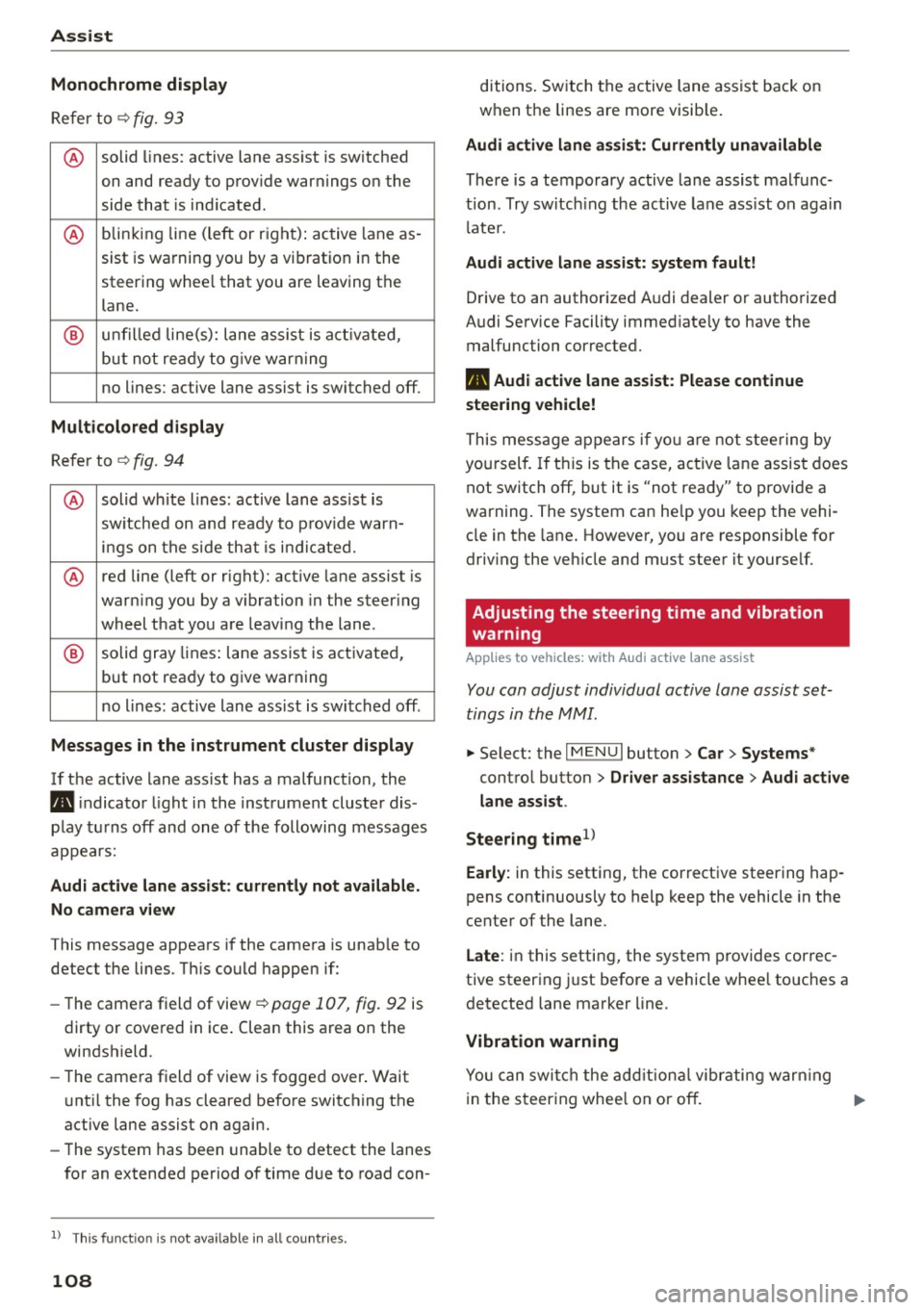
Refer to¢ fig. 93
® solid lines: active lane ass ist is switched
on and ready to provide warnings on the
side that is ind icated.
® blinking line (left or r ight): active lane as -
sist is warning you by a vibration in the
steering whee l that you are leaving the
lane.
® unfilled line(s): lane assist is activated,
but not ready to give warn ing
no lines: active lane assist is switched off .
Multicolored display
Refer to¢ fig. 94
® solid white lines: active lane assist is
switched on and ready to provide warn-
ings on the side that is indic ated.
® red line (left or rig ht): active lane assist is
warn ing you by a v ibration in the steer ing
wheel that you are leaving the lane .
® solid gray lines: lane assist is activated,
but not ready to give warning
no lines: active lane assist is switched off .
Messages in the instrument cluster display
If the active lane ass ist has a malfunction, the
ra, indicator light in the inst rument cluste r dis
play turns off and one of the following messages
appears:
Audi active lane assist: currently not available.
No camera view
This message appears if the camera is unab le to
detect the lines . Th is could happen if:
- The camera field of view ¢
page 107, fig. 92 is
dirty or cove red in ice . Clean this area on the
windshield.
- The came ra f ield of view is fogged over. Wait
u nt il the fog has cleared before switching the
active lane assist on again.
- The system has been unable to detect the lanes
for an extended period of time due to road con-
l) Thi s fun ctio n is not available in all cou ntri es.
108
ditions. Switch the active lane assist back on
when the lines are more visib le.
Audi active lane assist: Currently unavailable
There is a temporary active lane assist malfunc
tion . Try switching the active lane assist on again
l ate r.
Audi active lane assist: system fault!
Drive to an authorized A udi dealer or authorized
Audi Service Facility immed iate ly to have the
malfunction corrected.
ra, Audi active lane assist: Please continue
steering vehicle!
This message appears if you are not steering by
you rself. If this is the case, active lane assist does
not switch off, but it is "not ready" to provide a
warning. The system can he lp you keep the vehi
cle in the lane. However, you are responsible for
driving the veh icle and must steer it yourse lf.
Adjusting the steering time and vibration
warning
Applies to vehicles: with Audi active lane assist
You can adjust individual active lane assist set
tings in the MMI.
.,. Select: the I MENU I button> Car > Systems *
control button > Driver assistance > Audi active
lane assist .
Steering time
1>
Early: in this setting, the corrective steering hap
pens continuously to help keep the vehicle in the
center of the lane.
Late : in this setting, the system provides correc
tive steering just before a vehicle whee l touches a
detected lane marker line .
Vibration warning
You can switch the additional vibrating warning
i n the steer ing whee l on or off.
II>
Page 114 of 282
Assist Driver messages
Appl ies to vehicles: with Audi side assist
If the side assist switches off automatically, a
message appears in the instrument cluster dis
p la y.
@j Audi side assist: currently unavailable.
No sensor vision
The radar sensors' vision is affected. Do not cover
the area in front of the sensors with bike wheels,
stickers, dirt or other objects. Clean the area in
front of the sensors, if necessary
r:!> page 110,
fig. 98.
@j Audi side assist: currently unavailable
Side assist cannot be switched on temporarily be
cause there is a ma lfunction (for examp le, the
battery charge level may be too low).
@j Audi side assist: System fault!
The system cannot guarantee that it will detect
veh icles correctly and it is switched off. The sen
sors have been displaced or are faulty. Have the
system checked by an authorized Audi dealer or
authorized Audi Service Facility soon.
Audi drive select (drive
settings)
Introduction
Applies to vehicles: with Audi drive select
Audi drive select makes it possible to experience
different types of vehicle settings in one vehicle.
The driver can select from three
Comfort, Auto
and Dynamic modes using the ~.7l.'i button in the
center console or the MMI to switch between a
sporty and a comfortable driving mode, for ex
ample . In the
individual* mode, the settings can
be adjusted to your personal preferences . This
makes it possib le to combine settings such as a
sporty engine tun ing with light steering .
.,&. WARNING
Using Audi drive select incorrect ly can lead to
collisions, other accidents and serious inju
ries.
112
· Description
Applies to vehicles: with Audi drive se lect
The vehicle setup in each mode depends on the
vehicle's features. However , the eng ine and steer
ing are always affected.
Engine and automatic transmission
Depending on the mode, the engine and auto
matic transmission* respond more qu ickly or in a
more balanced manner to accelerator peda l
movements .
Adaptive dampers (Audi magnetic ride)*
The adaptive dampers use sensors to record in
format ion regarding steer ing movements, brak
ing and acce lerat ion operations by the driver,
road surface, dr iv ing speed, and load. With Audi
drive select you can adjust the adaptive dampers
sporty (dynamic), comfortable (comfort) or bal
anced (auto).
Steering
T he steer ing adapts in terms of steer ing ass is
tance. There a re diffe rent modes
Q page 113.
Indirect steering that moves easily as in comfort
mode is especia lly suited to long drives on a high
way. The dynamic mode provides sporty, direct
steering .
For vehicles with progressive steering* the steer
ing performance is more agi le .
Cornering light*
The cornering light adjusts when driv ing on
curves at speeds between 6 mph (10 km/h) and
68 mph (110 km/h). The pivoting action and the
lig hting are also adapted to the mode.
Adaptive cruise control*
The behavior when accelerating can be adjusted
from comfortable to sporty, depending on the
Audi drive select mode. Adaptive cruise control
also responds to the driving behavior of the vehi
cle ahead in a more conservative or sporty man
ner.
Page 115 of 282
....,
N
0 > co
rl I.O
"'
"'
"'
rl
@ Tips
In some models, the maximum vehicle speed
can only be reached in the auto and dynamic
modes.
Selecting the driving mode
A ppl ies to vehicles: with Audi drive select
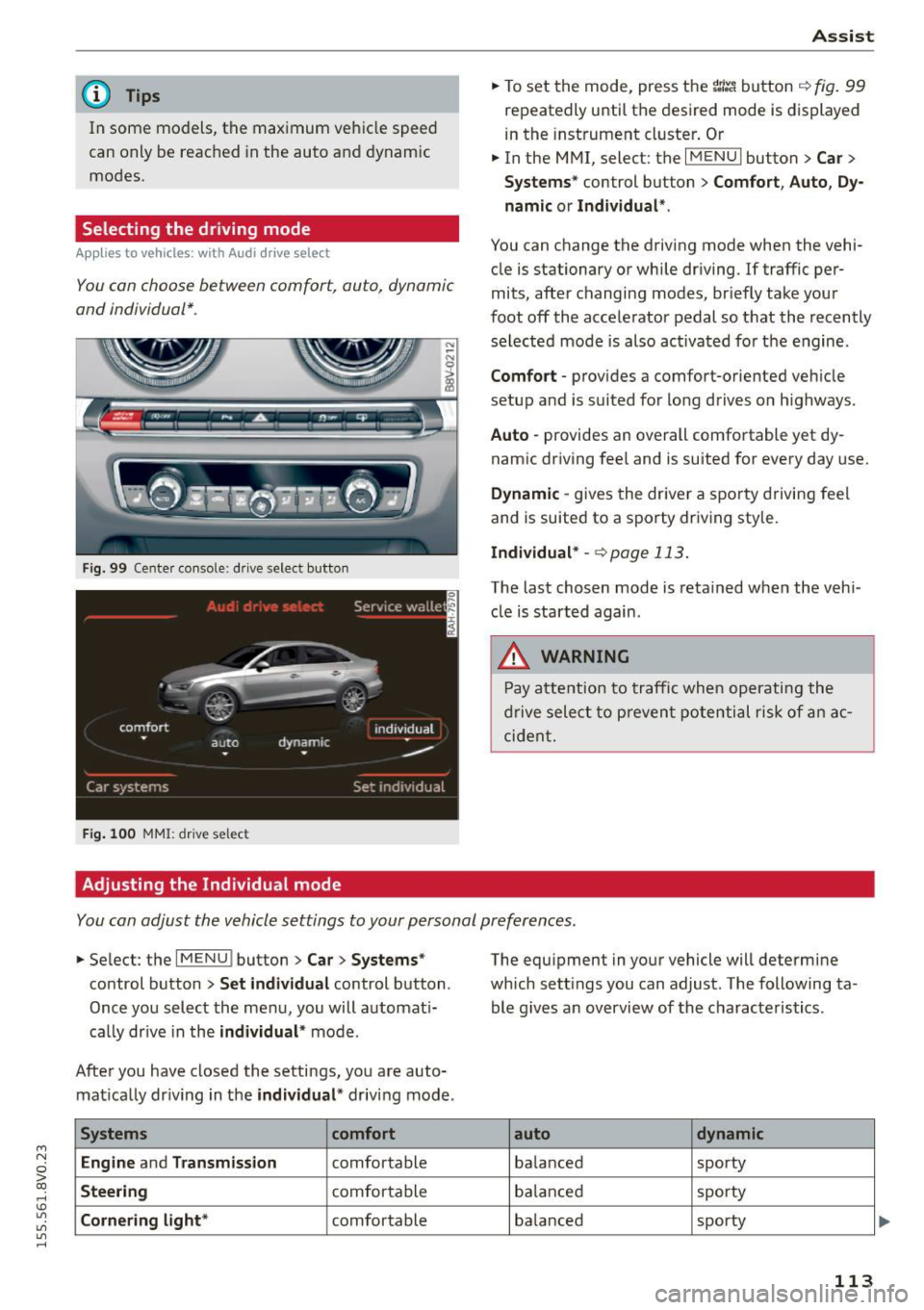
You con choose between comfort, auto, dynamic
and individual* .
Fig. 99 Center console: dr ive selec t button
Fig . 100 MMI : drive select
Adjusting the Individual mode Assist
.,.
To set the mode, press the r:1:.~ button ~ fig. 99
repeatedly until the desired mode is displayed
in the instrument cluster. Or
.,. In the MMI, select: the
I MENU I button >C ar>
Systems"
control button > Comfort, Auto, Dy
namic or Individual ".
You can change the driving mode when the vehi
cle is stationary or while driving.
If traffic per
mits, after changing modes, briefly take your
foot off the accelerator pedal so that the recently
selected mode is also activated for the engine .
Comfort -provides a comfort-oriented vehicle
setup and is suited for long drives o n highways.
Auto -provides an overall comfortable yet dy
namic driving feel and is suited for every day use.
Dynamic -gives the driver a sporty driving feel
and is suited to a sporty driving sty le.
Individual* -<=>page 113.
The last chosen mode is retained when the veh i
cle is started again .
.&, WARNING
-Pay attention to traffic when operating the
drive select to prevent potential risk of an ac
cident.
You con adjust the vehicle settings to your personal preferences .
.,. Select : the IMENU ! button> Car> Systems*
control button > Set individual control button .
Once you select the menu, you will automat i
ca lly dr ive in the
individual* mode .
After you have closed the settings, you are auto mat ically dr iving in the
individual * driving mode .
Systems comfort
Engine
and Transmission comfortable
Steering comfortable
Cornering light* comfortable The equipment
in your vehicle will determine
which sett ings you can adjust. The following ta
ble g ives an overview of the characteristics .
auto dynamic
balanced sporty
balanced sporty
ba lanced sporty
113
Page 118 of 282
Parking syste m s
Rear parking system
Description
Applies to veh icles: w ith rear parking system
The rear parking system is an audible parking
aid.
Des crip tion
There is a sensor in the rear bumper cover. If
these detect an obstacle, audible signals warn
you .
Make sure the sensors are not covered by stick
ers, deposits or any other obstructions as it may
impair the sensor function. For information on
cleaning, refer to
c:::;,page 235.
The range at which the sensors begin to measure
is approximately:
Side rear 3 ft (0.90
m)
Side center 5.2 ft (1.60
m)
The closer you get to the obstacle, the shorter
the interval between the audible signals . A con
tinuous tone sounds when the obstacle is less
than approximately 1 foot (0.30 meters) away.
Do not continue backing up
c:::;, .&. in General infor
mation on page 115, ¢0in General information
on page
115!
If the distance to an obstacle remains constant,
the volume of the distance warning gradually drops after about four seconds (this is not apply
in the continuous tone range).
Activa ting
The parking system activates automatically when
the reverse gear is se lected. You will hear a brief
confirmation tone.
116
Parking system plus
Description
App lies to vehicles: with parking system plus
The parking system plus provides audio and visu
al signals when parking .
=
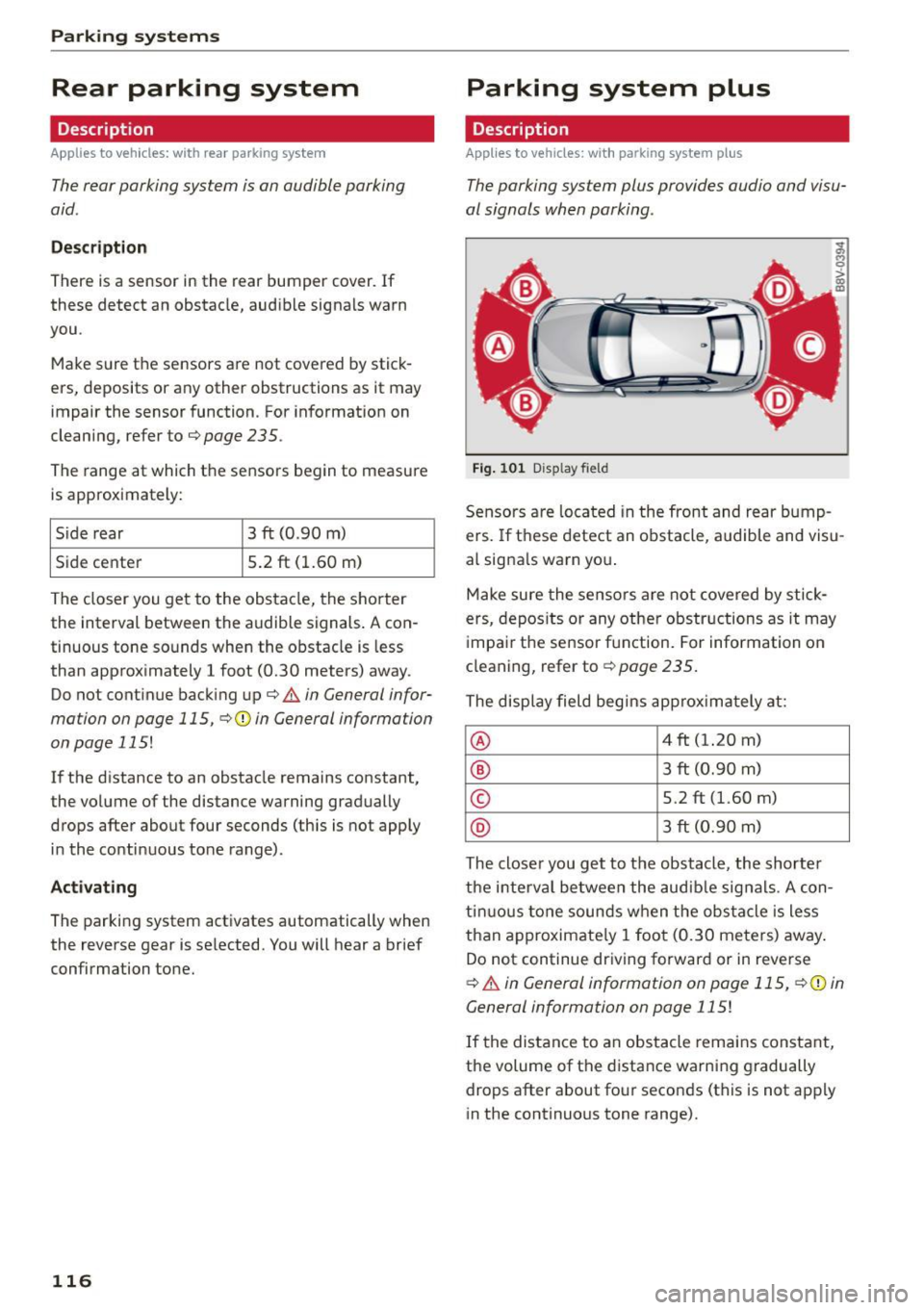
Fig. 101 D isp lay fie ld
Sensors are located in the front and rear bump
ers. If these detect an obstacle, audible and visu
al signa ls warn you .
Make sure the sensors are not covered by stick
ers, depos its or any other obstructions as it may
impair the sensor function. For information on
cleaning, refer to
c:::;, page 235.
The display field begins approximately at:
® 4 ft (1.20 m)
® 3 ft (0.90 m)
© 5.2 ft (1.60 m)
® 3 ft (0.90 m)
The closer you get to the obstacle, the shorter
the interval between the audible signals . A con
tinuous tone sounds when the obstacle is less
than approximate ly 1 foot (0.30 meters) away.
Do not continue driving forward or in reverse
c:::;, .&. in General information on page 115, c:::;,@) in
General information on page
115!
If the distance to an obstacle remains constant,
the volume of the distance warning gradually
drops after about four seconds (this is not apply
in the continuous tone range).
Page 119 of 282
....,
N
0 > co
rl I.O
"'
"'
"'
rl
Switching on/off
Applies to vehicles: with parking system plus
F ig. 102 Ce nter console: parking a id button
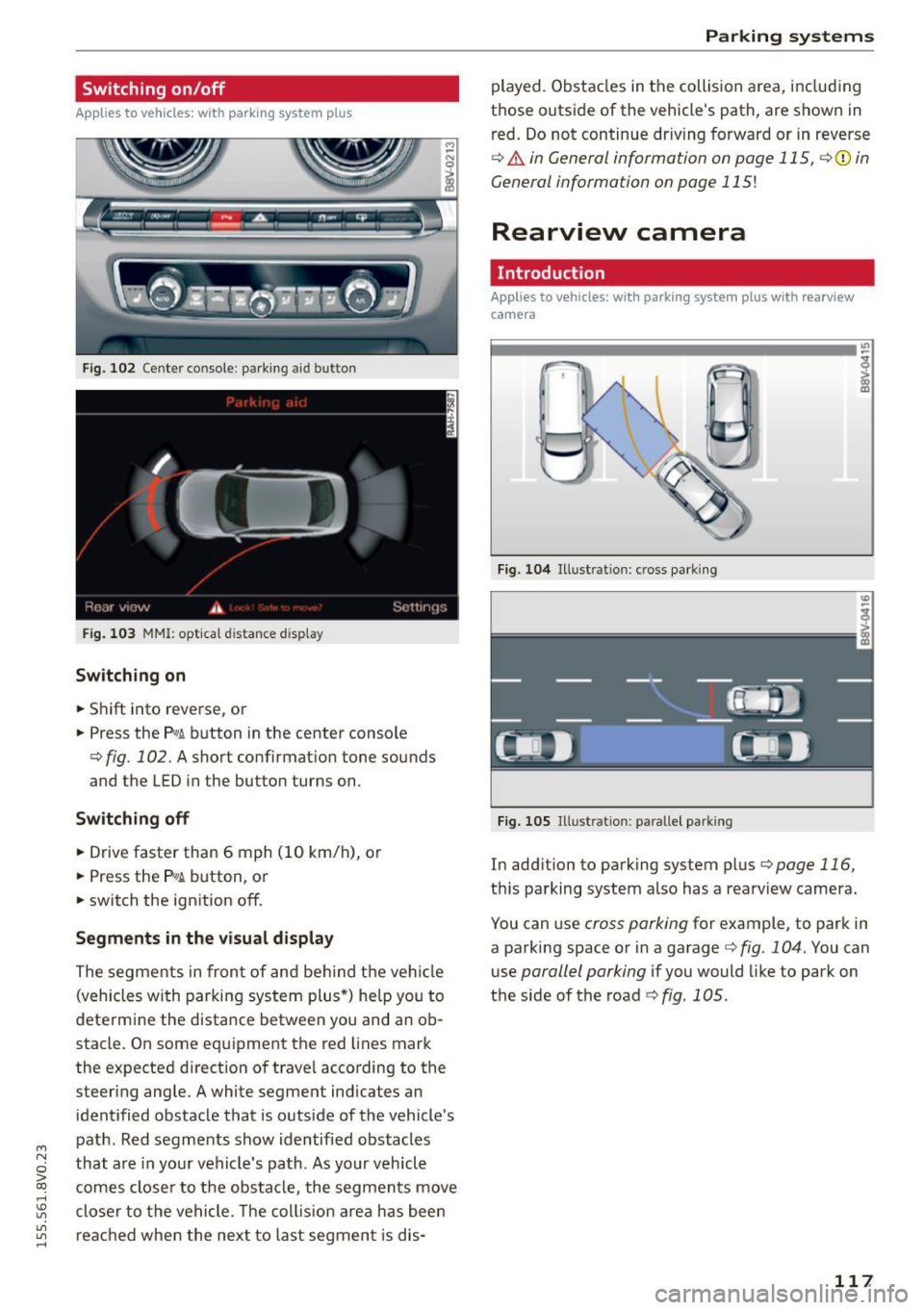
Fig. 103 MMI: opt ical d istance d isplay
Switching on
• Shift into reverse, or
• Press the
p,g ~ button in the center console
¢ fig . 102. A short confirmat ion tone sounds
and the LED in the butto n turns on .
Switching off
• Drive faster than 6 mph (10 km/h), or
• Press the
P,g~ button, or
• switch the ignition off.
Segments in the visual display
The segments in fron t of and behind the vehicle
(vehicles with parking system plus*) he lp you to
determine the distance between you and an ob
stacle. On some equipment the red lines mark
the expected d irection of trave l according to the
steer ing angle . A white segment indicates an
identified obstacle that is outside of the vehicle's
path . Red segments show identified obstacles
that are in your vehicle's path. As your vehicle
comes closer to the obstacle, the segments move
closer to the vehicle. The collision area has been
reached when the next to last segmen t is dis-
Parking systems
played. Obstacles in the collision a rea, including
those outside of the veh icle's path, are shown in
red. Do not continue dr iving forward or in reverse
¢ & in General information on page 115, ¢(i) in
General information on page 115!
Rearview camera
Introduction
Applies to vehicles: wit h parking sys tem plus with rearview
camera
Fig. 104 Illust rat ion : cross parking
Fig. 105 Illust ration : pa ralle l park ing
In add ition to parking system plus ¢page 116,
this parking system also has a rearv iew camera.
You can use
cross parking for example, to park in
a parking space or in a garage
¢ fig . 104. You can
use
parallel parking if you would like to park on
the side of the road
¢ fig. 1 OS.
117