lock AUDI S3 SEDAN 2015 Owners Manual
[x] Cancel search | Manufacturer: AUDI, Model Year: 2015, Model line: S3 SEDAN, Model: AUDI S3 SEDAN 2015Pages: 282, PDF Size: 71.14 MB
Page 4 of 282
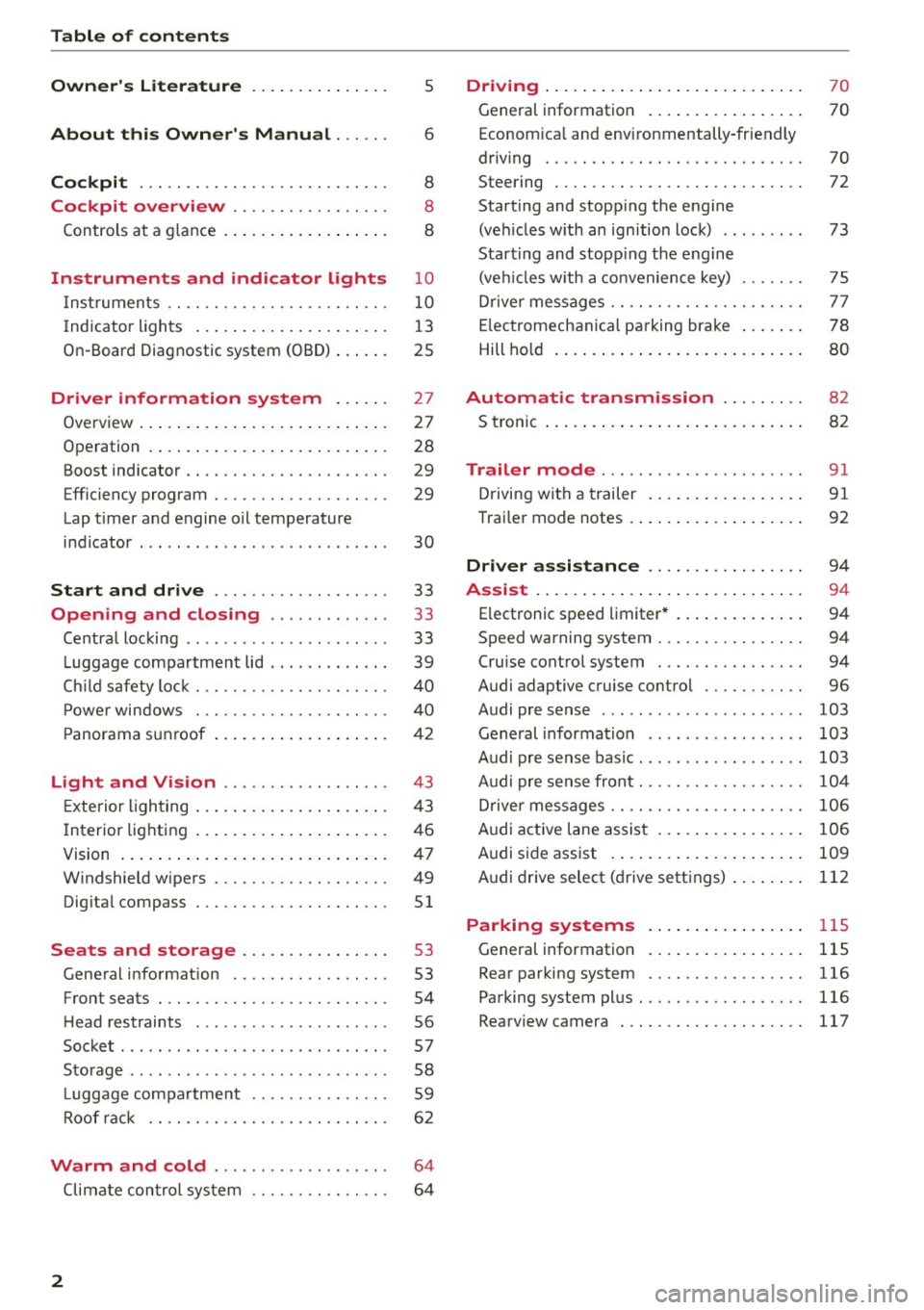
Table of contents
Owner's Literature
About this Owner's Manual ... .. .
Cockpi t ... ...... ........... .. .. .. .
Cockpi t overview .......... .. .. .. .
Controls at a g lance . ..... ... .. .. .. .. .
Instrument s and indicator lights
Instruments .. .. ........... .. .. .. .. .
I ndicator ligh ts .... ..... ... .. .. .. .. .
On-Board Diagnostic system (OBD) ..... .
Driver inform ation system ..... .
Overview ..... .. ... .. ..... ... .. .. .. .
Operation . ..... .. . .. ..... ... .. .. .. .
Boost indicator .... ........... .. .. .. .
Efficiency program ............ .. .. .. .
Lap t imer a nd engine oil temperature
i n dicator . .. .... .......... ...... ... .
Start and drive .............. .. .. .
Opening and clo sing ...... .. .. .. .
Centra l locking .. .............. ... .. .
L uggage compa rtment lid .. .. .. .. .. .. .
Ch ild safety loc k ... ......... .. .. .. .. .
P ower windows . ............. .. .. .. .
P anorama s unroof .. ..... ... .. .. .. .. .
5
6
8
8
8
10
10
13
25
27
27
28
29
29
30
33
33
33
39
4 0
40
42
Light and Vi sion . . . . . . . . . . . . . . . . . . 43
Exterior lighting . . . . . . . . . . . . . . . . . . . . . 4 3
Interior lighting . . . . . . . . . . . . . . . . . . . . . 46
V1s1on . . . . . . . . . . . . . . . . . . . . . . . . . . . . . 4 7
W indshield wipers . . . . . . . . . . . . . . . . . . . 49
Dig ita l compass . . . . . . . . . . . . . . . . . . . . .
51
Seats and storage ....... .. .. ... . .
General information .......... .. .. .. .
53
53
Front seats . . . . . . . . . . . . . . . . . . . . . . . . . 54
H ead rest raints . . . . . . . . . . . . . . . . . . . . . 56
Socket . . . . . . . . . . . . . . . . . . . . . . . . . . . . . 57
S to rag e . . . . . . . . . . . . . . . . . . . . . . . . . . . . 58
L uggage compa rtmen t . . . . . . . . . . . . . . . 59
Roof rac k . . . . . . . . . . . . . . . . . . . . . . . . . .
6 2
Warm and cold . . . . . . . . . . . . . . . . . . . 64
Climate con trol sy stem . . . . . . . . . . . . . . . 6 4
2
Driving . . . . . . . . . . . . . . . . . . . . . . . . . . . . 70
General information . . . . . . . . . . . . . . . . . 70
Econom ica l and envi ronmentally-friendly
driving . . . . . . . . . . . . . . . . . . . . . . . . . . . . 70
Steering . . . . . . . . . . . . . . . . . . . . . . . . . . . 72
Starting and stopp ing the engine
(ve hicles w ith an ign ition lock) . . . . . . . . . 73
Start ing and stopp ing the engine
(ve hicl es w ith a convenience key) . . . . . . . 75
Drive r messages . . . . . . . . . . . . . . . . . . . . . 7 7
E lectromechanica l pa rking brake . . . . . . . 78
Hill ho ld . . . . . . . . . . . . . . . . . . . . . . . . . . . 80
Automatic tran smission . . . . . . . . . 82
S troni c . . . . . . . . . . . . . . . . . . . . . . . . . . . . 8 2
Trailer mode . . . . . . . . . . . . . . . . . . . . . . 91
Driving with a trailer . . . . . . . . . . . . . . . . . 91
Trai ler mode notes . . . . . . . . . . . . . . . . . . . 92
Driver assi stance . . . . . . . . . . . . . . . . . 9 4
Assi st .. .. .. .... .. .. ... .. ..... ... .. 94
E lectronic speed limiter* . . . . . . . . . . . . . . 94
Speed warning system . . . . . . . . . . . . . . . . 94
Cruise contro l system . . . . . . . . . . . . . . . . 94
Audi adaptive cruise control . . . . . . . . . . .
96
Audi pre sense . . . . . . . . . . . . . . . . . . . . . . 103
General informa tion . . . . . . . . . . . . . . . . . 103
Audi pr e sense bas ic . . . . . . . . . . . . . . . . . . 103
Audi pre se nse front. . . . . . . . . . . . . . . . . . 10 4
Driver messages . . . . . . . . . . . . . . . . . . . . . 106
Audi active lane assist . . . . . . . . . . . . . . . . 106
Audi s ide ass ist . . . . . . . . . . . . . . . . . . . . . 109
A udi drive select (d rive settings) . . . . . . . . 112
Parking systems
General information
Rear par king system
115
115
116
Parking system pl us. .. ........... .. .. 116
Rearv iew camera . . . . . . . . . . . . . . . . . . . . 117
Page 11 of 282
M N
0 > co ...... \!) ..,.,
..,.,
..,., ......
CD
@
®
©
®
®
(J)
®
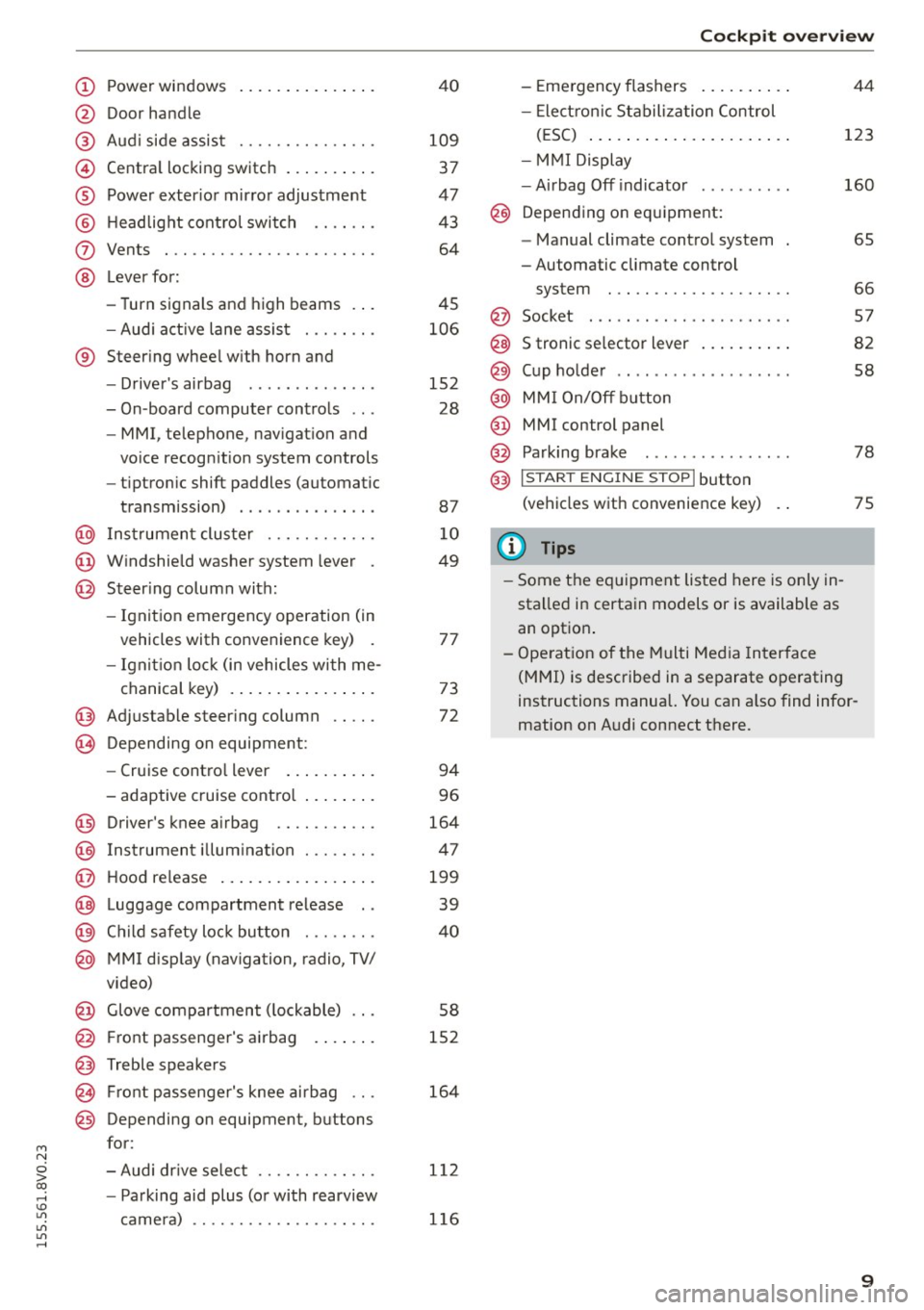
Power windows
Door hand le
Aud i side assist
........ .... .. .
Centra l locking switch ... .. .. .. .
Powe r exter ior mir ro r adjustment
H ead light cont rol swit ch .. .. .. .
Vents
L ever fo r:
- Turn si gnals and high beams . . .
- Audi act ive lane assis t ... .. .. .
® Steer ing whee l w ith horn and
@
©
@
- Driver's airbag ....... .. .. .. .
- On-board computer controls .. .
- MMI, telephone , nav igat ion and
vo ice recogn ition system controls
- tiptron ic shift paddles (automatic
transmission)
I ns trumen t clus te r ..... .. .. .. .
W indshield washer system lever .
Steer ing column with:
- Ignit ion emergency operation (in
vehicles with conve nience key) .
- Ignit ion loc k (in vehicles wi th me-
chanical key) . ..... ... .. .. .. .
@ Adjustable steer ing column
(B) D epending on equipment: 4
0
109
37
47
4 3
64
45
106
152 28
87
1 0
49
7 7
73
72
- Cruise contro l lever . . . . . . . . . . 94
- adaptive cruise cont ro l . .. .. .. .
Driver's knee a irbag .... .. .. .. .
I ns trumen t illum ination . .. .. .. .
Hood re lease
. .. .... ... .. .. .. .
Luggage compartment release ..
C hild safety loc k bu tton . .. .. .. .
MMI disp lay (navigation, radio, TV/
video)
Glove compartment ( lockable) .. .
F ront passenger's airbag . ... .. .
Treble speakers Fr ont passenger's knee airbag .. .
Depending on equipment, b uttons
f or:
- Audi dr ive select ...... .. .. .. .
- Pa rking aid plus (o r with rearview
camera) 9
6
164
4 7
199
39
40
58
152
164
1 12
1 16
Co ckpit over view
-Eme rgency flashers ..... ... . .
- Elect ron ic St abiliza tion Control
( E SC) ..... .. .. .... .... ... . .
- MMI Displ ay
- Airbag Off indicato r ..... .... .
@ Depending on eq uipment:
- Manual climate contro l system .
- Automatic climate control
system ... .. ............. . .
@ Socket . .... .. .. ........... . .
S tronic se lector lever
. .... ... ..
Cup ho lde r .. .. .......... .... .
MM I On/ Off button
MMI control panel
Parking bra ke
@) I S TAR T ENGI NE STOPI button
(vehicles with convenie nce key)
(J} Tips
- Some the eq uipment listed here is only in
sta lled in certa in models or is available as
an option . 44
123
160
6S
66
5 7
82
58
78
75
- Ope rat ion of the Multi Med ia In terface
(MMI) is described in a separate o perating
instructions manual. You can a lso find infor
mation on A udi connect there.
9
Page 16 of 282
Instruments and indicator lights
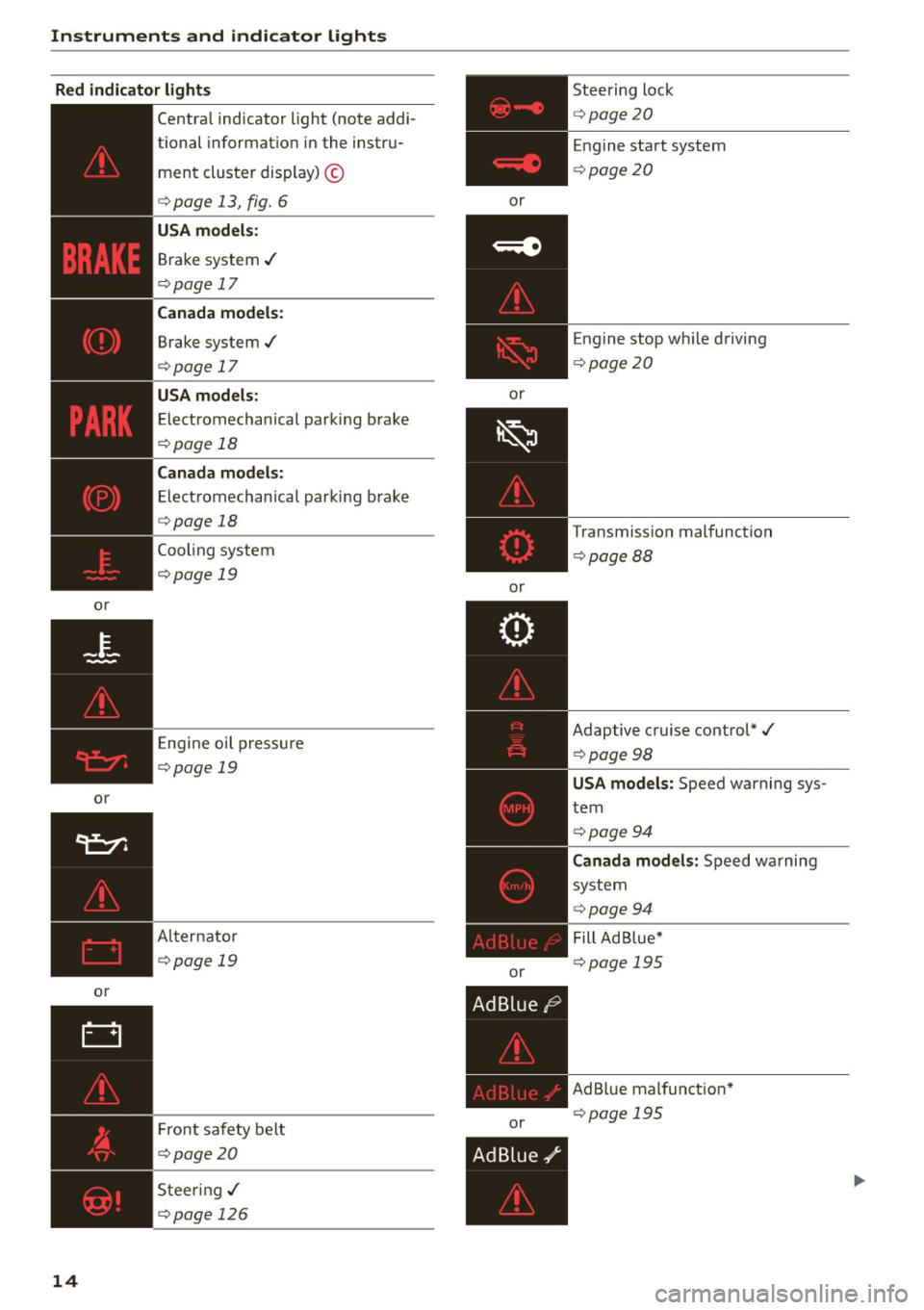
Red indicator light s
or
or
or
14
Central indicator light (note addi-
tional informat ion in the instru-
ment cluster display) ©
<=>page 13, fig. 6
USA m odel s:
Brake system ../
<=>page 17
Cana da models :
Brake system ../
<=>page 17
USA models :
Electromechan ical parking brake
<=> page 18
Canada mod els :
Electromechanica l parking b rake
<=> page 18
Cooling system
<=>page 19
Eng ine oil pressure
<=>page 19
Al ternator
<=>page 19
Fr ont safety belt
<=>page20
S teer ing../
<=>page 126
or
or
or
or
or Steering lock
<=>
page20
Engine start system
<=> page20
Engine stop whi le driving
<=> page 20
Transmission malfunction
<=>page 88
Adaptive cruise control*./
<=>page 98
USA mod els: Speed warning sys
tem
<=> page 94
Canada mo del s: Speed warning
system
<=> page 94
Fill Ad Blue*
<=> page 195
AdB lue malfunct ion*
<=> page 195
Page 18 of 282
Instruments and indicator lights
or
or
or
or
or
16
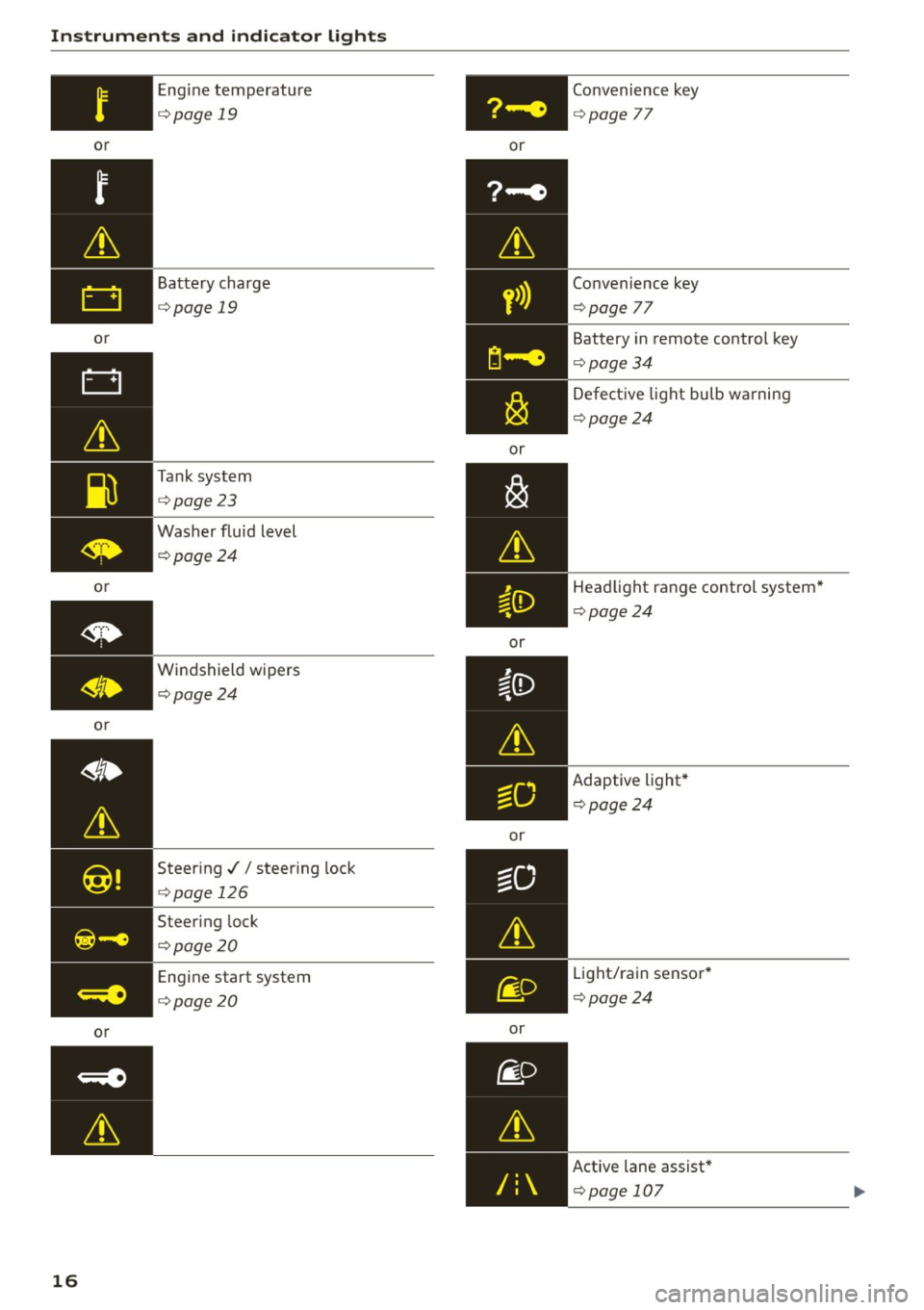
Engine temperature
¢page 19
Battery charge
¢page 19
Tank system
¢page23
Washer fluid level
¢page24
Windshield wipers
¢page24
Steer ing .// steer ing lock
¢ page 126
Steering lock
¢page20
Engine start system
¢ page20 or
y>)}
or
or
or
or Convenience key
¢
page
77
Convenience key
¢page
77
Battery in remote control key
¢page34
Defective light bulb warning
¢ page24
Headlight range control system *
¢ page24
Adaptive light* ¢ page24
Light/rain sensor *
¢ page24
Active lane assist *
¢ page 107
Page 22 of 282
Instruments and indicator lights
If th is message turns off after a little while, the
battery charged enough while driving .
I f the message does no t turn off, have and au
thor ized Audi dealer or au thorized A udi Service
F acility repair the ma lfunction.
t/ll !i.: Safety systems
The II (USA models)/ m (Canada mode ls) indi
cator light monitors the safety systems.
Safety system
If the II (USA mode ls) I m (C anada mode ls) in
d icator light turns on or blinks, there is a mal
function in a safety system.
D rive to an a uth o rized Aud i dea le r or a uth o rized
Aud i Service Fac ility immediately to have the
malfunct ion corrected .
A WARNING
-
Have the safety systems inspected immedi
ately. Otherwise, there is a risk that the sys
tems may not activate d uring a co llision,
wh ich increases the risk of serious injury or
death .
t Front safety belt
The. indicator light stays o n until the driver 's
and front passenge r's safety belts are buckled .
Above a certain speed, there w ill also be a warn
i n g tone .
@ Tips
For add it ional information on safety be lts, re
fe r to
c::> page 140.
~ - Steering lock
• Do not dri ve v ehicle : steerin g defective
There is a malfunct ion in the electron ic steering
lock . You cannot turn the ignition on .
Do
not tow your vehicle because it cannot be
steered . See an authorized Aud i dea ler or author
ized Aud i Service Fac ility for assistance .
20
II!! Steering lock: sy stem fault! Please contact
Serv ice
There is a malfunction in the elec tronic steer ing
l ock.
D rive to an authori zed Audi dealer or authorized
Audi Se rv ice Facility immed iate ly to have the
malfunction cor rec ted.
A WARNING
D o not tow yo ur vehicle when there is a mal
f u nction in the e lectronic steering loc k - this
inc reases the r is k of an accident .
~ Engine start system
• Eng ine start system malfunction. Plea se
contact Ser vice
Do not sw itch the ignition off because you may
not be able to switch it on again.
D rive to an authori zed A udi dealer or au thori zed
Audi Service Facility immed iate ly to have the
malfunction corre cted.
¥ ·1 Engine start system malfunction. Pl ea se
conta ct Servi ce
-
There is a malfunction in the eng ine starting sys
tem .
- Veh icles with ign ition lock
c::> page 73, Auto
matic start malfunction
- Veh icles with convenience key c::> page 76 , Au-
tomatic start malfunction
Drive to an authorized A udi dealer or authorized
A udi Service Facility immed iate ly to have the
malfunction corrected.
~ Engine
• Eng ine stopped : brake ser vo and power
steering not pos sibl e
There is a malfunction in the eng ine or in the fuel
supply sys tem.
More fo rce is needed to steer and bra ke t he mov
i ng vehicle when the engine is stopped. If the ve
hicle is roll ing, try to br ing it to a stop off to the
s ide from moving traffic. See an authori zed Audi .,.
Page 23 of 282
dealer or authorized Audi Service Facility for as
sistance.
A WARNING
If the engine stops while driving, you will
need to use more force to brake the vehicle.
This increases the risk of an accident. There
will still be power steering if the ignition is
switched on while the vehicle is rolling and
there is sufficient battery charge. Otherwise,
you must use greater force when steering.
!;.!~ Electronic stabilization control (ESC)
and
(8) anti-lock braking system (ABS)
If the DJ indicator light blinks while driving, the
ESC or ASR (Anti-Slip Regulation) is actively regu
lating.
If the
DJ indicator light turns on, the system has
switched the ESC off. In this case , you can switch
the ignition off and then on to switch the ESC on
again. The indicator light turns off when the sys
tem is functioning fully.
Stabilization control (ESC): sport. Warning! Re
stricted stability
If the II indicator light turns on, ESC sport
mode was switched on using the
i .i, O FF I button
¢ page 124. You can turn the ESC on again by
press the
i .i, OFFI button again .
Stabilization control (ESC): off. Warning! Re
stricted stability
If the II indicator light turns on, the ESC was re
stricted or switched off using the
I.$ O FF I button
r::!:> page 124. The message ESC OFF also appears.
You can turn the ESC on again by press the
i.i, OF F! button again.
The system switched on when the ignition is
switched on. The
II indicator light turns off
when the system is functioning fully.
Stabilization control (ESC) malfunction! See
owner's manual
M N Stabilization control (ESC/ABS) malfunction! 0
iii See owner's manual ,...., \!) 1.1"1
1.1"1
1.1"1
,....,
Instruments and indicator lights
ABS malfunction! See owner's manual
If the Bl indicator light and the ABS indicator
light[!] (USA models) /
¢0) (Canada models)
turn on and this message appears, there is a mal
function in the ABS system or electronic differen
tial lock. This also causes the ESC to malfunction.
The brakes still function with their normal power,
but ABS is not active.
Drive to an authorized Audi dealer or authorized
Audi Service Facility immediately to have the
malfunction corrected.
A WARNING
If the 1111 (USA models) /. (Canada mod
els) brake system indicator light turns on to
gether with the ABS and ESC indicator lights,
the ABS/ESC regulating function may have
failed . Functions that stabilize the vehicle are
no longer available. This could cause the vehi
cle to swerve, which increases the risk that
the vehicle will slide. Drive carefully to the
nearest authorized Audi dealer or authorized
Audi Service Facility and have the malfunction
corrected.
(D Tips
For additional information on ESC and ABS,
refer tor::!:> page
123.
BRAKEt< O: Brake pads
1111 (USA models) / [IJ (Canada models)
Brake pads!
If the warning light illuminates, immediately
contact your authorized Audi dealer or qualified
workshop to have all brake pads inspected. Both
sets of brake pads on an axle must always be re
placed at the same time.
A WARNING
-Driving with bad brakes can cause a collision
and serious personal injury .
21
Page 35 of 282
M N
0 > co ,...., \!) 1.1"1
1.1"1
1.1"1
,....,
Opening and closing
Central locking
Key set
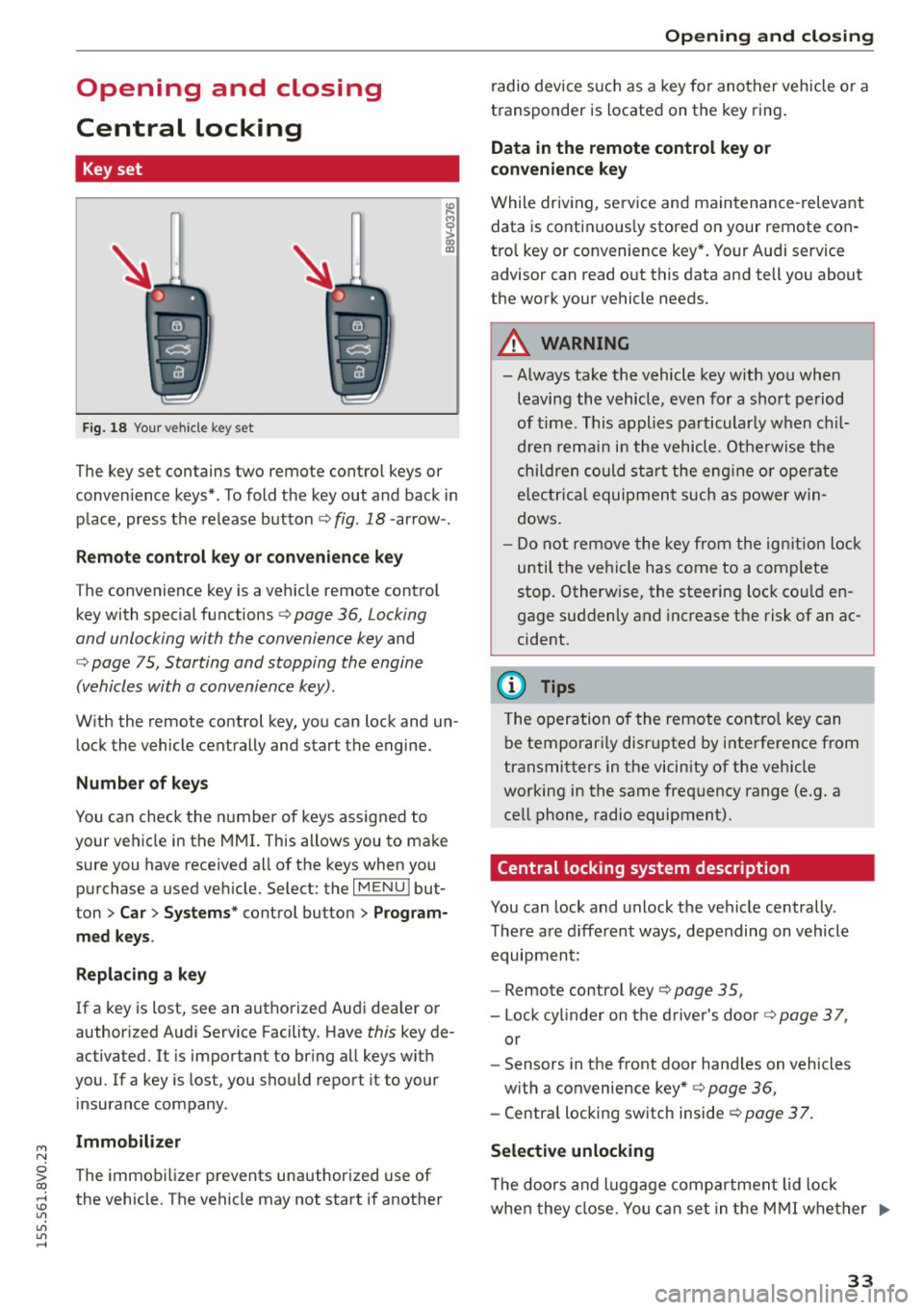
Fig. 18 Your vehicle key set
The key set contains two remote control keys or
conven ience keys*. To fold the key out and back in
place, press the release button¢ fig . 18 -arrow- .
Remote control key or convenience key
The convenience key is a vehicle remote contro l
key with special functions¢ page 36, Locking
and unlocking with the convenience key and
¢ page 75, Starting and stopping the engine
(vehicles with a convenience key) .
With the remote control key, you can lock and un
lock the vehicle centrally and start the engine.
Number of keys
You can check the number of keys assigned to
your vehicle in the MMI. This allows you to make
sure you have received all of the keys when you
purchase a used vehicle. Select: the
I MENU I but
ton
> Car> Systems * control button > Program
med keys.
Replacing a key
If a key is lost, see an authorized Audi dealer or
author ized Audi Service Facility. Have this key de
activated. It is important to bring all keys with
you .
If a key is lost, you should report it to your
insurance company.
Immobilizer
The immobilizer prevents unauthorized use of
the vehicle. The vehicle may not start if another
Opening and closing
radio device such as a key for another vehicle or a
transponder is located on the key ring.
Data in the remote control key or
convenience key
While driving, service and maintenance -relevant
data is continuous ly stored on your remote con
trol key or convenience key*. Your Audi service
advisor can read out this data and tell you about
the work your vehicle needs.
A WARNING
-- Always take the vehicle key with you when
leaving the vehicle, even for a short period
of time. This applies particularly when chil
dren remain in the vehicle. Otherwise the
children could star t the engine or operate
electrica l equipment such as power win
dows.
- Do not remove the key from the ignition lock
until the vehicle has come to a complete
stop. Otherw ise, the steering lock could en
gage suddenly and increase the risk of an ac
cident.
(D Tips
The operation of the remote control key can
be temporari ly disrupted by interference from
transmitters in the vicinity of the vehicle
working in the same frequency range (e .g. a
cell phone, radio equipment).
Central locking system description
You can lock and unlock the vehicle centrally.
There are d ifferent ways, depending on vehicle
equipment:
- Remote control key ¢page 35,
- Lock cylinder on the driver's door ¢page 37,
or
- Sensors in the front door hand les on vehicles
with a convenience key* ¢ page 36,
- Central locking switch inside <=:>page 37.
Selective unlocking
T he doors and luggage compa rtment lid lock
when they close. You can set in the MMI whether .,..
33
Page 36 of 282
Opening and closing
only the driver 's door or the entire vehicle should
un lock when unlocking
q page 3 7 .
Automatic locking (Auto L ock )
The Auto Lock funct ion loc ks all doors and the
luggage compartmen t lid once the speed has ex
ceeded approximate ly 9 mph (15 km/h).
The ca r is unlocked aga in once the ignition key is
removed . In add ition, the vehicle can be unlo cked
if the opening function in the power locki ng sys
tem sw itch is used or one o f the door handles is
pu lled .*
Add it io nally, in the event of a cr ash with a irbag
dep loymen t the doors are au tom atic ally un
lo cked to allow access to the vehicle.
Anti-theft alarm system*
If th e a nti-theft alarm system detects a ve hicle
break-in, audio and v is u a l warning s ignals are
tr iggered.
The ant i-theft alarm system tu rns on automati
cally when you lock the veh icle. It deact ivates
wh en unlocking usi ng the remote cont ro l key or
by to uchin g the se nsor on the door handle ( con
ven ience key).
To switch the a larm off, press th em butto n on
the r emote co ntro l key or convenience key or
sw itch the igni tion on. The alarm a lso stops au to
ma tica lly aft er a cer ta in amoun t of time.
Turn signals
W hen you unlock the vehicle, the t urn signa ls
flash twice . W hen you lock the vehicle, the t urn
signals flash once.
If they do not flash, one of the doo rs, the lug
gage compartment lid or the hood is not loc ked
or the ignition is still sw itched on (the la tter ap
plies to veh icles with a convenience key).
Unintentionally locking yourself out
In the following cases there safeguards to pre
ve nt you lock ing you r remote master key in the
ve hicle:
- The vehicle does not lock with the centra l lock
ing switch if the driver's door is open
c> page 37 .
34
-On veh icles with a convenience key*, the l ug
gage compa rtment lid unlocks again after clos
ing if the most recently used key is in the lug
gage compa rtment.
Do not loc k your vehicle w ith the remote control
key or convenience key * until all doors and the
l uggage compartment lid a re closed. In this way
you avoid locking yourse lf out accidentally .
@ Tips
-Do not leave va luab les unattende d in the ve
hicle. A locked veh icle is not a safe!
- If the LE D in the u pper edge of the drive r's
doo r tu rns o n for a bout 30 seconds after
the vehicle is locked, there is a ma lf u nction
in the power locki ng or the anti-theft alarm
system*. Have the problem corrected by an
autho rized Aud i dealer or autho rized Audi
Service Facility .
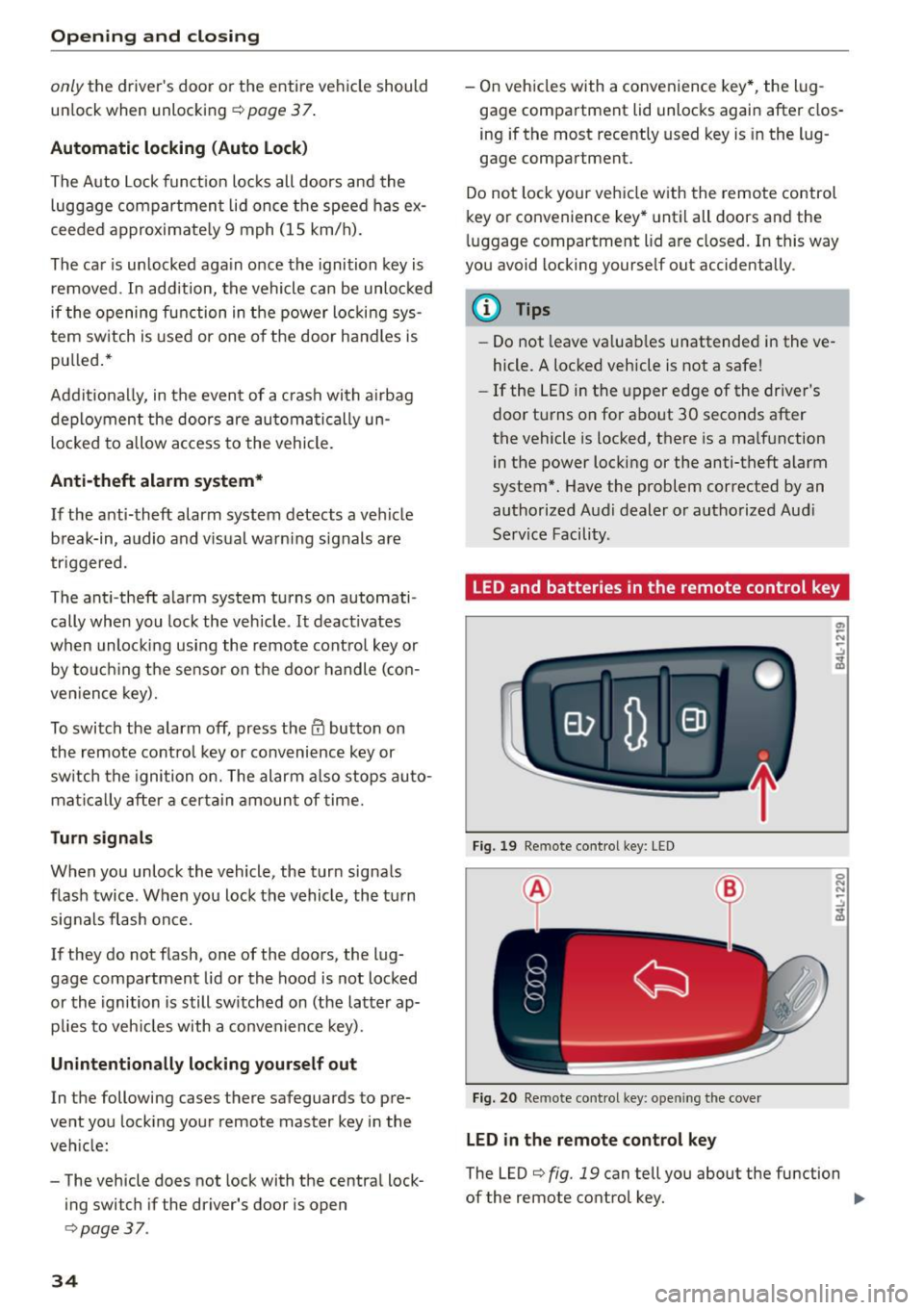
LED and batterie s in the remote control key
Fi g. 19 Remote con trol key: LED
Fig. 20 Remote con trol key: open ing the cove r
LED in the remote control key
The LED c> fig. 19 can tell you about the fu nction
of the remote control key. ..,_
Page 37 of 282
....,
N
0 > co
rl I.O
"'
"'
"'
rl
• If you press a button quickly, the LED blinks
once .
• If you press a button longer (convenience open
ing*), the LED blinks several times.
• If the LED does not blink, the remote control
key battery is dead. The message=
Please
ch ange ke y batt ery
can also appear in the in
strument cluster d isplay . Replace the battery .
Replacing the remote cont rol ke y batte ry
"Pry off the cover with a co in c;, fig. 20.
• Insert the new battery w ith the" +" facing up .
• Press the cover back onto the key until it clicks
into place .
We recommend having the battery replaced by
an authorized Audi dealer or authorized Audi
Service Fac ility .
@.) For the sake of the environment
Dead batteries must be disposed of using
methods that will not harm the env ironment.
Do not dispose of them i n household trash .
{!) Tips
The replacement battery must meet the same
specifications as the original battery .
Remote control key synchronization
The remote control key must be synch ron ized if
the vehicle does not lock and unlock with the re
mote cont ro l.
• Press the remote control key button
l@J .
• Insert the key in the dr iver door lock within 30
seconds.
• Press the
[m] button o r Im button.
Opening and clo sing
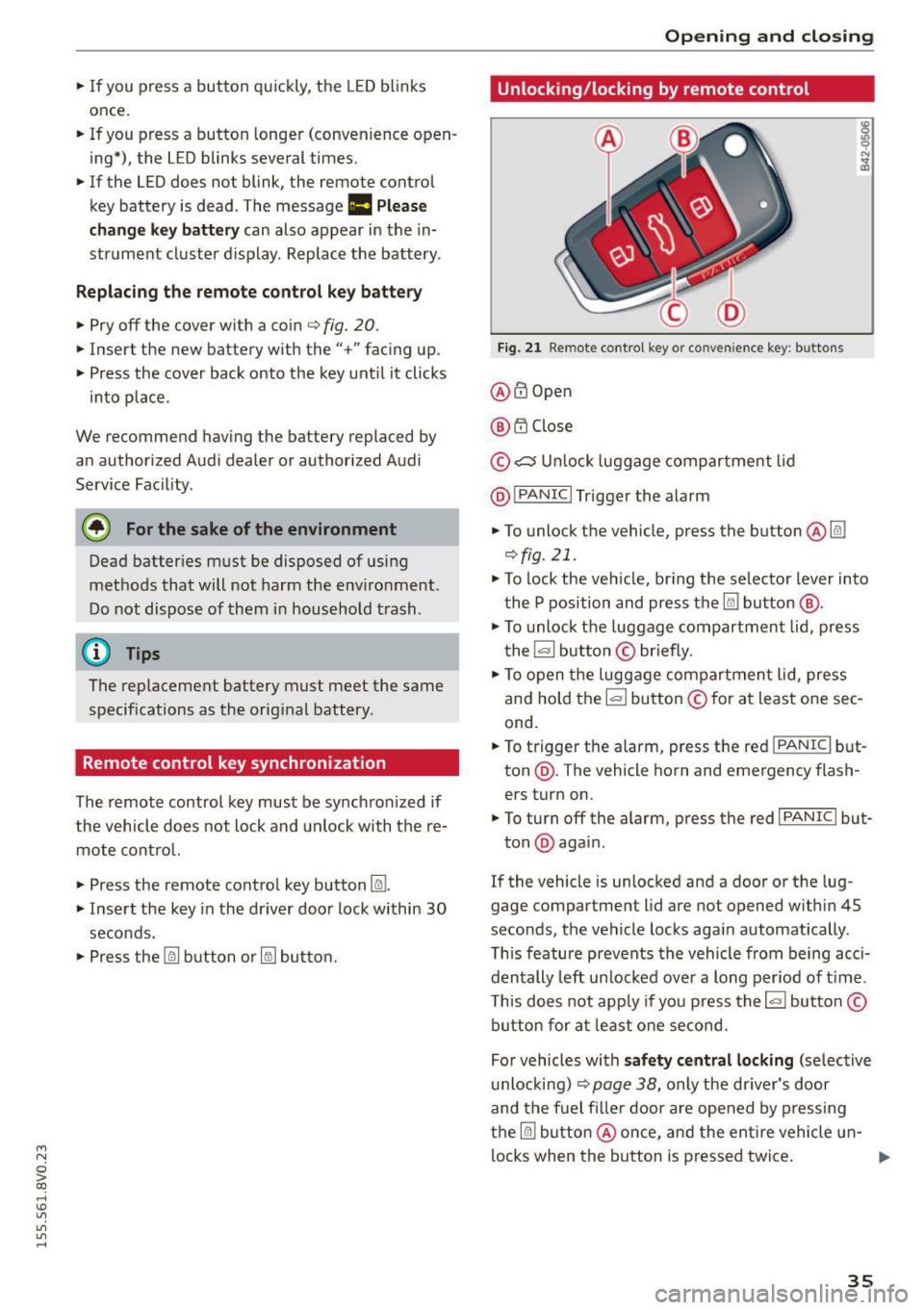
Unlocking/locking by remote control
Fig. 2 1 Remote cont rol key o r conven ience key: b uttons
@ @Open
@ t'.D Close
© ,;:::::::, U nlock luggage compartment lid
@ I
PANIC I Trigger the alarm
• To unlock the vehicle, press the button @@:!
¢fig.21 .
• To lock the ve hicle, br ing the selector lever into
the P position and press the
Im button @ .
• To unlock the luggage compartment lid, press
the~ button © briefly .
• To open the luggage compartmen t lid, press
and hold the I= ! button © for at least one sec
ond.
• To trigger the alarm, press the red I
PANIC I but
ton @. The vehicle horn and emergency flash
ers turn on.
• To turn off the alarm, press the red I
PANIC ! but-
ton @again .
If the vehicle is unlocked and a door or the lug
gage compartment lid are not opened w ith in 45
seconds, the vehicle locks aga in automatically .
This feature prevents the vehicle from being acci
dentally left un locked over a long per iod of t ime .
T his does not app ly if you press the~ button©
button for at least one second.
For vehicles with
s af ety ce ntral locking (se lective
u nlocking)
c;, page 38, only the dr iver's door
and the fuel filler door are opened by press ing
the
@I button @once, and the en tire vehicle u n-
locks when the button is pressed twice. ..,.
35
Page 38 of 282
Opening and closing
A WARNING
Read and following all WARNINGS. ¢ & in
Key set on page 33
(D Tips
- Only use the remote control key or conven
ience key within view of the vehicle.
- Do not use the remote control when you are
inside the vehicle. Otherwise, you could un
intentionally lock the vehicle. If you then
tried to start the engine or open a door, the
alarm would be triggered. If this happens, press the unlock button
m.
- The vehicle can only be locked when these
lector lever is in the
P posit ion.
- Only use the panic function in an emergen
cy.
- For information on additional remote con
trol key or convenience key functions, refer
to ¢
page 41, Convenience opening/clos
ing .
Locking and unlocking with the
convenience key
A ppl ies to veh icles: w ith conve nien ce key
The front doors and the luggage compartment
lid can be unlocked and locked without using the
remote control key .
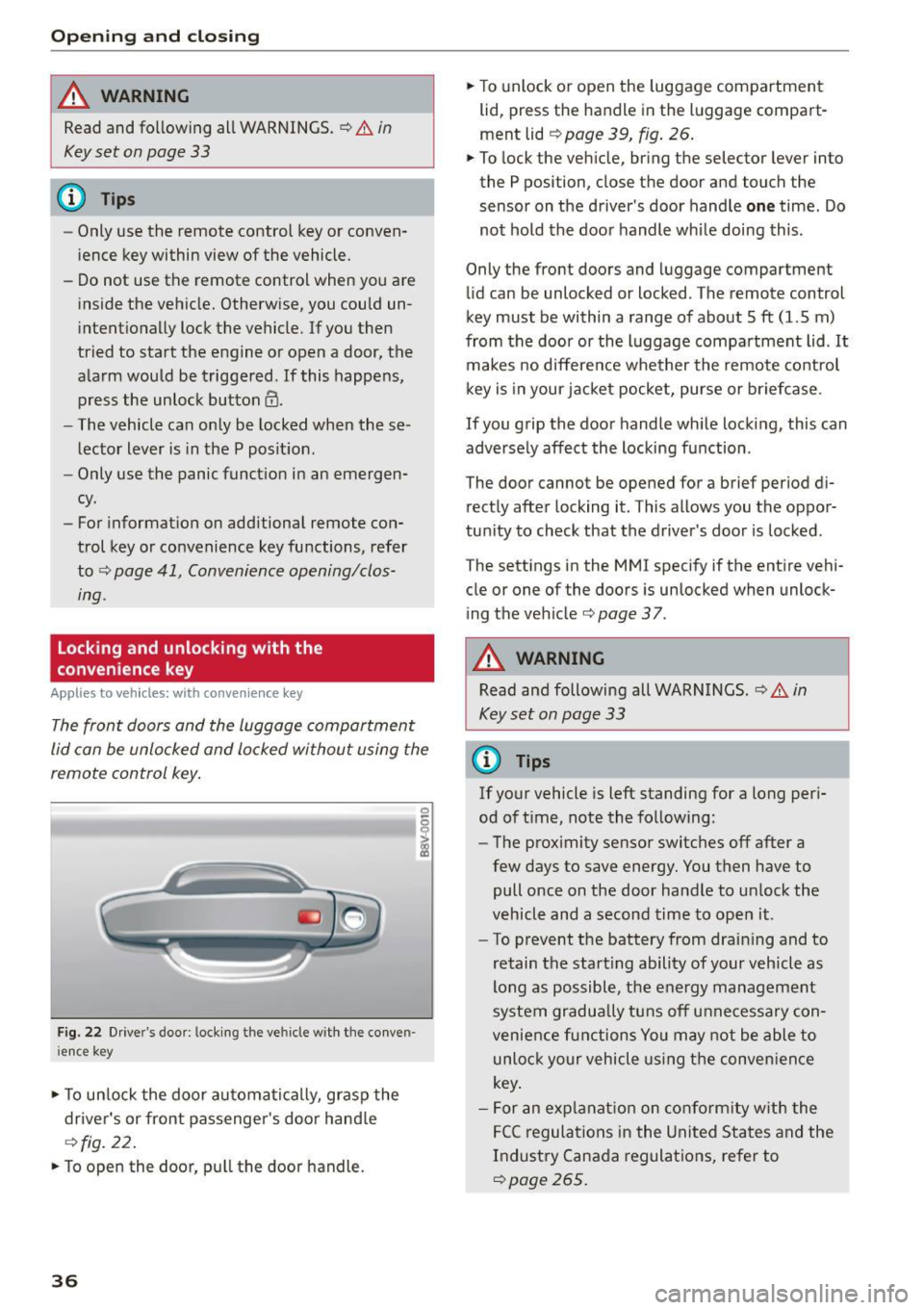
Fig. 22 Driver's door : locking the ve hicle with the conven
i ence key
• To unlock the door automatically, grasp the
driver's or front passenger 's door hand le
¢ fig. 22.
• To open the door, pull the door handle.
36
• To unlock or open the luggage compartment
lid, press the handle in the luggage compart
ment lid
¢ page 39, fig. 26.
• To lock the vehicle, bring the selector lever into
the P position, close the door and touch the
sensor on the driver's door handle
one time. Do
not hold the door handle while doing this .
Only the front doors and luggage compartment
lid can be unlocked or locked . T he remote control
key must be within a range of about
5 ft (1.5 m)
from the door or the luggage compartment lid . It
makes no difference whether the remote control
key is in your jacket pocket, purse or briefcase .
If you grip the door handle wh ile locking, this can
adversely affect the locking function .
The door cannot be opened for a brief period di rectly after locking it. This allows you the oppor
tunity to check that the driver's door is locked .
The settings in the
MMI specify if the entire vehi
cle or one of the doors is unlocked when unlock
ing the vehicle¢
page 37.
A WARNING
Read and following all WARNINGS . ¢ & in
Key set on page
33
@ Tips
If your vehicle is left standing for a long peri
od of time, note the following:
- The proximity sensor switches off after a
few days to save energy. You then have to
pull once on the door handle to unlock the
vehicle and a second time to open it.
- To prevent the battery from drain ing and to
retain the starting ability of your vehicle as
long as possible, the energy management
system gradua lly tuns off unnecessary con
venience functions You may not be able to
unlock your vehicle using the convenience
key .
- For an exp lanation on conformity with the
FCC regulations in the United States and the
Industry Canada regulations, refer to
¢page 265.