lock AUDI S3 SEDAN 2015 User Guide
[x] Cancel search | Manufacturer: AUDI, Model Year: 2015, Model line: S3 SEDAN, Model: AUDI S3 SEDAN 2015Pages: 282, PDF Size: 71.14 MB
Page 39 of 282
....,
N
0 > co
rl I.O
"'
"'
"'
rl
Unlocking/locking with the key
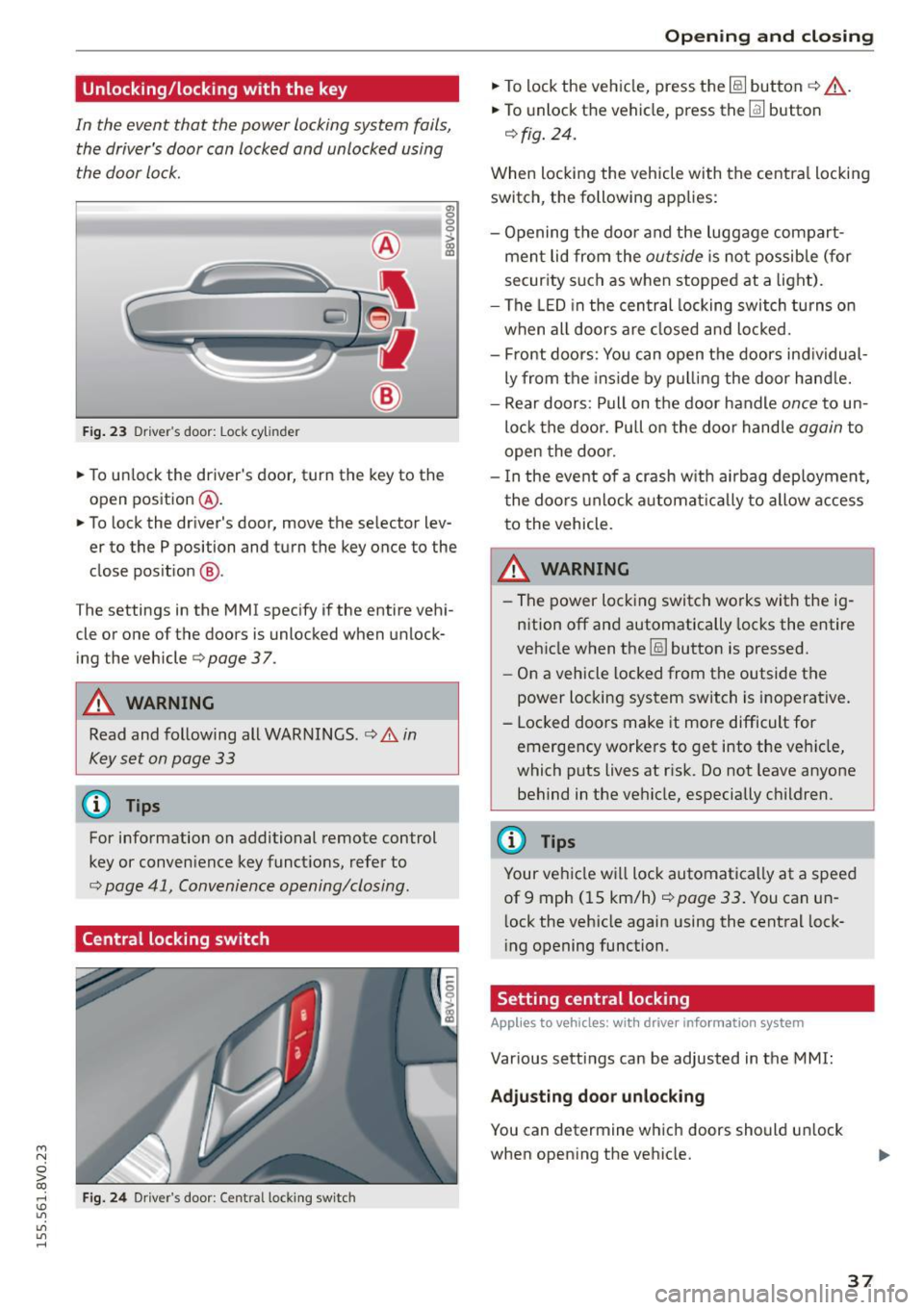
In the event that the power locking system fails,
the driver's door can locked and unlocked using
the door lock.
F ig . 23 Dr ive r's door: Lock cylinder
• To un lock the driver's door, turn the key to the
open position
® ·
a, 0 0 0 :> Q) a,
• To lock the driver's door, move the selector lev
er to the P position and turn the key once to the
close pos it ion
® ·
The settings in the MMI specify if the entire vehi
cle or one of the doors is unlocked when unlock
ing the vehicle
c:::> page 3 7.
A WARNING
Read and following all WARNINGS. c:::> &. in
Key set on page 33
@ Tips
For information on additional remote control
key or conven ience key functions, refer to
c::> page 41, Convenience opening/closing .
Central locking switch
Fig. 24 Dr iver 's door : Centra l lock ing switch
Open ing and clo sing
• To lock the vehicle, press the~ button c:::> .&_.
• To unlock the vehicle, press the~ button
c:::>fig. 24.
When loc king the vehicle with the centra l locking
switch, the following app lies:
- Opening the door and the luggage compart
men t lid from the
outside is not possible (for
secur ity such as when stopped at a light).
- The LED in the central locking switch tu rns o n
when all doors are closed and loc ked.
- Front doo rs: You can open the doors ind ividual
ly from the ins ide by p ulling the door hand le.
- Rear doors: Pull on t he door handle
once to un
lo ck the doo r. Pull on the doo r handle
again to
open the doo r.
- I n the event of a crash w it h ai rbag deploymen t,
t he doo rs unlock a utoma tically to allow access
to the vehicle.
_&. WARNING
- The power locking switch wo rks with the ig
n ition off an d automatically locks the entire
veh icle when the~ button is pressed.
- On a vehicle locked from the outside the
power loc king system switch is inoperative.
- Locked doors make it more difficult for emergency workers to get into the ve hicle,
which puts lives at ris k . Do not leave anyone
behind in the ve hicle, especially c hildren.
(D Tips
Your ve hicle w ill lock automatica lly at a speed
of 9 mph ( 15 km/h)
c::> page 33 . You can un
l ock the vehicle again using the central lock
i ng opening function.
Setting central locking
Applies to vehicles: with drive r in fo rmat io n system
Var ious settings can be adjusted in the MMI:
Adju sting door unlocking
You can determine wh ich doors should u nlock
when open ing the vehicle.
37
Page 40 of 282
Opening and closing
"'Select: the IMENU ! button> Car> Systems*
control button > Vehicle settings > Central
locking > Door unlocking.
Selecting All and pressing the~ button on the
remote control key unlocks the entire vehicle.
If you select
Driver and then press the~ button
on the remote control key, only the driver's door
will unlock. In vehicles with a convenience key,
only the front door whose handle you pull will
unlock. If you press the~ button twice, the en
tire vehicle will unlock. If you press the~ button,
the entire vehicle will always lock.
Folding* the exterior mirrors
"'Select: the IMENU ! button> Car> Systems*
control button > Vehicle settings > Central
locking > Fold mirrors when locking.
For more
information, refer to
c:> page 47, Adjusting
the exterior mirrors.
If you select On, the outside mirrors will fold in
automatically when you press the~ button on
the remote control key
i:> page 47.
Tone when locking
"'Select : the IMENU ! button> Car> Systems*
control button > Vehicle settings > Central
locking> Tone when locking.
When checked off./, a tone will sound when you
lock the vehicle.
If you press the~ button twice, the entire vehi
cle will lock. There is a locking tone at the same
time
1l .
Electronic immobilizer
The immobilizer prevents unauthorized use of
your vehicle.
A microchip in the key automatically deactivates
the electronic immobilizer when the key is locat
ed in the vehicle.
If you remove the key from the
vehicle, the electronic immobilizer activates
again automatically.
l) Thi s fu nct io n is not availabl e in all cou ntri es .
38
A WARNING ,_ -
Always take the key with you whenever you
leave your vehicle. The electronic immobilizer
can be deactivated with the key, so this could
make it possible for unauthorized persons to
start the engine and operate vehicle systems
such as the power windows or sunroof. This
can increase the risk of serious injury.
(D Tips
-The vehicle cannot be started if an unau
thorized key is used.
It may not be possible
to start the vehicle under certain circum
stances, for example if there is another ra
dio module like the key from another vehicle
or a transponder on the same keychain.
- For an explanation on conformity with the
FCC regulations in the United States and the
Industry Canada regulations, refer to
i:>page 265.
Safety central locking
App lies to vehicles : wi th safe ty cen tral lock ing
Safety central locking provides the possibility, to
only unlock the driver's door and the fuel filler
door. The rest of the vehicle remains locked.
Unlocking the driver's door and the fuel filler
door
"' Press the remote control key or convenience key
Ifill button once or turn the key once in the open
ing direction.
Unlocking all doors, the luggage
compartment lid and the fuel filler door
"' Press the remote control key or convenience key
Ifill button twice within five seconds or turn the
key
twice within five seconds in the opening di
rection.
When unlocking just the driver's door, the anti
theft alarm system* is also immediately deacti
vated.
In vehicles with an MMI, you can directly adjust
the safety central locking
c:> page 3 7.
Page 41 of 282
....,
N
0 > co
rl I.O
"'
"'
"'
rl
Front passenger's door and rear doors
emergency locking
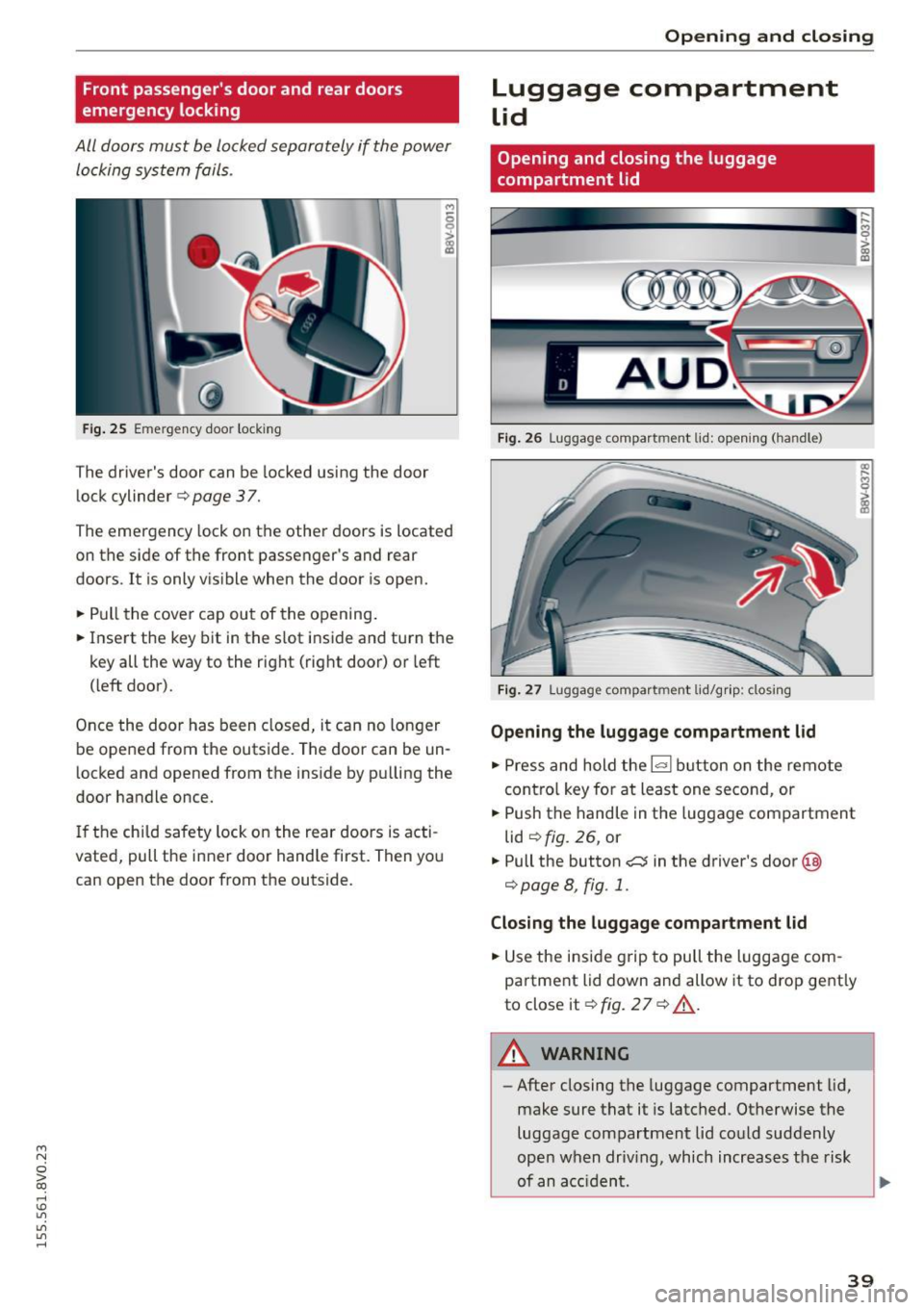
All door s must be locked separately if the power
lo cking system fails .
Fig. 25 Em ergenc y doo r locki ng
The driver's door can be lo cked using the door
lock cylinder
¢ page 37.
,.,
6
i
The emergency lock on the other doors is located
on the side of the front passenger's and rear
doo rs. I t is only vis ible when the door is open.
• Pull the cover cap out of the opening .
• Insert the key bit in the slot inside and turn the
key all the way to the right (right door) or left
( left door).
Once the doo r has been closed, it can no longer
be ope ned from the outside. The door can be un
l ocked and opened from the inside by p ulling the
door handle once.
I f the chi ld safety lock on the rear doors is acti
vated, pull the inner door hand le first. Then you
can open the door from the outside .
Opening and clo sing
Luggage compartment
Lid
Opening and closing the luggage
compartment lid
Fig . 26 Lugg age compart men t lid : op en ing ( han dle )
F ig . 27 Lugg age compart ment lid/gr ip : clo sing
Opening the luggage compartment lid
• Press and hold the~ button on the remote
contro l key for at least one second, or
• Push the handle in the luggage compartment
lid
¢ fig . 26, or
• Pull the button
c::::::; in the driver 's door @
¢ page 8, fig . 1.
Closing the luggage compartment lid
• Use the inside g rip to pull the luggage com
partment lid down and allow it to drop gently
to close it¢
fig. 2 7 ¢ ,&. .
A WARNING
-
-After closing the luggage compartment lid,
make sure that it is latched . Otherwise the
luggage compartment lid co uld suddenly
open when driv ing, which increases the risk
of an a cc iden t.
39
Page 42 of 282
Opening and closing
- Never drive with the luggage compartment
lid ajar or open , because po isonous gases
can enter the vehicle interior and create the
risk of asphyxiation .
- Never leave your vehicle unattended when
the luggage compartment lid is open. A
child could climb into the vehicle through
the luggage compartment. If the luggage
c ompartm ent lid was the n closed, the child
would be trapped in t he ve hicle and u nable
to escape. To reduce the risk of injury, do
not allow c hildren to play in or a rou nd the
vehicle. A lways keep the luggage compart
ment lid and the doors closed when the ve
hicle is not in use.
- Always make sure no one is in the luggage
compartment lid 's range of motion when it
is closing, especially nea r the hinges. F in
gers or hands co uld be p inched .
(D Tips
-W hen the vehicle is locked, the luggage
compartment lid can be unlocked separately by p ress ing the
1~ 1 button on the remote
contr ol key. When the luggage compart
ment lid is closed aga in, it locks a utomat i
ca lly.
- In case of an emergency o r a faulty hand le ,
the luggage compartment lid can be opened
from the ins ide
c::> pag e 240 .
Child safety Lock
Child safety lock
Applies to vehicles: w ith mec han ical child safety lock
The child safety locks t prevent the rear doors
from opening from the inside.
F ig . 2 8 Rear doo rs: C hild safety loc k
40
.,. To turn the child safety locks on , turn the igni
tion key in the direction of the arrow .
.,. To turn
off , turn the ignition key oppos ite the
direction of the arrow.
When the ch ild safety loc ks are activated, the in
side door handles do not work and t he doors can
on ly be opened from the outs ide.
The child sa fe ty lo ck only func tions on the door i n
which it was activated.
Power windows
Controls
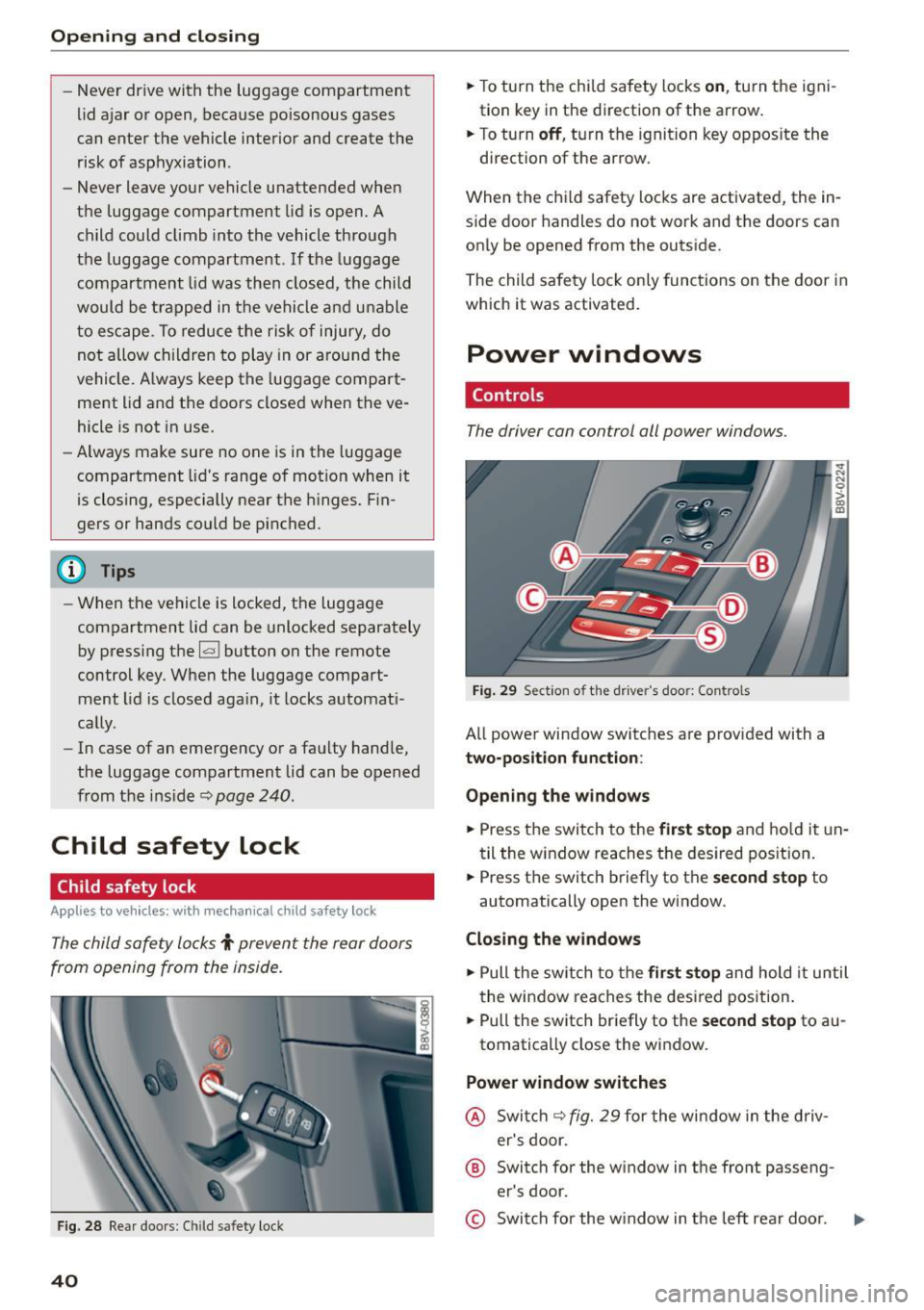
The driver can control all power windows .
Fig. 29 Section of th e d river 's doo r: Co ntro ls
All powe r window switc hes are prov ided with a
two-position function :
Opening the window s
.,. Press the switch to the first stop and ho ld it un
til the w indow reaches t he des ired pos it ion .
.,. Press the switch briefly to the
second stop to
automatically open the window.
Closing the windows
.,. Pull the sw itch to th e first stop a n d hold it until
t he win dow reaches the des ired pos ition .
.,. Pull the switch br iefly to the
se cond stop to au
tomatically close the w indow.
Power window switches
@ Swi tch c::> fig. 29 for the wi ndow in the driv
er's door.
® Switch for the w indow in the front passeng
er's door.
© Swi tch for the w indow in t he left rear doo r.
Page 43 of 282
M N
0 > co ,...., \!) 1.1'1
1.1'1
1.1'1
,....,
@ Switch for the window in the right rear door.
® Safety button* .
Child safety lock
When the safety button®~ fig. 29 is pressed,
the@ symbol in the button lights up. The power
window switches in the rear doors are switched
off.
A WARNING
- When you leave your vehicle - even if only
br iefly -always remove the ignition key. This
applies part icularly when children remain in
the vehicle. Otherwise the children could start the engine or operate e lectr ica l equip
ment (e.g. power windows). The power win
dows are functional until the driver 's door o r
passenger's door has been opened .
- Pay caref ul attent ion when closing the win
dows.
It could cause injury by pinching .
- When locking the veh icle from outs ide, the
vehicle must be unoccupied since the win
dows can no longer be opened in an emer
gency.
-
(D Tips
After turning the ignition off you can st ill
open and close the windows for approximate
ly 10 seconds. The power windows are not
switched off unti l the driver's door or pas
senger's door has been opened.
Convenience opening/closing
With the convenience opening/closing funct ion,
you can centrally and easily open the windows and the panorama sunroof* from the outside.
Con veni enc e op en f eatur e
.. Press the open button Iii on the remote control
key until all windows and the panorama sun
roof* have reached the desired position, or
.. Hold the key in the driver's door lock until all
windows and the panorama sunroof* have
reached the desired position.
Op ening and cl osing
Conven ience clo se feature
.. Ho ld the key in the driver's door lock in the lock
position unti l all windows and the panorama
sunroof* are closed.
Con venienc e closing wi th the convenience
key*
.. Touch the sensor * on one of the front door han
dles and contin ue touching it until all of the
windows and the panorama sunroof* are
closed. Do not place your hand in the door han
dle when doing th is .
Adju sting the con venience opening in the
MMI
.. Select: the I MENU I button >Car> Sys tems*
control button > Vehicle se ttings > Cent ral
loc king > Long-pr ess to open w indo ws
To enable convenience opening of the w indows
and the roof*, the
Front windo ws, Rear win
do ws*
and Roo f* functions must be switched On.
A WARNING
- Never close the w indows or panorama sun
roof* care lessly or in an uncontrolled man
ner, because this increases the risk of injury.
- For secur ity reasons, the w indows can only
be opened with the remote control key at a
maximum distance of approximately 6 feet
(2 meters) from the vehicle.
- Pay attention when using the lock cylinder
to close the w indows and the panorama
sunroof* so that no one is pinched. Closing
stops when the key is moved into the start
ing position.
Correcting power window malfunctions
After disconnecting the vehicle battery, the one touch up and down feature must be activated
again .
.,. Pull the power wi ndow switch until the window
is completely ra ised.
.. Release the switch and pull it again for at least
one second.
4 1
Page 45 of 282
....,
N
0 > co
rl I.O
"'
"'
"'
rl
Light and Vision
Exterior Lighting
Switching lights on and off
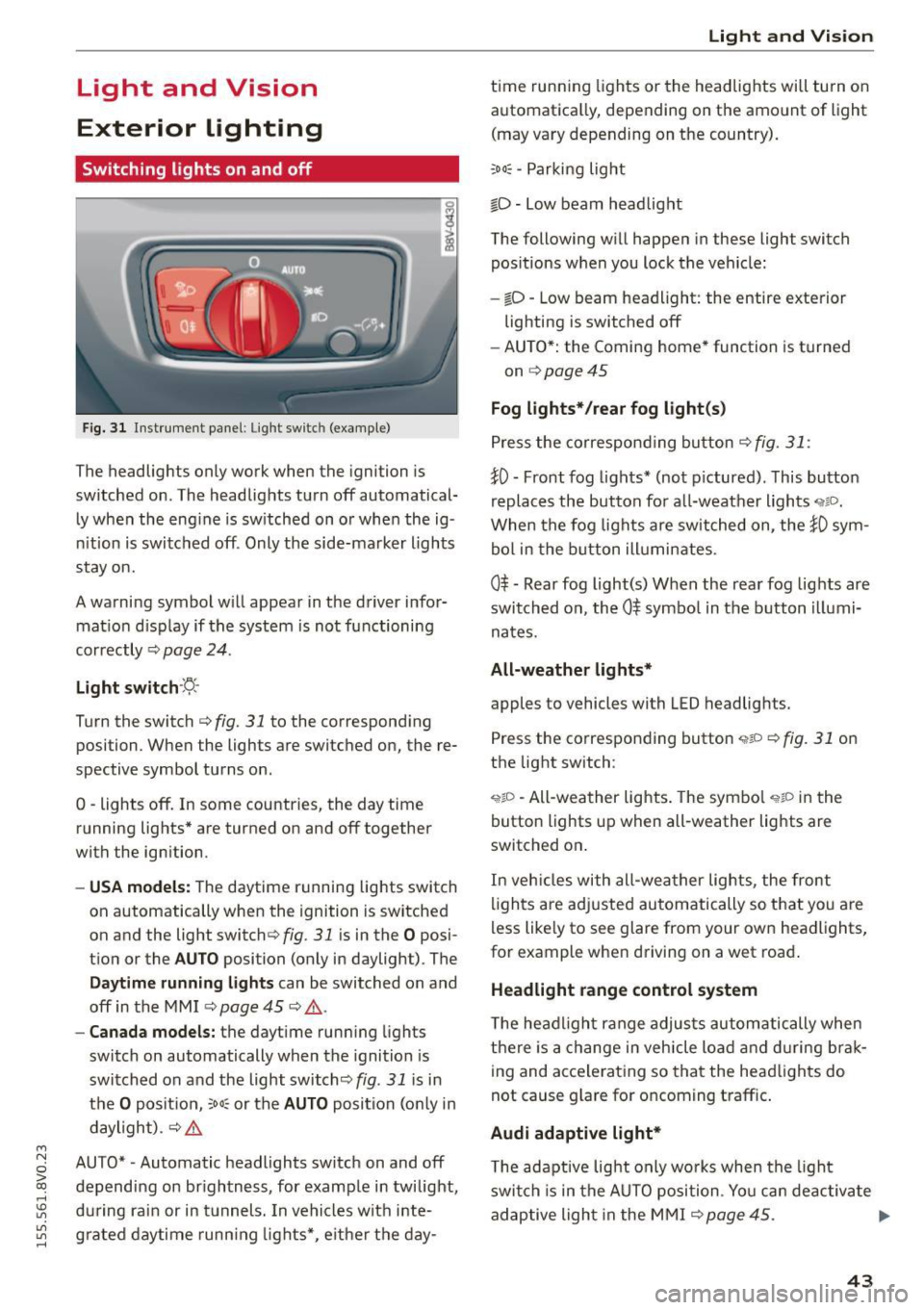
Fig. 31 Instrument panel: Ligh t swi tc h (examp le )
The headlights only work when the ignition is
switched on . The headlights turn off automatical
ly when the eng ine is switched on or when the ig
nition is switched off . Only the side-marker lights
stay on.
A warning symbol w ill appear in the driver infor
mat ion d isp lay if the system is not functioning
correctly ¢
page 24.
Light switch ·~-
Turn the switch c::> fig. 31 to the corresponding
position . When the lights are switched on, the re
spective symbol turns on .
0 -lights off. In some countries, the day time
running lights* are turned on and off together
with the ignition .
-USA models: The daytime running lights switch
on automatically when the ignition is switched
on and the light switch¢
fig. 31 is in the O posi
tion or the
AUTO position (only in daylight) . The
Daytime runn ing lights can be switched on and
off in the MMI
c::> page 45 c::> & .
-Canada models: the daytime running lights
switch on automatically when the ignition is
switched on and the light switch<::>
fig. 31 is in
the
O position, ;ooc or the AUTO position (on ly in
daylight) .
c::> &.
AUTO* -Automatic headlights switch on and off
depending on brightness, for example in twilight,
during rain or in tunnels. In vehicles with inte
grated daytime running lights*, e ither the day-
Light and Vision
time running lights or the headlights will turn on
automatica lly, depend ing on the amount of light
(may vary depending on the country).
;oo~ -Parking light
io -Low beam headlight
The following will happen in these light switch
pos itions when you lock the vehicle:
- iD -Low beam headlight: the entire exterior
lighting is switched off
- AUTO*: the Coming home* function is turned
on
c::> page 45
Fog lights* /rear fog light(s)
Press the correspond ing button c::> fig. 31 :
!0 -Front fog lights* (not pictured) . This button
replaces the button for all-weather lights
'i'liD.
When the fog lights are switched on, the !0 sym
bol in the button illuminates.
0$ -Rear fog light(s) When the rear fog lights are
switched on, the
0$ symbol in the button illumi
nates.
All-weather lights*
apples to vehicles with LED headlights.
Press the corresponding button
<,1gD <=> fig. 31 on
the light switch :
'i'!io -All-weather lights . The symbo l 'i'!io in the
button l ights up when all-weather lights are
switched on .
In veh icles with all-weather lights, the front
lights are adjusted automatically so that yo u are
less likely to see glare from your own headlights,
for example when driving on a wet road .
Headlight range control system
The headlight range adjusts automatically when
there is a change in vehicle load a nd during brak
ing and accelerating so that the headlights do
not cause glare for oncoming traff ic.
Audi adaptive light*
T he adaptive light only wo rks when the light
switch is in the AUTO position . You can deactiva te
adaptive light in the MMI ¢
page 45. ..,.
43
Page 47 of 282
....,
N
0 > co
rl I.O
"'
"'
"'
rl
You can indicate a lane change or a turn when the
emergency flashers are switched on by using the
turn signal lever. The emergency flashers stop
temporari ly.
The emergency flashers also work when the igni
tion is turned off.
@ Tips
Yo u should switch the emergency flashers on
if:
- You are the last car in a traffic jam so that
all other vehicles approaching from behind
can see you, or if
- Your vehicle has broken down or you are
having an emergency, or if
- Your vehicle is being towed or if yo u are
towing another vehicle.
Turn signal and high beam lever
The Lever operates the turn signals, the high
beams and the headlight flasher.
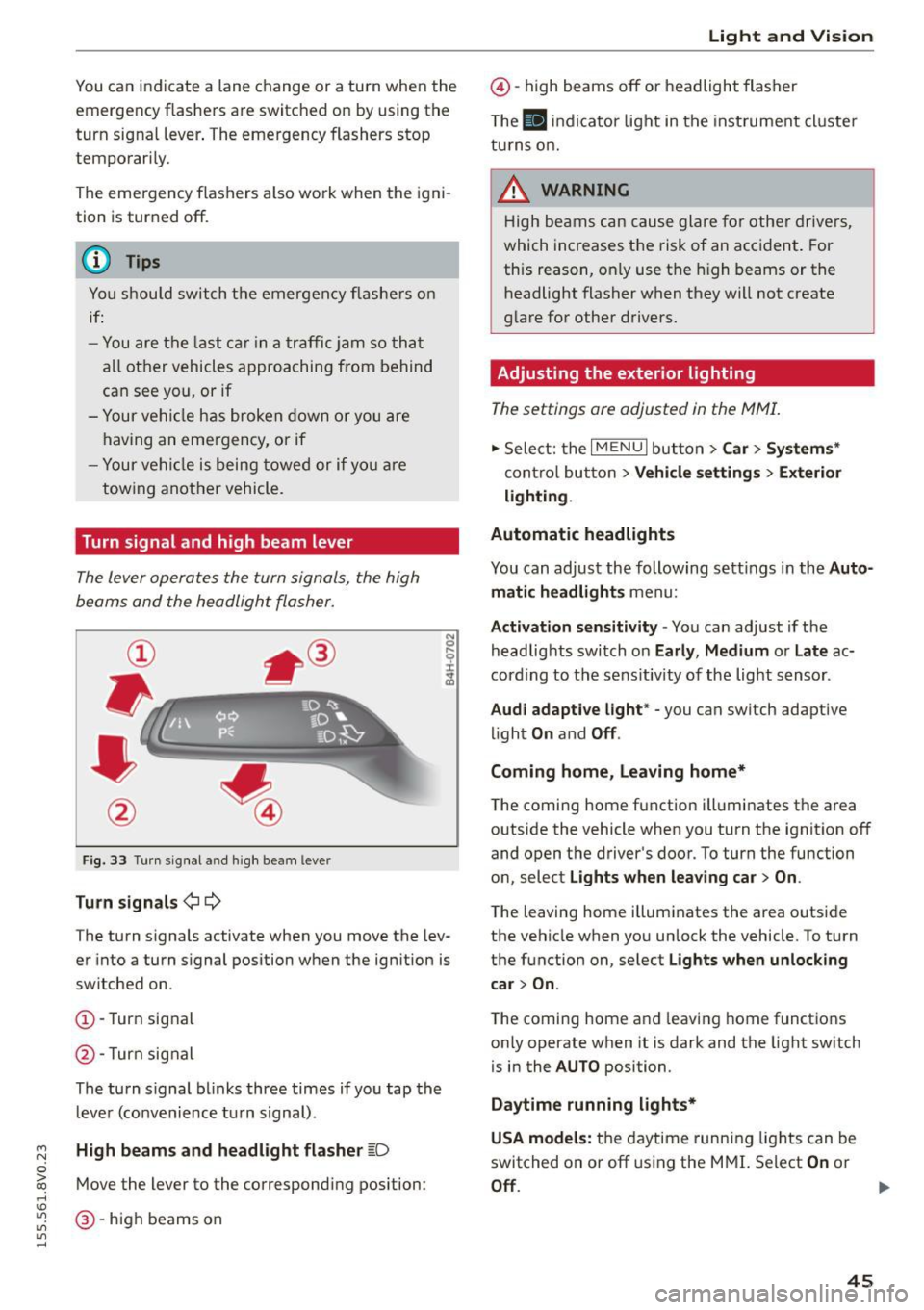
Fig. 33 Turn signal a nd high beam leve r
Turn signals ¢i 9
The turn signals activate when you move the lev
er into a turn s ignal position when the ignition is
switched on.
CD -Turn signal
@ -Turn sig nal
The turn s ignal blinks three times if you tap the
l eve r (convenience tu rn signal) .
High beams and headlight flasher ~D
Move the lever to the correspond ing position :
@-high beams on
Light and Vision
@-high beams off or headlight flasher
Th e
El indicator light in the inst rument cl uste r
turns on.
_& WARNING
High beams can cause glare for other drivers,
which increases the risk of an accident . For
this reason, only use the high beams or the
headlight flasher when they will not create
glare for other drivers.
Adjusting the exterior lighting
The settings are adjusted in the MMI.
.. Select: the I MENU I button > Car> Systems*
cont rol button > Vehicle settings > Exterior
lighting.
Automatic headlights
You can adjust the following sett ings in the Auto
matic headlights
menu:
Activation sensitivity -You can adjust if the
headlights switch on
Early, Medium or Late ac
cording to the sens itiv ity of the light sensor .
Audi adaptive light * -you can switch adaptive
light
On and Off .
Coming home, Leaving home*
The coming home function illuminates the area
outside the vehicle when you turn the ignit ion off
and open the driver's door. To turn the function
on, select
Lights when leaving car > On .
The leaving home illuminates the area outside
the vehicle when you un lock the vehicle. To turn
the function on, select
Lights when unlocking
car > On .
The coming home and leaving home functions
on ly operate when it is dark and the light switch
is in the
AUTO position.
Daytime running lights*
USA models:
the daytime running lights can be
switched on or off using the MMI. Select
On or
Off. ...
45
Page 49 of 282
....,
N
0 > co
rl I.O
"'
"'
"'
rl
Instrument illumination
The brightness of the instrument cluster and the
center console can be adjusted .
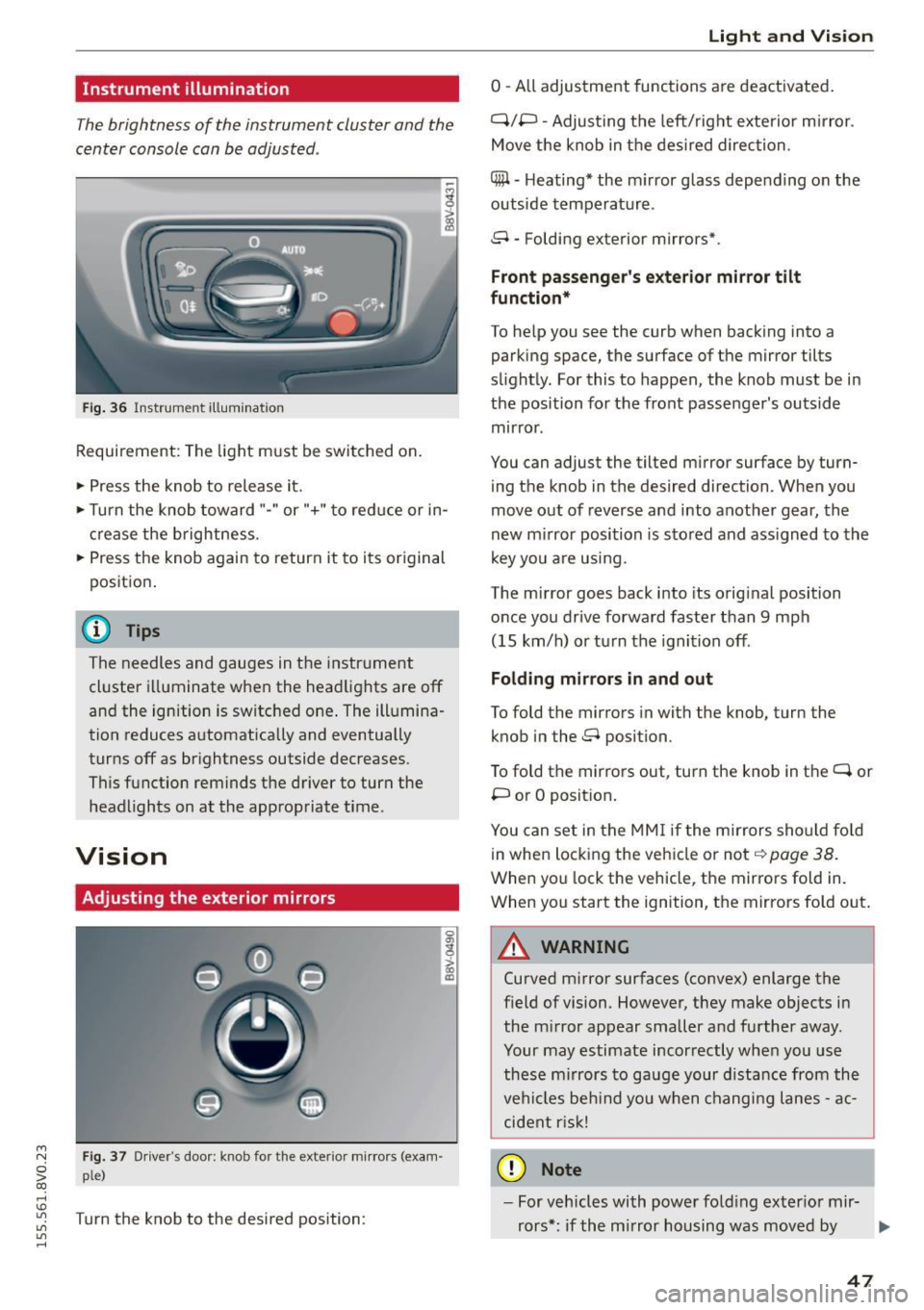
Fig. 36 Instrument illum ination
Requirement: The light must be switched on.
.. Press the knob to release it.
.. Turn the knob toward"-" or"+" to red uce or in
crease the brightness.
.. Press the knob again to return it to its original
posit ion .
@ Tips
The needles and gauges in the instrument
cluster illuminate when the headlights are off
and the ignition is switched one . The illumina·
tion reduces automatically and eventually
turns off as br ightness outside decreases.
This function reminds the driver to turn the
headlights on at the appropriate time .
Vision
Adjusting the exterior mirrors
Fig. 37 Driver's door: knob for the exterior mirrors (exam
ple)
Turn the knob to the desired position:
0
g
> a, (X)
Light and Visio n
0 -A ll adjustment functions are deactivated .
Q/P -Adjusting the left/rig ht exterior mirror.
Move the knob in the des ired direction.
C@ · Heating* the m irror glass depending on the
outside temperature.
8 • Folding exterior mirrors*.
Front pa ss e ng er's ex te rior mirror tilt
functio n*
To help you see the curb when backing into a
parking space, the surface of the mirror tilts
slight ly. For this to happen, the knob must be in
the position for the front passenger's outside
mirror .
You can adjust the tilted mirror surface by turn·
i ng the knob in the desired direction . When you
move out of reverse and into another gear, the
new m irror position is stored and ass igned to the
key yo u are us ing .
The mirror goes back into its orig inal position
once you drive forward faster than 9 mph
(15 km/h) o r turn the ignition off.
Folding m ir rors in and out
To fold the mirrors in with the knob, turn the
knob in the 8 position.
To fold the mirrors out, turn the knob in the
q or
P or O posit ion .
You can set in the MM I if the mirrors sho uld fo ld
in when locking the vehicle or not
q page 38.
When you lock the vehicle, the mirrors fold in.
When you start the ignition, the mirrors fold out.
A WARNING -,.
Curved m irror surfaces (convex) enlarge the
field of vision. However, they make objects in
the m irror appear smaller and further away.
Your may estimate incorrectly when you use
these m irrors to gauge your d istance from the
vehi cles be hind you when changi ng lanes -ac·
cident risk!
@ Note
- For vehicles with power fo ld ing exter ior mir·
rors*: if the mirror housing was moved by
IJI,-
47
Page 52 of 282
Light and Vi sion
- Do not use the wipers to remove ice from
the windows. Using windshie ld wipers as ice
scrapers destroys the wiper blades.
(D Tips
- The windshield wipers are switched off
when the ignition is turned off. Activate the
windsh ield wipers after the ignition is
switched back on by moving the windsh ield
wiper lever to any pos it ion.
- Worn or dirty windshie ld wiper b lades result
i n streaking. This can affect the rain sensor
funct ion. Check your windshield wiper
blades regularly .
- The washer fluid nozzles in the w indshield
washer system are heated* at low tempera
tures when the ignit io n is on.
- When stopp ing temporarily, such as at a
traffic light, the speed of the windsh ield
wipers automatically reduces by one level.
- In vehicles with an MMI, you can switch the
rain sensor or off in the
Dri ver ass istanc e
menu.
Cleaning windshield wiper blades
Clea n the wiper blades when you see wipe r
s treaks. Use a soft cloth and a glass cleaner.
.., Place the w indshield wiper arms in the serv ice
pos ition ¢
page 50 .
.., Fo ld the windshield wipe r arms away from the
winds hield .
A WARNING
Dirty windshie ld wiper blades can impai r vi
sion , which increases the risk of an accident.
(D Note
If you see streaks aga in after cleaning the
w iper blades, the b lades must be replaced
¢page SO.
so
-
Replacing front windshield wiper blades
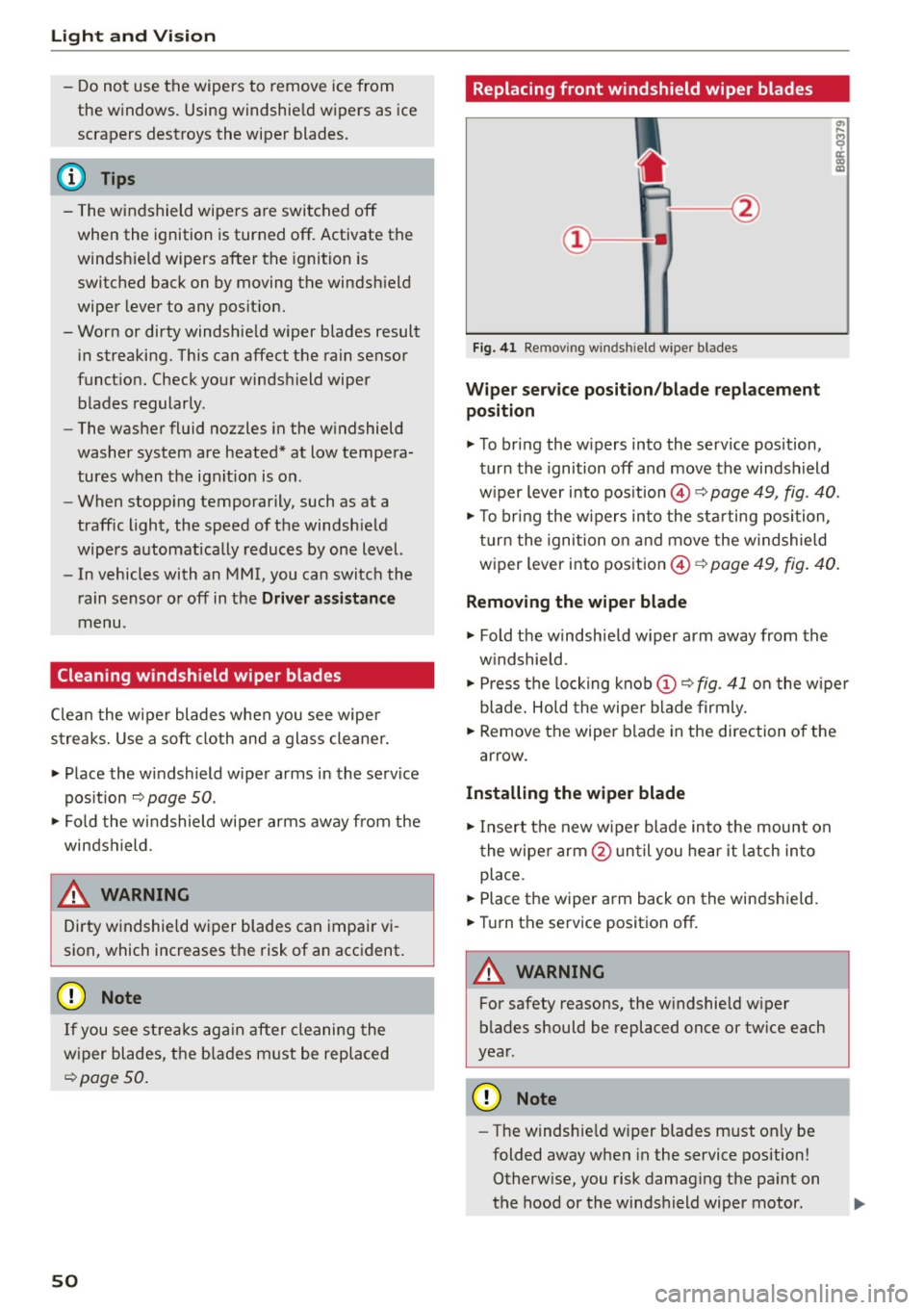
F ig. 41 Re mov ing wind shi eld w iper blades
Wiper service po sit ion /blade repl acement
position
.., To br ing the w ipers into the service pos ition,
turn the ignition off and move the windsh ield
w iper lever into position @¢
page 49, fig. 40.
.., To br ing the w ipers into the sta rting position ,
turn the ignition on and move the w indshield
wiper lever into position ©¢
page 49, fig. 40.
Removing the wiper blade
... Fold the windshie ld w iper arm away from the
w indshield.
.., Press the locking knob
(D C? fig . 41 o n the wiper
blade . Hold the wipe r blade firmly.
... Remove the wiper blade in the direction of the
arrow .
Installing the wipe r blade
.., Insert the new wiper blade into the mount on
the wiper arm @unt il you hear it latch in to
place.
... Place the wiper arm back on the windshield.
... Turn th e service position off .
A WARNING
-
For safety reasons, the w indshie ld w iper
b lades should be replaced once or tw ice each
year .
Q) Note
-The windshie ld w iper blades must only be
folded away when in the service position!
Otherw ise, you risk damag ing the pa int on
the hood or the windshield wiper motor .
Page 58 of 282
Seats and storag e
Rear center armrest
Applies to vehicles: with rear center armrest
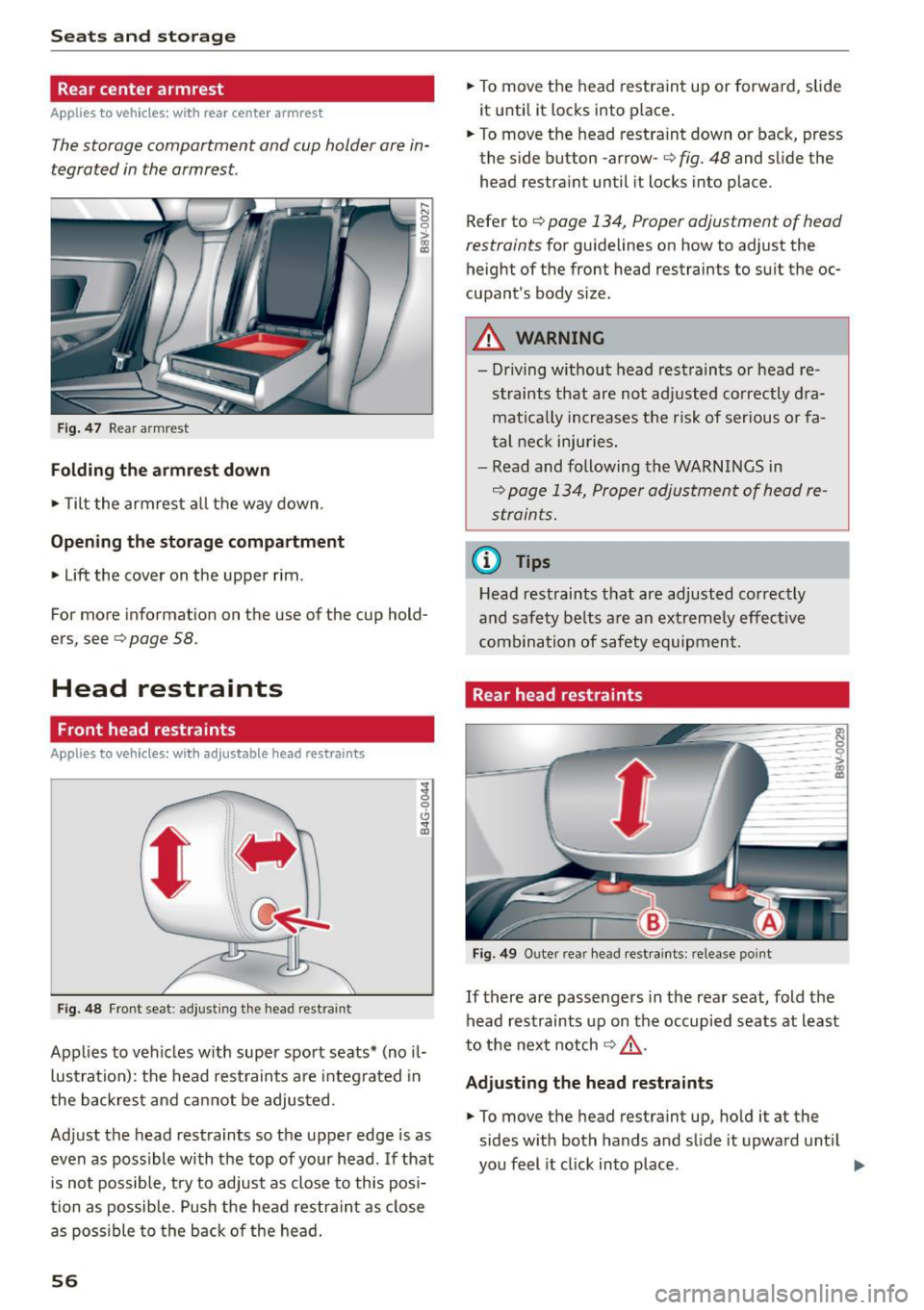
The storage compartment and cup holder are in
tegrated in the armrest.
Fig . 47 Rear armrest
Folding the armre st d own
• Tilt the armrest a ll the way down.
Opening the sto rage c omp artment
• Lift the cover on the upper rim .
~I
gl
~
For more information on the use of the cup hold
ers, see
c> page 58.
Head restraints
Front head restraints
Applies to veh icles: with adjustable head restraints
-
'
' F ig. 48 Front seat : ad just ing the head restraint
Applies to vehicles w ith super sport seats* (no il
lustration): the head restraints are integrated in
the backrest and cannot be adjusted.
Adjust the head restraints so the upper edge is as
even as possible with the top of your head. If that is not possible, try to adjust as close to this posi
tion as possib le. Push the head restra int as close
as poss ible to the back of the head.
56
• To move the head restraint up or forward, slide
it unti l it locks into place .
• To move the head restraint down or back, press
the side button -arrow-
c> fig. 48 and s lide the
head restraint until it locks into place.
Refer to
c> page 134, Proper adjustment of head
restraints
for guidelines on how to adjust the
height of the front head restraints to suit the oc
cupant's body size.
A WARNING
- Dr iving without head restraints or head re
straints that are not adjusted correctly dra
mat ica lly increases the risk of serious o r fa
tal neck inju ries.
- Read and following the WARNINGS in
c> page 134, Proper adjustment of head re
straints.
@ Tips
Head restraints that are adjusted correctly
and safety belts are an extreme ly effect ive
combination of safety equipment.
Rear head restraints
ro -0
Fig. 49 Outer rear head rest raints: release point
-0 > :g
If there are passengers in the rear seat, fold the
head restraints up on the occupied seats at least
to the next notch
c> ,& .
Adju sting the head restraints
• To move the head restraint up, hold it at the
sides with both hands and slide it upward unt il
you feel it click into place. .,.