button AUDI S3 SEDAN 2017 User Guide
[x] Cancel search | Manufacturer: AUDI, Model Year: 2017, Model line: S3 SEDAN, Model: AUDI S3 SEDAN 2017Pages: 400, PDF Size: 67.32 MB
Page 23 of 400
CXl CXl .... N ,.__
N .... 0 N > 00
-Accepting a call : press the left thumbwheel
when there is an incoming ca ll.
-D eclining a call: select and confirm Declin e
when there is an incoming call.
-Ending a phone call : select and confi rm End
call .
Funct ion s du ring a phon e ca ll
Applies to: ve hicles with analog instrument clus ter
-Making an addition al call : select Hold > ~
button > Directo ry or C all list > an entry in the
list.
- Ac cepting an incom ing call when there is an
act ive call and a call on hold :
select and con
firm
Replace . The active call is replaced with
the incoming call.
Applies to: vehicles with Audi virtual cockpit
-Making an additional call : selec t: Hold call >
le ft control b utton > Director y or Call list > an
entry .
-Acc epting an inc oming call when there i s an
acti ve call and a call on hold :
select and con
firm
An sw er. The active call is replaced with the
incoming call.
Addit ional functions incl ude:
Mute : if you se lect and co nfirm this function , the
o ther pe rson on the phone cannot hear yo u. You
can hea r the other person.
Holding or r esumin g a call : you can put an ex ist
i ng phone call o n hold and resume it .
S w ap call : you can alternate between two phone
calls at the same time . One of the calls w ill be on
hold.
End call ends the active phone call. A call
that was placed on hold stays on ho ld a nd can be
taken off hold with
Re sume .
Confe rence call :
a call on hold and up to five ac
tive parties (depending on the cell phone service p rovider) can be added to a conference ca ll. To
make an addit ional call, put all pa rti ci pants in
the curren t confe rence ca ll on ho ld using
Hold .
By pressing the left contro l button, yo u can make
additional calls from the directory or the call list.
Re sume takes all parties off ho ld .
Coc kpit o ve rv iew
{!) Tips
-The telephone functions can on ly be con
trolled with the multif unction steering
wheel if the telephone equipment was in
stalled
at the factory.
- The telephone functions depend on the cell phone and whether they are supported by
your cell phone service provider or not.
- The
Call waiting function must be act ivated
in your cell phone and in the MMI to be
alerted when there is an incoming call dur
ing an act ive call. The call options depend
on the cell phone and se rvice provide r. You
can obta in mo re information from your cell
phone serv ice provider.
Navigation
Applies to: vehicles wi th naviga tion system
Requirement: the navigation tab must be dis
played.
If you have not star ted rou te guidance, a com
pass will disp lay in the drive r information sys
tem. The map is displayed in the Audi v irtual
cockpit *.
.,. Press eithe r the ~ button o r the left contro l
but ton
q page 14, depending on vehicle equip
ment .
Depend ing on veh icle equ ipment, the followi ng
funct ions may be ava ilable i n the dr iver informa
t ion system.
-A ccessing last d estinations : select and confirm
Last destinations > the desired destination.
-Accessing favorites ": select and confirm F av or
ite s>
the desired destination.
Applies to: vehicles with analog instru men t cluster
-Showing na vigation when route guidance is
a cti ve :
select and confirm Route gu idance .
-Showing compas s when route guidance is not
a ctive:
select and confirm Compass .
- Starting route guidance to the stored home
add re ss :
if necessary, first select and confirm
Stop route guidance and then Fav orite s >
Home a ddre ss .
- Canceling act ive route guidan ce :
se lect and
confirm
Stop route guidance .
21
Page 25 of 400
a, a, ..... N
" N .... 0 N > 00
of the street name, you should turn onto the
street shown .
® Direction arrow for the upcoming maneuver
@ La ne recommendat ion
(J) A bar graph appears when a direction arrow
is displayed. The fewer bars are shown, the
shorter the distance is until the turn .
The fo llowing functions are also available when
route guidance is active:
- Repeating the last navigation prompt: press
the~ button.
-Changing the voice guidance volume : turn the
right thumbwheel up or down during voice
guidance.
A WARNING
The route calc ulated by the navigation system
is a recommendation for reaching your desti
nation. Obey traffic lights, stopping restric
tions, one-way streets, lane change restr ic
tions, etc.
{!) Tips
-Also refer to the chapter ¢ page 8, Controls
at a glance
- An exclamation point" !" in front of the
street name indicates that the informat ion
about this street or this section of the route
i s not complete in the navigation data con
tained in the MMI. Obey traffic laws in one
way streets and pedestrian zones.
On Board Diagnostic
System (OBD)
Malfunction indicator lamp (MIL)
The malfunction indicator lamp (MIL) ¢4 in the
in strument cluster is part of the On Board Diag
n ostic System (080 II).
The indicator light turns on when the ign ition is
switched on and turns off once the engine is
started and is running in idle at a stab le speed.
This indicates that the MIL is functioning correct
l y .
Cockpit overview
If the light does not turn off after starting the
engine
or turns on while driving, this may indi
cate there is a malfunction in the engine.
If the
indicator turns on, the cata lytic converter may be
damaged .
Drive
with reduced engine performance (avoid
high speeds for extended periods of time and/or
fast acceleration) and have the malfunction cor
rected . See an authorized Audi dealer or author
ized Audi Service Facility.
The electronic speed limiter may be fau lty if the
indicator light turns on. For additional informa
tion, see
Q page 23 .
The MIL may also turn on if the fuel filler cap is
not closed correctly
Q page 314.
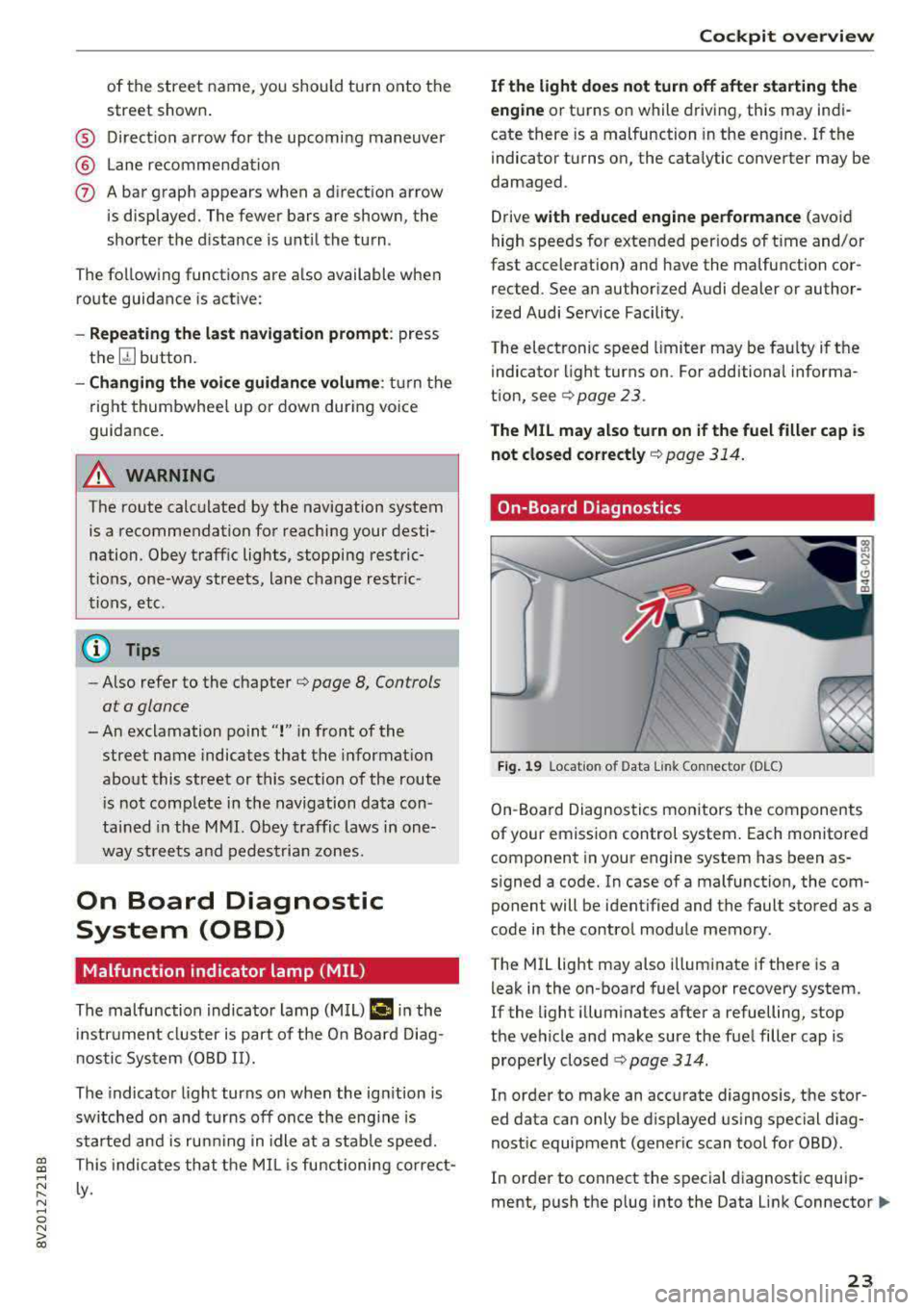
On-Board Diagnostics
Fig. 19 Locat ion of Data Link Co nnector (D LC)
On-Boa rd Diagnostics monitors the components
of your emission control system . Each monitored
component in your engine system has been as
signed a code. In case of a malfunction, the com ponent will be identified and the fault stored as a
code in the control module memory .
The MIL light may also illuminate if there is a
leak in the on-board fuel vapor recovery system.
If the light illuminates after a refuelling, stop
the vehicle and make sure the fuel filler cap is properly closed
¢ page 314.
In order to make an accurate diagnosis, the stor
ed data can only be displayed using special diag
nostic equipment (generic scan tool for 080) .
In order to connect the special diagnostic equip
ment, push the plug into the Data Link
Connector .,.
23
Page 26 of 400
Cockpit over view
(D LC). The DLC is located to the rig ht o f the hood
release
¢ fig. 19 .
Your author ized Audi dealer or a qualified service
s ta tion can interpret the code and perform the
necessary repair.
A WARNING
Do not use the diagnostic connector for per
sonal use. Incorrect usage can cause malfunc
tions, which can increase the risk of a colli
sion!
Indicator Lights
Description
The indica to r lights in the inst rument cluste r
blink or t urn on. They indicate funct ions or ma l
functions .
-
Messages may appea r wi th some indi cato r lights.
A wa rning signal w ill so und at the same time.
The indicator ligh ts and messages in the instru
ment cluster display can be covered by other dis
p lays. Yo u can have these displayed again in the
drive r information system by opening the second
Veh icle tab (messages) using the
l <1 ~ I button on
the multifunction steering wheel. If there are
several malfunctions, you can d isplay them one
at a time us ing the thumbwhee l.
Some ind icator lights in the display can display in
several colors .
& Central indicator light
If the. or mi indicator light turns on, check
the instrument cluster display for more info rma
tion .
App lies to: ve hicles w ith monochro me display
If a message appears together with a central in
d icator light . or
Q. the central indicato r ligh t
will ind icate the prior ity of t he war ning . If a
whi te indicato r light also appears, the cent ral in
d ica tor light will have its own co lor. For e xamp le,
ir ii :ippears together w ith . , read the descrip
tion
for •.
24
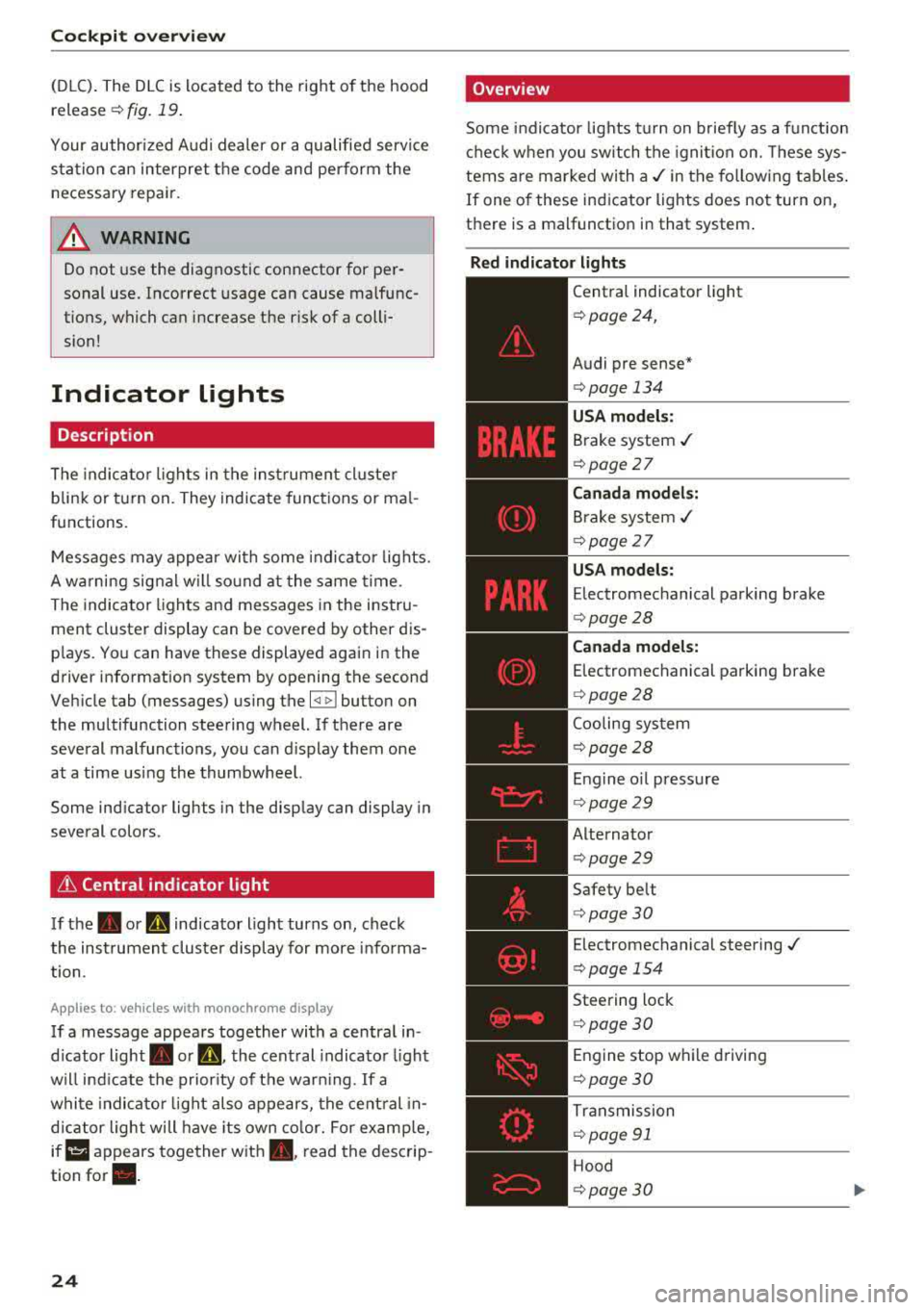
'Overview
Some indicator lights t urn on b riefly as a f unction
c h eck when you switch the ignition on. These sys
tems are marked wi th
a ,/ in the fo llow ing tab les .
If one of these indicator lights does not turn on,
there is a malfunctio n in that system .
Red indicator light s
--------------
Central indicator light
¢ page 24,
Audi pre sense *
¢page 134
USA model s:
Brake system ./
¢ page 27
Canada models:
Brake system ,/
¢page 27
USA models:
Electromechanical parking brake
¢ page28
Canada model s:
E lectromechanical parking brake
¢ page28
Coo ling system
¢ page28
Engine o il press ure
¢ page29
Alternator
¢page29
Safety be lt
¢ page30
Electromechanical steering ./
¢ page 154
Steering lock
¢page 30
Engine stop w hile driving
¢ page 30
Tr ansmission
¢ page 91
Hood
¢page30
Page 33 of 400
CXl CXl .... N r--N .... 0 N > 00
!;.!~ Electronic Stabilization Control (ESC)
If th€: G1 indicato r ligh t blink s w hile d riving, the
E SC or ASR (Anti-S lip Reg ulation) is active ly reg u
l at ing .
I f
the: GJ indicator light turns on, the system has
sw itched the ESC off. In this case , you can switc h
the ign ition off and then o n to switch the ESC on
again. The indicator light turns off when the sys
tem is functioning fully .
I f the
II indicato r ligh t turns on, ESC was
sw itched off using the
!.$ m l button i=:> page 151.
Stabilization control (ES C/ ABS) : malfunction!
Se e owner's manual
If the: G1 ind icator light and t he ~ (USA mod
els)/ 11] (Canada models) ABS indicator light turn
on and the message appears, there is a malfunc
tion in the ABS or the elect ronic differential lock .
This a lso ca uses the ESC to malfunct io n. The
b rakes s till f unct io n w it h thei r norma l powe r, but
ABS is not act ive.
D rive to an autho rized Aud i dea le r or a uthorized
Aud i Servi ce Faci lity immediately to have the
malfunct ion corrected .
For addit ional information on ESC and ABS,
see
¢ page 151.
~,t:ri /BRAKE WEAR/ (0: Brake pads
l,IJ1 :j;t!31WtJ ;j ( USA models )/riJ (Canad a mod
el s) Brake pads !
The brake pads are wo rn.
Drive to an authorized Aud i dea ler or authorized
Aud i Service Facility immediately to have the
b rake pads c hecked .
·~ Hill hold assist
II Hill hold a ssist : unavailable
When th is message appears, h ill hold assist is
n ot available .
ii Manual control!
Cockpit o ve rv iew
If this message appears , press the b rake p eda l.
Continue driving with the he lp of th e parking
brake
¢ pag e 83.
~ Engine control
II Drive system: malfunction! Please contact
Serv ice
If the II indicator light turns on if ther e is a mal
funct ion in the engine control.
Drive slowly to an a uthorized Audi dea ler or a u
t h orized Audi Service Facility to have the engine
c h ecked .
EPC Engine control
Applies to : vehicles with gasoline engines
If the ~ indicato r light t urns on if there is a
malfunction in the engine cont rol.
Drive slowly to an a uthori zed Audi dea ler or a u
thori zed Audi Serv ice Facility to have t he engine
checked.
o Malfunction indicator lamp (MIL)
T he ma lfunction ind icator lamp (MIL) is p art of
the On Board D iagnost ic system (OBD II) . The
¢4 c;ymbol tu rns on when the igni tion is sw itched
o n and turns off aga in once the engine is started
and ru nning at a steady idle speed. This indica tes
t h at the MIL is f unct ion ing cor rec tly.
T he ind icator light tu rns o n if there is a malfu nc
t ion in the engine electronics . See an author ized
A udi dealer or authori zed A udi Se rvice Fa cility to
have t he mal func tion cor rected . Fo r addi tional
information, see
i=:> page 23.
The ind icator light can a lso tu rn o n if the fuel fill
er cap is not closed correc tly
i=:> page 314 .
!?) Engine speed limitation
Applies to: vehicles wi th engine speed limitation
(Pl Maximum engine speed : XXXX rpm
The eng ine speed is automatically limited to the
speed displayed in the inst rument cl uste r. This
pro te cts the engine from ove rheating .
31
Page 36 of 400
Opening and closin g
Opening and closing
Central locking
Description
You can lock and un lock the veh icle centrally . You
have the following options:
-Remote control key <=> page 36, or
-Sensors in the front door handles"
<=>page 36, or
-Lock cylinder on the driver's door<=> page 38,
or
-Interior central locking switch <=> page 3 7.
Tu rn sign als
The turn s ignals flash tw ice when you unlock the
vehicle and flash once when you lock the vehicle.
I f they do not f lash, then the ignition may still be
sw itched on or one of the doors , the luggage
compartment, or the hood may be open, for ex
ample.
Autom atic locking (Auto Lock )
The Auto Lock funct ion locks all doors and the
luggage compartment lid once the speed has ex
ceeded approx imately 9 mph (15 km/h).
The vehicle will unlock aga in if the ign ition key is
removed, the opening function in the centra l
lock ing switch is act ivated, or one of the door
handles is operated. The Auto Lock f unct ion can
be switched on and off in the Infotainment sys
tem <=>
page 38.
In the event of a crash with a irbag deployment,
the doors will a lso automat ica lly unlock to allow
access to the vehicle.
Selective door unlocking
The doors and luggage compartment lid w ill lock
when they close. You can set in the Infotainment
system whether
only the driver's door or the en
tire ve hicle should be unlocked when unlocking
<=> page 38.
Unintentionally locking yourse lf out
Only lock your vehicle when all of the doors and
the luggage compartment lid a re closed and the
34
remote control key is not in the vehicle. This
helps to prevent you from locking yourself out
accidenta lly.
The following conditions prevent yo u from lock
ing you r remote control key in the vehicle:
-If the driver's door is open, the vehicle cannot
be locked by press ing the
Iii button on the re
mote contro l key or touching the locking sen
sor* on a doo r.
-If the most recently used convenience key* is in
the luggage compartment, the luggage com
partment lid automatically unlocks again after
closing it.
-If the convenience key* that was last used is de
tected inside the vehicle, then the vehicle will
not be ab le to lock from the outside.
A WARNING
-Always take the veh icle key with you when
leaving the vehicle, even for a short period
of t ime. This applies part icularly when chil
dren remain in the vehicle . Otherwise the
children could start the eng ine or ope rate
electrical equipmen t such as power win
dows.
- No one, especially ch ildren, should stay in
the vehicle when it is loc ked from the out
side, because the windows can no longer be
opened from the
inside ¢ page 38. Locked
doors make it more difficu lt for emergency
workers to get into the vehicle, which puts
lives at risk.
(D Tips
-Do not leave va luables unattended in the ve
hicle. A locked vehicle is not a safe!
-T he LED in the driver's door rail blinks when
you lock the vehicle. If the LED lights up for
approximate ly 30 seconds after locking,
there is a malfunction in the centra l locking
system . Have the problem corrected by an
authorized Audi dealer or authorized Aud i
Service Facility.
Page 37 of 400
a, a, ..... N
" N ..... 0 N > 00
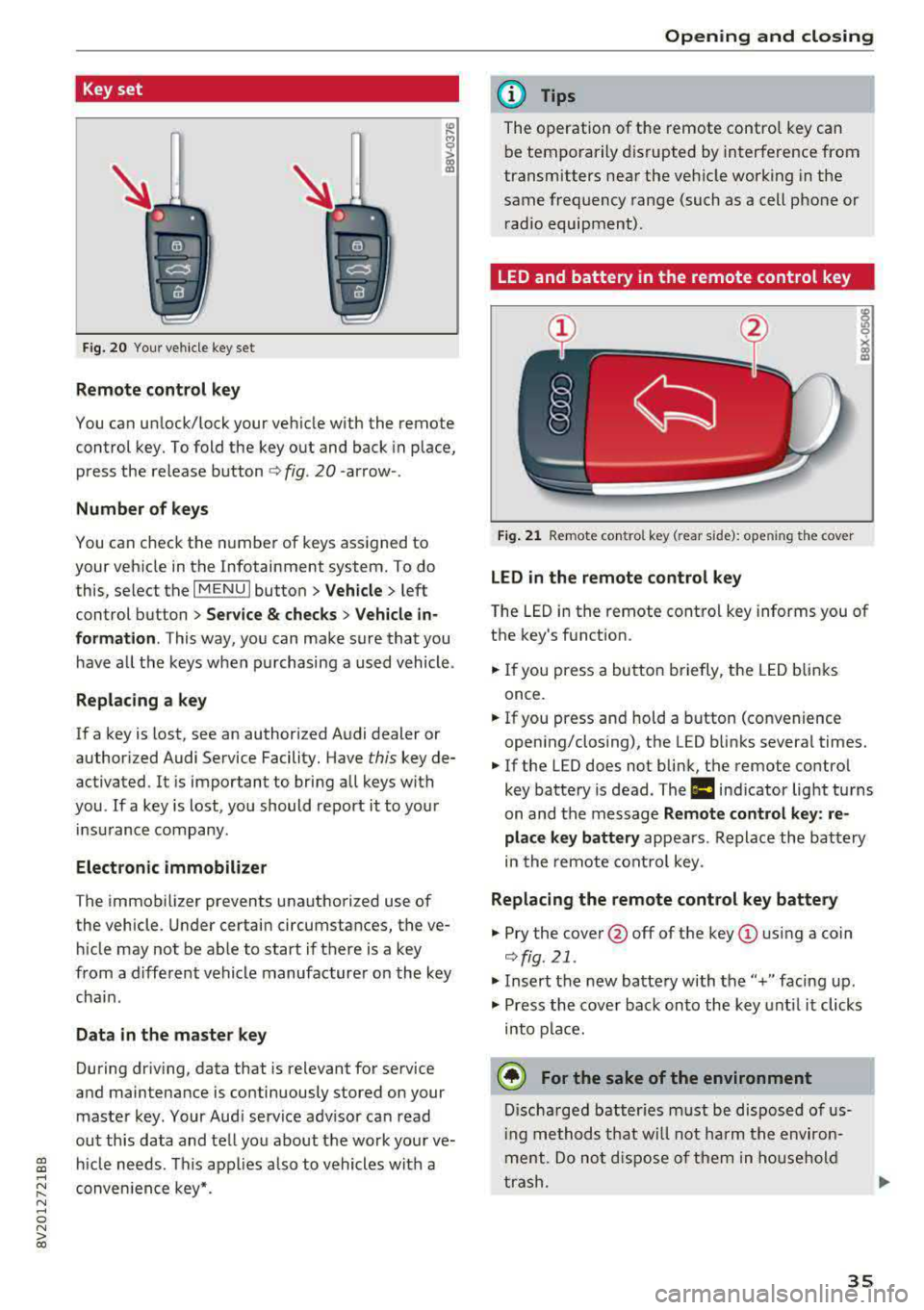
Key set
Fig. 2 0 Your vehi cle key se t
Remote control key
You can un lock/lock your veh icle with the remote
control key. To fold the key out and back in p lace,
p ress the release
b utton <=> fig. 20 -arrow -.
Number of keys
You can check the numbe r of keys ass igned to
your vehicle in the Infotainment system. To do
this, select the
I MENU I button > Vehicle > left
control button
> Service & checks > Veh icle in
formation .
This way, you can make sure that you
have a ll the keys w hen p urchasing a used vehicle .
Replacing a key
If a key is lost, see an author ized A udi dealer or
author iz ed Audi Service Facility. Have
this key de
ac tivated . It is important to bring all keys with
you .
If a key is lost, you should report it to your
in surance company.
Electronic immobilizer
The immob ilizer prevents unauthori zed use of
the vehicle . U nder certain circumstances, the ve
hi cle may not be able to start if there is a key
from a different vehicle manufacture r o n the key
cha in.
Data in the master key
During dr iv ing , data that is relevant for se rvice
and maintenance is continuously stored on your
maste r key . Your Aud i service adv isor can read
out th is data and te ll yo u about the work your ve
h icle needs. This app lies a lso to vehicles with a
conven ience key*.
Open ing and closing
(D Tips
The operation of t he remote contro l key ca n
b e temporarily disrupted by interference from
transmitters near the veh icle work ing in the
same frequency range (such as a cell pho ne or
r ad io equipment).
LED and battery in the remote control key
Fig. 21 Re mote co ntro l key (rear s ide): ope ning the cover
LED in the remote control key
T he LED in the remote cont ro l key informs you of
the key's function.
.,. If you press a bu tto n briefly, t he LED b link s
once .
.. If you press and hold a button (convenience
open ing/closing), the LED b links severa l times.
.. If the LED does not blin k, the remote control
key batte ry is dead. The
la ind icator lig ht tu rns
on and t he message
Remote control key : re
place key battery
appea rs . Re place th e ba ttery
in the remote cont ro l key .
Replacing the remote control key battery
.. Pry the cove r@ off of the key (!) usi ng a coin
<=> fig. 21 .
.. Insert the new batte ry with the" +" faci ng up .
.,. Press the cove r bac k on to the key unt il it clicks
into p la ce.
@ For the sake of the environment
D isc ha rge d batt er ies must be di sp osed of us
i ng methods t hat w ill not harm t he env iro n
me nt. Do not dispos e of th em in hous ehol d
t ras h .
35
Page 38 of 400
Opening and closing
@ Tips
The replacement battery must meet the same
specifications as the orig inal battery in the re
mote control key.
Synchronizing the remote control key
The remote control key must be synchronized if
the vehicle does not lock/unlock with the remote
control.
• Press the remote control key button [@].
• Insert the key in the driver's door lock within 30
seconds¢
page 38 .
• Press the !ill button or~ button.
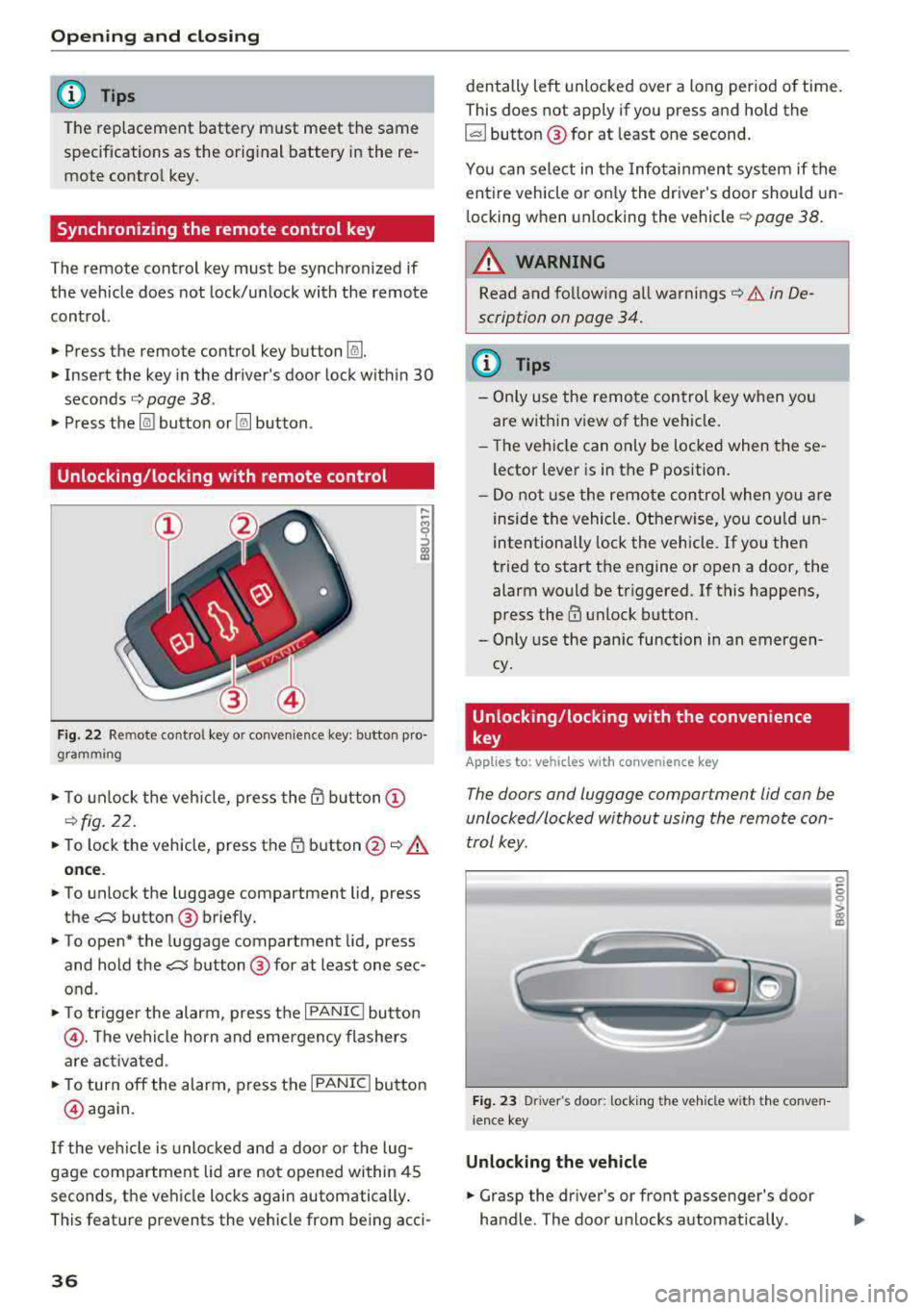
Unlocking /locking with remote control
Fig . 22 Remote contro l key or conven ience key: button pro
gramming
• To unlock the vehicle, press the @ button @
¢fig. 22.
• To lock the vehicle, press the 1D button @~.&.
once .
• To unlock the luggage compartment lid, press
the
,c::j button @ briefly.
• To open* the luggage compartment lid, press
and hold the
,c::j button @ for at least one sec
ond .
• To tr igger the alarm, press the I PANIC I button
@ . The vehicle horn and emergency flashers
are activated .
• To turn off the alarm, press the I PANIC ! button
@ aga in.
If the vehicl e is unlocked and a door o r the lug
gage compartment lid are not opened within 45
seconds, the vehicle locks again automatically .
This feat ure prevents the vehicle from being acci-
36
den tally left unlocked over a long period of time.
This does not apply if you press and hold the
~button ® for at least one second.
You can select in the Infotainmen t system if the
entire vehicle or on ly the driver's door should un
l ocking when unlocking the vehicle ¢
page 38.
A WARNING
Read and fo llowing all warnings¢ .& in De
scription on page 34.
(D Tips
-Only use the remote control key when you
are within view of the veh icle.
-Th e vehicle can only be locked when the se
lector lever is in the P position.
- Do not use the remote control when you are
inside the vehicle. Otherwise, you could un
intentionally lock the vehicle. If you then
tried to start the engine or open a door, the
alarm would be triggered. If this happens,
press
the@ unlock button.
-Only use the panic function in an emergen
cy.
Unlocking /locking with the convenience
key
App lies to: vehicles wit h co nvenience key
The doors and luggage compartment lid can be
unlocked/locked without using the remote con
trol key.
Fig. 23 Driver's door: lock ing t he ve hicle w ith th e conve n
i ence key
Unlocking the vehicle
• Grasp the driver's or front passenger's door
handle. The door unlocks automatically .
-
0
6
I
Page 39 of 400
a, a, ..... N
" N .... 0 N > 00
"'Pull on the door handle to open the door.
Locking the vehicle
"'Place the selector lever in the P position (auto
matic transmissions), or e lse the vehicle will
not be able to lock.
"'To lock the vehicle, close the door and touch
the sensor on the door handle
once ¢ fig. 23,
¢_& .Do not hold the door hand le while doing
this.
Unlocking and locking the vehicle can only be
done at the front doors . The remote contro l key
cannot be more than approx imately 5 ft ( 1.5 m)
away from the door handle. It makes no differ
ence whether the remote control key is in you r
jacket pocket, purse or br iefcase .
If you hold the door handle while locking, this
can impair the locking function .
The door cannot be opened for a br ief period di
rect ly after locking it. This allows you the oppor
tunity to check that the driver's door is locked .
The settings in the Infotainment system deter
mine if the enti re vehicle or only one of the doors
is unlocked when unlocking the vehicle
¢page 38.
A WARNING
Read and following all warnings ¢ A in De
scription on page 34.
(!j) Tips
If your vehicle is left stand ing for a long peri
od of time, note the following:
-The proximity sensor switches off after a
few days to save energy. You then have to pull once on the door handle to unlock the
vehicle and a second time to open it.
-The energy management system gradually turns off unnecessary convenience functions
to prevent the vehicle battery from draining
and to maintain the vehicle's ab ility to start
for as long as possib le . You may not be able
to unlock your vehicle using the convenience
key.
-
Open ing and closing
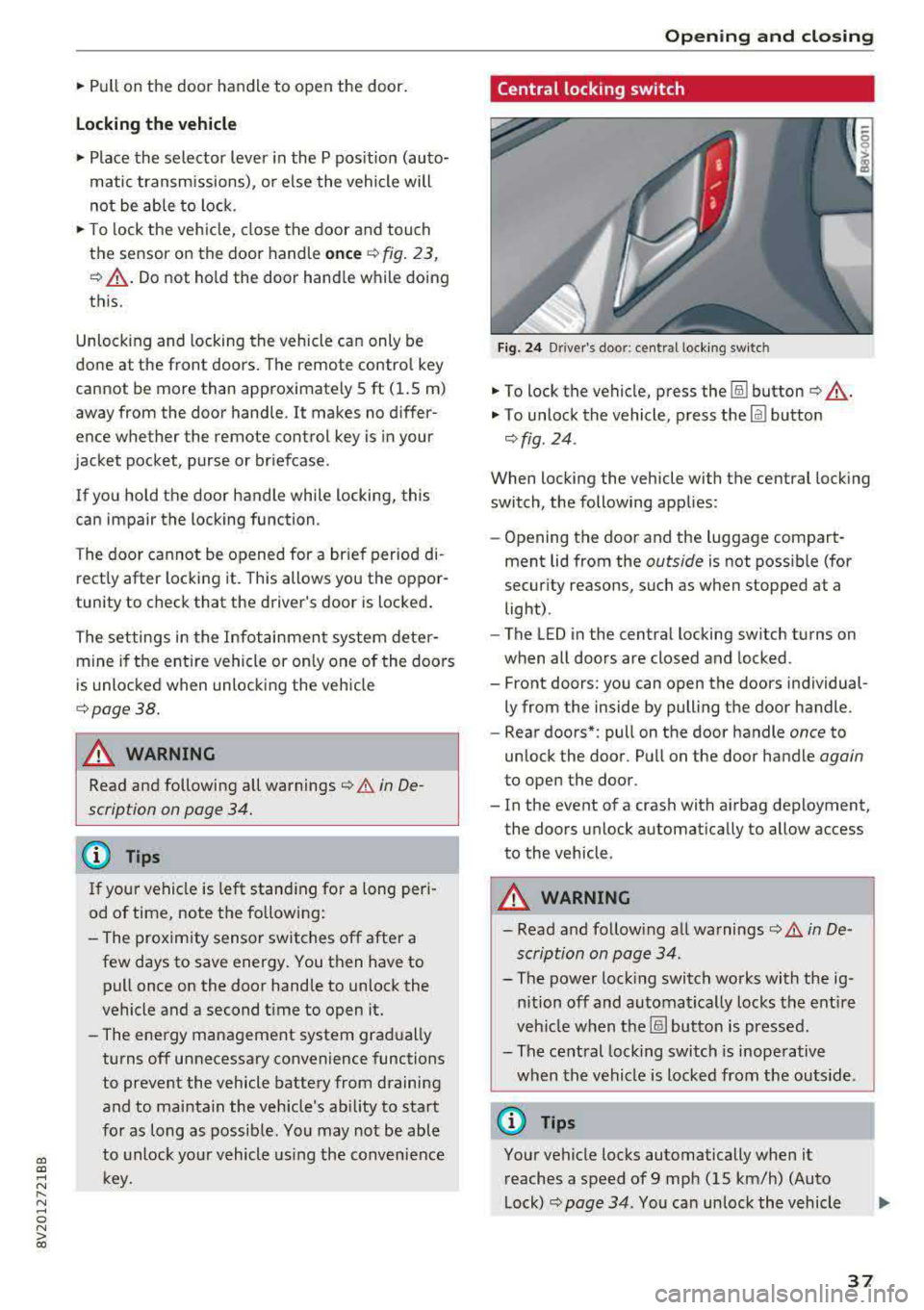
Central locking switch
Fig. 24 Drive r's doo r: centra l lock ing switc h
"'To lock the vehicle, press the !ill button ¢_& .
"'To unlock the vehicle, press the Im button
¢ fig . 24.
When locking the vehicle with the central locking
switch, the following applies:
-Opening the door and the luggage compart
ment lid from the
outside is not possible (for
security reasons, such as when stopped at a
light) .
- The L ED in the central locking sw itch turns on
when all doors are closed and locked.
- Front doors: you can open the doors individual ly from the inside by pulling the door handle.
- Rear doors*: pull on the door handle
once to
unlock the door . Pull on the door handle
again
to open the door .
- In the event of a crash with airbag deployment, the doors unlock automatically to allow access
to the vehicle.
A WARNING
-- Read and following all warnings¢ A in De-
scription on page 34 .
- The power locking switch works with the ig
nition off and automatical ly locks the entire
veh icle when the[§] button is pressed.
- The central locking switch is inoperative
when the vehicle is locked from the outs ide.
@ Tips
Your vehicle locks automatically when it
reaches a speed of 9 mph (15 km/h) (Auto
Lock) ¢
page 34. You can unlock the vehicle
37
Page 40 of 400
Opening and clo sin g
again using the ca button in the central
locking switch .
Central locking settings
In the Infotainment system, you can set which
functions are controlled by the central locking
system .
.,. Select in the Infota inment system: I MENU I but
ton
> V ehicle > left contro l button > Ve hicl e
s ettings
> Cent ral lock ing .
Door unlo ckin g
-you can decide if All doors or
only the
Dri ver 's door should unlock. The lug
gage compartment lid also unlocks when
All is
selected. If you se lect
Dri ver 's door in a vehicle
with a convenience key*, only the door whose
handle you pull will unlock.
If you select D riv er 's door , all the doors and lug
gage compartment lid will unlock if you press the
[@] button on the remote control key twice.
long press to open w indow s -the convenience
opening/closing function can be switched on/off
c::>page 42.
Fold mirr ors* -if yo u sw itch the funct io n on, the
exterior m irrors fo ld in automatically when the
ve hicle is locked.
To ne when l ockin g -when checked off./, a tone
will sound when you lock the vehicle
l) .
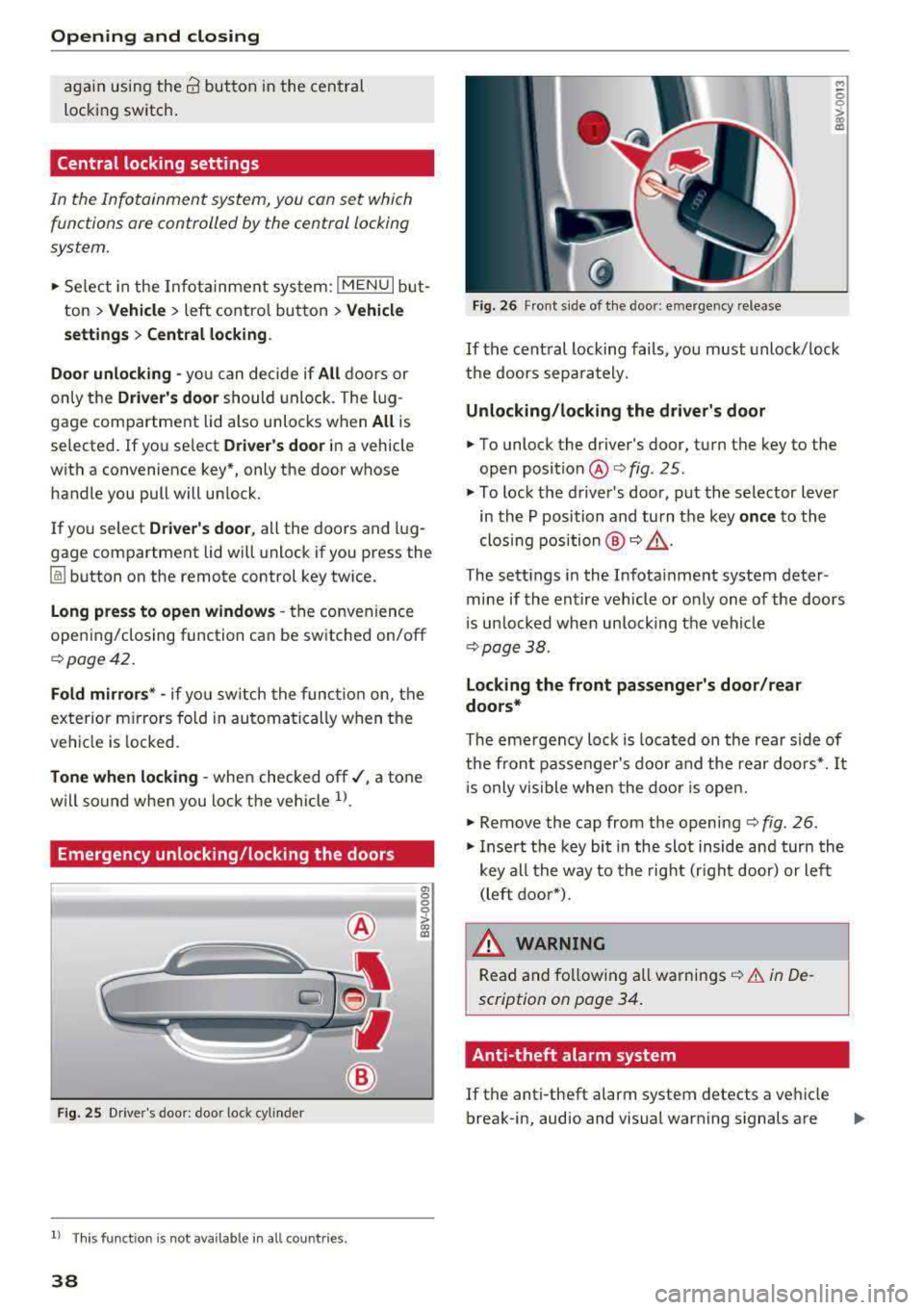
Emergency unlocking/locking the doors
Fig . 25 Driver's doo r: door lock cylinder
l) This function is not availab le in all countries.
38
a, 0 0 0
> 00 a:,
Fig. 26 Front side of the door: emergency release
M ~ 0
~ CX) a,
If the central locking fails, you must unlock/ lock
the doors separately.
Unlocking /lo cking the d riv er 's door
... To unlock the driver's door, turn the key to the
open
position @ofig . 25.
.,. To lock the driver 's door, put the selector lever
in the P position and turn the key
onc e to the
clos ing position @
o A.
The settings in the Infota inment system deter
mine if the entire vehicle or only one of the doors
i s un locked when unlocking the veh icle
c:>page38.
Locking the front pa ssenger 's door /rear
doo rs *
The eme rgency loc k is located on the rear side of
the fron t passenger's door and the rear doo rs*. It
i s only vis ible when the door is open.
... Remove the cap from the opening c::> fig. 26 .
.,. Insert the key bit in the slot inside and turn the
key all the way to the right (right door) or left (left door*).
A WARNING
Read and fo llowing all warnings c::> .&. in De
scription on page 34.
Anti-theft alarm system
If the anti-theft alarm system detects a vehicle
break-in, audio and visual warning signals are
Page 41 of 400
a, a, ..... N
" N ..... 0 N > 00
triggered. The anti-theft alarm system is activat
ed when the vehicle is locked as usua l.
It
switches off when the vehicle is unlocked.
If the a larm is trigge red, it w ill shu t
off automat
ically a fter a ce rtain amount of time . Switch the
ignition on or press the
lil button on the remote
control key to turn
off the alarm.
Luggage compartment
Lid
Opening /closing the luggage compartment
lid
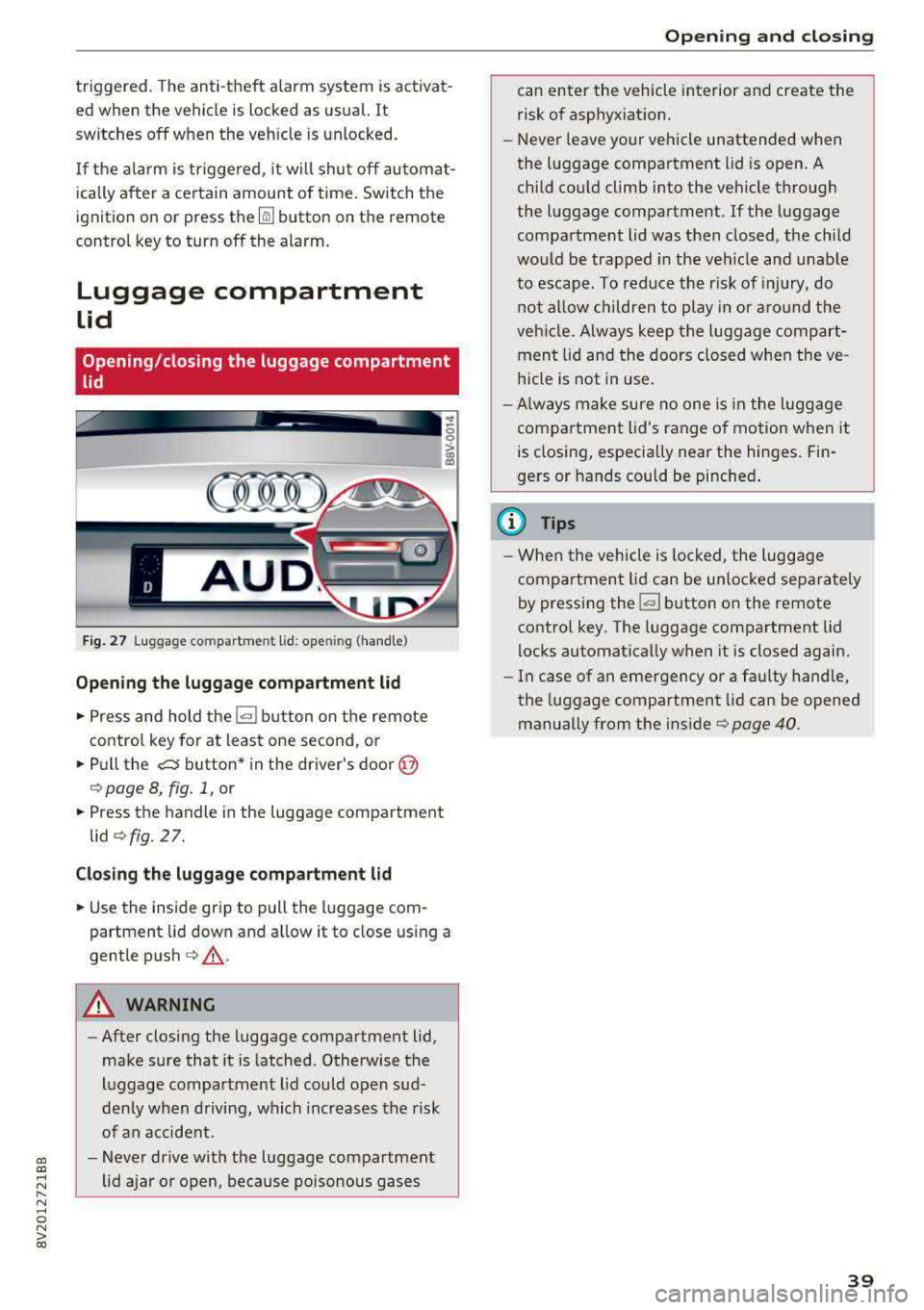
Fig. 27 L uggage compartm ent lid : op enin g (handle)
Opening the luggage compartment lid
• Press and hold the l=I button on the remote
control key for at least one second , or
• Pull the c:s button* in the driver's door @
¢ page 8, fig. 1, or
• Press the handle in the luggage compartment
lid ¢fig. 27.
Closing the luggage compartment lid
• Use the ins ide grip to pull the luggage com
partment lid down and allow it to close using a
gentle push ¢
,&..
A WARNING
-After closing the luggage compartment lid,
make sure that it is latched . Otherwise the
luggage compartment lid could open sud
denly when driving, which increases the risk
of an accident.
- Never drive with the luggage compartment
lid ajar or open, because poisonous gases
Opening and closing
can enter the vehicle interior and create the
risk of asphyx iat ion.
-Never leave your vehicle unattended when
the luggage compartment lid is open. A
child could climb into the veh icle through
the luggage compartment. If the luggage
compa rtment lid was then closed, the child
wou ld be trapped in the veh icle and unable
to escape. To reduce the r isk of injury, do
not a llow children to play in or around the
veh icle. Always keep the luggage compart
ment lid and the doors closed when the ve
hicle is not in use.
- Always make sure no one is in the luggage
compartment lid's range of motion when it
is closing, especially near the hinges . Fin
gers or hands could be pinched.
(D Tips
-When the vehicle is lock ed, the luggage
compartment lid can be unlocked separately
by pressing the
I= I button on the remote
control key . The luggage compartment lid
locks automatically when it is closed again.
- In case of an emergency or a faulty handle,
the luggage compartment lid can be opened
manually from the ins ide ¢
page 40.
39