ignition AUDI S3 SEDAN 2017 Owner's Manual
[x] Cancel search | Manufacturer: AUDI, Model Year: 2017, Model line: S3 SEDAN, Model: AUDI S3 SEDAN 2017Pages: 400, PDF Size: 67.32 MB
Page 56 of 400
Lights and Vision
The emergency flashers makes other drivers
aware of your veh icle in dangerous situations.
• P ress t h e ~ button to switch the eme rgency
f lashers on o r off.
You can indicate a lane change or a tu rn when the
emergency flas hers are sw itched on by using the
tur n sig nal lever. The emergency flashers stop
tempo rarily .
The emergency flashers also work when the igni
tion is turned off.
Interior lighting
Front interior lighting
F ig. 53 Headli ner : fr on t in te ri or l ig htin g (exa mple )
Applie,s to: vehicles with touch -sensitive reading lights
Fig . 5 4 Headli ner: fro nt i nte rior lig hts
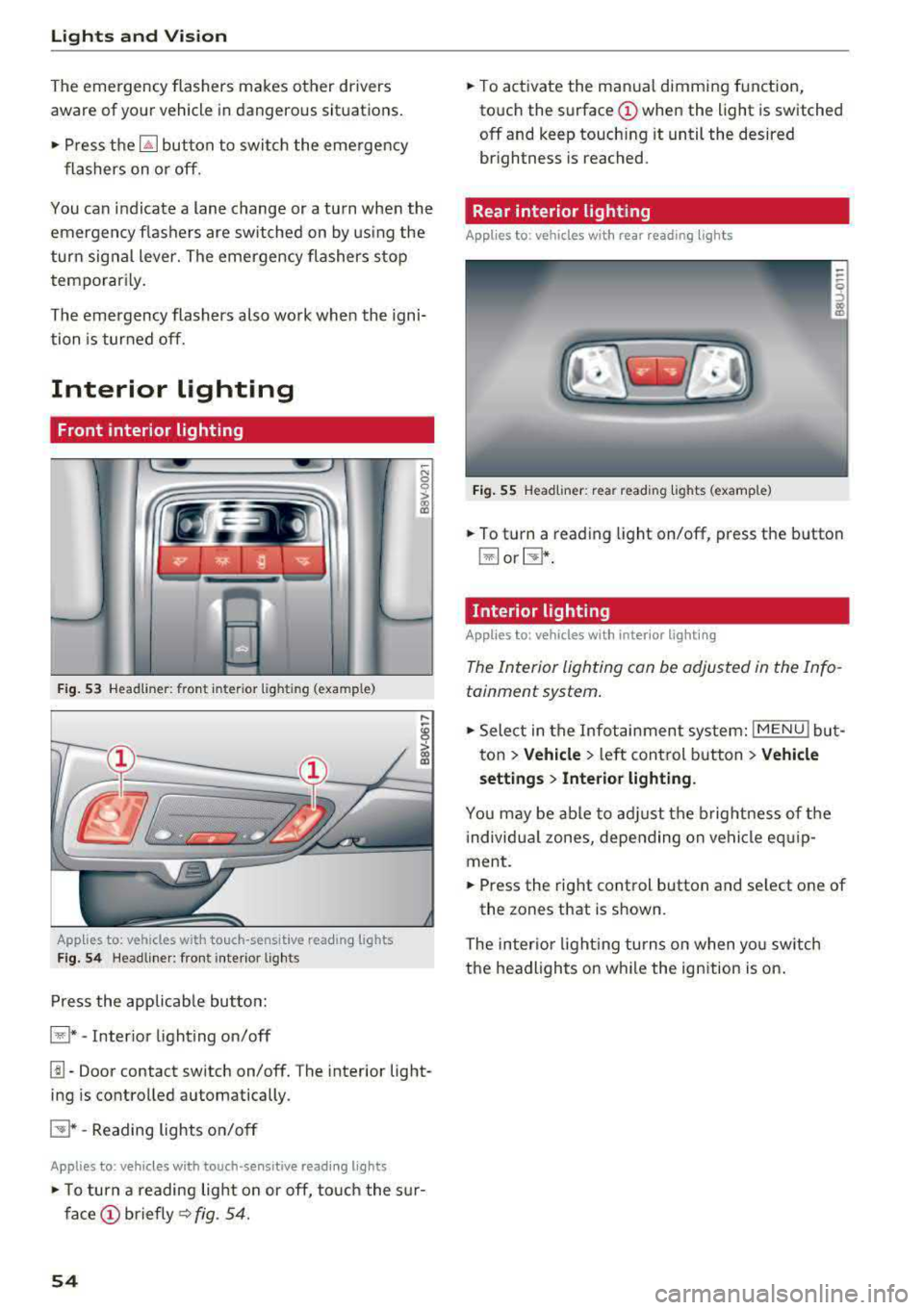
Press the app licab le bu tton:
@ * -Inter ior light ing on/off
~ N 0
0
> ~
l!I -Door contact switch on/off. The interior light
ing is controlled automatically.
E:!J* -Reading lights o n/o ff
Applies to: vehicles with touch-sensitive reading lights
• T o turn a reading lig ht on or off, to uch the s ur
face (!) briefly ~ fig. 54.
54
• To activate the man ua l dimming function,
to uch the
surface (!) when the light is switched
off and keep touch ing it until the desired
brightness is reached.
Rear interior lighting
Applies to : vehicles with rear reading lights
Fig. 55 Headliner : re ar reading lig hts ( example)
• To t urn a reading light on/off , press the b utton
@ or~ .
Interior lighting
Applies to: vehicles with interior lighting
The Interior lighting can be adjusted in the Info
tainment system .
• Select in the Infotainment system : IMENU! but
t on
> Vehicle > left control b utton > Vehicle
setting s
> Interior lighting.
You may be ab le to ad just the b rig htness of t he
i ndivid ua l zones, depending on ve hicle eq uip
ment .
• Press the right cont rol button and se lect one of
the zones that is shown .
The inter io r li ght ing turns o n when yo u sw itch
t h e headlights on w hile the ignition is on .
Page 57 of 400
a, a, ..... N
" N ..... 0 N > 00
Instrument illumination
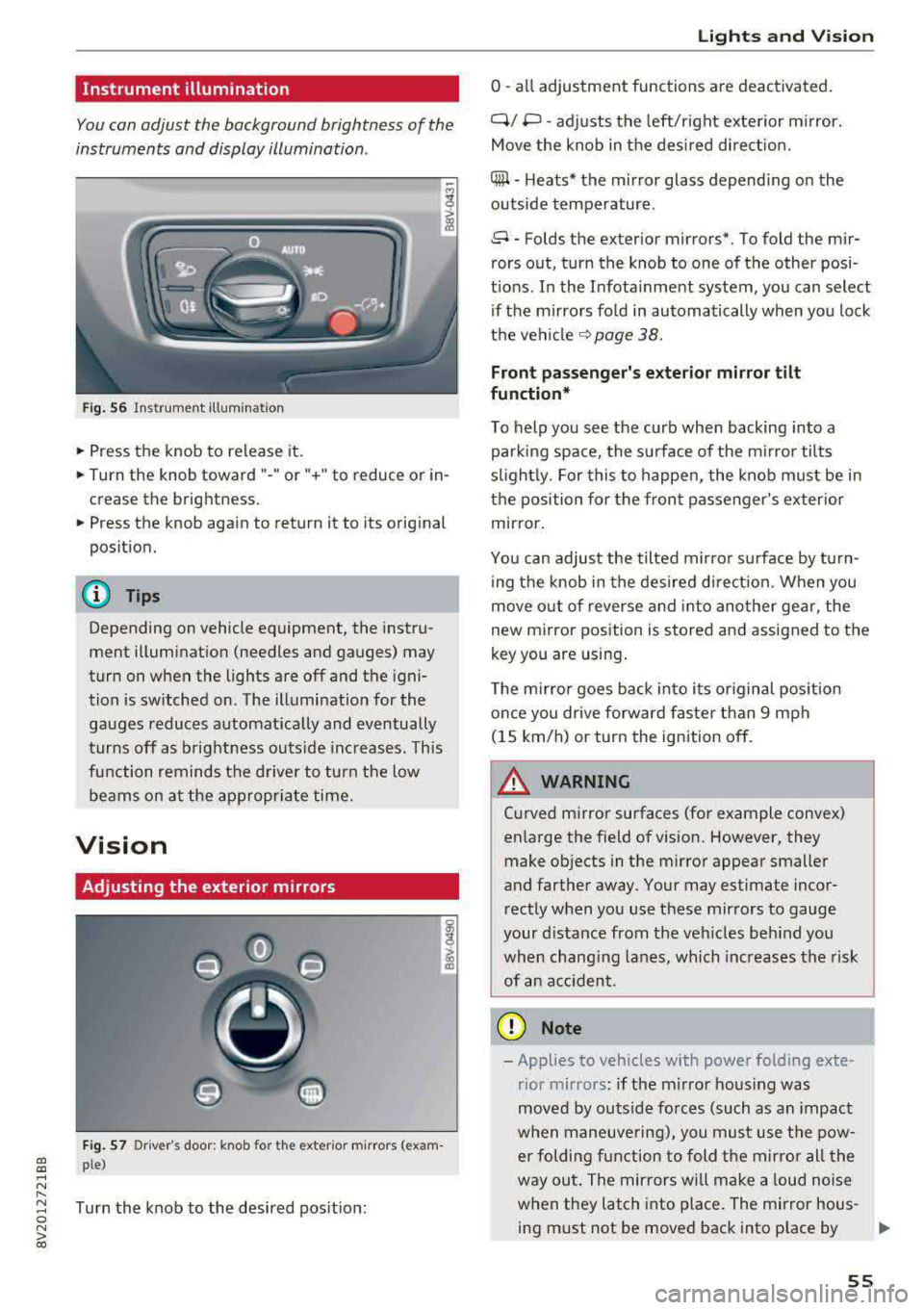
You can adjust the background brightness of the
instruments and display illumination .
Fig. 56 Instrumerit illumination
• Press the knob to release it.
• Turn the knob toward"-" or"+" to reduce or in
crease the brightness.
• Press the knob again to return it to its original
position.
(D Tips
Depending on vehicle equipment, the instru
ment illuminat ion (needles and gauges) may
turn on when the lights are off and the igni
tion is sw itched on. The illumination for the
gauges reduces automat ically and eventually
turns off as brightness outs ide inc reases. This
function remind s the d river to turn the low
beams on at the appropr iate time.
Vision
Adjusting the exterior mirrors
F ig . 57 Dr iver's door: knob for t he exter ior m irrors (exam
ple)
Turn the knob to the desired pos it ion:
Lights and V ision
0 -all adjustment functions are deactivated.
Q/ P -adj usts the left/right exte rior m irror.
Move the knob in the des ired direct ion.
C@ -H eats* the mir ror glass depend ing on the
outside temperature .
8 -Folds the exterior mirrors*. To fold the mir
rors out, turn the knob to one of the other posi
t ions. In the Infota inment system, you can select
if the mirrors fo ld in automatically when you lock
the
vehi cle ~ page 38.
Front passenge r's e xterior mirror tilt
function*
To help you see the curb when backing into a parking space, the surface of the m irro r tilts
s li ghtly. For this to happen, the knob must be in
the position for the front passenger's exterio r
mirror.
You can adjus t the tilted mirro r sur face by turn
ing the knob in the desired d irect ion. When you
move out o f reverse and into another gear, the
new mirror position is stored and assigned to the
key you are using .
T he m irror goes back into its or iginal pos ition
once you drive forwa rd faster than 9 mph
(15 km/h) or turn the ignition off.
A WARNING ~
Cu rved mirror surfaces (for example convex)
enlarge the field of vision. However, they make objects in the mirror appear smaller
and farther away. Your may est imate incor
rect ly when you use these mirrors to gauge
your distance from the veh icles beh ind you
when chang ing lanes, which increases the risk
of an accident .
(D Note
-Applies to vehicles with power folding exte
rior mirrors : if the m irro r hous ing was
moved by outs ide forces (such as an impact
w hen maneuve ring), you must use the pow-
er folding function to fold the mirro r all the
way out. The mirrors will make a loud noise
when they latch into place. The mirror hous-
ing must not be moved back into p lace by
II>-
55
Page 59 of 400
a, a, ..... N
" N ..... 0 N > 00
The sun visors can be pulled out of their brackets
and turned toward the doors
(D *. The sun shade
can also be moved back and forth lengthwise in
this position.
The mirror light switches on w hen the cover over
the vanity mirror* @opens.
Windshield wipers
Switching the windshield wipers on
A
Fig. 59 Windshield wiper lever
Fig. 60 Rear window wiper* ope ration
t ® I
. @
Ill ®
[II @
•®
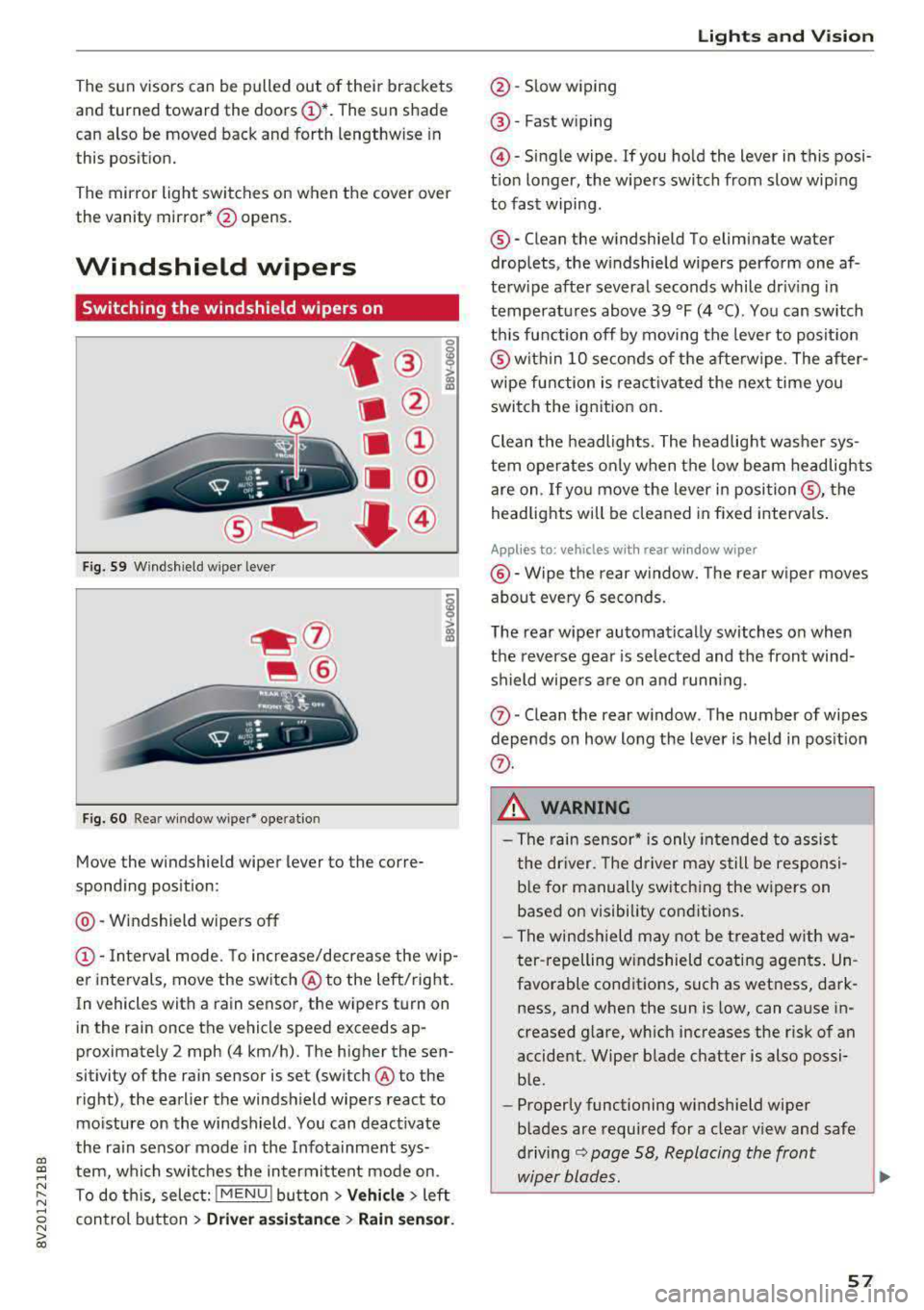
Move the windshield wiper lever to the corre
sponding position:
@ -Windshield wipers off
(D -Interva l mode. To increase/decrease the w ip
er intervals, move the switch
@ to the left/right.
In vehicles with a rain sensor, the wipers turn on
in the rain once the vehicle speed exceeds ap
proximately 2 mph (4 km/h). The higher the sen
sitivity of the rain sensor is set (switch @to the
right), the earlier the windshield wipers react to
mo isture on the windshield . You can deact ivate
the ra in sensor mode in the Infotainment sys
tem, which switches the intermittent mode on.
To do th is, select:
! MENU ! button> Vehicle> left
control button >
Dri ver assis tance > Rain sen sor.
Lights and V ision
@ -Slow wiping
@ -Fast w iping
@ -Single wipe . If you ho ld the lever in this posi
t ion longer, the wipers switch from slow wip ing
to fast wiping .
®-Clean the windshield To eliminate water
droplets, the w indshield wipers perform one af
terw ipe after several seconds while dr iv ing in
temperatures above 39 °F (4 °C) . You can switch
th is function off by moving the lever to posit ion
@ with in 10 seconds of the afterw ipe . The after
wipe function is reac tivated the next time you
switch the ignition on.
Clean the headlights. The headlig ht washe r sys
tem operates only when the low beam headlights
are on . If you move the lever in
posi tion @, the
headlig hts will be cleaned in fixed intervals .
Applies to: vehicles wi th re ar w indow wiper
@ -Wipe the rear window. The rear w iper moves
abo ut eve ry 6 seconds.
The rear wiper automatically switches on when
the reverse gear is selected and the front wind
shield wipe rs a re on and running.
(J) -Clean the rear w indow . The number of wipes
depends on how long the lever is held in pos ition
(f) .
_& WARNING
-The rain sensor* is only in tended to assist
the dr iver. The driver may still be responsi
b le for manually switching the wipers on
based on visibility conditions.
- The windsh ield may not be t reated w ith wa
ter -repelling w indshield coating agen ts . Un
favorable conditions, such as wetness, dark
ness, and when the sun is low, can cause in
creased glare, wh ich increases the risk of an
accident. Wiper blade chatter is also possi ble.
- Properly functioning windshield wiper
b lades are required for a clear view and safe
driving
¢ page 58, Replacing the front
wiper blades.
~
57
Page 60 of 400
Lights and Vi sion
CJ) Note
- If there is frost, make sure the windshie ld
wiper blades are not frozen to the wind
sh ield. Switching on the windshield wipers
when the blades are frozen to the wind
shield can damage the wiper blades.
- The windshield wiper system must be
switched off (lever in position @) before
us
ing a car wash. This prevents the wipers
from sw itching on unintentionally and caus
i ng damage to the w indshield wiper system.
(D Tips
- The windshield wipers switch off when the
ignition is switched off. You can act ivate the
windsh ield wipers after the ign ition is
switched back on by moving the windsh ield
wiper lever to any pos it ion.
- Wo rn o r dirty windshield wipe r blades result
i n streak ing. This can affect the ra in sensor
fun ct ion . Check your windshield wiper
blades regularly .
- The washer fluid nozzles in the w indshield
washer system are heated* at low tempera
tures when the ignition is on.
- When stopp ing temporarily, such as at a
traffic light, the speed of the windshie ld
wipers automatically reduces by one leve l.
Cleaning the wiper blades
Clean the wiper blades when you see wiper
streaks. Use a soft cloth and a glass cleaner .
Windshi eld w iper
.. Place the windshield wiper arms in the service
position
r=;, page 58.
.. Fo ld the windshield wiper arms away from the
windshield.
R ea r w indo w wi per
Applies to: ve hicles w ith rear w indow w ipe r
.. Fo ld the w iper arm away from the rear w indow .
A WARNING
Dirty windshield wiper blades can impair vi
sion, which increases the risk of an accident.
58
-
(D Note
If you see streaks again after cleaning the
wiper b lades, the blades must be replaced
c:>page 58.
Replacing the front wiper blades
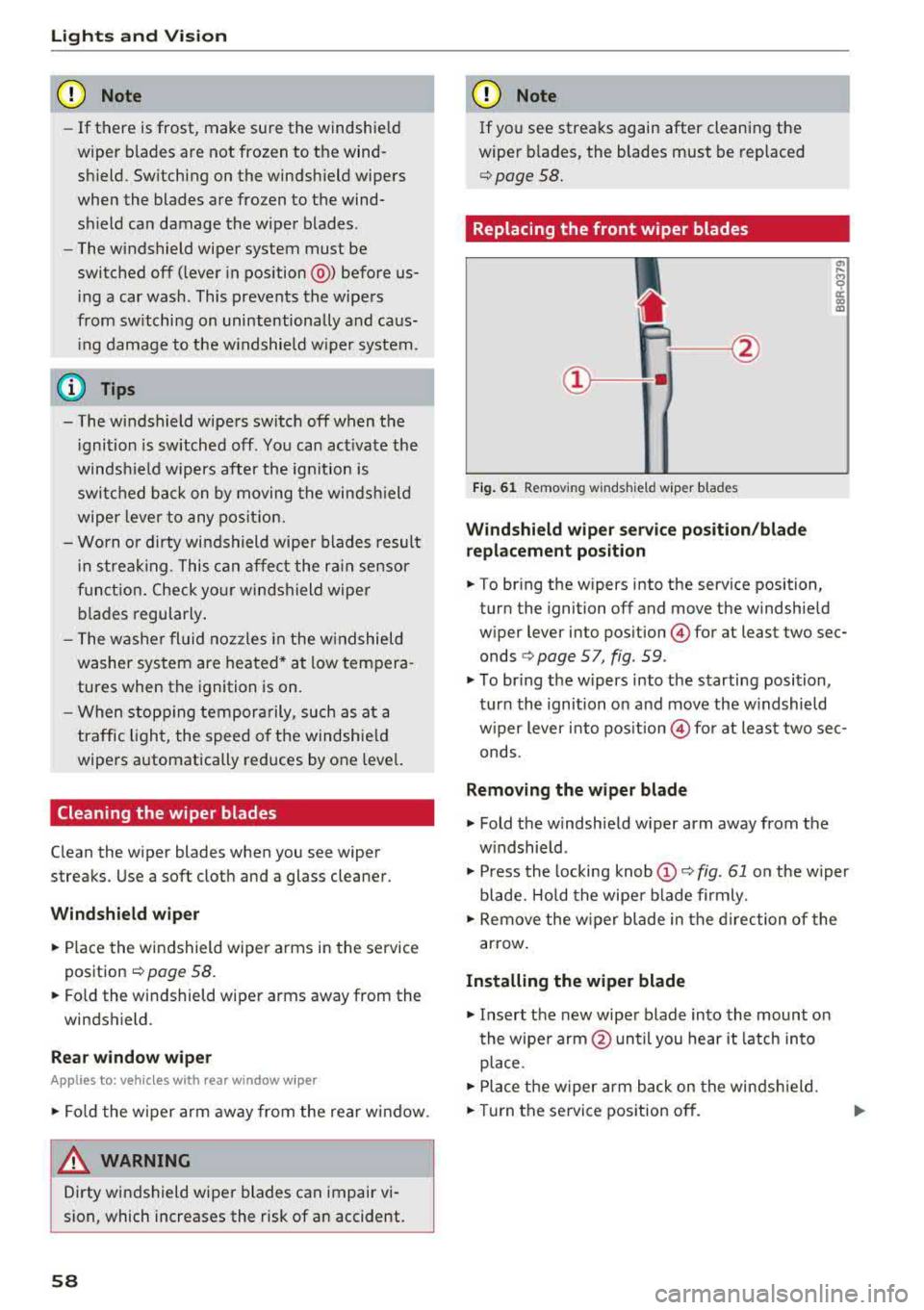
Fig . 61 Removing windshield wiper blades
Wind shi eld wiper s ervice pos iti on/blad e
r ep la cem ent po sition
"' !ii cc c:o m
.. To bring the wipers into the service position,
turn the ignition off and move the windshie ld
wiper lever into position
@ for at least two sec
onds
c:> page 5 7, fig. 59 .
.. To br ing the wipers into the starting position,
turn the ignition on and move the w indshield
w iper lever into
pos ition @) for at least two sec
onds.
Removin g the wiper blade
.. Fold the windshield w iper arm away from the
w indshield .
.. Press the locking knob@r=;, fig. 61 on the w iper
blade. Hold the wipe r blade firmly.
.. Remove the w iper blade in the d irection of the
arrow .
Install ing the w ipe r blade
.. Insert the new wiper blade into the mount on
the wipe r arm @until you hear it latch into
place .
.. Place the w iper arm back on the windsh ield .
.. Turn the se rvice position off .
Page 61 of 400
a, co .... N
" N .... 0 N > 00
_& WARNING
For safety reasons, the windshield wiper
blades should be replaced once or twice each
year .
(D Note
-The windshield wiper blades must only be
folded away when in the service position!
Otherwise, you risk damaging the paint on
the hood or the windshield wiper motor .
- You should not drive your vehicle or press
the windshield wiper lever when the wiper
arms are folded away from the windshield.
The windshield wipers would move back in
to their original position and could damage
the hood and windshield .
@ Tips
- You can also use the service position, for ex
ample, if you want to protect the windshield
from icing by using a cover.
- You cannot activate the service position
when the hood is open .
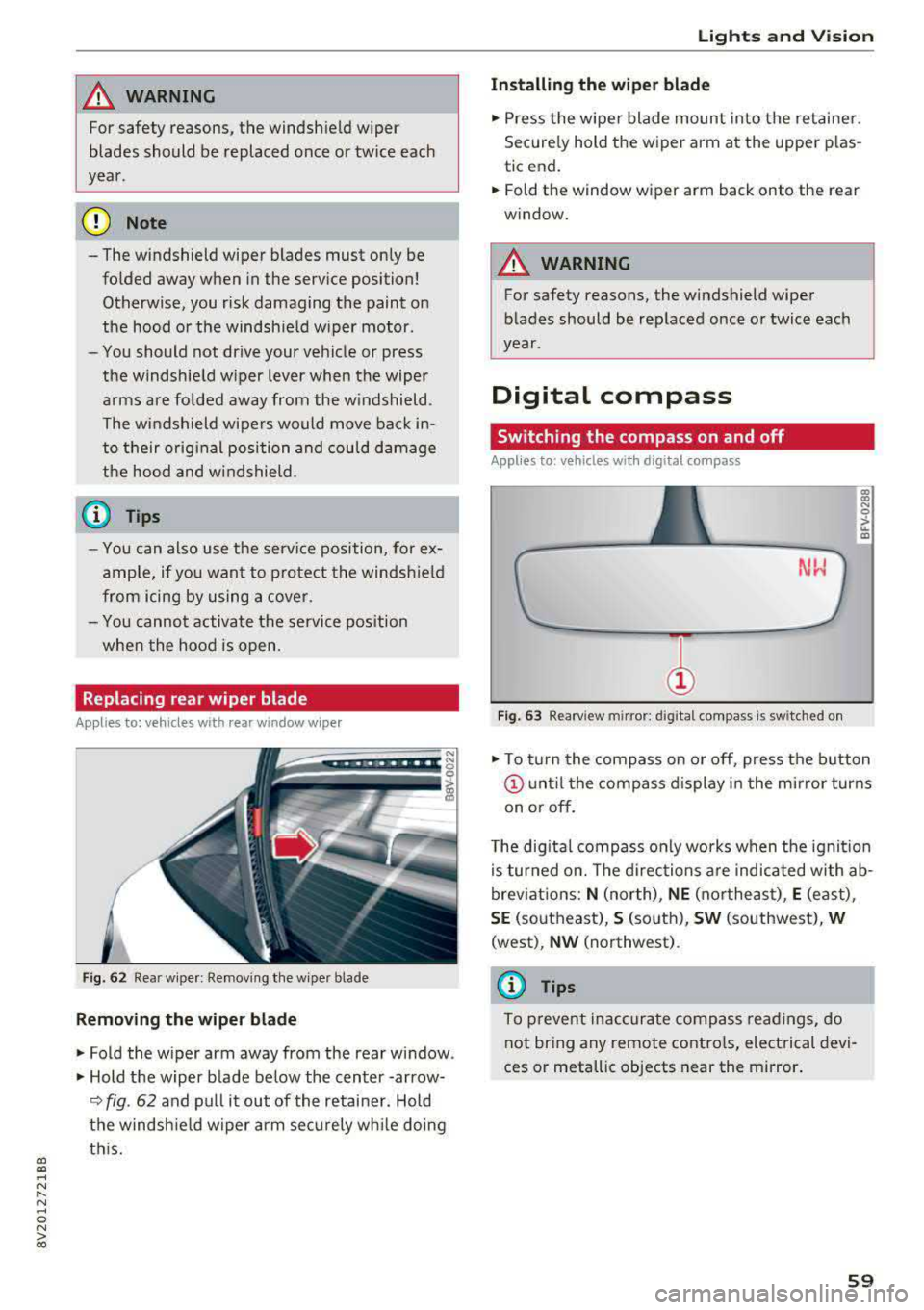
Replacing rear wiper blade
Applies to: vehicles with rear window wiper
Fig. 62 Rear wiper : Removing the wiper bla de
Removing the wiper blade
"Fold the wiper arm away from the rear window .
" Hold the wiper blade below the center -arrow-
¢ fig. 62 and pull it out of the retainer . Hold
the windshield wiper arm securely while doing
this.
Lights and Vision
Installing the wiper blade
"Press the wiper blade mount into the retainer.
Securely hold th e wiper arm at the upper plas
tic end.
"Fold th e window wiper arm back onto the r ear
window.
_& WARNING
= -
For safety reasons, the windshield wiper
blades should be replaced once or twice each
year .
Digital compass
Switching the compass on and off
Applies to: vehicles with digital compass
Fig. 63 Rearview mir ror : digi tal compa ss is s wit c hed on
gi N 0
> u. m
"To turn the compass on or off, press the button
@until the compass display in the mirror turns
on or off.
The digital compass only works when the ignition
is turned on. The directions are indicated with ab
breviations:
N (north), NE (northeast), E (east) ,
SE (southeast), S (south), SW (southwest), W
(west) , NW (northwest) .
(D Tips
To prevent inaccurate compass readings, do
not bring any remote controls, electrical devi
ces or metallic objects near the mirror.
59
Page 64 of 400
Sea ts and stor age
_& WARNING
- Only adjust the front seat with when the ve
hicle is stat ionary . Otherwise, this increases
the risk of an acc ident
- The power adjustment for the front seats al
so works with the ignition switched off or
with the ignition key removed . For this rea
so n, children should never be left unattend
ed in the veh icle
-they co uld be inj ured!
- Exercise caution when adjusting the seat
height. Uns upervised or careless seat ad
justment can p inch fingers or hands causing
injur ies .
- T he front seat backrests m ust not be re
cl ined too far back when driving, because
this impairs the effectiveness of the safety
belts and airbag system, which increases
the risk of injury .
(Di Tips
The massage function* switches off a utomat i
cally after approximately 10 mi nutes.
Entry assistance
Applies to: vehicles with entry ass istance
E asy seat entry makes it easier to get into the
back seats .
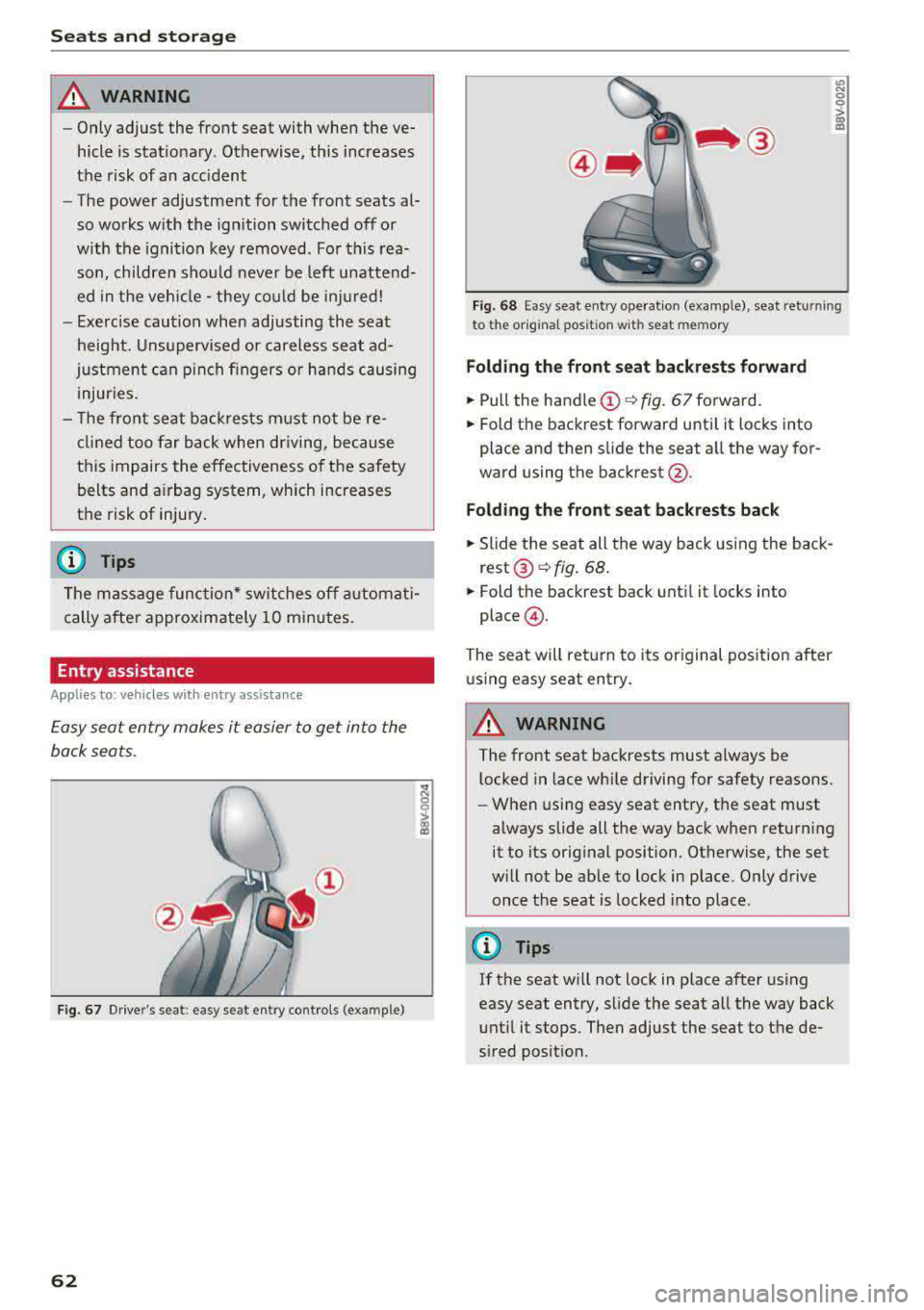
Fig. 67 Dr ive r's seat : easy se at ent ry controls (ex ample )
62
'° ::: 0 ::l-a) 113
F ig. 6 8 Easy sea t en try ope rat io n (examp le) , seat ret urnin g
t o t he origina l pos ition w it h se at mem ory
Fold ing th e front seat backrests forward
.,. Pull the handle (!)¢ fig. 67 forward.
.,. Fold the backrest forward unti l it locks into
place and then slide the seat a ll the way for
ward using the backrest @.
Fold ing the front seat back rests back
.,. Slide the seat all the way back using the back
rest ®~ fig. 68 .
.,. Fold the backrest back until it locks into
place @.
The seat will ret urn to its original posit ion after
u sing easy seat entry.
A WARNING
-The front seat backrests must a lways be
l ocked in lace wh ile driving for safety reasons.
- When using easy seat entry, t he seat must
always slide all the way back when returning
it to its orig inal position . Otherwise, the set
w ill not be ab le to lock in place. Only drive
once the seat is locked into place .
(D Tips
If the seat w ill not lock in place after using
easy seat entry, slide the seat all the way back
unt il it stops. Then adjust the seat to the de
sired posit ion.
Page 74 of 400
Warm and cold
driver is transferred to the front passenger's
side . This applies a t emperature change to the
front passenger's side .
8/r Blower
Using the regulator 8£?, you can manually adjust
the volume of air generated by the blower to your
p reference . The blower shou ld always run at a
low setting to prevent the windows from fogging
and to ensure a continuous exchange of air inside
the vehicle . To have the blower regulated auto
mat ically , press the AUTO button.
~/ :,0/ ~ Air distribution
The air distribution can adjusted with the but
tons. To have the air distribution regulated auto mat ically, press the AUTO button.
The round air vents in the cockpit are adjustable
qpage 73.
To keep the front s ide windows from fogging up
in damp weathe r, we recommend opening the
side air vents and tilting them to the side .
Foot vents are located under the front seats and
adjustable vents on the end of the center console
to heat the rear of the vehicle .
::!_ Defrosting
The windsh ield and s ide windows are defrosted
or cleared of condensation as qu ickly as possible .
The max imum amount of air flows ma inly from
the vents below the windshield. Recirculation
mode switches off. The temperature shou ld be
set at +72°F (22°() o r higher. The temperature is
controlled automatica lly. In the
;Ix setting, the
A/C cooling mode switches on automatically , d e
pending on the outside air temperature.
The AUTO button switches the defroster off.
cE) Recirculation mode
The recirculation mode can be turned on manua l
ly or automatically*.
- Switching manual recirculation mode on and
off: Press
the~ button.
72
- Automatic * reci rculation mode: auto recircula
tion needs to be activated in the Infotainment
system. Select in the Infotainment system:
I MENU I but ton > Vehicle > left control button >
Air conditioning > Auto recirculation
The air
quality sensor that is designed for diesel and
gasoline exhaust automatically sw itches the re
circulation mode on or off depending on the
level of pollutants in the outside air.
In rec irculat ion mode, the air inside the vehicle is
c ir culated and filtered. This prevents the unfil
tered air outs ide the veh icle from entering the
vehicle inte rior. Switching rec irculation mode on
whe n driving through a tunnel or when sitting in
traffic is recommended
q .&..
Pressing the~ button, AUTO or the ;fx button
switches recircula tion mode off.
T he system switches to recirculation mode when
driv ing in reverse when the engine is cold .
SP. Rear window defogger
If the rear window defogger is activated when
the igni tion is switched on, the battery manage
ment determines based on the battery charge if
i t is possible to turn on . Otherwise, the rear w in
dow defogger functions with the engine running
and switches off automatically after approxi
mately 10 -20 minutes, depending on the out
side temperature .
To prevent the rear window defogger from
switching off automat ica lly, press and hold the
!fP. button for more than two seconds. This re
mains stored up to approximate ly 15 minutes af
te r turning off the ignition.
J Seat heating*
Pressing the J button switches the seat heat ing
on at the highest setting (level 3) . The LEDs indi
cate the temperat ure level. To reduce the tem
perature , press the button again. T o switc h the
seat heating off, press the button repeatedly un
ti l the LED turns off .
After approximately 10 minutes, the seat heating
a utomat ically switches from level 3 to level 2.
.,..
Page 78 of 400
Driving
other damage to the vehicle or other property .
-Have your vehicle maintained properly and
in accordance with the service recommenda
tions in your Warranty
& Maintenance book
let . Lack of proper maintenance as well as
improper use of the vehicle will impair the
function of the emission control system and
could lead to damage.
- Do not alter or remove any component of
the Emission Control System unless ap
proved by the manufacturer .
- Do not alter or remove any device, such as
heat shields, switches, ignition wires,
valves, which are designed to protect your
vehicle's Emission Control System and other
important vehicle components.
(I) Tips
The consumption estimates as published by
ENVIRONMENTAL PROTECTION AGENCY
(EPA) and Transport Canada may not corre
spond to your actual consumption on the
road, which will vary depending upon vehicle
load and speed, road and weather conditions,
trip length, etc .
Steering
Adjusting the steering wheel position
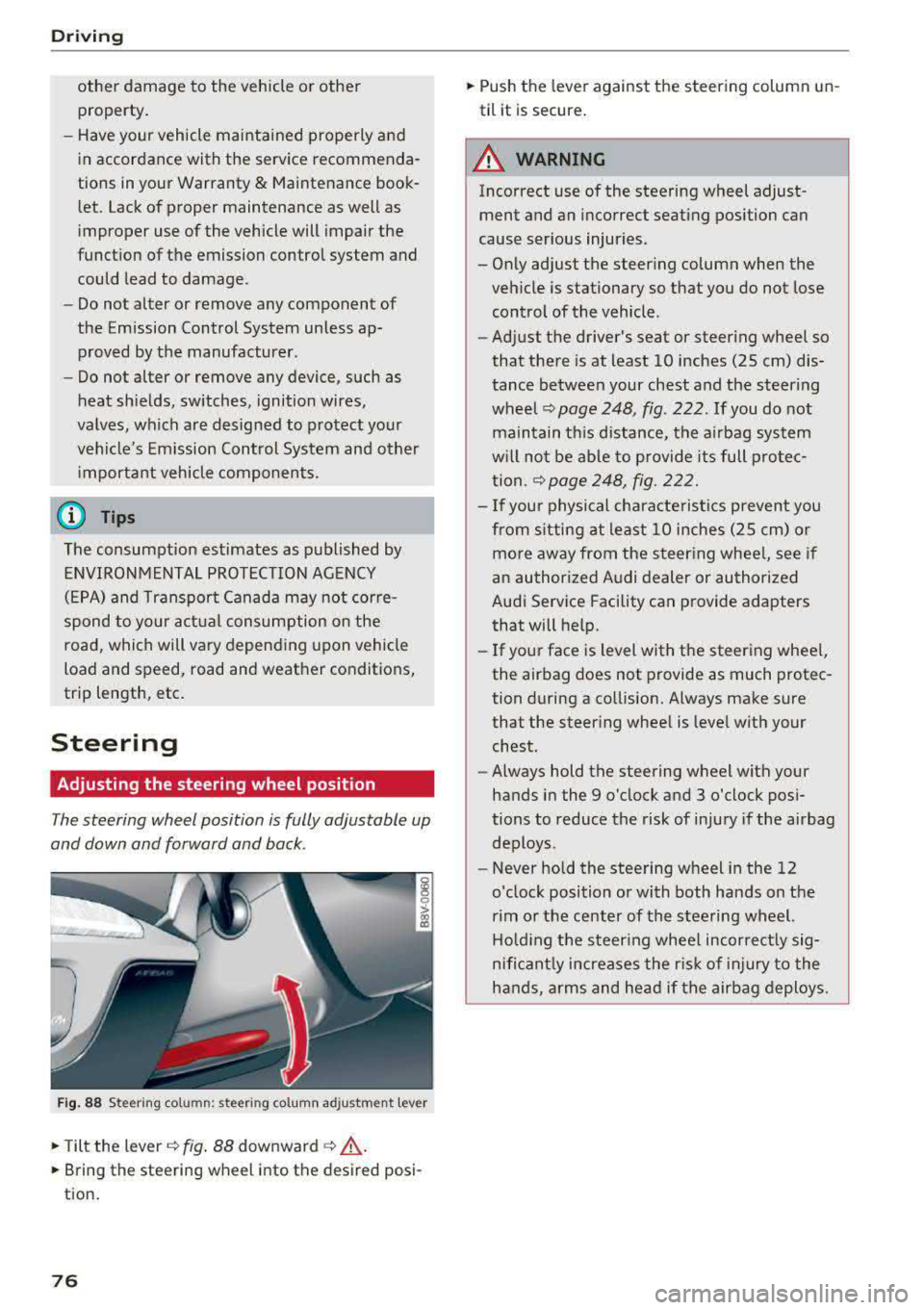
The steering wheel position is fully adjustable up
and down and forward and back .
Fig. 88 Steering column: steering col umn adjustment lever
.,. Tilt the lever c:::;, fig. 88 downward c:::;, ,& .
.,. Bring the steering wheel into the desired posi
tion.
76
.,. Push the lever against the steering column un
til it is secure.
A WARNING
Incorrect use of the steering wheel adjust ment and an incorrect seating position can
cause serious injuries.
- Only adjust the steering column when the
vehicle is stationary so that you do not lose control of the vehicle .
-
-Adjust the driver's seat or steering wheel so
that there is at least 10 inches (25 cm) dis
tance between your chest and the steering
wheel
c:::;, page 248, fig. 222 . If you do not
maintain this distance, the airbag system
will not be able to provide its full protec
tion .
c:::;,page248, fig. 222.
- If your physical characte ristics prevent you
from s itting at least 10 inches (25 cm) or
more away from the steering whee l, see if
an authorized Audi dealer or authorized
Audi Service Facility can provide adapters
that will help.
- If your face is level with the steering whee l,
the airbag does not provide as much protec
tion during a collision. Always make sure
that the steer ing wheel is level with your
chest.
- Always hold the steering wheel with your
hands in the 9 o'clock and 3 o'clock posi
tions to reduce the risk of injury if the airbag
deploys.
- Never hold the steering wheel in the 12
o'clock position or with both hands on the
rim or the center of the steering wheel.
Holding the steer ing wheel incorrect ly sig
nificant ly increases the r isk of injury to the
hands, arms and head if the airbag deploys.
Page 79 of 400
a, a, ..... N
" N ..... 0 N > 00
Starting and stopping
the engine (vehicles with
an ignition lock)
Starting the engine
Ap plies to: ve hicles with ign itio n lock
The ignition is switched on ond the engine start
ed with the key in the ignition.
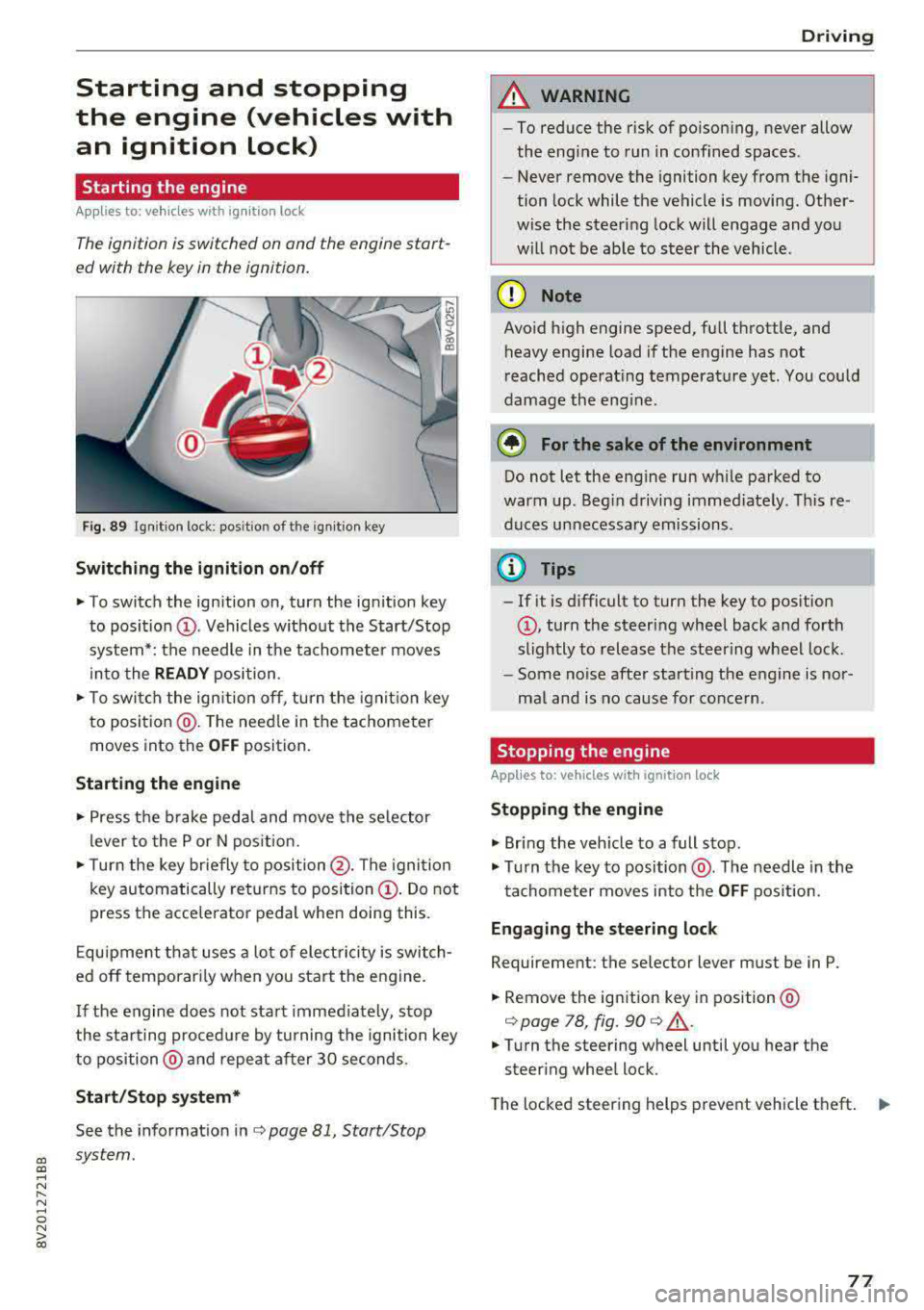
Fig. 89 Ignit ion lock: posit ion of the ignitio n key
Switching the ignition on /off
~ To switch the ignition on, turn the ign ition key
to posit io n
(D . Vehicles w ithout the Start/Stop
system*: the needle in the tachomete r moves
into the
READY position .
~ To swi tch the ign ition off, turn the ignit io n key
to positio n@ . The need le in the tachometer
moves into the
OFF position.
Starting the engine
~ Press the b rake peda l and move the se lector
l ever to the P or N pos ition.
~ T urn the key br iefly to position @. The igni tion
key automatically returns to position
(D . Do not
press the accelerator pedal when doing this .
E qu ipment that uses a lot of elect ric ity is switch
ed off temporar ily when you sta rt the engine.
I f the engine does not sta rt immed iately, stop
the s ta rting proced ure by turning the ignition key
to position @ and repeat after 30 seconds.
Start /Stop system*
See the informat ion inc:> page 81, Start/Stop
system.
Driving
A WARNING
-- To reduce the r isk of po ison ing, never allow
the engine to run in confined spaces .
- Never remove the ignition key from the igni
tion lock while the vehicle is moving. Other
wise the steering lock will engage and you
w ill no t be ab le to s teer the vehicle.
(D Note
Avo id high engine speed, fu ll throttle, and
heavy engine load i f the engine has not
reached operat ing temperat ure yet. You could
damage the eng ine.
@ For the sake of the environment
Do not let the engine run w hile parked to
warm up . Beg in driving immed iately . T hi s re
duces unnecessa ry emissions .
@ Tips
-If it is d ifficult to tur n the key to pos ition
(D , turn the steer ing wheel back and fo rth
sligh tly to release the steering wheel lock.
- Some noise after starting the engine is nor
ma l and is no cause for conce rn .
Stopping the engine
Applies to: vehicles w ith ign ition lock
Stopping the engine
~ Br ing the veh icle to a full stop.
~ Tu rn the key to position @. The needle in the
tachometer moves into the
OFF pos ition.
Eng aging the steering lock
Requirement: the selector lever must be in P.
~ Remove the ignition key in position @
i:>page 78, fig. 90 c:> &,.
~ Tu rn the steering wheel until you hea r the
steer ing wheel lock.
The locked steer ing helps prevent vehicle theft.
""
77
Page 80 of 400
Driving
_& WARNING
-Never turn off the engine before the vehicle
has come to a complete stop. The full func
t ion of the brake booster and the power
steering is not guaranteed. Yo u must use
more force to turn or brake. Because you
cannot steer and brake as you usually
would, this could lead to accidents and ser i
ous injuries.
- Never remove the ignit ion key from the ign i
tion lock while the vehicle is moving. Other
wise, the steering lock cou ld sudden ly en
gage and you would not be able to steer the
vehicle.
- Always take the key with you whenever you
leave your vehicle. Otherw ise, the engine
could be started or electrical equipment
suc h as the power windows could be operat
ed . This can lead to serious injury.
- For safety reasons, always park the vehicle
with the selector lever in the P position .
Otherwise, there is the r isk that the vehicle
could roll unintentionally.
(D Note
If the engine has been under heavy load for
an extended per iod of t ime, heat builds up in
the engine compartment after the engine is
sw itched off and there is a risk of damaging
the engine. For this reason, let the engine run
for at idle for approximately two minutes be
fore shut ting it off.
(0 Tips
For up to 10 minutes after stopping the en
gine, the rad iator fan may turn on again auto
matically or it may continue to run (even if
the is ignition switched off) due to the follow
ing reasons:
- The coolant temperature is increasing due
to trapped heat.
- If the engine is warm and the engine com
partment also heats up from strong sun
light.
78
Starting and stopping
the engine (vehicles with
convenience key)
Starting the engine
App lies to : vehicles with co nvenience key
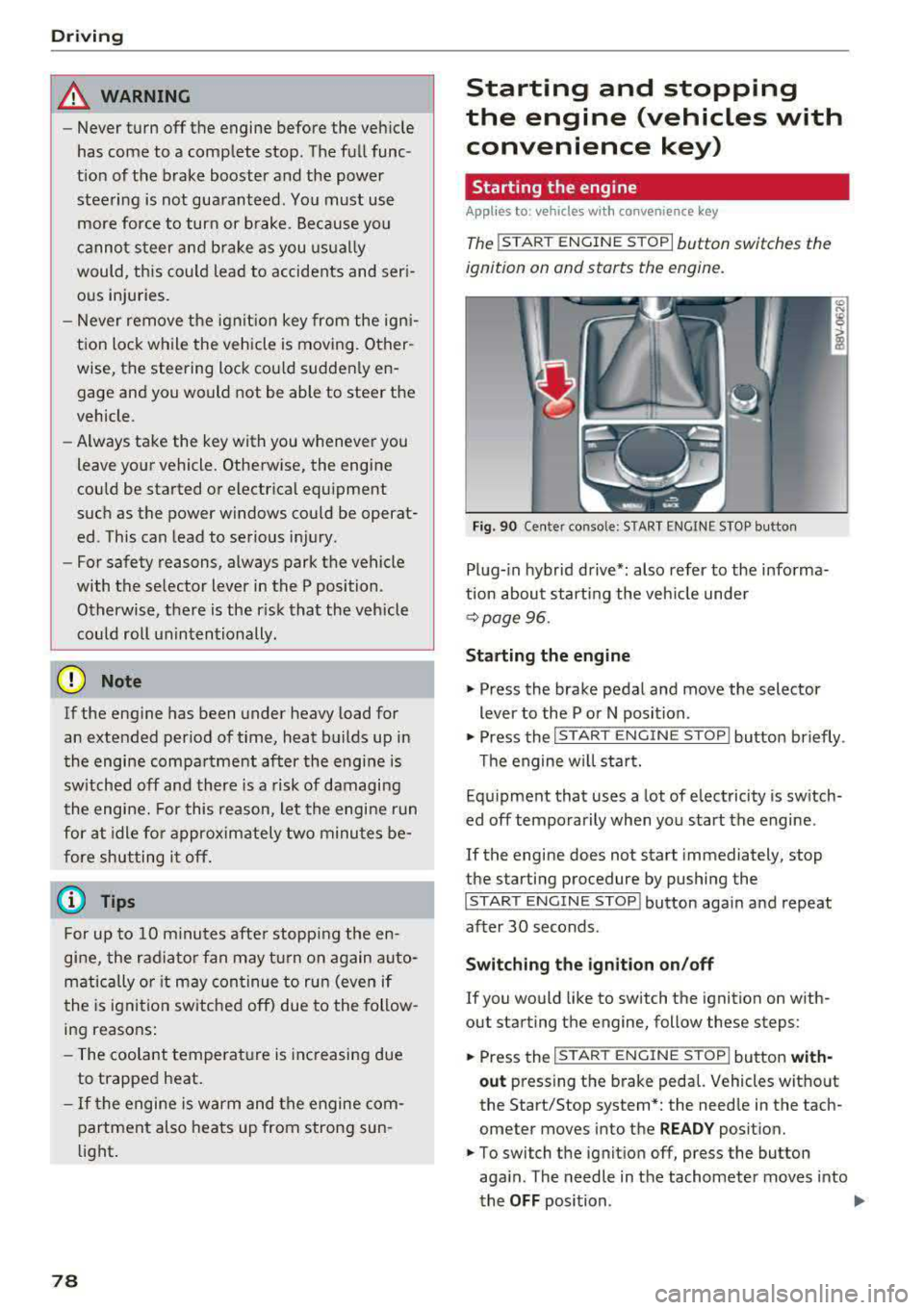
The I ST ART ENGINE STOP I button switches the
ignition on and starts the engine.
Fig. 90 Center conso le: STAR T ENGINE S TOP button
Plug-in hybrid drive*: also refer to the informa
t ion about starting the veh icle under
r::!v page 96.
Starting the engine
"'Press the brake pedal and move the selector
lever to the P or N position .
"'Press the I START ENGINE STOP ! button briefly .
Th e engine will start.
Equipment that uses a lot of electricity is switch
ed off temporarily when you start the engine .
If the engine does not start immediately, stop
the starting procedure by pushing the
I START ENGINE STOP ! button again and repeat
after 30 seconds .
Switching the ignition on/off
If you would like to switch the ignition on with
out starting the engine, follow these steps:
"' Press the I S TAR T ENGINE ST OP I button with-
out press ing the brake pedal. Vehicles without
the Start/Stop system *: the need le in the tach
ometer moves into the
READY position.
"'To switch the ignition off, press the button
aga in . The needle in the tachometer moves into
the
OFF position . .,..