ignition AUDI S3 SEDAN 2017 Workshop Manual
[x] Cancel search | Manufacturer: AUDI, Model Year: 2017, Model line: S3 SEDAN, Model: AUDI S3 SEDAN 2017Pages: 400, PDF Size: 67.32 MB
Page 179 of 400
CXl CXl .... N r--N .... 0 N > 00
Telephone Introduction
A pp lies to: ve hicles with telep hone
To make phone coils in your vehicle using the
MMI, connect your cell phone to the
MMI via
Bluetooth.
H and sfree
Afte r you have connected your cell phone to the
MMI via Bluetooth, you can use the handsfree
system and operate telephone functions through
your MMI. You can make calls using the antenna
on your cell phone.
A WARNING
- Medical experts warn that cell phones can
interfere w ith the function of pacemakers.
Always ma inta in a m inimum distance of 20
centimeters between the cell phone anten
na and the pacemaker.
- Do not carry the cell phone in a pocket di
rectly over the pacemaker when the phone
is switched on.
- Sw itch the cell phone off immediately if
you suspect it may be interfering with the pacemaker.
- Do not use the voice recognition system*
c::> page 170 in emergencies because your
voice may change in stressful situations. It may take longer to dial the number or the
system may not be able to dia l it at all. Dial
the emergency n umber manua lly.
- Switch your cell phone off in areas where
there is a risk of an exp losion. These loca
tions are not always clea rly marked. This
may include gas stations, fuel and chemical
storage facilities or transport vehicles, or lo
cations where fuel vapors (such as propane
or gasoline vapor in vehicles or bu ildings),
chem icals or large quantities of dust parti
cles (such as flour, sawdust or metal) may
be present in the air. Th is also applies to all
other locations where you would normally
tu rn your vehicle engine off .
- The demands of traffic requ ire your full at
tent io n. Always read t he chapter
c::> page 158, Traffic safety information.
-
T e le ph on e
(D Note
Always fo llow the information found in Q (!) in
Wi-Fi hotspot on page 195.
(D Tips
- The Bluetooth connect ion range is limited
to inside the vehicle. It can also be affected
by local condit ions and interference with
other devices.
- To learn which Bluetooth connections and
wh ich of the functions in your cell phone are
supported, check with your cell phone serv
ice provider or the database for mobile devi
ces at
www .audiu sa.com /bl uetooth .
Setup
Connecting a cell phone using Bluetooth
Applies to: vehicles wi th telepho ne
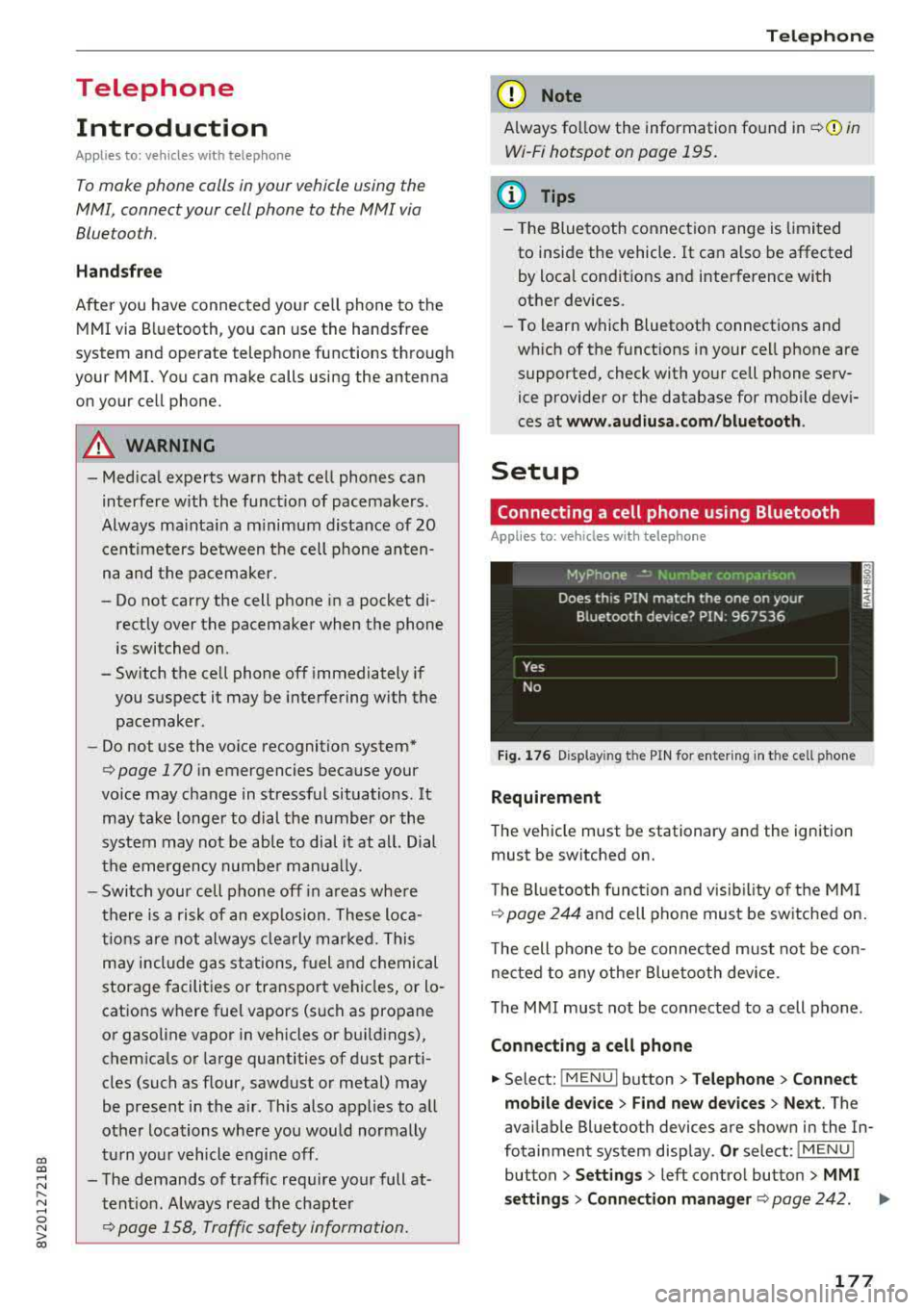
Fig . 17 6 Display ing t he PIN for enter ing in t he cell ph one
R equirem ent
The vehicle must be stationary and the ignition
must be switched on.
T he Bl uetoo th funct ion and v isib ility o f the MMI
¢ page 244 and cell phone must be sw itched on.
T he cell phone to be connected must not be con
nected to any other Bluetooth device.
T he
MMI must not be connected to a cell phone .
Connecting a cell phone
.,. Select: !MENU I button> Telephone > Co nnect
mobile dev ice
> Find new de vices > Ne xt. The
avai lable Bluetooth devices are shown in the In
fotainment system display .
Or select: !MENUI
button > S etting s> left contro l button > MMI
s ettin gs> Connec tion manag er ¢
page 242 . .,..
177
Page 180 of 400
Telephone
"'Se lect and confirm the desired ce ll phone from
the list of disp layed Bluetooth devices.
"' The MMI generates a PIN for the connect ion
setup
¢ fig. 176 .
"' Select and confirm Y es.
"' Enter the PIN for connecting on your cell
phone .
Or: when the PIN is d isplayed on your
ce ll phone, confirm the PIN on you r ce ll phone
and in the MMI. The time a llowed for ente ring
the PIN is l im ited to app rox imately 30 seconds.
"' Pay attention to any additiona l system prompts
displayed on your cell phone, for example if the
system should connect automatically in the fu
ture . Depending on the ce ll phone, you may
have to confirm downloading the directory sep
arately .
After connect ing succ essfull y
After connecting successfully, a short message
with information about the connected profi les
will appear . You can also change profiles later.
Select:
! MENU ! button> Sett ings> left control
button
> MMI sett ings > Conn ection man ag er
c:::;, page242 .
In addition, the cell phone contacts are automat
ically loaded in the MMI directory. Th is process
can take several minutes, depend ing on the num
ber of contacts .
You can a lso make your connected cell phone the
default phone by select ing
Se t as de fault tel e
phone
in the Conne ct ion man ager c:::;, page 244 .
Q) Note
Always follow the information found in c:::;,(D in
Wi-Fi hotspot on page 195.
(D Tips
- Making phone calls through the MMI is only
possib le using the
Handsfree Bluetooth pro
file.
- You can apply additional settings to con nected mobile devices using the
Connection
manager
c:::;, page 242.
- You can also search for the MMI in your cell phone us ing the Bluetooth device search.
- You only have to pair your device one t ime.
Bluetooth devices that are already paired
178
automatically connect to the M MI when the
Bluetooth function is switched on, they are
within range and the ignition is sw itched on.
The last connected cell phone is given first pr iority.
-Authoriz ing the MMI connect ion in your cell
phone wi ll make automatic connection pos
sible .
- Pay attention to any system prompts dis played on your cell phone, for example if
the system should connect automatically in
the future. Depend ing on the cell phone,
you may also need to download the directo
ry and confirm a ccess to your text messages
separately.
- When leaving the vehicle, the Bluetooth
c onnect ion to the cell phone will automati
cally disconnect. Depending on yo ur cell
phone, phone calls in progress may be auto
matically redirected from the MM I to your
cell phone and you can continue the ca ll on
your phone.
- You can obtain more info rmation from your
cell phone service provider or from yo ur ce ll
phone user guide. For information on us ing
the te lephone, v isit
ww w.audiu sa.com /
bluetooth
or contact an authorized Audi
dealer or author ized Audi Service Facility.
'
Operating two telephones through the
MMI
You can connect two cell phones to the MMI, for
example your business cell phone as the primary
phone and your private cell phone as the secon dary phone. You can be reached in your vehicle
through both cell phones .
The first connected cell phone is d isplayed as the
primary phone in the MM I. The second cell phone
i s connected as the secondary phone .
The directory from the con nected prima ry phone
will a lways be d isplayed . If yo u wo uld like to use
the d irecto ry from the secondary phone, you
must switch the primary and secondary phone
¢ page 179 .
Page 197 of 400
CXl CXl .... N r--N .... 0 N > 00
Wi-Fi hotspot
Applies to: vehicles with Wi-Fi hotspot
You con use the MMI as a Wi-Fi hotspot to con
nect up to eight Wi-Fi devices to the Internet. While driving, restricted use of unsecured, light,
small wireless devices is only possible from the
rear of the vehicle.
Requirement: the ignition must be switched on.
• Select: I MENU I button > Tele ph one> right con-
trol button >
Wi -F i s ettin gs.
The follow ing settings can be modified:
Wi-Fi
The MMI Wi-F i hotspot is deactivated at the fac
tory . Switch the Wi-Fi hotspot to
H otsp ot before
establishing a connection between your vehicle
and your W i- Fi dev ice.
- On : the MMI Wi-Fi hotspot is active and visible
to other devices . You can connect your Wi-Fi
device with the MMI.
- Off: the MMI W i-F i hotspot is deactivated . An
I n ternet connection fo r Wi-Fi devices is not
poss ible.
_& WARNING
- T o reduce the risk of an accident, use the
Audi connect In fotainment services with a
Wi-Fi hotspot only in the rear seat when the
vehicle is in motion, or on ly when the vehi
cle is stationary.
- It is only safe to use tab lets, laptops, mo
bile devices and other similar devices when
the vehicle is stationary because, like all loose objects, they could be thrown around
the ins ide of the vehicle in a crash and cause
serious injur ies. Store these types of devices
securely while driving.
- Do not use any w ireless devices on the front
seats w ith in range of the a irbags while driv
ing. Also read the warn ings in the chapter
~page 271, Front airbags.
- As the driver, do not allow usage of the Wi
Fi hotspot to dist ract you from driving, as
this could increase the risk of an accident .
-
Audi conn ect ( Inf ota inm ent )
(D Note
-Under some conditions, certain mobile devi
ces and operating systems may automati
cally switch from your vehicle's Wi-Fi hot
spot to the device's mobile data connection.
In that event , standard text and data usage
rates would apply wh ile the device's mobile
data connection is in use. Please refer to
documentation provided by your mobile de
vice's manufacture and your data carrier for details, related terms and privacy state
ment.
- You a re responsib le for all precautions tak
en for data protection, anti -virus protection
and protection against loss of data on mo
bile devices that are used to access the In
ternet through the Wi-Fi hotspot.
(D Tips
- In vehicles without Audi connect (Infotain
ment)*, the use of the Wi-Fi hotspot is only
possible for the W i-Fi audio player*. A data
connect ion to the Internet cannot be estab
lished.
- For add itional information about the Audi
connect Infotainment services, visit
ww w.a udiusa.c o m /aud iconn ect .
Configuring the data
connection
Applies to: vehicles with Audi connect (Infotainment)
The data connection for Audi connect Infotain
ment services is pre-configured at the factory.
However, if a configuration should be necessary,
you con adjust the following settings.
• Select: ! MENU I button> right control button>
Connecti on manag er.
• Select: right control button > Online setti ngs >
Data c onnec tion setting s.
Using the Data co nnection settin gs menu, you
can set when an Internet connection should be
made . T he Internet connection disconnects auto
matically once the requested Audi connect Info
tainment service no longer requires any data.
The following options can be selected:
195
Page 201 of 400
CXl CXl .... N r--N .... 0 N > 00
-If a t least two minutes have passed after
the last time the ignition was switched
off,
you can reset the access counter back to "O" as needed after switching the ignition on/
off again .
Vehicle status report
Applies to: veh icles with Audi connect e·tron services
You can access various vehicle statuses using the
services, such as:
- high-voltage battery charge level,
- electri c range,
- mileage,
- next inspection .
For addit ional information,
see ¢ page 97, Power
meter overview
and ¢ page 99, Range display .
A WARNING
Do not ignore messages and warning or indi
cator lights that turn on in the vehicle
be
cause of the information in the status report.
T his could le a d to b reak downs in on the ro ad,
ac cidents and serious injuries .
Car Finder
Applies to: vehicles with Audi connect e-tron services
The vehicle collects data under certa in conditions
a n d se nds it to a se rver.
When data is stored, you can access values such
as these us ing the service :
- Vehicle location d isplay,
- Display of one's own locat ion,
- Ro ute to your vehicle.
I f yo ur mobile device also has a navigation f unc
tion, yo u can navigate to your last know n pa rking
l ocat ion .
(D Tips
-The new pa rking location canno t be dete r
mined with this service if the vehicle is
moved after shutt ing the ve hicle
off and
without switching the ignition on and
off
again, for example when being towed o r if
the veh icle is stolen.
Audi connect e-tron s erv ic es
- If the vehicle is moved and shut off again
using the second key, for example, t he new
park ing location is transmitted to the server
after sw itching the ign ition
off.
Charging
Applies to: vehicles with Audi connect e-t ron services
You can contro l and access the hig h-voltage bat
tery charging process remotely using these serv ices. You have the followi ng options:
- check the battery charge level,
- start/end the cha rging p rocess,
- program the charging t imer with/wit hout cl i-
mate con trol,
- deactivate/activate the cha rg ing timer.
Fo r additional information,
see ¢ page 108,
Charging the battery with the Audi e-tron charg
ing system .
A WARNING
Only perform c harg ing f unct io ns on t he h igh
vol tage battery if t he ve hicl e is shut
off co r
r e ct ly, is con nected to a suitable socket an d if
the ignition is switched
off.
Temperature control
Applies to: vehicles with Audi connect e-tron services
You can co ntro l the clima te control in your vehi
cl e remo tely using these serv ices:
- start/end climate control,
- program the timer,
- deactivate/activate the timer.
For additional information,
see ¢ page 118 , Cli
mate control.
A WARNING "---
Only perform the climate cont rol functions i f
your vehicle was shut
off cor rectly and the ig
ni tion is switched off .
199
Page 208 of 400
Navigation
Personal route
assistance
App lies to: ve hicles w ith navigat ion system
Your MMI can learn your frequently driven routes
and, depending on the current vehicle position,
suggest route guidance (for example, your daily commute to work and back).
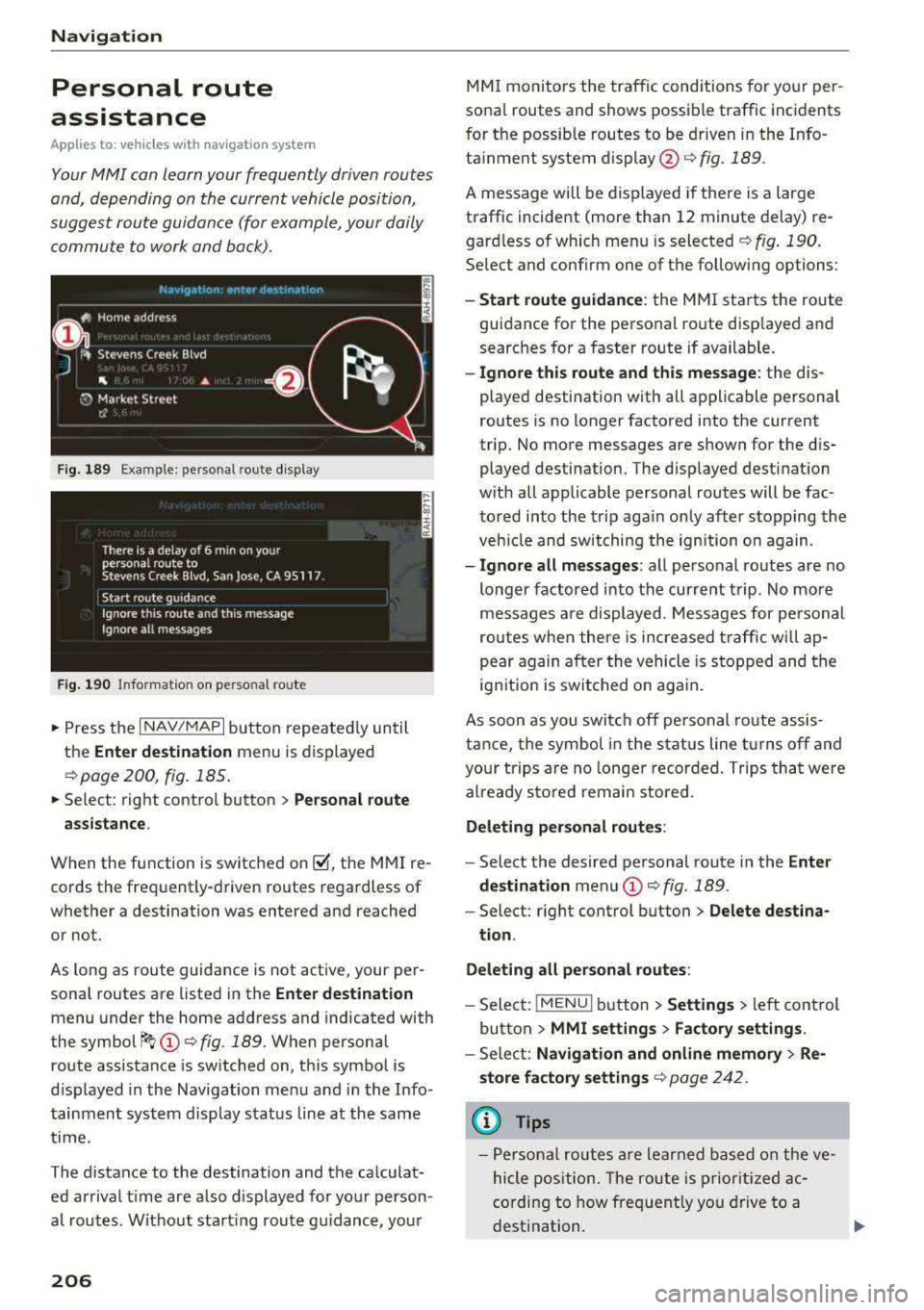
Fig. 189 Exa mple: perso nal rou te display
Fig . 190 In forma tion on personal ro ute
.,. Press the I NAV/MAPI button repeated ly until
the
Enter destination menu is displayed
qpage 200 , fig . 185.
... Select : right contro l button > Personal route
assistance .
When the function is switched on~, the MMI re
cords the frequently-driven routes regardless of
whether a destination was entered and reached
or not .
As long as route guidance is not act ive, your per
sonal routes are listed in the
Enter destination
menu under the home address and indicated with
the
symbol ~ (D q fig. 189. When personal
route assistance is switched on, this symbol is
displayed in the Navigation menu and in the Info
tainment system disp lay status line at the same
time.
The distance to the destination and the calculat ed arrival time are also d isplayed for your person
al routes. Without start ing route gui dance, your
206
MMI monitors the traffic conditions for your per
sona l routes and shows possible traffic incidents
for t he possib le routes to be driven in the Info
ta inment system
display @q fig. 189.
A message will be displayed if there is a large
traffic incident (more than 12 minute delay) re
gardless of which menu is selected
¢fig . 190.
Select and confirm one of the following options :
-Start route guidance: the MMI starts the route
guidance for the personal ro ute disp layed and
searches for a faster route if available.
- Ignore this route and this message: the dis
played destination with all applicable personal
routes is no longer factored into the current
trip. No more messages are shown for the dis
played destination. The displayed destination
w ith all applicable personal routes will be fac
tored into the trip again on ly after stopping the
veh icle and switching the ignition on again.
-Ignore all messages : all personal routes are no
longer factored into the current trip. No more
messages are displayed . Messages for pe rsonal
routes when there is increased traffic will ap
pear again after the vehicle is stopped and the
ignition is switched o n again.
As soon as you switch off personal route assis
tance, the symbol in the status line turns off and
your trips are no longer recorded. Trips that were
already stored remain sto red .
Deleting personal routes :
-Select the desired personal route in the Enter
destination
menu (D ¢ fig. 189.
-Select: r ight control button> Delete destina
tion .
Deleting all personal routes:
-Select: !MENU I button> Settings > left control
button >
MMI settings > Factory settings.
-Sele ct: Navigation and online memory > Re·
store factory settings
¢ page 2 42.
(D Tips
-Personal routes are learned based on the ve
hicle position. The route is prioritized ac
cording to how frequently you drive to a
destination.
Page 216 of 400
Navigation
Selecting the online map update
- Se lect an update package from the list(~) @
<=>fig. 198 .
-Confirm you r se lection with the I BACK I button
and go back to the selection.
- T he number and amount of data for the select
ed updat e package are now displayed in the In
fotainment system.
Starting the download
- Select and confirm Start download .
-Confirm the secur ity prompt by selecting Start
download
again.
The update packages begin to down load and the
status of the download progress is shown in the
Infotainment system display .
Installation of online map updates
The downloaded map materia l installs after you
stop your vehicle. The new update packages in
stall only after you switch off the ignition. After
restarting the MMI, the Infota inment system dis
play ind icates if the updates installed successful
ly .
- Confirm the successful update with
OK .
The new map materia l can now be used for navi
gation.
(D Tips
- The amount of available on line map up
dates in the vehicle is lim ited . To update
more regions, use the map update via SD
card at
my.audiusa.com .
-Always read the chapter I:!) page 196, Audi
connect (Infotainment) general informa tion.
Accessing traffic information
Traffic information (TMC)
Ap plies to: ve hicles w ith navigation system
.. Press the I NAV/MAPI button repeated ly until
the map is d isp layed .
.. Se lect : left control button > Traffic messages .
214 An ove
rview of all the traffic messages is dis
played in the Infotainment system. Traffic inci
dents on your route are shown in the upper sec
tion of the list, sorted according to distance.
- Displaying all traffic messages for a street/
highway :
select and confirm the [ill symbol. A
list of all the traff ic messages for the selected
street/highway is displayed.
- Opening a detailed view of traffic information:
select and confirm the traffic information from
the list.
-Displaying the selected traffic information on
the map :
select and confirm the right control
button
> Show on map . The shaded line shows
the street and the length of the traffic jam.
-Displaying the next traffic message on the
map :
press the control knob.
Traffic information display
Colored warning symbols:
traffic incidents on
your route are shown in the upper section of the
list and are sorted according to distance.
Warning symbols with~: avoided traffic inci
dents .
Grayed out warning symbols: traffic incidents
that are not on your route. They are sorted ac
cording to road type (expressway, highway, other
road), country and name.
(D Tips
-Critical traffic information, such as warn
ings about wrong -way drivers, is automati
cally displayed. To hide the traffic informa
t ion, press the
I BACK ! button or the control
knob.
- TMC traffic reports are not available in Can
ada. For more information, please contact
Sirius Canada.
Page 241 of 400
CXl CXl .... N ,.__
Audi smartphone interface
Setup
App lies to: ve hicles with Audi smartpho ne interface
You can connect your smartphone to the MMI us
ing the Audi smartphone interface . Certain con
tent on your smartphone is adapted to the Info
tainment system display while driving and can
be operated through the
MMI control panel.
R equirement:
The vehicle must be stationary and the ignition
must be switched on.
iPhone generation 5 or higher with Lightning
connector and iOS 7.1.2 operating system or
h igher.
O r:
Smartphone with Android Auto app and Android
5 .0 Loll ipop operating system or higher.
.,. Connect your smar tphone to the Audi music in
te rface
c:> page 229 using a USB adapter
c:> page 228, fig. 211 .
.. Select and confirm A cti va te Apple CarPl ay or
Acti vate And roid Auto no w.
.. Follow the system instruct ions.
.,. Pay attention to any add itional system prompts
on your smartphone if applicable.
If you chose not to use Apple CarPlay or Android
Auto when connecting your smartphone for the
first time, you can start the Audi smartphone in
terface later on using the
Connection m an ager .
.. Select: I MENU I button > Audi smartphone in ·
terfa ce
> Change to connecti on manager .
.. Connect your smar tphone to the Audi music in
terface using a USB adapter
c:> page 228,
fig .211.
.. Se lect and confirm Audi smartphone : in the
Connection manager c:> page 242. You can se
lect your smartphone in the list of devices that
are already paired
c:> page 243.
.,. Follow the system instruct ions.
N .... 0 N iii l) In preparat io n at t he t ime of pr inting.
Aud i smartphon e int erfac e
(D Note
Always fo llow the information found in c:> @ in
Wi-Fi hotspot on page 195.
(D Tips
-The functions that can be used depen d on
the fo llowing factors, among others:
- the brand of your smartphone
- the vers ion of the operating system in
your smartphone
- the software version of the app used
- the USB adapter cab le and correct connec-
tion
- your cell phone service provider
- the customized se ttings on your sma rt-
phone
- O ne of the factors
above or a comb ina tion
o f any of them could cause your sma rtphone
to be incompatib le with the Audi smart
phone interface. Compatibility cannot be
guaranteed for all types of smartphones.
For more informat ion and assistance, refe r
to the user guide and the ma nufacturer of
your smartphone.
- If the connected smartphone has voice con
trol, you can operate you r smartpho ne usi ng
t he exter nal voice recognition system
c:> page 175.
- The menu language shown in the MMI is
based on the sett ings in you r smartphone.
- The time d isplayed in the MMI is based o n
the settings in yo ur smartphone .
- Severa l MMI functions are not avai lab le
when Apple CarPlay or Andro id Auto is ac
t ive.
- You cannot co nnect any mob ile dev ices
via
Bluetooth when an App le CarPlay connec
tion is act ive.
- Whe n the Apple CarPlay connection is ac
t ive,
Tag this song for iTunes*1> is not ava il
able
c:>page 218 .
239
Page 259 of 400
Retracting rollover protection
Applies to: vehicles with power top
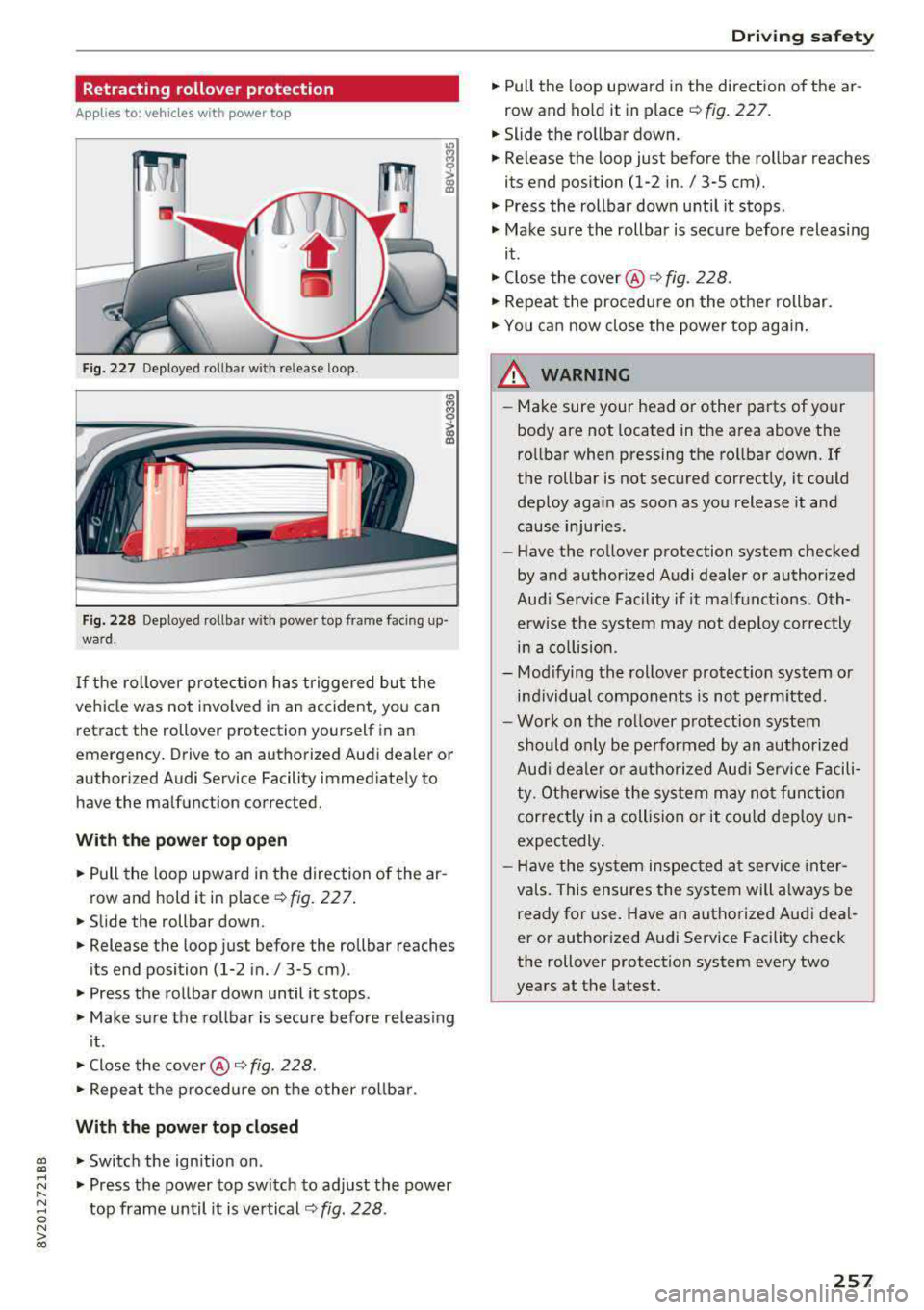
Fig. 227 Deploye d rollb ar w ith re le ase loop .
Fig. 228 Deploye d rollb ar w it h powe r top fram e faci ng up
wa rd.
If the ro llover protection has triggered bu t the
vehicle was not invo lved in a n accident, you can
retract the rollover protection yourself in an
em ergency. Drive to an authorized Audi dea ler or
author ized Audi Service Facility immed iate ly to
have the malfunction corrected.
Wi th th e po we r top op en
• Pull the loop upward in the direction of the ar
row and hold it in place r:!> fig. 22 7.
• Slide the rollbar down.
• Release the loop just before the rollbar reaches
its end position
(1-2 in./ 3-5 cm) .
• Press the rollbar down until it stops .
• Make sure the rollbar is secure before re leas ing
i t .
• Close the cove r@ ¢ fig. 228 .
• Repeat the p rocedure on the other rol lbar .
With the power top closed
gi • Switch the ignition on .
..... ~ • Press the power top switch to adj ust the power
8 top frame until it is vertical r::!> fig. 228 .
N > 00
Driving safety
• Pull the loop upward in the direction of the ar
row and ho ld it in place r::!> fig. 22 7.
• Slide the ro llbar down.
• Release the loop just before the rollbar reaches
its end position
(1-2 in ./ 3-5 cm).
• Press the rollbar down until it stops .
• Make sure the rollbar is secure before releasing
it.
• Close the cover @¢ fig. 228.
• Repeat the procedure on the othe r rollbar.
• You can now close the power top again .
_&. WARNING
--Make sure your head or other parts of your
body are not located in the area above the
rollbar when pressing the rollbar down. If
the rollbar is not secured correctly, it could deploy aga in as soon as you release it and
cause injur ies .
- Have the rollover protection system checked
by and authorized Audi dealer or authorized
Aud i Serv ice Facility if it ma lfunctions. Oth
erwise the system may not dep loy correctly
in a co llision .
- Mod ifying the rollover protect ion system or
i n dividual components is not pe rm itted.
- Work on the rollover p rotection system
should only be performed by an authorized
Aud i deale r o r autho rized Audi Serv ice Facili
t y. Otherwise the system may no t function
correct ly in a collision or it could dep loy un
expectedly .
- H ave the sys tem inspec ted a t service inte r
va ls. This ensures the system will a lways be
ready for use. Have an authorized Aud i deal
er or author ized Audi Service Facility check
the rollover protection system every two
years at the latest.
257
Page 271 of 400
CXl CXl .... N ,.__
N .... 0 N > 00
about children and Advanced Airbags
c::>page292 .
Even though yo ur vehicle is equipped with an Ad
vanced Airbag System, make certain that all chil
dren, especially those
12 years and younger, a l
ways ride in the back seat properly restrained for
their age and size. The airbag on the passenger
side makes the front seat a potentially dangerous
place for a child to ride. The front seat is not the
safest place for a child in a forward-facing child
safety seat .
It can be a very dangerous place for
a n infant or a child in a rearward-fac ing seat.
The Advanced Airbag System in your veh icle has
been certified to comply with the requirements
of United States Federal Motor Vehicle Safety
Standa rd (FMVSS)
208, as well as Canada Motor
Veh icle Safety Standa rd (CMVSS)
208 as applica
b le a t the time your veh icle was m an ufact ured.
Accord ing to requirements, the front Advanced
Airbag System on the passenger side has been
certified for "suppression" for infants of about
12 month old and younger and for "low risk de
ployment" for children aged 3 to 6 years old (as
defined in the standard) .
The
PASSENGER AIR BAG O FF light in the instru
ment panel tells you when the front Advanced
Airbag on the passenger side has been turned
off
by the electronic control unit.
Each time yo u switch on the ignition, the
PAS ·
S ENGER AIR BAG OFF
light will come on for a
few seconds and:
- will stay on if the front passenger seat is not
occupied,
- will stay on if the electrical capacitance meas
ured by the capac itive passenger detection sys
tem for the front passenger seat equals the combined capacitance of an infant up to about
one year of age and one of the rearward-facing
or forward-facing child restraints listed in Fed
era l Moto r Vehicle Safety Standard
208 w it h
which the Advanced Airbag System in your veh i
cl e was certified . Fo r a listing of the child
re
strain ts th at were used to ce rtify you r vehicle's
compliance with the U.S. Safety Standard
c::>page295 .
Airbag sys tem
-wi ll stay on if there is a small child or c hild re
straint on the front passenger seat,
- will go
off if the front passenge r seat is occu
pied by an adult as registered by the capac itive
passenger detection system
c::, page 2 79, Mon
itoring the Advanced Airbag System.
T he PASSENGER AIR BAG OFF lig ht comes on
when e lectrica l capacitance registered on the
front passenger seat is equal to or less t han the
combined capacitance of a typical
1 year-old in
fant and one of the rearward-facing or forward
facing child restraints listed in Federal Motor
Ve
hicle Safety Standard 208 w ith which the Ad
vanced Airbag System in your vehicle was certi
fied.
If the total e lectr ica l capacitance reg istered on
t h e front passenger seat is more than that of a
typ ical 1 year-old ch ild but less than the weight
of a sma ll adult, the front airbag on the passen
ger side can deploy (the
PASSENGER AIR BAG
OFF
light does not come on).
If the PASSENGER AIR BAG OFF light does not
come on, the front airbag on the passenger side
has not been turned off by the electron ic con trol
u ni t and can dep loy if the control unit senses an
impact that meets the cond itions s tored in its
memory .
For example , th e airbag may deplo y if:
- a small ch ild that is heav ier than a typ ical 1
year-o ld child is on the front passenger seat
(regardless of whethe r the child is in one of the
child safety seats listed
c::, page 295), o r
- a child who has outgrown c hild rest raints is on
the front passenge r seat.
If the front passenger airbag is turned off, the
PASSENGER AIR BAG OFF light comes on in the
inst rument cluste r and stays on .
If the front passenger airbag deploys, the Feder
al Standard requires the airbag to meet the " low
risk" deployment cr iteria to reduce the r isk of
in
jury through interact ion w ith the airbag . "Low
r isk" dep loymen t occurs in those crashes tha t
t ak e place at lowe r decelerations as defined in
the e lectronic cont rol unit
c::, page 2 79, PASSEN -
GER AIR BAG OFF light.
Ill>
269
Page 272 of 400
Airbag syste m
Always remember, a child safety seat or infant
carrier installed on the front seat may be struck
and knocked out of position by the rapidly inflat
ing passenger's airbag in a frontal collision. The
airbag could greatly reduce the effectiveness of
the child restraint and
even seriously injure the
child dur ing inflation.
For this reason, and because the back seat is the
safest place for children - when properly restrain
ed according to the ir age and size -we strongly
recommend that children always sit in the back
seat ¢ page 292, Child safety.
A WARNING
A child in a rearward-facing chi ld safety seat
installed on the front passenger seat w ill be
seriously injured and can be killed if the front
airbag inflates -
even with an Advanced Airbag
System.
- The inflating airbag will hit the child safety
seat or infant carrier with great force and
will smash the chi ld safety seat and child
against the backrest, center armrest, door
or roof.
- Always install rear-facing child safety seats
on the rear seat.
- If you must install a rearward facing chi ld
safety seat on the front passenger seat be cause of exceptional circumstances and the
PA SSENGER AIR BAG OFF light does not
come on and stay on, immed iately install
the rear-fac ing ch ild safety seat in a rear
seat ing pos ition and have the airbag system
inspected by your Audi dealer.
- Forward-facing ch ild safety seats installed
on the front passenger's seat may interfere
with the deployment of the airbag and ca use serio us personal injury to the child .
A WARNING
If, in exceptional circumstances, you must in
stall a forward-facing chi ld restraint on the
front passenger's seat:
- Always make sure the forward -facing seat
has been designed and ce rtified by its man
u facturer for use on a front seat with a pas
senger front and side a irbag.
270
- Never put the fo rward-facing child restraint
up against or
very near the instrument pan
el.
- Always move the front passenger seat to
the highest posit ion in the up and down ad
justment range and move it back to the rearmost posit ion in the seat's fore and aft
ad justment range, as far away from the a ir
bag as poss ible, before install ing the for
ward-facing chi ld restraint.
- Always make sure that the safety be lt upper
anchorage is behind the ch ild rest raint and
not next to o r in front of the child rest raint
so that the safety be lt will be properly posi
tioned.
- Ma ke sure that the
PASSENGER AIR BAG
OFF
light comes on and stays on a ll the time
wheneve r the ignit ion is switched on .
A WARNING
-
To reduce the risk of serious injury, make sure
that the
PASSENGER AIR BAG OFF light will
be d isp layed whenever a ch ild restraint is in
stalled on the front passenge r seat and the
ignition is switched on.
- If the
PASSENGER AIR BAG OFF light does
not stay on, perform the checks described
¢ page 2 79, Monitoring the Advanced Air
bag System .
-Take the child restraint off the front passen
ger seat and install it properly at one
of the
rear seat positions if the
PASSENGER AIR
BAG OFF
light does not stay on.
- Have the airbag system inspected by your
Aud i dea le r i mmediately.
- Always carefully follow instructions from child restraint manufacture rs when instal
ling child restra ints.
A WARNING
If, in exceptional ci rcumstances, you must in
stall a forward or rearward-fac ing child re
stra int on the front passenger's seat:
- Improper installat ion of child restr aints can
reduce the ir effectiveness or
even preven t
them from provi ding any pro te ct ion .