ignition button AUDI S3 SEDAN 2017 Owner's Manual
[x] Cancel search | Manufacturer: AUDI, Model Year: 2017, Model line: S3 SEDAN, Model: AUDI S3 SEDAN 2017Pages: 400, PDF Size: 67.32 MB
Page 82 of 400
Driving
(D Tips
For up to 10 minutes after stopping the en
gine, the rad iator fan may tu rn on again auto
matically or it may continue to run (even if
the is ignit ion sw itched off) due to the follow
ing reasons :
- The coolant temperat ure is increasing due
to trapped heat.
- If the engine is warm and the engine com partment also heats up from strong sun
li ght .
Messages
Engine runn ing. Warn ing! Turn off ignition be
fore leaving vehicle
This message appea rs and a warn ing tone sounds
if you open the driver's door when the engine is
running.
Pressing start/ stop button again will switch off
engine.
T his message appe ars when you press t he
I START ENGI NE STOP I* button wh ile driving
~ page 79, Emergency off function .
Engine start system: malfun ction! Please con
tact Servi ce
The engine automatic start system has a mal
f un ction. D rive to a n author ized A udi dealer or
author ized Audi Se rvice Fa cility imme diate ly to
h a ve t he m alfu nction co rrected. To st art the en
g ine, turn the key to
pos it ion @ ¢ page 77 or
p ress and ho ld the
I S TAR T ENGINE ST OP I button
until the engine is runn ing .
II Key not recognized. See owner's manual
This message appea rs if the re is no co nvenience
key inside the vehicle or if the system does no t
re cog nize the key. The conve nien ce key may not
be recogn ized, for ex ample, if it is cove red by a n
objec t that
disrupts the s ignal (s uch as a b rief
case), o r if the key batte ry is weak . Elect ronic de
vices s uch as cell phones can also interfere w it h
the s ignal.
T o sti ll be able to sta rt or s top the engi ne, refer
to
~ page 81 .
80
II Remote control key : hold back of key
against the designated area. See owner 's man
ual
I f the indic ator li ght turns on and this message
a ppears, there is a ma lfunction ¢
page 81.
Ill Key not in vehicle?
Ill Remote control key: key not recognized . Is
the key still in the vehicle?
The Ill indicator lig ht t urns on and th is message
appears if the convenience key was removed from
the ve hicle when the e ngine was ru nning . If the
convenience key is no longe r in the veh icle, yo u
cannot sw itch the igni tion on or sta rt the eng ine
o nc e you stop it. You also canno t lo ck t he vehicle
from the o utside.
Please press brake pedal
This message appears if yo u do not step on the
bra ke peda l to start the engine on a ve hicle w ith
an a utomat ic t ra nsmission .
Please select N or P
This mess age appears w hen s tart ing o r stopping
t h e engine i f th e se lec to r l ever is not in the
N or P
pos ition . The engine will not sta rt/sto p.
Turn off ignition before leaving vehicle . Battery
is dis charging
This message appears and a warning tone sounds
i f you open the d rive r's doo r w hen the ig nition is
swi tched on . Sw itch t he igni tion off s o that the
vehicle battery will no t dis charge.
Shift to P, otherwise vehicle can roll away .
Doors do not lock if lever is not in P
This message appears for safety reasons if t he
selector lever for the automatic transmission is not in the
P posi tion afte r th e ignition is switched
off. Move the sele ctor leve r to t he
P posit ion.
Otherwise t he veh icle i s not protec ted fro m roll
i ng and i t cannot be locke d.
Page 83 of 400
a, a, ..... N
" N ..... 0 N > 00
Starting the engine
when there is a
malfunction
Appl ies to: vehicles with convenience key
It may not be possible to start the engine under
certain circumstances, for example if the battery
in the vehicl e key is drained, if interference is af
fect ed the key or if there is a syst em malfunc
tion.
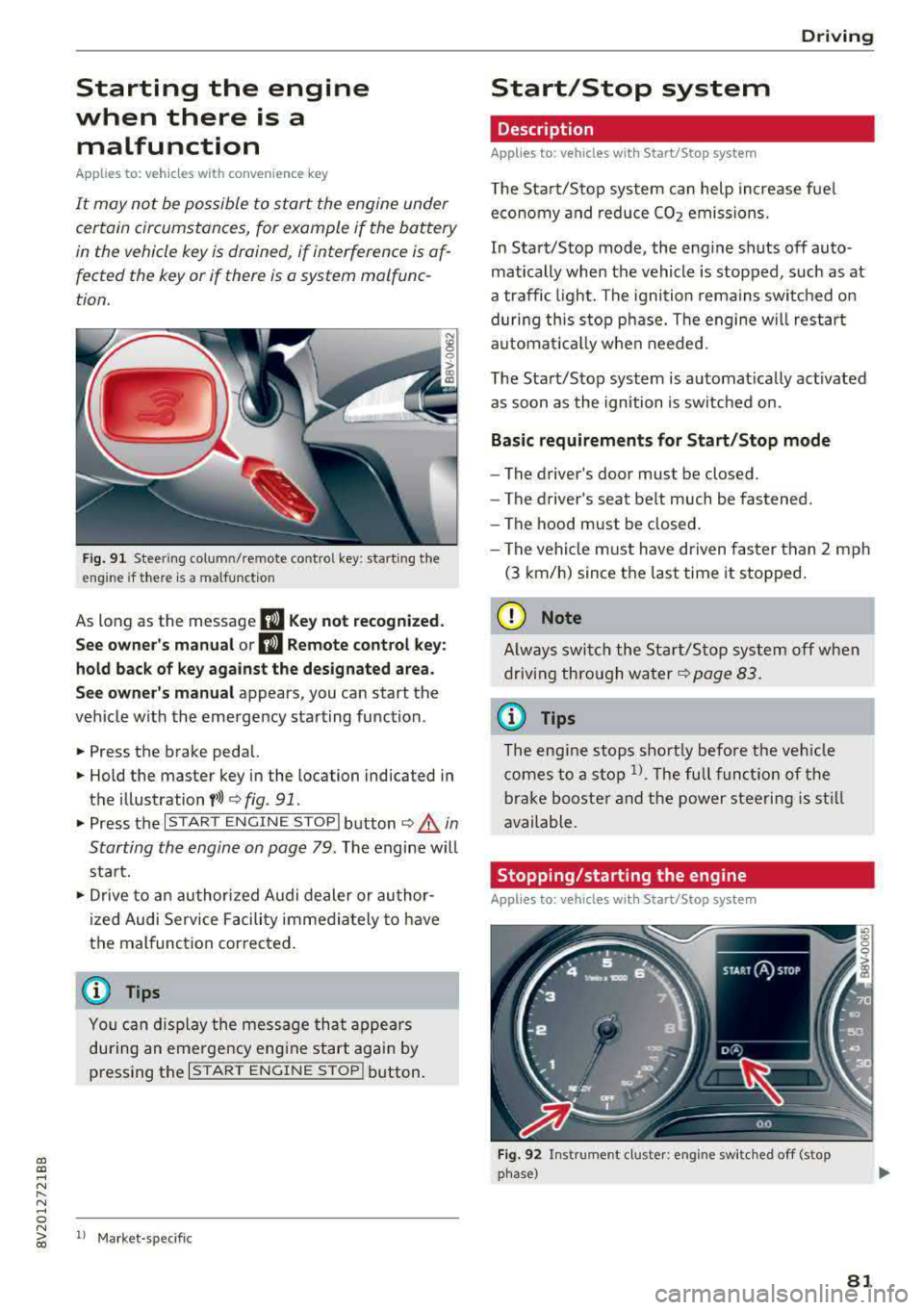
Fig. 91 Steer ing colum n/remote co ntro l key: starting the
e ngi ne if there is
a malfunction
As long as the message II Key not recognized.
See owner's manual or
II Remote control key:
hold back of key against the designated area.
See owner's manual
appears, you can start the
vehicle w ith the emergency starting function .
.,. Press the brake pedal.
.,. Hold the master key in the location indicated in
the illustration
f>l) r:> fig. 91.
.,. Press the I STAR T ENGIN E ST OPI button r:> _&. in
Starting the engine on page
79. The engine will
start.
.,. Drive to an authorized A udi dealer or author
ized Audi Service Facility immediately to have
the malfunction cor rected.
@ Tips
You can d isplay the message that appears
during an emergency engine start again by
pressing the
I START ENGINE STOPI button.
l l Market -s p ecific
D rivi ng
Start/Stop system
Description
Applies to: vehicles with Start/Stop system
The Start/Stop system can help increase fuel
economy and reduce CO2 emissions.
In Start/Stop mode, the engine shuts off auto
matically when the vehicle is stopped, such as at
a traffic light. The ignition remains switched on
during this stop phase. The engine w ill restart
automat ically when needed.
The Start/Stop system is automat ically act ivated
as soon as the ignition is switched on.
Basic requirements for Start/Stop mode
-The driver's door must be closed .
- The driver's seat belt much be fastened.
- The hood must be closed.
- The vehicle must have driven faster than
2 mph
(3 km/h) since the last time it stopped.
(D Note
Always switch the Start/Stop system off when
driving through water
r:> page 83.
(D Tips
The engine stops shortly before the veh icle
comes to a stop
l). The full function of the
brake booster and the power steering is still
available.
Stopping /starting the engine
Applies to: vehicles with Start/Stop system
Fig. 92 Instrument cluster: eng ine swi tched off (stop
phase)
81
Page 84 of 400
Driving
"' Brake the vehicle to a stop . The engine stops
sho rtly before th e vehicle comes to a stop or if
the ve hicle is stationary
l). Keep your foot on
the brake pedal. The
D] ; D] ind icator light ap
pears in the display. The need le in the tachome
ter also moves into the
READ Y position .
"'The eng ine starts aga in when you take you r
foot off the b rake pedal. The ind icator light
tu rns off.
Add itional information
The engine stops in the P , N and D selector lever
positions .
If you select the R se lector lever position during a
Stop phase, the eng ine will start again.
Shift to P quick ly to prevent t he engine from
starting unintent iona lly when s hifting t hrough R.
You can dete rm ine fo r you rself if the engine will
s top or not by reducing or increas ing the amount
of force you use to press the brake pedal. For ex
ample, if you only lig htly press on the brake ped
a l in stop -and-go traff ic or when turning, the en
g ine will not switch off when the vehicle is sta
tionary. As soon as you press the brake down harder , the eng ine will switch off.
(D Tips
- Press the brake pedal during a Stop phase
to keep the veh icle from rol ling.
- The ignition will turn off if you press the
I STAR T ENGINE ST OP ! button* d uring a
stop phase. The needle in the tac hometer
moves into the
OFF posit io n.
General information
A pp lies to: ve hicles w ith Start/Stop system
Engine does not switch off
Before and d uring each stop phase, the system
checks if certa in cond itions have been met .
If the
fiJ indica to r li ght appears in the inst rument cl us
ter disp lay, the engine w ill not be s topped, for
examp le in the fo llow ing s itu ations :
l) Market -spe cific
82
-The engine has not reached the minim um re
quired temperature for Start/Stop mode.
- The interior tempera ture selected by the cli -
mate cont rol system* has not been reached.
- The ou tside tempe ra tu re is extremely h igh/low.
- The windsh ield is being
defros ted® .
-The pa rking system * is switched on .
- The vehicle battery charge level is too low.
- The steering wheel is turned at a sharp angle o r
is moving.
- After engaging the reve rse gear.
- On sharp inclines .
- A t high altitu des .
Engine automatically restarts
The standard Start/Stop mode w ill be canceled
d urin g a s top p hase in the following si tuations.
The eng ine res tarts wi tho ut any ac tion by the
drive r.
- T he vehicle ro lls, fo r example whi le on a slope .
- T he interior temperature d iffers from the tem -
perat ure selected i n the A/C system .
- The windsh ie ld is being
defrosted® .
-The b rake peda l is p ressed several times in a
row.
- The vehicle battery charge level is too low.
- Powe r consumption is hig h.
The eng ine ca n turn off ag ain when the cond i
tions for Sta rt/S top mode a re met
1>.
Ignition is switched off automatically
To p reve nt the vehicle battery from dra ining, the
i gnition will switch off
automatically under the
fo llow ing cond it io ns:
- The Start/Stop system has stopped the engine.
- The veh icle is stationary.
- You exit ed the vehicle .
I n this case, the activ ated low be am is replaced
by the pa rking light . The parking lig hts will
switch off afte r approximately 30 minutes or
whe n you lock the ve hicle.
.,..
Page 85 of 400
a, a, ..... N
" N ..... 0 N > 00
If the Start/Stop system has not turned off the
engine or if you have switched the Start/Stop sys
tem off manually, the ignition will not be auto
mat ically switched off and the engine w ill contin
ue to run
c:> ,& .
A WARNING
To reduce the risk of poisoning, never allow
the engine to run in confined spaces.
{!) Tips
If you select the D or N se lector lever position
in a vehicle with an automat ic transmission
after sh ift ing into reverse, the vehicle m ust
be driven fas ter than 6 m ph (10 km/h) in or
de r fo r the e ngine to switch off again.
Manually switching the Start/Stop system
on/off
Applies to: vehicles with Sta rt/Stop system
If you do not wish to use the system, you can
switch it off manually.
F ig . 93 Cen ter co nsole: Start/S top system button
-
"' To switch the Start/Stop system off/on man
ually, press the
l (A) ~I button. The LED in the but
ton turns on when the system is sw itched off .
@ Tips
If you switch the system off during a stop
phase, the engine will start again automati
cally.
Messages in the instrument cluster display
Applies to: veh icles with Start/Stop system
ml Automatic start /stop deactivated : Please re
s tart engine manually
D rivi ng
This message appears when spec ific conditions
are not met du ring a stop phase . The Start/Stop
system will
not be ab le to restart the engine. The
engi ne must be started manua lly .
ml Automati c start /stop system malfun ction!
Function unavailable
T he re is a m alfu nction in the S tart/Stop system.
Drive the vehicle to an a uth orized Aud i dea ler or
a uthori zed Serv ice Facility as soon as possible to
have the malfunction corrected.
Electromechanical
parking brake
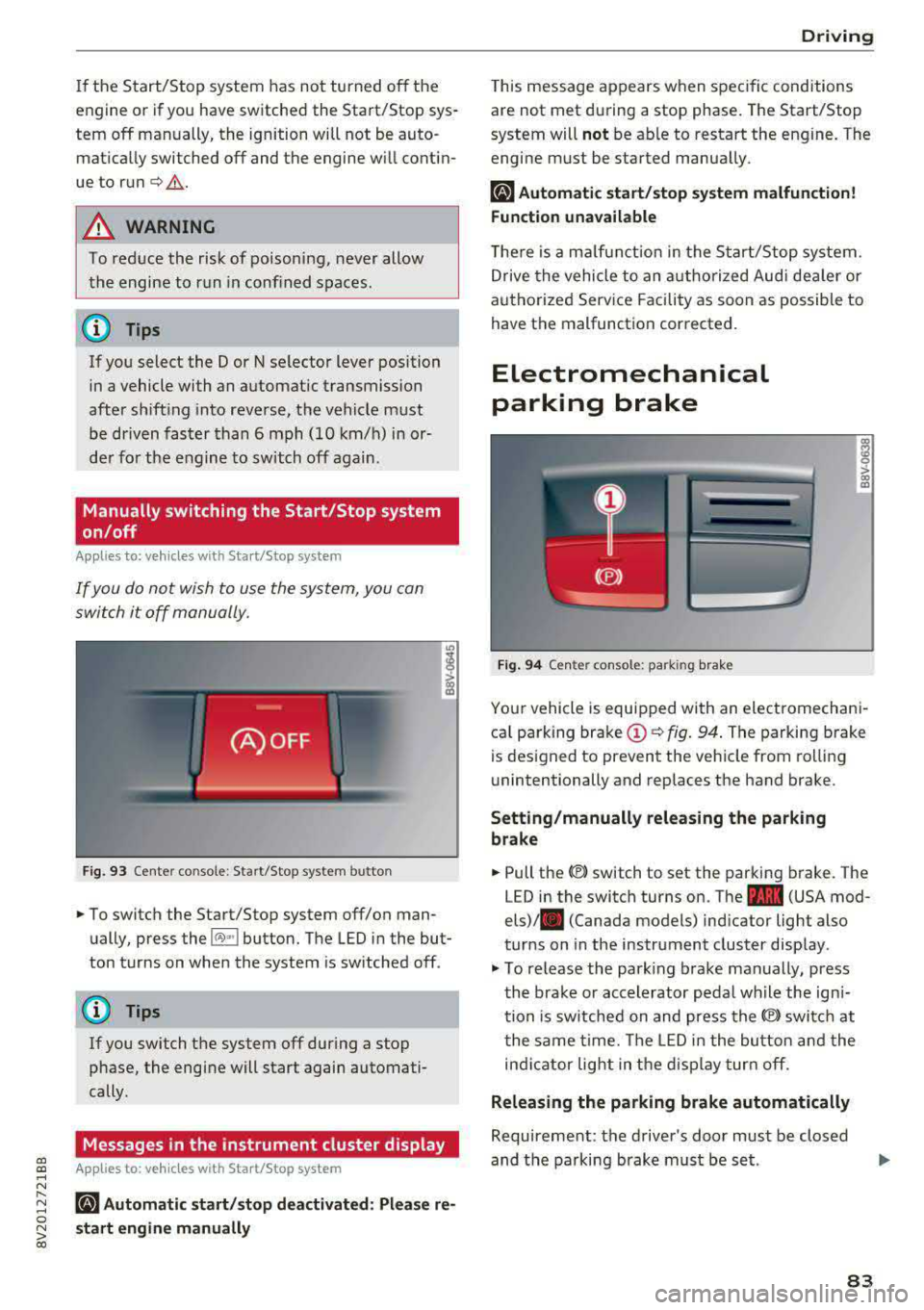
F ig . 94 Cen ter console : park ing bra ke
ra 0 > co m
Yo ur vehicle is equipped with an electromechani
ca l parking brake
(D c:> fig. 94 . The parking brake
is des igned to prevent the veh icle from rol lin g
unintentionally and replaces the hand brake.
Setting /manually releasing the parking
brake
"' Pull the(®) switch to set the parking b rake. The
LED in the switch turns on. The
-(USA mod
els)/ . (Canada models) ind icator light also
turns on in the instrument cluster disp lay .
"'To re lease the park ing brake man ually, press
th e bra ke or accelerator peda l wh ile the ign i
tion is sw itched on and press the
(®) switc h at
t he same time. The LED i n the bu tton and the
in di cator light in the d isp lay turn off.
Releasing the parking brake automatically
Requireme nt: the driver's door must be closed
and the parking brake must be s et.
83
Page 88 of 400
Driving
transmissions and allow the vehicle to accelerate
without a noticeab le interruption in traction .
Selector lever positions
Appl ies to: ve hicles w ith a uto mat ic t ra n sm issio ns
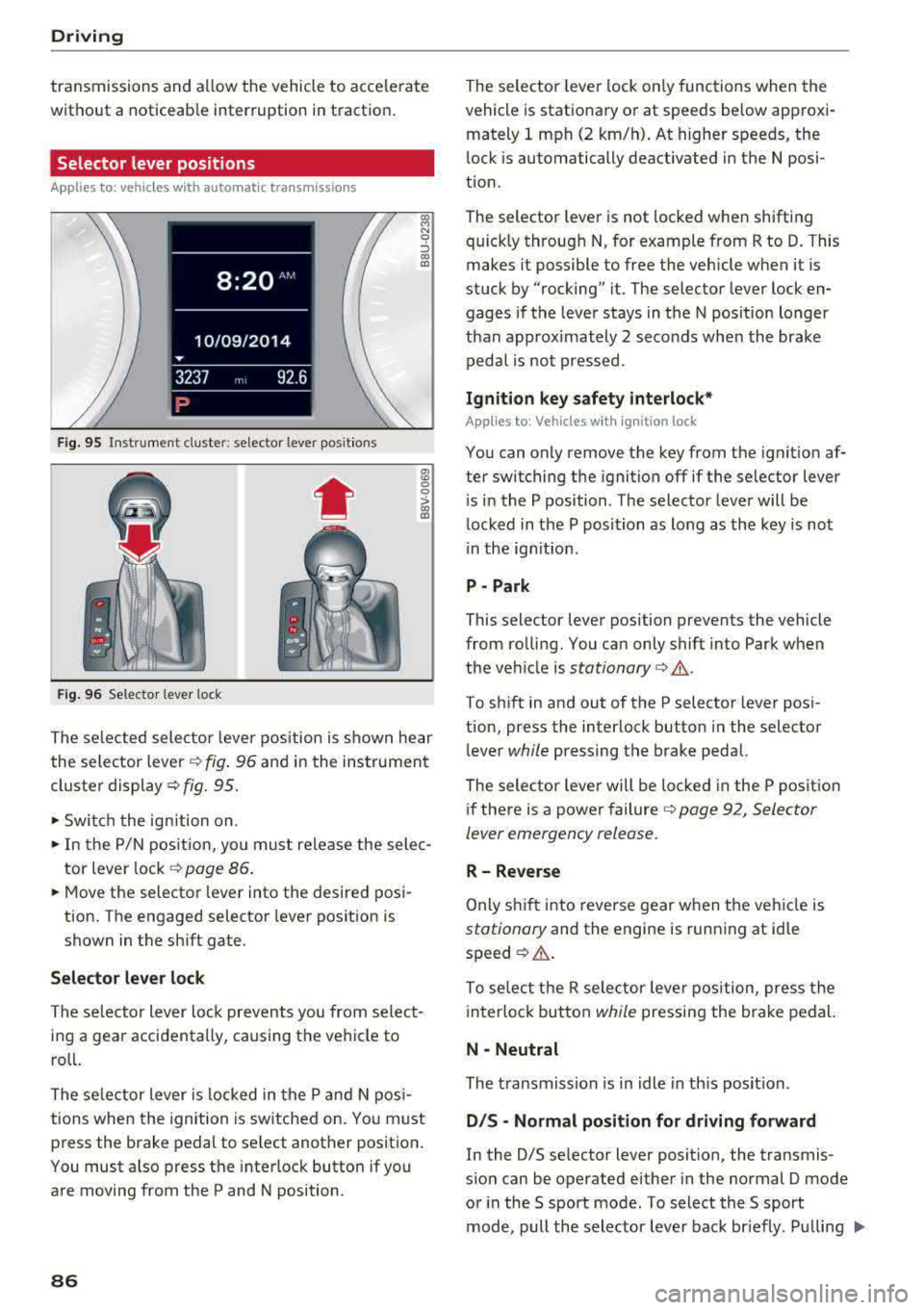
F ig. 95 Instrument cluster : selector lever posit ions
•
F ig. 96 Selector lever lock
OJ M N 0
:J OJ OJ
The se lected selector leve r pos ition is shown hear
the selector lever ¢
fig. 96 and in the instrument
cluster display ¢
fig. 95.
• Switch the ign ition on.
• In the P/N pos it ion, yo u m ust release the selec
tor lever lock ¢
page 86 .
• Move the selector lever into the desired pos i
tion. The engaged selector lever pos ition is
shown in the shift gate .
Selector lever lock
The selector lever lock prevents you from se lect
ing a gea r accidenta lly, causing t he vehicle to
ro ll.
The se lector lever is locked in the P and N pos i
tions whe n the ignition is sw itched o n. You must
press the brake pedal to se lect another position .
You must a lso press the inte rloc k button if you
are moving from the P and N position .
86
The selector leve r lock on ly functions when the
vehicle is stationary or at speeds be low approxi
mately 1 mph (2 km/ h). At higher speeds, the
l ock is automatically deactivated in the N posi
tion.
The selector leve r is not locked when shifting
quick ly throug h N, fo r example from R to D. This
makes it possible to free the vehicle when it is
stuck by "rocking" it. The selector lever lock en
gages if the leve r stays in the N pos ition longer
t h an approximately 2 seconds when the brake
pedal is not pressed .
Ignition key safety interlock*
App lies to: Vehicles w it h i gnit ion lock
You can only remove the key from the ignition af
ter switching t he ignition
off if the selector lever
i s in the P position. The selector lever will be
locked in the P position as long as the key is not
i n the ig nition .
P -Park
This selector lever position prevents the vehicle
from ro lling. You ca n only shift into Park w hen
the ve hicle is
stationary ¢,&. .
To sh ift in and out of the P selecto r lever posi
t ion, press the interlock button in the selector
l ever
while pressing the brake peda l.
The selector lever will be locked in the P pos ition
i f there is a power failure ¢
page 92, Selector
lever emergency release.
R- Reverse
Only s hift into reverse gear w hen the ve hicle is
stationary and the engine is running at idle
speed ¢,& .
To se lect t he R sele ctor leve r position, press the
interloc k but ton
while pressing the brake pedal.
N - Neutral
The tra nsmission is in idle in th is posi tion.
D /S -Normal position for driving forward
In the 0/5 se lector lever position, the transmis
sion can be operated either in the normal D mode
or in the 5 sport mode. To select the 5 sport
mode, pull the selector lever back br ie fly. P ulling
..,.
Page 89 of 400
CXl CXl .... N ,.__
N .... 0 N > 00
the lever back again will select the norma l D
mode. The instrument cluster display shows the
selected driv ing mode.
I n the
no rmal mode D, the transmission a uto
matica lly selects the suitab le gear ratio .
It de
pends on engine load, vehicle speed and driving
style.
The engine 's power reserves are used fully in the
Sport mode S . Shifting may become noticeab le
when accelerating .
To move from selector lever position N to D, yo u
must press the bra ke pedal and the veh icle mus t
be traveling less than 1 mph (2 km/h) or be sta
tionary ¢.&, .
A WARNING
Read and follow all WARNINGS.
-The vehicle can roll even if the ignition is
switched off.
-Never select R or P while driv ing, beca use
this increases the risk of an accident.
-Power is st ill transmitted to the wheels
when the eng ine is r unning at idle . To pre
vent the vehicle from "creeping", you must
keep your foot on the brake in all selector
lever positions (except P) when the engine is
running . Otherwise, th is increases the r isk
of an accident .
-Do not inadvertent ly press the acce lerator
peda l when the veh icle is stopped if a gear is
engaged . Otherwise the veh icle wi ll start to
move immediately, even i f the pa rking brake
is se t. T his cou ld res ult in a crash.
-Do not p ress the accelerator pedal when
changing the s elector leve r pos ition w hile
the vehicle is stationa ry and the engine is
running.
-Never leave yo ur vehicle with the engine
running wh ile in gear. If yo u m ust leave
yo ur vehicle when the engine is runn ing, set
the parking brake and move the selecto r lev
er to the P position.
- T o decrease the risk of an accident, t hese
lector lever must be in the P position and
the parking brake must be set before open ing the hood and wo rking on a running en-
D riv ing
gine . A lways read and follow the app licab le
warn ings
¢ page 316, Working in the en
gine compartment.
-Read and fo llowing a ll WARNINGS c> .&. in
Driving tips on page 88 .
(D Tips
-Audi drive select: Sporty shifting character
istics can be selected using the
Dynam ic
dr iving mode c> page 143 Sw ill appear in
the instrument cluster display instead of D.
-If you accidentally select N wh ile driving,
take your foot off the accelerator peda l im
mediately and wait for the eng ine to slow
dow n to idle before selecting Dor S.
-If the selector leve r does not engage, there
is a malfunct ion. The engine is disabled to
prevent the veh icle from drivi ng off unin
tentionally. To allow t he selecto r lever to
engage again, proceed as follows:
- >Briefly press the brake pedal.
-If the vehicle does not move forward or in
reverse even tho ugh a drive posit io n is se
lected, proceed as follows:
->If the vehicle does not move in the desired
direction, the system may not have engaged
the drive position correctly. Press the bra ke
peda l and select the dr ive position again.
- >If the vehicle still does not move in the de
sired d irection, there is a system malfunc
tion. See an autho riz ed Aud i dealer o r au
tho rized Audi Service Fac ility for assistan ce
t o have the system checked .
- If there is a powe r fail ure, the se lector lever
w ill not move ou t of the P posi tion. The
emergency re lease can be used if this hap
pens
¢ page 92.
(D Tips
P lug-i n hy brid drive *: the transm iss ion
swi tches automatically to the norma l mode D
if the
l""'I button¢ page 100 is p ressed wh ile
i n sport mode S.
87
Page 98 of 400
e-tron
for the high-voltage battery can lead to serious damage and/or a decrease of the capacity
void coverage under the New Vehicle Limited
Warranty.
Starting/driving the vehicle
Applies to: ve hicles w ith plug -in hybrid drive
The vehicle is started and stopped with the
I START STOP I button. Please also read the in
formation under
c::> page 78, Starting the engine .
Establishing drive ready mode
See c::> A in Introduction on page 94.
Requirement: a charging cable must not be con
nected to the vehicle
c::> page 117 and the selec
tor lever must be in the P or N position.
- Press the brake pedal.
- Press the
I STAR T STOPI button .
When the vehicle enters drive ready mode, the
status message
e-tron READY appears briefly in
the instrument cluster display and the needle in
the power meter points to
READY c::> page 97.
Driving
The vehicle starts with the electric motor after
establishing the dr ive ready mode and if the con
ditions for electric drive mode have been met
c::> page 100.
The conditions to drive are essentially the same
as for the automatic transmission
c::> page 85 .
You and your passengers should anticipate the
possibility of a sporty acce leration.
Ending drive ready mode
- Place the selector lever in the P position.
- Switch the ignition off with the
I STAR T STOPI
button.
Vehicle sound
The vehicle generates an electronic engine sound
so that your vehicle can be heard from the out
side when in electr ic drive mode. The veh icle
sound automatically fades out at higher speeds
when the sounds from the tires and wind start in
creasing.
96
Switching the ignition on/off
You can switch the ignition on without establish
ing drive ready mode.
- Press the
I START STOP ! button to switch the
ign ition on and off. Do not press the brake ped
al whi le doing this.
When the ignition is sw itched on, the needle
points at
OFF @c::>page 97, fig. 103 or OFF is
displayed @c::>page97, fig .103.
No indicator lights stay turned on when the igni
tion is switched off .
Ignition is switched off automatically
To prevent the vehicle battery from draining, the
ignition will switch off automatically under the
follow ing cond it ions:
- The vehicle must have already been driven.
- The vehicle is stationary.
- The gasoline engine must not be runn ing .
- The driver's door must be open.
- The driver's safety belt must be unbuckled .
- The brake pedal must not be pressed.
In this case, the activated low beam is replaced
by the parking light. The message
Side marker
lights automatically shut off in
30 minutes. See
owner's manual
appears in the instrument clus
ter display . The parking lights w ill switch off af
ter approx imately 30 minutes or when you lock
the veh icle.
If the gasoline engine was not stopped, the mo
tor continues runn ing and the ignit ion does not
automat ica lly switch off
c::> A .
A WARNING
To reduce the risk of poisoning, never allow
the eng ine to run in confined spaces.
(D Tips
The vehicle cannot start when outs ide tem
peratures are below-18 °F (-28 °C)
c::> page 98.
-
Page 128 of 400
Assistance systems
(D Tips
-A maximum of 30 lap times (ana log instru
ment cluster) or 99 lap t imes (Audi virtual
cockpit*) can be measured.
- If timing is paused, you can continue it later
even if you switch the ignition off.
- Saved lap times cannot be individually de
l eted from the total resu lts.
- The saved lap timer values will remain after
switching the ignition off .
Lap statistics
Applies to: vehicles with lap timer
Display ing lap statistics
You can d isplay the number of laps driven, the
fastest lap" +", the s lowest lap" -", and the aver
age time
"0" in the instrument cluster.
~ Applies to: vehicles with analog instrument
cluster: select
Statistics in the menu using the
multifunction steering wheel.
~ Applies to: vehicles with Audi virtual cockpit: on
the multifunction steering wheel, select: left
control button
> Lap statistics or Statistics .
~ Turn the thumbwheel down or up to display the
individual lap times.
~ To retur n to the lap t iming that was begun,
press the left thumbwheel.
Resetting lap statistics
Applies to: vehicles with Audi virtual cockpit
~ On the multifunction steer ing wheel, select:
the right control button
> Reset statistics.
(D Tips
- The lap statistics list the lap times for the
last 30 laps.
-Applies to: vehicles with Audi virtual cock
pit: the fastest and slowest lap times from
up to 99 timed laps will be disp layed.
126
Audi adaptive cruise
control
Description
Applies to: vehicles with Audi adaptive cruise control
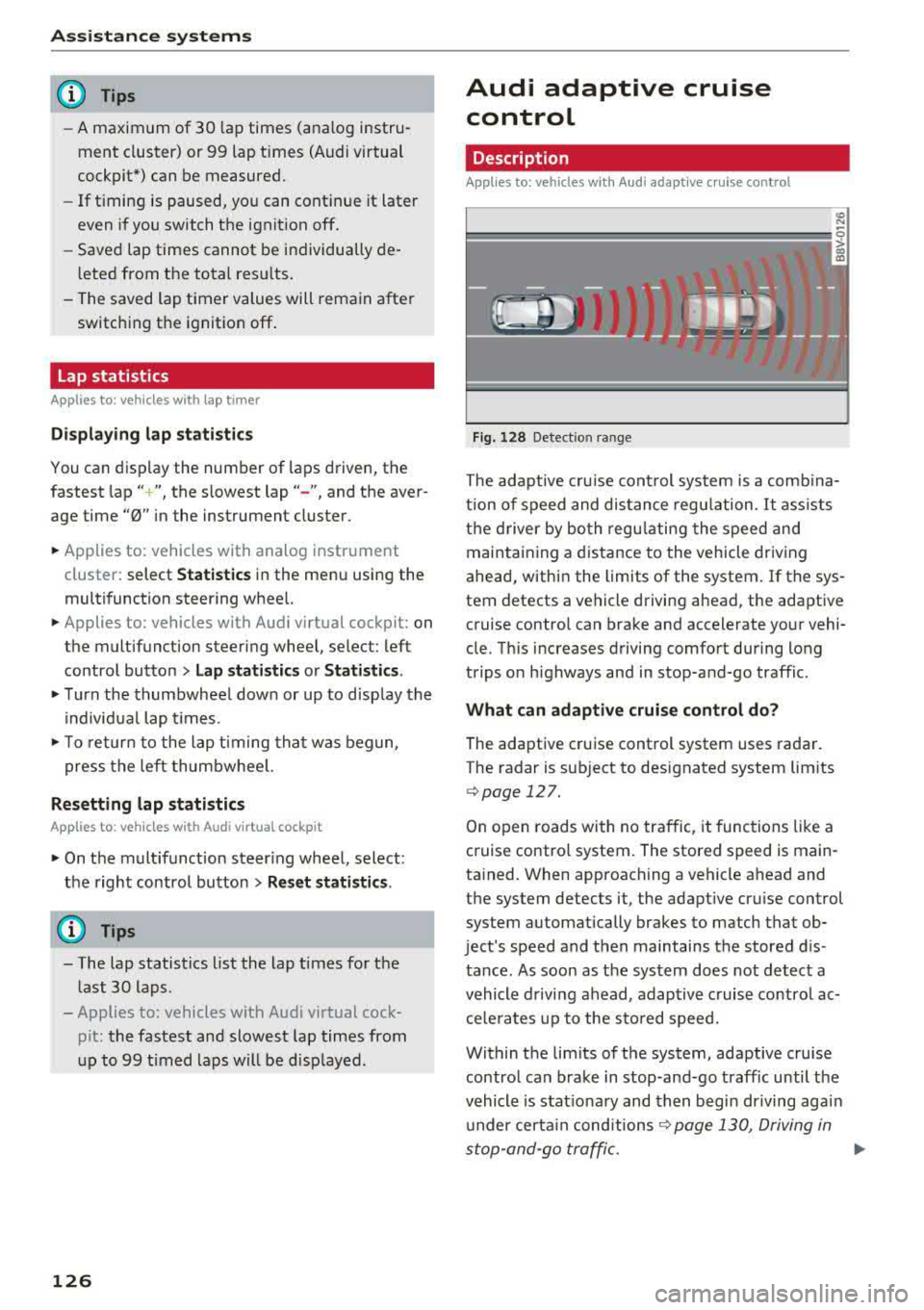
Fig. 128 Detect ion range
> (0 (0
The adaptive cru ise control system is a comb ina
tion of speed and dis tance regu lation.
It ass ists
the d river by both regulating the speed and
maintaining a distance to the vehicle driving
ahead, within the limits of the system. If the sys
tem detects a vehicle driving ahead, the adaptive
cruise contro l can brake and accelerate your vehi
cle. Th is increases driving comfort during long
trips on highways and in stop-and-go traffic.
What can adaptive cruise control do?
The adaptive cruise control system uses radar.
The radar is sub ject to designated system lim its
q poge 127.
On open roads with no traffic, it functions like a
cruise contro l system. The stored speed is main
tained. When approaching a vehicle ahead and
the system detects it, the adapt ive cru ise control
system automatically brakes to match that ob
ject's speed and then maintains the stored dis
tance. As soon as the system does not detect a
vehicle driving ahead, adaptive cruise contro l ac
celerates up to the stored speed.
Within the limits of the system, adaptive cruise control can brake in stop-and-go traffic until the
vehicle is stat ionary and then begin driving agai n
under certain
conditions ~ page 130, Driving in
stop-and-go traffic.
ll>
Page 131 of 400
a, a, ..... N
" N ..... 0 N > 00
The stored speed in the LED line is erased.
@ Indicator lights
It -Adaptive cruise control is switched on. No
vehicles are detected ahead. The stored speed is
maintained .
B-A vehicle driving ahead was detected. The
adaptive cruise control system regulates the
speed and distance to the vehicle ahead and
brakes/accelerates automatically.
r51 -Adaptive cruise control is switched on. Ave
hicle was detected ahead. Your vehicle remains
stopped and will not start driv ing automat ically.
•-The automatic braking is not enough to
maintain a sufficient distance to a veh icle driving
ahead. You must intervene
c::> page 132, Driver
intervention request.
@ Instrument cluster display
I f adaptive cruise control is not shown in the in
strument cluster display, yo u can call it up using
the mu ltifunction steering wheel buttons
c::> page 13.
Based on the g raphics in the disp lay, you can de
termine if the system is maintaining a distance to
a vehicle ahead and what that distance to th is ve
hicle is:
No vehicle -no vehicle was detected driving
ahead.
Silver vehicle -a veh icle was detec ted dr iv in g
ahead .
Red vehicle -request for driver intervention
<=:>page 132 .
The five distance bars on the gauge © represent
the set d istance (refer to
c::> page 131 for infor
mat ion on how to change the distance) .
If you
fal l below the selected distance, the distance
bars become red from the bottom upward.
A WARNING
If you press the !SETI button when driving at
speeds below 20 mph (30 km/h), the vehicle
accelerates automatically up to 20 mph (30
Assistance systems
km/h), which is the minimum speed that can
be set.
(D Tips
-If you switch the ignition or the adaptive
cruise control system off, the set speed is
erased for safety reasons .
-The e lectronic stabilization control (ESC)
and the anti-slip -regulation (ASR) are auto
matically switched on when the adaptive
cruise control is switched on.
Changing the speed
Applies to: vehicles with Audi adaptive cruise control
0
f
J
0
Fig. 134 Operat ing lever: changing the speed
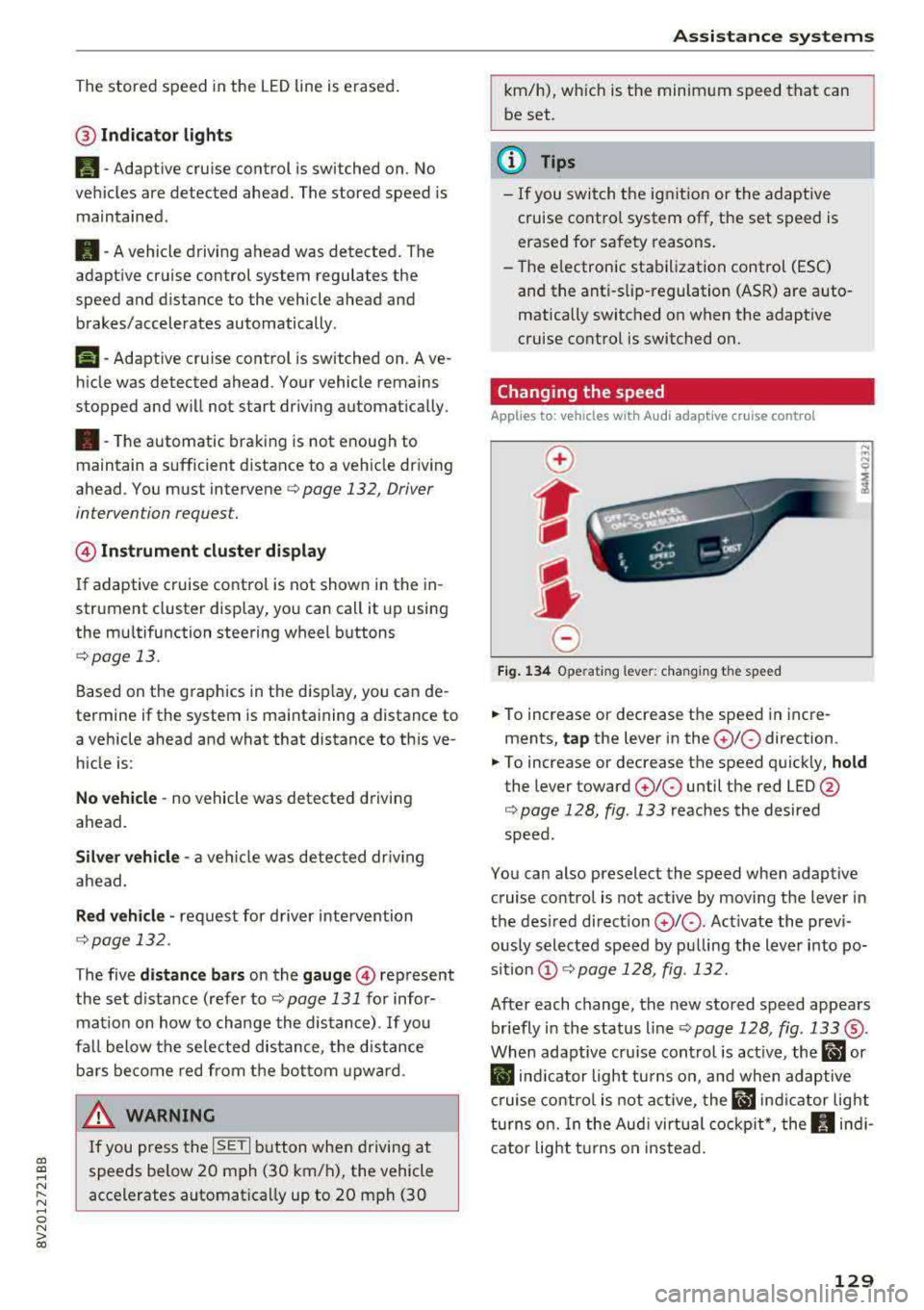
.. To increase or decrease the speed in incre
ments,
tap the lever in the 0 10 direction .
.. To increase or decrease the speed quickly, hold
the lever toward 010 until the red LED @
c::> page 128, fig. 133 reaches the desired
speed.
You can also preselect the speed when adaptive cruise control is not active by moving the lever in
the desired direction
0 10 . Act ivate the previ
ously selected speed by pulling the lever into po
s ition
@ c::> page 128, fig . 132.
After each change, the new stored speed appears
briefly in the status line
c::> page 128, fig. 133 ®·
When adaptive cru ise control is active, the ill or
• indicator light turns on, and when adaptive
cruise control is not active, the
ill ind icator light
turns on. In the Audi virtual cockpit*, the
II indi
cator light t urns on instead.
129
Page 138 of 400
Assistance systems
by this. Have an authorized Audi dealer or au
thorized Audi Service Facility check their func
tion.
(D Tips
- You can cancel the braking with increasing
force that is initiated by the system by brak
ing yourself, by accelerating noticeably or
by swerving.
- Certain pre sense front functions switch off
when ESC is switched off (sport mode) or
when driving in reverse.
- If you restrict or switch off the ESC, the pre
sense also switches itself off ¢
page 152.
Settings in the Infotainment system
Applies to: vehicles with Audi pre sense front/Audi adaptive
cruise control
~ Select in the Infotainment system: I MENU I but
ton
> Vehicle > left control button > Driver as
sistance
> Audi pre sense.
System -
the pre sense functions can be switched
on/off.
If the system is switched off, it switches on again
automatically once the ignition is switched on
again.
Prewarning -the early warning can be switched
off permanently or the pre sense front warning
point can be set
(Early/Medium/Late).
Messages
Applies to: vehicles with Audi pre sense
IIJ Audi pre sense: malfunction! Please contact
Service
This message appears when the pre sense func
tion is affected. For example, this could be
caused by a faulty sensor. If the message stays
on, drive immediately to an authorized Audi deal
er or authorized Audi Service Facility to have the
malfunction corrected.
IIJ Audi pre sense currently restricted. Restrict
ed sensor vision due to surroundings.
This message appears if the sensor view is ob
structed, for example by leaves, snow, heavy
136
spray or dirt. Clean the sensor if necessary
¢page 127, fig. 129.
II] Audi pre sense: currently restricted
This message appears if the ESC is restricted or
switched off, for example .
II] Audi pre sense: currently restricted. See
owner's manual
This message appears when there is a temporary
failure in a subsystem, such as the ESC. If this
message appears repeatedly, drive to an author
ized Audi dealer or authorized Audi Service Facili
ty to have the malfunction corrected .
fl] Audi pre sense: emergency braking system
off
This message appears if the pre sense functions
are switched off through the Infotainment sys
tem or if the system is not ready.
Audi active lane assist
Description
Applies to: vehicles with Audi active lane assist
Active lane assist (lane departure warning) de
tects lane marker lines within the limits of the
system using a camera in the windshield. If you
are approaching a detected lane marker line and
it appears likely that you will leave the lane, the
system will warn you with corrective steering.
You can override this steering at any time. If you pass over a line, the steering wheel will vibrate
lightly. In order for this warning vibration to oc
cur, it must first be switched on in the Infotain
ment system. Active lane assist is ready for oper
ation when the lane marker line is detected on at
least one side of the vehicle.
The system is designed for driving on express
ways and highways and therefore only activates
at speeds above approximately 40 mph (65 km/
h).
Applies to: vehicles with Audi side assist
If you activate a turn signal when active lane as
sist is ready and it classifies a lane change as crit
ical because of vehicles traveling alongside you or
approaching you, there will be noticeable
.,.