ECU AUDI S3 SEDAN 2017 Repair Manual
[x] Cancel search | Manufacturer: AUDI, Model Year: 2017, Model line: S3 SEDAN, Model: AUDI S3 SEDAN 2017Pages: 400, PDF Size: 67.32 MB
Page 356 of 400
Emergency assistance
• To open the side pane l, turn the lock and re
move the
cover @*/ @ ¢ fig. 283.
• Lift the cargo floor using the plastic handle @
un til the cargo floor engages behind the tabs
© in both side panels¢ fig. 284 (upper im
age) .
• Fold the cargo floor back before closing the
luggage compartment lid.
Vehicle tool kit and cargo floor cover
App lies to: ve hicles w ith versio n 2
The vehicle too l kit, tire mobility kit* and com
pressor* are stored in the luggage compartment
under the cargo floor
cover @¢ fig. 283 .
• Engage the plastic hook® in the luggage com
partment
seal ¢ fig. 284.
• Fold the cargo floor back before closing the
luggage compartment lid .
.&_ WARNING
Improper use of the vehicle jack can cause se
r ious personal injuries.
- Never use the screw driver hex head to
tighten wheel bolts, since the bolts cannot
attain the necessary tightening torque if you
use the hex head, potentially causing an ac
cident.
- T he factory-supplied jack is intended only
for your vehicle model. Under no circum
stances should it be used to lift heavy
vehicles or other loads; you risk injuring
yourself.
- Never start the engine when the vehicle is
raised, which could cause an accident.
- Support the vehicle securely with appropri
ate stands if work is to be performed under
neath the vehicle; otherwise, there is a po
tent ial risk for injury.
- Never use the jack supplied with your Audi
on another vehicle, particularly on a heavier
one. The jack is only suitable for use on the
vehicle it came w ith.
@ Tips
The vehicle jack* in your vehicle is mainte
nance-free.
354
Tire mobility kit
Preparation
App lies to: vehicles with tire mobility kit
• Read and fo llow the important safety precau-
tions
in ¢ page 353.
• Set the parking brake.
• Move the selector lever into the P position.
• Check if a repair with the tire mobility kit is pos
sible
¢ page 354.
Using the tire mobility kit
Applies to: vehicles wit h tire mobility kit
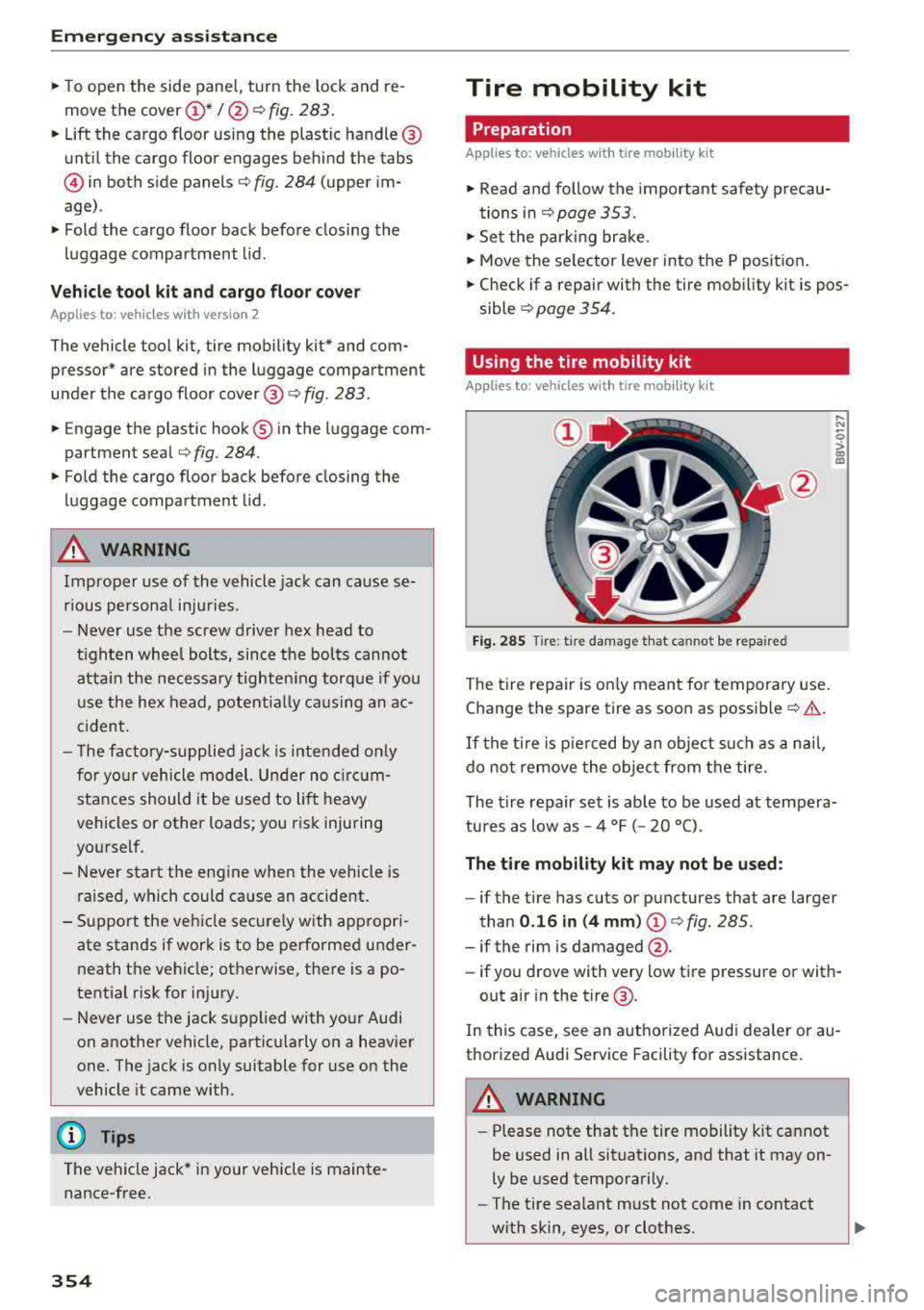
Fig. 285
Tire: t ir e damage that cannot be repaired
The tire repair is only meant for temporary use .
Change the spare tire as soon as possible
c:;> .&..
If the tire is pierced by an object such as a nail ,
do not remove the object from the tire.
..... N
0
> 00 m
The tire repair set is able to be used at tempera
tures as low as -4 °F ( -20 °C).
The tire mobility kit may not be used :
-if the tire has cuts or punctures that are larger
than
0.16 in (4 mm) (!)¢ fig. 285.
-if the rim is damaged @.
- if you drove with very low tire pressure or with-
out air in the tire @.
In this case, see an authorized Aud i dea ler or au
thorized Audi Service Facility for assistance.
~ WARNING
-Please note that the tire mobility kit cannot
be used in all situations, and that it may on
ly be used temporarily.
-The tire sealant must not come in contact
with skin, eyes, or clothes.
Page 362 of 400
Emerg ency assis ta nce
-To help prevent injury to yourself and your
passengers:
-Do not ra ise the vehicle until you are sure
the jack is secure ly engaged.
-Passengers must not remain in the vehicle
when it is jacked up.
-Make sure that passengers wait in a safe
place away from the vehicle and well away
from the road and traffic.
-Make sure jack posit ion is correct, adjust
as necessary and then cont inue to raise
the jack.
CD Note
Do not lift the vehicle by the sill. Position the
veh icle jack only at the designated lifting
points on the sill. Otherwise, your vehicle will
be damaged.
Taking the wheel off /installing the spare
Follow these instructions step-by-step for chang
ing the wheel .
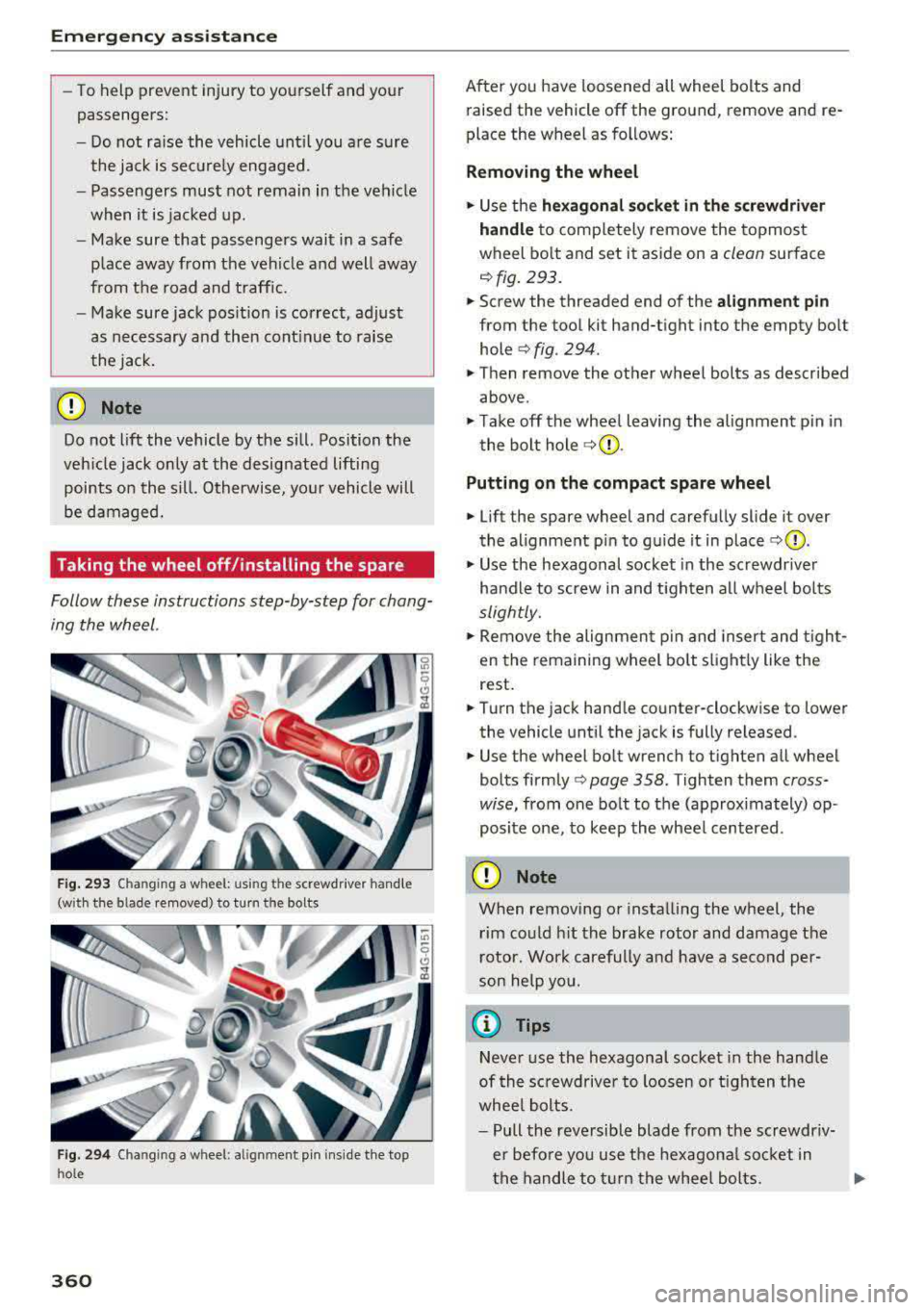
Fig . 293 Changing a wheel: using the screwdr iver hand le
(with the blade removed) to turn the bolts
Fig. 29 4 Changing a wheel: alignm ent pin ins ide the top
ho le
360
After you have loosened all wheel bolts and
raised the vehicle off the ground, remove and re
place the wheel as follows:
Removing the wheel
.. Use the he xago nal socket in th e screwdriver
handle
to comp letely remove the topmost
wheel bo lt and set it aside on a
clean surface
<=> fig. 293.
.. Screw the threaded end of the alig nm ent pi n
from the tool kit hand-tight into the empty bolt
hole
<=> fig. 294.
.. Then remove the other wheel bolts as described
above .
.. Take off the whee l leaving the alignment p in in
the bolt hole
<=> (j) .
Putting on the c omp act spare wheel
.. Lift the spare wheel and carefully slide it over
the alignment p in to gu ide it in place
<=>(j) .
.. Use the hexagonal socket in the screwdr iver
handle to screw in and t igh ten all wheel bolts
slightly.
.. Remove the alignmen t pin and insert and t igh t
en the remaining wheel bolt s light ly like the
rest .
.. Turn the jack hand le counter-clockwise to lower
the vehicle until the jack is fully released .
.. Use the wheel bolt wrench to tighten all wheel
bolts
firmly <=> page 358. Tighten them cross
wise,
from one bolt to the (approximately) op
posite one, to keep the wheel centered.
CD Note
When removing o r insta lling the wheel, the
rim could h it the brake rotor and damage the
r otor. Wor k carefully and have a second per
son he lp yo u.
{!) Tips
Neve r use the hexagonal socket in the handle
of th e sc rewdriver to loos en o r tigh ten the
whee l bolts.
-Pull the reve rsible blade from the screwdr iv
er befo re you use the hexagona l socket in
the handle to turn the whee l bolts.
Page 363 of 400
CXl CXl .... N ,.__
N .... 0 N > 00
-When mountin g tires w ith unidirectional
tread design
ma ke sure the t read pattern is
p oin ted the r ight way ¢
page 36 1.
-The wheel bolts should be clean and easy to
turn. C heck for d irt a nd cor rosion on the
ma ting surfaces o f both the wheel an d the
hub. Remove all dirt from t hese surfaces be
fo re remo unt ing the wheel.
Tires with unidirectional tread design
Tires with unidirectional tread design must be
mounted with their tread pattern pointed in the
right direction.
Using a spare t ire with a tread pattern
intended for use in a specific direction
W hen using a spa re t ire with a tread patte rn in
tended fo r use in a specific direction, please note
the following:
-The direct ion of rotat ion is ma rked by an a rrow
on the side of the tire .
-If the spare tire has to be installed in the incor
rect d irection, use the spare tire only tempora
ri ly s ince the tire w ill not be ab le to achieve its
opt imum p erformance c harac ter istics wi th re
gard to aquaplaning, noise and wea r.
-We recommend t hat you pay particular atten
t io n t o this fac t during we t weat her and that
yo u adju st yo ur speed to match road condi
ti ons.
-Rep lace the flat t ire with a new one and have it
insta lled on yo ur ve hicl e as soon as possibl e to
r es to re th e hand li n g adva ntages of a unid irec
tional t ire.
Notes on changing tires
Please read the info rmation I:!> page 3 35 if you
are go ing to use a spare tire which is different
from the tires on your veh icle.
Af te r yo u c hange a tire:
-Check the tire pressure on the spare immedi
ately after in stallation .
-Have the wheel bolt tightening torque
checked with a torque wrench as soon as pos -
Emergency assistance
sible by your authorized Audi dealer or a
qualified service station.
-With steel and alloy wheel rims, the wheel bolts are correctly tightened at a torque of
90 ft lb (120 Nm).
-If you notice that the wheel bolts are corroded
and difficult to turn while changing a tire ,
they should be replaced before you check the
tightening torque.
-Replace the flat tire with a new one and have
it installed on your vehicle as soon as possi ·
ble. Remount the wheel cover .
Until then , dr ive with extra care and at reduced
speeds.
_& WARNING
-I f you are going to equip yo ur vehicle with
tires or r ims which differ from those w hich
were factory installed, the n be sure to read
th e information
¢ pag e 335.
-Always make sure the damaged wheel or
e ven a flat tire a nd the jack and tool kit are
p rop erly secur ed in t he lu ggag e compart
m en t an d are not l oose in th e p asseng er
compa rtme nt.
-In an accide nt or sudde n man euv er th ey
could fly forward, injuri ng a nyo ne in the ve
hicl e.
-Always s tor e damag ed w heel, jack and t ools
securely i n the lu ggage compa rtm ent. Ot h
erwise, in an accid ent or sud den m aneuve r
t he y c ould fl y forwar d, ca using injury to pas
sen gers in the ve hicle.
-
361
Page 365 of 400
a, a, ..... N
" N ..... 0 N > 00
Removing the subwoofer
• Lift up the cargo floor ¢ page 362, fig. 295.
• Press the connector tabs CD¢ fig. 297 togeth
er.
• Remove the connector @and set the discon-
nected cab le aside.
• Remove the bolt@.
• Carefully remove the subwoofer .
Installing the subwoofer
• Carefully place the subwoofer in the rim wel l.
The word "FRONT" on the subwoofer must face
forward.
• Insert the connector that was removed .
• Secure the subwoofer with the bolt.
• Fold the cargo floor cover back into place .
@ Tips
The subwoofer can also be mounted when the
spare tire is not in the spare wheel wheel.
Removing the subwoofer (version 2)
App lies to: vehicles with subwoofer in the spare wheel well
The subwoofer must be removed before the
spore wheel* can be removed .
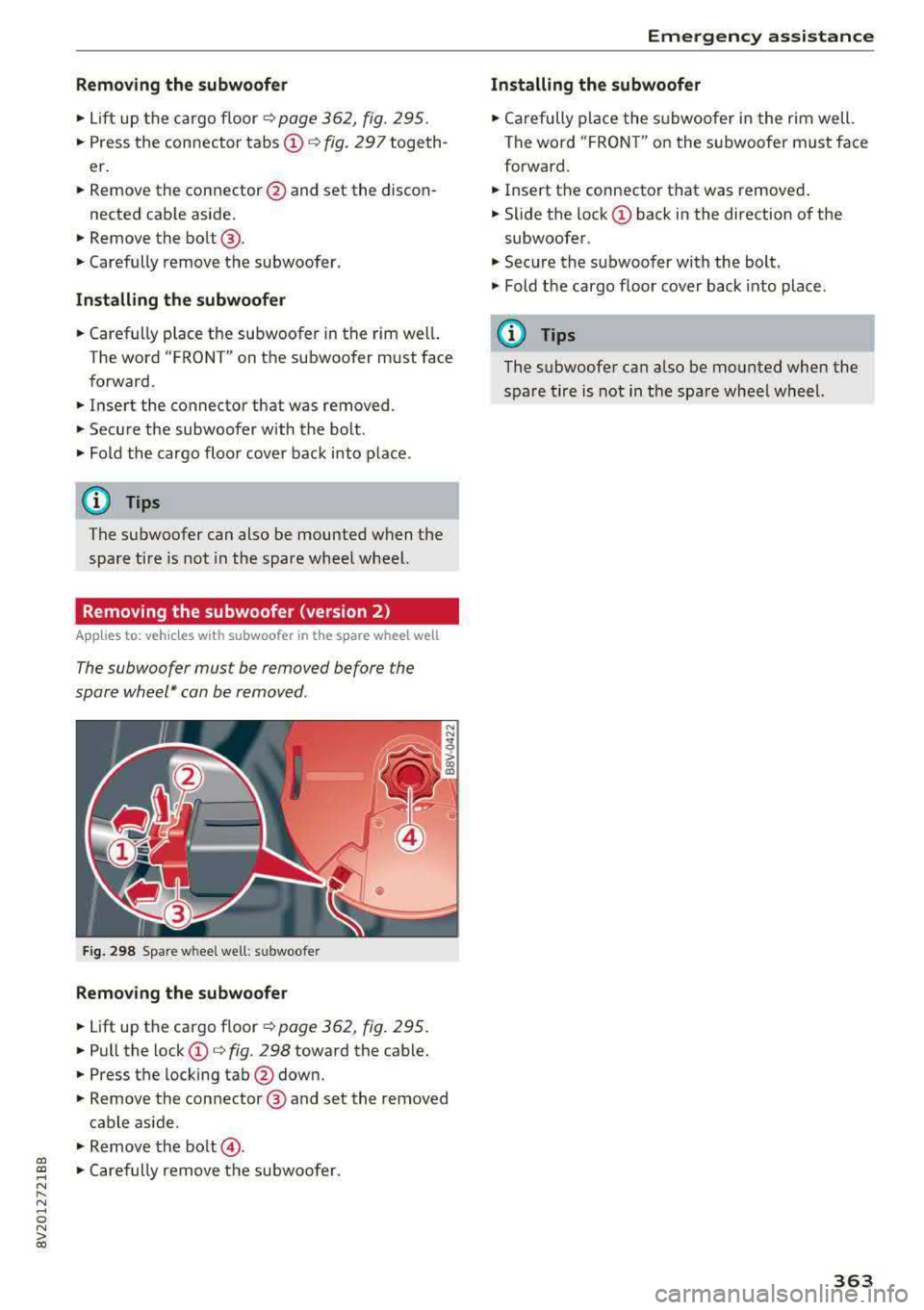
Fig. 298 Spare w heel well : su bwoofer
Removing the subwoofer
• Lift up the cargo floor ¢ page 362, fig . 295.
• Pull the lock CD¢ fig. 298 toward the cable.
• Press the locking tab@down.
• Remove the connector @ and set the removed
cable aside .
"' Remove the bolt@.
• Caref ully remove the subwoofer.
Emergency assistance
Installing the subwoofer
• Carefully place the subwoofer in the rim well.
The word "FRON T" on the subwoofer must face
forward.
• Insert the connector that was removed .
• Slide the lock CD back in the direction of the
subwoofer .
• Secure the subwoo fer with the bolt.
"' Fold the cargo floor cover back into place .
@ Tips
The subwoofer can also be mounted when the
spare tire is not in the spare wheel wheel.
363
Page 372 of 400
Emerg enc y s it uati ons
9. In the ve hicle that is being jump started,
switch the heater fan and rear window de
froster on to reduce any voltage peaks that
may occur when disconnecting the jumper
cables. The headlights must be switched off.
10. With the engines running, remove the cables
i n
reverse order of the way they were instal
l ed. Make sure the cables do not get caught
in mov ing engine components.
11. Sw itch the heater fan and rear w indow de-
froster off.
12. C lose the battery cover .
The battery is vented to the outside so that gases
do not enter the passenger compartment. Make
sure that the connected positive termina l clamps
on the jump start cab le have sufficient contact
with metal.
A WARNING
Follow the warnings and instructions from
the jump start cab le manufacturer to reduce
the risk of ser ious injuries and vehicle dam
age. If you are unsure about anything, call
roads ide ass istance.
- The jump start cables must be long enough
so that the veh icles do not touch.
-
- Route the jump start cables so they cannot
get caught in the moving parts in the engine
compartment.
- Always read and follow the warnings before check ing anything in the engine compart
ment
~page 316.
(D Note
Connecting jump start cables incorrectly can
damage the alternator .
- Always connect the positive terminal(+) to
the positive term inal(+) and the negative
term inal(-) to the negat ive terminal(-) on
the body ground po int, but not the negative
terminal on the battery.
- Make su re the screw plugs on the battery
cells are installed securely. If not, tighten
the plugs before connecting the clamps to
the negat ive termina l on the b attery.
- Please note t hat the connecting p rocess de
scribed below for the jump sta rt cab les is
in-
370 tended for when your vehicle is being jump
started. If you are jump starting another ve
hicle, do not connect the negat ive cab le to
the negative term inal (-) on the dra ined
battery, but rather connect it to a large
metal component that is bolted secure ly to
the engine block, or to the engine block it
self.
If the battery in the vehicle being jump
sta rted is not vented to the outside, there is
a risk of explosion due to hyd rogen gas.
- Make sure that the connected pos itive ter
minal clamps have suff icient contact with
metal.
- Do not use the battery negative terminal fo r
jump starting or a ma lfunction co uld occ ur
in the vehicle electrical system.
Towing with a tow truck
General tips
Your Audi requires special handling for towing.
The following information is to be used by com mercia l tow truck operators who know how to op
erate their equipment safely.
-Never tow your Audi. Towing will cau se dam
age to the engine and t ran smi ssi on.
- Nev er wrap the safet y ch ains or winch cables
aroun d the br ake lines .
- To pr event unne ce ssa ry damag e, your Audi
must be tran sported with a flat be d tru ck .
- To load th e vehicle on to the flat bed , use th e
towing l oop found in the vehicl e tool s and at
t a ch to the front or rear an chorage
.=;,page 371 and ~page 371.
A WARNING
A veh icle being towed is not safe for passen
gers. Never allow anyone to ride in a vehicle
being towed, fo r any reason.
Page 374 of 400
Emergency situations
Loading the vehicle onto a flat bed truck
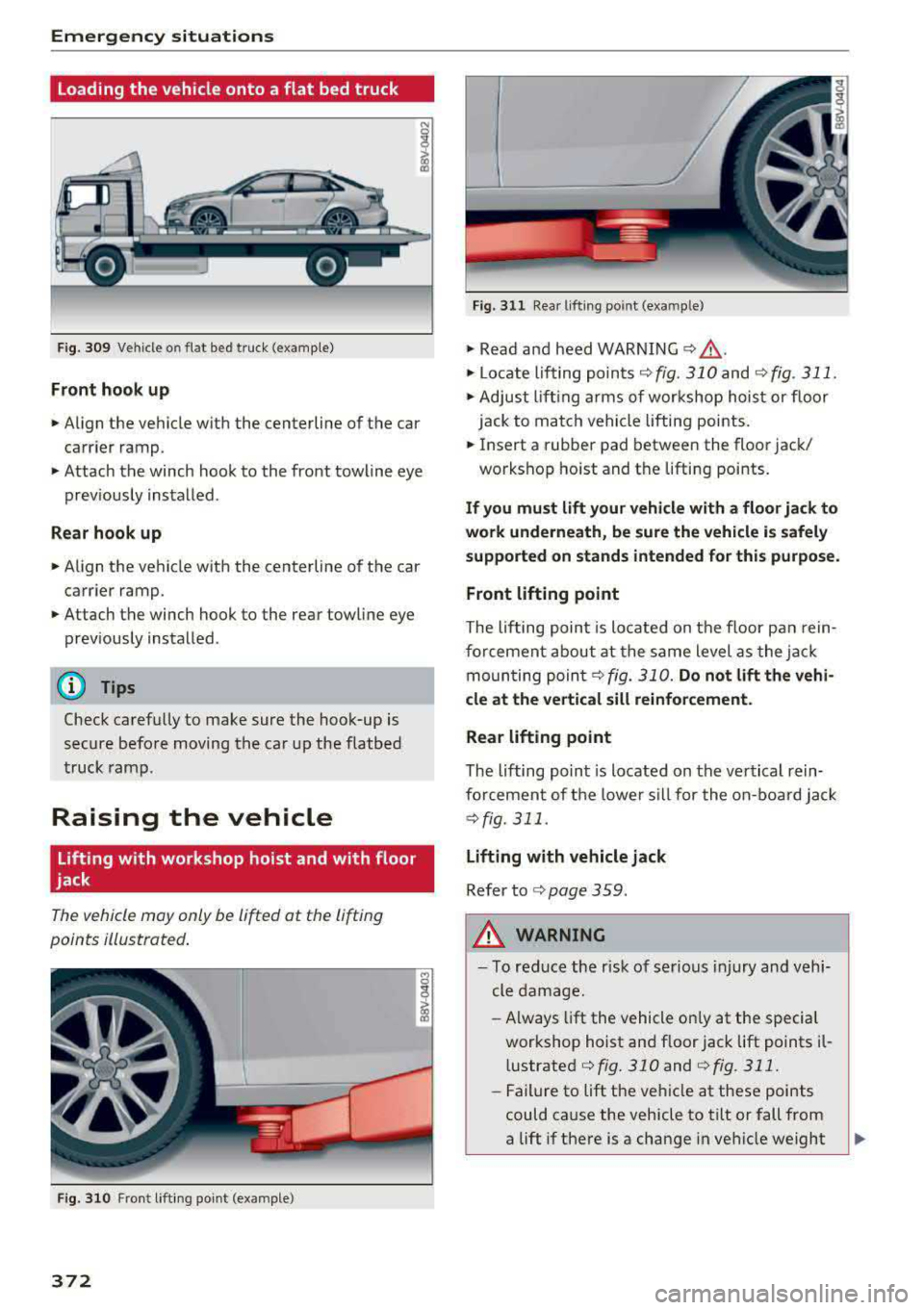
Fig. 309 Veh icle o n flat bed truck (example)
Front hook up
.. Align the vehicle with the centerline of the car
carrier ramp .
.. Attach the winch hook to the front towline eye
prev iously installed.
Rear hook up
.. Align the vehicle with the centerline of the car
carrier ramp .
.. Attach the winch hook to the rear towline eye
previously installed .
@ Tips
Check carefully to make sure the hook-up is
secure before moving the car up the flatbed
truck ramp.
Raising the vehicle
Lifting with workshop hoist and with floor
jack
The vehicle may only be lifted at the lifting
points illustrated.
Fig. 310 Front lifting point (example)
372
Fig. 311 Rear lifting point (exa mple )
.. Read and heed WARNING ¢&_ .
.. Locate lifting points <;!)fig. 310 and <;!) fig . 311.
.. Adjust lifting arms of workshop hoist or floor
jack to match vehicle lifting points .
.. Insert a rubber pad between the floor jack/
workshop hoist and the lifting points .
If you must lift your vehicle with a floor jack to
work underneath, be sure the vehicle is safely
supported on stands intended for this purpose .
Front lifting point
The lifting point is located on the floor pan rein
forcement about at the same level as the jack
moun ting poin t¢ fig.
310. Do not lift the vehi
cle at the vertical sill reinforcement.
Rear lifting point
The lifting point is located on the vertical rein
forcement of the lower sill for the on-board jack
¢fig. 311.
Lifting with vehicle jack
Refer to c> page 359.
,&. WARNING
-To reduce the r isk of serious injury and vehi
cle damage.
- Always lift the vehicle on ly at the special
workshop hoist and floor jack lift points il
l ustrated
c> fig. 310and c>fig. 311.
-Failure to lift the vehicle at these points
could cause the vehicle to tilt or fall from
a lift if there is a change in vehicle weight
Page 381 of 400
CXl CXl .... N ,.__
N .... 0 N > 00
today's automobiles, have steadily reduced the
scope of maintenance and repairs which can be
carried out by vehicle owners.
Also, safety and
environmental
concerns place very strict limits
on the nature of repairs and adjustments to en
gine and transmission parts which an owner can perform .
Maintenance, adjustments and repairs usually re
quire special tools, testing devices and other
equipment available to specially trained work
shop personnel in order to assure proper per
formance, reliability and safety of the vehicle and its many systems.
Improper maintenance, adjustments and repairs
can impair the operation and reliability of your
vehicle and even void your vehicle warranty .
Therefore, proof of servicing in accordance with
the maintenance schedule may be a condition for upholding a possible warranty claim made within
the warranty period.
Above all , operational safety can be adversely af
fected, creating unnecessary risks for you and
your passengers.
If in doubt about any servicing, have it done by
your authorized Audi dealer or any other properly equipped and qualified workshop. We strongly urge you to give your authorized Audi dealer the
opportunity to perform all scheduled mainte nance and necessary repairs. Your dealer has the
facilities, original parts and trained specialists to keep your vehicle running properly .
Performing limited maintenance yourself
The following pages describe a limited number of
procedures which can be performed on your vehi
cle with ordinary tools, should the need arise and
trained personnel be unavailable. Before per
forming any of these procedures, always thor
oughly read all of the applicable text and careful ly follow the instructions given . Always rigorously
observe the
WARNINGS provided .
Before you check anything in the engine com
partment, always read and heed all WARNINGS
c::> .&. and c::> page 316 .
Consumer information
A WARNING
-Serious personal injury may occur as a result
of improperly performed maintenance, ad
justments or repairs .
- Always be extremely careful when working
on the vehicle. Always follow commonly ac
cepted safety practices and general com mon sense. Never risk personal injury.
- Do not attempt any of the maintenance,
checks or repairs described on the following pages if you are not fully familiar with these
or other procedures with respect to the ve hicle, or are uncertain how to proceed.
- Do not do any work without the proper tools
and equipment. Have the necessary work
done by your authorized Audi dealer or an
other properly equipped and qualified work
shop.
- The engine compartment of any motor vehi cle is a potentially hazardous area. Never
reach into the area around or touch the radi
ator fan.
It is temperature controlled and
can switch on suddenly - even when the en
gine is off . The radiator fan switches on au
tomatically when the coolant reaches a cer
tain temperature and will continue to run
until the coolant temperature drops.
- Always switch off the ignition before anyone
gets under the vehicle.
-Always support your vehicle with safety
stands if it is necessary to work underneath
the vehicle . The jack supplied with the vehi
cle is not adequate for this purpose and
could collapse causing serious personal in
jury.
- If you must work underneath the vehicle
with the wheels on the ground, always make
sure the vehicle is on level ground, that the
wheels are always securely blocked and that
the engine cannot be started.
- Always make sure the transmission selector
lever (automatic transmission) is in P (Park
position) and the park brake is applied .
II>
379
Page 386 of 400

Index
Cell phone
refer to Telephone . . . . . . . . . . . . . . . . . . . 177
Ce ntral lock ing . . . . . . . . . . . . . . . . . . . . . . . . 3 4
Certification . . . . . . . . . . . . . . . . . . . . . . . . . 381
C hanging eng ine o il . . . . . . . . . . . . . . . . . . . 322
Changing the scale . . . . . . . . . . . . . . . . . . . . . 1 3
Charge level
Inst rument cluste r . . . . . . . . . . . . . . . . . . . .
97
C harg in g clip. .. .... ........... .... ... 110
C harg ing the battery (mob ile dev ices) . . . . 229
Cha rgi ng (p lug-i n hybrid drive) . . . . . . . . . . 106
Ch ild rest raints
D anger o f using ch ild rest raints in the front
seat . . . . . . . . . . . . . . . . . . . . . . . . . . . . . . .
268
Where can I get additional information
about child rest raints and their use? . . . .
3 11
Ch ild rest raint system a nchors . . . . . . . . . . 306
Ch ild safety . . . . . . . . . . . . . . . . . . . . . . . . . . 292
Important safety instructions for using child
safety sea ts . . . . . . . . . . . . . . . . . . . . . . . .
296
Tether anchors . . . . . . . . . . . . . . . . . . . . . . 309
Tether st raps . . . . . . . . . . . . . . . . . . . . . . . 309
Ch ild safety lock . . . . . . . . . . . . . . . . . . . . . . . 41
C hil d safety sea ts . . . . . . . . . . . . . . . . . . . . . 29 8
Booster seats . . . . . . . . . . . . . . . . . . . . . . . 302
Conve rtible chi ld safety seats . . . . . . . . . . 300
Conve rtible locking retractor . . . . . . . . . . 305
H ow do I p roperly install a child safety seat
. h' l 7 296 in myve 1c e . ..... ........ ......... .
Infant sea ts . . . . . . . . . . . . . . . . . . . . . . . .
298
Insta lling a child restrain t using the LA TC H
system . . . . . . . . . . . . . . . . . . . . . . . . . . . .
308
LA TCH system . . . . . . . . . . . . . . . . . . . . . . 308
Lower ancho rages . . . . . . . . . . . . . . . . . . . 30 7
M ounting and releasing the anchorage
hook . ... .... .. ... .. ..... ... .. .. ...
308
Safety instructions . . . . . . . . . . . . . . . . . . . 296
Secur ing . . . . . . . . . . . . . . . . . . . . . . . . . . . 303
Unused safety belts on the rear seat . . . . 298
Classic v iew . . . . . . . . . . . . . . . . . . . . . . . . . . . 1 5
C lea ning . . . . . . . . . . . . . . . . . . . . . . . . . . . . 34 7
Clean ing/remov ing ice from windows . . . . . 349
Clea ning Alc ant ara . . . . . . . . . . . . . . . . . . . . 3 50
Clea ning artificial leather..... ... ... ... . 350
Cleaning ca rbon parts . . . . . . . . . . . . . 349, 350
Clea ning contro ls . . . . . . . . . . . . . . . . . . . . . 350
Clean ing deco rative parts/trim . . . . . . . . . . 349
384
Cleaning exhaust tail pipes . . . . . . . . . . . . . 349
Cleaning plas tic pa rts . . . . . . . . . . . . . . . . . . 349
Cleaning textiles . . . . . . . . . . . . . . . . . . . . . . 350
C leaning the charg ing clip . . . . . . . . . . . . . . 119
Cleaning the charg ing dock . . . . . . . . . . . . . 119
Cleaning the tail lights . . . . . . . . . . . . . . . . . 348
Cleaning the windshield . . . . . . . . . . . . . . . . . 5 7
Climate control system (automat ic) . . . . . . . 70
Adjusting t he air vents. . . . . . . . . . . . . . . . . 73
A UTO (climate control system) . . . . . . . . . . 71
Description . . . . . . . . . . . . . . . . . . . . . . . . . . 70
D rive select . . . . . . . . . . . . . . . . . . . . . . . . . 143
Key re cognit io n . . . . . . . . . . . . . . . . . . . . . . 70
Operat io n . . . . . . . . . . . . . . . . . . . . . . . . . . . 71
Presetting . . . . . . . . . . . . . . . . . . . . . . . . . . . 70
Sync hroniz ing . . . . . . . . . . . . . . . . . . . . . . . . 7 1
Clock . . . . . . . . . . . . . . . . . . . . . . . . . . . . . . . 241
Closing
Panorama glass roof . . . . . . . . . . . . . . . . . .
43
Power top . . . . . . . . . . . . . . . . . . . . . . . . . . . 44
Windows ....... ..... ........... .... 41
also refer to U nlocking/locking . . . . . . . 36 , 37
Closing/ open ing
refer to Unlock ing/ locking . . . . . . . . . . 36, 37
Cockpit (overview) . . . . . . . . . . . . . . . . . . . . . . 8
Coming home/Leaving home
refer to E ntry/ex it lighting . . . . . . . . . . . . . 53
Command (voice recognition system) . . . . . 170
Compartments . . . . . . . . . . . . . . . . . . . . . . . . 65
Compass in t he m irro r . . . . . . . . . . . . . . . . . . 59
Compliance . . . . . . . . . . . . . . . . . . . . . . . . . . 381
Connec tion manage r 242
Connect ions
refer to Media . . . . . . . . . . . . . . . . . . 222, 230
Cons umer info rmation . . . . . . . . . . . . . . . . . 378
Cons umer Information . . . . . . . . . . . . . . . . . 2 55
Consumption (fuel) . . . . . . . . . . . . . . . . . 17, 18
Contacting NHTSA . . . . . . . . . . . . . . . . . . . . 255
Contacts . . . . . . . . . . . . . . . . . . . . . . . . . . . . 185
Additional d irecto ry . . . . . . . . . . . . . . . . . . 243
Impo rting/export ing . . . . . . . . . . . . . . . . . 18 7
Memo ry c apac ity . . . . . . . . . . . . . . . . . . . . 188
Storing as destination . . . . . . . . . . . . . . . . 20 7
Cont rol buttons (opera ting the MMI) . . . . . 160
Control knob with joystick funct ion (MMI op
eration) . . . . . . . . . . . . . . . . . . . . . . . . . . . . .
163
Page 387 of 400
CXl CXl .... N r--N .... 0 N > 00
Convenience key Em ergency operation . . . . . . . . . . . . . . . . . . 81
Starting/stopping the engine . . . . . . . . . . . 78
Unlocking/locking . . . . . . . . . . . . . . . . . . . . 36
Convenience opening/closing . . . . . . . . . . . . 42
Convertible child safety seats . . . . . . . . . . . 300
Convertible locking retracto r
Activating . . . . . . . . . . . . . . . . . . . . . . . . . . 305
Deactiva ting . . . . . . . . . . . . . . . . . . . . . . . . 306
Using to secure a child safety seat . . . . . . 305
Cooling mode Automatic climate control system . . . . . . . 71
Cooling system Adding coolant . . . . . . . . . . . . . . . . . . . . . . 323
Coolant . . . . . . . . . . . . . . . . . . . . . . . . . . . . 323
Coolant level checking . . . . . . . . . . . . . . . . 323
Coolant temperature indicator . . . . . . . . . . 11
Corner ing light . . . . . . . . . . . . . . . . . . . . . . . . 51
Cruise control system . . . . . . . . . . . . . . . . . . 123
Cup holders . . . . . . . . . . . . . . . . . . . . . . . . . . . 65
Current consumption . . . . . . . . . . . . . . . . 17, 18
D
Data connection . . . . . . . . . . . . . . . . . . . . . . 195
Data protection . . . . . . . . . . . . . . . . . . . 196, 222
Data recorder . . . . . . . . . . . . . . . . . . . . . . . . 156
Date .. .. .. .. .. ............... .. .. .. . 241
Date display . . . . . . . . . . . . . . . . . . . . . . . . . 241
Daytime running lights . . . . . . . . . . . . . . . . . 51
Declaration of compliance Audi adaptive cruise control . . . . . . . . . . . 381
Audi side assist . . . . . . . . . . . . . . . . . . . . . 381
Cell phone package . . . . . . . . . . . . . . . . . . 381
Convenience key . . . . . . . . . . . . . . . . . . . . . 381
Electronic immobilizer. . . . . . . . . . . . . . . . 381
H omelink universal remote control . . . . . 381
Remote control key . . . . . . . . . . . . . . . . . . 381
Defrosting (windows) Automatic climate control system . . . . . . . 72
DEF (instrument cluster) . . . . . . . . . . . . . . . . 12
Deluxe automatic climate control
refer to Climate control system
(automatic) . . . . . . . . . . . . . . . . . . . . . . 70, 71
Demo mode
refer to Presentation mode . . . . . . . . . . . . 208
Determining correct load limit . . . . . . . . . . 341
Index
Digital compass . . . . . . . . . . . . . . . . . . . . . . . 59
Digital Rights Management . . . . . . . . . . . . . 222
Dimensions . . . . . . . . . . . . . . . . . . . . . . . . . . 375
Dimming the exterior mirrors . . . . . . . . . . . . 56
Dimming the rearview mirror . . . . . . . . . . . . 56
Directory
refer to Contacts . . . . . . . . . . . . . . . . . . . . 185
Display . . . . . . . . . . . . . . . . . . . . . . . . . . . . . . 13
Cleaning . . . . . . . . . . . . . . . . . . . . . . . . . . . 349
Infotainment system display . . . . . . 159, 242
Instrument cluster. . . . . . . . . . . . . . . . . . . . 16
Multifunction steering wheel . . . . . . . . . . . 13
Distance ... ....................... 17,18
Doors Child safety lock . . . . . . . . . . . . . . . . . . . . . . 41
Door contact switch . . . . . . . . . . . . . . . . . . . 54
Emergency release . . . . . . . . . . . . . . . . . . . . 38
also refer to Unlocking/locking ....... 36, 37
Driver information system . . . . . . . . . . . . . . . 17
Changing views . . . . . . . . . . . . . . . . . . . . . . 13
Economy tips (analog instrument cluster) . 19
Efficiency program . . . . . . . . . . . . . . . . . . . . 19
Energy consumers (Audi virtual cockp it) . . 18
Outs ide temperature display. . . . . . . . . . . . 12
Service interval display . . . . . . . . . . . . . . . 327
Trip computer (analog instrument cluster . 18
Trip computer (Audi virtual cockpit) . . . . . . 17
View . . . . . . . . . . . . . . . . . . . . . . . . . . . . . . . 15
Driver seating position . . . . . . . . . . . . . . . . . 248
Drives
refer to Media . . . . . . . . . . . . . . . . . . 222, 230
Drive select
refer to Audi drive select . . . . . . . . . . . . . . 143
Driving econom ically . . . . . . . . . . . . . . . . . . . 74
Driving safely . . . . . . . . . . . . . . . . . . . . . . . . 247
Driving through water . . . . . . . . . . . . . . . . . . 74
Driving time . . . . . . . . . . . . . . . . . . . . . . . 17, 18
Dust filter
refer to Pollutant filter . . . . . . . . . . . . . . . . 70
DVD drive (media drives)
223
Dynamic volume
refer to System volume . . . . . . . . . . . . . . . 246
E
E-mail . . . . . . . . . . . . . . . . . . . . . . . . . . . . . . 184
385
Page 392 of 400
Index
Opening/closing
re fer to Unlocking/locking
36,37
Operating Multifunction steering wheel . . . . . . . . 13, 16
Multi Media Interface . . . . . . . . . . . . . . . . 159
Voice recognition system . . . . . . . . . . . . . 170
Options menu .. .. ............. 14, 160, 164
Outside temperatu re display . . . . . . . . . . . . . 10
Overview (Cockpit) . . . . . . . . . . . . . . . . . . . . . . 8
p
Paint damage . . . . . . . . . . . . . . . . . . . . . . . . 349
Paint number .. ...... .... ..... .... ... 374
Panorama glass roof. . . . . . . . . . . . . . . . . . . . 43
also refer to Convenience opening/closing 42
Parental control
DVD ... .. .. .. ... ..... ....... .... .. . 233
Parking aid Cleaning sensors/camera . . . . . . . . . . . . . 348
Parking brake
r e fer to Electromechanical parking brake . 83
Parking lights . . . . . . . . . . . . . . . . . . . . . . . . . 51
p k" ar ing systems . . . . . . . . . . . . . . . . . . . . . . 146
Malfunct ion . . . . . . . . . . . . . . . . . . . . . . . . 150
Rearview camera . . . . . . . . . . . . . . . . . . . . 148
Sett ings . . . . . . . . . . . . . . . . . . . . . . . . . . . 150
Parking (automatic transmission) . . . . . . . . . 88
Parts replacement . . . . . . . . . . . . . . . . . . . . 380
Pass -through . . . . . . . . . . . . . . . . . . . . . . . . . 68
PASSENGER AIR BAG OFF light . . . . . . . . . . 279
Paths (Owner's Manual) . . . . . . . . . . . . . . . . 160
Pause (audio/video file) . . . . . . . . . . . . . . . . 230
Pedals . . . . . . . . . . . . . . . . . . . . . . . . . . . . . . 252
Personal route assistance . . . . . . . . . . . . . . 206
Phonebook
refer to Contacts . . . . . . . . . . . . . . . . . . . . 185
Physical principles of a frontal collision . . . 259
Picture format (v ideo) . . . . . . . . . . . . . . . . . 233
Playback (media) . . . . . . . . . . . . . . . . . . . . . 230
Playlist . . . . . . . . . . . . . . . . . . . . . . . . . . . . . 232
Plug-in hybrid drive . . . . . . . . . . . . . . . . . . . . 94
12 Volt battery . . . . . . . . . . . . . . . . . . . . . . 104
Auxiliary climate control . . . . . . . . . . . . . . 118
Boost . . . . . . . . . . . . . . . . . . . . . . . . . . . . . 10 1
Charging . . . . . . . . . . . . . . . . . . . . . . . . . . . 106
Charging clip . . . . . . . . . . . . . . . . . . . . . . . 110
390
Charging dock . . . . . . . . . . . . . . . . . . . . . . 110
Charging system PIN . . . . . . . . . . . . . . . . . 117
Charging the high-voltage battery . . . . . . 108
Charging time . . . . . . . . . . . . . . . . . . . . . . 116
Cleaning the charging system . . . . . . . . . . 119
Climate control . . . . . . . . . . . . . . . . . . . . . 118
Coasting . . . . . . . . . . . . . . . . . . . . . . . . . . . 101
Coolant . . . . . . . . . . . . . . . . . . . . . . . . . . . . 104
Driving . . . . . . . . . . . . . . . . . . . . . . . . . . . . . 96
E-max (power availability) . . . . . . . . . . . . . 102
Efficient driving . . . . . . . . . . . . . . . . . . . . . 101
Ending drive ready mode . . . . . . . . . . . . . . . 96
Energy flow disp lay . . . . . . . . . . . . . . . . . . 102
E stablishing drive ready mode . . . . . . . . . . 96
EV mode .... .. .. .. .. ............. .. 100
High-voltage battery .. ......... 94 , 95, 117
High -voltage system . . . . . . . . . . . . . . . . . . 94
Indicator lights . . . . . . . . . . . . . . . . . . . . . . 98
Jump starting . . . . . . . . . . . . . . . . . . . . . . . 104
Power meter . . . . . . . . . . . . . . . . . . . . . . . . . 97
Range and statistics . . . . . . . . . . . . . . . . . . . 99
Range display . . . . . . . . . . . . . . . . . . . . . . . . 99
Recuperation . . . . . . . . . . . . . . . . . . . . . . . 101
Refueling . . . . . . . . . . . . . . . . . . . . . . . . . . 105
Setting the modes . . . . . . . . . . . . . . . . . . . 100
Starting the vehicle . . . . . . . . . . . . . . . . . . . 96
Sta tus dis plays . . . . . . . . . . . . . . . . . . . . . . 114
Switching the ignition on/off . . . . . . . . . . . 96
Tachometer . . . . . . . . . . . . . . . . . . . . . . . . . 97
T ire mobility kit . . . . . . . . . . . . . . . . . . . . . 103
Vehicle sound . . . . . . . . . . . . . . . . . . . . . . . . 96
Vehicle tool kit . . . . . . . . . . . . . . . . . . . . . . 103
Vehicle transport . . . . . . . . . . . . . . . . . . . . 104
Point of interest . . . . . . . . . . . . . . . . . . . . . . 203
Point of interest search . . . . . . . . . . . . . . . . 203
also refer to Point of interest . . . . . . . . . . 203
Polishing . . . . . . . . . . . . . . . . . . . . . . . . . . . . 349
Pollen filter
refer to Pollutant filter . . . . . . . . . . . . . . . . 70
Pollutant filter . . . . . . . . . . . . . . . . . . . . . . . . 70
Power meter . . . . . . . . . . . . . . . . . . . . . . . . . . 97
Power seat adjustment . . . . . . . . . . . . . . . . . 61
Power top . . . . . . . . . . . . . . . . . . . . . . . . . . . . 44
Cleaning . . . . . . . . . . . . . . . . . . . . . . . . . . . 349
Power windows . . . . . . . . . . . . . . . . . . . . . . . . 41
Child safety lock . . . . . . . . . . . . . . . . . . . . . . 41
Malfunction . . . . . . . . . . . . . . . . . . . . . . . . . 42