ECU AUDI S3 SEDAN 2017 Owner's Manual
[x] Cancel search | Manufacturer: AUDI, Model Year: 2017, Model line: S3 SEDAN, Model: AUDI S3 SEDAN 2017Pages: 400, PDF Size: 67.32 MB
Page 100 of 400
e-tron
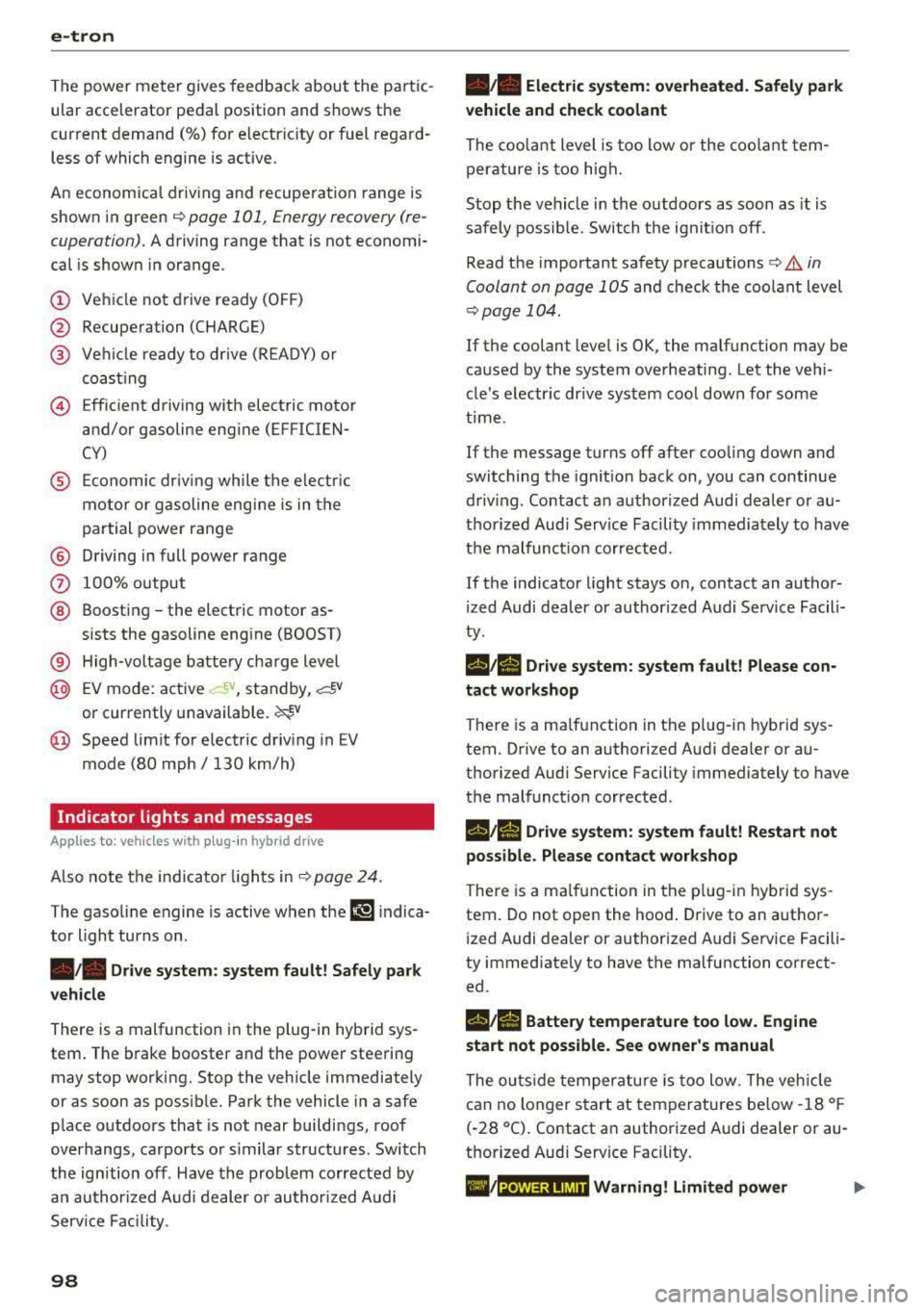
The power meter gives feedback about the pa rt ic
ular accelerator pedal position and shows the
cur rent demand
(%) fo r electric ity or fuel rega rd
less of which engine is active.
An economica l driv ing and recupe ra tion range is
shown i n green
r:!> page 101, Energy recovery (re
cuperation). A driving range that is not economi
cal is shown in orange.
CD Ve hicl e no t drive ready (O FF)
@ Recuperation (CHARGE)
® Ve hicl e ready to d rive ( READY) o r
c oastin g
@ Effic ient driving w ith electric moto r
and/or gasoline eng ine (EFFICIEN-
CY)
® Ec onomic driv ing while t he e lectr ic
mot or or g asoline e ng in e is i n th e
p a rt ial power range
® D riving in full power range
0 100 % outp ut
® Boosting -the elect ric motor as-
sists the gasoline engine (BOOST)
® H igh-voltage battery cha rge level
@ EV mo de: a ct ive av , standby, c::§V
or cur rently unavailable. ~v
@ Speed limit for elect ric driv ing in EV
m ode (80 mph/ 130 km/h)
Indicator lights and messages
A pp lies to: ve hicles w ith p lug -in hybr id drive
A lso note the in dica to r li ghts in r:!> page 24.
The gaso line engine is active when the
111 indica
to r ligh t turns o n.
./. Drive system: system fault! Safely park
vehicle
There is a malfunction in the plug-in hybrid sys
tem . T he br ake booster and the powe r steering
may stop wor king. Stop the veh icle immediately
or as soon as possib le . Park the vehicle in a safe
p lace o utdoors that is not near buildi ngs, roof
overhangs, carports o r similar structures . Sw itch
the ig nition off . Have the problem cor rected by
an a uthor ized A udi dealer or au thor ized A udi
S erv ice Facil it y .
98
•• Electric system: overheated. Safely park
vehicle and check coolant
The coolant level is too lo w or the coo lan t tem
p er at ure is too hig h.
Stop t he vehi cle in the o utdoors as soon as it is
safely possib le. Swi tch t he ig nitio n off.
Read the important safety precautions
r:!> .& in
Coolant on page 105 and check the coolant level
r:!> page 104.
If the coolant level is OK, the malfunction may be
ca used by the system ove rheating . Let the vehi
cle's e lectr ic dr ive system coo l dow n for so me
t im e.
If the message turns off after coo ling down and
switching the ignition back on, you can continue
driv ing . Co ntac t an author ized Audi dealer or au
t h orized Audi Serv ice Facili ty immedia tely to have
t h e malfunct io n co rrecte d.
If the indicato r light stays on , contact an autho r
i zed Audi dealer or author ized A udi Se rvice Facili
ty.
11;11 D rive system: system fault! Please con
tact workshop
There is a ma lf u nction in t he p lug -in hy brid sys
tem. D rive to an authorized Aud i deale r or au
thorized Aud i Serv ice Facility immediately to have
the malfunct ion co rrected.
11;11 Drive system: system fault! Restart not
possible. Please contact workshop
There is a ma lf u nction in the plug-in hybrid sys
tem. Do not ope n the hoo d. Drive to an a uth o r
i zed Audi dealer or author ized A udi Se rvice Facili
ty immediate ly to have the malfuncti on correct
ed.
11;11 Battery temperature too low. Engine
start not possible . See owner's manual
The o utsid e tem per atur e is too low. The veh icle
can no longer s tart at tem peratures be low -18 °F
(-28 ° C). Contact an author ized A udi dea ler or au
thorized Audi Serv ice Facility.
•
POWER LIMIT Warning! Limited power
Page 103 of 400
CXl CXl .... N ,.__
N .... 0 N > 00
when condensation accumulates in the en
gine . Driving exclusively in electric mode is
not possible in this phase.
Plug-in hybrid functions
Applies to: ve hicles with plug- in hybrid drive
The funct ions descr ibed below act ivate automati
cally depend ing on the dr iv ing style.
Full -throttle acceleration (boost)
The boost function is activated by pressing the
accelerator pedal farther down (kick-down) . The
vehicle is powered by both the gaso line engine
and the electric motor when in full accelerat ion.
Boost is only available for a sho rt time, because it
uses a large amount of energy. Availab ility de
pends o n the high-voltage battery cha rge level.
Coasting
The gaso line engine switches off and disengages
at speeds up to approximately 112 mph
(180 km/h) if the accelerator pedal is not press
ed and the D position is selected. Dr iv ing conser
vative ly like this can reduce fuel consumption .
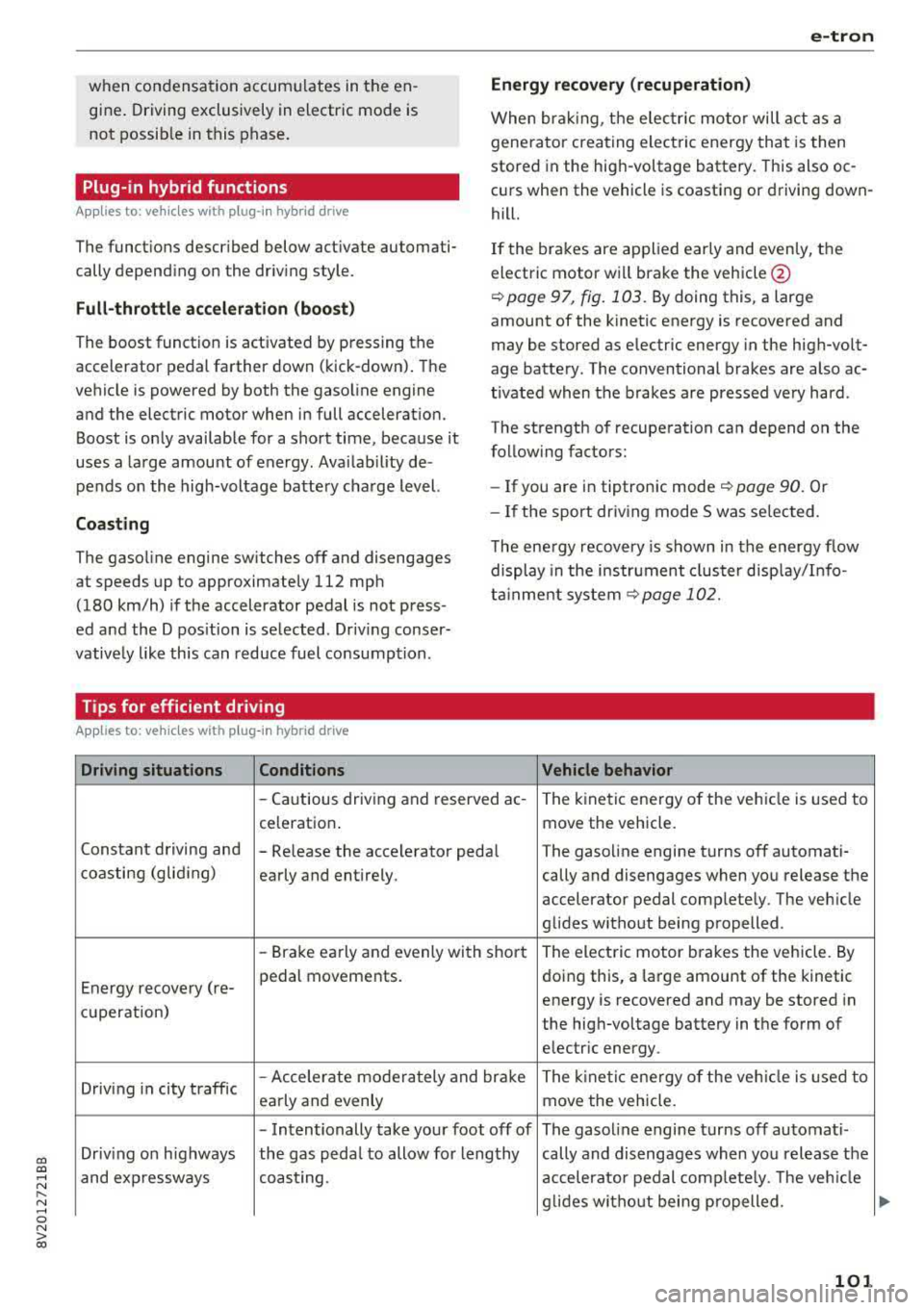
Tips for efficient driving
Applies to: vehicles with plug -in hybrid drive
Driving situations Conditions
e-tron
Energy recovery (recuperation)
When braking, the elec tric moto r will act as a
generato r creating ele ct ric energy that is then
stored in the high -voltage battery. This also oc
c ur s when the vehicle is coasting or driving down
hill.
If the brakes are applied early and evenly, the
electric motor w ill brake the vehicle @
¢page 97, fig. 103. By doing this, a large
amount of the kinetic energy is recovered and
may be stored as electric energy in the high-volt
age battery . The conventional brakes are also ac
t ivated when the brakes are pressed very hard .
The strength of recuperation can depend on the
follow ing factors:
- If you are in tiptron ic mode
¢page 90. Or
- If the sport dr iv in g mode S was se lected .
The energy recovery is shown in the energy flow
display in the instrument cluster display/I nfo
tainment system
¢page 102.
Vehicle behavior
-Cautious driving and reserved ac -The kinetic energy of the vehicle is used to
celeration .
move the vehicle.
Constant driving and
-Re lease the accelerator peda l The gasoline engine turns off automati-
coasting (gliding)
early and entirely . cally and disengages when you release the
accelerator pedal complete ly. The veh icle
glides without being propelled .
-Brake early and evenly with short The electric motor brakes the vehicle. By
Energy recovery (re- pedal movements.
doing this, a large amount of the kinetic
energy is recovered and may be stored in
cu peration) the high-voltage battery in the form of
electr ic energy .
Driv ing in city traffic
-Accelerate moderately and brake
The kine tic ene rgy o f the vehicle is used to
early and evenly move the vehicle.
-Intentionally take your foot off of The gasol ine engine turns off automati -
Driving on highways the gas peda l to allow fo r lengthy cally and disengages when you release the
and expressways coast ing . accelerator pedal complete ly. The veh icle
g lid es w ithout being p ropelled .
101
Page 105 of 400
a, a, ..... N
" N ..... 0 N > 00
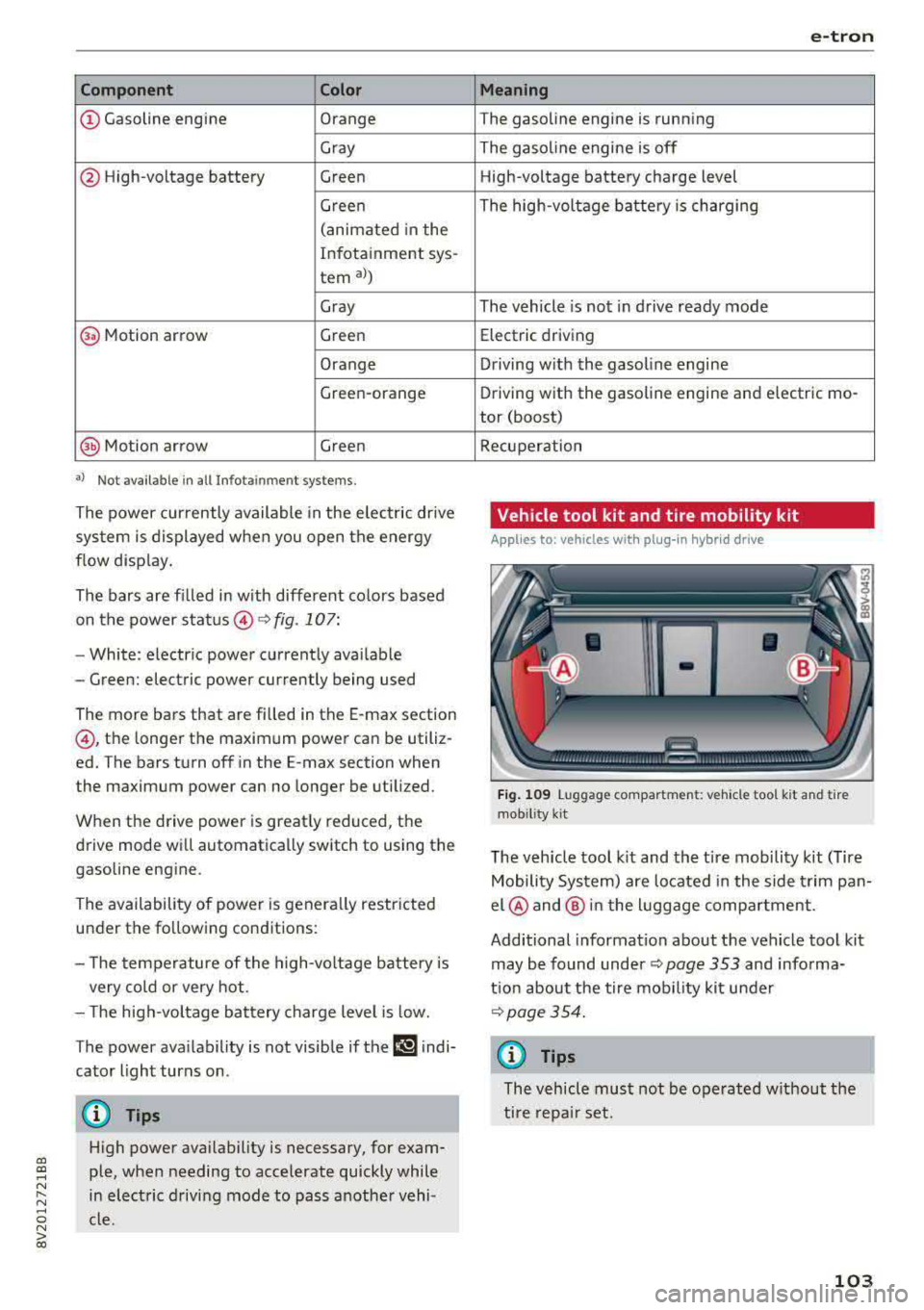
Component Color
@Gasoline engine Orange
Gray
@ High-voltage battery Green Green
(animated in the
Infotainment sys -
tern
a))
Gray
(§) Motion arrow Green
Orange
Green-orange
@ Motion ar row Green
•> Not availab le in all Infot ainmen t systems .
The power currently available in the e lectric drive
system is displayed when you open the energy
flow disp lay .
The bars are fi lled in with different co lors based
on the power
status @ Q fig. 107:
- White: electr ic power currently availab le
- Green: electric power currently being used
The more bars that are filled in the E-max section
@ , the longer the maximum power can be utiliz
ed. The bars turn off in the E-max section when
the maximum power can no longer be utilized.
When the drive power is greatly reduced, the
drive mode will automatically switch to using the
gasoline engine.
The availability of power is genera lly restricted
under the following conditions:
- T he temperature of the high-voltage battery is
very co ld or very hot.
- The high-vo ltage battery charge level is low.
The power availability is not visible if the
Ii] indi
cator light turns on.
(D Tips
High power ava ilability is necessary, for exam
ple, when needing to accelerate quickly while
in electric driving mode to pass another vehi
cle.
e-tron
Me aning
The gasoline engine is running
The gasoline engine is off High -voltage battery charge level
The high-voltage battery is charging
The vehicle is not in drive ready mode Electric driving
Driving w ith the gasoline engine
Driving with the gasoline engine and electric
mo-
tor (boost)
Recuperation
Vehicle tool kit and tire mobility kit
App lies to: vehicles wit h pl ug-in hy brid drive
Fig . 1 09 Luggage compartment: veh icle too l kit and tire
mob ility
k it
The veh icle tool k it and the tire mobility kit (Tire
Mobility System) are located i n the side t rim pan
el @ and @ in the l uggage compartment.
Additional information about the vehicle tool kit may be found under ¢
page 353 and informa
tion about the tire mob ility kit under
~page 354.
(f) Tips
The vehicle must not be operated w ithout the
tire repa ir set.
103
Page 111 of 400
a, a, ..... N
" N ..... 0 N > 00
-Using the control unit while operating the
charging dock*
c!;> page 110 or charging
clip*
c!;> page 110 is recommended .
-Do not immerse the control un it in water or
cover with snow or ice.
@ Tips
-Always place the Audi e-tron charging sys
tem on a secure surface when charg ing.
-To reduce the risk of over heat ing during op
eration, do not place the Audi e -t ron cha rg
i ng system in direct sunlight for long per i
ods of time.
-If the temperature inside the control unit r ises above 176 °F (80 °C), the charging
process will stop automatically unt il the
temperature decreases back down to the normal range.
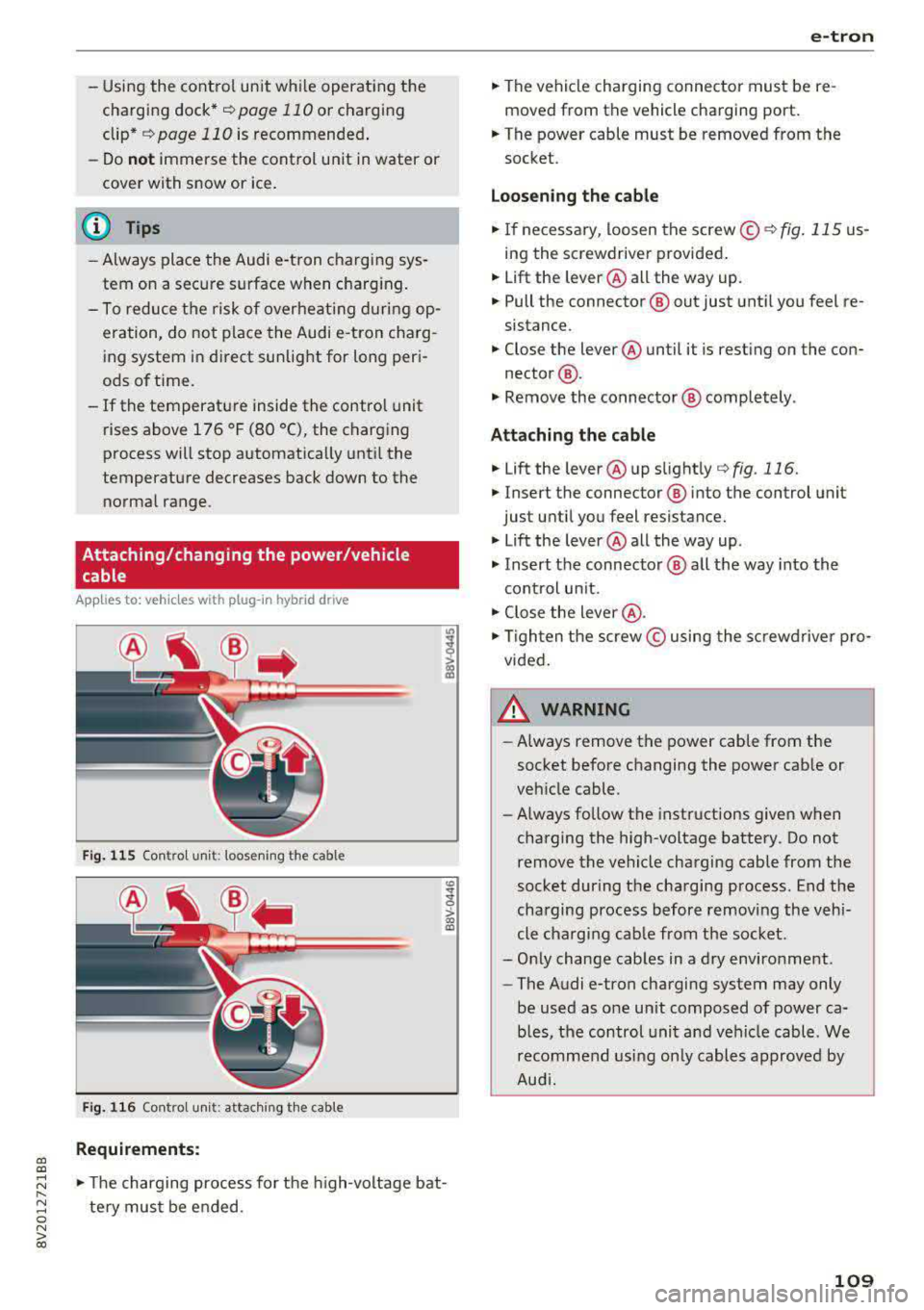
Attaching/changing the power/vehicle cable
A pp lies to: ve hicles with p lug -in hybrid dr ive
Fi g. 11 5 Contro l u ni t: loose nin g the cable
Fig. 116 Co ntro l u ni t: attach ing t he cable
Requirements:
co
~
> ex, a,
.,. The charging process for the high -voltage bat
te ry mus t be e nded .
e-tron
.,. The vehicle charging connector must be re
moved from the vehicle charging port.
.,. The power cable must be removed from the
socket.
Loosening th e cable
.,. If ne cessary, loosen the screw © r::!:>fig . 115 us
ing the screwdriver provided .
.,. Lift the lever@all the way up.
.,. Pull the connector @out just unt il you feel re
sistance.
.,. Close the lever @until it is rest ing on the con-
nector @.
.,. Remove the connector @ completely .
Attaching the cable
.,. Lift the lever @up slight ly c!;> fig. 116.
.,. Insert the connector ® into the control unit
just until you feel resistance .
.,. Lift the lever @all the way up .
.,. Insert the connector @ all t he way into the
cont rol un it.
.,. Close the lever @ .
.,. Tigh ten the screw © using the sc rewdrive r pro
vided .
A WARNING
-
-Always remove the power cable from the
socket before changing the power cab le or
veh icle cable.
- Always follow the instructions given when
charging the high-voltage battery. Do not
remove the vehicle charging cable from the
socket during the charging p rocess . End the
charging process before removing the vehi
cle charging cab le from the socket.
-Only change cab les in a dry enviro nment .
-The Audi e-tron charging system may only
be used as one un it composed of power ca
b les, the control unit and vehicle cable . We
recomme nd usi ng only cables approved by
Aud i.
109
Page 113 of 400
a, a, ..... N
" N ..... 0 N > 00
Removing the charging syst em from the
charging clip
• Remove the power cable connector from the
socket @.
• Unwind the cable from the charging connector
mount (D.
• To loosen the control unit from the bracket,
push the lock ing mechan ism @ upward
9fig. 119.
Transport ing
App lies to: veh icles with plug-in hybrid drive
Fig. 1 20 Storage bag
• Store the charg ing system and the special
charg ing cable* in the bag befo re transport ing .
• Secure the bag using the tie-downs ¢ page 66.
The flat hook must be secured to the left side
of the tie-downs.
_& WARNING
- If the vehicle charging cab le is not secured
or pos itioned correct ly, it can slide out of
place and endanger vehicle occupants when
brak ing, when changing directions, or in an
acc ident.
- Never transport the Audi e-tron charging system or the special charg ing cable" unse
cured.
- Store the Audi e-tron charging system or the spec ial charging cable* in the storage
bag in the luggage compartment.
- Always transport the storage bag in the lug
gage compartment and never i n the passen
ger compartment (for example the seats or
in front of them) .
e-tron
Charging overview
Applies to: vehicles with pl ug-in hybrid drive
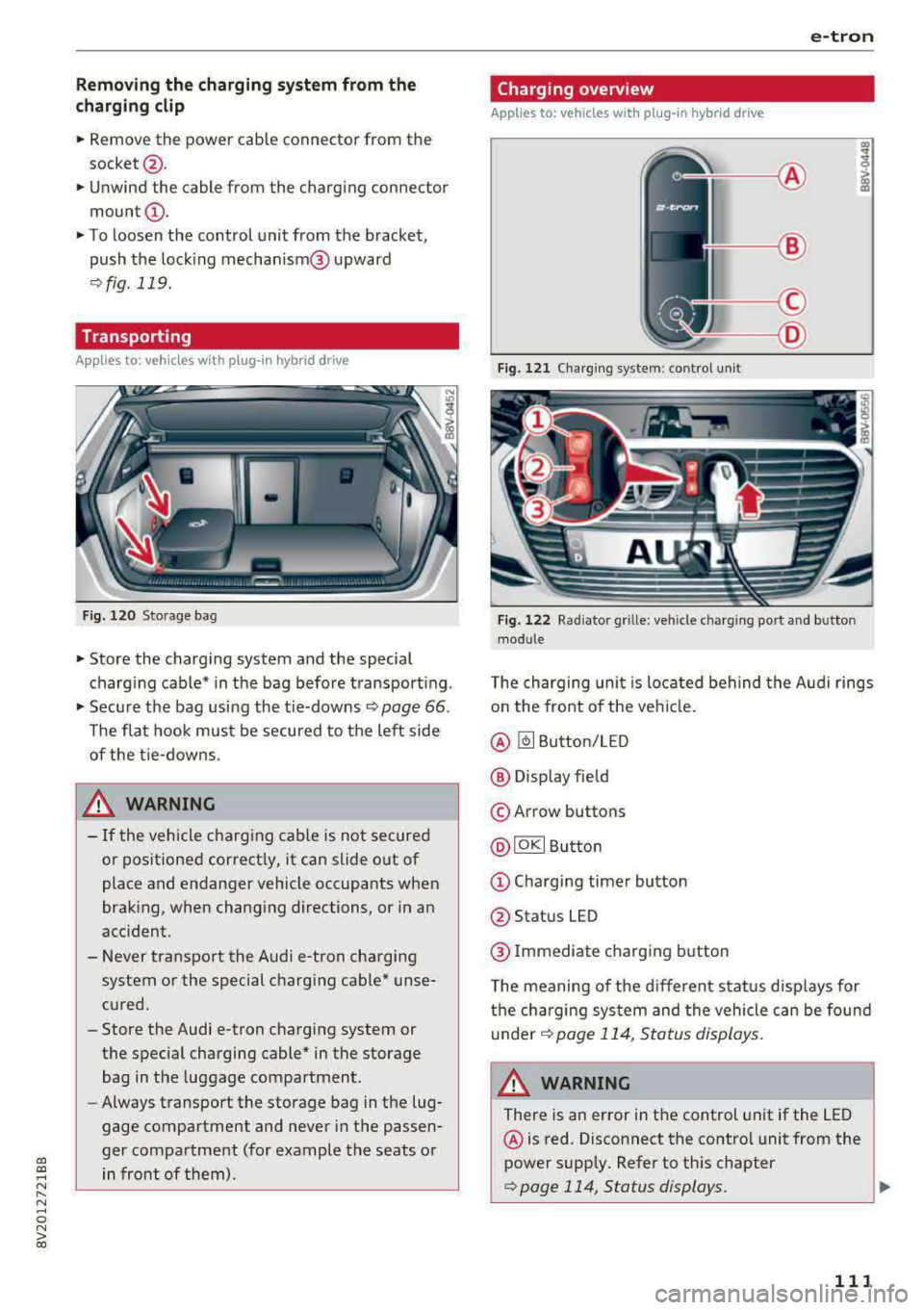
Fig. 121 Charging system : control unit
Fi g. 122 Rad iator grille: veh icle charg ing port and bu tton
module
T he charging uni t is located behind the Audi rings
o n the front of the vehicle .
@ ~ Button/LED
@ Display field
© Arrow buttons
@IOKI Butto n
(D Chargi ng timer button
@ Status LED
@ Immediate charging button
T he meaning of the d ifferent status displays for
the cha rging sys tem and the vehicle can be found
u nder
9 page 114, S tatus displays.
A WARNING
There is an error in the control unit if the LED
@ is red. Disconnect the contro l unit from the
power supply. Refer to th is chapter
¢page 114, Status displays. ..,
111
Page 122 of 400
Trailer towing
Trailer towing
Driving with a trailer
General information
Your Audi was designed primarily for passenger
transportation.
If you plan to tow a trailer, please remember that
the additional load will affect durability, econo
my and performance.
Trailer towing not on ly places more stress on the
ve hicle, it also ca lls for more concentration from
the dr iver.
F or this reason, always follow the operating and
driving instructions provided and use common
sense.
Technical requirements
Trailer hitch
Use a weight-carrying hitch conforming to the
gross tra iler weight. The hitch must be suitab le
for your veh icle and tra iler and must be mounted
securely on the vehicle's chassis at a technically
sound
locat ion . Use on ly a trailer hitch with a re
movable ba ll mount . Always che ck with the t rail
er hitch man ufac tur er to make s ure t hat you are
using the co rrect hi tc h.
Do not use a bumper hitch.
The hitch must be installed in such a way that it
does not interfere with the impact -absorbing
bumper system. No mod ificat ions should be
made to the vehicle exhaust and b rake systems .
Fr om t ime to t ime, che ck tha t all hitch mo unti ng
bol ts rem ain securely f aste ned.
W hen you are not tow ing a tra iler, remove the
tra ile r hitc h ba ll mount . This prevents the hit ch
from caus ing damage s hou ld your veh icle be
s truck from be hind
c> ,&. .
Trailer brakes
If your trailer is equipped with a brak ing system,
check to be su re that it conforms to all regula
tions .
120
The t rai ler hydraulic bra ke system must not be
directly connected to the vehicle's hydraulic
bra ke system.
Safety chains
A lways use s afety chains between you r vehi cle
and t he tra ile r.
Trailer lights
Traile r lights must meet all regula tions . B e s ure
to check w ith your Aud i dea le r fo r cor rect wir ing,
switches and relays .
Mirrors
If you are unable to see t he traffic behind you us
i ng t he regular outs ide mir rors, then yo u
must in
stall extended mirro rs . It is impo rtant that you
always have clear vision to the rear.
&, WARNING
Afte r remov ing the tr ailer hi tch, do not s to re
i t i n yo ur vehicle. In case o f su d den braking,
the hitch could fly fo rwa rd and injure you or
your passengers .
Operating instructions
Maximum trailer weight
A tra iler f or yo ur vehicle is lim ite d to a typical
class 1 or class 2 trailer.
Trailer load distribution
Be sure the load in the t rai le r i s he ld se curely in
pla ce to p revent i t from shi fting forward, bac k
ward or si deways.
Never allow a passenger to ride in a trailer c> &.
in Driving instructions on page 121.
Engine cooling system
Towing a tra iler makes the engine work harder. It
is important that the cooling system's perform
ance is up to the additional load . Make sure tha t
the coo ling system has enoug h flu id.
Tire pressure
When towing a trailer, inf late the tires of your
vehicle to the tire pressure listed under "Full load" on the label
c> page 336. Inflate trailer
Page 137 of 400
CXl CXl .... N r--N .... 0 N > 00
Ea rl y warning /a cut e warning
The system can prov ide v is u al and aud ible warn
ings when dangerous situations are detected.
The
earl y wa rning may occur if:
- a vehicle d riving ahead brakes strongly,
- your vehicle is traveling at speeds between ap-
prox imately 20 to 50 mph (30 to 85 km/h) and
it approaches a stationary veh icle.
- your vehicle is trave ling at speeds between ap
prox imately 20 to 155 mph (30 to 250 km/h)
and it approaches a vehicle that is clearly t rav
eling more slowly o r a veh icle in your direction
of travel that is stopped.
When t his warning occurs, it may on ly be poss i
b le to avoid a collision by swerv ing or b raking
strong ly. The message
Aud i pre sens e.
¢ fig . 140 and a warning tone will warn you
about the danger .
If there is an impending collision with vehicles,
there will a lso be an
acute warning in the form of
sharp braking. If you do not react to the acute
warn ing, pre sense front can brake with increas
ing force within the limits of the system. This re
duces the vehicle speed in the event of a coll i
sion.
Automatic d ecel erati on
Depending on the speed , pre sense front can de
c elerate automat ically
shortly before a collision:
- i f there are s tat ionary vehicles whe n you are
traveling at speeds up to approximately 28 mph (45 km/h).
- if there are vehicles driving or stopped ahead
when you are traveling at speeds up to approxi
mately 155 mph (250 km/h) .
Automatic braking force inc rease
I f pre sense front determines that you are no t
b raking st rongly enough when a collision is imm i
nent, it can increase the b raking force, depending
on the situation and speed.
- i f there are stationary vehicles whe n you are
t raveling at speeds up to approximately 50
mph (85 km/h) .
A ss ista nce sys te m s
- if there are vehicles d riving or stopped ahead
when you are traveling at speeds up to approxi mate ly 155 mph (250 km/h).
A WARNING "--
Pre sense front cannot overcome the laws of
physics. It is a system designed to ass ist and
i t cannot prevent a collision in every c ircum
stance. The driver must always intervene. The
d river is always respons ible for braking at the
cor rect time. Do not let the increased safety
p rovided tempt you into ta king risks. This
could increase your risk of a collis ion .
- Keep in mind th at pre sense front can pro
vide warn ings or b rake unexpected ly. Al
ways secure any cargo or objects that yo u
are transporting to reduce the risk of dam
age or injury.
- The system can dep loy incorrectly due to
system-specific limits.
- Please note that the sensor does not a lways
detect a ll objects . T hi s increases the risk of
a co llision.
- Pre sense front does not react to vehicles traveling toward you in the same lane, to peop le, groups of people, anima ls, objects
that are crossing the road, or objects that are difficult to
detect¢ &. in General infor
mation on page 12
7.
A WARNING
"---
Pre sense front may be restricted or not avail
able i n the follow ing example s ituations:
- if there a re other ref lective objects nearby,
such as guard ra ils or vehicles.
- when dr iv ing into a tunnel.
- in heavy fog, ra in, spray or snow.
- if the radar sensor is di rty, covered in ice,
damaged, or covered .
- in curves .
- if the ESC was restri cted or sw itched off.
(£) Note
The sensor can be displaced by impacts or
damage to the bumper, wheel housing and u nderbody. Pre sense front ca n be impaired
135
Page 162 of 400
Multi Media Interface
Open ing th e main menu
.. Press the IM ENU I bu tton @ ¢page 158,
fig . 160.
The MMI menus (such as Radio ) are
displayed ¢ fig. 163. Then you can select and
confirm a function using the control knob .
Opening a menu directly
.. Press the applicable b utton to directly open the
men us ® ¢ page 158, fig. 160 in the direction
of the desired menu (such as
I RADIO I ) . Then
you can select and confirm a f unction using the
contro l knob.
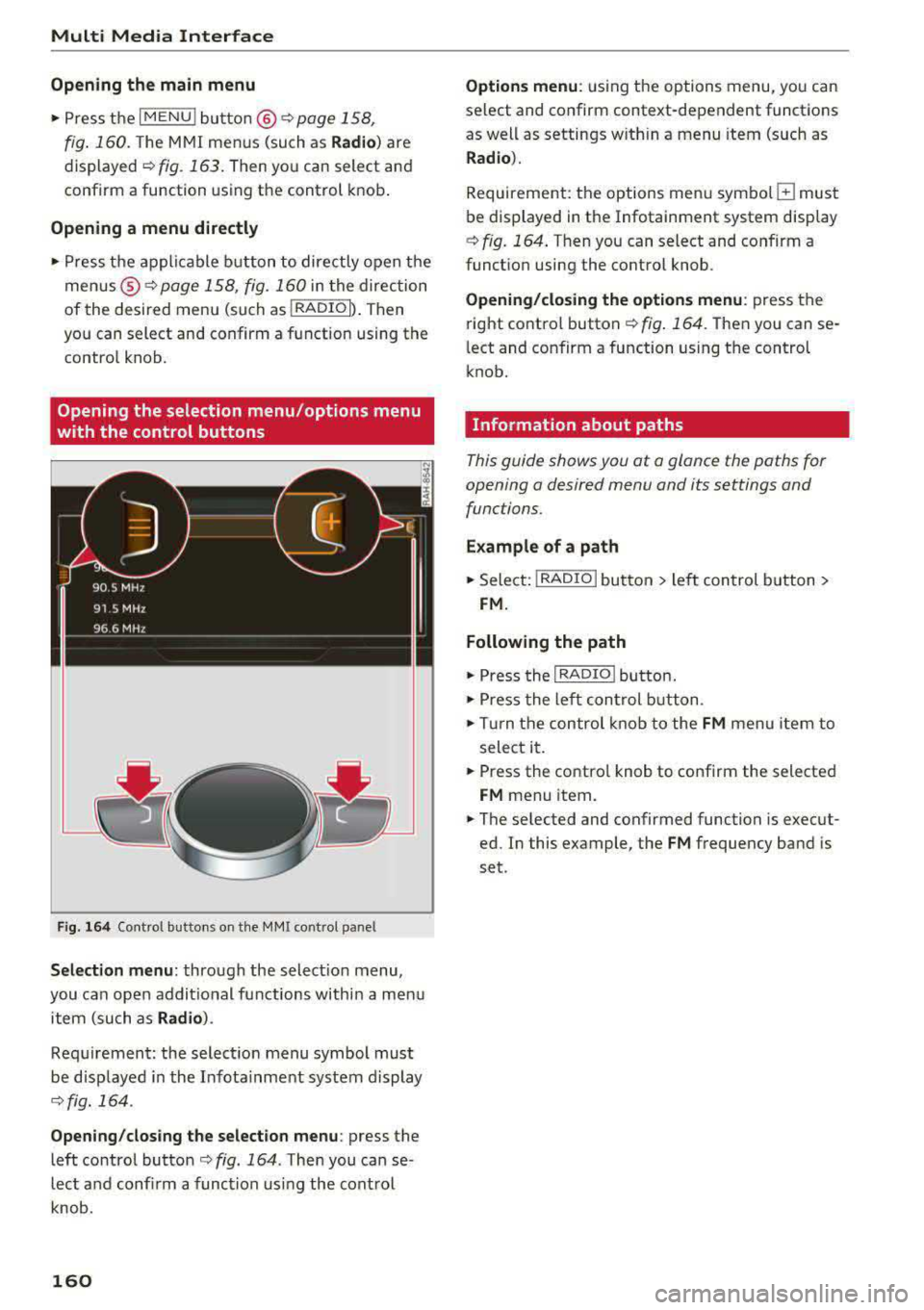
Opening the selection menu /options menu
with the control buttons
F ig . 164 Cont rol butto ns on the MM! control pane l
Selection menu: through the selectio n menu,
you can open addit ional functions within a men u
item (such as
Radio ).
Req uirement: the select ion menu symbol mus t
be disp layed in the Infota inment system display
¢ fig. 164 .
Opening /clos ing th e select ion menu : press the
left contro l button
¢ fig . 164 . Then you can se
lect a nd confi rm a funct ion usi ng the cont rol
knob.
160
Opti ons menu : using the options menu, you can
select and confirm context-dependent functions
as well as settings w ith in a menu item (such as
R ad io ).
Requirement: the options menu symbo l G must
be displayed in the Infotainment system display
¢ fig. 164 . Then you can select and confirm a
funct ion using the control knob.
Opening /clo sing the options menu : press the
right control button
¢ fig . 164. Then you can se
l ect and confirm a function using the control
knob.
Information about paths
This guide shows you at a glance the paths for
opening a desired menu and its settings and
functions .
Example of a path
.. Select: I RADIO I button > le ft control b utton >
FM.
Following the path
.. Press the I RADIO ! button .
.. Press the lef t con trol b utton .
.. Tur n the control knob to the FM menu item to
select it .
.. Press the contro l knob to confirm the selected
FM menu item .
.. The se lected and confirmed function is execut
ed. In this example, the
FM frequency band is
set .
Page 195 of 400
CXl CXl .... N r--N .... 0 N > 00
Different functions are available depending on
the Twitter category you have selected:
- New twe et: you can post a new tweet using
pre-made temp lates or using myAudi tem
plates that you have created yourse lf .
- Refr es h: the selected Tw itter function is re
freshed.
- Favori te: mark a Tweet as favo rite to show you
l ik ed it.
- Retw eet: you can quote a Tweet to share it with
others.
(j) Tips
- Other settings such as account, language,
Tweet security and location settings
cannot
be changed in the MMI. These changes must
be made on the Twitter website .
- You can only connect
one Twitter account
wi th you r myAudi account.
- Audi connect (Infotainment) makes it possi
ble to access Tw itter. Permanen t ava ilability
cannot be guaranteed, because that de
pends on Twitter.
Travel (travel guide)
Applies to: vehicles with Audi connect (Infotainmen t)
You can use the Audi MMI connect opp to store
points of interest on your mobile device (such as
a smartphone) and then use them for route
guidance in the MMI .
Requirement:
The
A udi MM I connect app must be installed and
open on your mobile device .
You must be logged i nto your myAud i account in
the
A udi MMI conn ect app and you must have se
l ected your vehicle.
The Wi-Fi funct ion on your mobile device and on
the MMI must be switched on.
The MMI must be connected to the network.
.,. Press: I MENU I button > Audi conne ct > left con-
t ro l button
> Inf ormati on category > Tra ve l.
Afte r opening the travel guide, travel tips in yo ur
a rea will be displayed incl uding c urrent rat ings as
well as the correspond ing category.
Audi c onn ect ( Inf ota inm ent )
.,. Press the le ft control button to change the cat
egory (such as bars nearby) .
A WARNING
= -
-It is only safe to use tablets, laptops, mo
b ile dev ices and other similar devices when
the vehicle is stationary because, like all loose objects, they co uld be thrown around
the inside of the vehicle in a crash and cause
serious inju ries. Store these types of devices
securely while d riving.
- Do not use any wireless devices on the front
seats within range of the airbags while dr iv
ing. Also read the warnings in the chapte r
¢ page 271, Front airbags.
(D Tips
-Units of measurement, language settings
and time are shown in the Infotainment sys
tem display based on how they were set in
the system settings
¢ page 241.
Audi connect (Infotainment) in navigation
Applies to: vehicles with navigation system and Audi connect
(Infotainment)
.,. Select : !MENUI button> A udi conn ect > left
control button >
Na vig atio n.
The following Audi connect Infotainment services
are currently ava ilable:
- Navigation with
online m ap vie w and Street
Vi ew
¢ page 212.
- Point of Intere st (POI) on line sea rch with
v oi ce re cognit ion
(such as restaurants): plan
route guidance using the MMI contro l pane l
¢ page 203 and the voice recogn ition system
¢ page 170 .
-Set up destinations in your MMI using your
myAu di account or onl in e map vie w
¢page 212 .
-On line traff ic informat ion : receive up-to-the
m inute traffic informat ion about acc idents,
road construction and other inc idents
¢ page 215 .
-Map update: import navigation map updates
direct ly to your veh icle using an SD card or as
an online update
¢ page 213.
193
Page 196 of 400
Audi connect (Infotainm ent )
(D Tips
-For the m ap update Audi connect Infotain
ment service via SD card, check the current
software vers ion in your vehicle and then
check
m y.audi usa .com to see if a newer ver
sion is available . You can also have the new
navigation data installed by an Audi dealer,
which can be done for an additional charge .
- You can find add itional information about
the
map update online at
www. audiu sa .com /m yaudi .
Audi connect (Infotainment) on the phone
Applies to: veh icles with Audi connect (Infota inment)
.,. Se lect : I MENU I button> Audi conne ct> left
contro l bu tton
> C ommunication .
The follow ing Audi connect Infota inme nt services
are currently availab le:
- Stor ing contacts on your computer using your
m yA ud i Ac co unt and loading the contacts into
the MMI directory
<=:> page 187.
Audi connect (Infotainment) in Media
menu
Applies to: ve hicles w ith Wi- Fi audio playe r and Aud i connect
(Infotainment)
.,. Se lect : IMENUI button> Audi c onne ct > right
contro l bu tton
> Ent erta inment .
- Wi-Fi audio pla yer:
you can access the media
cente r th rough a Wi-Fi connected media player
(such as a smartphone)
c:> page 226 .
-Online m edi a and Int ern et r adi o: offers access
to diffe rent onl ine media services and ope ra
tion through the MMI using the
Audi MM I con
n ect
app .
A WARNING
It is on ly safe to use tab lets, laptops, mobi le
devices and other similar devices when the ve
hicle is stationary because, like all loose ob
jects, they could be thrown around the ins ide
of the veh icle in a crash and cause serious in
jur ies . Store these types of devices securely
wh ile driving .
194
(D Note
A lways fo llow the information found in c:> 0 in
Wi-Fi hotspot on pag e 195.
@ Tips
- Also see the chapter ¢ page 196, Audi con
nect (Infotainment) general information .
-For more information on the Wi -Fi audio
player and supported devices, contact an
authorized Audi dealer or authorized Audi
Service Facility.
Additional options
App lies to : vehicles with Aud i connect (I nfotainment)
.,. Select: !M ENU I button> Aud i con nect > right
control button .
T he following options are available in the Aud i
connect Infota inment servi ces overview :
Log in*
Refer to c:> page 190, Logging into myAudi in the
vehicle .
Connection manag er
Refer to c:> page 242.
Li cens e subscription
The validity and exp ira tion date of your license s
are displayed. When the function is sw itched on
~. the message Warning b efor e subscr iption
ex pires
will display to warn you that your license
i s about to exp ire.
Refre sh
The content of the selec ted Audi connect Info
ta inment service or the ent ire Audi connect (Info
ta inment) list is updated .