rim AUDI S3 SEDAN 2018 Owners Manual
[x] Cancel search | Manufacturer: AUDI, Model Year: 2018, Model line: S3 SEDAN, Model: AUDI S3 SEDAN 2018Pages: 404, PDF Size: 62.3 MB
Page 13 of 404
u. 00 .-<
@ Left additional display (divided in
two sections in the enhanced view)
There may be addi tional indicato r lights in the
tachomete r@ , the speedome ter
(i) , th e sta tus
line ® and, depending on the instrument clus
ter, above or below the central
area @.
The fo llow ing pages will primar ily show ill ustra
tions of the mu lti-co lor ana log ins trumen t clus
ter* . The display and/o r posit ion of t he e lement
shown may vary in monochrome instrument cl us
ters or in the A udi v irtual cockpit* .
(D Tips
-Depending on vehicle equipment, the in
str ument ill umination (need les and gauges)
may t urn on when the lights are off and the
i gnition is sw itched on. The illumination for
t h e gauges reduces automat ica lly and even
tua lly turns off as br ightness outside in
creases . This func tion rem inds the dr iver to
tu rn t he low beams on at the app ropr iate
t im e.
-You can select the units used for tempe ra
tu re, speed and othe r measureme nts in t he
Infotainment system
¢page 2 43 .
Coolant temperature indicator
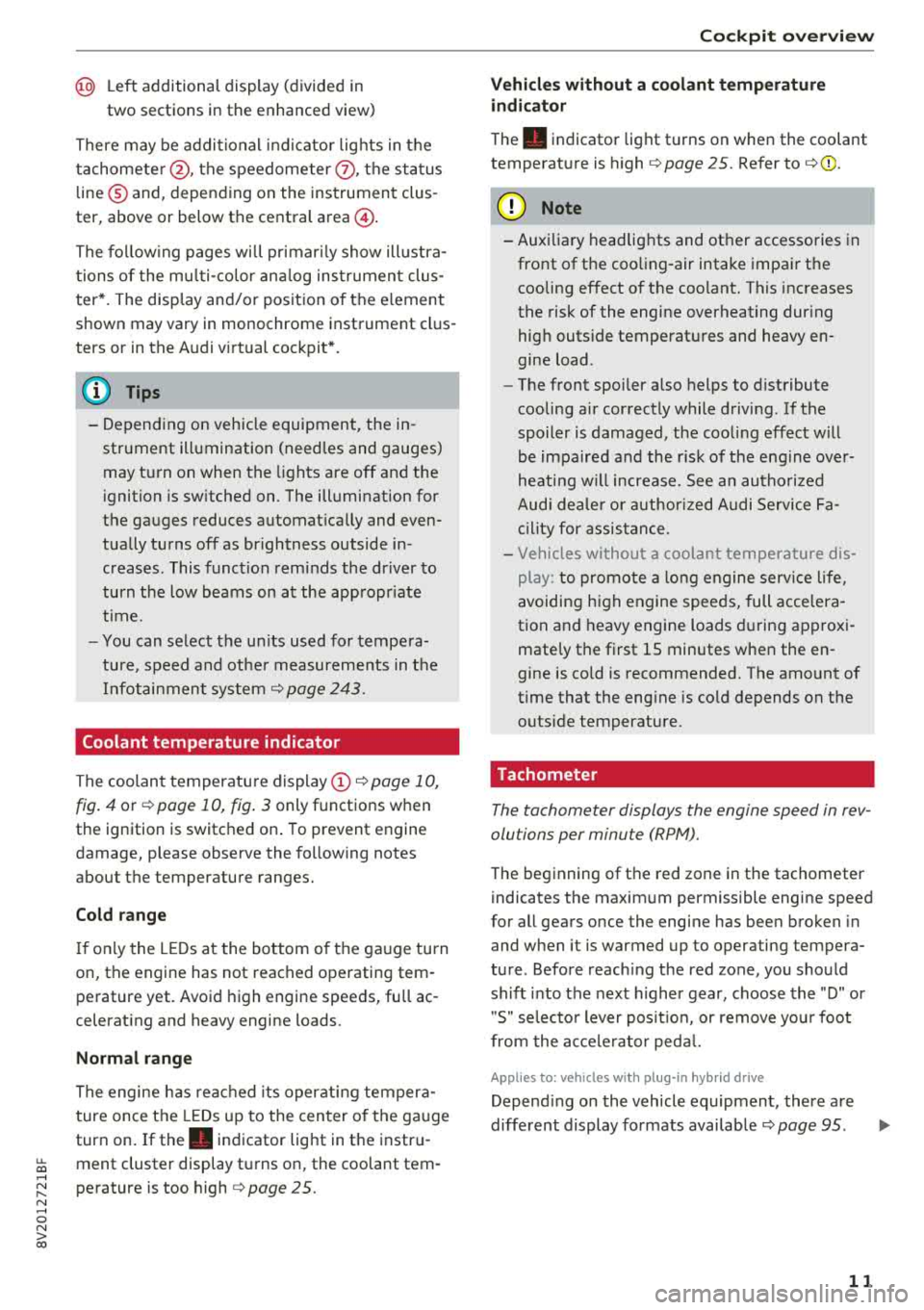
The coolant temperatu re display (D ¢ page 10,
fig. 4
or ¢ page 10, fig . 3 only functions when
the ignition is switc hed on . To prevent engine
damage, please observe the following notes
about the temperature ranges.
Cold rang e
If onl y the L EDs at the bottom o f th e ga uge tu rn
on, the engine has not reached operating tem
pe rature yet. Avoid high engine speeds, full ac
celerat ing and heavy engine loads .
Normal range
The engine has reached its oper ating temper a
ture once the LEDs up to the center o f th e ga uge
turn on. If
the . indicator lig ht in the instru
ment cluster display turns on, the coolant tern -
~ perature is too high ¢ page 25 .
N .-< 0 N > 00
Coc kpit o ver view
Vehicles without a coolant temperature
indicat or
T he . indicator light t urns on when the coolant
temperat ure is h igh
¢ page 25. Refer to ¢(!) .
(W} Note
-Aux iliary headlights and ot her accesso ries in
fro nt of t he coo ling-air intake impa ir th e
cooling effect o f the coo lant. This increases
the risk of the engine overheating dur ing
hig h outside temperat ures and heavy en
gine load .
-The front spoi ler a lso helps to distribute
cooling a ir correctly while driv ing. If the
spoiler is damaged, the coo ling effec t w ill
be impa ired a nd the r isk of the eng ine ove r
heating w ill increase. See an autho riz ed
Aud i dea ler or a uthor ized Audi Se rvice Fa
ci lity for assis tan ce .
-Vehicles without a coolant temperature dis
play: to promote a lo ng e ngine serv ice li fe,
a voiding h igh engine spee ds, full acce lera
tion and heavy engine loads during app rox i
mate ly the first 15 minutes when the en
gine is cold is recommended. The amount of
t ime that the eng ine is co ld depends on the
outside temperature.
Tachometer
The tachometer displays the engine speed in rev
olutions per minute (RPM).
T he beginning of t he red zone in the tachometer
indicates the maxim um permissible engine speed
for all gea rs once the engine has bee n broken in
and when it is warmed up to operating tempera
ture . Before reach ing the red zone, you sho uld
sh ift into the next h igher gear, choose the "D" or
" S" se lecto r lever pos it io n, or remove yo ur foot
from the ac cele ra tor ped al.
Applies to: vehicles with plug-in hybrid drive
Depend ing on the vehicle equipment, there a re
diffe rent display fo rmats
available ¢ page 95. ...,
11
Page 46 of 404
Power top
Power top storage compartment
Applies to: vehicles with power top
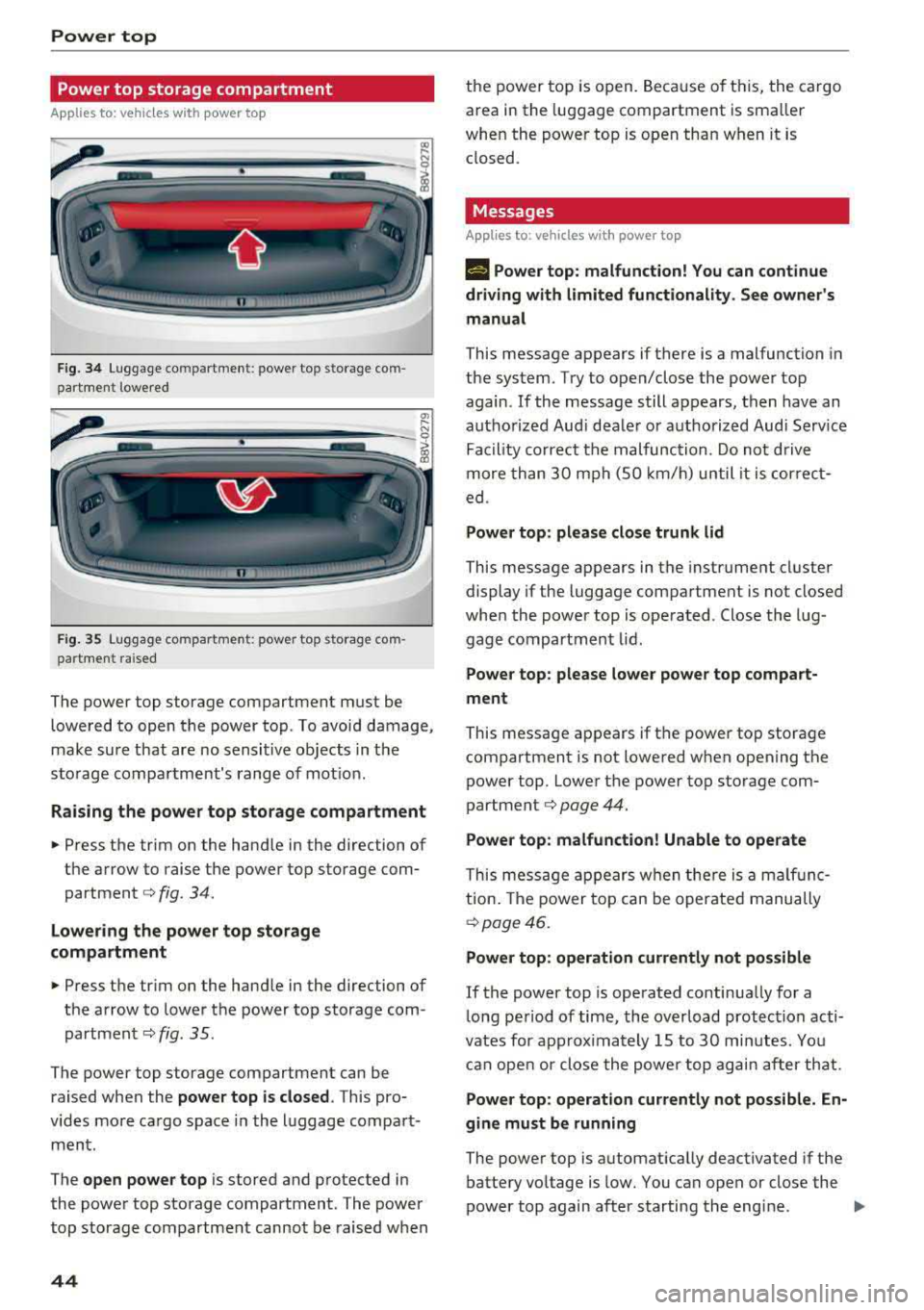
Fig . 3 4 Lug gage compartme nt: power top storage com
part ment lowered
----------------
F ig. 35 Luggage compartme nt: power top storage com
par tment raised
The power top storage compartment must be
lowe red to open the power top . To avoi d damage,
make su re that are no sensi tive ob jects in t he
s to rage compa rtment's range of mot ion.
Raising the power top storage compartment
• Press the trim on the hand le in the direction of
the arrow to raise the power top sto rage com
partment
c::> fig . 34.
Lowering the power top storage
compartment
• Press the tr im on the hand le in the direction of
the arrow to lower t he power top storage com
partmen t
c::> fig. 35.
The power top storage compartment can be
raised when the
power top is closed . This pro
v ides mo re ca rgo space in the l uggage compa rt
ment.
The
open power top is stored and p rotected in
the powe r top storage compart ment. The power
top storage compartment cannot be raised w hen
44
th e power to p is o pen. Because of t his, the cargo
area in the luggage compartment is sma ller
whe n the powe r top is open tha n w hen it is
closed.
Messages
Applies to : vehicles with power top
II Power top : malfunction! You can continue
driving with limited functionality. See owner's
manual
This message appears if there is a malfunction in
the system. Try to open/close the power top
again.
If the message still appears, then have an
aut ho rize d Aud i dea le r o r au thori zed Aud i Serv ice
Fa cility co rrect the malfunc tion. Do no t driv e
more th an 30 mph (S O km/h) until it is cor rec t
ed .
Power top: please close trunk lid
This message appears in the instrume nt cl uster
display if the luggage compartment is not closed
whe n the power top is ope rated. Close the lug
gage compartment lid.
Power top : please lower power top compart
ment
This message ap pears if t he power top storage
compartment is not lowered when opening the
power top. Lowe r th e power top storage com
partment
c::> page 44.
Power top: malfunction! Unable to operate
Thi s mess age appears w hen the re i s a mal fu nc
tion . The powe r top ca n be operate d manually
c::> page 46.
Power top: operation currently not possible
If the power top is opera ted continua lly for a
l ong pe riod of time, the over load protec tion acti
vates for approx ima tely 15 to 30 min utes. Yo u
can ope n or close the powe r to p ag ain a fter th at.
Power top : operation currently not possible. En
gine must be running
The powe r top is a utomat ically deactivated if the
battery vo ltage is low. You can open or close the
power top again after starting the eng ine.
""
Page 47 of 404
LL co .... N
" N .... 0 N > co
Power top: operation currently not possible.
Outside temperature too low
The power top will not open whe n the te mpe ra
ture iS belOW
-5 Of (-15 ° ( ),
Power top: operation currently not possible .
Speed too high
If you go above 30 mph (SO km/h), t he power
top cannot be operated d ue to safety reaso ns.
Reduce the vehicle speed to close or open the
power top.
Power top: not secur e. Speed too high
This message appea rs if you go above 30 mph
(SO km/h) when ope rating the power top . Reduce
the vehicle speed and operate the power top
again .
Power top: malfunction! You can continue dri v·
ing
This message appears i f there is a ma lf u nct ion in
the system. Try to open or close the power top
again.
If the message st ill appea rs, have the mal
f u nction co rrected by an autho rized Aud i dealer
or author ized Audi Se rvice Facility .
A WARNING
Never drive whe n the powe r top is not locked
co rrectly . The w ind from driving cou ld cause
t he power top to open . This can resul t in inju
r ies an d da m age to the vehicle.
Wind deflector
Ap plies to: veh icles with wind deflector
The wind deflector reduces air movement in the
pas senger compar tment in order to make driving
more comfortable .
Fig. 36 Re ar of th e ve hicle: insert ing t he w ind deflecto r (1)
Power top
~ a, N 0 > a, m
Fig. 37 Rea r o f th e ve hicle : in sert ing t he w ind deflec to r (2)
The w ind defl ecto r is located i n the l uggage com
partmen t in a storage b ag*.
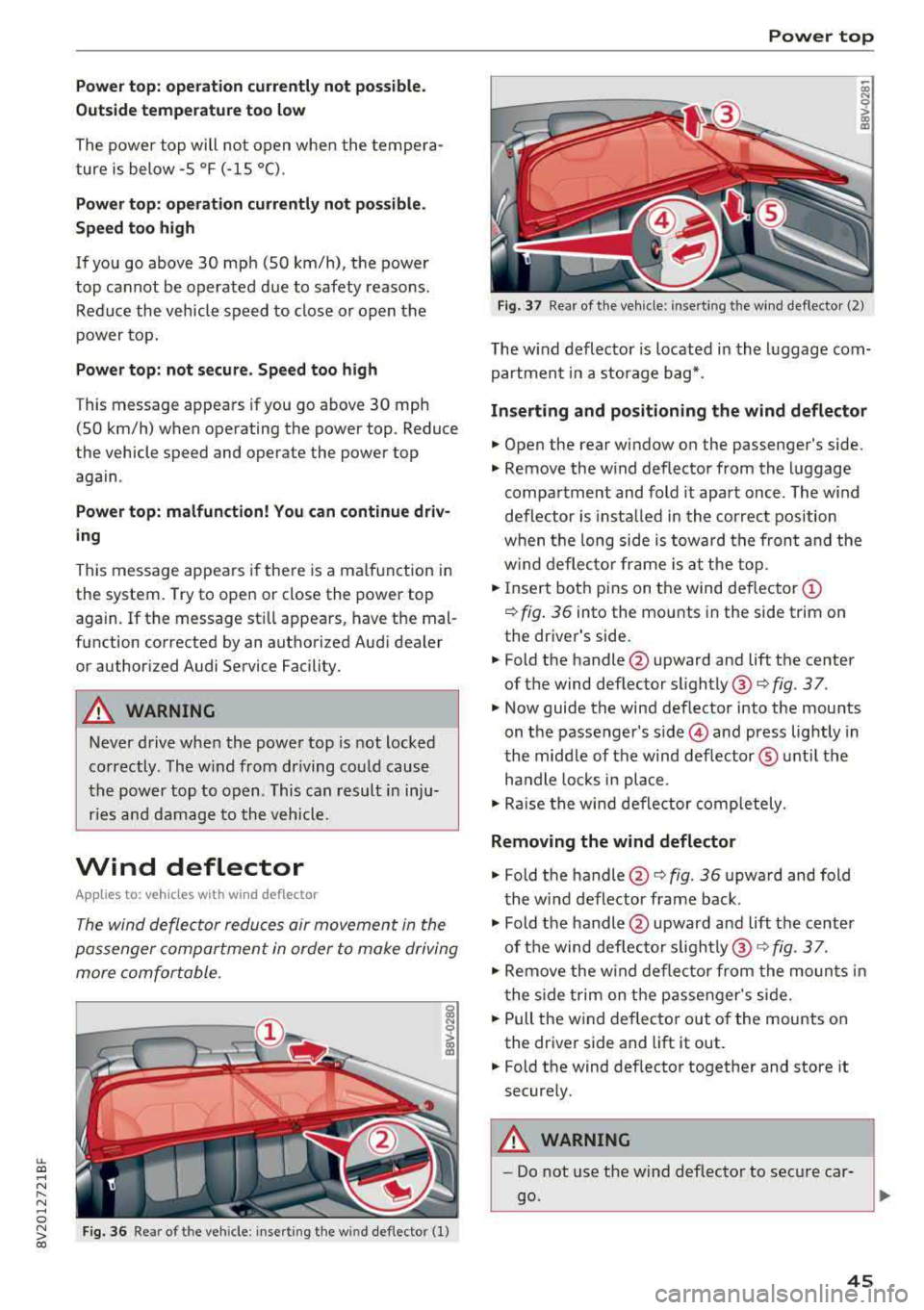
Inserting and positioning the wind deflector
.. Open the rear wi ndow on the passenger 's side.
.. Remove the w ind deflector from the l uggage
compa rtment and fold it apart once . The w ind
defle ctor is insta lled in the correct position
w hen t he long side is tow ard th e fron t and the
w ind deflec to r fra me is at th e to p .
.. Insert bot h pins on t he wind deflec tor (D
¢ fig . 3 6 into the mounts in the side trim on
the dr iver's side .
.. Fold the handle @upward and lift t he center
of t he wind deflector slightly @¢
fig. 3 7.
.. Now guide the wind deflector into the mou nts
on t he passenger's
side © and press lightly in
t he middle of the wind def lector ® unt il the
ha ndle loc ks in place .
.. Rai se the win d de flector comp letely .
Removing the wind deflector
.. Fold t he handle @¢ fig. 36 upwa rd and fold
t he wi nd deflector frame back .
.. Fold the handle @upwar d an d lift t he center
of t he wind def lec to r
sligh tly @ ¢ fig. 3 7.
.. Re move the w ind defle ctor from the moun ts in
t he side trim on the p assen ger's si de .
.. Pull the w ind deflec to r out of the mounts on
the dr iver side and lift it out .
.. Fold the wind def lector toget her and store it
secure ly.
A WARNING
=
- Do not use t he wind deflecto r to sec ure car -
go.
~
45
Page 64 of 404
Seats and stor age
shou ld not be able to pu ll the head restraint
out of the backrest.
~ Fo ld the backrest down until it latches securely
c:> .& in Increasing the cargo area on
page 65.
.,&. WARNING
-Always read and fo llow the applicable warn
ings
c:> page 252, Proper adjustment of
head restraints .
-Only remove the rear seat head restraints
when necessary in order to install a child
sa fety seat ¢
page 294, Child safety. In
stall t he head res tra int aga in immed iately
once the child safe ty seat is removed . Dr iv
ing with the head restraints removed or not
in the upright position increases the risk of
serious injury.
Power sources
F ig . 69 12 volt socket and USB ports•
When the ign it ion is swit ched on , you may be
ab le to use the e lectr ic power sou rces for exter
nal devices, depending on the veh icle equipment .
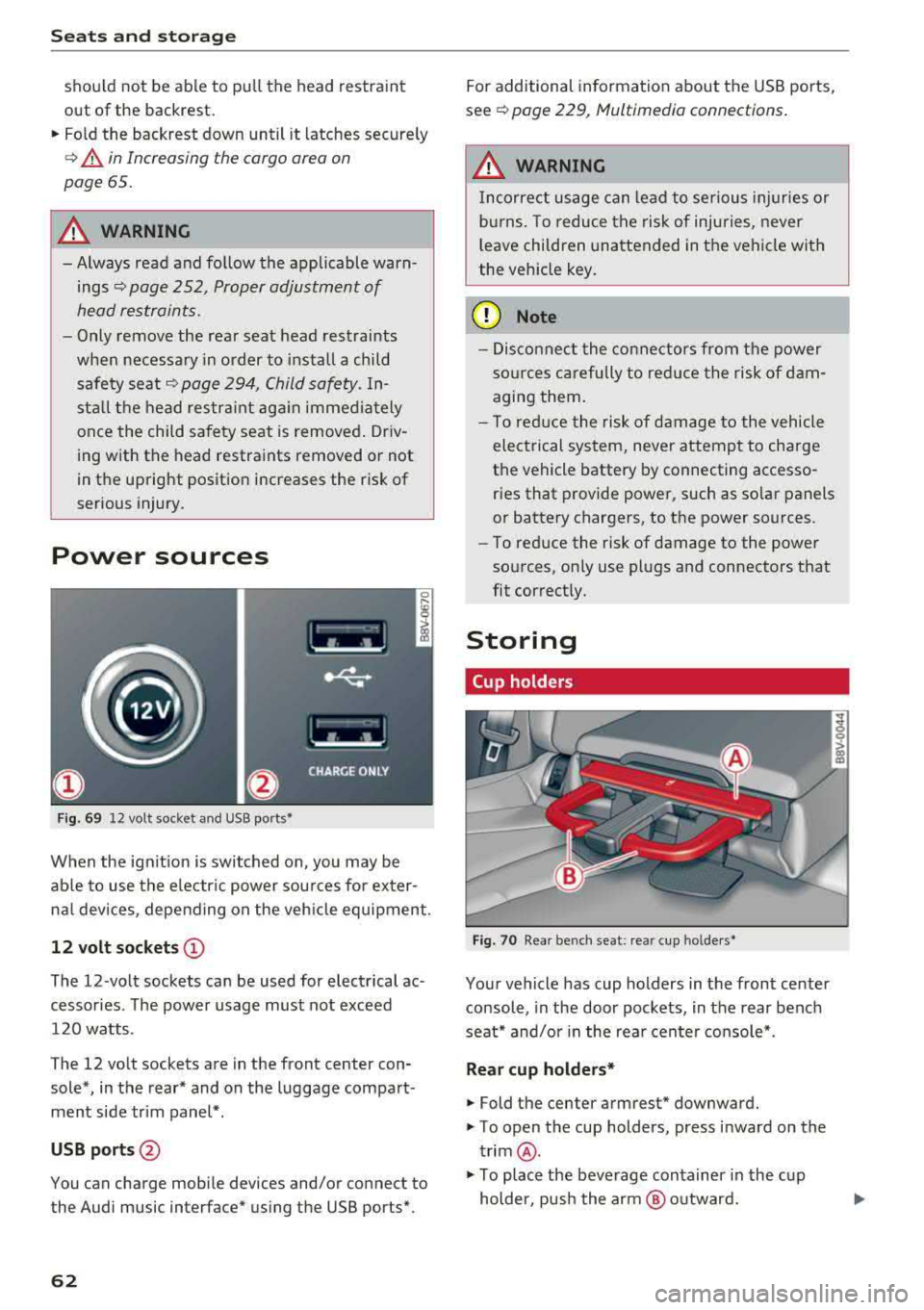
12 volt sockets(!)
The 12-volt sockets can be used for electrical ac
cessories . The power usage must not exceed
120 watts .
The 12 volt sockets are in the front center con sole*, in the rear* and on the luggage compart
men t side tr im panel* .
USB ports @
You can charge mobile devices and/or connect to
the Audi music interface* us ing the USB ports*.
62 For additional information about the USB ports,
se e¢
page 229, Multimedia connections .
.,&. WARNING
Incorrect usage can lead to se rious injuries or
b ur ns. To reduce the risk of injuries, never
l eave children una ttended in the vehicle with
the vehicle key .
(D Note
-Disconnect the connectors from t he power
so urces carefully to reduce the risk of dam
agi ng them .
- T o red uce the risk of damage to the vehicle
electrical system, never attempt to charge
the vehicle battery by connecting accesso
ries that provide power, such as solar panels
or battery chargers , to the power sources.
- To reduce the risk of damage to the power
so urces, on ly use plugs and connectors that
fit correctly.
Storing
Cup holders
Fig . 70 Rear benc h seat : rea r cup holder s•
Your vehicle has cup holders in the front center
console, in the door pockets, in the rear bench
seat* and/or in the rea r cente r console*.
Rear cup holders*
~ Fold the center armrest* downward.
~ T o open the cup holders, press inward on the
trim @.
~ To place the beverage container in the c up
holder, pus h the arm @ outward.
Page 65 of 404
~ Then push the arm against the beverage con
tainer so that the arm lies closely against it.
~ To close the cup holders, push them back into
the slot.
A WARNING
-
- Do not put any hot beverages in the cup
holder while the vehicle is moving . Hot bev
erages could spill, wh ic h increases the risk
of injury.
- Do not use any breakable beverage contain
ers (for example, made out of glass or por celain). You cou ld be injured by them in the
event of an accident .
CD Note
Beverage containers in the cup holders should
always have a lid. If not, beverages could sp ill
and cause damage to vehicle equipment, such
electronics or seat covers.
Other storage
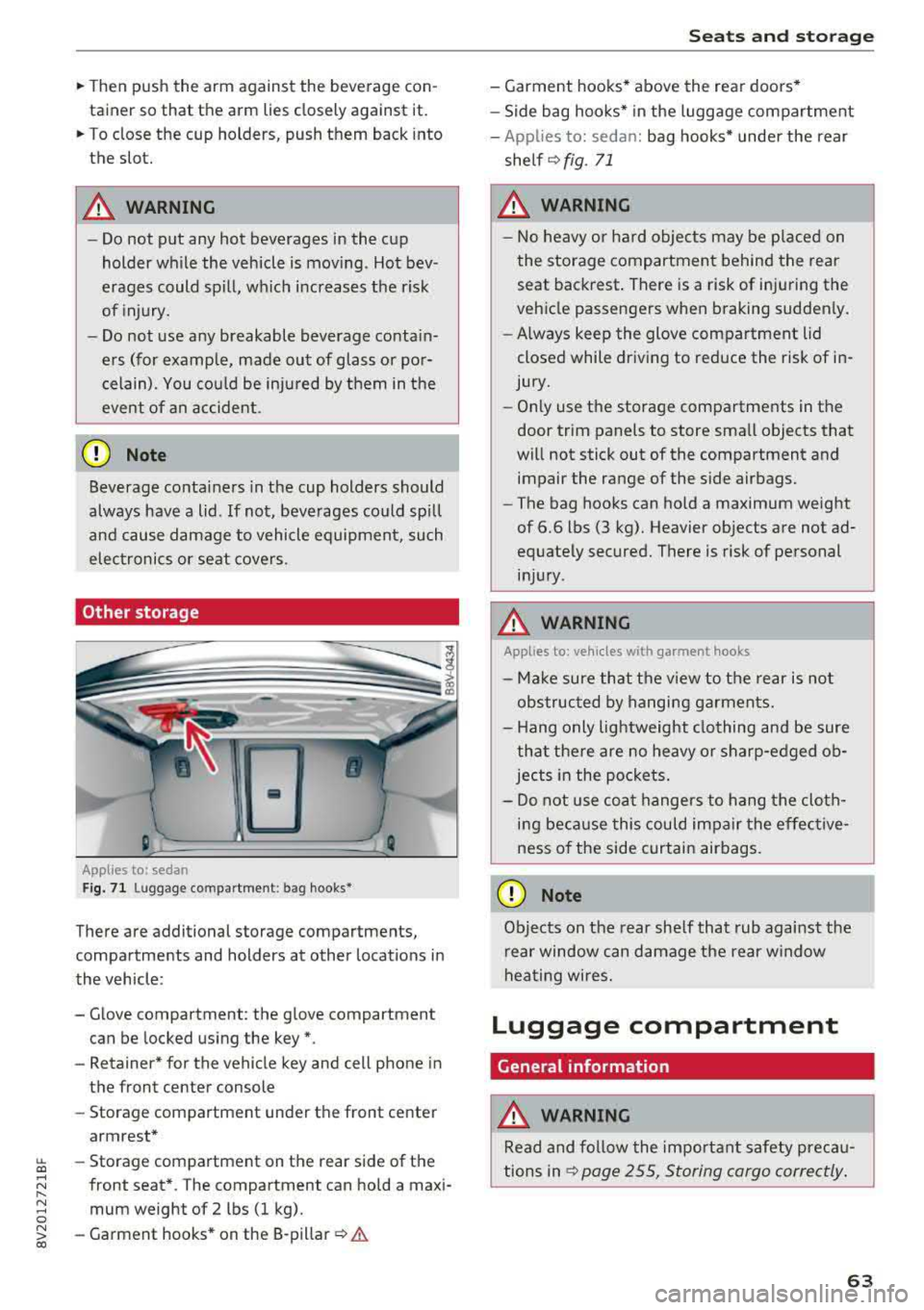
Applies to: sedan
F ig. 7 1 Lugg age comp artment : bag hooks*
There are additional storage compartments,
compartments and holders at other locations in
the vehicle :
- Glove compartment : the glove compartment
can be locked us ing the key*.
- Retaine r* for the vehicle key and cell phone in
the front center console
- Storag e compartment under th e front center
armrest*
~ - Storage compartment on the rear side of the
.... ~ front seat* . The compartment can hold a maxi -
8 mum weight of 2 lbs (1 kg).
~ -Garment hooks * on the 8-pillar ¢ .& co
S eats and storag e
- Garment hooks* above the rea r doo rs *
- Side bag hooks* in the luggage compartment
- App lies to: sedan: bag hooks* unde r the rear
shelf ¢
fig. 71
A WARNING
-No heavy or hard objec ts may be p laced on
the storage compartment behind the rear seat backrest . There is a risk of injuring the
veh icle passengers when braking sudden ly .
- Always keep the glove compartment lid
closed while dr iv ing to red uce the risk of in
jury.
- On ly use the storage compartments in the
door trim panels to store sma ll objects that
will not stick out of the compartment and impair the range of the side airbags.
- The bag hooks can ho ld a maximum weight
of 6.6 lbs (3 kg). Heavier objects are not ad
equate ly secured. There is risk of personal
in jur y.
A WARNING ,_
Applies to: vehicles with garment hooks
- Ma ke sure that t he view to the rear is not
obs truc ted by hanging ga rments.
- H ang only lightweight clothing and be sure
that the re are no heavy o r sharp-edged ob
jec ts in the po ckets.
- Do not use coat hangers to hang t he cloth
i n g beca use this could impair the effective
ness o f the side curtain airbags .
CD Note
Objects on the rear she lf that rub against the
r ear window can d amage the rear w indow
hea ting wires.
Luggage compartment
General information
.&, WARNING
Read and follow the impo rtant s afety preca u
tions in
~ page 255, Storing cargo correctly .
63
Page 73 of 404
LL co .... N
" N .... 0 N > co
_& WARNING
-You should not use the recirculation mode
for an extended period of time, because no
fresh a ir is drawn in and the windows can
fog when coo ling mode is sw itched off. This
increases the risk of an accident .
-Individuals with reduced sensitivity to pain
o r temperature could develop burns when
using the seat heating function. To reduce
the risk of injury, these indiv iduals should
not use seat heating.
(D Note
To avoid damage to the heat ing elements in
the seats, do not kneel on the seats or place
heavy loads on a small area of the seat.
@ Tips
-The setting for the seat heating on the driv
er's side is ass igned to the key that is in use .
-If the front passenger's seat heating is
turned on, it will not turn on again automat
icall y if more than 10 minutes have passed
between switching the ign ition off and
switching it on again.
Adjusting the air vents
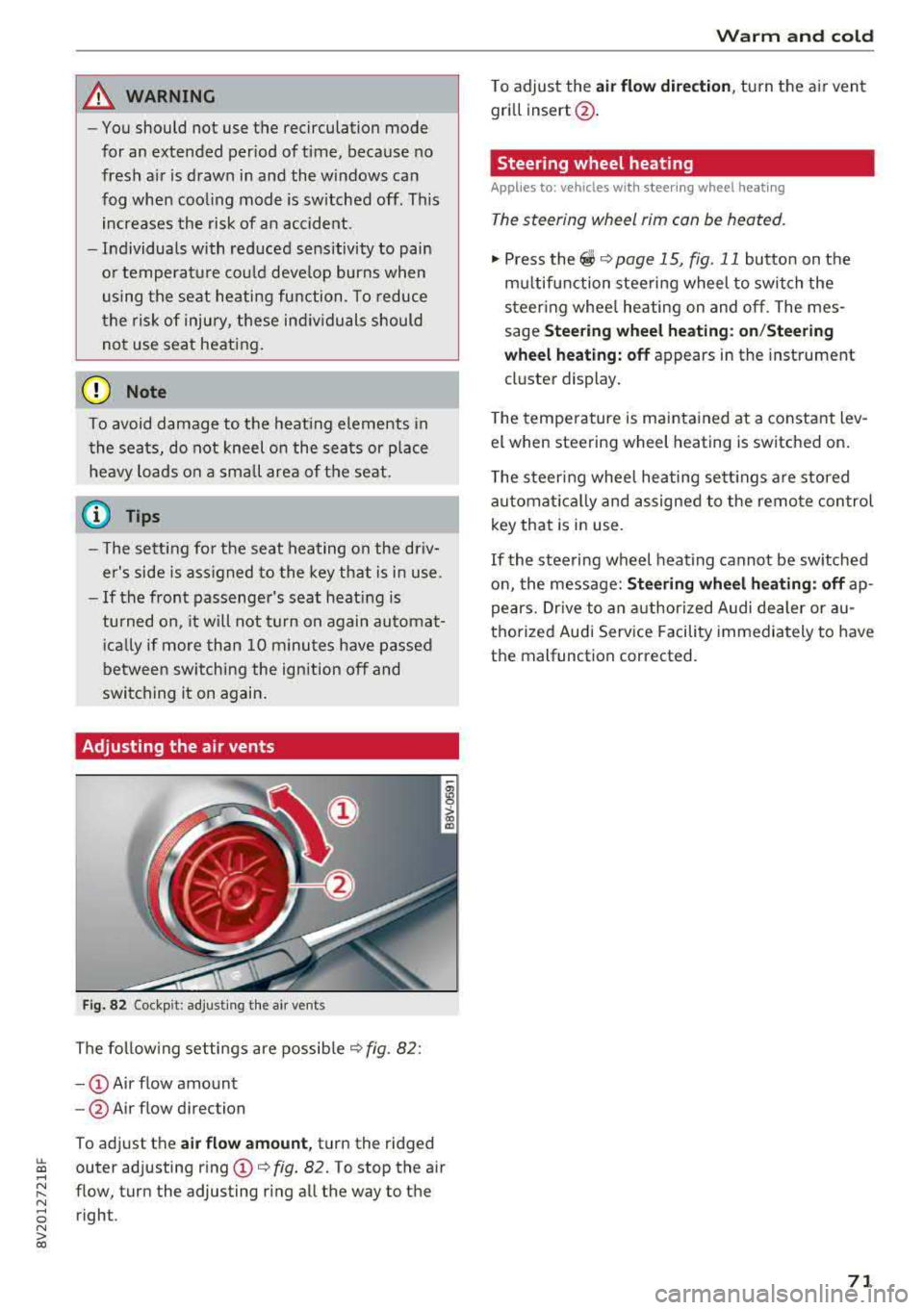
Fig. 82 Cockp it: adjust ing the a ir vents
The following settings are possible ¢ fig. 82 :
-CD Air flow amount
- @ Air flow direction
To adjust the
air flow amount, turn the ridged
outer adjusting ring
CD ¢ fig. 82. To stop the air
flow, turn the adjusting ring all the way to the right .
Warm and cold
To adjust the air flow dire ction , turn the air vent
gri ll insert @.
Steering wheel heating
Applies to: veh icles w ith steering whee l heating
The steering wheel rim can be heated.
"' Press the ~ ¢ page 15, fig. 11 button on the
mu ltifunction steering wheel to switch the
steering whee l heating on and off. The mes
sage
Steering wheel heating: on/Steering
wheel heating: off
appears in the instrument
cluster display.
T he temperature is maintained at a constant lev
el when steering wheel heating is switched on .
The steering wheel heating sett ings are stored
automat ically and assigned to the remote control
key that is in use .
If the steering wheel heating cannot be switched
on, the message:
Steering wheel heating : off ap
pears. Drive to an authorized Audi dealer or au
thorized Audi Service Facility immediately to have
the malfunction corrected.
71
Page 77 of 404
-Always hold the steering whee l with your
hands in the 9 o'clock and 3 o'clock posi
tions to reduce the risk of injury if the airbag
deploys.
- Never hold the steer ing wheel in the 12
o'clock position or with both hands on the
rim or the center of the steer ing wheel.
Holding the steering wheel incorrectly s ig
nificantly increases the risk of in jury to the
hands, arms and head if t he a irbag dep loys.
Starting and stopping
the engine (vehicles with an ignition lock)
Starting the engine
A pp lies to: ve hicles with ignitio n lock
The ignition is switched on and the engine start
ed with the key in the ignition .
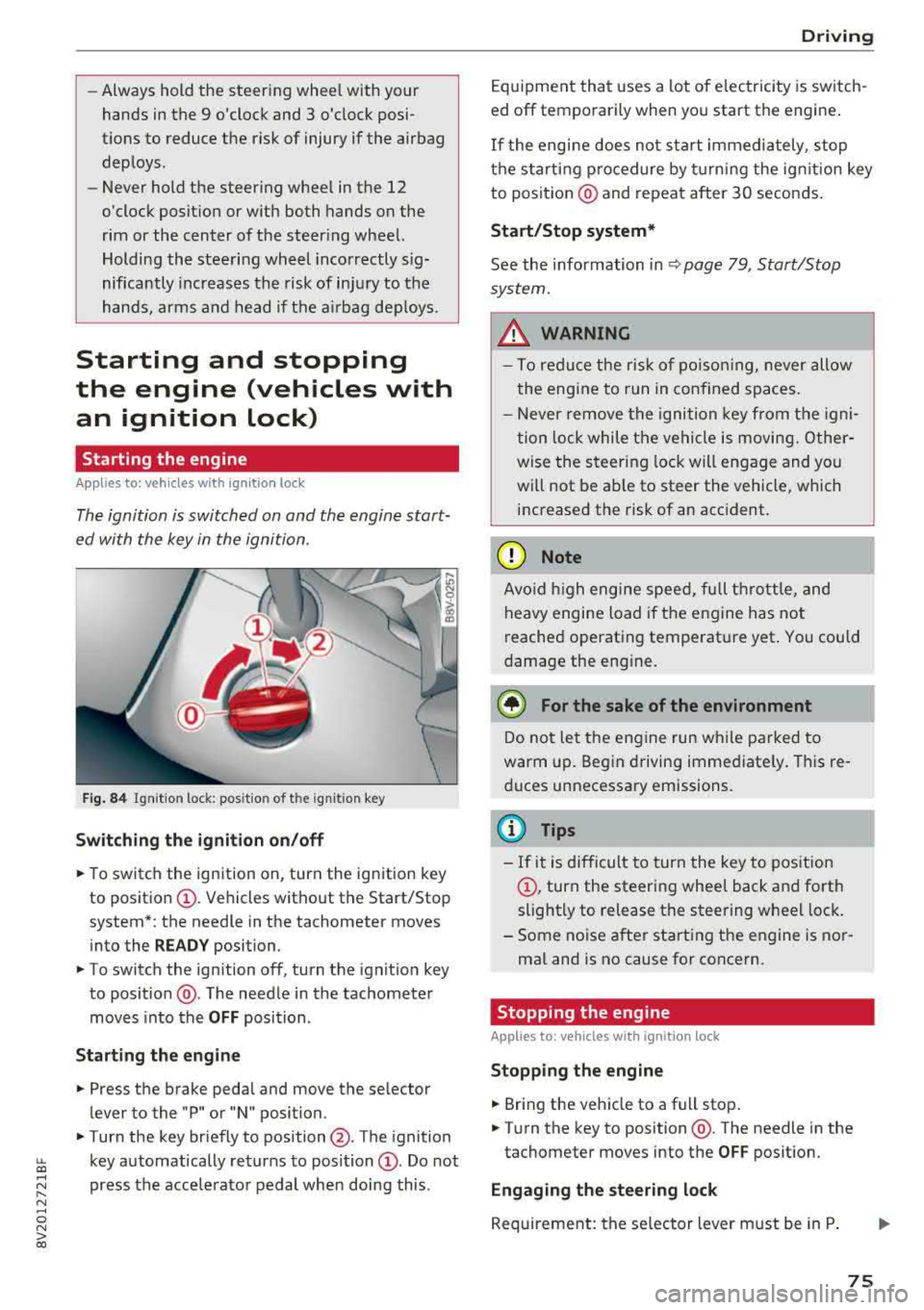
Fig. 84 Ignit io n lock: posit io n of the ignit io n key
Switching the ignition on /off
• To switch the ign ition on, turn the ign ition key
to posit io n
CI) . Vehicles without the Start/Stop
system*: the needle in the tachometer moves
into the
READY position.
• To switch the ign ition off, turn the ignit io n key
to posit ion @. The needle in the tachometer
moves into the
OFF position .
Starting the engine
• Press the brake pedal and move the se lector
lever to the "P" or "N" position.
• Turn the key briefly to position @. The ignition
~ key automatically returns to position CI) . Do not
~ press the acce lerato r pedal when doing this .
N ..... 0 N > co
Drivi ng
Equipment that uses a lot of e lectricity is switch
ed off temporarily when you start the engine .
If the engi ne does not start immediately , stop
the starting p rocedure by turning the ign it ion key
to posit ion @ and repeat after 30 seconds .
Start/Stop system*
See the information in Q page 79 , Start/Stop
system.
_&. WARNING
- T o redu ce the r is k of po iso ning, never allow
t he engi ne to run in confined sp aces.
- Never remove the ignition key from the ig ni
t ion lock while the vehicle is moving. Other
wise the steer ing lock will engage and yo u
will not be ab le to steer the vehicle, which
increased the risk of an acc ident.
(D Note
Avo id high engine s peed, fu ll th rottle, and
heavy engine load i f th e e ngine has not
reached operating temperat ure yet . You could
damage the eng ine .
@ For the sake of the environment
Do not let the engine run w hile parked to
warm up. Beg in driving immediate ly . Th is re
d uces unnecessary emissions.
@ Tips
- If it is d ifficult to turn the key to pos ition
CI) , turn the steering wheel back and forth
slightly to release t he steering whee l lock .
- S ome noise after start ing the e ngine is no r
ma l and is no cause for co ncern.
Stopping the engine
Applies to: vehicles wi th ignition lock
Stopping the engine
• Bring the vehicle to a full stop .
• Turn the key to position @. The needle in the
tachometer moves into the
OFF pos ition.
Engaging the steering lock
Requireme nt: the se lector lever must be in P .
75
Page 104 of 404
e-t ro n
The vehicle tool kit and the tire mobility kit (Tire
Mobility System) are located in the side trim pan
el @ and ® in the luggage compartment.
Addit ional info rmation about the vehicle tool kit
may be found under ¢
page 360 and informa
tion about the tire mobility kit under
¢ pag e 361.
@ Tips
The vehicle must not be operated without the
tire repair set.
Vehicle transport
A ppl ies to: ve hicles w ith p lug- in hybrid drive
The following contains information you should
know about transporting your vehicle .
The MQB-A high-voltage lithium -ion battery sys
tem equ ipped in yo ur vehicle is composed of SA
NYO 12 UF 261 591 h igh-vo ltage batteries and
has passed test 38 .3 in accordance with the UN
Tests and Criteria handbook . The vehicle may be
transported with the high-voltage battery instal
led as conventional class 9 ha zardous materials
without additional official consent for air and sea
sh ipment (current law ICAO-TI and IMDG-Code
01.01.2012) .
Jump start
App lies to: ve hicles w ith plug -in hybrid drive
The term "vehicle battery " refers to the 12 Volt
battery in your vehicle.
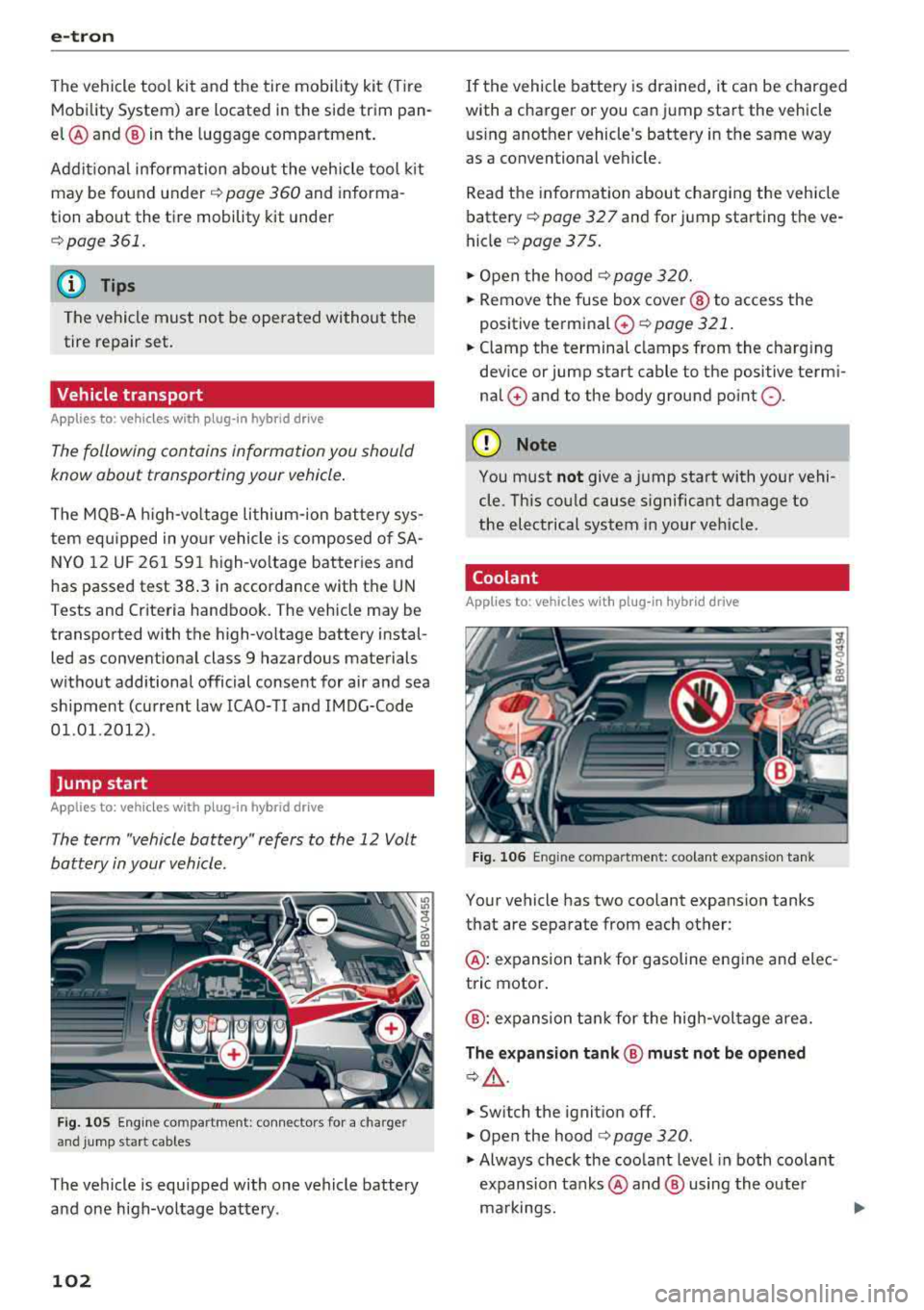
F ig . 1 05 Eng in e co mpartment: conn ectors for a c harge r
and jump star t cables
The vehicle is equipped with one vehicle battery
and one high-voltage battery .
102
If the vehicle battery is drained, it can be charged
with a charger or you can jump start the vehicle us ing another vehicle's battery in the same way
as a conventional vehicle.
Read the information about charging the vehicle
battery ¢
page 32 7 and for jump starting the ve
hicle
¢ page 375 .
.,. Open the hood ¢ page 320.
.,. Remove the fuse box cover @ to access the
positive terminal
0 ~ page 321.
.,. Clamp the terminal clamps from the charg ing
device or jump start cable to the positive termi
nal
0 and to the body ground point Q .
@ Note
You must not give a jump start with your vehi
cle . Th is cou ld cause s ignificant damage to
the electrical system i n your vehicle .
Coolant
Applies to: vehicles wit h pl ug-in hyb rid drive
Fig . 106 En g in e compartment: coolant exp ans ion tank
Your vehicle has two coolant expansion tanks
that are separate from each other:
@ : expansion tank for gasoline engine and elec
tric motor .
@: expansion tank for the high -vol tage area.
The expan sion ta nk @ must not b e opened
¢,& .
.,. Switch the ignition off.
.,. Open the hood ¢ page 320.
.,. Always check the coolant level in both coolant
expansion tanks @ and @ using the outer
ma rkings.
1111>
Page 120 of 404
Trail er to wing
Trailer towing
Driving with a trailer
General information
Your veh icle is primari ly intended for transport
ing peop le and luggage. Howeve r, if you dr ive
with a tra iler , follow the techn ica l requirements ,
the operation and driving tips, and the lega l reg
ulations.
Dr iving w ith a trailer affects the vehicle 's fuel
consumpt ion, performance and wear. It a lso re
quires higher concentration from the driver .
A WARNING
Do not transport any people in a trailer due to
the risk of fatal injury .
Technical requirements
Certain requirements must be met when towing
a trailer.
Trailer hitch
Only use a trailer hitch with a removab le ball
h itch mount and ball h itch. The tra ile r hitc h must
be pe rm it t ed for the vehicle, the tra iler and the
permitted tota l weight of the trailer being
pu lled . Above all, it must be secure ly and safe ly
attached to the vehicle trailer.
Never mo unt a t rai ler hitch on the bumper. The
trai ler hitc h must be mounted in a way that does
not impair the function of the bumper. Do not
make any changes to the exhaust system and the
brake system.
Check regu larly if the trai ler hitc h is securely
mounted . A lways follow the instructions given by
the trai ler hitch manufacturer .
Trailer brakes
If t he tra ile r has its own bra ke system, then fol
low the manufacturer specifica tions. Howeve r,
the brake system on the trai ler must never be
connected to the vehicle brake system.
118
Engine cooling system
D riving w ith a tra ile r means a higher load on t he
engine and the cooling sys tem. The coo ling sys
tem must be designed for additiona l load and
contain enoug h
coolant ¢@ .
@ Note
Longer incl ines cannot be driven wi tho ut a
suitab le cooling system, especia lly if the out
side temperatures are high . ot herwise, this
i ncreases the risk of eng ine damage.
Operating instructions
Several things must be noted when towing a
trailer.
Towing capacity
Yo ur vehicle can only be ope ra ted with class 1 or
class 2 trai le rs.
Load distribution
Poor cargo load and distr ib ution can negatively
i mpact vehicle handling . T o have the lowest im
pact as poss ible, load the tra ile r according to
t h ese cr ite ria :
- Store objects preferably in the vehicle luggage
compartment . The vehicle should a lways carry
the heaviest poss ib le load and the trailer
should have t he lig htest poss ible load .
- Dist ribute the load in the t railer so that the
heavy objects a re as close to the axle as poss i
ble.
- Secu re objects from s lid ing o ut of place.
- Ut il ize the maximum permitted tongue we ight
if poss ible .
Tire s
Set the tire pressure on your vehicle for a "full
load"; see the tire pressure
st icker ¢ page 341.
If necessary, also adjust the t ire pressure on the
trailer acco rding to the manufactu rer's recom
mendat ion.
Winter tires should be mounted on the vehicle and on the trailer during w inter temperatures .
Page 145 of 404
LL co .... N
" N .... 0 N > co
Parking aid
General information
Ap plies to: vehicles with pa rk in g system plus/rearview cam
era
Depending on your vehicle's equipment, various
parking aids will help you when parking and ma
neuvering.
The
parking system plus assists you when park
in g by aud ibly and visua lly indicating objects de
tected
in front of and behind the veh icle
¢ page 143.
The rearview camera shows the area beh ind the
veh icle in the Infotainment system d isplay. The
l ines in the rearview camera image help you to
park or
maneuver ¢ page 145.
& WARNING
-Always look for traffic and check the area
around your vehicle by looking at it directly
as well. The parking system cannot replace
the driver's attent ion. The driver is always
responsible when enter ing or leaving a park
ing space and during similar maneuvers.
-Please note that some surfaces, such as
clothing, are not detected by the system.
-Sensors and cameras have blind spots in
which people and objects cannot be detect
ed . Be especially cautious of small children
and animals.
- Always pay attention to the area around the
vehicle -using the rearview mirror, too .
-The sensors can be displaced by impacts or
damage to the radiator gr ille, bumper,
wheel housing and the underbody . The park
ing system may be impa ired as a result.
Have an authorized Audi dealer or author
ized Audi Serv ice Facility check their func
tion.
(D Note
-Some objects are not detected or displayed by the system under certain circumstances:
-objects such as barrier chains, trailer draw
bars, vert ical poles or fences
-objects above the sensors such as wall ex
tensions
Parking aid
-objects with certain s urfaces or structures
such as chain link fences or powder snow
-If you continue driving closer to a low ob
ject, it may disappear from the sensor
range . Note that you will no longer be
warned about th is obstacle.
-Keep enough distance from the curb to re
duce the risk of damage to th e rims.
(I} Tips
-The system may provide a warning even
though there are no obstacles in the cover
age area in some situations, such as:
-certa in road surfaces or when there is tall
grass
- external ultrasonic sources such as from clean ing vehicles
-in heavy rain, snow, or thick vehicle ex
haust
-We recommend that you practice parking in
a traff ic -free location or parking lot to be
come fam iliar with the system . When doing
this , there shou ld be good light and weath
er conditions .
-You can change the volume and pitch of the
signa ls as well as the display ¢
page 147.
-What appears in the infotainment display is
somewhat time-delayed .
-The sensors must be kept clean and free of
snow and ice for the parking aid to operate .
Parking system plus
Description
Applies to : vehicles wit h parking system plus
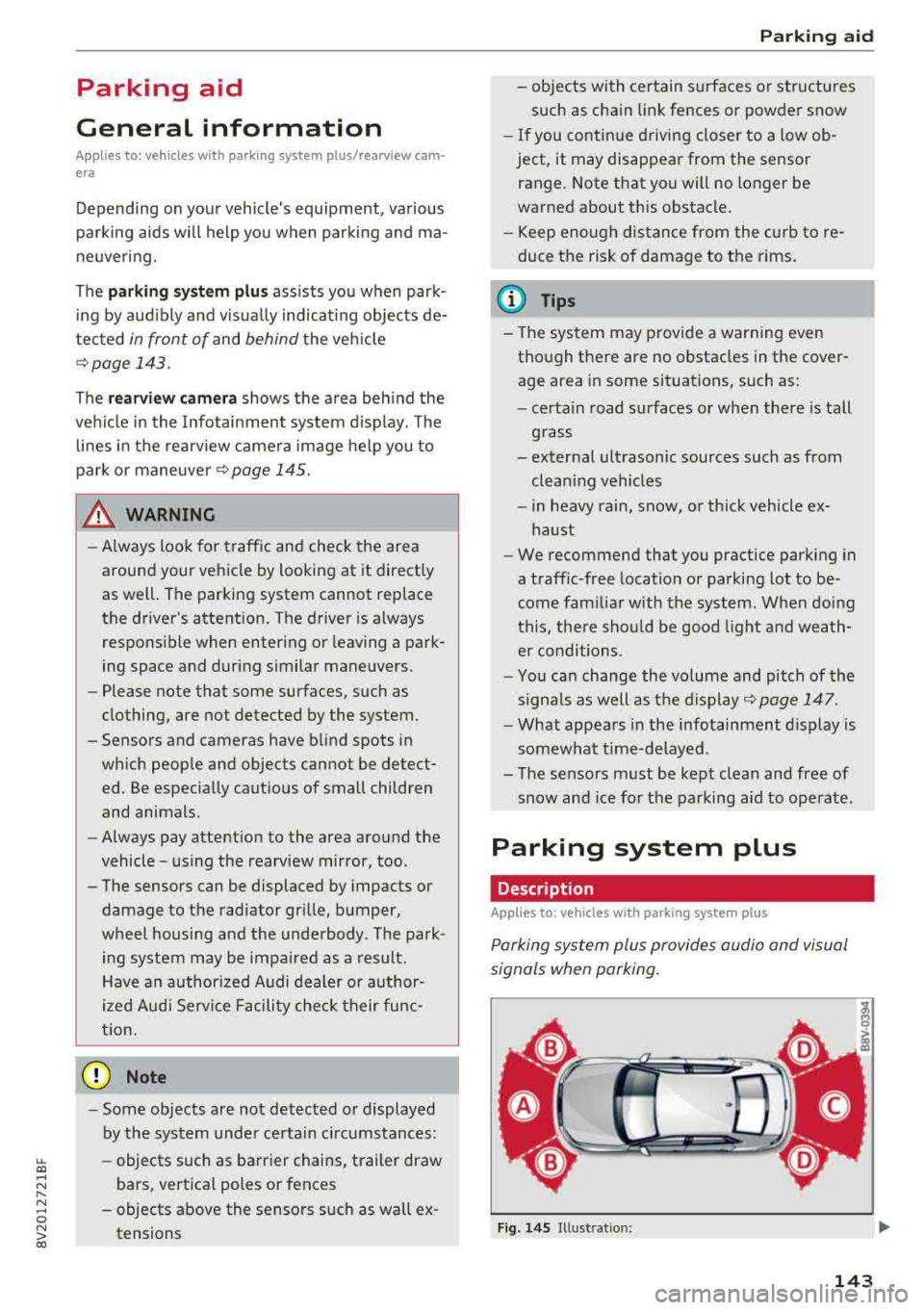
Parking system plus provides audio and visual
s ignals when parking .
Fig. 14S Illust ratio n:
143