towing AUDI S4 2008 User Guide
[x] Cancel search | Manufacturer: AUDI, Model Year: 2008, Model line: S4, Model: AUDI S4 2008Pages: 342, PDF Size: 15.01 MB
Page 152 of 342
Audi side assist
150
Switching on
– Press the button ⇒page 149, fig. 165. The red indicator
lamp in the button will light up.
Switching off
– Press the button again. The indicator lamp in the button will go out.The system is designed to provide assistance on motorways and
other out-of-town roads, so it only operates at speeds above about
60 km/h.
WARNING
•
Please note that the sensors ar e not always able to detect all
vehicles which may represent a po tential hazard (accident risk).
•
Please note that the side assist is not able to give adequate
warning of vehicles approaching very fast from behind, or vehicles
that you are overtaking rapidly.
•
The radar sensor's "field of vision" can be impaired by rain,
snow or a lot of water on the road. This results in vehicles not
being reliably recognised or, in some circumstances, not being
detected at all by the side assist. Al ways give your full attention to
the position of your vehicle on the road and other nearby traffic.
•
The side assist only gives a warning of approaching vehicles
and vehicles in the blind spots when road speed is above 60 km/h.
•
Please note that the side assist does not operate in tight bends
(with a radius of less than 200 metres).
•
The side assist feature is not a su bstitute for the full concentra-
tion of the driver. The driver is al ways responsible for the safety of
lane changes and other manoeuvres. Always give your full atten-
tion to the position of your vehicle on the road and other nearby
traffic.
Caution
•
To avoid impairing the function of the side assist, do not attach
any objects (e.g. stickers or bicycle carriers) in such a way that they
might interfere with the radar sensors in the rear bumper.
•
Make sure that the warning lamps on the exterior mirrors are not
obscured by stickers or other objects.Note
•
To ensure that the side assist function works properly, do not
allow snow and ice to accumulate on the rear bumper near the radar
sensors. Please observe the additional notes on ⇒page 157 .
•
The side assist function will be switched off automatically when
the electrical connector for the trailer socket is plugged in on vehi-
cles with a factory-fitted towing bracket.
•
The side assist should be switched off manually when towing a
trailer if the vehicle is equipped with a towing bracket which was not
factory-fitted.
•
The side assist system will switch off automatically if it detects
an obstruction that impairs the function of the radar sensors.
•
The warning lamps on the exterior mirrors may not be properly
visible if tinted foil is affixed to the side windows on the driver's or
passenger's side.
document_0900452a81b1b9de.book Seite 150 Donnerstag, 26. Juli 2007 9:16 09
--4 -
-
CD
T
[I]
-+ +-
•
Page 159 of 342
Audi side assist157
Controls
Safety
Driving tips
General maintenance
Self-help
Technical data
Audi side assist: system fault
The system should be checked by an
Audi dealership or other qual-
ified workshop.
Audi side assist not available when towing
On vehicles with a factory-fitted towing bracket the side assist func-
tion will be switched off automatically when the electrical connector
for the trailer is plugged in, and this message will appear in the
instrument cluster display. The side assist function may not be
switched off automatically if the towing bracket is not of the factory-
fitted type.
Applies to vehicles: with side assistSafety notesThe function of the side assist can be restricted when driving in
tight bends or over crests and in bad weather conditions.
It is possible that the radar sensors may register objects such as
high or offset roadside barrie rs as well as other vehicles.
The side assist system is programmed for lanes of a fixed width, and
is not able to measure differing lane widths. It monitors a zone
equivalent to one normal lane width on either side. If the lanes are
narrower than this, or if vehicles are not travelling in the centre of
the lanes, the system may give a warning for vehicles which it
judges to be critical, even though they are not in fact travelling in an
adjacent lane.
WARNING
•
Please note that the sensors are not always able to detect all
vehicles which may represent a potential hazard (accident risk).
•
Please note that the side assist is not able to give adequate
warning of vehicles approaching very fast from behind, or vehicles
that you are overtaking rapidly.
•
The radar sensor's "field of vision" can be impaired by rain,
snow or a lot of water on the road. This results in vehicles not
being reliably recognised or, in some circumstances, not being
detected at all by the side assist. Al ways give your full attention to
the position of your vehicle on the road and other nearby traffic.
•
The side assist only gives a warning of approaching vehicles
and vehicles in the blind spots when road speed is above 60 km/h.
•
Please note that the side assist does not operate in tight bends
(with a radius of less than 200 metres).
•
The side assist feature is not a substitute for the full concentra-
tion of the driver. The driver is always responsible for the safety of
lane changes and other manoeuvres. Always give your full atten-
tion to the position of your vehicle on the road and other nearby
traffic.Caution
To avoid impairing the function of the side assist, do not attach any
objects (e.g. stickers or bicycle ca rriers) in such a way that they
might interfere with the radar sensors in the rear bumper.
Note
For reasons of safety, the side assist system must be checked by a
qualified workshop if the positions of the radar sensors have been
affected by a rear-end collision, etc.Applies to vehicles: with side assistConformity certificationThe side assist employs radar sensors operating in one of two
frequency bands at 24 GHz. Please note that in some countries only
one of these two frequency bands is permitted. Accordingly, the
frequency band permitted in the country where the vehicle is being
WARNING (continued)
document_0900452a81b1b9de.book Seite 157 Donnerstag, 26. Juli 2007 9:16 09
--4 -
-T
•
-+
CD
+-
[1J
•
Page 166 of 342
Automatic gearbox
164moving the selector lever either in or out of position P. The lever can
only be moved out of position P when the ignition is on.
R - Reverse gear
When reverse gear is engaged the gearbox automatically selects the
lowest gear ratio.
Reverse gear must only be engaged when the vehicle is stationary
and the engine is idling ⇒.
To move the selector lever to position R, press in the interlock
button and at the same time press the brake pedal. Depending on
the model, one or two reversing lights will come on in selector lever
position R (when ignition is switched on).
N - Neutral
In this position the gearbox is in neutral ⇒.
D - Drive (forwards)
In this position the gearbox auto matically selects the best gear
ratio. This depends on the engine load, the road speed and the
dynamic gear control program (DCP).
Press the brake pedal when moving the selector lever from N to D if
the vehicle is stationary or at speeds below 5 km/h ⇒.
In some situations (such as on mountain roads or when towing a
trailer or caravan) it can be advantageous to switch temporarily to
tiptronic mode ⇒page 166 , so that the gear ratios can be selected
manually to suit the driving conditions.
S - Sport position
Select this position if you wish to take full advantage of the car's
performance. This setting makes use of the engine's maximum
power output. When accelerating the gear shifts will be noticeable.
Press the brake pedal when moving the selector lever from N to S if
the vehicle is stationary or at speeds below 5 km/h ⇒.
WARNING
•
Never move the selector lever to R or P when driving, as this
could cause an accident.
•
In selector position D or S the vehicle must always be held with
the foot brake when the engine is running. This is because an auto-
matic gearbox still transmits powe r even at idling speed, and the
vehicle tends to “creep”. The throttle must on no account be
opened inadvertently (for instan ce by hand from the engine
compartment) when a ge ar is engaged with the vehicle stationary.
The vehicle could otherwise star t moving immediately (in some
cases even if the parking brake is engaged) and possibly cause an
accident.
•
To avoid accidents, apply th e parking brake and put the
selector lever in position P befor e opening the bonnet and working
on the vehicle with the engine running. Please observe the impor-
tant safety warnings ⇒page 255, “Working on components in the
engine compartment”.Note
You can select the sport program for gear changes on vehicles with
Audi drive select* by activating the DYNAMIC mode. There is no S
position on the selector lever.•
Applies to vehicles with tiptronic gearbox:
•
If the lever is moved accidentally to N when driving, release the
accelerator and let the engine speed drop to idling before selecting
D or S again.
•
For the sake of fuel economy (and the environment), the gearbox
ratios on some models are designed so that maximum speed is only
obtained when the selector lever is at position S.
document_0900452a81b1b9de.book Seite 164 Donnerstag, 26. Juli 2007 9:16 09
--4 -
-T
&
&
-+
[I]
+-
&
•
&
Page 172 of 342
Parking aid
170etc.) may not always be detected by the system, so take care not to
damage the vehicle in such cases.
Note
•
Please refer to the notes on towing ⇒ page 177.
•
You can adjust the volume and pitch of the beeps ⇒page 177 .
Audi parking system plusApplies to vehicles: with Audi parking system plusDescription
The Audi parking system plus is a parking aid with
acoustic signals and graphic display.Sensors are located in the front and rear bumpers. When the
sensors detect an obstacle, you are alerted by acoustic signals
(beeps) and a graphic display. The measuring range of the sensors
starts at about:
The acoustic signals sound with increasing frequency as you
approach the obstacle. A warning tone will sound continuously
when the vehicle is less than appr ox. 0.30 m away from the obstacle.
Stop moving immediately!
The volume of the warning beeps will be gradually reduced after
about 4 seconds if the vehicle remains at a constant distance from
a detected obstacle (it will not be reduced if the obstacle is closer
than 0.30 m).
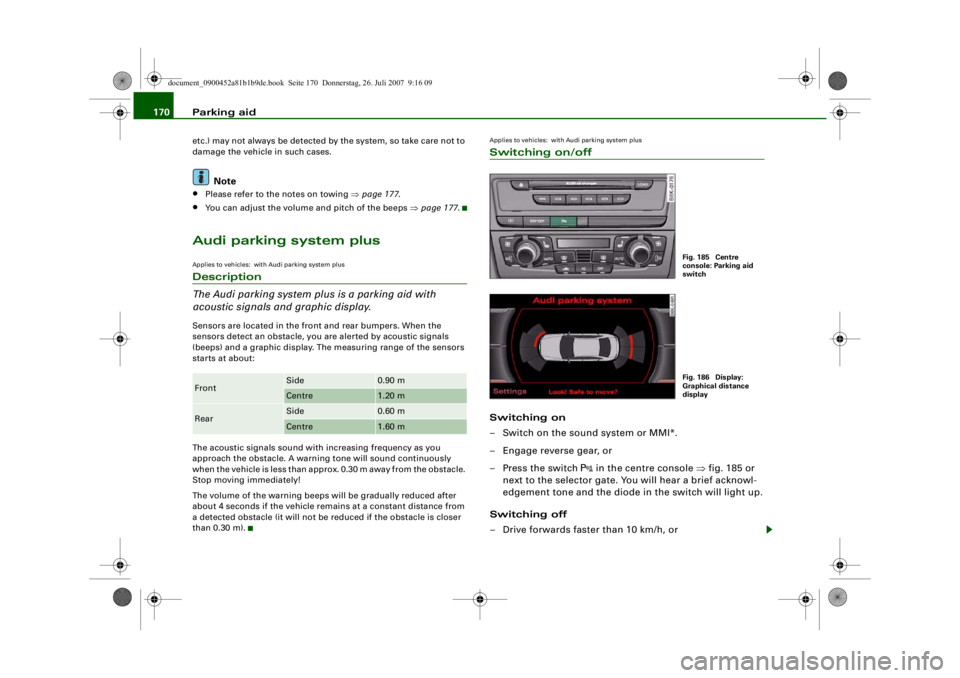
Applies to vehicles: with Audi parking system plusSwitching on/offSwitching on
– Switch on the sound system or MMI*.
– Engage reverse gear, or
– Press the switch
in the centre console ⇒fig. 185 or
next to the selector gate. You will hear a brief acknowl-
edgement tone and the diode in the switch will light up.
Switching off
– Drive forwards faster than 10 km/h, or
Front
Side
0.90 m
Centre
1.20 m
Rear
Side
0.60 m
Centre
1.60 m
Fig. 185 Centre
console: Parking aid
switchFig. 186 Display:
Graphical distance
display
document_0900452a81b1b9de.book Seite 170 Donnerstag, 26. Juli 2007 9:16 09
--4 -
-T
[I)
-+ +-
•
Page 173 of 342
Parking aid171
Controls
Safety
Driving tips
General maintenance
Self-help
Technical data
– Press the switch
, or
– Switch off the ignition.
Segments in the graphic display
You can estimate the distance to an obstacle by referring to the red
segments at the front and rear of the vehicle ⇒page 170, fig. 186.
The closer the vehicle gets to the obstacle the closer the segments
move towards the vehicle in the graphic. At the latest when the
penultimate segment is highlighted the vehicle has reached the
danger (collision) zone. Stop moving immediately ⇒!
WARNING
•
The parking aid cannot replace the full concentration of the
driver. The driver is always resp onsible for safety during parking
and other manoeuvres.
•
The sensors have blind spots in which obstacles are not regis-
tered. It is particularly important to ensure that there are no small
children or animals near the vehicle, as the sensors may not
always be able to detect them.
•
Always keep a close wa tch on the area around the vehicle and
make full use of the rear-view mirrors.Caution
Please note that low obstacles detected by the system may no
longer be registered by the sensors as the car moves closer, so the
system will not give any further warning. Certain kinds of obstacles
(such as wire fences, chains, thin painted posts or trailer draw bars,
etc.) may not always be detected by the system, so take care not to
damage the vehicle in such cases.
Note
•
You can change the display and adjust the volume and pitch of
the beeps ⇒page 177 .
•
Please refer to the notes on towing ⇒page 177 .
•
There is a slight delay in the picture display.
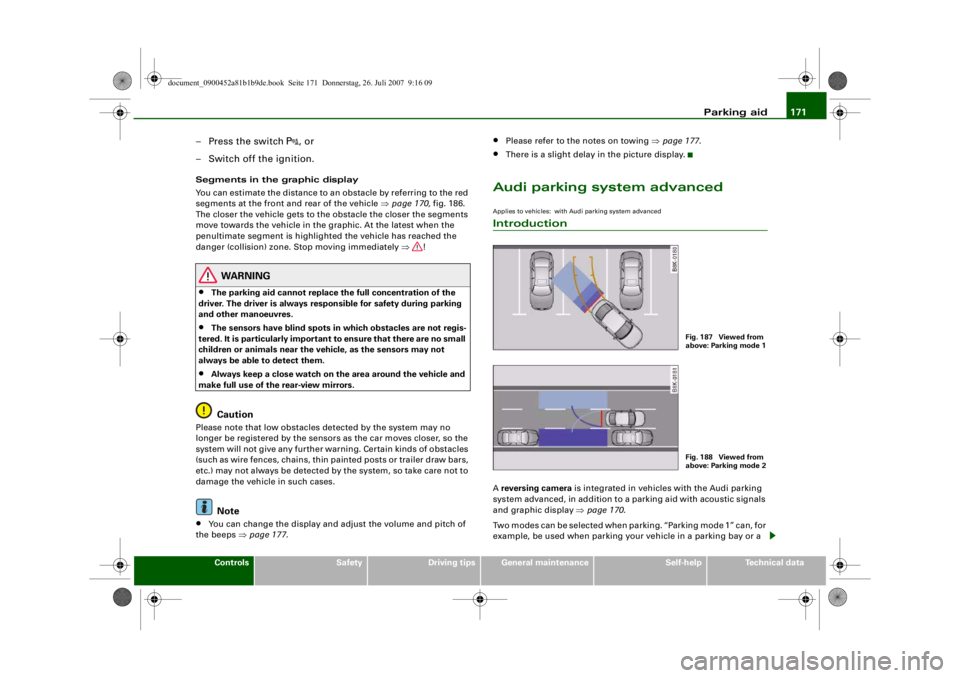
Audi parking system advancedApplies to vehicles: with Audi parking system advancedIntroductionA reversing camera is integrated in vehicles with the Audi parking
system advanced, in addition to a parking aid with acoustic signals
and graphic display ⇒page 170 .
Two modes can be selected when parking. “Parking mode 1” can, for
example, be used when parking your vehicle in a parking bay or a
Fig. 187 Viewed from
above: Parking mode 1Fig. 188 Viewed from
above: Parking mode 2
document_0900452a81b1b9de.book Seite 171 Donnerstag, 26. Juli 2007 9:16 09
--4 -
-T
•
-+ +-
CD
Page 176 of 342
Parking aid
174•
Only use the reversing camera to assist you if it is supplying
you with a good and clear picture. The quality of the picture could
be impaired by adverse light, dirt on the lens or a defect (accident
risk).
•
Only use the reversing camera when the boot lid is completely
c lo s e d . P l e a se m a k e su re t h a t t h ere are no objects mounted to the
rear end of the vehicle which coul d block the view of the reversing
camera.Note
•
If your vehicle is near an obstacle, the graphic display will also
appear in the reversing camera image. This superimposed graphic
helps the driver to localise the critical area of the vehicle.
•
You can change the display and adjust the volume and pitch of
the beeps ⇒ page 177.
•
Please refer to the notes on towing ⇒ page 177.
•
There is a slight delay in the picture display.
Applies to vehicles: with Audi parking system advancedParking perpendicular to the roadside
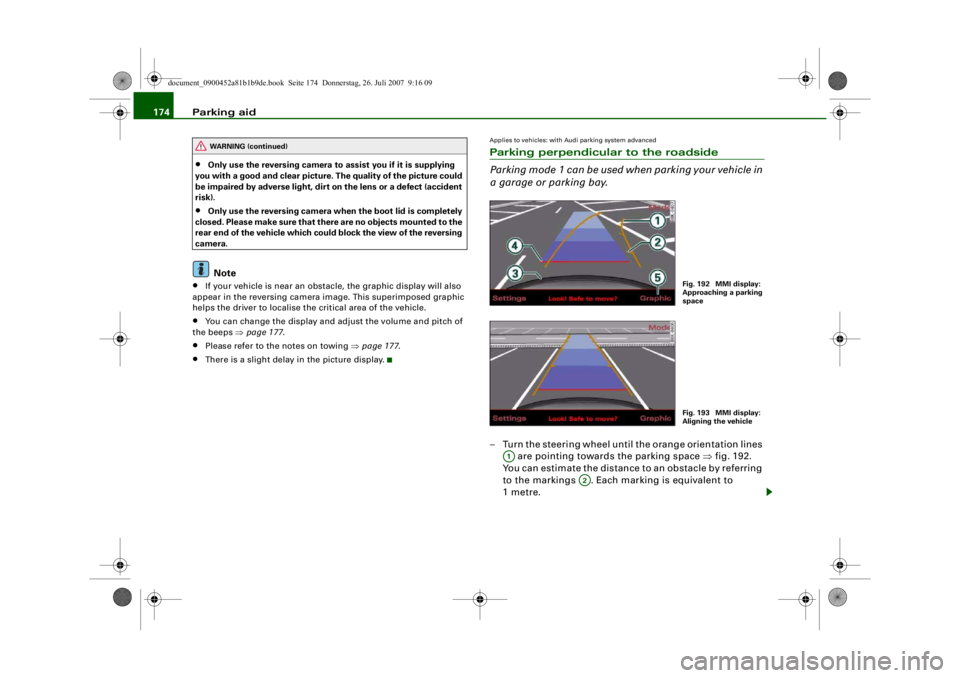
Parking mode 1 can be used when parking your vehicle in
a garage or parking bay.– Turn the steering wheel until the orange orientation lines
are pointing towards the parking space ⇒fig. 192.
You can estimate the distance to an obstacle by referring
to the markings . Each marking is equivalent to
1metre.
WARNING (continued)
Fig. 192 MMI display:
Approaching a parking
spaceFig. 193 MMI display:
Aligning the vehicle
A1
A2
document_0900452a81b1b9de.book Seite 174 Donnerstag, 26. Juli 2007 9:16 09
--4 -
-T
[I]
-+
•
+-
Page 177 of 342
Parking aid175
Controls
Safety
Driving tips
General maintenance
Self-help
Technical data
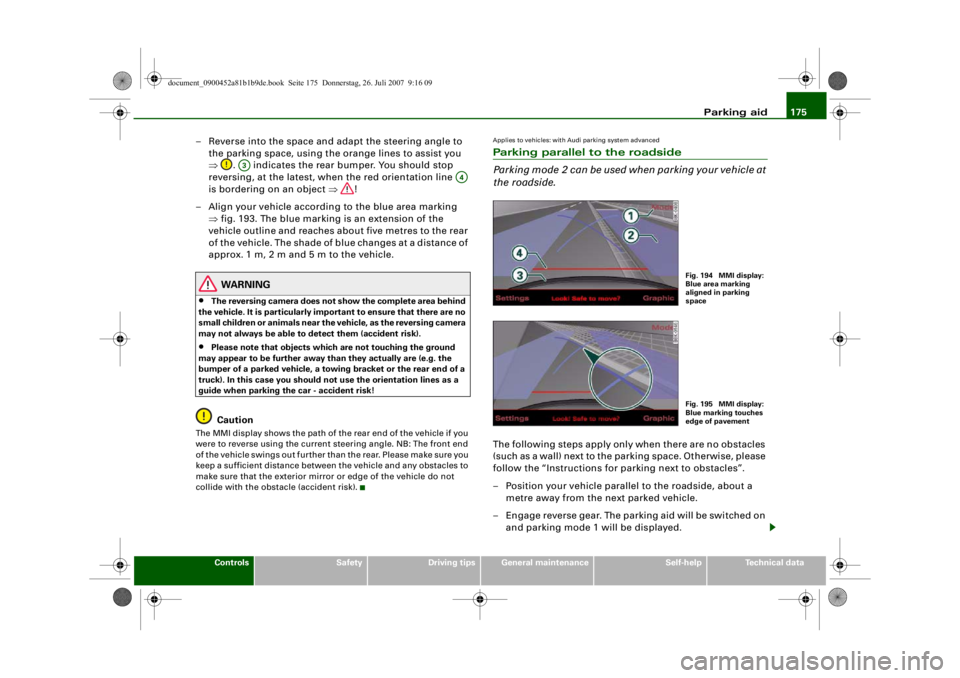
– Reverse into the space and adapt the steering angle to
the parking space, using the orange lines to assist you
⇒ . indicates the rear bumper. You should stop
reversing, at the latest, when the red orientation line
is bordering on an object ⇒!
– Align your vehicle according to the blue area marking ⇒fig. 193. The blue marking is an extension of the
vehicle outline and reaches about five metres to the rear
of the vehicle. The shade of blue changes at a distance of
approx. 1m, 2m and 5m to the vehicle.
WARNING
•
The reversing camera does not show the complete area behind
the vehicle. It is part icularly important to ensure that there are no
small children or animals near the vehicle, as the reversing camera
may not always be able to detect them (accident risk).
•
Please note that objects whi ch are not touching the ground
may appear to be further away th an they actually are (e.g. the
bumper of a parked ve hicle, a towing bracket or the rear end of a
truck). In this case you should not use the orientation lines as a
guide when parking the car - accident risk!Caution
The MMI display shows the path of th e rear end of the vehicle if you
were to reverse using the current steering angle. NB: The front end
of the vehicle swings out further th an the rear. Please make sure you
keep a sufficient distance between the vehicle and any obstacles to
make sure that the exterior mirror or edge of the vehicle do not
collide with the obstacle (accident risk).
Applies to vehicles: with Audi parking system advancedParking parallel to the roadside
Parking mode 2 can be used when parking your vehicle at
the roadside.The following steps apply only when there are no obstacles
(such as a wall) next to the parking space. Otherwise, please
follow the “Instructions for parking next to obstacles”.
– Position your vehicle parallel to the roadside, about a metre away from the next parked vehicle.
– Engage reverse gear. The parking aid will be switched on and parking mode 1 will be displayed.
A3
A4
Fig. 194 MMI display:
Blue area marking
aligned in parking
spaceFig. 195 MMI display:
Blue marking touches
edge of pavement
document_0900452a81b1b9de.book Seite 175 Donnerstag, 26. Juli 2007 9:16 09
--4 -
-T
CD
-+ +-
0
•
Page 179 of 342
Parking aid177
Controls
Safety
Driving tips
General maintenance
Self-help
Technical data
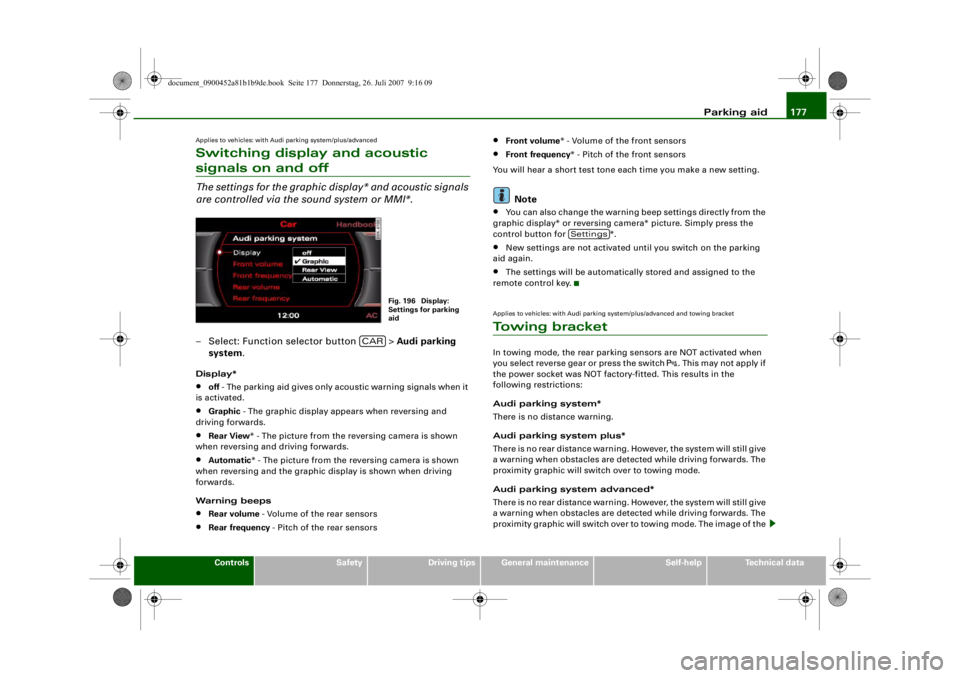
Applies to vehicles: with Audi parking system/plus/advancedSwitching display and acoustic signals on and offThe settings for the graphic display* and acoustic signals
are controlled via the sound system or MMI*.– Select: Function selector button > Audi parking
system .Display*•
off - The parking aid gives only acoustic warning signals when it
is activated.
•
Graphic - The graphic display ap pears when reversing and
driving forwards.
•
Rear View * - The picture from the reversing camera is shown
when reversing and driving forwards.
•
Automatic * - The picture from the reversing camera is shown
when reversing and the graphic display is shown when driving
forwards.
Warning beeps
•
Rear volume - Volume of the rear sensors
•
Rear frequency - Pitch of the rear sensors
•
Front volume* - Volume of the front sensors
•
Front frequency * - Pitch of the front sensors
You will hear a short test tone each time you make a new setting.Note
•
You can also change the warning beep settings directly from the
graphic display* or reversing camera* picture. Simply press the
control button for *.
•
New settings are not activated until you switch on the parking
aid again.
•
The settings will be automatically stored and assigned to the
remote control key.
Applies to vehicles: with Audi parking system/plus/advanced and towing bracketTo w i n g b r a c k e tIn towing mode, the rear parking sensors are NOT activated when
you select reverse gear or press the switch
. This may not apply if
the power socket was NOT factory-fitted. This results in the
following restrictions:
Audi parking system*
There is no distance warning.
Audi parking system plus*
There is no rear distance warning. However, the system will still give
a warning when obstacles are detected while driving forwards. The
proximity graphic will switch over to towing mode.
Audi parking system advanced*
There is no rear distance warning. However, the system will still give
a warning when obstacles are detected while driving forwards. The
proximity graphic will switch over to towing mode. The image of the
Fig. 196 Display:
Settings for parking
aid
CAR
Settings
document_0900452a81b1b9de.book Seite 177 Donnerstag, 26. Juli 2007 9:16 09
--4 -
-T
[1J
I I •
-+ +-
Page 194 of 342
Safe driving
192
WARNING
Any obstructions that restrict pedal travel can cause loss of
vehicle control and critical situations on the road.•
Never place objects in the driver 's footwell. Such objects could
move under the pedals and interfere with their proper function. In
the event of sudden braking or a change of direction, you would
not be able to use the pedals. This could result in a loss of control
and possibly cause an accident.
Floor mats on the driver's side
Use only floor mats which can be securely fastened in the
footwell and do not obstruct the pedals.– Make sure that floor mats are securely fastened and cannot interfere with the pedals ⇒.Use only floor mats that leave th e pedal area unobstructed and are
firmly secured to prevent them from slipping. You can obtain suit-
able floor mats from your dealer or a specialist retailer.
WARNING
Any obstructions that restrict pedal travel can cause loss of
vehicle control and increase the risk of serious personal injury. •
Always make sure that floor mats are properly secured.
•
Never lay or install additional floor mats or other floor cover-
ings over the existing floor mats; this would restrict the pedal area
and possibly obstruct the pedals, which could cause an
accident.
Stowing luggage safelyLuggage compartment
All luggage and other objects must be safely secured in
the luggage compartment.Loose items in the luggage compartment can shift suddenly
and cause a safety hazard or impair the handling of the
vehicle by changing the weight distribution.
– Distribute the load evenly in the luggage compartment ⇒page 79 .
– Place heavy items as far forward as possible in the luggage compartment and secure them properly.
– Use the fastening rings* provided ⇒page 193 or the
luggage net* for securing heavy items.
WARNING
•
Loose items in the luggage co mpartment can shift suddenly
and cause a safety hazard or impair the handling of the vehicle by
changing the weight distribution.
•
Always stow objects in the luggage compartment and secure
them on the fastening rings*.
•
Transporting heavy objects may affect the vehicle's handling by
shifting the centre of gravity – this could cause an accident. Take
extra care when driving and adjust your speed accordingly.
•
Never exceed the maximum axle loads or the maximum gross
weight for the vehicle ⇒page 323, “Performance, weights and
dimensions”. Exceeding the permitted axle loads or gross weight
limit can affect the vehicle's handling characteristics, and increase
the risk of accidents, personal injuries or damage to the vehicle.
•
Never leave your vehicle unatten ded when the boot lid is open.
Children could climb into the boot and close the boot lid from the
document_0900452a81b1b9de.book Seite 192 Donnerstag, 26. Juli 2007 9:16 09
--4 -
-T
•
-+ +-
•
Page 234 of 342
Towing a trailer
232Towing a trailerDriving the vehicle with a trailer or
caravanTechnical requirements
The towing bracket must comply with certain technical
requirements.Your car is intended mainly for transporting passengers and
luggage. However, if suitably equipped, it can also be used to tow a
trailer or caravan.
If the car is supplied with a factory-fitted towing bracket it will
already have the necessary technical modifications and meet the
statutory requirements.
A 13-pin socket is provided to make the electrical connection
between the car and the trailer. If the trailer has a 7-pin plug you can
use an adapter cable. This is available from Audi dealers.
WARNING
If a towing bracket is retrofitted, the installation should be carried
out by a qualified workshop.•
In particular in high outside tem peratures it is not possible to
drive up long steep gradients with out a suitable cooling system.
The engine would then overheat.
•
Incorrect installation can result in a safety risk.
Points to check before towingTrailer weights
Never exceed the maximum permitted trailer weights ⇒page 323 .If you do not load the trailer up
to the maximum permitted trailer
weight, you can then climb correspondingly steeper gradients.
The maximum trailer weights listed are only applicable for altitudes
up to 1000 m above sea level. With increasing altitude the engine
power and therefore the car's climbing ability are impaired because
of the reduced air density, so the maximum trailer weight has to be
reduced accordingly. The weight of the car and trailer must be
reduced by 10% for every further 1000 m (or part thereof). This
figure refers to the combined weight of the (loaded) vehicle and
(loaded) trailer.
The figures for the draw bar weight that appear on the identification
plate of the towing bracket are for certification purposes only. The
correct figures for your specific vehicle, which may be lower than
these figures for the towing bracket, are given in the registration
documents. Also refer to ⇒page 323 .
Distributing the load
Distribute loads in the trailer so th at heavy objects are as near to the
axle as possible. Loads carried in the trailer must be secured to
prevent them slipping.
Where possible, operate the trai ler with the maximum permitted
draw bar weight on the ball joint of the towing bracket, but do not
exceed the specified limit.
Tyre pressure
Check the tyre pressures on your car and adjust for “full load” condi-
tions (refer to the sticker listing the tyre pressures on the end face
of the driver's door). It may also be necessary to adjust the tyre pres-
sures on the trailer according to the recommendations of the trailer
manufacturer.
Exterior mirrors
Check whether you can see enough of the road behind the trailer
with the standard mirrors. If this is not the case you should have
document_0900452a81b1b9de.book Seite 232 Donnerstag, 26. Juli 2007 9:16 09
--4 -
-T
-+ +-
•