warning light AUDI S4 2013 Owner's Manual
[x] Cancel search | Manufacturer: AUDI, Model Year: 2013, Model line: S4, Model: AUDI S4 2013Pages: 302, PDF Size: 75.61 MB
Page 42 of 302
40 Opening and closing
Power opening/closing rear lid
Applies to vehicles: wit h au tom atic rear lid op erat ion
The open position can be adjusted.
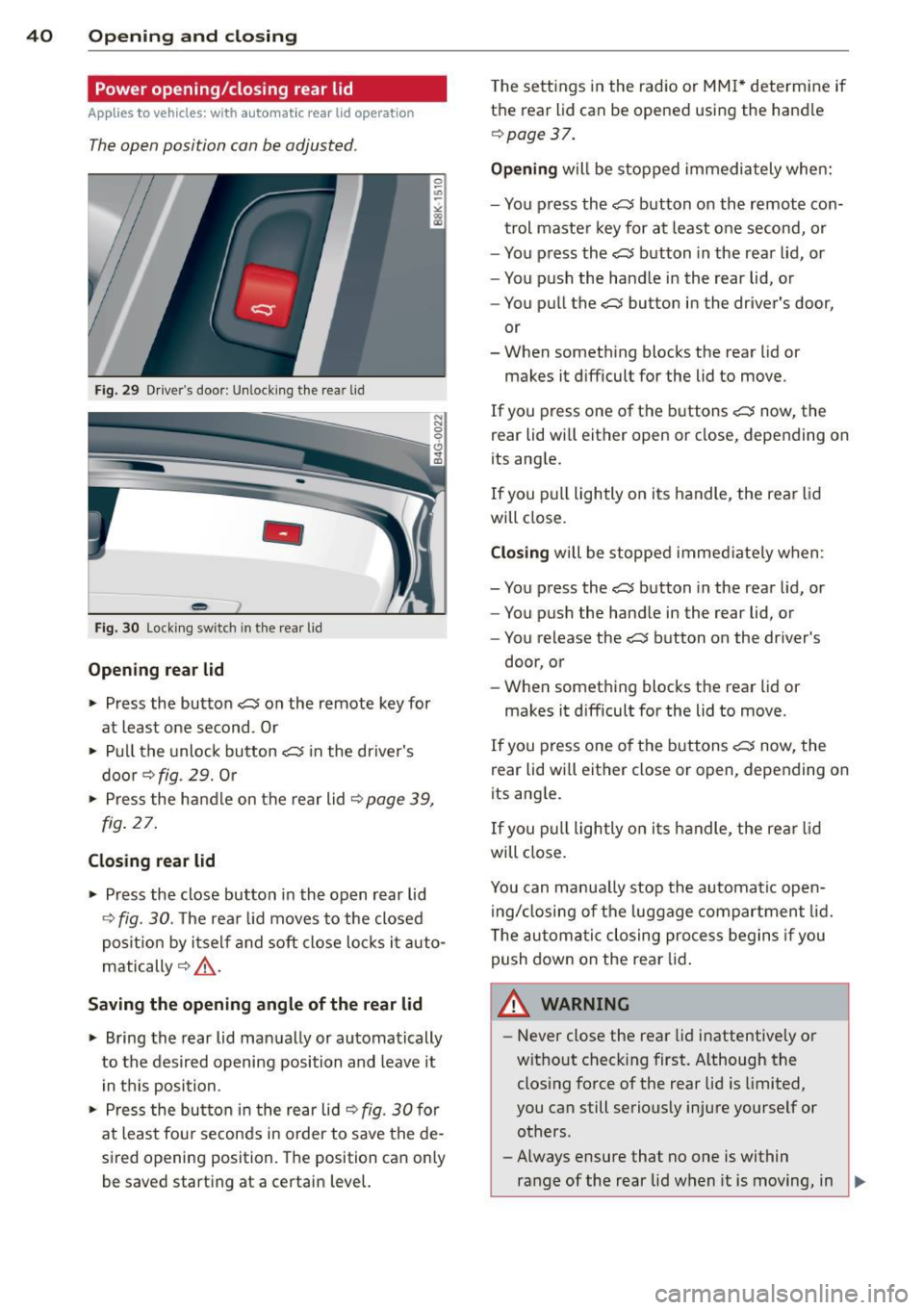
Fig . 29 Drive r's door: Unlock ing the rear lid
-
Fig. 30 Locking switch in the rear lid
Opening rear lid
~ Press the button C$ on the remote key for
at least one second . Or
~ Pull the unlock button C$ in the driver's
door
r::::> fig. 29. Or
~ Press the handle on the rear lid r:::;, page 39,
fig. 27.
Closing rear lid
~ Press the close button in the open rear lid
r::::> fig. 30. The rear lid moves to the closed
position by itself and soft close locks it auto
matically
r:::;, ,&. .
Saving the opening angle of the rear lid
~ Bring the rear lid manually or automatically
to the desired opening position and leave it
in this position.
~ Press the button in the rear lid r:::;, fig. 30 for
at least fou r seconds in order to save the de
sired opening position. The position can only
be saved start ing at a certain level. T
he sett ings in the radio or MMI* determine if
the rear lid can be opened using the handle
r::::>page 37.
Opening will be stopped immediately when:
- You press the
C$ button on the remote con-
trol master key for at least one second, or
- You press the
C$ button in the rear lid, or
- You push the handle in the rear lid, or
- You pull the
C$ button in the driver's door,
or
- When something blocks the rear lid or
makes it difficult for the lid to move.
If you press one of the buttons
C$ now, the
rear lid will either open or close, depending on
its angle.
If you pull lightly on its handle, the rear lid
will close.
Closing will be stopped immediately when :
- You press the
C$ button in the rear lid, or
- You push the handle in the rear lid, or
- You release the
C$ button on the driver's
door, or
- When something blocks the rear lid or
makes it difficult for the lid to move.
If you press one of the buttons
C$ now, the
rear lid wi ll either close or open, depending on
its ang le.
If you pull lightly on its h andle, the rear lid
will close.
You can manua lly stop the automatic open
ing/closing of the luggage compartment lid.
T he automatic closing process begins if you
push down on the rear lid.
A WARNING ,..___
-Never close the rear lid inattentive ly or
without check ing first. Although the
closing force of the rear lid is limited,
you can still seriously injure yourself or others.
- Always ensure that no one is within
range of the rear lid when it is moving, in
~
Page 45 of 302
Opening th e windows
"' Press the switch to the firs t stop and hold it
until the window reaches the desi red posi
tion.
"' Press the switch briefly to the se cond stop
to automatically open the window .
Cl os ing th e windows
"' Pull the swi tch to the first sto p and hold it
until the window reaches the desi red posi
tion .
"' Pu ll the switch brief ly to the sec on d st op to
automatica lly close the window.
P ow er w ind ow switch es
@ Driver's door
@ Passenger's door
© Left rea r door
@ R ight rear door
® Safety button
Child safety loc ks
When the safety button® is pressed
c::> fig. 35, the ~ symbol in the button lights
up . The power w indow switches in the rear
doors are switched off.
A WARNING
- When you leave your veh icle - even if on
ly briefly - always remove the ign ition
key. This applies part icularly when chil
dren remain in the vehicle. Otherw ise the
children cou ld s tart the engine or oper
ate e lectr ica l equipment (e.g . power win
dows). The power windows a re f unction
al until the driver's door or passenger's
door has been opened.
- Pay close attention when closing the win
dows to prevent pinching of hands or
limbs.
- When locking the vehicle from outside,
the vehicle must be unoccupied s ince the
windows can no longer be opened in an
emergency.
Opening and clo sin g 43
(D Tips
After the ignition has been switched off,
the w indows can still be opened or closed
for about 10 minutes. The power windows
are not switched off until the driver's door
or passenger's door has been opened .
Convenience opening/closing
The windows and the power sunroof can be
opened and closed with the mechanical key or the emergency key.
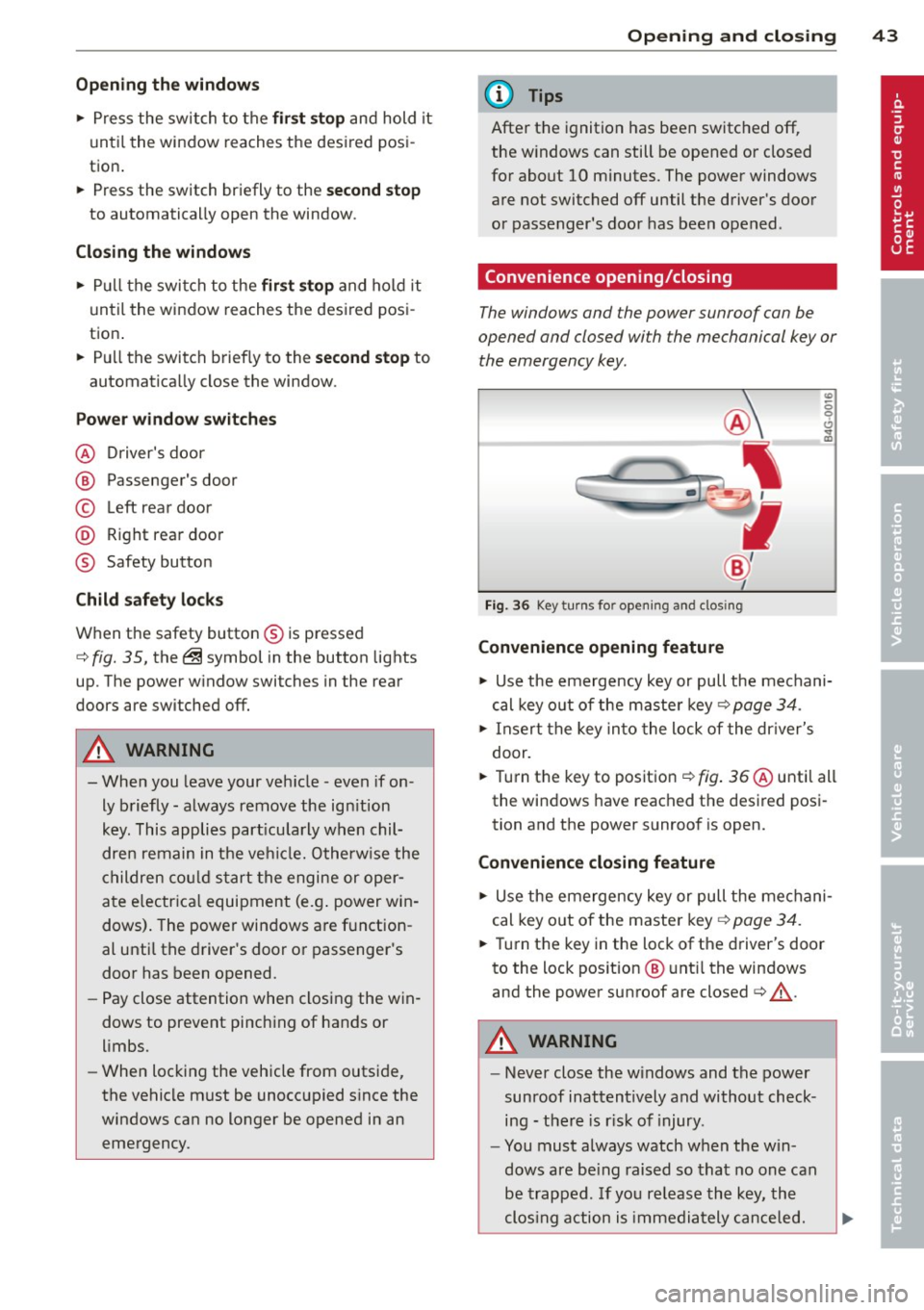
Fig. 36 Key turns for opening and clos ing
Convenience opening feature
"' -0 0 t!, ., a,
"' Use the emergency key or pull the mechani
cal key out of the maste r key
c:? page 34.
"' Insert the key into the lock of the dr iver's
door.
"' Turn the key to position ¢
fig. 36 @until all
the windows have reached the desired posi
tion and the power sunroof is open.
Convenience closing f eature
"' Use the emergency key or pull the mechani
cal key out of the maste r key ¢
page 34.
"' Turn the key in the lock of the driver's door
to the lock position @ unt il the windows
and the power sunroof are closed¢
A.
A WARNING
- Never close the w indows and the power
sunroof inattentively and without check ing - the re is r isk of injury.
- You must always watch when the win
dows are be ing raised so that no one can
be trapped. If you re lease the key, the
clos ing action is immediately canceled.
Page 47 of 302
Tilting
• The sunroof can be tilted or closed only in
switch position @¢
fig. 38
• To tilt it , brief ly press the switch ¢ page 44,
fig. 37.
• To close it, briefly pull the switch ¢ .&, .
• To set an intermediate position, press/pull
the switch until the roof reaches the desired
pos ition .
Opening
• To open the sunroof complete ly, turn and
hold the switch against the resistance in po
s ition (!).
• To close the sunroof, turn the rotary sw itch
to posit ion @ ¢.&, .
• An intermediate position can be set by turn
ing the rotary swit ch to the des ired position.
Opening /closing the sunshade
• Press the switch®¢ page 44, fig . 37 in
the des ired arrow direction .
• To stop the sunshade in an intermed iate po-
sit ion, press the switch again .
After the ignit ion is switched off, you can st ill
operate the sunroof for about 10 minutes. As
soon as the driver's or passenger's door is
opened, the sw itch is inoperative.
T he power sunshade can also be closed when
the sunroof is open.
A WARNING
Pay careful attention when clos ing the
sunroof- otherwise serious injury could re
sult! For this reason, always remove the ig
nition key when leav ing the veh icle.
(D Note
Always close your sunroof when leaving
your veh icle. Sudden rain can cause dam
age to the inter ior equipment of yo ur vehi
cle, particularly the electronic equipment.
@ Tips
-Information regarding convenience
opening/closing¢
page 43.
Opening and closing 45
Emergency closing of the sunroof
If the sunroof detects an object in its path
when it is clos ing, it will open again automati
ca lly. In this case, you can close the roof with
the power emergency closing function.
• Within five seconds after the sunroof opens
automatically , pull the switch until the roof
closes.
Valet parking
Applies to vehicles: with fo lding and lockab le rear seat
backs
The valet parking feature protects the lug
gage compartment from unauthorized ac
cess.
-
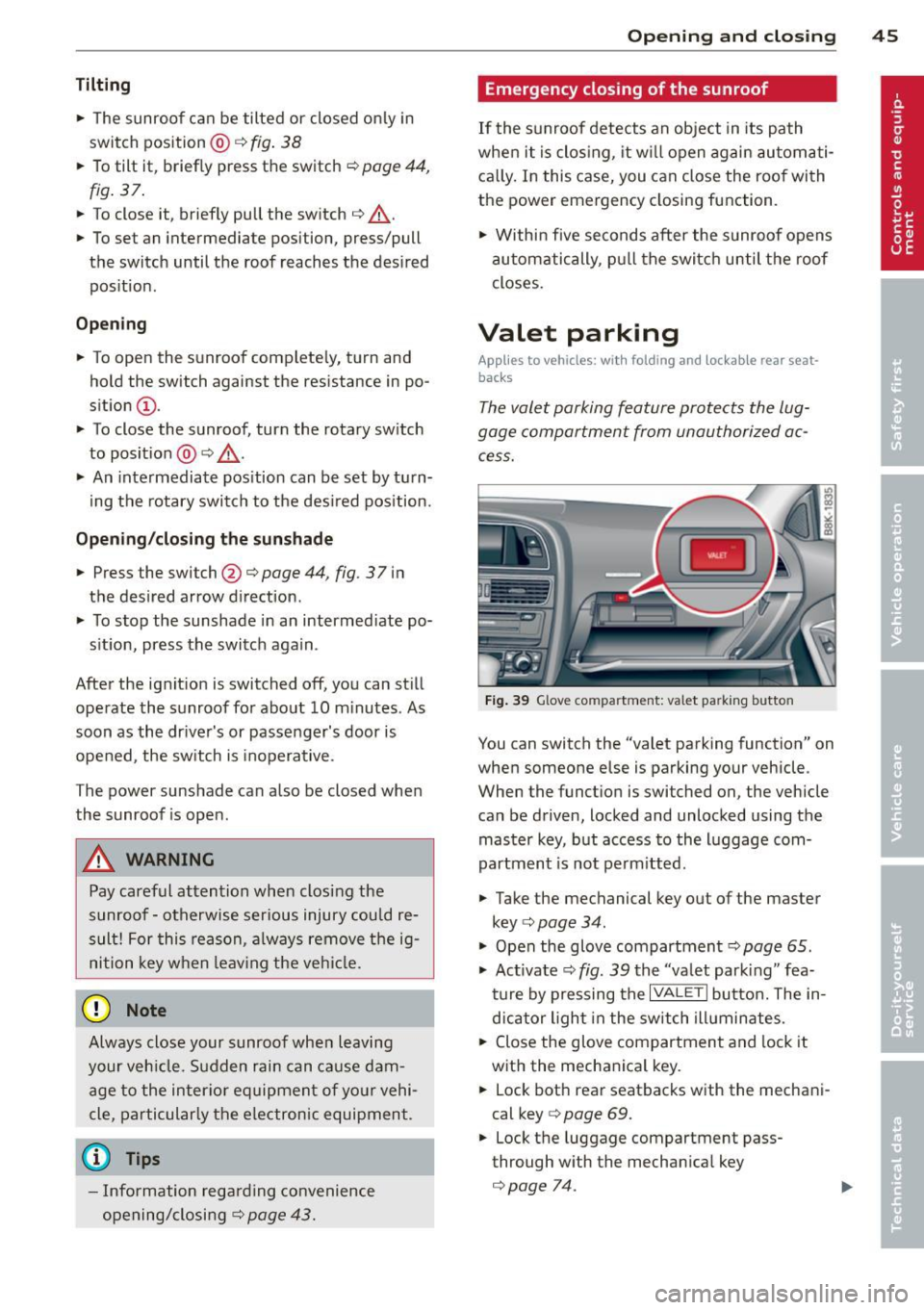
Fig. 39 Glove co mpartment: valet pa rking butto n
You can switch the "valet parking function" on
when someone else is parking your vehicle .
When the funct ion is switched on , the vehicle
can be driven, locked and unlocked using the master key, but access to the luggage com
partment is not perm itted .
• Take the mechanical key out of the master
key ¢
page 34.
"' Open the glove compartment¢ page 65.
"' Act ivate ¢
fig. 39 the "valet park ing" fea
ture by pressing the
I VALET I button. The in
dicator light in the switch illuminates.
• Close the glove compartment and lock it
with the mechanical key.
• Lock both rear seatbacks with the mechani
cal key
c> page 69.
• Lock the luggage compartment pass
through w ith the mechan ica l key
c> page 74.
Page 49 of 302
Clear vision Lights
Switching the lights on and off
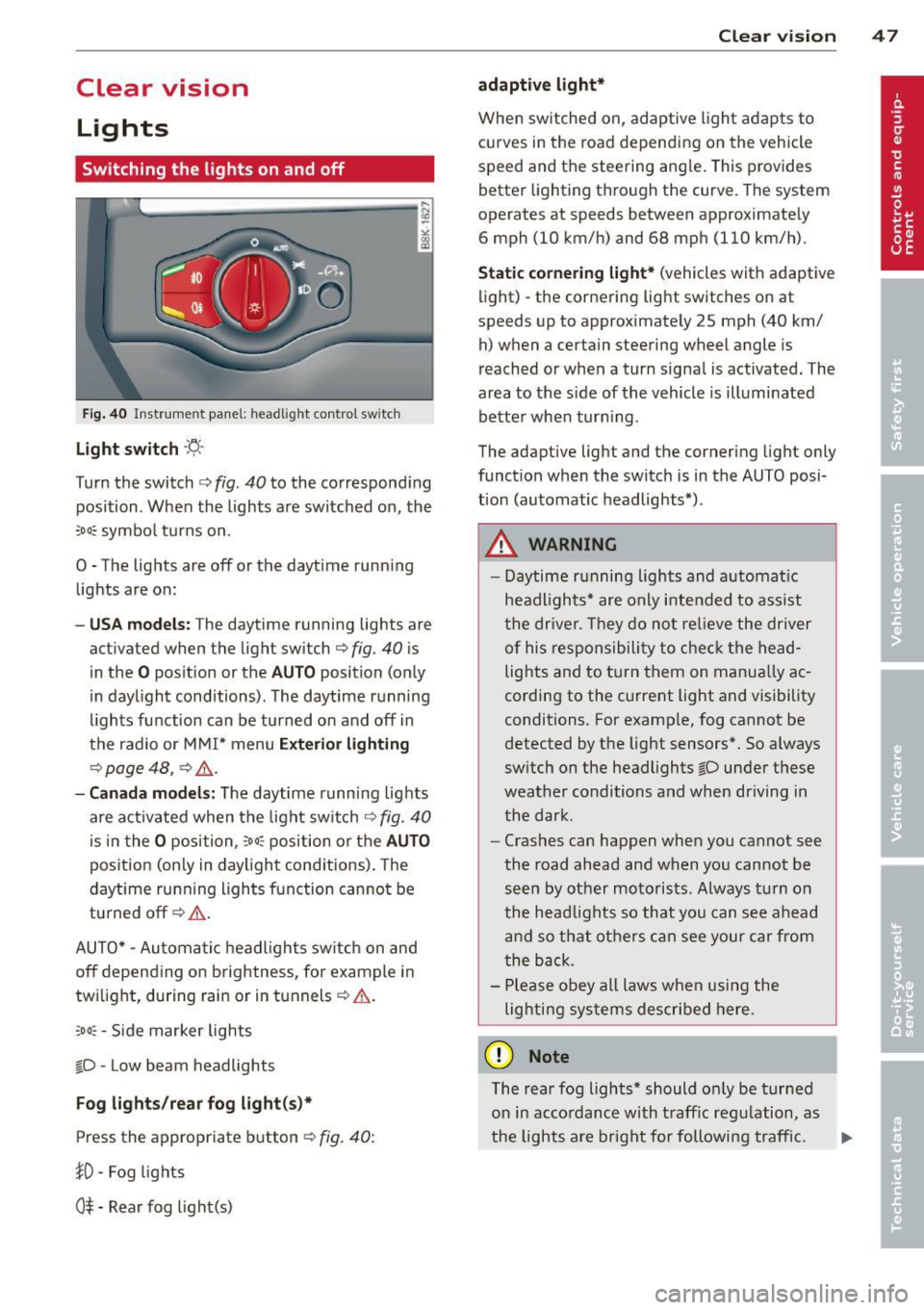
F ig . 40 Instrument pane l: headlight control switch
Light switch ·'t/,·
Turn the switch c> fig . 40 to the correspond ing
position . When the lights are switched on, the
:oo: symbol turns on.
0 • The lights are off or the dayt ime running
lights are on:
- USA mod els : The daytime running lights are
activated when the light sw itch
c> fig . 40 is
in the
O position or the AUTO position (only
in daylight conditions) . The daytime running
lights function can be turned on and off in
the radio or MMI* menu
E xteri or li ghtin g
¢ page 48 , c> &_.
-Ca nad a mod els: The daytime runn ing lights
are activated when the light sw itch
¢ fig . 40
is in the O position, :oo : position or the AUTO
posit ion (only in daylight conditions). The
daytime running lights function cannot be
turned off¢&. .
AUTO* -Automatic headlights switch on and
off depending on b rightness, for example in
tw ilight, during rain or in tunnels¢,& .
:oo: -Side marker lights
~D -Low beam headlights
Fog light s/rea r fog ligh t(s)*
Press the appropriate button c> fig. 40:
1D -Fog lights
0$ -Rear fog light(s)
Clear vi sion 4 7
adaptive light*
When switched on, adaptive ligh t adap ts to
curves in the road depend ing on the vehicle
speed and the steering ang le. This provides
better lighting through the curve. The system
operates at speeds between approximately 6 mph (10 km/h) and 68 mph (110 km/h).
St atic corner ing light * (vehicles with adaptive
light) -the cornering light switches on at
speeds up to approximately 25 mph (40 km/ h) when a certain steering wheel angle is
reached or when a turn signal is activated. The
area to the s ide of the vehicle is illuminated
better whe n turn ing .
The adaptive light and the cornering light only
function when the switch is in the AUTO posi
tion (automatic headlights*) .
A WARNING
-Daytime running lights and automatic
headlights* are only intended to ass ist
the driver . T hey do no t re lieve the driver
of his responsibility to chec k the head
lights and to t urn them on manua lly ac
cording to the current light and visibility
conditions. For examp le, fog cannot be
detected by the light sensors*. So a lways
switch on the headlights
~D under these
weather conditions and when driving in
the dark .
- Crashes can happen when you cannot see
the road ahead and when you cannot be
seen by other motorists. Always turn on
the head lights so that you can see ahead
and so that others can see your car from
the back.
- Please obey all laws when using the
lig hting sys tems described here.
(D Note
The rear fog lights* should on ly be turned
on in accordance with t raff ic regulation, as
the lights are bright for following traffic. ..,.
Page 50 of 302

48 Clear vis ion
@ Tips
- The light sensor* for headlight control is
located in the rear view m irror mount.
You should therefore not apply any st ick
ers to the windsh ield in this area in order
to prevent malfunctions or failures.
- Some exterior lighting functions can be
adjusted
c> page 48.
- When you remove your key from the igni
tion while the vehicle's lights are turned
on, a buzzer sounds as long as the driv
er's door is open .
- In cool or damp weather, the ins ide of
the headlights, turn signals and tail lights can fog over due to the tempera
ture difference between the inside and
outside. They will clea r shor tly after
switching them on. This does not affect
the service life of the lighting.
- In the even t of a light sensor malfunc
tion, the driver is no tified in the instru
ment cluster disp lay ¢
page 22.
Turn signals and high beam lever
The lever operates the turn signals , the high
b eams and th e headlight flash er.
Fig . 4 1 Tu rn s ig na l an d h ig h beam leve r
Turn sign als ¢i ¢
The turn signals activate when you move the
l ever into a turn s ignal pos ition when the ign i
tion is switched on.
(D -right turn signal
@-left tur n signa l
The turn s ignal blinks three times if you just
tap the lever .
High be ams and headlight flasher [D
Move the lever to the correspon ding posit io n:
@ -high beams on
@ -high beams off o r headligh t fla sher
The indicator light
II in the i nstr ument clus
ter turns on .
Notes on thes e features
- The turn signals on ly work w ith the ign ition
t ur ned on. The indicator lights
B or II in
t he instrument cluster also blink.
- After you have turned a co rner, the tu rn s ig
na l switches off au toma tically .
- The
high beam works on ly w hen the head
lights a re o n. The indicator light
II in the
instrument cluster illuminates when the
high beams are on .
- The
headlight flasher works o nly as long as
you ho ld the lever -even if the re a re no
lights switched on . The ind icator light
II i n
the instrument cluster illum inates when you
use the headlight flasher.
A WARNING
--
Do not use the h igh beam or headlight
flashe r if you know that these could blind
oncom ing traffic.
Adjusting exterior lighting
The functions ore selected in the radio or
MMI" .
.,. Select: I CAR ! function button > Ext erio r
light ing .
Or
.,. Select: !CAR I function button > Car sys
tem s*
contro l button > Ve hicle settings >
Ext eri or lighting .
Coming home (light when leav ing car }* ,
L e aving home (light when unlocking car)*
The coming home function illuminates the
area around the vehicle when the ignition is
switched off and the dr ive r's door is opened .
Depend ing on vehicle equ ipment, the function
can be switched on and off or the length of
time the lights remain on* can be ad justed . ..,_
Page 53 of 302
Turn the knob to the desired position:
Q/ P -In this position , you can adjust the
driver's and front passenger's exterior mirrors
by turning the knob in the desired direction.
(ijjl -The mirrors are heated depending on the
outside temperature.
8 -The exterior mirrors fold in*. You can ad
just whether or not the mirrors fold in auto
matically when locking the vehicle using the
radio/MM I*
c::> page 3 7.
Passenger exterior mirror tilt function*
(only with memory for exterior mirrows)
To help you see the curb when backing into a
parking space, the surface of the mirror tilts
slightly . The knob must be in the
P position
for this to happen .
You can adjust the tilted mirror surface by
turning the knob in the desired direction .
When you move out of reverse and into anoth
er gear, the new mirror position is stored and
assigned to the key you are using.
The mirror goes back into its original position
once you d rive forward faster than 9 mph
(15 km/h) or switch the ignition off .
,&. WARNING
Curved mirror surfaces (convex or spheri
cal*) increase your field of view. Remem
ber that vehicles or other objects will ap
pear smaller and farther away than when
seen in a flat mirror. If you use this mirror
to estimate distances of following vehicles
when changing lanes, you could estimate incorrectly and cause an accident.
(D Note
- If the mirror housing is moved uninten
tionally (for example, while parking your
vehicle), then you must first fold the mir ror electrically. Do not readjust the mir
ror housing manually. You could damage
the motor which controls the mirror .
-If you wash the vehicle in an automatic
car wash, you must fold the exterior mir
rors in to reduce the risk of damage to
-
Clear vision 51
the mirrors . Never fold power folding ex
terior mirrors* by hand. Only fold them
in and out using the power controls.
(D Tips
- The exterior mirror settings are stored
with the memory function*
c::> page 62.
- If there should be a malfunction in the
electrical system, you can still adjust the
exterior mirrors by pressing the edge of
the mirror.
Dimming the mirrors
N
:!
"' ~:::====~~=~====~ :ll
Fig. 47 Auto mat ic dimming re arv iew mirror*
Manual dimming rearview mirror
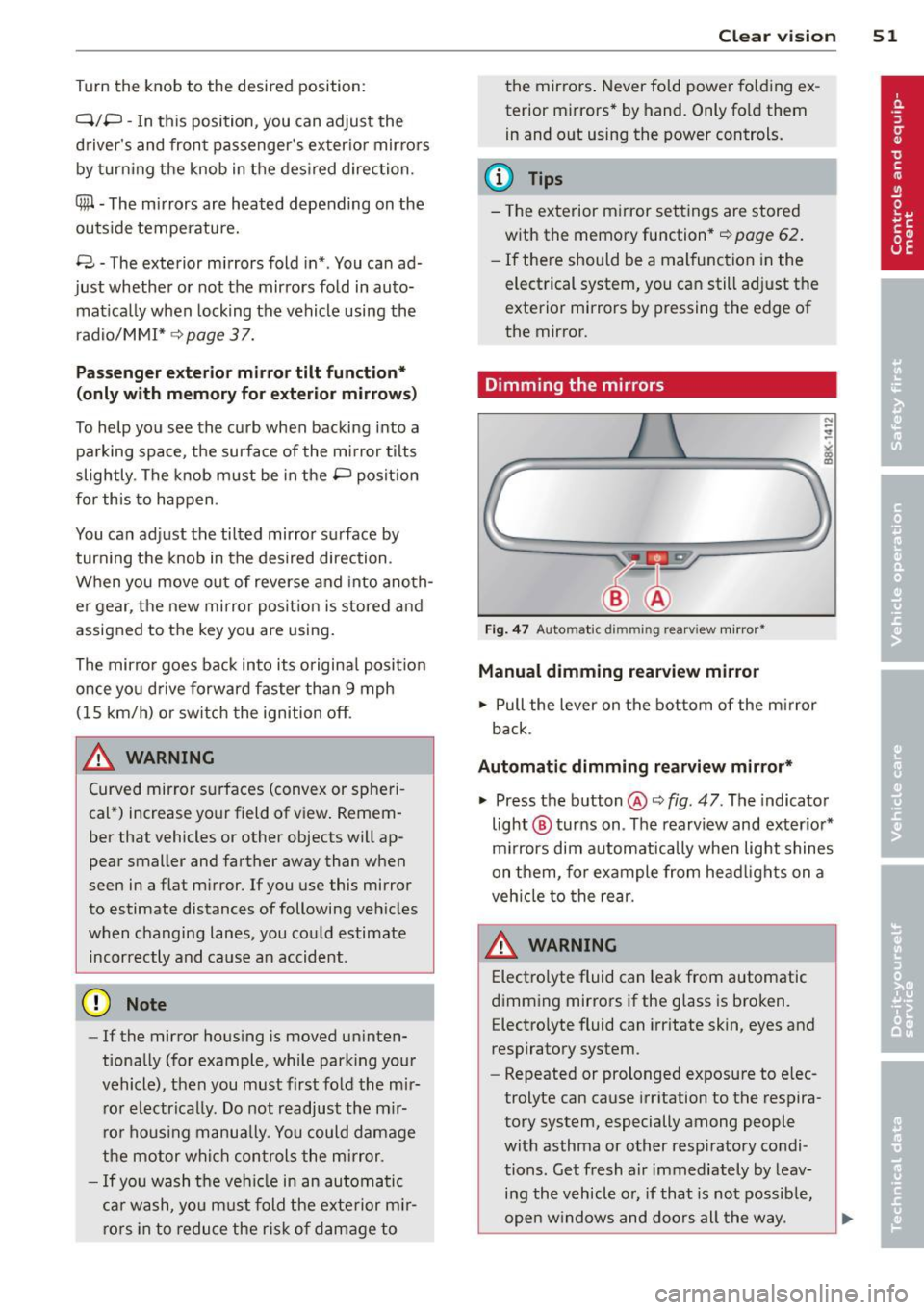
.. Pull the lever on the bottom of the mirror
back .
Automatic dimming rearview mirror*
.. Press the button @c::> fig. 47. The indicator
light @ turns on . The rearview and exterior*
mirrors dim automatically when light shines
on them, for example from headlights on a
vehicle to the rear.
A WARNING -
Electrolyte fluid can leak from automatic
dimming mirrors if the glass is broken. Electrolyte fluid can irritate skin, eyes and
respiratory system .
- Repeated or prolonged exposure to elec
trolyte can cause irritation to the respira
tory system, especially among people
with asthma or other respiratory condi
tions. Get fresh a ir immediately by leav
ing the vehicle or, if that is not possible,
open windows and doors all the way.
Page 56 of 302
54 Clear vis ion
ra in sensor mode off and switch intermittent
mode on in the MMI*. Se lect:
I CAR ! function
button
> C ar sys tem s* contro l button > Dri ver
assi st> Rain s enso r.
In interm ittent mode,
you can adjust the interval time using the ®
switch .
@-Slow wiping
@-Fas t wiping
© -Sing le w ipe
® -Clean the windshield . To eliminate water
drop lets, the w indshield wiper performs one
afterwipe operation after several seconds
while driv ing . You can switch th is fu nction off
by mov ing the lever to position ® within 10
seconds of the afte rwipe operation . The after
wipe func tion is reactiva ted the next time the
ignition is switched on.
a llroad: The rear w iper automatically switches
on when the reve rse gear is engaged and the
front w indshield w ipers are on and in opera
tion .
C lean ing the headlights*. The headlight wash
e r system* opera tes on ly when the headl ights
a re on. If you move the leve r to pos ition @,
the head lights are washed in intervals.
@ -allroad : Wipe the rear window. The rear
wiper moves about every 4 seconds.
(J) -allroad : Clean the rear window . The num
ber of wiping operations depends on how long
the lever is held in pos ition
(J) .
_& WARNING
- T he ra in sensor is only inte nded to assist
the drive r. The driver is still responsible
for man ually switching the wipers on ac
cording to the v isibility conditions .
- T he windshie ld may not be treated w ith
water-repe lling windshie ld coating
agents . Unfavorable conditions, such as
wetness, darkness, low sun, can res ult in
increased glare. Wiper blade chatter is
also possible .
- Proper ly functioning windshie ld w iper
blades are required for a clear view and safe driving
~ page 54, Replacing
windshield wiper blades.
@ Note
- In the case of frost, check whethe r the
windshield wiper blades are frozen to
the windshield. Sw itching on the wind
shield wipers can damage the wiper
blades!
- Pr ior to us ing a car wash, the w indshield
w iper system must be sw itched off ( lever
in posit ion @). Th is he lps to prevent un
intentional switching on and damage to
the windsh ield wiper system .
@ Tips
- The windshie ld wipers are switched off
when the ignit ion is turned off. Act ivate
the winds hield wipers after the ignition
is switched back on by moving the wind
shield w iper lever to any position.
- Worn or d irty windshield wiper blades
result in st reaking. This can affect the
rain sensor* function. Check your wind
shield w ipe r blades regularly.
- The washer fluid nozz les of the wind
shield w asher system a re heated at low
temperat ures when the igni tion is on.
- When stopping tempo rarily, (e .g. at a
t raffic light) the set speed o f the wind
shield wipers is automatically reduced by
one speed.
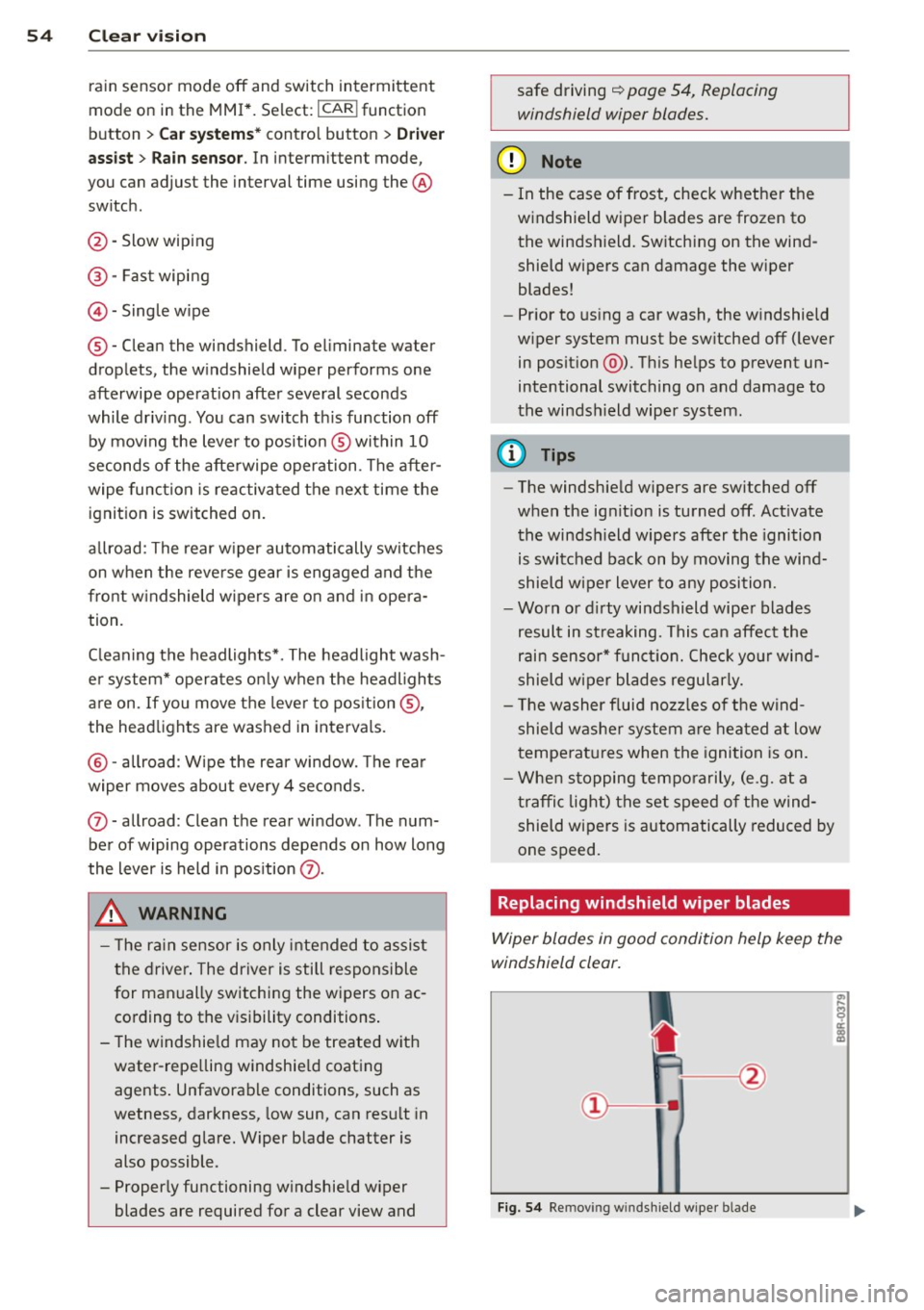
· Replacing windshield w iper blades
Wiper blades in good condition help keep the
windshield clear.
F ig. 5 4 Remov ing wi nd sh ie ld w ipe r bl ade
Page 60 of 302
58 Seat s a nd s tor ag e
Seats and storage
General recommen
dations
Why is your seat adjustment so
important?
The safety belts and the airbag system can
only provide maximum protection if the front
seats are correctly adjusted.
There are various ways of adjust ing the front
seats to provide safe and comfortable support
for the driver and the front passenger . Adjust
your seat properly so that :
- you can easily and quick ly reach all the
switches and controls in the instrument
panel
-your body is prope rly supported thus reduc
ing physical stress and fatigue
- the safety be lts and a irbag system can offer
maximum protection
¢ page 145 .
In the following sec tions, you will see exactly
how you can best adjust you r seats .
There are special regulations and instructions
for insta lling a child safety seat on the front
passenger's seat. Always follow the informa
tion rega rd ing child safety provided in
G page 166, Child Safety.
WARNING
Refer to G page 12 7, Driving Safely for
important information, tips, suggestions
and warnings that you should read and fol
low for your own safety and the safety of
your passengers.
A WARNING
, -
Incorrect seating position of the dr iver and
all other passengers can result in serious
personal inj ury .
- Always keep your feet on the f loor when
the vehicle is in mo tion -never p ut your
feet on top of the instrument panel, out of the w indow or on top of the seat cush
ion. This app lies especially to the passen- gers
. If your seating position is incorrect,
you increase the risk of injury in the case of sudden braking or an accident. If the
airbag inflates and the seating position is incorrect, this could result in pe rsonal
in ju ry or even death.
- It is important for both the driver and front passenge r to keep a distance of at
least 10 inches (25 cm) between them
selves and the steering wheel and/or in
s trumen t panel.
If you're s itting any
closer than th is, the a irbag system can
not protect you properly. In addition, the
front seats and head restraints m ust be
adj usted to your body height so that they
can give you max imum protect ion.
- Always try to keep as much distance as
possible between yourself and the steer
ing wheel or instrument panel.
- Do not adjust the driver's or front pas senger's seat while the vehicle is moving.
Your seat may move unexpected ly , caus
ing sudden loss of veh icle control and
pe rsonal injury. If you ad just you r seat
while the veh icle is moving, yo u are out
of posit ion.
Driver's seat
The correct seat position is important for safe
and relaxed driving .
We recommend that you adjust the dr iver's
seat in the follow ing manner:
.. Adjust the seat in fore and aft direction so
that you can easily push the pedals to the
floor wh ile keeping your knees slightly bent
G &. in Why is your seat adjustment so im
portant? on page 58 .
.,. Adjust the seatback so that when you sit
w ith your back against t he seatback, you can
s till grasp the top of the steering whee l.
.. Applies to veh icles with adjustable head re
straints: Adjust the head restraint so the up
per edge is as even as possible with the top
of yo ur head. If that is not possib le, try to
adjust the head restraint so that it is as .,.
Page 65 of 302
The memory buttons are located in the driv
er's door.
Switching the memory function on/off
• Press the !O FF ! button to switch the memo
ry function on/off. The word
OFF lights up
when the memory function is switched off .
Seat profiles are not stored .
Storing a seat profile
• Press the !SET ! button . When the wo rd SET
lights up, the memory is ready to store set
t ings .
• Press a memory button
dJ J or [II ) briefly . A
tone confirms that the settings wer e stored.
Accessing a seat profile
• If the driver's door is open , press a memory
button .
• If the drive r's door is closed, press and ho ld
the memory button until the seat adjust
ment is complete.
A WARNING
- For safety reasons, the seat setting can
only be recalled when the vehicle is sta
tionary -otherwise you risk having an ac
cident .
- In an emergency the recall procedure can
be cancelled by pressing the
! OF F! switch
or by tapping the memory buttons .
Ashtray
Fig. 65 Center con so le: ash tray
Opening/closing
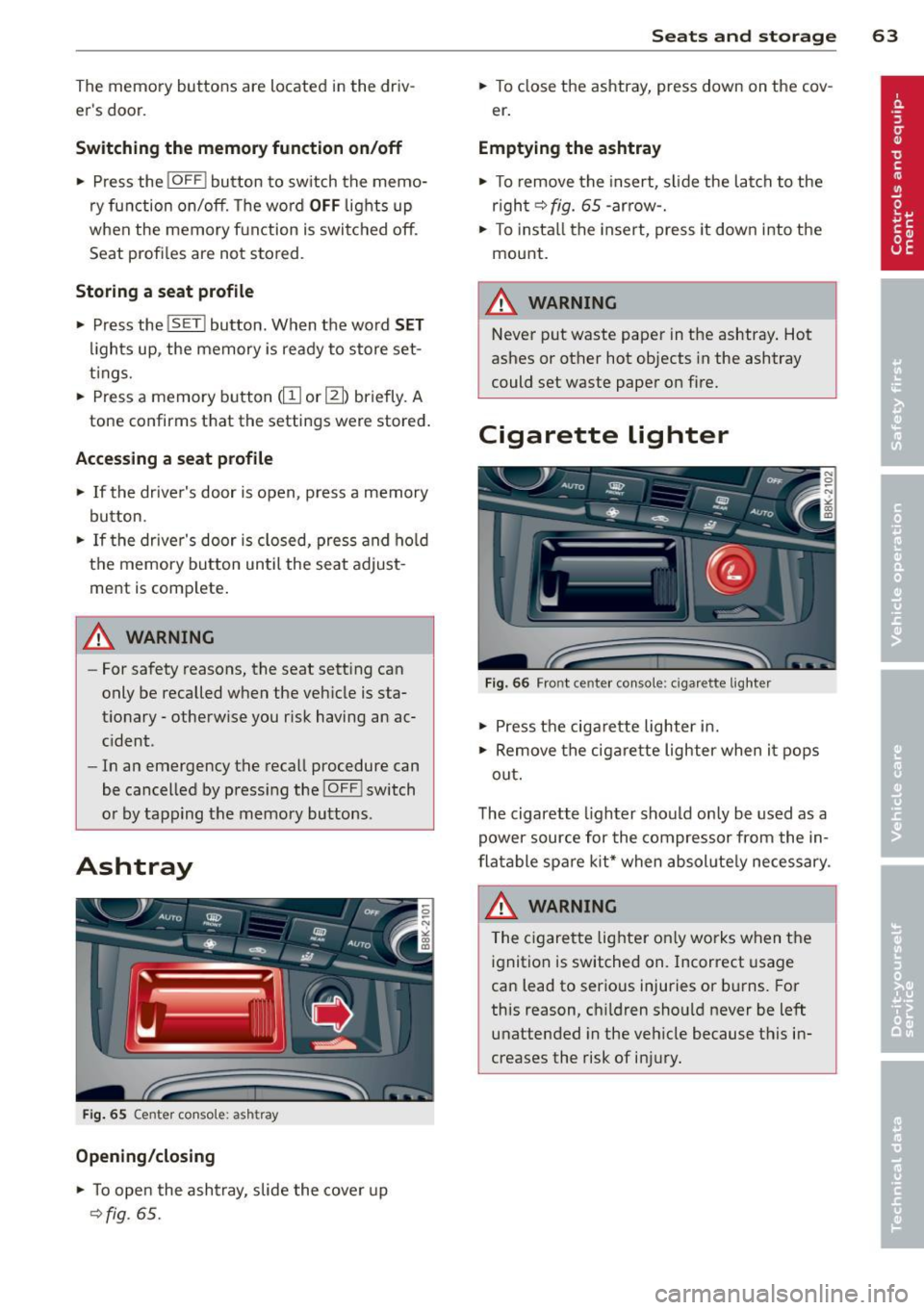
• To open the ashtray, slide the cover up
~fig . 65 .
.
Seats and storage 63
• To close the ashtray, press down on the cov
e r.
Emptying the ashtray
• To remove the insert, slide the latch to the
r igh t
~fig. 65 -arro w-.
• To install the insert, press it down into the
mount.
A WARNING
-Never put waste paper in the ashtray. Hot
ashes or other hot objects in the ashtray
could set waste paper on fire.
Cigarette lighter
Fig. 66 Fro nt c ente r con sole : cigar ette light er
• Press the cigarette lighter in.
• Remove the cigarette lighter when it pops
out.
The cigarette lighter should only be used as a
power source for the compressor from the in
flatable spare kit* when absolutely necessary.
& WARNING ~
The cigarette lighter on ly works when the
ignition is switched on. Incorrect usage
can lead to serious injuries or burns. For
this reason, ch ildren should never be left
unattended in the vehicle because this in
creases the risk of injury.
Page 66 of 302
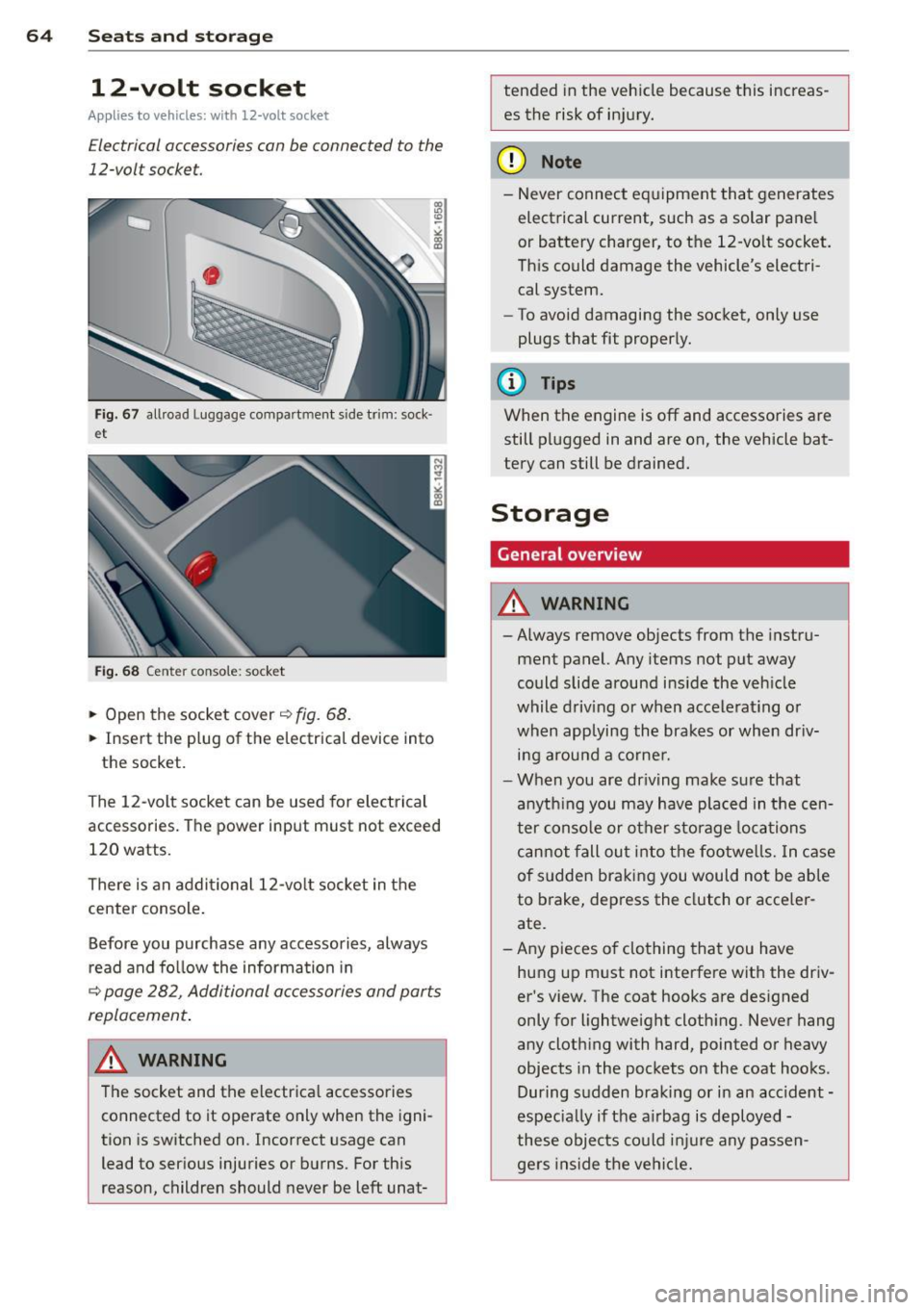
64 Seats and storage
12-volt socket
Applies to vehicles: wit h 12-volt socket
Electrical accessories can be connected to the
12-volt socket.
F ig . 6 7 allroad Luggage compartment s ide trim: sock·
et
Fig . 68 Center conso le: socket
.,. Open the socket cover~ fig. 68.
.,. Insert the plug of the e lectrica l device into
the socket.
The 12-volt socket can be used for elec trical
accessories. The power input must not exceed
120 watts.
There is an addi tional 12-vo lt socket in the
cente r console .
Before you purchase any accessories, always
r ead and fo llow the information in
~ page 282, Additional accessories and parts
replacement .
.&_ WARNING
The socket and the electrica l accessories
connected to it operate only when the igni
tion is sw itched on. Incorrect usage can
lead to serious injuries or burns. For this
reason, children should never be left unat-
-
tended in the veh icle because this increas
es the risk of in jury.
(D Note
-Never connect e quipment that generates
electrical current, such as a solar pane l
or battery charger, to the 12-vo lt socket.
Th is could damage the vehicle's electri
cal system.
- To avoid damaging the socket, only use
plugs t hat fit properly.
(D Tips
When the engine is off and accessories are
still pl ugged in and are on, the vehicle bat
tery can still be drained.
Storage
General overview
.&_ WARNING
-
- Always remove objects from the instru-
ment panel. Any items not put away
could slide around ins ide the veh icle
while driving or when accele rat ing or
when applying the brakes or when dr iv
i n g arou nd a corne r.
- When you are dr iving make su re that
anyth ing you may have pla ced in the cen
ter conso le or other sto rage locations
can not fall ou t in to t he footwe lls. In c ase
of sudden bra king you would not be able
to brake, dep ress the clutch o r acce ler
ate.
- Any pieces o f clothing that you have
hung up m ust not interfere with the driv
er 's view. The coat hooks are des igned
only for lightweight cloth ing. Never hang
a ny clothing with hard, pointed or heavy
objects in the pockets on the coat hooks .
During s udden braking or in an accident -
especia lly if the a irbag is d eployed -
these objec ts co uld inj ure any passen
gers inside the ve hicl e.
-