warning lights AUDI S4 2014 User Guide
[x] Cancel search | Manufacturer: AUDI, Model Year: 2014, Model line: S4, Model: AUDI S4 2014Pages: 296, PDF Size: 73.56 MB
Page 21 of 296
Instruments and warning/indicator lights 19
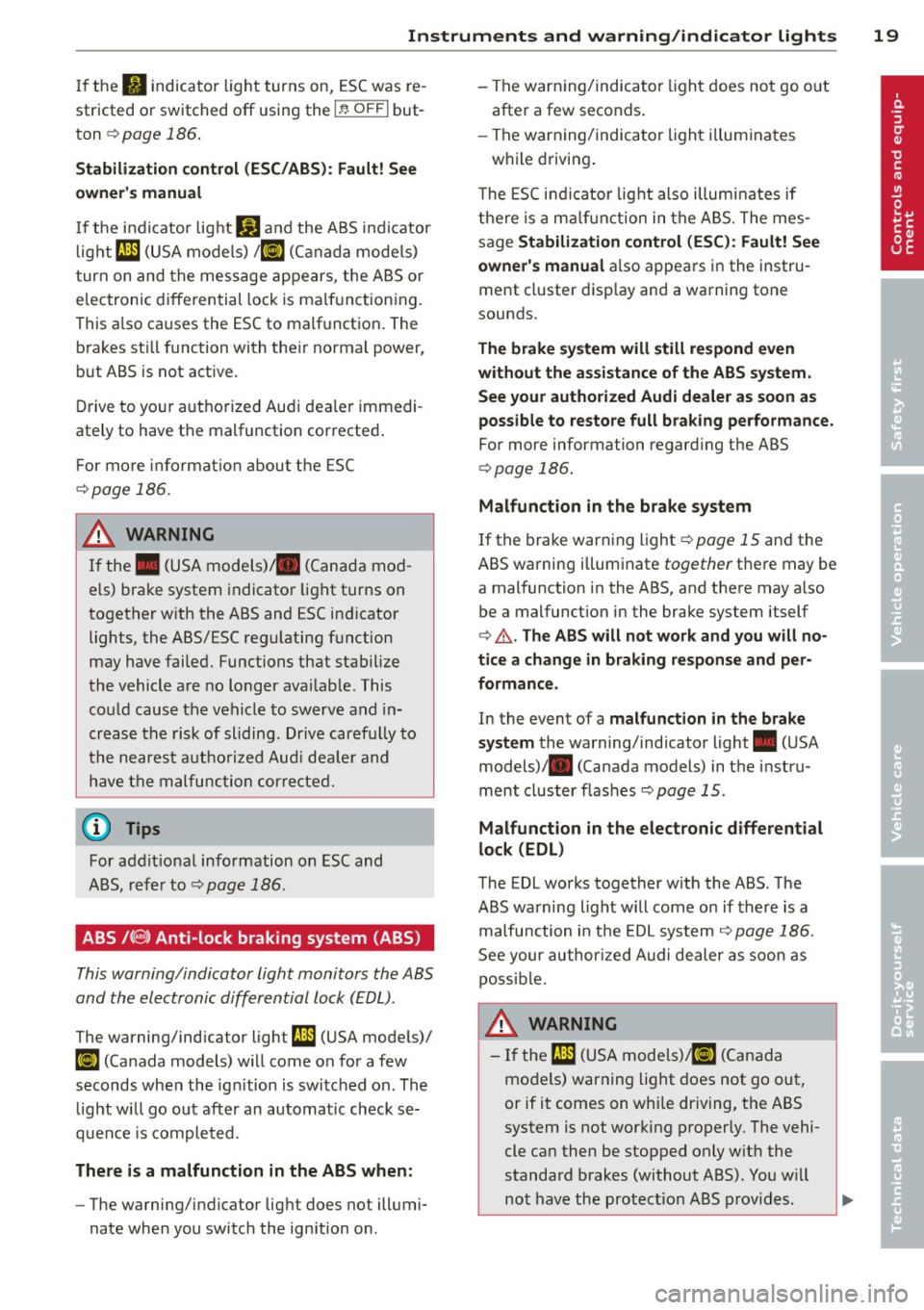
If the fl indicator light turns on, ESC was re
stricted or switched
off using the I ~ O FF I but
ton
¢ page 186.
Stabilization control (ESC/ABS): Fault! See
owner's manual
If the indicator light Ji) and the ABS indicator
light
ml (USA models) / II] (Canada models)
turn on and the message appears, the ABS or
e lectronic differential lock is ma lfunctioning.
This a lso ca uses the ESC to malfunction . The
brakes st ill function with their normal power,
but ABS is not act ive.
D rive to your authorized Audi dea ler immedi
ately to have the malfunction corrected .
Fo r more informat io n about the ESC
¢page 186.
A WARNING
If the . (USA models) . (Canada mod
els) brake system indicator light turns on
together with the ABS and ESC indicator
lights, the ABS/ESC regulating function
may have failed. Functions that stabilize
the vehicle are no longer avai lab le. This
could cause the vehicle to swerve and in
crease the risk of sliding. Drive carefu lly to
the nearest authorized Audi dea le r and
have the malfunction corrected.
(D Tips
For addit ional information on ESC and
ABS, refer to¢
page 186.
ABS /(8) Anti-lock braking system (ABS)
This warning/indicator light monitors the ABS
and the electronic differential lock (EDL).
The warning/indicator light ml (USA models)/
II] (Canada models) w ill come on for a few
seconds when the ign ition is switched on . The
light wi ll go out after an automatic check se
quence is completed.
There is a malfunction in the ABS when:
-The warning/ indicator light does not illumi
nate when you switch the ignition on . -
The warning/indicator light does not go out
after a few seconds.
- The warning/indicator light il luminates
while driving.
T he ESC indicator lig ht also illuminates if
there is a malfunction in the ABS. The mes
sage
Stabilization control (ESC): Fault! See
owner 's manual
also appears in the instru
ment cluster display and a warning tone
sounds.
The brake system will still respond even
without the assistance of the ABS system.
See your authorized Audi dealer as soon as
possible to restore full braking performance.
For more information regarding the ABS
¢page 186.
Malfunction in the brake system
If the brake warning light ¢page 15 and the
ABS warning illuminate
together there may be
a malfunction in the ABS, and there may a lso
be a malfunct ion in the brake system itself
¢ .&. .The ABS will not work and you will no
tice a change in braking response and per
formance.
In the event of a malfunction in the brake
system
the warning/indicator light . (USA
models) . (Canada models) in the instru
ment cluster flashes
¢ page 15 .
Malfunction in the electronic differential
lock (EDL)
The EDL works together with the ABS . The
ABS warning light will come on if there is a
malfu nction in the EDL system ¢
page 186.
See your authorized Audi dealer as soon as
poss ible.
A WARNING
-
-If the ml (USA models) tli] (Canada
models) warning light does not go out,
or if it comes on while dr iving, the ABS
system is not working properly. The vehi
cle can then be stopped only w ith the
standard brakes (without ABS). You w ill
not have the protect ion ABS provides.
...
Page 22 of 296
20 Instrum ent s a nd w arn in g/i ndic ato r light s
Contact your authorized Audi dealer as
soon as possible.
- USA models: If the . warning light and
the
rJl1 warning light come on together,
the rear wheels could lock up first under
hard braking. Rear wheel lock-up can
cause loss of vehicle control and an acci
dent . Have your vehicle repaired immed i
ately by your authorized Audi dealer or
qualified workshop. Dr ive slowly and
avo id sudden, hard brake applicat ions.
- Canada models: If the brake warn ing
light . and the ABS warning light
[IJ
come on together, the rear wheels could
lock up first under hard braking. Rear
wheel lock-up can cause loss of vehicle
control and an acc ident. Have your vehi
cle repaired immediately by your author
ized Audi dealer or qualified workshop.
Drive slowly and avoid sudden, hard
brake applicat ions.
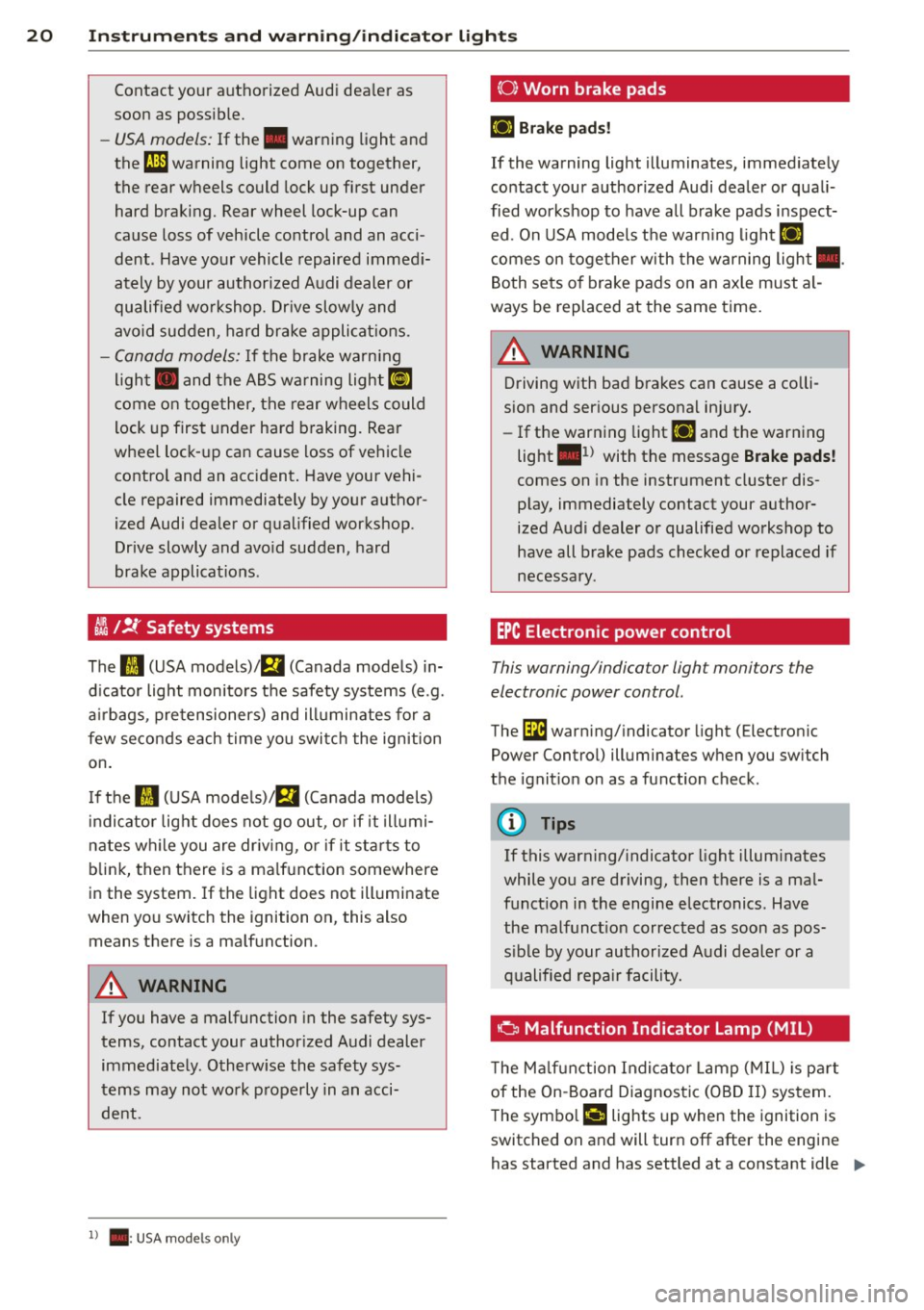
~ /!J.' Safety systems
The fl (USA models)/ E,I (Canada models) in
d icator light monitors the safety systems (e .g.
a ir bags, pretensioners) and ill uminates for a
few seconds each time you switch the ignition
on.
I f the
fl (USA mode ls)/ E,I (Canada models)
i ndi cato r light does not go out, or if it illumi
nates wh ile you are driv ing, or if it sta rts to
blink, then there is a ma lfunction somewhere
in the system.
If the light does not illuminate
when you switch the ignition on, this also means there is a malfunction.
A WARNING
If you have a malfunction in the safety sys
tems, contact your author ized Audi dealer
immediately. Otherw ise the safety sys
tems may not work properly in an acci
dent.
l) .: USA mode ls on ly
(0) Worn brake pads
llJ Br ake pad s!
If the warning light illuminates, immed iately
contact your authorized Audi dealer or quali
fied workshop to have all brake pads inspect ed . On USA models the warn ing light
llJ
comes on together with the warning light •.
Both sets of brake pads on an axle must al
ways be replaced at the same time.
A WARNING
Driving with bad brakes can cause a colli
sion and serious personal injury.
- If the warning light
llJ and the warning
light
. 1) with the message Brake pads!
comes on in the instrument cluster dis
play, immediately contact your author
ized Audi dealer or qualified workshop to
have all brake pads checked or replaced if
necessary.
EPC Electronic power control
This warning/indicator light monitors the
electronic power control.
The l3i warn ing/ indicator light (Electron ic
Power Control) illuminates when you sw itch
the ignit ion on as a function check.
(D Tips
If this warning/ indicator light illum inates
while you are driving, then there is a mal
funct ion in the engine electronics. Have
the malfunct ion corrected as soon as pos
s ible by your authorized Audi dealer or a
qualified repa ir facility.
Ci Malfunction Indicator Lamp (MIL)
T he Ma lfun ction Indicator Lamp (MIL) is par t
of the On-Board Diagnostic (OBD II) system.
-
The symbo l ('4 lights up when the ignition is
switched on and will turn off after the engine
has started and has settled at a constant idle
IJ>,
Page 23 of 296
Instruments and warning/indicator lights 21
speed. This ind icates that the MIL is working
properly.
The warning light illuminates when there is a
mal funct ion in the engine e lectronic system.
Contact your authorized Audi dealer and have
the ma lfunction corrected .
An improperly closed fuel filler cap may also
cause the MIL light to illum inate
r::!,> page 212.
For more informat ion r:!,> page 30 .
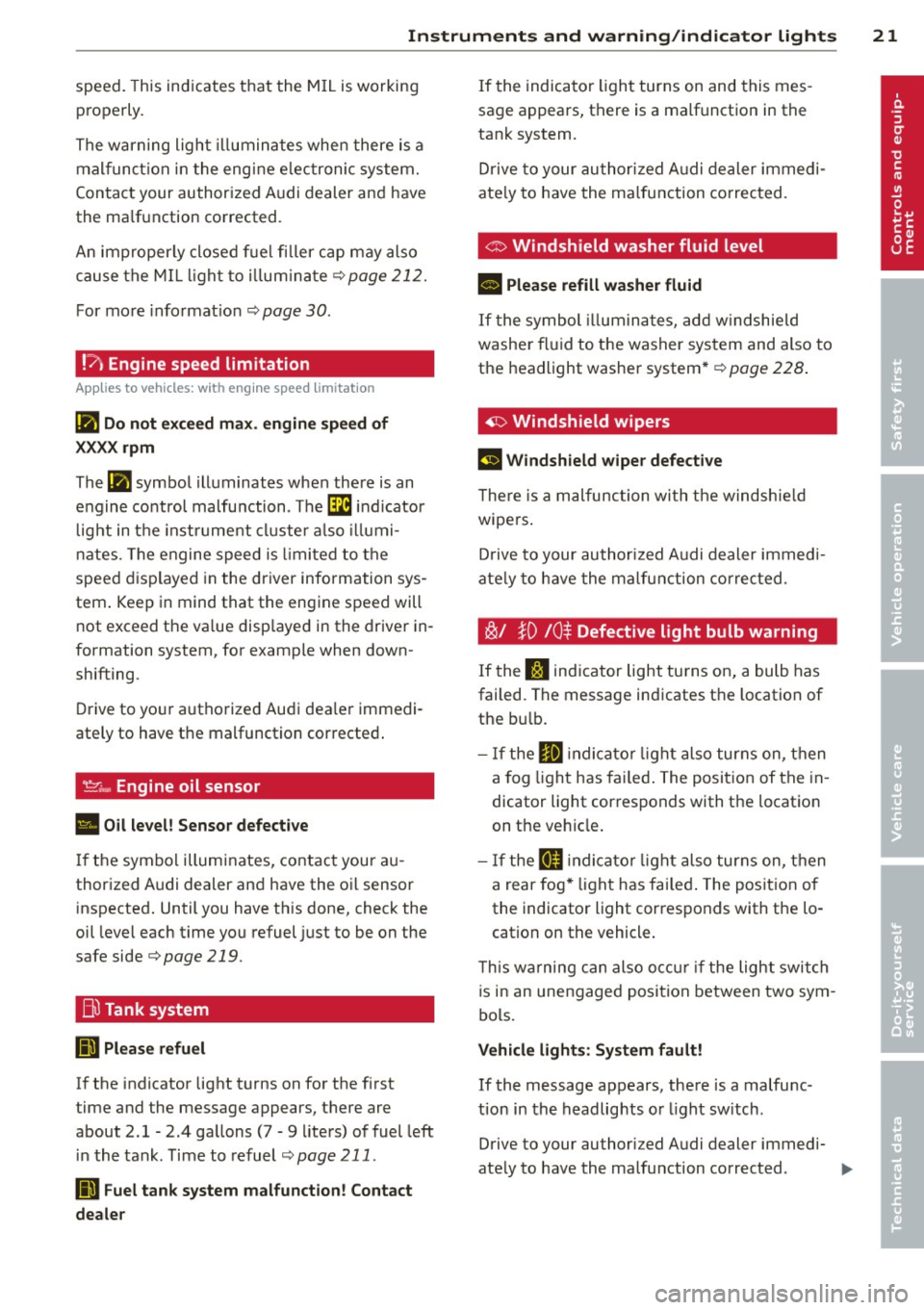
!?) Engine speed limitation
App lies to vehicles: wit h eng ine speed lim itat ion
Ill Do not exceed max. engine speed of
XXXX rpm
The Ill symbol illuminates when there is an
engine control malfunction . The
'3i indicator
l ight in the instrument cluster also illumi
nates. The engine speed is lim ited to the
speed displayed in the driver information sys
tem . Keep in mind that the engine speed will
not exceed the va lue disp layed in the driver in
formation system, for example when down
shifting.
Drive to your authorized Audi dea ler immedi
ately to have the malfunction corrected .
'.!2:;,.,, Engine oil sensor
• Oil level! Sensor defective
If the symbol illuminates, contact your au
thorized Audi dealer and have the oil sensor
inspected. Until you have this done, check the
oil level each time you refuel just to be on the
sa fe side
r:!,> page 219 .
Bil Tank system
(iD Please refuel
If the indicator light turns on for the f irst
time and the message appears, there are
about 2.1- 2 .4 gallons (7 -9 liters) of fuel left
in the tank. Time to refuel
r::!,>page 211 .
DD Fuel tank system malfunction! Contact
dealer
If the indicator light turns on and this mes
sage appears, there is a malfunction in the
tank system.
Drive to your authorized Audi dealer immedi
ate ly to have the malfunction corrected.
C> Windshield washer fluid level
II Please refill washer fluid
If the symbol illum inates, add windshield
washer fluid to the washer system and also to
the headlight washer system*
r:!,> page 228.
~ Windshield wipers
El Windshield wiper defective
The re is a malfunc tion with the windshie ld
wipers .
Drive to your author ized Audi dealer immedi
ate ly to have the malfunction corrected .
~/ }D /0$ Defective light bulb warning
If the S:$ indicator light turns on, a bulb has
failed. The message indicates the location of
the bu lb.
- If the
El indicato r light also turns on, then
a fo g lig ht has failed. The position of the in
dicator light corresponds w ith the location
on the vehicle .
- If the
II indicato r light also turns on, then
a rear fog * light has failed. The position of
the indicator light corresponds with the lo
cation on the vehicle .
T his wa rning can also occur if the light switch
is in an unengaged position between two sym
bols.
Vehicle lights: System fault!
If the message appears, there is a malfunc
tion in the headlights or light sw itch .
Drive to your au thori zed Audi dealer immedi-
ately to have the malfunction corrected .
IJJ,,
Page 24 of 296
22 Instruments and warning/indicator lights
&_ WARNING
-light bulbs are pressurized and could ex
plode while they are being changed caus
ing serious personal injury.
- Work with due care when handling the
high-voltage section of gas discharge
(xenon) lights*. Failure to do so could re
sult in death or serious injury.
(D Tips
Have the bulb replaced or the connection
repaired by your authorized Audi Service
department.
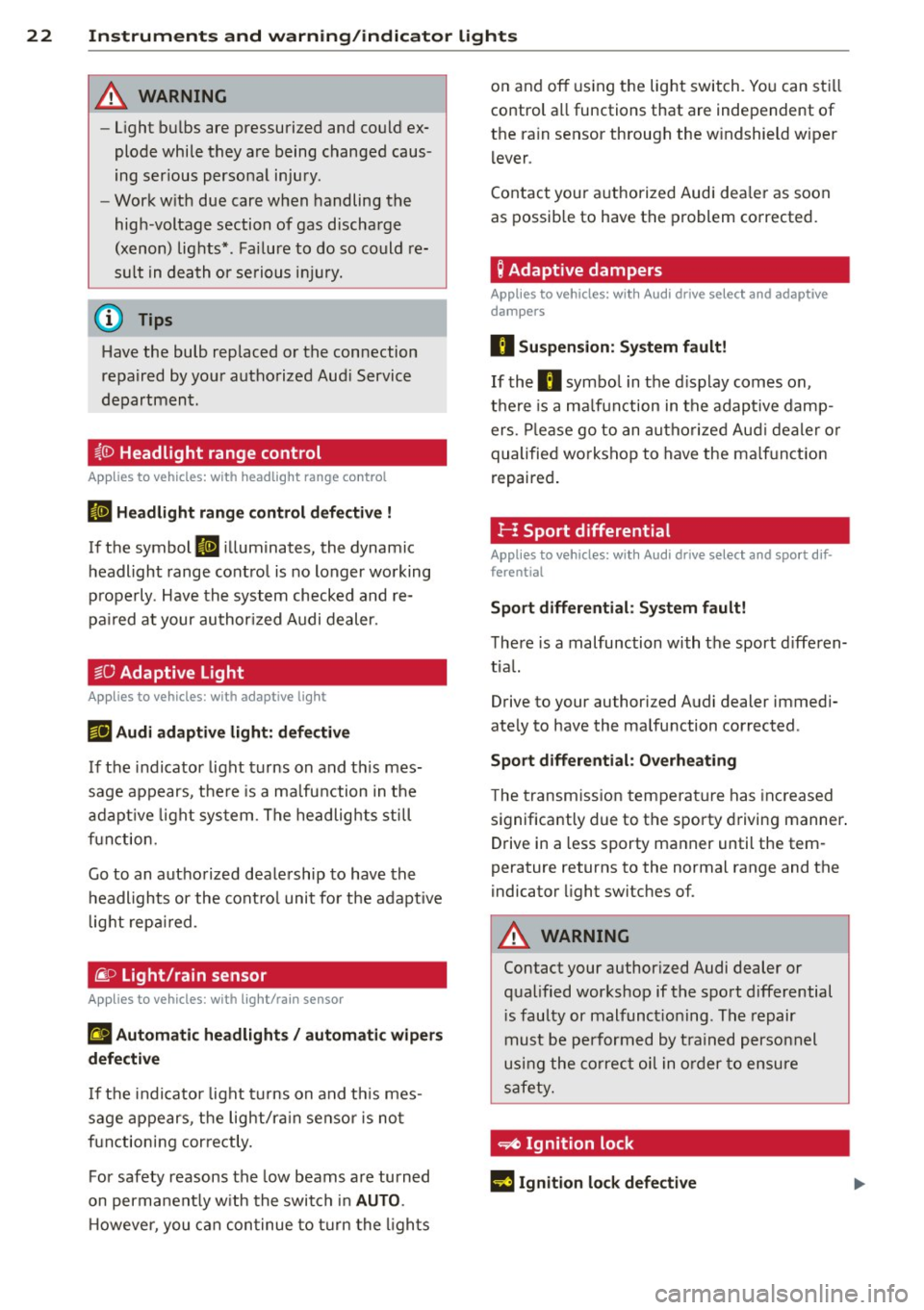
~(D Headlight range control
Appl ies to vehicles: with headlig ht range co ntrol
II Headlight range control defective !
If the symbol II illuminates, the dynamic
headlight range control is no longer working
properly . Have the system checked and re
paired at your authorized Audi dealer.
§0 Adaptive Light
Appl ies to vehicles: with adaptive light
r!l Audi adaptive light: defective
If the indicator light turns on and this mes
sage appears, there is a malfunction in the
adaptive light system. The headlights still
function.
Go to an authorized dealership to have the
headlights or the control unit for the adaptive
light repaired .
@..D light/rain sensor
Applies to vehicles: with light/rain sensor
II Automatic headlights/ automatic wipers
defective
If the indicator light turns on and this mes
sage appears, the light/rain sensor is not
functioning correctly.
For safety reasons the low beams are turned
on permanently with the switch in
AUTO.
However, you can continue to turn the lights on and off
using the light switch . You can still
control all functions that are independent of
the rain sensor through the windshield wiper lever .
Contact your authorized Audi dealer as soon
as possible to have the problem corrected.
Q Adaptive dampers
Applies to vehicles: with Aud i drive select and adaptive
dampers
II Suspension: System fault!
If the II symbol in the display comes on,
there is a malfunction in the adaptive damp
ers. Please go to an authorized Audi dealer or
qualified workshop to have the malfunction
repaired.
H Sport differential
Appl ies to vehicles: with Aud i drive select and spo rt dif
ferential
Sport differential: System fault!
There is a malfunction with the sport differen
tial.
Drive to your authorized Audi dealer immedi
ately to have the malfunction corrected .
Sport differential: Overheating
The transmission temperature has increased
significantly due to the sporty driving manner.
Drive in a less sporty manner until the tem
perature returns to the normal range and the
indicator light switches of.
&_ WARNING
-
Contact your authorized Audi dealer or
qualified workshop if the sport differential is faulty or malfunctioning . The repair
must be performed by trained personnel
using the correct oil in order to ensure
safety.
~ Ignition lock
l3 Ignition lock defective
Page 25 of 296
Instruments and warning/indicator lights 23
There is a malfunction in the electronic igni
tion lock. Please go to an authorized Audi
dea ler or other qualified workshop to have the
malfunction repaired.
¢¢ Turn signals
Whenever you use the left B or the right B
turn signal, the ind icator light blinks . When
you use the emergency flashers, both indica
tor lights flas h.
If one of the turn s ignal light bulbs burn out,
the turn signal w ill blink tw ice as fast as nor
mal. Carefully drive to your authorized Audi
dealer immediately to have the malfunct io n
corrected.
Page 45 of 296
Power windows
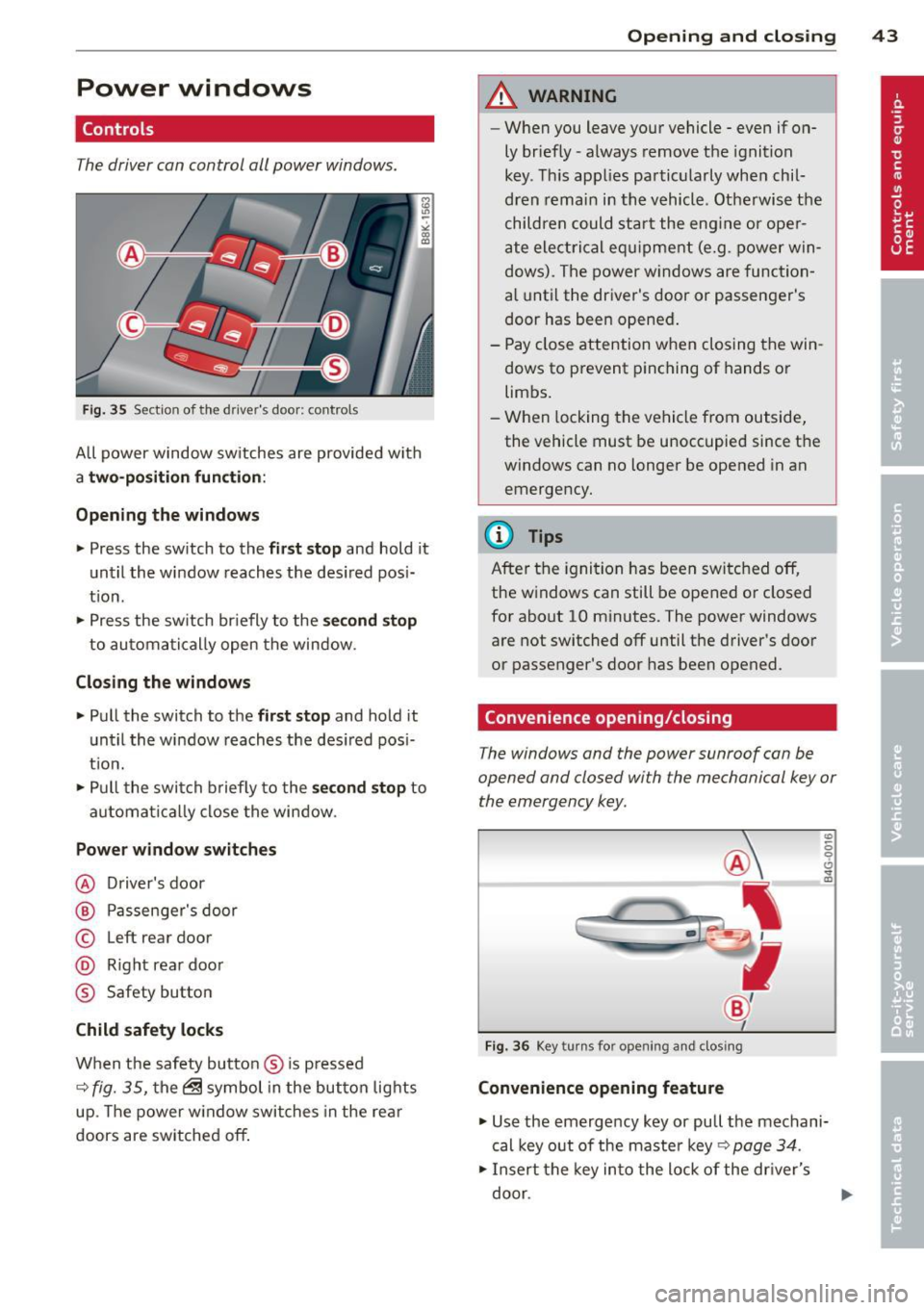
Controls
The driver can control all power windows.
F ig . 35 Section of the driver 's doo r: co ntrols
All power window sw itches are provided with
a two -position function :
Opening the windows "' Press the sw itch to the first stop and hold it
un til the window reaches the des ired pos i
t io n.
"' Press the sw itch br iefly to the se cond stop
to au tomatically open the window .
Closing the windows "' Pull the switch to the first stop and hold it
unt il the window reaches the des ired pos i
t ion.
"' Pull the swi tch b riefly to the sec ond stop to
a utoma tica lly close the window.
Power window switches
@ Driver's door
@ P assenger's door
© Left rear door
@ Right rear door
® Safety button
Child safety locks
W hen the safety button ® is p ressed
~ fig. 35, the@ symbol in the but ton lights
up. The power w indow swi tches in the re ar
doors are switched
off .
Opening and clo sin g 43
A WARNING
-When you leave your vehicle - even if on
ly briefly -always remove the ignit ion
key. This app lies pa rtic ularly whe n chil
d ren remain in th e vehicle. Othe rwise t he
child ren c ould sta rt the eng ine o r ope r
a te elect ric al e quipme nt (e.g. power win
dows). The power w indows are func tio n
a l until the dr iver's door or passenge r's
door has been opened .
- Pay close attention when closing the win
dows to p revent pinching of hands o r
limbs .
- When locking the ve hicle from outside,
the vehicle must be unoccupied since the
windows can no longer be opened in an
emerge ncy.
(D Tips
After the ignition has been switc hed
off,
the w indows can still be opened o r closed
for about 10 minutes. The power windows
a re not switched
off until the driver's door
or passenger's door has been opened.
Convenience opening/closing
The windows and the power sunroof can be
opened and closed with the mechanical key or
the emergency key.
Fig . 36 Key turns for opening and closing
Convenience opening feature
"' 6 0 0 ... m
"' Use the emergency key or pull the mechani
cal key out of the maste r key ~ page 34 .
"' Insert t he key in to the lock of the dr iver's
door .
Page 49 of 296
Clear vision Lights
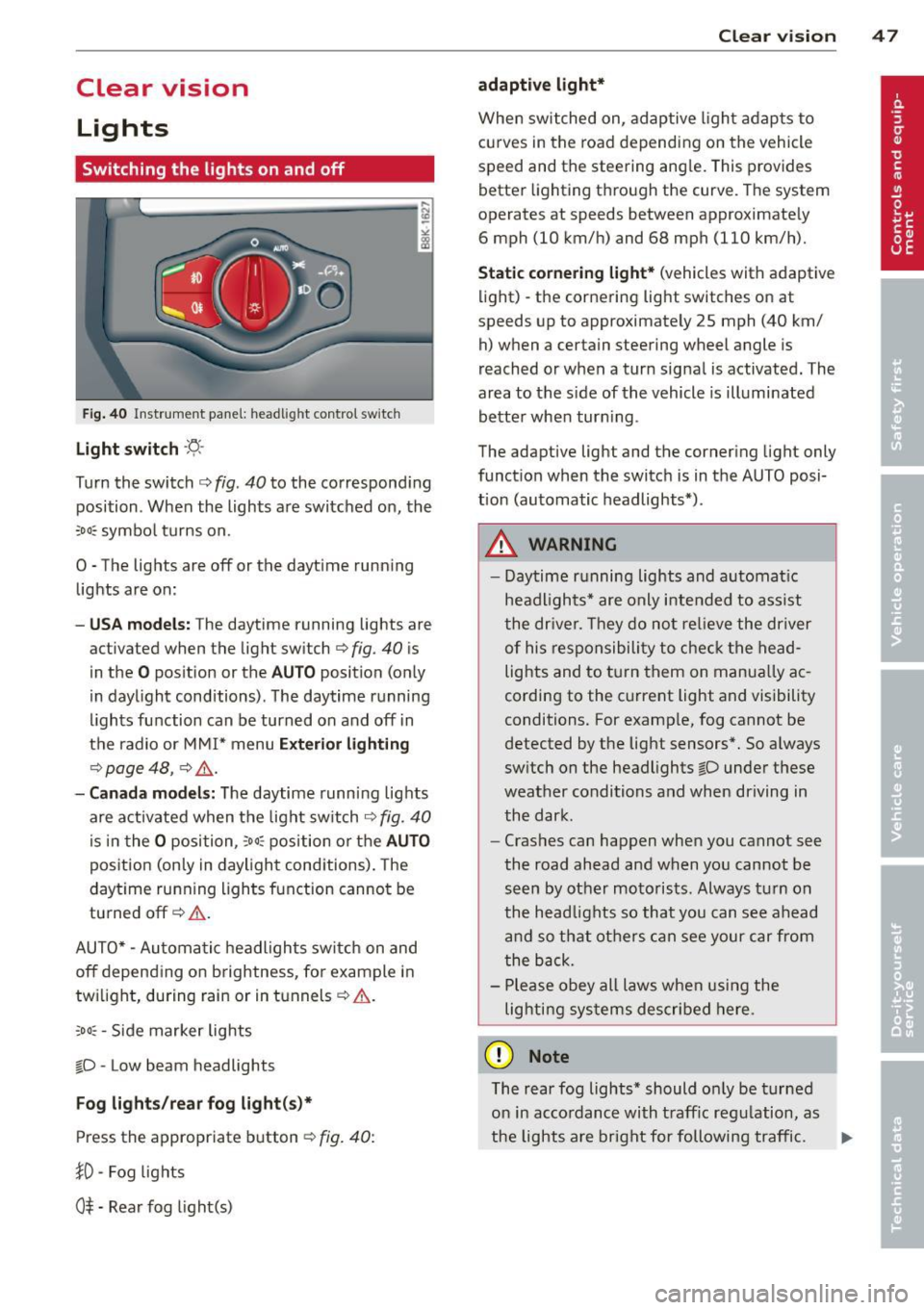
Switching the lights on and off
F ig . 40 Instrument pane l: headlight control switch
Light switch ·'t/,·
Turn the switch c> fig . 40 to the correspond ing
position . When the lights are switched on, the
:oo: symbol turns on.
0 • The lights are off or the dayt ime running
lights are on:
- USA mod els : The daytime running lights are
activated when the light sw itch
c> fig . 40 is
in the
O position or the AUTO position (only
in daylight conditions) . The daytime running
lights function can be turned on and off in
the radio or MMI* menu
E xteri or li ghtin g
¢ page 48 , c> &_.
-Ca nad a mod els: The daytime runn ing lights
are activated when the light sw itch
¢ fig . 40
is in the O position, :oo : position or the AUTO
posit ion (only in daylight conditions). The
daytime running lights function cannot be
turned off¢&. .
AUTO* -Automatic headlights switch on and
off depending on b rightness, for example in
tw ilight, during rain or in tunnels¢,& .
:oo: -Side marker lights
~D -Low beam headlights
Fog light s/rea r fog ligh t(s)*
Press the appropriate button c> fig. 40:
1D -Fog lights
0$ -Rear fog light(s)
Clear vi sion 4 7
adaptive light*
When switched on, adaptive ligh t adap ts to
curves in the road depend ing on the vehicle
speed and the steering ang le. This provides
better lighting through the curve. The system
operates at speeds between approximately 6 mph (10 km/h) and 68 mph (110 km/h).
St atic corner ing light * (vehicles with adaptive
light) -the cornering light switches on at
speeds up to approximately 25 mph (40 km/ h) when a certain steering wheel angle is
reached or when a turn signal is activated. The
area to the s ide of the vehicle is illuminated
better whe n turn ing .
The adaptive light and the cornering light only
function when the switch is in the AUTO posi
tion (automatic headlights*) .
A WARNING
-Daytime running lights and automatic
headlights* are only intended to ass ist
the driver . T hey do no t re lieve the driver
of his responsibility to chec k the head
lights and to t urn them on manua lly ac
cording to the current light and visibility
conditions. For examp le, fog cannot be
detected by the light sensors*. So a lways
switch on the headlights
~D under these
weather conditions and when driving in
the dark .
- Crashes can happen when you cannot see
the road ahead and when you cannot be
seen by other motorists. Always turn on
the head lights so that you can see ahead
and so that others can see your car from
the back.
- Please obey all laws when using the
lig hting sys tems described here.
(D Note
The rear fog lights* should on ly be turned
on in accordance with t raff ic regulation, as
the lights are bright for following traffic. ..,.
Page 50 of 296
48 Clear vis ion
@ Tips
- The light sensor* for headlight control is
located in the rear view m irror mount.
You should therefore not apply any st ick
ers to the windsh ield in this area in order
to prevent malfunctions or failures.
- Some exterior lighting functions can be
adjusted
c> page 48.
- When you remove your key from the igni
tion while the vehicle's lights are turned
on, a buzzer sounds as long as the driv
er's door is open .
- In cool or damp weather, the ins ide of
the headlights, turn signals and tail lights can fog over due to the tempera
ture difference between the inside and
outside. They will clea r shor tly after
switching them on. This does not affect
the service life of the lighting.
- In the even t of a light sensor malfunc
tion, the driver is no tified in the instru
ment cluster disp lay¢
page 22.
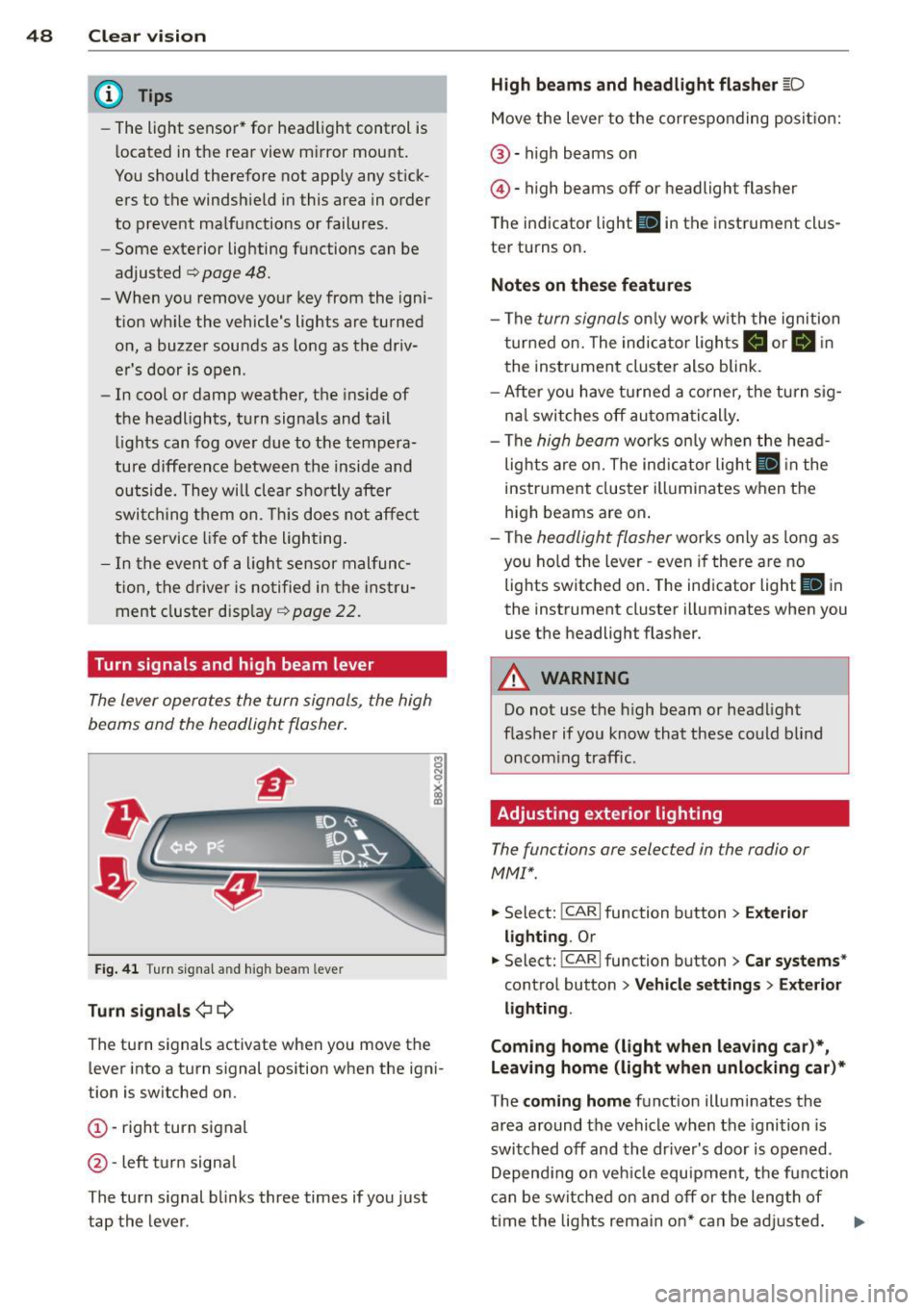
Turn signals and high beam lever
The lever operates the turn signals, the high
beams and the headlight flasher .
Fig. 4 1 Tu rn s ig na l and hig h beam lever
Turn sign als ¢i ¢
The turn signals activate when you move the
l ever into a turn s ignal pos ition when the ign i
tion is switched on.
(D -right turn signal
@-left tur n signa l
The turn s ignal blinks three times if you just
tap the lever .
High be ams and headlight flasher [D
Move the lever to the correspon ding posit io n:
@ -high beams on
@ -high beams off or headlight flasher
The indicator light
ii in the instrument cl us
ter turns on .
Notes on thes e features
-The turn signals on ly wor k w ith the ignition
t urned on. The indicator ligh ts
Ct or a in
the instrument cluster also blink.
- After you have turned a co rner, the turn s ig
na l switches off au toma tically .
- The
high beam works on ly w hen the head
lights a re on. The indicator ligh t
II in the
instrument cluster illuminates when the
high beams are on .
- The
headlight flasher works o nly as long as
you ho ld the lever -even if there a re no
lights switched on . The indicator light
II in
the instrument cluster illuminates when you
use the headlight flasher.
A WARNING
--
Do not use the h igh beam or headlight
flasher if you know that these could blind
oncom ing traffic.
Adjusting exterior lighting
The functions ore selected in the radio or
MMI" .
.,. Select: !CARI function button> Exte rior
light ing .
Or
.,. Select: !CARI function button > Car systems *
control button > Vehicle s etting s> Exterior
lighting .
Coming home (light when leav ing car }*,
Leav ing home (light when unlocking car )*
The coming home function illuminates the
area around the vehicle when the ignition is
switched off and th e dr ive r's door is opened.
Depend ing on vehi cle equ ipment, the function
can be switched on and off or the length of
time the lig hts remain on* can be ad justed . ..,.
Page 53 of 296
Turn the knob to the desired position:
Q/ P -In this position , you can adjust the
driver's and front passenger's exterior mirrors by turning the knob in the desired direction.
(ijjl -The mirrors are heated depending on the
outside temperature.
8 -The exterior mirrors fold in*. You can ad
just whether or not the mirrors fold in auto
matically when locking the vehicle using the
radio/MM I*¢
page 3 7.
Passenger exterior mirror tilt function*
To help you see the curb when backing into a
parking space, the surface of the mirror tilts
slightly . The knob must be in the P position
for this to happen .
You can adjust the tilted mirror surface by
turning the knob in the desired direction .
When you move out of reverse and into anoth
er gear, the new mirror position is stored and
assigned to the key you are using.
T he mirror goes back into its original position
once you drive forward faster than 9 mph (15 km/h) or switch the ignition off .
_& WARNING
Curved mirror surfaces (convex or spheri
cal*) increase your field of view. Remem
ber that vehicles or other objects will ap
pear smaller and farther away than when
seen in a flat mirror. If you use this mirror
to estimate distances of following vehicles
when changing lanes, you could estimate
incorrectly and cause an accident .
(D Note
-If the mirror housing is moved uninten
tionally (for example, while parking your
vehicle), then you must first fold the mir ror electrically. Do not readjust the mir
ror housing manually . You could damage
the motor which controls the mirror .
- If you wash the vehicle in an automatic
car wash, you must fold the exterior m ir
rors in to reduce the risk of damage to
the mirrors. Never fold power folding ex-
.
Clear vision 51
terior mirrors* by hand. Only fold them
in and out using the power controls.
a) Tips
- The exterior mirror sett ings are stored
with the memory function*
~ page 62.
-If there should be a malfunction in the
electrical system, you can still adjust the
exterior mirrors by pressing the edge of
the mirror.
Dimming the mirrors
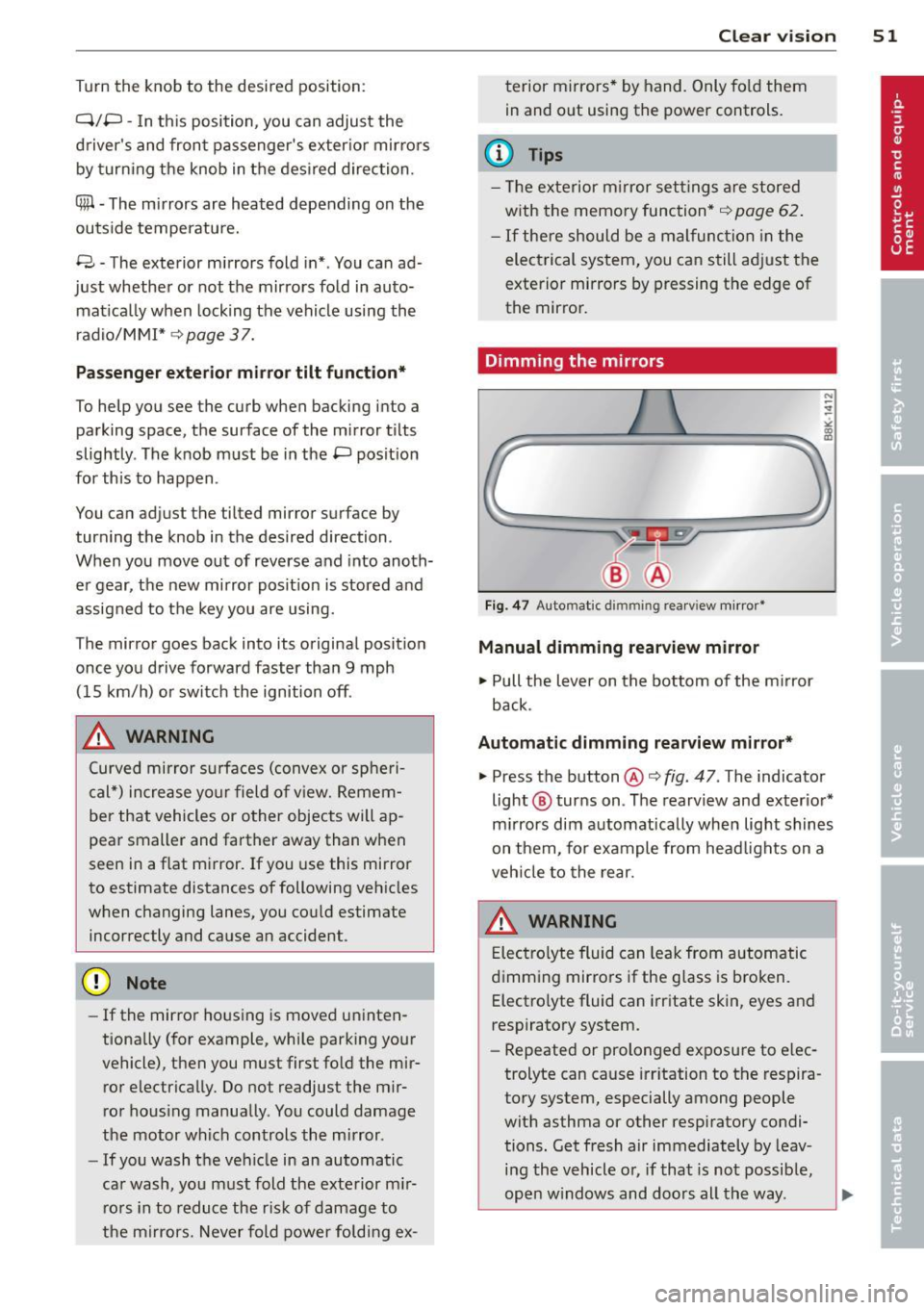
Fig. 47 Auto mat ic dimmin g rearv iew mirror •
Manual dimming rearview mirror
11>-Pull the lever on the bottom of the mirror
back.
Automatic dimming rearview mirror*
.,. Press the button@¢ fig. 47 . The indicator
light @ turns on . The rearview and exterior*
mirrors dim automatically when light shines
on them, for example from headlights on a
vehicle to the rear.
A WARNING
Electrolyte fluid can leak from automatic
dimming mirrors if the glass is broken .
Electrolyte fluid can irritate skin, eyes and
respiratory system .
- Repeated or prolonged exposure to elec
trolyte can cause irritation to the respira
tory system, especially among people
with asthma or other respiratory condi
tions. Get fresh air immediately by leav
ing the vehicle or, if that is not possible,
open windows and doors all the way. .,..
Page 56 of 296
54 Clear vis ion
rain sensor mode off and switch intermittent
mode on in the MMI*. Se lect:
I CAR ! function
button
> C ar sys tem s* contro l button > Dri ver
assi st> Rain s enso r.
In interm ittent mode,
you can adjust the interval time using the ®
switch .
@-Slow wiping
@-Fas t wiping
© -Sing le w ipe
® -Clean the windshield . To eliminate water
drop lets, the w indshield wiper performs one
afterwipe operation after several seconds
while driv ing . You can switch th is fu nction off
by mov ing the lever to position ® within 10
seconds of the afte rwipe operation . The after
wipe func tion is reactiva ted the next time the
ignition is switched on.
a llroad: The rear w iper automatically switches
on when the reve rse gear is engaged and the
front w indshield w ipers are on and in opera
tion .
C lean ing the headlights*. The headlight wash
e r system* opera tes on ly when the headl ights
a re on. If you move the leve r to pos ition @,
the head lights are washed in intervals.
@ -allroad : Wipe the rear window. The rear
wiper moves about every 4 seconds.
(J) -allroad : Clean the rear window . The num
ber of wiping operations depends on how long
the lever is held in pos ition
(J) .
_& WARNING
- T he ra in sensor is only inte nded to assist
the drive r. The driver is still responsible
for man ually switching the wipers on ac
cording to the v isibility conditions .
- T he windshie ld may not be treated w ith
water-repe lling windshie ld coating
agents . Unfavorable conditions, such as
wetness, darkness, low sun, can res ult in
increased glare. Wiper blade chatter is
also possible .
- Proper ly functioning windshie ld w iper
blades are required for a clear view and safe driving
~ page 55, Replacing
windshield wiper blades.
@ Note
- In the case of frost, check whethe r the
windshield wiper blades are frozen to
the windshield. Sw itching on the wind
shield wipers can damage the wiper
blades!
- Pr ior to us ing a car wash, the w indshield
w iper system must be sw itched off ( lever
in posit ion @). Th is he lps to prevent un
intentional switching on and damage to
the windsh ield wiper system .
@ Tips
-The windshie ld wipers are switched off
when the ignit ion is turned off. Act ivate
the winds hield wipers after the ignition
is switched back on by moving the wind
shield w iper lever to any position.
- Worn or d irty windshield wiper blades
result in st reaking. This can affect the
rain sensor* function. Check your wind
shield w ipe r blades regularly.
- The washer fluid nozz les of t he wind
shield w asher system a re heated at low
temperat ures when the igni tion is on.
- When stopping tempo rarily, (e .g. at a
t raffic light) the set speed o f the wind
shield wipers is automatically reduced by
one speed.
· Cleaning windshield wiper blades
Clean the windshie ld w iper b lades when they
begin to leave streaks. Use a soft cloth and
glass cle aner to clea n the windshield wiper
blades .
Front wip er
.. Place the windshie ld wiper arms in the serv
ice pos it ion. Refer to
c> page 55.
.. Lift the wiper arm away from the fron t win-
d~.
~