lights AUDI S4 2014 Owner's Manual
[x] Cancel search | Manufacturer: AUDI, Model Year: 2014, Model line: S4, Model: AUDI S4 2014Pages: 296, PDF Size: 73.56 MB
Page 52 of 296
50 Clear vis ion
Interior lights
Front /rear interior lights
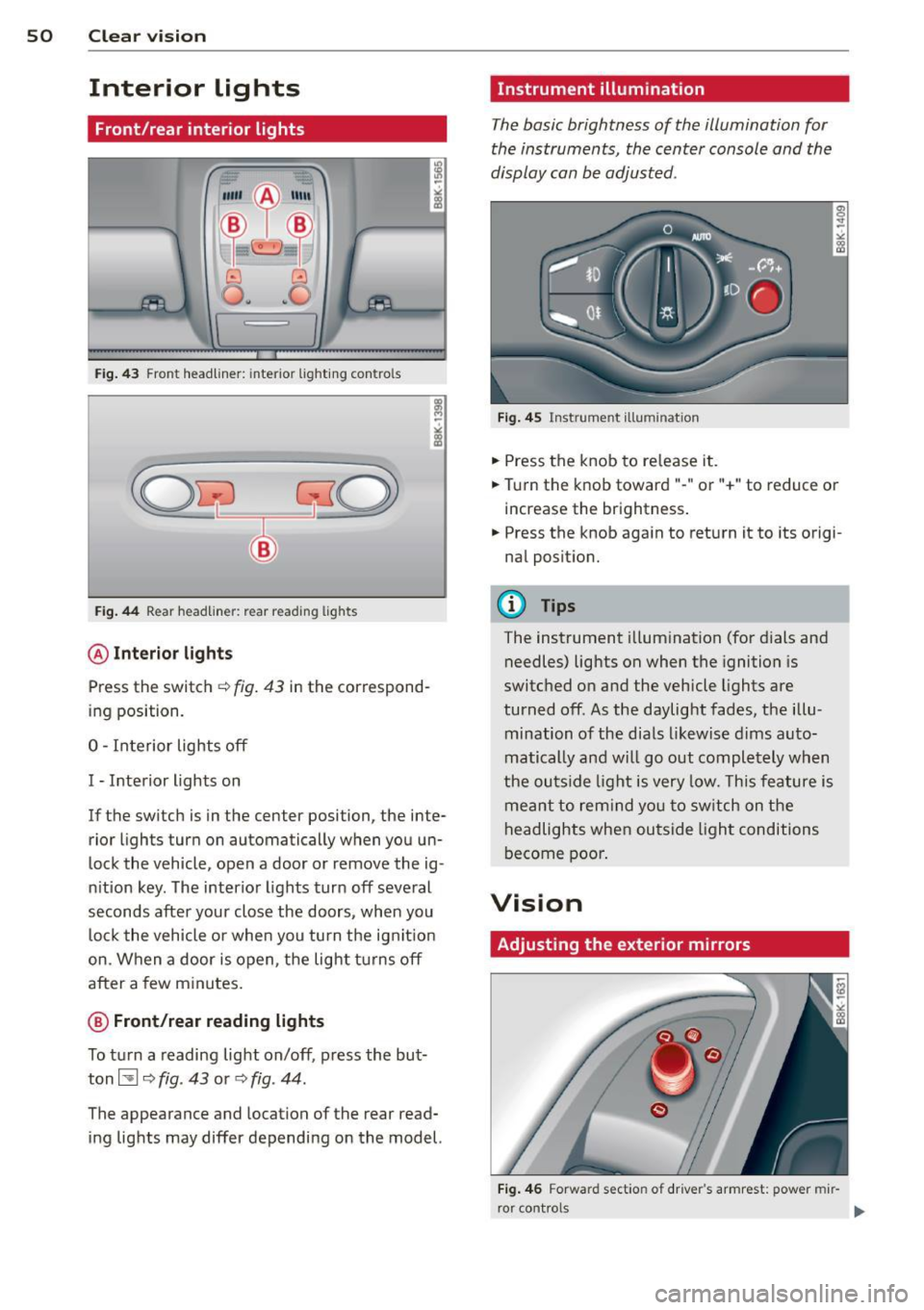
Fig . 43 Front headliner: inte rior lighting controls
Fig. 44 Rear headliner: rear reading lights
@Interio r ligh ts
Press the switch ~ fig. 43 in the correspond
ing position.
0 -Interior lights off
I -Interior lights on
If the switch is in the center position, the inte
rior l ights turn on automatically when you un
lock the vehicle, open a door or remove the ig
n ition key. The interior lights turn off several
seconds after your close the doors , when you
lock the vehicle or when you turn the ign it ion
on. When a door is open, the light tu rns off
after a few minutes.
@ Fr ont /rear r eading lights
To turn a reading light on/off, press the but
ton~
c::> fig. 43 or c::> fig. 44.
The appearance and location of the rear read
ing lights may differ depending on the model.
Instrument illumination
The basic brightness of the illumination for
the instruments, the center console and the
display can be adjusted .
Fig . 45 Inst rume nt illu mination
.,. Press the knob to release it .
.,. Turn the knob toward"-" or"+" to reduce or
increase the brightness .
.,. Press the knob again to return it to its origi
nal posit ion.
(!') Tips
The instrument i llumination (for dials and
needles) lights on when the ignition is
switched on and the vehicle lights are
turned off . As the daylight fades, the illu
mination of the dia ls likewise dims auto
matically and wi ll go out completely when
the ou tside light is very low. This feature is
meant to rem ind you to sw itch on the
headlights when ou tside light conditions
become poor .
Vision
Adjusting the exterior mirrors
Fig . 4 6 Forward section of driver's a rmrest: power mir
r or controls
Page 53 of 296
Turn the knob to the desired position:
Q/ P -In this position , you can adjust the
driver's and front passenger's exterior mirrors by turning the knob in the desired direction.
(ijjl -The mirrors are heated depending on the
outside temperature.
8 -The exterior mirrors fold in*. You can ad
just whether or not the mirrors fold in auto
matically when locking the vehicle using the
radio/MM I*¢
page 3 7.
Passenger exterior mirror tilt function*
To help you see the curb when backing into a
parking space, the surface of the mirror tilts
slightly . The knob must be in the P position
for this to happen .
You can adjust the tilted mirror surface by
turning the knob in the desired direction .
When you move out of reverse and into anoth
er gear, the new mirror position is stored and
assigned to the key you are using.
T he mirror goes back into its original position
once you drive forward faster than 9 mph (15 km/h) or switch the ignition off .
_& WARNING
Curved mirror surfaces (convex or spheri
cal*) increase your field of view. Remem
ber that vehicles or other objects will ap
pear smaller and farther away than when
seen in a flat mirror. If you use this mirror
to estimate distances of following vehicles
when changing lanes, you could estimate
incorrectly and cause an accident .
(D Note
-If the mirror housing is moved uninten
tionally (for example, while parking your
vehicle), then you must first fold the mir ror electrically. Do not readjust the mir
ror housing manually . You could damage
the motor which controls the mirror .
- If you wash the vehicle in an automatic
car wash, you must fold the exterior m ir
rors in to reduce the risk of damage to
the mirrors. Never fold power folding ex-
.
Clear vision 51
terior mirrors* by hand. Only fold them
in and out using the power controls.
a) Tips
- The exterior mirror sett ings are stored
with the memory function*
~ page 62.
-If there should be a malfunction in the
electrical system, you can still adjust the
exterior mirrors by pressing the edge of
the mirror.
Dimming the mirrors
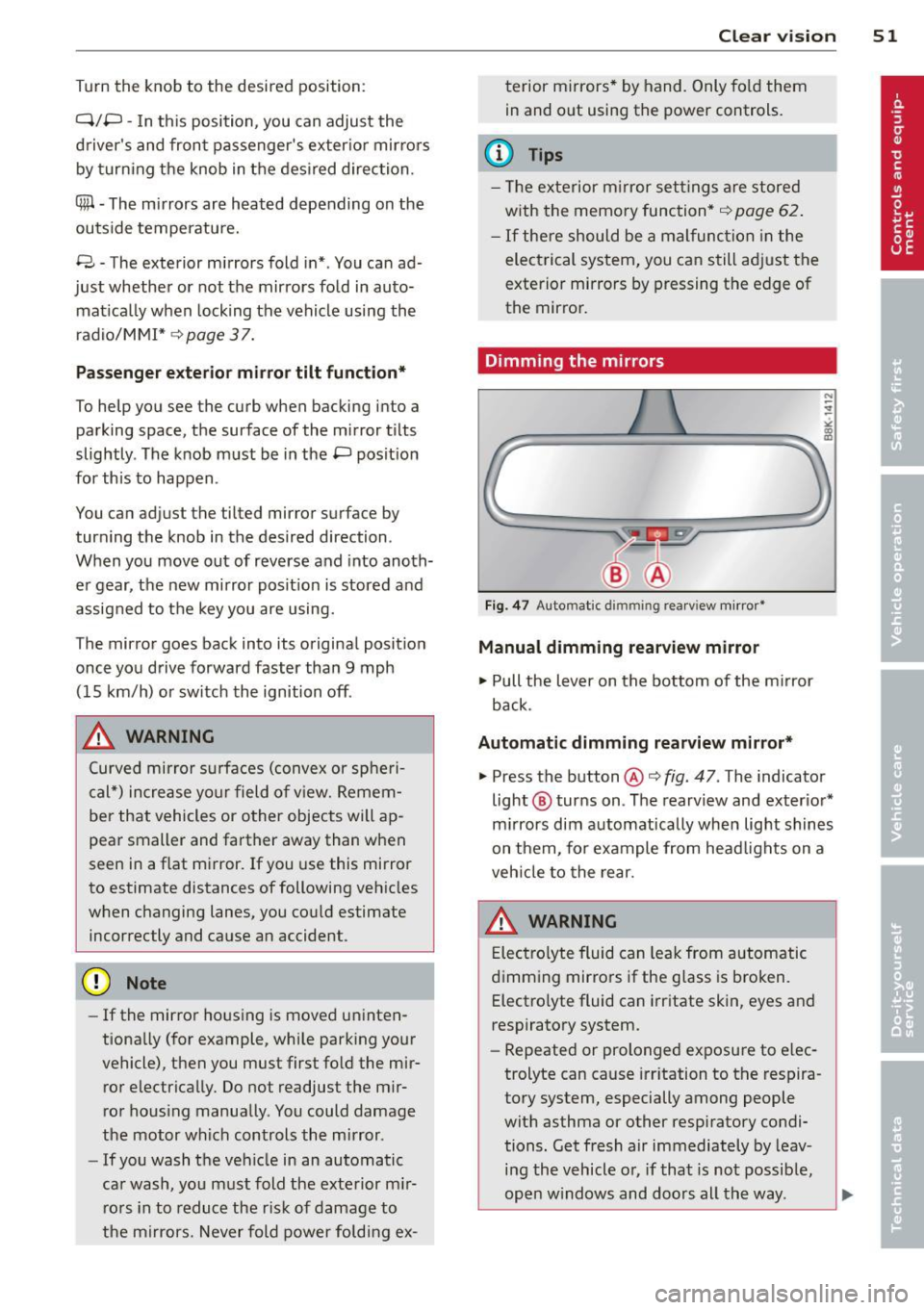
Fig. 47 Auto mat ic dimmin g rearv iew mirror •
Manual dimming rearview mirror
11>-Pull the lever on the bottom of the mirror
back.
Automatic dimming rearview mirror*
.,. Press the button@¢ fig. 47 . The indicator
light @ turns on . The rearview and exterior*
mirrors dim automatically when light shines
on them, for example from headlights on a
vehicle to the rear.
A WARNING
Electrolyte fluid can leak from automatic
dimming mirrors if the glass is broken .
Electrolyte fluid can irritate skin, eyes and
respiratory system .
- Repeated or prolonged exposure to elec
trolyte can cause irritation to the respira
tory system, especially among people
with asthma or other respiratory condi
tions. Get fresh air immediately by leav
ing the vehicle or, if that is not possible,
open windows and doors all the way. .,..
Page 56 of 296
54 Clear vis ion
rain sensor mode off and switch intermittent
mode on in the MMI*. Se lect:
I CAR ! function
button
> C ar sys tem s* contro l button > Dri ver
assi st> Rain s enso r.
In interm ittent mode,
you can adjust the interval time using the ®
switch .
@-Slow wiping
@-Fas t wiping
© -Sing le w ipe
® -Clean the windshield . To eliminate water
drop lets, the w indshield wiper performs one
afterwipe operation after several seconds
while driv ing . You can switch th is fu nction off
by mov ing the lever to position ® within 10
seconds of the afte rwipe operation . The after
wipe func tion is reactiva ted the next time the
ignition is switched on.
a llroad: The rear w iper automatically switches
on when the reve rse gear is engaged and the
front w indshield w ipers are on and in opera
tion .
C lean ing the headlights*. The headlight wash
e r system* opera tes on ly when the headl ights
a re on. If you move the leve r to pos ition @,
the head lights are washed in intervals.
@ -allroad : Wipe the rear window. The rear
wiper moves about every 4 seconds.
(J) -allroad : Clean the rear window . The num
ber of wiping operations depends on how long
the lever is held in pos ition
(J) .
_& WARNING
- T he ra in sensor is only inte nded to assist
the drive r. The driver is still responsible
for man ually switching the wipers on ac
cording to the v isibility conditions .
- T he windshie ld may not be treated w ith
water-repe lling windshie ld coating
agents . Unfavorable conditions, such as
wetness, darkness, low sun, can res ult in
increased glare. Wiper blade chatter is
also possible .
- Proper ly functioning windshie ld w iper
blades are required for a clear view and safe driving
~ page 55, Replacing
windshield wiper blades.
@ Note
- In the case of frost, check whethe r the
windshield wiper blades are frozen to
the windshield. Sw itching on the wind
shield wipers can damage the wiper
blades!
- Pr ior to us ing a car wash, the w indshield
w iper system must be sw itched off ( lever
in posit ion @). Th is he lps to prevent un
intentional switching on and damage to
the windsh ield wiper system .
@ Tips
-The windshie ld wipers are switched off
when the ignit ion is turned off. Act ivate
the winds hield wipers after the ignition
is switched back on by moving the wind
shield w iper lever to any position.
- Worn or d irty windshield wiper blades
result in st reaking. This can affect the
rain sensor* function. Check your wind
shield w ipe r blades regularly.
- The washer fluid nozz les of t he wind
shield w asher system a re heated at low
temperat ures when the igni tion is on.
- When stopping tempo rarily, (e .g. at a
t raffic light) the set speed o f the wind
shield wipers is automatically reduced by
one speed.
· Cleaning windshield wiper blades
Clean the windshie ld w iper b lades when they
begin to leave streaks. Use a soft cloth and
glass cle aner to clea n the windshield wiper
blades .
Front wip er
.. Place the windshie ld wiper arms in the serv
ice pos it ion. Refer to
c> page 55.
.. Lift the wiper arm away from the fron t win-
d~.
~
Page 65 of 296
The memory buttons are located in the driv
er's door.
Switching the memory function on/off
• Press the !OFF ! button to switch the memory
function on/off. The word
OFF lights up
when the memory function is switched off.
Seat profiles are neither stored nor recalled.
Storing a seat profile
• Press the !SET ! button. When the word SET
lights up, the memory is ready to store set
t in gs.
• Press a memory button
([II or rn) briefly. A
tone confirms that the settings were stored.
Accessing a seat profile
• If the driver's door is open and the ignition
is switched off, press the memory button.
• If the driver's door is closed or the ignition is
switched on, press and hold the memory
button until the seat adjustment is com
plete .
A WARNING
-For safety reasons, the seat sett ing can
only be recalled when the vehicle is sta
tionary - otherwise you risk having an ac
c ident.
- In an emergency the recall procedure can
be cancelled by press ing the
!OF F! switch
or by tapping the memory buttons.
Ashtray
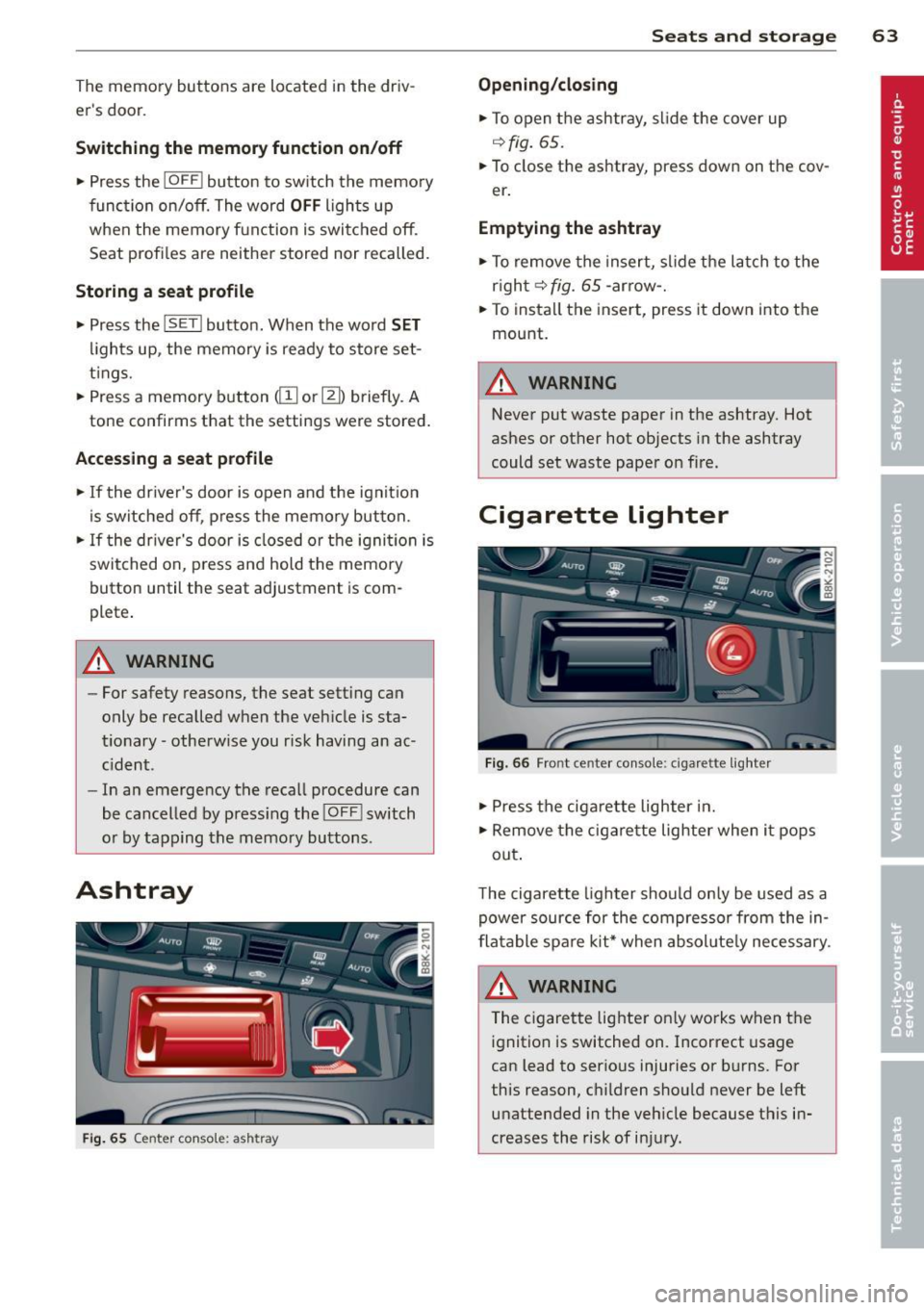
Fig . 65 Center console: ashtray
Seats and storage 63
Opening/closing
• To open the ashtray, slide the cover up
~fig. 65.
• To close the ashtray, press down on the cov
er .
Emptying the ashtray
• To remove the insert, slide the latch to the
right~
fig. 65 -arrow-.
• To instal l the insert, press it down into the
mount.
A WARNING
Never put waste paper in the ashtray. Hot
ashes or other hot objects in the ashtray
could set waste paper on fire.
Cigarette lighter
Fig. 66 Front center console: cigar ette lighter
• Press the cigarette lighter in.
• Remove the cigarette lighter when it pops
out .
T he cigarette lighter should only be used as a
power source for the compressor from the in
flatable spare kit* when absol ute ly necessary.
A WARNING
The cigarette lighter on ly works when the
ignition is switched on. Incorrect usage
can lead to serious injuries or burns. For
this reason, children should never be left unattended in the vehicle because this in
creases the risk of injury.
Page 86 of 296
84 On th e road
in the hy dra ulic valve adjusters. This is
norma l and not a cause for concern.
- If you leave the vehicle with the ignition
switched on, the ignition will switch
off
after a certain period of time . Please
note that e lectrica l equipment such as
exter ior lights w ill switch
off as well
when that happens.
Switching engine off
Applies to vehicles: with conven ience key
" Bring your vehicle to a complete stop.
"Automatic transmiss ion: Move the selector
lever to the P or N pos it ion.
" Press the
!START ENGINE STOPI button
r::!;page83, fig. 97.
Steering lock
The stee ring locks when you turn the engine
off us ing the I STAR T ENGINE STOP I button
and open the dr iver's door. The locked stee r
i ng helps preven t vehicle theft.
Emergency off
If necessary, the eng ine ca n be sw itched off
with the selector leve r in the R or D/S pos i
tions. To do so, step on the brake pedal and
p ress and hold the
I START ENGINE STOP I but
ton vehicle speed must be less than 6 mph (10 km/h).
_& WARNING
- Never turn off the eng ine before the ve
hicle has come to a complete stop . The
full function of the brake booster and the
power steering is not guaranteed. You
must use more force to turn or brake if
necessary . Because you cannot steer and
brake as you usua lly would, this could
lead to crashes and se rious injur ies.
- For safety reasons, you s hould always
par k your vehicle with the se lector lever
in P. Ot herwise, the ve hicle co uld inad
vertent ly roll away.
- T he radiator fan ca n continue to ru n for
up to 10 mi nutes even after yo u have
tu rne d
off the eng ine and remove d the ignition key. The radiator fan can a
lso
turn on again if the engine coo lant heats
up because of intense sunlight or heat
bu ild-up in the engine compartment.
- Always take the key w ith you whenever
you leave your ve hicle. Otherw ise, the
eng ine could be sta rted or electrical
equ ipme nt such as the power windows
could be ope rated. This can lead to seri
ous injury.
(D Note
If the engine has bee n under heavy load
for an extended pe riod, heat bu ilds up in
the engine compartment after the engine
i s sw itched
off -there i s a r is k of damag ing
the engine. A llow the eng ine to run at id le
for about two minutes before switching it
off.
Driver messages
Ignition i s on
This message appears and a warning tone
sounds if you open the d river's door when the
ignition is sw itched on.
No key id entified
This message appears when the
I S TART ENGINE STOPI button is pressed if
there is no master key ins ide the veh icle or if
the system does not recognize it . Fo r exam
ple, the master key cannot be recognized if it
is covered by an object (e.g. al uminum b rief
case) which
screens the radio s ignal. Elec tron
ic dev ices such as cell phones can also inter
fere with the radio s ignal.
Pres s brak e pedal to start engine
This message appears if you do not press the
brake pedal to start the eng ine in a veh icle
with an automat ic transm iss ion.
Press clutch pedal to sta rt engine
T his message appears if yo u do not press the
clutch pedal to start the engine in a vehicle
with a manual transmission. .,.
Page 88 of 296
86 On the road
Emerge ncy b rake function
An emergency brake ensures t hat the vehicle
can be slowed down even if the normal brakes
fail
c::> page 87, Emergency broking.
Indicat or light s
-If the par king b rake is closed w ith the igni
t ion
s witc hed on the . (USA mode ls) /
• (Canada models) indica tor lights come
on in the instrument cluster and the switch .
-If the parking brake is closed w ith the igni
tion
s witc hed off the . (USA mode ls) /
• (Canada models) indicator lights come
on in the instrument cluster and the switch
for about 20 seconds .
A WARNING
If a gear or a drive range (automat ic trans
m ission) is engaged with the vehicle sta
tionary and the engine runn ing, you must
in no instance accelerate o r release the
cl utch * careless ly. Otherw ise the vehicle
w ill sta rt to move immediately- r isk of an
accident .
@ Note
If the . symbol in the display or the.
(USA models) . (Canada models) indica
tor light i n the instrument cluster flashes,
t here is a mal function i n the brake system.
By pressing the
ISETI button, you can bring
up a driver message which explains the malfunct ion in more detai l. If the driver
message
Parking b rake! appears, there is
an operating malfunction in the park ing
brake wh ich you shou ld have repa ired im
mediately by an author ized Audi dealer or
qualified workshop c::>poge 15.
(D Tips
-You can apply the parking brake at any
time -even w ith the ignition switched
off . The ignit ion must be turned on and
the b rake peda l must be pressed in o rder
to release the pa rking brake . - Occasional noises when the parking
brake is applied and released are normal
and are not a cause for concern.
- When the vehicle is parked, the parking
brake goes through a self-test cycle at
regu lar interva ls. Any associated noises
are normal.
Parking
.. Press the brake pedal to stop the veh icle .
.. Pull the sw itch @
c::> page 85, fig . 98 to set
the parking brake .
.,. Automatic transmission: Move the selecto r
lever to P.
.. Turn the engine off
c::> ,&. .
.. Manual transmission: Shift into 1st gear.
.. When on inclines o r declines, turn the steer
ing wheel so that the vehicle will roll into
the curb if it begins to move.
A WARNING ...__
- When you leave your vehicle -even if on
ly br iefly -always remove the ignition
key . Th is app lies pa rticularly whe n chi l
d ren remai n in the vehicle. Otherwise the
children could st art the eng ine , release
the par king brake or operate electrical
equ ipment (e.g. power windows). The re
is the risk of an accident.
- When the veh icle is locked, no one -par
ticularly not children should remain in
the vehicle. Locked doors make it more
d ifficult for emergency workers to get in
to the vehicle -putting lives at risk.
Starting from rest
The starting assist function ensures that the
parking broke is released automatically upon
starting.
Stopping and applying par king brake
.. Pull the switch @¢ page 85, fig. 98 to ap-
ply the parking brake .
Ill>
Page 93 of 296
Transmission Manual transmission
Gearshift lever
App lies to vehicles: with manual transmission
The clutch pedal must be depressed all the
way before you can start the engine.
T he manual transmission in your Audi is
equipped with an
interlock-feature.
~ Depress the clutch pedal all the way.
~ Start the eng ine with the gearshift lever in
Neutral and the clutch pedal depressed.
(D Note
Always depress the clutch pedal fully when
changing gears . Do not hold the vehicle on
a hill with the clutch pedal partially de
pressed. This may cause premature clutch
wear or damage .
@ Tips
-Resting your hand on the gearshift lever
knob while driving will cause premature
wear in the transmission.
- The back-up lights go on when you shift
into Reverse w ith the ignition on.
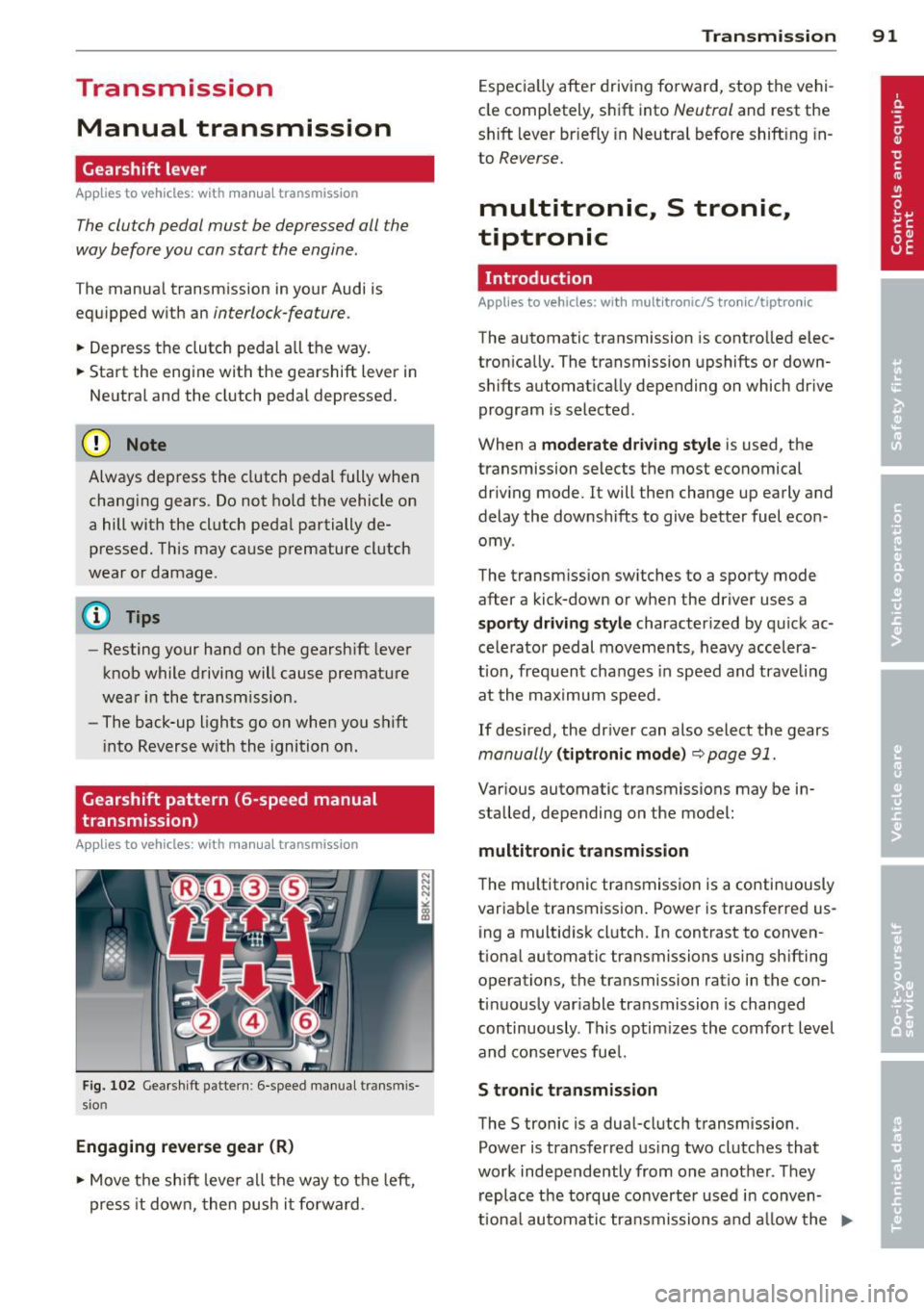
Gearshift pattern (6-speed manual
transmission)
Applies to vehicles: with manual transmission
Fig. 102 Gearshift pattern : 6-speed manual transmis
sio n
Engaging reverse gear (R)
~ Move the shift lever all the way to the left,
press it down, then push it forward . Transmission
91
Especially after driving forward, stop the vehi
cle completely, shift into
Neutral and rest the
shift lever br iefly in Neutral before shift ing in
to
Reverse.
multitronic., S tronic.,
tiptronic
Introduction
Applies to vehicles: with multitronic/S tronic/tiptronic
The automatic transmission is controlled elec
tronically. The transmission upshifts or down
shifts automatically depending on which drive
program is selected .
When a
moderate driving style is used, the
transmission selects the most economical
driving mode. It will then change up early and
delay the downshifts to give better fuel econ
omy .
The transmission switches to a sporty mode
after a kick-down or when the driver uses a
sporty driving style characterized by quick ac
celerator pedal movements, heavy accelera
t ion, frequent changes in speed and trave ling
at the maximum speed.
If desired, the driver can also select the gears
manually (tiptronic mode) ~ page 91.
Various automatic transmissions may be in
stalled, depending on the model:
multitronic transmission
The multitronic transmission is a continuously
variable transmission. Power is transferred us
ing a multidisk clutch. In contrast to conven
tional automatic transmissions using shifting
operations, the transmission ratio in the con
tinuously variable transmission is changed
continuously . This optimizes the comfort level
and conserves fuel.
S tronic transmission
The S tronic is a dual-clutch transmission .
Power is transferred using two clutches that
work independently from one another_ They
replace the torque converter used in conven
tiona l automatic transmissions and allow the ..,_
Page 94 of 296
92 Transmission
vehicle to accelerate without a noticeable in
terruption in traction.
tiptronic transmission
I n the tiptronic transmission, power is trans
ferred by a torque converter.
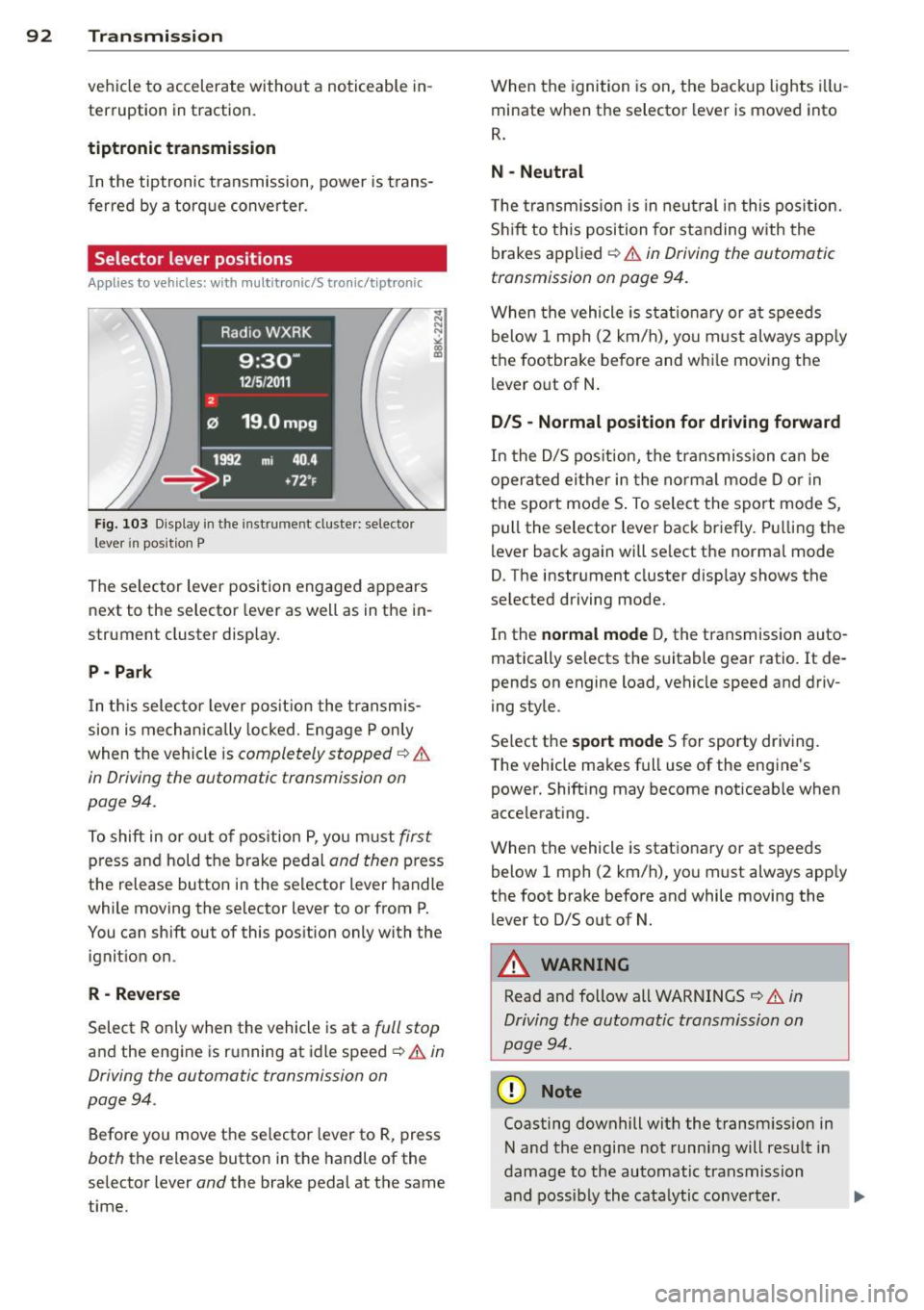
Selector lever positions
Applies to vehicles: with multitronic/5 tronic/tiptronic
Fig. 103 Display in the in stru me nt duste r: selecto r
lever in position P
The selector lever position engaged appears
next to the selector lever as well as in the in
strument cluster display.
P - Park
In this selector lever position the transmis
sion is mechanically locked. Engage P only
when the vehicle is
completely stopped ¢ &
in Driving the automatic transmission on
pag e 94 .
To shift in or out of pos ition P, you must first
press and hold the brake pedal and then press
the release button in the selector lever handle
wh ile mov ing the se lector lever to or from P.
You can shift out of this position only with the
ignition on .
R-Reverse
Select R only when the vehicle is at a full stop
and the engine is running at idle speed ¢ & in
Driving the automatic transmission on
page 94 .
Before you move the selector lever to R, press
both the release button in the handle of the
selector lever
and the brake pedal at the same
time. When the
ignition is on, the backup lights illu
minate when the selector lever is moved into
R.
N -Neutral
The transmission is in neutral in this position .
Shift to this position for standing with the
brakes applied ¢
& in Driving the automatic
transmission on page 94.
When the vehicle is stat ionary or at speeds
below 1 mph (2 km/h), yo u must always apply
the footbrake before and whi le moving the
lever out of N.
D/S - Normal position for driving forward
In the D/S position, the transmission can be
operated either in the normal mode D or in
the sport mode S . To select the sport mode S,
pull the selector lever back briefly. Pulling the
lever back again will se lect the normal mode
D. The instrument cluster disp lay shows the
selected driving mode.
In the
normal mode D, the transmission auto
matically selects the suitable gear ratio.
It de
pends on engine load, vehicle speed and driv
ing style .
Select the
sport mode S for sporty driving .
T he vehicle makes full use of the engine's
power. Shift ing may become noticeable when
accelerating.
When the vehicle is stationary or at speeds
below 1 mph (2 km/h), you must always app ly
the foot brake before and while moving the lever to D/S out of N.
A WARNING
Read and follow all WARNINGS ¢ & in
Driving the automatic transmission on
page 94 .
(D Note
Coasting downhill with the transm ission in
N and the engine not running will result in
damage to the automatic transmission
and possibly the catalytic conve rter. .,..
Page 96 of 296
94 Transmission Starting the engine
.. The selecto r lever must be in P or N.
Starting off
.. Press and hold the brake pedal.
.. Press and hold the release button in these
lector lever handle, se lect t he des ired selec
tor lever position such as D/S and release
the button .
.. Wait briefly unti l the transmission has shift
ed (you will feel a slight movement) .
.. Remove your foot from the brake pedal and
acce lerate.
Stopping temporarily
.. Keep the vehicle stationary usin g the brak
ing peda l, for examp le at traffic lights .
.. Do not press the accelerator pedal when do
ing this .
.. To prevent the veh icle from rolling when you
start driving, set the parking brake when
stopping on steep inclines
c> _& .
.. The parking brake will release automatically
and the vehicle w ill start moving once you
press the accelerator pedal.
Stopping/parking
If the selector lever is not in the P position
when you open the dr iver's door, the vehicle
could roll. The message
Transmission: Car
may roll! Shift to park!
appears.
.. Press and hold the brake pedal until the ve-
hicle has come to a complete stop .
.. Apply the parking brake
c> page 86, Parking .
.. Select the P selector lever position c> _&.
Stopping on an incline
.. Always press the brake pedal to hold the ve
hicle in place and prevent it from "rolling
back"
c> _& . Do not try to prevent the vehi
cle from "roll ing back" when a gear is en
gaged by increasing the eng ine speed
c> (D.
Starting on an incline
.. Activate the parking brake.
.. With the driving gear se lected, press the ac
celerator pedal carefully. The park ing brake will release automatically if your seat
belt is
fastened .
Under certain circumstances, such as driving
in the mountains, it may be usefu l to switch
temporarily to the manual shift program in or
der to adjust the gears to the driving cond i
tions by hand
c> page 96.
On slopes, activate the parking brake first and
then move the selector lever to the P position .
This prevents too much stress from being
placed on the locking mechanism .
Vehicles with multitronic transmission: Your
vehicle is equipped with
hill hold assist allow
ing you to start while on an incline. The sys
tem is activated when the brake pedal is
pressed down and he ld
for a few seconds . The
brake pressure will hold for
a moment after
the brake pedal loosens to prevent the vehicle
from roll ing backwards wh ile starting up .
A WARNING
-The vehicle can also roll when the engine
is stopped.
- Unintended vehicle movement can cause
serious injury.
- Never leave your vehicle with the engine
r un ning while in gear. If you must leave
your veh icle when the engine is running,
activate the parking brake and move the
selecto r lever to P.
- Power is still transmitted to the wheels
when the engine is running at idle. To
prevent the vehicle from "creeping", you
must keep your foot on the brake when
the engine is running and the selector
lever is in
DIS or R or "tiptronic" mode is
selected .
- Do not press the accelerator pedal when changing the selector lever position
while the veh icle is stationary and the
engine is running.
- Never shift into R or P while driving.
- Before driving down a steep s lope, re-
duce your speed and shift into a lower
gear with "tiptronic".
Page 104 of 296
102 Audi adaptive cruise control and braking guard
Switching on and off
Applies to vehicles: with Audi adaptive cruise control
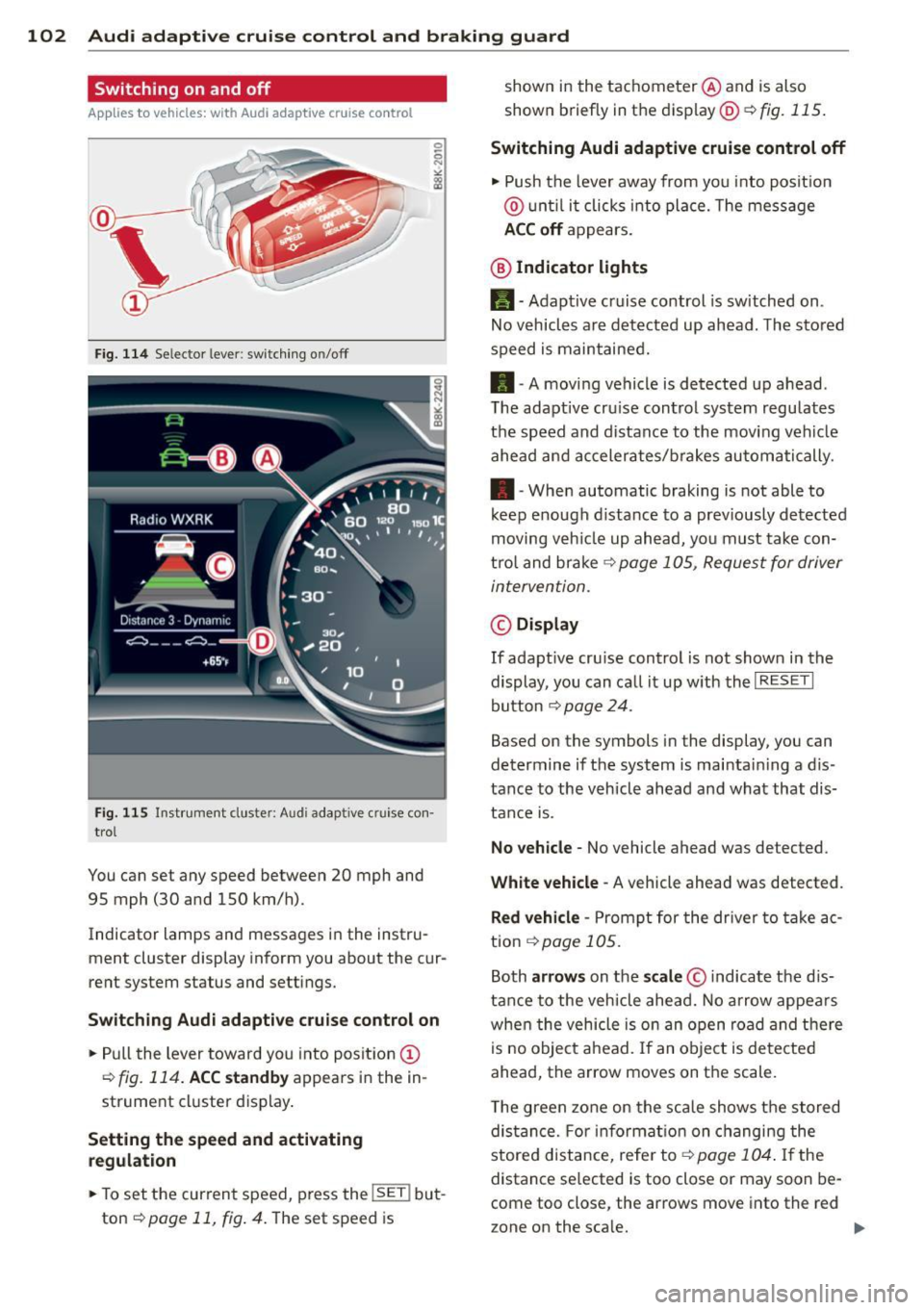
Fig. 114 Se lec tor lever: switching on/off
Fig. 115 Instrument clus te r: A udi adap tive c ru ise co n·
trol
You can set any speed between 20 mph and
95 mph (30 and 150 km/h).
Indicator lamps and messages in the instru·
ment cluster display inform you about the cur·
rent system status and settings.
Switching Audi adaptive cruise control on
• Pull the lever toward you into position (D
¢fig. 114. ACC standby appears in the in ·
strument cluster display.
Setting the speed and activating
regulation
.. To set the current speed , press the !SE T! but·
ton
¢ page 11, fig . 4. The set speed is shown in
the tachometer @and is also
shown briefly in the display@¢
fig. 115.
Switching Audi adaptive cruise control off
• Push the lever away from you into position
@ until it clicks into place. The message
ACC off appears.
@ Indicator lights
11 · Adaptive cruise control is sw itched on.
No vehicles are detected up ahead. The stored
speed is maintained.
• · A moving vehicle is detected up ahead .
T he adaptive cru ise control system regulates
the speed and distance to the moving vehicle
ahead and accelerates/brakes automatically .
• · When automatic braking is not able to
keep enough distance to a previously detected
moving veh icle up ahead, you must take con·
trol and brake
¢ page 105, Request for driver
intervention.
© Display
If adapt ive cru ise control is not shown in the
display, you can call it up w ith the
I RESET I
button ¢ page 24.
Based on the symbols in the display, you can
determine if the system is maintain ing a d is ·
tance to the vehicle ahead and what that dis
tance is.
No vehicle· No vehicle ahead was detected .
White vehicle -A vehicle ahead was detected .
Red vehicle -Prompt for the driver to take ac
tion
,=;, page 105.
Both arrows on the scale © indicate the dis·
tance to the vehicle ahead. No arrow appears
when the vehicle is on an open road and there
is no object ahead. If an object is detected
ahead, the arrow moves on the scale .
T he green zone on the scale shows the stored
distance. For information on changing the
stored distance, refer tor=;,
page 104 . If the
distance se lected is too close or may soon be·
come too close , the arrows move into the red
zone on the sca le. .,.