stop start AUDI S4 2014 Owner's Manual
[x] Cancel search | Manufacturer: AUDI, Model Year: 2014, Model line: S4, Model: AUDI S4 2014Pages: 296, PDF Size: 73.56 MB
Page 116 of 296
114 Audi drive select
-For vehicles with an automatic transmis
sion, selecting the
Dynamic mode re
su lts in sporty shifting characteristics .
The S gear position engages automati
cally.
- In vehicles that have dynamic steering*,
operating noise is heard when starting or
stopping the eng ine . This does not ind i
cate a problem .
Selecting the driving mode
Applies to vehicles: with Audi drive select
You can choose between Comfort, Auto, Dy
namic
and Individual * modes.
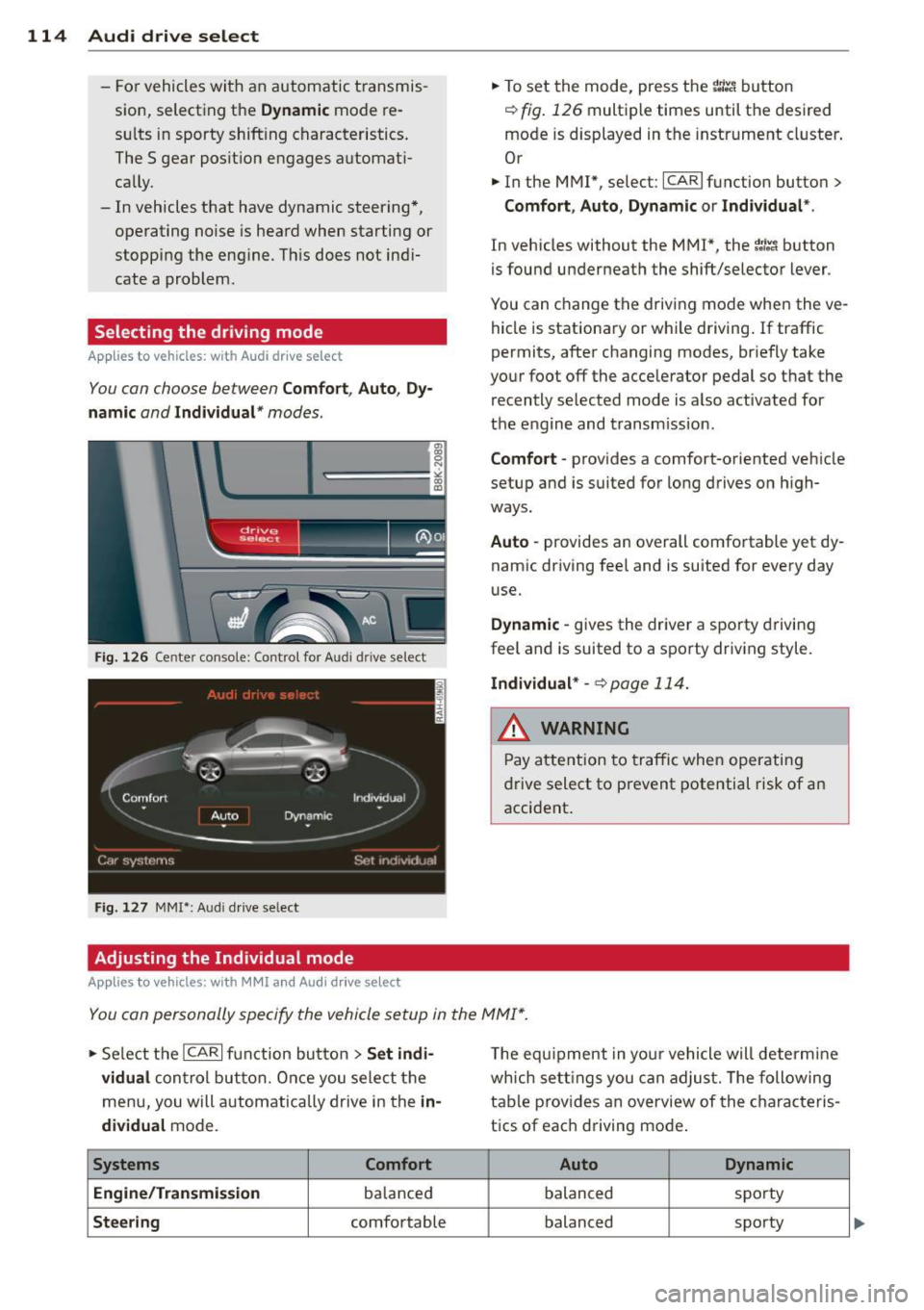
Fig. 126 Cen ter console: Control for Au di dri ve select
Fig. 127 MMI•: Aud i drive select
Adjusting the Individual mode
Applies to vehicles: with MMI and Aud i drive select
.,. To set the mode, press the r.:i:.~ button
~ fig. 126 multiple times until the desired
mode is displayed in the instrument cluster .
Or
.,. In the MMI", select:
ICARI function button>
Comfort, Auto, Dynamic or Individual *.
In vehicles without the MMI*, the~:/;,~ button
is found underneath the shift/selector lever .
You can change the driving mode when the ve hicle is stationary or wh ile driving . If traffic
permits, after changing modes, br iefly take
your foot off the acce lerator pedal so that the
recently selected mode is also activated for
the engine and transm ission .
Comfort -provides a comfort-oriented vehicle
setup and is suited for long drives on h igh
ways.
Auto -provides an overall comfortable yet dy
namic driving feel and is suited for every day
use.
Dynamic -gives the driver a sporty driving
feel and is suited to a sporty driving style.
Individual * -¢ page 114.
& WARNING
Pay atte ntion to traffic when operating
drive select to prevent potential risk of an
accident .
You can personally specify the vehicle setup in the MMI* .
.,. Se lect the ICAR I function button > Set indi·
vidual
control but ton. Once you select the
menu, you will automatically drive in the
in·
dividual
mode.
Systems Comfort
Engine /Transmission
balanced
Steering comfortable T
he equipment in your vehicle will determine
wh ich sett ings you can adjust. The following
table provides an overview of the characteris
tics of each driving mode .
Auto Dynamic
balanced spo
rty
balanced sporty
Page 118 of 296
116 Park assist
Park assist
Parking system
Applies to vehicles: with pa rking system
Different park assist systems may be used for
parking or maneuvering, depending on the
vehicle's features.
Parking system (rear)*:
For the parking system (rear), the acoustic
park assist system is installed in the rear of
the vehicle
¢ page 116.
The rear parking assist system uses ultrason ic
sensors to determine the distance of the vehi
cle from a detected obstacle. There are a total
of four sensors located on the rear bumper
(two in the middle and two on the sides).
Parking system (rear, with rear view
camera)*:
For the parking system (rear, with rear view
camera),
the rear acoustic park assist system
is integrated in the rear of the vehicle and the
rear view camera is integrated in the rear lid
¢page 119.
The parking system (rear, with rear view cam
era)
uses ultrasonic sensors to determine the
distance of the vehicle from a detected obsta
cle . There are a total of four sensors located
on the rear bumper (two in the middle and
two on the sides).
_& WARNING
Make sure the sensors are not covered by
stickers, deposits or any other obstruc
tions as it may impair the sensor function.
For information on cleaning, refer to
qpage 204.
Parking system (rear)
Rear acoustic park assist
Applies to vehicles: with parking system (rear)
The rear acoustic park assist warns you of ob
stacles or objects behind your car .
Description
The rear acoustic parking assist system deter
mines the distance of the vehicle from an ob
stacle using ultrasonic sensors. There are 4
sensors in the rear bumper.
The range at which the sensors start to meas
ure is
about:
To the sid e 2 ft (0 .60 m)
Center rear 5.2 ft (1.60 m)
Activation
Acoustic parking assist is activated automati
ca lly when
reverse gear is engaged. A brief
tone confirms that the system is activated.
Warning tones
Distance warning is given by warn ing tones
wh ich are generated by the rear signa l genera
tor. The volume and the pitch of th e warning
tones can be adjusted in the MMI*
¢page 117.
Reversing
Distance warning when reversing starts when
an obstacle is detected in the range of the
parking assist system . As the distance de
creases, the time interval between the a udible
tones becomes shorter.
When the distance is less than 1ft (0.30 m),
the tone becomes continuous. At this point
you should stop backing up .
Please note that low objects already signalled
by a warn ing can disappear from the system's
detection range and will not continue to be
signalled .
If the distance to an obstacle remains the
same, the volume of the distance warning is
gradually reduced after about 4 seconds (this
does not apply in the continous tone range).
ll-
Page 120 of 296
118 Park assist
Parking system (rear,
with rear view camera)
Introduction
Applies to vehicles: with parking system (rear, with rea r
view camera)
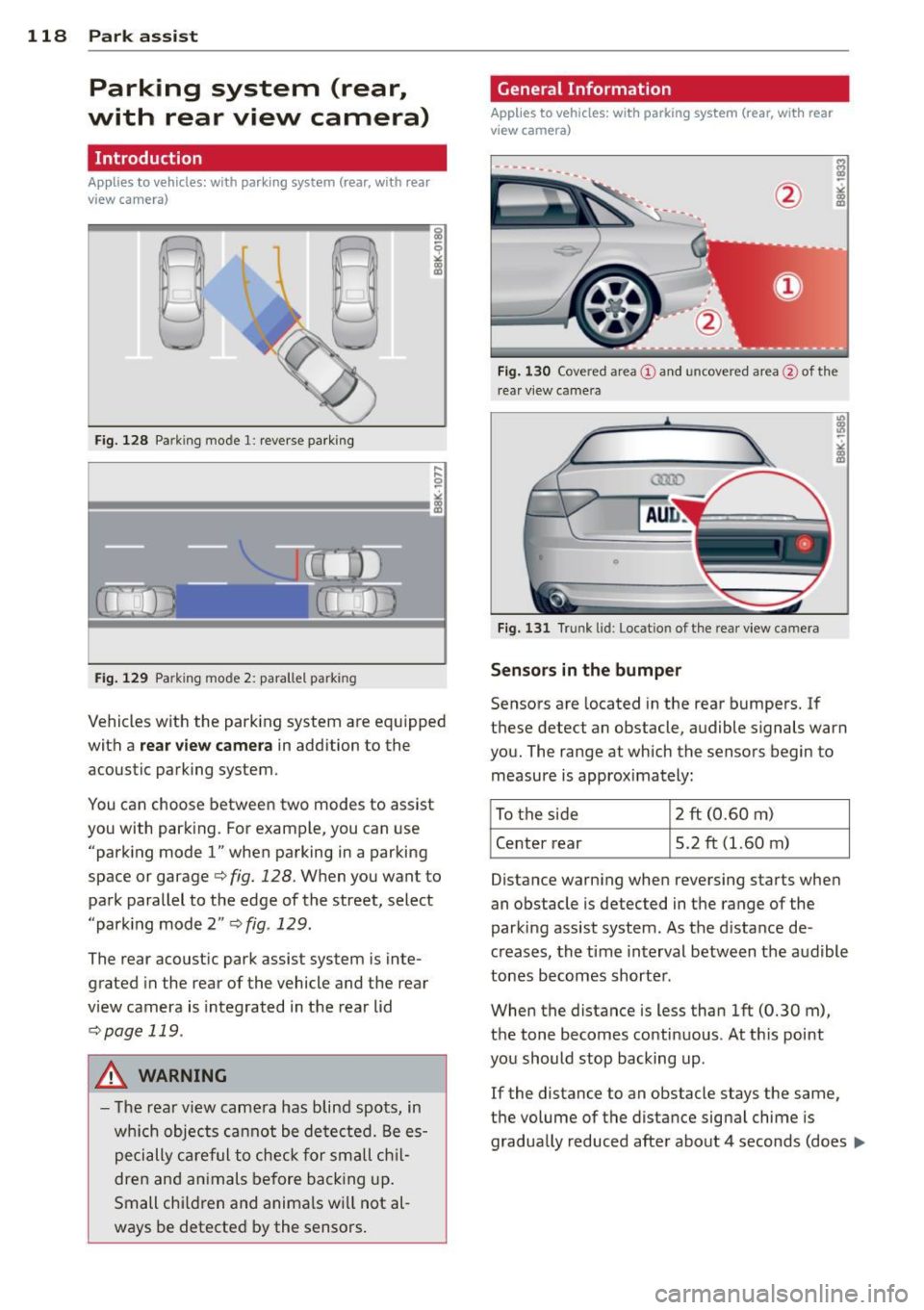
Fig. 128 Pa rking mode 1: reverse parking
Fig. 129 Parking mode 2: parallel park ing
Vehicles with the park ing system are equipped
with a
rear view camera in addition to the
acoustic parking system.
You can choose between two modes to assist
you with park ing. For example, you can use
"parking mode
l" when parking in a parking
space or garage
c> fig. 128. When you want to
park parallel to the edge of the street, select
"park ing mode 2"
c> fig . 129.
The rear acoustic park assist system is inte
grated in the rear of the vehicle and the rear
view camera is integrated in the rear lid
c>page 119 .
A WARNING
-The rear view camera has blind spots, in
wh ich objects cannot be detected. Be es
pecially careful to check for small chil
dren and animals before backing up.
Small chi ldren and animals wi ll not al
ways be detected by the sensors.
General Information
Applies to vehicles: with parking system (rear, with rear
view camera)
F ig . 130 Covered area@and uncove red area @of th e
r ea r view came ra
0
Fig. 131 Trunk lid: Locat io n of the rear view ca mera
Sensors in the bumper
Sensors are located in the rear bumpers. If
these detect an obstacle, audible signals warn
you. The range at which the sensors begin to measure is approximately:
To the side 2 ft
(0.60
m)
Center rear 5.2 ft (1.60 m)
Distance warning when reversing starts when
an obstacle is detected in the range of the
parking assist system . As the d istance de
creases, the time interval between the audible
tones becomes shorter .
When the distance is less than 1ft (0.30 m),
the tone becomes continuous . At this point
you should stop backing up .
If the distance to an obstacle stays the same,
the volume of the distance signal chime is
gradually reduced after about 4 seconds (does ..,.
Page 122 of 296
120 Park ass is t
Sw it c hing off
.,. Drive faster than 9 mph (15 km/h), or
.,. take the vehicle out of reverse gear. The
acoustic parking system is immediately de
activated, and the rear view camera picture
is deactivated automatically after a per iod
of about 15 seconds, or
.,. switch off the ignition.
The delay in deactivating the camera provides an uninterrupted view behind the vehicle es
pec ially when maneuvering in tight parking
spaces and prevents the picture from turning
off the every time you sh ift out of reverse .
If the warning message appears in the display but not the rear view camera picture, read and
confirm the warning message. The acoustic
d istance signal is always active .
If you press a function button on the MMI
control console, the rear view camera picture
d isappears. The rear view camera picture reap
pears the next time you park.
Further information on the warn ing message
and the MMI control console can be found in
the MMI instruction booklet .
A WARNING
-Only use the rearview camera to assist
you if it shows a good, clea r picture. For
example, the image may be affected by
the sun sh in ing into the lens, dir t on the
lens or if there is a defect .
- Use the rearview camera only with the
rear lid completely closed. Make sure any
objects you may have mounted on the
rear lid do not block the rearview cam
era .
(D Tips
-The rear v iew camera picture is ava ila b le
as soon as the MM I Display or the MM I is
switched on, or the start-up phase is
completed.
- The sensors must be kept clean and free
of snow and ice for the park assist to op
erate. -
Yo u can change the vo lume and pitch of
the s ignals as we ll as the disp lay
¢ page 122 .
-What appea rs in the disp lay is time-de
layed.
· Reverse Parking
Applies to vehicles: with parking system (rear, with rear
v iew camera}
Parking mode 1 can be used when parking in
a garage or parking space.
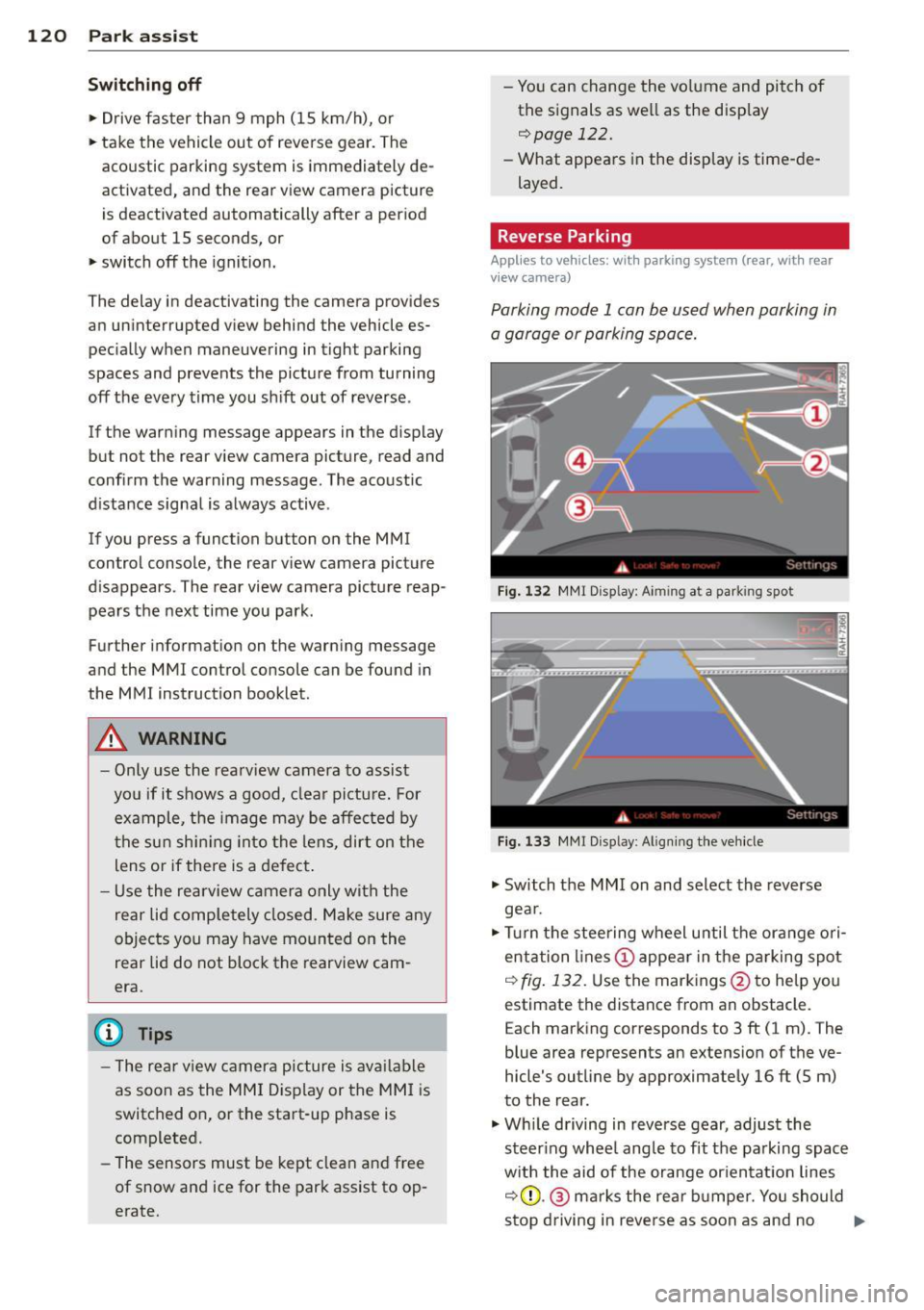
F ig . 1 32 MMI Disp lay : A im ing a t a park ing spo t
Fig. 133 MMr Disp lay : A lig nin g the ve hicle
.,. Switch the MMI on and select the reverse
gea r.
.,. Turn the stee ring wheel u ntil the ora nge ori
entation lines(!) appea r in the pa rking spot
q fig . 13 2. Use the markings @to help you
estimate the distance from an obstacle. E ach marking corresponds to 3 ft (1 m). The
blue area represents an extens ion of the ve
hicle's outline by approximately 16 ft (5 m)
to the rear.
.,. Wh ile driving in reverse gear, adjust the
steer ing whee l angle to fit the parking spac e
w ith the aid of the orange or ien tat ion lines
q (D .@ marks the rear b umpe r. You should
stop driving in reve rse as soon as and no .,.
Page 124 of 296
122 Park assis t
the b lue area should be on the curb. The en
ti re b lue area must fit into the parking spot.
• While the vehicle is stationary, turn the
steering wheel to the right as far as it will
go.
• Back into the park ing spot . Stop the vehicle
as soon as the blue curve touches the curb
¢ fig . 135.
• While the vehicle is stationa ry, turn the
steering wheel to t he left as far as i t wi ll go.
• Conti nue to bac k up into the park ing spot
unti l the vehicle is pa rked parallel to the
c ur b.® marks the rear bumper . You sho uld
stop dr iving in reverse as soon as and no lat
er than when the red orientation line@
abuts an object¢,&! Keep an eye on the
front of your veh icle wh ile doing this
c> (D .
Pa rking ne xt to obstacle s
When there is an obstacle (such as a wall)
next to the parking spot, choose a spot w ith
more space on the sides. Pos ition the long
side of the blue area so that there is sufficient
space from the curb . T he area must not be on
the curb . Yo u will also need to start turn ing
the steer ing whee l much ear lie r. T he re s hou ld
be a suff ic ient amoun t of sp ace between the
curb and the b lue curve, and the blue c urve
¢
fig . 135 must not touch the curb .
8_ WARNING
-The rea r view came ra does not show the
entire area beh ind the veh icle
¢
page 118, fig. 130. Watch o ut espe
cially for small children and an imals. The
rear view camera cannot a lways detect
them, pos ing risk of a n accide nt!
- Please note that objects not touch ing the
ground can appear to be further away
than they really are (for examp le, the
bumper of a pa rked vehicle, a t railer
hit ch, or the rear of a t ru ck ). In this case,
yo u shoul d no t use the help li nes to he lp
with par king, which poses danger of an
acc ident!
(D Note
In the M MI dis p lay, the direction of travel
of the vehicle rear is represented depend
i ng on the steering wheel angle . The vehi
cle front swings out more than the vehicle
rear. Mainta in plenty of dista nce from an
obstacle so that your outs ide mir ro r or a
corner of you r vehicle does not coll ide with
any obstacles - dange r of accide nt!
(D Tips
The left o r right orie ntation lines and su r
faces will be disp layed, depending on t he
t u rn s ignal being used .
Adjusting the display and warning tones
Applies to vehicles: with parking system (rear, with rear
view camera)
The display and warning tones are adjus ted in
the radio or MMI*.
.. Select: !CAR I function button> Parking sys
tem .
Or
--.. Select: !C AR I func tion but ton> Car systems "
control butto n> Driver assist > Parking aid .
Di splay
- Off -when the parking system is switched
off, only a udible s ignals a re given .
-On -when the par king system is switched
on, the picture from the rear view camera is
disp layed.
Warning tones
- Rear volum e -
rear sensor vo lume
- Rear frequency -rear senso r frequency
- Music volume whil e parking -when the
parking system is sw itched on, the volume
of the active audio sour ce is lowered.
The newly ad justed value is briefly heard from
the sig nal generato r. The sett ings are auto
matically stored and assigned to the remote
control key. ..,
Page 126 of 296
124 Homelin k
Homelink
Universal remote
control
Description
Appl ies to vehicles: wit h Homeli nk
The HomeLink universal remote control can
be programmed with the remote control for
devices that are already present.
W ith Home Link, you can control devices such
as the garage door, security systems, house lights, etc. comfortably from the inside of you
vehicle.
Homelink makes it possible for you to replace
three d ifferent remote controls from dev ices
in your home with one universal remote. This
feature works for most garage door and exte
rior door motor signals. Programming the in
div idual remote control for your remote con
trol takes place near the center of the radiator
grille. There is a control module attached at
this location .
A one -time programm ing of the sensor must
be performed before you are able to use sys
tems with Home link. If the system does not
activate after performing the one-time pro
gramm ing, check whether the system uses a
rolling code
q page 127 for vehicles without
the MMI*.
& WARNING
-
- Never use the Homelink transmitter
with any garage door opener that does
have not the safety stop and reverse fea
ture as required by federa l safety stand
ards. This includes any garage door open
er model manufactured before April 1,
1982.
- A garage door opener which cannot de
tect an object, signaling the door to stop
and reverse does not meet current feder
al safety standards. Using a garage door
opener without these features increases
risk of serious injury or death. -
For safety reasons never release the
parking brake or start the engine while
anyone is standing in front of the vehicle.
- A garage door or an estate gate may
sometimes be set in motion when the
Homelink remote control is being pro
grammed. If the device is repeatedly ac
tivated, this can overstrain motor and
damage its e lectrica l components - an
overheated mo tor is a fire hazard!
- To avo id possib le injuries or property
damage, please always make abso lutely
certain that no persons or objects are lo
cated in the range of motion of any
equipment being operated.
{D Tips
- If you would li ke more information on
Homel ink, where to purchase the Home
Link compat ible prod ucts, or wou ld like
to purchase the Homelink Home Light
ing Package, please call toll-free:
1-800-355-3515.
- For Declaration of Compliance to United
States FCC and Industry Canada regula
tions
¢ page 2 78.
- For security reasons, we recommend that
you clear the programmed buttons be
fore selling the vehicle.
Operation
Applies to veh icles : w it h Ho meli nk
~ ,.......,,...--, ........... ~
,;,,, r . o : o . ) .~
®
Fig. 136 Headl iner: controls
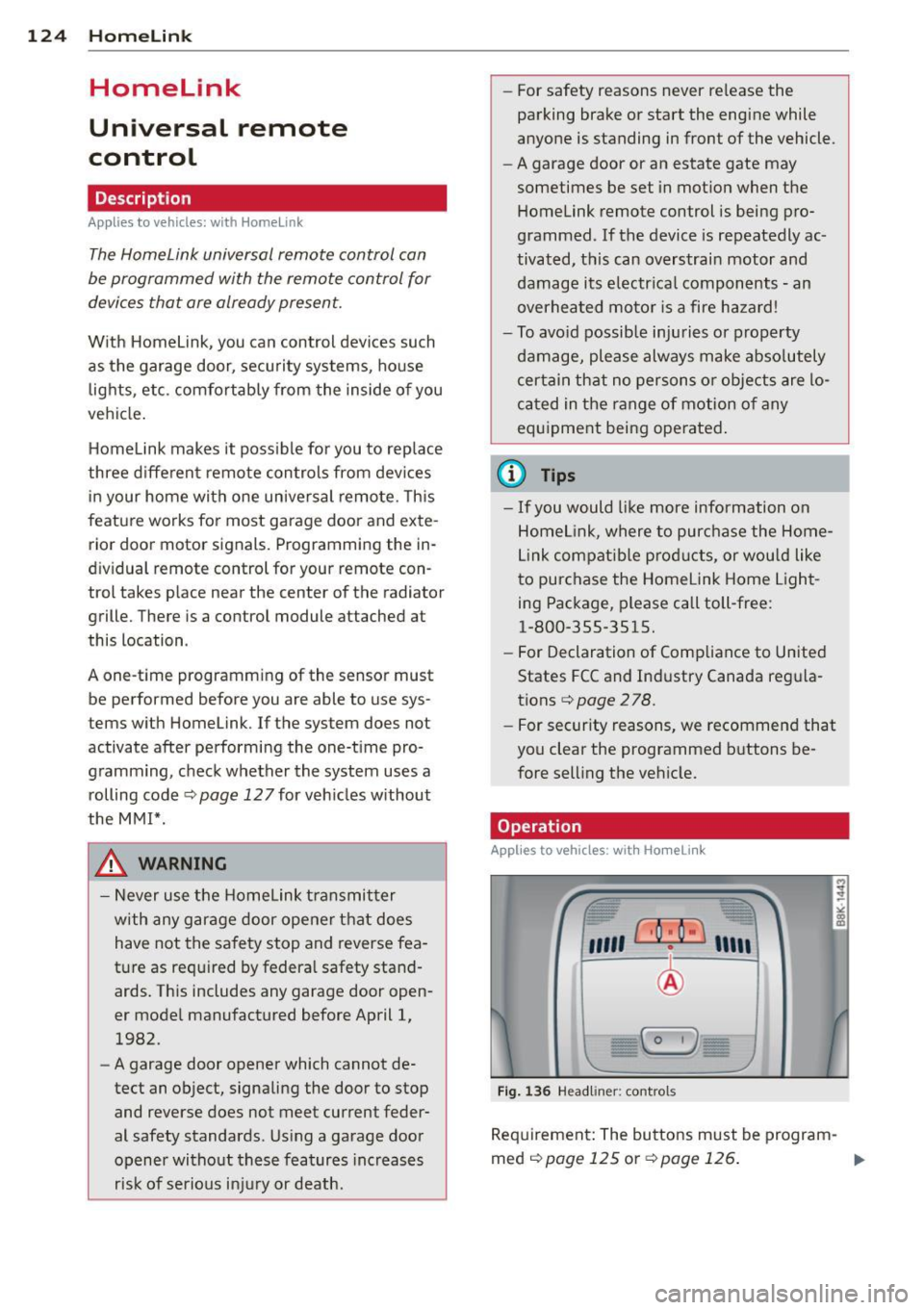
Requirement : The buttons must be program-
med
¢ page 125 or ¢page 126. II>
Page 128 of 296
126 Homelink
Programming the transmitter
(version B)
Applies to vehicles: with Homelink
F ig. 138 Distance between t he rad iator grille and the
hand transm itter
P rogramming: phase 1 on th e control unit
1. Sw itch on the ign it ion (do not start the
engine) .
2. Press and hold both of the outer Home
Link buttons
¢ page 124, fig. 136 unti l
the LED @turns off completely (about
20
seconds). Th is procedure clears the stand
ard codes that were set at the factory and
does not need to be repeated again to
p rogram the other buttons .
3 . Briefly press the Homelink button that
you would like to prog ram .
4. Wai t unti l the LED @ beg ins to blin k
q uickly. The Homelink module wi ll now
remain in learning mode for
5 minutes .
5. Now stand in front of your vehicle with
the original hand transmitter for the ga
rage door opener or for the device that
you would like to allocate to the Home
Link button .
P rogramming: pha se 2 on the radiator
gr ille
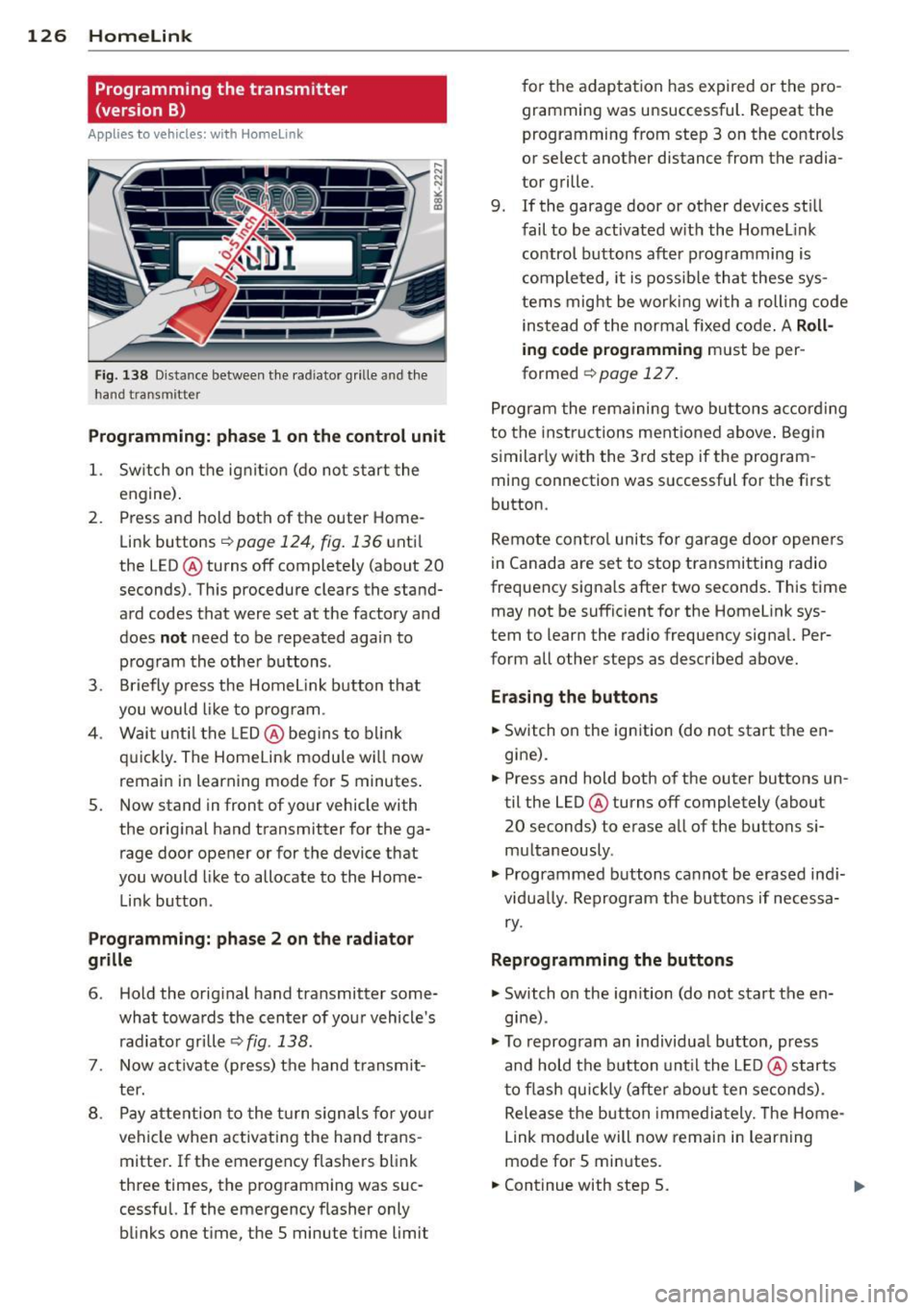
6 . Hold the orig inal hand transmitter some
what towa rds the center of your vehicle's
r adiato r grille ¢
fig. 138 .
7. Now activate (p ress) the hand transmit
ter.
8 . Pay attention to the tu rn signals fo r your
vehicle when activating the hand trans
mitter . If the emergency flashers blink
three times, the programming was suc
cessful. If the emergency flasher only blinks one time, the S minute time limit f
or the adaptation has expired or the pro
gramming was unsuccessful. Repeat the
programming from step 3 on the controls
or select another distance from the radia
tor grille.
9 . If the garage door or other devices still
fail to be activated w it h the HomeL ink
control buttons after programming is
comple ted, it is possib le tha t these sys
tems mig ht be work ing with a roll ing code
instead of the normal f ixed code .
A Roll
ing code programming must be per
formed
¢ page 127 .
Program the remaining two buttons accord ing
to the instructions mentioned above . Begin
similarly with the 3rd step if the program
ming connection was successful for the first
button.
Remote contro l units for garage door openers
in Canada are set to stop transmitting radio
frequency signa ls after two seconds. This time
may not be suffic ient for the Homelink sys
tem to learn the radio frequency signa l. Per
form all other steps as described above.
E rasing the button s
.,. Switch on the ignition (do not start the en
gine).
.,. Press and hold both of the outer buttons un
til the LED @turns off completely (about
20 seconds) to erase all of the buttons si
multaneously .
.. Programmed buttons cannot be erased ind i
vidua lly. Reprogram the buttons if necessa
ry .
Reprogramming the buttons
.. Switch on the ignition (do not start the en
gine) .
.. To reprogram an individua l button, press
and hold the b utton unt il the L ED@starts
to f lash quickly (after abo ut ten seconds).
Release the button immedia tely. The Home
Link module will now remain in learning
mode for 5 minutes.
.,. Continue with step 5.
Page 198 of 296
196 Driving and en vironm ent
8_ WARNING
After driving through water, mud, slush,
etc ., the brakes may be slow to take effect
because of wet brake rotors and pads . Dry
the brakes first by braking carefully to re
store the full braking effect.
(D Note
Vehicle components such as the engine,
transmiss ion, suspension or electrical sys
tem can be severely damaged by driving
through wate r.
@ Tips
- Check the depth of the water before dr iv
i ng through it .
- Do not stop the veh icle, dr ive in reverse
or switc h the engine off when driving
t hr ough water .
- Keep in mind that oncoming vehicles
may c reate waves that raise the water
l evel and make it too deep fo r you r vehi
cle to dr ive through safely.
-
- Avoid dr iving thro ugh salt water because
i t can ca use corrosion.
Catalytic converter
It is very important that your emission con
trol system (catalytic conv ert er) is function
ing properly to ensure that your vehicle is run
ning in on env ironm entally sound manner.
,,. Always use lead-free gaso line Q page 209,
Fuel supply .
,,. Never run the tank down a ll th e way to emp
ty.
,,. Never put too much moto r oil in your engine
Q page 219, "t':::r. Adding engine oil .
,,. Never try to push -or tow -start your ve hicle .
T he cata lytic converter is an eff ic ient "clean
up" device built in to the exhaust system of
the vehicle . The catalytic converter burns
many of the polluta nts in the exhaust gas be
fore they are released into the atmosphe re . The exclus
ive use of unleaded f uel is critica lly
important for the life of the catalytic conv ert
er and p roper funct ion ing of the eng ine .
A WARNING
=
-The temperature of the exhaust system
is high, both when driving and after stop
p ing the eng ine .
- Never touch the exhaust tail pipes once
they have become hot. This could result
in burns.
- Do not park or operate the vehicle i n
areas where the hot exhaust system may
come in co ntact with dry grass, brush,
fue l spill or other material wh ich can
cause a fire .
- Do not app ly additional undercoating or
r u stp roofing on or nea r the exhaust
manifold, exhaust pipes, cataly tic con
ver ter or he at s hields. Dur ing driv ing, the
substance used fo r undercoating could
overheat and cause a fire.
CI) Note
- Be aware tha t just o ne tank filling with
leaded fu el w ill alre ady ser io usly de
grade the performance of the cata lytic
converter .
- Do not exceed the cor rect engine oil level
Q poge 219.
-Do not drive until the fuel t ank becomes
comple tely empty . The engine cou ld mis
fire . Unburned fuel could also get into
the exhaust system and th is co uld cause
the catalytic converter to overheat.
- Do not turn off the ignition while the ve
hicle is mov ing.
- Do not contin ue to ope rate your veh icle
under these conditions, as otherwise fuel
can reach the catalyt ic converter. Th is
co uld result in overheating of the con
verter, requir ing its replacement.
- To assure efficient operation of the Emis -
sion Control System: .,..
Page 204 of 296
202 Trailer towing
Tire pressure
When towing a trailer, inflate the tires of your
vehicle to the cold tire pressure listed under
"Full load" on the label located on the driver's
side B-pillar (visible when the door is open).
Inflate trailer tires to trailer and tire manufac
turers' specifications.
Lights
The headlight settings should be checked with
the trailer attached before driving off. Check
to make sure both vehicle and trailer lights
are working properly.
Safety chains
Be sure trailer safety chains are properly con
nected from the trailer to the hitch on the ve
hicle. Leave enough slack in the chains to per
mit turning corners. When you install safety
chains, make sure they will not drag on the road when you are driving.
The chains should cross under the trailer
tongue to prevent it from dropping in case of
separation from the hitch.
Driving instructions
Driving with a trailer always requires extra
care and consideration.
To obtain the best possible handling of vehicle
and trailer, please note the following:
.,. Do not tow a loaded trailer when your car it
self is not loaded.
.,. Be especially careful when passing other
vehicles.
.,. Observe speed limits .
.,. Do not drive at the maximum permissible
speed.
.,. Always apply brakes early.
.,. Monitor the temperature gauge.
Weight distribution
Towing a loaded trailer with an empty car re
sults in a highly unstable distribution of
weight . If this cannot be avoided, drive at very
low speeds only to avoid the risk of losing
steering control. A "balanced" rig is easier
to operate and con
trol. This means that the tow vehicle should be loaded to the extent possible and permissi
ble, while keeping the trailer as light as possi
ble under the circumstances. Whenever possi
ble, transfer some cargo to the luggage com
partment of the tow vehicle while observing
tongue load requirements and vehicle loading
considerations.
Speed
The higher the speed, the more difficult it be
comes for the driver to control the rig. Do not
drive at the maximum permissible speed. Re
duce your speed even more if load, weather or
wind conditions are unfavorable -particularly
when going downhill.
Reduce vehicle speed
immediately if the trail
er shows the slightest sign of swaying .
Do not
try to stop the swaying by accelerating.
Observe speed limits. In some areas, speeds
for vehicles towing trailers are lower than for
regular vehicles .
Always apply brakes early. When driving downhill, shift into a lower gear to use the en
gine braking effect to slow the vehicle . Use of
the brakes alone can cause them to overheat
and fail.
Coolant temperature
The coolant temperature gauge c> page 10
must be observed carefully . If the needle
moves close to the upper end of the scale, re
duce speed immediately and/or turn off the
air conditioner.
If the coolant temperature warning light •
in the instrument cluster starts flashing, pull
off the road, stop and let the engine
idle for
about two minutes to prevent heat build-up .
_& WARNING
Anyone not properly restrained in a mov
ing vehicle is at a much greater risk in an
accident. Never let anyone ride in your car
who is not properly wearing the restraints
provided by Audi.
-
Page 205 of 296
Trailer towing tips
Important to know
Your vehicle hand les different ly when tow ing
a trailer because o f the addit ional weight and
d iffe ren t weight distribution . Safety, perform
ance and economy w ill greatly depend on how
caref ully you load your trailer and operate
your rig.
B efore you actua lly tow your trailer, pr actice
turning, stopp ing and bac king up in an area
away from traffic. Keep practicing until you have become comp lete ly fam iliar with the way
your veh icle-trailer comb ination behaves and
responds.
Backing up is d ifficu lt a nd requires practice .
Backing up with a tra iler genera lly requires
steer ing action opposite to that when backing
up your vehicle without a trailer.
M aintain a g reater distance betwee n your ve
h icle and the one in front o f you . You will need
mo re room to stop. To compensate for the
trailer, you will need a larger than normal
turning radius .
W hen pass ing, remember that yo u cannot ac
celerate as fast as yo u normally wo uld be
cause of the added load. Make sure you have
e nough room to pass . After passing , allow
p lenty o f room fo r your tra iler before chang
in g la nes aga in .
Avoid jerky starts, sharp turns or rap id lane
changes.
(D Tips
- Do not tow a tra iler during the break-in
period of you r vehicle.
- If you tow a trailer, your A udi may re
quire more frequent maintenance due to
the extra load
o page 275.
Trailer towin g 203
Parking on a slope
Do not park on a slope with a trailer . If it can
not be avoided, do so only after doing the fol lowing:
When parking:
.. App ly the foot brake.
.. Have someone p lace chocks under both the
veh icle and the tra iler wheels .
.,. With chocks in place, slowly release t he
bra kes unt il t he whee l chocks absorb the
load .
.. Tu rn the whee ls towards the curb.
.,. App ly the par king b rake .
.. Place an a utomatic transm ission* in P, re
spectively a manual transmission in first or
reverse gear.
When restarting after parking:
.,. App ly th e foot br ake .
.. Start the en gine.
.. Move the selector lever to D/S, respect ively
a man ual transmiss ion in first gea r.
.. Release the parking bra ke and s low ly pull
out and away from the wheel chocks .
.. Stop and have someone retr ieve the wheel
chocks.
@ Tips
If you move the selector leve r of the auto
matic transmissio n* to P before applying
the pa rking brake and before blocking the
whee ls, you may hav e to use mor e forc e
l ater to move the le ver out of the P posi
tion.
•
•