stop start AUDI S4 2014 User Guide
[x] Cancel search | Manufacturer: AUDI, Model Year: 2014, Model line: S4, Model: AUDI S4 2014Pages: 296, PDF Size: 73.56 MB
Page 85 of 296
CD Note
If the engine has been under heavy load
for an extended period, heat builds up in
the engine compartment after the engine
is switched off- there is a risk of damaging
the engine . Allow the engine to run at idle
for about two minutes before switching it
off.
Convenience key
Starting the engine
Applies to vehicles: with convenience key
The I STAR T ENGINE ST OPI button switches
the ignition on and starts the engine.
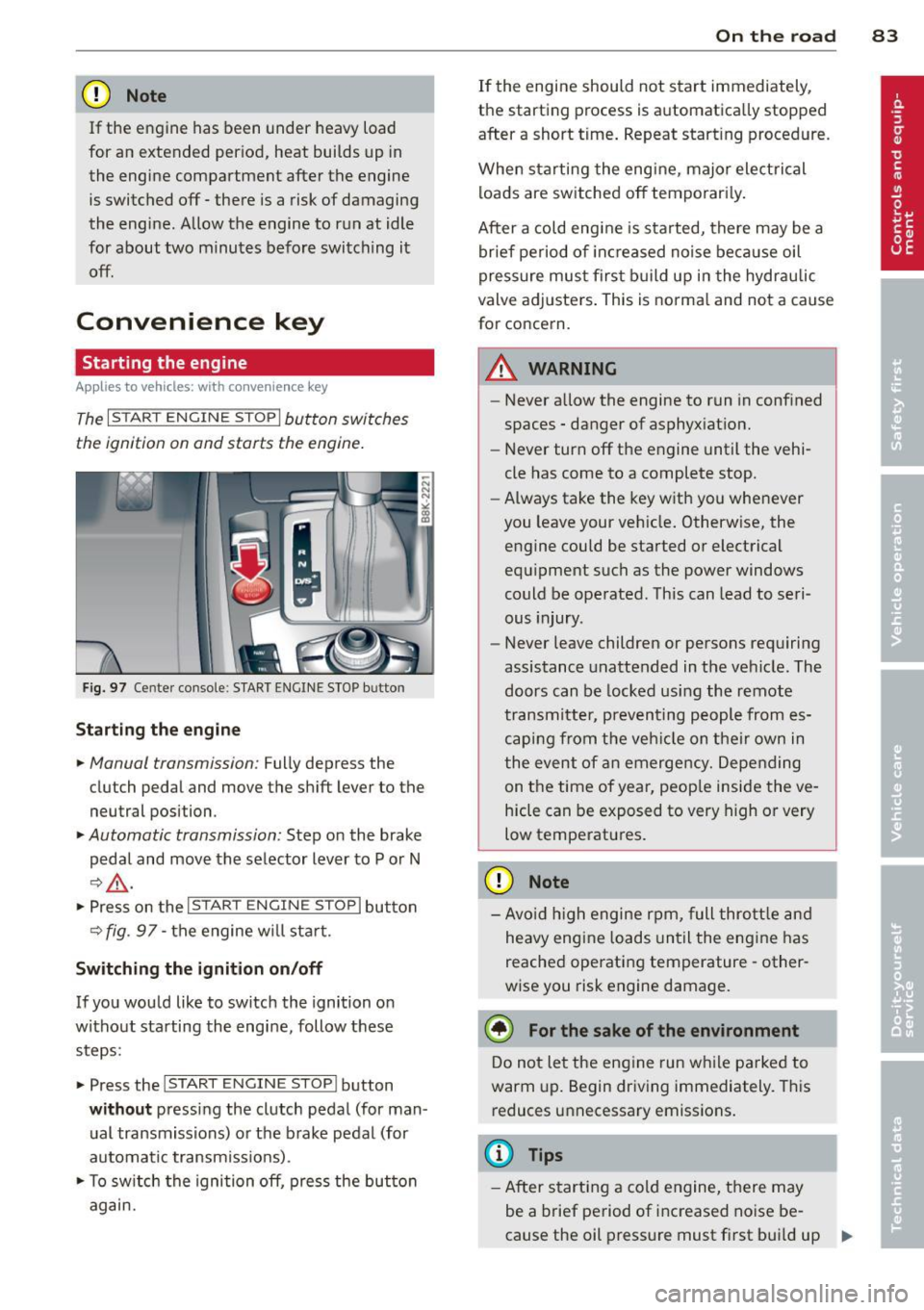
Fig. 97 Center console : S TART ENGINE STOP b utto n
Starting the engine
.. Manual transmission : Fully depress the
clutch pedal and
move the shift lever to the
neutral position .
.. Automatic transmission: Step on the brake
pedal and
move the selector lever to P or N
~ .&, .
.. Press on the I STAR T ENGINE ST OP I button
~fig . 97-the engine will sta rt.
Switching the ignition on/off
If you would like to switch the ignition on
without starting the engine, follow these
steps :
.. Press the
I START ENGINE STOPI button
without pressing the clutch pedal (for man
ual transmissions) or the brake pedal (for
automatic transmissions) .
.. To switch the ignition off, press the button
again.
On the road 83
If the engine should not start immediately,
the starting process is automatically stopped
after a short time. Repeat starting procedure .
When starting the engine , major electrical
loads are switched off temporari ly.
After a cold engine is started, there may be a
brief period of inc reased noise because oil
pressure must first build up in the hydraulic
valve adjusters. This is normal and not a cause
for concern.
A WARNING
- Never allow the engine to run in confined
spaces - danger of asphyxiation.
- Never turn off the engine until the vehi
cle has come to a complete stop.
- Always take the key with you whenever
you leave your vehicle. Otherwise, the
engine could be started or electrical
equipment such as the power windows
could be operated . This can lead to seri
ous injury .
- Never leave children or persons requiring
assistance unattended in the vehicle. The
doors can be locked using the remote
transmitter, preventing people from es
caping from the vehicle on their own in
the event of an emergency. Depending
on the time of year, peop le inside the ve
hicle can be exposed to very high or very
low temperatures .
CD Note
-Avo id high engine rpm, full throttle and
heavy engine loads until the engine has
reached operating temperature - other
wise you risk engine damage.
@ For the sake of the environment
Do not let the engine run while parked to
warm up. Begin driving immediately. This
reduces unnecessary emissions.
(D Tips
-After starting a cold engine, there may
be a brief period of increased noise be-
cause the oil pressure must first bui ld up
II-
Page 86 of 296
84 On th e road
in the hy dra ulic valve adjusters. This is
norma l and not a cause for concern.
- If you leave the vehicle with the ignition
switched on, the ignition will switch
off
after a certain period of time . Please
note that e lectrica l equipment such as
exter ior lights w ill switch
off as well
when that happens.
Switching engine off
Applies to vehicles: with conven ience key
" Bring your vehicle to a complete stop.
"Automatic transmiss ion: Move the selector
lever to the P or N pos it ion.
" Press the
!START ENGINE STOPI button
r::!;page83, fig. 97.
Steering lock
The stee ring locks when you turn the engine
off us ing the I STAR T ENGINE STOP I button
and open the dr iver's door. The locked stee r
i ng helps preven t vehicle theft.
Emergency off
If necessary, the eng ine ca n be sw itched off
with the selector leve r in the R or D/S pos i
tions. To do so, step on the brake pedal and
p ress and hold the
I START ENGINE STOP I but
ton vehicle speed must be less than 6 mph (10 km/h).
_& WARNING
- Never turn off the eng ine before the ve
hicle has come to a complete stop . The
full function of the brake booster and the
power steering is not guaranteed. You
must use more force to turn or brake if
necessary . Because you cannot steer and
brake as you usua lly would, this could
lead to crashes and se rious injur ies.
- For safety reasons, you s hould always
par k your vehicle with the se lector lever
in P. Ot herwise, the ve hicle co uld inad
vertent ly roll away.
- T he radiator fan ca n continue to ru n for
up to 10 mi nutes even after yo u have
tu rne d
off the eng ine and remove d the ignition key. The radiator fan can a
lso
turn on again if the engine coo lant heats
up because of intense sunlight or heat
bu ild-up in the engine compartment.
- Always take the key w ith you whenever
you leave your ve hicle. Otherw ise, the
eng ine could be sta rted or electrical
equ ipme nt such as the power windows
could be ope rated. This can lead to seri
ous injury.
(D Note
If the engine has bee n under heavy load
for an extended pe riod, heat bu ilds up in
the engine compartment after the engine
i s sw itched
off -there i s a r is k of damag ing
the engine. A llow the eng ine to run at id le
for about two minutes before switching it
off.
Driver messages
Ignition i s on
This message appears and a warning tone
sounds if you open the d river's door when the
ignition is sw itched on.
No key id entified
This message appears when the
I S TART ENGINE STOPI button is pressed if
there is no master key ins ide the veh icle or if
the system does not recognize it . Fo r exam
ple, the master key cannot be recognized if it
is covered by an object (e.g. al uminum b rief
case) which
screens the radio s ignal. Elec tron
ic dev ices such as cell phones can also inter
fere with the radio s ignal.
Pres s brak e pedal to start engine
This message appears if you do not press the
brake pedal to start the eng ine in a veh icle
with an automat ic transm iss ion.
Press clutch pedal to sta rt engine
T his message appears if yo u do not press the
clutch pedal to start the engine in a vehicle
with a manual transmission. .,.
Page 87 of 296
Shift to N or P to start engine
This message appea rs whe n attempti ng to
sta rt the engine if the se le ctor lever for the
a u tomatic t ransmission is not in the P or N
p osition. The engine can on ly be sta rted w ith
the selector in these posit ions .
Is the key in the vehicle?
This m essage appears if the maste r key is re
moved from t he vehi cle w ith the eng ine run
ni ng.
If the mas ter key is no longe r in the ve
hicl e, yo u ca n not swi tch on the igni tion a fter
s t opping the eng ine a nd you also canno t st art
the eng ine again. Mo reover, yo u cannot lock
the vehicle from the outside with the key .
Shift to P otherwise vehicle can roll away.
Doors do not lo ck if lever is not in P.
This m essage appea rs for saf ety reaso ns
along w it h a wa rning signa l.
It appears if t he
s e lec to r l ever for the aut omat ic tra n sm iss io n
i s no t in the P po sition when switch ing off t he
ignit ion . Move the se lector lever to the P pos i
tion, othe rwise the veh icle is not sec ured
aga inst rolling away. You a lso cannot lock the
ve hicle using the locking button * on the door
h andle or using the remote key.
Convenience key defective! Use ignition lock
Thi s m essa ge appe ars if the eng ine mu st be
s ta rted or s to p ped using the ig nition key and
no t th e
I S TART ENGINE STOP! button.
On the road 85
Electromechanical
parking brake
Operation
The ele ctromechani cal parking brake replaces
the hand br ake.
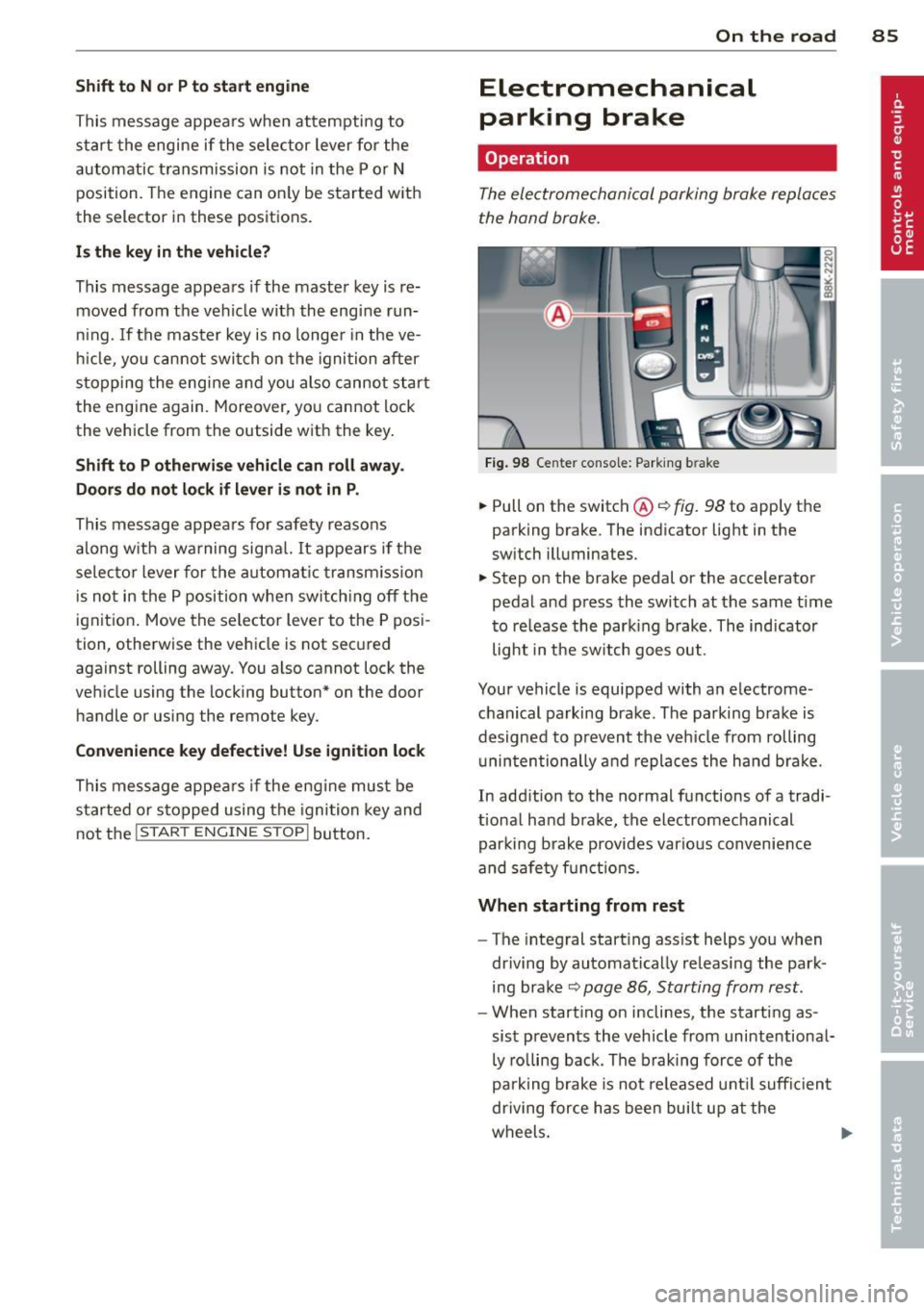
Fi g. 98 Ce nter console: Park ing b rake
.,. Pull on the switch@¢ fig. 98 to apply the
parking brake. The ind icator lig ht in the
sw itch illuminates.
.,. Step o n the brake pedal or the accelerator
pedal and press the switch at the same t ime
t o re lease the par king brake. The indicator
light in the sw itch goes out.
Your vehicle is equipped with an e lectrome
c hanical p arking bra ke. The pa rking bra ke is
d esigned to p revent the ve hicle from rolling
u nin ten tionally and repla ces the hand b ra ke.
In add ition to the normal fu nctions of a tradi
t ional ha nd b rake, the electromechanical
par king b rake provides vario us conv enience
and sa fe ty f unct ion s.
When starting from rest
- The integral start ing ass ist helps you when
dr iving by automat ica lly releasi ng the par k
ing b ra ke ¢
pag e 86, Starting from rest .
-When start ing on inclines, the starting as
sis t preven ts the veh icle from unintentiona l
ly ro lling back . The braking force of the
pa rk ing brake is no t released u ntil su ffici ent
driving for ce h as been bui lt up at the
w heel s. ..,.
Page 88 of 296
86 On the road
Emerge ncy b rake function
An emergency brake ensures t hat the vehicle
can be slowed down even if the normal brakes
fail
c::> page 87, Emergency broking.
Indicat or light s
-If the par king b rake is closed w ith the igni
t ion
s witc hed on the . (USA mode ls) /
• (Canada models) indica tor lights come
on in the instrument cluster and the switch .
-If the parking brake is closed w ith the igni
tion
s witc hed off the . (USA mode ls) /
• (Canada models) indicator lights come
on in the instrument cluster and the switch
for about 20 seconds .
A WARNING
If a gear or a drive range (automat ic trans
m ission) is engaged with the vehicle sta
tionary and the engine runn ing, you must
in no instance accelerate o r release the
cl utch * careless ly. Otherw ise the vehicle
w ill sta rt to move immediately- r isk of an
accident .
@ Note
If the . symbol in the display or the.
(USA models) . (Canada models) indica
tor light i n the instrument cluster flashes,
t here is a mal function i n the brake system.
By pressing the
ISETI button, you can bring
up a driver message which explains the malfunct ion in more detai l. If the driver
message
Parking b rake! appears, there is
an operating malfunction in the park ing
brake wh ich you shou ld have repa ired im
mediately by an author ized Audi dealer or
qualified workshop c::>poge 15.
(D Tips
-You can apply the parking brake at any
time -even w ith the ignition switched
off . The ignit ion must be turned on and
the b rake peda l must be pressed in o rder
to release the pa rking brake . - Occasional noises when the parking
brake is applied and released are normal
and are not a cause for concern.
- When the vehicle is parked, the parking
brake goes through a self-test cycle at
regu lar interva ls. Any associated noises
are normal.
Parking
.. Press the brake pedal to stop the veh icle .
.. Pull the sw itch @
c::> page 85, fig . 98 to set
the parking brake .
.,. Automatic transmission: Move the selecto r
lever to P.
.. Turn the engine off
c::> ,&. .
.. Manual transmission: Shift into 1st gear.
.. When on inclines o r declines, turn the steer
ing wheel so that the vehicle will roll into
the curb if it begins to move.
A WARNING ...__
- When you leave your vehicle -even if on
ly br iefly -always remove the ignition
key . Th is app lies pa rticularly whe n chi l
d ren remai n in the vehicle. Otherwise the
children could st art the eng ine , release
the par king brake or operate electrical
equ ipment (e.g. power windows). The re
is the risk of an accident.
- When the veh icle is locked, no one -par
ticularly not children should remain in
the vehicle. Locked doors make it more
d ifficult for emergency workers to get in
to the vehicle -putting lives at risk.
Starting from rest
The starting assist function ensures that the
parking broke is released automatically upon
starting.
Stopping and applying par king brake
.. Pull the switch @¢ page 85, fig. 98 to ap-
ply the parking brake .
Ill>
Page 89 of 296
Starting and autom ati call y relea sing the
pa rking b rake
~ When you start to drive as usua l, the park
ing brake is automatically re leased and your
vehicle begins to move.
When stopping at a traffic signa l or stopp ing
in city traffic on vehicles with an automatic
transmission, the parking brake can be ap
plied. The vehicle does not have to be held
w ith the footbrake . The park ing brake elimi
nates the tendency to creep with a drive range
engaged. As soon as you dr ive off as usual,
the park ing brake is released automatically
and the vehicle sta rts to move .
Starting on slop es
When starting on inclines, the start ing ass ist
prevents the vehicle from unintentionally roll
ing back. The braking force of the parking
brake is not released until sufficient dr iving
force has been b uilt up at the whee ls.
(D Tips
For safety reasons, the park ing brake is re
leased automatically only when the dr iv
er 's safety belt is engaged in the buc kle.
Starting off with a trailer
To prevent rolling back unintentionally on an
incline, do the following:
~ Keep the switch@c::> page 85, fig . 98 pulled
and depress the accelerator. The park ing
brake stays applied and prevents the vehicle
from roll ing backward.
~ You can release the switch @once you are
sure that yo u are developing enough driving
force at the wheels by depressing the accel
erator.
D epending on the weight of the rig (vehicle
and trai ler) and the severity of the incline , you
may roll backwards as you start. Yo u can pre
vent roll ing backwards by holding the parking
brake switch @pulled out and accelerating -
just as you would when starting on a hill wit h
a conventional hand brake .
On the ro ad 87
Emergency braking
In the event that the conventional brake sys
tem fails or locks .
~ In an emergency, pull the switch @
c::>
page 85, fig. 98 and continue to pull it to
slow your vehicle down with the parking
brake .
~ As soon as you re lease the switch @or ac-
celerate, the b rak ing process s tops.
If you pull the switch @and hold it above a
speed of about 5 mph (8 km/h), the eme rgen
cy bra king funct ion is initia ted . T he veh icle is
braked at all four whee ls by activating the hy
draulic brake system. The brake performance
is similar to making an emergency stop c::>
&..
In order not to act ivate the eme rgency brak
ing by mis take, an audib le warning tone (buz
zer) so unds when the switch @is pulled. As
soon as the switch @ is re leased, or the acce l
erato r pedal is depressed, emergency braking
stops.
A WARNING
...--
Emergency braking should only be used in
an emergency, when the normal foot brake
has fa iled or the brake pedal is obstructed .
Using the parking b rake to pe rform emer
gency brak ing will slow your vehicle down
as if you had made a full bra ke application .
The laws of physics cannot be suspended
even with ESC and its associated compo
nents (ABS, ASR, EDS) . In corners and
when road or weather conditions are bad,
a full brake application can ca use the vehi
cle to sk id or the rear end to break away -
risking an accident.
Speed warning system
Overview
The speed warning system helps you to keep
your driving speed below a set speed limit.
The speed warn ing system warns if the driver
exceeds a p reviously stored max imum speed .
A warn ing tone w ill sound as soon as the
Ill>
Page 91 of 296
.. Se lect: ICAR I function button> Car sys tem s*
control button > Driv er ass is t > Spe ed
warning .
Warning threshold 2 can be set in the speed
range starting from
20 mph to 150 mph (30
km/h to 240 km/h). Settings can each be ad
justed in intervals of
6 mph (10 km/h).
Cruise control
Switching on
The cruise control system makes it possible to
drive at a constant speed starting at 20 mph
(30 km/h).
®
f
®t
0
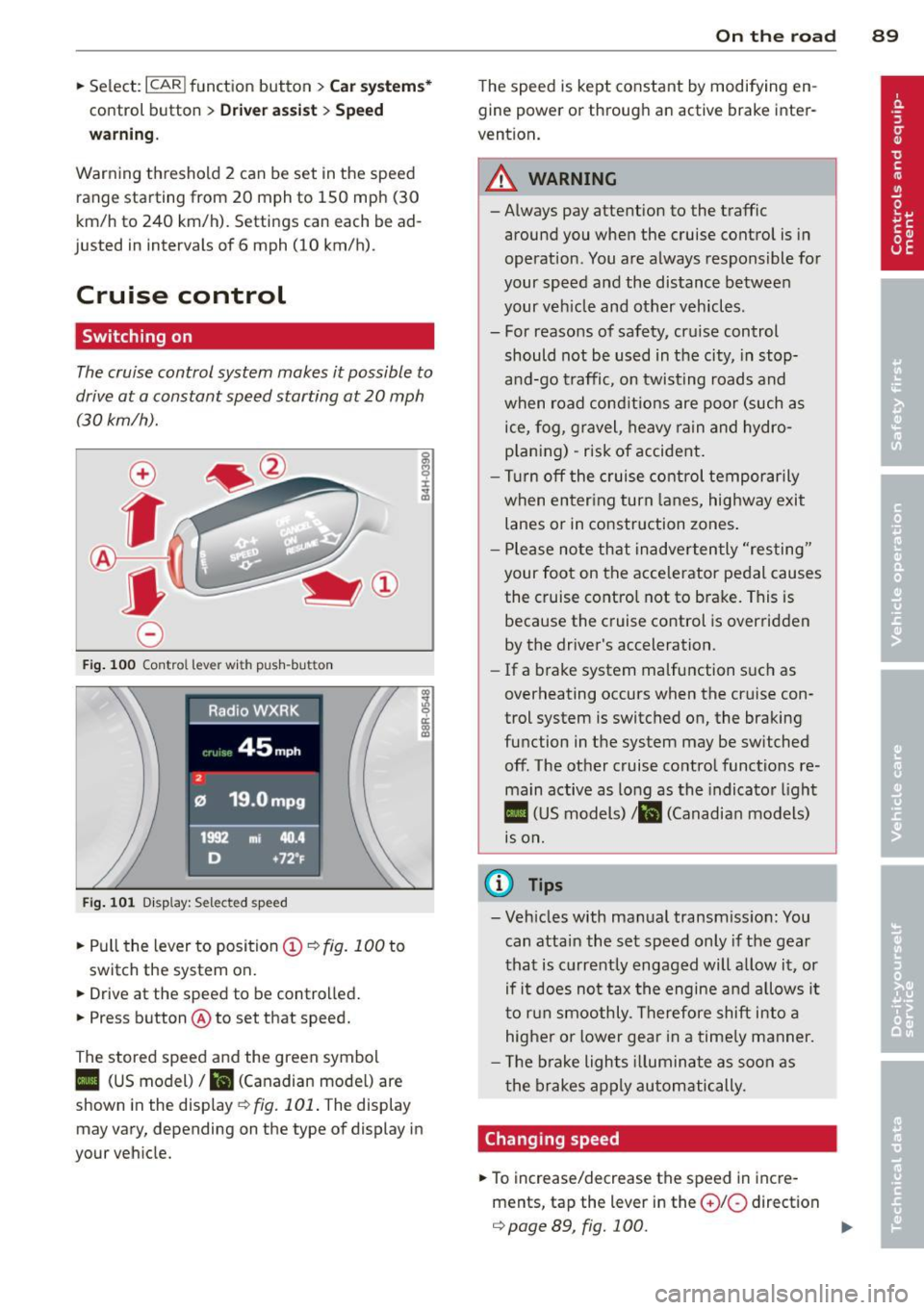
Fig . 100 Contro l lev er wi th push -bu tton
Fi g. 101 Dis p lay : Se lect ed spee d
.. Pull the lever to position (!)¢ fig. 100 to
switch the system on.
.. Drive at the speed to be controlled.
.. Press button @to set that speed.
The stored speed and the green symbol
II (US model)/ &I (Canadian mode l) are
shown in the display
r::;, fig. 101. The display
may vary, depending on the type of display in
your veh icle.
On th e road 89
The speed is kept constant by modifying en
gine power or through an active brake inter
vention.
_& WARNING
-Always pay attention to the traffic
around you when the cruise control is in
operation. You are always responsible for
your speed and the distance between
your veh icle and other vehicles .
- For reasons of safety, cru ise control
should not be used in the city, in stop
a nd-go traffic, on twisting roads and
when road cond itions are poor (such as
ice, fog , gravel, heavy rain and hydro
p lan ing) -risk of accident .
- Turn
off the cruise control temporar ily
when enter ing turn la nes, highway exit
lanes or in construction zones .
- Please no te that inadverten tly "resting"
your foot on the accelerator pedal causes
the cruise contro l not to brake. This is
because the cruise control is overridden
by the driver's acceleration.
- If a brake system malfunction such as
overheating occurs when the cruise con
trol system is switched on, the braking
function in the system may be switched
off. The other cruise contro l functions re
main active as long as the indicator l igh t
II (US models) 1&1 (Canadia n models)
1s on.
@ Tips
- Veh icles with ma nual transmiss ion: You
can attain the set speed only if the gear
that is currently engaged will a llow it, or
if it does not tax the engine a nd allows i t
t o r un smoothly. Therefore shift in to a
higher or lower gear in a time ly manner.
- The bra ke ligh ts ill umina te as soon as
the brakes app ly au tomatically.
Changing speed
.. To increase/decrease the speed in incre
ments, tap the lever in the
0 10 direction
r::;, page 89, fig. 100. Ill>
Page 93 of 296
Transmission Manual transmission
Gearshift lever
App lies to vehicles: with manual transmission
The clutch pedal must be depressed all the
way before you can start the engine.
T he manual transmission in your Audi is
equipped with an
interlock-feature.
~ Depress the clutch pedal all the way.
~ Start the eng ine with the gearshift lever in
Neutral and the clutch pedal depressed.
(D Note
Always depress the clutch pedal fully when
changing gears . Do not hold the vehicle on
a hill with the clutch pedal partially de
pressed. This may cause premature clutch
wear or damage .
@ Tips
-Resting your hand on the gearshift lever
knob while driving will cause premature
wear in the transmission.
- The back-up lights go on when you shift
into Reverse w ith the ignition on.
Gearshift pattern (6-speed manual
transmission)
Applies to vehicles: with manual transmission
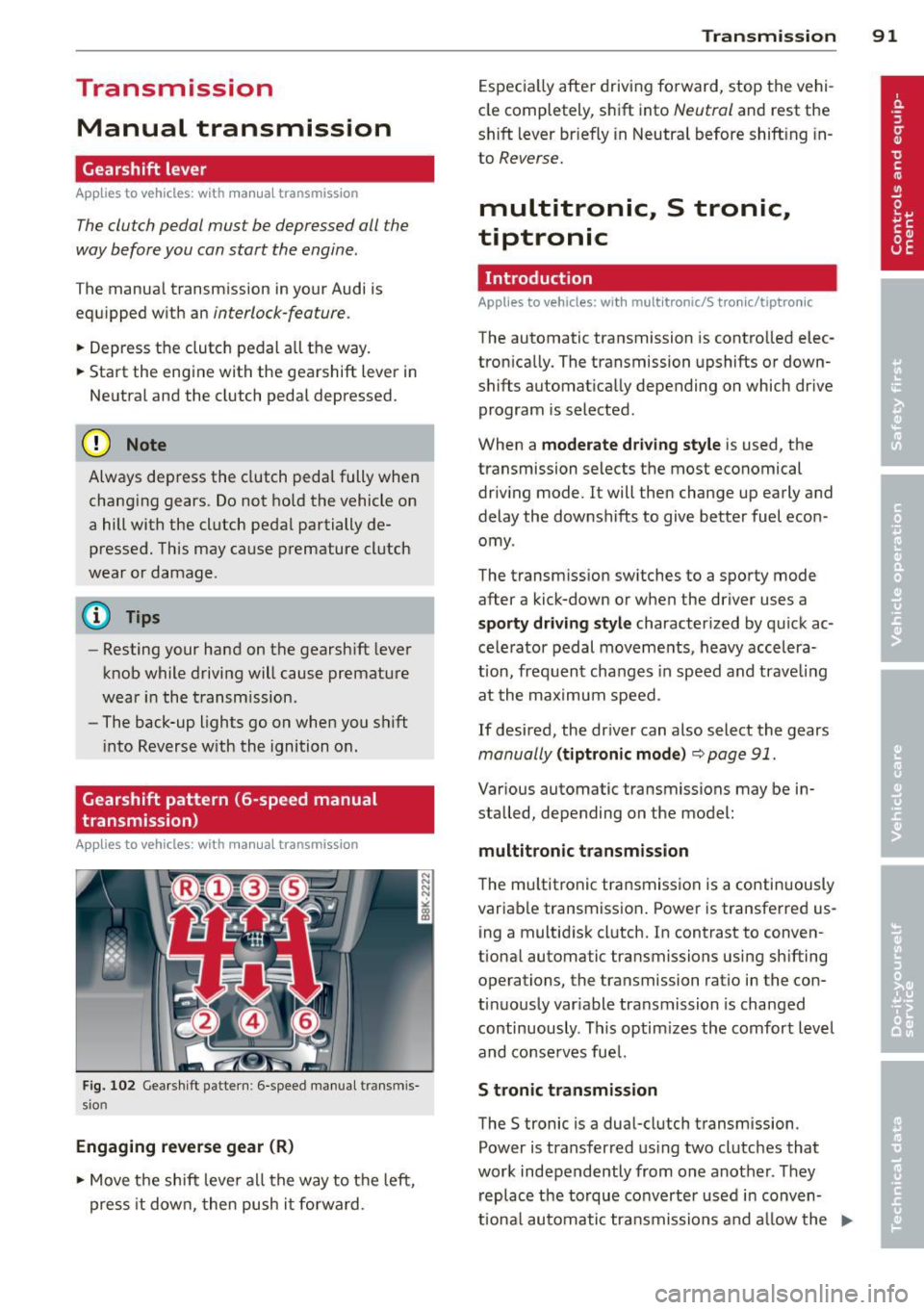
Fig. 102 Gearshift pattern : 6-speed manual transmis
sio n
Engaging reverse gear (R)
~ Move the shift lever all the way to the left,
press it down, then push it forward . Transmission
91
Especially after driving forward, stop the vehi
cle completely, shift into
Neutral and rest the
shift lever br iefly in Neutral before shift ing in
to
Reverse.
multitronic., S tronic.,
tiptronic
Introduction
Applies to vehicles: with multitronic/S tronic/tiptronic
The automatic transmission is controlled elec
tronically. The transmission upshifts or down
shifts automatically depending on which drive
program is selected .
When a
moderate driving style is used, the
transmission selects the most economical
driving mode. It will then change up early and
delay the downshifts to give better fuel econ
omy .
The transmission switches to a sporty mode
after a kick-down or when the driver uses a
sporty driving style characterized by quick ac
celerator pedal movements, heavy accelera
t ion, frequent changes in speed and trave ling
at the maximum speed.
If desired, the driver can also select the gears
manually (tiptronic mode) ~ page 91.
Various automatic transmissions may be in
stalled, depending on the model:
multitronic transmission
The multitronic transmission is a continuously
variable transmission. Power is transferred us
ing a multidisk clutch. In contrast to conven
tional automatic transmissions using shifting
operations, the transmission ratio in the con
tinuously variable transmission is changed
continuously . This optimizes the comfort level
and conserves fuel.
S tronic transmission
The S tronic is a dual-clutch transmission .
Power is transferred using two clutches that
work independently from one another_ They
replace the torque converter used in conven
tiona l automatic transmissions and allow the ..,_
Page 96 of 296
94 Transmission Starting the engine
.. The selecto r lever must be in P or N.
Starting off
.. Press and hold the brake pedal.
.. Press and hold the release button in these
lector lever handle, se lect t he des ired selec
tor lever position such as D/S and release
the button .
.. Wait briefly unti l the transmission has shift
ed (you will feel a slight movement) .
.. Remove your foot from the brake pedal and
acce lerate.
Stopping temporarily
.. Keep the vehicle stationary usin g the brak
ing peda l, for examp le at traffic lights .
.. Do not press the accelerator pedal when do
ing this .
.. To prevent the veh icle from rolling when you
start driving, set the parking brake when
stopping on steep inclines
c> _& .
.. The parking brake will release automatically
and the vehicle w ill start moving once you
press the accelerator pedal.
Stopping/parking
If the selector lever is not in the P position
when you open the dr iver's door, the vehicle
could roll. The message
Transmission: Car
may roll! Shift to park!
appears.
.. Press and hold the brake pedal until the ve-
hicle has come to a complete stop .
.. Apply the parking brake
c> page 86, Parking .
.. Select the P selector lever position c> _&.
Stopping on an incline
.. Always press the brake pedal to hold the ve
hicle in place and prevent it from "rolling
back"
c> _& . Do not try to prevent the vehi
cle from "roll ing back" when a gear is en
gaged by increasing the eng ine speed
c> (D.
Starting on an incline
.. Activate the parking brake.
.. With the driving gear se lected, press the ac
celerator pedal carefully. The park ing brake will release automatically if your seat
belt is
fastened .
Under certain circumstances, such as driving
in the mountains, it may be usefu l to switch
temporarily to the manual shift program in or
der to adjust the gears to the driving cond i
tions by hand
c> page 96.
On slopes, activate the parking brake first and
then move the selector lever to the P position .
This prevents too much stress from being
placed on the locking mechanism .
Vehicles with multitronic transmission: Your
vehicle is equipped with
hill hold assist allow
ing you to start while on an incline. The sys
tem is activated when the brake pedal is
pressed down and he ld
for a few seconds . The
brake pressure will hold for
a moment after
the brake pedal loosens to prevent the vehicle
from roll ing backwards wh ile starting up .
A WARNING
-The vehicle can also roll when the engine
is stopped.
- Unintended vehicle movement can cause
serious injury.
- Never leave your vehicle with the engine
r un ning while in gear. If you must leave
your veh icle when the engine is running,
activate the parking brake and move the
selecto r lever to P.
- Power is still transmitted to the wheels
when the engine is running at idle. To
prevent the vehicle from "creeping", you
must keep your foot on the brake when
the engine is running and the selector
lever is in
DIS or R or "tiptronic" mode is
selected .
- Do not press the accelerator pedal when changing the selector lever position
while the veh icle is stationary and the
engine is running.
- Never shift into R or P while driving.
- Before driving down a steep s lope, re-
duce your speed and shift into a lower
gear with "tiptronic".
Page 99 of 296
A WARNING 1=
Please note that the drive wheels can spin
if kick-down is used on a smooth slippery
road - there is a risk of skidding.
Launch Control Program
App lies to vehicles: with S tronic
The Launch Control Program provides the
best acceleration possible when starting from
a stop .
Requirement : The engine must be at operat
ing temperature and the steering wheel must
not be turned .
~ Sedan: Press the l.e OFFI button ¢ page 188
while the engine is running . The II indica
tor light illuminates in the instrument clus
ter and
Stabilization cont ro l ( ES C): S port .
Warning! R estrict ed s tabilit y
appears in the
driver information system display.
~ all road: Press the l.e O FF I but to n
¢
page 188 while the engine is running.
T he
II indicator light illuminates in the in
strument cluster and
Stabilization control
( ES C): Off ro ad. W arning! Restri cted stabil
it y
appears in the driver information system
display.
~ Move the selector lever to the D/S pos ition
to select sport mode (S) or select the
dy
namic
driving mode in drive select*
¢ page 114.
~ Press the bra ke peda l st rongly wit h your left
foot and hold it dow n for at least 1 second.
~ At the same time, press the accelerator ped
al down complete ly with your right foot un
ti l the engine reaches and maintains a high
RPM .
~ Remove your foot from the brake pedal
within S seconds¢.& .
A WARNING
-Always adapt your driving to the traffic
flow .
- Only use the Launch Control Program when road and traffic condit ions allow it
and other dr ivers will not be endangered
-
Tran sm iss ion 97
or annoyed by your driving and the vehi
cle's acceleration.
- Please note that the driving wheels can
spin and the vehicle can break away
when sport mode/offroad mode is
sw itched on, especially when the road is
slippery.
- Once you have accelerated, you shou ld
sw itch sport mode/offroad mode off by
press ing the
I~ O FFI button .
(l) Tips
- The transmission temperature may in
crease s ignificantly after using the
Launch Control Program. If that hap-
pens, the program may not be availab le
for a few m inutes .
It will be ava ilable
again after a cool-down per iod.
- When accelerating using the Launch
Cont ro l program, a ll vehicle parts are
subjec t to heavy loads. This can result in
increase d wear.
Transmission malfunction
Applies to vehicles: with multitronic/S tronic/tiptronic
[il Transmission : Pre ss brake pedal and se
lect gear again.
Press the br ake peda l and select the desired
selector lever posi tion again. You ca n then
continue driving .
[il Transmi ssion overh eating : Pl ea se drive
con servatively .
The transm iss ion temperature has increased
s ignificantly due to the sporty d riving manner.
D rive in a less sporty ma nner until the tem
perature re turns to the normal range and the
i ndica tor ligh t switches o f.
[O] Transmission malfunction : You can con
tinu e driving
There is a system malfunction i n the transmis
s io n. You may cont inue d rivi ng . Drive to your
authorized Aud i dea le r or qualified repa ir fa
c ili ty soon to have the ma lfunction corrected. ..,.
Page 101 of 296
Audi adaptive cruise control and braking guard 99
Audi adaptive cruise
control and braking
guard
Introduction
App lies to vehicles: with Audi adaptive cruise control
The adaptive cruise control system assists the
driver by regu lating vehicle speed and helping
to maintain a set distance to the vehicle
ahead, within the limits of the system . If the
system detects a moving vehicle up ahead,
adaptive cruise control can brake and then ac
celerate your vehicle . This he lps to make driv
ing more comfortable on long highway
stretches.
The braking guard system can warn you about
an impending collision and initiate braking
maneuvers
c::;, page 1 OS.
Adaptive cruise control and braking guard
have technical limitations that you must
know, so please read this section carefully, un
derstand how the system works and use them properly at all times.
General information
General information
Applies to vehicles: with Audi adaptive cruise control
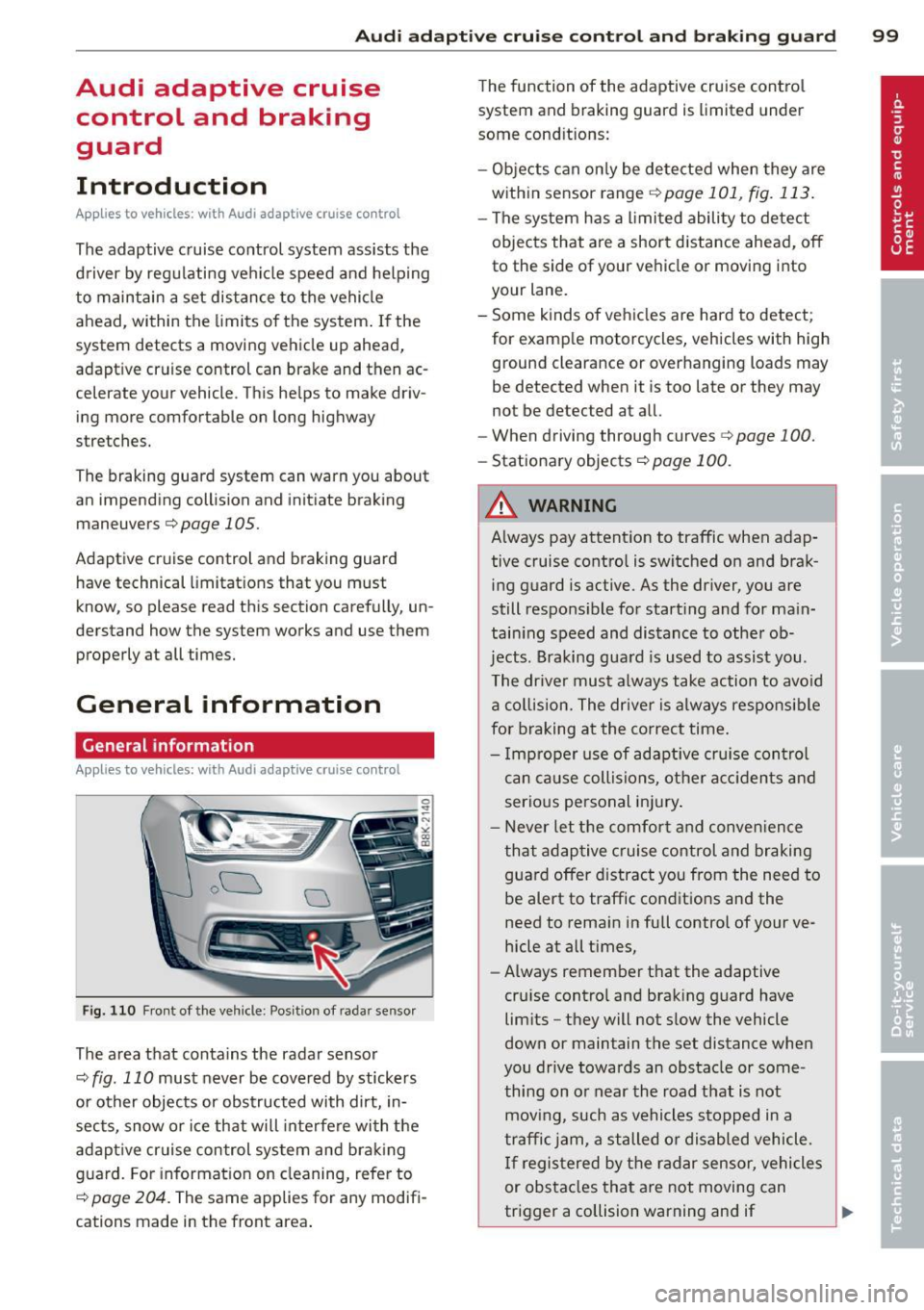
Fig. 110 Front of the vehicle: Position of radar sensor
The area that contains the radar sensor
c::;, fig. 110 must never be covered by stickers
or other objects or obstructed with dirt, in
sects, snow or ice that will interfere with the
adaptive cruise control system and braking
guard. For information on cleaning, refer to
c::;, page 204. The same applies for any modifi
cations made in the front area . The
function of the adaptive cruise control
system and braking guard is limited under
some cond itions:
- Objects can only be detected when they are
within sensor range
.:!>page 101 , fig. 113.
-The system has a limited ability to detect
objects that are a short distance ahead, off
to the side of your vehicle or moving into
your lane.
- Some kinds of vehicles are hard to detect;
for examp le motorcycles, vehicles with high
ground clearance or overhanging loads may
be detected when it is too late or they may
not be detected at all.
- When driving through curves
c::;, page 100.
-Stationary objects c::;, page 100.
A WARNING
-Always pay attention to traffic when adap-
tive cruise control is switched on and brak ing guard is active. As the dr iver, you are
still respons ible for start ing and for main
tain ing speed and distance to other ob
jects. Braking guard is used to assist you.
The driver must always take action to avoid
a collision. The driver is always responsible
for braking at the correct time.
- Improper use of adaptive cruise con trol
can cause collisions, other accidents and
serious personal injury .
- Never let the comfort and convenience
that adaptive cruise control and braking
guard offer d istract you from the need to
be alert to traffic conditions and the
need to remain in fullcontrolofyourve
hicle at all times,
- Always remember that the adaptive
cru ise contro l and braking guard have
limits -they will not slow the vehicle
down or maintain the set distance when
you drive towards an obstacle or some
thing on or near the road that is not
moving, such as vehicles stopped in a
traffic jam, a stalled or disabled vehicle.
If registered by the radar sensor, vehicles
or obstacles that are not moving can
trigger a collision warning and if .,.