light AUDI S4 2014 Owner's Guide
[x] Cancel search | Manufacturer: AUDI, Model Year: 2014, Model line: S4, Model: AUDI S4 2014Pages: 296, PDF Size: 73.56 MB
Page 51 of 296
The leavin g home function i lluminates the
area around the vehicle when unlock ing it.
T his function can be switched on and off.
The
c o ming h om e and lea ving home func
tions on ly operate when it is dark and the
light switch is in the AUTO posit ion
¢ page 47 , fig. 40 .
Auto headlight s*
When the light switch is in the A UTO
¢ page 47 posi tion, the switch-on po int of the
lights can be changed in the automatic driving
light function.
Daytime running lights
USA m odel s:
You can switch the dayt ime run
ni ng lights
on and o ff .
Canada mod els:
The function cannot be
turned off .
It is activated a utomat ica lly each
time the ignition is switched on.
Travel mode*
T he headlig ht beam is asymmetrical. This pro
v ides stronger illum ination on the s ide of the
road on wh ich you are driving .
If you are driv
i ng in a count ry that d rives on the opposite
side of the road from your own country, th is
will cau se glare for on coming dr ivers. To pre
vent glare:
- Trave l mode must be selected in vehicles
with Xenon headlights*.
- In veh icles with halogen headlights, ce rtain
areas of the head light lenses must be cov
ered w ith wate rproof adhesive covers that
prevent light from passing thro ugh. Fo r
more informat ion, please see your author
i z ed Audi dea ler or author ized repa ir faci lity .
(D Tips
When trave l mode is activated, a display in
the dr iver information system in dicates
this each time you switch the ignit io n on.
Clear vi sion 49
Emergency flashers
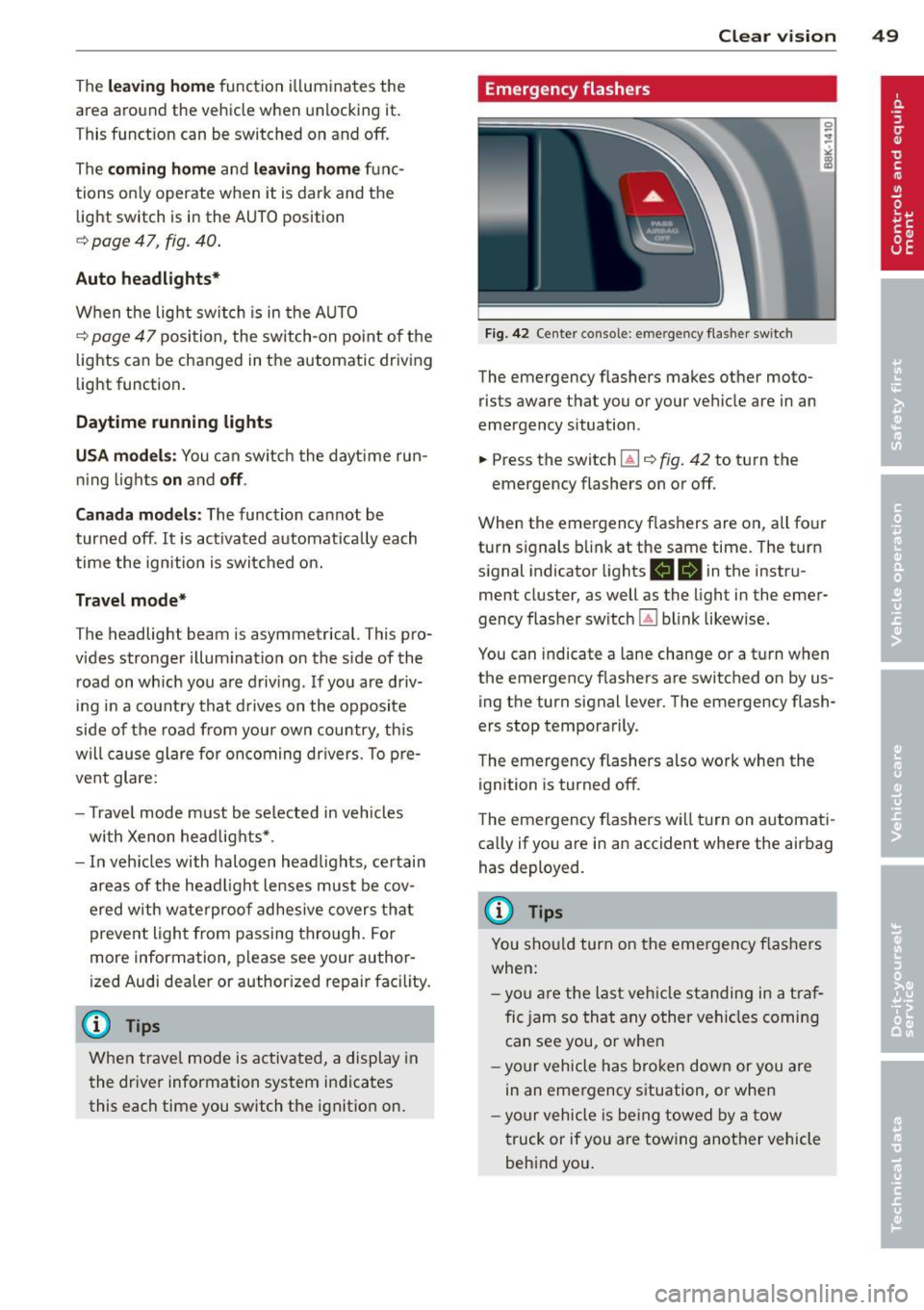
Fi g. 42 Center co n sole : em erge ncy flasher sw itc h
The emergency flashers makes other moto
rists aware that you or your vehicle are in an
emergency situation .
.. Press the switch
Gil ¢ fig. 42 to turn the
emergency flashers on or off .
When the emergency f las hers are on, all four
turn s ignals b link at the same time. The turn
s ignal indicator lights .
1B in the instru
ment cluster, as well as the light in the emer
gency flasher switch ~ blink likewise.
You can indicate a lane change or a tu rn w hen
the emergency flashers are switched on by us
ing the turn signal lever. The emergency flash
ers stop temporarily .
T he emergency flashers also work when the
ign ition is turned off .
T he emergency flashers w ill turn on a utomat i
ca lly if yo u are in an accident where the airbag
has deployed.
(D Tips
You sho uld turn on the emergency f las hers
when:
- yo u are the last veh icle standing in a t raf
fic jam so that any other vehi cles coming
can see you, or whe n
- yo ur vehicle has bro ken down or you are
in an eme rgency s ituation, or when
- yo ur vehicle is be ing towed by a tow
truck or if you are tow ing another vehicle
beh ind you.
Page 52 of 296
50 Clear vis ion
Interior lights
Front /rear interior lights
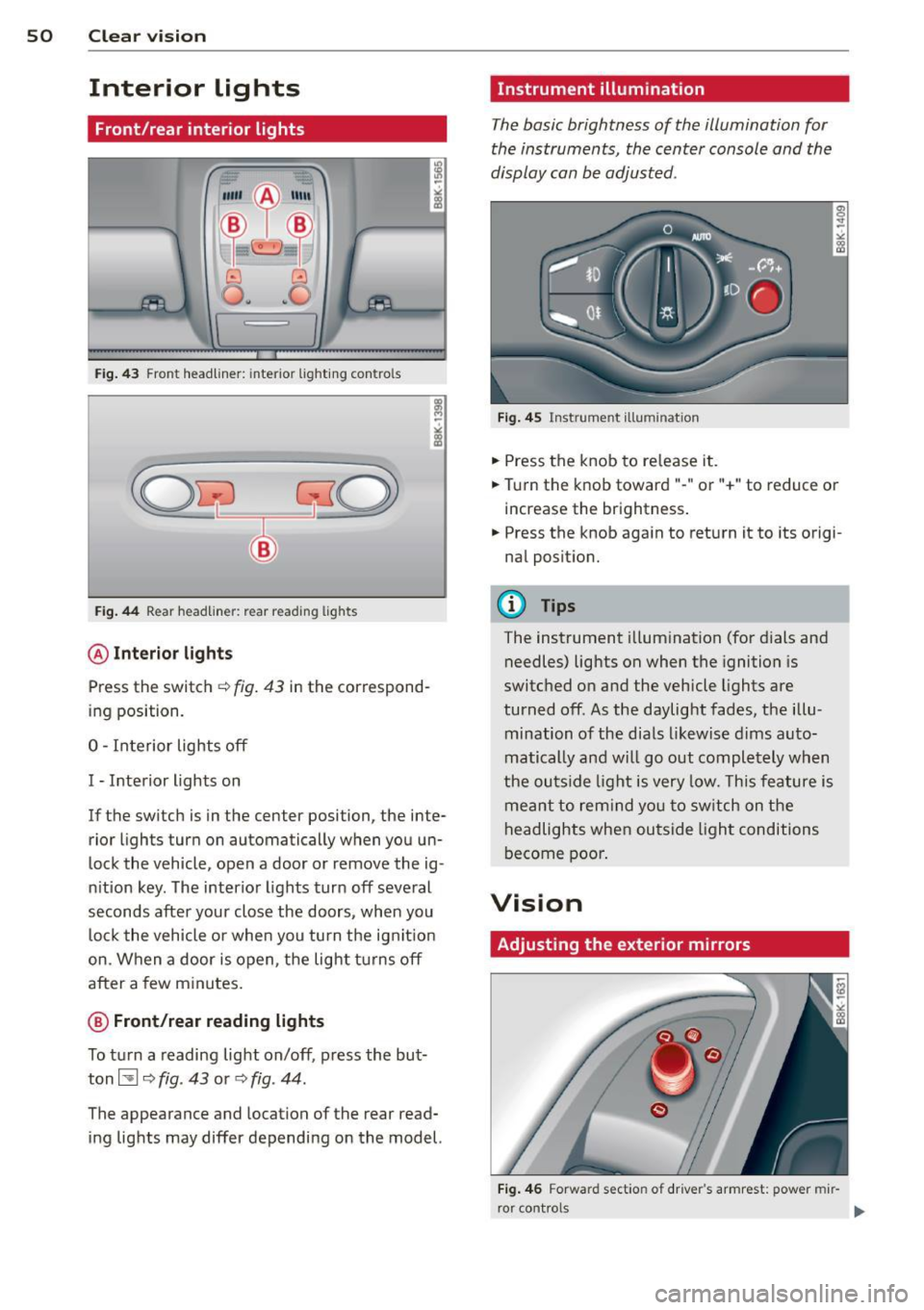
Fig . 43 Front headliner: inte rior lighting controls
Fig. 44 Rear headliner: rear reading lights
@Interio r ligh ts
Press the switch ~ fig. 43 in the correspond
ing position.
0 -Interior lights off
I -Interior lights on
If the switch is in the center position, the inte
rior l ights turn on automatically when you un
lock the vehicle, open a door or remove the ig
n ition key. The interior lights turn off several
seconds after your close the doors , when you
lock the vehicle or when you turn the ign it ion
on. When a door is open, the light tu rns off
after a few minutes.
@ Fr ont /rear r eading lights
To turn a reading light on/off, press the but
ton~
c::> fig. 43 or c::> fig. 44.
The appearance and location of the rear read
ing lights may differ depending on the model.
Instrument illumination
The basic brightness of the illumination for
the instruments, the center console and the
display can be adjusted .
Fig . 45 Inst rume nt illu mination
.,. Press the knob to release it .
.,. Turn the knob toward"-" or"+" to reduce or
increase the brightness .
.,. Press the knob again to return it to its origi
nal posit ion.
(!') Tips
The instrument i llumination (for dials and
needles) lights on when the ignition is
switched on and the vehicle lights are
turned off . As the daylight fades, the illu
mination of the dia ls likewise dims auto
matically and wi ll go out completely when
the ou tside light is very low. This feature is
meant to rem ind you to sw itch on the
headlights when ou tside light conditions
become poor .
Vision
Adjusting the exterior mirrors
Fig . 4 6 Forward section of driver's a rmrest: power mir
r or controls
Page 53 of 296
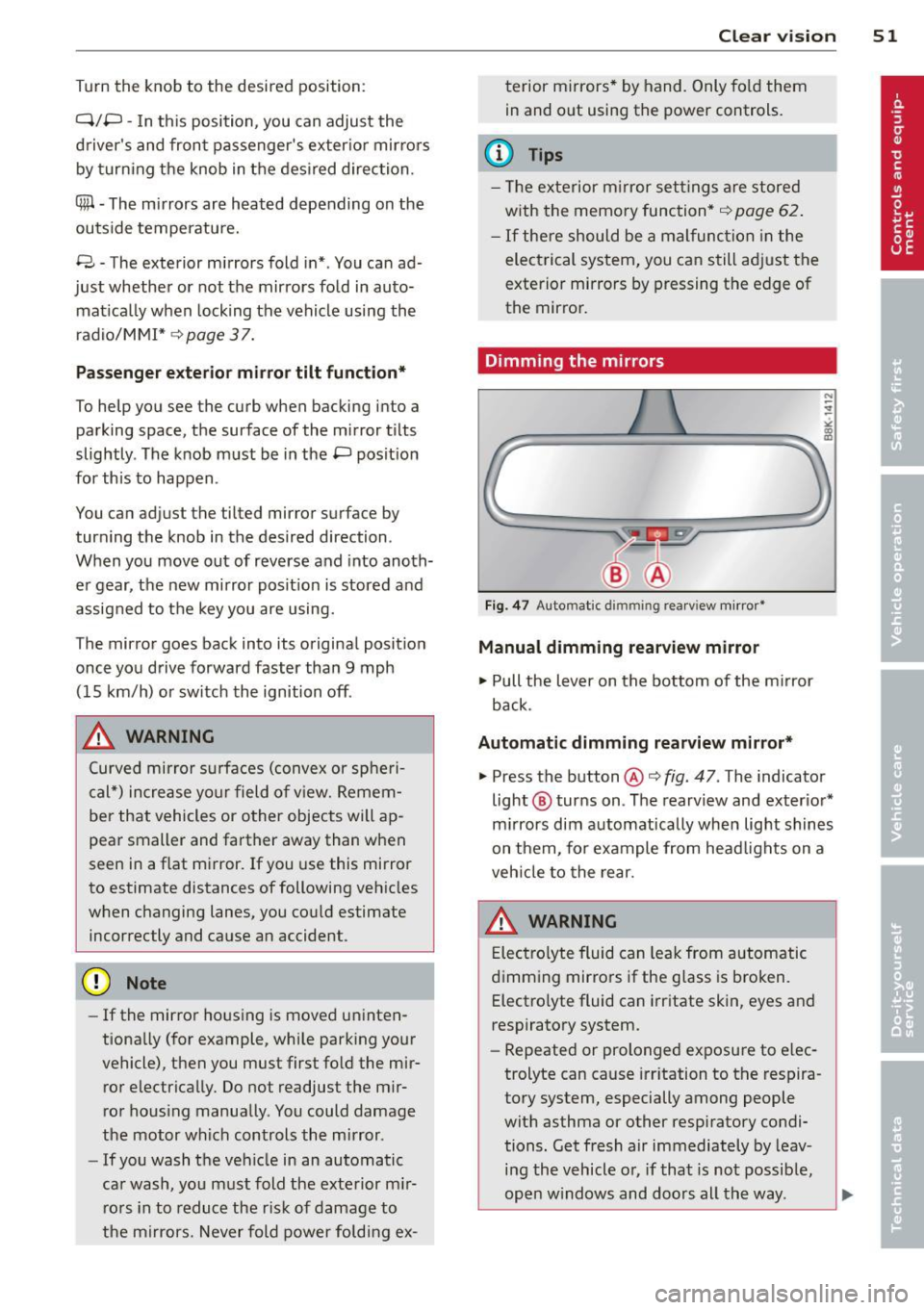
Turn the knob to the desired position:
Q/ P -In this position , you can adjust the
driver's and front passenger's exterior mirrors by turning the knob in the desired direction.
(ijjl -The mirrors are heated depending on the
outside temperature.
8 -The exterior mirrors fold in*. You can ad
just whether or not the mirrors fold in auto
matically when locking the vehicle using the
radio/MM I*¢
page 3 7.
Passenger exterior mirror tilt function*
To help you see the curb when backing into a
parking space, the surface of the mirror tilts
slightly . The knob must be in the P position
for this to happen .
You can adjust the tilted mirror surface by
turning the knob in the desired direction .
When you move out of reverse and into anoth
er gear, the new mirror position is stored and
assigned to the key you are using.
T he mirror goes back into its original position
once you drive forward faster than 9 mph (15 km/h) or switch the ignition off .
_& WARNING
Curved mirror surfaces (convex or spheri
cal*) increase your field of view. Remem
ber that vehicles or other objects will ap
pear smaller and farther away than when
seen in a flat mirror. If you use this mirror
to estimate distances of following vehicles
when changing lanes, you could estimate
incorrectly and cause an accident .
(D Note
-If the mirror housing is moved uninten
tionally (for example, while parking your
vehicle), then you must first fold the mir ror electrically. Do not readjust the mir
ror housing manually . You could damage
the motor which controls the mirror .
- If you wash the vehicle in an automatic
car wash, you must fold the exterior m ir
rors in to reduce the risk of damage to
the mirrors. Never fold power folding ex-
.
Clear vision 51
terior mirrors* by hand. Only fold them
in and out using the power controls.
a) Tips
- The exterior mirror sett ings are stored
with the memory function*
~ page 62.
-If there should be a malfunction in the
electrical system, you can still adjust the
exterior mirrors by pressing the edge of
the mirror.
Dimming the mirrors
Fig. 47 Auto mat ic dimmin g rearv iew mirror •
Manual dimming rearview mirror
11>-Pull the lever on the bottom of the mirror
back.
Automatic dimming rearview mirror*
.,. Press the button@¢ fig. 47 . The indicator
light @ turns on . The rearview and exterior*
mirrors dim automatically when light shines
on them, for example from headlights on a
vehicle to the rear.
A WARNING
Electrolyte fluid can leak from automatic
dimming mirrors if the glass is broken .
Electrolyte fluid can irritate skin, eyes and
respiratory system .
- Repeated or prolonged exposure to elec
trolyte can cause irritation to the respira
tory system, especially among people
with asthma or other respiratory condi
tions. Get fresh air immediately by leav
ing the vehicle or, if that is not possible,
open windows and doors all the way. .,..
Page 54 of 296
52 Clear vision
-If electrolyte gets into the eyes, flush
them thoroughly with large amounts of
clean water for at least 15 minutes;
medical attention is recommended.
- If electrolyte contacts skin, flush affect
ed area with clean water for at least 15
minutes and then wash affected area
with soap and water; medical attention
is recommended. Thoroughly wash af
fected clothing and shoes before reuse.
-If swallowed and person is conscious,
rinse mouth with water for at least 15
minutes. Do not induce vomiting unless
instructed to do so by medical professio
nal. Get medical attention immediately.
Liquid electrolyte leaking from broken mir
ror glass will damage any plastic surfaces
it comes in contact with. Clean up spilled
electrolyte immediately with clean water
and a sponge.
(D} Tips
- Switching off the dimming function of
the inside rear view mirror also deacti
vates the automatic dimming function of
the exterior mirrors.
- Automatic dimming for the mirror only
operates properly if the sun shade* for
the rear window is not in use or the light
strik ing the inside mirror is not hindered
by other objects.
- The automatic dimming mirrors do not
dim when the interior lighting is turned
on or the reverse gear is selected .
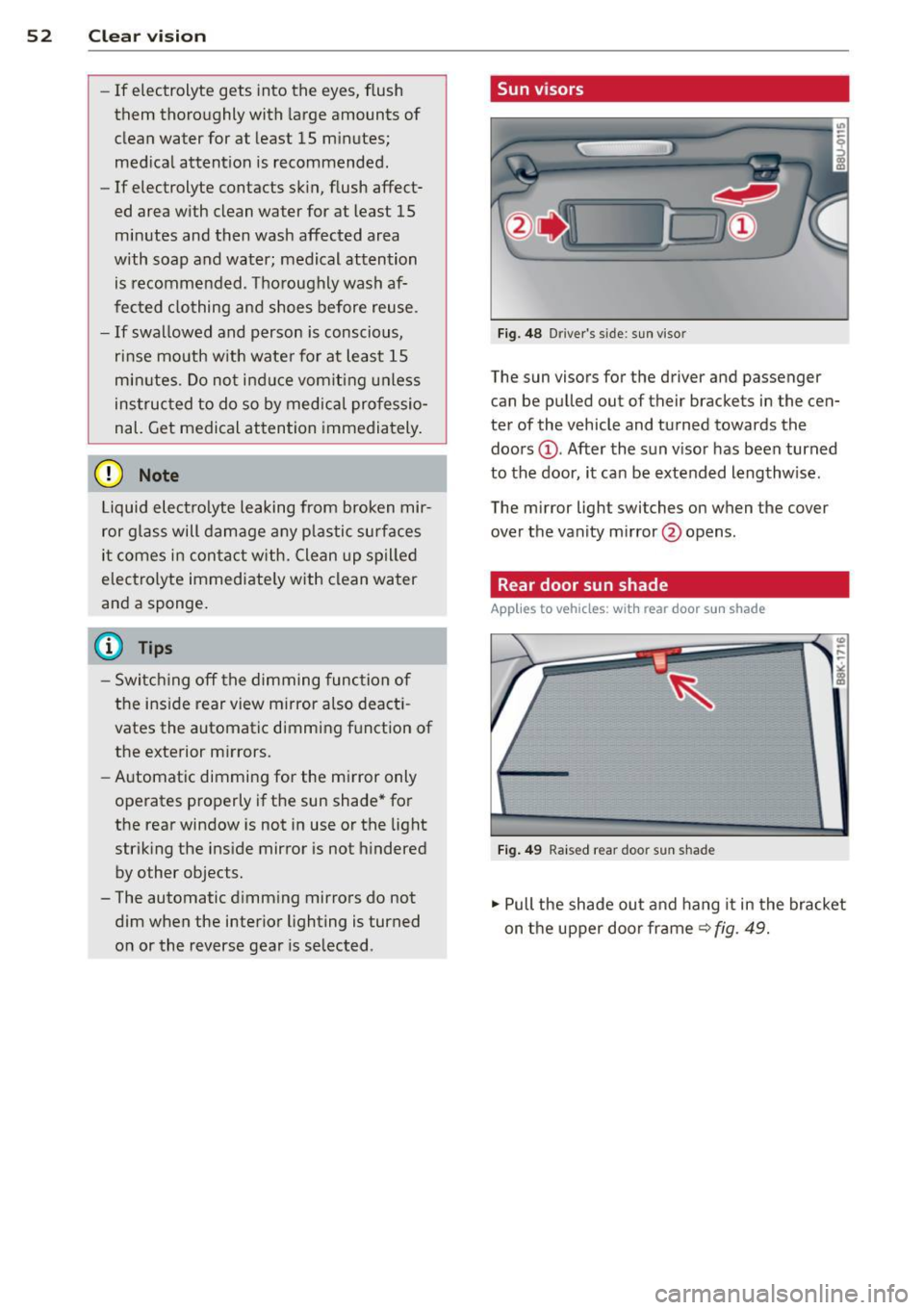
, Sun visors
Fig. 48 Driver's side; sun visor
The sun visors for the driver and passenger
can be pulled out of their brackets in the cen
ter of the vehicle and turned towards the
doors @. After the sun visor has been turned
to the door, it can be extended lengthw ise.
The mirror light switches on when the cover
over the vanity mirror @opens.
Rear door sun shade
Applies to vehicles: with rear door sun shade
Fig. 49 Raised rear door sun shad e
.,. Pull the shade out and hang it in the bracket
on the upper door frame~
fig. 49.
Page 56 of 296
54 Clear vis ion
rain sensor mode off and switch intermittent
mode on in the MMI*. Se lect:
I CAR ! function
button
> C ar sys tem s* contro l button > Dri ver
assi st> Rain s enso r.
In interm ittent mode,
you can adjust the interval time using the ®
switch .
@-Slow wiping
@-Fas t wiping
© -Sing le w ipe
® -Clean the windshield . To eliminate water
drop lets, the w indshield wiper performs one
afterwipe operation after several seconds
while driv ing . You can switch th is fu nction off
by mov ing the lever to position ® within 10
seconds of the afte rwipe operation . The after
wipe func tion is reactiva ted the next time the
ignition is switched on.
a llroad: The rear w iper automatically switches
on when the reve rse gear is engaged and the
front w indshield w ipers are on and in opera
tion .
C lean ing the headlights*. The headlight wash
e r system* opera tes on ly when the headl ights
a re on. If you move the leve r to pos ition @,
the head lights are washed in intervals.
@ -allroad : Wipe the rear window. The rear
wiper moves about every 4 seconds.
(J) -allroad : Clean the rear window . The num
ber of wiping operations depends on how long
the lever is held in pos ition
(J) .
_& WARNING
- T he ra in sensor is only inte nded to assist
the drive r. The driver is still responsible
for man ually switching the wipers on ac
cording to the v isibility conditions .
- T he windshie ld may not be treated w ith
water-repe lling windshie ld coating
agents . Unfavorable conditions, such as
wetness, darkness, low sun, can res ult in
increased glare. Wiper blade chatter is
also possible .
- Proper ly functioning windshie ld w iper
blades are required for a clear view and safe driving
~ page 55, Replacing
windshield wiper blades.
@ Note
- In the case of frost, check whethe r the
windshield wiper blades are frozen to
the windshield. Sw itching on the wind
shield wipers can damage the wiper
blades!
- Pr ior to us ing a car wash, the w indshield
w iper system must be sw itched off ( lever
in posit ion @). Th is he lps to prevent un
intentional switching on and damage to
the windsh ield wiper system .
@ Tips
-The windshie ld wipers are switched off
when the ignit ion is turned off. Act ivate
the winds hield wipers after the ignition
is switched back on by moving the wind
shield w iper lever to any position.
- Worn or d irty windshield wiper blades
result in st reaking. This can affect the
rain sensor* function. Check your wind
shield w ipe r blades regularly.
- The washer fluid nozz les of t he wind
shield w asher system a re heated at low
temperat ures when the igni tion is on.
- When stopping tempo rarily, (e .g. at a
t raffic light) the set speed o f the wind
shield wipers is automatically reduced by
one speed.
· Cleaning windshield wiper blades
Clean the windshie ld w iper b lades when they
begin to leave streaks. Use a soft cloth and
glass cle aner to clea n the windshield wiper
blades .
Front wip er
.. Place the windshie ld wiper arms in the serv
ice pos it ion. Refer to
c> page 55.
.. Lift the wiper arm away from the fron t win-
d~.
~
Page 60 of 296
58 Seat s a nd s tor ag e
Seats and storage
General recommen
dations
Why is your seat adjustment so
important?
The safety belts and the airbag system can
only provide maximum protection if the front
seats are correctly adjusted.
There are various ways of adjust ing the front
seats to provide safe and comfortable support
for the driver and the front passenger . Adjust
your seat properly so that :
- you can easily and quick ly reach all the
switches and controls in the instrument
panel
-your body is prope rly supported thus reduc
ing physical stress and fatigue
- the safety be lts and a irbag system can offer
maximum protection ¢
page 146.
In the following sec tions, you will see exactly
how you can best adjust you r seats .
There are special regulations and instructions
for insta lling a child safety seat on the front
passenger's seat. Always follow the informa
tion rega rd ing child safety provided in
G page 167, Child Safety.
WARNING
Refer to G page 128, Driving Safely for
important information, tips, suggestions
and warnings that you should read and fol
low for your own safety and the safety of
your passengers.
A WARNING
, -
Incorrect seating position of the dr iver and
all other passengers can result in serious
personal inj ury .
- Always keep your feet on the f loor when
the vehicle is in mo tion -never put your
feet on top of the instrument panel, out of the w indow or on top of the seat cush
ion. This app lies especially to the passen- gers
. If your seating position is incorrect,
you increase the risk of injury in the case of sudden braking or an accident. If the
airbag inflates and the seating position is incorrect, this could result in pe rsonal
in ju ry or even death.
- It is important for both the driver and front passenge r to keep a distance of at
least 10 inches (25 cm) between them
selves and the steering wheel and/or in
s trumen t panel.
If you're s itting any
closer than th is, the a irbag system can
not protect you properly. In addition, the
front seats and head restraints m ust be
adj usted to your body height so that they
can give you max imum protect ion.
- Always try to keep as much distance as
possible between yourself and the steer
ing wheel or instrument panel.
- Do not adjust the driver's or front pas senger's seat while the vehicle is moving.
Your seat may move unexpected ly , caus
ing sudden loss of veh icle control and
pe rsonal injury. If you ad just you r seat
while the veh icle is moving, yo u are out
of posit ion.
Driver's seat
The correct seat position is important for safe
and relaxed driving .
We recommend that you adjust the dr iver's
seat in the follow ing manner:
.. Adjust the seat in fore and aft direction so
that you can easily push the pedals to the
floor wh ile keeping your knees slightly bent
G &. in Why is your seat adjustment so im
portant? on page 58 .
.,. Adj ust the seatback so that when you s it
w ith your back against t he seatback, you can
s till grasp the top of the steering whee l.
.. App lies to ve hicles w ith ad justable head re
straints: Adjust the head restraint so the up
pe r edge is as even as possible with the top
of yo ur head. If that is not possib le, try to
adjust the head restraint so that it is as .,.
Page 65 of 296
The memory buttons are located in the driv
er's door.
Switching the memory function on/off
• Press the !OFF ! button to switch the memory
function on/off. The word
OFF lights up
when the memory function is switched off.
Seat profiles are neither stored nor recalled.
Storing a seat profile
• Press the !SET ! button. When the word SET
lights up, the memory is ready to store set
t in gs.
• Press a memory button
([II or rn) briefly. A
tone confirms that the settings were stored.
Accessing a seat profile
• If the driver's door is open and the ignition
is switched off, press the memory button.
• If the driver's door is closed or the ignition is
switched on, press and hold the memory
button until the seat adjustment is com
plete .
A WARNING
-For safety reasons, the seat sett ing can
only be recalled when the vehicle is sta
tionary - otherwise you risk having an ac
c ident.
- In an emergency the recall procedure can
be cancelled by press ing the
!OF F! switch
or by tapping the memory buttons.
Ashtray
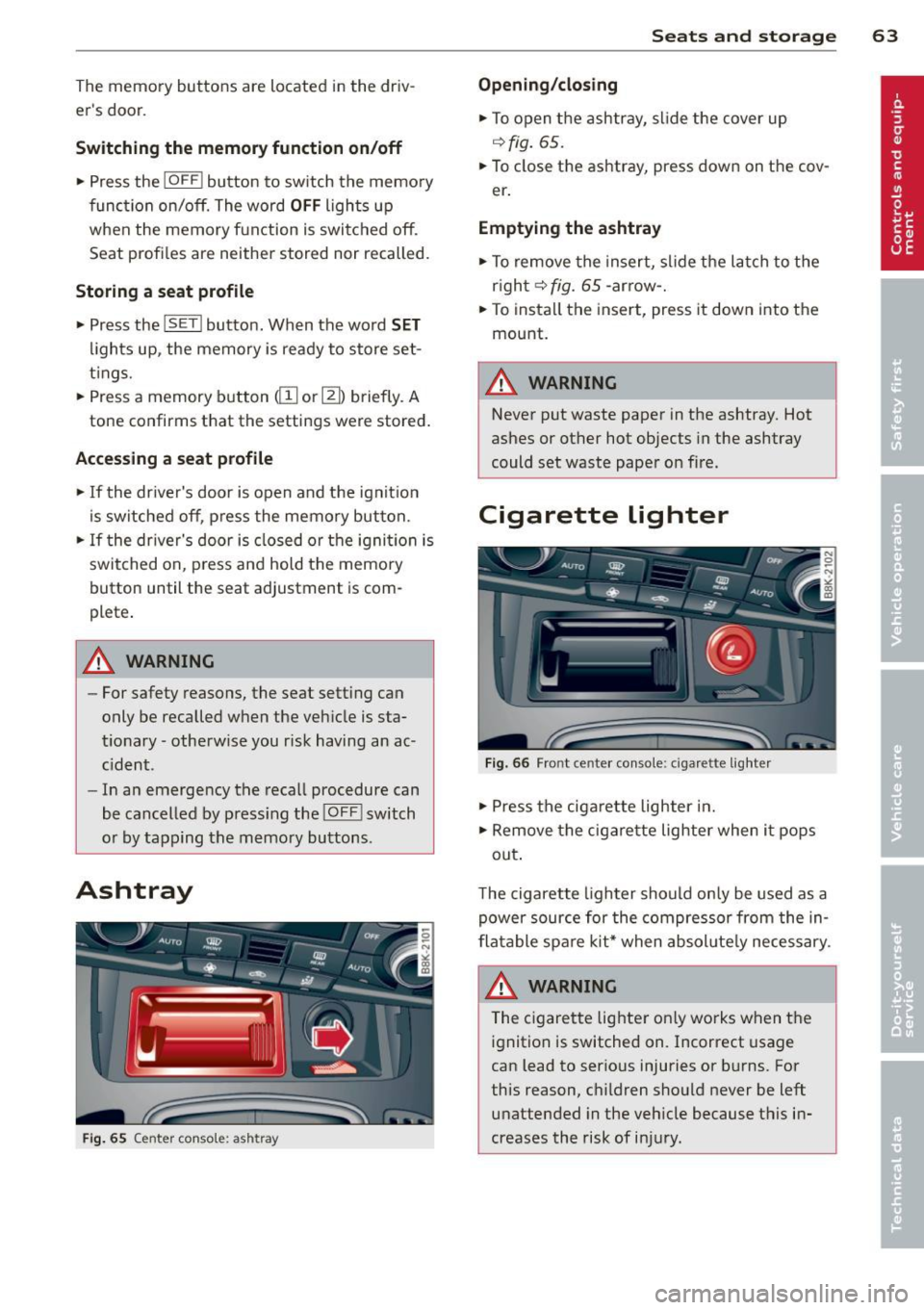
Fig . 65 Center console: ashtray
Seats and storage 63
Opening/closing
• To open the ashtray, slide the cover up
~fig. 65.
• To close the ashtray, press down on the cov
er .
Emptying the ashtray
• To remove the insert, slide the latch to the
right~
fig. 65 -arrow-.
• To instal l the insert, press it down into the
mount.
A WARNING
Never put waste paper in the ashtray. Hot
ashes or other hot objects in the ashtray
could set waste paper on fire.
Cigarette lighter
Fig. 66 Front center console: cigar ette lighter
• Press the cigarette lighter in.
• Remove the cigarette lighter when it pops
out .
T he cigarette lighter should only be used as a
power source for the compressor from the in
flatable spare kit* when absol ute ly necessary.
A WARNING
The cigarette lighter on ly works when the
ignition is switched on. Incorrect usage
can lead to serious injuries or burns. For
this reason, children should never be left unattended in the vehicle because this in
creases the risk of injury.
Page 66 of 296
64 Seats and storage
12-volt socket
Applies to vehicles: wit h 12-volt socket
Electrical accessories can be connected to the
12-volt socket.
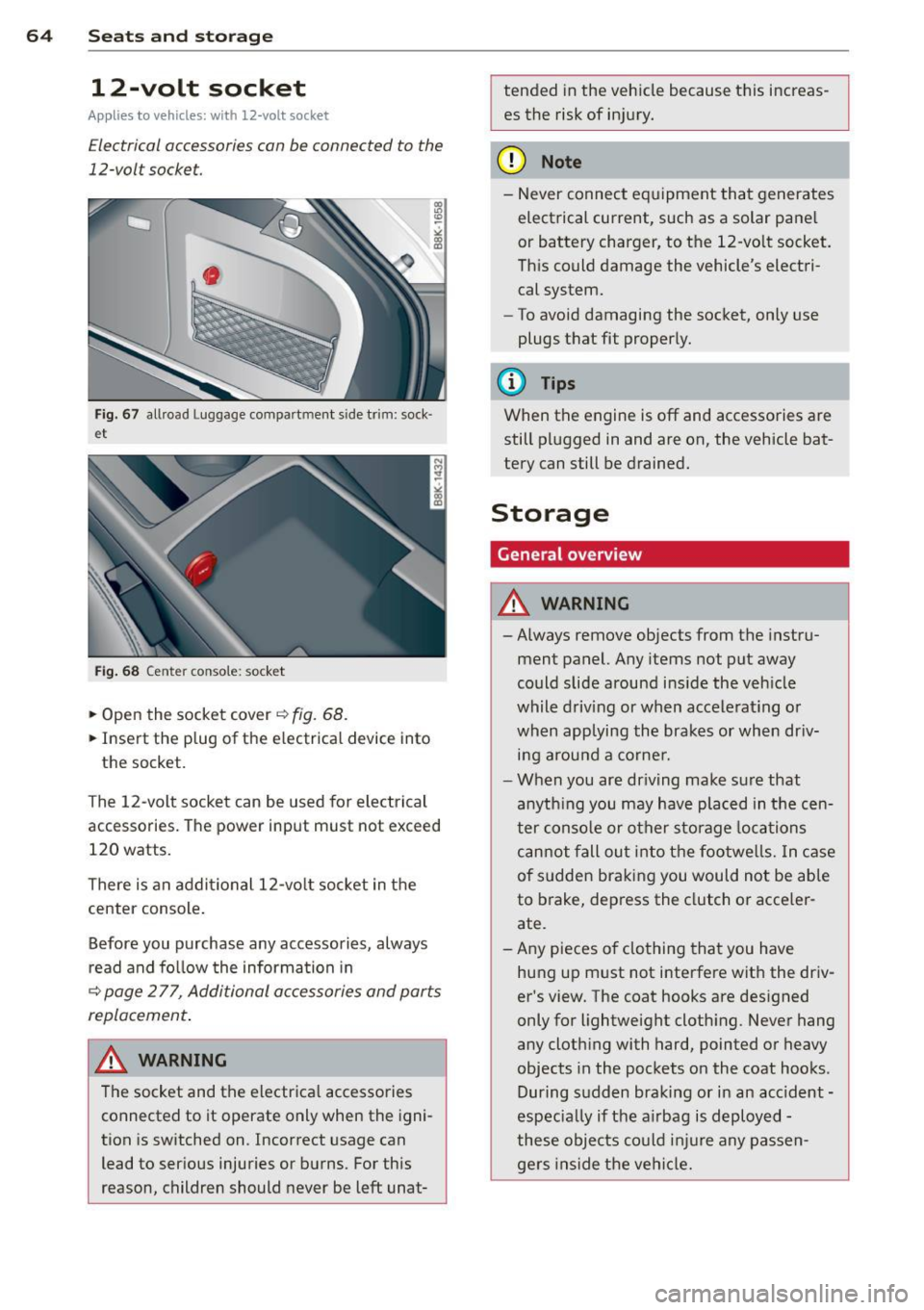
F ig . 6 7 allroad Luggage compartment s ide trim: sock·
et
Fig . 68 Center conso le: socket
.,. Open the socket cover~ fig. 68.
.,. Insert the p lug of the e lectrical device into
the socket.
The 12-volt socket can be used for elec trical
accessories. The power input must not exceed
120 watts.
There is an addi tional 12-vo lt socket in the
center console .
Before you purchase any accessories, always
r ead and fo llow the information in
~ page 277, Additional accessories and parts
replacement .
.&_ WARNING
The socket and the electrica l accessories
connected to it operate only when the igni
tion is sw itched on. Incorrect usage can
lead to serious injuries or burns. For this
reason, children should never be left unat-
-
tended in the veh icle because this increas
es the risk of in jury.
(D Note
-Never connect eq uipment that generates
electrical current, such as a solar pane l
or battery charger, to the 12-vo lt socket.
Th is could damage the vehicle's electri
cal system.
- To avoid damaging the socket, only use
plugs t hat fit properly.
(D Tips
When the engine is off and accessories are
still plugged in and are on, the vehicle bat
tery can still be drained.
Storage
General overview
.&_ WARNING
-
- Always remove objects from the instru-
ment panel. Any items not put away
could slide around ins ide the veh icle
while driving or when accele rat ing or
when applying the brakes or when dr iv
i n g arou nd a corne r.
- When you are dr iving make su re that
anyth ing you may have pla ced in the cen
ter conso le or other sto rage locations
can not fall ou t in to t he footwe lls. In c ase
of sudden braking you would not be able
to brake, dep ress the clutch o r acce ler
ate.
- Any pieces o f clothing that you have
hung up m ust not interfere with the driv
er 's view. The coat hooks are des igned
only for lightweight cloth ing. Never hang
any clothing with hard, pointed or heavy
objects in the pockets on the coat hooks .
During s udden braking or in an accident -
especia lly if the a irbag is d eployed -
these objec ts co uld inj ure any passen
gers inside the ve hicl e.
-
Page 68 of 296
66 Seat s a nd s tor ag e
Addit ional storage
There are a variety of storage compa rtments
and fasteners in var ious places in the vehicle.
- In the roof headliner above the rearview
mirror .
- On the back of the front seat . The com pa rt
ment can hold a maximum weight of 1 kg.
- On the left and right of the luggage com
partment, behind the s ide trim.
- Garment hooks on the pillars in the rear of
the vehicle .
A WARNING
-When driving, do not leave any hard ob
jects on the rear wi ndow shelf or allow
your pet to s it on the shelf. They could
become a hazard for ve hicle occ upan ts in
the event of sudden braking or a crash.
- Always remove objects from the instru
ment pane l. Any items no t stored could
slide around inside the vehicle while driv
ing or when accelerating or when apply
ing the brakes or when driving around a
corner.
- When you are driving make sure that
anything you may have placed in the cen
ter console or other storage locations cannot fall out into the footwells. In case
of sudden braking you would not be able
to brake or accelerate .
- Any articles of cloth ing that you have
hung up must not interfere with the driv
er's v iew. The coat hooks are designed
only for lightweight clothing. Never hang
any clothing wit h hard, po inted or heavy
objects in the pockets on the coat hooks .
During sudden braking or in an accident -
especially if the airbag is deployed -
these objects could injure any passen
gers inside the vehicle .
- To reduce the risk of persona l injury in an
acc ident or sudden stop, always keep the
glove compartment closed while dr iving.
- Read and fo llow all WARNINGS
i=> page 163, Important safety instruc
tions on the side airbag system.
- Hang clothes in such a way that they do
not impa ir the driver's vision.
- The coat hooks must on ly be used for
lightweight clothing. Do not leave any
heavy or sharp edged objects in the pock
ets which may interfere with the s ide cur
tain airbag deployment and can cause pe rsonal injury in a crash.
- Do not use coat hangers for hanging
cloth ing o n the coat hooks as t his can in
terfere with proper deployment of the
side curta in a irbags in an a ccident.
- Do not hang heavy objects on the coat
hooks , as they could cause personal in
jury in a sudden stop.
- Always keep the compa rtment above the
rea rv iew mirror closed while d riving to
re duc e the risk of i nju ry in the event of
sudden b raking m aneuvers or a collision.
(£} Note
Objects located on the rear shelf that rub
against the rea r window could damage the
hea ting wi res for the rear window defog"
ger.
(D Tips
-A vent slot is located between the shelf
and the rear w indow. Do not bloc k the
vent wi th any items you may place o n the
rear window she lf.
- Do not place b ulky items on the rear win
dow shelf as they co uld restrict or block
the drive r's vision in the rear view mirror.
Page 73 of 296
(D Note
Let the partition net roll up slowly to pre
vent damage.
Partition net (seatback tilted forward)
Applies to vehicles: with partition net
Fig. 79 Folded ba ckrest: install ing the part it ion net
Fig. 80 Folded backrest: hanging the partition net
Installing
• Tilt the seatback forward r::;, page 69.
0 0
0
~ gi
• Affix the partition net to the recesses on the
retaining rails
(D r::;, fig. 79 and slide it to
wards the left side of the vehicle until it
latches @.
Hanging
• Pull the net upward and hang the crossbar
in the front eyelets
over the front seats
r=> fig. 80 -arrow-.
Removing
• Slide the partit ion net to the right and lift it
out of the retaining rails
r::;, fig. 79.
@ Note
-You must remove the partition net be
fore foldi ng the backrest back into the
upright position.
Seats and storage 71
-Let the partition net roll up slow ly to
prevent damage.
Cargo net
Applies to vehicles: with cargo net
The cargo net prevents small objects from
sliding.
Fig. 81 Luggage compartment: cargo net stretched
out
Fig . 82 Luggage compartment: ca rgo net at the top of
the luggage compartment
Net stretched out
• First hang the first hooks in the mounting
eyelets and then hang the rear hooks
r::!>fig. 81.
Net at the top of the luggage
compartment
• Hang the hooks on the cargo net in the tie
downs on the floor at the rear of the lug
gage compartment
r::;, fig. 82.
• Fold down the bag hooks at the upper area
of the luggage compartment down, pull the
net up and hang the eyelets on the net on
the hooks .
You can also use the hooks
r=> fig. 82 to hang
light purses, bags, etc.
1JJ,,