warning AUDI S4 2014 Owner's Guide
[x] Cancel search | Manufacturer: AUDI, Model Year: 2014, Model line: S4, Model: AUDI S4 2014Pages: 296, PDF Size: 73.56 MB
Page 46 of 296
44 Opening and clo sing
• Turn the key to position ¢ fig. 36@ until all
the windows have reached the desired posi
t ion and the power sunroof is open.
Conv eni ence closing feature
• Use the eme rgency key or pull the mechan i
cal key out of the master key ¢
page 34.
• Turn the key in the lock of the driver's door
to the lock position ® until the windows
and the power sunroof are closed
¢ &_ .
F or vehicles w ith Panoramic sliding sunroof*:
When you open or close the Panoramic sliding
sunroof* , the power sunshade wi ll also open
or close.
A WARNING
- Never close the windows and the power
sunroof inattentively and without check
ing -there is risk of inj ury .
- You must always watch whe n the win
dows are being ra ised so that no one can
be trapped. If you release the key, the
closing action is immed iate ly canceled .
- Always read and heed WARNING
¢ .&. in
General description on page 32 .
Correcting window regulator
malfunction
After disconnecting the vehicle battery, the
one-tou ch up and down feature must be acti
vated again.
• Pull and hold the power w indow switch unt il
the window is completely closed.
• Re le ase the switch and pull the switch again
f or one second.
Sunroof
Operation sliding/tilting sunroof
Applies to vehicles: with sliding/tilting sunroof
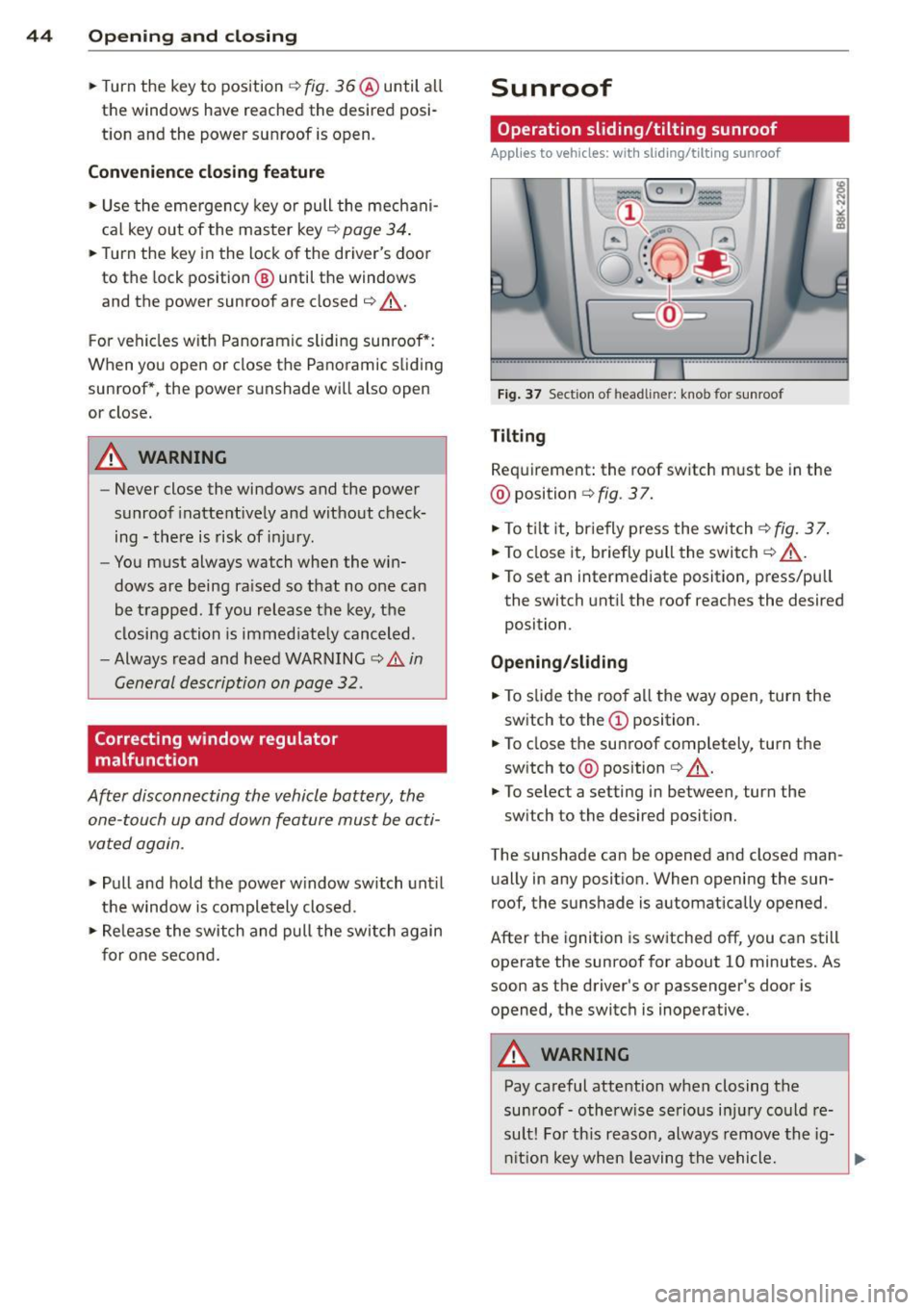
F ig. 37 Se ction of head lin er: k nob for s unroof
Tilting
Requirement: the roof switch must be in the
@ position
¢fig . 37.
• To t ilt it, br ie fly p ress the switch ¢ fig. 37.
• To close it, briefly pull the switch ¢&_ .
• To set an intermediate position, press/pu ll
the switch unt il the roof reaches the desired
position .
Opening /sliding
• To slide the roof a ll the way open, turn the
switch to the
(D position.
• To close the sunroof completely, turn the
sw itch to @ position
¢ &_.
• To select a setting in between , turn the
sw itch to the desired position.
The sunshade can be opened and closed man u ally in any posit ion. When opening the sun
roof, the sunshade is automatically opened .
After the ignition is sw itched off, you can still
operate the sunroof for about 10 minutes. As
soon as the driver's or passenger's door is
opened, the switc h is inoperative.
A WARNING
--
Pay careful atte ntion when closing the
su nroof- otherw ise serio us i njur y cou ld re
sul t! Fo r th is reason, always remove the ig-
ni tio n key when leaving the vehicle.
~
Page 47 of 296
CD Note
Always close your sunroof when leaving
your vehicle. Sudden rain can cause dam
age to the interior equipment of your vehi
cle, particularly the electronic equipment.
(D Tips
- Information on conven ience opening/
closing
c::> page43.
Operation panorama sunroof
App lies to vehicles: with pa norama sunroof
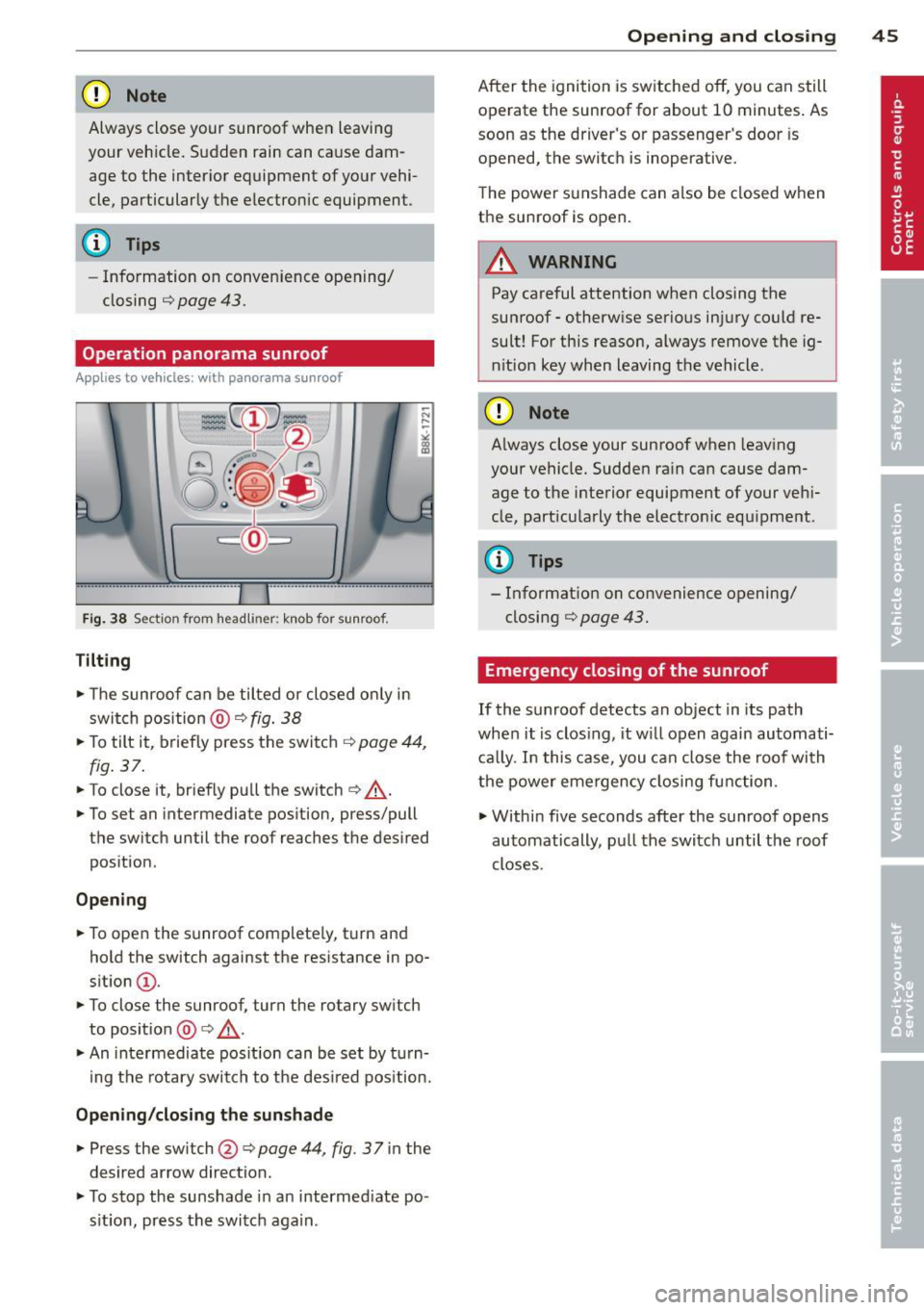
Fig . 38 Sect io n from headl iner: knob for sunroof .
Tilting
~ The sunroof can be tilted or closed on ly in
switch position @ c::>
fig. 38
~ To tilt it, briefly press the switch c::> page 44,
fig. 37.
~ To close it, briefly pull the switch c::> .&_ .
~ To set an intermediate position, press/pull
the switch until the roof reaches the desired
pos ition .
Opening
~ To open the sunroof complete ly, turn and
hold the switch against the resistance in po
sition
(D .
~ To close the sunroof, turn the rotary switch
to position @ c::>
.&_.
~ An intermediate position can be set by turn
i ng the rotary switch to the des ired pos ition.
Opening /closing the sunshade
~ Press the switch@c::> page 44 , fig . 37 in the
desired arrow direction.
~ To stop the sunshade in an intermediate po
s it ion, press the switch again.
Opening and closing 45
After the ignition is switched off, you can still
operate the sunroof for about 10 minutes . As
soon as the driver's or passenger's door is
opened, the switch is inoperative.
The power sunshade can also be closed when
the sunroof is open.
A WARNING
Pay careful attention when closing the
sunroof -otherwise serious injury could re
sult! For this reason, always remove the ig
n ition key when leaving the vehicle.
CD Note
Always close your sunroof when leaving
your vehicle. Sudden rain can cause dam
age to the interior equipment of your vehi
cle, part icularly the electronic equipment.
{!) Tips
- Information on convenience opening/
closing c::>
page 43.
Emergency closing of the sunroof
If the sunroof detects an object in its path
when it is clos ing, it will open again automati
cally. In this case, you can close the roof with
the power emergency closing function .
~ Within five seconds after the sunroof opens
automatically , pull the switch until the roof
closes .
Page 49 of 296
Clear vision Lights
Switching the lights on and off
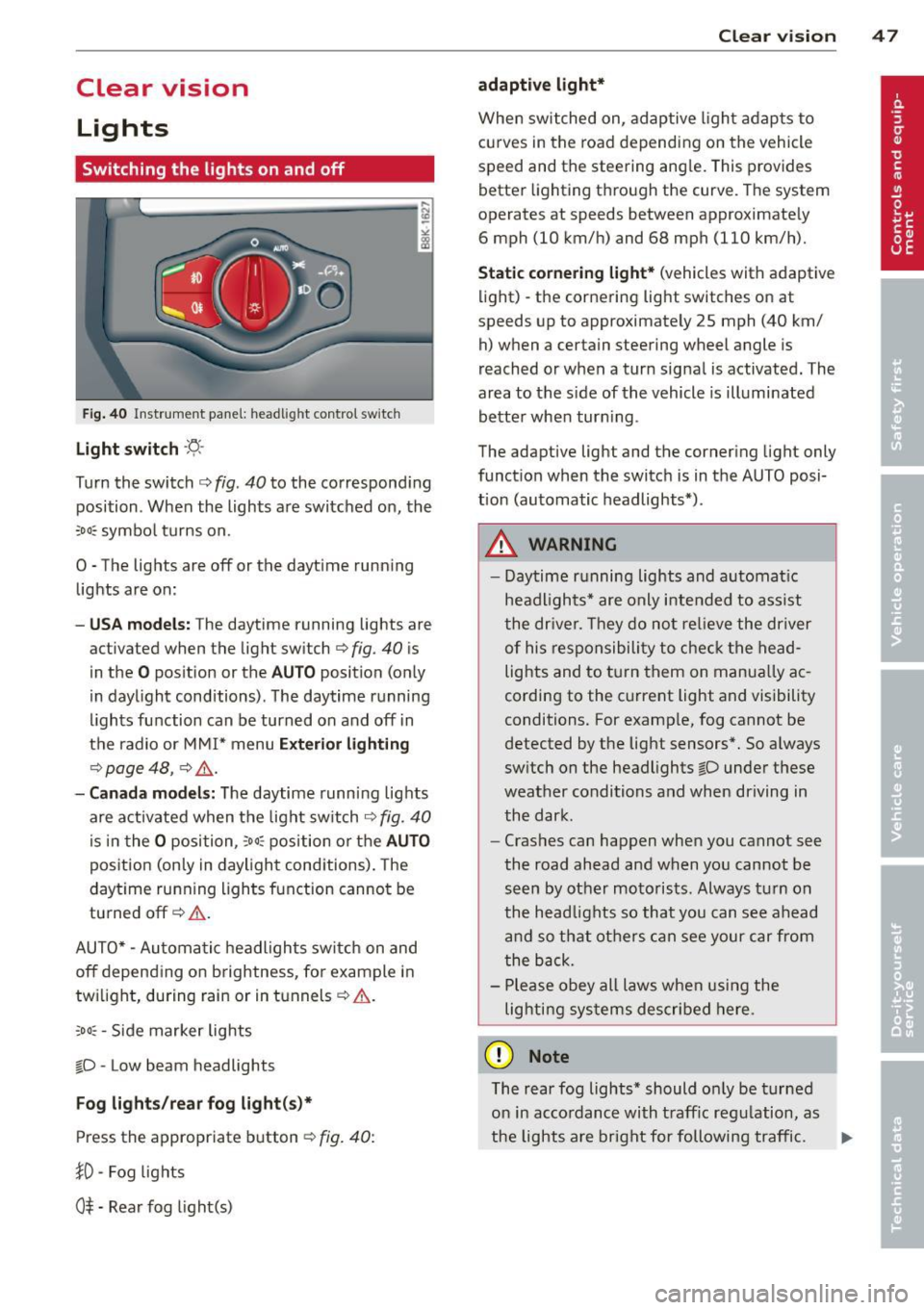
F ig . 40 Instrument pane l: headlight control switch
Light switch ·'t/,·
Turn the switch c> fig . 40 to the correspond ing
position . When the lights are switched on, the
:oo: symbol turns on.
0 • The lights are off or the dayt ime running
lights are on:
- USA mod els : The daytime running lights are
activated when the light sw itch
c> fig . 40 is
in the
O position or the AUTO position (only
in daylight conditions) . The daytime running
lights function can be turned on and off in
the radio or MMI* menu
E xteri or li ghtin g
¢ page 48 , c> &_.
-Ca nad a mod els: The daytime runn ing lights
are activated when the light sw itch
¢ fig . 40
is in the O position, :oo : position or the AUTO
posit ion (only in daylight conditions). The
daytime running lights function cannot be
turned off¢&. .
AUTO* -Automatic headlights switch on and
off depending on b rightness, for example in
tw ilight, during rain or in tunnels¢,& .
:oo: -Side marker lights
~D -Low beam headlights
Fog light s/rea r fog ligh t(s)*
Press the appropriate button c> fig. 40:
1D -Fog lights
0$ -Rear fog light(s)
Clear vi sion 4 7
adaptive light*
When switched on, adaptive ligh t adap ts to
curves in the road depend ing on the vehicle
speed and the steering ang le. This provides
better lighting through the curve. The system
operates at speeds between approximately 6 mph (10 km/h) and 68 mph (110 km/h).
St atic corner ing light * (vehicles with adaptive
light) -the cornering light switches on at
speeds up to approximately 25 mph (40 km/ h) when a certain steering wheel angle is
reached or when a turn signal is activated. The
area to the s ide of the vehicle is illuminated
better whe n turn ing .
The adaptive light and the cornering light only
function when the switch is in the AUTO posi
tion (automatic headlights*) .
A WARNING
-Daytime running lights and automatic
headlights* are only intended to ass ist
the driver . T hey do no t re lieve the driver
of his responsibility to chec k the head
lights and to t urn them on manua lly ac
cording to the current light and visibility
conditions. For examp le, fog cannot be
detected by the light sensors*. So a lways
switch on the headlights
~D under these
weather conditions and when driving in
the dark .
- Crashes can happen when you cannot see
the road ahead and when you cannot be
seen by other motorists. Always turn on
the head lights so that you can see ahead
and so that others can see your car from
the back.
- Please obey all laws when using the
lig hting sys tems described here.
(D Note
The rear fog lights* should on ly be turned
on in accordance with t raff ic regulation, as
the lights are bright for following traffic. ..,.
Page 50 of 296
48 Clear vis ion
@ Tips
- The light sensor* for headlight control is
located in the rear view m irror mount.
You should therefore not apply any st ick
ers to the windsh ield in this area in order
to prevent malfunctions or failures.
- Some exterior lighting functions can be
adjusted
c> page 48.
- When you remove your key from the igni
tion while the vehicle's lights are turned
on, a buzzer sounds as long as the driv
er's door is open .
- In cool or damp weather, the ins ide of
the headlights, turn signals and tail lights can fog over due to the tempera
ture difference between the inside and
outside. They will clea r shor tly after
switching them on. This does not affect
the service life of the lighting.
- In the even t of a light sensor malfunc
tion, the driver is no tified in the instru
ment cluster disp lay¢
page 22.
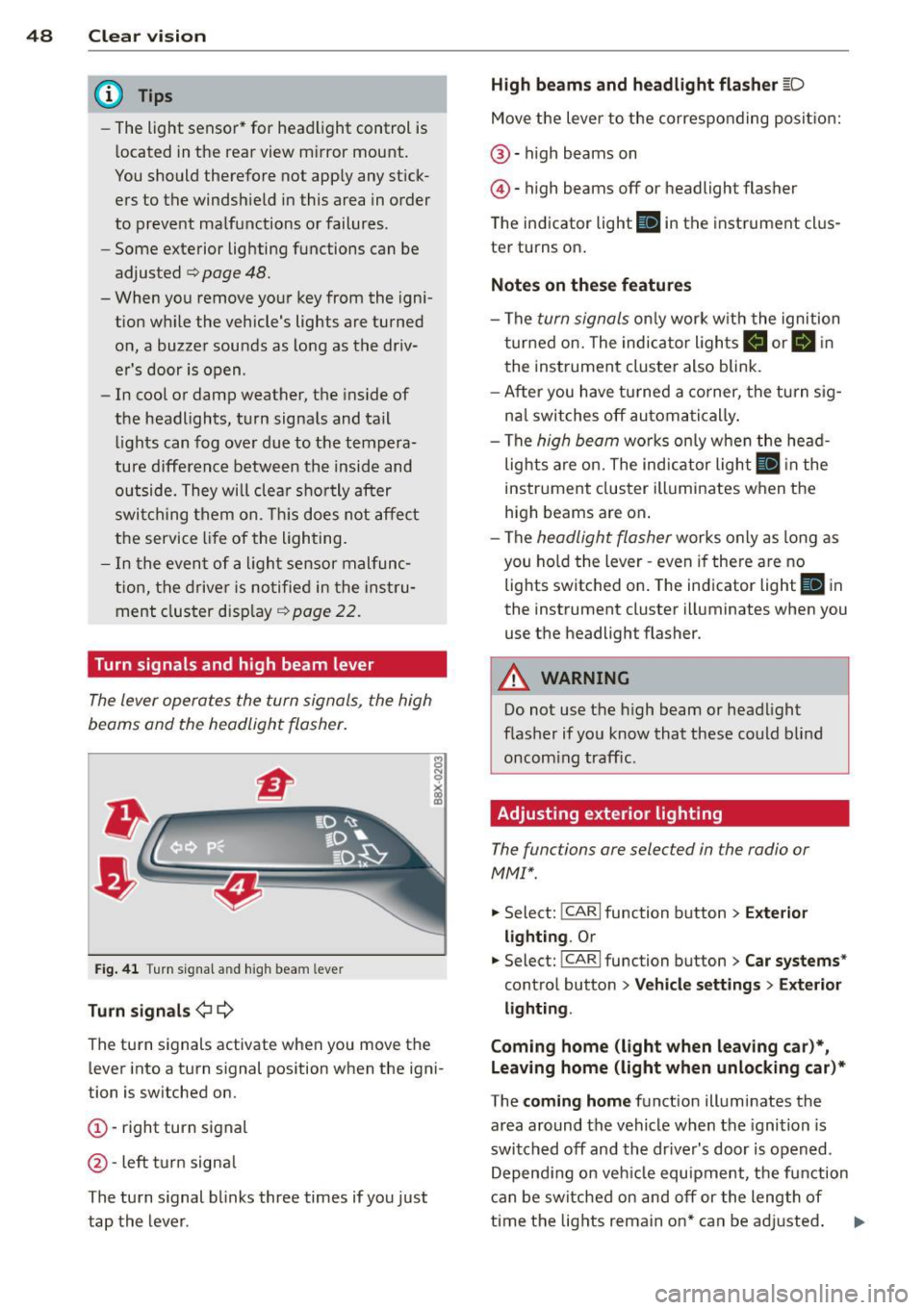
Turn signals and high beam lever
The lever operates the turn signals, the high
beams and the headlight flasher .
Fig. 4 1 Tu rn s ig na l and hig h beam lever
Turn sign als ¢i ¢
The turn signals activate when you move the
l ever into a turn s ignal pos ition when the ign i
tion is switched on.
(D -right turn signal
@-left tur n signa l
The turn s ignal blinks three times if you just
tap the lever .
High be ams and headlight flasher [D
Move the lever to the correspon ding posit io n:
@ -high beams on
@ -high beams off or headlight flasher
The indicator light
ii in the instrument cl us
ter turns on .
Notes on thes e features
-The turn signals on ly wor k w ith the ignition
t urned on. The indicator ligh ts
Ct or a in
the instrument cluster also blink.
- After you have turned a co rner, the turn s ig
na l switches off au toma tically .
- The
high beam works on ly w hen the head
lights a re on. The indicator ligh t
II in the
instrument cluster illuminates when the
high beams are on .
- The
headlight flasher works o nly as long as
you ho ld the lever -even if there a re no
lights switched on . The indicator light
II in
the instrument cluster illuminates when you
use the headlight flasher.
A WARNING
--
Do not use the h igh beam or headlight
flasher if you know that these could blind
oncom ing traffic.
Adjusting exterior lighting
The functions ore selected in the radio or
MMI" .
.,. Select: !CARI function button> Exte rior
light ing .
Or
.,. Select: !CARI function button > Car systems *
control button > Vehicle s etting s> Exterior
lighting .
Coming home (light when leav ing car }*,
Leav ing home (light when unlocking car )*
The coming home function illuminates the
area around the vehicle when the ignition is
switched off and th e dr ive r's door is opened.
Depend ing on vehi cle equ ipment, the function
can be switched on and off or the length of
time the lig hts remain on* can be ad justed . ..,.
Page 53 of 296
Turn the knob to the desired position:
Q/ P -In this position , you can adjust the
driver's and front passenger's exterior mirrors by turning the knob in the desired direction.
(ijjl -The mirrors are heated depending on the
outside temperature.
8 -The exterior mirrors fold in*. You can ad
just whether or not the mirrors fold in auto
matically when locking the vehicle using the
radio/MM I*¢
page 3 7.
Passenger exterior mirror tilt function*
To help you see the curb when backing into a
parking space, the surface of the mirror tilts
slightly . The knob must be in the P position
for this to happen .
You can adjust the tilted mirror surface by
turning the knob in the desired direction .
When you move out of reverse and into anoth
er gear, the new mirror position is stored and
assigned to the key you are using.
T he mirror goes back into its original position
once you drive forward faster than 9 mph (15 km/h) or switch the ignition off .
_& WARNING
Curved mirror surfaces (convex or spheri
cal*) increase your field of view. Remem
ber that vehicles or other objects will ap
pear smaller and farther away than when
seen in a flat mirror. If you use this mirror
to estimate distances of following vehicles
when changing lanes, you could estimate
incorrectly and cause an accident .
(D Note
-If the mirror housing is moved uninten
tionally (for example, while parking your
vehicle), then you must first fold the mir ror electrically. Do not readjust the mir
ror housing manually . You could damage
the motor which controls the mirror .
- If you wash the vehicle in an automatic
car wash, you must fold the exterior m ir
rors in to reduce the risk of damage to
the mirrors. Never fold power folding ex-
.
Clear vision 51
terior mirrors* by hand. Only fold them
in and out using the power controls.
a) Tips
- The exterior mirror sett ings are stored
with the memory function*
~ page 62.
-If there should be a malfunction in the
electrical system, you can still adjust the
exterior mirrors by pressing the edge of
the mirror.
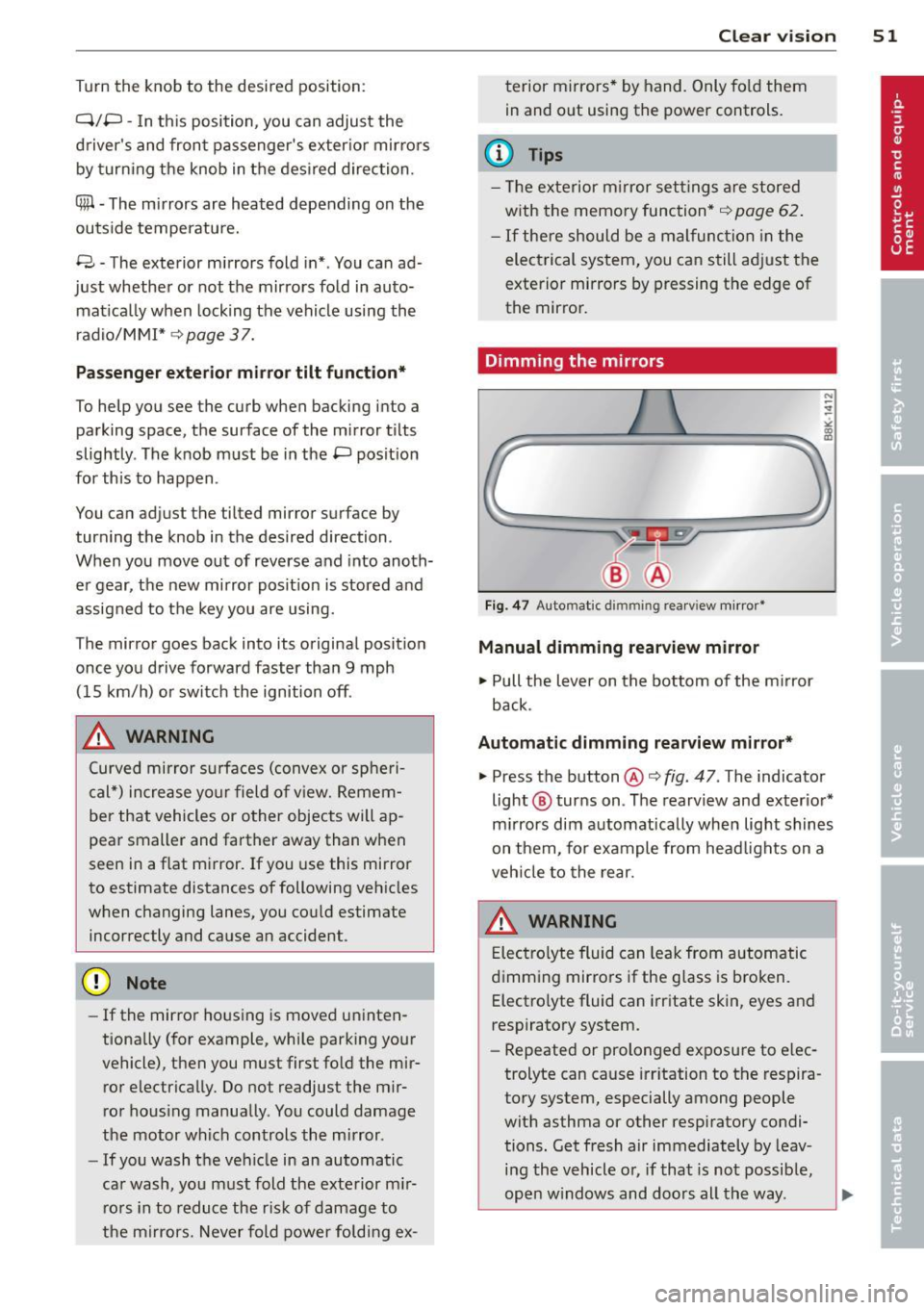
Dimming the mirrors
Fig. 47 Auto mat ic dimmin g rearv iew mirror •
Manual dimming rearview mirror
11>-Pull the lever on the bottom of the mirror
back.
Automatic dimming rearview mirror*
.,. Press the button@¢ fig. 47 . The indicator
light @ turns on . The rearview and exterior*
mirrors dim automatically when light shines
on them, for example from headlights on a
vehicle to the rear.
A WARNING
Electrolyte fluid can leak from automatic
dimming mirrors if the glass is broken .
Electrolyte fluid can irritate skin, eyes and
respiratory system .
- Repeated or prolonged exposure to elec
trolyte can cause irritation to the respira
tory system, especially among people
with asthma or other respiratory condi
tions. Get fresh air immediately by leav
ing the vehicle or, if that is not possible,
open windows and doors all the way. .,..
Page 55 of 296
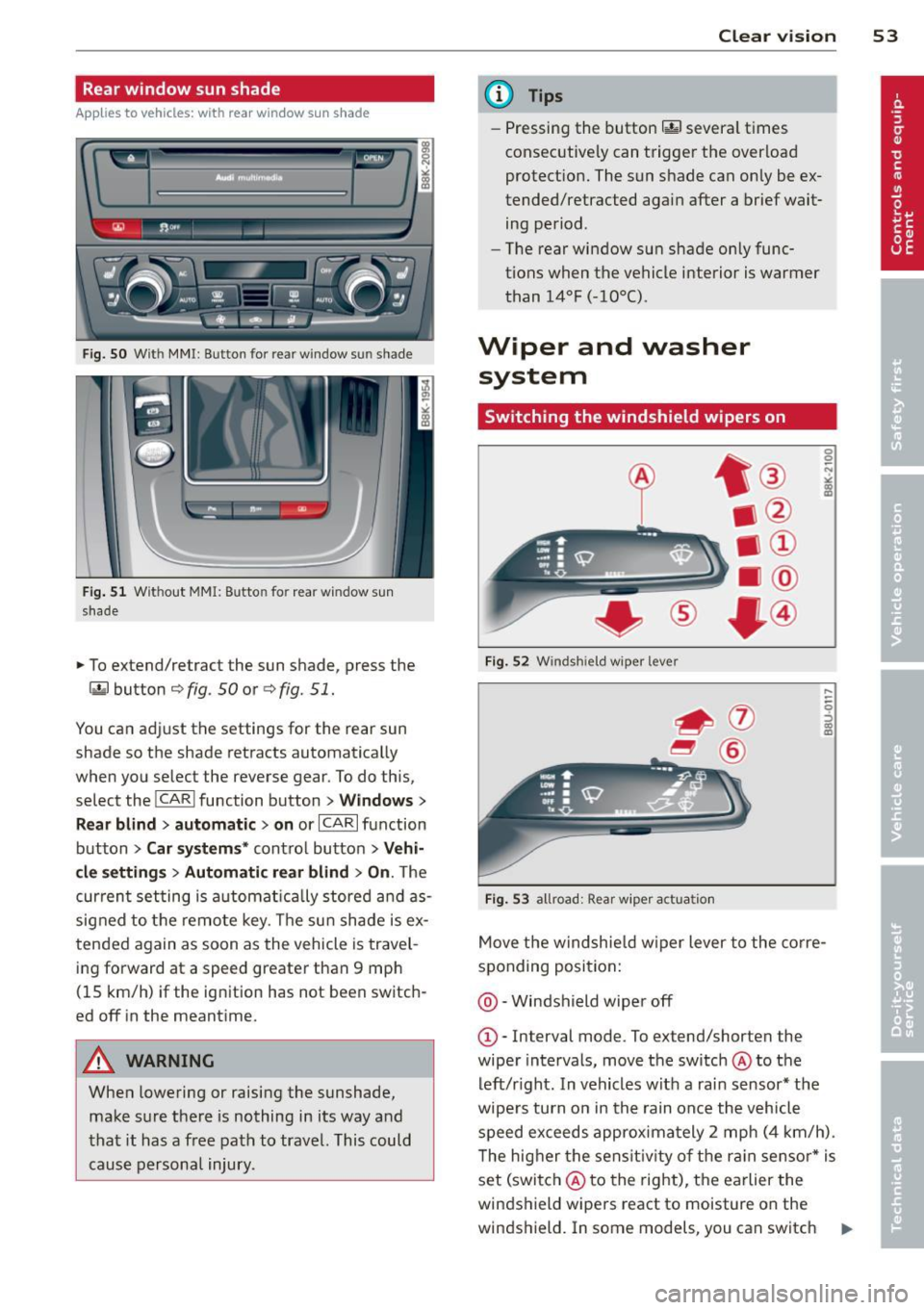
Rear window sun shade
Applies to vehicles: with rear window su n shade
Q;l I flc.i" , ~---
Fig. SO Wit h MMI : Button for re ar window su n shade
Fig. 51 W it h out MMI: B utto n fo r rear wi ndow s un
s hade
• To extend/retract the sun shade, press the
laf.l button r=;> fig . 50 or ¢ fig. 51.
You can adj ust the settings for the rear sun
shade so the shade retracts automatica lly
when you select the reverse gear. To do this,
select the
! CARI function button> Windows >
Rear blind > automatic > on
or ICARI function
button >
Car systems* contro l button > Vehi
cle settings
> Automatic rear blind > On . The
cur ren t setting is automatically stored and as
signed to the remote key . Th e sun shade is ex
tended again as soon as the vehicle is travel
ing forward at a speed greater than 9 mph
(15 km/h) if the ignit ion has not been switch
ed off in the meantime.
A WARNING
When lowering or raising the sunshade,
make sure there is nothing in its way and
that it has a free path to travel. This could
cause personal injury.
-
Clear vision 53
@ Tips
-Pressing the button~ several times
consecutive ly can trigger the overload
protect ion. The sun shade can only be ex
tended/retracted aga in after a brief wait
ing period.
- The rear window sun shade only func
tions when the vehicle interior is warmer
than 14°F (-10°C) .
Wiper and washer
system
Switching the windshield wipers on
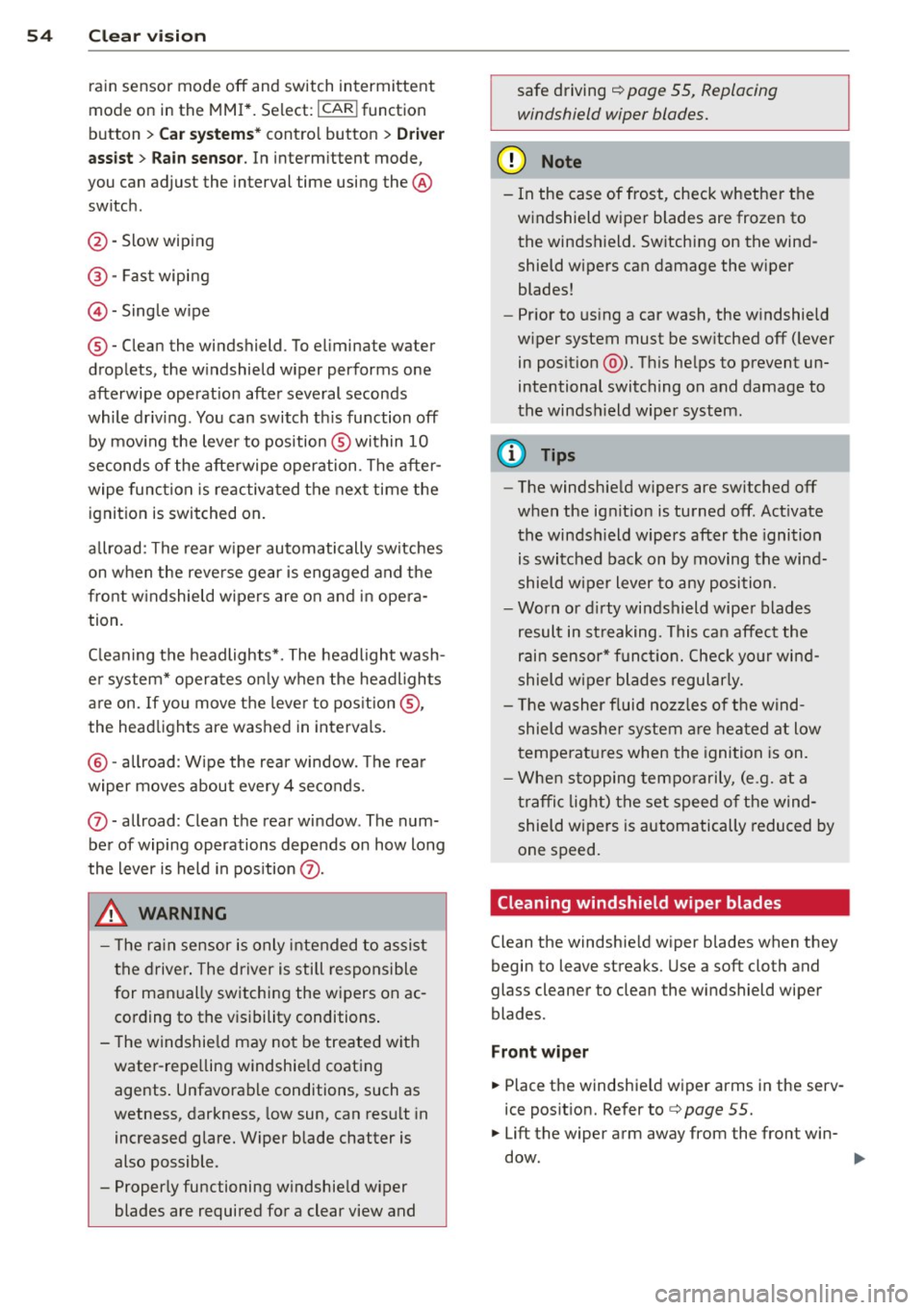
Fig. 52 Winds hie ld w iper leve r
Fig. 53 allroad: Rear w iper ac tua tio n
0 0 N
"' :8
.....
-
-0 ::, a) m
Move the windshield wiper lever to the corre
sponding position:
@-Windshield wiper off
G)-Interval mode . To ex tend/shorten the
wiper intervals, move the switch @to the
left/r ight. In vehicles w it h a rai n sensor* the
wipe rs turn on in the rain once the vehicle
speed exceeds approximately 2 mph (4 km/h) .
T he higher the sensitivity of the rain sensor * is
set (switch @to the right), the earlier the
windshield wipers react to moisture on the
w indshield. In some models, you can switch
II-
Page 56 of 296
54 Clear vis ion
rain sensor mode off and switch intermittent
mode on in the MMI*. Se lect:
I CAR ! function
button
> C ar sys tem s* contro l button > Dri ver
assi st> Rain s enso r.
In interm ittent mode,
you can adjust the interval time using the ®
switch .
@-Slow wiping
@-Fas t wiping
© -Sing le w ipe
® -Clean the windshield . To eliminate water
drop lets, the w indshield wiper performs one
afterwipe operation after several seconds
while driv ing . You can switch th is fu nction off
by mov ing the lever to position ® within 10
seconds of the afte rwipe operation . The after
wipe func tion is reactiva ted the next time the
ignition is switched on.
a llroad: The rear w iper automatically switches
on when the reve rse gear is engaged and the
front w indshield w ipers are on and in opera
tion .
C lean ing the headlights*. The headlight wash
e r system* opera tes on ly when the headl ights
a re on. If you move the leve r to pos ition @,
the head lights are washed in intervals.
@ -allroad : Wipe the rear window. The rear
wiper moves about every 4 seconds.
(J) -allroad : Clean the rear window . The num
ber of wiping operations depends on how long
the lever is held in pos ition
(J) .
_& WARNING
- T he ra in sensor is only inte nded to assist
the drive r. The driver is still responsible
for man ually switching the wipers on ac
cording to the v isibility conditions .
- T he windshie ld may not be treated w ith
water-repe lling windshie ld coating
agents . Unfavorable conditions, such as
wetness, darkness, low sun, can res ult in
increased glare. Wiper blade chatter is
also possible .
- Proper ly functioning windshie ld w iper
blades are required for a clear view and safe driving
~ page 55, Replacing
windshield wiper blades.
@ Note
- In the case of frost, check whethe r the
windshield wiper blades are frozen to
the windshield. Sw itching on the wind
shield wipers can damage the wiper
blades!
- Pr ior to us ing a car wash, the w indshield
w iper system must be sw itched off ( lever
in posit ion @). Th is he lps to prevent un
intentional switching on and damage to
the windsh ield wiper system .
@ Tips
-The windshie ld wipers are switched off
when the ignit ion is turned off. Act ivate
the winds hield wipers after the ignition
is switched back on by moving the wind
shield w iper lever to any position.
- Worn or d irty windshield wiper blades
result in st reaking. This can affect the
rain sensor* function. Check your wind
shield w ipe r blades regularly.
- The washer fluid nozz les of t he wind
shield w asher system a re heated at low
temperat ures when the igni tion is on.
- When stopping tempo rarily, (e .g. at a
t raffic light) the set speed o f the wind
shield wipers is automatically reduced by
one speed.
· Cleaning windshield wiper blades
Clean the windshie ld w iper b lades when they
begin to leave streaks. Use a soft cloth and
glass cle aner to clea n the windshield wiper
blades .
Front wip er
.. Place the windshie ld wiper arms in the serv
ice pos it ion. Refer to
c> page 55.
.. Lift the wiper arm away from the fron t win-
d~.
~
Page 57 of 296
Rear wip er*
• Lift the w iper arm away from the rear w in
dow .
A WARNING
Dirty windshield wiper blades can impair
your view. This can lead to acc idents.
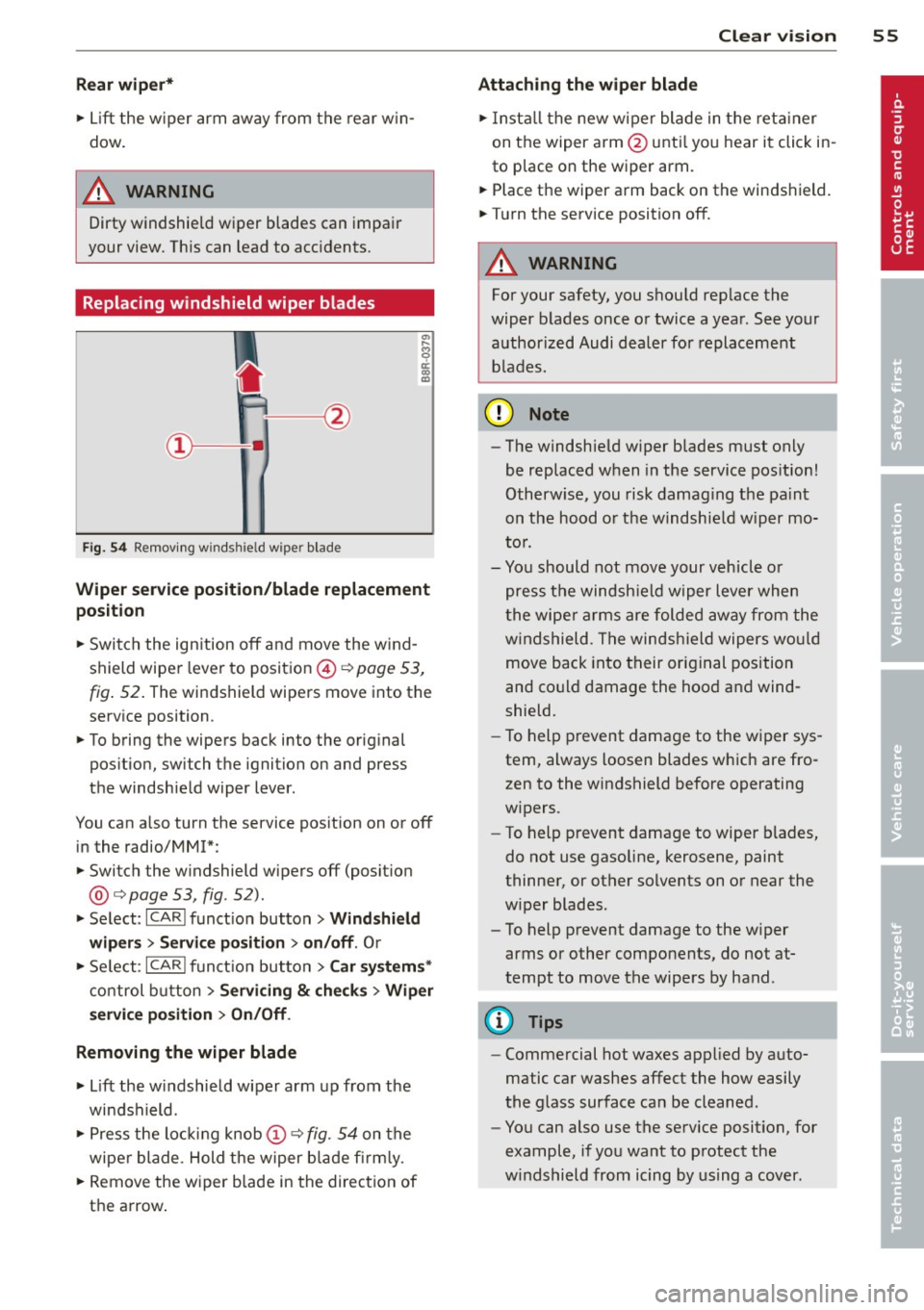
Replacing windshield wiper blades
Fi g. 5 4 Remov ing wi nd shi eld w iper blade
-
Wiper ser vice position /blade replacem ent
position
• Switch the ign ition off and move the w ind
shield wiper lever to position ©¢
pag e 53,
fig. 52 . The windshield wipers move into the
serv ice position.
• To bring the wipers back into the original
pos ition, swi tch the ignition on and p ress
the windshield wiper lever.
You can also turn the service pos ition on or off
in the radio/MM!*:
• Switch the w indshield wipers off (posit ion
@ ¢
page 53, fig. 52).
• Se lect : ICARI funct ion button> Wind shie ld
wiper s
> Servi ce positi on > on /off . Or
• Se lect :
IC ARI funct ion button> Car system s*
control b utton
> Servicing & ch eck s > Wiper
s er vic e po sition
> O n/ Off .
Removing the wiper blade
• Lift the w indshield wiper arm up from the
windshield.
• Press the loc kin g knob
(D ¢ fig. 54 on the
wiper blade . Hold the wiper b lade fi rm ly.
• Remove the wiper blade in the direct ion of
the arrow .
Clear vis ion 5 5
Attach ing the wiper blade
• Insta ll the new wiper blade in the reta iner
on the wiper arm@ unti l yo u h ear it click in
to place on the wiper arm .
• Place the wiper arm back on the windshield.
• Turn the service position off.
A WARNING
For your safety, you should rep lace the
wiper b lades once or twice a year . See your
authorized Audi dealer for replacement
b lades.
(D Note
- The windshield w iper blades must only
be replaced w hen in the service pos ition!
Otherw ise, you risk damag ing the pa int
on the hood o r the windshie ld w iper mo
to r.
- Yo u should not move your vehicle o r
press the windsh ield wiper lever when
t he wipe r arms are folded away from the
w indshield . The windsh ie ld wipers wou ld
move back into their original position
and co uld damage the hood and wind
shield.
- To help prevent damage to the w iper sys
tem, always loosen blades which are fro
zen to the windshield before operating
w ipers.
- To help p revent damage to wiper blades,
do not use gasoline, kerosene, paint
thinner, or other solvents on or near the
w iper blades .
- To help p revent damage to the w iper
arms or other components, do not at
tempt to move the wipe rs by hand .
(D Tips
- Commercial hot waxes applied by auto
matic car washes affect the how easily
the glass surface can be cleaned .
- You can also use the service position, for
example, if you want to protect the
w indshield from icing by us ing a cover .
Page 58 of 296
56 Clear vision
Replacing the rear wiper blade
Applies to vehicles: with rear wiper
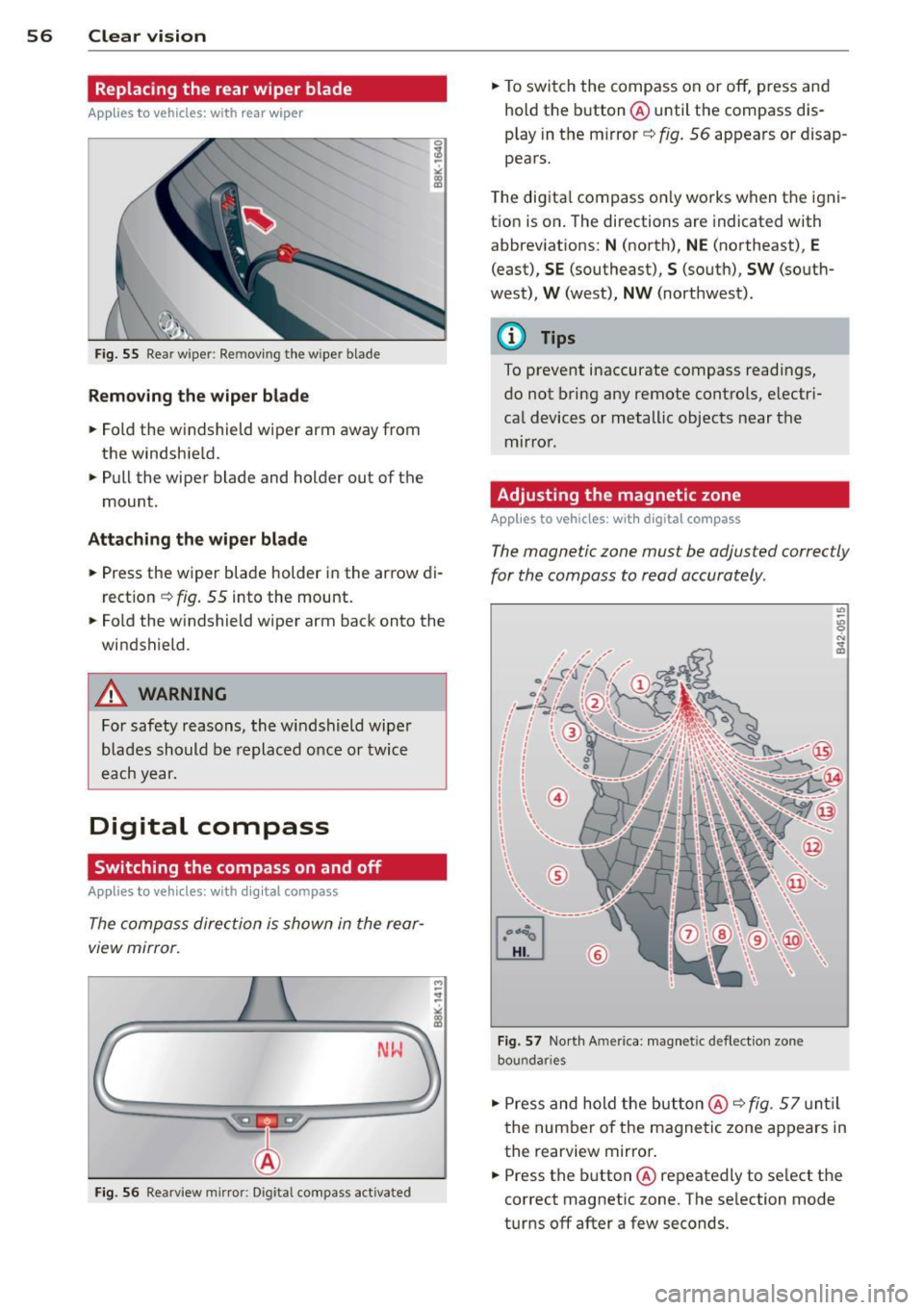
Fig. 55 Rear w ipe r: Re movi ng the w ipe r blade
Removing the wiper blade
.. Fold the windshield wiper arm away from
the windshie ld .
.. Pull the wiper blade and holder out of the
mount .
Attaching the wiper blade
.. Press the wiper blade holder in the arrow di
rection
~ fig. 55 into the mount .
.. Fold the w indshield wiper arm back onto the
windshield .
A WARNING
For safety reasons, the windshield wiper
blades should be replaced once or twice
each year.
Digital compass
Switching the compass on and off
Applies to vehicles: with digital compass
The compass direction is shown in the rear
view mirror.
-
M ~ :!
"' L;;.=== =====~ll!
Fig. 56 Rearview mirror: Dig ital compass activated
.. To switch the compass on or off, press and
hold the button @ until the compass dis
play in the mirror ~
fig. 56 appears or disap
pears.
T he digital compass only works when the igni
tion is on . The directions are indicated with
abbreviations:
N (north), NE (northeast), E
(east), SE (southeast), S (south), SW (south
west),
W (west), NW (northwest) .
@ Tips
To prevent inaccurate compass readings,
do not bring any remote controls, electri
cal devices or metallic objects near the
mirror .
Adjusting the magnetic zone
Applies to vehicles: with digita l compass
The magnetic zone must be adjusted correctly
for the compass to read accurately .
@
Fig. 57 North A merica: magnet ic deflection zone
bou nda ries
.. Press and hold the button @ ~ fig. 57 until
the number of the magnetic zone appears in
the rearview mirror .
.. Press the button @ repeatedly to select the
correct magnetic zone . The selection mode
turns off after a few seconds.
Page 59 of 296
Calibrating the compass
Appl ies to vehicles: with digital compass
You must recalibrate the compass if it does
not display the correct direction .
.. Press and ho ld the button @unt il a C ap
pears in the rearview mirror .
.,. Drive in a c ircle at about 6 mph (10 km/h)
until a direction is d isp layed in the rearview
mirror .
A WARNING
- To avoid endanger ing yourself and other
dr ivers, calibrate the compass in an area
where the re is no traffic.
- T he dig ita l compass is to be used as a di
rect ional aid only. Even though you may
want to look at it wh ile you are driving,
yo u must still pay attention to traffic,
road and weather cond itions as well as
other poss ible hazards.
Clear vis ion 5 7