warning AUDI S4 2014 Manual Online
[x] Cancel search | Manufacturer: AUDI, Model Year: 2014, Model line: S4, Model: AUDI S4 2014Pages: 296, PDF Size: 73.56 MB
Page 109 of 296
Audi adaptive cruise control and braking guard 107
-If you restrict or switch off the ESC, the
braking guard also switches itself off
¢page 188.
- Switch braking guard off when you are
loading the vehicle onto a vehicle carrier,
tra in, ship or other type of transporta
tion. This can prevent undesired warn i ngs from the braking guard system.
Messages
App lies to vehicles: with Audi adaptive cruise co ntrol
Braking guard: Off
This driver message appears if the system is
turned off via the radio/MM!*. Otherwise, if
the system is turned off, the information ap pears every time shortly after the start of the
tr ip.
The driver message also appears if the system is not avai lab le due to a malfunction or if the
ESC is not switched on¢
page 188. If this is
the case, the system will not provide warnings
about a possible collision.
Braking guard: Activated
This driver message appears if sharp brake
press ure was applied due to an acute warning.
•••
Three wh ite dots appear if a setting cannot be
selected with the operat ing lever . For exam
p le , this happens if you want to raise/lower
the speed even though there was no previous
l y saved speed .
ACC: Deactivation
The driver message appears in vehicles with
manual transmission . If the clutch pedal was
pressed down for too long, the adaptive cruise
control turns off . A chime sounds as a rem ind
er .
ACC: Sensor blocked
This message appears if the sensor view is ob
structed, for example by leaves, snow, heavy
spray or dirt. Clean the sensor <=>
page 99,
fig. 110.
ACC: not available
The driver message appears if there is a mal
function . The adaptive cruise contro l turns off .
A chime sounds as a reminder. Have the sys
tem checked by an authori zed Aud i dea ler or
authorized Aud i Service Fac ility.
ACC: unavailable
The driver message appears if, for example,
the brake temperat ure is too high. The adap
tive cruise control is temporarily unavailable .
A chime sounds as a reminder.
Engine speed!
This driver message appears in vehicles with
manua l transmission if the driver had not up
shifted or downs hifted in time while using
adaptive cruise control braking or accelerat
ing, caus ing the vehicle to exceed or no t reach
the permitted limit speed. The adaptive cruise
control turns off. A chime sounds as a remind
er .
Shift lever position!
Vehicles with an automat ic transmission: the
driver message appears if the selecto r lever is
shifted to the N position. Th e adaptive cruise
control is no t available while in this position.
Vehicles with manua l transm ission: the driver
message appears for vehicles with manual
transmission if there is no forward gear en
gaged, meaning if the reverse gear or the 1st
gear is engaged or if the selector leve r is in
the neutral position . The adaptive cr uise con
trol is not available while in th is position.
Stabilization control (ESC)
This message appears if the electronic stabili
z ation control ( ESC) is taking action to stab i
lize the vehicle. The adaptive cruise contro l
turns off. A chime sounds as a reminder .
Speed too low
This message appears if the current speed is
too low
to set or to maintain the desired
speed .
The speed be ing saved must be at least
20 mph (30 km/h). The cruise control is
turned off for speeds lower than 12 mph
Page 111 of 296
Audi side assist Lane change assistant
Description
Applies to vehicles: with Audi side assist
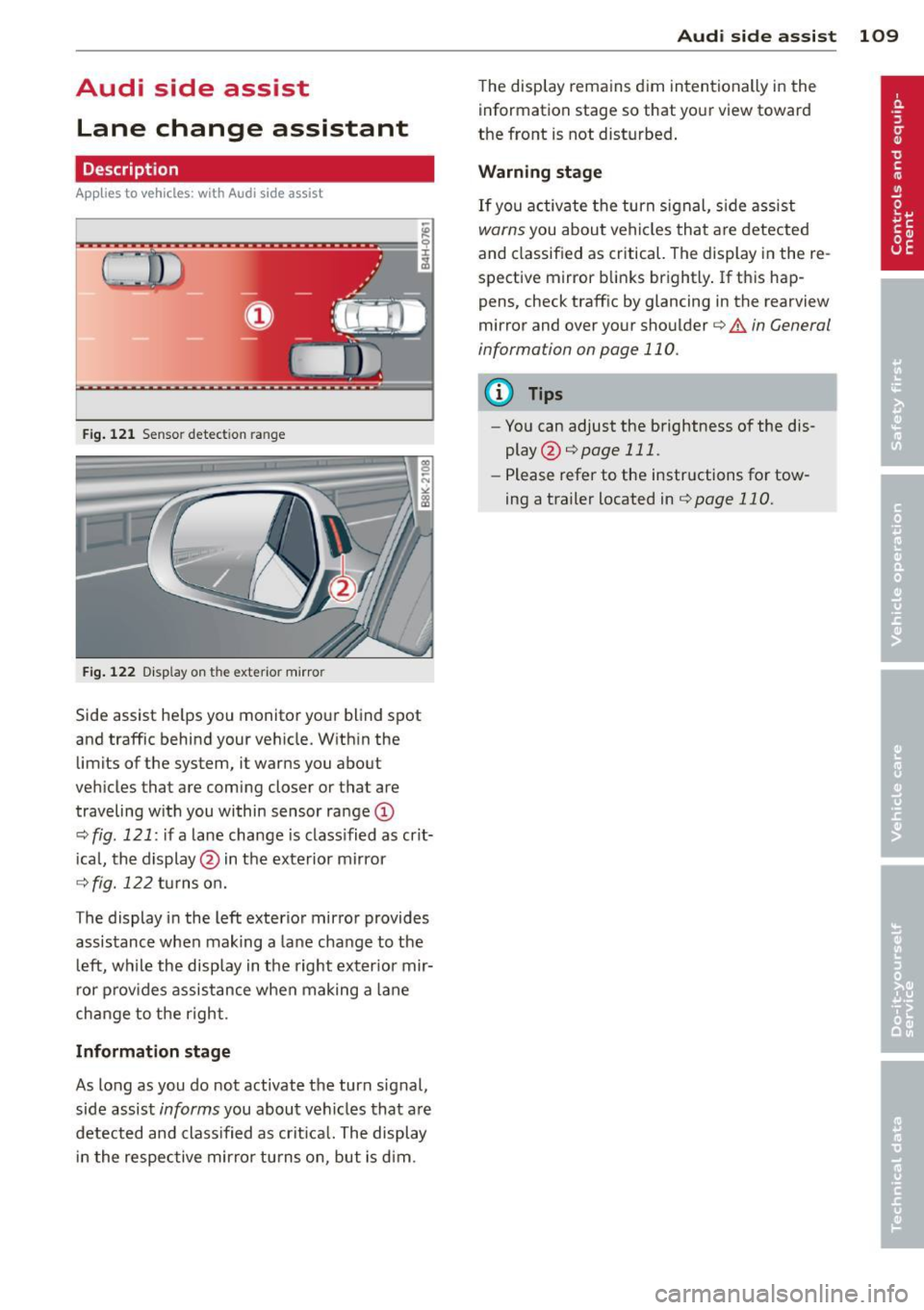
Fig . 12 1 Sensor dete ction ra n ge
Fig . 122 Disp la y on t he e xterio r mirro r
Side assist he lps you mon itor your blind spot
and traffic behind you r veh icle. W ith in the
limits of the system, it warns you about
vehicles that are coming closer or tha t are
traveling w ith you within sensor ra nge
(D
o:;, fig . 121: if a lane change is class ified as crit
ical, the display @ in the exterior mirror
o:;, fig. 122 turns on.
T he display in the left exterior mirror provides
assistance when making a lane change to the l eft, while the display in the right exter ior mir
r or p rov ides assistance when making a lane
change to the right .
Information stage
As long as you do not activate the turn signal,
side assist
informs you about vehicles that are
detected and class ified as crit ical. The display
i n the respective mirror turns o n, but is d im .
Aud i side assist 109
The display remains d im intentionally in the
information stage so that your view toward
the front is not disturbed .
Warning st age
If you activate the turn signal, s ide assist
warns you about veh icles that are detected
and classified as critical. The display in the re
sp ective mirror blinks brightly . If this hap
pens, check traff ic by glanc ing in the rearview
mirror and over your shoulder ¢
A in General
information on page 110 .
@ Tips
-You can adjust the brightness of the dis
play @¢
page 111 .
-Please refer to the instructions for tow
ing a trailer located in
¢page 110.
Page 112 of 296
110 Audi side assist
General information
App lies to vehicles: with Audi side assist
®
©
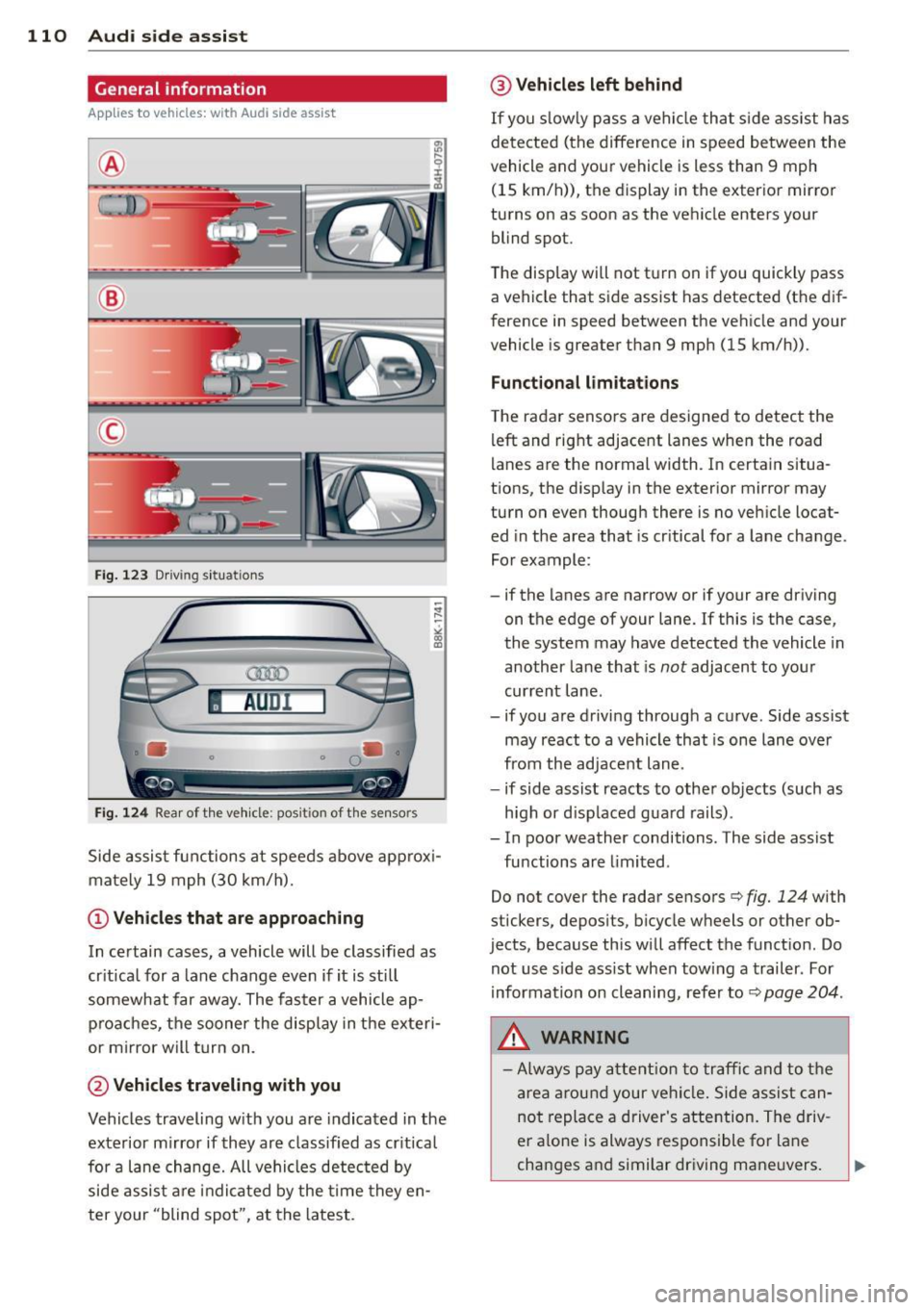
Fig. 12 3 Driving s it u at ions
AU Dr- l
• •
Fig . 124 Rear of th e ve hicle: pos it io n of t he se nso rs
Side assis t fu nctions at speeds above ap prox i
ma tely 19 mph (30 km/h).
(D V ehicles that are approaching
In certain cases, a vehicle will be classified as
cr itical for a lane change
even if it is still
somewhat far away. The fas ter a vehicle ap
p ro aches, the sooner the disp lay in the exteri
or m irror will t urn on.
@ Vehicles traveling with you
Vehicles traveling w ith you are indicated in the
exterior m irror if they are classified as cr it ical
for a lane change. All vehicles detec ted by
side assis t are in dicated by the time they en
ter your "blind spot", at the latest.
@ Vehicles left behind
If you s low ly pass a ve hicl e tha t sid e ass ist has
dete cted ( the difference in s peed between the
vehicle and you r vehicle is less than 9 mph
(15 km/h)), the display in the exter io r mirro r
turns on as soon as the vehicle enters your blind spot.
The disp lay wi ll not t urn on if you quickly pass
a vehicle that s ide assist has detected (t he d if
f erence in speed between the ve hicle and your
vehicle is greater than 9 mph (15 km/h)).
Functional limitations
T he radar senso rs are des igned to detect the
left and right adjacent lanes whe n the road
l anes a re the normal width. In certain situa
t ions, the d isp lay in the exterior mirror may
turn on even though there is no ve hicle locat
ed in the area that is cr itical fo r a lane cha nge.
For example:
- if the lanes are narrow or if your are driving on the edge of your lane. If this is the case,
the system may have detected the vehicle in
another la ne that is
not adjacent to your
cur rent lane .
- if you a re driving through a c urve . Side assis t
may react to a vehicle that is one lane ove r
from the ad jacent lane .
- if side assist reacts to other objects (such as
high or d isp laced gua rd rails) .
- In poor weather conditions. The side assist fu nctions are limited .
Do not
cover the radar sensors c::> fig. 124 with
stickers, depos its, bicycle wheels or other ob
jects , because this will affect the funct ion. Do
not use s ide ass ist when tow ing a trail er. For
information on cleaning, refe r to
c::> page 204 .
&_ WARNING
-Always pay a tten tion t o traffic and to the
ar ea around your ve hicl e. Side a ssist can
no t repla ce a driver's attention. The driv
er a lone is always respons ible fo r lane
cha nges a nd similar driving mane uvers.
Page 113 of 296
-Improper reliance on the side assist sys
tem can cause collisions and serious
personal injury:
- Never rely only on side assist when
changing lanes.
- Always check rear view mirrors to make
sure that it is safe to change lanes.
- Side assist cannot detect all vehicles un
der all conditions- danger of accident!
- Please note that side assist indicates
there are approaching vehicles, or
vehicles in your blind spot, only after
your vehicle has reached a driving speed
of at least 19 mph (30 km/h).
- In certain situations, the system may not
function or its function may be limited.
For example:
- if vehicles are approaching or being left
behind very quickly. The display may
not turn on in time.
- in poor weather conditions such as
heavy rain, snow or heavy mist .
- on very wide lanes, in tight curves or if
there is a rise in the road surface .
Vehicles in the adjacent lane may not
be detected because they are outside
of the sensor range.
(D Note
The sensors can be displaced by impacts or
damage to the bumper, wheel housing and
underbody. This can affect the system .
Have your authorized Audi dealer or au
thorized Audi Service Facility check their
function.
(D Tips
- If the window glass in the driver's door
or front passenger's door has been tint
ed, the display in the exterior mirror may be misinterpreted.
- For Declaration of Compliance to United
States FCC and Industry Canada regula
tions
~page 278.
Audi side assist 111
Activating and deactivating
App lies to vehicles : wi th Aud i side ass ist
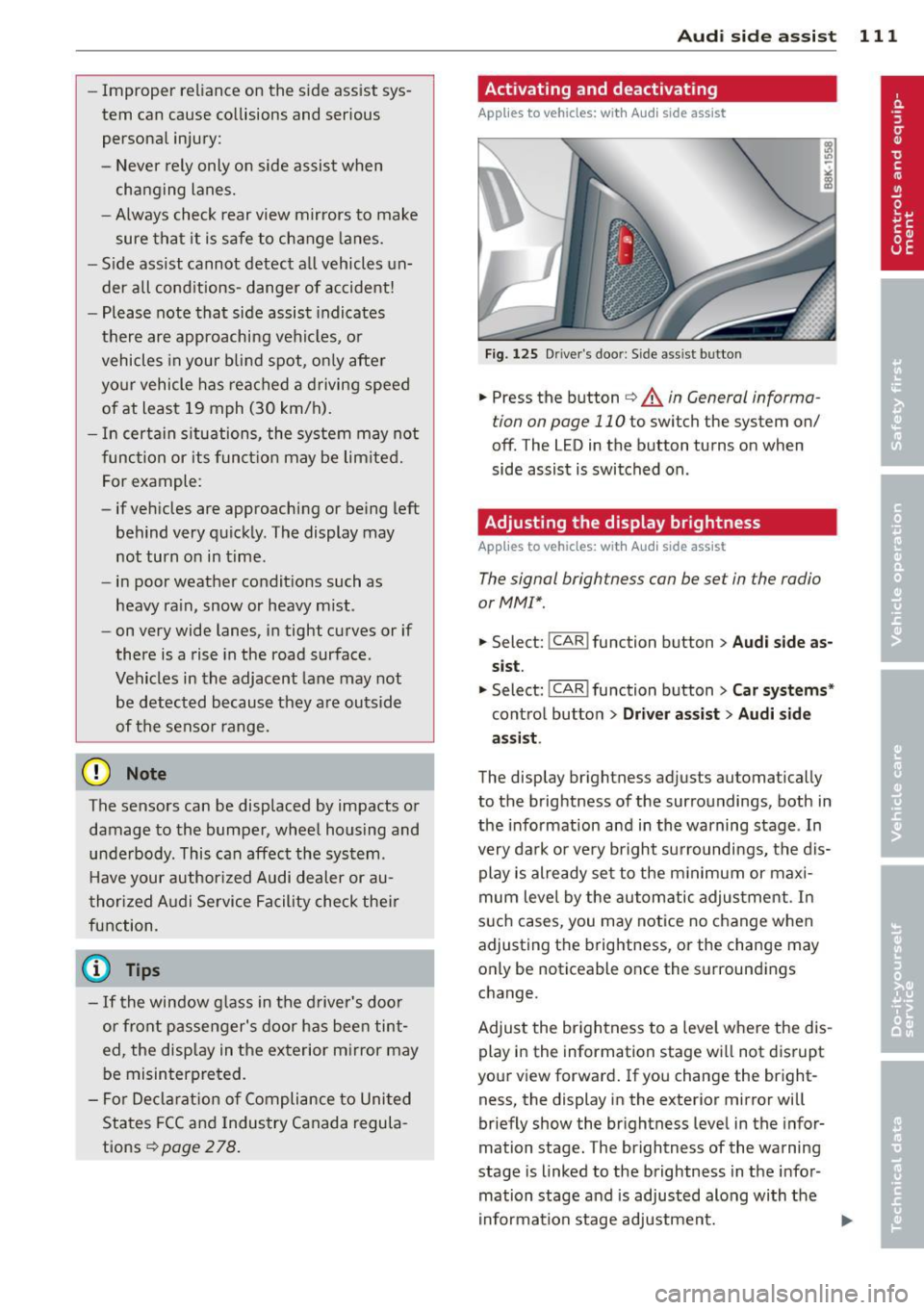
Fig. 125 Driver 's doo r: Side ass ist button
.,. Press the button ~ A in General informa
tion on page 110
to switch the system on/
off . The LED in the button turns on when
side assist is switched on.
Adjusting the display brightness
A pp lies to vehicles: wi th Audi side ass ist
The signal brightness can be set in the radio
orMMI* .
.,. Select: !CAR ! function button > Audi side as
sist.
.,. Select: I CAR I function button > Car systems*
control button > Driver assist > Audi side
assist .
The display brightness adjusts automatically
to the brightness of the surroundings, both in
the information and in the warning stage . In
very dark or very bright surroundings, the dis play is already set to the minimum or maxi
mum level by the automatic adjustment. In
such cases, you may notice no change when
adjusting the brightness, or the change may
only be noticeable once the surroundings
change.
Adjust the brightness to a level where the dis
play in the information stage will not disrupt
your view forward. If you change the bright
ness, the display in the exterior mirror will
briefly show the brightness level in the infor
mation stage. The brightness of the warning
stage is linked to the brightness in the infor
mation stage and is adjusted along with the
information stage adjustment.
Page 115 of 296
Audi drive select Driving settings
Introduction
App lies to vehicles: with Audi drive select
Drive select provides the possibility to experi
ence diffe rent types of vehicle sett ings in one
vehicle. For instance, using the three
Com
fort, Auto and Dynamic modes, the driver can
switch from a sporty to a comfortab le driving
mode with the press of a button.
Addit ionally, in vehicles with
MM I*, the vehi
cle setup for
Individual* mode can be cus
tomized by you. This makes it possib le to
combine settings such as a sporty engine tun
ing with comfortable steering.
A WARNING
Improper use of the Audi drive select can
cause collisions, other acc idents and seri
ous personal injury.
Description
Applies to vehicles: with Audi drive select
The vehicle setup in each mode depends on
the vehicle's features . However, the engine,
automatic t ransmission* and steering are al
ways involved.
-
Engine and automatic transmission*
Depending on the mode, the engine and the
automatic transmission respond quicker or in
a more ba lanced manner to acce lerator pedal
movements. In the sporty dynamic mode, the
automatic transmission shifts at higher RPMs .
Steering
The steering adapts in terms of steering effort
and steering ratios . Indirect steer ing that
moves easily, like the steering in comfort
mode , is best su ited to long dr ives on a high
way. In contrast, dynamic mode prov ides
sporty, di rect steering.
The follow ing applies to vehicles with dynam ic
steer ing*: the steering ratio changes based on
vehicle speed in order to maintain optimum
Audi drive select 113
steering effort for the driver at all times. This
sets the steering to be less sensitive at higher
speeds in order to provide improved vehicle
control. At reduced speeds, however, steering
is more direct in order to keep the steering ef
fort as minimal as possible when the driver is
maneuveri ng the veh icle . At low and average
speeds, dynamic steering addit iona lly pro
vides more responsive steering performance.
Adaptive dampers*
The adaptive dampers* use sensors to record
information regarding steering movements,
braking and acceleration operations by the
driver , road surface, driving speed, and load.
T his makes it possible to adapt damp ing to
the d riving situation v irtually i n rea l time.
Drive select also makes it possible to satisfy
the desire for sporty suspension (Dynamic)
and comfortab le suspension (Comfort) with
out giving up balanced tuning (Auto) .
Sport differential*
As a component of the all whee l dr ive system
(quattro)
~ page 192, the sport differential*
distributes the driving power to the rear axle
depending on the situation . The distribution
of power varies depending on the mode se lected. The goal is a high level of agility and
ability to accelerate on curves . The vehicle is
very respons ive to steering .
Audi adaptive cruise control*
The behavior when accelerating can be adjust
ed from comfortab le to sporty, depending on
the drive select mode. Adaptive cruise control
also responds to the driving behavior of the
vehicle ahead in a more conservative or sporty
manner .
Engine sound*
The sound of the engine is adapted to the se
lected mode and ranges from subtle to sporty.
0) Tips
-In some models, the maximum vehicle
speed can only be reached in the
Auto
and Dynamic modes.
Page 116 of 296
114 Audi drive select
-For vehicles with an automatic transmis
sion, selecting the
Dynamic mode re
su lts in sporty shifting characteristics .
The S gear position engages automati
cally.
- In vehicles that have dynamic steering*,
operating noise is heard when starting or
stopping the eng ine . This does not ind i
cate a problem .
Selecting the driving mode
Applies to vehicles: with Audi drive select
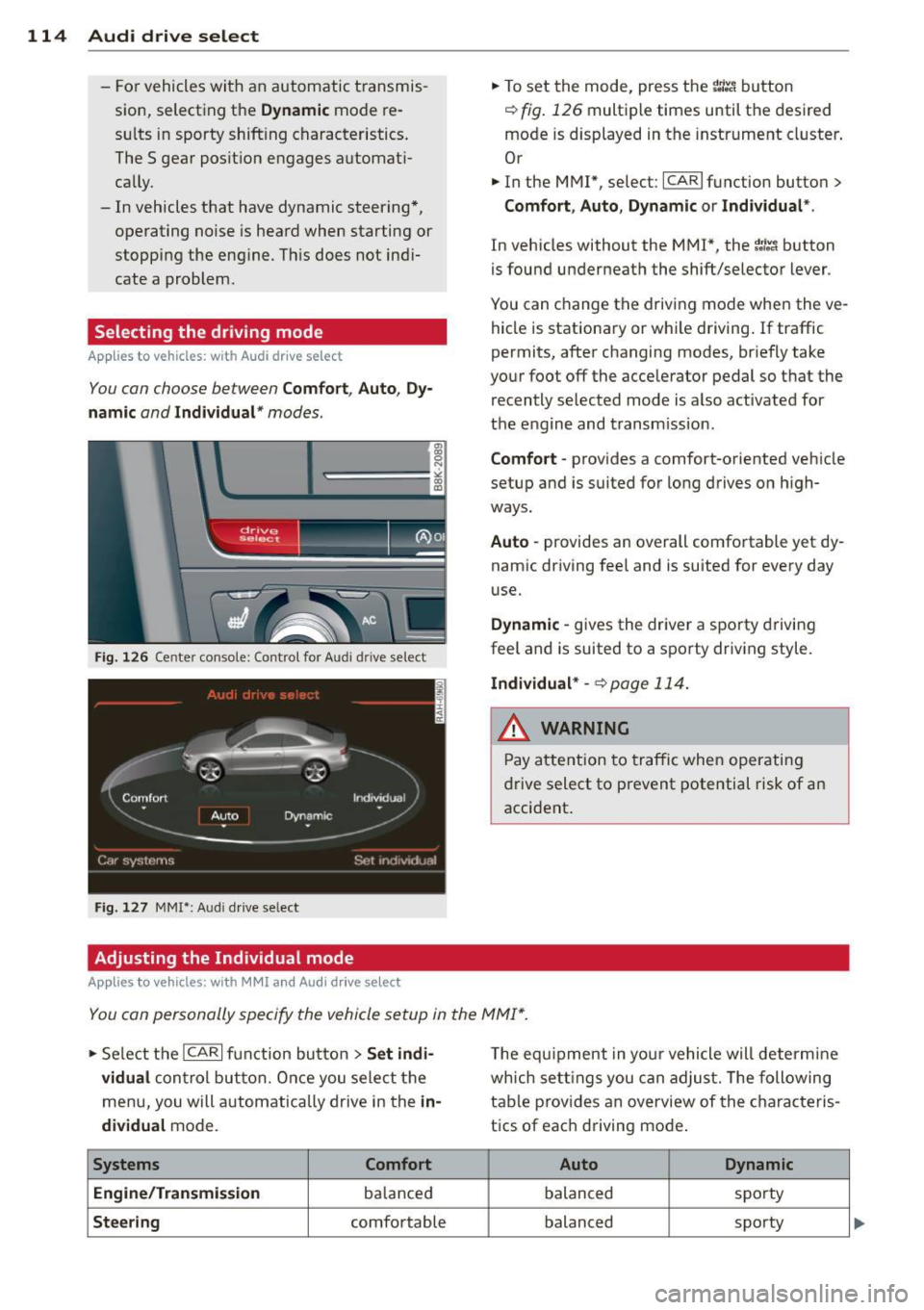
You can choose between Comfort, Auto, Dy
namic
and Individual * modes.
Fig. 126 Cen ter console: Control for Au di dri ve select
Fig. 127 MMI•: Aud i drive select
Adjusting the Individual mode
Applies to vehicles: with MMI and Aud i drive select
.,. To set the mode, press the r.:i:.~ button
~ fig. 126 multiple times until the desired
mode is displayed in the instrument cluster .
Or
.,. In the MMI", select:
ICARI function button>
Comfort, Auto, Dynamic or Individual *.
In vehicles without the MMI*, the~:/;,~ button
is found underneath the shift/selector lever .
You can change the driving mode when the ve hicle is stationary or wh ile driving . If traffic
permits, after changing modes, br iefly take
your foot off the acce lerator pedal so that the
recently selected mode is also activated for
the engine and transm ission .
Comfort -provides a comfort-oriented vehicle
setup and is suited for long drives on h igh
ways.
Auto -provides an overall comfortable yet dy
namic driving feel and is suited for every day
use.
Dynamic -gives the driver a sporty driving
feel and is suited to a sporty driving style.
Individual * -¢ page 114.
& WARNING
Pay atte ntion to traffic when operating
drive select to prevent potential risk of an
accident .
You can personally specify the vehicle setup in the MMI* .
.,. Se lect the ICAR I function button > Set indi·
vidual
control but ton. Once you select the
menu, you will automatically drive in the
in·
dividual
mode.
Systems Comfort
Engine /Transmission
balanced
Steering comfortable T
he equipment in your vehicle will determine
wh ich sett ings you can adjust. The following
table provides an overview of the characteris
tics of each driving mode .
Auto Dynamic
balanced spo
rty
balanced sporty
Page 118 of 296
116 Park assist
Park assist
Parking system
Applies to vehicles: with pa rking system
Different park assist systems may be used for
parking or maneuvering, depending on the
vehicle's features.
Parking system (rear)*:
For the parking system (rear), the acoustic
park assist system is installed in the rear of
the vehicle
¢ page 116.
The rear parking assist system uses ultrason ic
sensors to determine the distance of the vehi
cle from a detected obstacle. There are a total
of four sensors located on the rear bumper
(two in the middle and two on the sides).
Parking system (rear, with rear view
camera)*:
For the parking system (rear, with rear view
camera),
the rear acoustic park assist system
is integrated in the rear of the vehicle and the
rear view camera is integrated in the rear lid
¢page 119.
The parking system (rear, with rear view cam
era)
uses ultrasonic sensors to determine the
distance of the vehicle from a detected obsta
cle . There are a total of four sensors located
on the rear bumper (two in the middle and
two on the sides).
_& WARNING
Make sure the sensors are not covered by
stickers, deposits or any other obstruc
tions as it may impair the sensor function.
For information on cleaning, refer to
qpage 204.
Parking system (rear)
Rear acoustic park assist
Applies to vehicles: with parking system (rear)
The rear acoustic park assist warns you of ob
stacles or objects behind your car .
Description
The rear acoustic parking assist system deter
mines the distance of the vehicle from an ob
stacle using ultrasonic sensors. There are 4
sensors in the rear bumper.
The range at which the sensors start to meas
ure is
about:
To the sid e 2 ft (0 .60 m)
Center rear 5.2 ft (1.60 m)
Activation
Acoustic parking assist is activated automati
ca lly when
reverse gear is engaged. A brief
tone confirms that the system is activated.
Warning tones
Distance warning is given by warn ing tones
wh ich are generated by the rear signa l genera
tor. The volume and the pitch of th e warning
tones can be adjusted in the MMI*
¢page 117.
Reversing
Distance warning when reversing starts when
an obstacle is detected in the range of the
parking assist system . As the distance de
creases, the time interval between the a udible
tones becomes shorter.
When the distance is less than 1ft (0.30 m),
the tone becomes continuous. At this point
you should stop backing up .
Please note that low objects already signalled
by a warn ing can disappear from the system's
detection range and will not continue to be
signalled .
If the distance to an obstacle remains the
same, the volume of the distance warning is
gradually reduced after about 4 seconds (this
does not apply in the continous tone range).
ll-
Page 119 of 296
Approaching another obstacle will result in
the distance warning sounding at the normal
volume aga in.
Malfunctions in the s ystem
If a war ning tone is audible for about five sec
onds when you turn on the ignit ion, there is a
mal function in the system. Have the problem
corrected by your authorized Audi dealer.
Keep t he sensors in the rear bumper clean and
free from ice so t hat the acoustic park assist
system can function properly.
A WARNING
- Sensors have dead spaces in which ob
jects cannot be detected. Be especially
alert for small children and animals ,
since they are not a lways detected by the
sensors.
- The acoust ic park ing system is not a sub
st itute for the d river's own caut io n and
alertness . Ultimate responsib ility always
remains with the driver during park ing
and simi lar maneuvers. Always watch
whe re you are dr iv ing .
- You should always adjust the volume and
frequency of the warning tones so that
yo u can easily hear the a co ustic distance
warning even if the radio is p laying, the
air-conditioner blower is on High or there
is a high leve l of outside noise.
- Check the settings whenever anyone
else has driven the vehicle before you.
- Remember that low obstacles for wh ich
-
a war ning has a lready been issued may
"dive" below the system's sensing zone if
the veh icle is being backed up closer . In
th is case, the warn ing sound shutt ing off
does
not i ndi cate that you have cleared
the obs ta cl e. Instead, impact is immi
nen t.
- Objec ts such as trai ler hitches, c hains,
narrow posts or fences covered by a th in
l ayer of paint may no t always be detect -
Park a ssis t 11 7
ed by the sys tem . They can still damage
your vehicle without warning.
(0 Tips
Keep the senso rs in the rear b umpe r clean
and free of snow and ice so that the acous
tic parking assist system can function proper ly .
Adjusting the warning tones
App lies to vehicles : wit h parking system (rear)
The warning tones con be adjusted in the
MM!*.
.,. Sele ct: !CAR ! func tion button > Parking sy s
tem . Or
.,. Select:
!CAR ! function button > Car sy stem s*
contro l button > Dri ver a ssist> Parking a id.
- Rear volume -
rear sensor vo lume
- Rear frequency -rear senso r frequency
- Mu sic volume while parking -when the
pa rking system is sw itched on, the volume
of the active audio sour ce is lowered.
The newly adjusted value is briefly hea rd from
the signal generato r. Th e sett ings are auto
matically s to red and assigned to the master
key w ith remote contro l.
Page 120 of 296
118 Park assist
Parking system (rear,
with rear view camera)
Introduction
Applies to vehicles: with parking system (rear, with rea r
view camera)
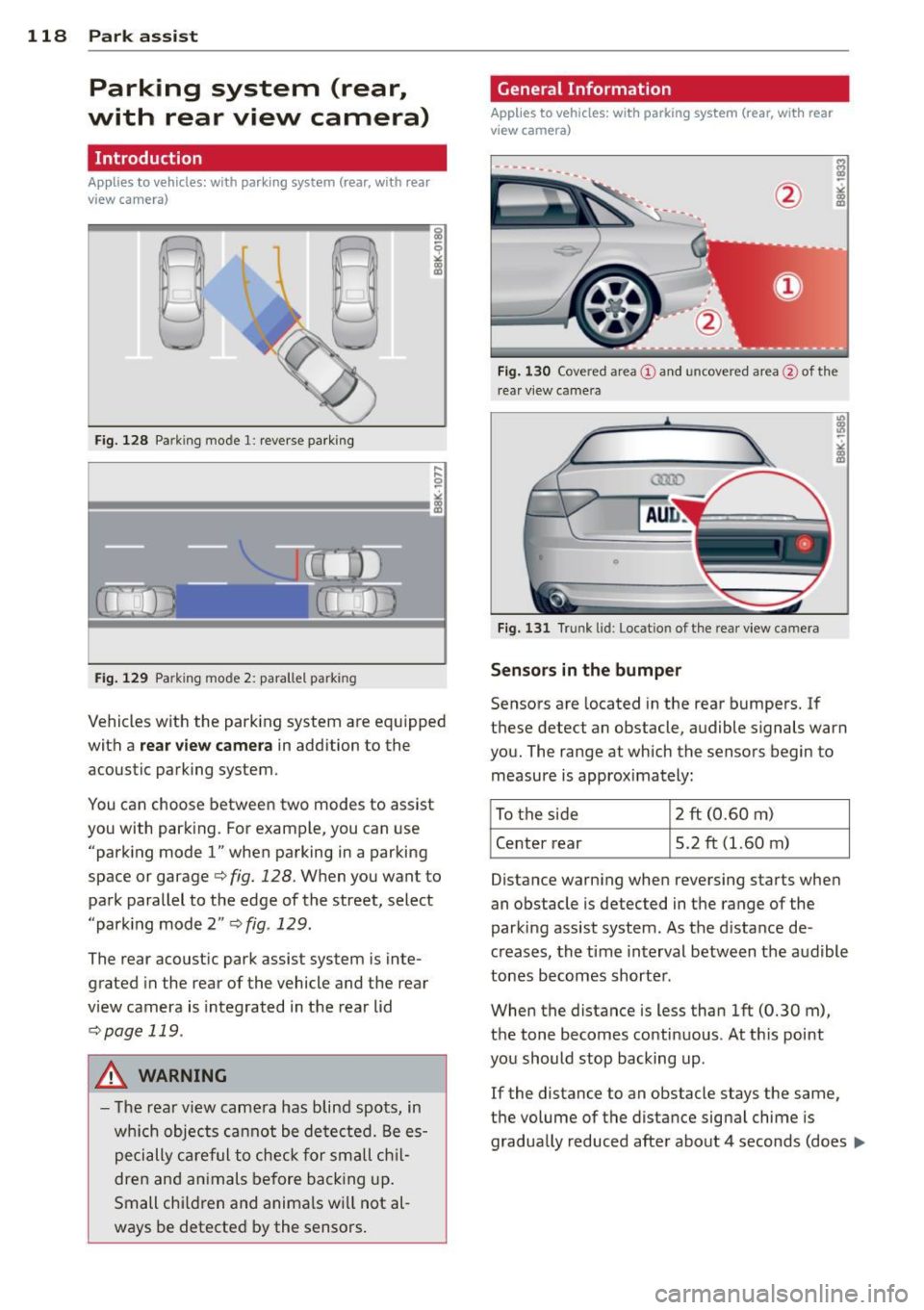
Fig. 128 Pa rking mode 1: reverse parking
Fig. 129 Parking mode 2: parallel park ing
Vehicles with the park ing system are equipped
with a
rear view camera in addition to the
acoustic parking system.
You can choose between two modes to assist
you with park ing. For example, you can use
"parking mode
l" when parking in a parking
space or garage
c> fig. 128. When you want to
park parallel to the edge of the street, select
"park ing mode 2"
c> fig . 129.
The rear acoustic park assist system is inte
grated in the rear of the vehicle and the rear
view camera is integrated in the rear lid
c>page 119 .
A WARNING
-The rear view camera has blind spots, in
wh ich objects cannot be detected. Be es
pecially careful to check for small chil
dren and animals before backing up.
Small chi ldren and animals wi ll not al
ways be detected by the sensors.
General Information
Applies to vehicles: with parking system (rear, with rear
view camera)
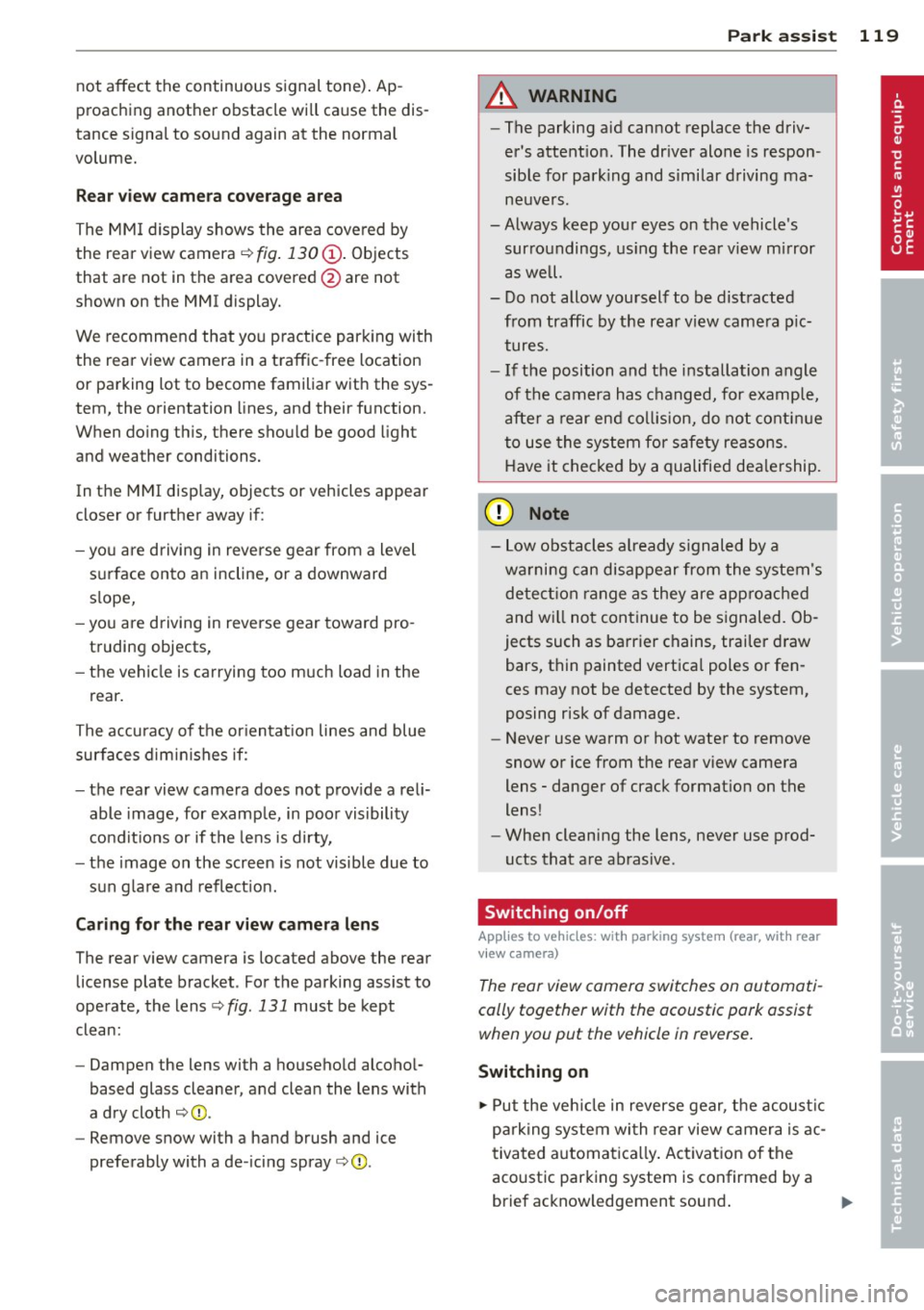
F ig . 130 Covered area@and uncove red area @of th e
r ea r view came ra
0
Fig. 131 Trunk lid: Locat io n of the rear view ca mera
Sensors in the bumper
Sensors are located in the rear bumpers. If
these detect an obstacle, audible signals warn
you. The range at which the sensors begin to measure is approximately:
To the side 2 ft
(0.60
m)
Center rear 5.2 ft (1.60 m)
Distance warning when reversing starts when
an obstacle is detected in the range of the
parking assist system . As the d istance de
creases, the time interval between the audible
tones becomes shorter .
When the distance is less than 1ft (0.30 m),
the tone becomes continuous . At this point
you should stop backing up .
If the distance to an obstacle stays the same,
the volume of the distance signal chime is
gradually reduced after about 4 seconds (does ..,.
Page 121 of 296
not affect the continuous signal tone). Ap
proaching another obstacle will cause the dis
tance signa l to sound again at the normal
volume.
R ear view came ra co verage area
The MM I d isplay shows the area covered by
the rear view camera¢
fig . 130 (i) . Objects
that are not in the area covered @are not
shown on the MMI display.
We recommend that you p ractice parking with
the rear view camera in a traffic -free location
or parking lot to become familiar with the sys
tem, the orientation lines, and their function.
When doing th is, there shou ld be good light
and weather conditions.
In t he MMI disp lay, objects or vehicles appear
closer or further away if:
- yo u are driving in reverse gear from a level
surface onto an incline, or a downward
s lope,
- you are driving in reverse gear toward pro
truding objects,
- the vehicle is carrying too much load in the
rear .
The accuracy of the or ientat ion lines and blue
surfaces d imin ishes if:
- the rear view camera does not prov ide a reli
able image, for examp le, in poor visibility
condit ions or if the lens is dirty,
- the image on the screen is not visible due to
sun g lare and reflect ion.
Caring for the rear view came ra lens
The rear view camera is located above the rear
license plate bracket . Fo r the parking assist to
operate, the lens
¢ fig. 131 must be kept
clean:
- Dampen the lens with a household alcoho l
based glass cleaner, and clean the lens with
a dry cloth ¢
CD.
- Remove snow with a hand brush and ice
preferably with a de -icing spray ¢(D .
Park a ssis t 119
A WARNING
- The parking aid cannot replace the driv
er's attent ion. The dr iver alone is respon
sible for park ing and similar driving ma
neuvers .
-Always keep your eyes on the vehicle 's
surroundings, us ing the rea r view m irror
as well.
- Do not allow yourself to be dist racted
from traffic by the rear view camera p ic
tures.
- If the position and the installation angle
of the camera has changed, for examp le,
after a rear end collision, do not conti nue
to use the system for s afety re asons .
H ave it checked by a qualified dea le rship.
CJ) Note
- Low obstacles a lready s ignaled by a
wa rning can disappear from the system's
detect ion range as they are app ro ached
and w ill not continue to be signaled. Ob
jects such as barrier chains, trailer d raw
bars, thin painted vertica l poles or fen
ces may not be detected by the system,
posing risk of damage.
- Never use warm or hot water to remove
snow or ice from the rear view camera
lens -danger of crack format ion on the
lens!
- When cleaning the lens, never use prod
ucts that are abrasive.
Switching on/off
App lies to vehicles: wit h parking system (rear, wit h rear
v iew camera)
The rear view camera switches on automati
cally together with the acoustic pork assist when you put the vehicle in reverse.
Switching on
.,. Put the ve hicle in reverse gear, the acoust ic
parking system wi th rear view camera is ac
tivated a utomatica lly. Activation of the
acoust ic parking system is confirmed by a
brief acknowledgement sound . ..,_