mirror AUDI S4 2014 Owners Manual
[x] Cancel search | Manufacturer: AUDI, Model Year: 2014, Model line: S4, Model: AUDI S4 2014Pages: 296, PDF Size: 73.56 MB
Page 39 of 296
-You cannot open the doors or the rear lid
from the outside (increased security, for ex
amp le when yo u are stopped at a red light).
- The diodes in the power loc king switc h illu
minate when a ll the doors are closed and
l ocked.
- Front doors: you can un lock and open the
doors from the ins ide by p ulling on the door
hand le.
- Rea r doors: p ull the door handle once to re
lease the lock. Pull the hand le again to open
the door.
- If you have a crash and the airbag is activat
ed, the doors automatically un lock.
A WARNING
- The power locking sw itch works w ith the
ignition off and automatically locks the
entire vehicle when it is actua ted .
- On a vehicle locked from the outs ide the
power locking system switch is inopera
t ive.
- Locked doors make it more diffic ult for
eme rg ency workers to get into th e vehi
cle, w hich puts lives at risk . Do not leave
anyone behi nd in the ve hicle, espe cially
ch ildren.
(D Tips
Your vehicle is locked automatically at a
speed of
9 mph (15 km/h) (Au to Lock)
~ page 32. You ca n unl ock the vehicle
a g ai n using the opening f un ction in the
power locking sys tem swit ch ~ -
Setting power locking
In the radio/MM !*, you can se t which doors
t he central locking system will unlo ck .
.,. Se lect:
I CARI f u nct ion butto n > Central lock
ing .
Or
.,. Se lect:
~ I C-A-R~I fu nct io n bu tton > Car systems *
co ntrol b utton > Vehicle settings > (Central
locking)*.
Single door unlocking /Unlock door s* -
you
c a n specify whi ch door s unl ock when yo u open
the veh icle .
Opening and clo sin g 37
-Select ing off / All and p ressing the Iii button
on t he remote contro l key unlocks the entire
veh icle.
- Selecting
on /Driver and pressing the Iii but
ton on the remote control key once un locks
only the driver's door. In vehicles with a con
ven ience key*, only the door whose handle
you pull w ill unlock. If you press the
Iii but
ton tw ice, the entire vehicle will u nlock . If
you press the [@] button, t he entire ve hicle
w ill always lock .
Luggage comp. lock/ Lock exterior trunk han
dl e -
If you select On , you can no longer ope n
the luggage compartment using the rea r lid
hand le
~ page 39, fig. 2 7. In this case, the
r ear lid can be opened with t he
l=I bu tton on
th e maste r key¢ page 35, fig. 22 or with the
l= I* button in the d river's doo r¢ page 40,
fig .
29 .
Fold mirrors * if you se lec t On , the outs ide
mirro rs will fo ld in au tomati cally when yo u
press the
Iii button on the remote cont ro l key
~ page 50.
Tone when locking -if you selec t On, a to ne
will soun d when yo u lo ck t he vehicle.
Auto Lock /Lock when driving -if you selec t
On, th e e nti re ve hicl e w ill lock automat ically
whe n the speed reaches
9 m ph (1 5 km /h).
Page 52 of 296
50 Clear vis ion
Interior lights
Front /rear interior lights
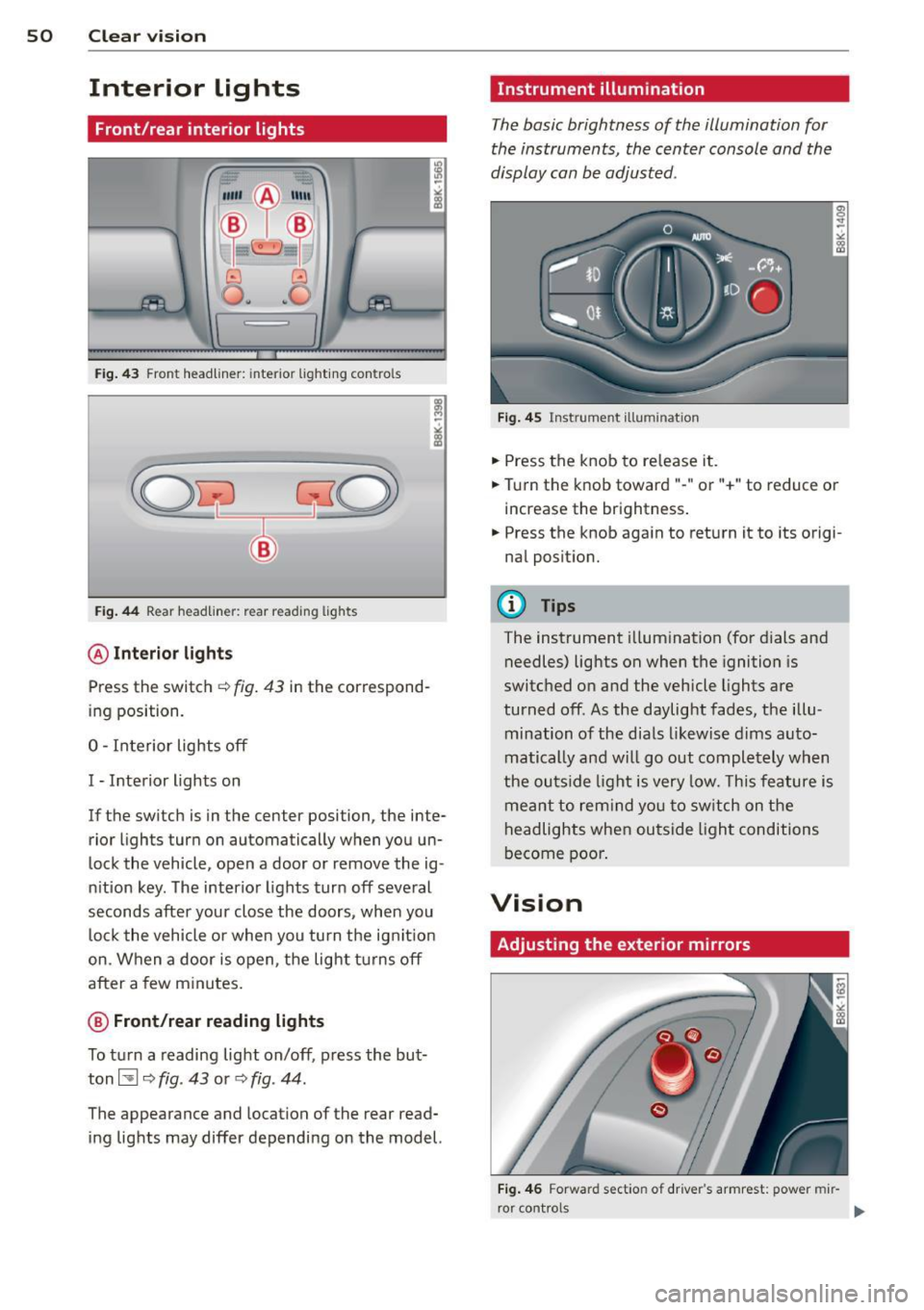
Fig . 43 Front headliner: inte rior lighting controls
Fig. 44 Rear headliner: rear reading lights
@Interio r ligh ts
Press the switch ~ fig. 43 in the correspond
ing position.
0 -Interior lights off
I -Interior lights on
If the switch is in the center position, the inte
rior l ights turn on automatically when you un
lock the vehicle, open a door or remove the ig
n ition key. The interior lights turn off several
seconds after your close the doors , when you
lock the vehicle or when you turn the ign it ion
on. When a door is open, the light tu rns off
after a few minutes.
@ Fr ont /rear r eading lights
To turn a reading light on/off, press the but
ton~
c::> fig. 43 or c::> fig. 44.
The appearance and location of the rear read
ing lights may differ depending on the model.
Instrument illumination
The basic brightness of the illumination for
the instruments, the center console and the
display can be adjusted .
Fig . 45 Inst rume nt illu mination
.,. Press the knob to release it .
.,. Turn the knob toward"-" or"+" to reduce or
increase the brightness .
.,. Press the knob again to return it to its origi
nal posit ion.
(!') Tips
The instrument i llumination (for dials and
needles) lights on when the ignition is
switched on and the vehicle lights are
turned off . As the daylight fades, the illu
mination of the dia ls likewise dims auto
matically and wi ll go out completely when
the ou tside light is very low. This feature is
meant to rem ind you to sw itch on the
headlights when ou tside light conditions
become poor .
Vision
Adjusting the exterior mirrors
Fig . 4 6 Forward section of driver's a rmrest: power mir
r or controls
Page 53 of 296
Turn the knob to the desired position:
Q/ P -In this position , you can adjust the
driver's and front passenger's exterior mirrors by turning the knob in the desired direction.
(ijjl -The mirrors are heated depending on the
outside temperature.
8 -The exterior mirrors fold in*. You can ad
just whether or not the mirrors fold in auto
matically when locking the vehicle using the
radio/MM I*¢
page 3 7.
Passenger exterior mirror tilt function*
To help you see the curb when backing into a
parking space, the surface of the mirror tilts
slightly . The knob must be in the P position
for this to happen .
You can adjust the tilted mirror surface by
turning the knob in the desired direction .
When you move out of reverse and into anoth
er gear, the new mirror position is stored and
assigned to the key you are using.
T he mirror goes back into its original position
once you drive forward faster than 9 mph (15 km/h) or switch the ignition off .
_& WARNING
Curved mirror surfaces (convex or spheri
cal*) increase your field of view. Remem
ber that vehicles or other objects will ap
pear smaller and farther away than when
seen in a flat mirror. If you use this mirror
to estimate distances of following vehicles
when changing lanes, you could estimate
incorrectly and cause an accident .
(D Note
-If the mirror housing is moved uninten
tionally (for example, while parking your
vehicle), then you must first fold the mir ror electrically. Do not readjust the mir
ror housing manually . You could damage
the motor which controls the mirror .
- If you wash the vehicle in an automatic
car wash, you must fold the exterior m ir
rors in to reduce the risk of damage to
the mirrors. Never fold power folding ex-
.
Clear vision 51
terior mirrors* by hand. Only fold them
in and out using the power controls.
a) Tips
- The exterior mirror sett ings are stored
with the memory function*
~ page 62.
-If there should be a malfunction in the
electrical system, you can still adjust the
exterior mirrors by pressing the edge of
the mirror.
Dimming the mirrors
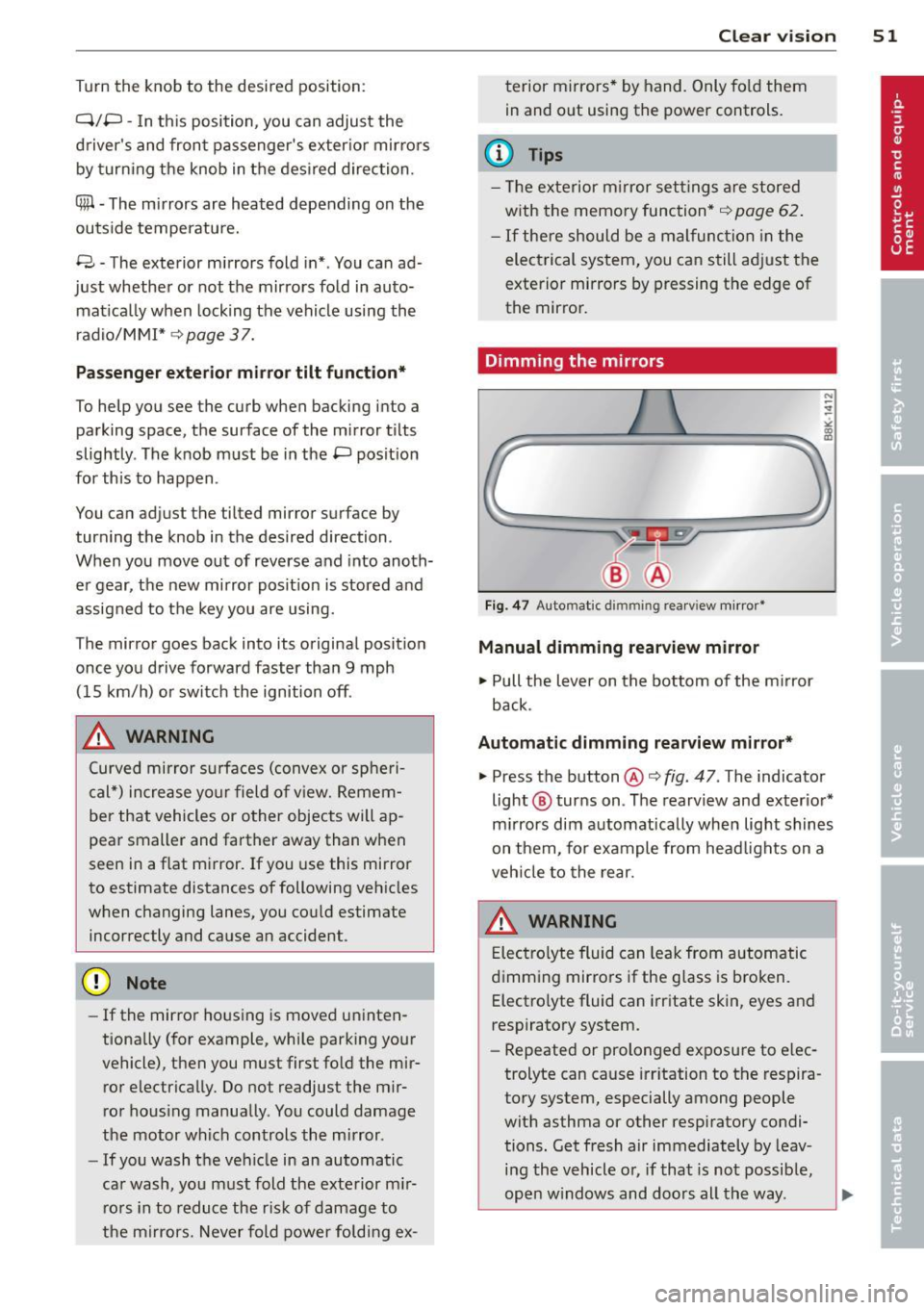
Fig. 47 Auto mat ic dimmin g rearv iew mirror •
Manual dimming rearview mirror
11>-Pull the lever on the bottom of the mirror
back.
Automatic dimming rearview mirror*
.,. Press the button@¢ fig. 47 . The indicator
light @ turns on . The rearview and exterior*
mirrors dim automatically when light shines
on them, for example from headlights on a
vehicle to the rear.
A WARNING
Electrolyte fluid can leak from automatic
dimming mirrors if the glass is broken .
Electrolyte fluid can irritate skin, eyes and
respiratory system .
- Repeated or prolonged exposure to elec
trolyte can cause irritation to the respira
tory system, especially among people
with asthma or other respiratory condi
tions. Get fresh air immediately by leav
ing the vehicle or, if that is not possible,
open windows and doors all the way. .,..
Page 54 of 296
52 Clear vision
-If electrolyte gets into the eyes, flush
them thoroughly with large amounts of
clean water for at least 15 minutes;
medical attention is recommended.
- If electrolyte contacts skin, flush affect
ed area with clean water for at least 15
minutes and then wash affected area
with soap and water; medical attention
is recommended. Thoroughly wash af
fected clothing and shoes before reuse.
-If swallowed and person is conscious,
rinse mouth with water for at least 15
minutes. Do not induce vomiting unless
instructed to do so by medical professio
nal. Get medical attention immediately.
Liquid electrolyte leaking from broken mir
ror glass will damage any plastic surfaces
it comes in contact with. Clean up spilled
electrolyte immediately with clean water
and a sponge.
(D} Tips
- Switching off the dimming function of
the inside rear view mirror also deacti
vates the automatic dimming function of
the exterior mirrors.
- Automatic dimming for the mirror only
operates properly if the sun shade* for
the rear window is not in use or the light
strik ing the inside mirror is not hindered
by other objects.
- The automatic dimming mirrors do not
dim when the interior lighting is turned
on or the reverse gear is selected .
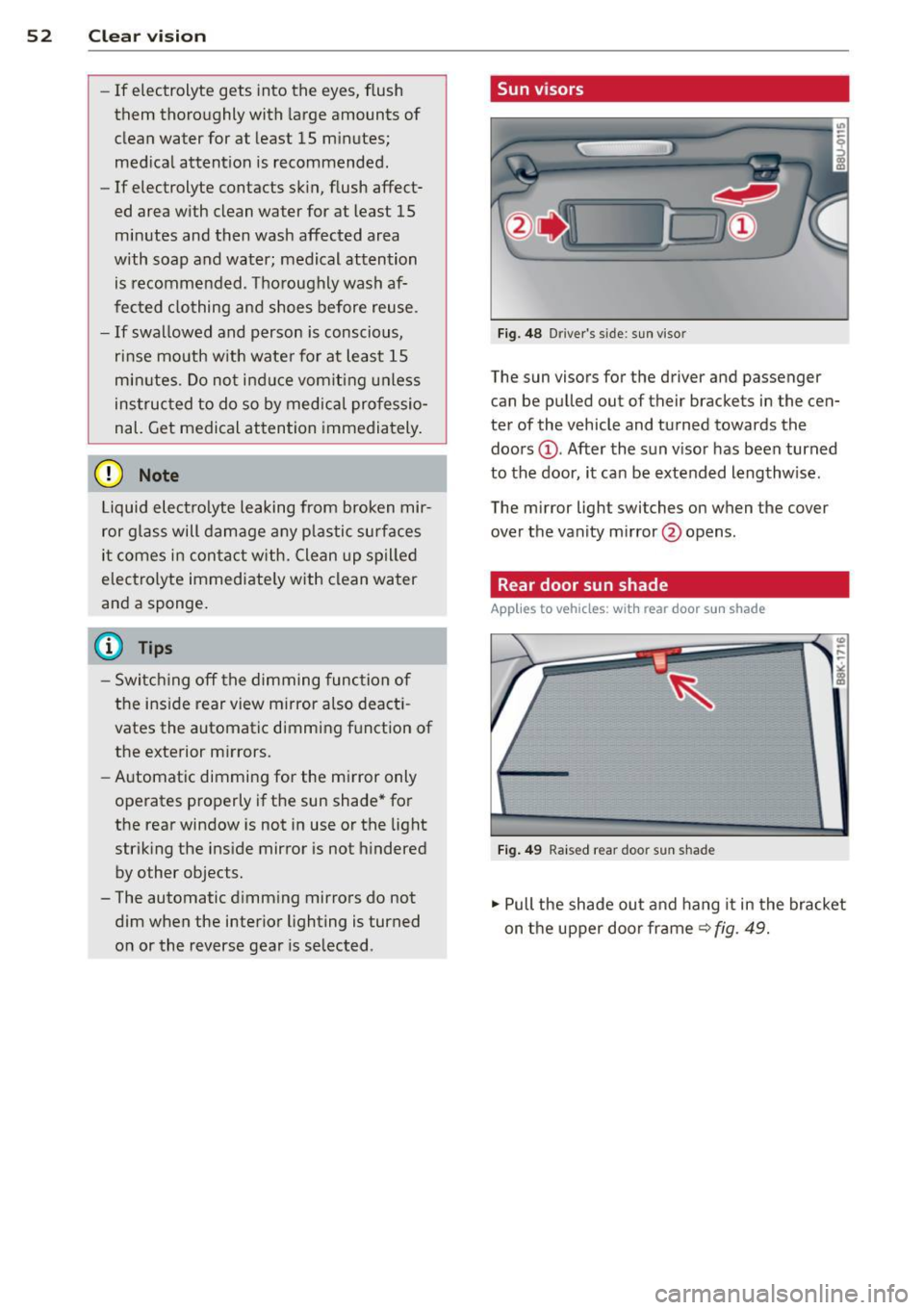
, Sun visors
Fig. 48 Driver's side; sun visor
The sun visors for the driver and passenger
can be pulled out of their brackets in the cen
ter of the vehicle and turned towards the
doors @. After the sun visor has been turned
to the door, it can be extended lengthw ise.
The mirror light switches on when the cover
over the vanity mirror @opens.
Rear door sun shade
Applies to vehicles: with rear door sun shade
Fig. 49 Raised rear door sun shad e
.,. Pull the shade out and hang it in the bracket
on the upper door frame~
fig. 49.
Page 58 of 296
56 Clear vision
Replacing the rear wiper blade
Applies to vehicles: with rear wiper
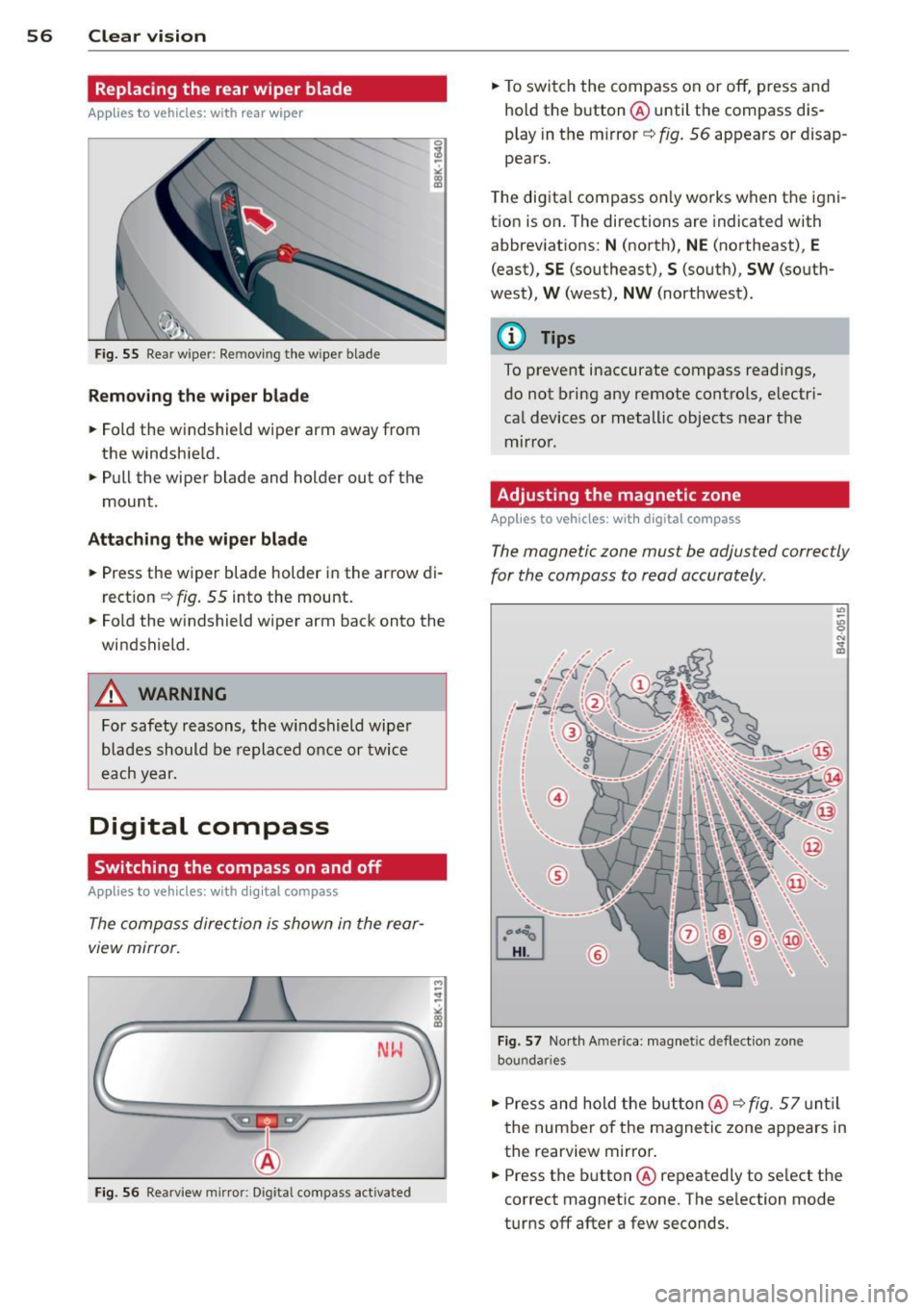
Fig. 55 Rear w ipe r: Re movi ng the w ipe r blade
Removing the wiper blade
.. Fold the windshield wiper arm away from
the windshie ld .
.. Pull the wiper blade and holder out of the
mount .
Attaching the wiper blade
.. Press the wiper blade holder in the arrow di
rection
~ fig. 55 into the mount .
.. Fold the w indshield wiper arm back onto the
windshield .
A WARNING
For safety reasons, the windshield wiper
blades should be replaced once or twice
each year.
Digital compass
Switching the compass on and off
Applies to vehicles: with digital compass
The compass direction is shown in the rear
view mirror.
-
M ~ :!
"' L;;.=== =====~ll!
Fig. 56 Rearview mirror: Dig ital compass activated
.. To switch the compass on or off, press and
hold the button @ until the compass dis
play in the mirror ~
fig. 56 appears or disap
pears.
T he digital compass only works when the igni
tion is on . The directions are indicated with
abbreviations:
N (north), NE (northeast), E
(east), SE (southeast), S (south), SW (south
west),
W (west), NW (northwest) .
@ Tips
To prevent inaccurate compass readings,
do not bring any remote controls, electri
cal devices or metallic objects near the
mirror .
Adjusting the magnetic zone
Applies to vehicles: with digita l compass
The magnetic zone must be adjusted correctly
for the compass to read accurately .
@
Fig. 57 North A merica: magnet ic deflection zone
bou nda ries
.. Press and hold the button @ ~ fig. 57 until
the number of the magnetic zone appears in
the rearview mirror .
.. Press the button @ repeatedly to select the
correct magnetic zone . The selection mode
turns off after a few seconds.
Page 59 of 296
Calibrating the compass
Appl ies to vehicles: with digital compass
You must recalibrate the compass if it does
not display the correct direction .
.. Press and ho ld the button @unt il a C ap
pears in the rearview mirror .
.,. Drive in a c ircle at about 6 mph (10 km/h)
until a direction is d isp layed in the rearview
mirror .
A WARNING
- To avoid endanger ing yourself and other
dr ivers, calibrate the compass in an area
where the re is no traffic.
- T he dig ita l compass is to be used as a di
rect ional aid only. Even though you may
want to look at it wh ile you are driving,
yo u must still pay attention to traffic,
road and weather cond itions as well as
other poss ible hazards.
Clear vis ion 5 7
Page 64 of 296
62 Seats and storage
r:!vfig. 62. Pull the head restraint out of the
backrest at the same time¢
,A.
Installing the head restraints
.. Slide the posts on the head rest raint down
into the guides until you feel the posts click
into place.
.. Press the button @
<::?v fig. 62 and slide the
head restraint all the way down. You shou ld
not be able to pull the head restraint out of
the backrest.
So that the driver can have a better view to
the rear, the head restraints shou ld be pushed
down complete ly when the rear seats are not
occupied.
A WARNING
- Read and heed all WARNINGS
r:!v page 132, Proper adjustment of head
restraints.
- Only remove the rear seat head restraints
when necessary in order to install a child
seat¢
page 175. Install the head re
straint again immediately once the child
seat is removed. Driving without head re
straints or with head restraints that are
not properly adjusted increases the risk
of serious or fata l neck injury dramatical
ly.
(D Tips
Correctly adjusted head restraints and
safety belts are an extremely effective
combination of safety features .
Seat memory
Description
Applies to vehicles: with memory function
The memory function allo ws you to quickly
and easily store and reca ll personal seating
p ro files for the driver. The memory function is
ope rated through the master key and the
memory buttons in the driver's door.
The driver's seating profile is stored and as
signed to the master key each time the vehicle
is locked. When you open the door, the seat profile
is automatically recalled. If two peop le
use one vehicle, it is recommended that each
person always uses "their own" master key.
Up to 2 seat profiles can be stored in the
memory buttons in the drive r's door. Once
they are stored, these seat profiles can be se
l ected at any time .
In addition to the driver's seat settings, you
can a lso store and access the exterior mirror
adjustment settings* using the remote con
trol key or memory button.
Remote control key
Applies to vehicles: wit h seat memory
To assign the driver's seat settings to the re
mote control key when locking the veh icle, the
function must be activated in the rad io or
MMI*
.. Select:
!CARI function button > Seat adjust
ment > Driver's seat > Remote control key
>
on.Or
.. Select : !CARI function button> Car systems*
cont ro l button > Vehicle settings > Seats >
Driver's seat> Remote control key> On .
@ Tips
If you do not want another driver's set
tings to be assigned to the remote key,
switch off the memory function using the
radio or
MMI* or the IOFFI button
¢page 62.
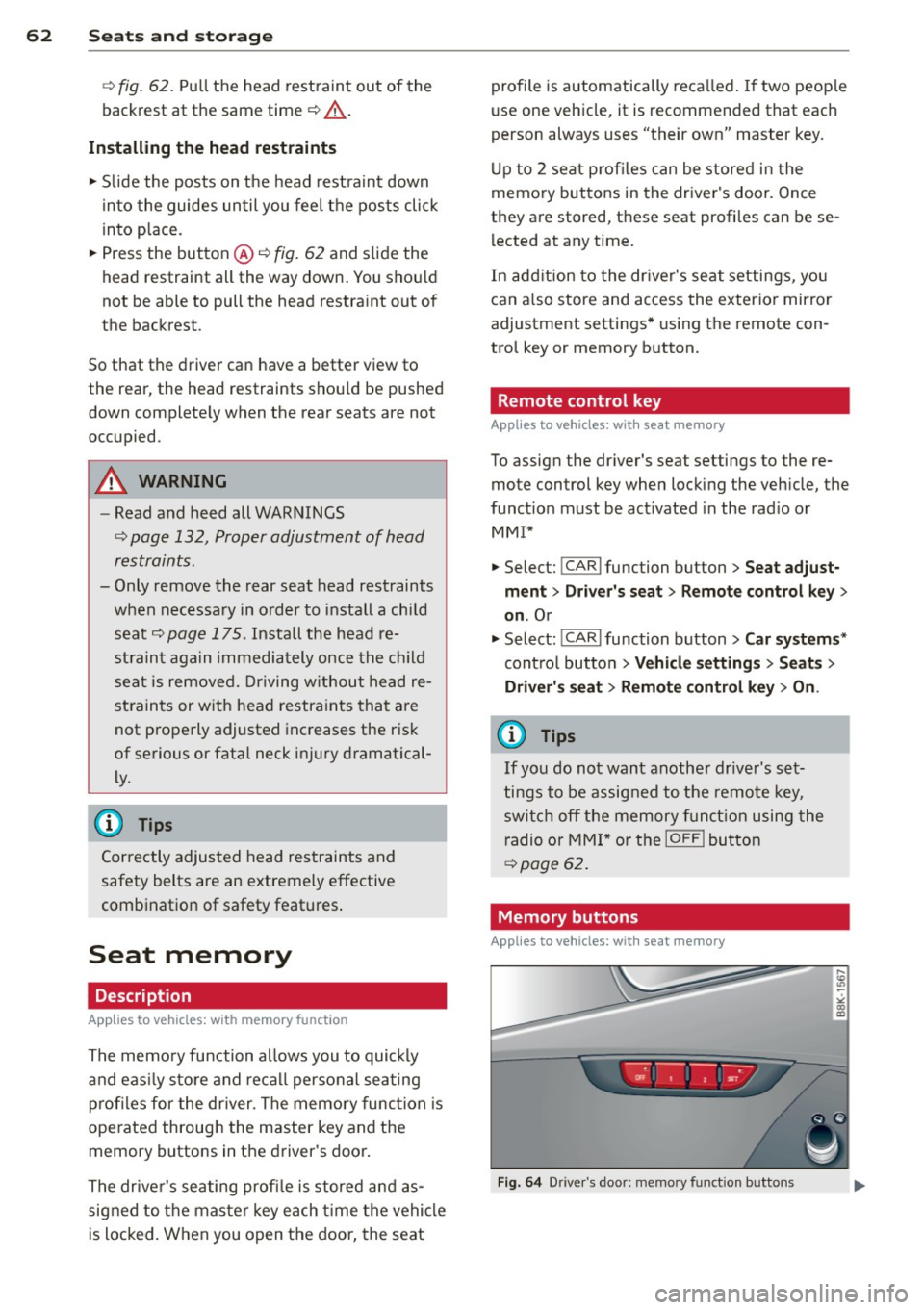
· Memory buttons
Appl ies to vehicles: wit h seat memory
Fig. 64 Driver's door: memory function buttons
Page 68 of 296
66 Seat s a nd s tor ag e
Addit ional storage
There are a variety of storage compa rtments
and fasteners in var ious places in the vehicle.
- In the roof headliner above the rearview
mirror .
- On the back of the front seat . The com pa rt
ment can hold a maximum weight of 1 kg.
- On the left and right of the luggage com
partment, behind the s ide trim.
- Garment hooks on the pillars in the rear of
the vehicle .
A WARNING
-When driving, do not leave any hard ob
jects on the rear wi ndow shelf or allow
your pet to s it on the shelf. They could
become a hazard for ve hicle occ upan ts in
the event of sudden braking or a crash.
- Always remove objects from the instru
ment pane l. Any items no t stored could
slide around inside the vehicle while driv
ing or when accelerating or when apply
ing the brakes or when driving around a
corner.
- When you are driving make sure that
anything you may have placed in the cen
ter console or other storage locations cannot fall out into the footwells. In case
of sudden braking you would not be able
to brake or accelerate .
- Any articles of cloth ing that you have
hung up must not interfere with the driv
er's v iew. The coat hooks are designed
only for lightweight clothing. Never hang
any clothing wit h hard, po inted or heavy
objects in the pockets on the coat hooks .
During sudden braking or in an accident -
especially if the airbag is deployed -
these objects could injure any passen
gers inside the vehicle .
- To reduce the risk of persona l injury in an
acc ident or sudden stop, always keep the
glove compartment closed while dr iving.
- Read and fo llow all WARNINGS
i=> page 163, Important safety instruc
tions on the side airbag system.
- Hang clothes in such a way that they do
not impa ir the driver's vision.
- The coat hooks must on ly be used for
lightweight clothing. Do not leave any
heavy or sharp edged objects in the pock
ets which may interfere with the s ide cur
tain airbag deployment and can cause pe rsonal injury in a crash.
- Do not use coat hangers for hanging
cloth ing o n the coat hooks as t his can in
terfere with proper deployment of the
side curta in a irbags in an a ccident.
- Do not hang heavy objects on the coat
hooks , as they could cause personal in
jury in a sudden stop.
- Always keep the compa rtment above the
rea rv iew mirror closed while d riving to
re duc e the risk of i nju ry in the event of
sudden b raking m aneuvers or a collision.
(£} Note
Objects located on the rear shelf that rub
against the rea r window could damage the
hea ting wi res for the rear window defog"
ger.
(D Tips
-A vent slot is located between the shelf
and the rear w indow. Do not bloc k the
vent wi th any items you may place o n the
rear window she lf.
- Do not place b ulky items on the rear win
dow shelf as they co uld restrict or block
the drive r's vision in the rear view mirror.
Page 111 of 296
Audi side assist Lane change assistant
Description
Applies to vehicles: with Audi side assist
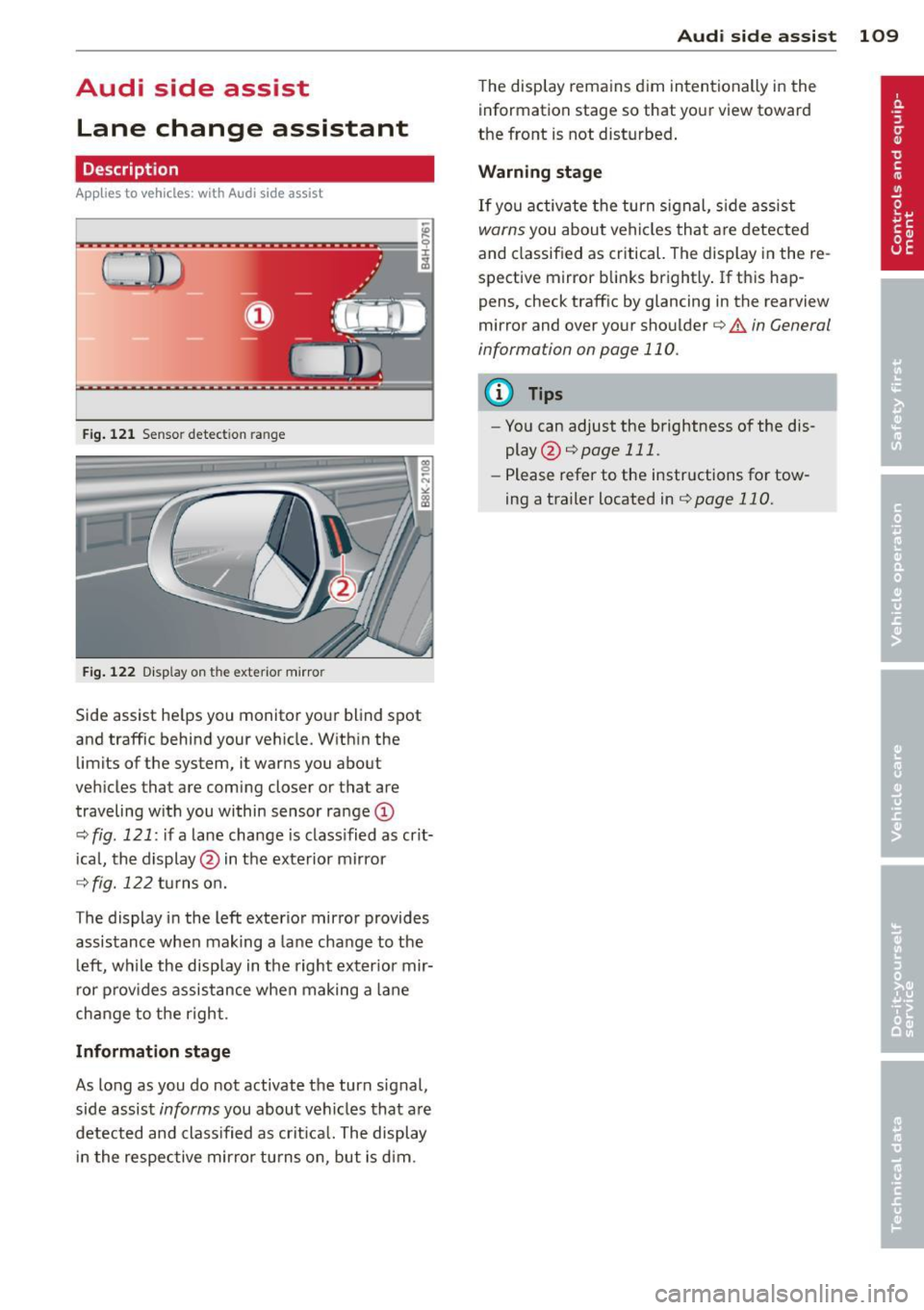
Fig . 12 1 Sensor dete ction ra n ge
Fig . 122 Disp la y on t he e xterio r mirro r
Side assist he lps you mon itor your blind spot
and traffic behind you r veh icle. W ith in the
limits of the system, it warns you about
vehicles that are coming closer or tha t are
traveling w ith you within sensor ra nge
(D
o:;, fig . 121: if a lane change is class ified as crit
ical, the display @ in the exterior mirror
o:;, fig. 122 turns on.
T he display in the left exterior mirror provides
assistance when making a lane change to the l eft, while the display in the right exter ior mir
r or p rov ides assistance when making a lane
change to the right .
Information stage
As long as you do not activate the turn signal,
side assist
informs you about vehicles that are
detected and class ified as crit ical. The display
i n the respective mirror turns o n, but is d im .
Aud i side assist 109
The display remains d im intentionally in the
information stage so that your view toward
the front is not disturbed .
Warning st age
If you activate the turn signal, s ide assist
warns you about veh icles that are detected
and classified as critical. The display in the re
sp ective mirror blinks brightly . If this hap
pens, check traff ic by glanc ing in the rearview
mirror and over your shoulder ¢
A in General
information on page 110 .
@ Tips
-You can adjust the brightness of the dis
play @¢
page 111 .
-Please refer to the instructions for tow
ing a trailer located in
¢page 110.
Page 112 of 296
110 Audi side assist
General information
App lies to vehicles: with Audi side assist
®
©
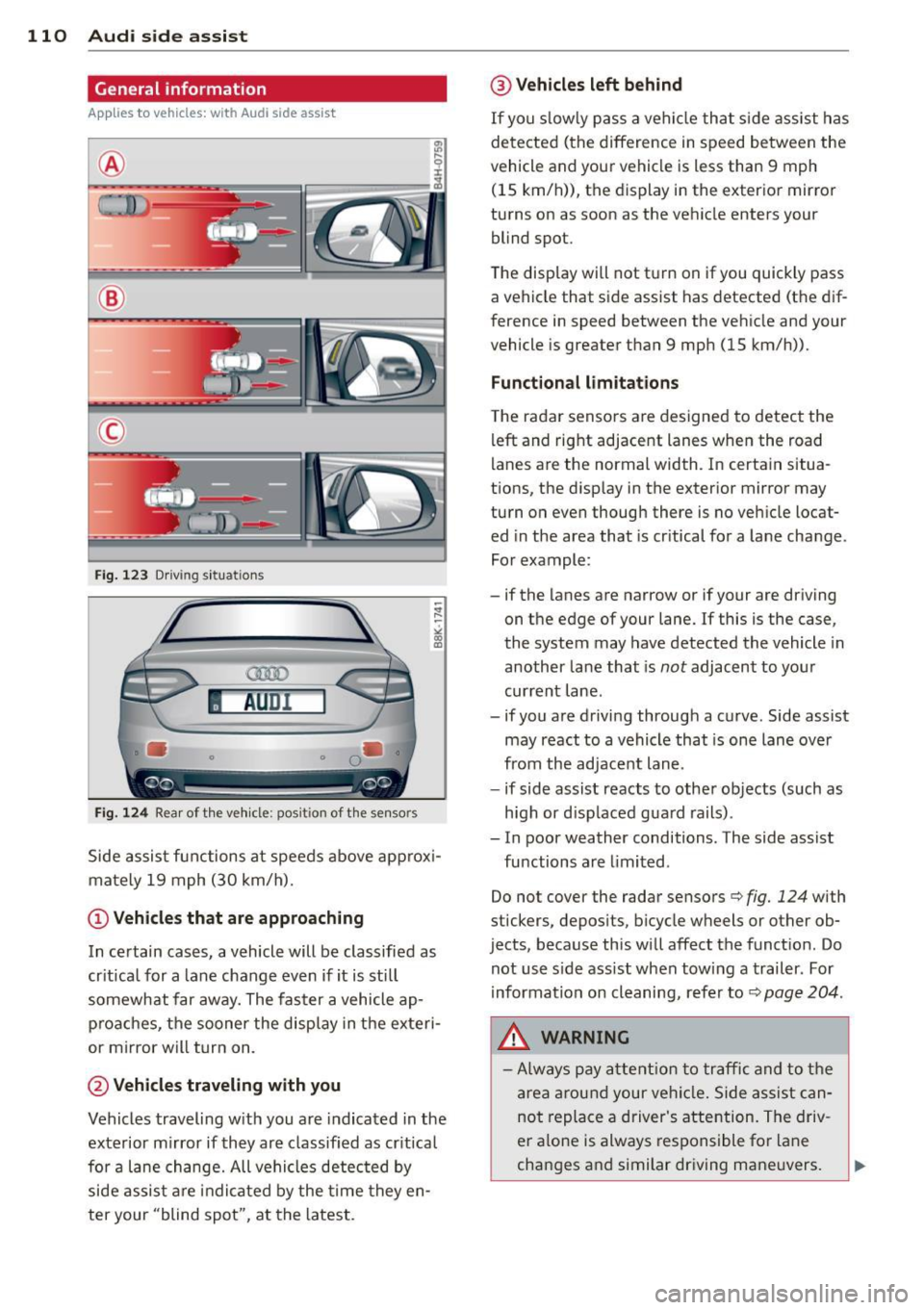
Fig. 12 3 Driving s it u at ions
AU Dr- l
• •
Fig . 124 Rear of th e ve hicle: pos it io n of t he se nso rs
Side assis t fu nctions at speeds above ap prox i
ma tely 19 mph (30 km/h).
(D V ehicles that are approaching
In certain cases, a vehicle will be classified as
cr itical for a lane change
even if it is still
somewhat far away. The fas ter a vehicle ap
p ro aches, the sooner the disp lay in the exteri
or m irror will t urn on.
@ Vehicles traveling with you
Vehicles traveling w ith you are indicated in the
exterior m irror if they are classified as cr it ical
for a lane change. All vehicles detec ted by
side assis t are in dicated by the time they en
ter your "blind spot", at the latest.
@ Vehicles left behind
If you s low ly pass a ve hicl e tha t sid e ass ist has
dete cted ( the difference in s peed between the
vehicle and you r vehicle is less than 9 mph
(15 km/h)), the display in the exter io r mirro r
turns on as soon as the vehicle enters your blind spot.
The disp lay wi ll not t urn on if you quickly pass
a vehicle that s ide assist has detected (t he d if
f erence in speed between the ve hicle and your
vehicle is greater than 9 mph (15 km/h)).
Functional limitations
T he radar senso rs are des igned to detect the
left and right adjacent lanes whe n the road
l anes a re the normal width. In certain situa
t ions, the d isp lay in the exterior mirror may
turn on even though there is no ve hicle locat
ed in the area that is cr itical fo r a lane cha nge.
For example:
- if the lanes are narrow or if your are driving on the edge of your lane. If this is the case,
the system may have detected the vehicle in
another la ne that is
not adjacent to your
cur rent lane .
- if you a re driving through a c urve . Side assis t
may react to a vehicle that is one lane ove r
from the ad jacent lane .
- if side assist reacts to other objects (such as
high or d isp laced gua rd rails) .
- In poor weather conditions. The side assist fu nctions are limited .
Do not
cover the radar sensors c::> fig. 124 with
stickers, depos its, bicycle wheels or other ob
jects , because this will affect the funct ion. Do
not use s ide ass ist when tow ing a trail er. For
information on cleaning, refe r to
c::> page 204 .
&_ WARNING
-Always pay a tten tion t o traffic and to the
ar ea around your ve hicl e. Side a ssist can
no t repla ce a driver's attention. The driv
er a lone is always respons ible fo r lane
cha nges a nd similar driving mane uvers.