ECO mode AUDI S4 2016 User Guide
[x] Cancel search | Manufacturer: AUDI, Model Year: 2016, Model line: S4, Model: AUDI S4 2016Pages: 278, PDF Size: 70.26 MB
Page 59 of 278

,....,
N
0
""' CX) ,....,
I.Cl U"I ,....,
I.Cl ,....,
Removing the wiper blade
• Fold the windshield wiper arm away from the
windshield.
• Pull the wiper blade and holder out of the
mount.
Attaching the wiper blade
• Press the wiper b lade holder in the arrow di rec
t ion
r::!> fig . 57 into the mount .
• Fold the windshield wiper arm back onto the
windshield.
A WARNING
For safety reasons, the windshield wiper
blades should be replaced once or tw ice each
year.
Digital compass
Switching the compass on and off
Applies to vehicles: with digital compass
The compass direction is shown in the rearview
mirror.
F ig . 58 Rea rview mirror: Digita l compass ac tivated
• To switch the compass on or off, press and hold
the button @until the compass display in the
mirror
r::!> fig. 58 appears or disappears.
The digital compass only works when the ignition is on. The directions are indicated with abbrevia
tions :
N (north), NE (northeast), E (east), SE
(southeast) , S (south), SW (southwest), W
(west), NW (northwest) .
Light and Vision
(D Tips
To prevent inaccurate compass readings, do
not bring any remote controls, electrical devi
ces or metallic objects near the mirror.
Adjusting the magnetic zone
Applies to vehicles: with digital compass
The magnetic zone must be adjusted correctly
for the compass to read accurately.
®
Fig. 59 North A meri ca: magnetic deflect io n zone bounda
ries
" Press and hold the button@r::!> fig. 59 until the
number of the magnetic zone appears in the
rearview mirror.
" Press the button @ repeated ly to select the
correct magnetic zone. The selection mode
turns off after a few seconds .
Calibrating the compass
Applies to vehicles: with digital compass
You must recalibrate the compass if it does not
display the correct direction.
" Press and hold the button @until a C appears
in the rearview mirror.
• Dr ive in a circle at about 6 mph (10 km/h) until
a direction is displayed in the rearview mirror. ..,.
57
Page 79 of 278
Warm and cold
Operation
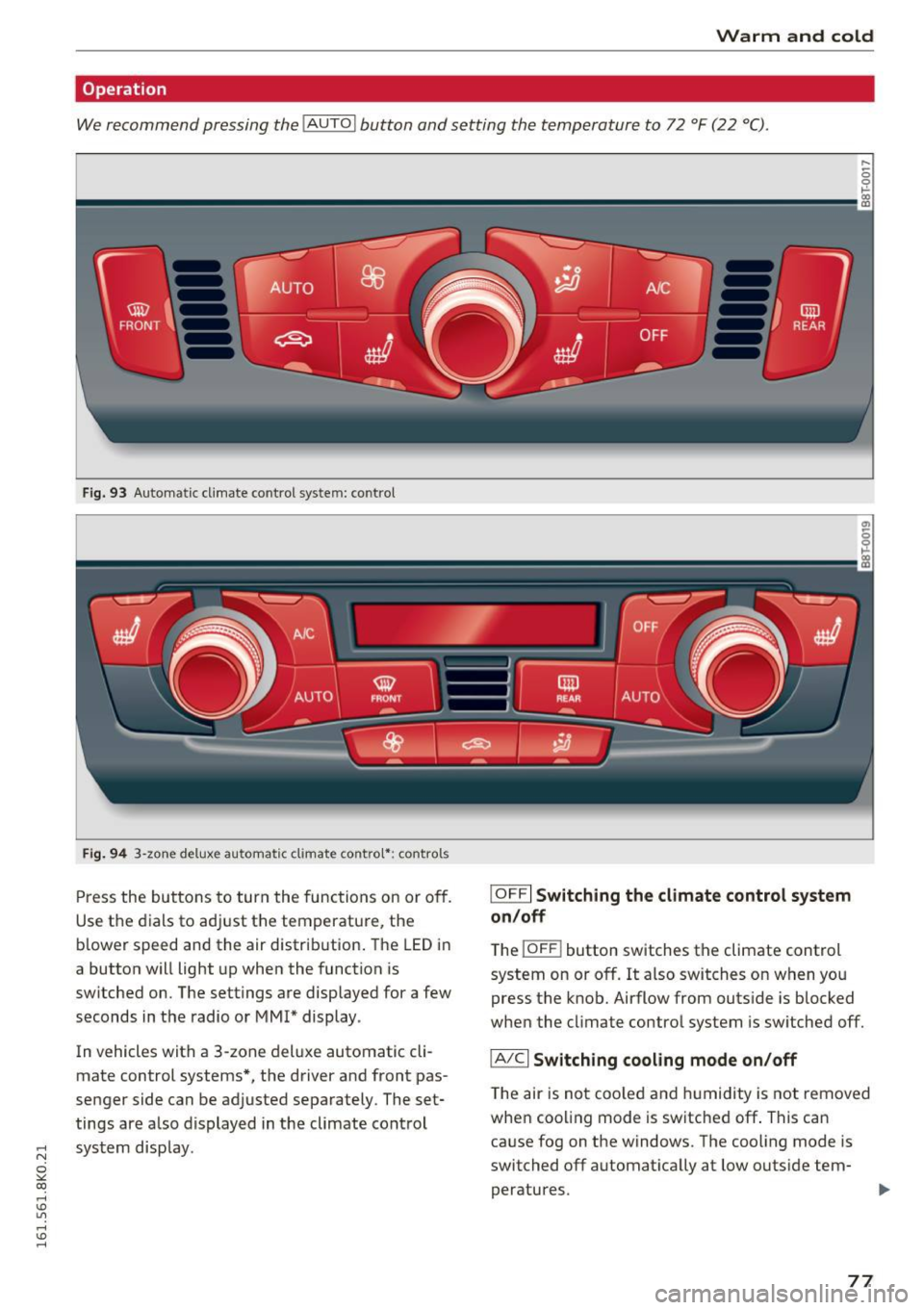
We recommend pressing the !AUTO ! button and setting the temperature to 72 °F (22 °C).
Fig. 93 Automatic climate control system: contro l
Fig. 94 3-zone deluxe automatic climate contro l*: controls
Press the buttons to turn the functions on or off.
Use the dials to adjust the temperature, the
b lower speed and the air distrib ution . The LED in
a button will light up when the function is
switched on. The settings are displayed for a few
seconds in the radio or MM!* display.
In vehicles with a 3-zone deluxe automatic cli
mate control systems*, the driver and front pas
senger side can be adjusted separately. The set
tings are a lso displayed in the climate control
~ system display.
0
""' CX)
rl I.Cl U"I
rl I.Cl rl
I OFFI Switching the climate control system
on/off
T he iOFF i button switches the climate control
system on or off.
It also switches on when you
press the knob. Airflow from outside is blocked
when the cl imate control system is switched off.
IA/C l Switching cooling mode on/off
The air is not coo led and humidity is not removed
when cooling mode is switched off . This can
cause fog on the windows. The cooling mode is
switched off automat ically at low outside tem-
peratures.
IJl,,
77
Page 80 of 278
Warm and cold
1- 1 Swit ch ing recir cu la tion m ode on /off
In recirculation mode, the a ir inside the vehicle is
circu lated and filtered. This prevents the unfil
tered air outside the vehicle from entering the
ve hicle interior. We recommend switching recir
culation mode on when driving through a tunnel
or when sitting in traffic¢.&,.
The
IAUTOI button or l
IAUTO I Switching aut omatic mode on
Automatic mode ma inta ins a constant tempe ra
ture inside the veh icle . Air temperature, airflow
and air distribution are controlled automatically.
Adjusting th e tempe rature
Temperatures between 60 °f (+16 °C) and 84 °f
( + 28 °C) can be set. Outside of this range,
LO or
HI will appear in the cl imate control system dis
p lay. At both of these settings, the climate con
trol system runs continuously at maximum cool
ing or heating power. There is no temperature
regulation.
~ A dj usting the airflow
You can adjust the airf low manually to s uit your
needs. To have the airflow regulated automati
cally, press the
IAU TO I button.
~ Adjusting the air distribution
You can manually select the vents where the air
will flow. To have the a ir dist ribution reg ulated
automatically , press the
IAU TO I button.
QJ Adju sting seat h eating *
Pressing the button switches the seat heat ing on
at the h ighest setting (level 3) . The LEDs indicate
the temperature level. To reduce the tempera
ture, p ress the button aga in. To sw itch the seat
heating off, p ress the butto n repeated ly unt il the
L ED turns off.
After 10 minutes, the seat heating automatically
sw itches from level 3 to level 2.
I @ FRONT I Switch the d efroster on /off
The windsh ield and s ide windows are defrosted
or cleared of condensation as qu ickly as possible .
78
The maximum amount of air flows mainly from
the vents below the windshield . Recirculation
mode switches off. The temperature should be
set to 72 °f (22 °C) or higher. The temperature is
controlled automatically.
The
! AU TOI button switches the defroster off.
lliil R EAR I Switching rear window heater on /
off
The rear window heater only operates when the
engine is running.
It switches off automatically
after a few minutes, depending on the outside
temperature.
To prevent the rear window heater from switch
i ng off automatica lly, press and hold the
loo REARI
button for more than 2 seconds . This remains
stored unti l the ignition is sw itched off.
Air vents
You can open and close the cente r and rear a ir
vents using the thumbwheels. The levers adjust
the direction of the airf low from the vents.
In veh icles with a 3-zone deluxe automatic cli
mate contro l system*, you can adjust the a ir tem
perature in the rear by turning the th umbwheel
toward the red side to make it warmer or toward
the blue side to make it cooler.
A WARNING
- Do not use the rec irculat ion for extended
periods of time. The windows could fog up
since no fresh air can enter the vehicle. If
the windows fog up, press the air rec ircula
tion button again immed iate ly to sw itch off
the air rec irculat io n function o r select de
frost.
- Individua ls w ith redu ced sensit iv ity to pa in
or temperature could develop b urns when
using the seat heating f unction. To red uce
the risk of inj ury, these individuals sho uld
not use seat heating.
(D Note
To avoid damage to the heating elements in
the seats, do no t knee l on the seats o r place
heavy loads on a small area of the seat .
-
Page 89 of 278
Emergency braking
In the event that the conventional brake system
fails or locks.
11-In an emergency, pull the switch @c:> page 85,
fig. 100
and continue to pull it to slow your ve
hicle down with the parking brake.
11-As soon as you release the switch @ or acceler-
ate, the braking process stops.
If you pull the switch @and hold it above a
speed of about
5 mph (8 km/h), the emergency
braking function is initiated. The vehicle is braked
at all four wheels by activating the hydraulic
brake system. The brake performance is similar
to making an eme rgency stop c:>
.&..
In order not to activate the emergency braking by
mistake, an audible warning tone (buzzer)
sounds when the switch @ is pulled. As soon as
the switch @is released, or the accelerator pedal
is depressed, emergency braking stops.
A WARNING
Emergency braking should only be used in an
emergency, when the normal foot brake has
failed or the brake pedal is obstructed. Using the parking brake to perform emergency
braking will slow your vehicle down as if you
had made a full brake application. The laws of
physics cannot be suspended even with ESC
and its associated components (ABS, ASR,
EDS). In corners and when road or weather
conditions are bad, a full brake application
can cause the vehicle to skid or the rear end to
break away- risking an accident.
Speed warning system
Overview
The speed warning system helps you to keep your
driving speed below a set speed limit.
The speed warning system warns if the driver ex
ceeds a previously stored maximum speed. A
;:; warning tone will sound as soon as the vehicle
0 ~ speed exceeds the set speed by about 3 mph
~ (3 km/h). At the same time, a warning symbol Lil ,...., v:, ,....,
Driving
appears in the display. The symbol's appearance
might be different in some models.
The speed warning system has one or two* warn
ing thresholds that function independently of
each other and that have somewhat different
purposes:
Speed warning 1
You can use speed warning 1 to set the maximum
speed while you are driving. This setting will re
main in effect until you turn off the ignition, as
suming that you have not changed or reset the
setting .
The. (USA models) /. (Canada models)
speed wa rning symbol in the warning 1 display
appears when you exceed the maximum speed .
It
goes out when the speed falls below the stored
maximum speed.
The speed warning symbol will also go out if the
speed
exceeds the stored maximum speed by
more than about 2S mph
(40 km/h) for at least
10 seconds. The stored maximum speed is delet
ed.
Setting speed warning 1 c:>
page 88.
Speed warning 2*
Storing warning 2 is recommended if you always
want to be reminded of a certain speed, for ex
ample when you are traveling in a country that
has a general maximum speed limit, or if you do
not want to exceed a specified speed for winter
tires.
The. (USA models) /. (Canada models)
speed warning 2 symbol appears in the display
when you exceed the stored speed limit. Unlike
warning 1, it will not go out until the vehicle
speed drops below the stored speed limit.
Setting speed warning 2
c:>page 88.
(D Tips
Even though your vehicle is equipped with a
speed warning system, you should still watch
the speedometer to make sure you are not
driving faster than the speed limit.
87
Page 90 of 278

Driving
Speed warning 1: setting a speed limit
Warning threshold 1 is set by the I SET I button .
Fig. 1 01 SET button in t he in str ume nt cluster
Storing the maximum spe ed
• Drive at the desired maximum speed.
• Press the
!SE TI but ton in the ins trumen t panel
display ~fig.101 for 1 second .
Resetting the maximum speed
• Drive the vehicle at a speed of at least 3 mph
(5 km/h)
• Press the
-IS-E T-I button for more than 2 seconds .
The . (USA models)
I. (Canada models)
speed warn ing symbol will appear briefly in the
d isp lay when yo u release the
!SE TI button to indi
ca te that the max imum speed has been stored
successfully .
The max imum speed remains stored until it is
changed by pressing the
I S ETI button again brief
ly or unt il it is deleted by a lengthy p ush on the
button.
Speed warning 2: setting a speed limit
Applies to veh icles: w ith tr ip computer
The radio or MMI* control unit is used to set,
change or delete warning threshold
2 .
• Se lect: !CARI funct ion button > In strument
clu ste r
> Spe ed warning . Or
• Se lect : !CARI funct ion button> Car system s*
contro l button > Dri ver a ssist > Speed warnin g.
Wa rning threshold 2 can be set in the speed
range starting from 20 mph to 150 mph (30 km/
h to 240 km/h) . Settings can each be adjusted in
intervals of 5 mph (10 km/h).
88
Cruise control system
Switching on
The cruise control system makes it possible to
drive at a constant speed starting at 20 mph (30
km/h) .
0
f
®l
0
Fig. 102 Co ntrol leve r w it h p ush-but ton
Fig . 103 Disp lay: Selected speed
• Pull the lever to position (D c:> fig . 102 to
switch the system on.
• Drive at the speed to be controlled.
• Press button @to set that speed .
The stored speed and the green symbol
g M 0 ±
~
Q)
~ ci: Q) m
[lj;(IJM4 (US model)/ El (Canadian model) are
shown in the d isplay
c:> fig. 103 . The display may
vary, depending on the type of display in your ve
hicle .
The speed is kept constant by modifying engine power or through an active brake intervention.
A WARNING
- Always pay attention to the traffic around
you when the cruise control is in operation .
You are always respons ible for your speed
and the distance between your veh icle and
other veh icles .
-
Page 92 of 278
Automatic transmission
Automatic transmission Manual transmission
Gearshift lever
A pp lies to veh icles: w ith manu al transmiss ion
The clutch pedal must be depressed all the way
before you can start the engine .
The manual transmission in your Audi is equip
ped with an
interlock-feature.
• Depress the clutch pedal a ll the way.
• Start the engine w it h the gearshift lever in Neu
tral and the clutch pedal depressed.
(D Note
Always depress the clutc h pedal fu lly when
chang ing gears. Do not ho ld the vehicle on a
hill with the clutch pedal partially depressed.
This may cause premature clutch wear or
damage.
@ Tips
- Resting your hand o n the gearshift leve r
k nob while driving will cause premature
wear in the transmiss io n.
- The back-up lights go on when you shift into
Reverse w ith the ignition o n.
Gearshift pattern (6-speed manual
transmission)
Ap plies to veh icles: w ith man ual transmiss ion
F ig . 104 Gears h ift pattern: 6-speed manual transm iss io n
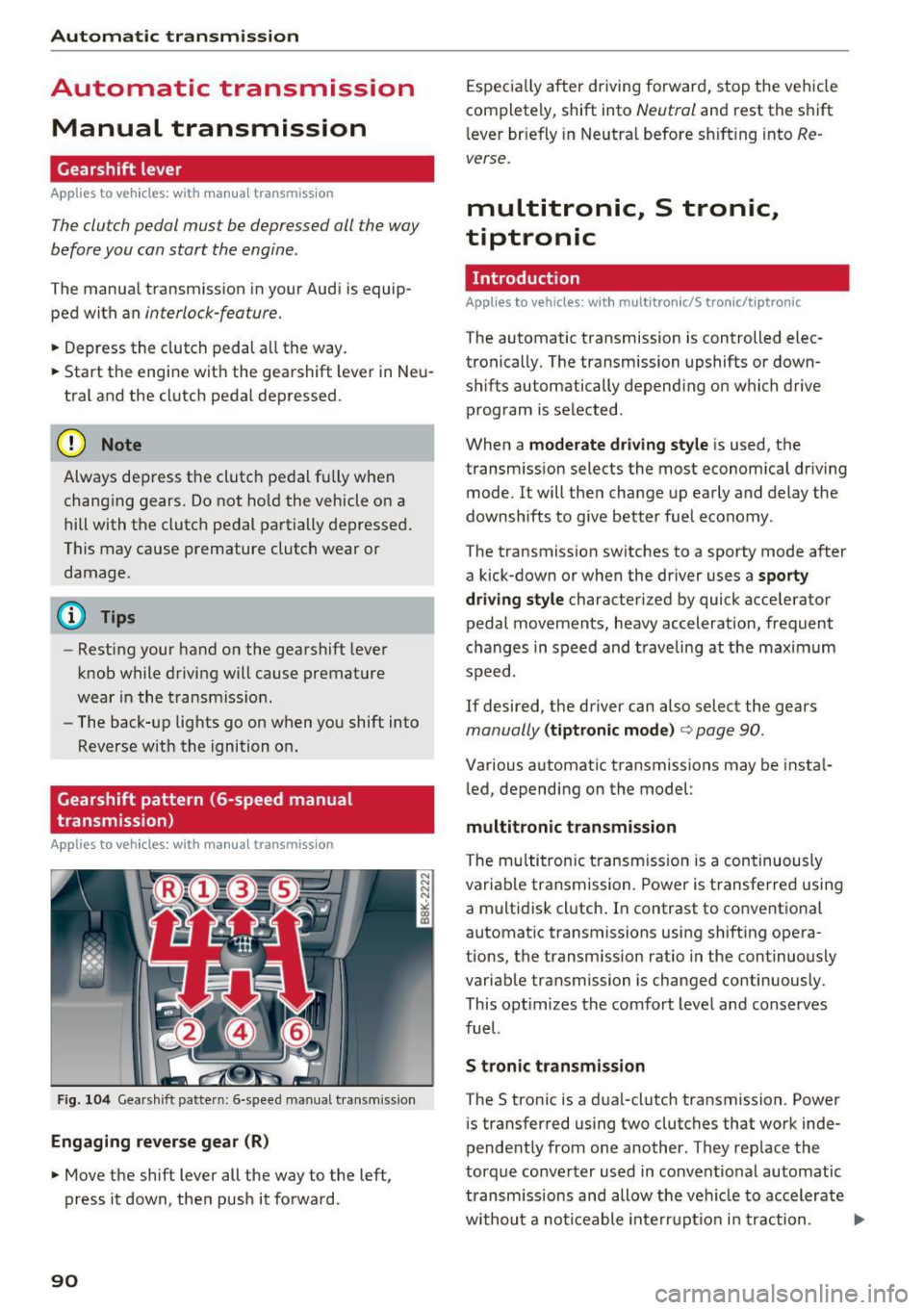
Engaging reverse gear (R)
• Move the shift lever all the way to the left,
press it down, the n push it forward.
90
Espec ia lly after driving forward, stop the vehicle
completely, shift into
Neutral and rest the shift
l ever br iefly in Neutra l before s hift ing into
Re
verse.
multitronic, S tronic,
tiptronic
Introduction
Applies to vehicles : wi th mult itro nic/S tro nic/ tip tronic
The automatic transmission is controlled elec
tronically. The transmission upshifts or down
shifts automatically depend ing o n which drive
program is se lected .
When a
moderate driving style is used, the
transm ission selects the most economica l driv ing
mode . It will the n change up early and delay the
downshifts to give better fuel economy .
The transmission switches to a sporty mode after
a kick-down or when the driver uses a
sporty
dri ving style
characterized by quick accelerator
pedal movements, heavy acceleration, frequent
c hanges in speed and traveling at the maxim um
speed.
If desired, the driver can also select the gears
manually (tiptronic mode ) ¢ page 90.
Various automatic transmissions may be insta l
l ed, depending on the model :
multitronic transmission
The mu ltitron ic t ransm iss ion is a continuously
variable transmission. Power is transferred using
a multidisk cl utch . In contrast to conventional
automat ic transmissions using shifting opera
tions, the transmission ratio in the continuously
variable transmission is changed continuously.
This opt imizes the comfort leve l and conserves
fuel.
S tronic t ran smission
The S tronic is a d ua l-clutch transmission. Power
i s transferred using two clutches that work inde
pendently from one another . They rep lace the
torque converter used in convent io nal automatic
transm issions and allow the vehicle to accelerate
withou t a noticeable inte rru pt io n in traction. ..,.
Page 93 of 278
,....,
N
0
""' CX) ,....,
I.Cl U"I ,....,
I.Cl ,....,
tiptronic transmission
In the tiptron ic tr ansmission, power is transfer
red by a torque converter.
Selector lever positions
Applies to vehicles: with multitronic/S tronic/tiptronic
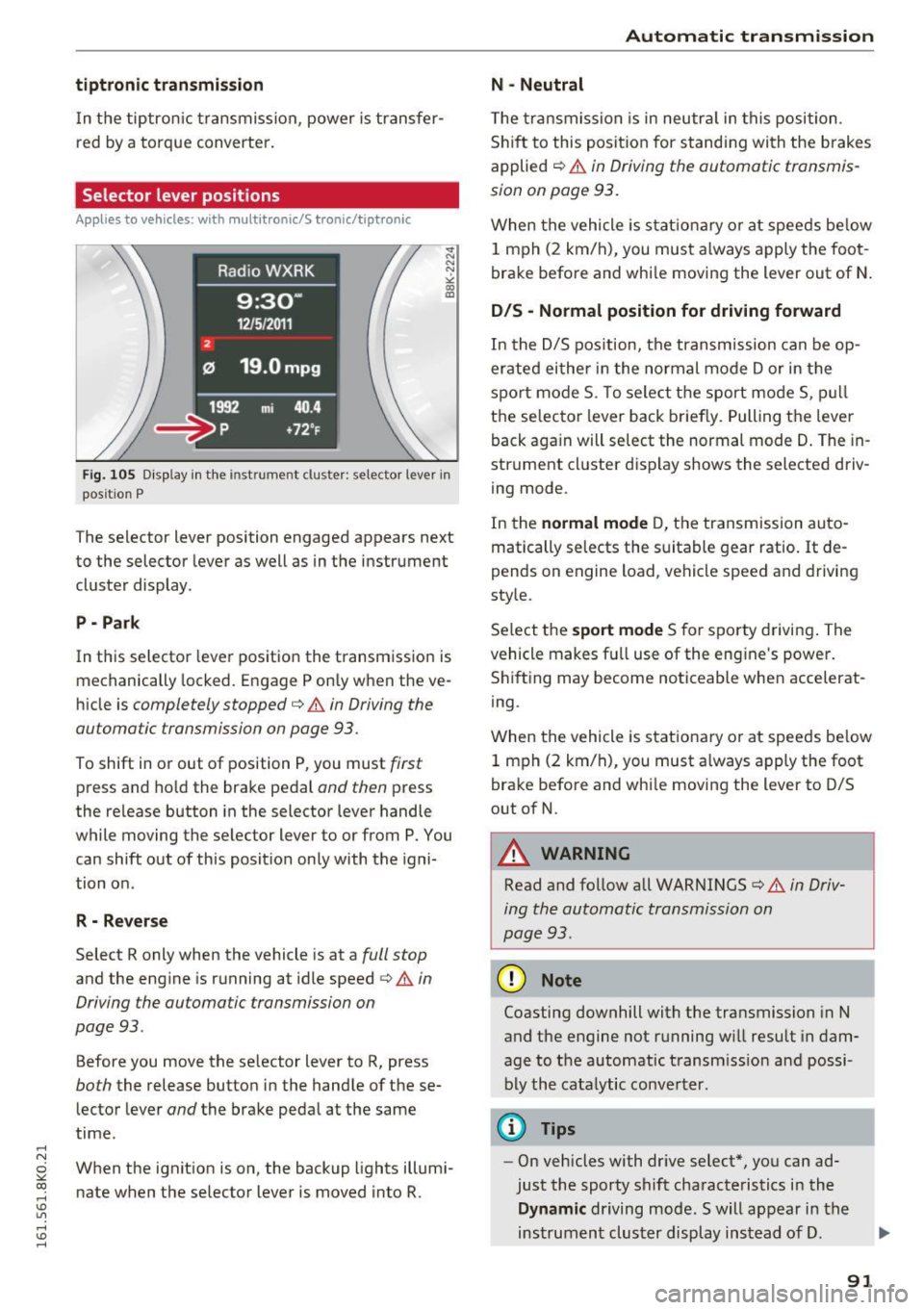
Fig. 105 Display in the instrume nt clus ter: selector lever in
pos it io n P
The selector lever position engaged appears next
to the selector lever as well as in the instrument
cluster display .
P • Pa rk
In this selector lever pos ition the transmission is
mechanically locked. Engage P only when the ve
hicle is
completely stopped¢ A in Driving the
automatic transmission on page 93.
To shift in or out of position P, you must first
press and ho ld the brake pedal and then press
the re lease button in the selector lever handle
while moving the selector lever to or from P. You can shift out of this position only with the igni
tion on .
R - Reverse
Select R only when the vehicle is at a full stop
and the engine is running at idle speed ¢&. in
Driving the automatic transmission on
page 93 .
Before you move the se lector lever to R, press
both the release button in the handle of these
lector lever
and the brake pedal at the same
time.
When the ignition is on, the backup lights illumi
nate when the selector lever is moved into R.
Automatic transmission
N -Neutral
The transmission is in neutra l in this position.
Shift to this position for stand ing with the brakes
applied
c:> A in Driving the automatic transmis
sion on page 93.
When the vehicle is stationary or at speeds below
1 mph (2 km/h), you must always apply the foot
brake before and whi le moving the lever out of N.
DIS -Normal position for driving forward
In the D/S position, the transmission can be op
erated either in the normal mode Dor in the
spo rt mode S. To select the sport mode S, pull
the selector lever back briefly. Pulling the lever
back aga in will select the normal mode D. The in
strument cluster display shows the selected driv
ing mode.
In the
normal mode D, the transmission auto
matically selects the suitable gear ratio.
It de
pends on engine load , vehicle speed and driving
style.
Se lect the
sport mode S for sporty driving. The
vehicle makes fu ll use of the engine 's power.
Shifting may become noticeable when accelerat
ing.
When the vehicle is stationary or at speeds be low
1 mph (2 km/h), you must always apply the foot
brake before and whi le moving the lever to D/S
out of N.
A WARNING
-Read and follow all WARNINGS¢ & in Driv-
ing the automatic transmission on
page 93 .
(D Note
Coasting downhill with the transmission in N
and the engine not running w ill result in dam
age to the automatic transmiss ion and possi
bly the catalytic converter.
@ Tips
-On vehicles with dr ive select*, you can ad
just the sporty shift characteristics in the
Dynamic driving mode.Swill appear in the
instrument cluster display instead of D.
91
Page 95 of 278
..... N
0 ::..:: co .....
tor lever handle, select the desired selector lev
er position such as D/5 and release the button.
~ Wait briefly until the transmission has shifted
(you w ill fee l a slight movement) .
~ Remove your foot from the brake pedal and ac
celerate .
Stopp ing tem pora ril y
~ Keep the vehicle stationary using the braking
pedal, for example at traffic lights.
~ Do not press the accelerator pedal when doing
th is .
~ To prevent the vehicle from rolling when you
start driving, set the park ing brake when stop
ping on steep inclines ¢
,&.
~ The pa rking brake w ill release automatically
and the vehicle will start moving once you press
the accelerator pedal.
Stopping /park ing
If the se lecto r lever is not in the P position when
you open the d river 's door, the vehicle could roll.
The message
Tr an smi ssion: Car ma y roll! Shift
t o pa rk!
appears .
~ Press and hold the brake pedal unt il the vehicle
has come to a comp lete stop.
~ Apply the pa rking brake ¢ page 86, Parking .
~ Select the P selector leve r position ¢ .&,.
Stopp ing on an incline
~ Always press the brake peda l to hold the vehi
cl e in place and prevent it from "rolling back"
¢
,& . Do not try to prevent the vehicle from
"ro lling back" when a gear is engaged by in
c reasing the eng ine speed ¢(!).
Starting on an incline
~ Activate the parki ng b rake .
~ With the driving gea r se lected, press the acce l
erator pedal caref ully. The parking b rake will
r e lease automatically if your seat belt is fas
tened .
Unde r ce rtain c ircumstances, suc h as dr iv ing in
the mountai ns, it may be usef ul to switch tempo
rari ly to the manua l shift program in order to ad-
Autom atic tran sm iss ion
just the gears to the driv ing conditions by hand
¢ page 94.
On slopes, act ivate the park ing brake first and
then move the selec to r l ever to the P posi tion .
T his prevents too m uch stress from being placed
on the locking mechanism .
Vehicles with mult itro nic tr ansmission : Your ve
hicle is equipped wi th
hill hold assist allowing
you to start whi le on an incl ine. The system is ac
tivated when the brake peda l is pressed down
and held
for a few second s. The brake pressure
will ho ld for
a momen t after the brake peda l
loosens to prevent the veh icle from rolling back
wards while starting up .
A WARNING
--The vehicle can also ro ll when the eng ine is
stopped .
- Unintended vehicle movement can cause se rious injury .
- Never leave your veh icle with the engine
running while in gear .
If you must leave
your ve hicle when the eng ine is running, ac
tivate t he pa rking brake and move the selec
tor lever to P.
- Power is still transmi tted to the wheels
when the engine is runn ing at idle. To pre
vent the vehicle from "creepi ng", yo u m ust
keep your foot on the brake when the en
gine is running and the selector lever is in D/
Sor R or "tiptronic" mode is se lected .
- Do not press the acce le ra t or peda l when
changing the se lector lever position while
the vehicle is stationary and the engine is
running.
- Never sh ift into R or P whi le driving.
- Before driving down a steep slope, reduce your speed and sh ift into a lower gear w ith
"t i ptronic".
- Do not ride the brakes or press the brake
pedal too often or too long when driving
down a hi ll. Constant brak ing causes the
brakes to overheat and substant ially re
duces brak ing performance, increases brak
ing d istance or causes comp lete failure of
the brake system.
~
93
Page 96 of 278
Automat ic t ra nsm iss io n
-To prevent the vehicle from rolling back
when stopping on inclines, a lways hold it in
place with the brake pedal or parking brake.
- Never hold the vehicle on an incline with a
s li pping clutch. The clutch opens automati
cally when it becomes too hot from the
overload . An indicator lamp
mJ illuminates
and a driver message appears
~ page 96
when the cl utch is overloaded.
- If the engine must remain running, never
have any dr iv ing pos ition engaged when
checking under the hood. Make sure these
lector lever has secure ly engaged and is
locked in P with the parking bra ke set
~ page 203. Otherwise, any increase in en
gine speed may set the vehicle in motion,
even with the parking brake applied.
- S tronic- and tiptron ic transmission: When
stopping on an incline, do not try to ho ld
the vehicle in place by pressing the acce lera
tor pedal while a driving gear is selected.
This can cause the transm ission to overheat
and can damage it. Activate the parking brake or press the brake pedal to prevent
the vehicle from rol ling .
- S tronic- and tiptron ic transmission: Allow
i ng the veh icle to roll when the eng ine is
stopped and the selector leve r is in N will
damage the transmission because it is not
l ub ricated under those c ircumstances .
(D Tips
For safety reasons, the parking brake is re
leased automatically only when the driver's
safety belt is engaged in the buckle.
Hill descent control
Applies to vehicles: with multitro nic/5 tronic/tip tronic
The hill descent control system assists the driver
when driving down declines.
H ill descent control is activated when the selec
tor lever is in D/S and you press the brake pedal.
The transmission au tomatically selects a gear
that is suitable for the in cl ine. Hill descent con-
94
trol tries to maintain the speed achieved at the
time of braking, within physica l and techn ical
li mitations .
It may still be necessary to adjust the
speed with the brakes .
Hill descent control switches off once the decline
l evels out or you press the accel erator pedal.
On vehicles with the cruise control system*
~ page 88 , hill descent control is a lso activated
when the speed is set.
./1. WARNING
Hill descent control cannot overcome physical
limitations, so it may not be able to maintain
a constant speed under all conditions . A lways
be ready to apply the brakes .
Manual shift program
Applies to vehicles: with multitronic/5 tronic/tiptronic
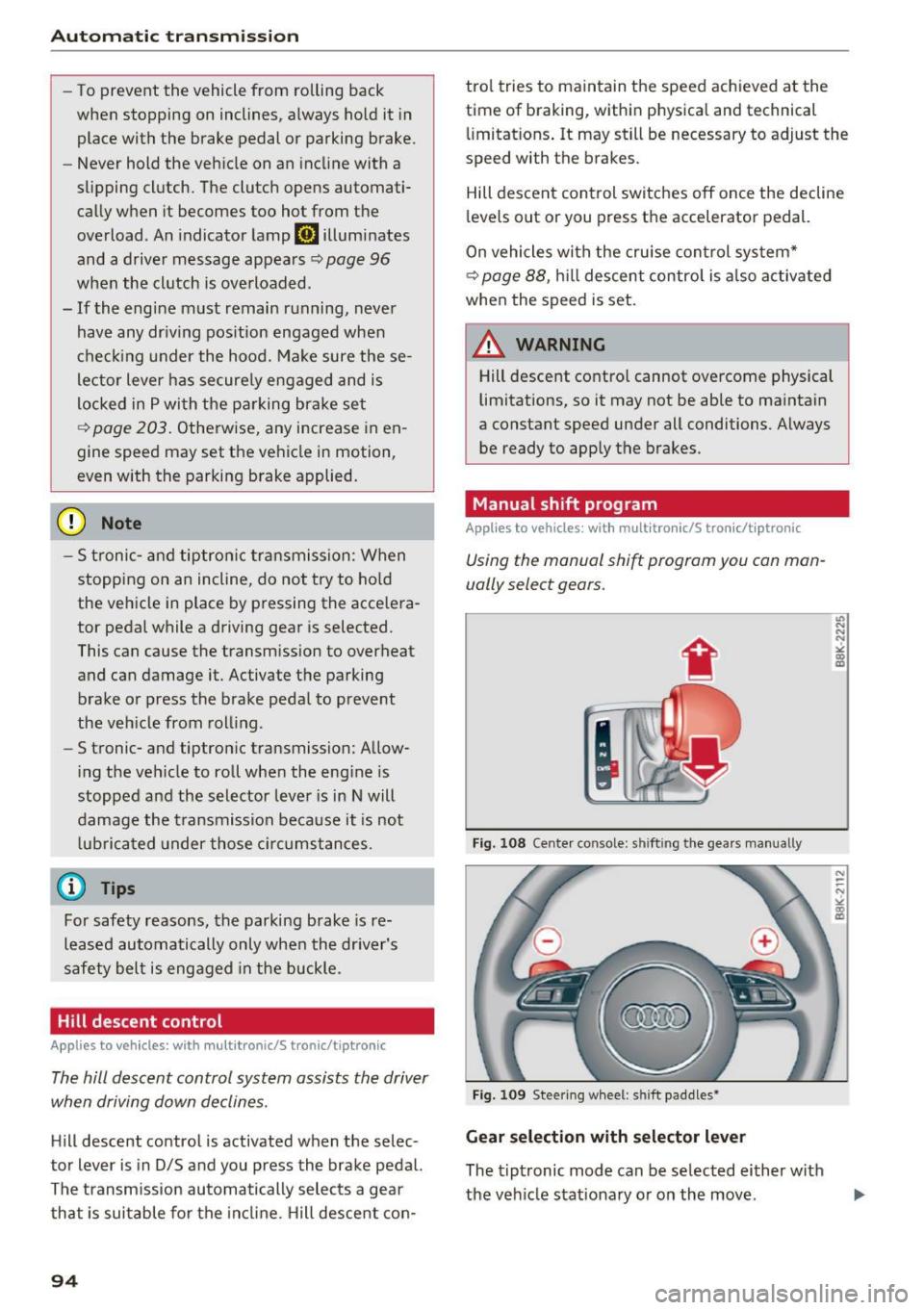
Using the manual shift program you con man
ually select gears.
Fig. 108 Cente r co n sole: s hift in g the gea rs m anually
Fig. 109 Stee ring whee l: shift paddle s•
Gear selection w ith selector lever
The tiptronic mode can be se lected either w ith
the veh icle stat ionary or on the move .
"' N N
N
"' CD m
N ~ N ><'. co m
Page 97 of 278
..... N
0 ::..:: co .....
An M appears in the instrument cluster display as soon as the transmiss ion has shifted.
~ To upshift, push the selector lever forward to
the p lus position
0 ¢ fig. 108.
~ To downshift, push the lever to the minus posi -
t ion
0 .
Gear selection with shift paddles*
The shift paddles are act ivated when the se lector
lever is in D/S or the tiptronic manual shift pro
gram.
~ To upshift, touch the shift padd le on the right
G) ¢fig.109 .
~ To downshift, touch the shift paddle on the left
0.
~ If you do not press a shift paddle within a short
t ime while in the D/S position, the transmission
will return to automatic mode. To keep shift ing
using the sh ift paddles, move the selector lever
to the right out of the D/S position.
The transm ission automatically shifts up or down
before critical engine speed is reached.
The transm ission only allows manual shifting
when the engine speed is within the permitted
range.
{O) Tips
- When you sh ift into the next lower gear, the
transmission will downsh ift only when there
i s no poss ibility of over-rew ing the engine.
- When the kick-down comes on, the trans
mission will shift down to a lower gear, de
pending on vehicle and engine speeds.
- Tiptron ic is inoperative when the transmis
s ion is in the fail-safe mode.
Kick-down
Appl ies to vehicles: with multitronic/S t ronic/tiptronic
Kick-down enables maximum acceleration .
Applies to vehicles with a multitronic
transmission
When you depress the accelerator pedal beyond
the res istance point, the transmission downshifts
in to a lower gear rat io depending on the vehicle
Automatic transm ission
speed and engine speed. As long as the accelera
tor pedal is depressed, the engine speed is auto
matically regulated for maximum accelerat ion .
Applies to vehicles with a S tronic-/ tiptronic
transmission
When you depress the accelerator pedal beyond
the resistance point, the automat ic transmission
downsh ifts into a lower gear, depending on vehi
cle speed and engine speed. The upsh ift into the
next higher gear takes place once the maximum
specified engine speed is reached .
A WARNING
Please note that the drive wheels can spin if
kick-down is used on a smooth slippery road -
there is a risk of skidding.
Launch Control Program
Applies to vehicles: wi th S tronic
The Launch Control Program provides the best
acceleration possible when starting from a stop .
Requirement: The engine must be at operating
temperature and the steering wheel must not be
turned .
~ Sedan: Press the I~ OF FI button¢ page 178
while the eng ine is running. The II indicator
light illuminates in the instrument cluster and
Stabilization control (ESC): Sport. Warning!
Restricted stability
appears in the driver infor
mation system display.
~ allroad: Press the I~ OFFI button¢ page 178
while the engine is ru nning . The II indicator
light illuminates in the instrument cluster and
Stabilization control (ESC): Offroad . Warning!
Restricted stability
appears in the driver infor
mation system display .
~ Move the selector lever to the D/S posit ion to
select sport mode (S) or select the
dynamic
driving mode in drive select*¢ page 112.
~ Press the brake pedal strongly w ith your left
foot and hold i t down for at least 1 second.
~ At the same time, press the accelerator pedal
down comp lete ly with your right foot unti l the
engine reaches and maintains a h igh RPM.
~ Remove your foot from the brake peda l within
S seconds¢ ,&. ..,.
95