service AUDI S4 2017 User Guide
[x] Cancel search | Manufacturer: AUDI, Model Year: 2017, Model line: S4, Model: AUDI S4 2017Pages: 386, PDF Size: 96.32 MB
Page 37 of 386
<(
a,
.... N ,....
N .... 0 0
DD Tank syst em : m alfunction ! Plea se conta ct
Se rvice
If the indi cator lig ht t urns on and the message
appears:
- there is a malfunct ion in the fuel ta nk system,
o r
- in vehicles with d iesel eng ines, water may have
collected in the fue l filter .
Drive to an authori zed Aud i dea ler or authori zed
Aud i Service Facility immediately to have the
malfunct ion corrected .
(D Note
Applies to veh icles w ith a diesel engine: if the
diese l fuel quality is poor, it may be necessary
to have the wate r drai ned from the water sep
arator
l) in the fuel filter more often than
specified in the m aintenance schedule. This
can help red uce eng ine malfu nctions .
(D Tips
For mo re information on fueli ng, ref er to
o=:> page298 .
• Washer fluid level
E;:2 Please add washer fluid
Fill the washer fluid for the w indshield washer
system and the headlight washer system* when
the ignition is swi tched off~
page 316.
El Wind shield wiper s: malfunction! Plea se con
tact Se rvice
There is a malfunction wi th t he w indsh ie ld w ip
e rs.
Dr ive to an autho rized Aud i dealer or a uthorized
Aud i Service Facility immediately to have the
malfunct ion corrected.
~ l) Th is func tion is no t av ail able in a ll countri es.
Coc kpit o ve rv iew
~ Driver's door
IJ1 Driver 's door: malfun ction! Shift to P before
leaving v ehicle . See owner's manual
T he re is a ma lfunction in the drive r's door . Select
the P selector leve r pos ition to secure the vehicle .
Drive to an au thori zed Audi dealer or authori zed
Audi Service Facility immed iate ly to have the
malfu nction corrected.
·:<;X· Defective light bulb warning
If the II ind icator light tu rns o n, a bulb has
failed. The message indica tes the location of the
bulb . Replace the bulb immedi ately .
Vehicle lights: m alfunction! Please contact
Servi ce
There is a ma lfunction in the headlights or the
l ight switch . Dr ive to an authorized Audi dealer or
autho rized Aud i Serv ice Facility immediately to
have t he malfunc tion cor rected.
.&_ WARNING
- Light bul bs are under p ressure a nd can ex
p lode when b ulbs are replaced, w hich in
creases the r isk of injury.
- W ith HID he ad lights (xenon he adlights), the
high-vo ltage component must be handled
correct ly. Otherwise, there is a risk of fatal
i n jur y.
~0 Dynamic headlight range control system
Iii Headlight range control: malfunction! See
owne r's manual
T he re is a ma lf u nction in the headlight range
contro l system , which may cause glare for other
drive rs.
D rive to an authori zed Audi dealer or au thori zed
Audi Service Facility immed iate ly to have the
malfunction corrected.
.
35
Page 39 of 386
Opening and closing
Central Locking
Description
You can lock and unlock the veh icle centrally . You
have the following choices:
- Remote control key¢
page 40,
-Sensors in the door handles * ¢ page 40
- Lock cylinder on the driver's door¢ page 42,
or
- Interior central locking switch ¢
page 41.
Turn signals
The turn s ignals flash twice when you unlock the
veh icle and flash once when you lock the veh icle.
If they do not flash, then one of the doors, the
rear lid or the hood is not closed.
Automatic locking (Auto Lock)
The Auto Lock funct ion locks all doors and the
luggage compartment lid once the speed has ex
ceeded approximately 9 mph (15 km/h).
The vehicle can be unlocked if the opening func
tion in the central locking system sw itch is used
or one of the door handles is pulled.
In the event of a crash with airbag deployment,
the doors will a lso automat ically unlock to allow
access to the vehicle.
Selective door unlocking
The doors and luggage compartment lid will lock
when they close . You can set in the Infotainment
system whether
only the driver's door or the en
tire vehicle should be unlocked when unlocking
¢page 41.
Unintentionally locking yourself out
The following conditions prevent you from lock
ing your remote control key in the vehicle:
- If the driver's door is open, the vehicle cannot
be locked by pressing the~ button on the re
mote control key or by touching the locking
<( a:i sensor* on a door . .... N ,....
N .... 0 0
3 a,
Opening and closing
- When locking using the~ button in the central
locking switch, the vehicle will not lock if a door
is open ¢
page 41.
-On vehicles with a convenience key*, the lug
gage compartment lid unlocks again after clos
ing if the most recently used key is in the lug
gage compartment. The emergency flashers blink four times.
Do not lock your vehicle with the remote control
key or convenience key* until all doors and the
luggage compartment lid are closed. This helps
to prevent you from locking yourself out acciden
tally .
A WARNING
-
-When you lock your vehicle from outs ide,
nobody -espec ially children -should rema in
inside the vehicle. Remember, when you
lock the vehicle from the outside the win
dows cannot be opened from the inside .
- When you leave the vehicle, always take the
ignition key with you. This will prevent pas
sengers (children, for examp le) from acci
dentally being locked in the vehicle should
they accidentally press the power locking
switch in the doors.
- Do not leave children inside the vehicle un
supervised. In an emergency it would be im
possible to open the doors from the outside
without the key.
(D Tips
- Do not leave valuables unattended in the ve
hicle. A locked vehicle is not a safe!
- The LED in the driver's door rail blinks when
you lock the vehicle. If the LED lights up for
approximately 30 seconds after locking,
there is a malfunction in the central locking
system . Have the problem repaired by an
authorized Audi dealer or authorized Audi
Service Facility.
37
Page 40 of 386
Opening and closing
Key set
Fig. 25 Your veh icle key set
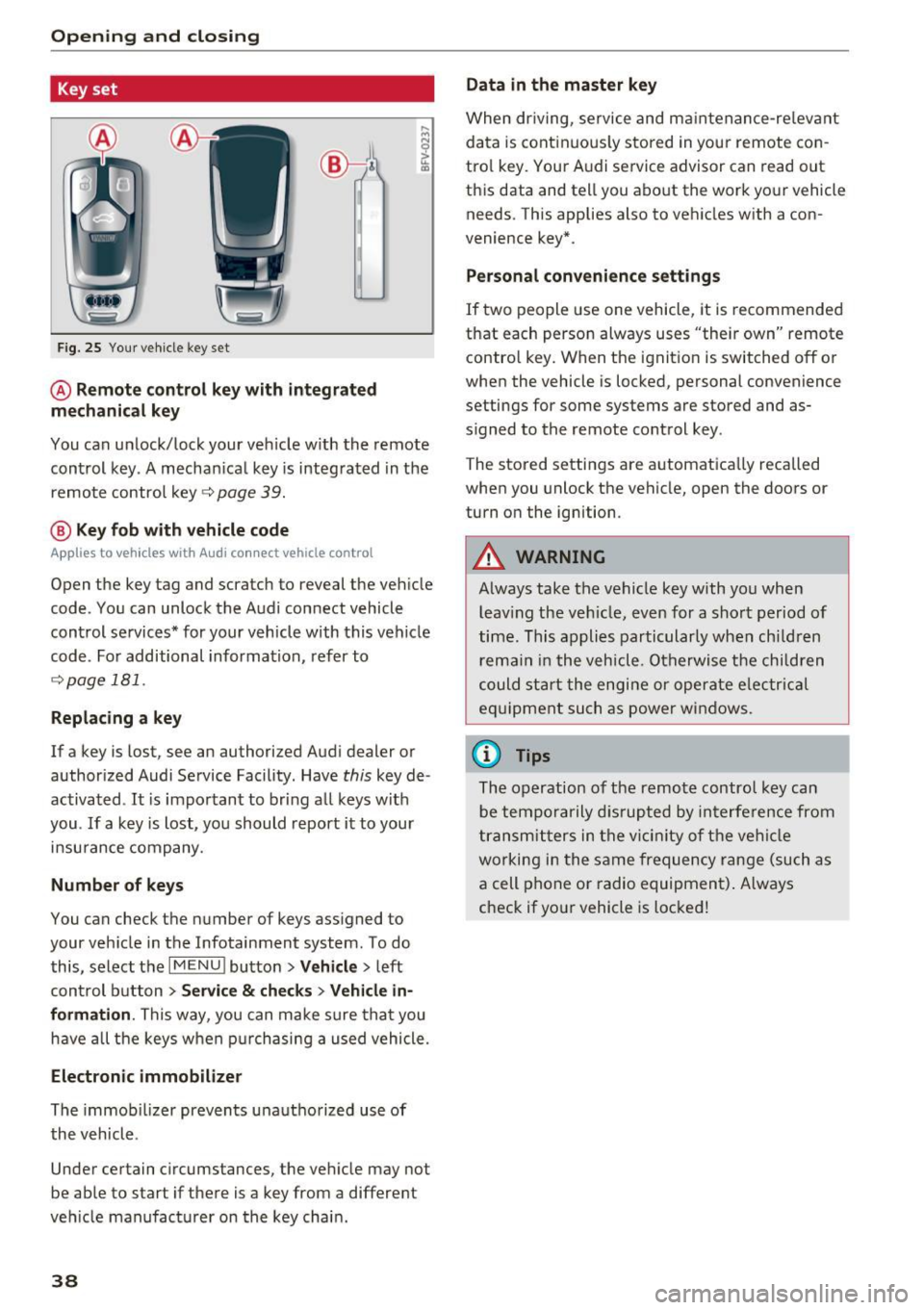
@ Remote control key with integrated
mechanical key
You can unlock/lock your veh icle w ith the remote
control key . A mechan ical key is integrated in the
remote control key~
page 39.
@ Key fob with vehicle code
Applies to veh icles with Audi connect vehicle control
Open the key tag and scratch to reveal the veh icle
code . You can unlock the Audi connect vehicle
control se rvices* for your vehicle with this vehicle
code . For additional information, refer to
~ page 181 .
Replacing a key
If a key is lost, see an authorized Audi dealer or
authorized Audi Service Facility. Have
this key de
activated .
It is important to bring all keys with
you .
If a key is lost, you should report it to your
insurance company.
Number of keys
You can check the number of keys assigned to
your vehicle in the Infotainment system . To do
this, select the
IM ENU I button > Vehicle > left
control button
> Service & checks> Vehicle in·
formation .
This way, you can make sure that you
have all the keys when purchasing a used vehicle.
Electronic immobilizer
The immob ilizer prevents unauthorized use of
the vehicle .
Under certain circumstances, the vehicle may not
be able to start if there is a key from a different
veh icle manufacturer on the key chain.
38
Data in the master key
When driving, service and maintenance-re levant
data is continuously stored in your remote con
trol key. Your A udi service advisor can read out
this data and tell you about the work your vehicle
needs . This applies also to vehicles with a con
venience key*.
Personal convenience settings
If two people use one vehicle, it is recommended
that each person always uses "their own" remote contro l key. When the ignition is switched off or
when the vehicle is locked, personal convenience
settings for some systems are stored and as
s igned to the remote control key .
The stored settings are automatically recalled
when you unlock the vehicle, open the doors or
turn on the ignition.
_&. WARNING
Always take the vehicle key with you when leaving the vehicle, even for a short period of
time. This applies particularly when children
r ema in in the vehicle . Otherwise the children
could start the engine or operate elec trical
equipment such as power windows.
(D Tips
-
The operation of the remote control key can
be temporarily disrupted by interference from
transmitters in the vicinity of the vehicle
working in the same frequency range (such as
a cell phone or radio equipment) . Always
check if yo ur vehicle is locked!
Page 47 of 386
,&_ WARNING
After opening the luggage com partment lid
using the emergency release in vehicles with a
fixed rear seat backrest, make s ure the brack
et under the rea r bench seat loc ks sec urely in
to the mounting eyelet again.
Child safety Lock
-
The child safety lock prevents the rear doors
from being opened from the inside and the rear
power windows from be operated.
F ig. 38 Section of driver's door: co ntrols
Fi g. 39 Rear door: child safety lock
0
N
9 :::, a, a,
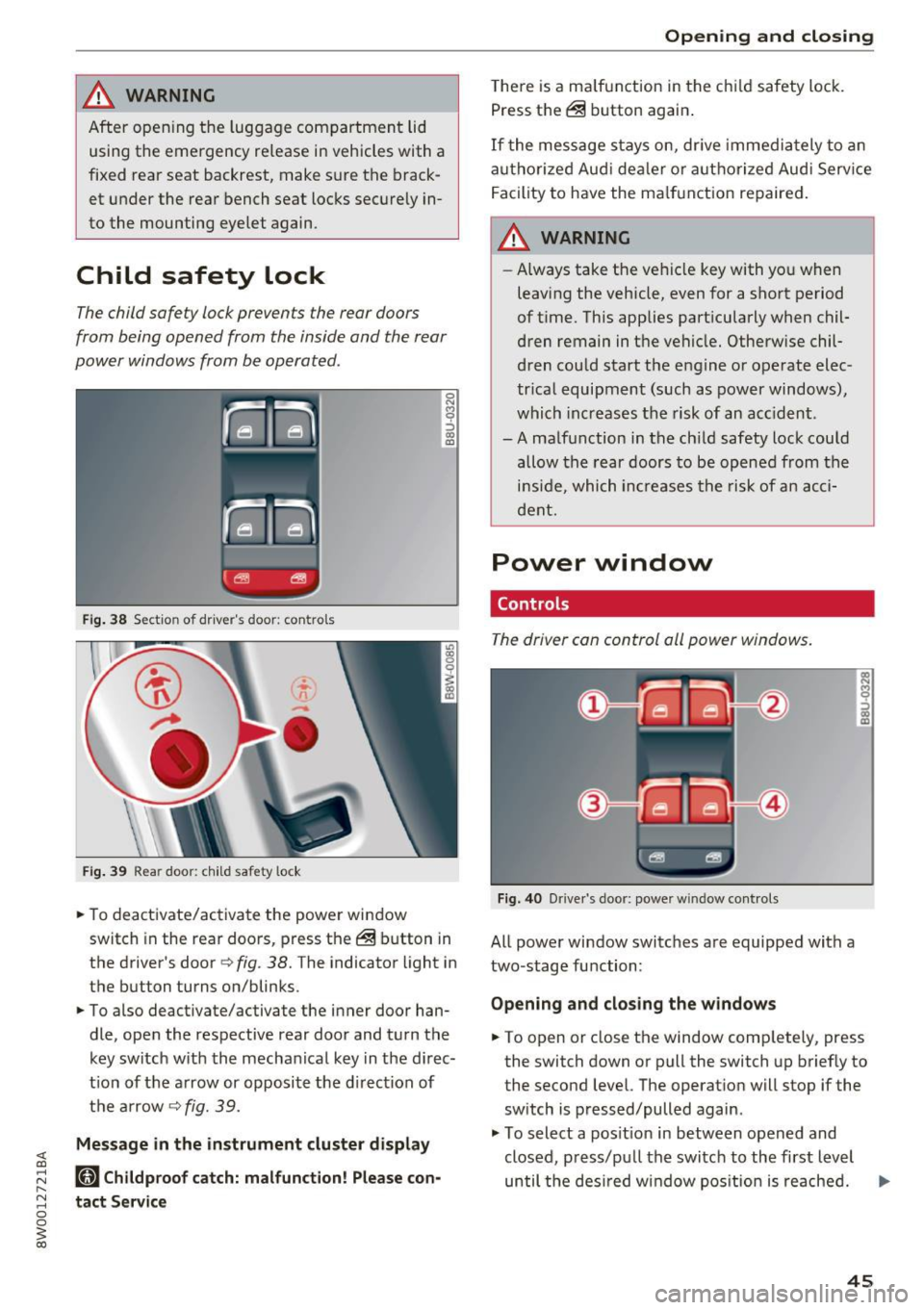
"'To deactivate/ac tivate the power wi ndow
switch in the rear doo rs, press the @ button in
the driver's door
r=> fig . 38. The indicator light in
the button turns on/blinks.
"' To also deactivate/activate the inner door han
dle, open the respective rear door and turn t he
key switch w ith the mecha nical key in the d irec
t ion of the a rrow or opposi te the d irec tion of
t h e ar row
r=> fig. 39.
Message in the instrument cluster display
(81 Childproof catch: malfunction! Please con
tact Service
Open ing and closing
T he re is a ma lf u nction in the c hild safety lock.
Press th e @ button again .
If the me ssage s tay s on, dr ive immedia tely to an
a uth o rized Aud i de aler o r a uth o rized Aud i Serv ice
F acility to have the ma lf u n ction repaired .
,&_ WARNING
-Always take the ve hicl e key with yo u when
leavi ng the vehicle, even for a sho rt period
of t ime. This applies part icularly when chil
dren remain in t he vehicle. Otherwise chil
d ren cou ld start t he e ngine o r operate elec
tr ica l equipment (such a s power windows) ,
which inc reas es t he risk of an ac cident.
-A ma lf u nction in the ch ild safety lock cou ld
allow the rear doors to be opened from the
i n si de, which inc reases the ris k of an acc i
d ent.
Power window
Controls
The driver can control all power windows.
Fig. 40 Drive r's door: power w indow controls
All power window switc hes are equipped with a
two-stage fu nction:
Opening and clos ing the w indows
-
"' To open or close the window comp letely, press
the switch down or pull the switch up briefly to
the second level. The operat ion will stop if the
sw itch is pressed/pulled again.
"' To select a pos it ion in between opened and
closed, p ress/p ull the switch to the first level
until the des ired w indow pos ition is reache d. ..,.
45
Page 53 of 386
-If you turn off the ignition while the exterior
lights are on and open the door, a warning
tone sounds.
- In cool or damp weather, the inside of the
headlights , turn signals and tail lights can
fog over due to the temperature difference between the inside and outside. They will
clear shortly after switching them on. This
does not affect the service life of the light
ing .
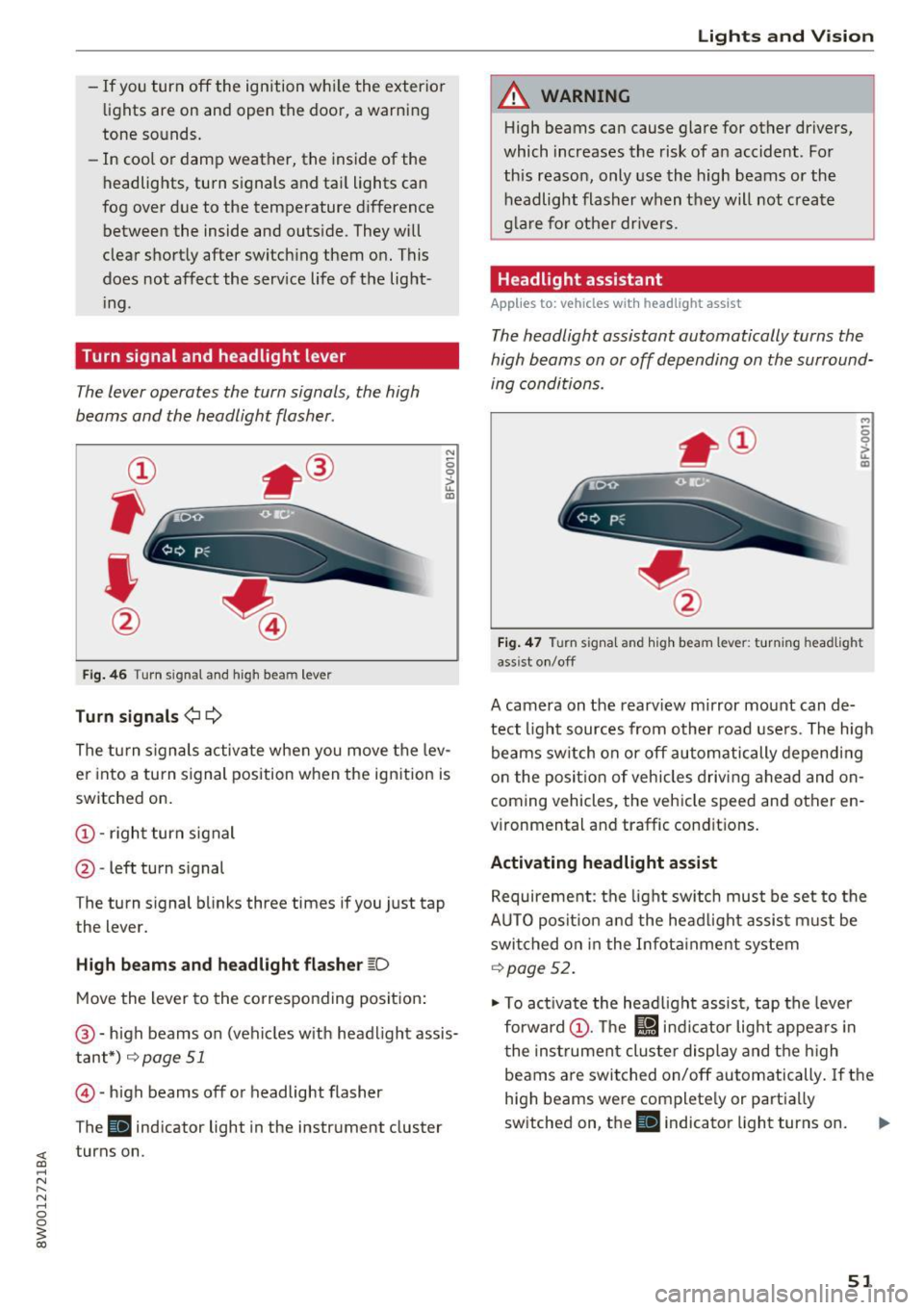
Turn signal and headlight lever
The lever operates the turn signals, the high
beams and the headlight flasher.
Fig. 46 T urn signal and high beam lever
Turn signals¢¢
N
0 0
> u. IXl
The turn signals activate when you move the lev
er into a turn signal position when the ignition is
switched on.
@ -right turn signal
@ -left turn signal
The turn signal blinks three times if you just tap
the lever.
High beams and headlight flasher ~D
Move the lever to the corresponding position:
@-high beams on (vehicles with headlight assis
tant*)
r=;, page 51
© -high beams off or headlight flasher
The
Ill indicator light in the instrument cluster
turns on.
Lights and Vision
A WARNING
-High beams can cause glare for other drivers,
which increases the risk of an accident . For
this reason, only use the high beams or the
headlight flasher when they will not create
glare for other drivers.
Headlight assistant
Applies to: vehicles wit h headlight assist
The headlight assistant automatically turns the
high beams on or off depending on the surround
ing conditions .
..,
0 0
it m
Fig. 47 Turn signal and high beam lever: turning headlig ht
ass ist on/off
A camera on the rearview mirror mount can de
tect light sources from other road users. The high
beams switch on or off automatically depending
on the position of vehicles driving ahead and on
coming vehicles, the vehicle speed and other en
vironmental and traffic conditions.
Activating headlight assist
Requirement: the light switch must be set to the
AUTO position and the headlight assist must be switched on in the Infotainment system
r=;, page 52.
"'To activate the headlight assist, tap the lever
forward @. The
l!J indicator light appears in
the instrument cluster display and the high
beams are switched on/off automatically. If the
high beams were completely or partially
switched on, the
Ill indicator light turns on. Ill>
51
Page 59 of 386
<( a, .... N ,....
N .... 0 0
3 a,
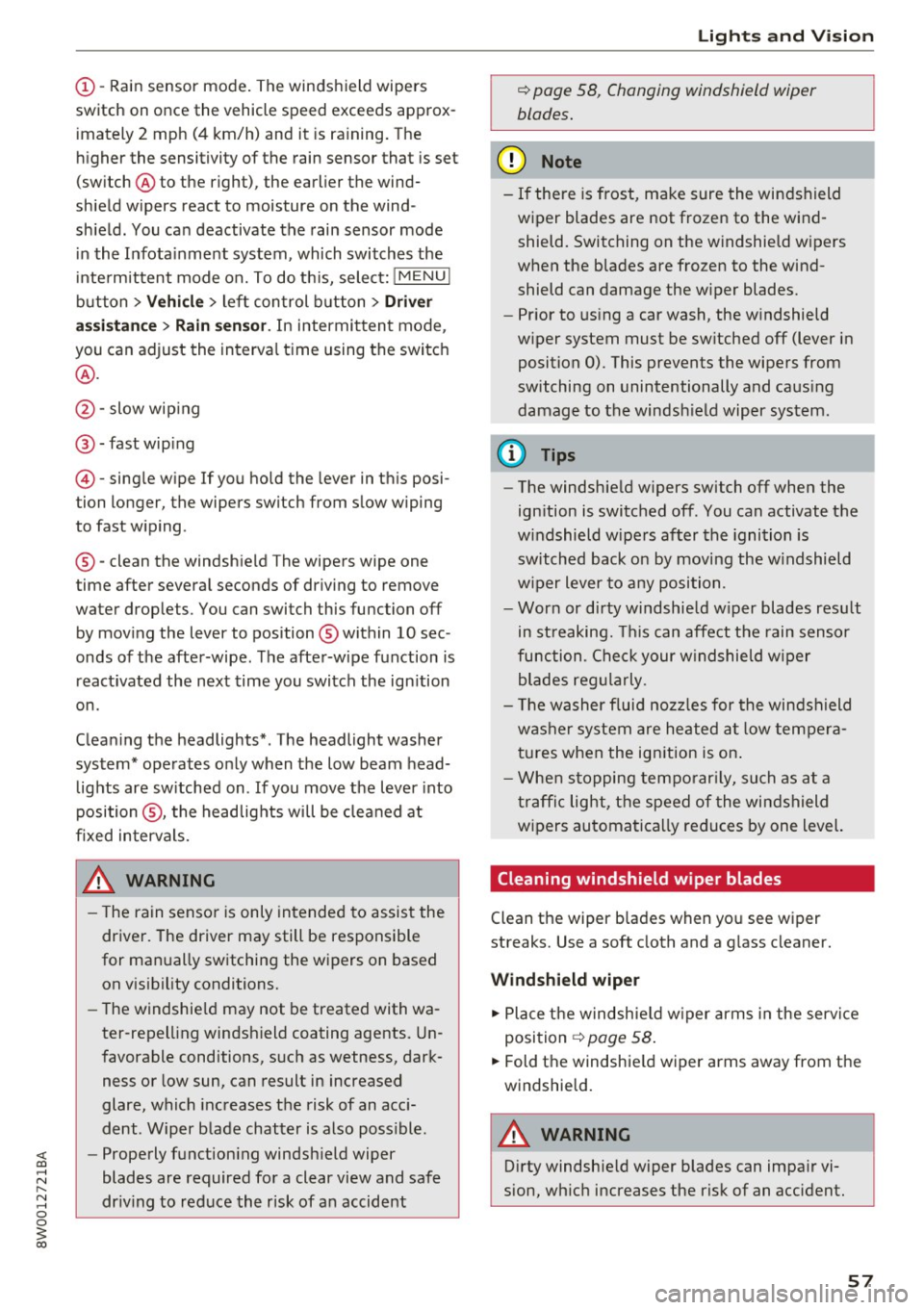
(!)-Rain sensor mode. The windshield wipers
switch on once the vehicle speed exceeds approx imately 2 mph (4 km/h) and it is ra ining. The
higher the sensitivity of the rain sensor that is set
(switch @ to the right), the earlier the wind
shield wipers react to moisture on the wind
sh ield . You can deactivate the rain sensor mode
in the Infota inment system, which switches the
intermittent mode on. To do th is, select:
! MENU !
button > Vehicle > left control button > Dri ver
a ss is ta nc e
> Rain sen sor. In intermittent mode ,
you can adjust the interva l time using the switch
@ .
@ -slow wip ing
@ -fast wip ing
© -sing le wipe If you hold the lever in this posi
tion longer, the wipers switch from slow wiping
to fast w iping.
® -clean the windsh ie ld The wipers wipe one
time after several seconds of dr iving to remove
water droplets. You can switch this function off
by moving the lever to position ® within
10 sec
onds of the after-wipe . The after-wipe function is
react ivated the next time you switch the ign ition
on.
C leaning the headlights*. The headlight washer
system* operates only when the low beam head lights are sw itched on . If you move the lever into
position @, the headlights will be cleaned at
fixed intervals.
A WARNING
- T he rain sensor is only intended to assist the
driver. The driver may still be responsible
for manually switching the w ipers on based
on v is ibility conditions.
- The w indshie ld may not be treated with wa
ter -repelling windshield coating agents. Un
favorable conditions, s uch as wetness, dark
ness or low sun, can result in increased
glare, which increases the risk of an acc i
dent . Wiper blade chatter is also poss ible.
- Properly functioning windsh ield wiper
blades are required for a clear view and safe
dr iv ing to red uce the risk of an accident
Light s and Vision
c::> page 58, Changing windshield wiper
blades.
@ Note
- If there is frost, make sure the windshield
wiper blades are not frozen to the wind
shield. Switching on the windshield wipers
when the blades are frozen to the wind
shield can damage the w iper blades.
- Prior to using a car wash, the windshield
wiper system must be sw itched off (lever in
position
0). This prevents the wipers from
switching on unintentionally and caus ing
damage to the windsh ield wiper system.
@ Tips
- The windshield wipers switch off when the
ign ition is switched off. You can activate the
w indshield wipers after the ignition is
switched back on by moving the w indshield
w iper lever to any position.
- Wor n or dirty w indshie ld w iper blades resu lt
in st reaking. T his can affect the rain senso r
function. Check your windshield wiper
blades reg ularly.
- The washer fluid nozz les for the windshield
washer system are heated a t low tempera
tures when the ignition is on .
- Whe n stopping tempo rar ily, such as at a
t raffic lig ht, the speed of the windshield
wipers automatically reduces by one level.
Cleaning windshield wiper blades
Clean the wiper b lades when you see wiper
streaks. Use a soft cloth and a g lass cleaner.
Wind shi eld wiper
... Place t he w indsh ie ld w iper arms in the service
position
c::> page 58 .
... Fold the windshie ld wiper arms away from the
windshie ld.
A WARNING
D irty windshie ld wiper blades can impa ir vi
sion, wh ic h increases the risk of an accident.
57
Page 60 of 386
Lights and Vision
Changing windshield wiper blades
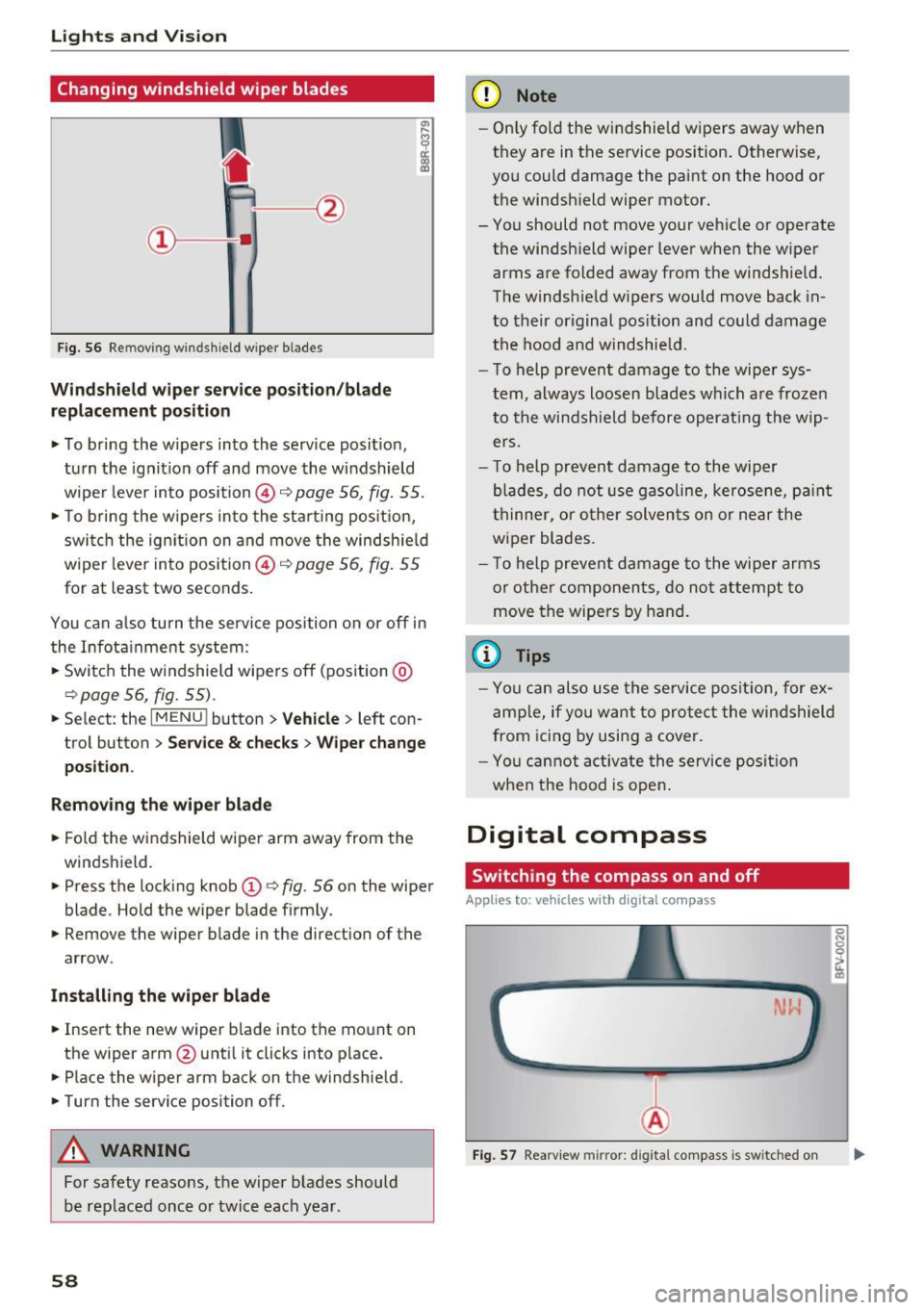
Fig. 56 Remov ing w indshi eld w iper blades
Windshield wiper service position/blade
replacement position
• To bring the wipers into the service position ,
turn the ignition off and move the windshield
wiper lever into position @~
page 56, fig. 55.
• To bring the wipers into the starting position,
switch the ignition on and move the windshield
wiper lever into position @~
page 56, fig. 55
for at least two seconds .
You can also turn the service position on or off in
the Infotainment system :
• Switch the windshield wipers off (position @
~page 56, fig. 55).
• Select : th e IMENU i button> Vehicle> left con
trol button >
Service & checks > Wiper change
position .
Removing the wiper blade
• Fold the windshield wiper arm away from the
windshield.
• Press the locking knob
(D ~ fig. 56 on the wiper
blade . Hold the wiper blade firmly.
• Remove the wiper blade in the direction of the
arrow .
Installing the wiper blade
• Insert the new wiper blade into the mount on
the wipe r arm @until it clicks into place.
• Place the wiper arm back on the windshield.
• Turn the service position off.
A WARNING
For safety reasons, the wiper blades should
be replaced once or twice each year .
58
-
(D Note
-Only fold the windshield wipers away when
they are in the service position. Otherwise,
you could damage the paint on the hood or
the windshield wiper motor.
- You should not move your vehicle or operate the windshield wiper lever when the wiper
arms are folded away from the windshield.
The windshield wipers would move back in
to their original position and could damage
the hood and windshield.
- To help prevent damage to the wiper sys
tem, always loosen blades which are frozen
to the windshield before operating the wip
ers.
- To help prevent damage to the wiper
blades, do not use gasoline, kerosene, paint
thinner, or other solvents on or near the
wiper blades.
- To help prevent damage to the wiper arms
or other components, do not attempt to
move the wipers by hand.
{l) Tips
-You can also use the service position, for ex
ample, if you want to protect the windshield
from icing by using a cover.
- You cannot activate the service position
when the hood is open.
Digital compass
Switching the compass on and off
App lies to: vehicles with digital compass
Fig. 57 Rearview mirror: d ig ital compass is sw itched on
Page 77 of 386

(D Note
-Have your vehicle maintained properly and
in accordance with the service recommenda
tions in your Warranty
& Maintenance book
let. lack of proper maintenance as well as
improper use of the vehicle will impair the
function of the emission control system and
could lead to damage .
- Do not alter or
remove any component of
the Emission Control System unless ap proved by the manufacturer.
- Do not alter or
remove any device, such as
heat shields, switches, ignition wires,
valves, which are designed to protect your
vehicle's Emission Control System and other important vehicle components.
{t) Tips
The consumption estimates as published by
ENVIRONMENTAL PROTECTION AGENCY
(EPA) and Transport Canada may not corre
spond to your actual consumption on the
road, which will vary depending upon vehicle
load and speed, road and weather conditions,
trip length, etc.
Steering
Adjusting the steering wheel position
The steering wheel position is adjustable up and
down and forward and back .
Fig. 76 Lever on the steeri ng col umn
.. Pull the lever in the direction of the arrow
¢,&. .
"'Bring the steering wheel into the desired posi
tion.
Driving
.. Push the lever against the steering column un
til it is secure.
A WARNING
Incorrect use of the steering wheel adjust ment and an incorrect seating position can
cause serious injuries.
-
- Only adjust the steering column when the
vehicle is stationary so that you do not lose
control of the vehicle.
- Adjust the driver's seat or steering wheel so
that there is at least a 10 in (25 cm) dis
tance between your chest and the steering
wheel. If you do not maintain this distance
I
you will not be properly protected by the air
bag system.
- If your physical characteristics prevent you
from sitting at least 10 in (25 cm) or more
away from the steering wheel, see if your
authorized Audi dealer or authorized Audi
Service Facility can provide adapters that
will help.
- If your face is level with the steering wheel,
the airbag does not provide as much protec
tion during a collision. Always make sure that the steering wheel is level with your
chest.
- Always hold the steering wheel with your
hands in the 9 o'clock and 3 o'clock posi
tions to reduce the risk of injury if the airbag
deploys.
- Never hold the steering wheel in the 12
o'clock position or with both hands on the
rim or the center of the steering wheel.
Holding the steering wheel incorrectly sig
nificantly increases the risk of injury to the
hands, arms and head if the airbag deploys.
75
Page 80 of 386
Driving Starting the engine when there is a
malfunction
It may not be possible to start the engine under certain circumstances, for example if the battery
in the vehicle key is drained, if interference is af
fected the key or if there is a system malfunc
tion.
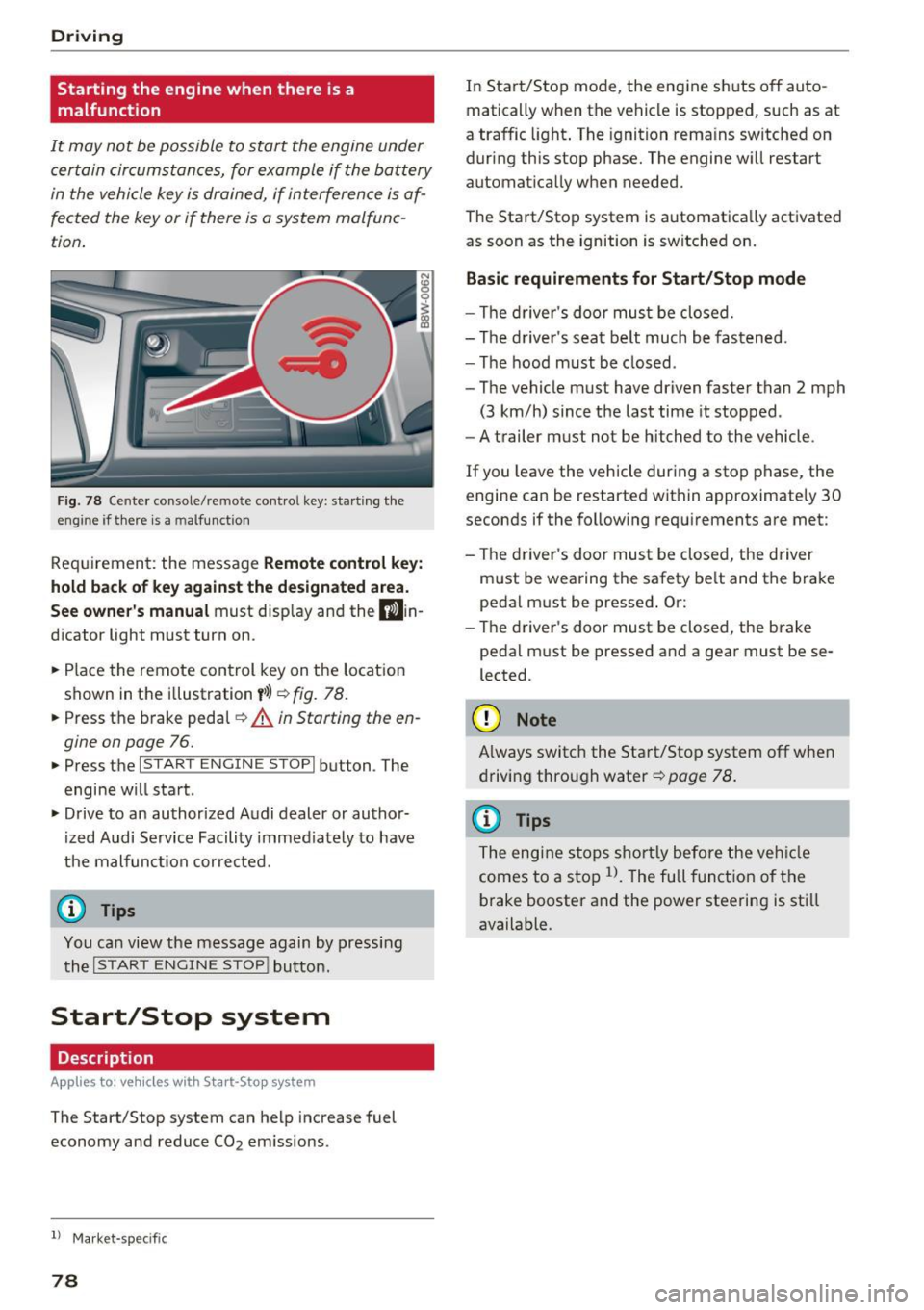
Fig. 78 Center console/remote contro l key: starting the
eng ine if there is a m alfunction
Requirement: the message Remote control key:
hold back of key against the designated area.
See owner's manual must display and the D)in
dicator light must turn on.
.. Place the remote control key on the location
shown in the illustration
y>l) ~ fig. 78.
.. Press the brake pedal~ A in Starting the en
gine on page
76.
.. Press the l~S_T_A_R_T_E_N_G_I_N_E_S_T_O_P_I button . The
engine will start .
.. Drive to an authorized Audi dealer or author
ized Audi Service Facility immediately to have
the malfunction corrected.
(D Tips
You can view the message again by pressing the
I START ENGINE STOP! button.
Start/Stop system
Description
App lies to: ve hicles w ith S ta rt-Sto p system
The Start/Stop system can help increase fuel
economy and reduce CO2 emissions.
l ) Market -spe cific
78
In Start/Stop mode, the engine shuts off auto
matically when the vehicle is stopped, such as at
a traffic light. The ignition remains switched on
during this stop phase. The engine will restart automatically when needed.
The Start/Stop system is automatically activated as soon as the ignition is switched on.
Basic requirements for Start/Stop mode
-The driver's door must be closed.
- The driver 's seat belt much be fastened.
- The hood must be closed .
- The vehicle must have driven faster than
2 mph
(3 km/h) since the last time it stopped .
- A trailer must not be hitched to the vehicle .
If you leave the vehicle during a stop phase, the
engine can be restarted within approximately 30
seconds if the following requirements are met:
- The driver's door must be closed , the driver
must be wearing the safety belt and the brake
pedal must be pressed . Or:
- The driver's door must be closed, the brake
pedal must be pressed and a gear must be se
lected.
({D Note
Always switch the Start/Stop system off when
driving through water
~page 78.
(D Tips
The engine stops shortly before the vehicle
comes to a stop
l). The full function of the
brake booster and the power steering is still
available.
Page 83 of 386
Automatic start /stop syst em: malfunct ion!
F unction una vailabl e. Please contact Ser vic e
There is a malfunction in the Start/Stop system .
Drive the vehicle to an authorized Audi dealer or
authori zed Service Facility as soon as possible to
have the malfunction corrected.
Electromechanical
parking brake
Operating
The electromechanical parking brake replaces
the hand brake.
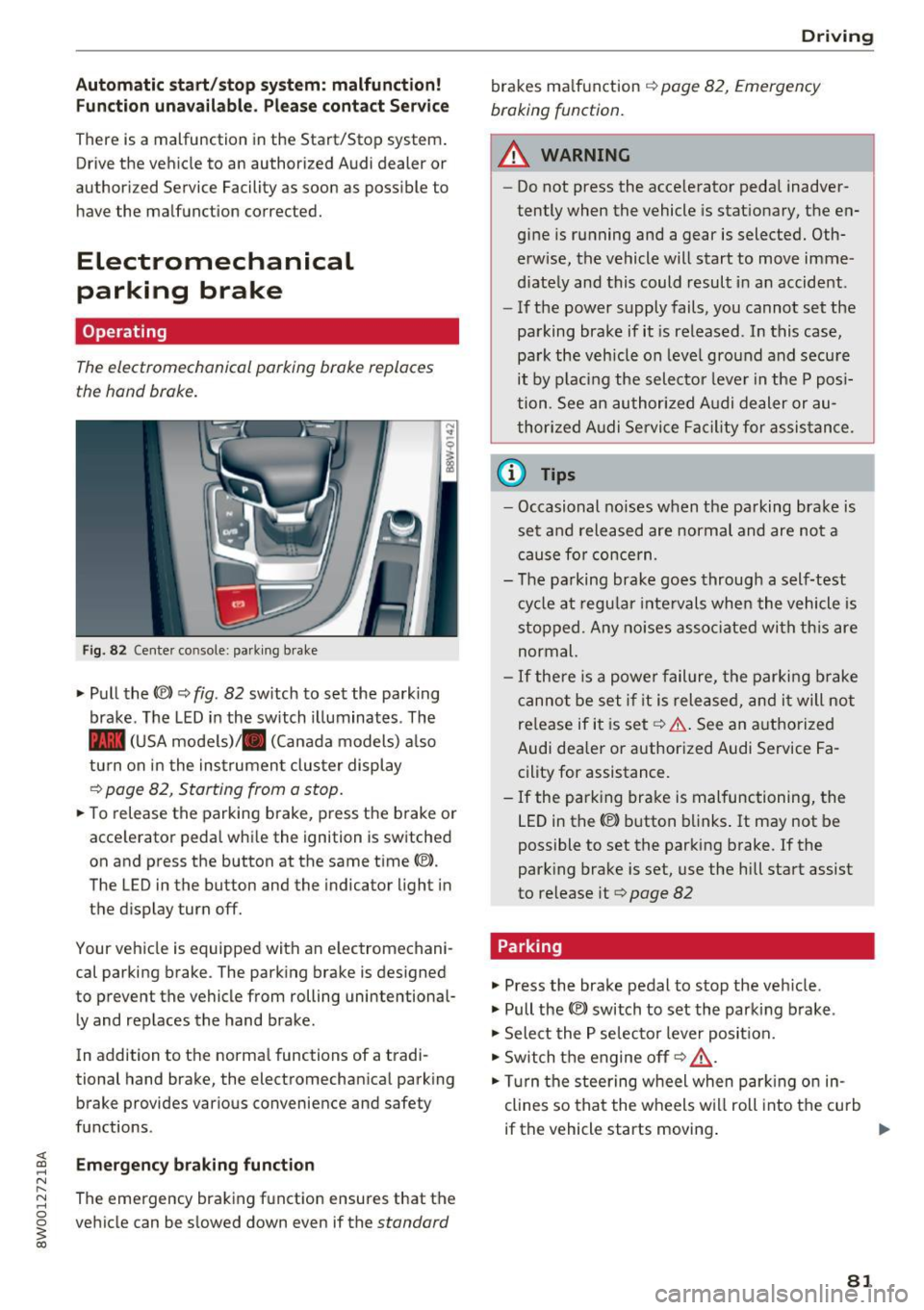
Fig. 82 Center co nsole: parking brake
"'Pull the(®) ~ fig. 82 sw itch to set the park ing
brake . The LED in the switch illuminates . The
- (USA models)/ . (Canada models) a lso
turn on in the instrument cluster display
Q page 82, Starting from a stop .
"'To release the parking brake, press the brake or
accelerator pedal while the ignition is switched
on and press the button at the same time(®).
The LED in the button and the indicator light in
the display turn off.
Your vehicle is equipped with an electromechani
cal parking brake . The parking brake is designed
to prevent the vehicle from rolling unintentional
l y and replaces the hand brake .
In addition to the normal functions of a tradi
tional hand brake, the electromechanical parking brake provides various convenience and safety
functions .
Emerg enc y braking function
The emergency braking fu nction ensures that the
vehicle can be slowed down even if the
standard
D rivi ng
brakes ma lfunction Q page 82, Emergency
braking function.
.&_ WARNING
-
- Do not press the acce lerator pedal inadver-
tently when the vehicle is stationary, the en
gine is running and a gear is selected. Oth
erwise, the vehicle will start to move imme
diate ly and this could result in an accident .
- If the power supply fails, you cannot set the
parking brake if it is released . In this case,
park the veh icle on leve l ground and secure
it by p lac ing the selector leve r in the P posi
tion. See an authorized A udi dealer or au
thorized A udi Se rvice Fa cil ity for assis tance.
(D Tips
- Occasional noises when the parking brake is
set and released are normal and are not a
cause fo r concern.
- The pa rking brake goes through a self-test
cy cle at regu lar inte rvals when the vehicle is
stopped . Any no ises asso ciated wi th th is are
normal.
- If there is a powe r failure, the parki ng brake
canno t be set if it is rele ased, and i t will not
re lease if it is set ~& . See an a uthorized
Audi dealer or authorized Audi Service Fa
cility for assistance.
- If the parking brake is malfunctioning, the
LED in the
C® button blinks . It may not be
possible to set the parking brake . If the
park ing brake is set, use the hill start assist
to release it
Q page 82
Parking
.,. Press the brake pedal to stop the veh icle.
.,. Pull the
C® switch to set the parking b rake .
.,. Select the P se lector lever position .
.,. Switch the engine off
Q _&. .
.,. Turn the steering w heel when par king o n in
clines so that the wheels w ill roll into the cu rb
if the vehicle starts moving .
81