service AUDI S4 2017 Owner's Manual
[x] Cancel search | Manufacturer: AUDI, Model Year: 2017, Model line: S4, Model: AUDI S4 2017Pages: 386, PDF Size: 96.32 MB
Page 89 of 386

<( a, .... N ,....
N .... 0 0
3 a,
-tiptronic does not work if the transmission
is running in emergency mode.
Kick-down
Kick-down enables maximum acceleration.
When you press the accelerator pedal down be
yond the resistance point, the automatic trans
mission shifts down into a lower gear and the en
gine utilizes its full power, depending on vehicle
speed and engine RPM. It shifts up into the next
higher gear once the maximum specified engine
RPM is reached .
A WARNING
Please note that the wheels could spin on
slick or slippery roads when kick-down is ac
tive.
Launch control program
The launch control program provides the best
possible acceleration when starting from a stop.
Requirement: The engine must be at operating
temperature and the steering wheel must not be
turned .
~ Deactivate the Start/Stop system* ¢ page 80.
The LED in the 10 ml button turns on.
~ With the engine running, press the ~l.i; -o~FF =! but
ton briefly ¢
page 135. The II indicator light
turns on and the message
Stabilization control
(ESC): Sport. Warning! Restricted stability
ap
pears in the instrument cluster display.
~ Pull the selector lever back out of the D/S posi
tion briefly to select the S position or select the
Dynamic driving mode in drive select*
¢page 122.
~ Press the brake pedal firmly with your left food
and hold it all the way down for at least 1 sec
ond.
~ At the same time, press the gas pedal all the
way down with your right foot until the engine
reaches and stays at a high RPM level.
~ Remove your foot from the brake pedal within
S seconds ¢
,&..
Driving
A WARNING
-Always adapt your driving to the traffic flow.
- Only use the Launch control program when
road and traffic conditions allow it and oth
er drivers will not be endangered or both
ered by your driving and the vehicle's accel
eration.
- Please note that the drive wheels can spin
and the vehicle can break away when sport
mode is switched on, especially when the
road is slippery.
- Once the vehicle has started moving, press
the
1 .$ OFFI button briefly to turn the sport
mode off.
(D Tips
- The transmission temperature may increase
significantly after using the launch control
program. If that happens, the program may
not be available for a few minutes. It will be
available again after a cool-down period.
- When accelerating using the launch control
program, all vehicle parts are subject to
heavy loads. This can lead to increased
wear.
Transmission malfunction
• Transmission: too hot. Please stop vehicle
Do not continue driving . Select the P selector lev
er position and contact an authorized Audi dealer
or authorized Audi Service Facility for assistance.
• Transmission: malfunction! Please stop ve
hicle and shift to P
Do not continue driving . Select the P selector lev
er position and contact an authorized Audi dealer
or authorized Audi Service Facility for assistance.
@] Selector lever: malfunction! You may contin
ue driving. Please contact Service
There is a system malfunction in the transmis
sion. Drive to an authorized Audi dealer or au
thorized Audi Service Facility immediately to have
the malfunction corrected .
[O] P button: malfunction! Auto P when engine
off. Please contact Service ..,.
87
Page 90 of 386
Driving
There is a malfunction in the P button on these
lector lever. The transmission automatically en
gages in P when you switch off the engine . Drive
to an author iz ed Audi deale r or author iz ed Audi
Serv ice Facility immediately to have the malfunc
tion corrected .
[iJ Transmission : m alfun ction ! Sel. le ver pos.
can only be changed using both paddle le vers.
Ple ase contact Service
There is a system malfunction in the transmis
sion. You can contin ue driving with restricted
function . The selector lever is not working. Gears
can only be selected by tapping both sh ift pad
d les at the same time when the vehicle is station
ary ¢
page 86, fig. 85 . Pay attention to these
lected transm ission position i n the instrument
cluste r display . The park ing lock engages au to
mat ic all y w hen you t urn off the engine. Drive to
an author ized Audi dealer or author ized A udi
Service Facility immediately to have the malfunc
tion corrected.
[iJ Transmi ssion : plea se pre ss brake pedal and
se lect gear again
Press the brake pedal and se lect the desired se
lecto r leve r posit ion aga in. You can then continue
d riving.
[O] Transmi ssion : too hot . Plea se adapt dr iving
s tyle
The transm ission temperature has incre ased s ig
n ificantly due to the sporty driving manner . Drive
i n a less sporty ma nner until the temperature re
turns to the normal range and the indicator light
sw itches of .
[O] Transmi ssion : malfunct ion! You can contin
u e driving . See owner 's manual
There is a system malfunct ion in the transm is
sion . You may continue dr iving . Drive to your au
thor ized Audi dealer or authorized Audi Service
Facility soon to have the malfu nction corrected .
[O] Transmission : malfunct ion! You ma y contin
ue dri ving in D until engine off
There is a system malfunction in the transmis
sion . The transmission is switching to emergency
mode. If you turn the engine off, you will not be
88
able to se lect any othe r se lector lever positions
after starting the engine again . Drive to an au
thorized Audi dea ler or a uthorized Audi Service
Facility immediate ly to have the malfunction cor
rected .
[iJ Transmission: malfunction! You ma y contin
ue dr iving (limited functionality ). Please con
tact Serv ice
There is a system malfunction in the transmis
sion . The transmission is switching to emergency
mode. This mode only s hifts into certain gears or
will no longer shift at a ll. The eng ine may sta ll.
Drive to an authorized Audi dealer or authorized
Audi Service Facility immediate ly to have the
malfunction corrected .
[iJ Transmission: malfunction! You ma y contin
ue dr iving. No re verse gear
There is a system malfunction in the transmis
s ion. The transmission is switch ing to emergency
mode. This mode only s hifts into certain gears or
will no longer shift at a ll. The eng ine may sta ll.
You cannot engage the reverse gear . Dr ive to an
authorized Aud i dealer or a uth orized Aud i Serv ice
Facility immediate ly to have the malfunction cor
r ected .
[iJ Danger of rolling away! P not possible .
Pl ea se apply park ing brake
- The parking lock was re leased us ing the emer
gency release¢
page 89. Or
- The parking lock can no longer be engaged.
Dr ive to an authori zed Audi dealer or author
ized Aud i Service Facility immediately to have
the malfunction corrected .
[iJ Move selector lever to automatic position
There is a ma lfunction in the tiptron ic mode . End
tiptronic mode by pus hing the selector lever to
the left into the D/S position .
Page 100 of 386
Assist
(D Note
The sensors can be displaced by impacts or
damage to the bumper , whee l housing and
underbody. This can impair the adaptive
cruise control. Have an authorized Audi dea ler
or authorized Audi Service Fac ility check their
function .
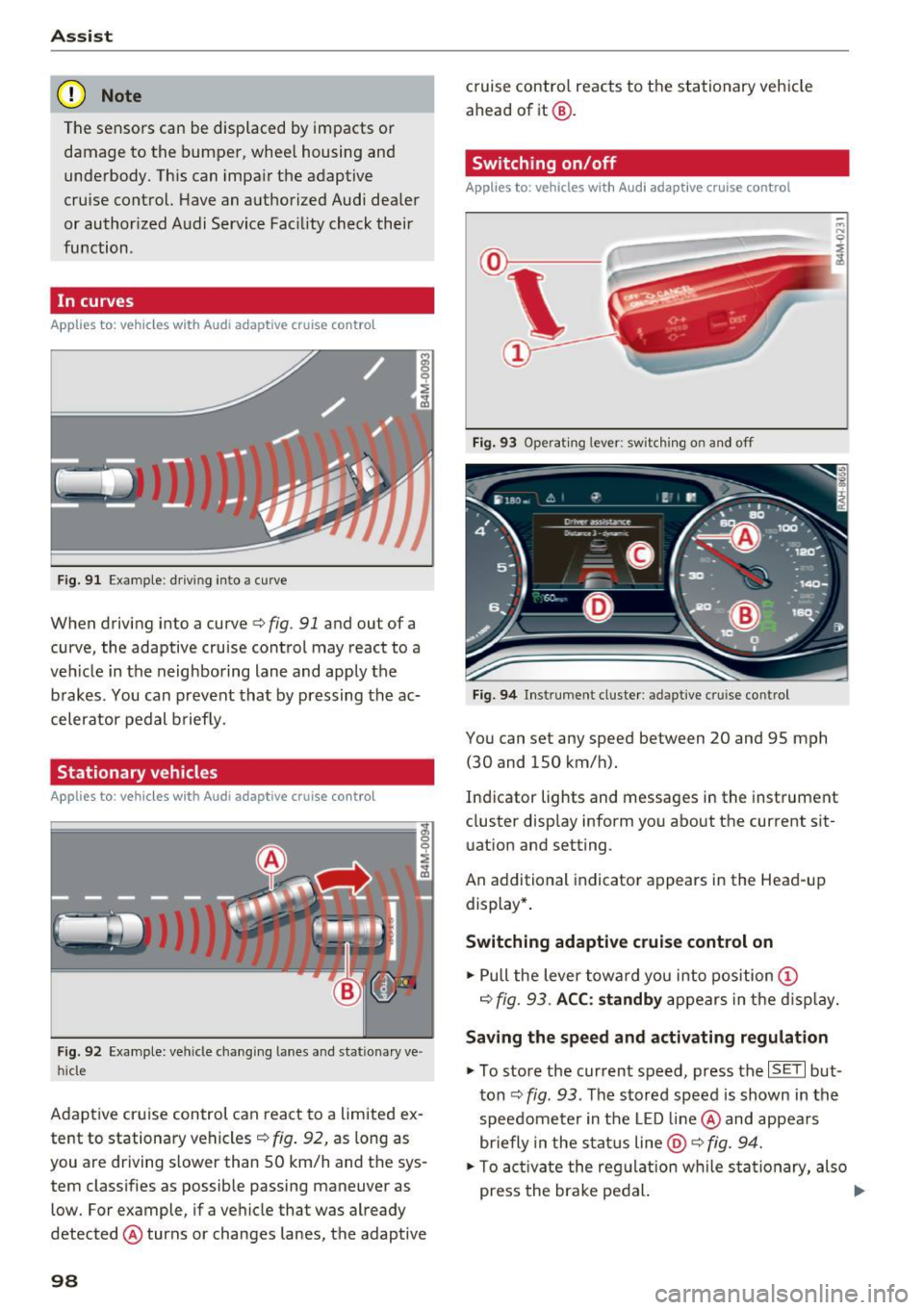
In curves
Applies to: vehicles with Audi adaptive cruise control
Fig . 9 1 Exa mple: drivin g in to a curve
When driving into a curve<=> fig. 91 and ou t of a
curve, the adaptive cruise control may react to a
veh icle in the neighboring lane and apply the
brakes . You can prevent that by pressing the ac
celerator pedal b rief ly.
Stationary vehicles
Applies to : vehicles with Aud i adaptive cruise contro l
Fig. 92 Example: vehicl e chang ing lane s and sta tiona ry ve
hi cle
Adaptive cruise control can react to a limited ex
tent to stationary vehicles
c:> fig . 92, as long as
you are driving slow er than SO km/h and the sys
tem classifies as possible passing maneuver as
low . For example, if a vehicle that was already
detected @turns or changes lanes, the adaptive
98
cruise contro l reacts to the stationary vehicle
ahead of it@ .
Switching on/off
Applies to: vehicles with Audi adaptive cruise control
Fig. 93 Operating lever : sw itc hin g on and off
Fig. 94 Inst rument cluster : adap tive cr uise cont rol
You can set any speed between 20 and 9S mph
(30 and lSO km/h).
Indicator lights and messages in the instrument
cluster display inform you about the cu rrent sit
uation and setting .
An add itional indicator appears in the Head-up
display *.
Switching adaptive cruise control on
.. Pull the lever toward you into position (D
c=> fig. 93. ACC: standby appears in the display.
Saving the speed and activating regulation
.. To store the current speed, press the ISE TI but
ton
c:> fig . 93 . The stored speed is shown in the
speedometer in the LED line@ and appears
briefly in the status line
@ c:> fig. 94.
.. To activate the regulation while sta tionary, also
press the brake pedal. .,.
Page 103 of 386

.. To resume cruise control, release the lever or
take your foot off the acce lerator pedal.
Canceling cruise control while driving
.. Move the lever into posit ion @. The message
ACC: standby appears. Or
.. press the brake pedal.
.. To resume the stored speed, move the lever in
to position @.
Canceling cruise control when stopped
.. Push the lever away from you into position @.
The message
ACC : standby appears.
.. To resume cruise control, press the brake pedal
and pull the lever toward you into position@
A WARNING
It is dangerous to activate cruise control and
resume the stored speed when the current
road, traffic or weather conditions do not per
m it this . This increases the risk of an acc ident.
Setting the distance
A ppl ies to: ve hicles with Audi adaptive cruise co ntro l
,
0
Fig . 98 Operating lever: sett ing the dista nce
.. Tap the rocker switch to display the current set
distance
c:> fig. 98.
.. To increase or reduce the distance in incre
ments, tap the switch upward/downward
again . The distance between the two vehicles
will change in the instrument cluster display.
When approaching a veh icle driving ahead, the
adapt ive cruise control system brakes to match
that vehicle's speed and then adjusts to the set
d istance. If the vehicle driv ing ahead accelerates,
then the adaptive cruise cont rol w ill also acceler
ate up to the speed that you have set.
Assist
The higher the speed, the greater the distance
c:> &. The Distance 3 setting is recommended.
That is equal to the general recommendation of "ha lf the speed shown on the speedometer" .
T he distances provided are specified values. De
pending on the driving situation and how the ve
hicle ahead is driving, the actual distance may be
more or less than these target distances.
If you change the time gaps, the newly set value
appears brief ly in the instrument cluster display
II for example for Distance 3. This only occurs if
Driver assist is current ly not shown in the display
c:> page 98, fig. 94 .
Distance 1: this setting corresponds to a distance
of 92 feet (28 meters) when traveling at 62 mph
(100 km/h), or a time distance of 1 second .
Distance 2: this setting corresponds to a distance
of 118 feet (36 meters) when traveling at 62
mph (100 km/h), or a time distance of 1.3 sec
onds.
Distance 3: this setting corresponds to a distance
of 164 feet (SO meters) when traveling at 62
mph (100 km/h), or a time distance of 1.8 sec
onds.
Distance 4: this setting corresponds to a distance
of 210 feet (64 meters) when traveling at 62
mph (100 km/h), or a time distance of 2 .4 sec
onds.
Distance 5: this setting corresponds to a distance
of 328 feet (100 meters) when traveling at 62
mph (100 km/h), or a time distance of 3 .6 sec
onds.
A WARNING
-When setting the distance, the driver is re-
sponsible for adheri ng to any applicable legal
regulations.
@ Tips
- Distance
3 is set automatically each time
you switch the ignition on. If you would like
to set another distance as the standard set
ting, you can have the
Adaptive cruise con
trol
menu enabled by an authorized Audi
dealer or authorized Audi Service Facility.
101
Page 108 of 386
Assist
Messages
Applies to: vehicles with Audi adaptive cruise control
II ACC with Conge stion assist: unavailable. See
owner 's manual
Th e system c annot guarantee that it w ill detec t
ve hicl es co rre ctly and it h as swit ched
off. T he ra
dar senso rs have s hifted o r are faul ty . D rive to an
authorized Audi dealer or authorized Audi Se rvice
Facility immediately to have t he mal function cor
rected.
II ACC with Congestion assist: currently un
available. Sensor v ision restricted due to sur
roundings. See owner 's manual
T hi s message appears if the radar sensor view is
obs truc ted, for example by leaves, snow, heavy
spray or dirt. C lean the sensors ~
page 97,
fig . 90.
IIJ ACC with Congestion assist : currently un
available. Gradient too steep
T he road exceeds the maximu m possib le grade
for safe ope ra tion. The systems c annot be swi tch
e d on.
IIJ ACC with Congestion assist: only available in
D, Sor M
Select the D/S o r M selector lever position .
Bl ACC with Congestion assist: currently un·
a vailable . Parking brake applied
The systems sw itch off if yo u set the pa rk in g
brake. The systems a re availab le again after you
release the pa rking brake .
IIJ ACC with Congestion assist : currently un
available. Stabilization control (ESC ) input
This message appea rs if the Ele ct ro nic St abiliza
tion Cont rol (ESC) is ta king a ction to s tabilize the
ve hicl e. The sys tems sw itch
o ff in this s cenar io.
IIJ ACC with Congestion assist: manual control!
This message appea rs if the veh icle rolls bac k
when starting on a slight incl ine , even thoug h the
sys tems are ac tive . P ress the b rake pedal to pre
ve nt the vehicle from rolling o r sta rting to move.
106
ilJ ACC with Congestion a ssist: currently un
available. Downhill assist activated
Y ou canno t activ ate the sys te m when hill hold as
s ist is active.
tei ACC with Congestion assist: manual control!
This message appears if the driver does not take
over steering after multiple driver i ntervention
r equests and the system sw itches
o ff . The veh icle
brakes un til it is sta tionary .
tei Congestion assist: unava ilable . See owner's
manual
The system can no longer ensu re that the vehicle
will stay in t he lane and switches
off. Have your
vehicle checked by an authorized Audi dealer o r
aut horize d Aud i Serv ice Facility if the ma lf u nc
t ion is continuous .
II Congestion assist: Please take over steering!
This message app ears as soon as t he system
stops detect ing steering act iv ity when the system
li mits a re reached . Always keep your hands o n
t h e steer ing whee l so you can be ready to steer at
any t ime.
@ Conge stion assist: currently unavailable.
Please fasten seat belt
The system swi tches off when the drive r's safety
b elt is unfas tene d.
II ACC: efficiency as sist not available in thi s
country
The adaptation to speed lim its and rou tes ahead
i s not available in this co unt ry .
ii ACC: efficiency assist currently unavailable .
See owner's manual
The adaptation to speed lim its and routes ahead
switches off at speed limits under 20 mph
(30 km/h).
The message can also appear if the adaptation to speed limits and routes ahead has a temporary
failure. Have your vehicle checked by an a uthor
i zed Audi dealer or author ized Audi Se rvice Facili
ty if the malfunction is cont inuous.
Distance warning: malfunction! Please contact
Service
...
Page 109 of 386
<( a, .... N ,....
N .... 0 0
3 a,
The system cannot guarantee that it will detect
vehicles correctly and it has switched off. The ra
da r senso rs have sh ifted o r are faulty . Drive to an
author iz ed Audi dealer or author iz ed Audi Se rvice
Faci lity immediately to have the malfunction cor
rected .
Distance warning : currently una vailable . Sensor
v iew restricted due to surroundings. See own
er's manual
This message appears if the radar sensor view is
obstructed, for example by leaves, snow, heavy
spray or dirt . C lean the sensors ¢
page 97,
fig. 90 .
Distance warning: currently unavailable. See
owner 's manu al
This message appea rs if the sys tem has a tempo
rary fai lure. If this occ urs mult iple times, d rive to
an authorized Audi dealer or authorized A udi
Service Facility immediately to have the malfunc
tion corrected.
ACC: Please fa sten seat belt
The system is no t comp lete ly available if the d riv
e r' s sea t belt is u nfastened .
Stationary object ahead
This message appears if you would like to switch
the system o n and there is a stationary object di
rect ly in front of your vehicle.
Door open
The system is no t availab le when the door is
open .
Audi pre sense
Introduction
Applies to: ve hicles with Audi pre sense
W ith in the lim its of the system, t he pre sense
f u nctions can init iate measures in part icularly
dangerous sit uat ions to protect t he ve hicle pas
sengers and ot her road users.
- Because different veh icle systems such as the
ESC are i nterconnected , the
pre sense b asic in
t roduces p reempt ive safety meas ures for the
Assist
passengers i f an unstable driving si tuation is
detected.
- The
pre sen se front system uses the data from
the adaptive cruise contro l* radar sensors and
the camera to ca lculate the probability of a co l
lision . With in the lim its of the system, an im
pending co llision with vehicles can be detected
in both urba n and rural speed ranges. In t his
case, the system warns the driver visua lly,
acoust ica lly and w ith a jerk on the brakes if nec
essary. If needed, i t can in itiate a partia l o r fu ll
dece lerat ion to reduce the collision speed or to
avoid the collision under certa in circumstances.
I n conjunction with pre sense basic/rear, the
front safety belts are a lso reve rsibly tens ioned
when needed . The pre sense front is a lso active
when adaptive cruise control* is sw itched off.
- Pre sense rear contains pre sense basic func
tions. It uses the data from the side assist* ra
dar sensors and ca lculates within the limits of
the system the probability of a rear end colli
sion with t he vehicle behind you. Pre sense rear
is also act ive when side assist* is sw itched off .
- Within the limits of the system,
pre sense city
uses the camera data and can detect an im
pe nding collision with vehicles and pedestrians.
I n th is case , the system warns the driver visua l
ly , acous tic ally and wit h a jerk on the b rakes if
necessary. If needed, it c an initi ate a full dece l
erat io n to reduce the collis io n speed or to avoid
the collision under certain circumstances . In
conjunction with pre sense basic/rear, the front
safety belts are a lso reversibly tens ioned when
needed .
A WARNING
-
Read the genera l information on¢.&. in Gen -
eral information on page
97, c::> .&. in General
information on page 117 .
@ Tips
-Certa in pre sense funct ions sw itch off when
dr iving in reverse.
- The pre sense funct ions may not be availa
ble if there is a malfunct ion in the ESC sys
tem or t he a irbag control module .
107
Page 111 of 386
<( a, .... N ,....
N .... 0 0
3 a,
increasing force within the limits of the
system
l)_ This reduces the vehicle speed in the
event of a collision. At low vehicle speeds, pre
sense front can initiate a complete deceleration
shortly before a collision with a vehicle driving
ahead
1>. If pre sense front determines that you
are not braking strongly enough when a collision
is imminent, it can increase the braking force .
The following functions trigger in conjunction
with pre sense basic/rear at corresponding vehi
cle speeds :
- Reversible tensioning of the front safety belts.
- Closing the windows and sunroof*.
- Inflating the side bolsters* in the seat backrest
and seat surface.
Audi drive select*: the reversible belt tensioner,
the closing of the windows and sunroof* as well
as the inflating of the side bolste rs* on the seat
backrest and seat surface are not active depend
ing on the mode selected .
Collision avoidance assist
Collision avoidance assist helps you to steer the
vehicle around an obstacle in a critical situation.
If you avoid an obstacle after the acute warning,
then the collision avoidance supports you by ap plying slight steering adjustment to correct your
steering wheel angle as long as you are actively
steering. Collision avoidance assist is available at
speeds between approximately 20 mph (30 km/
h) and 90 mph (150 km/h).
Turn assist
When starting to drive and up to speeds of maxi
mum 6 mph (10 km/h), the turn assist uses a
braking intervention to prevent your vehicle from
colliding with an oncoming vehicle when turning left or right (available in certain countries) . The
braking intervention causes your vehicle to stay
in its lane.
.8, WARNING
-Pre sense front cannot overcome the laws of
physics.
It is a system designed to assist and
1) This is not availa ble in some co untries.
Assist
it cannot prevent a collision in every circum
stance. The driver must always intervene.
The driver is always responsible for braking
at the correct time. Do not let the increased
safety provided tempt you into taking risks .
This could increase your risk of a collis ion.
- The system can deploy incorrectly due to
system-specific limits.
- Please note that the sensors and the camera
do not always detect all objects or lane
markings . This increases the risk of an acci
dent.
- Pre sense front does not react to people, an
imals or objects that are crossing the vehi
cle 's path or that are difficult to detect
c> &..
in General information on page 97.
-Reflective objects such as guard rails or the
entrance to a tunnel, heavy rain and ice can
affect the function of the radar sensors and
the system's ability to detect a collision risk.
(D Note
The sensors can be displaced by impacts or
damage to the bumper, wheel housing and
underbody. Pre sense front can be impaired
by this. Have an authorized Audi dealer or au
thorized Audi Service Facility check their func
tion.
(D Tips
- You can cancel the braking with increasing
force that is initiated by the system by brak
ing yourself, by accelerating noticeably or
by swerving.
- Keep in mind that pre sense front can brake
unexpectedly. Always secure any cargo or
objects that you are transporting to reduce
the risk of damage or injury.
- Certain pre sense front functions are switch
ed off when the ESC is limited or switched
off
c> page 135 .
109
Page 112 of 386
Assist
Audi pre sense rear
Description
App lies to: ve hicles w ith Audi side assist
If the risk of a collision is detected, the following
functions can trigger:
- Reversible tensioning of the front safety belts
at the corresponding speeds .
- Closing the windows and sunroof*.
- Inflating the side bolsters* in the seat backrest
and seat surface.
- Switching on the emergency flashers with in-
creased frequency
l ).
The message Audi pre sense. ~ page 108,
fig. 104 will warn you about the danger.
Aud i drive select*: the function is not active de
pending on the mode selected.
A WARNING
- To reduce the risk of an accident, please
note that the side assist* radar sensors do
not always detect every object.
- Pre sense rear does not react to people, ani
mals or objects that are crossing the vehi
cle's path or that are difficult to detect.
- Reflective objects such as guard rails, heavy
rain and ice can impair the function of the
radar sensors and the ability to detect a col
lision risk .
(D Note
The radar sensors can be displaced by impacts
or damage to the bumper, wheel housing and
underbody. Pre sense rear can be impaired by
this . Have an authorized Audi dealer or au
thorized Audi Service Facil ity check their func
tion.
(0 Tips
- The pre sense rear functions switch off
when towing a trailer.
- The pre sense rear functions may also
switch off if there is a malfunction in the
side assist* system.
1> This is not ava ilab le in some co untri es.
110
Audi pre sense city
' Description
App lies to : vehicles wit h Audi pre sense city
Within the limits of the system, pre sense city
can warn you of impending collisions with
vehicles and pedestrians and initiate the applica
ble braking maneuver if needed. Pre sense city is
active at a speed of 6 mph (9 km/h) and higher.
A pedestrian warning can occur at speeds up to 50 mph (85 km/h), and vehicle warnings can oc
cur at speeds up to 155 mph (250 km/h). A pre
sense city braking maneuver is possible at speeds
up to 50 mph (85 km/h).
Warnings
App lies to: vehicles wit h Aud i pre sense city
The system recognizes various dangerous situa
tions. The
early warning occurs when:
- a vehicle driving ahead brakes sudden ly,
- your own vehicle approaches a sign ificantly
slower vehicle or stationary vehicle in the direc
tion of travel.
- a pedestrian is standing in the lane or is moving
into the lane.
When this warning occurs, it may only be possi
ble to avo id a collision by swerving or braking
strongly. The message
Audi pre sense.
~ page 108, fig. 104 and a warning tone will
warn you about the danger.
Additionally, a jerk on the brakes may occur as an
acute warning when there is an impend ing colli
sion . If you do not react to the acute warning, pre
sense city can brake to the point of complete de
ce leration within the limits of the system. This
reduces the vehicle speed in the event of a colli
sion. The message
Audi pre sense. also ap
pears.
The following functions are triggered in conjunc
tion with pre sense basic/rear:
- Reversible tensioning of the front safety belts .
- Closing the windows and sunroof*. ..,
Page 114 of 386
Assist
sensors and the area around the camera
~ page 97, fig. 90 or~ page 116, fig . 112.
Ill Audi pre sense: malfunction! Please contact
Service
This message appears when the pre sense func
tion is affected. For examp le, this could be
caused by a faulty sensor. Dr ive to an authorized
Aud i dealer or a utho rized Aud i Serv ice Facility im
mediately to have the malfunction cor rected.
Ill Audi pre sense: currently restricted. Towing
mode
Pre sense rear and the pre sense city braking in
tervent ions sw itch off automatically when the
electrical connector in the factory-installed trail
er hitch is connected. There is no gua rantee the
f unct ions will swi tch off when using a re trofitted
trai ler hitch .
Ill Audi pre sense: currently restricted
This message appears if the ESC is restr icted or
sw itched off, for example.
Ill Audi pre sense: currently restricted. See
owner's manual
This message appears when there is a temporary
fa ilur e in a subsystem, such as the ESC. If this
message appears repeated ly, dr ive to an author
ized Audi dealer or authorized Audi Se rvice Facili
ty to have the malfunction corrected .
Ii] Audi pre sense: emergency braking system
off
This message appears if the pre sense functions
are switched off through the Infotainment sys
tem or if th e system is not ready.
Audi active Lane assist
Description
Applies to: veh icles w ith Audi active lane assist
Active lane assist (lane departure warning) de
tects lane ma rker lines withi n the l imits of the
system using a camera in the windshield. If you
are approaching a detected lane marker line and it appears likely that you will leave the lane, the
system will warn you w ith corrective stee ring .
You can override this steering at any time . If you
112
pass over a line, the steering wheel will vibrate
lightly. In order for this warning vibration to oc
cur, it must first be switched on in the Infotain
ment system. Active lane ass ist is ready for oper
a tion when the lane marker line is detected on at
least one side of the vehicle .
T he system is des igned for driving on express
ways and highways and therefore on ly activates
a t speeds above approximately 40 mph (65 km/
h) .
Applies to vehicles with s ide ass ist*: if you acti
vate a turn signa l when active lane assist is ready
a nd it classifies a lane change as critical bec ause
of veh icles traveling a longside you or approach
i ng you, there will be noticeable corrective steer
i ng shortly before you leave the lane. This will at
tempt to keep your vehicle in the lane.
Applies to vehicles without side assist* : the sys
tem does not warn when it is ready if you act ivate
the turn signal before crossing the lane marker
lin e. In this case, it assumes that you are chang
in g lanes intent ionally.
Applies to vehicles with adaptive cruise contro l*:
there is no corrective steer ing or warnings if the
system recognizes a distinct passing maneuver.
If the conditions are met, congestion assist
switches on at speeds under approximately
40 mph (65 km/h)
¢page 104.
_& WARNING
-The system warns the driver that the vehicle
is leaving the lane using correct ive steering.
The driver is always responsible for keeping
the vehicle within the lane.
- The system can help you keep the vehicle in
the lane, but it does not drive by itself. Al
ways keep your hands on the steering
wheel.
- Corrective steering may not occur in certain
situations, such as during heavy braking .
- There may be cases where the camera does
not recognize all lane marker lines. Correc
tive steering can only take place on the side
of the vehicle where lane marker lines are
detected.
Page 117 of 386

-Th e system has been unable to detect the lanes
for an extended period of time due to road con
ditions . Sw itch act ive lane assist back on when
the lines are more visible .
rm Audi active lane assist: currently unavaila
ble. See owner's manual
There is a temporary active lane assist malfunc
tion . Try sw itching the active lane assist on again
later .
• Audi active lane assist: malfunction! See
owner's manual
Drive to an authorized Aud i dealer or authorized
Audi Service Facility immediately to have the
malfunction corrected.
rm Audi active lane assist: Please take over
steering!
This message appears if you are not steering by
yourself. Active lane assist is activated, but is not ready to give warning
Adjusting the steering time and vibration
warning
Applies to: vehicles with Audi active lane assist
You can adjust individual active lane assist set
tings in the Infotainment system .
... Select in the Infotainment system: !MENUI but
ton
>Ve hicle > left control button > Driver as
sist
> Audi active lane assist .
Steering time Early:
in this setting, the correct ive steering hap
pens continuously to help keep the vehicle in the
center of the lane.
Late: in this setting, the system provides correc
tive steering just before a vehicle whee l goes over
a detected lane marker line.
Vibration warning
You can switch the additional vibration warning
in the steering wheel on or
off.
A WARNING
-
With the vibration warning switched off,
there will also be no visual warning in the in-
Assist
strument cluster disp lay when crossing a lane
marker line.
(D Tips
In certain countries: your settings are stored
automatica lly and assigned to the remote
control key in use.
Audi side assist
Description
Applies to: vehicles with Audi side assist
Fig. 109 Sensor detection range
Fig. 110 Disp lay on th e exterio r m irror
Side assist (lane change assist) helps you mon itor
your blind spot and traffic behind your vehicle .
Within its lim its, the system warns you about
vehicles that are coming closer or that are travel
ing within your sensor range
(D <=?fig. 109. If a
lane change is classified as critical, the display@
turns on in the exterio r mirror
<=? fig. 110 .
The display in the left exterior mirror p rovides as
s istanc e when making a lane change to the left,
wh ile th e display in the rig ht exterior m irro r pro
vides ass istance when making a lane change to
the right. ..,.
115