service AUDI S4 2017 Repair Manual
[x] Cancel search | Manufacturer: AUDI, Model Year: 2017, Model line: S4, Model: AUDI S4 2017Pages: 386, PDF Size: 96.32 MB
Page 202 of 386
Navigation
@ Tips
-The stored o nline map view data can be de
l eted in
Factory settings > Navigation and
online memory
c::> page 230.
- The on line map view is an Audi co nnect (In
fotainment) service and is regular ly updated
when the function is opene d. T he p rocess
may take several seconds.
- When the on line map view is switc hed o n
us ing the 30 map orientation, the MMI d is
pl ay automatically switc hes to the 20 map
orienta tion when driving t hrough tunn els .
- Fo r safety reasons, the Street V iew func
tions can o nly b e used when the veh icle is
sta tionary.
- Al ways read the chapter
c::> page 178, Audi
conn ect (Infotainm ent) information.
- Additional informat io n can be found at
www.audiusa.com /audiconnect .
Map update
Introduction
Applies to: ve hicles w ith navigation system
There are mult iple options available for updating
your map materia l:
- Map u pdat es thr ough the
online map update*
c::> page 2 00.
- Impo rt map updates from the
SD card to y our
M MI. Addi tio nal info rmation on th is can be
f o und in t he
Audi connect (myAudi) operating
manual
un der my .audiusa .com.
- Map upd ate a t your author ized Audi de aler or
autho rized Aud i Serv ice Facility. This can result
in additional costs .
200
Online map update
Applies to : vehicles wit h a naviga tion sys tem and Audi co n
nect (I nfo tainm ent)
Using the online map update, you can update
the map material in your navigation system di
rectly from your vehicle.
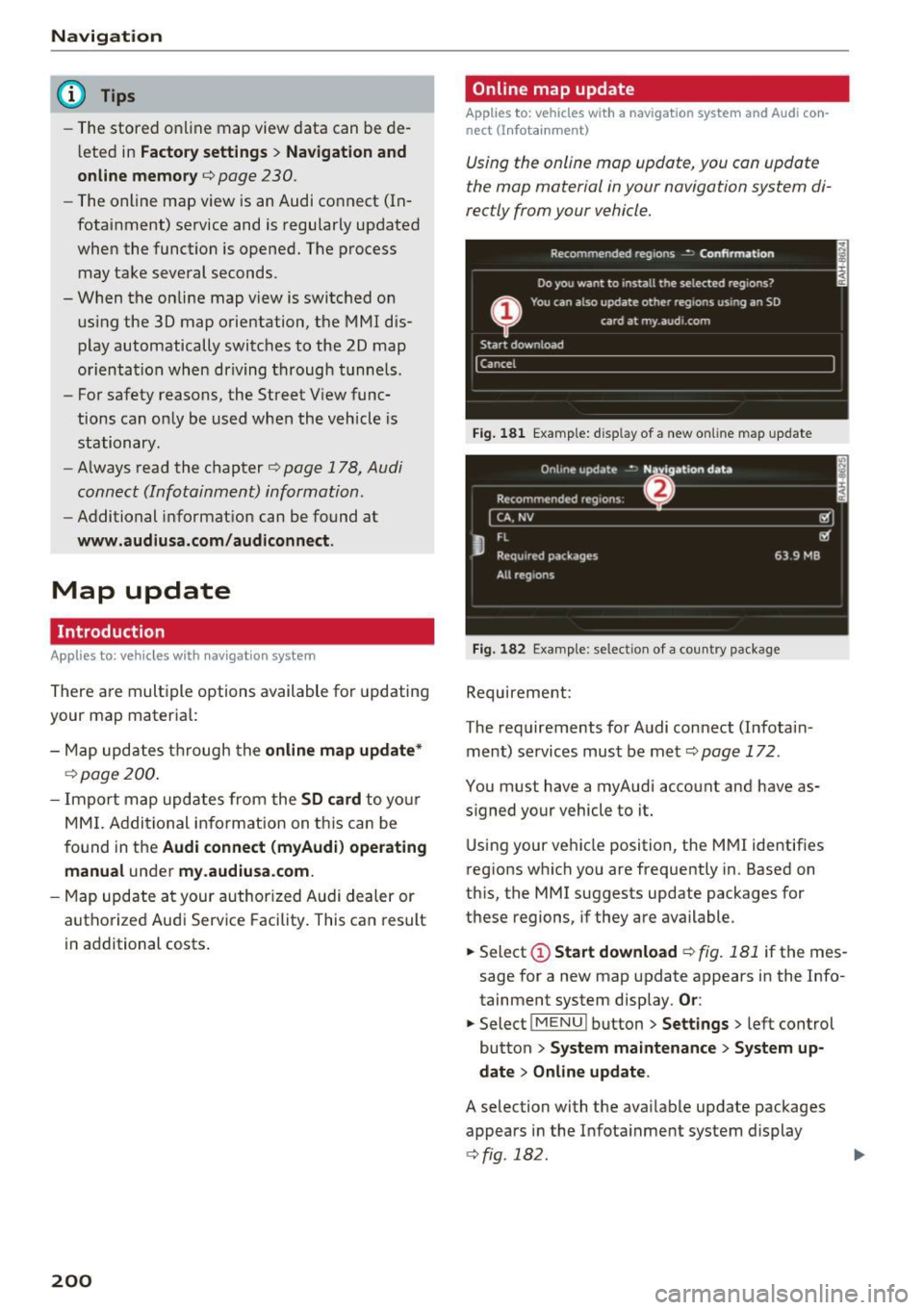
Fig. 181 E xamp le: display of a new on line map upda te
Fig. 182 Examp le: select io n of a country package
Requireme nt:
The requirements fo r A udi connect (Infota in
ment) services must be met
c::> page 172 .
You must have a myAudi acco unt and have as
s igned yo ur vehicle to it .
U sin g your ve hicle position, the M MI ide ntif ies
r eg ions w hich you are frequently in . Based on
th is, the MMI suggests update packages for
t h ese regions, if they are available.
.,. Select
(D Start download c::> fig. 181 if the mes
sage for a new map update appears in the Info
tainment system display.
Or :
.,. Select I ME N u I butt on > Settings > left cont rol
button
> System maintenance > System up
date > Online update .
A selection with the available update packages
appears in the In fota inment system display
c::> fig . 182.
Page 216 of 386

Media
-To avoid interruptions during playback, de
activate the power saving function on the
media player or connect it to a charger.
- The loading t imes for the a udio data depend
on the med ia p layer used and the number of
files that it conta ins.
- A maximum of 2,000 entries per directory
are displayed in the MMI.
- Songs down loaded for offline use using mu
sic streaming services are stored on your mobile device (such as a smartphone) and
may be DRM protected. The Wi-Fi audio
player wil l not play DRM protected files.
- Contact your authorized Aud i dea ler or au
thorized Audi Service Facility for additional
i nformat ion on the Wi-Fi audio player .
Online media
Applies to: veh icles w ith Aud i connect
You can playback and operate different online
media services using the
MMI.
F ig . 193 Online me dia
" Press the I MEDIAi button . Press the left control
button until the so urces overview ¢
fig. 193 is
displayed.
Requirement:
- The
Audi MMI connect app must be insta lled
and open on your mobile device.
- You m ust be logged into your myAudi account
in the
Aud i MMI connect app and you must
have selected your vehicle.
- The Wi-Fi function on the mobile device and on
the MMI must be switched on.
- If necessary , check in the connection manager
¢ page 230 if the mobile device you connected
is selected under the
MMI connect app (~).
-The MMI must be connected to the network.
214
- T he Online media source (!)¢ fig. 193 must be
disp layed in the MMI.
- A s upported online med ia service must be ava il
able in yo ur country.
- You must have a n acco unt wit h a supported on
line media service.
- Depe nding on the online media service, yo u
must install and open an app on your mobile
device .
Starting Online media :
Press the I MEDIAi button. Press the left control
button until the so urces overview ¢
page 217 is
displayed .
Se lect and confirm an online media service.
A WARNING
- It is only safe to use tablets, laptops, mo
bile devices and other similar devices when
the vehicl e is stat ionary because, like a ll
loose objects, they co u ld be thrown a round
the inside o f the ve hicle in a c rash and ca use
serious inju ries. Store these types of devices
secure ly while driving .
-
-Do not use any wire less devices o n the front
seats within range of the airbags while dr iv
ing . Also read and follow the warnings in
¢ page 257, Front airbags.
(D Note
P lease no te that there ge nera lly are add itio n
a l costs when using an on line media service
account, espec ia lly when it is used interna
tionally.
@ Tips
- Mobile devices only need to be paire d with
the MM I one time using the Wi -Fi hotspot *.
Depending on the mobi le dev ice be ing used,
a device that was already paired will connect
automatically to the MMI Wi-Fi hotspot*
when it is within ra nge .
- Depending on the Inte rnet connection, a
connect io n loss can occur during playback of
online med ia services.
- Onl ine media usage depends on the service
availability of the third party provider. ..,.
Page 217 of 386

-Audi AG simply makes the access to online
media services possible through the MMI
and does not take any respons ibility for the
contents of the online media services.
- Always read the chapter
c;, page 178, Audi
connect (Infotainment ) information .
-Depending on the mobile device being used,
interruptions in media playback can occur.
To avoid interruptions when using a mobile
device, do not lock the screen on your mo
bile device and keep the
Audi MMI connect
app in the foreground .
- Contact your authorized Audi dealer or au
thorized Audi Service Facility for additional
information about online media .
Multimedia connections
USB adapter for Audi music interface
You con connect your mobile devices (such as o
smortphone or MP3 player) to the Audi music in
terface and charge them using o special
USB
adopt er.
Fig. 194 Audi USB adapt ers
CD USB adapter for devices with a micro USB con
nect ion
@ USB adapter for devices with an Apple Light
ning connection
@ USB adapter for devices with an Apple Dock
connector
You can purchase the USB adapter from an au
thor ized Audi dealer or at spec ialty stores .
Use the USB adapter for the
Audi music interface
,=;,page 215.
Media
(D Note
Handle the USB adapter carefully . Do not al
l ow it to be pinched .
Audi music interface
Connect your mobil e devices to the Audi music
interfac e in order to operate them through the
MMI and charge the battery.
Fig. 195 Conn ect ing mob ile device s
The Audi music interface is located under the
armrest in the center console @,=;,
page 8, fig. 2.
-Connecting a mobile device using a USB
adapter:
connect the applicable USB adapter @
c;, fig. 195 to the port on the Audi music inter
face @ and then connect the adapter to the
mobile device
CD (such as an iPod).
- Charging a mobile device using a USB adapter :
when you connect a mobile device to the Audi
mus ic interface @ using the applicable USB
adapter @,=;,
fig. 195 , the battery will auto
matically charge .
-Disconnecting a mobile device from the Audi
music interface :
remove the USB adapter@
c;, fig. 195 from the Aud i music interface .
-Disconnecting mobile devices with an Apple
Dock connector :
remove the Apple Dock con
nector from the Apple device with the release
tabs pressed in@ ¢poge
215 , fig. 194.
The media are started and operated through the
mobile device or the MMI, depending on the de
vice being used ¢
page 217.
Connecting two mobile devices : if two mobile
dev ices (for example iPod and smartphone) are
connected at the same time , then both devices
can be used as playback sources.
IJl.
215
Page 218 of 386

Media
You can connect mobile devices using the analog
AUX port .
-Connecting a mobile device to the AUX input:
connect the cable®<=> fig. 195 to the AUX in
put ® on the Audi music interface and then to
the mobile device@ (such as an MP3 player or
smartphone).
- Disconnecting a mobile device from the AUX
input :
remove the cable S@ <=> fig. 195 from
the AUX input@<=>fig.
195 .
-Operating: select and confirm the External au
dio player @source
<=> page 217, fig. 196. The
media are started and operated through the
mobile device@<=>fig.
195.
A WARNING
Driving requires your complete and undivided
attention. As the driver, you have complete
responsibility for safety in traffic. Never oper
ate mobile devices while driving, because this
increases the risk of an accident .
@ Note
-Remove the connector from the Audi music
interface carefully so it is not damaged.
- Use a USB extension cable to connect devi
ces that have an integrated USB connector
(such as a USB stick) to prevent damage to
your USB device and the Audi music inter
face.
- Extremely high or low temperatures that
can occur inside vehicles can damage mobile
devices and/or impair their performance .
Never leave mobile devices in the vehicle in
extremely high or low temperatures.
@ Tips
-Do not use an additional adapter or USB ex
tension cable to connect mobile devices to
the Audi music interface that already have a
cable or that must be connected with a USB
adapter( <=>
page 215). This may impair the
functionality.
1 > A pp lies only to MTP devic e s. Doe s no t a ppl y to A pple de vi
ces and U SB m ass s torage d evic es.
216
-You can purchase the AUX connector cable
from an authorized Audi dealer or at spe
cialty stores.
- Functionality is not guaranteed for mobile
devices that do not conform to the USB 2.0
specification .
- USB hubs are not supported.
- Some versions of the iPod such as the iPod
shuffle cannot be connected to the USB
adapter for devices with Apple Dock connec
tor. Connect these devices using a AUX con
nector cable.
- Changed content on a mobile device
ll that
is connected to the Audi music interface
may not be displayed in the media center.
In this case, reset the
Media settings back
to
Factory settings <=> page 230.
-Video playback through the Audi music in
terface is only supported if the connected
device is recognized as a USB storage device
(for example a USB stick). Apple devices and
MTP devices (such as smartphones) are not
recognized as USB storage devices.
- iPod/iPhone/iPad malfunctions also affect
the operation of the MMI. Reset your iPod/
iPhone/iPad if this happens.
- For important information on operating
your iPod/iPhone/iPad , refer to the user
guide for that device. Audi recommends up
dating the iPod/iPhone/iPad software to the
latest version.
- For more information about the Audi music
interface and supported devices, check the
Audi database for mobile devices at
www.audiusa.com/bluetooth or contact an
authorized Audi dealer or authorized Audi
Service Facility.
Page 219 of 386

Rear Seat Entertainment preparation
A ppl ies to: ve hicles with Rear Sea t Entertainment preparation
The Rear Seat Entertainment preparation in
cludes cables and a mount for Audi Entertain
ment mobile in the driver's and front passenger's
seat backrests.
The su itable Audi Entertainment mobile Rear
Seat Entertainment package is available through
Aud i Genu ine Accessories.
We recommend that you use Audi Genuine Acces
sories . Aud i has established their reliability, safe
ty and s uitability.
We cannot evaluate or endorse other products in
this way, even if the product is approved by a cer
tified testing agency or government agency.
(D Note
Only use devices that are approved for the Rear Seat Entertainment preparation. Unap
proved devices may cause damage to the vehi
cle electronics.
(D Tips
-Contact your authorized Audi dealer or au
thorized Audi Service Facility for additional i nformat ion a bout
Audi Entertainment mo
bile .
-Always read the chapter¢ page 365, Tech
nical Modifications .
- The Rear Seat Entertainment preparation is
not intended to charge external electronic
devices.
Media
Playing media
Opening media
You can start and operate various media
through the MMI control panel .
Fig. 196 Possible sources in the Med ia menu
Fig. 197 Possible sources in the Med ia menu
Requirement: a media source must contain au
dio/video files* ¢
page 210.
"' Press the I MEDIA ! button. Press the left control
button unt il the sources overv iew is displayed.
"' Select and confirm the desired source.
Or:
press the !MEDIA ! button repeatedly until the
desired source is selected.
Depending on the vehicle equipment, the follow
ing sources may be displayed in the
Media menu:
@ Jukebox* ..... .. .. ..... ..... .
@ DVD/CD drive* .. . .. .......... .
@ SD card reader .. ... ......... .
@ Audi music interface* ......... .
such as iPod, USB stick
211
210,211
210
215
© External audio player . . . . . . . . . . 215
such as an MP3 player connected to
the AUX input
® Bluetooth audio player* 212 ..,_
217
Page 221 of 386

(j) Folders
The folder structure or track/chapter list is dis
played. Select a folder, if necessary. Select and
confirm a track.
@ Playlists
All available playlists from the source and the
smart playlists are displayed. Select and confirm
a playlist and then a track.
Smart playlists:
- Last played tracks:
the last track played in the
selected source is displayed.
-Most played tracks: the most played tracks in
the selected source are displayed.
- 5 stars to 1 star: tracks from the selected
source are displayed according to their rating.
- Unrated : all files from the selected source
without rating information (for example, in the
103 tag) are displayed.
@ Videos*
All available video files are displayed. Select and
confirm a video file.
@ Tips
- Only the categories supported by the medi
um are available. For example, CD/DVD
ROM tracks cannot be selected with catego
ries such as
Artists, Albums or Genres.
With an iPod (source : Audi music interface
r:!;> page 215), the Podcasts, Audio books
and Composers categories are also availa
ble.
- For safety reasons, the
video image is only
displayed when the vehicle is stationary. On
ly the sound from the video plays while driv
ing .
- When synchronizing a portable device with
"Cloud" services, playlists may display incor
rectly in the MMI. Use the media center in
the device.
Media
Free text search
App lies to : veh icles w it h free text searc h
You can search in the active source by tracks and
video files*, for example
Fig. 200 Input field and res ults list for free text sea rc h
You can open the free text search depending on
the selected source .
Requirement: the playlist
¢ page 220 or media
center
¢ page 218 must be displayed.
Opening free text search
.. Keep turning the control knob to the left until
the
free text search input field@<:!;> fig. 200
appears. Or: push the control knob up.
Using the free text search: refer tor:!;> page 149,
Free text search.
Entries that contain the entered search term are
listed in the results list ®
r:!;> fig. 200. You can
search for artists @<:!;>
fig. 200, albums @or
tracks @) as well as genres and videos.
@ Tips
-It will then search through the files in the
active source.
-If you open free text search in the Folders
category 0 r:!;> page 218, fig. 199 or
theComposers, Podcasts and Audio books
categories, it will only search through the
files in that folder.
219
Page 253 of 386
<( a, .... N ..... N .... 0 0
3 a,
The shoulder belt should lie as close to the center
of the collar bone as possib le and should fit well
on the bod y ¢
A in Safety belt position on
page 249.
.. Push
the loop- around fittings up ¢ fig . 21 8@ ,
or
.. squeeze to gether the@ button, and push the
loop-around fittings
do wn@ .
.. Pull the belt to make sure that the upper at
tachment is p roperly engaged .
A WARNING
Always read and heed all WARNINGS and oth
er important informat ion¢
page 247.
With the front seats, the height adjustment
of the seat can also be used to adjust the po
sition of the safety belts.
Improperly worn safety belts
Incorrectly positioned safety belts can cause se
vere injuries.
Wearing safety belts improperly can cause seri
ous injury or death. Safety belts can only work
when they are correctly pos itioned on the body .
Improper seating positions reduce the effect ive
n ess of safety be lts and will even inc rease the
ris k of injury and death by mov ing the safety bel t
to cr it ica l areas of the body. Imp roper seating
positions also increase the risk of serious inj ury
and death when an airbag deploys and strikes an
occ upant who is not in the co rrect seat ing posi
tion. A driver is respons ible for the safety of all
vehicle occupants and espec ia lly for children.
Therefore:
.. Never permit anyone to ass ume an incorrect
s itting position in the veh icle wh ile traveling
¢ &, .
A WARNING
Improperly worn safety belts i ncrease the risk
of serious personal injury and death wheneve r
a vehicle is be ing used.
S afet y be lts
- Always make sure that all veh icle occupants
are correctly restrained and stay in a correct
seating position whenever the vehicle is be
ing used.
- Always read and heed all WARNINGS and
other important informat ion¢
page 247.
Belt tensioner
How safety belt pretensioners work
Reversible safety belt pr etensioners
T he safety belts on the front seats are equ ipped
wi th reve rsible safe ty belt pretensioners. The fol
l owing func tions a re available when the dr iver's/
front passenge r's safety belts are fastened:
- I n ce rtain driving situations, the safety bel ts
may tig hten w it h a reve rsib le tensioning func
t ion
¢ page 107 .
-The s afe ty be lts may also tighten with thi s re-
versible tens ion ing f unct ion in m inor collisions.
Pyrotechnic safety belt pretens ioners
All safety belts except for the safety belt in the
center seat position of the rea r seat are equipped
with safety belt pretensioners. The sys tem is acti
va ted by sensors in front, side and rear-end co lli
s ions of great severity and in a rollover. Th is
t ightens the belt and takes up belt slack¢&.
in
Service and disposal of safety belt pretensioner
on page 252.
Taking up the slack helps to re
duce forward occupant movement during a co lli
s io n.
(!) Tips
The pyrotechn ic safety belt pretensioners can
on ly be act ivated once.
- The safety belt pretensione rs do not deploy
in minor frontal, side and rear-end colli
sions.
- When the pyrotechn ic safety belt preten
sioners are activated, a fine dust is released.
Th is is normal and is not caused by a fire in
the vehicle .
- The relevant safety requirements must be
observed when the vehicle or components
of the sys tem are scrapped. An authorized
Audi dealer or qua lified wor kshop is fami lia r .,.
251
Page 254 of 386
Safety belts
with these regulations and will be pleased
to pass on the information to you.
- Be sure to observe all safety, environmental
and other regulations if the vehicle or indi
vidual parts of the system, particularly the
safety belt or airbag, are to be disposed . We
recommend you have your authorized Audi
dealer perform this service for you.
Service and disposal of safety belt preten
sioner
The safety belt pretensioners are parts of the
safety belts on your Audi. Installing, removing,
servicing or repairing of belt pretensioners can
damage the safety belt system and prevent it
from working correctly in a collision.
There are some important things you have to
know to make sure that the effectiveness of the
system will not be impaired and that discarded
components do not cause injury or pollute the
environment.
A WARNING
Improper care, servicing and repair proce
dures can increase the risk of personal injury
and death by preventing a safety belt preten
sioner from activating when needed or acti
vating it unexpectedly :
- The pyrotechnic safety belt pretensioners
can only be activated once.
If pyrotechnic
safety belt pretensioners have been activat
ed, the system must be replaced.
- Never repair, adjust, or change any parts of
the safety belt system.
- Safety belt systems including safety belt
pretensioners cannot be repaired. Special
procedures are required for removal, instal
lation and disposal of this system.
- For any work on the safety belt system, we
strongly recommend that you see your au
thorized Audi dealer or qualified technician
who has an Audi approved repair manual,
training and special equipment necessary.
@ For the sake of the environment
Undeployed airbag modules and pretension
ers might be classified as Perchlorate Materi-
252
al -special handling may apply, see
www.dtsc.ca.gov/hazardouswaste/perchlo rate. When the vehicle or parts of the re
straint system including airbag modules safe
ty belts with pretensioners are scrapped, all
applicable laws and regulations must be ob
served . Your authorized Audi dealer is familiar
with these requirements and we recommend
that you have your dealer perform this service
for you.
Page 270 of 386

Airbag syste m
Make sure that the PASSENGER AIR BAG
OFF
11;; li ght comes on and stays on all t he
t ime whenever the ignition is switched on.
A WARNING
- If the PA SSEN GER AIR BAG OFF 11;; light
does not go out when an adult is si tting on
the front passe nger seat a fter ta king the
steps described above, make sure the adult is p roperly seated and restrained at one of
the rear seating positions.
- Have the airbag system inspected by your
authorized Aud i dealer before transporting
anyone on the front passenger seat.
@ Tips
If the capacitive passenger detection system
determines that the front passenger seat is
empty, the frontal airbag on the passenge r
side w ill be tu rned off, and the
PASSENGER
AIR BAG OFF
11;; light will stay on.
-
Repair , care and disposal of the airbags
Parts of the a irbag system are installed at many
different places on your Audi. Installing, remov ing, servic ing or repa iring a part in an area of the
ve hicle can damage a part of an airbag system
and prevent that system from working properly
i n a collision .
There are some important things you have to
know to make sure that the effectiveness of the
system w ill not be impaired and that discarded
components do not cause injury or pollute the
env ironment.
A WARNING
Improper care, serv icing and repai r proce
dures can increase the r is k of personal injury
and death by preventing an airbag from de
ploying when needed or dep loying an airbag
unexpectedly:
-
- Never cover, obstruct, or change the stee r
ing wheel horn pad or airbag cover or the in
strument pane l or modify them in any way.
268
- Never attach any objects s uch as c upholders
or telephone mountings to the surfaces cov
ering the a irbag un its.
- For cleaning the horn pad or instrument
panel, use only a soft, dry cloth or one mois
tened w ith plain water. Solvents or cleaners
could damage the airbag cover or change
the st iffness or strength of the material so
that the airbag canno t deploy and p rotect
properly.
- Never repair, adjust , or change any parts of
the airbag system.
- All work on the steering wheel, inst rument
panel, front seats or e lectr ica l system ( in
cluding the installation of a udio eq uipment,
cellular telephones and C B radios, etc.)
m ust be perfo rmed by a qualified techn ician
who has the training and specia l equipment
necessary.
- For any work on the airbag system, we strong ly recommend that you see your au
thorized A udi dealer or qualified workshop.
- Never modify the front b umper or parts of
the vehicle body.
- Always make sure that the side a irbag can
inflate w ithout interference:
- Never install seat covers or replacement
upholstery over the front seatbacks that
have not been specifically approved by
A udi.
- Never use additional seat c ushions that
cover the areas where the side airbags in
flate.
- Damage to the orig inal seat cove rs or to
the seam in the area of the s ide airbag
module mus t always be repaired immedi
ate ly by an autho riz ed Au di dealer.
- The a irbag system can deploy on ly once. Af
ter an airbag h as been deployed, i t m ust be
repla ced with new replacement parts de
signed and approved espec ia lly for your
Audi model version . Replacement of com
plete airbag systems or airbag components
must be perfo rmed by qua lified workshops
only. Make su re that any airbag service ac
tion is entered in your A udi Warranty
&
Ma intenance boo klet under AIRBAG RE-
PLAC EM EN T RECORD.
~
Page 271 of 386
-For safety reasons in severe accidents, the
alternator and starter are separated from
the vehicle battery with a pyrotechn ic circuit
interrupter.
- Work on the pyrotechnic circ uit interrupt
er must only be performed by a qualified
technicians who have the experience, in
formation and special tools necessary to
perform the work safely.
- If the vehicle or the circuit interrupter is
scrapped, all app licab le safety precautions
must be followed .
@) For the sake of the environment
Undeployed airbag modu les a nd pretension
ers might be classified as Perch lorate Materi
al -special handling may apply, see
www.dtsc .ca.gov/hazardouswaste/perchlo
rate. When the vehicle or parts of the re
straint system including airbag modules and
safety belts with pretensioners are scrapped,
all applicable laws and regulations must be
observed. Your authorized Audi dealer is fa
m iliar with these requi rements a nd we recom
mend t hat you have you r dealer perform this
service for you.
Other things that can affect Advanced
Airbag performance
Changing the vehicle's suspension system can
change the way that the Advanced Airbag System
performs in a crash . For example, using tire-r im
comb inat ions not approved by Audi, lowering the
ve hicl e, chang ing the stiffness of the suspens io n,
in clud ing the spr ings, suspens ion str uts, shock
absorbers et c. can change the forces that are
measured by the airbag sensors and sent to the
e lectronic contro l unit. Some suspension changes
can, for example, increase the force levels meas
ured by the sensors and make the airbag system
deploy in crashes in wh ich it would not deploy if
the changes had not been made. Other ki nds of
changes may reduce the fo rce levels meas ured by
the sensors and prevent the airbag from deploy
in g when i t should .
Airbag sys tem
A WARNING
-Changing the vehicle's suspension including
use of unapproved tire-rim combinations can
change Advanced Airbag performance and in
crease the risk of serious persona l injury in a
crash.
- Never install suspension components that
do not have the same pe rformance charac
teristics as the components o rigina lly ins tal
led on your vehicle.
- Never use tire-rim combinations t hat have
not been approved by Audi.
Knee airbags
Description of knee airbags
The knee airbag system can provide supplemen
tal protection to prop erly restrained front sea t
occupants.
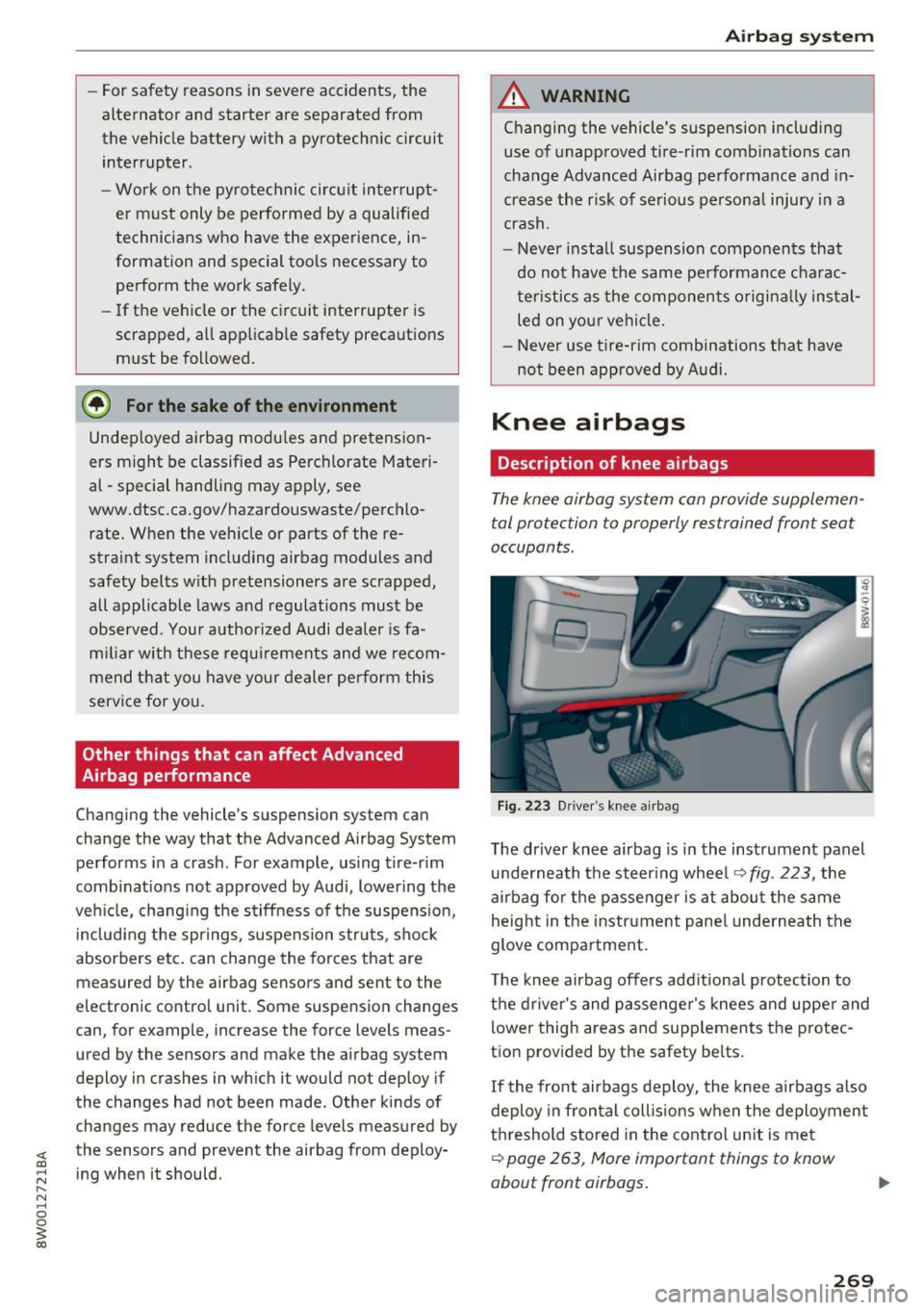
F ig. 223 D river 's knee a irbag
The driver knee airbag is in the instrument panel
u nderneath the steering whee l
~fig. 223, the
airbag fo r the p asse nger is at about the same
height in the instr ument pane l underneath the
glove compa rtment.
T he knee airbag offers add itiona l protection to
the driver's and passenge r's knees and uppe r and
lower thigh areas and supp lements the protec
tion provided by the safety be lts .
If the front airbags deploy, the knee airbags a lso
deploy in fron tal coll is ions when the deploymen t
threshold stored in the cont rol un it is me t
~ page 263, More important things to know
about front airbags.
269