ECU AUDI S4 2018 User Guide
[x] Cancel search | Manufacturer: AUDI, Model Year: 2018, Model line: S4, Model: AUDI S4 2018Pages: 403, PDF Size: 66.81 MB
Page 73 of 403
Increasing the size of the vehicle interior
Applies to: vehicles with fold ing backrests
The rear seat backrests can be folded for ward ei
the r separately* or together .
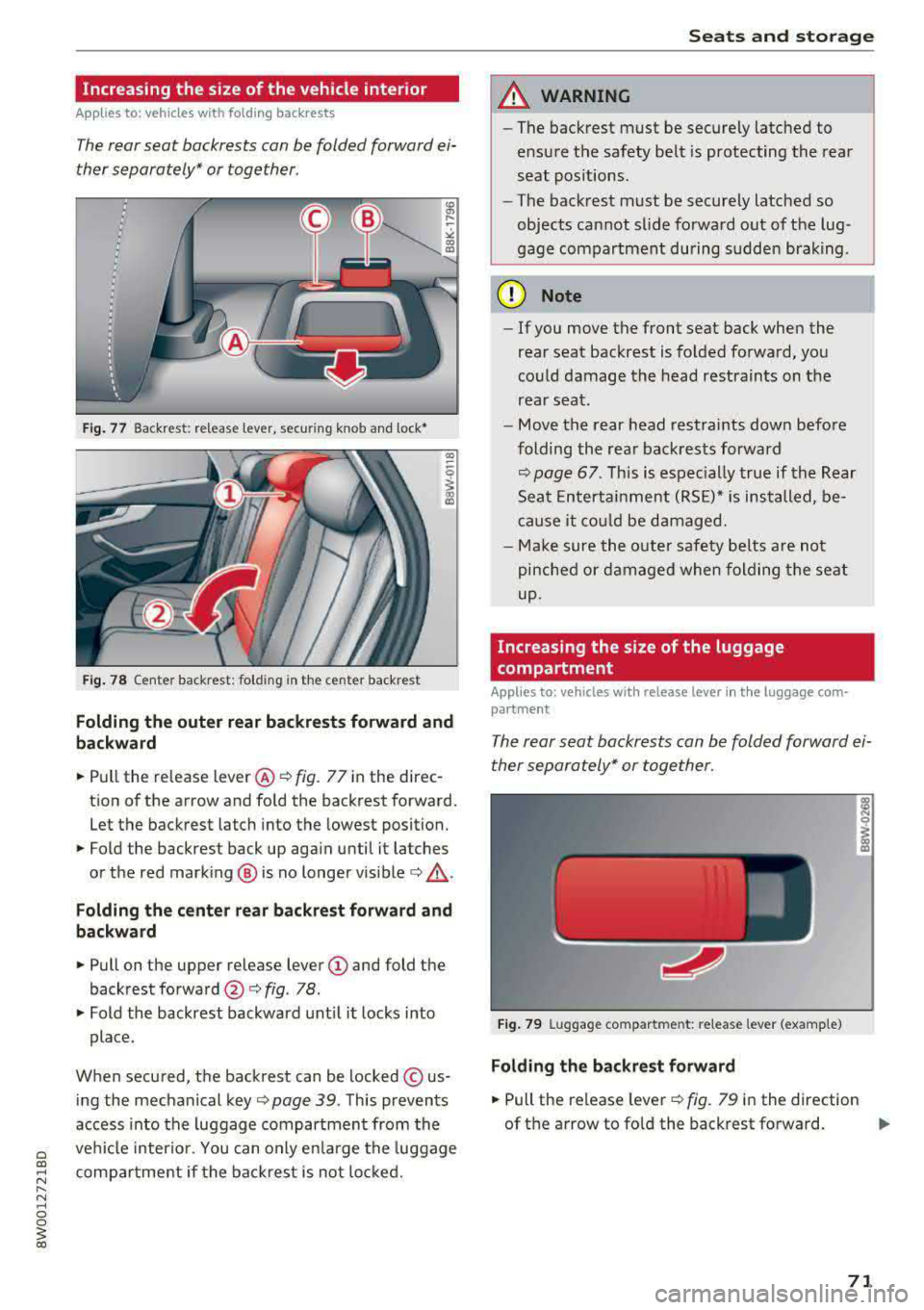
Fig. 77 Back rest: release lever, securing knob and lock•
F ig. 78 Center backrest: folding in the center backrest
Folding the outer rear backr ests forward and
backward
.,.. Pull the release lever @¢ fig. 77 in the direc
tion of the arrow and fo ld the backrest forward .
Let the backrest latch into the lowest position .
.,.. Fold the backrest back up aga in until it latches
or the red mark ing @ is no longer
vis ible ¢,&. .
Folding the center rear backrest forward and
backward
.,.. Pull on the upper re lease lever (D and fold the
backrest
forward @c::> fig. 78 .
.,.. Fold the backrest backward unt il it l ocks into
place.
When secured, the backrest can be locked © us
ing the mechanical
key ¢ page 39 . This prevents
access into the luggage compartment from the
ve hicl e interio r. You can only e nlarge the luggage
compa rtme nt if the backr est is not loc ke d .
Seats and storag e
A WARNING
-~
-The backrest must be securely latched to
e nsu re the safety belt is protecting the rea r
seat pos itions .
- The bac krest must be securely latched so
objects cannot slide fo rwa rd out of the lug
gage compartment during sudde n braking.
(D Note
- If you move the front seat back when the
rear seat backrest is fo lded fo rward, you
could damage the head restraints on the
rear seat .
- Move the rear head restrai nts down befo re
folding the rea r back rests forward
c::> page 67. Th is is espec ially true if the Rear
Sea t Enterta inment (RS E)* is ins talled, be
cause it co uld be damaged.
- Ma ke sure the o ute r safety be lts are not
pinched or d am age d when fol ding the seat
up.
Increasing the size of the luggage
compartment
Applies to: vehicles with release lever in the luggage com·
partment
The rear seat backrests can b e folded forward ei
ther separately* or together .
Fig. 7 9 Luggage co mpartme nt: re lease lever (example)
Folding the backre st fo rward
.,.. Pull the release leve r ¢fig. 79 in the direction
of th e arrow to fo ld the backrest forward.
.,.
71
Page 75 of 403
.. Place the partition net on the recesses in the re
taining rails
(D and slide it all the way to the
left @~ fig. 82.
Attaching
.. Pull the net out and upward and attach it to the
mounting eyelets above the front seats
-arrows-
¢ fig. 83.
Removing
.. Slide the partition net to the right and lift it out
of the retaining rails.
(D Note
-You must remove the partition net before
folding the backrest back into the upright
position.
- Let the partition net roll up slowly to pre
vent damage.
Tie-downs
A pp lies to: ve hicles with tie -dow ns
Fig . 84 Lu ggage compartment : fa stened t ie -dow ns
Use non-elastic cords attached to the tie-downs
to secure objects .
Seats and storage
Pass-through
App lies to : vehicles wi th pass -through
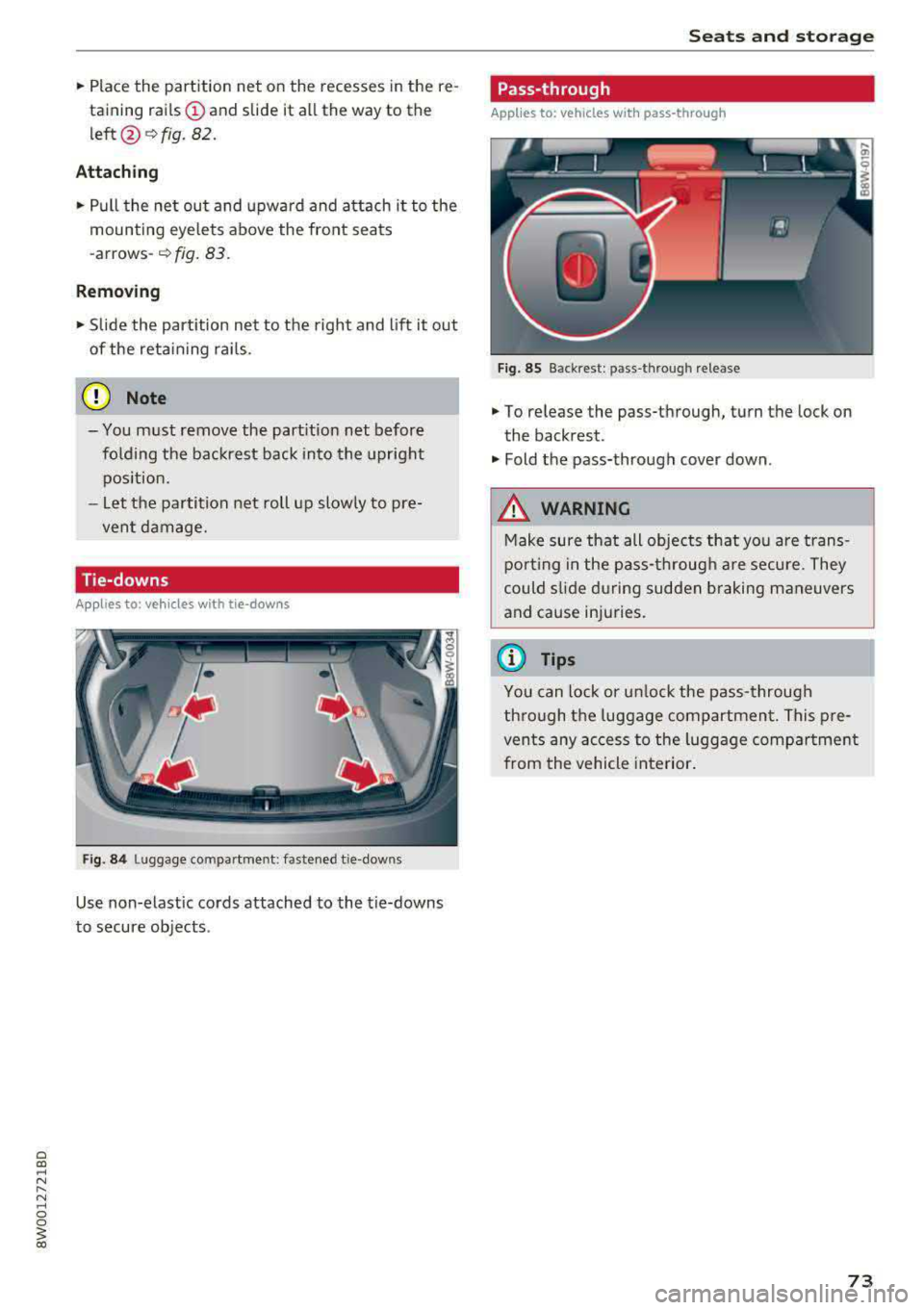
Fig. 85 Back rest : pas s-thro ugh release
.. To release the pass-through, turn the lock on
the backrest .
.. Fold the pass-through cover down .
_&. WARNING
Make sure that all objects that you are trans
porting in the pass-through are secure. They
could slide during sudden braking maneuvers
and cause injuries .
(D Tips
You can lock or unlock the pass-through
through the luggage compartment. This pre
vents any access to the luggage compartment
from the vehicle interior.
73
Page 84 of 403
Driving
unheeded. Extended idling also produces
heat, which could result in overheating or
other damage to the vehicle or other proper
ty.
(D Note
- Have your vehicle maintained properly and
in accordance with the service recommenda
tions in your Warranty
& Maintenance book
let . Lack of proper maintenance as well as
improper use of the vehicle will impair the
function of the emission control system and
could lead to damage.
- Do not alter or remove any component of the Emission Control System unless approved by the manufacturer .
- Do not alter or remove any device, such as
heat shields, switches, ignition wires,
valves, which are designed to protect your
vehicle's Emission Control System and other
important vehicle components.
(D Tips
The consumption estimates as published by
ENVIRONMENTAL PROTECTION AGENCY (EPA) and Transport Canada may not corre
spond to your actual consumption on the
road, which will vary depending upon vehicle
load and speed, road and weather conditions,
trip length, etc.
Steering
Adjusting the steering wheel position
The steering wheel position is adjustable up and
down and forward and back.
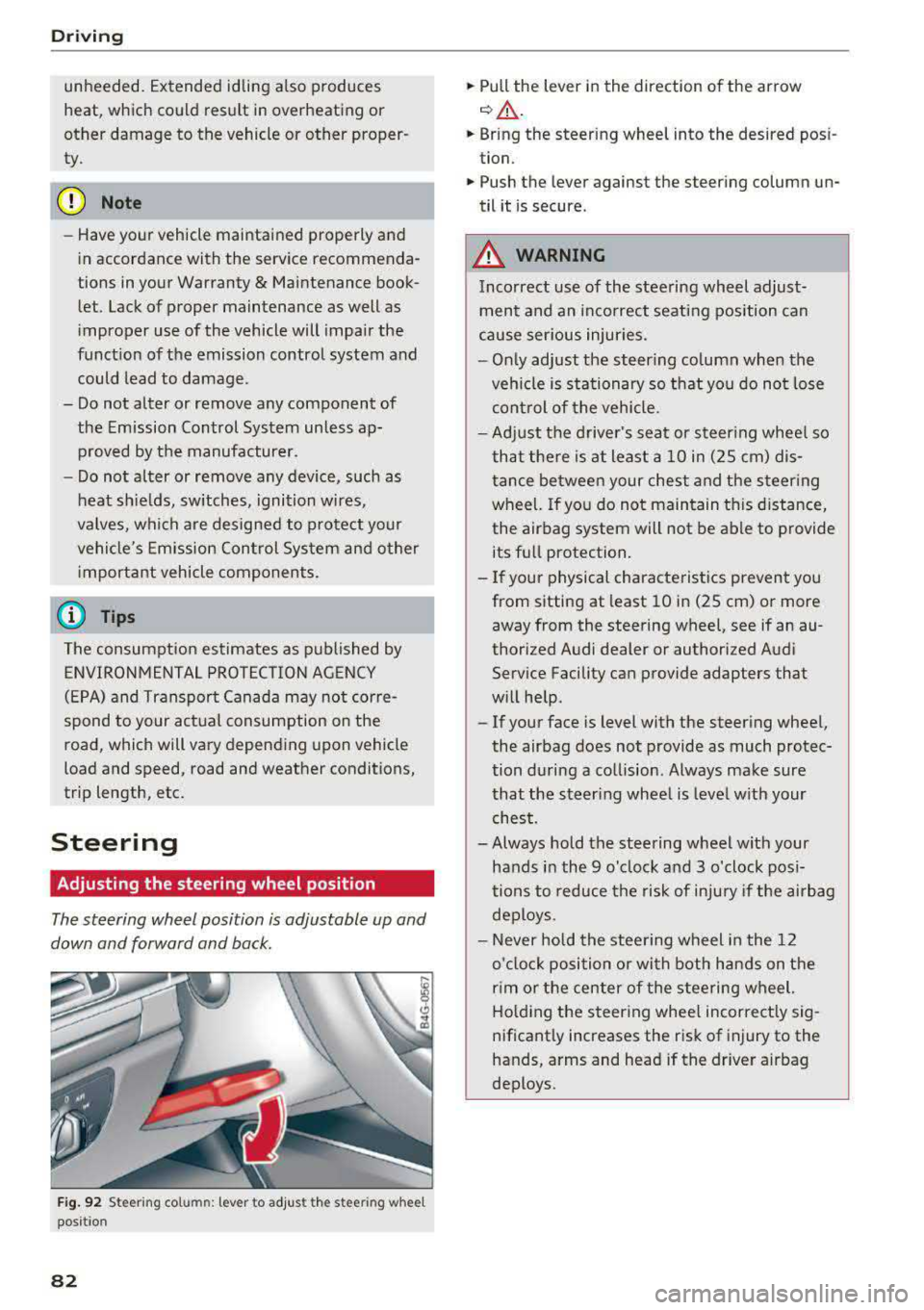
Fig. 92 S tee rin g col umn : le ver to adjus t the stee ring w heel
posit ion
82
.,. Pull the lever in the direction of the arrow
c::, A -
... Bring the steering wheel into the desired posi
tion .
.,. Push the lever against the steering column un
til it is secure .
_&. WARNING
Incorrect use of the steering wheel adjust
ment and an incorrect seating position can
cause serious injuries.
- Only adjust the steering column when the
vehicle is stationary so that you do not lose
control of the vehicle.
-
-Adjust the driver's seat or steering wheel so
that there is at least a 10 in (2S cm) dis
tance between your chest and the steering
wheel. If you do not maintain this distance,
the airbag system will not be able to provide
its full protection.
-If your physical characteristics prevent you
from sitting at least 10 in (2S cm) or more
away from the steering
wheel, see if an au
thorized Audi dealer or authorized Audi
Service Facility can provide adapters that
will help .
- If your face is level with the steering wheel,
the airbag does not provide as much protec
tion during a collision . Always make sure
that the steering wheel is level with your
chest.
- Always hold the steering wheel with your
hands in the 9 o'clock and 3 o'clock posi
tions to reduce the risk of injury if the airbag
deploys.
- Never hold the steering wheel in the 12
o'clock position or with both hands on the
rim or the center of the steering wheel.
Holding the steering wheel incorrectly sig
nificantly increases the risk of injury to the
hands, arms and head if the driver airbag
deploys .
Page 91 of 403
a co .... N ..... N .... 0 0
3 co
~ Applies to: automatic transmission: Select the
P selector lever position .
~ Turn the eng ine off ¢,&. .
~ Applies to: manual transmission: Engage 1st
gear.
~ Turn the steering wheel when parking on in
clines so that the wheels will roll into the curb
if the veh icle starts moving .
A WARNING
-Never accelerate or release the clutch pedal
carelessly when a gear or a selector lever
posit ion (automatic transmission) is engag
ed whi le the vehicle is stationary and the en
gine is running. Otherwise, the vehicle will
start to move immediately and this cou ld re
sult in an accident.
- Emergency braking should only be used in
an emergency, when the normal brake peda l
has failed or the brake pedal is obstructed.
During emergency braking, your veh icle will
brake sim ilar to heavy brak ing . ESC and the
associated components (ABS, ASR, EDL)
cannot overcome the laws of physics,
Around curves and when road or weather
conditions are bad, a full brake application
can cause the vehicle to skid or the rear end
to swerve, which increases the risk of an ac
c ident.
- If the power supply fails, you cannot set the
park ing brake if it is released . If th is is the
case, stop the veh icle on leve l ground and
secure it by engaging 1st gear (manual
transmiss ion) or select ing the P selector lev
er position (automatic transm iss ion). See an
authorized Aud i dealer or autho rized Aud i
Service Facility for assistance .
- Always take the vehicle key with you when
leaving your vehicle, even if for a short pe ri
od of time. This applies particu larly when
children remain in the vehicle. Otherwise,
children could start the engine, release the
parking brake or operate electrical equip
ment such as powe r windows, which in
creases the risk of an acc ident.
- No one, especially children, shou ld remain
in the vehicle when it is locked. Locked
doors make it more difficult for emergency
D riving
workers to get into the vehicle, which puts
lives at risk.
(D Tips
Ap plies to : vehicles with auto matic transmissions
When stopp ing at a traff ic signa l or stopp ing
i n city traffic, you can set the park ing brake
manually . The vehicle does not have to be
held with the brake pedal. The park ing brake
eliminates the tendency to creep when a se
l ector lever position is engaged. As soon as
you press the a ccelerator peda l, the parking
brake releases automatically and your vehicle
starts to move r=;,
page 89.
(j) Tips
-Occasional noises when the pa rking brake is
set and released are normal and are no t a
cause for concern.
- The parking brake goes through a self-test
cycle at regular intervals when the vehicle is
stopped. Any noises assoc iated with this are
normal.
- If there is a power failure, the parking brake
wi ll not set if it is released, and it will not
re lease if it is
set ¢.&. . See an a uthorized
Audi dealer or authorized Audi Service Fa cility for assistance.
Starting to drive
Various convenience and safety funct ions may be
available when the vehicle begins driving, de
pending on vehicle equipment .
Starting on hills with the p arking brake set
Requirement: the driver's door must be closed .
~ To start driving comfortably when on a hill , set
the parking brake and begin driving as usual.
The braking force of the parking brake does not
release a utomatically until the wheels build up
enough driving force.
Starting on hills with hill hold assist
Hi ll ho ld assist makes it easier to start on hills.
Requirement: the driver's door must be closed
and the engine must be running.
89
Page 94 of 403

Driving
the desired position . The selector lever will re
turn to its original position.
F or examp le, you c an skip over the
N posit ion if
you would like to go directly from D into
R.
Selector lever lock
The se lector lever lock prevents you from se lect
i n g a position un intent ionally, causing the vehicle
to ro ll. Whe n engaging some sele ctor lever posi
tions , you must press t he locking
bu tton (!) on
the selector leve r and/or press the brake pedal
¢ fig . 98.
You mus t press the brake pedal to engage a se
lec to r l ever pos it ion when the engine is running
an d the vehicle is stationary .
You do not have to press the brake peda l if yo u
shift from D to
R with in one second. This allows
you to " roc k" the veh icle to free it when it is
s tuck .
P - Park
This se lecto r lever position p revents the vehicle
from rolling . Only s hif t in to par k w hen the veh i
cle is
s tat ionary ¢.&. . To selec t the P se lector lev
e r position, press the P bu tton @ on the selec to r
lever ¢ fig. 98 . P appears next to the selector lev
er.
Appl ies to veh icles w ith S tro nic t ra nsmission:
t he par king lock can only be released when t he
ignition is switched on and the b rake pedal is
pressed. To release the parking lock, press the
brake pedal, press the lock ing
button (!) on the
selector lever and select the desired position
¢ fig. 98. The engine must a lso be started to en
gage the Dor R se lector lever posit io n.
App lies to vehicles w ith tiptronic transm iss ion:
the park ing lock can only be released when the
engine is running and the brake pedal is pressed.
To re lease the park ing lock, press the brake ped
al, press the locking
button (!) on the selector
leve r and se lect t he des ired
posit ion ¢ fig. 98.
P engages automatically if you switch t he engine
off while the selector leve r is in D, E, S, R or man
ua l mode .
92
If you swi tc h the engine off when the N selector
l ever position is selected, the t ransm ission re
mains in
N for approx imately 30 minutes and
then Pis engaged. The vehicle is not secured
from ro lling in the
N selector lever pos ition, so
yo u need to set the parking brake
®l ¢ page 88 .
You m ust use the park ing lock emergency re lease
before towing the
vehicle ¢ page 97.
R- Reverse
The reverse gea r is engaged in th is posi tion . On ly
se lect reve rse gear when t he vehi cle is stationary
and t he engine is running at idle
speed ¢.&, . To
engage the
R se lector lever position, press the
bra ke peda l, press the locking
button (!) on the
selector lever and select the
R pos it ion ¢ fig. 98.
A confi rmation tone will sound when the reverse
gear is engaged.
N - Neutral (idle)
The transmission is in idle in th is po sit ion. To en
gage the
N selector lever position, press the lock
i ng
button (!) on the se lector lever and sh ift into
the
N pos ition ¢ fig. 98.
I f you swi tc h t he eng ine off when the N sele ctor
l eve r posit ion is sele cted, the t ransm iss ion re
mains in
N for approximately 30 minutes and
then Pis engaged.
Yo u c anno t se lec t th e N po sition w hen the ig ni
tion is swi tched off. When dr iv ing th rough an au
tomat ic car wash, fi rst select the N position and
then turn the eng ine off.
Fo r safe ty re asons , the veh icle canno t be lo cked
when the transmiss io n is in t he N pos it ion .
DIS -Driving forward
When the transm iss ion is in the D/S posit io n, it
can be ope ra ted e ither in the no rma l D mode o r
i n the S sport mo de. Move the sele ctor leve r back
to engage the S sport mode. You c an on ly se lect
t h e S selector lever position when the Dor E pos i
tion is se lected . To select the Dor E position
again w hen S is engaged, move the selector lever
back ¢.&. . To sh ift from N to D when traveling at
speeds below 1 mph (2 km/h), p ress the brake
pedal and shift into the D
position ¢.&. . .,.
Page 100 of 403

Driving
"' Keep the brake pedal pressed and engage the
fo llowing se lector lever positions one after the
other: N, D and back to N.
"' Turn the eng ine off again .
"' Grasp the socket wrench w ith both hands and
pull it up and out carefully to remove
<=> (D .
"' Reinsert the cover and rubbe r mat.
When the parking lock emergency re lease is
used, the
mJ ind icator light and the N selector
lever position tu rn on in the instrument cluster .
The message
Dang er of rolling away! P not pos
s ible . Please apply parking brake
a lso appea rs .
.&_ WARNING
- Only activ ate the emerge ncy re le ase while
on a level s urface o r a slig ht slope.
- T he pa rking lock may only be released using
the emergency release if the parking brake
is set. If i t is not functioning, secure the ve
hicle from rolling using the brake peda l or
other s uitab le means, s uch as blocking a
front and a rear wheel. An unsec ured vehicle
may roll away, wh ich increases the r isk of an
acc ident.
- To reduce the risk of an accident, you m ust
not drive when the eme rgency re lease is ac
t ivated.
(D Note
- Read and fo llow the impo rtant instr uctions
abo ut towing<=>
page 376.
- The risk of damage increases if you do not
r emove the socket wrench carefully when
resett ing the pa rking lock.
98
-
Page 101 of 403

a co .... N ,....
N .... 0 0
3 co
Trailer towing Driving with a trailer
General information
Your Audi was designed primarily for passenger
transportation .
If you plan to tow a trailer, please remember that
the additional load will affect durability, econo my and performance.
Trailer towing not only places more stress on the
vehicle, it also calls for more concentration from
the driver.
For this reason, always follow the operating and
driving instructions provided and use common
sense.
Technical requirements
Trailer hitch
Use a weight-carrying hitch conforming to the
gross trailer weight. The hitch must be suitable
for your vehicle and trailer and must be mounted
securely on the vehicle's chassis at a technically
sound
location . Use only a trailer hitch with a re
movable ball mount . Always check with the trail
er hitch manufacturer to make sure that you are
using the correct hitch.
Do not use a bumper hitch.
The hitch must be installed in such a way that it
does not interfere with the impact -absorbing
bumper system. No modifications should be
made to the vehicle exhaust and brake systems .
From time to time, check that all hitch mounting
bo lts remain securely fastened.
When you are not towing a trailer,
remove the
tra iler hitch ball mount . This prevents the hitch
from causing damage shou ld your vehicle be
struck from beh ind ¢
,&. .
Trailer brakes
If your trailer is equipped with a braking system,
check to be sure that it conforms to all regula
tions .
Trailer towing
The trailer hydraulic brake system must not be
directly connected to the vehicle's hydraulic
brake
system ¢.&. .
Safety chains
Always use safety chains between your vehicle
and the trailer.
Trailer lights
T ra iler lights must meet all regulations . Be sure
to check w ith your author ized Audi dealer for cor
rect wiring, switches and relays.
Mirrors
If you are unable to see the traffic behind you us
ing the regular outside mirrors, then you
must in
stall extended mirrors. It is important that you
always have clear vision to the rear.
,8. WARNING
After removing the traile r hitch, do not store
it in your vehicle. In case of sudden braking,
the hitch could fly forward and injure you or
your passengers.
Operating instructions
Maximum trailer weight
A trailer for your vehicle is limited to a typical
class 1 or class 2 trailer.
Trailer load distribution
Be sure the load in the trailer is held securely in
place to prevent it from shifting forward, back
ward or sideways.
Never allow a passenger to ride in a trailer ¢.&.
in Driver messages on page 100 .
Engine cooling system
Towing a trailer makes the engine work harder. It
is important that the cooling system's perform
ance is up to the additional load. Make sure that
the cooling system has enough fluid.
Tire pressure
When towing a trailer, inflate the tires of your
vehicle to the tire pressure listed under "Full
load" on the label ¢ page 344. Inflate trailer
99
Page 124 of 403

Ass is tan ce sys tems
your steering whee l ang le as long as you are ac
tively steering. Evasive steering support is availa
b le at speeds between approximately 20 mph
(30 km/h) and 90 mph (150 km/h).
Tu rn assist
When start ing to drive and up to speeds of maxi
mum
6 mph (10 km/h), the turn assist uses a
braking intervention to prevent your vehicle from
colliding with an oncoming vehicle when turning
left or right (available in certain countries). The
braking intervent ion causes your vehicle to stay
in its lane.
A WARNING
-Pre sense front cannot overcome the laws of
physics.
It is a system des igned to assist and
it cannot prevent a collision in every circum
stance. The driver must always i ntervene.
T he driver is always responsib le for braking
at the correct time. Do not let the increased
safety provided tempt you into taking risks .
This could increase your risk of a collision.
- The system can deploy incorrectly due to
system-specific limits .
- Please note that the sensors and the camera
do not always detect all objects or lane
markings. This increases the risk of an acci
dent.
- Pre sense front does not react to people, an
imals or ob jects that are crossing the veh i
cle's path or that are difficu lt to
detect¢ .&.
in General information on page 109.
-Reflective objects such as guard rails or the
entrance to a tunnel, heavy rain and ice can
affect the fu nction of the radar sensors and
the system's ability to detect a coll is ion risk .
(D Note
The sensors can be displaced by impacts or
damage to the bumper, whee l housing and
underbody. Pre sense front can be impa ired
by this. Have an authorized Aud i dealer or au
thorized Audi Service Fac ility check their func
tion.
l ) Th is is not availab le in some countr ies.
122
(D Tips
- You can cancel the braking with increas ing
force that is initiated by the system by bra k
ing yourself, by acce lerating not iceably or
by swerving.
- Keep in mind that pre sense front can brake
unexpectedly. Always secure any cargo or
objects that you are transporting to reduce
the risk of damage or injury.
- Specific pre sense front functions switch off
when the ESC is restricted or sw itched off
¢ page 147 or the hill ho ld assist" is
switched on
¢ page 148 .
Audi pre sense rear
Description
Applies to : vehicles wi th Aud i s ide ass ist
If the risk of a co llision with a vehicle ahead is de
tected, the follow ing funct ions can be triggered:
- Reversible tensioning of the front safety belts
at the corresponding speeds .
- Closing the windows
and sunroof*.
- Infla ting the side bo ls ters* on the seat back-
rest.
- Ac tivat ing the emergency flashers with in -
creased frequency
l l.
The message Audi pr e sense. ¢ page 121,
fig. 122
will warn you about the danger.
Audi drive select": the function is not active de
pending on the mode selected.
A WARNING
- To reduce the r isk of an accident, please
no te t hat the s ide assist* radar sensors do
no t always dete ct every object.
-
- Pre sense rear does not react to people, ani
mals or objects that a re c ross ing the vehi
cle 's path o r that are d ifficult to detec t.
- Ref lective objects such as gua rd ra ils, heavy
rain and i ce can impair the func tion of the
radar sensors an d the abili ty to detect a col
lision risk.
Page 126 of 403

Assistance systems
-when there are visual obstr uctions, such as
glare, reflections or variations in light
- when it is dark
- if the camera window or the windshie ld is
dirty, iced over, damaged or covered
- when driving on snow, ice or loose ground
- in curves
- if the ESC was restricted or switched off
- when towing a tra iler
- when the driver's seat belt is unfastened
- up to ten seconds after switching on the ig-
nition
(D Note
Impacts or damage to the camera mount on
the windshield can disp lace the sensor . Pre
sense city can be impa ired by this. Have an au
thorized Audi dealer or authorized Aud i Serv
ice Facility check the ir funct ion.
{D) Tips
- You can cancel the system braking interven
tion if you accelerate considerably or swerve
away.
- Keep in mind that pre sense city can brake
unexpectedly. Always secure any cargo or
objects that you are transport ing to reduce
the r isk of damage or injury.
- Specific pre sense city funct ions sw itch off
when the ESC is limited or switched
off
¢ page 147 or the hill descent assist* is
switched on
¢page 148.
-When there is a malfunction in the camera,
the pre sense city funct ions also switch off.
Settings in the
Infotainment system
A pp lies to: ve hicles w ith Audi p re se nse
.,. Select in the Infotainment system: IMENU I but
ton
> Vehicle > left control button > Driver as
sistance
> Audi pre sense.
Turn on/off Audi pre sense
-the pre sense func
tions can be turned on and
off.
124
If the system is switched off, it switches on again
automatica lly once the ignition is switched on
again.
Early warning -the early warning can be switch
ed
off or the pre sense city/front warning point
can be set
( Early /Medium /Late ).
Set the warning time for the early warning to
Early at first . If this causes undesi red early warn
ings to appear, then set the warning time to
Me
dium .
The Late warning time should only be set
i n spec ial circumstances, for example, when driv
i ng with a very dynamic style.
(D Tips
Your settings are automatically stored and as
signed to the remote control key being used.
Messages
Applies to: vehicles wi th Audi pre sense
II Audi pre sense: malfunction! Please contact
Service
This message appears when the pre sense func
tion is affected . For example, th is could be
ca used by a faulty sensor. Drive to an authorized
Audi dealer or authorized Audi Service Facility im mediately to have the malfunction corrected.
II Audi pre sense currently restricted . Restrict
ed sensor vision due to surroundings. See own
er 's manual
This message appears if the radar sensor and
camera view is obstructed, for example by leaves,
snow, heavy spray or dirt. If necessary, clean the
sensors and the area around the camera
¢ page 109, fig . 108 or ¢page 129, fig. 130 .
II Audi pre sense: currently restricted. Towing
mode
For vehicles wi th a trailer hitch installed at the
factory, the pre sense rear functions switch
off
when the electrical connector at the socket is
plugged in. There is no guarantee the functions
will switch
off when using a retrofitted trailer
hitch.
II Audi pre sense: currently restricted
Page 160 of 403
Multi Media Interface
Option s menu :
using the opt ions menu, you can
select and conf irm context-dependent functions
as well as sett ings within a menu item (such as
Rad io ).
R eq uiremen t: the options menu symbol B must
be disp layed i n the I nfotainment system display
¢ fig . 164.
Opening /clo sing the option s menu : press the
right control button
~ fig. 164.
Information about paths
This guide sho ws you at a glan ce the paths for
opening a desired menu and its settings and
functions.
Example of a path
• Se lect : IRADIO I button> left cont rol knob> FM.
Following the path
• Press the I RADIO I button .
• Press the left co ntro l button.
• Turn the control knob to the FM menu item to
select it .
• Press the con trol knob to confirm the se lected
FM menu item.
• The selec ted and confirmed f un cti on is execu t
ed. In this example, the FM frequency band is
set .
158
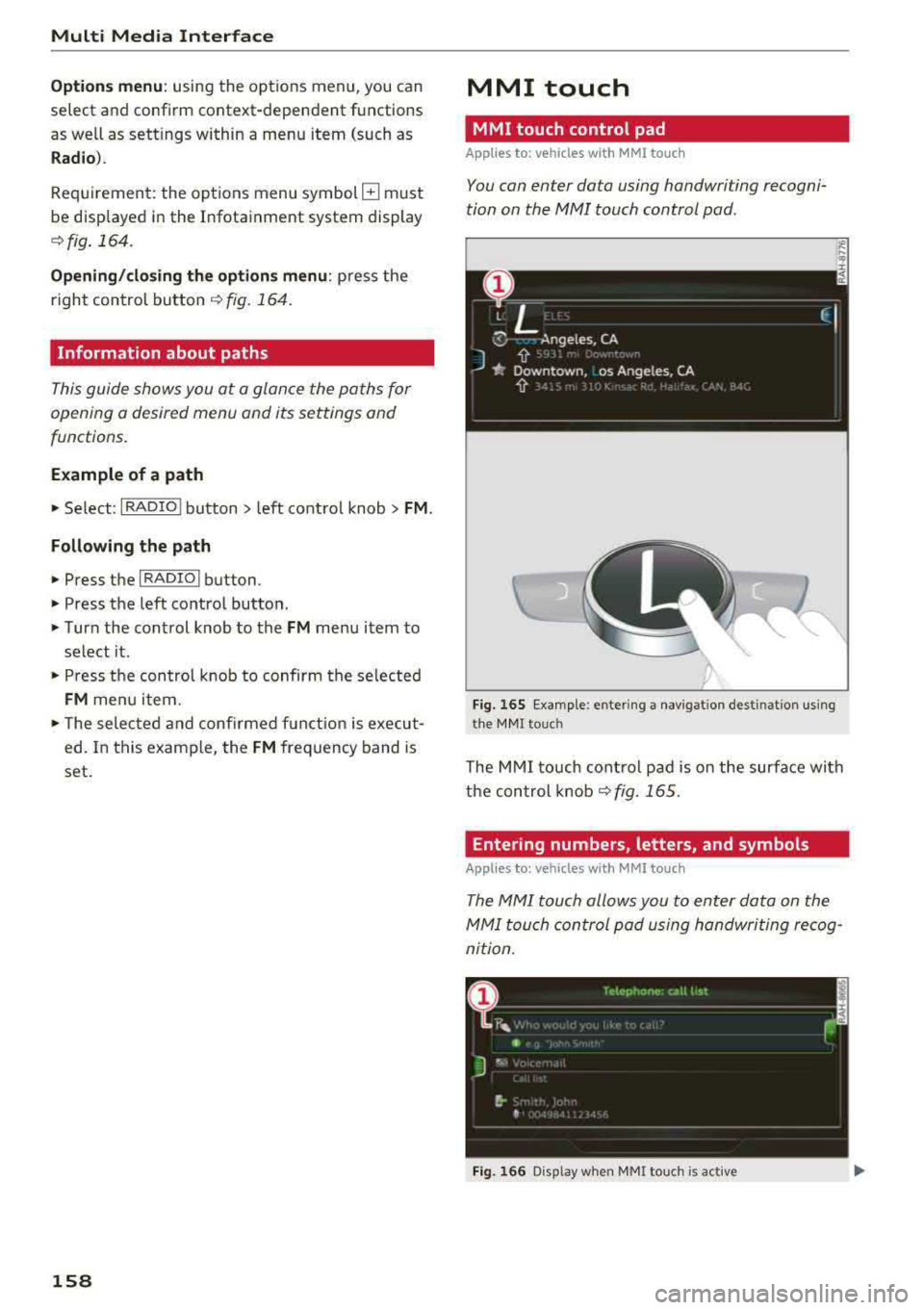
MMI touch
MMI touch control pad
Applies to: vehicles with MMI touch
You can enter data using handwriting recogni
tion on the
MMI touch control pad.
Fi g. 16 5 E xamp le : en te ring a navigat ion dest inat ion us ing
t h e MM I touch
The M MI touch cont rol pa d is on the surfa ce with
the con trol knob
¢ fig. 165 .
Entering numbers, letters, and symbols
Applies to: vehicles with MMI touch
The MMI touch allows you to enter data on the
MMI touch control pad u sing handwri ting recog
nition .
Fig. 166 D isp lay whe n MMI to uch is active