turn signal AUDI S4 2018 User Guide
[x] Cancel search | Manufacturer: AUDI, Model Year: 2018, Model line: S4, Model: AUDI S4 2018Pages: 403, PDF Size: 66.81 MB
Page 130 of 403

Assistance systems
There is a temporary malfunction that may pre
vent the active lane assist from switching on. Try
sw itch ing the active lane assist on again later.
rl! Audi active lane assist: Please take over
steering!
This message appears if you are not steering by
yourse lf. Ac tive lane assist is activated, but is not
ready to give wa rning
& WARNING
Note that messages may be delayed or not
displayed on vehicles with accessories mount
ed on the steering whee l, s uch as a steering
wheel spinner knob. Always keep your hands
on the steer ing wheel.
Adjusting the steering time and vibration
warning
Applies to: veh icles with Audi active lane assist
You con adjust individual active lone assist set
tings in the Infotainment system .
-
.,. Select in the Infotainment system: IMENUI but
ton
> Vehicle > left contro l button > Driver as
sistance > Audi active lane assist .
Steering time
Early :
in this setting, the corrective steer ing hap
pens continuously to help keep the vehicle in the
center of the lane.
late : in this setting, the system provides correc
tive steering just before a wheel goes over a de
tected lane marker line.
Vibration warning
You can switch the additional vibration warning
in the steering wheel on or off.
WARNING
With the vibration warning switched off,
there will also be no visual warning in the in
strument cluster display when crossing a lane
marker line.
128
@ Tips
In certain ma rkets: your settings are stored
automat ically and assigned to the remote
control key in use.
Audi side assist
Description
Applies to: vehicles with Audi side assist
Fig. 127 Sensor detection range
Fig . 128 D isplay on the exterior mirror
Side assist (lane change ass ist) helps you mon itor
your blind spot and traffic behind yo ur vehicle.
Within the limits of the system, i t warns you
about veh icles that are coming closer or that are
traveling with you within sensor range
(D
¢ fig. 12 7. If a lane change is classified as criti
ca l, the display @in the exterior mirror turns on
¢fig. 128.
The display in the left exterior mirror provides as
sistance when making a lane change to the left,
while the display in the right exterior mirror pro
vides assistance when making a lane change to
the right.
Information stage
As long as you do not activate the turn signal,
side assist
informs yo u about vehicles that are
Page 131 of 403

detected and classified as crit ical. The display in
the mirror turns on, but is dim .
The display remains dim in the information stage
so that your view toward the front is not distur
bed.
Warning stage If the d isplay in a mirror blinks brightly when you
activate a turn signal, side assist is
warning you
about detected vehicles that it has classified as
critical. If this happens, check traffic by gla nc ing
in the exterior m irrors and over your shoulder
c::> .&. in General information on page 130 .
Applies to: vehicles with active lane assist : the
d isplay i n the mirror can also blink if you have not
act ivated a turn signal: if you are app roaching a
detected lane marker line and it appears you will
be leaving the lane, side assist will warn you
about detected vehicles that it ha s classified as
critical.
(D Tips
You can ad just the brightness on of the dis
play on the rearview mirror
c::;, page 130 .
General information
Applies to: vehicles with Audi side assist
®
®
©
Fig. 129 Drivi ng situat ion s
Assistance systems
0
r AUD I
• •
Fig. 130 Rear of the veh icle: pos it ion of th e se nso rs
S id e assist functions at speeds above approxi
mately 9 mph (15 km/h).
@ Vehicles that are approaching
In certain cases, a vehicle will be classified as
critical for a lane change even if it is still some
what far away . The faster a vehicle approaches,
the sooner the display in the exterior m irror will
turn on.
@ Vehicles traveling with you
Vehicles traveling with you are indicated in the
exter ior mirror if they are classified as cr itical for
a lane change . A ll vehicles detected by side assist
are ind icated by the time they enter your "blind
spot" , at the latest .
© Vehicles you are passing
If you s lowly pass a veh icle that s ide assist has
detected (the difference in speed between the
vehicle and your vehicle is less than approximate
ly 9 mph ( 15 km/h)) , the disp lay in the exter ior
mirror turns on as soon as the vehicle en ters your
blind spot.
The display w ill not turn on if you quickly pass a
vehicle that side assist has detected (the differ
ence in speed is greater than approximately 9
mph (15 km/h)) .
Functional limitations
T he radar sensors are designed to detect the left
and right adjacent lanes when the road lanes are
the normal width. In some situations, the display
in the exterior mirror may turn on even though
there is no vehicle located in the area that is criti-
cal for a lane change. For example :
..,.
129
Page 140 of 403
Parking systems
sound was muted, no tone will sound. Pay atten
tion to the vehicle's surroundings when you start
to drive.
Switching on /off
Applies to: ve hicles w ith park ing system plus
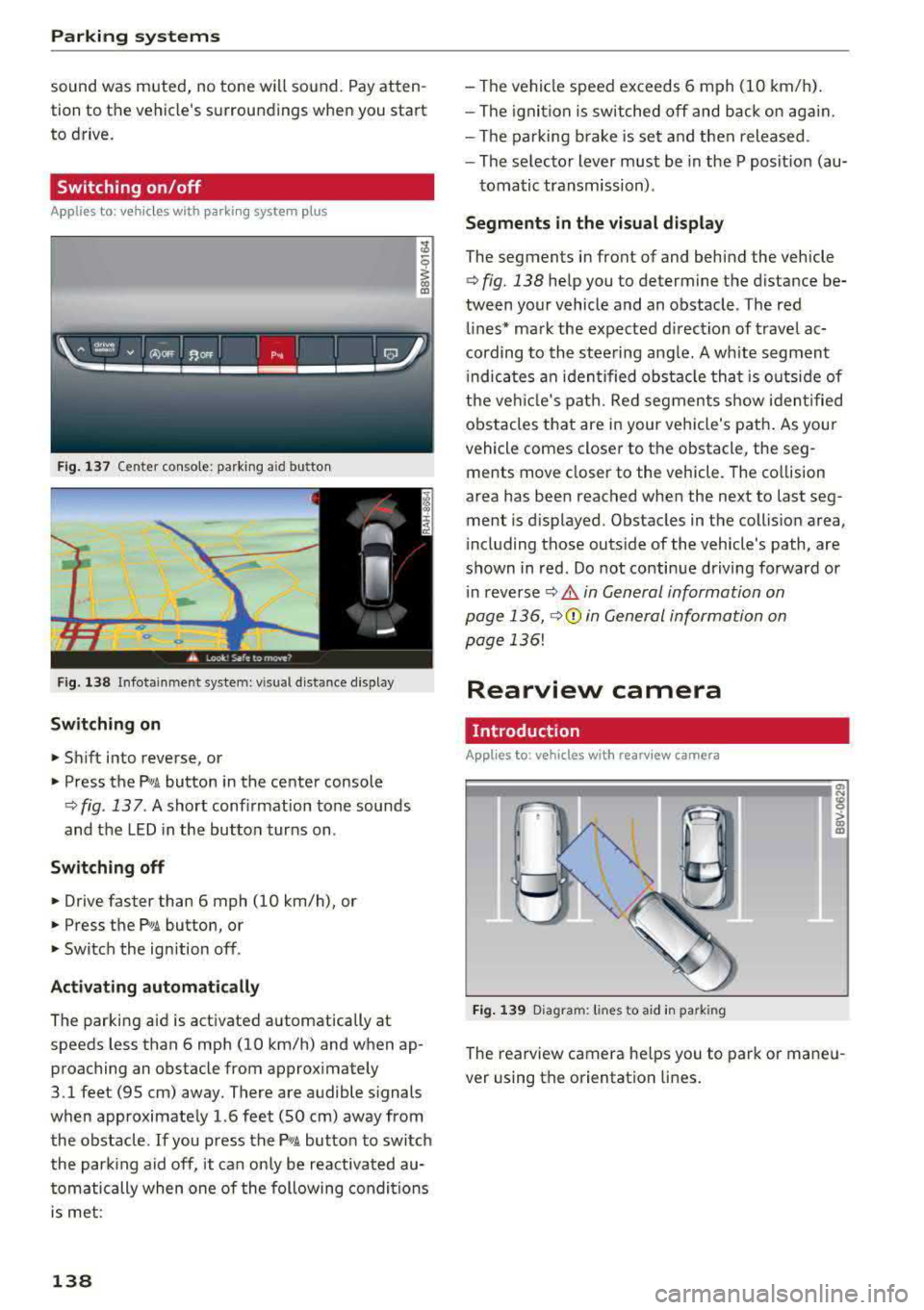
Fig . 137 Center console: parking aid button
Fig. 138 Infotainment system: visual d istance d isplay
Switching on
... Shift into reverse, or
" Press the P'"A button in the center console
q fig. 137. A short conf irmation tone sounds
and the LED in the button turns on .
Switching off
"Drive faster than 6 mph (10 km/h), or
" Press the Pw.6. button, or
" Switch the ign ition off.
Activating automatically
The parking aid is activated automatically at
speeds less than 6 mph (10 km/h) and when ap
proaching an obstacle from approximately
3.1 feet (95 cm) away. There are audible signals
when approximately 1.6 feet (SO cm) away from
the obstacle.
If you press the P,,1A button to switch
the park ing aid off, it can only be reactivated au
tomatically when one of the following conditions
is met :
138
-The vehicle speed exceeds 6 mph (10 km/h).
-The ignition is switched off and back on again.
-The parking brake is set and then released .
-The selector lever must be in the P posit ion (au-
tomatic transmission) .
Segments in the visual display
The segments in front of and behind the vehicle
q fig. 138 help you to determine the distance be
tween your vehicle and an obstacle . The red
lines* mark the expected direction of travel ac
cording to the steering angle. A white segment
i ndicates an identified obstacle that is outside of
the vehicl e's path. Red segments show identified
obstacles that are in your vehicle's path. As your
vehicle comes close r to the obstacle, the seg
ments move clos er to the vehicle. The collision
area has been reached when the next to last seg
ment is displayed. Obstacles in the coll is ion area ,
i ncluding those outside of the vehicle's path, are
shown in red. Do not continue driving forward or
i n reverse
q .&. in General information on
page 136,
q(i) in General information on
page
136!
Rearview camera
Introduction
Applies to: vehicles with rearview camera
Fig. 139 Diagram: lines to aid in park ing
The rearview camera he lps you to park or mane u
ver using the orientation lines .
Page 223 of 403
Radio
Radio
Opening the radio
The radio supports the FM, AM and SiriusXM*
(satellite radio) bands. Using the HD Radio
re
ceiver also allows you to receive radio stations
on the FM and AM bands in digital format.
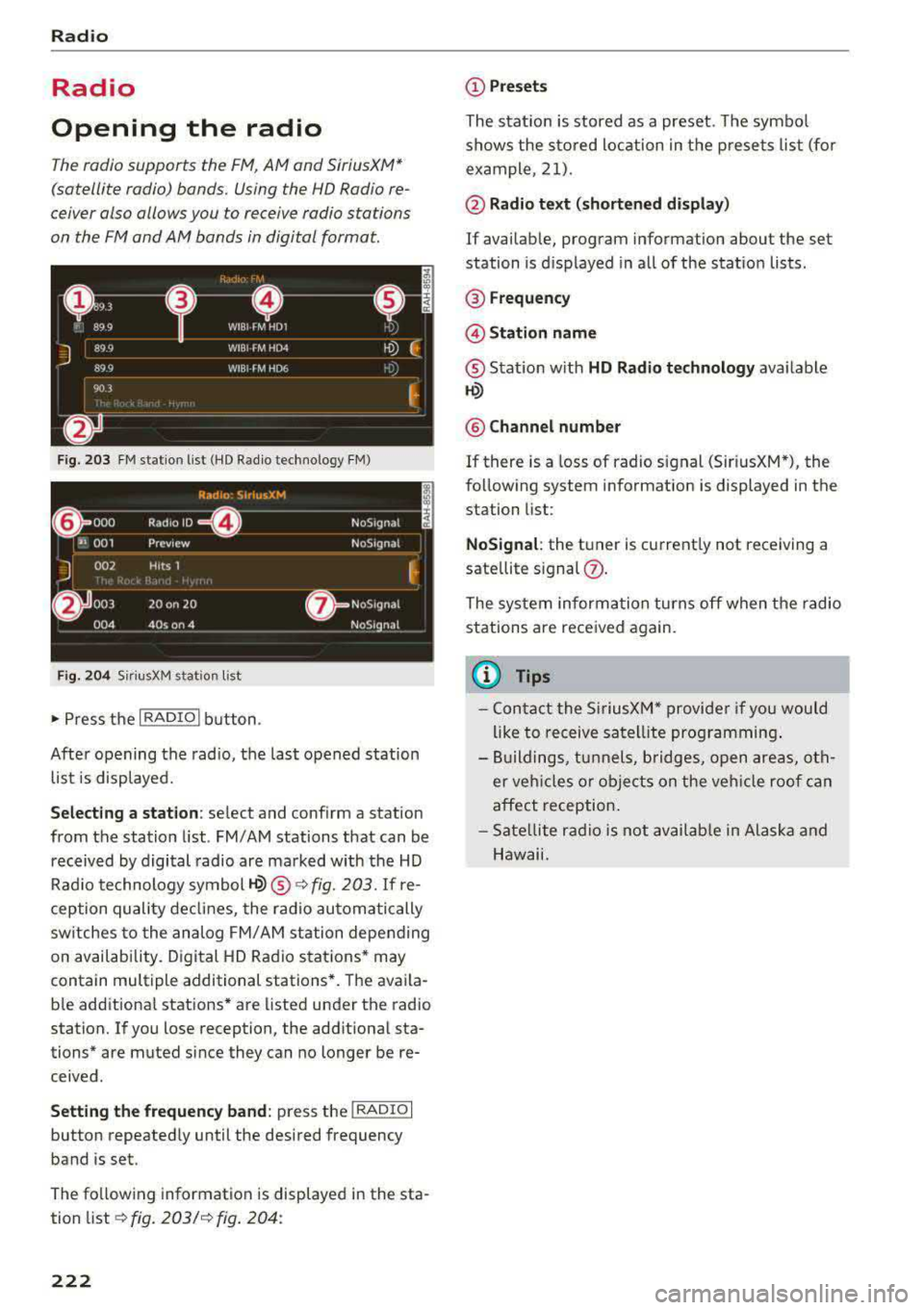
F ig . 203 FM station list (HD Radio technology FM)
F ig. 2 04 Siri usXM stat ion list
~ Press t he I RADIO I button .
After opening the radio, the last opened station
list is displayed.
S e le cting a station : select and conf irm a station
from the station list . FM/ AM stations that can be
received by digital radio are marked with the HD
Rad io technology symbol
1-Q) ® ¢fig. 203. If re
ception quality declines, the radio automatically
sw itches to the analog FM/AM station depending
on availability. Digital HD Radio stations* may
contain multiple additional stations*. The avai la
b le additional stations* are listed under the radio
station. If you lose reception, the additional sta
tions* are muted since they can no longer be
re
ceived .
Setting the fr equ ency band : press the I RADIO I
button repeated ly until the desired frequency
band is set.
The fo llowing information is displayed in the sta
tion
list ¢ fig. 203/ ¢ fig. 204:
222
(D Pre set s
The stat ion is stored as a preset. The symbo l
shows the sto red loc ation in the p resets list (for
example, 21) .
@ Radio text (s horten ed di spl ay)
If availab le, program information about the set
station is d isplayed in all of the statio n lists .
® Frequenc y
@Stati on name
® Stat ion w ith HD Radio technol ogy ava ilable
~
® Chann el numbe r
If there is a Loss of radio signal (Sir i usXM*), the
following system information is displayed in the
station list:
N oSignal : the tuner is current ly not receiving a
sate llite
signal (!).
The system informa tion turns off when the radio
stations are received again.
@ Tips
- Con tact the SiriusXM" provide r if you would
like to receive satel lite programming .
- Buildings, tunnels, bridges, open areas, oth
er veh icles o r objects on the veh icle roof can
affect reception.
- Sate llite rad io is not avai lab le in Alaska and
Hawaii.
Page 250 of 403
wait for the signal tone (beep) to say a new
command.
Volum e: you can adjust t he volume of the
prompts by turning the control knob.
Indi vidual sp eech training (only when the vehi
cle is stationary): yo u can adapt the vo ice recog
ni tion system to yo ur vo ice or pronunc iation in
order to improve the system 's ability to recognize
your speech . Individua l train ing is comprised of
20 speech entries that consist of commands and
sequences of numbers. Yo u can delete the pro
grammed voice training w ith the
Reset indi vidu
al speech training
function.
Display brightnes s
You can adjust the brightness of the Infotain
m ent system disp lay by turning the control knob.
Factory s ettings
The fo llow ing funct ions can be reset to the facto
r y default settings :
-Sound setting s
- Rad io
- Media sett ings
- Jukebo x*
- Directory
-Tel ephone
- Bluetooth and Wi -Fi *
- Nav igat ion sett ings *
- Nav iga tion and onlin e mem ory *
- Voice recognition s ystem *
- Shortcut ke ys
- Me ssage se ttings *
-A pps*
- Tool tips
- Aud i conn ect *
- Aud i smartphone in terface *
You can se lect the desired functions individually
or all at once with the option
S ele ct all ent rie s.
Select and confirm Res tore factor y settings .
(D Tips
~ Make sure that not only the settings were de-....
~ leted but also the stored data, if applicable.
N .... 0 0
3
Connection manager
Introduction
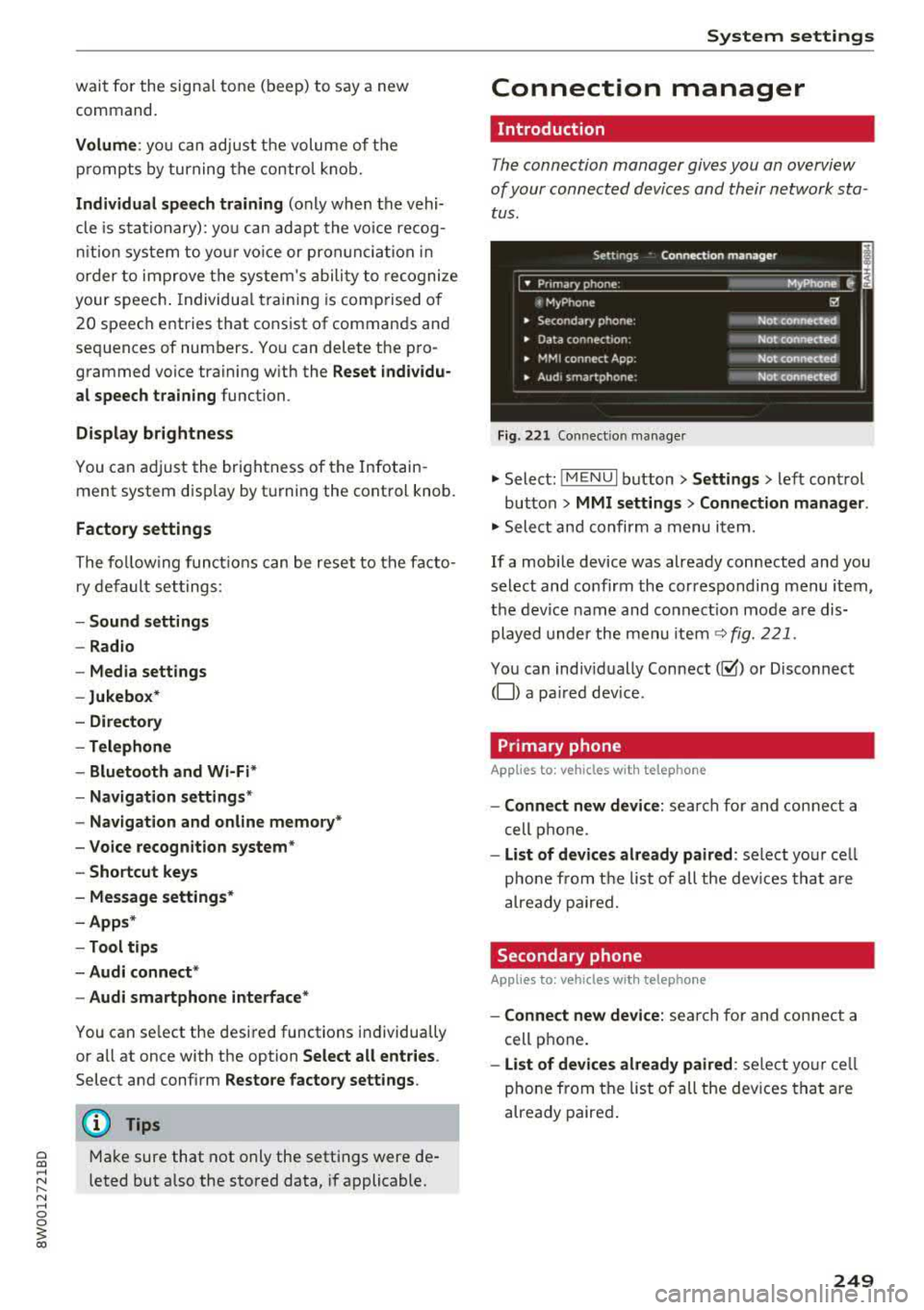
The connection manager gives you an overview
of your connected devices and their network sta
tus .
Settings Connection mana ger I
====-... · • Prima hone: MyPhone ..
c M yPhone
• Secondary phone :
" Data connection:
• MM I connect App :
• Audi smartphone:
Fig. 221 Co nnect io n manager
@
Not connected
Not connected
Not connected
Not
connect"d
.,. Select: ! M EN UI button> Settings > left control
button >
MMI setting s> Connection manager .
.,. Select and confirm a menu item.
If a mobile device was already connected and you
select and confirm the corresponding menu item,
the device name and connect ion mode a re dis
played under the menu item
~ fig. 221.
You can indiv idually Connect(~ or Disconnect
(0) a pa ired dev ice .
Primary phone
Applies to : veh icles w ith telep hone
- Connect new de vice : search for and connect a
cell phone.
- List of d evic es alre ady pai red : select you r cell
phone from the list of all the dev ices that a re
already paired.
Secondary phone
Appl ies to: veh icles w ith telep hone
- Connect new device: sea rch fo r and connect a
cell phone .
-List of devi ces alre ad y paired : select yo ur ce ll
phone from the list of all the devices that a re
already paired .
249
Page 253 of 403
System settings
Sound settings
The sound distribution and volume of the MMI
con be adjusted individually. The settings depend
on vehicle equipment.
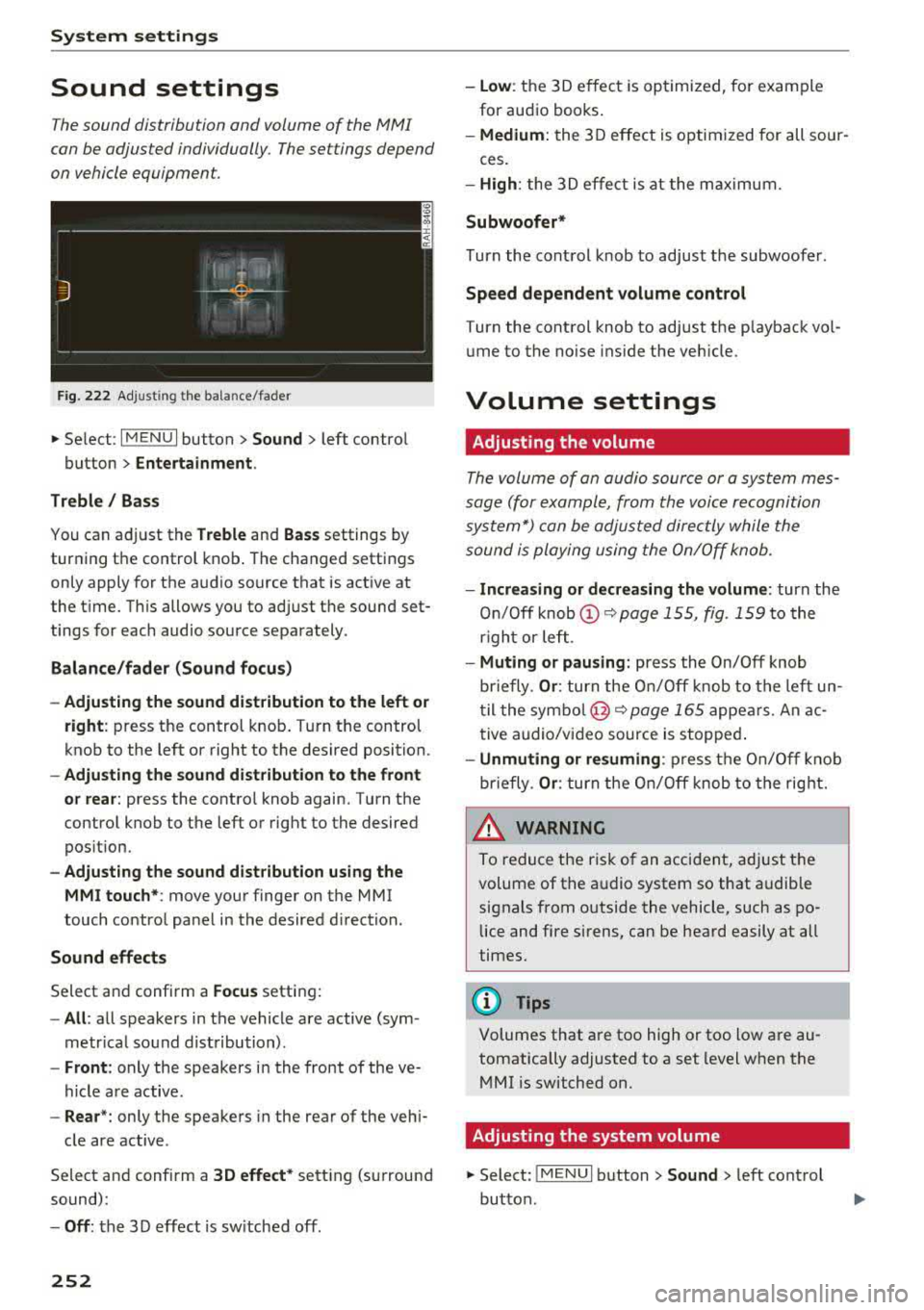
F ig . 222 Ad justing t he ba lance/fade r
.. Select : I MENU I button> Sound > left contro l
button >
Entertainment.
Treble/ Bass
You can a djust the Treble and Bass settings by
turning t he control knob . The changed settings
only apply for the a udio source that is act ive at
the t ime. Th is allows you to ad just t he sound set
tings for each audio source sepa rately .
Balance/fader (Sound focus)
- Adjusting the sound dist ribution to the left or
right :
press the control knob . T ur n the control
knob to the left or right to the des ired position.
- Adjusting the sound dist ribution to the front
or rear :
press the contro l knob again. Turn the
contro l knob to the left or right to the desired
pos ition.
- Adjust ing the sound distribution using the
MMI touch* :
move your finger on the MMI
touch contro l panel in the desired d irection.
Sound effects
Select and confirm a Focus setting:
- All : all speakers in the vehicle are active (sym
metr ica l sound dist ribution) .
-Front : only the speakers in the front of the ve
hicle a re active.
- Rear *: only the speakers in the rea r of the veh i-
cle are active .
Select and confirm a
3D effect * setting (surround
sound):
- Off : the 3 D effect is sw itched off.
252
- low : the 3D e ffec t is optimized, fo r exam ple
for aud io books .
-Medium: the 3D effect is optim ized for all sour-
ces.
- High : the 3 D effe ct is at the m aximum.
Subwoofer*
Turn the cont rol knob to adjust the subwoofer .
Speed dependent volume control
Turn the control knob to adjust the p layback vo l
ume to the no ise ins ide the veh icle.
Volume settings
· Adjusting the volume
The volume of an audio source or a system mes
sage (for exampl e, from the voice recognition
system*) con be adjusted direc tly while the
sound is ploying using the On/Off knob.
- Increasing or decreasing the volume : turn the
On /O ff
knob @<=:> page 155, fig. 159 to the
r igh t or left .
-Muting or pausing : press the On/Off knob
briefly .
Or: turn the O n/Off knob to the left un
til the symbo l@ <=:>
page 165 appe ars. An ac
t ive audio/vi deo source is stopped .
-Unmuting or resuming : press t he On/Off knob
briefly .
Or: turn the O n/O ff knob to the right.
& WARNING
-To redu ce the ris k of an accident, ad just t he
volume of the a udio system so that a udible
signals from o utside the vehicle, such as po
lice and fire sirens , can be hea rd easily at all
times.
(D Tips
Volumes that a re too high or too low are au
tomatically adjusted to a set level when the
M MI is switched on.
Adjusting the system volume
.. Select : !ME NUI button> Sound > left cont rol
button .
Page 254 of 403
a co .... N ,....
N .... 0 0
Telephone
Applies to: vehicles with telephone
Mute telephone : messages and ring tones are se t
to mute .
Ringtone : see¢ page 185, Ringtone and volume
se ttings .
Ringtone volume :
you can adjust the volume of
the selected ringtone by turning the co ntro l
knob.
Message volume : you can ad just the volume of
the no tifica tion for an i ncoming tex t message by
turn ing t he control knob .
Microphone input level : you can adjust the call
volume during a phone ca ll by tu rning the co ntro l
knob .
Navigation
Applies to: veh icles with navigation system
Voice guidance : see ¢page 213.
Voice guidance during phone call : see
¢page 213.
Voice guidanc e volume : you can adjust the voice
g ui dance vo lume by turn ing t he con trol knob. Or:
you can adj ust the vo ice gu idan ce vo lume durin g
active rou te gu idance by tu rning the On/Off
knob.
Entertainment fader: t he v olume of audi o play
ba ck can be tempo rarily lowe red when the p ark
in g system or voi ce g uidance is active.
Voice recognition system
App lies to: vehicles with voice recognition system
Command display : see¢ page 248 .
Short dialog : see¢ page 248.
Volume: see ¢ page 248.
Individual speech training : see ¢page 248 .
Parking aid*
You can ad just the vo lume of the signal tone by
turn ing t he control knob.
3 1) Not avai lab le in all ve hicle s. co
System settings
-Adjusting th e Front volume : select and con
fi rm
High , Medium or Low .
- Adjusting
the Rear volume : select and con firm
High , Medium or Low .
MMI touch volume*
Yo u can adjus t the vol ume of t he p romp ts fo r the
MM I touch* by turnin g the cont rol k nob.
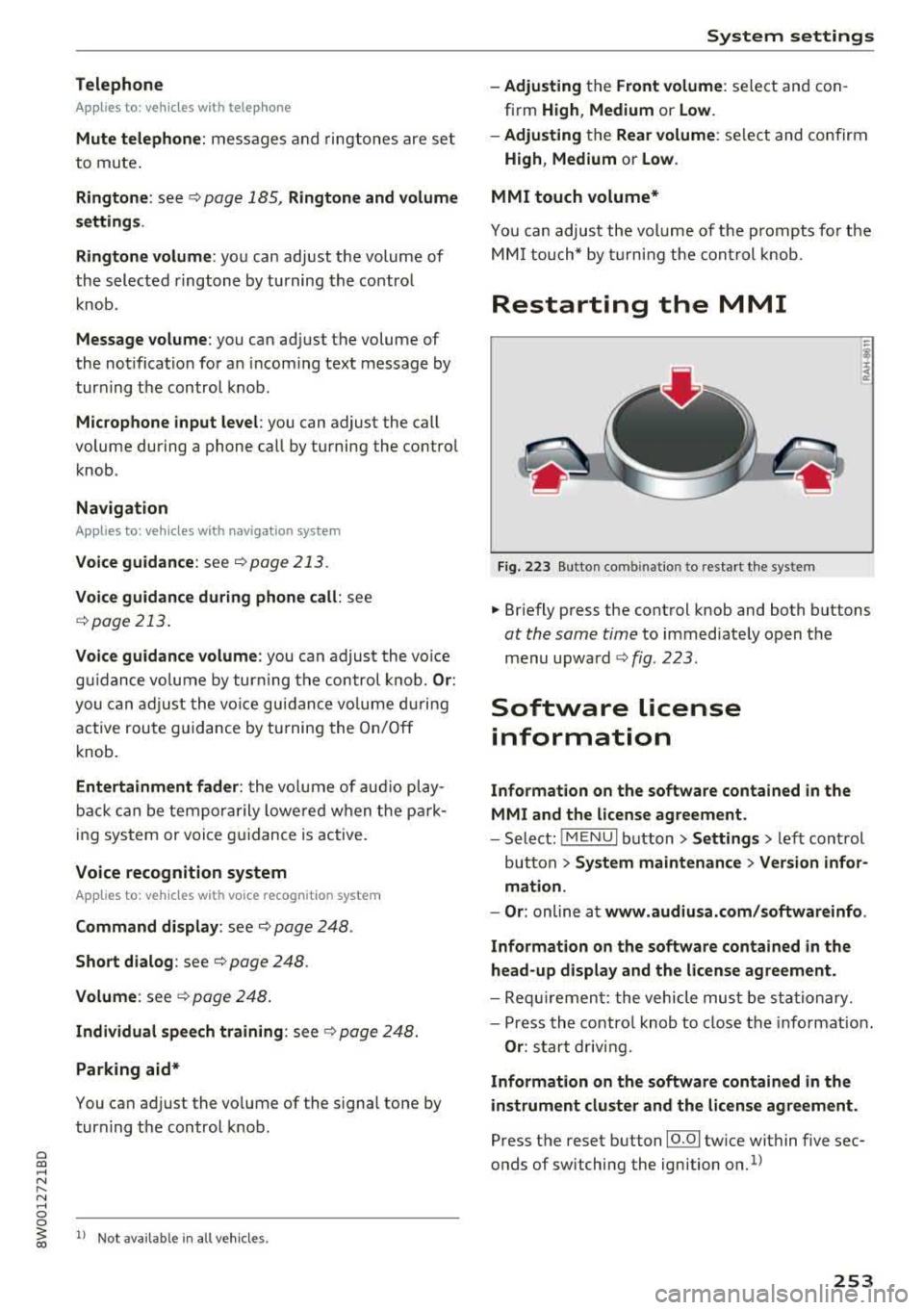
Restarting the MMI
Fig . 223 Button co mbinatio n to res ta rt t he syste m
.,. Briefly p ress the cont rol knob and both buttons
at the same time to immediate ly open t he
menu upward
<:;> fig. 223 .
Software license
information
Information on the software contained in the
MMI and the license agreement.
- Select : !ME NUI bu tton> Settings > le ft con trol
button >
System maintenance > Version infor
mation.
- Or :
online a t www.audiusa.com /softwareinfo .
Information on the software contained in the
head-up display and the license agreement .
-Re quir emen t: the vehicle mus t be sta tion ary.
- Press th e co ntro l knob to close the info rmat ion .
Or : sta rt dr ivin g.
Information on the software contained in the
instrument cluster and the license agreement.
Press t he reset button 10.01 twice within five sec
onds of switching the ign ition
on.1>
253
Page 279 of 403
Airbag syste m
-If you are unrestrained, leaning forward, sit
ting sideways or out of position in any way,
your risk of injury is much higher.
- You will also receive serious injuries and
could even be killed if you are up aga inst the
airbag or too close to it when it inflates
-
even with an Advanced Airbag ¢ page 2 71.
A WARNING
A child in a rearward-facing child safety seat
installed on the front passenger seat w ill be
ser iously injured and can be killed if the front
airbag inflates
-even w ith an Advanced Airbag
System.
- Although the Advanced A irbag System in
yo ur vehicle is designed to turn off the front
airbag when a rearward-facing child re
straint has been insta lled on the front pas
senger seat, nobody can absolutely guaran
tee that deployment is impossible in all con ceivable s ituations that may happen during
the useful life of your vehicle.
- The inf lating airbag will hit the child safety
seat or infant carrier with great force and
will smash the chi ld safety seat and child
against the backrest, center armrest, door,
or roof.
- Always install rearward-facing ch ild re
straints on the rear seat.
- If you must install a rearward fac ing ch ild
safety seat on the front passenger seat be
cause of exceptiona l circumstances and the
PAS SENGER AIR BAG OFF ~; light does not
come on and stay on, immed iate ly install
the rear-fac ing ch ild safety seat in a rear
seating position and have the airbag system
inspected by your authorized Audi dea ler.
A WARNING
If, in exceptional circumstances, you must in
stall a forward-facing chi ld restraint on the
front passenger's seat:
- Always make sure the forward-facing seat
has been designed and certified by its man
ufacturer for use on a front seat with a pas
senger front and side a irbag.
278
- Never put the forward-facing child restraint
up against or very near the instrument pan
el.
- Always move the front passenger seat to
the highest posit ion in the up and down ad
justment range and move it back to the rearmost posit ion in the seat's fore and aft
ad justment range, as far away from the a ir
bag as poss ible, before install ing the for
ward-facing chi ld restraint.
- Always make sure that the safety be lt upper
anchorage is behind the ch ild rest raint and
not next to o r in fron t of the child rest raint
so that the safety be lt will be properly posi
tioned.
- Always make sure th at there is noth ing on
the front passenger seat that will cause the
capacitive passenger detection system in
the seat to signal to the Airbag System that
the seat is occup ied by a person when it is
not, or to signal that it is occupied by some
one who is heavier than the person actually
sitt ing on the seat. The presence of addi
tional objects could cause the passenger
front airbag to be turned on when it should
be off, or could cause the airbag to work in a
way that is d ifferent from the way it wou ld
have worked withou t the objec t on the seat .
- Ma ke sure that the
PASSENGER AIR BAG
OFF
"1; light comes on and stays on all the
time wheneve r the ignit ion is switched on .
' Advanced Airbag System components
The front passenger seat in your vehicle has a lot
of very important parts of the Advanced Airbag
System in it. These parts include the capacitive passenger detection system, wir ing, brackets,
and more. The control unit monitors the system
on the front passenger seat when the ignit ion is
switched on and turns the airbag indicato r light
o n when a malfunction in the one of the system
components is detec ted
¢ page 283. Because
t h e fron t passenger seat contains impo rtant
parts of the Advanced Ai rbag System, you must
take care to prevent it from being damaged .
Damage to the seat may prevent the Advanced
.,.
Page 283 of 403
Airbag system
airbag inflates -even with an Advanced Airbag
System.
- The inflating airbag will hit the child safety
seat or infant carrier with great force and
will smash the child safety seat and child
against the backrest, center armrest, door or roof .
- Always install rear-facing child safety seats
on the rear seat .
- If you must install a rearward-facing child
safety seat on the front passenger seat be
cause of exceptional circumstances and the
PASSENGER AIR BAG OFF~; light does not
come on and stay on, immediately install
the rear-facing child safety seat in a rear
seating position and have the airbag system inspected by your authorized Audi dealer.
A WARNING
Objects between you and the airbag will in
crease the risk of injury in a crash by interfer
ing with the way the airbag unfolds or by be
ing pushed into you as the airbag inflates.
- Never hold things in your hands or on your
lap when the vehicle is in use.
- Never transport items on or in the area of
the front passenger seat. Objects could move into the area of the front airbags dur
ing braking or other sudden maneuvers and
become dangerous projectiles that can
cause serious personal injury if the airbags
inflate .
- Never place or attach accessories or other
objects (such as cupholders, telephone
brackets, large, heavy or bulky objects) on
the doors, over or near the area marked "AIRBAG'' on the steering wheel, instru
ment panel, seat backrests or between
those areas and yourself. These objects could cause injury in a crash, especially
when the airbags inflate.
- Never recline the front passenger's seat to
transport objects. Items can also move into
the area of the side airbag or the front air bag during braking or in a sudden maneu
ver. Objects near the airbags can become
282
-
projectiles and cause injury, particularly
when the seat is reclined .
- Never place or transport objects on the
front passenger seat. Objects on the front passenger seat could cause the capacitive
sensor in the seat to signal to airbag system
that the seat is occupied by a person when it
in fact is not, or that the person on the seat
is heavier than he or she actually is. The
change in electric capacitance because of
such objects can cause the passenger front
airbag to be turned on when it should be
off, or can cause the airbag to work in a way
that is different from the way it would have
worked without objects on the seat.
- Always make sure that there is nothing on
the front passenger seat that will cause the
capacitive passenger detection system in
the seat to signal to the Airbag System that
the seat is occupied by a person when it is not , or to signal that it is occupied by some
one who is heavier than the person actually
sitting on the seat. The presence of an ob
ject could cause the passenger front airbag
to be turned on when it should be off, or
could cause the airbag to work in a way that
is different from the way it would have
worked without the object on the seat.
A WARNING
The fine dust created when airbags deploy can cause breathing problems for people with a history of asthma or other breathing condi
tions .
- To reduce the risk of breathing problems,
those with asthma or other respiratory con ditions should get fresh air right away by
getting out of the vehicle or opening win
dows or doors.
- If you are in a collision in which airbags de
ploy, wash your hands and face with mild
soap and water before eating.
- Be careful not to get the dust into your eyes,
or into any cuts or scratches.
- If the residue should get into your eyes,
flush them with water .
Page 284 of 403
Monitoring the
Advanced Airbag System
Airbag monitoring indicator light
Two separate indicators monitor the fun ction of
the A dvanced Airbag System : the
El ligh t and
t he
PASSENGER AIR BAG OFF ~ ; ON @ Light.
The Advanced Airbag System as we ll as the side
a ir bags and side c urta in air bags with ejec tion
m it iga tion fea tures ( in cludi ng the e lectro nic con
tro l uni t, sensors and sys tem wiring) are a ll
monitored co nti nu ously to ma ke sure that they
are funct ioning properly whenever the ignition is
on. Every t ime you turn on the ignition, the air
bag system ind icator
light E,lwill come on for a
few seconds (function check).
The system must be inspected when the
indicato r light
E,I:
- does not come on when the ignit ion is switched
on
- does not go out a few seconds after you have
switched on the ign ition, o r
- comes on w hile driving
If an airbag sys tem malf unct ion is de te cted, the
indicator light w ill come on to serve as a co nstant
remi nder to have the system inspected immedi
ately .
If a mal function occurs that turns the front air
bag on the passenger side off, the
PASSENGER
AIR BAG
OFF ~. lig ht w ill come o n an d stay on
whenever the ignit ion is on.
A WARNING
An airbag system that is not funct io ning prop
erly cannot provide supplemental p rotection
in a frontal crash .
- If the airbag indicato r
light¢ page 32
comes whe n the vehicle is be ing used, have
th e sys te m in spect ed immed iate ly by yo ur
au tho riz ed Aud i deale r.
It is possible that
th e air bag will i nflate w hen it i s n ot su p
p osed to, o r will not i nfla te whe n it shou ld.
Airbag system
PASSENGER AIR BAG OFF '1; ON @ light
Fi g. 241 Sect io n fro m th e headli ner: PASSENGE R AIR BAG
OFF~ ; ON @ lig ht
T he PASSENGER AIR BAG OFF ~; ON@ light is
located in t he
headliner ¢ fig. 241.
The PASSENGER AIR BAG OFF ~; light will come
o n and stay on to tell you w hen t he fro nt Ad
van ced Air bag o n the p assenge r side has been
tu rned
off by t he e lec tron ic control unit . If the
bulb fo r the
PASSENGER AIR BAG OFF ~; ON@
light b urns o ut, t he a irbag ind icator light El w ill
come on to signal a ma lfunction in the Advanced
Airbag System. Altho ugh the burned-out b ulb
will not change the way the front passenger's
frontal a irbag works , it w ill no longer be possible
to use the
PASSENGER AIR BAG OFF ~; ON@
ligh t to make s ure that the airbag on/off s tatus is
c or rec t fo r th e o ccu pan t on the front passenge r
sea t. Have the airb ag system inspec ted immedi
ate ly by yo ur au thorized A udi d ealer .
The PASSENGER AIR BAG OFF~; ON@ light
will blink for about S seconds when:
- the capacit ive passenger detection system,
which switc hes the front sea t passe nger's fron
tal Advanced Airbag o n and off, detects a
change in the st atus of the front pa sse nger
se at.
As soon as the
PASSENGER AIR BAG OFF ~; ON
@ light s tops blin kin g, a lways make sure that the
air bag st atus (on o r off) as shown by the ligh t is
prope r for the age, size and e lec trica l capacitance
of t he perso n occ up ying the front passenger
seat . Always ma ke sure that the safety be lt fo r
t h e front passenger seat is proper ly fastened .
The PASSENGER AIR BAG OFF~;/ PASSENGER
AIR BAG ON
@ light will show the statu s of the ..,.
283