window AUDI S4 2018 Owner's Manual
[x] Cancel search | Manufacturer: AUDI, Model Year: 2018, Model line: S4, Model: AUDI S4 2018Pages: 403, PDF Size: 66.81 MB
Page 126 of 403

Assistance systems
-when there are visual obstr uctions, such as
glare, reflections or variations in light
- when it is dark
- if the camera window or the windshie ld is
dirty, iced over, damaged or covered
- when driving on snow, ice or loose ground
- in curves
- if the ESC was restricted or switched off
- when towing a tra iler
- when the driver's seat belt is unfastened
- up to ten seconds after switching on the ig-
nition
(D Note
Impacts or damage to the camera mount on
the windshield can disp lace the sensor . Pre
sense city can be impa ired by this. Have an au
thorized Audi dealer or authorized Aud i Serv
ice Facility check the ir funct ion.
{D) Tips
- You can cancel the system braking interven
tion if you accelerate considerably or swerve
away.
- Keep in mind that pre sense city can brake
unexpectedly. Always secure any cargo or
objects that you are transport ing to reduce
the r isk of damage or injury.
- Specific pre sense city funct ions sw itch off
when the ESC is limited or switched
off
¢ page 147 or the hill descent assist* is
switched on
¢page 148.
-When there is a malfunction in the camera,
the pre sense city funct ions also switch off.
Settings in the
Infotainment system
A pp lies to: ve hicles w ith Audi p re se nse
.,. Select in the Infotainment system: IMENU I but
ton
> Vehicle > left control button > Driver as
sistance
> Audi pre sense.
Turn on/off Audi pre sense
-the pre sense func
tions can be turned on and
off.
124
If the system is switched off, it switches on again
automatica lly once the ignition is switched on
again.
Early warning -the early warning can be switch
ed
off or the pre sense city/front warning point
can be set
( Early /Medium /Late ).
Set the warning time for the early warning to
Early at first . If this causes undesi red early warn
ings to appear, then set the warning time to
Me
dium .
The Late warning time should only be set
i n spec ial circumstances, for example, when driv
i ng with a very dynamic style.
(D Tips
Your settings are automatically stored and as
signed to the remote control key being used.
Messages
Applies to: vehicles wi th Audi pre sense
II Audi pre sense: malfunction! Please contact
Service
This message appears when the pre sense func
tion is affected . For example, th is could be
ca used by a faulty sensor. Drive to an authorized
Audi dealer or authorized Audi Service Facility im mediately to have the malfunction corrected.
II Audi pre sense currently restricted . Restrict
ed sensor vision due to surroundings. See own
er 's manual
This message appears if the radar sensor and
camera view is obstructed, for example by leaves,
snow, heavy spray or dirt. If necessary, clean the
sensors and the area around the camera
¢ page 109, fig . 108 or ¢page 129, fig. 130 .
II Audi pre sense: currently restricted. Towing
mode
For vehicles wi th a trailer hitch installed at the
factory, the pre sense rear functions switch
off
when the electrical connector at the socket is
plugged in. There is no guarantee the functions
will switch
off when using a retrofitted trailer
hitch.
II Audi pre sense: currently restricted
Page 128 of 403
Assistance systems
potential for hydroplaning . Using active lane
assist under these conditions may increase
the risk of a crash.
Switching on /off
A pp lies to: vehicl es w ith Audi active lane assist
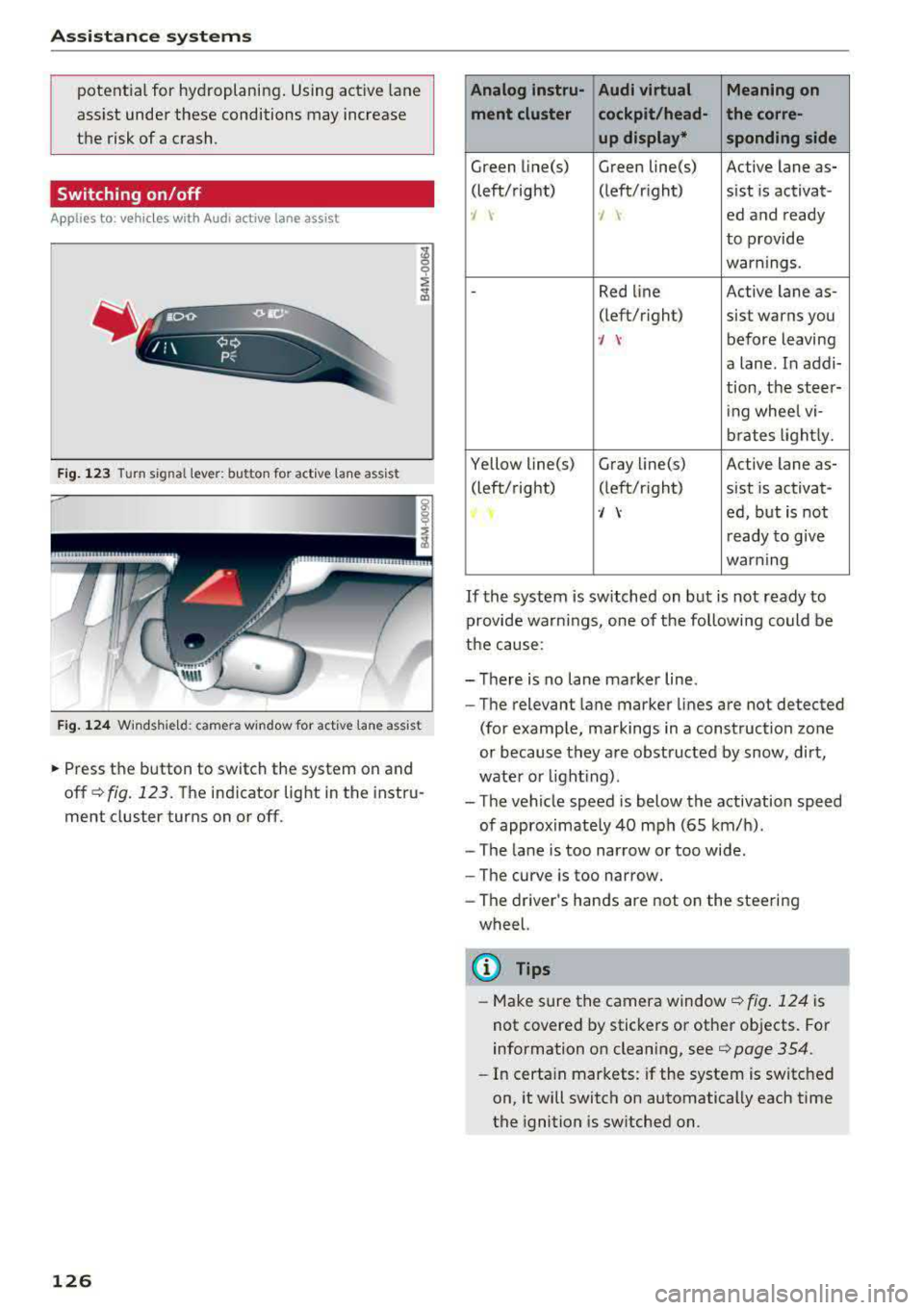
Fig. 123 Turn signal lever: button for act ive lane ass ist
F ig . 124 Windsh ie ld: camera window for act ive lane ass ist
~ Press the button to switch the system on and
off
¢ fig. 123. The indicator light in the instru
ment cluster turns on or off.
126
Analog lnstru- Audi virtual Meaning on
ment cluster cockpit/head- the corre- up display* sponding side
Green line(s) Green line(s) Active lane as-
(left/right) (left/r ight) sist is activat-
-J -J ed and ready
to provide
warnings .
-Red line Active lane as-
(left/r ight)
sist warns you
·/ \-before leaving
a lane. In addi-
tion, the steer-
ing whee l vi-
brates lightly.
Yellow line(s) Gray
Li ne(s) Active lane as-
(left/right) (left/r ight) sist is activat-
·/ \-ed, but is not
ready to give
warning
If the system is switched on but is not ready to
provide wa rn ings, one of the following could be
the cause:
-There is no lane marker line .
-The relevant lane marker lines are not detected
(for example, markings in a construction zone
or because they are obstructed by snow, dirt,
wate r or lighting) .
-The vehicle speed is below the activation speed
of approximate ly 40 mph (65 km/h).
- The lane is too narrow or too wide .
- The curve is too narrow.
- The driver 's hands are not on the steering
wheel.
(D Tips
- Make sure the camera window ¢fig. 124 is
not covered by stickers or other objects. For
information on cleaning, see
¢ page 354.
- In certain markets: if the system is switched
on, it will switch on automatically each time
the ignition is switched on.
Page 132 of 403

Ass is tan ce sys tems
-If the lanes are narrow or if your are driving on
the edge of your lane. If this is the case, the system may have detected a vehicle in another
lane that is
not adjacent to your current lane.
-If you are driving through a curve . Side assist
may react to a vehicle that is in the same lane
or one lane over from the adjacent lane.
-If side assist reacts to other objects (such as
roadside structures like guard rails).
- In poor weather condit ions . The side assist
funct ions are limited.
Do not cover the radar
sensors ¢ fig. 130 with
stickers, deposits, bicycle wheels or other ob
jects, because this will impair the function. Do
not use side assist when towing a trailer. For in
formation on cleaning,
see¢ page 354 .
A WARNING
-Always pay attention to traffic and to the
area around your vehicle. Side assist cannot
replace a dr iver's attention . The driver alone
is a lways responsible for lane changes and
similar d riving maneuvers.
-In some situat ions, the system may not
function or its funct ion may be limited. For
example :
-If vehicles are approach ing or being left
behind very quickly. The display may not
turn on in t ime .
-In poor weather conditions such as heavy
rain, snow or heavy mist.
-On very wide lanes, in tight curves, or if
there is a rise in the road surface. Vehicles in the adjacent lane may not be detected because they are outs ide of the sensor
range .
(D Note
The sensors can be displaced by impacts or
damage to the bumper, whee l housing and
underbody. Th is can impa ir the system. Have
an authorized A udi dealer or authorized Audi
Serv ice Facility check their function .
(i) Tips
-If the window glass in the driver's door or
front passenger's door has been tinted, the
130
-
display in the exterior mirror may be incor
rect.
-For an exp lanation on conform ity with the
FCC reg ulations in the United States and the
Industry Canada regulations, see
¢ page 386.
Switching on/off
App lies to: vehicles with A udi side ass ist
The system con be switched on/off in the Info
tainment system .
If the system is activated, the displays in the ex
terior mirrors wi ll turn on briefly when the igni
tion is switched on .
.,. Select in the Infotainment system: IMENU! but
ton
> V ehicl e > left control button > D riv er as·
s is tance
> Audi side a ssist. Off switches the
system off.
(D Tips
When yo u switch side assist on or off, the ex it
warning system activates or deact ivates
¢ page 131.
Setting the display brightness
App lies to: vehicles wit h Aud i side ass ist
The display brightness con be adjusted in the In
fotainment system.
.,. Select in the Infotainment system: IMENU ! but
ton
> Veh icle > left control button > Dri ver as
s ist ance
> Audi side a ssist.
The disp lay br igh tness adjusts au tomatically to
the brightness of the surroundings, both in the
information and in the warning stage. In very
dark or very bright surround ings, the automatic
adjustment will set the display to the minim um
or max imum level. In such cases, you may notice
no change when adjusting the br ightness, or the
c h ange may only be noticeable once the sur
r oundings change .
Adjust the br ightness to a leve l where the display
i n the information stage will not disrupt your
view ahead . If you change the br ightness, the dis-
play in the exterior mirror w ill briefly show the
.,.
Page 138 of 403

Parking systems
Parking systems
General information
A ppl ies to: ve hicles w ith a rea r parking sys te m /pa rking sys
tem p lus/rearv iew camera/peripheral ca meras
Depending on your vehicle's equipment , various
parking aids will help you when parking and ma
neuvering.
The
rear parking system is an audible parking aid
that warns you of obstacles
behind the vehicle
¢ page 137.
The
parking system plus assists you when park
ing by audibly and visually indicating objects de
tected
in front of and behind the veh icle
¢ page 137.
The
rearview camera shows the area behind the
vehicle in the Infotainment system display . The
lines in the rearview camera image help you to
park or
maneuver ¢ page 138. The parking sys
tem plus functions are also available
¢ page 137.
The
peripheral cameras give various views to
help you when parking or maneuvering
¢ page 140. The parking system plus functions
are also available
¢page 137.
A WARNING ,..__ -
- Always look for traffic and check the area
around your vehicle by looking at it directly
as well. The parking system cannot replace
the driver's attention. The driver is always
responsible when entering or leaving a park
ing space and during similar maneuvers.
- Please note that some surfaces , such as
clothing, are not detected by the system .
- Sensors and cameras have blind spots in
which people and objects cannot be detect
ed . Be especially cautious of small children
and animals .
- Always keep your eyes on the vehicle's sur
roundings, using the rearview mirror as
well.
- The sensors can be displaced by impacts or
damage to the radiator grille, bumper,
wheel housing and the underbody. The park ing system may be impa ired as a result.
136
Have an authorized Audi dealer or author
ized Audi Service Facility check their func
tion.
(D Note
- Some objects are not detected or displayed
by the system under certain circumstances:
- objects such as barrier chains, trailer draw
bars, vertical poles or fences
- objects above the sensors such as wall ex
tensions
- objects with certain surfaces or structures
such as chain link fences or powder snow
- If you continue driving closer to a low ob
ject, it may disappear from the sensor
range. Note that you will no longer be
warned about this obstacle.
- Keep enough distance from the curb to re
duce the risk of damage to the rims.
{i) Tips
- The system may provide a warning even
though there are no obstacles in the cover
age area in some situations, such as:
- certain road surfaces or when there is tall
grass
- external ultrasonic sources such as from
cleaning vehicles
-in heavy rain, snow, or thick vehicle ex
haust
- We recommend that you practice parking in
a traffic-free location or parking lot to be
come familiar with the system . When doing
this, there should be good light and weath
er conditions.
- You can change the volume of the signals
and the display ¢
page 143.
- Please refer to the instructions for towing a
trailer located in
¢page 144.
- What appears in the infotainment display is
somewhat time-delayed.
- Th e sensors must be kept clean and free of
snow and ice for the parking aid to operate .
- Th e rearv iew camera is automatically
cleaned when cleaning the rear window*
¢ page 60 .
Page 154 of 403
Intelligent Technology
Idling current management
The idling c urrent management dec reases the
energy used w hile pa rked. With the engine
sw itched off, it manages the energy distribution
to the different elect rical components . Data from
the battery diagnosis is taken into account for
this .
Depending on the vehicle battery charge level,
e lectrical equipment is switched off one item af
ter the other to prevent the vehicle battery from
draining and to maintain the starting ability.
Dynamic energy manag em ent
W hil e driving, dynamic energy management dis
tr ibutes the appropriate amount of energy to the
electrical equipment. It controls the battery
charge level so that the amount of energy is not
greater than the amount being generated in or
der to mai nta in a n optimal vehicle battery charge
level.
(D Tips
- Energy management cannot overcome the
l aws of phys ics . Note that the charge leve l
and leng th of the vehicle battery life a re
li mi ted .
- When the starting ability is endanger ed, the
(•) ind icator light turns on~ page 30.
What you should know
Maintaining the starting ability is the highest
priority.
A lot of stress is placed on the vehicle battery
when dr iv ing short d istances, dur ing c ity dr iv ing,
and at cold times of the year . A lot of energy is
used but little is gene rated . It is a lso cri tical
wh en the engine is not runn ing but e lectr ica l
e qui pment is swi tc h ed o n. In this case, energy is
u sed bu t none is ge nera te d.
In s ituatio ns l ike this, energy management will
actively regu late the d ist ribu tion of ene rgy.
Long pe riods without use
If you do not drive your vehicle for several days or
weeks, electrica l equipment is gradually scaled
back or swi tched off . This reduces energy use and
152 ensures
the vehicle will be ab le to s tart a fter long
periods of time. Some conven ience f unctions,
such as interior lig hting or power seat ad just
ment, may not be avai lab le under ce rtain circum
stances. These conven ience functions will be
available again once you switch the ignit ion on
and sta rt the eng ine.
With the engine switched off
The vehicle battery will drain if you use Infotain
ment functions such as listening to the radio
whi le the engine is switched off.
If the vehicle's ability to start may be impaired by
the energy use, a message will appear i n the In
fota inment system display. The message indi
cates that the system will switc h off automatical
l y soon. If yo u wou ld like to continue using the
funct io ns, you must s tart the engine .
With the engine running
Although electr ica l energy is generated w hile
driv ing, the veh icle battery can d ra in. This can
happe n if litt le ene rgy is generated but much is
used, and the charge level of the vehicle battery
is not optimal.
To resto re t he ba lance of energy, components
that require large amounts of energy are tempo rarily scaled back or sw itched off. Heat ing sys
te ms in pa rticula r r equir e a great deal of e nergy .
I f you notice, fo r example, t hat the seat heati ng*
o r r ear window defogger is not wor king, then it
h as been tempor arily reduce d or switched off.
These sys tems are avai lab le aga in as soon as t he
energy supp ly has been restored.
I n add it ion, yo u may notice tha t the idle speed
h as slig htly incre ase d. Tha t is normal and no
ca use for concer n. By in creasing the idling spee d,
the addit io na l required energy will be gene rated
and t he vehicle battery w ill be charged.
Page 170 of 403
Voice recognition system
Voice recognition system Operating
Applies to: vehicles with vo ice recognition system
You con operate many Infotainment functions
conveniently by speaking.
Req uirements: the ignition and the MM I must be
sw itched
on~ page 155 , there must not be any
phone call in progress and the parking system
m ust not be active .
.. Switching on: press the~ button @
¢
page 15, fig. 11 or ¢ page 16, fig . 13 briefly
on the multifunction steering wheel and say
the des ired command after the
Beep .
.. Switching off : press and hold the~ button.
Or: press the l2l button.
.,. Pause : say the command Pause . To resume,
press
the~ button .
.,. Correcting : say the command Correction . Or :
simp ly say a new comma nd during an an
no uncement ¢
page 248.
Input assistance
The system gu ides you throug h the input with
visual and audio feedbac k.
- Visual input as sistance : after switching on
vo ice recognit ion, a display with a selection of
poss ible commands appears . This command
display can be sw itched on o r off. Se lect:
IMENU I button> Set tings > left co ntrol button
> MMI setting s> Speech di alog system .
- Audio input a ssistanc e:
to have the poss ible
commands read, turn t he voice recogn ition sys
tem on and say
Help.
For the system to understand you:
Speak clearly and dist inctly at a normal volume .
Speak louder when d riving faster .
Emphasize the words in the commands even ly
and do not leave long pauses .
Close the doors, the windows and the sunroof* to reduce background noise . Make sure that passen
gers are not speaking when you are giving a voice
command .
168
Do not direct the air vents toward the hands -free
microp hone, which is on the roof headliner near
the front interior lights .
Only use the system from the dr iver's seat be
ca use the hands -free microphone is directed to
ward that seat .
Additional settings
See¢ page 248, Speech dialog system .
.8, WARNING
-Dire ct yo ur full attention to dr iv ing . As the
driver, you have complete responsibility fo r
safety in traffic. Only use the functions in
such a way that yo u always maintain com
plete contro l over your vehicle in a ll traffic
situations .
- Do not use the voice recognition system in
emergencies beca use your voice may change
in stressful s ituations. It may take longer to
dia l the number or the system may not be
ab le to dial it at all. Dial the emergency
number manually.
(D Tips
- The d ialog pauses when there is an incom
ing phone call and will continue if you ig
nore the call. The dia log ends if you answer
the ca ll.
- You can select an item in the list us ing ei
ther the vo ice recognit ion system or the
cont rol knob.
Command overview
information
Applies to: vehicles with voice recognition system
The following overv iews des cribe the commands
that can be used to operate the MMI using the
voice recognition system.
Alte rnative commands are separated using a"/ ",
for example say:
Telephone / (or) Navigation /
(or) Radio.
Sequences of commands used to perform an a c
tion are identified w ith a
"> ", fo r example say:
Enter addre ss> (t hen) Enter country /state . ..,.
Page 243 of 403
Media
Supported media and file formats
Overview
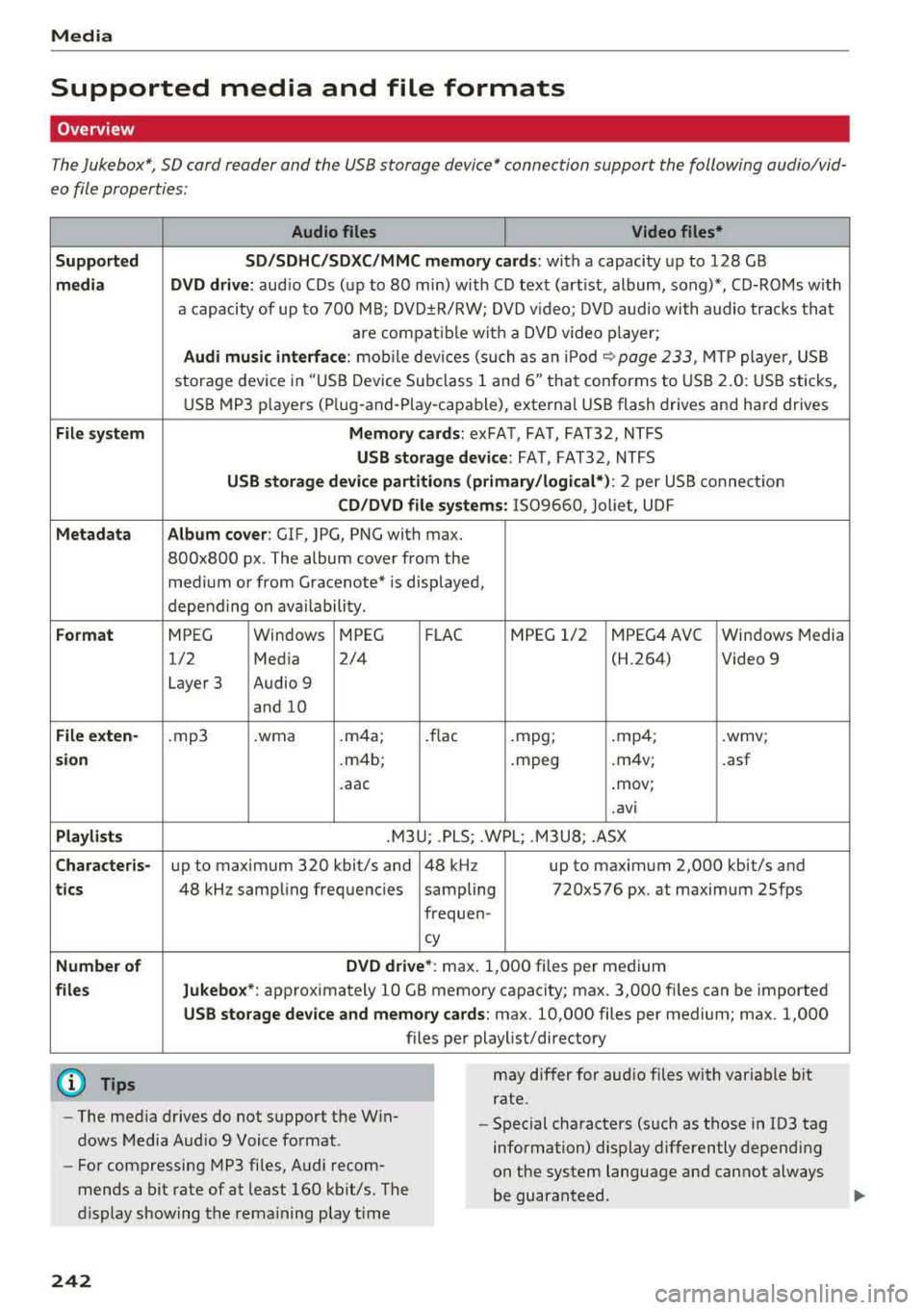
The Jukebox*, SD card reader and the USB storage device* connection support the following audio/vid
eo file properties:
S upp orte d
med ia
Fil e sys te m
Metadat a
Form at
Fil e exten-
s ion
Pla ylists
C ha ract eris-
t ics
Number o f
file s
(D Tips
Aud io files Video files*
SD/SD HC/SDXC/ MMC mem ory c ard s:
with a capacity up to 128 GB
DVD dri ve : aud io CDs (up to 80 min) with CD text (art ist, album, song)*, CD-ROMs w ith
a capacity of up to 700 MB; DVD±R/RW; DVD v ideo; DVD audio with audio tracks that
are compat ible with a DVD v ideo p layer;
Au di mu sic in terface: mob ile dev ices (such as an iPod ¢ page 233, MTP player, USB
storage device in "USB Device Subclass 1 and
6" that conforms to USB 2.0: USB sticks,
USB MP3 p layers (P lug-and -Play-capable), externa l USB flash drives and hard drives
M emor y cards: exFA T, FAT, FAT32, NTFS
USB storage d evice: FAT, FAT32, NTFS
USB stor age device partition s (pr imary/lo g ic al* ): 2 per USB connection
CD /DVD fil e systems: IS09660, Jol iet, UDF
A lbum co ver: GIF, JPG, PNG with max.
800x800 px. The album cover from the
med ium or from Grace note* is displayed,
depending on ava ilability.
MPEG Windows
MPEG F
LAC MPEG 1/2 MPEG4 AVC Windows Media
1/2 Media 2/4 (H.264) Video 9
Layer 3 Audio 9
and 10
.mp3 .wma .m4a; .flac .mpg; .mp4; .wmv;
.m4b; .mpeg .m4v; .asf
. aac .mov;
.avi
.M3U; .PLS; .WPL; .M3U8; .ASX
up to maximum 320 kbit/s and 48 kHz up to maximum 2,000 kbit/s and
48 kHz sampling frequencies sampling 720x576 px. at maximum 25fps
frequen-
cy
DVD d rive* : max. 1,000 files per medium
Jukebo x*: approximately 10 GB memory capacity; max. 3,000 files can be imported
U SB s torage de vice a nd m emor y cards: max . 10,000 files per medium; max. 1,000
files per playlist/directory
may differ for aud io files with variable bit
rate.
- The med ia drives do not support the W in
dows Media Audio 9 Voice format. -
Special characters (such as those in ID3 tag
information) display differently depending
on the system language and cannot always
be guaranteed .
-
For compressing MP3 files, Audi recom
mends a bit rate of at least 160 kb it/s. The
display showing the remaining play t ime
242
Page 244 of 403
a co .... N ,....
N .... 0 0
3 co
Media
-The manufacturer of the storage device can
provide information about its "USB Device
Subclass" . -Some MTP player funct ions are not support
ed, such as rating music tracks and video
playback.
CD drive
App lies to: ve hicles with a CD drive
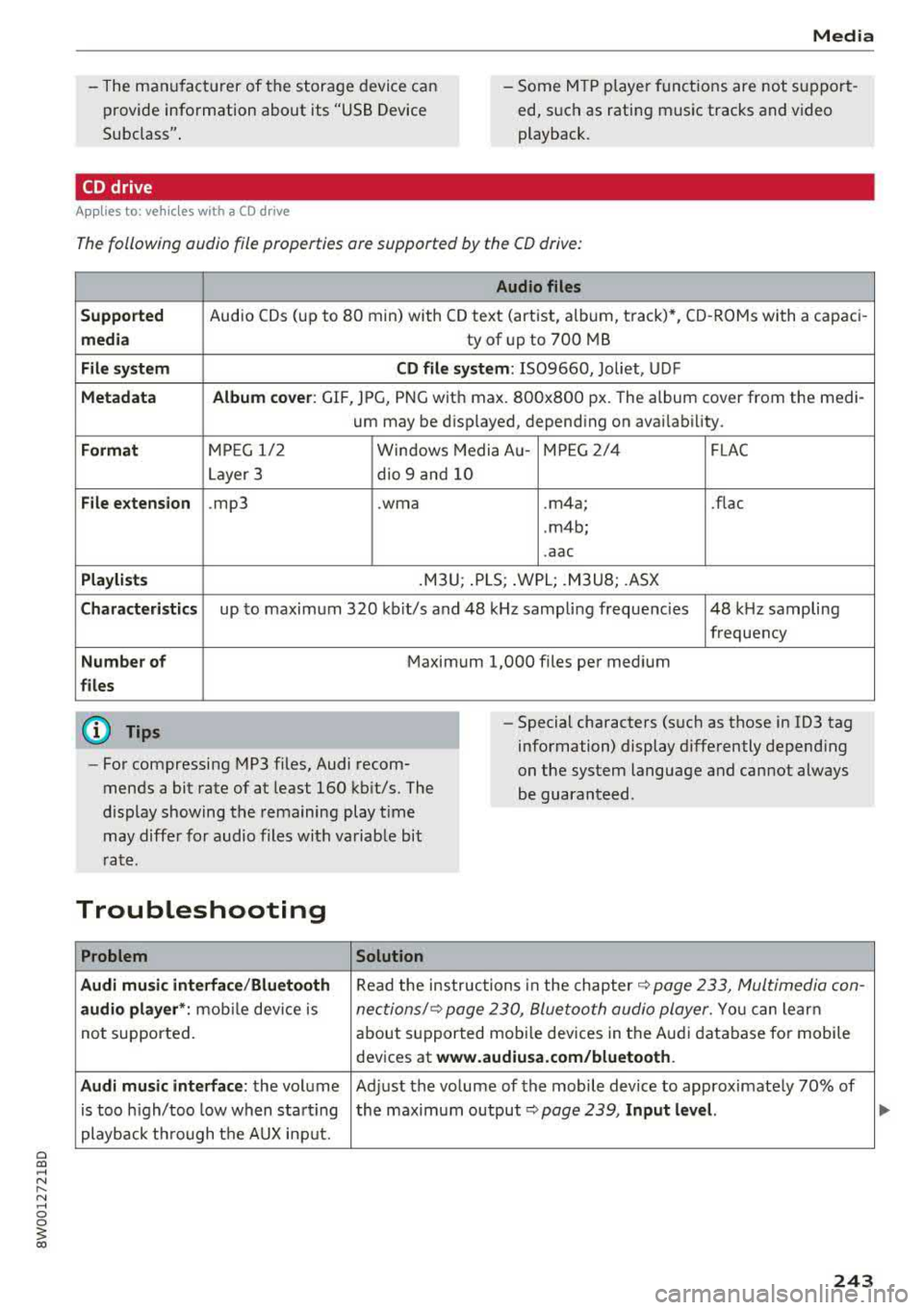
The following audio file properties are supported by the CD drive:
Audio files
Supported
Audio CDs (up to 80 min) with CD text (artist, album, track)*, CD -ROMs with a capaci -
media ty of up to 700 MB
File system CD file system: IS09660, Joliet, UDF
Metadata Album cover: GIF, JPG, PNG with max. 800x800 px. The album cover from the medi-
um may be disp layed, depend ing on availability.
Format MP EG 1/ 2 Windows Media Au- MPEG 2/4 FLAC
Layer 3 dio 9 and 10
File extension .mp3 .wma .m4a; .flac
. m4b;
.aac
Playlists .M3U; .PLS; .WPL; .M3U8; .ASX
Characteristics up to maximum 320 kbit/s and 48 kHz samp ling frequenc ies 48 kHz sampling
frequency
Number of Maximum 1,000 files per medium
files
@ Tips
-For compressing MP3 files, Audi recom
mends a bit rate of at least 160 kb it/s. The
display showing the remaining play time
may differ for audio files with va riable bit
r ate. -
Special characters (s uch as those in 1D3 tag
information) display differently depend ing
on the system language and cannot always
be guaranteed .
Troubleshooting
Problem Solution
Audi music interface /Bluetooth
Read the instructions in the chapter ~ page 233, Multimedia con-
audio player *: mobile dev ice is nectionsl~ page 230, Bluetooth audio player . You can learn
not supported . about supported mobi le devices in the Audi database for mobile
devices at
www.audiusa.com/bluetooth.
Audi music interface :
the volume Adjust the volume of the mobile device to approximately 70% of
is too high/too low when start ing the maximum output ¢
page 239, Input level.
playback through the AUX inp ut.
243
Page 255 of 403
Driving sa fe ty
Driving safety
Basics
Safe driving habits
Please remember -safe ty first!
The individua l safety features of your vehicle can
work together as a system to help protect you
and your passengers in a wide range of accidents.
These features cannot work as a system if they
are not always correctly adjusted and correctly
used .
This chapter contains important informat ion,
tips, instruct ions and warn ings that you need to
read and observe for your own safety, the safety
of your passengers and others . We have summar
ized here what you need to know about safety
be lts , a ir bags, child restra ints as well as child
safety. Yo ur sa fe ty is for us
priority number 1 . Al
ways observe the information and wa rnings in
this section - for your own safety as well as that
of your passengers.
The informa tion in this section applies to all
model ve rsions of your vehicle . Some of the fea
tures described in th is sections may be standard
equipment on some models, or may be optional
equ ipment on others. If you are not sure, ask
your author ized Audi dealer.
A WARNING
- Always make sure that you follow the in
structions and heed the WARNINGS in th is
manual. It is in your inte rest and i n the in
te res t of your passengers .
- Always keep all of the Owner 's L iterature
man uals in yo ur Audi when you lend o r sell
yo ur vehicle so that this importan t info rma
t ion w ill always be availab le to the dr iver
and passenge rs.
- Alw ays keep t he Owner 's L ite ra tu re han dy
so that you can find i t easi ly if yo u have
questions .
254
· Important things to do before driving
Safety is everybody 's job! Vehicle and occupant
safety always depends on the informed and care
ful driver .
For your safety and the safety of your passen
gers,
before driving always:
.. Make sure that a ll lights and signals are operat
ing correctly .
.. Make sure tha t the tire pressure is correct .
.. Make sure that all windows are clean and afford
good vis ibility to the outs ide .
.,. Sec ure all luggage and othe r items ca refully
¢ page 259 .
.,. Mak e sure tha t noth ing ca n interfere with the
pedals .
.. Adjust front seat, head restraint and mirrors
correctly for your height.
.. Applies to: adjustable head restraints: Instruct
passengers to adjust the head restraints ac
cording to the ir height .
.. Make sure to use the rig ht child restraint cor
rectly to protect
chi ldren ~ page 295 , Child
safety.
.,. Si t properly in yo ur seat a nd make su re t hat
your passengers do the same ¢
page 65, Front
seats.
.. Fasten your safety belt and wear it properly . Al
so instruct your passenge rs to fasten thei r sa fe
ty belts properly ¢
page 263.
What impairs driving safety?
Safe driving is directly related to the condition of
the vehicle , the driver as well as the driver's abili
ty to concentra te on the road withou t being dis
tracted.
The driver is responsib le for the sa fety of the ve
hicle and a ll of its occupants . If your ability to
drive is impa ired, safety risks for everybody in the
vehicle increase and you a lso become a hazard to
everyone else on the road ¢
,&.. There fore:
.. Do not let yourse lf be distracted by passengers
or by using a cellular telephone .
.. NEVER dr ive whe n your driving ab ility is im -
paired (by med ications, alcohol, drugs, e tc.) .
..,.
Page 257 of 403
Driving safety
-Always sit in an upright position and never
lean against or place any part of your body
too close to the area where the airbags are located .
- Before driving, always adjust the front seats
and head restraints properly and make sure
that all passengers are properly restrained .
- Never adjust the seats while the vehicle is
moving . Your seat may move unexpectedly
and you could lose control of the vehicle.
- Never drive with the backrest reclined or
tilted far back! The farther the backrests are
tilted back, the greater the risk of injury due
to incorrect positioning of the safety belt and improper seating position .
- Children must always ride in child safety
seats
c::> page 295 . Special precautions ap
ply when installing a child safety seat on the
front passenger seat
c::> page 2 71 .
Proper seating position for the f ront
passenger
The proper front passenger seating position is
important for safe, relaxed driving.
For your own safety and to reduce the risk of in
jury in the event of an accident, we recommend
that you adjust the seat for the front passenger
to the following position:
.. Adjust the angle of the seatback so that it is in
an upright position and your back comes in full
contact with it whenever the vehicle is moving.
.. Applies to: adjustable head restraints: Adjust
the head restraint so the upper edge is as even
a s possible with the top of your head . If that is
not possible, try to adjust the head restraint so
that it is as close to this position as possible
c::> page 66 .
.. Keep both feet flat on the floor in front of the
front passenger seat.
.. Fasten and wear safety belts correct
ly <=:> page 266.
For detailed information on how to adjust the
front passenger's seat, see
c::> page 65.
256
A WARNING , _
Front seat passengers who are unbelted, out
of position or too close to the airbag can be
seriously injured or killed by the airbag as it
unfolds. To help reduce the risk of serious
personal injury:
- Passengers must always sit in an upright po
sition and never lean aga inst or place any
part of their body too close to the area
where the airbags are located.
- Passengers who are unbelted, out of posi
tion or too close to the airbag can be seri
ously injured by an airbag as it unfolds with
great force in the blink of an eye.
- Always make sure that there are at least
10 inches (25 cm) between the front pas
senger's breastbone and the instrument
panel.
- Always make sure that there are at least 4 inches (10 cm) between the front passen
ger's knees and the lower part of the instru
ment panel.
- Each passenger must always sit on a seat of
their own and properly fasten and wear the
safety belt belonging to that seat.
- Before driving, always adjust the front pas
senger seat and head restraint properly.
- Always keep your feet on the floor in front
of the seat. Never rest them on the seat, in
strument panel, out of the window, etc . The
airbag system and safety belt will not be
able to protect you properly and can even in
crease the risk of injury in a crash .
- Never drive with the backrest reclined or
tilted far back! The farther the backrests are
tilted back, the greater the r isk of injury due
to incorrect positioning of the safety be lt
and improper seat ing position.
- Ch ildren must always ride in child safety
seats
c::> page 295. Special precautions ap
ply when installing a child safety seat on the
front passenger seat
c::> page 2 71.